

ISSUE
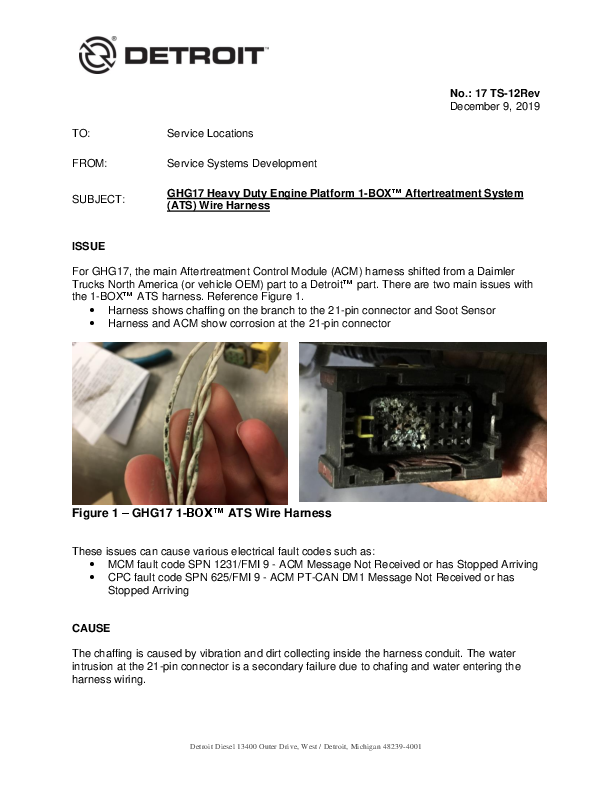
For GHG17, the main Aftertreatment Control Module (ACM) harness shifted from a Daimler Trucks North America (or vehicle OEM) part to a Detroit™ part. There are two main issues with the 1-BOX™ ATS harness.
Two images are provided as Figure 1. The left image shows a wire harness with frayed insulation and exposed copper strands. The right image shows a 21-pin electrical connector with visible corrosion and debris inside the pins.
These issues can cause various electrical fault codes such as:
- MCM fault code SPN 1231/FMI 9 - ACM Message Not Received or has Stopped Arriving
- CPC fault code SPN 625/FMI 9 - ACM PT-CAN DM1 Message Not Received or has Stopped Arriving
CAUSE
The chaffing is caused by vibration and dirt collecting inside the harness conduit. The water intrusion at the 21-pin connector is a secondary failure due to chafing and water entering the harness wiring.
REQUIRED ACTION
Anti-chaffing tape should be applied to the current ATS harness, or to a new replacement harness if it does not have the tape. See the Repair Procedure section for instructions on installing the tape.
REQUIRED MATERIAL
If the harness needs replacing, the current production and service ATS harness is P/N: A4721504320. It superseded former P/N: A4721503620 with approximate ATS S/N: 1240000769034 at the truck plants in July, 2017. The new harness has anti-chaffing tape under the loom. Either part number is acceptable to use in a repair. Refer to the eParts Catalog on ddcsn.com with the specific engine serial number to verify the correct ATS harness part number.
If repairing or installing harness P/N: A4721503620, portions of the harness will need to be wrapped with anti-chaffing tape such as DTNA P/N: 48-25910-003 or commercially available tape, Coroplast 832 MPX. The DTNA tape is 82' long x 1" wide, and is enough for multiple vehicles. See the Repair Procedure section for instructions on installing the tape.
REPAIR PROCEDURE
Follow the procedure below.
To avoid injury from electrical shock, use care when connecting battery cables. The magnetic switch studs are at battery voltage.
- Shut off engine and apply the parking brake, chock the wheels, disconnect vehicle battery power, and perform any other applicable safety steps.
- If necessary, remove the passenger side fairing. Refer to OEM procedures.
- Allow the ATS time to cool.
- Remove the six bolts securing the ACM protective cover to the ATS. A dark grey rectangular protective cover for the ACM, secured by bolts, is shown in Figure 2.
- Note the location of the zip ties securing the wiring harness to the ATS and the harness routing location. Remove the zip ties securing the wiring harness to the ATS. Figure 3 shows the harness routing and zip tie locations.
- Remove the following plastic connector clips. Figure 4 shows a wire harness laid out with various plastic connector clips attached, labeled: two 90-degree elbows, three T-fittings, a 21-pin connector fitting, and a Soot Sensor fitting.
- Two 90-degree elbows
- Three T-fittings
- 21-pin connector fitting
- Soot Sensor fitting
- Remove the convoluted tubing using scissors or tool DKI0CHA17002-13 from the Chassis Terminal Extraction Tool Kit DKI0CHA17002. Take care not to cut the wire harness. DO NOT USE A RAZOR BLADE. If using the Harness Fiber Tape Wrap Cutting Tool, use the sharp end to make an incision in the tubing, and then insert the blunt end to cut the tubing. Figure 5 shows the tool DKI0CHA17002-13, which has a sharp end for incision and a blunt end for cutting.
- Carefully remove all convoluted tubing. Figure 6 shows two isometric views of the ATS unit, highlighting the convoluted tubing in red that needs to be removed.
- Inspect all exposed wires for damage or corrosion, looking carefully for wire insulation that has worn through, exposing the wire core. Is there exposed wire core? Figure 7 shows two images for wire harness inspection: the left image shows intact insulation labeled "No wire core exposure", and the right image shows insulation worn away exposing the wire core, labeled "Wire core exposure-REPLACE harness".
- Yes; replace the ATS harness. Reference the removal and installation sections for the 1-BOX™ Aftertreatment Harness in the GHG17 Heavy Duty Workshop Manual (DDC-SVC-MAN-0190). Instructions for adding anti-chaffing tape are further below. Go to step 11.
- No; go to step 10.
- Inspect the ATS harness 21-pin and 120-pin connectors for excessive corrosion. Figure 8 shows two images of electrical connectors: the left shows a 21-pin connector with visible corrosion, and the right shows a 120-pin connector also showing signs of corrosion. Is excessive corrosion present at one or both connectors?
- Yes; replace the ATS harness. Reference the removal and installation sections for the 1-BOX™ Aftertreatment Harness in the GHG17 Heavy Duty Workshop Manual (DDC-SVC-MAN-0190). Instructions for adding anti-chaffing tape are further below.
- No; the harness will be reused.
- Inspect the ACM 21-pin and 120-pin connectors for excessive corrosion. Figure 9 shows a close-up view of the ACM's 21-pin and 120-pin connectors, heavily coated with corrosion and debris. Is excessive corrosion present at one or both connectors?
- Yes; replace the ACM. Reference the removal and installation sections for the 1-BOX™ Aftertreatment Control Module in the GHG17 Heavy Duty Workshop Manual (DDC-SVC-MAN-0190). Go to step 13.
- No; go to step 12.
- If light corrosion is present in the ACM 21-pin and 120-pin connectors, clean them with commercially available electrical contact cleaner and an insulative nylon brush such as Techni-Stat Insulative Brush P/N: 758PR499 (reference Figure 10) or Techni-Tool ESD Brush P/N: 758PR121. Figure 10 shows a close-up of an insulative nylon brush. Gently blow out the connector with compressed air until dry.
- If reusing the existing ATS harness or installing a new ATS harness P/N: A4721503620, install anti-chaffing tape around all exposed wires as shown in Figure 11. Overlap the tape by 50% and proceed to step 14. Figure 11 shows two images demonstrating anti-chaffing tape application: the left shows tape being wrapped around exposed wires, and the right shows a harness with tape applied and secured. If installing a new ATS harness P/N: A4721504320, note that it already comes with anti-chaffing tape under the loom and proceed to step 15.
- Reinstall the convoluted tubing and install existing elbows, tees and connector fittings. Fully apply electrical tape around the convoluted tubing. Figure 12 shows a wire harness assembly in progress with convoluted tubing, fittings, and tape being applied.
- Connect the 120-pin and 21-pin electrical connectors and make sure the latches are fully closed. Connect the soot sensor electrical connector. Install new zip ties in the original locations, securing the harness to the ATS. Figure 13 shows the ATS unit with the harness reconnected and secured by zip ties.
- Install the ACM protective cover and hand-tighten the bolts. Torque the bolts to 10 N·m (7.4 lb-ft). Figure 14 shows the ACM protective cover being reinstalled onto the ATS unit.
CLAIM PROCESS
Normal Detroit™ in-warranty procedures apply. Proactive installation of the tape or ATS harness replacement is not allowed under warranty.
If a mechanical failure is found in warranty, file the claim as follows:
- Claim type: 1 (base warranty) or 2 (extended coverage)
- Primary Failed Part: A4721503620
- Fault type: 22
- Parts return: Required
Troubleshooting may include the following labor operations:
- Labor Operation SRT939-6225D, Computer Hook Up Used In Diagnostics
- Labor Operation 3RB-000EE, MCM/CPC/ACM/TCM Diagnostics-Difficult
- Labor Operation 246-6130E, ATS-After Treatment Device Harness R&R (One Box ATS)
- Labor Operation 246-6133E ATS-After Treatment Device Harness Anti-Chaffing Tape Installation (Harness Installed On Vehicle)
- Labor Operation 246-6134E ATS-After Treatment Device Harness Anti-Chaffing Tape Installation (Harness Removed From Vehicle)
- Labor Operation 246-6195E, ATS-ACM (Aftertreatment Control Module) R&R (If needed/replacement)
- Admin Labor Operation 939-6010B
CONTACT INFORMATION
Please contact the Detroit™ Customer Support Center at 800-445-1980 or email csc@daimler.com if you have any questions.
