

Geryst BE1037 True Wireless Earbuds User Manual
Introduction
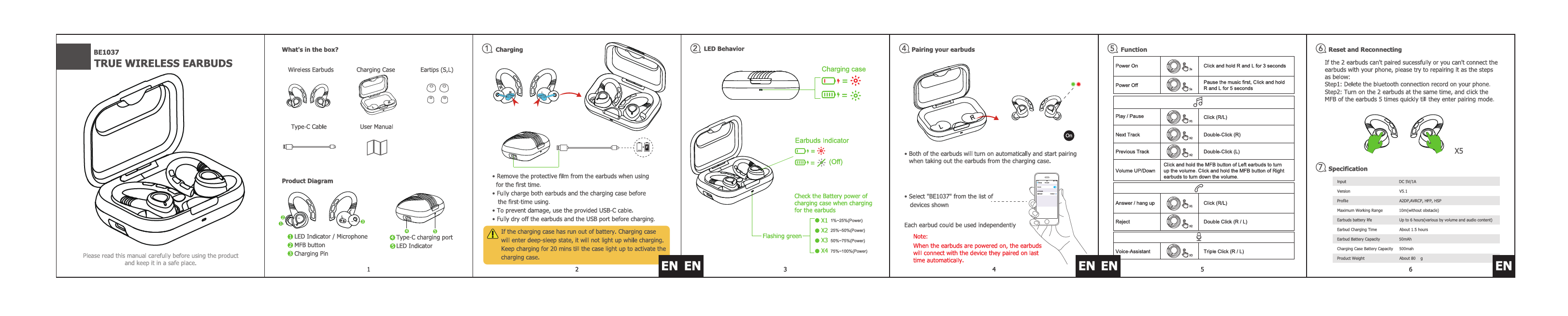
This document provides essential information and instructions for the Geryst BE1037 True Wireless Earbuds. Please read this manual carefully before using the product and keep it in a safe place for future reference.
What's in the Box?
- 1 Charging Case
- Wireless Earbuds (Left and Right)
- Eartips (Sizes S, L)
- Type-C Cable
- User Manual
The package contains the charging case, the left and right wireless earbuds, multiple sizes of eartips (S and L), a Type-C charging cable, and this user manual.
Product Diagram
Earbud Components:
- 1: LED Indicator / Microphone
- 2: MFB button (Multi-Function Button)
Charging Case Components:
- 3: Charging Pin
- 4: Type-C charging port
- 5: LED Indicator
Charging and LED Behavior
Charging Instructions
Before first-time use, remove the protective film from the earbuds. Fully charge both the earbuds and the charging case.
Use the provided USB-C cable for charging to prevent damage. Ensure the earbuds and the USB port are fully dry before charging.
If the charging case battery is depleted, it may enter a deep-sleep state and not illuminate while charging. Continue charging for approximately 20 minutes until the case light activates.
Earbuds LED Behavior
When the earbuds are removed from the charging case, they will automatically turn on and begin pairing.
- Power On: Earbuds indicator will flash green.
- Power Off: Earbuds indicator will turn off.
Charging Case LED Behavior
Check the battery power of the charging case when charging the earbuds:
- Flashing green (1x): 1% - 25% Power
- Flashing green (2x): 25% - 50% Power
- Flashing green (3x): 50% - 75% Power
- Flashing green (4x): 75% - 100% Power
Pairing and Functions
Pairing Your Earbuds
To pair the earbuds with your device, select "BE1037" from the list of available Bluetooth devices shown on your phone or other device.
Note: When the earbuds are powered on, they will automatically connect to the device they were last paired with.
Earbud Functions
Power On/Off
- Power On: Automatically when removed from the charging case. Manual power on: Press and hold both R and L earbuds for 3 seconds.
- Power Off: Automatically when placed in the charging case. Manual power off: Pause music, then press and hold both R and L earbuds for 5 seconds.
Music Control
- Play / Pause: Single-click the MFB button (R or L earbud).
- Next Track: Double-click the MFB button on the R earbud.
- Previous Track: Double-click the MFB button on the L earbud.
- Volume Up: Press and hold the MFB button on the Left earbud.
- Volume Down: Press and hold the MFB button on the Right earbud.
Call Control
- Answer / Hang Up Call: Single-click the MFB button (R or L earbud).
- Reject Call: Double-click the MFB button (R or L earbud).
Voice Assistant
- Activate Voice Assistant: Triple-click the MFB button (R or L earbud).
Reset and Reconnecting
If the two earbuds cannot be paired successfully or you cannot connect them to your phone, please try repairing them using the following steps:
- Delete the Bluetooth connection record for "BE1037" from your device.
- Turn on both earbuds simultaneously.
- Quickly click the MFB button on each earbud 5 times until they enter pairing mode.
Specifications
| Specification | Value | Remarks |
|---|---|---|
| Input | DC 5V/1A | |
| Version | V5.1 | |
| Profile | A2DP, AVRCP, HFP, HSP | |
| Maximum Working Range | 10m (without obstacle) | |
| Earbuds Battery Life | Up to 6 hours | Varies by volume and audio content |
| Earbud Charging Time | About 1.5 hours | |
| Earbud Battery Capacity | 50mAh | |
| Charging Case Battery Capacity | 500mAh | |
| Product Weight | About 80 g |
