

Samsung AU8, UA8, AU9, Q6*A, QA6* Series Quick Setup Guide
This guide provides essential steps for setting up your new Samsung television.
Supported Models and Specifications
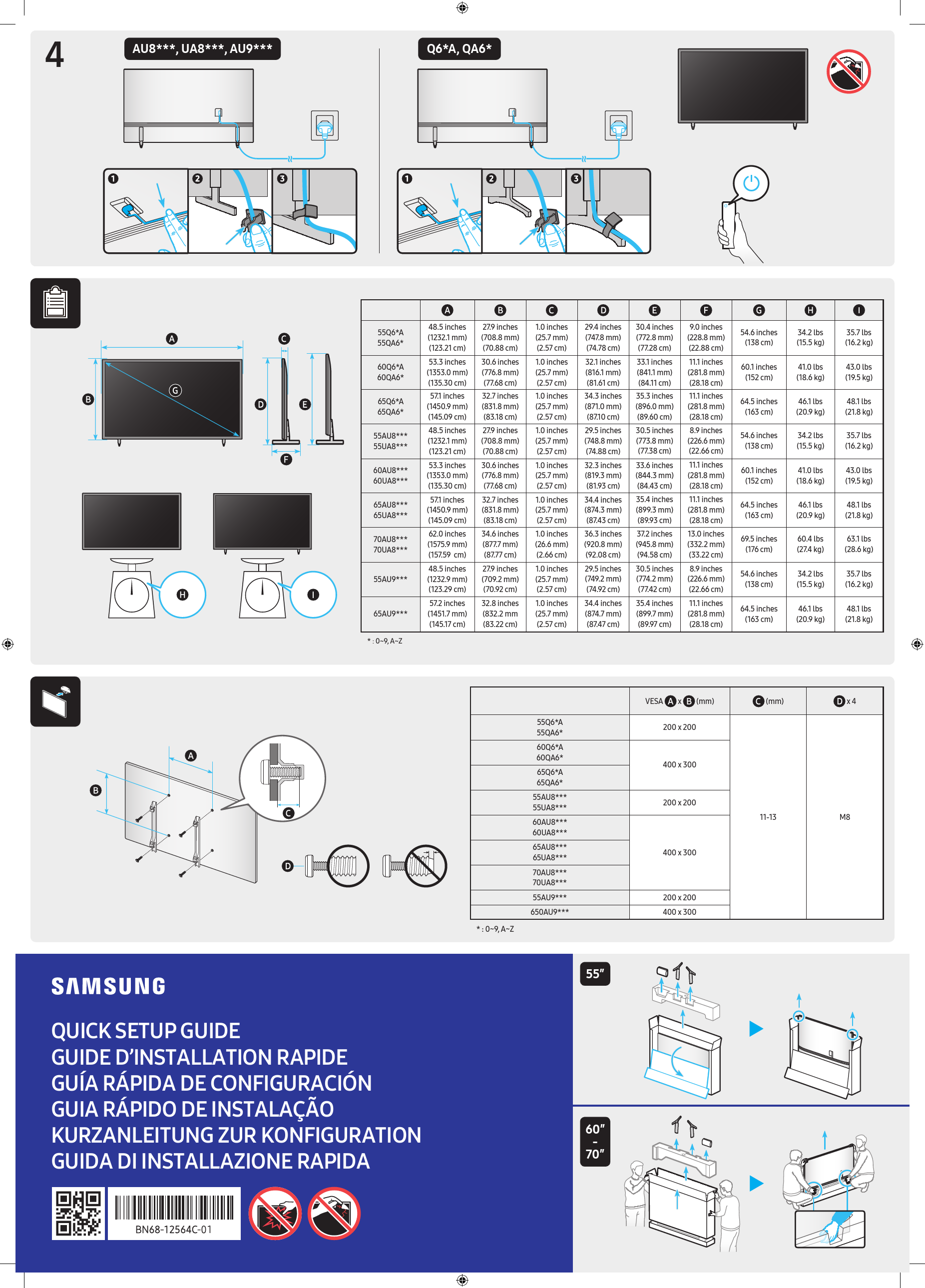
| Model | Width (inches/mm/cm) | Height (inches/mm/cm) | Depth (inches/mm/cm) | Screen Width (inches/mm/cm) | Screen Height (inches/mm/cm) | Stand Depth (inches/mm/cm) | Screen Diagonal (inches/cm) | Weight (lbs) | Weight (kg) |
|---|---|---|---|---|---|---|---|---|---|
| 55Q6*A 55QA6* | 48.5 inches (1232.1 mm) (123.21 cm) | 27.9 inches (708.8 mm) (70.88 cm) | 1.0 inches (25.7 mm) (2.57 cm) | 29.4 inches (747.8 mm) (74.78 cm) | 30.4 inches (772.8 mm) (77.28 cm) | 9.0 inches (228.8 mm) (22.88 cm) | 54.6 inches (138 cm) | 34.2 lbs | 15.5 kg |
| 60Q6*A 60QA6* | 53.3 inches (1353.0 mm) (135.30 cm) | 30.6 inches (776.8 mm) (77.68 cm) | 1.0 inches (25.7 mm) (2.57 cm) | 32.1 inches (816.1 mm) (81.61 cm) | 33.1 inches (841.1 mm) (84.11 cm) | 11.1 inches (281.8 mm) (28.18 cm) | 60.1 inches (152 cm) | 41.0 lbs | 18.6 kg |
| 65Q6*A 65QA6* | 57.1 inches (1450.9 mm) (145.09 cm) | 32.7 inches (831.8 mm) (83.18 cm) | 1.0 inches (25.7 mm) (2.57 cm) | 34.3 inches (871.0 mm) (87.10 cm) | 35.3 inches (896.0 mm) (89.60 cm) | 11.1 inches (281.8 mm) (28.18 cm) | 64.5 inches (163 cm) | 46.1 lbs | 20.9 kg |
| 55AU8*** 55UA8*** | 48.5 inches (1232.1 mm) (123.21 cm) | 27.9 inches (708.8 mm) (70.88 cm) | 1.0 inches (25.7 mm) (2.57 cm) | 29.5 inches (748.8 mm) (74.88 cm) | 30.5 inches (773.8 mm) (77.38 cm) | 8.9 inches (226.6 mm) (22.66 cm) | 54.6 inches (138 cm) | 34.2 lbs | 15.5 kg |
| 60AU8*** 60UA8*** | 53.3 inches (1353.0 mm) (135.30 cm) | 30.6 inches (776.8 mm) (77.68 cm) | 1.0 inches (25.7 mm) (2.57 cm) | 32.3 inches (819.3 mm) (81.93 cm) | 33.6 inches (844.3 mm) (84.43 cm) | 11.1 inches (281.8 mm) (28.18 cm) | 60.1 inches (152 cm) | 41.0 lbs | 18.6 kg |
| 65AU8*** 65UA8*** | 57.1 inches (1450.9 mm) (145.09 cm) | 32.7 inches (831.8 mm) (83.18 cm) | 1.0 inches (25.7 mm) (2.57 cm) | 34.4 inches (874.3 mm) (87.43 cm) | 35.4 inches (899.3 mm) (89.93 cm) | 11.1 inches (281.8 mm) (28.18 cm) | 64.5 inches (163 cm) | 46.1 lbs | 20.9 kg |
| 70AU8*** 70UA8*** | 62.0 inches (1575.9 mm) (157.59 cm) | 34.6 inches (877.7 mm) (87.77 cm) | 1.0 inches (26.6 mm) (2.66 cm) | 36.3 inches (920.8 mm) (92.08 cm) | 37.2 inches (945.8 mm) (94.58 cm) | 13.0 inches (332.2 mm) (33.22 cm) | 69.5 inches (176 cm) | 60.4 lbs | 27.4 kg |
| 55AU9*** | 48.5 inches (1232.9 mm) (123.29 cm) | 27.9 inches (709.2 mm) (70.92 cm) | 1.0 inches (25.7 mm) (2.57 cm) | 29.5 inches (749.2 mm) (74.92 cm) | 30.5 inches (774.2 mm) (77.42 cm) | 8.9 inches (226.6 mm) (22.66 cm) | 54.6 inches (138 cm) | 34.2 lbs | 15.5 kg |
| 65AU9*** | 57.2 inches (1451.7 mm) (145.17 cm) | 32.8 inches (832.2 mm) (83.22 cm) | 1.0 inches (25.7 mm) (2.57 cm) | 34.4 inches (874.7 mm) (87.47 cm) | 35.4 inches (899.7 mm) (89.97 cm) | 11.1 inches (281.8 mm) (28.18 cm) | 64.5 inches (163 cm) | 46.1 lbs | 20.9 kg |
VESA Mount Compatibility
| Model | VESA (mm) | Screw Size (mm) | Quantity |
|---|---|---|---|
| 55Q6*A 55QA6* | 200 x 200 | M8 | 11-13 |
| 60Q6*A 60QA6* | 400 x 300 | ||
| 65Q6*A 65QA6* | 400 x 300 | ||
| 55AU8*** 55UA8*** | 200 x 200 | M8 | 11-13 |
| 60AU8*** 60UA8*** | 400 x 300 | ||
| 65AU8*** 65UA8*** | 400 x 300 | ||
| 70AU8*** 70UA8*** | 400 x 300 | M8 | 11-13 |
| 55AU9*** | 200 x 200 | ||
| 65AU9*** | 400 x 300 | M8 | 11-13 |
Setup Instructions
Step 1: Unpacking and Placement
Carefully place the television on a soft, flat, and stable surface, such as a table, to prevent scratches. Ensure there is enough space around the TV.
Step 2: Attaching the Stand
Attach the stand legs to the bottom of the television. Align the stand parts with the designated mounting points on the TV. Secure the stand using the provided screws ? and a screwdriver ?. Follow the specific diagrams (2-1 and 2-2) for correct leg orientation.
Step 3: Lifting the TV
With assistance from another person, carefully lift the television upright and place it in its desired location. Exercise caution during this step. ⚠️
Connections
Connect your devices and power to the appropriate ports on the television:
- ? USB: Connect USB storage devices or other compatible peripherals.
- ? Optical: Connect to an audio receiver or soundbar for digital audio output.
- ? HDMI ARC: Connect to an audio device that supports Audio Return Channel.
- ? HDMI eARC: Connect to an audio device that supports enhanced Audio Return Channel for higher bandwidth audio.
- ? LAN: Connect to your network router or modem for internet access.
- ? ANT: Connect an antenna or cable TV source.
Multilingual Title
Quick Setup Guide
Guide d'installation rapide
Guía rápida de configuración
Guia rápido de instalação
Kurzanleitung zur Konfiguration
Guida di installazione rapida
