

Insignia Fire TV Edition Quick Setup Guide
For 43"/50"/55" 60 Hz LED TV 4K ULTRA HD
Model Numbers: NS-43DF710NA21 / NS-50DF710NA21 / NS-55DF710NA21
Included Accessories: Voice Remote with Alexa and two AAA batteries.
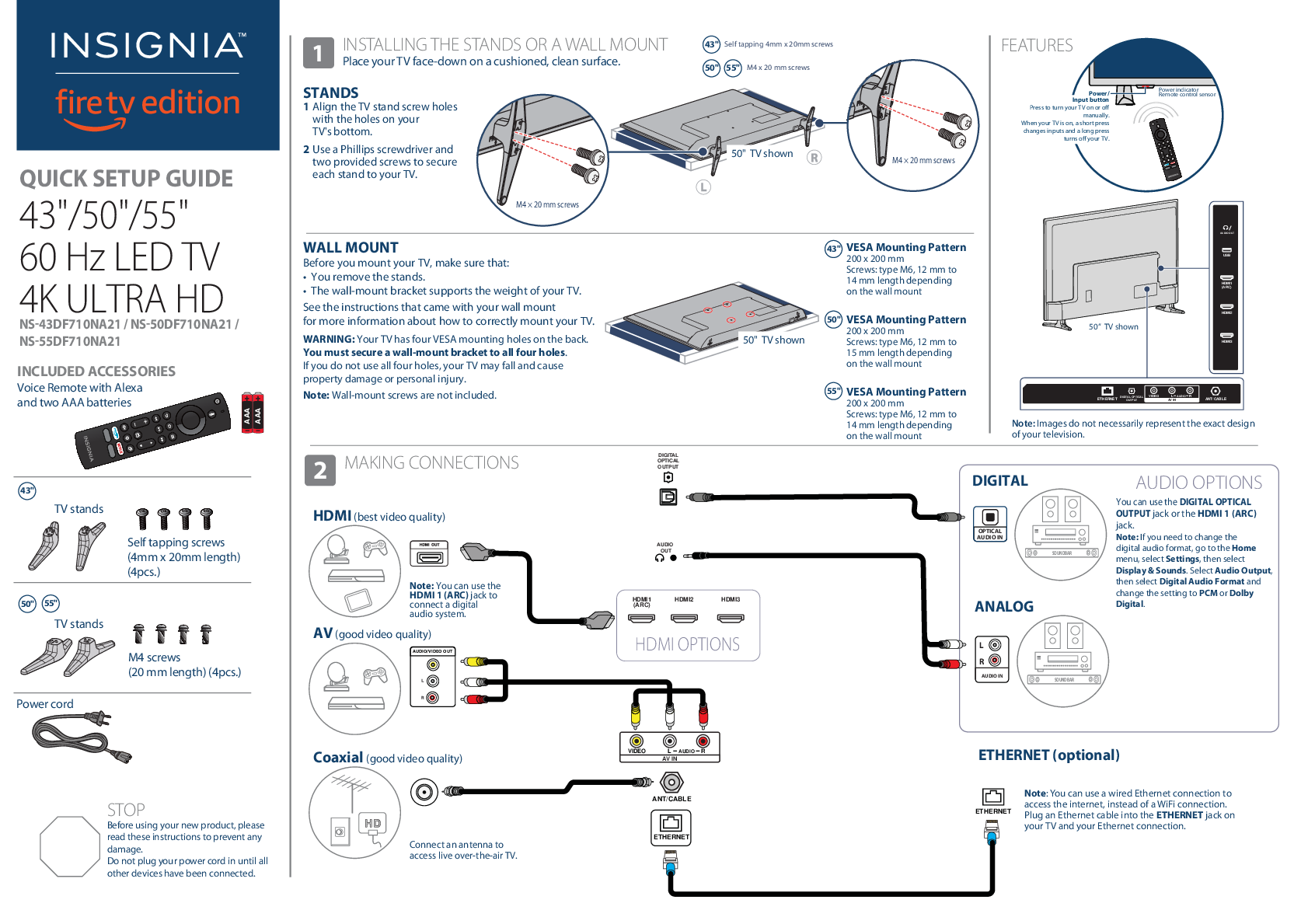
1 Installing the Stands or a Wall Mount
Place your TV face-down on a cushioned, clean surface.
Stands
- Align the TV stand screw holes with the holes on your TV's bottom.
- Use a Phillips screwdriver and two provided screws to secure each stand to your TV.
- For 43" models: Use self-tapping screws (4mm x 20mm length).
- For 50" and 55" models: Use M4 x 20 mm screws.
Wall Mount
Before you mount your TV, ensure the following:
- The stands have been removed.
- The wall-mount bracket supports the weight of your TV. Refer to your wall mount's instructions for correct mounting procedures.
WARNING: Your TV has four VESA mounting holes on the back. A wall-mount bracket must be secured to all four holes. Failure to use all four holes may result in the TV falling, causing property damage or personal injury.
Note: Wall-mount screws are not included.
VESA Mounting Patterns:
- 43" Model: 200 x 200 mm (Screws: M6, 12 mm to 14 mm length)
- 50" Model: 200 x 200 mm (Screws: M6, 12 mm to 15 mm length)
- 55" Model: 200 x 200 mm (Screws: M6, 12 mm to 14 mm length)
2 Making Connections
STOP: Before using your new product, please read these instructions to prevent any damage. Do not plug in the power cord until all other devices have been connected.
- HDMI (Best Video Quality): Connect devices like Blu-ray players or game consoles. HDMI 1 (ARC) can also be used to connect a digital audio system.
- AV (Good Video Quality): Connect older devices using composite video and stereo audio cables.
- Coaxial (Good Video Quality): Connect an antenna or cable wall jack to access live over-the-air TV.
- Digital Optical Audio Output: Connect to a digital audio system. For audio format adjustments (PCM or Dolby Digital), navigate to Settings > Display & Sounds > Audio Output.
- Analog Audio In: Connect to a soundbar or other audio devices.
- Ethernet (Optional): Use a wired Ethernet cable for internet access instead of Wi-Fi. Connect the cable to the ETHERNET jack on your TV and your network.
3 Turning On Your TV
- Plug the power cord into the back of your TV and a power outlet.
- Remove the remote control cover and install the two AAA batteries.
- Press the on your Voice Remote with Alexa.
- Follow the on-screen instructions.
4 Complete the On-Screen Setup
Your TV should automatically pair to your new Voice Remote with Alexa. If your remote is not paired, press the . If issues persist, re-insert or replace the batteries and try again.
- Select your Wi-Fi network from the displayed list. If your network is password-protected, enter the password using the on-screen keyboard. For hidden networks, select "Join Other Network".
- Select your experience:
- Full (Recommended): Access live TV, thousands of movies, TV episodes, apps, and Alexa skills. Sign in or sign up for a free Amazon account.
- Basic: Access live TV and six preset streaming apps. Alexa and the full Appstore are not included.
- If you connected your TV to an antenna or cable wall jack:
- Go to Settings > Live TV > Channel Scan.
- Follow the on-screen instructions to scan for channels.
- Note: To browse and watch live TV, use the "On Now" row or press the on your remote.
Using Your Voice Remote with Alexa
Power : Turns your TV on or off. When the TV is off, the LED indicator on the front of the TV lights red.
Navigation , , , : Navigate on-screen menus.
Home : Takes you to the Home Screen. A long press activates the Quick Settings Overlay.
Back : Returns you to the previous screen.
Rewind : Rewind (long press) and skip back (short press). Behavior varies by app.
Volume Keys , : Adjust volume.
Guide : Opens the live TV Channel Guide.
Mute : Mutes the sound.
Prime Video : Launches Prime Video from any screen or when your TV is off.
App 1 : Launches App 1 from any screen or when your TV is off.
Voice : Holding down the Voice button activates the Alexa-enabled microphone. Use your voice to search for content, control playback, and more. (Requires an Amazon account).
Select : Confirms a selection or action.
Menu : Activates contextual commands on the screen.
Play / Pause : Resumes or pauses playback.
Forward : Fast forward (long press) and skip ahead (short press). Behavior varies by app.
Channel , : Goes to the next or previous live TV channel.
Settings : Activates quick settings overlay.
Recents : Opens a row of recently watched content for easy switching.
Netflix : Launches Netflix from any screen or when your TV is off.
App 2 : Launches App 2 from any screen or when your TV is off.
Find Your User Guide Online
- Go to www.insigniaproducts.com.
- Use the search bar to find model numbers: NS-43DF710NA21, NS-50DF710NA21, or NS-55DF710NA21.
- Select "Support & Downloads".
- Next to "User Guide", select your preferred language.
Key Features
- A Smarter TV Is Here
- 4K Picture Quality, Fire TV Experience Built-in, Voice Remote with Alexa
- Access Your Favorite Content - All Through One Home Screen: Fire TV Edition seamlessly integrates live over-the-air TV and streaming channels on a unified home screen.
- Endless Entertainment: Watch over 500,000 streaming movies and TV episodes with access to tens of thousands of channels, apps, and Alexa skills (e.g., Netflix, Prime Video, YouTube, Hulu, HBO).
- Control It All With Your Voice - Voice Remote with Alexa: Use your voice to watch live TV, launch apps, search for titles, play music, switch inputs, and control smart home devices. (Full Experience required).
Warranty and Support
One-Year Limited Warranty: Visit www.insigniaproducts.com for details.
Need Additional Help? Check out the Insignia Support Community at http://community.insigniaproducts.com/ for helpful information from other Insignia TV owners.
Contact Us: For customer service, call 1-877-467-4289 (U.S./Canada). Visit www.insigniaproducts.com for more information.
Contact Amazon Fire TV Customer Service: www.amazon.com/deviceservices/support
Legal and Trademark Information
For DTS patents, see http://patents.dts.com. Manufactured under license from DTS, Inc. DTS, the DTS Symbol, DTS and the DTS Symbol together, and DTS Studio Sound are registered trademarks or trademarks of DTS, Inc. in the United States and/or other countries. © DTS, Inc. All Rights Reserved.
Amazon Terms & Policies: Before using Fire TV Edition, please read the terms at www.amazon.com/deviceservices/support. This includes Amazon's Privacy Notice (www.amazon.ca/privacy) and Conditions of Use (www.amazon.ca/conditionsofuse). By using Fire TV Edition, you agree to be bound by these terms.
Amazon, Fire, and all related marks are trademarks of Amazon.com, Inc. or its affiliates. Certain services are subject to change, may not be available in all areas or in 4K UHD, and may require separate subscriptions.
INSIGNIA is a trademark of Best Buy and its affiliated companies. Registered in some countries. Distributed by Best Buy Purchasing, LLC, 7601 Penn Ave South, Richfield, MN 55423 U.S.A. ©2020 Best Buy. All rights reserved.

 Amazon.ca Conditions of Use - Amazon Customer Service