

Introduction
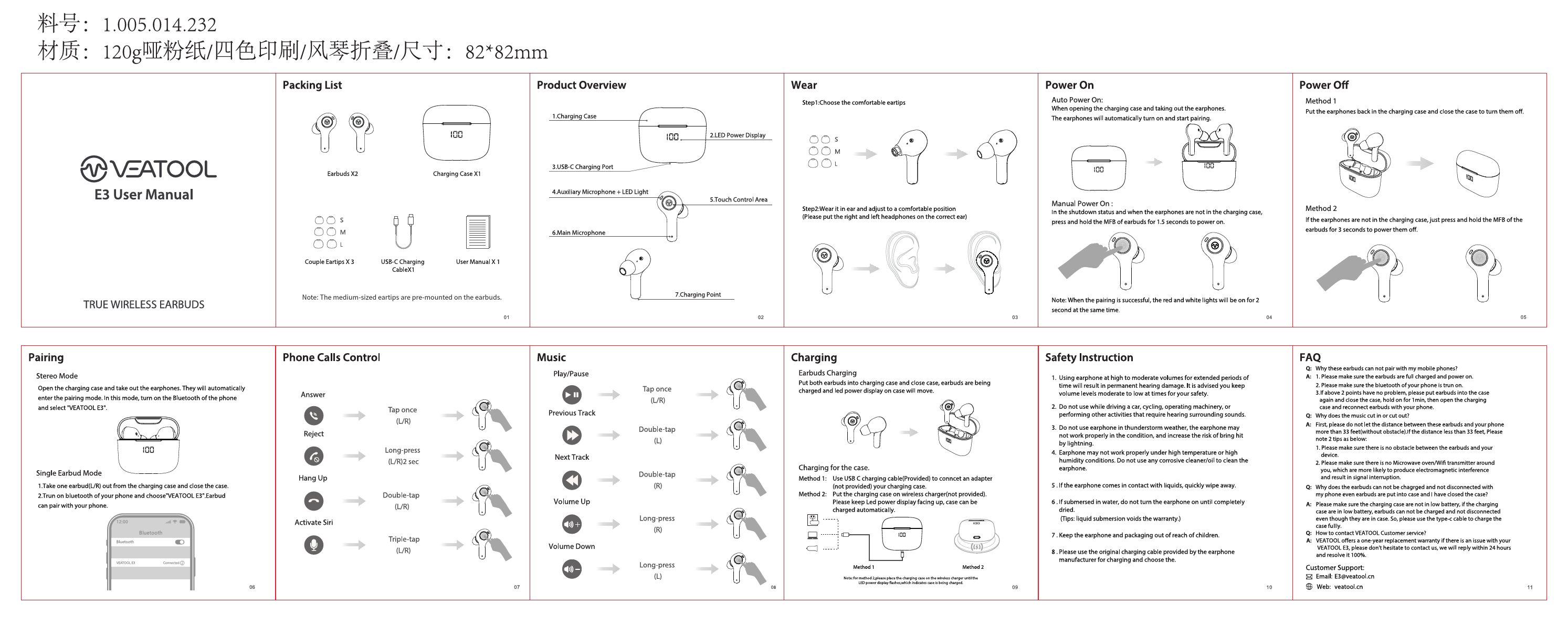
Welcome to the VEATool E3 True Wireless Earbuds user guide. This document provides essential information for operating your new earbuds, ensuring a seamless audio experience. Discover how to pair, wear, and control your VEATool E3 earbuds, along with important safety instructions and troubleshooting tips.
Product Overview
The VEATool E3 earbuds offer advanced features for superior sound and convenience. Learn about the charging case, LED display, charging port, microphones, and touch controls.
Getting Started
- Packing List: Includes Earbuds (x2), Charging Case, USB-C Charging Cable, and User Manual.
- Wear: Choose the comfortable ear tip size (S, M, L) and properly wear the earbuds for optimal sound and fit.
Operation
- Power On/Off: Automatic power on/off when opening/closing the charging case, or manual power on/off via touch control.
- Music Control: Play/pause, skip tracks, and adjust volume with intuitive touch commands.
- Phone Calls: Answer, hang up, and activate voice assistants with simple taps.
Charging
Learn how to charge your earbuds and the charging case using the provided USB-C cable or wireless charging.
Safety Instructions
Adhere to important safety guidelines to ensure safe and proper use of your VEATool E3 earbuds, including recommendations on listening volume, environmental awareness, and handling.
Frequently Asked Questions (FAQ)
Find answers to common questions regarding pairing, sound quality, battery life, and more.
Customer Support
For further assistance, contact VEATool customer support via email at support@veatool.com.
