

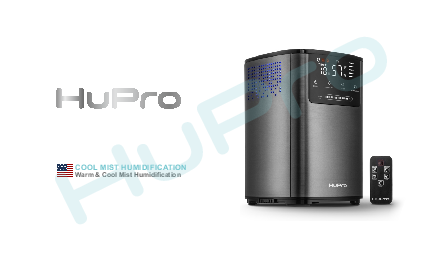
HuPro PRO-777 Ultrasonic Humidifier
User Manual
Introduction
Dear buyer, we thank you for choosing HuPro. This humidifier restores humidity levels, eliminating discomfort from dry air. Please read these instructions carefully for optimal use. Misuse may cause malfunction or short circuits. The manufacturer is not responsible for misuse, noncompliance with safety rules, or unqualified repairs.
We are always here to help you.
Applications of the Device
The HuPro supersonic humidifier effectively addresses insufficient air humidity. It contributes to better sleep, relieves cold and headache symptoms, moisturizes skin, and protects skin properties.
? Ensures good night sleep
⚡ Prevents headaches
? Reduces allergy symptoms
? Cares for indoor plants
☕ Relieves cold and flu symptoms
? Relieves dry skin
? Ensures long life of wooden surfaces and hardware floors
⚡ Low energy consumption
The device features an intuitive interface, stylish design, and an automatic safety system.
4L Capacity & 30H Humidifying
♨️❄️ Warm and Cool mist with 5 speed levels
? Automatic shut off when out of water
? Top filling design
? Remote control
% Automatic control of humidity level
⚛️ Antibacterial anion function
? Aroma oil tray
Safety Precautions
⚠️ ATTENTION! Please follow basic safety precautions when using this electrical appliance.
- This appliance can be used by children aged 8+ and persons with reduced physical, sensory, or mental abilities if supervised or instructed on safe use. Children shall not play with the appliance. Cleaning and maintenance by children require supervision.
- Ensure your electricity supply voltage matches the appliance's rating plate.
- Always place the humidifier on a hard, flat surface. Avoid direct sunlight and keep away from heat sources (stoves, radiators). Warning: The appliance may not work correctly if not placed on a flat surface.
- Do not insert or remove the electric plug with wet hands.
- If the mains cable is damaged, it must be replaced by the manufacturer, service agent, or qualified personnel.
- To reduce electrical shock risk, do not remove screws. The unit has no user-serviceable parts. Leave maintenance to qualified personnel.
- Fill the tank with fresh, distilled, or demineralized water. Do not switch on if the tank is empty.
- Do not shake the appliance to prevent water spillage into the base. Never touch water or components during operation.
- If an unusual smell occurs, switch off, unplug, and have it examined by your dealer.
- Do not pour hot water (over 100°F) into the tank.
- Unplug the appliance before cleaning or removing the tank.
- Do not immerse the appliance, cable, or plug in water or other liquids.
- Never scrape mineral deposits with a hard tool. Clean the humidifier regularly.
- If liquid spills into the unit, switch it off immediately, withdraw the plug, and consult your dealer.
- Disconnect from power supply when not in use and before cleaning.
- Ensure the mains cable does not touch hot surfaces or overhang table edges.
- Never use this appliance in rooms with aerosol products (sprays) or where oxygen is administered.
- Do not place clothing or towels on top of the appliance, as this may obstruct the nozzle and cause malfunction.
- When moving, lift by the unit base, not the water tank.
- Do not use if room humidity is already 50% or higher. The ideal level is 45%-60%. Excess humidity causes condensation. Use a hygrometer to measure.
- The humidifier is designed for indoor use only.
⚠️ ATTENTION! Before plugging in, check if the voltage stated on the back panel matches your outlet's capacity. Operate only at the voltage stated on the underside of the device. SAVE THESE INSTRUCTIONS.
User Safety Tips
- Do not direct humid air at furniture or electronic devices to avoid condensation.
- Place and use the humidifier only on a dry, flat, horizontal surface, preferably on glass, marble, or plastic above floor level.
- Do not place the device directly on varnished, painted, or wooden surfaces that could be damaged by moisture or water.
- Do not place the humidifier on floors with underfloor heating.
- Do not cover the device or place anything on it.
- Ensure not to pour water into the air tube, as this will immediately result in device malfunction.
- Do not place the device on carpets or towels.
- If using on a wooden table, place a 30"x30" plastic mat or substitute underneath to avoid condensation.
- Do not operate the device while using smoke repellents, diffusing oily admixtures, scented candles, aroma diffusers, or if chemical vapors are present.
- Fill the reservoir only with cold water. Do not fill with anything other than water.
- Do not add scented oils/substances or aromatherapy oils to the water.
- Using tap water with high mineral content (hard water) can emit white dust. Use distilled or demineralized water to avoid this.
- Always disconnect the plug from the electrical outlet before servicing, cleaning, or adding water.
- The device is designed for 110V supply only.
- Do not pour cleaning fluids or chemicals into the water reservoir.
- Do not put the device or mains plug in water or other fluids.
- Disconnect the mains plug by holding the plug, not pulling the cable.
Humidifier Parts
Diagram shows the humidifier components:
- 1. Top Cover
- 2. Water Filter
- 3. Handle
- 4. Mist Outlet
- 5. Water Tank
- 6. Housing
- 7. LCD Display
- 8. Aroma Box
- 9. Remote Control
- 10. Power Plug
- 11. Buoy
- 12. Transducer
A separate diagram shows the remote control with numbered buttons.
Instructions for Use
- Place the device on a flat surface.
- Remove the lid and take out the water tank.
- Pour water into the water tank and place it back into the main base, ensuring it's correctly positioned.
- Put the lid on the humidifier. The nozzle should not be higher than the lid.
Use cold/warm (not over 100°F) distilled or filtered water.
❌ Pour water into the water tank ONLY. Do not fill the humidifier base with water. The base is filled automatically via a water tank valve.
✔️ Correct method.
❌ Make sure not to pour water into the air tube, as this will immediately result in device malfunction. If the water reservoir is empty, the device will stop working and show a red warning indicator.
4. Plug the mains plug into the socket. A flashing ON/OFF symbol will appear on the display, indicating the device is ready.
5. Touch the On/Off symbol on the device to start in AUTO mode. The display will show the AUTO symbol and current humidity, which the device will determine independently. After 10 seconds, the display will show room temperature, then temperature and moisture level alternately.
? To start using the humidifier, press the ON/OFF button. Familiarize yourself with instructions for other functions.
⚠️ ATTENTION! When the device runs out of water, it enters the lack of water mode ?❗. Pour water into the water tank, and the humidifier will resume working.
Operating Instructions
On the Humidifier
- On/Off: Short press to turn the humidifier on/off.
- Humidity Level: Press the button one or several times to select desired humidity (30%-75%). The device saves the level and displays the current humidity until the selected level is reached.
- Sleep Mode: Press and hold the button until the display turns off to enter sleep mode. Press On/Off to cancel.
- Timer: Press the button to select auto shut-off timer (1-12 hours). The humidifier stops working after the selected time. Press and hold to disable the timer.
- Warm/Anion: Press once for warm mist mode (reaches within 15-20 mins, max temp 140°F). Press again for ionization mode. Press the button until the desired combination is achieved to turn off ionization or warm mist.
- UV Lamp: Press and hold for a few seconds to turn the UV lamp on/off. The light can be seen through side openings or when the cover is removed.
- Mist Output Slider: Press "MAX" for maximum mist power or "MIN" for minimum. Slide finger across the panel for other levels (5 power levels available).
Water Shortage
If there is not enough water, the device stops and enters Standby Mode. A water shortage symbol ?❗ appears, and 3 warning beeps sound (no beeps in Sleep Mode). Refill the humidifier with water and switch it on.
If there is too much water, an "EF" symbol is displayed, and the humidifier stops working. Pour out excess water and switch the device on again.
Adding Essential Oils to the Aroma Tray
- Open the aroma tray near the base of the humidifier.
- Apply 2-3 drops of essential oil on the sponge.
- Close the aroma tray.
Use only natural essential oils. Synthetic oils may damage the aroma box.
⚠️ Add oils and fragrances only to the aroma box to avoid damaging the device.
Aroma oils vary in concentration and intensity. Regulate the number of drops according to preference, starting with 3 drops.
Illustration shows a hand applying drops of oil to a sponge within a tray.
Remote Control
The remote control has the following functions:
- ON/OFF: Short press to turn the humidifier on/off.
- MIST LEVEL: Select mist output level (1-5).
- HUMIDITY: Short press to select humidity level (30%-75%). Press and hold to enter sleep mode. Press any button to exit sleep mode.
- WARM ANION: Press once for warm mist, again for ionization. Press and hold for UV lamp on/off.
- TIMER: Select auto shut-off timer (1-12 hours). Press and hold to disable.
- AUTO: Press to activate auto humidification mode.
Remote Control Battery Replacement
How to change the battery in the remote:
- Press button 1 in the direction of the arrow, then button 2 in the direction of the arrow. Remove the battery container.
- Replace the battery and put the container back in the remote.
Diagram shows pressing buttons to release a compartment and inserting a battery.
Care for the Device
Hard water can cause a "white powder" problem and limescale on the water basin, transducer, and tank. Scale on the transducer interferes with operation.
We recommend:
- Use cold boiled water or distilled water.
- Clean the transducer, water tank, and basin weekly.
- Change the water in the tank often to keep it fresh.
- Ensure the water tank and humidifier base are empty before storing.
- Clean the entire unit and ensure all parts are completely dry before storing.
How to clean the transducer:
- Apply 5-10 drops of cleaning agent/vinegar on the transducer surface; wait 2-5 minutes.
- Brush off scale.
- Rinse with clean water.
How to clean the humidifier base:
- Clean the water basin with a soft cloth and cleaning agent/vinegar if scaled.
- If deposits are on the security switch, apply cleaning agent/vinegar and clean with a brush.
- Rinse the water basin with clean water.
Storage and Disposal
Storage
- Unplug the device.
- Pour all water out of the reservoir and dry it with a cloth.
- Let the device cool down.
- Store in a cool, dry place away from children.
Disposal
The device must be disposed of separately at the end of its life. It can be recycled at your local electronics and appliance recycling depot. ♻️
Specifications
| Model | PRO-777 |
|---|---|
| Control Type | LED-screen with sensor buttons, remote control |
| Voltage | 120V |
| Power | 30W for cool mist, 110W for warm mist |
| Frequency | 60Hz |
| Capacity | 4L |
| Evaporation Rate | 350ml/H (±50ml/H) |
| Noise Level | ≤35dB(A) |
| Product Size | 8.66 x 8 x 66 x 12.99 inch. |
Automatic Protection
If there isn't enough water, a buzzer will beep once. If the water reservoir is empty, the device stops and shows a red warning indicator.
Ceramic Filter
The water is filtered through active carbon & mineral pellets. Then, it passes through ceramic pellets made from maifanite & tourmaline minerals that resonate with water particles on the far infrared frequency. These pellets also generate negative ions to extract impurities.
Diagram shows a cylindrical filter.
How to maintain the water filter:
- To clean, rinse with tap water every 1-2 weeks.
- No need to replace the filter as long as its structure is not compromised.
Troubleshooting
| Problem | Possible Reasons | Solution |
|---|---|---|
| Power lamp off, does not work | No power supply | Connect power supply, switch on. |
| Power lamp on, no mist is produced | No water in water tank | Fill the water tank with water. |
| Abnormal smell of the mist | New unit | Take out the water tank, open the cover, wait for 12 hours. |
| Dirty water or water sitting too long | Clean the water tank, fill with clean water. | |
| Power lamp on, unit doesn't work | Too much water in the water basin | Pour out some water from the water basin. |
| Mist fog is too low | Too much scale in the water basin | Clean the humidifier. |
| Water is too dirty or water kept too long in the tank | Clean the water tank and change to fresh clean water. | |
| Abnormal noise | There is not enough water in the tank | Fill the tank with water. |
| Unit is on an unstable surface | Move the unit to a stable flat surface. | |
| Mist fog coming out from around the nozzle | There are apertures between the nozzle and water tank | Dip the nozzle in water for a while and then fix it onto the socket on the water tank. |
Warranty
The warranty period for all HuPro devices is 12 months from the date of purchase. The manufacturer will address all manufacturing defects free of charge.
If you are not satisfied with the product, contact HuPro via Amazon, email, or phone.
HuPro is available 24/7 and resolves most issues within 1 business day.
⚠️ WARNING: This appliance is intended for household use only. The standard warranty for commercial and professional use does not apply.
Online Customer Support
Visit: www.hupro.biz
Email: support@hupro.biz
Models: HuPro, Hupro,Hupro,Hupro,Premium,Humidifier,for,Bedroom,5L,Large,Room,Home,Plants,Baby,Kids,Room,Air,Vaporizer,Ultrasonic,Cool,&,Warm,Mist,Humidifier,Top,Fill,with,Essential,Oils,&,Humidistat,Control,Remote,Timer,B09F1JCMYF,B081H3CHF
Full PDF Document

If the inline viewer fails, it will open the original document in compatibility mode automatically. You can also open the file directly.