Mykronoz Ze Fit 3 HR Quick Start Guide Zefit3hr Ug Ml
ZeFit 3 - Quick Start Guide zefit3-ug-ml Free User Guide for MyKronoz SmartWatch and Wearable, Manual
User Manual: mykronoz ZeFit 3 HR - Quick Start Guide Free User Guide for MyKronoz SmartWatch and Wearable, Manual
Open the PDF directly: View PDF  .
.
Page Count: 104 [warning: Documents this large are best viewed by clicking the View PDF Link!]
ENGLISH

ENGLISH
Quick start guide
OVERVIEW ........................................................... 04
CHARGING .......................................................... 05
PAIRING ............................................................... 06
TECH SPECS ........................................................ 08
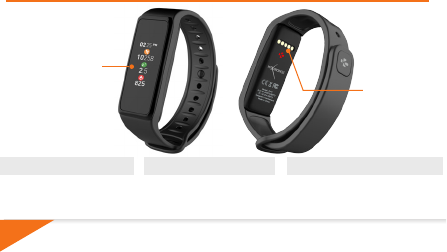
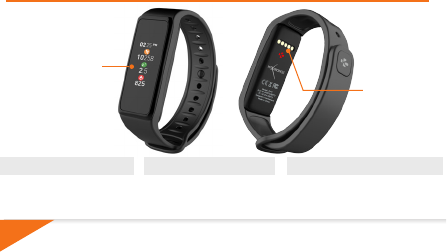
CHARGING
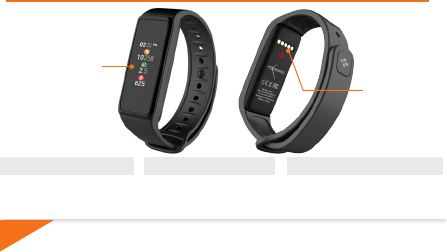
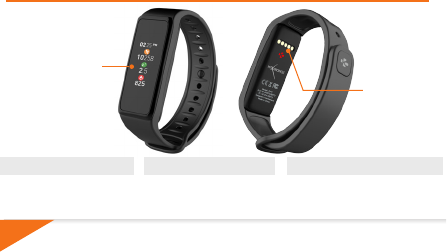
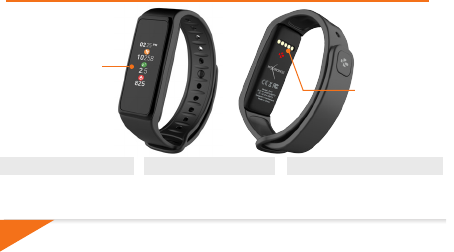
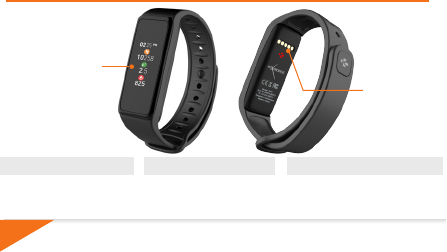
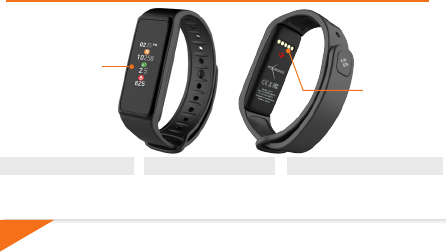
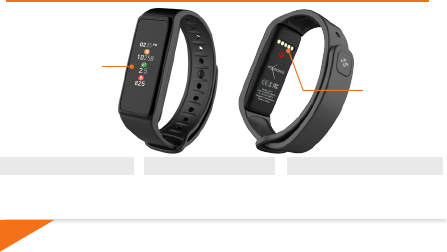
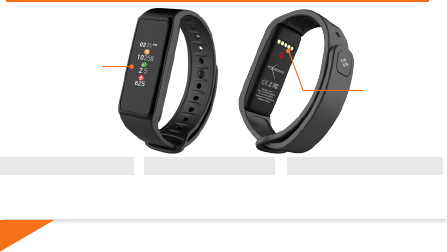
TERMINALS
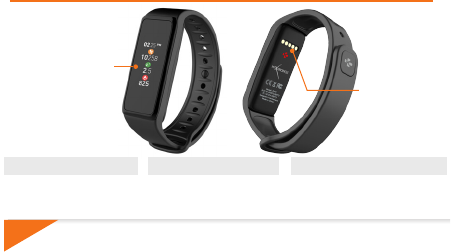
TOUCHSCREEN
OVERVIEW
WAKE THE DEVICE
I
Double tap the touchscreen
I
ZeFit3 screen turns off when
not use
EXIT A MENU
I
Double tap the touchscreen
MOVE BETWEEN SCREENS
I
Swipe left or right (horizontal mode)
up or down (vertical mode)
i
To ensure ZeFit3 is responding accurately to your taps, we recommend using your fingertip and
not your nail.
4
5
5
CHARGING
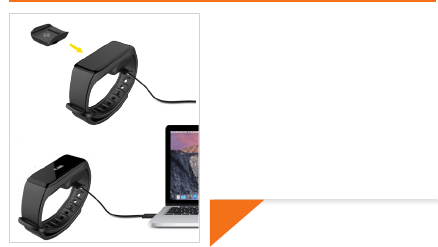
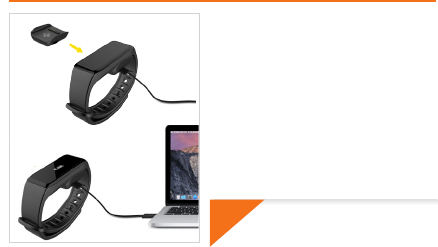
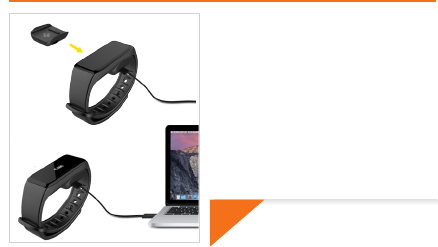
Charge ZeFit3 for two hours before your first use.
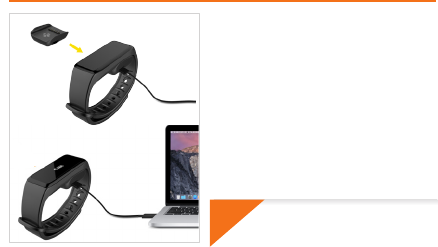
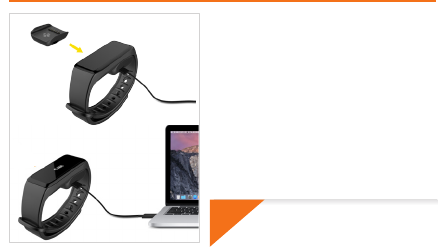
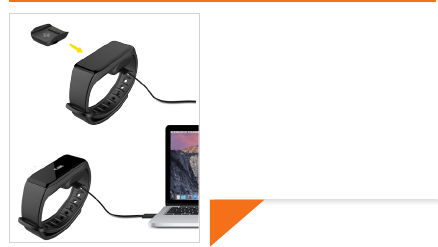
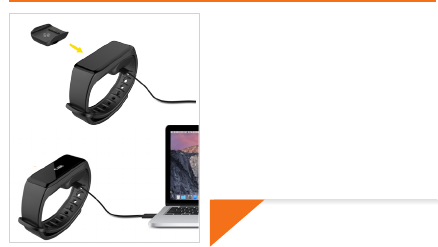
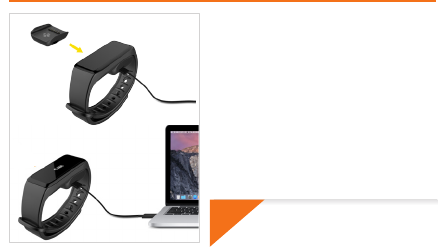
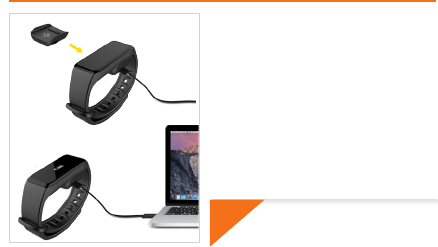
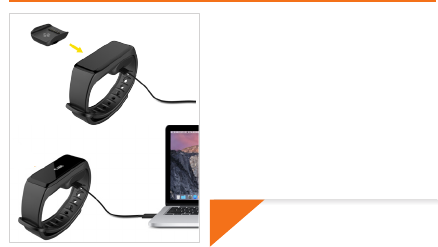
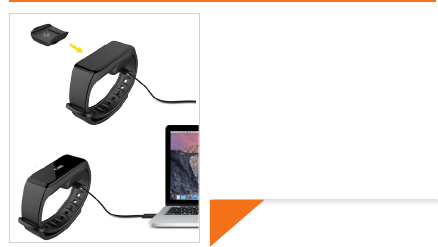
1. Put ZeFit
3
on the magnetic charging dock
2. Make sure the pin on the charging dock fit
correctly onto the charging terminals on the
back of ZeFit
3
3. Plug the small end of the USB cable provided
into the charging’s dock USB port
4. Plug the big end of the USB cable into a
power source
5. A battery indicator will fill to indicate charging
is in progress. Once ZeFit
3
is charged, the
battery indicator will be full
i
A full charge takes 1:30 hour. When the
battery level gets low, a battery indicator
will appear.
66
PAIRING
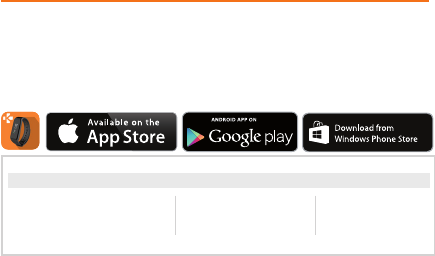
GET ZeFit3 APP
The first time you use
ZeFit
3
, a SET UP message will prompt you to set up your
ZeFit
3
using a mobile device.
To set up your
ZeFit
3
using your mobile device, you first need to get
ZeFit
3
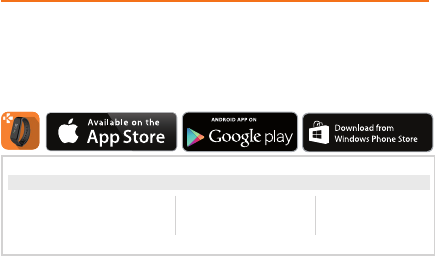
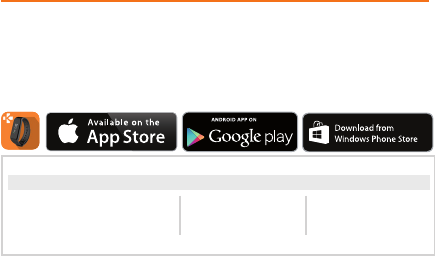
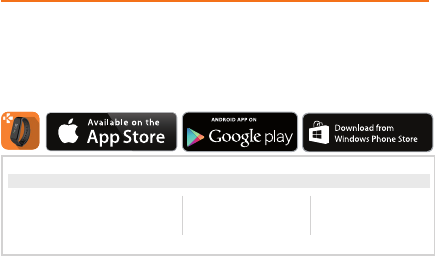
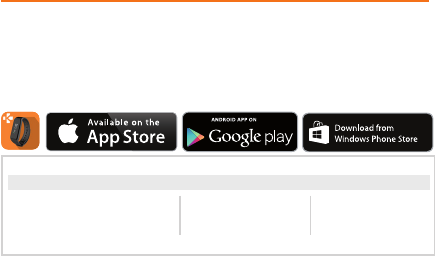
App. Search for ZeFit3 App in the App store, Google Play or Windows Phone
store, download and install the App on your mobile device.
iOS Android
Windows Phone 8.1+
System Requirements
Visit www.mykronoz.com to get the latest compatibility list
iOS 8+ devices with Bluetooth 4.0 BLE
iPhone 4s, 5, 5c, 5s, 6, 6 Plus and newer, iPad (3rd,
4th and 5thgen) iPad Mini, iPod touch (5thgen)
Select Android 4.3 +
devices that support
Bluetooth 4.0 BLE
Select Windows Phone
8.1+ that support
Bluetooth 4.0 BLE
i
7
7
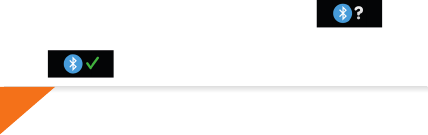
1. Enable Bluetooth on your mobile device
2. Open ZeFit
3
App on your mobile device. Sign up if you are a new member or Log in
with your existing account. After entering your personal information, tap Set up
3. Make sure ZeFit
3
is nearby and select ZeFit
3
in the list of devices
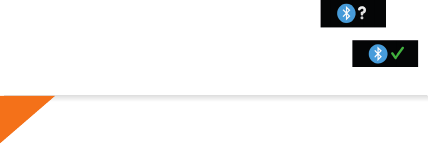
4. You will receive a pairing request on your mobile device. Press Pair to accept it
5. Then, a pairing request will appear on your ZeFit
3
display
Tap on your ZeFit
3
to accept the pairing
6. When ZeFit
3
is successfully paired, you will be notified on ZeFit
3
and on your mobile device’s screen
i
If pairing fails, repeat the same steps. Pairing is a one-time process. If you want to
pair ZeFit3 with another account, you first need to unpair it from the current one.
Open ZeFit3 App, go to Settings > Connect ZeFit3 > Unpair ZeFit3 . Tap Connect
ZeFit3 to pair a new device
88
TECH SPECS
Size & Circumference 47.5 x 20 x 9 mm
Min: 159 mm
Max: 194 mm
Weight 18 g
Bluetooth 4.0 BLE
Bluetooth operating range Up to 5 meters
Battery type Li-ion 80mAh
Battery life Up to 5 days
Charging time 1 to 2 hours
Memory 5 days of activity
Display
TFT color touchscreen 1.06 inches/ 160*64 pixels
Sensor 3-axis accelerometer
Operating temperature -20°C to +40°C
Water resistance IP67
International warranty 1 year
FRANÇAIS

Guide d’utilisation rapide
FRANÇAIS
PRÉSENTATION ................................................... 10
CHARGE ............................................................... 11
APPAIRAGE .......................................................... 12
CARACTÉRISTIQUES TECHNIQUES ................... 14
i
10
Pour s’assurer que ZeFit3 réponde précisément aux pressions, nous recommandons d’utiliser votre
doigt et non votre ongle.
NAVIGUER ENTRE LES ÉCRANS
I
Faites glisser votre doigt de
droite à gauche (mode horizontal),
de haut en bas (mode vertical).
QUITTER UN MENU
I
Appuyez deux fois sur l’écran
tactile.
CONTACTS DE
CHARGE
ACTIVATION DE L’ÉCRAN
I
Appuyez deux fois sur l’écran tactile.
I
Sans activité, l’écran de la ZeFit3
s’éteindra.
ÉCRAN
COULEUR
TACTILE
PRÉSENTATION
11
11
CHARGE
i
Chargez ZeFit3 pendant deux heures avant sa
première utilisation.
1. Disposez ZeFit3 sur son socle de charge
magnétique
2. Assurez-vous que les bornes du socle soient
bien alignées avec les contacts de charge situés à
l’arrière de ZeFit3
3. Branchez la petite extrémité du câble USB
fourni dans le port USB de la station de charge
4. Branchez la grande extrémité du câble USB à
une source d’alimentation
5. Un indicateur de la batterie confirme que la
recharge est en cours. Une fois ZeFit3 est
chargée, l’indicateur de la batterie sera plein
Une charge complète prend 1h30. Lorsque
le niveau de la batterie est faible, un
indicateur de batterie s’affiche
1212
Certains appareils
Android 4.3 + équipés de
Bluetooth 4.0 BLE
APPAIRAGE
Téléchargez l’application ZeFit3
Lors de la première utilisation de
ZeFit3
, le message SET UP à l’écran vous indiquera
de la configurer à l’aide de votre appareil mobile.
Pour configurer votre
ZeFit
3
à l’aide de votre appareil mobile, vous devez préalablement
télécharger l’application
ZeFit
3
. Recherchez l’application ZeFit3 sur l’App store, Google
Play ou Windows Phone store, téléchargez la et installez-la sur votre appareil mobile.
iOS Android
Windows Phone 8.1+
Configurations requises
i
Consultez la liste des appareils compatibles sur www.mykronoz.com
Les appareils iOS 8+ équipés de Bluetooth 4.0
BLE - iPhone 4s, 5, 5c, 5s, 6, 6 Plus - iPad (3ème , 4ème
and 5ème gen.) iPad Mini - iPod touch (5èmegen.)
Certains appareils Windows
Phone 8.1+ équipés de
Bluetooth 4.0 BLE

13
13
1. Activez le Bluetooth sur votre appareil mobile
2. Ouvrez l’application
ZeFit3
sur votre appareil mobile. Cliquez sur S’Inscrire si vous
êtes un nouveau membre ou Se Connecter pour accèder à votre compte existant.
Après avoir entré vos informations personnelles, appuyez sur Configurer
3. Assurez-vous que
ZeFit3
est à proximité et sélectionner
ZeFit3
dans la liste des
accessoires
4. Vous recevrez une demande d’appairage sur votre appareil mobile. Appuyez sur
Jumeler pour l’accepter
5. Puis une demande d’appairage apparaîtra sur l’écran de votre
ZeFit3
.
Appuyez sur votre
ZeFit3
pour accepter le jumelage
6. Lorsque
ZeFit3
est jumelée avec succès, vous serez informé sur
l’écran de
ZeFit3
et sur votre appareil mobile
i
En case d’échec de l’appairage, répétez les mêmes étapes. L’appairage est un processus unique. Si
vous souhaitez appairer votre ZeFit3 à un autre compte, vous devez d’abord la dissocier du compte
actuel. Ouvrez l’application ZeFit
3
, allez dans Paramètres > Connecter ZeFit
3
> Déconnecter
ZeFit3. Appuyez sur Configurer ZeFit3 pour appairer un nouvel appareil
1414
CARACTÉRISTIQUES TECHNIQUES
Taille & Circonférence 47.5 x 20 x 9 mm
Min:159 mm
Max: 194 mm
Poids 18 g
Bluetooth 4.0 BLE
Portée Bluetooth Jusqu’à 5 mètres
Type de batterie Li-ion 80mAh
Autonomie Jusqu’à 5 jours
Temps de charge 1 à 2 heures
Mémoire 5 jours d’activité
Ecran
Écran couleur tactile TFT/ 160*64 pixels
Capteur Accéléromètre triaxial
Température de fonctionnement -20°C to +40°C
Résistance à l’eau IP67
Garantie internationale 1 an
ESPAÑOL

Guía rápida de usuario
GENERALIDADES ................................................ 16
CARGA ................................................................. 17
EMPAREJAMIENTO ............................................. 18
ESPEC. TÉCNICAS ............................................... 20
ESPAÑOL
i
16
Para asegurarse de que el ZeFit3 responda con precisión a sus toques, le recomendamos que utilice la
punta del dedo en lugar de las uñas.
PANTALLA
TÁCTIL TERMINALES
DE CARGA
CAMBIAR DE PANTALLA
I
Mover el dedo a la derecha o
izquierda (modo horizontal) o hacia
arriba o abajo (modo vertical).
ACTIVAR EL DISPOSITIVO
I
Pulsar dos veces la pantalla
táctil.
ACTIVAR EL DISPOSITIVO
I
Pulsar dos veces la pantalla táctil.
I
La pantalla del ZeFit3 se apaga
cuando no se está utilizando.
GENERALIDADES
17
17
i
CARGA
Una carga completa tarda 1 hora 30 minutos.
Cuando el nivel de batería es bajo, aparecerá
un indicador de batería.
Cargue ZeFit3 durante dos horas antes de usarlo
por primera vez.
1. Coloque ZeFit3 sobre la base de carga
magnética
2. Asegúrese de que los contactos de la base de
carga encajen correctamente en los terminales de
carga de la parte posterior de ZeFit3.
3. Conecte el extremo pequeño del cable USB
suministrado en el puerto USB de la base de carga.
4. Conecte el extremo grande del cable USB a una
fuente de alimentación eléctrica.
5. Un indicador de batería se rellenará para indicar
que la carga está en curso. Una vez que ZeFit3 se
haya cargado, el indicador de batería se mostrará
lleno.
1818
i
La primera vez que utilice ZeFit
3
, un mensaje CONFIGURAR le invitará a configurar
ZeFit3 a través de un dispositivo móvil.
EMPAREJAMIENTO
CONSEGUIR LA APLICACIÓN ZeFit3
Para configurar ZeFit3 con su dispositivo móvil, primero tiene que conseguir la
aplicación ZeFit3. Busque la aplicación ZeFit3 en App store, Google Play o Windows
Phone, descárguela e instálela en su dispositivo móvil.
Requisitos del sistema
iOS Android
Windows Phone 8.1+
Dispositivos iOS 8 o superior con Bluetooth 4.0 BLE;
iPhone 4s, 5, 5c, 6, 6 Plus y superiores; iPad (3
a
, 4
a
o 5
a
generación), iPad Mini o iPod touch (5
a
generación)
Seleccione dispositivos
Android 4.3 + compatibles
con Bluetooth 4.0 BLE
Seleccione Windows
Phone 8.1+ compatible con
Bluetooth 4.0 BLE
Visite www.mykronoz.com para obtener la última lista de compatibilidad.
19
19
i
Si el emparejamiento falla, repita los mismos pasos. El emparejamiento es un proceso de
una sola vez. Si quiere emparejar ZeFit
3
con otra cuenta, antes tiene que desemparejarlo de
la actual. Abra la aplicación ZeFit3, vaya a Configuración > Conectar ZeFit3 > Desemparejar
ZeFit3. Puntee en Conectar ZeFit3 para emparejar un nuevo dispositivo.
1. Active el Bluetooth en su dispositivo móvil.
2. Abra la aplicación ZeFit3 en su dispositivo móvil. Regístrese si es un nuevo miembro o
inicie sesión con su cuenta actual. Después de introducir sus datos personales, puntee
en Configurar
3. Asegúrese de que ZeFit3 esté cerca y seleccione ZeFit3 en la lista de dispositivos.
4. Recibirá una solicitud de emparejamiento en su dispositivo móvil. Pulse Emparejar
para aceptar.
5. A continuación, la solicitud de emparejamiento aparecerá en la pantalla
de ZeFit3.
Toque en ZeFit3 para aceptar el emparejamiento.
6. Cuando ZeFit3 se haya emparejado correctamente, se le notificará
en ZeFit3 y en la pantalla de su dispositivo móvil.
2020
ESPEC. TÉCNICAS
Tamaño y circunferencia 47,5 x 20 x 9 mm
Mín.: 159 mm
Máx.: 194 mm
Peso 18 g
Bluetooth 4.0 BLE
Rango de funcionamiento del Bluetooth Hasta 5 metros
Tipo de batería Iones de litio, 80 mAh
Vida útil de batería Hasta 5 días
Tiempo de carga De 1 a 2 horas
Memoria 5 días de actividad
Pantalla
Pantalla táctil TFT en color, 1,06” / 160 x 64 píxeles
Sensor Acelerómetro de 3 ejes
Temperatura de funcionamiento -20 °C a +40 °C
Resistencia al agua IP67
Garantía internacional 1 año
ITALIANO

Guida utente rapida
INFORMAZIONI GENERALI ................................ 22
CARICA ................................................................ 23
ABBINAMENTO ................................................... 24
SPECIFICHE TECNICHE ...................................... 26
ITALIANO
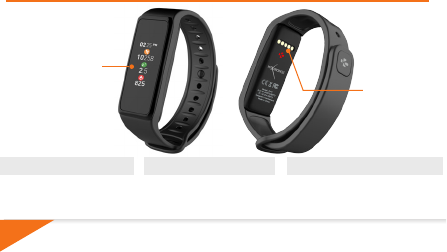
TOUCHSCREEN
i
22
Per assicurarsi che ZeFit3 risponderà in modo preciso ai tocchi, si consiglia di utilizzare il polpastrello
e non l’unghia.
PER SPOSTARSI TRA LE SCHERMATE
I
Scorrere a sinistra o a destra
(modalità orizzontale) in alto o in
basso (modalità verticale).
PER USCIRE DA UN MENU
I
Doppio tocco sul touchscreen.
PER RIATTIVARE IL DISPOSITIVO
I
Doppio tocco sul touchscreen.
I
Lo schermo ZeFit3 si
spegnerà se non è in uso.
TERMINALI DI
RICARICA
INFORMAZIONI GENERALI
23
23
i
CARICA
Lasciare ZeFit
3
in carica per due ore al momento
del primo utilizzo.
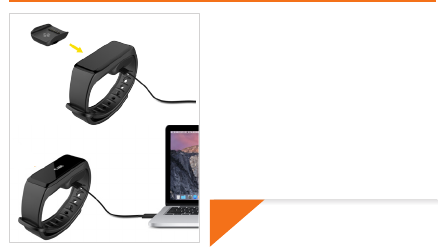
1. Posizionare ZeFit
3
sulla culla di carica
magnetica
2. Inserire attentamente i 5 pin della culla di
carica nei terminali di carica sul retro di ZeFit
3
3. Collegare il connettore piccolo del cavo USB
fornito alla porta USB della culla di carica
4. Collegare il connettore grande del cavo USB
a una fonte di alimentazione
5. Un indicatore segnalerà l'avanzamento della
carica. Al termine della carica, l'indicatore
sarà pieno
Il processo di carica completa richiede 1
ora e 30 minuti. Quando il livello di carica
della batteria è basso, appare un indicatore.
2424
i
Requisiti di sistema
iOS Android
Windows Phone 8.1+
Dispositivi iOS 8+ con Bluetooth 4.0 BLE
iPhone 4s, 5, 5c, 5s, 6, 6 Plus e versione successiva, iPad (3a,
4a e 5agenerazione) iPad Mini, iPod touch (5agenerazione)
Alcuni dispositivi Android 4.3 +
che supportano
Bluetooth 4.0 BLE
Alcuni dispositivi Windows
Phone 8.1+ che supportano
Bluetooth 4.0 BLE
Visitare www.mykronoz.com per consultare l’elenco compatibilità aggiornato.
ABBINAMENTO
SCARICARE L'APP ZeFit3
Al primo utilizzo di ZeFit3, un messaggio CONFIGURAZIONE sul display chiede
all'utente di configurare ZeFit3 tramite un dispositivo mobile.
Per configurare ZeFit3 tramite dispositivo mobile, occorre prima scaricare l'app
ZeFit3. Cercare l'App ZeFit3 nell'App store, su Google Play o Windows Phone
store, scaricarla e installarla sul dispositivo mobile.
25
25
i
1. Attivare il Bluetooth sul dispositivo mobile.
2. Aprire l'app ZeFit3 sul dispositivo mobile. Selezionare Iscriviti per i nuovi utenti o
Accedi per entrare nell'account esistente. Dopo aver acquisito le informazioni personali,
toccare Configurazione
3. Accertarsi che ZeFit3 sia vicino e selezionare ZeFit3 nell'elenco dei dispositivi
4. Riceverai una richiesta di abbinamento sul dispositivo mobile. PremiAbbina
per accettarla
5. Aquesto punto, appare una richiesta di abbinamento sul display di ZeFit3
Toccare ZeFit3 per accettare l'abbinamento
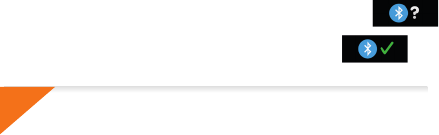
6. Quando l'abbinamento di ZeFit3 è riuscito, riceverai una notifica su
ZeFit3 e sullo schermo del dispositivo mobile
Se l’abbinamento non va a buon fine, occorre ripetere la procedura. L'abbinamento
va eseguito una volta sola. Per abbinare ZeFit
3
con un altro account, occorre annullare
l'abbinamento con quello corrente. Aprire l'app ZeFit
3
, accedere a Impostazioni
> Connetti ZeFit
3
> Annulla l'abbinamento di ZeFit
3
. Toccare Connetti ZeFit
3
per
abbinare un nuovo dispositivo
2626
SPECIFICHE TECNICHE
Dimensione e circonferenza 47,5 x 20 x 9 mm
Min:159 mm
Max: 194 mm
Peso 18 gr.
Bluetooth 4.0 BLE
Range operativo Bluetooth fino a 5 metri
Tipo batteria Agli ioni di litio da 80 mAh
Autonomia batteria fino a 5 giorni
Tempo di carica da 1 a 2 ore
Memoria 5 giorni di attività
Display
TFT a colori touchscreen 1,06 pollici/ 160*64 pixel
Sensore Accelerometro a 3 assi
Temperatura di esercizio da -20°C a +40°C
Resistenza all’acqua IP67
Garanzia internazionale 1 anno
DEUTSCH

Kurzanleitung
ÜBERSICHT .......................................................... 28
LADEN ................................................................. 29
PAARUNG ........................................................... 30
TECHNISCHE DATEN . ........................................ 32
DEUTSCH
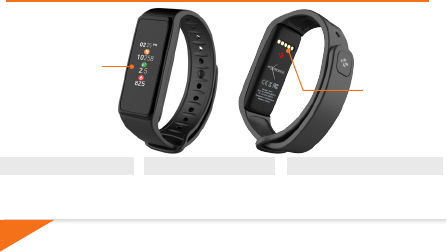
i
28
ZWISCHEN VERSCHIEDENEN ANZEIGEN WECHSELN
I
Entweder nach links oder rechts
(Horizontal - Modus) oder nach oben
oder unten (Vertikal - Modus) streichen.
Um sicher zu stellen, dass ZeFit3 auf Ihr Tippen reagiert, empfehlen wir Ihre Fingerspitze, anstatt den
Fingernagel zu benutzen.
DAS GERÄT AKTIVIEREN
I
Zweimal auf den Touchscreen tippen
I
Bei Inaktivität schaltet sich ZeFit
3
automatisch aus
EIN MENÜ VERLASSEN
I
Zweimal auf den Touchscreen
tippen
LADEANSCHLUSS
TOUCHSCREEN
ÜBERSICHT
29
29
i
LADEN
Ein kompletter Ladevorgang dauert 1 1/2
Stunden. Wenn der Ladestand niedrig wird,
erscheint eine Batterie-Anzeige
Laden Sie ZeFit
3
zwei Stunden lang vor Ihrer ersten
Nutzung auf.
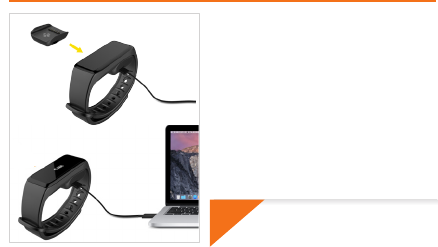
1. Stellen Sie ZeFit3 auf die magnetische
Ladestation
2. Vergewissern Sie sich, dass sich die 5 Stifte
auf der Ladestation korrekt in die Ladeausgänge
auf der Rückseite der ZeFit3 einfügen
3. Stecken Sie das schmale Ende des
mitgelieferten USB-Kabels in den USB-
Ausgang der Ladestation
4. Stecken Sie das große Ende des USB-Kabels
in eine Stromquelle
5. Eine Batterieanzeige wird aufgefüllt, um
das Aufladen anzuzeigen. Sobald ZeFit3
aufgeladen ist, ist die Batterieanzeige voll
3030
i
Systemanforderungen
iOS Android
Windows Phone 8.1+
iOS 8+ Geräte mit Bluetooth 4.0 BLE
iPhone 4s, 5, 5c, 5s, 6, 6 Plus und neuere, iPad
(3., 4. und 5.Gen.) iPad Mini, iPod touch (5 Gen.)
Wählen Sie Android 4.3 +
Geräte aus, die
Bluetooth 4.0 BLE unterstützen
Wählen Sie Windows Phone
8.1+ aus, die Bluetooth 4.0
BLE unterstützen
Begeben Sie sich auf www.mykronoz.com für die aktuelle Kompatibilitätsliste
PAARUNG
Wenn Sie ZeFit3 das erste Mal benutzen, fordert eine SET UP-Nachricht Sie auf,
Ihre ZeFit3 mit Hilfe eines Mobilgeräts einzustellen.
ZeFit3-APP ERHALTEN
Um Ihre ZeFit3 mit Hilfe Ihre Mobilgeräts einzustellen, benötigen Sie zunächst
die ZeFit3-App. Suchen Sie die ZeFit3-App im App Store, in Google Play oder
im Windows Phone Store, laden Sie die App auf Ihrem Mobilgerät herunter und
installieren Sie sie.
31
31
i
1. Aktivieren Sie Bluetooth auf Ihrem Mobilgerät
2. Öffnen Sie die ZeFit3-App auf Ihrem Mobilgerät. Eröffnen Sie ein Konto, wenn Sie ein
neues Mitglied sind, oder loggen Sie sich mit Ihrem bereits existierenden Konto ein.
Nachdem Sie Ihre persönlichen Informationen eingegeben haben, tippen Sie auf Set up
3. Vergewissern Sie sich, dass sich ZeFit3 in der Nähe befindet und wählen Sie ZeFit3 in
der Geräteliste aus
4. Sie erhalten eine Pairing-Anfrage auf Ihrem Mobilgerät. Drücken Sie zum Akzeptieren
auf Pair
5. Dann erscheint eine Pairing-Anfrage auf Ihrem ZeFit3-Display
Tippen Sie auf Ihre ZeFit3, um das Pairing zu akzeptieren
6. Sobald ZeFit3 erfolgreich gepairt ist, werden Sie auf ZeFit3
und auf dem Bildschirm Ihres Mobilgeräts benachrichtigt
Wenn das Pairing fehlschlägt, wiederholen Sie diese Schritte. Pairing ist ein einmaliger
Prozess. Falls Sie ZeFit3 mit einem anderen Konto pairen möchten, müssen Sie sie
zunächst von dem laufenden entpairen. Öffnen Sie die ZeFit3 App, begeben Sie sich
in Settings > Connect ZeFit3 > Unpair ZeFit3. Tippen Sie auf Connect ZeFit3, um ein
neues Gerät zu pairen.
3232
TECHNISCHE DATEN
Größe und Umfang 47,5 x 20 x 9 mm
Mini.:159 mm
Maxi.: 194 mm
Gewicht 18 g
Bluetooth 4.0 BLE
Bluetooth Betriebsbereich Bis zu 5 Meter
Batterietyp Li-ion 80mAh
Batterieleben Bis zu 5 Tage
Ladezeit 1 bis 2 Stunden
Speicher 5 Tage Aktivität
Display
Farb-TFT Touchscreen (1,06 Zoll/ 160*64 Pixel)
Sensor dreiachsiger Beschleunigungsmesser
Betriebstemperatur -20°C bis +40°C
Wasserfestigkeit IP67
Internationale Garantie 1 Jahr
NEDERLANDS

Snelstartgids
OVERZICHT ......................................................... 34
OPLADEN ............................................................ 35
KOPPELEN ........................................................... 36
TECHNISCHE SPECIFICATIES ............................. 38
NEDERLANDS
i
34
Om te waarborgen dat de ZeFit3 nauwkeurig op uw tikjes reageert, is het raadzaam uw vingertop te
gebruiken, en niet uw nagel.
APPARAAT ACTIVEREN
I
Op het aanraakscherm dubbeltikkenn
I
ZeFit3-scherm gaat uit wanneer
het niet wordt gebruikt.
EEN MENU BEËINDIGEN
I
Op het aanraakscherm
dubbeltikkenn.
VAN SCHERM WISSELE
I
Veeg naar links of rechts (horizontale
modus) of naar boven of beneden
(verticale modus).
OPLAADKLEMMEN
AANRAAKSCHERM
OVERZICHT
35
35
i
OPLADEN
U moet ZeFit3 twee uur opladen voordat u het
voor de eerste keer gebruikt.
1. Leg de ZeFit3 op de magnetische lader.
2. Zorg dat de 5 pinnen van de lader correct
aansluiten op de oplaadpunten aan de
achterkant van de ZeFit3
3. Steek het smalle uiteinde van de
meegeleverde USB-kabel in de USB-poort
van de lader
4. Steek het grote uiteinde van de USB-kabel in
een stroombron.
5. Er verschijnt een batterij-indicator die aanduidt
dat de batterij wordt opgeladen De ZeFit3 is
opgeladen als de batterij-indicator vol is
De batterij volledig opladen duurt 1 uur
30. Als de batterij bijna leeg is, zal er een
batterij-indicator verschijnen.
3636
i
Als u ZeFit3 voor de eerste keer gebruikt, zal er een SET UP bericht verschijnen
dat u verzoekt om uw ZeFit3 via uw mobiele apparaat in te stellen.
DE ZeFit3 APP GEBRUIKEN
Om de ZeFit3 in te stellen met behulp van uw mobiele apparaat, moet u eerst de
ZeFit3 App installeren. Zoek naar de “ZeFit3” App in de App Store, Google Play,
of Windows Phone store, download en installeer de App op uw mobiele apparaat.
KOPPELEN
Systeemvereisten
iOS Android
Windows Phone 8.1+
iOS 8+ apparaten met Bluetooth 4.0 BLE
iPhone 4s, 5, 5c, 5s, 6, 6 Plus en nieuwer, iPad
(3rd, 4e en 5egen) iPad Mini, iPod touch (5egen)
Selecteer Android 4.3 +
Ondersteunende apparaten
Bluetooth 4.0 BLE
Selecteer Windows Phone
8.1+ die Bluetooth 4.0 BLE
ondersteunt
Ga naar www.mykronoz.com voor de laatste compatibiliteitslijst
37
37
i
Als het koppelen niet lukt, moet u dezelfde stappen herhalen. Het koppelen is
uitsluitend nodig bij het eerste gebruik. Indien u uw ZeFit3 aan een ander account
wilt koppelen, moet u het huidige eerst ontkoppelen. Open de ZeFit3 App, ga naar
Instellingen > Verbinden met ZeFit3 > Ontkoppelen ZeFit3. Tik op ZeFit3 Verbinden
om een nieuw apparaat te koppelen
1. Schakel Bluetooth in op uw mobiele apparaat
2. Open de ZeFit
3
App op uw mobiele apparaat. Sign up als nieuw lid of Log in met
uw bestaande account. Nadat u uw persoonlijke gegevens heeft ingevoerd, tikt u
op Set up
3. Zorg dat ZeFit
3
in de buurt is en selecteer ZeFit
3
in de lijst van apparaten
4. U ontvangt een koppelverzoek op uw mobiele apparaat. Druk op Koppelen om
het aanvaarden
5. Vervolgens verschijnt een koppelverzoek op uw ZeFit
3
scherm
Tik op uw ZeFit
3
om het koppelen te aanvaarden
6. Wanneer het koppelen met ZeFit
3
is gelukt, krijgt u een bericht op
ZeFit
3
en op het scherm van uw mobiele apparaat.
3838
Afmeting & omtrek 47,5 x 20 x 9 mm
Min:159mm
Max: 194 mm
Gewicht 18 g
Bluetooth 4.0 BLE
Bluetooth bereik Tot 5 meter
Type batterij Li-ion 80 mAh
Autonomie Tot 5 dagen
Oplaadtijd 1 tot 2 uur
Geheugen 5 dagen activiteiten
Scherm
TFT Color aanraakscherm 1,06” / 160 x 64 pixels
Sensor 3-assige versnellingsmeter
Bedrijfstemperatuur -20°C tot +40°C
Waterbestendig IP67
Internationale garantie 1 jaar
TECHNISCHE SPECIFICATIES
PORTUGUÊS

Guia rápido do utilizador
PORTUGUÊS
GENERALIDADES ................................................ 40
CARREGAMENTO ............................................... 41
EMPARELHAMENTO ........................................... 42
ESPECIFICAÇÕES TÉCNICAS ............................. 44
i
40
Para assegurar que o ZeFit3 responda aos seus toques com precisão, recomendamos que utilize o seu
dedo e não a unha.
ATIVAR O APARELHO
I
Toque duas vezes no ecrã tátil.
I
O ecrã do ZeFit3 desliga-se
quando não está em uso.
SAIR DE UM MENU
I
Toque duas vez es no
ecrã tátil.
NAVEGAR PELOS ECRÃS
I
Deslize o dedo para a esquerda ou
para a direita (modo horizontal), para
cima ou para baixo (modo vertical).
TERMINAIS DE
CARREGAMENTO
ECRÃ TÁTIL
GENERALIDADES
41
41
i
CARREGAMENTO
É necessário 1h30 para um carregamento
completo. Quando a bateria ficar fraca, um
indicador de bateria aparecerá no ecrã.
Antes de utilizar o ZeFit3 pela primeira vez, é
necessário carregá-lo durante duas horas.
1. Coloque o ZeFit
3
na dock de carregamento
magnético.
2. Certifique-se de que os 5 pinos da dock de
carregamento estão corretamente encaixadas nos
terminais de carregamento da parte de trás do ZeFit
3
.
3. Ligue a ficha pequena do cabo USB fornecido à
porta USB da dock de carregamento.
4. Ligue a ficha grande do cabo USB a uma fonte
de energia.
5. Uma barra de progresso no indicador da bateria
confirma que o carregamento está em curso. O
indicador de bateria aparecerá cheio quando o
ZeFit
3
estiver completamente carregado.
4242
i
Ao usar o ZeFit
3
pela primeira vez, uma mensagem de CONFIGURAÇÃO solicitará
que configure o ZeFit3 a partir de um dispositivo móvel.
EMPARELHAMENTO
OBTER A APLICAÇÃO ZeFit3
Para configurar o ZeFit
3
a partir do seu dispositivo móvel, é preciso obter primeiro
a aplicação ZeFit3. Procure a aplicação ZeFit3 na App Store, no Google Play ou
na Windows Phone Store, descarregue-a e instale-a no seu dispositivo móvel.
Requisitos do Sistema
iOS Android
Windows Phone 8.1+
Dispositivos iOS 8+ com Bluetooth 4.0 BLE
iPhone 4s, 5, 5c, 5s, 6, 6 Plus e mais recentes,
iPad (3a., 4a. e 5a.ger.) iPad Mini, iPod touch (5a.ger.)
Selecione dispositivos
Android 4.3 + que suportem
Bluetooth 4.0 BLE
Selecione um Windows
Phone 8.1+ que suporte
Bluetooth 4.0 BLE
Visite www.mykronoz.com para obter a lista de compatibilidade mais recente.

43
43
i
Em caso de falha de emparelhamento, repita as mesmas etapas. O emparelhamento
é um processo executado uma única vez. Para emparelhar o seu ZeFit3 com uma
outra conta, é necessário desemparelhá-lo primeiro da conta ativa. Abra a aplicação
ZeFit3, e acesse Parâmetros > Conectar ZeFit3 > Desemparelhar ZeFit3. Toque em
Conectar ZeFit3 para emparelhar com um novo dispositivo.
1. Habilite o Bluetooth no seu dispositivo móvel.
2. Abra a aplicação ZeFit3 no seu dispositivo móvel. Crie uma conta, se for um novo
membro, ou logue-se, caso já possua uma conta. Depois de ter introduzido as suas
informações pessoais, toque em Configurar.
3. Certifique-se de que o ZeFit3 encontra-se à proximidade e selecione ZeFit3 na lista
de dispositivos.
4. Receberá então um pedido de emparelhamento no seu dispositivo móvel. Aperte em
Emparelhar para aceitá-lo.
5. Um pedido de emparelhamento aparecerá no visor do ZeFit3.
Toque no ZeFit3 para aceitar o emparelhamento.
6. Quando o ZeFit3 estiver corretamente emparelhado, receberá uma notificação no
ecrã do ZeFit3 e no ecrã do seu dispositivo móvel.
4444
ESPECIFICAÇÕES TÉCNICAS
Dimensões e Circunferência 47,5 x 20 x 9 mm
Mín:159 mm
Máx: 194 mm
Peso 18 g
Bluetooth 4.0 BLE
Alcance operacional Bluetooth Até 5 metros
Tipo de pilha Iões de lítio de 80mAh
Duração da bateria Até 5 dias
Tempo de carregamento 2 horas
Memória 5 dias de atividade
Visor
Ecrã tátil a cores TFT de 1,06 polegadas/160*64 pixéis
Sensor Acelerómetro de 3 eixos
Temperatura de funcionamento -20°C a +40°C
Resistência à água IP67
Garantia internacional 1 ano
POLSKI

Skrócona instrukcja obsługi zegarka
PRZEGLĄD ........................................................... 46
ŁADOWANIE........................................................ 47
SPAROWANIE ...................................................... 48
DANE TECHNICZNE ........................................... 50
POLSKI
i
46
Aby mieć pewność, że zegarek ZeFit3 reaguje właściwie na dotknięcia, zaleca się dotykanie
opuszkami palców, a nie paznokciami.
WYBUDZENIE URZĄDZENIA
I
Dwukrotne dotknięcie ekranu dotykowego.
I
Nieużywany zegarek ZeFit3
wyłącza się.
ZAMKNIĘCIE MENU
I
Dwukrotne dotknięcie ekranu
dotykowego.
PORUSZANIE SIĘ PO EKRANACH
I
Przesunięcie palcem w lewo lub w
prawo (w ustawieniu poziomym); w górę
lub w dół (w ustawieniu pionowym).
STYKI
ŁADOWANIA
EKRAN
DOTYKOWY
PRZEGLĄD
47
47
i
ŁADOWANIE
Przed pierwszym użyciem należy ładować ZeFit3
przez 2 godziny.
1. Umieść ZeFit3 na magnetycznej stacji ładującej
2. Sprawdź, czy 5 styki stacji ładującej pasują
prawidłowo do zacisków ładujących z tyłu ZeFit3
3. Włóż mały koniec dostarczonego z
urządzeniem przewodu USB do portu USB stacji
ładującej
4. Podłącz większą wtyczkę przewodu USB do
źródła zasilania
5. Wskaźnik baterii zacznie wskazywać ładowanie
w toku. Gdy urządzenie ZeFit3 zostanie
naładowane, wskaźnik naładowania baterii
będzie sygnalizować w pełni naładowaną baterię
Pełny cykl ładowania trwa 1:30 h. Kiedy
poziom naładowania baterii spadnie,
pojawi się wskaźnik poziomu baterii.
4848
i
Wymagania systemowe
iOS Android
Windows Phone 8.1+
urządzenia iOS 8+ z Bluetooth 4.0 BLE
iPhone 4s, 5, 5c, 5s, 6, 6 Plus i nowsze,, iPad (3., 4.
i 5.generacji) iPad Mini, iPod touch (5.generacji)
Wybrane urządzenia z systemem
Android 4.3 + obsługujące
Bluetooth 4.0 BLE
Wybrane urządzenia z
systemem Windows Phone 8.1+
obsługujące Bluetooth 4.0 BLE
Najnowszą listę kompatybilnych urządzeń można znaleźć w witrynie www.mykronoz.
SPAROWANIE
Przy pierwszym użyciu urządzenia ZeFit3 komunikat KONFIGURACJA zasugeruje
użytkownikowi skonfigurowanie urządzenia ZeFit3 przy użyciu urządzenia mobilnego.
POBIERZ APLIKACJĘ ZeFit3
Aby skonfigurować urządzenie ZeFit
3
przy użyciu urządzenia mobilnego, musisz najpierw
pobrać aplikację ZeFit3. Wyszukaj aplikację ZeFit3 w App Store, Google Play lub sklepie
Windows Phone, pobierz ją i zainstaluj na urządzeniu mobilnym.

49
49
i
1. Włącz Bluetooth na urządzeniu mobilnym
2. Otwórz aplikację ZeFit
3
na swoim urządzeniu mobilnym. Zarejestruj się, jeśli jesteś nowym
członkiem, lub Zaloguj się na istniejące konto. Po wprowadzeniu danych osobowych dotknij
opcji Konfiguracja
3. Sprawdź, czy urządzenie ZeFit
3
znajduje się w pobliżu i wybierz ZeFit
3
z listy urządzeń
4. Na urządzeniu mobilnym pojawi się prośba o sparowanie. Naciśnij Sparuj, by ją
zaakceptować.
5. Następnie prośba o sparowanie pojawi się na wyświetlaczu urządzenia ZeFit
3
Dotknij urządzenia ZeFit
3
, by zaakceptować sparowanie
6. Po pomyślnym sparowaniu urządzenia ZeFit
3
informacja pojawi się na
urządzeniu ZeFit
3
i na ekranie urządzenia mobilnego
Jeśli sparowanie się nie powiedzie, powtórz te czynności Parowanie jest procesem
jednorazowym. Jeśli chcesz sparować swoje urządzenie ZeFit
3
z innym kontem, musisz najpierw
usunąć sparowanie z aktualnym. Otwórz aplikację ZeFit
3
, przejdź do Ustawienia > Podłącz
ZeFit
3
> Usuń sparowanie ZeFit
3
. Dotknij opcji Podłącz ZeFit
3
, by sparować nowe urządzenie
5050
DANE TECHNICZNE
Wymiary i średnica 47,5 x 20 x 9 mm
Min.: 159 mm
Maks. 194 mm
Waga 18 g
Bluetooth 4.0 BLE
Zasięg roboczy Bluetooth Do 5 metrów
Rodzaj baterii Litowo-jonowa, 80 mAh
Czas pracy na baterii Do 5 dni
Czas ładowania Od 1 do 2 godz.
Pamięć Aktywność z 5 dni
Wyświetlacz
Kolorowy ekran dotykowy TFT (przekątna 1,06 cala / 160*64 pikseli)
Czujnik Akcelerometr trójosiowy
Temperatura pracy -20°C do +40°C
Wodoodporność IP67
Międzynarodowa gwarancja 1 rok
КРАТКОЕ РУКОВОДСТВО ПО ЭКСПЛУАТАЦИИ ZEFIT3
РУССКИЙ

КРАТКОЕ РУКОВОДСТВО ПО ЭКСПЛУАТАЦИИ ZEFIT3
ОБЗОР................................................................ 52
ЗАРЯДКА ........................................................... 54
СОПРЯЖЕНИЕ ................................................ 56
ТЕХНИЧЕСКИЕ ПАРАМЕТРЫ ..................... 58
РУССКИЙ
i
52
Для того чтобы ZeFit3 точно реагировал на ваши нажатия, рекомендуется пользоваться кончиками
пальцев, а не ногтями.
АктивАция устройствА
I
двАжды коснитесь сенсорного экрАнА
I
экрАн ZeFit3 отключАется,
когдА не используется.
выход из меню
I
двАжды коснитесь
сенсорного экрАнА
переход между экрАнАми
I
проведите влево или впрАво
(горизонтАльно), вверх или
вниз (вертикАльно).
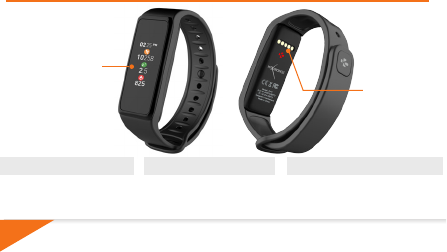
ЗАРЯДНЫЕ
КЛЕММЫ
СЕНСОРНЫЙ
ЭКРАН
ОБЗОР
53
53
i
ЗАРЯДКА
Полная зарядка устройства занимает
1 час 30 минут. При низком уровне заряда
аккумулятора отображается индикатор
заряда.
Перед первым использованием зарядите ZeFit3 в
течение двух часов.
1. Установите ZeFit
3
на магнитной зарядной
док-станции.
2. Убедитесь в том, что 5 контактов зарядной
док-станции надлежащим образом соприкасаются
с зарядными клеммами на задней поверхности
ZeFit
3
.
3. Подключите меньший конец предоставляемого
USB-кабеля к USB-порту зарядной док-станции.
4. Подключите больший конец USB-кабеля к
источнику питания.
5. Индикатор заряда аккумулятора будет
заполняться, указывая на процесс зарядки.
По окончании зарядки ZeFit
3
индикатор заряда
аккумулятора станет полным.
5454
i
При первом использовании ZeFit3 сообщение НАСТРОЙКА на дисплее подскажет
вам, как настроить ZeFit3 с помощью мобильного устройства.
ПОЛУЧЕНИЕ ПРИЛОЖЕНИЯ ZeFit3
Для того чтобы настроить ZeFit
3
с помощью мобильного устройства, необходимо
сначала установить приложение ZeFit
3
. Найдите приложение ZeFit
3
в App store,
Google Play или магазине Windows Phone, загрузите и установите его на свое
мобильное устройство.
Системные требования
iOS Android
Windows Phone 8.1+
Устройства iOS 8 или более поздней версии
с Bluetooth 4.0 BLE.
iPhone 4s, 5, 5c, 5s, 6, 6 Plus и более новые, iPad (3-
го, 4-го и 5-го покол.) iPad Mini, iPod touch (5-го покол.)
Некоторые устройства с Android 4.3
или более поздней версии.
Устройства, поддерживающие
Bluetooth 4.0 BLE
Некоторые устройства
с Windows Phone 8.1+,
поддерживающие
Bluetooth 4.0 BLE
Новейший список совместимых устройств вы найдете на сайте www.mykronoz.
СОПРЯЖЕНИЕ
55
55
i
1. Включите Bluetooth на своем мобильном устройстве.
2. Откройте приложение ZeFit
3
на своем мобильном устройстве. Нажмите
Зарегистрироваться при отсутствии учетной записи, либо Войти при наличии учетной
записи. После ввода персональных данных нажмите Настройка.
3. Положите ZeFit
3
поблизости и выберите его в списке устройств.
4. На мобильном устройстве отобразится запрос на сопряжение. Нажмите Сопряжение,
чтобы подтвердить сопряжение устройств.
5. Затем на дисплее ZeFit
3
отобразится запрос на сопряжение.
Коснитесь ZeFit
3
, чтобы принять запрос на сопряжение.
6. При выполнении сопряжения отобразится уведомление на дисплее
ZeFit
3
и на экране мобильного устройства.
Если не удалось выполнить сопряжение устройств, следует повторить эти шаги сначала.
Сопряжение является одноразовым процессом. При желании выполнить сопряжение ZeFit
3
с
другой учетной записью, в первую очередь следует отменить текущее сопряжение. Откройте
приложение ZeFit
3
, перейдите в «Настройки» > «Подключить ZeFit
3
» > «Отменить сопряжение
ZeFit
3
». Нажмите «Подключить ZeFit
3
», чтобы выполнить сопряжение с новым устройством.
5656
ТЕХНИЧЕСКИЕ ПАРАМЕТРЫ
Размер и окружность 47,5 x 20 x 9 мм
Мин: 159 мм
Макс.: 194 мм
Вес 18 г
Bluetooth 4.0 BLE
Зона действия Bluetooth до 5 метров
Тип аккумулятора Литиево-ионный, 80 мА/ч
Срок действия батареи до 5 дней
Время зарядки 2 часа
Память 5 дней активности
Дисплей
цветной тонкопленочный сенсорный экран (1,6” / 160*64 пикселей
Сенсор 3-осевой акселерометр
Температура эксплуатации от –20 до +40 °C
Водонепроницаемость IP67
Международная гарантия 1 год
中文版

快速使用者指南
概述 ..................................................................... 58
充電 ..................................................................... 59
與手機配對 ......................................................... 60
產品規格 ............................................................ 62
中文版
i
58
爲了確保ZeFit3能根據您的按壓做出準確反應,我們建議您使用指尖操作,而不要
用指甲。
喚醒設備
I
按兩次觸控式熒幕。
I
不使用時,ZeFit
3
熒幕會關
閉。
退出功能表
I
按兩次觸控式熒幕。
在各窗口間切換
I
左右(水平方向)或上下滑
動(垂直方向)。
充電端口
觸控式熒幕
概述
59
59
i
充電
首次使用前,請先為 ZeFit3充電兩個小時。
1. 將 ZeFit3置於磁性充電座上
2. 請確認充電座上的 5 個充電針與 ZeFit3
背面的充電終端正確匹配。
3. 將USB 連接線的小頭端插入充電座的
USB 埠
4. 將 USB 連接線的大頭端插入電源
5. 電池指示燈將顯示正在充電。當 ZeFit3
充滿電時,電池指示燈將顯示電量已滿
充滿電需一個半小時。當電池電量
不足時,電池指示燈會亮起。
6060
i
iOS Android
Windows Phone 8.1+
系統要求
iOS 8+ 設備,配備藍牙 4.0 BLE的
iPhone 4s、5、5c、5s、6、6 Plus 以
及更新版本,iPad(3 代、4 代和 5 代)、
iPad Mini、iPod touch(5 代)
選擇 Android 4.3 +
支援裝置
Bluetooth 4.0 BLE
選擇支援 Bluetooth
4.0 BLE 的Windows
Phone 8.1+
與手機配對
取得 ZeFit3 APP
初次使用 ZeFit3時, 將提醒您透過行動裝置 設定 ZeFit3。
若要使用行動裝置設定ZeFit3,您必須先取得ZeFit3 App。可以在App store、
Google Play 或Windows Phone store 裡搜尋 ZeFit3 ,在您的行動裝置下載並安
裝該 App。
請瀏覽 www.mykronoz.com 已獲得最新的相容性清單

61
61
i
1.啟動您行動裝置的藍芽功能
2.開啟您行動裝置上的 ZeFit3 App。如果您是新會員,請註冊 或 透過現有帳戶登
入。輸入您的個人資訊後,請按一下設定
3.確保 ZeFit3 位於附近,並從裝置清單中選擇 ZeFit3
4.您的行動裝置將收到配對請求。按下配對按鈕已接受配對
5.然後,您的 ZeFit3 顯示配對要求
點按您的 ZeFit3 已接受配對
6.當ZeFit3 成功配對後,您的 ZeFit3 和行動裝置
將收到通知
若配對失敗,請重複相同步驟。配對為一次性過程若您想要透過其他帳
戶配對 ZeFit3,您必須先取消目前的配對。開啟 ZeFit3 App,進入設定 >
連接 ZeFit3 > 取消 ZeFit3配對。點按連接 ZeFit3已配對新裝置
6262
產品規格
產品尺寸 47.5 x 20 x 9 mm
最小 :
159mm
最大 :
194 mm
重量 18 g
Bluetooth 4.0 BLE
藍芽最遠操作範圍 :約五米
電池類型 Li-ion 80mAh
電池壽命 最多五天
充電時間 1-2 小時
記憶體 5日的活動
顯示螢幕
TFT 觸控式熒幕 (1.06 英吋 /160*64 像素)
感應器 3- 軸加速器
操作溫度 -20°
C至+
40°
C
防水測試 IP67
全球保固 1年

..................................................................... 64
..................................................................... 65
............................................................ 66
68
i
64
I
I
I
I
65
65
i
最初のご使用前に2時間ZeFit3を 充 電してくだ
さい。
1.磁気式充電ドックにZeFit3をセットしてくださ
い。
2.充電ドック上の5本ピンが、ZeFit3背面の充
電端子に正しくフィットしていることを確認して
ください。
3.付属USBケーブルの小さい方の端を、充電ドッ
クのUSBポートに差し込みます。
4.USB ケーブルの大きい方の端を電源に差し込
みます。
5.バッテリーインジケータが、充電が進行中で
あることを示します。ZeFit3が充電されると、バッ
テリインジケータがフル状 態になります。
フル充電には1時間30ほどかか
ります。電池残量が少なくなる
と、 バッテリインジケー タが 表 示
されます。
6666
i
iOS Android
Windows Phone 8.1+
Bluetooth 4.0 BLE搭載iOS 8以上デバイス、
iPhone 4s、5、5c、5s、6、6 Plus以降、
iPad(第3世代、第4世代、第5世代)、iPad
Mini、iPod touch(第5世代)
Android 4.3 +
Bluetooth 4.0 BLEを
サ ポ ートする デバ イスを 選 択
Bluetooth 4.0 BLEを
サポートするWindows
Phone 8.1+を選択
初めての ZeFit3の使用時に、 モバイルデバイスを使用してZeFit3をセットアップするように
SET UP(セットアップ)メッセージが表示されます。
モバイルデバイスを使用して、ZeFit3をセットアップするには、まず ZeFit3アプリを 取 得 す
る必要があります。Appストア、Google PlayまたはWindows Phoneストアで、 ZeFit3 ア
プリを検索し、ダウンロードしてモバイルデバイス上にインストールします。
67
67
i
1.お使いのモバイルデバイスでBluetoothを有効にします。
2.あなたのモバイルデバイス上でZeFit3アプリを 開 きま す。新し い メンバ ー で あ れ ば Sign up(サ
インアップ)、既 にアカウントを持っている場 合は Log in(ログイン)を行います。個人情報を
入力した後、Set up(セットアップ)をタップします。
3.ZeFit3を近くに置いて、デバイスのリストからZeFit3を選択します。
4.モバイルデバイス上でペアリング要求を受信します。Pair(ペアリング)を押して受諾します。
5. その後、ペアリング要求がZeFit3ディスプレイに表示されます。
ZeFit3をタップして、ペアリングを受け入れます。
6.ZeFit3が正常にペアリングされると、ZeFit3上にその旨が表示されます。
そして、同様にモバイルデバイスの画面にも表示されます。
ペアリングに失敗した場合、同じ手順を繰り返します。ペアリングは、一回限りのプロセスです。別
のアカウントでZeFit3をペアリングする場合は、まず、現在のペアリングを解除する必要があります。
ZeFit3アプリを開き、Settings(設定) > Connect(接続) ZeFit3 > Unpair ZeFit3
(登録解除)へ
進みます。新しいデバイスをペアリングするためにZeFit3のConnect(接続)をタップします。
6868
寸法及び円周 47.5 x 20 x 9 mm
最少:159mm
最大:194 mm
重量 18 g
Bluetooth 4.0 BLE
Bluetooth作動範囲 最大5m
バッテリータイプ リチウムイオン 80mAh
バッテリー寿命 最大5日
充電時間 1 ~ 2時間
メモリ 5 日間 の アクティビティ
ディスプレ ー
TFT カラータッチスクリーン (1.06インチ/160*64 ピクセル)
センサー 3軸加速度センサー
動作温度 -20℃~40℃
防水 IP67
国際保証 1年間
3

3
.................................................................. 70
................................................................. 71
............................................................. 72
...................................................... 74
i
70
3
I
I
I
I
3
71
71
i
3
3
7272
i
iOS Android
Windows Phone 8.1+
3
App

73
73
i
7474
한국어

빠른 사용자 안내서
개요....................................................................... 76
충전....................................................................... 77
페어링 ................................................................... 78
기술 사양 .............................................................. 80
한국어
i
76
ZeFit3가 누름 동작에 정확히 반응하게 하려면 손톱이 아니라 손가락 끝을 사용하는 것이 좋습니다.
기기 켜기
I
터치스크린을 두 번 누릅니다.
I
사용하지 않으면 ZeFit3
화면이 꺼집니다.
메뉴 끝내기
I
터치스크린을 두 번
누릅니다.
화면 전환
I
좌우로(수평 모드) 또는
위아래로(수직 모드) 살짝 밉니다.
충전 단자
터치스크린
개요
77
77
i
충전
ZeFit
3
을 처음 사용하기 전에 2시간 정도 충전해야
합니다.
1. ZeFit
3
을 자석 충전 도크에 올려놓습니다
2. 충전 도크의 핀 5개와 ZeFit
3
뒷면의 충전 단자를
정확히 맞춰 끼우세요
3. 제품과 함께 제공된 USB 케이블의 작은 플러그
단자를 충전 도크의 USB 포트에 연결합니다
4. USB 케이블의 큰 플러그 단자를 전력원에
연결합니다
5. 배터리 아이콘의 잔량 표시로 충전 진행 상태를
확인할 수 있습니다. ZeFit
3
의 충전이 완료되면
배터리 아이콘이 가득 차오른 상태로 표시됩니다
배터리를 완전히 충전하는 데 1시간 30
분이 소요됩니다. 배터리 잔량이 부족한
경우, 배터리 아이콘이 표시됩니다.
7878
i
iOS Android
Windows Phone 8.1+
Bluetooth 4.0 BLE를 지원하는 iOS 8 이상 기기,
iPhone 4s, 5, 5c, 5s, 6, 6 Plus 및 그 이상, iPad(3,
4, 5세대) iPad Mini, iPod touch(5세대)
Bluetooth 4.0 BLE 기능을
지원하며
Android 4.3 이상 최신 버전이
설치된 기기
Bluetooth 4.0 BLE 기능을
지원하는 Windows Phone 8.1+
페어링
ZeFit3 를 처음 시작하면 모바일 기기를 사용하여 ZeFit3 설정을 위한 설정 메시지가 화면에
나타납니다.
모바일 기기를 사용해 ZeFit3을 설정하려면 먼저 ZeFit3 애플리케이션을 다운로드해야 합니다.
App Store, Google Play 또는 Windows Phone 스토어에서 ZeFit3을 검색 후 다운로드하여
모바일 기기에 애플리케이션을 설치합니다.
호환 가능한 기기의 최신 목록은 www.mykronoz.com 웹사이트에서 확인할 수 있습니다
I시스템 요구 사항
ZeFit3 애플리케이션 다운로드
79
79
i
1. 모바일 기기의 Bluetooth 기능을 활성화합니다
2. 모바일 기기에서 ZeFit
3
애플리케이션을 실행합니다. 애플리케이션을 처음 사용할 경우, 회원
가입을 해야 합니다. 계정이 있다면 로그인합니다. 개인 정보 입력 후, 설정을 탭합니다
3. 모바일 기기와 ZeFit
3
을 가까이 위치시키고 모바일 기기에 표시되는 장비 목록에서 ZeFit
3
을
선택합니다
4. 모바일 기기에 페어링 요청 메시지가 표시됩니다. 페어링을 눌러 요청을 수락합니다
5.
ZeFit3
디스플레이에 페어링 요청 메시지가 표시됩니다.
ZeFit3
화면을 탭해 페어링 요청을 수락합니다.
6.
ZeFit3과 모바일 기기가 성공적으로 페어링되면 ZeFit3 및
모바일 기기의 화면에 안내 메시지가 표시됩니다
페어링에 실패할 경우, 동일한 단계를 반복하십시오. 페어링은 최초 한 번만 설정하면 별도의
조작 없이 계속 사용할 수 있습니다. ZeFit3을 다른 계정과 페어링할 때는 먼저 현재 계정과의
페어링을 해제해야 합니다. ZeFit3 애플리케이션을 실행한 후, 설정 > ZeFit3 연결 > ZeFit3
페어링 해제를 선택합니다. 그런 다음, ZeFit
3
연결을 탭해 새로운 기기와 페어링을 시작합니다
8080
기술 사양
사이즈 47.5 x 20 x 9 mm
최소: 159mm
최대: 194mm
무게 18 g
Bluetooth 4.0 BLE
Bluetooth 작동 범위 최대 5m
배터리 용량 Li-ion 80mAh
배터리 사용 시간 최대 21.5일
충전 시간 1-2시간
메모리 5일간의 활동량 저장
디스플레이 TFT 컬러 터치스크린(1.06인치/160*64픽셀)
센서 3축 가속도계
작동 온도 영하 20°C ~ 영상 40°C
방수 IP67
국제 보증 1년
81
81
8282
ABOUT THIS MANUAL
SUPPORT
The features of ZeFit3 and the contents of the user manual are subject to change. To get
the latest instructions on how to use this product, please refer to the online user manual
available on www.mykronoz.com
If you have any question or require assistance regarding our product, please visit www.
mykronoz.com/support/ or email us at support@mykronoz.com
WARNING
IConnecting the charging cable improperly may cause serious damage to the device. Any
damage caused by misuse is not covered by the warranty. Unplug the cable after ZeFit3 is
fully charged.
IZeFit
3
unit and charging dock contain strong magnets that may interfere with pacemakers, credit
cards, watches and other magnet-sensitive objects. If you use a pacemaker or any other electronic
medical device, please consult your physician before wearing or handling ZeFit3.
IThis product is not a medical device and should not be used to diagnose or treat any
medical condition.
IThis product is in compliance with the IP rating IP67. IP67 indicates that the product is
resistant again dust ingress and water ingress up to 1 meter of submersion in still tap water
at room temperature, for a maximum duration of 30 minutes.
83
83
À PROPOS DE CE MANUEL
SUPPORT
Les fonctionnalités de
ZeFit
3 et le contenu du manuel de l’utilisateur sont susceptibles d’être
modifies. Pour obtenir les dernières instructions sur l’utilisation de ce produit, veuillez vous
référer au manuel disponible en ligne sur www.mykronoz.com
Si vous avez des questions ou si vous avez besoin d’aide concernant votre produit, veuillez
consulter la page www.mykronoz.com/support/ ou nous envoyer un e-mail à l’adresse
support@mykronoz.com
ATTENTION
IUn mauvais branchement du câble de chargement peut causer de graves dommages à
l’appareil. Les dommages causés par une mauvaise utilisation ne sont pas couverts par la garantie.
Débranchez le câble après une charge complète de
ZeFit3
.
I
ZeFit3
et son socle de charge contiennent des aimants puissants qui peuvent interférer avec les
stimulateurs cardiaques, cartes de crédit, les montres et autres objets magnétiques sensibles. Si
vous utilisez un stimulateur cardiaque ou tout autre appareil médical électronique, veuillez consulter
votre médecin avant de porter ou de manipuler
ZeFit3
.
ICe produit n’est pas un dispositif médical et ne doit pas être utilisé pour diagnostiquer ou traiter
une condition médicale.
ICe produit est en conformité avec l’indice de protection IP IP67. IP67 indique que le produit
est résistant à la poussière et à l’eau jusqu’à 1 mètre en immersion dans l’eau du robinet à la
température ambiante, pour une durée maximale de 30 minutes.
8484
ADVERTENCIA
ACERCA DE ESTE MANUAL
I Si el cable de carga se conecta de forma incorrecta, el dispositivo podría resultar gravemente
dañado. La garantía no cubre los daños ocasionados por un uso incorrecto. Desconecte el
cable cuando ZeFit
3
se haya cargado completamente.
I La base de carga y la unidad ZeFit
3
contienen potentes imanes que pueden interferir con
marcapasos, tarjetas de crédito, relojes y demás objetos sensibles a los imanes. Si utiliza un
marcapasos o cualquier otro dispositivo médico electrónico, consulte con su médico antes
de llevar o de manipular ZeFit
3
.
I Este producto no es un dispositivo médico y no debe utilizarse para diagnosticar ni tratar
ningún estado de salud.
I Este producto está conforme al grado de protección IP67. IP67 indica que el producto
es resistente a la entrada de polvo y agua hasta 1 metro de inmersión en agua de grifo a
temperatura ambiente, durante un máximo de 30 minutos.
SOPORTE
Las características de ZeFit
3
y el contenido del manual de usuario pueden ser modificados.
Para obtener las últimas instrucciones sobre cómo usar este producto, consulte el manual
del usuario en línea disponible en www.mykronoz.com
Si tiene alguna pregunta o necesita asistencia en relación con nuestro producto, visite www.
mykronoz.com/support/ o envíenos un correo electrónico a support@mykronoz.com
85
85
AVVERTENZA
INFORMAZIONI SUL MANUALE
ASSISTENZA
IUn errato collegamento del cavo di carica può causare gravi danni al dispositivo. La garanzia
non copre i danni derivanti da utilizzo improprio. Scollegare il cavo quando la carica di
ZeFit
3
è completa.
IZeFit
3
e la culla di carica contengono potenti calamite che possono interferire con pacemaker,
carte di credito, orologi e altri oggetti sensibili. Se si utilizza un pacemaker o qualsiasi
altro dispositivo medico elettronico, si prega di consultare un medico prima di indossare
o manipolare ZeFit
3
.
IQuesto prodotto non è un dispositivo medico e non deve essere utilizzato per diagnosticare
o trattare condizioni patologiche.
IQuesto prodotto è conforme alla classificazione IP IP67. Il grado di protezione IP67 indica
che il prodotto è ermetico alla polvere e all'acqua fino a 1 metro di immersione nell'acqua
del rubinetto, a temperatura ambiente, per una durata massima di 30 minuti.
Le funzionalità di ZeFit
3
e i contenuti del manuale di istruzioni sono soggetti a modifiche.
Per ottenere le istruzioni più aggiornate sull'uso del prodotto, consultare il manuale online
disponibile su www.mykronoz.com.
In caso di dubbi o per assistenza sul prodotto, consultare www.mykronoz.com/support o
inviare una e-mail a support@mykronoz.com.
8686
ACHTUNG
ÜBER DIESES HANDBUCH
HILFE
I Falls das Ladekabel nicht richtig angeschlossen wird, kann das Gerät schwer beschädigt
werden. Schäden, die durch unsachgemäßen Gebrauch verursacht werden, werden nicht durch
die Garantie abgedeckt. Ziehen Sie das Kabel heraus, wenn ZeFit
3
komplett aufgeladen ist.
I Die ZeFit
3
-Einheit und die Ladestation enthalten starke Magnete, die gegebenenfalls
Herzschrittmacher, Kreditkarten, Uhren und sonstige magnetempfindliche Gegenstände
stören können. Falls Sie einen Herzschrittmacher oder andere elektromedizinische Geräte
benutzen, konsultieren Sie bitte Ihren Arzt, bevor Sie ZeFit
3
tragen oder damit hantieren.
I Dieses Produkt ist kein medizinisches Gerät und darf nicht zur Diagnose oder Behandlung
von Krankheiten benutzt werden.
I Dieses Produkt entspricht der Schutzart IP67. IP67 gibt an, dass das Produkt sicher vor Staub
und gegen zeitweiliges Untertauchen, bis zu 30 Minuten in maximal1 Meter Tiefe, geschützt ist.
Die Merkmale von ZeFit
3
und der Inhalt des Benutzerhandbuchs können abgeändert werden.
Schauen Sie bitte, die aktuellsten Anweisungen, in Bezug auf die Nutzung dieses Produkts,
im Online-Benutzerhandbuch nach, unter: www.mykronoz.com
Falls Sie in Bezug auf unser Produkt Fragen haben oder Hilfe benötigen, begeben Sie sich bitte
auf www.mykronoz.com/support/ oder schicken Sie uns eine E-Mail an support@mykronoz.com.
87
87
WAARSCHUWING
OVER DEZE HANDLEIDING
ONDERSTEUNING
I Het onjuist aansluiten van de oplaadkabel kan ernstige schade aan het apparaat veroorzaken.
Elke schade die veroorzaakt wordt door verkeerd gebruik, valt niet onder de garantie. Verwijder
de oplaadkabel als de ZeFit
3
volledig is opgeladen.
I Het ZeFit3 apparaat en de lader bevatten sterke magneten die interferentie kunnen veroorzaken
met pacemakers, kredietkaarten, horloges en andere magneetgevoelige voorwerpen. Indien
u een pacemaker gebruikt of enig ander elektronisch medisch apparaat, gelieve uw arts te
raadplegen vóór u de ZeFit
3
draagt of gebruikt.
I Dit product is geen medisch apparaat en mag niet worden gebruikt voor diagnose of
behandeling van een medisch probleem.
I Dit product voldoet aan de IP rating IP67. IP67 geeft aan dat het product stofdicht is en
beschermd tegen onderdompeling tot 1 meter diep in stil leidingwater op kamertemperatuur,
voor maximum 30 minuten.
De kenmerken van ZeFit
3
en de inhoud van de handleiding zijn onderhevig aan wijzigingen.
Voor de nieuwste instructies met betrekking tot het gebruik van dit product, verwijzen wij u
naar de online gebruikershandleiding die beschikbaar is op www.mykronoz.com
Als u vragen heeft of hulp nodig heeft met betrekking tot onze producten, kunt u terecht op
www.mykronoz.com/support of een e-mail sturen naar support@mykronoz.com

8888
ADVERTÊNCIA
I A ligação incorreta do cabo de carregamento pode causar graves danos ao dispositivo. Os
danos causados por uso indevido estão excluídos da garantia. Desligue o cabo, depois que
o ZeFit
3
estiver completamente carregado.
I A unidade ZeFit
3
e a dock de carregamento contêm ímanes potentes que podem pode
afetar o desempenho de estimuladores cardíacos (pacemakers), cartões de crédito, relógios e
outros objetos sensíveis ao campo magnético dos ímanes. Se for portador de um estimulador
cardíaco ou de qualquer outro dispositivo médico eletrónico, consulte o seu médico antes
de usar ou manusear o ZeFit
3
.
I Este produto não é um dispositivo médico, e não deve ser usado para diagnosticar ou tratar
qualquer condição médica.
I Este produto está em conformidade com o grau de proteção IP67. IP67 indica que o produto
é resistente à penetração de poeira e água, até 1 metro de imersão em água da torneira à
temperatura ambiente, durante no máximo 30 minutos.
ACERCA DESTE MANUAL
As funcionalidades do ZeFit
3
e o conteúdo do manual do utilizador estão sujeitos a alterações.
Para obter as instruções mais recentes sobre como utilizar este produto, consulte o manual
do utilizador disponível online em www.mykronoz.com
SUPORTE
Para esclarecer dúvidas ou obter assistência acerca do nosso produto, visite www.mykronoz.
com/support/ ou contacte-nos por e-mail no endereço support@mykronoz.com
89
89
IINieprawidłowe podłączenie przewodu ładującego może być przyczyną poważnego
uszkodzenia urządzenia. Gwarancja nie obejmuje uszkodzeń, których przyczyną
jest nieprawidłowe użytkowanie. Gdy ZeFit3 osiągnie poziom pełnego naładowania,
odłącz przewód.
IUrządzenie ZeFit
3
i stacja ładująca zawierają silne magnesy, które mogą zakłócać działanie
rozruszników serca, kart kredytowych, zegarków i innych przedmiotów wrażliwych na
działanie pola magnetycznego. Jeśli używasz rozrusznika serca lub innego elektronicznego
wyrobu medycznego, przed noszeniem czy używaniem urządzenia ZeFit
3
skonsultuj się ze
swoim lekarzem.
IProdukt nie jest wyrobem medycznym i nie może być używany do diagnozowania ani
leczenia jakichkolwiek stanów medycznych.
IProdukt jest zgodny ze stopniem ochrony IP67. Klasa ochrony IP67 oznacza, że produkt
jest odporny na przedostawanie się kurzu i wody w przypadku zanurzenia do głębokości
1 metra w wodzie nieruchomej w temperaturze pokojowej, maksymalnie przez 30 minut.
INFORMACJE O TYM PODRĘCZNIKU UŻYTKOWNIKA
Funkcje urządzenia ZeFit
3
i treści podręcznika użytkownika mogą ulec zmianie. Najnowsze
instrukcje dotyczące użytkowania tego produktu można znaleźć podręcznikach użytkownika
online w witrynie www.mykronoz.com
POMOC TECHNICZNA
W razie pytań lub konieczności uzyskania pomocy związanej z produktem zapraszamy na stronę
www.mykronoz.com/support lub prosimy o kontakt pod adresem support@mykronoz.com
9090
ПРЕДУПРЕЖДЕНИЕ
IНеправильное подключение зарядного кабеля может привести к серьезному повреждению
устройства. Любое повреждение, вызванное неправильным использованием, не покрывается
гарантией. Отключайте кабель после того, как ZeFit
3
зарядится полностью.
IУстройство ZeFit
3
и зарядная док-станция содержат сильные магниты, которые могут создавать
помехи для кардиостимуляторов, кредитных карт, часов и других предметов с высокой
чувствительностью к магнитному полю. Если вы пользуетесь кардиостимулятором или другим
электронным медицинским прибором, проконсультируйтесь со своим врачом, прежде чем надевать
часы ZeFit
3
или использовать их.
IДанное изделие не является медицинским прибором. Запрещается использовать его в
диагностических целях или для лечения какого-либо заболевания.
ИНФОРМАЦИЯ ОБ ЭТОМ РУКОВОДСТВЕ
IДанное изделие соответствует классу IP-защиты IP67. Класс IP67 указывает на защищенность
изделия от проникновения пыли или влаги при погружении его на 1 метр в спокойную воду комнатной
температуры на не более чем 30 минут.
Функции ZeFit
3
и содержимое руководства пользователя могут меняться. Обновленные инструкции
по использованию этого изделия можно найти в онлайн-руководстве пользователя, доступном на
сайте www.mykronoz.com
ПОДДЕРЖКА
Если у вас возникли вопросы или необходима помощь относительно нашей продукции, посетите сайт
www.mykronoz.com/support/ или отправьте нам электронное письмо по адресу support@mykronoz.com
91
91
警告
關於本手冊
支援
I不當連接充電線會導致裝置嚴重損壞。因錯誤操作而造成的損壞不予保固。ZeFit3 充滿
電後,請拔出充電線。
I ZeFit3 裝置和充電座的磁場較強,可能會干擾心律調節器、信用卡、手錶及其他磁體敏
感物品。若您有使用心律器或任何其他電子醫療裝置,則在配戴或使用ZeFit3 前請先諮
詢您的醫師。
I該產品非醫療裝置,不得用於診斷或治療任何醫療狀況。
I本產品符合IP67 防護等級。IP67 表示該產品可防塵和防水,可在室溫下的一米深的自
來水中浸沒最長 30 分鐘。
若ZeFit3 功能和使用者手冊內容有更動時,要獲得最新的產品使用方法說明,請參閱線
上使用者手冊 : www.mykronoz.com
若您對我們的產品有任何疑問,或需要協助,請瀏覽www.mykronoz.com/support/或
向我們發送郵件 support@mykronoz.com
9292
I充電ケーブルを正しく接続していない場合、デバイスに深刻な損傷を与える危険がありま
す。誤用によって生じる損害は保証の対象外です。ZeFit3をフル充電した後は、ケーブル
を抜いてください。
IZeFit3 ユニットと充電ドックは強力な磁気を発生し、ペースメーカー、クレジットカード、
時計、その他磁気に敏感なオブジェクトの作動を妨害する可能性があります。ペースメー
カーやその他の電子医療機器を使用している場合は、 ZeFit3を身に着けて使用する前に
医師に相談してください。
I本製品は医療機器ではありません。診断や治療目的に使用しないでください。
Iこの製品は、IP保護階等級 IP67 に準拠します。IP67等級は、製品が、ほこりや水の侵入
に対して常温1mの水深で最大30 分の耐性を保持していることを示します。
ZeFit3の機能とユーザーマニュアルの内容は変更される場合があります。この製品の使用に関
する最新情報は、 www.mykronoz.comで利用可能なオンラインユーザーマニュアルを参照して
ください。
当社の製品についての質問・ご要望は、 www.mykronoz.com/support/ をご覧ください。また
はメールでsupport@mykronoz.comまでお問い合わせください。
93
93
9494
경고
본 설명서에 대해
고객 지원
I충전 케이블을 잘못 연결하면 기기에 심각한 손상이 발생할 수 있습니다. 잘못된 사용 방법으로 인한 손상은
보증 서비스가 적용되지 않습니다. ZeFit3의 충전이 완료되면 케이블을 뽑아 두시기 바랍니다.
IZeFit
3
유닛 및 충전 도크는 강한 자석을 포함하고 있어 심장박동기, 신용카드, 시계 및 기타 자성에 민감한
물체의 작동에 영향을 줄 수 있습니다. 심장박동기 또는 기타 의료 전자기기를 사용할 경우, ZeFit3을
착용하거나 다루기 전에 의사와 상담하시기 바랍니다.
I본 제품은 의료 기기가 아니며, 의학 상태를 진단하거나 치료하는 데 본 제품을 사용할 수 없습니다.
I본 제품은 IP67 등급을 획득했습니다. IP67은 본 제품이 방진 기능을 갖추었으며 실온 상태의 일반 수돗물
수심 1m까지 최대 30분간 침수 시 방수 기능을 제공함을 의미합니다.
ZeFit3의 사양 및 본 사용 설명서의 내용은 변경될 수 있습니다. 본 제품의 사용법에 관한 최신 정보는 www.
mykronoz.com 웹사이트에서 제공하는 온라인 사용 설명서를 참고하시기 바랍니다
제품 관련 문의 사항이 있거나 도움이 필요하신 경우, www.mykronoz.com/support/ 웹사이트를
방문하시거나 support@mykronoz.com으로 이메일을 보내주시기 바랍니다
95
95

9696
Before using the device, read these instructions carefully.
I
ZeFit
3
has one built-in battery. Do not disassemble the battery on your own. KRONOZ LLC is not
responsible for any damage or personnel injury caused by the removal of the battery or any component.
I
This device is not waterproof so keep it away from all sources of heat or humidity. Do not use it near sink or
other wet areas. Do not immerse the product in any liquid other than water. Do not immerse the product in salt
water. Do not swim wearing this product. Do not use the product underwater.
I
Charge the battery in a cool, ventilated room. Excessive temperature during charging could cause heat, smoke,
fir or deformation of the battery or even explosion.
I
Avoid excessive temperatures. Do not expose this device to excessive smoke, dust sand, or direct sunlight
for an extended period of time.
I
Do not open, crush, bend, deform, puncture or shred secondary cells or batteries. In the event of a battery
break or leak, prevent battery liquid contact with skin or eyes. If this happens, immediately flush the areas with
water (do not rub the eye) or seek medical help.
SAFETY INSTRUCTIONS
97
97
I
Do not short-circuit. Short-circuiting can occur when a metallic object, such as coins, causes direct connection
of positive and negative terminals of the battery. Short-circuiting may damage the battery.
I
Do not use batteries that have been damaged or have been exhausted.
I
Keep the batteries out of children’s reach and in a safe place to prevent danger.
I
Do not dispose of batteries in fire as they may cause explosion. Dispose of used batteries in accordance with
your local regulations (such as recycling). Do not dispose as household waste.
I
Use only the USB cable supplied to charge this battery. Do not charge fo more than 24 hours.
I
KRONOZ LLC is not responsible for any damage caused by improper use of the device.

9898
USA
FCC STATEMENT
This device complies with Part 15 of the FCC Rules. Operation is subject to the following two conditions: (1) This
device may not cause harmful interference, and (2) This device must accept any interference received, including
interference that may cause undesired operation.
CAUTIONS
Changes or modifications not expressly approved by the party responsible for compliance could void the user’s authority
to operate this equipment.
FCC NOTICE
This equipment complies within the limits of a Class B digital device, pursuant to part 15 of the FCC Rules. These limits
are designed to provide reasonable protection against radio and TV interference in residential areas. However, even
during normal operation, this equipment may cause TV or radio interference. If this equipment does cause harmful
interference to radio or television reception, which can be determined by turning the equipment off and on, the user is
encouraged to try one or more of the following corrective measures:
I
Reposition the receiving antenna
I
Increase the distance between the equipment and receiver
I
Connect the equipment into an outlet on a circuit different from
which the receiver is connected
I
Consult the dealer or an experienced radio/TV technician for help. FCC ID: 2AA7D-ZEFT3
REGULATORY NOTICES
99
99
Declaration of conformity with regard to the EU Directive 1999/5/EC.
Kronoz LLC hereby declares that this device is in compliance with the essential requirements and other relevant
provisions of the R&TTE Directive 1999/5/EC. The complete declaration of conformity is available on request via
our customer service: support@mykronoz.com
Déclaration de conformité à l’égard de la directive européenne 1999/5/CE.
Kronoz LLC déclare que cet appareil est conforme aux exigences essentielles et aux autres dispositions pertinentes de
la directive R&TTE 1999/5/CE. La déclaration de conformité complète est disponible sur demande auprès de notre
service client: support@mykronoz.com
EUROPEAN UNION
CE DIRECTIVE
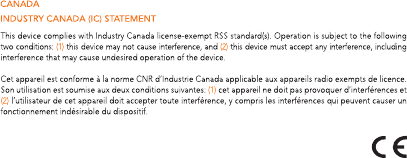
IC: 12131-ZEFT3
100100
©2016 Kronoz LLC, all rights reserved. Kronoz LLC, Avenue Louis-Casaï 18, 1209 Geneva, Switzerland
All brands or product names are or may be trademarks of their respective owners.
Pictures and specifications are not contractual.Les marques citées sont des marques déposées par leur
fabricant respectif. Photos et caractéristiques non contractuelles.
Designed in Switzerland - Made in China
101
101
https://www.mykronoz.com/support
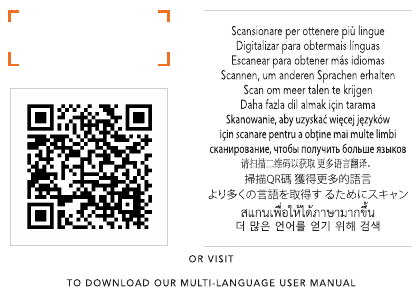
SCAN FOR
MORE LANGUAGES

www.mykronoz.com
© 2016 KRONOZ LLC. Tous droits réservés
