nTAG Interactive WV1000 nTAG Wave User Manual

nTAG Interactive LLC nTAG Wave

Contents

User manual

  Page 1   Operational Manual for the nTAG Wave Model WV1000    Copyright nTAG Interactive Operational Manual for the nTAG Wave Model WV1000                                       nTAG Interactive  311 Summer Street Boston, Massachusetts 02210
  Page 2   Operational Manual for the nTAG Wave Model WV1000    Copyright nTAG Interactive Table of Contents 1. NOTICES.......................................................................................................3 2. LIST OF COMPONENTS ..............................................................................3 3. OPERATION .................................................................................................5 3.1. Installing Batteries ......................................................................................................................... 5 3.2. Initializing the nTAG Wave .......................................................................................................... 5 3.3. Resetting the device........................................................................................................................ 5 3.4. Removing Batteries ........................................................................................................................ 5  List of Figures  Figure 1 nTAG Wave Back View with back off......................................................................................... 3 Figure 2 nTAG Wave Back View with back attached............................................................................... 4 Figure 3 nTAG Wave Front View............................................................................................................... 4
  Page 3   Operational Manual for the nTAG Wave Model WV1000    Copyright nTAG Interactive 1. Notices FCC ID: UBJ-WV1000   IC: 6562A-WV1000 nTAG Interactive LLC Model WV1000  This device complies with part 15 of the FCC rules.  Operation is subject to the following two conditions: (1) This device may not cause harmful interference, and (2) this device must accept any interference received, including interference that may cause undesired operation.   This Class [A] digital apparatus complies with Canadian ICES-003.  Cet appareil numérique de la classe [A] est conforme à la norme NMB-003 du Canada.  This operations manual is intended only for nTAG employees and their representatives. The end user of the nTAG Wave will never perform these operations.  There are no end user serviceable parts inside the nTAG Wave device. The nTAG Wave doesn’t have any hardware that is adjustable. 2. List of Components  The nTAG Wave Model WV1000 is a single device that has a back that can be unscrewed to insert batteries. The following figures show the key views of the device.   Figure 1 nTAG Wave Back View with back off Battery Positive Battery Positive
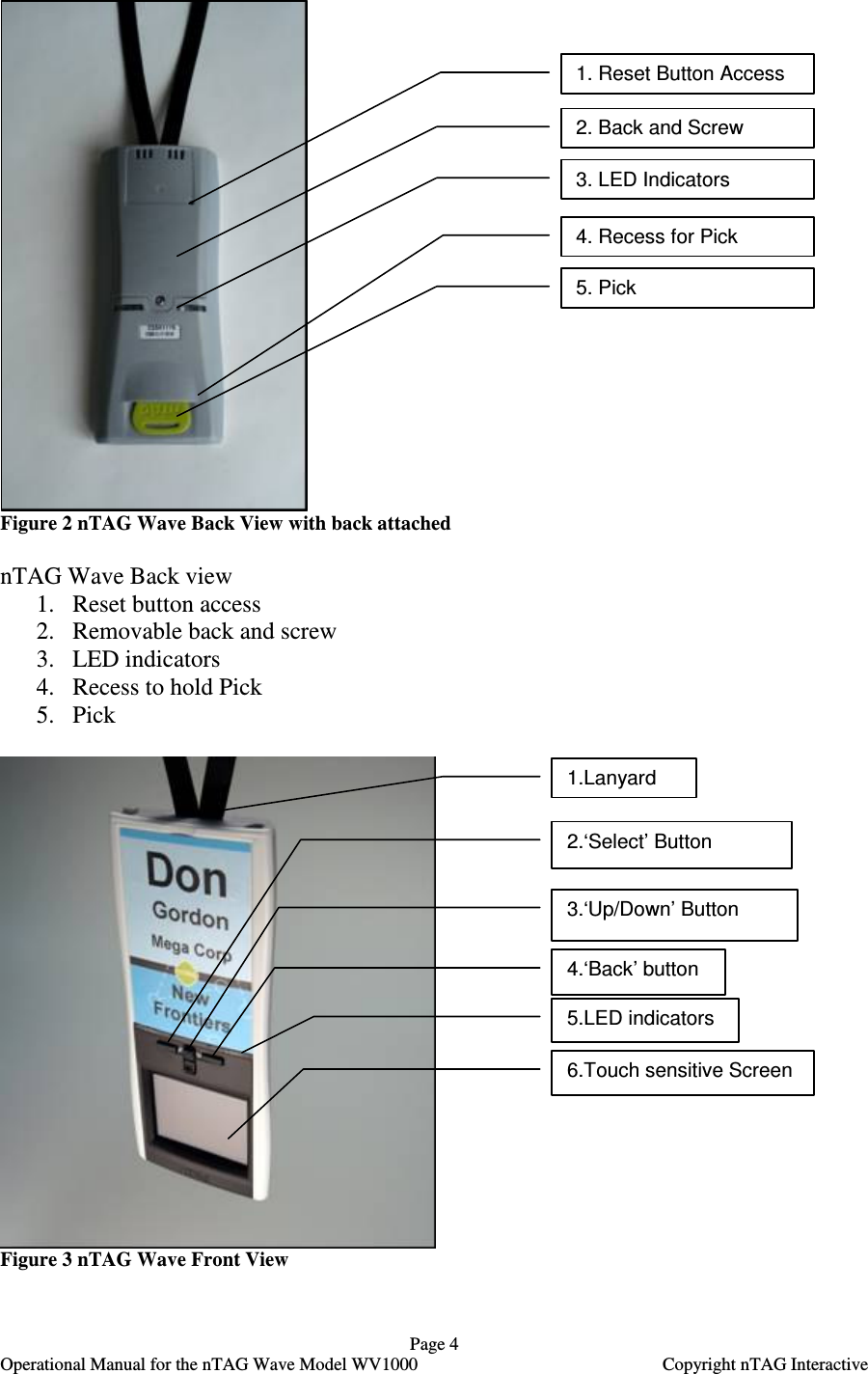
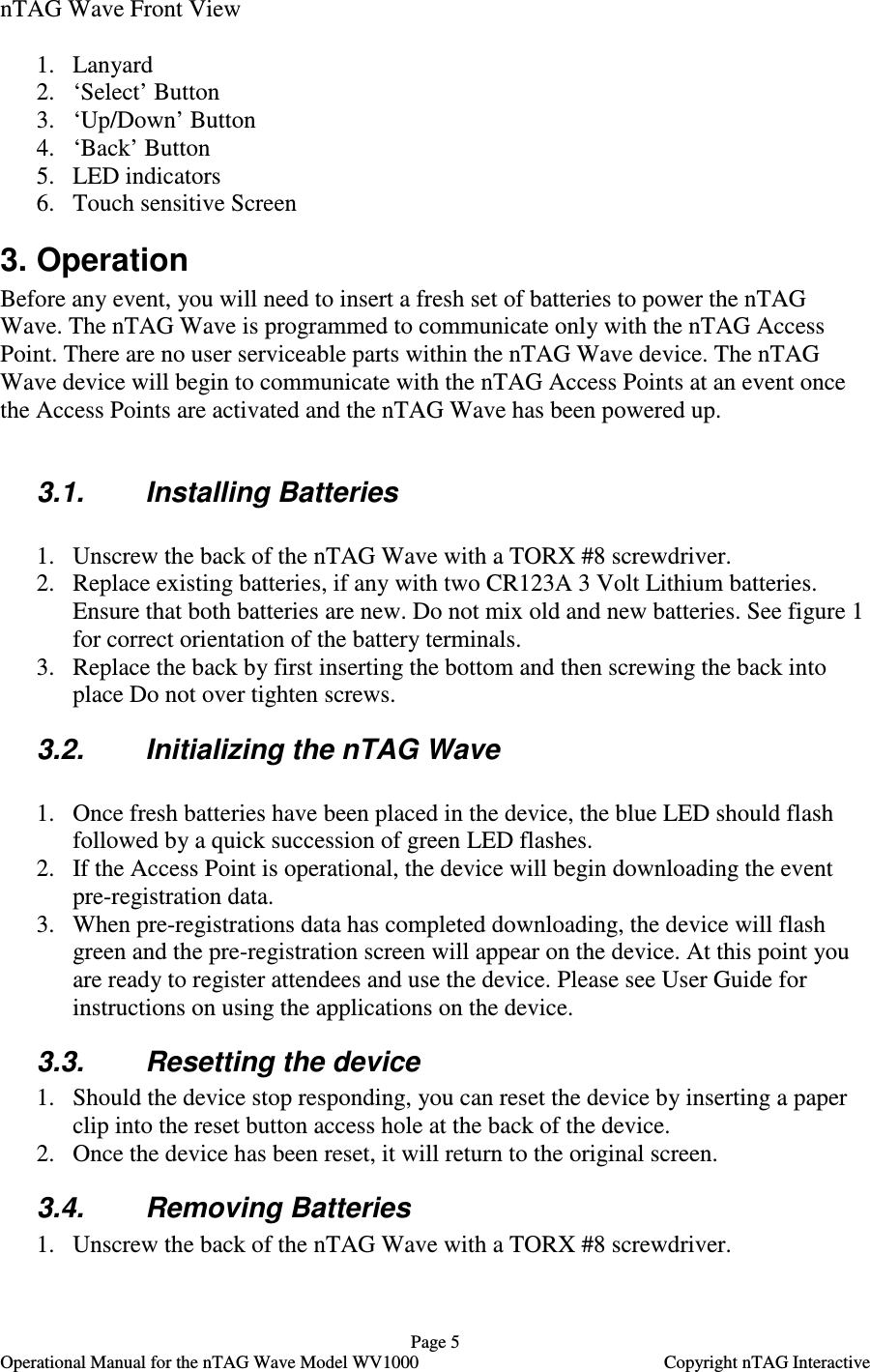
  Page 4   Operational Manual for the nTAG Wave Model WV1000    Copyright nTAG Interactive  Figure 2 nTAG Wave Back View with back attached  nTAG Wave Back view 1. Reset button access 2. Removable back and screw 3. LED indicators  4. Recess to hold Pick 5. Pick   Figure 3 nTAG Wave Front View  1.Lanyard 2.‘Select’ Button 3.‘Up/Down’ Button 4.‘Back’ button 6.Touch sensitive Screen 5.LED indicators 1. Reset Button Access 4. Recess for Pick 2. Back and Screw 3. LED Indicators 5. Pick
  Page 5   Operational Manual for the nTAG Wave Model WV1000    Copyright nTAG Interactive nTAG Wave Front View  1. Lanyard 2. ‘Select’ Button 3. ‘Up/Down’ Button 4. ‘Back’ Button 5. LED indicators 6. Touch sensitive Screen 3. Operation Before any event, you will need to insert a fresh set of batteries to power the nTAG Wave. The nTAG Wave is programmed to communicate only with the nTAG Access Point. There are no user serviceable parts within the nTAG Wave device. The nTAG Wave device will begin to communicate with the nTAG Access Points at an event once the Access Points are activated and the nTAG Wave has been powered up.  3.1.  Installing Batteries   1. Unscrew the back of the nTAG Wave with a TORX #8 screwdriver. 2. Replace existing batteries, if any with two CR123A 3 Volt Lithium batteries. Ensure that both batteries are new. Do not mix old and new batteries. See figure 1 for correct orientation of the battery terminals. 3. Replace the back by first inserting the bottom and then screwing the back into place Do not over tighten screws. 3.2.  Initializing the nTAG Wave  1. Once fresh batteries have been placed in the device, the blue LED should flash followed by a quick succession of green LED flashes. 2. If the Access Point is operational, the device will begin downloading the event pre-registration data. 3. When pre-registrations data has completed downloading, the device will flash green and the pre-registration screen will appear on the device. At this point you are ready to register attendees and use the device. Please see User Guide for instructions on using the applications on the device. 3.3.  Resetting the device 1. Should the device stop responding, you can reset the device by inserting a paper clip into the reset button access hole at the back of the device. 2. Once the device has been reset, it will return to the original screen. 3.4.  Removing Batteries 1. Unscrew the back of the nTAG Wave with a TORX #8 screwdriver.
  Page 6   Operational Manual for the nTAG Wave Model WV1000    Copyright nTAG Interactive 2. Remove the existing batteries. Ensure that batteries are properly disposed of. Do not dispose of in the thrash. Read instructions that come with the batteries for proper disposal directions. Ensure batteries are isolated in packaging to avoid short circuits.  3. Replace the back by first inserting the bottom and then screwing the back into place Do not over tighten screws.

Navigation menu