novero NBHS-4 Bluetooth Stereo Headset User Manual
novero International GmbH Bluetooth Stereo Headset
novero >
User manual
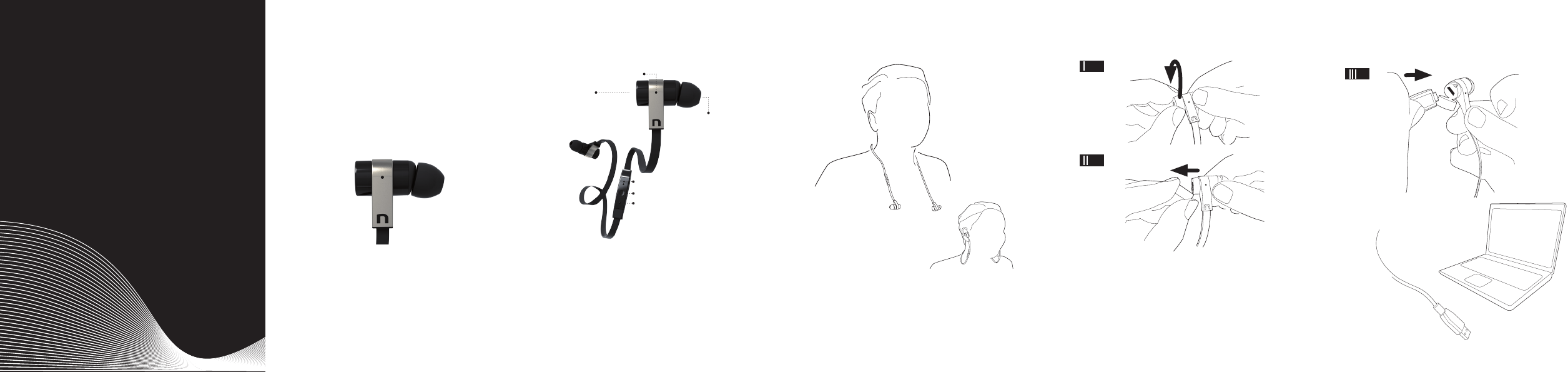
CHARGING
_ Openthecapofyourrightearpiecetochargeit
viaPCorLaptop
_ Yourheadsetwillbefullychargedafter
approximately2.5hours
_ Note:yourheadsetisalways“off”when
connectedtothechargertospeedupthe
chargingprocess
english
USERGUIDE
Rockaway
Bluetooth®stereoheadset
BIGSOUND-NOCORDS
RockawayisaBluetoothstereoheadsetthatlets
youtolistentoyourfavoritemusicinhighquality
audioandeventakecalls-withoutgettingtangled
upincords.JustconnecttoanyBluetoothenabled
musicplayer,phone,PC,laptoportabletandmove
tothebeat!
ToenjoyRockawaywithyourphone,laptopor
MP3Playermakesureyourdevicesupportsthese
proles:
_ BluetoothHandsfree
_ BluetoothAudio/VideoRemoteControl
_ BluetoothAdvancedAudio/VideoDistribution
HEADSETOVERVIEW
LED
charging
behindcap
exchangeable
earpieces
Volumeup/nextsong
Multi-Function-Button/play/pause/call
Volumedown/previoussong
_ exchangeableearpieces
_ charginginterface
_ remotecontrol
_ MFB=Multi-functionbutton
_ volumeup
_ volumedown
_ LED
HOWTOWEAR
1.Choosebestttingearpiecewithrespectto
comfortandnoisereduction,startwithsmallest
size
2.Attachtheclipwithcabletoyourshirt
3.Puttheheadsetintoyourearsandenjoy
LED
turning your headset on / off
Blue-goodbatterylevel
Red-lowbatterylevel
connection check
Pressvolumeupordown-continuousblueorred
whilepressing-youareconnected
Pressvolumeupordown-quickashingblueor
red5times=notconnected
incoming call
Flashingblue-incomingcall/batteryfull
Flashingred-incomingcall/batterylow
pairing mode
Flashingred/blue-startpairingfromyourphone
charging when connected to charger
Steadyred-chargingisongoing
Steadyblue-chargingisready
TONES
battery is low
Twotonestoinformyouthatyouneedtocharge
yourheadset
voice dial
AfteralongpressontheMFByouwillhearrsta
tonefromyourheadsetandthenfromyourmobile
phonetoconrmthatvoicedialisactivated
connection loss / failure
Youwillheartwoshorttones
maximum / minimum volume:
Youwillhearatoneatthemaximumorminimum
volume
held call:
Youwillhearatoneevery5secondstoremindyou
thatsomeoneiswaiting
PAIRING
Beforeyoucanuseyourheadsetyouneedtopair
itoncewithyourdevice.Afterasuccessfulpairing
theheadsetwillrememberyourdeviceandwill
automaticallyreconnecttoyourheadsetassoonas
itisturnedonandisinrange.
1.TurnontheBluetoothfunctiononyourphoneand
select”addnewBluetoothdevice”or”searchfor
Bluetoothdevices”
2.TurnonyourRockawaywithalongpressofthe
Multi-functionbuttoninthemiddle.Nowitwill
starttoashred/bluealternately.
3.ChoosenoveroRockawayoutoftheBluetooth
listonyourphoneandconnectit.Ifitasksyoufor
aPINitisalways“0000”
4.AllowRockawaytopermanentlybeconnected
5.Rockawaycanbepairedwithupto8devices.
6.Ifitdoesn‘tstarttoashred/blueautomatically
pleasepowerupagainandholdtheMFBfor4
secondsuntilitstartstoashred/blue.Youcan
alsopressvolumeupanddownsimultaneously,
whentheheadsetispoweredon,toenterthe
pairingmode.
TURNON/OFF
to turn the headset on
PresstheMFBfor1seconduntiltheLEDturnson
to turn the headset off
PresstheMFBfor4seconds
SLEEPMODE
Rockawaysupportsalowpowersleepbattery
modetooptimizepowerconsumptionandwhich
allowstohaveaquickstartupifdeviceisnot
switchedoff.
turning sleep mode on
WhenthereisnoactivityRockawaywillautomati-
callygotolowpowermodetosaveenergy.
PHONECALLS
to make a call
Dialthenumberfromyourphoneoractivatevoice
dialwithalongpressontheMFB
to answer a call
ShortpressoftheMFB
to end a call
ShortpressoftheMFB
to reject an incoming call
LongpressoftheMFB
to redial the last dialed number
DoublepressoftheMFB
to mute your mic
Usethisfunctiondirectlyonyourphone
MUSICLISTENING
to listen to music
PresstheMFBshortly*
to pause the music
PresstheMFBshortly
to skip to next / previous track
Longpressonvolumeup/volumedown
to change music volume
Shortpressonvolumeup/volumedown
to make a call while listening to music
PresstheMFB1secondtoactivatevoicedialor
justenteryourphonebookonyourdevice
*ifthisfunctionisnotsupportedbyyourplayeryou
havetostartitmanual
ADVANCEDCALLS
to answer an incoming second call
ShortpressofMFB
to reject a second incoming call
LongpressofMFB
to switch between two active calls
LongpressofMFB
to end one call and to switch to the other
ShortpressofMFB
to activate a private call from phone
PressMFBtorouteaudiototheheadset
SPECIFICATION
headset weight:app.10grams
operating range:10meters(33feet)
battery:Li-ionbattery,builtin,rechargeable
talk-time / play-time: upto5,5hours
stand-by time:approx.250hours
supported proles:Bluetooth2.1,HandsfreePro-
le1.5,HeadsetProle1.1,A2DP1.2,AVRCP1.4
FAQ
no connection to phone
Checkthatyourheadsethasafullbatteryandthat
yourphoneisBluetoothenabled.Trythepairing
procedureagainandmakesureyourheadsetis
notstillpairedwithanotherdevice.Pleasepress
volume+andvolume-for10secondstodoafac-
toryreset.
voice dial does not work
Makesureyourphone/devicesupportsvoice
dialing;makesureyouhavealreadyrecordedyour
voicetagstoyourphoneifneeded
you can‘t hear music through your headset
Checkthattheheadsetisconnectedandthatyou
chosetherightgatewayinyourmusicplayer
automatic sleep mode
Ifyoudon‘tconnectyourphonewithyourheadsetit
willgointosleepmodeaftersometime
no LED reaction of Rockaway at all
Pleasetryrsttopoweriton,ifthatdoesnotwork,
pleasechargeyourheadsetovernight
poor audio quality
Pleasecheckdifferentearpiecestoseeiflow
frequencyresponsechangessignicantly
no sound in your headset:
Checkthatthevolumeisadjustedcorrectly.Check
thatyourheadsetisconnectedwithyourdevice.
Checkthatyourheadsetanddeviceareturnedon.
Youshouldthenhearasoundfromyourheadset.
Checkthatyourheadsetanddevicearecharged.
if you cannot pair your headset:
Checkthattheheadsetisnotalreadyconnected
withyourdevice.Ifnot,thenrepeatthepairingpro-
cedure,orpressthepowerbuttonforalongperiod
(4sec.)toentermanualthepairingmode
if you hear static or noise in your headset:
Checkthattheheadsetisclosetoyourmobilede-
vice.Ifnot,movetheheadsetclosertothedevice.

FACTORYRESET
to reset your headset:
PresstheMFBuntilitashesblue/red.Nowpress
volumeupandvolumedownatthesametimefor
10-15seconds.
DELETEPAIRINGLIST
to delete pairing list:
PresstheMFBuntilitashesblue/red.Nowpress
volumeupandvolumedownatthesametimefor
10-15secondstodeletethepairinglist.
*afterafactoryresetorafterdeletingthepairinglistyouwillneedto
dothepairingofheadsetandphoneagain
CARE
StoreRockawayinoffstateandsafelyprotected
whennotinuse.DonotuseRockawayforsports
asitisnotwaterresistant.Storetheheadsetout of
direct sunlightandextremetemperatures(above
45°C/113°Forbelow-10°C/14°F),asthismay
shortentheLi-ionbatterylife,affecttheoperationor
degradetheperformanceofyourheadset.
Storetheheadsetaway from magnetic strips (e.g.
oncreditcards)andelectronicmedicaldevices.
Handleyourheadsetwithcare.Do not drop,
knock or shake it, or expose it to heavy dust,
dirt, moisture, rain or other liquids.
Disposeofallproductpartsinaccordancewithlocal
standardsandregulationstosparetheenvironment
andpromotesustainability.
Handleyourclipwithcare.Donotuseitonsensible
clothesasallclipscanleavemarksonyourclothes.
SAFETY&DISPOSAL
before using the headset:
Turnthevolumedowntoitslowestlevel.Thenput
theheadsetonandslowlyadjustthevolumetoa
comfortablelevel.
Topreventpossiblehearingdamage,donotlisten
athighvolumelevelsforlongperiods.
radio frequency exposure
YourBluetoothStereoHeadsetisradiotransmitter
andreceiver.Wheninoperation,itcommunicates
withBluetoothequippedmobiledevicesbyreceiv-
ingandtransmittingradiofrequency(RF)elec-
tromagneticeldsinthefrequencyrangearound
2400-2483,5MHz.Theoutputpoweroftheradio
transmitterislow,app.0.001watt.YourBluetooth
stereoheadsetisdesignedtooperateincompli-
ancewiththeRFexposureguidelinesandlimits
setbynationalauthoritiesandinternationalhealth
agencieswhenusedwithanycompatibleBluetooth
device.
using Rockaway
Keepthevolumeatthelowestlevelpossibleand
avoidusingtheheadsetinnoisyenvironments
whereyoumaybeinclinedtoturnupthevolume.
–Ifyouneedtoadjustthevolume,doitslowlyto
avoidsudden,unintendedloudsounds.
Ifyouexperiencediscomfortorringinginyourears,
stopusingtheheadsetimmediatelyandconsulta
physician.
Continueduseathighvolumesmayaccustomyour
earstothesoundlevelandresultinpermanent
damagetoyourhearingwithoutanynoticeable
discomfort.Becautiousaboutwearingyourheadset
whileengaginginanyactivitythatrequiresyourfull
attentionlikedrivingforexample.Removeandturn
offyourheadsettokeepyoufrombeingdistracted
andavoidaccidents.
using your headset while operating
Amotorvehicle,motorcycle,watercraftorbicycle
maybedangerous,andisillegalinsomejurisdic-
tions.Pleaserespectlocallaws.
Ifyouuseapacemaker,hearingaidorotherelec-
tronicmedicaldevice,pleaseconsultyourphysician
beforeusingtheheadset.
never try to dismantletheproductyourself.None
oftheinternalcomponentscanbereplacedorre-
pairedbyusers.Onlyauthorizeddealersorservice
centresmayopentheproduct.Ifanypartsofyour
productrequirereplacementforanyreason,includ-
ingnormalwearandtearorbreakage,contactyour
dealer.
keep out of reach of children
Containssmallparts-keepawayfromchildren.
Theplasticbags,whichthisproductanditsparts
arewrappedin,arenottoysforchildren.Thebags
themselvesorthemanysmallpartstheycontain
maycausechokingifingested.
ACA TS028 – Ignition of ammable atmospheres
Donotuseyourheadsetinenvironmentswithrisk
ofignitionofammablegases.
disposing of Rockaway
Donotattempttoreplacethebuilt-inLi-ionbattery
inyourheadset.Disposeofallproductpartsinac-
cordancewithlocalregulations.Ifindoubt,please
consultyourlocalauthorities.
Thecrossed-outwheeledbinmeansthatwithin
theEuropeanUniontheproductmustbetakentoa
separatecollectionfacilityattheproduct’send-of
-life.Donotdisposeoftheseproductsasunsorted
municipalwaste.
Reproduction,transfer,distributionorstorageof
partorallofthecontentsinthisdocumentinany
formwithoutthepriorwrittenpermissionofnovero
isprohibited.novero®isaregisteredtrademark.
Otherproductandcompanynamesmentioned
hereinmaybetrademarksortradenamesoftheir
respectiveowners.
noveroproductsaretrademarksorregisteredtrade-
marksofnoveroGmbH&noverointernational.
©2011novero.Allrightsreserved
Forrecyclingcompaniesonly:ToremovetheLi-ion
batteryforrecycling,pushtheearpieceopenby
insertingascrewdriverintotheUSBportandbreak-
ingtheplastics.
Moreinformationonwww.novero.com
WARRANTY
Rockawayhasalimitedone-year(1)warranty.
noverowarrantsthisproducttobefreefromdefects
inmaterialsandworkmanship(subjecttotheterms
setforthbelow)foraperiodofone(1)yearfrom
thedateofpurchase(“warrantyperiod”).Duringthe
warrantyperiod,noverowillrepairorreplacethis
productoranydefectivepartsatnovero’sdiscretion
(“warrantyservice”).Ifrepairorreplacementisnot
commerciallypracticableorcannotbecompletedin
atimelymanner,noveromaychoosetoissueyou
arefundofthepurchasepricepaidfortheaffected
product.Repairorreplacementunderthetermsof
thiswarrantydoesnotgivetherighttoanyexten-
sionornewbeginningofthewarrantyperiod.The
warrantydoesnotcovernormalwearandtearor
defectscausedbyroughhandling.
Claimsunderthewarranty:Toobtainwarrantyser
vice,pleasecontactthenoverodealerfromwhom
youpurchasedthisproductorvisit
www.novero.comforfurtherinformationaboutcus-
tomerservice.Ifyouliketoextendyourwarranty
pleasevisitwww.novero.com.Youwillneed

toreturnthisproducttotheplacewhereyouhave
boughtitineithertheoriginalboxorpackagingaf-
fordinganequaldegreeofprotection.Youwillbear
thecostofshippingtheproducttonovero.Ifthe
productiscoveredbythewarranty,noverowillbear
thecostofshippingtheproductbacktoyouafter
completionofthewarrantyservice.Returnshipping
willbechargedtoyouforproductsnotcoveredby
thewarrantyorrequiringnowarrantyservice.For
moresupportandfurtherinformation,pleasegoto
www.novero.com
CERTIFICATION&SAFETY
Declaration of Conformity
Hereby,novero,declaresthatthisNBHS-4product
isincompliancewiththeessentialrequirements
andotherrelevantprovisionsofDirective1999/5
/EC.
AcopyoftheDeclarationofConformitycanbe
foundatwww.novero.com/declaration_of_confor-
mity
FCC/Industry Canada notice
ThisdevicecomplieswithPart15oftheFCCRules
andIndustryCanadaRules.Operationissubjectto
thefollowingtwoconditions:
1.Thisdevicemaynotcauseharmfulinterference;
and
2.Thisdevicemustacceptanyinterference
received,includinginterferencethatmaycause
undesiredoperation.
FCC ID: ZORNBHS-4
IC: 7847C-NBHS4
NOTE:FCCandIndustryCanadaRulesRadiation
ExposureStatement:Thisequipmentcomplieswith
FCCandIndustryCanadaRulesradiationexposure
limitssetforthforanuncontrolledenvironment.End
usersmustfollowthespecicoperatinginstructions
forsatisfyingRFexposurecompliance.
Thistransmittermustnotbeco-locatedoroperating
inconjunctionwithanyotherantennaortransmitter.
NOTE:Changesormodicationsnotexpressly
approvedbynoverocouldvoidtheuser’sauthority
tooperatetheequipment.Bluetooth®isaregistered
trademarkofBluetoothSIG,Inc.
Sales Package text:
NBHS-4BluetoothStereoHeadset
ChargingCable
Carryingcase
Clip&UserGuide
- wirelessmusicstreaming
- makehandsfreephonecalls
- 5,5hplaytime,250hstand-by
- BT-headset,clip,chargingcableearpieces,
Quickguideincluded
only10gramweight
Theavailabilityofparticularproductsmayvaryby
region.Pleasecheckwiththenoverodealernearest
you.
Unauthorizedchangesormodicationstothisde-
vicemayvoidtheuser’sauthoritytooperatethe
equipment.
Exportcontrols:Thisdevicemaycontaincommodi-
ties,technologyorsoftwaresubjecttoexportlaws
andregulationsfromtheUSandothercountries.
Diversioncontrarytolawisprohibited.
NOTES