Pyle PLCM7200x PL CM7200 Owner's Guide PLCM7200 EN
User Manual: pyle PL-CM7200 - Owner's Guide Free User Guide for Pyle Audio Camcorder, Manual
Open the PDF directly: View PDF  .
.
Page Count: 5


WARNING:Failuretoreadandfollowthesewarningsandinstructionsmayresultinseriousinjury,includingdamaged
property,sopleasepaycloseattentionandexhibittheutmostcare.
•TheDigitalBackupCameraisdesignedasanaidtothedriverindetectingpotentiallyhazardousdrivingconditions,
obstructions,andlargestationaryobjects.You,thedriver,mustalsoremembertodrivesafelyandproperly.Useofthe
DigitalBackupCameraisnotasubstituteforsafe,properandlegaldrivingpractices.
•Neverbackupwhilelookingonlyatthescreen.Youshouldalwayscheckbehindandaroundthevehiclewhenbacking
upjustasyouwouldifthevehicledidnothavetheDigitalBackupCamera.Alwaysmakesureyourdrivingareaisclear.
Alwaysbackupslowlyandwithcaution.
•NeverdependontheBackupCameraentirelywhenbackingup.Theimageonthescreenisdifferentfromactualand
real‐timeconditions.Objectsviewedintherearviewmonitordifferfromactualdistancesbecauseawide‐anglelensis
used.Sousethecameraasanaidandalwaysfollowintendeddrivingpracticestoproperlyjudgedistancesfromobjects.
•TheBackupCamera'sassistedlowluxlightingperformancefeatureisalsoanaidtoadriver.Alwaysuseyourowneyes
toconfirmthevehicle’ssurroundings,asthedisplayedimagemaybenotwelllitornotentirelyvisible.Alwaysproceed
withcautionandperformdouble‐checksbeforeproceeding.
•TheareadisplayedbytheBackupCameraislimited.Itdoesnotdisplayobjectsthatareclosetoorjustbelowthe
bumper,underneaththevehicle,orobjectsoutofthecamera’sview.Thecamera'sviewcanchangeaccordingtoyour
vehicle'sorientationontheroadorchangingroadconditions.
•Besuretoalwayscheckthecameraisproperlyfunctioning,isproperlypositionedandsecurelymounted.
•Makesureyourtrunkorhatchoperatescorrectly,asintended,beforeandafterinstallation.
•Proceedwithcautionwhencleaningyourvehiclearoundthecamera.Avoidexcesswaterexposurearoundthecamera
especiallywithsprayingorapowerwasher.
•Pleasemakesuretokeepthecameracleanandunobstructedfromanydebris
•Followalltrafficlawsandmotorvehicleregulations.
•Consultlocallawsandregulationsforanyrestrictionsoninstallationoruse.
•UsingaBackupCameraSystemisnotadequateenoughtocompletelyeliminateavehicle’sblindspot.Alwaysremember
todrivewithcaution,followingalltrafficlaws.
Pleasereadalloftheinstallationinstructionscarefullybeforeinstallingtheproduct.Improperinstallationwillvoid
manufacturer’swarranty.Theinstallationinstructionsdonotapplytoalltypesofvehicles,andarewrittenas
guidelinestoassistininstallingthesystem.Pleaseconsultanexperiencedtechnicianifyouarenotcomfortable
installingtheproduct.PriortousingandinstallingtheBackupCameraSystem,pleasereadthesafetyinformation
providedinthisusermanual.Besuretousetheproductasoutlinedinthisusermanual.Altercationormodifications
carriedoutwithoutappropriateauthorizationmayinvalidatetheuser'srighttooperatetheequipment.

SystemInstallationandWiring
CameraSysteminstallationondieselvehiclesmayrequireaslightlydifferentwiringinstall.Theseinstallationinstructionsdonotapply
toalltypesofvehicles.Theyaremeantonlyasageneralguideduetothelargenumberofvehiclemakesandmodels.Consultyour
localmotorvehiclelawsontheuseofthisproducttobesureitispermitted.Throughinstallationofthisbackupcamerasystem,you
shouldbesureastonotdegrade,damageorcompromisethesafetyofanysystemordeviceonyourvehicle.Improperinstallation
andwiringofthevehicleback‐upcamerasystemmaydamagethevehicle'selectricalsystem,includingvitalvehiclecomputerand
operatingsystems.Thatcouldleadtoanaccidentorfire,causingpropertydamageand/orseriouspersonalinjury.Itishighly
recommendedtoseekprofessionalinstallationadvicefromaqualifiedautoelectricianor,inthealternative,tohavetheinstallation
performedbyaqualifiedautoelectrician.
PleaseensurethatyourmonitorissecuredandmountedwhereitwouldNOTobstructanyOEMvehiclesafetyfeatures.Inaneventof
anaccident,manufacturerisnotresponsibleforbodilyinjurycausedbythemonitorbeingaprojectile.Selectlocationformounting
themonitorindesiredlocation.Ensuremonitorlocationwillnotobstructyourvisionwhiledriving.Themanufacturerassumesno
liabilityfordamagecausedtoyourvehicleduetoimproperinstallationoruse.
QuickInstallation:
Thebackupcamerasystemiscompatiblewithawiderangeofvehiclesandvideodisplaymonitors.
Thiskitincludesnecessarywiringandcableconnectoraccessoriessufficientfortypicalconnections.However,
additionalaccessorycablesandinstallationmaterialsmaybenecessaryforacompletelysecureand
operationalbackupcameraperformance.
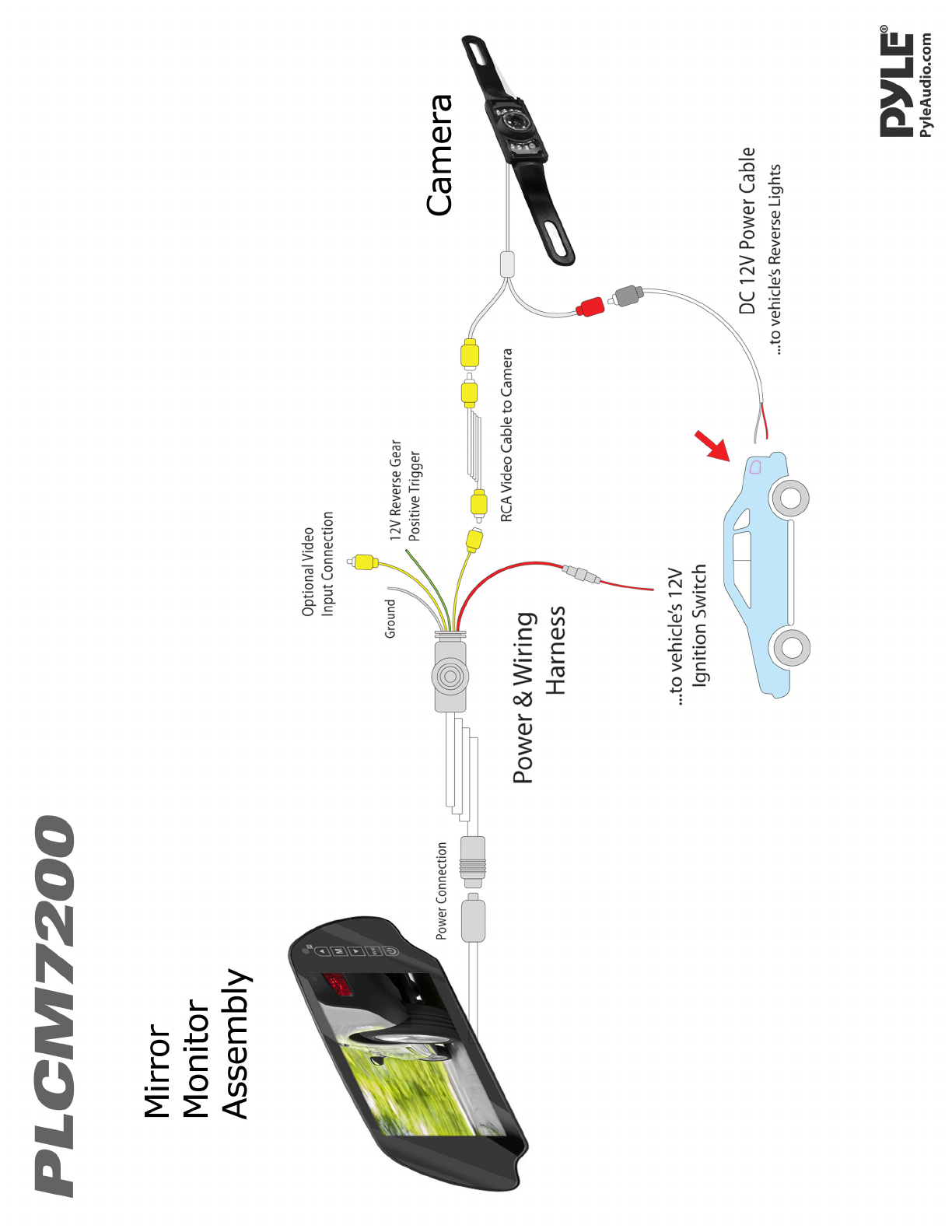
Connectthecamera,usingtheredcable,oftheDC12Vpowercable,tothepositive12Vreversetaillightinthe
rearofyourcar.Youmayneedtotemporarilyremoveaninteriorpanelorothercover.Then,connecttheblack
wire,oftheDC12Vpowercable,andgroundproperly.Thisconnectedpowerandgroundcableconnectstothe
camera,andwillsupplypowertothecameradirectly.(Redwireispositive,blackwireisnegative)
ThenusetheincludedyellowRCAvideoconnectorcable,andrunthatcabletotheyellowRCAvideoconnector
jackofthecamera,totheRCAvideoconnectorofacompatiblevideodisplaymonitor.
*Thesystemincludesanadditionalvideoinputconnection,soyouwillhavetheabilitytoconnectanadditional
videoinputsource.Theinputsourceisthenselectableviabuttononthemirrormonitorassembly.
Connectthemonitorusingtheincludedpowerandvideowiringharness.Usingtheredcable,ofthepowerand
videowiringharness,connecttoyourvehicle'sfusepanel(preferablytothe12Vignitionswitch)‐whichwillonly
bepoweredwhenyourvehicleison,oractivatedbykey.Thenconnecttheblackwire,oftheDC12Vinput,and
groundproperly.Thegreenwire,onthepowerandvideowiringharness,isthe12Vreversegearpositive
trigger,whichwillprovideapicture,tothemirrorvideomonitorassembly,whenthegearisplacedinreverse.
Thepowerandvideowiringharnessthenconnectstothemirrorvideomonitorassembly.Thisconnectionwill
supplypowertothemonitordirectly.
‐Determinethebestlocationforthecamera(Thecameraispreferablymountedjustabovethelicenseplate).
‐ Besurewhenrunningtheconnectioncablestoleaveasmallamountofslacksoyoucanstillmovethecameraaroundthelicense
plate,ifyoudecidetoslightlyadjustthecamera'spositioningatalatertime.
Caution:Thisunitisdesignedtooperateona12V/24VDCNEGATIVEGROUNDelectricalsystems.Connectingtoothertypesofelectrical
systemswillcausedamagetoyourvehicle.Pleasecontactthemanufacturerifyouareunawareofthesystemtypeinyourvehicle.
‐ Afterinstallationtestthecamerabeforeuse.Placingyourvehicleinreverseshouldprovideapictureinthemonitorwithinthe
rearviewmirrorassembly.
Mountthecamerainthedesiredlocation,thenconnecttheincludedRCAvideocable,fromthecamera,andrunthecablethroughto
yourvideodisplay'sRCAconnection.Makesuretorouteallcablesandwiringintheleastobtrusiveroutepossibleastoavoidconfict
withothervehiclecircuitryandtoensureasafeandstableinstallation/connection.
InterfaceDisplay
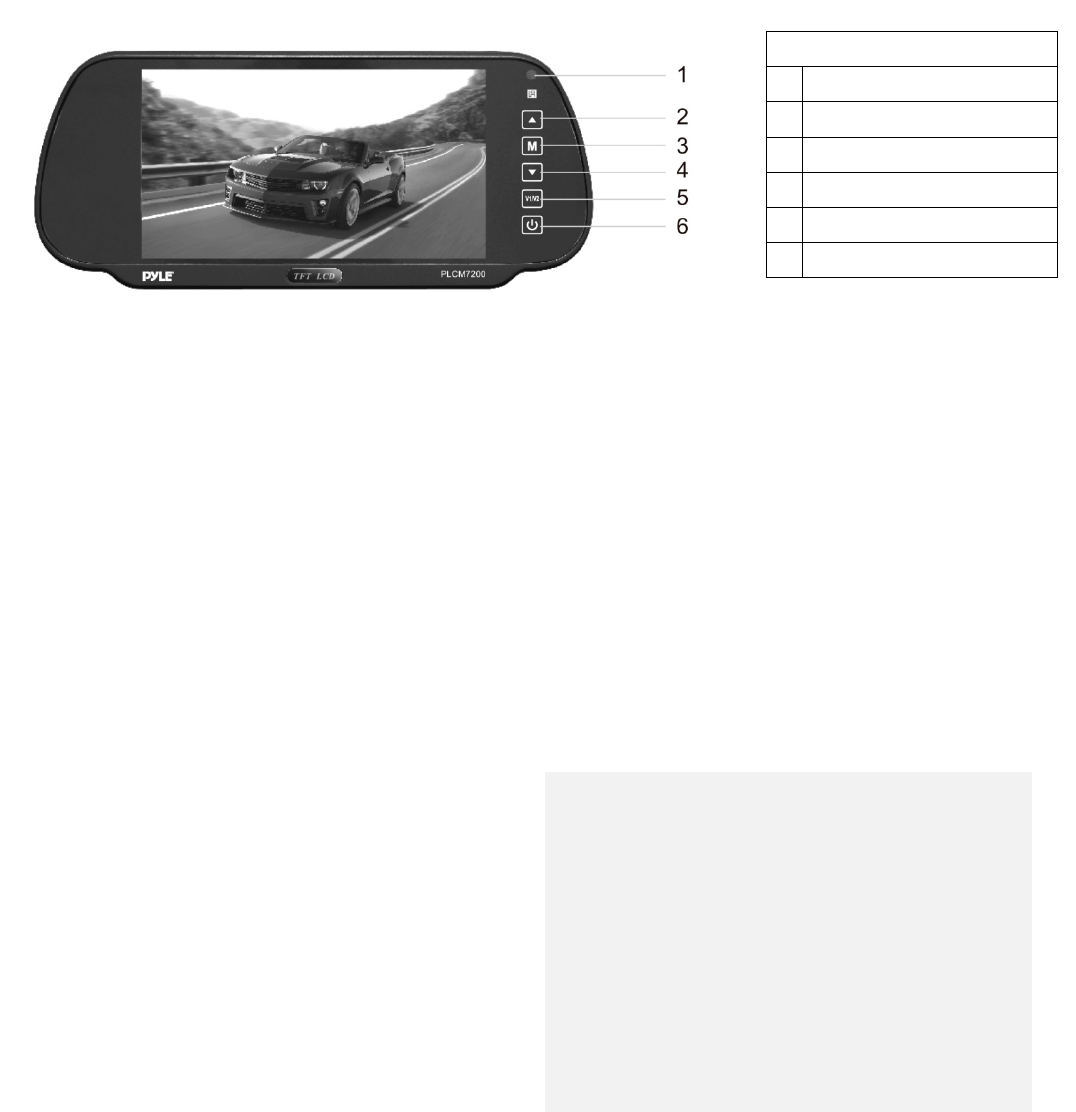
Therearviewbackupmirrormonitorassemblyprovidessofttouchbuttoncontrols.Gainaccesstomenuandpower
optionsbytouchingthedesiredbuttons.Accessthe'Menu'andmakeadjustmentstoBrightness,color,contrastand
volume.ON/OFFswitchcontrolspowertotheLCDdisplayscreenmonitor.The'InputSelection'buttonallowsyouto
switchtheLCDdisplaysourcefromconnectedinputsV1/V2(ifanoptionalandcompatibleinputsourceisconnected).
Specifications
BackupCamera&MonitorSystem
IncludesAllNecessaryCables&Wiring
Camera:
ExteriorLicensePlateMountCam
NightVisionPerformance
LowLuxLightIllumination
ExtraWideViewingAngle
SlimStyleCompactCamera
Monitor:
Built‐intoRearviewMirrorAssembly
UniversalSizeClipsontoExistingMirrors
7''TFT/LCDMirrorMonitorScreenDisplay
16:9WideScreen
Resolution:480x234Pixels(RGB)
ContrastRatio:400CD/M2
AntiGlareCoating
DualVideoInputs
AbilitytoConnectAdditionalVideoSource
PowerConsumption:6W
AutoSwitchPAL/NTSC
Dimensions/Size:
Screen(WxH):5.9''x3.25''
MirrorAssembly(LxWxH):10.0''x1.5''x4.25''
CameraDimensions(LxWxH):8.46''Wx1.29''Hx1.37''D
Controls
1RemoteWindow
2 AnalogIncrease
3Menu
4 AnalogDecrease
5InputSelection
6ON/OFF
Note:
Neverconnectthecarmonitortocigarettelighters
invehicleswith24VDCpower
Donotexposethemonitortohighhumiditylevels,
dust,steam,smokeorexcessivedirectsunlight.
TurnthepowerOFFwhennotinuse.
Pleaserefertoservicefromaqualifiedand
professionalserviceengineerwhenneeded.