Vmware Site Recovery Manager Administration Guide V Center 1.0 Srm 10 Admin
User Manual: vmware vCenter Site Recovery Manager - 1.0 - Administration Guide Free User Guide for VMware vCenter Software, Manual
Open the PDF directly: View PDF  .
.
Page Count: 96
- Administration Guide
- Contents
- About This Book
- Overview of Site Recovery Manager
- System Requirements
- Installing or Updating Site Recovery Manager
- Managing SRM
- Protected Site Configuration
- Recovery Site Configuration
- Failback
- Alerting and Monitoring
- Protected and Recovery Site Changes
- Preinstallation Checklist
- Failback Checklist
- Use the srm-config command to repair an SRM server connection
- Avoiding Replication of Paging Files and Other Transient Data
- Glossary
- Index

Administration Guide
Site Recovery Manager 1.0 Update 1
VMware, Inc.
3401 Hillview Ave.
Palo Alto, CA 94304
www.vmware.com
2VMware, Inc.
Site Recovery Manager Administration Guide
You can find the most up-to-date technical documentation on the VMware Web site at:
http://www.vmware.com/support/
The VMware Web site also provides the latest product updates.
If you have comments about this documentation, submit your feedback to:
docfeedback@vmware.com
© 2008 VMware, Inc. All rights reserved. Protected by one or more U.S. Patent Nos. 6,397,242,
6,496,847, 6,704,925, 6,711,672, 6,725,289, 6,735,601, 6,785,886, 6,789,156, 6,795,966, 6,880,022,
6,944,699, 6,961,806, 6,961,941, 7,069,413, 7,082,598, 7,089,377, 7,111,086, 7,111,145, 7,117,481,
7,149,843, 7,155,558, 7,222,221, 7,260,815, 7,260,820, 7,269,683, 7,275,136, 7,277,998, 7,277,999,
7,278,030, 7,281,102, 7,290,253, 7,356,679, 7,409,487, 7,412,492, 7,412,702, 7,424,710, 7,428,636,
7,433,951, 7,434,002, and 7,447,854; patents pending.
VMware, the VMware “boxes” logo and design, Virtual SMP, and VMotion are registered trademarks or
trademarks of VMware, Inc. in the United States and/or other jurisdictions. All other marks and names
mentioned herein may be trademarks of their respective companies.
Site Recovery Manager Administration Guide
Item: EN-000096-00
VMware, Inc. 3
Contents
AboutThisBook 7
1OverviewofSiteRecoveryManager 9
VMwareInfrastructureSupportsSiteRecoveryManager 9
SiteRecoveryManagerFeatures 10
SiteRecoveryManagerRequirements 11
SiteRecoveryManagerEnvironment 12
Array‐BasedReplication 13
SiteRecoveryManagerProcessOverview 14
InstallSRM 14
SetUptheProtectedandRecoverySites 15
ConfigureVirtualMachines 16
2SystemRequirements 19
PrerequisitesforSRMInstallation 19
SRMHardwareandSoftwareRequirements 20
SRMDatabaseRequirements 21
MicrosoftSQLServerConfiguration 22
OracleServerConfiguration 23
ConfigurationMaximums 23
SRMLicensing 24
ImportLicenseFiles 24
3InstallingorUpdatingSiteRecoveryManager 27
InstallSiteRecoveryManager 28
UpdateSiteRecoveryManager 31
InstalltheSiteRecoveryManagerPlug‐In 31
UpdatingDatabaseCredentials 32
RevertingtoaPreviousRelease 32
Site Recovery Manager Administration Guide
4VMware, Inc.
4ManagingSRM 33
UsetheVIClienttoManageSRM 33
ConnectingtheProtectedandRecoverySites 34
Credential‐BasedAuthentication 35
Certificate‐BasedAuthentication 36
SRMUsers,Groups,Permissions,andRoles 37
SRMPermissions 37
SRMDefaultRoles 38
AddRoles 39
AssignVirtualCenterAccessPermissions 39
AddaNewUserGroupandRoletoSRM 40
ChangeAccessPermissions 41
RemoveAccessPermissions 42
AccessSRMLogFiles 42
5ProtectedSiteConfiguration 43
ConfiguringtheProtectedSite 43
RequirementsforVMwareInfrastructureConfiguration 44
ConfigureArrayManagers 44
RepairArrayManagers 46
ConfigureInventoryPreferences 47
CreateaProtectionGroup 48
ConfiguringVirtualMachineProperties 49
ConfigurePropertiesforProtectedVirtualMachines 50
AddMessageandCommandSteps 52
RunBatchFilesorCommands 52
IPAddressMapping 53
BatchIPPropertyCustomization 54
6RecoverySiteConfiguration 59
CreateaRecoveryPlan 60
ManagingRecoveryPlans 61
EditaRecoveryPlan 62
TestaRecoveryPlan 63
Pausing,Resuming,orCancellingaTest 63
RunaRecoveryPlan 64
RemoveaRecoveryPlan 64
VMware, Inc. 5
Contents
ConfigureVirtualMachinesinaRecoveryPlan 65
ViewaRecoveryPlan 66
ViewRecoveryPlanHistory 67
ExportRecoveryHistoryResults 67
WorkwithCustomizationSpecifications 67
7Failback 69
FailbackScenario 69
OtherFailbackConsiderations 74
8AlertingandMonitoring 75
SRMAlarms 75
AboutSRMAlarmTriggers 76
EditSRMAlarmSettings 76
PrepareforAlarmNotificationbyEmail 78
9ProtectedandRecoverySiteChanges 79
ChangestoVirtualCenterServer 79
ChangestoProtectedSites 79
ChangestoRecoverySites 80
APreinstallationChecklist 81
BFailbackChecklist 83
CUsethesrm‐configcommandtorepairanSRMserverconnection 85
DAvoidingReplicationofPagingFilesandOtherTransientData 87
SpecifyaNonreplicatedDatastoreforSwapfiles 87
CreatingaNonreplicatedVirtualDiskforPagingFileStorage 88
Glossary 91
Index 93
Site Recovery Manager Administration Guide
6VMware, Inc.

VMware, Inc. 7
Thismanual,theSiteRecoveryManagerAdministrationGuide,providesinformation
aboutinstallingandconfiguringVMware®SiteRecoveryManager(SRM),adisaster
recoveryplug‐inforVMwareVirtualCenterServer.Theinformationincludesa
conceptualoverviewofconfiguringandmanagingsites,recoveryplanning,testingand
performingfailover,alerts,systemmanagement,andtroubleshooting.
Intended Audience
ThismanualisintendedforanyonewhowantstoinstalloruseSiteRecoveryManager.
TheinformationinthismanualiswrittenforexperiencedWindowsorLinuxsystem
administratorswhoarefamiliarwithvirtualmachinetechnologyanddatacenter
operations.ThismanualalsoassumesfamiliaritywithVMwareVirtualInfrastructure,
includingVMwareESX3.x,theVirtualCenterServer2.5,andtheVIClient.Youshould
alsohaveworkingknowledgeofstoragenetworktechnology,specificallyFibreChannel
oriSCSIstorageareanetworksandhowVirtualInfrastructureinteractswiththem.
VMware Infrastructure Documentation
IfyouarenotalreadyfamiliarwiththeVIClient,consulttheVMwareInfrastructure
documentation,whichconsistsofthecombinedVirtualCenterServerandESXServer
documentationset.Documentationisavailablefrom:
http://www.vmware.com/support/pubs/
About This Book
Site Recovery Manager Administration Guide
8VMware, Inc.
Document Feedback
VMwarewelcomesyoursuggestionsforimprovingourdocumentation.Ifyouhave
comments,sendyourfeedbacktodocfeedback@vmware.com.
Technical Support and Education Resources
Thefollowingsectionsdescribethetechnicalsupportresourcesavailabletoyou.
To accessthecurrentversionofthisbookandotherbooks,goto
http://www.vmware.com/support/pubs.
Online and Telephone Support
Touseonlinesupporttosubmittechnicalsupportrequests,viewyourproductand
contractinformation,andregisteryourproducts,goto
http://www.vmware.com/support.
Customerswithappropriatesupportcontractsshouldusetelephonesupportforthe
fastestresponseonpriority1issues.Goto
http://www.vmware.com/support/phone_support.html.
Support Offerings
TofindouthowVMwaresupportofferingscanhelpmeetyourbusinessneeds,goto
http://www.vmware.com/support/services.
VMware Professional Services
VMwareEducationServicescoursesofferextensivehands‐onlabs,casestudy
examples,andcoursematerialsdesignedtobeusedason‐the‐jobreferencetools.
Coursesareavailableonsite,intheclassroom,andliveonline.Foronsitepilot
programs andimplementationbestpractices,VMwareConsultingServicesprovides
offeringsto helpyouassess,plan,build,andmanageyourvirtualenvironment.
To accessinformationabouteducationclasses,certificationprograms,andconsulting
services,gotohttp://www.vmware.com/services.

VMware, Inc. 9
1
Adisasterisanyeventthathaltsbusinessactivityonalargescale.Adisasterthataffects
ITresourcescouldmeanbusinessdowntimewhileyourecoverdataandvalidate
systemsforuse.
Thecatastrophiceffectsofadisasteraremitigatedifyouareprepared.WithVMware
SiteRecoveryManager,youcanquicklyrestoreyourorganization’sITinfrastructure,
dramaticallyshorteningthelengthoftimethatyouexperienceabusinessoutage.
ThischapterintroducesSRMandincludesthefollowingtopics:
“VMwareInfrastructureSupportsSiteRecoveryManager”onpage 9
“SiteRecoveryManagerFeatures”onpage 10
“SiteRecoveryManagerRequirements”onpage 11
“SiteRecoveryManagerEnvironment”onpage 12
“SiteRecoveryManagerProcessOverview”onpage 14
VMware Infrastructure Supports Site Recovery Manager
ThefollowingfeaturesofVMwareInfrastructuresupportSRM:
Encapsulation—Virtualmachinesareencapsulatedintoagroupoffilesinshared
storage.
Bootfromsharedstorage—Replicationofthesharedstoragemeansyouhavefully
replicatedhardware‐independentvirtualmachinesreadytopoweronasneeded.
Overview of Site Recovery
Manager 1
Site Recovery Manager Administration Guide
10 VMware, Inc.
VMwareDistributedResourceScheduler(DRS)andresourcepools—VMware
DRSallocatesandbalancescomputingcapacityacrossresourcepoolstomatch
availableITresources.Youdonotneedtodeterminetheplacementofrecovery
virtualmachinesinadvanceofafailover.
Hardwareindependence—Usingvirtualmachines,recoveryfailuresarenearly
zerobecauseanyvirtualmachinecanberebootedfromanypieceofhardware
withouttheneedtofixdrivers.
Instantrepurposing—Withouttheconstraintofsystemreinstallation,hardware
canperformcompletelydifferentwork,perhapsonacompletelydifferent
operatingsystem,inamatterofminutes.
VirtualLocalAreaNetworks(VLANs)—VirtualLANsallowyoutoisolate
networktrafficforvirtualmachines,sotestingcanbenondisruptive.
Changecontrolandauditability—ThechangecontrolfeaturesofVMware
Infrastructurehelpyoumanageyourdisasterrecoverystrategy.Tasktracking
allowsyoutoviewchangestoSRM.
Site Recovery Manager Features
SiteRecoveryManagerisadisasterrecoveryworkflowproductthatautomatessetup,
failover,andtestingofdisasterrecoveryplans.
Preparedresponsereduceserror—SRMhelpsyoureducethepossibilityofhuman
errorifadisasteroccurs,becauseyourrecoverystrategyismappedout,tested,and
rehearsed.
Nondisruptivetests—Recoveryplantestingusingarraysnapshotsandisolated
networktrafficwithanalternateVLANallowsyoutotestwithoutinterrupting
dailyproductionworkflows.
Leveragedstorage—SRMisintegratedwitharraybasedreplicationtoeliminate
configurationerrorsonsetupthatareeasytomakeotherwise,andusuallyhave
dramaticimplications.
Networkreconfigurationofrecoveredvirtualmachines—Eachvirtualmachineis
connectedtothecorrectVLANandreconfiguredwithguestIPsettingsthatare
presetinSRM,whichmeansthatyoudonothavetomanuallyreconfigureeach
virtualmachineatrecoverytime.
VMware, Inc. 11
Chapter 1 Overview of Site Recovery Manager
CPUandmemoryqualityofserviceforrecoveredvirtualmachines—Each
virtualmachineisrecoveredinareconfiguredresourcepoolatthedestinationsite
sothatithasthecorrectCPUandmemoryresourcesatrecoverytime.Thisway,
youareensuredthattherecoveredvirtualmachinescandotheworkexpectedof
themwithouthavingtoprespecifyvirtualmachinetohostmappingsforeachof
hundredsofvirtualmachines.
Predictablemanagementofrecoveredvirtualmachines—Virtualmachinesare
organizedintheVirtualCenterhierarchyattheremotesitesothatadministrators
canimmediatelyunderstandthepurposeofeachvirtualmachine.
Instantupdates—Changestoyourrecoveryplanareinstantlyreflectedinthetest
andfailoverworkflows.
Monitoringandalerts—SRMmonitorseventssuchasfailureoftheremotesiteto
respondorthestartandfinishofarecoverytest.Notificationsareprovidedinan
emailmessagetotheSRMsystemadministrator.
Site Recovery Manager Requirements
TouseSRM,thefollowingarerequired:
VirtualCenterServerinstalledattheprotectedsiteandattherecoverysite
Preconfiguredarray‐basedreplicationbetweentheprotectedsiteandthe
recoverysite
NetworkconfigurationthatallowsTCPconnectivitybetweentheSRM
servers,VirtualCenterservers,andVirtualInfrastructureclients
OracleorSQLServerdatabasesontheprotectedsiteandtherecoverysitethat
useODBCforconnectivitywithadedicateddatastoreforSRM
SRMlicenseinstalledintheVirtualCenterlicenseserverattheprotectedsite
andattherecoverysite
Foradescriptionofminimumconfigurationrequirements,see“PrerequisitesforSRM
Installation”onpage 19.
Site Recovery Manager Administration Guide
12 VMware, Inc.
Site Recovery Manager Environment
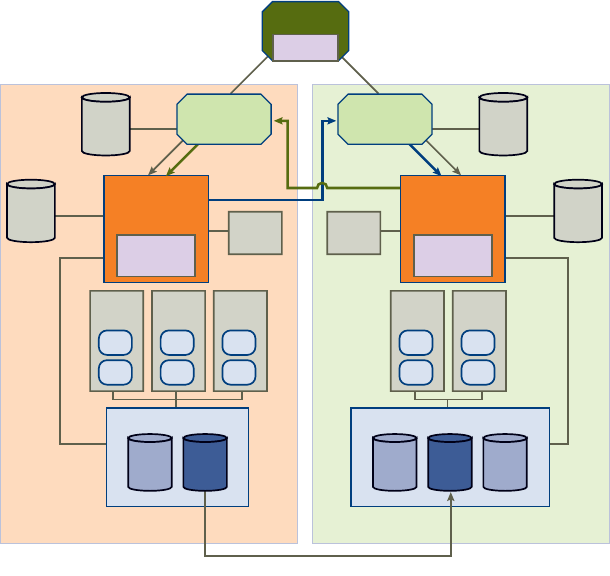
Figure 1‐1illustratesthekeycomponentsofSRM.
Figure 1-1. Prerequisite Environment for SRM
Thesecomponentsaredescribedasfollows:
VirtualCenterServer—Thecentralpointforconfiguring,provisioning,and
managingvirtualizedITenvironments.
SiteRecoveryManagerServer—AphysicalorvirtualhostonwhichSRMandone
ormorearraymanagersareinstalled.
LicenseServer—Aserverthatstoresandallocateslicenses.
OracleorSQLDatabase—PersistentstorageforSRMobjects.
ESXServers—A virtualization layer run on physical servers that abstracts processor,
memory, storage, and networking resources into multiple virtual machines.
primary site secondary site
replication
adapter
SAN
VMFSVMFS
UI plugin
TCP TCP
ODBC ODBC
array replication
Site
Recovery
Manager
replication
adapter
Site
Recovery
Manager
VMFS
VirtualCenter
Server
VirtualCenter
Server
SAN
VMFS VMFS
ESX
Server
License
Server
License
Server
Oracle
or SQL
DB
VCMS
DB
Oracle
or SQL
DB
VCMS
DB
VI Client
VM
VM
ESX
Server
VM
VM
ESX
Server
VM
VM
ESX
Server
VM
VM
ESX
Server
VM
VM

VMware, Inc. 13
Chapter 1 Overview of Site Recovery Manager
SAN—Storageareanetwork(FibreChanneloriSCSIarrays)supporting
array‐basedreplication.
VMwareFileSystem(VMFS)—Aclusteredfilesystemthatisoptimizedfor
storingvirtualmachines.
Array-Based Replication
SRMsupportsarray‐basedreplicationinwhichoneormorestoragearraysatthe
protectedsitereplicatetheirdatatopeerarraysattherecoverysite.Storagereplication
adapters(SRAs)arearray‐specificprogramsthatarrayvendorsprovidetosupportthe
useofarray‐basedreplicationbySRM.SRAsarenotpartofanSRMrelease.Yourarray
vendorprovidesandsupportsSRAs.YoucanalsodownloadthemfromtheVMware
Website.YoumustinstallSRAsspecifictothearraysthatyouwanttousewithSRMon
theSRMserverhost.
LUN Replication and Datastores
EachstoragearraysupportsasetofLUNs(logicalstorageunitscomprisingoneor
morephysicaldevices).AgivenLUNmayormaynotbereplicated.BecauseVirtual
MachineFileSystem(VMFS)datastorescanspanmultipleLUNs,SRMmustensure
thatallLUNsinadatastorearereplicated.
Beforevirtualmachineprotectionisconfigured,SRMpresentsalistofdatastoregroups
andthevirtualmachinestheycontain.Ifthelistofdatastoregroupsisnotwhatyou
expected,correctitbeforeyoucontinue.YoucanuseStorageVMotion(ESX3.5and
higher)tomoveindividualvirtualmachines.IfthewrongsetofLUNsisreplicated,
reconfigurethereplication.
Protection Groups
Aprotectiongroupisagroupofvirtualmachinesthatfailovertogether.Oneprotection
groupmustbecreatedforeachreplicateddatastore.Aftertheprotectiongroupsare
createdattheprotectedsite,they(andtheirvirtualmachines)mustalsobeaddedto
recoveryplansontherecoverysitetocompletetheSRMsetup.
Whennewvirtualmachinesarecreatedonreplicateddatastores,eventsarecreated
(andalarmscanbeassociatedwiththoseevents)thatnotifyyouwhentheyare
triggered.Whenthishappens,gototheprotectiongroup,findtheunconfiguredvirtual
machines,andmodifythesettingsforeachvirtualmachine.
NOTEThisverificationstepisacriticalcheckpointthateliminatesoneofthebiggest
sourcesoferrorindisasterrecoveryplans.
Site Recovery Manager Administration Guide
14 VMware, Inc.
Site Recovery Manager Process Overview
WithSRM,youcansetuparecoverysitethatcontinuouslyreplicatesyourproduction
site.Youdevelopadisasterrecoveryplan,resultinginaprocessthatistestedtomeet
yourrecoveryobjectives.Ifadisasteroccurs,thefailoverprocessenablesyoutobring
resourcesbackintoserviceinorderofpriority.
Install SRM
SRMincludesaservercomponentthatmustbeinstalledateachsiteandaclientplug‐in
thatyoudownloadfromtheserverandinstallinaVIClientthatyouusetomanage
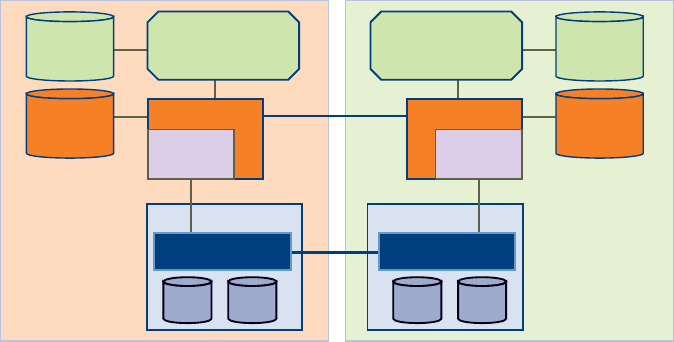
SRMservices.Figure 1‐2illustratesatypicalSRMinstallation.
Figure 1-2. SRM Installation Architecture
EachsitehasaVirtualCenterServerhost,whichisaWindowsmachinethatrunsthe
VirtualCenterservice.TheSRMservershouldbeinstalledonadedicatedserverhostif
possible,butcanbeinstalledontheVirtualCenterServerhostifnecessary.Storage
replicationadaptersareinstalledontheSRMserverhost.TheSRMdatabaseateachsite
holdsinformationaboutvirtualmachineconfigurations,protectiongroups,and
recoveryplans.SRMcannotusetheVirtualCenterdatabasebecauseithasdifferent
databaseschemarequirements.YoucanusetheVirtualCenterdatabaseservertocreate
andsupporttheSRMdatabase.
protected site recovery site
storage
replication
adapter
storage
replication
adapter
block replication
software
block replication
software
SRM server 1 SRM server 2
VirtualCenter
Server 1
VirtualCenter
Server 2
array 1 array 2
SRM 1 DB
VCMS 1 DB
SRM 2 DB
VCMS 2 DB
VMware, Inc. 15
Chapter 1 Overview of Site Recovery Manager
InstallingSRMincludesthefollowingtasks:
1ConfigureSRMdatabasesatbothsites.
2InstalltheSRMserveratbothsites,andconnecteachservertoitscorresponding
database.
3InstallthestoragereplicationadaptersforyourarraysontheSRMserverateach
site.
4InstalltheSRMclientplug‐inintooneormoreVirtualCenterclientsateachsite.
5UsetheSRMclienttoconnecttheprotectedandrecoverysites.
6UsetheSRMclienttoconfigurethearraymanagersateachsite.
Set Up the Protected and Recovery Sites
Afterinstallation,setuptheprotectedandrecoverysites.
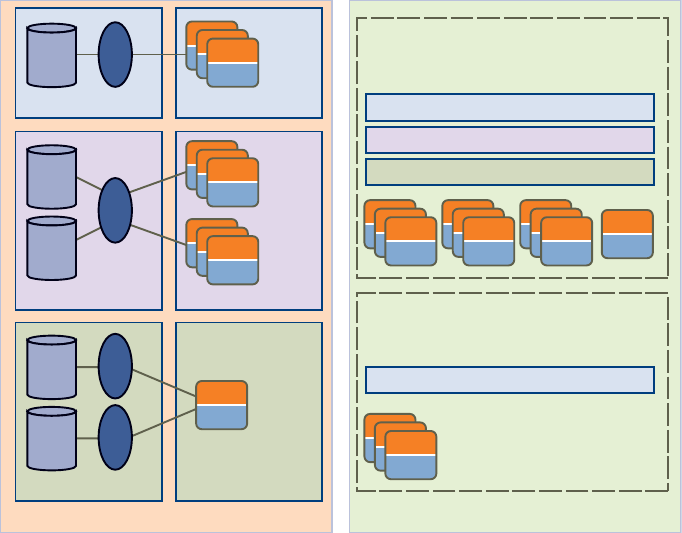
Figure 1-3. Relationship of Computing Resources in the Protected Site to the
Recovery Site
protected site recovery site
Datastore Group 1 Protection Group 1 Protection Group 1
Protection Groups
Recovery Plan 1
(whole site)
Recovery Plan 2
(subset)
Protection Groups
Protection Group 2
Protection Group 3
LUN 1
LUN 2
LUN 3
LUN 4
LUN 5
VMFS 1VMFS 3 VMFS 2VMFS 4
apps
OS
apps
OS
Protection Group 1
apps
OS
apps
OS
apps
OS
Datastore Group 2 Protection Group 2
Datastore Group 3 Protection Group 3
apps
OS
apps
OS
apps
OS
apps
OS
Site Recovery Manager Administration Guide
16 VMware, Inc.
Ontheprotectedsite,virtualmachinesareassignedtoprotectiongroups.Aprotection
groupisacollectionofvirtualmachinesthatallusethesamedatastoregroup(thesame
setofreplicatedLUNs)andfailovertogether.
Useprotectiongroupstocontroltheorderinwhichvirtualmachinesarerestoredafter
afailover.Forexample,criticalbusinessapplicationsmightbeassignedtoProtection
Group1,whilelowerpriorityapplicationsareassignedtoProtectionGroup2and
optionalapplicationsareassignedtoProtectionGroup3.Intherecoveryplan,
ProtectionGroup1failsoverfirst,followedbygroup2,andthengroup3.
Ontherecoverysite,createoneormorerecoveryplans.Arecoveryplanisanordered
setofstepsthatcontrolwhathappensduringafailover.Youcandevelopmultiple
recoveryplanstoaddressmultipledisasterscenarios.Settinguptheprotectedand
recoverysitesincludesthefollowingtasks:
1 Understandthedatastoregroupsyouhaveavailable.SRMdeterminestheseusing
informationfromthestoragereplicationadapters.
2 Createinventorymapsfortheprotectedvirtualmachines.
3 Createprotectiongroupsforeachdatastoregroup.
4Configureprotectiongroupsettings,whichprovideconfigurationdefaultsforall
virtualmachinesintheprotectiongroup.
5 Createarecoveryplan,withprompts,scriptcallouts,andnotificationsasneeded.
Configure Virtual Machines
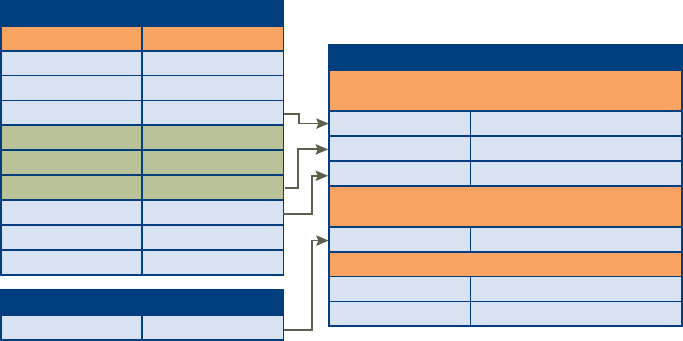
SRMenablesyoutospecifyinventorypreferencesthatcontrolhowvirtualmachine
resourcessuchasfolders,resourcepools,andnetworksattheprotectedsiteare
mappedtosimilarresourcesattherecoverysite.Thisinventorymappingensuresthat
protectedvirtualmachinesareconfiguredproperlytopoweronandconnecttothe
networkattherecoverysite.
VMware, Inc. 17
Chapter 1 Overview of Site Recovery Manager
Figure 1-4. Mapping of Virtual Machines from Protected Site to Recovery Site
Globalpreferencesareappliedtoallvirtualmachinesinaprotectiongroup.Youcan
alsocanapplycustomsettings,suchasnetworkconfigurationinformationto
individualvirtualmachines.
Configuringthevirtualmachinesincludesthefollowingtasks:
1Configureinventorymappings
2Configureprotectiongroups
3Configurevirtualmachinesettings
Folder 1 Folder 2
Source VC Destination VC
Global Inventory Mappings Between Sites
Folder 3 Folder 4
Folder 5 Folder 6
Resource Pool 1 Resource Pool 2
Resource Pool 3 Resource Pool 4
Resource Pool 5 Resource Pool 6
Port Group 1 Port Group 2
Port Group 3 Port Group 4
Port Group 5 Port Group 6
Temporary Files Datastore 1
Global Inventory Mappings Between Sites
Folder Folder 6
Per VM Settings
VM Settings at Recovery Site
Resource Pool Resource Pool 6
Network Port Group 2
Network Settings IP, subnet, gateway, DNS, etc.
Priority High (defaults normal)
Inherited Protection Group Settings
(overrides allowed)
Inherited Inventory Mappings
(overrides allowed)
Temporary Files Datastore 1
Site Recovery Manager Administration Guide
18 VMware, Inc.

VMware, Inc. 19
2
Thischapterdescribesthehardware,operatingsystem,andlicensingrequirementsfor
VMwareSiteRecoveryManager(SRM).Usetheinformationinthischaptertoensure
thatyourenvironmentmeetstherequirementsforinstallation.
SeetheSiteRecoveryManagerCompatibilityMatrixesforacompletelistofSRM
compatibilityrequirements.
Thischapterincludesthefollowingtopics:
“PrerequisitesforSRMInstallation”onpage 19
“SRMHardwareandSoftwareRequirements”onpage 20
“SRMDatabaseRequirements”onpage 21
“ConfigurationMaximums”onpage 23
“SRMLicensing”onpage 24
Prerequisites for SRM Installation
VMwareInfrastructuremustmeetthefollowingrequirements:
TheVirtualCenterServer2.5Update1orhigherandVIClient2.5installedand
runningattheprotectedandrecoverysites.TheVirtualCenterServerhostshould
haveastaticIPaddressifpossible.
VirtualmachinesresidingonESXhoststhattheVirtualCenterServermanages,in
datastoreshostedonreplicatedarrays.
Noreplicateddatastorecanbeaccessiblefrommorethanonedatacenter.
System Requirements 2
Site Recovery Manager Administration Guide
20 VMware, Inc.
Storagearraysmustmeetthefollowingrequirements:
Array‐basedreplicationandstoragereplicationadaptersinstalledandconfigured
attheprotectedandrecoverysites.
Arraymanagementmightalsorequiretheinstallationofothervendor‐provided
components.Someofthesecomponentsmightneedtobeinstalledonthesame
hostastheSRMserver;othersmightrequireonlynetworkaccessbytheSRMserver.
SRMmightoccasionallyneedtorescanstoragearrays.Youcanimprovearray
rescantimesbychangingdefaultvalueoftheScsi.RescanAllHbas onESXhosts.
IfrescantimesonESXhostsarelongerthan10minutes,youmaywanttosetthe
valueofthisoptionto1.
MaskingandzoningisconfiguredforreplicatedLUNstoremoteESXhostsfor
failover.VMwarerecommendsthatyouconfigurestoragetocreateclonesor
snapshotsofthereplicatedLUNs.Snapshotsorclonesmustbemaskedtothe
recoveryESXhosts.
UnlesstheSRMserverandVirtualCenterserverareinstalledonthesamehost,you
mustaddthefollowingportstotheWindowsFirewallexceptionlisttoenable
interprocesscommunicationbetweenSRMandVirtualCenter:
SRMCommunicationsSOAPport(default8095)
SRMClientDownloadHTTPport(default8096)
SRMExternalAPISOAPport(default9007)
SRM Hardware and Software Requirements
TheSRMhardwaremustmeetthefollowingrequirements:
Processor–2.0GHzorhigherIntelorAMDx86processor.
Memory–2GBminimum.
DiskStorage–2GBminimum.
Networking‐Gigabitrecommended.
VMwareSRMrunsonthefollowingMicrosoftWindowsoperatingsystems:
WindowsXPProfessionalwithSP2
Windows2003ServerR2
Windows2003ServerSP1(allreleasesexcept64‐bit)
Windows2000ServerSP4withUpdateRollup1

VMware, Inc. 21
Chapter 2 System Requirements
TheSRMplug‐inisinstalledintheVIClient.TheSRMplug‐inisdesignedtorunon
MicrosoftWindowsoperatingsystemsandisdesignedforthe32‐bitversionsofthe
followingoperatingsystems:
Windows2000ProfessionalwithSP4UpdateRollup1(MSIinstaller
version 3.1.4000.2435orlater)
WindowsXPProfessional32‐bitwithSP2(MSIinstallerversion3.1.4000.2435or
later)
Windows2003withSP1(allreleasesexcept64‐bit)
Windows2003ServerR2
WindowsVistaBusiness
WindowsVistaEnterprise
TheVIClientrequirestheMicrosoft .NET2.0Framework.Ifyoursystemdoesnot
haveitinstalled,theVIClientinstallerinstallsit.
SRM Database Requirements
TheSRMdatabaseateachsiteholdsinformationaboutvirtualmachineconfigurations,
protectiongroups,andrecoveryplans.SRMcannotusetheVirtualCenterdatabase
becauseithasdifferentdatabaseschemarequirements.YoucanusetheVirtualCenter
databaseservertocreateandsupporttheSRMdatabase.
EachsiterequiresitsowninstanceoftheSRMdatabase.Thedatabasemustexistbefore
SRMcanbeinstalled.YoumustnotreinitializethedatabaseafterSRMinstallationis
complete.DoingsowillcauseSRMtofail.IfyoumustreinitializetheSRMdatabase,
reinstallSRM,specifyinganewdatabaseconnection,afterthereinitializationis
complete.
Eachdatabaserequiresadditionalconfigurationafterthebasicinstallation.See
“MicrosoftSQLServerConfiguration”onpage 22and“OracleServerConfiguration”
onpage 23.
NOTETheSRMserverhostshouldhaveastaticIPaddressifpossible.

Site Recovery Manager Administration Guide
22 VMware, Inc.
Table 2‐1liststhedatabasesthatSRMsupports.
Microsoft SQL Server Configuration
MicrosoftSQLServerhasthefollowingconfigurationrequirementswhenusedwith
SRM:
Theschemanamemustbethesameastheusername.Youmusthaveadefault
schemaassociatedwithyouruseraccount.
Youmusthavebulkinsertadministratorprivileges.
IfyouareusingWindowsauthentication,theSRMserveranddatabaseserver
mustrunonthesamehost.
IfSQLServerisinstalledlocally,youmightneedtodisabletheSharedMemory
networksettingonthedatabaseserver.
TheSRMdatabaseusermustbegrantedthefollowingpermissions:connect,create
table,createview.
Table 2-1. SRM Supported Databases
Database Type Service Pack, Patch, and Driver Requirements
MicrosoftSQLServer2005Enterprise
(64‐bitversionwithSP2isalsosupported)
SP1orSP2
ForWindows2000andWindowsXP,apply
MDAC2.8SP1totheclient.
UseSQLnativeclientdriverfortheclient.
MicrosoftSQLServer2005Standard UseSQLnativeclientdriverfortheclient.
MicrosoftSQLServer2005Express UseSQLnativeclientdriverfortheclient.
MicrosoftSQLServer2000Enterprise SP4
MicrosoftSQLServer2000Standard SP4
Oracle9irelease2Standard
Oracle9irelease2Enterprise
Applypatch9.2.0.8.0totheserverandclient.
Driverversion10.02.x.x
Oracle10gEnterpriseRelease1Driverversion10.02.x.x
Oracle10gEnterpriseRelease2
(64‐bitversionisalsosupported)
Firstapplypatch10.2.0.3.0totheclientandserver.
Thenapplypatch5699495totheclient.
Driverversion10.02.x.x

VMware, Inc. 23
Chapter 2 System Requirements
Oracle Server Configuration
OracleServerhasthefollowingconfigurationrequirementswhenusedwithSRM:
IfyouareusinganOracle9iserver,theSRMBulkInsertfeaturemustbedisabled.
Editthevmware-dr.xmlconfigurationfileandchangetheEnableBulkInsert
settingtofalse.Thedefaultlocationofthisfileis:C:\Program
Files\VMware\VMware Site Recovery Manager\config\.Afteryouchange
theconfigurationfile,restarttheVMwareSiteRecoveryManagerServiceservice
foreachSRMserverthatisusingthisdatabase.
Usedriverversion10.02.x.xforallsupporteddatabaseversions.
TheSRMdatabaseusermustbegrantedthefollowingpermissions:connect,
resource,createsession,createview.
Configuration Maximums
Whenyouareselectingandconfiguringyourvirtualandphysicalequipment,you
mustnotexceedcertainlimitsimposedbySRM.Table 2‐2liststhelimitsforprotected
virtualmachines,protectiongroups,andreplicatedLUNssupportedbyasingleSRM
server.SRMpreventsyoufromexceedingthelimitsonprotectedvirtualmachinesand
protectiongroupswhenyoucreateanewprotectiongroup.Ifaconfigurationcreated
inanearlierversionofSRMexceedstheselimits,SRMdisplaysawarning,butallows
theconfigurationtooperate.Reconfiguresuchconfigurationstobringthemwithin
supportedlimitsassoonaspossible.
LimitsonreplicatedLUNsandrunningrecoveryplansareadvisory,butnotenforced.
Table 2-2. SRM Configuration Maximums
Item Maximum
Protectedvirtualmachines 500
Protectiongroups 150
ReplicatedLUNs 150
Runningrecoveryplans 3
Site Recovery Manager Administration Guide
24 VMware, Inc.
SRM Licensing
SRMrequirestwotypesoflicensekeys:
Aprotection‐enablementlicensekey(SRM_PROTECTED_HOST)thatspecifies
thenumberofESXCPUsthatcanrunprotectedvirtualmachinesatasite.Install
thiskeyattheprotectedsitetoenablefailover.Installitattherecoveryand
protectedsitestoenablebidirectionaloperation(failback).
Asiteenablementlicensekey(PROD_SRM)thatmustbeinstalledattheprotected
siteandtherecoverysite.Thesekeysaresuppliedwhenyoupurchaseyour
protection‐enablementkeys.
Toobtainyourlicensekeys,gototheSiteRecoveryManagerProductInformationpage
attheVMwareWebsite.
SRMlicensingchecksforavalidlicensewhenthehostlicenseisfirstinstalledandeach
timetheSRMhostdprogramrestarts.Licensesacquiredfromalicenseserverare
checkedeveryfiveminutes.Iflicensesarenotincompliance,VirtualCentertriggersa
licensingalarm.VMwarerecommendsthatyouconfigurealertsfortriggeredlicensing
eventssothatlicensingadministratorsarenotifiedbyemail.See“A l e r t i n g and
Monitoring”onpage 75formoreinformation.
Import License Files
WhentheVMwarelicenseserverisinstalled,youcanimportSRMlicensefilesintoyour
licenseserver.Youmustinstalltheper‐sitelicenseattheprotectedandrecoverysites.
Youmustinstalltheprotection‐enablementlicenseattherecoverysitetoenablefailover,
andattherecoveryandprotectedsitestoenablebidirectionaloperation(failback).
FormoreinformationabouttheVMwarelicenseserver,seetheESXServer3Installation
Guide.
To enable an SRM license
1Logintothecomputerthatrunsthelicenseserverapplication.
Theprotectedandrecoverysitesshouldeachhavetheirownlicenseservers.
2CopytheSRMlicensefilethatincludesthePROD_SRMkeytoC:\Program
Files\Vmware\VMware License Server\Licenses\.
Licensefilesmusthavea.licextension.
3Ifthisisasitewhereyouwanttoenableprotectedvirtualmachinestorun,copy
theSRMlicensefilethatincludestheSRM_PROTECTED_HOSTkeyto
C:\Program Files\Vmware\VMware License Server\Licenses\.
VMware, Inc. 25
Chapter 2 System Requirements
4 LaunchVMwareLicenseServerToolsbychoosingStart>Programs>VMware>
VMwareLicenseServer>VMwareLicenseServerTools.
5ClicktheStart/Stop/Rereadtab.
6ClickReReadLicenseFiletoloadthenewlicensefiles.
7RestarttheSRMserver.
Site Recovery Manager Administration Guide
26 VMware, Inc.

VMware, Inc. 27
3
YoumustinstallanSRMserverattheprotectedsiteandalsoattherecoverysite.After
theSRMservershavebeeninstalled,youcandownloadtheclientplug‐infromeither
servertoanyVIClientandusethatclienttoconfigureandmanageSRMateithersite.
SRMrequiresthesupportofaVirtualCenterserverateachsite.TheSRMinstallermust
beabletoconnectwiththisserverduringinstallation.IfyoucannotinstallSRMona
dedicatedserverhost,youcaninstallitonthesamehostwheretheVirtualCenter
Serverisinstalled.
InstallingSRMincludesthefollowingtasks:
1InstallSRMontheprotectedsite.
2InstallSRMattherecoverysite.
3UsingaVIClient,connecttoaVirtualCenterServerattheprotectedorrecovery
siteanddownloadtheSRMplugin.
UpdatingSRMincludesthefollowingtasks:
1 BackuptheSRMdatabaseattheprotectedandrecoverysites.
2 UpdateSRMontheprotectedsite.
3 UpdateSRMattherecoverysite.
4UsingaVIClientonwhichtheSRMplug‐inisnotinstalled,connecttoa
VirtualCenterServerattheprotectedorrecoverysiteanddownloadanewSRM
plug‐in.
Installing or Updating Site
Recovery Manager 3

Site Recovery Manager Administration Guide
28 VMware, Inc.
Thischapterincludesthefollowingtopics:
“InstallSiteRecoveryManager”onpage 28
“UpdateSiteRecoveryManager”onpage 31
“UpdateSiteRecoveryManager”onpage 31
Install Site Recovery Manager
BeforeinstallingSRM,ensurethatyoucompletedalltherequirementslistedin
Chapter 2,“SystemRequirements,”onpage 19.Inparticular,youneedthefollowing
informationforeachsite:
ThehostnameorIPaddressofarunningVirtualCenterServer—SRMand
VirtualCentercanresideonthesamehostorondifferenthosts.DuringSRM
installation,youmustsupplytheVirtualCenterhostnameorIPaddress.
TheusernameandpasswordoftheVirtualCenteradministrator—DuringSRM
installation,youmustsupplyavalidusernameandpasswordforthe
VirtualCenteradministrator.
AusernameandpasswordfortheSRMdatabase—Formoreinformation,see
“SRMDatabaseRequirements”onpage 21.
To install SRM
1LogintotheserverhostonwhichtoinstallSRM.
ToinstallSRM,youmustloginasamemberofthehost’sAdministratorsgroup.
2 DownloadtheSRMinstallationfiletoafolderonthehost,oropenafolderonthe
networkthatcontainsthisfile.
3Double‐clicktheSRMinstallericontobegininstallation.
TheinstallerexaminesthesetofinstalledVMwaresoftwareonthehost.Ifitdetects
anexistinginstallationofSRM,itpromptsyoutoverifythatyouwanttoupdate
theexistinginstallation.FormoreinformationaboutupdatingSRM,see“To
updateSRM”onpage 31.
4ClickNextontheWelcometotheinstallationwizardscreen.
5OntheLicenseAgreementpage,clickIacceptthetermsinthelicenseagreement
andthenclickNext.
NOTEDuringinstallation,SRMstoresthehostnamesoftheSRMserverand
VirtualCenterserverhosts.Ifyouhavetochangeeitherofthesehostnames,youmust
re‐installSRM.
VMware, Inc. 29
Chapter 3 Installing or Updating Site Recovery Manager
6AttheDestinationFolderscreen,choosethefolderinwhichyouwanttoinstall
SRMandclickNext.
Thepathnametotheinstallationfoldercannotbelongerthan240characters,and
cannotincludeanynon‐ASCIIcharacters.
7EnterthefollowinginformationabouttheVirtualCenterserveratthesitewhere
youareinstallingSRM:
VirtualCenterAddress‐EnterthehostnameorIPaddressofthe
VirtualCenterServer.
TheVirtualCenterServerandtheSRMservermustbeinthesamedomain.
Enterthehostnameinlowercase.Afterinstallationiscompleteandyouare
configuringtheconnectionbetweentheprotectedandrecoverysites,you
mustsupplythishostnameorIPaddressexactlyasyouenterithere.
VirtualCenterPort‐Acceptthedefaultorenteranotherport.
VirtualCenterUsername‐ EnterauserIDthathasadministratorprivilegeson
thespecifiedVirtualCenterServer.
VirtualCenterPassword‐EnterthepasswordforthespecifieduserID.
ClickNext.TheinstallercontactsthespecifiedVirtualCenterserverandvalidates
theinformationyousupplied.
8 Selectasourceforthecertificateusedtoauthenticateserverconnections:
TohaveSRMcreateandinstallacertificate,selectAutomaticallygenerate
certificateandclickNext.
Entertextvaluesforyourorganizationandorganizationunit,typicallyyour
companynameandthenameofyourgroupwithinthecompany.The
maximumlengthofthecombinedvaluescannotexceed80characters.
TouseanexistingPKCS#12certificatefile,selectUseaPKCS#12certificate
fileandclickNext.
Enterthepathtothecertificatefile.Thecertificatefilemustfilecontainexactly
onecertificatewithexactlyoneprivatekeymatchingthecertificate.
Enterthecertificatepasswordifnecessary.
9Enterthefollowingadditionalinformation:
LocalSiteName—AuniquenameforthisinstallationofSRM.Each
installationofSRMatasitemusthaveauniqueidentifier.
Administratore‐mail—Thee‐mailaddressofthepersonorgroupwho
monitorsSRMandrespondstoalertsornotifications.
Site Recovery Manager Administration Guide
30 VMware, Inc.
Additionalemail(optional)—Thee‐mailaddressofanadditionalpersonor
groupwhoshouldreceiveanyalertsornotifications.
LocalHost—ThenameorIPaddressofthelocalhost.Thisvalueisobtained
bytheSRMinstallerandneedonlybechangedifitisincorrect(forexample,
ifthelocalhosthasmorethanonenetworkinterfaceandtheonedetectedby
theSRMinstallerisnottheoneyouwanttouse).
ListenerPorts—TheSOAPandHTTPportnumbersfornetworktraffic.SOAP
isusedtoreceiverequestsfromSRM;HTTPisusedfordownloadingtheSRM
plug‐in.Defaultvaluesaresupplied.
APIListenerPorts—TheSOAPandHTTPportnumbersfornetworktraffic
fromtheSRMAPI.Defaultvaluesareautomaticallysupplied.Formore
information,seetheSiteRecoveryManagerAPIdocumentation.
Defaultportvaluesworkwithoutmodificationaslongasthoseportsarenotbeing
usedbyotherapplicationsinthesystemwhereSRMisbeinginstalled.Youcan
modifythesevaluesifotherservicesarealreadyusingtheports,orifyournetwork
administratorpreferstoassignspecificportsforSRMtouse.
10 EnterthefollowingdatabaseconfigurationinformationandclickNext:
DatabaseClient—Clickthearrowontherightofthefieldandselectthe
databaseclientforyoursite.
DataSourceName—TheDSNyouwanttouseforthisinstallationofSRM.
ClickODBCDSNSetuptoviewexistingDSNsorcreateanewone.
Username—AuserIDvalidforthespecifieddatabase.
Password—ThepasswordforthespecifieduserID.
ConnectionCount—Theinitialconnectionpoolsize.Connectionsinthispool
arecreatedbytheSRMinstaller.Iftheseconnectionsareallinuseandanew
oneisneeded,itiscreatedifdoingsowouldnotcausethenumberof
connectionsspecifiedbyMaxConnectionstobeexceeded.ItisfasterforSRM
touseaconnectionfromthepoolthantocreateanewone.
MaxConnections—Themaximumnumberofconnectionstoopentothe
databaseatonetime.Ifyourdatabaseadministratorhasrestrictedthenumber
ofconnectionsthatthedatabasecanhaveopen,thevalueyousupplyhere
mustnotexceedthatnumber.
11 ClickInstall.
12 Whenthewizardcompletes,clickFinish.

VMware, Inc. 31
Chapter 3 Installing or Updating Site Recovery Manager
Update Site Recovery Manager
WhenyouupdateSiteRecoveryManager,informationaboutVirtualCenterserver
connections,certificates,anddatabaseconfigurationisreadfromtheexisting
installationandreusedbythenewinstallation.
To update SRM
1LogintotheSRMserverhost.
ToinstallSRM,youmustloginasamemberofthehost’sAdministratorsgroup
2 DownloadtheSRMinstallationfiletoafolderonthehost,oropenafolderonthe
networkthatcontainsthisfile.
3Double‐clicktheSRMinstallationfileicontobegintheupdate.
TheinstallerexaminesthesetofinstalledVMwaresoftwareonthehost.Ifitdetects
anexistinginstallationofSRM,itpromptsyoutoverifythatyouwanttoupdate
theexistinginstallation.
ClickYestocontinuewiththeupdate.
4ClickNextontheWelcometotheupdatewizardpage.Thewizardpromptsyou
toverifythatyouhavebackeduptheSRMdatabase.
ClickNotopausetheinstallationwhileyoubackupthedatabase.
ClickYesifyouhavebackedupthedatabaseandwanttoproceedwiththe
installation.Theinstallerreadsconfigurationdatafromtheexisting
installationandusesittocompletetheupdate.
5Whenthewizardcompletes,clickFinish.
YoumightbepromptedtoshutdownandrestartWindows.
Install the Site Recovery Manager Plug-In
AfteryouhaveinstalledorupdatedSRM,useaVIClienttoconnecttothe
VirtualCenterServerattheprotectedorrecoverysite,thendownloadtheplug‐infrom
theserverandenableitintheVIClient.
NOTEBeforeyoubegintheupdate,backupyourcurrentSRMdatabase.Theupdate
wizardrequiresyoutoverifythatthedatabaseisbackedup,andpausesuntilyou
confirmthatitis.
Site Recovery Manager Administration Guide
32 VMware, Inc.
To download and install the SRM plug-in
1StartaVIClientandconnecttoaVirtualCenterServerattheprotectedor
recovery site.
2OntheVIClientmenubar,selectPlugins>ManagePlugins.
3OntheAvailabletab,locatetheVMwareVirtualCenterSiteRecoveryplug‐in
andclickDownloadandinstall.
4Whenthedownloadcompletes,theplug‐ininstallationwizardappears.Click
Nexttostartthewizard.
5ClickIacceptthetermsinthelicenseagreement,andclickNext.
6ClickInstall.
7ClickFinish.
YoumightbepromptedtoshutdownandrestartWindows.
8ClicktheInstalledtab.
9ChecktheEnabledcheckboxfortheSiteRecoveryplug‐in.
TheSiteRecoveryiconappearsonthetoolbar.
Updating Database Credentials
Duringinstallation,SRMencryptsandstoresthedatabasecredentialsthatyouspecify.
Ifanyofthesecredentialschange(forexample,ifthedatabaseusernameorpassword
changes),youmustchangethestoredcredentialsbyrunningtheinstallcreds.exe
utilityfoundintheinstallationdirectory.
Reverting to a Previous Release
YoumustuninstallbothSRManditsdatabasewhenrevertingtoapreviousrelease.
To revert to a previous release
1UninstallSRMattheprotectedandrecoverysites.
Wheresiteshavebeenpaired,SRMatbothsitesmustbeuninstalled.IfyouSRM
uninstallSRMfromonememberofapairofhosts,thedatabaseontheremaining
memberbecomesinconsistent.
2UninstalltheSRMplug‐infromaffectedVirtualCenterclients
3Restorethedatabaseusedbythepreviousrelease,followingtheprocedures
documentedbyyourdatabasevendor.

VMware, Inc. 33
4
ThischapterdescribestheVMwareInfrastructureClientandprovidesinformation
abouthowtousetheapplicationtomanageSRMandoperationssuchassitepairing,
managingusers,andaccessinglogfiles.
Thischapterincludesthefollowingtopics:
“UsetheVIClienttoManageSRM”onpage 33
“ConnectingtheProtectedandRecoverySites”onpage 34
“Credential‐BasedAuthentication”onpage 35
“Certificate‐BasedAuthentication”onpage 36
“SRMUsers,Groups,Permissions,andRoles”onpage 37
“A c c e s s SRMLogFiles”onpage 42
Use the VI Client to Manage SRM
TheVIClientistheinterfacetoVirtualCenterServer.Whenyoulogin,onlythose
featuresandfunctionssupportedbythetypeofserveryouloggedontoappear.
After youinstalltheSRMplug‐in,theVIClientdisplayssiterecoveryoptions.
To log in to SRM from a VI Client session
1UsingtheVIClient,logintotheprotectedsiteorrecoverysiteVirtualCenter
Server.
2ClicktheSiteRecoveryicononthetoolbar.
Managing SRM 4
Site Recovery Manager Administration Guide
34 VMware, Inc.
SiteRecoverycomponentsintheVIClientinclude:
Inventory–Locatedontheleft,displaystheinventoryobjectsavailableforSRM,
includingprotectiongroupsandrecoveryplans.
Summarytab–Displaystherelevantinformationfortheprotectedsiteandthe
recoverysite.
Setuppane–Displaystheoptionsusedtoconfiguresitefailover.
Alarmstab–ListstheconfiguredalarmsforSRM.
Permissionstab–Liststheusersandgroupsthathavepermissionsontheselected
objectandatwhatlevelthepermissionwasassigned.
Connecting the Protected and Recovery Sites
WhenyoustartusingSRM,establishasecureconnectionbetweentheprotectedsite
andtherecoverysite.UsetheVIClienttopairandmanagebothsites.Becausethe
VI ClientcanconnecttoonlyoneVirtualCenterServeratatime,launchoneVIClient
tomanageeachsite.Beforeyouconnecttotherecoverysite,youneedthefollowing:
TherecoverysiteVirtualCenterServernameorIPaddressandportnumber.
TheroleofProtectionSRMAdministratorontherecoverysiteifusing
credential‐basedauthentication.
Theadministratorloginfortheremoteserver.
ConnectionsbetweenSRMandeitherVirtualCenteroranotherinstanceofSRMmust
beauthenticated.Youcanuseadministrativecredentialsortrustedcertificatesto
authenticateconnections,butyoucannotmixauthenticationmethods.The
authenticationmethodyouchoosemustbeusedtosecuretheconnectionbetweenthe
VirtualCenterServerandSRMateachsite,andalsobetweentheSRMserversatthe
protectedandrecoverysites.Ifyouusetrustedcertificates,bothsitesmustusethesame
subjectname(composedfromtheorganizationandorganizationunitinformationyou
supplyduringinstallation)inthecertificate.
Credentialbased—Usesausernameandpassword.Theaccountmustbean
administratoraccount.TheprivilegesontheVirtualCenterServerspecifythese
credentials.SavethecredentialsyouspecifytocommunicatetotheVirtualCenter
Server.
Certificatebased—Specifyacertificatethatwassignedbyatrustedcertificate
authority.Thecertificateismostcommonlysignedbyatrustedcertificate
authorityandinstalledintheVirtualCenterServerandSRMontheprotectedand
recoverysites.Thisconfigurationisthemostsecureconnection.

VMware, Inc. 35
Chapter 4 Managing SRM
Credential-Based Authentication
Byspecifyingauto‐generatedcertificatesatinstallation,youareimplicitlyspecifying
credential‐basedauthentication.Inthiscase,theSRMserversavesthecredentials
specifiedduringinstallationtoauthenticateallsubsequentcommunicationwiththe
localVirtualCenterServer.WhenthisinstanceofSRMispairedtoaremoteSRMserver,
thecredentialsspecifiedaspartofthepairingprocessaresavedtoauthenticateall
subsequentcommunicationwiththeremoteSRMserver.
AllcommunicationwithSRMisprotectedusingSSLencryption,includingthetransfer
ofauthenticationcredentialstoVirtualCenterandSRMservers.
Pairing Sites with Credential-Based Authentication
Connectingprotectedandrecoverysitesusingauto‐generatedcertificatesisthedefault
setupforconnectingprotectedandrecoverysites.
To connect to protected and recovery sites
1UsingtheVIClient,logintotheprotectedsiteVirtualCenterServer.
2ClicktheSiteRecoveryicononthetoolbar.
3IntheProtectionSetuppane,clickConfigure.
4EntertheIPaddressorhostnameandportnumberfortheremoteVirtualCenter
ServerandclickNext.
5Accepttheremotesitecertificate.
ThiscertificatepromptappearswhentheSRMserverdoesnottrustthecertificate
fortheremoteVirtualCenterServer.
6Entertheadministrator’susernameandpassword.
7Accepttheremotesitecertificate.
ThiscertificatepromptappearswhentheSRMserverdoesnottrustthecertificate
fortheremoteSRMserver.
8VerifythateachstephasacheckmarkandclickFinish.
9Entertheadministrator’susernameandpasswordfortheremoteVirtualCenter
Server.
10 Accepttheremotesitecertificate.
CAUTIONWhenyouenterthehostnamefortheVirtualCenterServer,use
lowercase.TheVirtualCenterhostnamemustbeenteredexactlythesameway
(fullyqualifiedornot)duringpairingasitwasduringinstallation.
Site Recovery Manager Administration Guide
36 VMware, Inc.
11 UsingtheVIClient,logintotherecoverysiteVirtualCenterServer.
12 ClicktheSiteRecoveryicononthetoolbar.
ThissubmitstherequiredcredentialstologintotheremoteVirtualCenterServer.
13 Accepttheremotesitecertificate.
TheProtectedSiteandRecoverySitepanesdisplaytheconnectioninformationaftera
successfulpairing.
Certificate-Based Authentication
Certificate‐basedauthenticationrequirestheuseofcertificatessignedbyacommon
trustedcertificateauthorityonallserversinvolvedinyourSRMinstallation.This
includesbothVirtualCenterandSRMservers.Suchacertificatemaybereferredtoasa
“trustedcertificate.”
Byspecifyingatrustedcertificateatinstallation,youareimplicitlychoosingtouse
certificate‐basedauthentication.Inthiscase,theSRMserverusesthecertificate
specifiedduringinstallationtoauthenticateallsubsequentcommunicationwiththe
localVirtualCenterServer.TheSRMserverdoesnotsavecredentialsspecifiedduring
theinitialinstallation.
Pairing Sites Using Certificate-Based Authentication
VMwarerecommendsthatyouusecertificate‐basedauthentication.
To connect to protected and recovery sites
1UsingtheVIClient,logintotheprotected‐siteVirtualCenterServer.
2ClicktheSiteRecoveryicononthetoolbar.
3IntheSetuppane,clickConfigure.
4EntertheIPaddressorhostnameandportnumberfortheremoteVirtualCenter
ServerandclickNext.
5VerifythateachstephasacheckmarkandclickClose.
6Fromtheprotectedsite,entertheremotecredentialsintheRemoteVirtualCenter
Serverdialogbox.
7UsingtheVIClient,logintotherecovery‐siteVirtualCenterServer.
8ClicktheSiteRecoveryicononthetoolbarandsubmittherequiredcredentialsto
completethepairing.
Theconnectioninformationappearsafterasuccessfulpairing.

VMware, Inc. 37
Chapter 4 Managing SRM
SRM Users, Groups, Permissions, and Roles
SRMusesthesameauthorizationmodelasVirtualCenterServer.Thesetofpermissions
appliedtoorinheritedbyanobjectdeterminetheoperationsthatareallowedonthe
objectandthelistofrolesthatcanperformthoseoperations.Managedobjectsinthe
SRMinventorycanhavespecificpermissionsapplied.Therearetwowaystocontrol
permissiontoexecuteSRMoperations:
Addingusers–Assignuserstothepredefinedroles.
Addingroles–Createarole,addtheadministrators,andthenaddtheright
permissionstotherole.
Tomanagepermissionsandroles,youmustlogintotheVirtualCenterServerwiththe
administratoraccount.
ThePermissionstabliststheusersandgroupsthathavepermissionsontheselected
objectandatwhatlevelthepermissionwasassigned.
YoumustbeinAdministrationviewfortheRolesmenuitemtobeenabled.
The Permissionstabdisplaysthefollowing:
User/Group—TheuserorgroupthatexistsinSRM.
Role—Setofprivilegesassignedtoanexistinguserorgroup.
Definedin—Theobjectinwhichtheuser,group,androleisdefined.
SRM Permissions
Toobtainthefullabilityofanadministratoroftheprotectedsiteandtherecoverysite,
definethefollowingpermissions:
Protectedsite:
Read‐onlyattheVirtualCenterroot(donotpropagate).
Read‐onlytoDatacenterinventoryobject(donotpropagate).
ProtectionVirtualMachineAdministratorroleattheVirtualMachinelevel
(propagate).
NOTEToconfigureSRM,ausermusthavebothVirtualCenterandSRMpermissions.
SRMrolessuchasSRMProtectionAdministratorandSRMRecoveryAdministratordo
nothavespecificprivilegesforVirtualCenterandthereforedonothaveadequate
permissionstoperformallSRMoperations.Theconverseisalsotrue.VirtualCenter
rolesdonotprovideanySRMprivileges.EnsurethatSRMusershaveVirtualCenter
andSRMspecificrolesasappropriate.
Site Recovery Manager Administration Guide
38 VMware, Inc.
ProtectionSRMAdministratorroleattheSRMSiteRecoveryrootlevel(donot
propagate).
ProtectionGroupsAdministratorroleattheSRMProtectionGroupslevel
(propagate).
Recoverysite:
RecoveryInventoryAdministratorroleattheVirtualCenterrootlevel(donot
propagate).
RecoveryDatacenterAdministratorroleattheVirtualCenterdatacenterlevel
(do notpropagate).
RecoveryHostAdministratorroleattheVirtualCenterhostlevel(donot
propagate).
RecoveryVirtualMachineAdministratorattheVirtualCenterresourcepooland
VirtualCenterfolderlevels(propagate).
RecoverySRMAdministratorattheSRMrootlevel(donotpropagate).
RecoveryPlansAdministratorattheSRMRecoveryPlanslevel(propagate).
SRM Default Roles
ThefollowingSRM‐specificrolesaredefinedontheVirtualCenterServerduringSRM
installation:
ProtectionGroupsAdministrator—Setupandmodifyprotectiongroups.
ProtectionSRMAdministrator—Pairtheprotectedandrecoverysites,and
configureinventorymappings.
ProtectionVirtualMachineAdministrator—Setupandmodifytheprotection
characteristicsofaprotectedvirtualmachine.
RecoveryDatacenterAdministrator—Viewavailabledatastoresandperform
recoveryvirtualmachinecustomization.
RecoveryHostAdministrator—Configurevirtualmachinecomponentsduring
recovery.
RecoveryInventoryAdministrator—Viewcustomizationspecificationsforthe
recoverysite.
RecoveryPlansAdministrator—Reconfigureprotectionandrecoveryvirtual
machines.Alsograntstheabilitytosetupandrunrecovery.
VMware, Inc. 39
Chapter 4 Managing SRM
RecoverySRMAdministrator—ConfigureSANarraysandcreateprotection
profiles.
RecoveryVirtualMachineAdministrator—Createrecoveryvirtualmachinesand
addthemtotheresourcepool.Alsograntstheusertheabilitytoreconfigureand
customizetherecoveryvirtualmachineswhenarecoveryplanisrun.
TheVirtualCenterServerdefinesaRead‐Onlysystemrolethatcanbeusedtogrant
userstheabilitytoviewSRMproperties.Inaddition,theAdministratorrolecanbe
usedtograntuserscompletecontroloverboththeprotectionandrecovery
components.
Tosetuptheinventorymappings,aprotectedsiteusermustbeassignedthefollowing
roles:
“ProtectionSRMAdministrator”roleontheSRMrootobject.
“Read‐Only”roleontheVirtualCenterobjectbeingmappedonboththeprimary
andtherecoverysites.
Add Roles
Someofthedefaultroles(suchasAdministrator)arepreconfiguredandcannotbe
changed.Ifyouhavesituationsthatrequireadifferentcombinationofaccessprivileges
thantheonessetup,createanadditionalroleormodifytheprovidedsamplerolesto
suityourneeds.
To add a role
1LogintotheVIClientasauserwithAdministratorprivileges.
2FromtheVIClient,clicktheAdministrationbuttoninthenavigationbar.
3ClicktheRolestab.
4ClickAddRole.
5Typeanameforthenewrole.
6 Selecttheprivilegesforthenewroletohave(forexample,SiteRecovery)andclick
OK.Clicktheplus(+)signstoexpandthelists,asneeded.
Assign VirtualCenter Access Permissions
Assigntonewusersandgroupstherolesandpermissionstotherelevantinventory
objects.
Site Recovery Manager Administration Guide
40 VMware, Inc.
To assign a permission to a user or group
1LogintotheVIClientasauserwithadministratorprivileges.
2FromtheVIClient,clicktheInventorybuttoninthenavigationbar.
3ClickthePermissionstab.
4Right‐clickthePermissionstabandchooseAddPermission.
5ClickAdd.
6Identifytheuserorgroupthatisbeingassignedthisrole:
aFromtheDomaindrop‐downmenu,choosethedomainwheretheuseror
groupislocated.
bTypeanameintheSearchboxorselectanamefromtheNamelist.
Ifyouknowtheuserorgroupname,youcantypeitintheNamefield.
cClickAddtoaddthenametotheUsersorGroupslist.
dRepeatStep athroughStep ctoaddadditionalusersorgroupsandclickOK
whenfinished.
7Toapplythisroletoallchildobjectsoftheselectedinventoryobject,select
PropagatetoChildObjects.
8Verifythattheusersandgroupsareassignedtotheappropriatepermissionsand
clickOK.
9ClickOK.
Theserveraddsthepermissiontothelistofpermissionsfortheobject.
Add a New User Group and Role to SRM
AssigntonewusersandgroupstherolesandpermissionstotherelevantSRM
inventoryobjects.
To assign a user or group permission
1LogintotheVIClientasauserwithAdministratorprivileges.
2ClickSiteRecoveryinthenavigationbar.
Iftheprotectedandrecoverysitesarepaired,youmightneedtoenterlogin
informationfortherecoverysite.
3ClickthePermissionstaboftheSRMInventoryobject.
VMware, Inc. 41
Chapter 4 Managing SRM
4Right‐clickthePermissionstabandchooseAddPermission.
5ClickAdd.
6Identifytheuserorgroupthatisbeingassignedthisrole.
aFromtheDomaindrop‐downmenu,choosethedomainwheretheuseror
groupislocated.
bTypeanameintheSearchtextboxorselectanamefromtheNamelist.
cClickAddtoaddthenametotheUsersorGroupslist.
dRepeatStep athroughStep ctoaddmoreusersorgroups.
eClickOKwhenfinished.
7IntheAssignedPermissionsdialogbox,selectarolefromtheAssignedRole
drop‐downmenu.
Thismenudisplaysalltheavailablerolesthatarebeenassignedtothathost.
8Toapplythisroletoallchildobjectsoftheselectedinventoryobject,select
PropagatetoChildObjects.
Performthistaskforeachuserorgroupadded.
9ClickOK.
Theserveraddsthepermissiontothelistofpermissionsfortheobject.
Change Access Permissions
Youcanchangeaccesspermissionsforanyobjectinaninventory.
To change the permissions for a user or group
1FromtheVIClient,clickanInventoryobject.
2 SelectanobjectandclickthePermissionstab.
3Toselecttheuserorgroupandrolepairtochange,right‐clicktheitem.
4Toselecttheappropriaterolefortheuserorgroup,selectProperties.
5 Selectfromthedrop‐downmenuandclickOK.
6Topropagatetheprivilegestothechildrenoftheassignedinventoryobject,click
thePropagatecheckbox.
Site Recovery Manager Administration Guide
42 VMware, Inc.
Remove Access Permissions
Removingapermissionforauser,grouporrolefromthelistofthoseavailableremoves
theuserorgroupandrolepairfromtheselectedinventoryobject.Itdoesnotremove
therolefromthelistofavailableitems.
To remove a permission role for a user or group
1FromtheVIClient,selectanInventoryobject.
2ClickthePermissionstab.
3Toselecttheuserorgroupandrolepairtodelete,right‐clickanitem.
4 SelectDelete.
TheVirtualCenterServerremovesthepermissionsetting.
Access SRM Log Files
YoucanretrieveSRMlogandconfigurationfilesfromtheserverandcollectthemina
compressed(zipped)folderonyourdesktop.
To retrieve log files when you are logged in to the SRM server host
ClickStart > Programs > VMware > VMware Site Recovery Manager >
Generate Site Recovery Manager log bundle.
Theindividuallogfilesarecollectedinafilenamed
srm‐support‐MM‐DD‐YYYY‐HH‐MM.zip,whereMM‐DD‐YYYY‐HH‐MMisastring
indicatingthemonth,day,year,hour,andminutewhenthelogfileswereretrieved.
To retrieve log files when you are logged in to the VI Client
1StarttheWindowscommandprompt.
2 ChangedirectorytoC:\Program Files\VMware\VMware Site Recovery
Manager\bin.
3Runthefollowingcommand:
C:\Program Files\VMware\VMware Site Recovery Manager\bin>cscript
srm-support.wsf
Theindividuallogfilesarecollectedinafilenamed
srm-plugin-support-MM-DD-YYYY-HH-MM.zip, whereMM‐DD‐YYYY‐HH‐MMis
astringindicatingthemonth,day,year,hour,andminutewhenthelogfileswere
retrieved.

VMware, Inc. 43
5
ThischapterdescribesthestepsrequiredtoconfigureVMwareSiteRecovery
Manager (SRM)protectedsites,includingcreatingprotectiongroups,configuring
storagearraymanagers,inventorypreferences,andeditingvirtualmachinesettings.
Thischapterincludesthefollowingtopics:
“ConfiguringtheProtectedSite”onpage 43
“ConfigureArrayManagers”onpage 44
“RepairArrayManagers”onpage 46
“ConfigureInventoryPreferences”onpage 47
“CreateaProtectionGroup”onpage 48
“ConfiguringVirtualMachineProperties”onpage 49
“A d d MessageandCommandSteps”onpage 52
“IPAddressMapping”onpage 53
Configuring the Protected Site
Configuringprotectionattheprotectedsiteincludesthefollowingsteps:
1Installthestoragereplicationadapters.
Consultthedocumentationfromyourstoragevendorifyouneedassistance.You
mustaddthenecessaryarrayscriptsandrestarttheSRMservicebeforeyou
configurearraymanagers.
2ConfigurethearraymanagerstoallowSRMtodiscoverreplicatedLUNsand
createdatastoregroups.
Protected Site
Configuration 5
Site Recovery Manager Administration Guide
44 VMware, Inc.
3Configureinventorypreferencestosettheglobalmappingsforallprotection
groupstoinherit.
4 Createprotectiongroupsthatdefinevirtualmachinesthatfailovertogether.
5Configureindividualvirtualmachinesandsetthedefaultstoinheritfrom
inventorymappingsandthesettingsontheirprotectiongroup.
Requirements for VMware Infrastructure Configuration
Beforeyouconfigurearraymanagers,youneedthefollowingVMwareInfrastructure
configuration:
Adatacenterontheprotectedandrecoverysites.
ESXhostsattheprotectedandrecoverysites.
Ifyouneedtosupportuseofcertaintypesofsnapshotsattherecoverysite
(snapshotstakenwhenthevirtualmachineispoweredonorsuspended),theESX
hostsatbothsitesmusthavecompatibleCPUs,asdefinedintheVMware
knowledgebasearticlesVMotionCPUCompatibilityRequirementsforIntelProcessors
(article1991)andVMotionCPUCompatibilityRequirementsforAMDProcessors
(article1992).ThehostsmustalsohavethesameBIOSfeaturesenabled.Ifthe
servers’BIOSconfigurationsdonotmatch,theystillshowacompatibilityerror
messageeveniftheyareotherwiseidentical.Thetwomostcommonfeaturesto
checkareNon‐ExecuteMemoryProtection(NX/XD)andVirtualization
Technology(VT/AMD‐V).
Virtualmachinestobeprotectedontheprotectedsite.
Forinformationaboutconfiguringdatacenters,hosts,andresourcepools,seethe
VMwareInfrastructureServerConfigurationGuide.
Configure Array Managers
Aftertheprotectedandrecoverysitesareconnectedtoeachother,configurethearray
managerssothatSRMcanidentifyavailablearraysandreplicatedLUNs.Array
managersusestoragereplicationadapters,whicharesuppliedbyarrayvendors.When
youconfigurearraymanagers,yousupplyinformationaboutthearraysthatyouwant
touse.SRMusesthisinformationtodiscoverthearraysavailabletotheSRMserverand
thereplicatedLUNsthattheysupport.Formoreinformation,see“A r r a y ‐Based
Replication”onpage 13.
VMware, Inc. 45
Chapter 5 Protected Site Configuration
Beforeyoucanconfigureanarraymanager,thestoragereplicationadapterforthe
managermustbeinstalledontheSRMserverhost.Youmustalsohavedocumentation
fromthearrayvendorthatprovidestheinformationyouneedtosupplywhen
configuringanarraymanager.
SRMrescansarraysevery24hourstodetectanyLUNsthathavebeenaddedor
removed.Afteryouconfigurethearraymanagersforasite,youtypicallydonothave
toreconfigurethemunlesschangeanyoftheinformation,suchasIPaddressor
administrativecredentials,thatthearraymanagersrequire,oryouaddorremovea
LUNandwanttheSRMtorecognizethechangebeforethenextscheduledrescan.
Toconfigurearraymanagers,thefollowingconditionsmustbeinplace:
TheVIClientmustbeconnectedtotheprotectedsite.
TheroleofProtectionSRMAdministrator.
To configure array managers
1UsingaVIClient,logintotheprotectedsiteVirtualCenterServer.
2ClickSiteRecoveryontheVIClienttoolbar.
3Youarepromptedtoprovideausernameandpasswordthatarevalidatthe
recoverysite.
4OntheSummarypageoftheSiteRecoveryfor<protected‐site‐hostname>
window,findtheArrayManagerslineunderProtectionSetup.ClickConfigure
toopentheConfigureArrayManagerswizard.
5ClickAddtoopentheAddArrayManagerwindow.
6IntheAddArrayManagerwindow,providetheinformationSRMrequiresto
connectwithastoragearray:
Typeadisplaynameforthearraymanager.Useanydescriptivenamethat
makesiteasyforyoutoidentifythearraysthatthisarraymanagermanages.
SelectastoragereplicationadapterfromtheManagerTypelist.Ifthe
managertypethatyouwanttousedoesnotappearinthelist,thestorage
replicationadapterthatsupportsithasnotbeeninstalledontheSRMhost.
Afteryouselectamanagertype,theAddArrayManagerwindowchangesto
includefieldsfortheinformationrequiredbythatmanagertype.Formore
informationaboutthevaluesforthesefields,seethedocumentationfromthe
storagearrayvendor.
Site Recovery Manager Administration Guide
46 VMware, Inc.
7ClickConnecttovalidatetheinformationyousuppliedandreturnthelistofarrays
thatthearraymanagersupports.
Allsupportedarraysareselected.Cleartheselectionofanyarraythatyoudonot
wantSRMtouse.
8ClickOKwhenyoufinishselectingthestoragearraysthatyouwantSRMtouse.
ThearraymanagerqueriestheselectedarraystodiscoverwhichoftheirLUNsare
replicated.Detailedinformationabouttheselectedarraysandthenumberof
replicatedLUNstheysupportappearsintheReplicatedArrayPairsareaofthe
ConfigureArrayManagerswindow.
9ClickNexttoconfigurestoragearraysattherecoverysite.
Theprocedureforaddingthesearraysisthesameastheoneforaddingarraysat
theprotectedsite,showninStep 5throughStep 7.Whenyoufinishaddingstorage
arraysattherecoverysite,SRMverifiesthatitcancommunicatewithboth
membersofeacharraypairanddisplaysagreencheckmarkiconintheArrayID
columnoftheReplicatedArrayPairsareaoftheConfigureArrayManagers
window.Ifthegreencheckmarkisnotdisplayed,someoftheinformationyou
suppliedintheAddArrayManagerwindowmightneedtoberevised.
10 ClickNexttodisplaytheReviewReplicatedDatastorespage.
ReviewthetreetoensurethatthecorrectdatastoregroupsandreplicatedLUNs
arelisted.Onlyreplicateddatastoreswithregisteredvirtualmachinesappearon
thispage.
11 ClickFinishwhenyouaresatisfiedthatthearraymanagersareconfigured
properly.
Repair Array Managers
Ifyouneedtoeditarraymanagerdetailswhentheprotectedsiteisnotaccessible,use
theRepairArrayManagersfunction.Iftheprotectedsiteisaccessible,youcan
accomplishthesamethingbyfollowingtheproceduresin“ConfigureArray
Managers”onpage 44.
Torepairarraymanagers,thefollowingconditionsmustbeinplace:
TheVIClientmustbeconnectedtotherecoverysite.
TheroleofRecoverySRMAdministrator.
VMware, Inc. 47
Chapter 5 Protected Site Configuration
To repair array managers
1IntheInventory,clickRecoveryPlans.
2IntheCommandsareaoftheSummarytab,clickRepairArrayManagers.
This openstheRecoverySiteArrayManagerspageoftheConfigureArray
Managerswindow.UsetheAdd,Remove,orEditbuttonstomodifyarray
managerinformationfortherecoverysite.
Configure Inventory Preferences
Inventorypreferencesprovidemappingsbetweencomputeresources,virtualmachine
folders,andnetworksontheprotectedsiteandtheircounterpartsontherecoverysite.
Thesemappingsaresupersededbyanyvaluesspecifiedinindividualprotectedvirtual
machines.Beforeyoumap,determinewhichcomputeresources,virtualmachine
folders,andnetworksontheprotectedsiteyouwantassociatedtotherecoverysite.
Createcorrespondingcomputeresources,virtualmachinefolders,andnetworksatthe
recoverysite.
Mappingresourcesisoptional.Mapsprovidedefaultlocationsandnetworksforthe
replicatedvirtualmachinesontherecoverysite.Ifyoucreateaprotectiongroupandno
mapsexist,youmustconfigureeachprotectedvirtualmachineindividually.
Toconfigureinventorypreferences,thefollowingconditionsmustbeinplace:
TheVIClientmustbeconnectedtotheprotectedsite.
TheroleofProtectionSRMAdministrator.
To configure inventory preferences
1UsingtheVIClient,logintotheprotectedsiteVirtualCenterServer.
2ClickSiteRecoveryontheVIClienttoolbar.
3ClicktheInventoryMappingstab.
4ClickConfigure.
5 SelectthenetworktomaptotherecoverysiteandclickConfigure.
6 Expandthetree,selectthedesirednetworkandclickOK.
7ClickConfigure.
8FromtheInventoryMappingstab,selectComputeResourcestomaptothe
recoverysiteandclickConfigure.
9 SelectthecomputeresourcesthatyoucreatedattherecoverysiteandclickOK.

Site Recovery Manager Administration Guide
48 VMware, Inc.
10 ClickConfigure.
11 Selectavirtualmachinefoldertomaptotherecoverysite.
12 Selectthevirtualmachinefolderthatyoucreatedattherecoverysiteforthisvirtual
machinefolderandclickOK.
Create a Protection Group
Aprotectiongroupisagroupofvirtualmachinesthatfailovertogetherattherecovery
siteduringtestandrecovery.Whenyoucreateaprotectiongroup,SRMcreatesa
placeholdervirtualmachineattherecoverysiteforeveryvirtualmachineinthe
protectiongroup.Youcannotpowerontheseplaceholdervirtualmachines,butyoucan
configurethemandmovethemwithintheinventory.
Aprotectiongroupprotectsonedatastoregroup.Thevirtualmachinesinthegroup
sharecertaincommoncharacteristics.Youcanprotectadditionalvirtualmachinesby
configuringthemandaddingthemtoaprotectiongroup.Datamovementtothe
recoverysiteisdelegatedtothereplicationprovidersspecifiedwhenyoucreatethe
groups.
Becauseaprotectiongroupisscopedtoadatastoregroup,useofStorageVMotionto
moveavirtualmachine’sstoragecanremovethevirtualmachinefromtheprotection
groupifitsstorageismovedtoadifferentdatastore.
Aprotectiongroupcanbepresentinoneormorerecoveryplans.
Tocreateaprotectiongroup,thefollowingconditionsmustbeinplace:
TheVIClientmustbeconnectedtotheprotectedsite.
TheroleofProtectionGroupAdministrator.
Fullyconfiguredarraymanagers.
To create a protection group
1UsingtheVIClient,logintotheprotectedsiteVirtualCenterServer.
2ClickSiteRecoveryontheVIClienttoolbar.
3ClickProtectionGroupsintheinventorylist.
NOTEBecausesomeoperatingsystemscachefilesystemwrites,somefilesonthe
underlyingreplicatedstorageforarunningvirtualmachinemaynotbeuptodate
whenreplicated.Whenthishappens,therecoveredvirtualmachinepowersonusing
theresultsofthemostrecentreplication,whichmaynotincludeallchangestofiles
stateontheprotectedvirtualmachine.
VMware, Inc. 49
Chapter 5 Protected Site Configuration
4IntheCommandspaneontheSummarytab,clickCreateProtectionGroup.
5IntheProtectionGroupNamefield,enteranameforthegroup.
6ClickNext.
7 Selectthedatastoregrouptoaddtotheprotectiongroup.
Onlyonedatastoregroupcanbeassociatedwiththeprotectiongroup.
The associationcannotbemodifiedlater.
8ClickNext.
9 Selectarecoverysitedatastoreinwhichtostorethefilesforthevirtualmachines
inthisprotectiongroup.
Thedatastorestoresmetadataforthevirtualmachineandnotthe.vmdkfileor
files.Themetadataconsistsof.vmsd,.vmxand.vmxffilesandiswrittentothe
datastoretoallowthevirtualmachinestobeaddedtotheVirtualCenterinventory
attherecoverysite.
Wheninventorymappingsaredefinedforvirtualmachinesintheselected
datastoregroup,SRMstartsprotectingthosevirtualmachines.Iftheyarenot
defined,anemptyprotectiongroupiscreatedandthevirtualmachinesstatusis
NotConfigured.
10 ClickFinish.
YourprotectiongroupisaddedtoProtectionGroupsintheinventory.
Virtualmachineconfigurationisdoneontheprotectiongroup’sVirtualMachinestab.
Formoreinformation,see“ConfiguringVirtualMachineProperties”onpage 49.
Configuring Virtual Machine Properties
SRMcreatesplaceholdervirtualmachinesintherecoverysiteinventory.Eachofthese
placeholdersrepresentsavirtualmachineattheprotectedsite,andprovidesan
inventoryentryattherecoverysiteforthatvirtualmachine.
Propertycustomizationsforprotectedvirtualmachinesarerecoverysiteobjects,and
mustbeconfiguredwhileyouareconnectedtotherecoverysite.Resourcesettingsof
protectedvirtualmachinesarenotreplicated,becausetheyusearbitraryunitswhich
mayhavenomeaningattherecoverysite.
Site Recovery Manager Administration Guide
50 VMware, Inc.
UsetheVirtualMachinePropertieswizardtoperformthefollowingtasks:
Addunconfiguredvirtualmachinesfromtheprotectiongroupvirtualmachine
list.
Editvirtualmachineslistedinaprotectionorrecoverygroup.
YoucanconfigureandeditavirtualmachinefromtheVirtualMachinestabifa
protectiongroupalreadyexists.
Toconfigurevirtualmachinesontherecoverysite,see“ConfigureVirtualMachinesin
aRecoveryPlan”onpage 65.
Configure Properties for Protected Virtual Machines
Propertiesforprotectedvirtualmachinesareinitiallyderivedfromtheinventory
preferencesyouspecifiedforthemachine’sprotectiongroup.Ifyoudidnotspecify
inventorypreferencesoryouneedtoreconfigureavirtualmachine,youcandosoin
thefollowingways:
FromtheConfigurevirtualmachinespageavailablewhenyoucreateaprotection
group.
FromtheVirtualMachinestabifaprotectiongroupalreadyexists.
Toconfigurevirtualmachineprotectionproperties,thefollowingconditionsmustbein
place:
TheVIClientmustbeconnectedtotherecoverysite.
TheroleofProtectionVirtualMachineAdministrator.
To configure all virtual machines in a protection group
1UsingtheVIClient,logintotherecoverysiteVirtualCenterServer.
2ClickSiteRecoveryontheVIClienttoolbar.
3 SelectaprotectiongroupintheInventorylist.
4OntheVirtualMachinestab,clickConfigureAll.
Thisactionappliesexistinginventorymappingstoallvirtualmachinesthathave
astatusofNotConfigured.Afterthisprocesscompletes,anyvirtualmachinesthat
couldnotbeautomaticallyconfiguredhaveastatusofMappingMissingor
MappingInvalid.Youmustconfigurethesemachinesindividually,asdescribedin
“Toconfigureindividualvirtualmachineproperties”onpage 51.
VMware, Inc. 51
Chapter 5 Protected Site Configuration
To configure individual virtual machine properties
1UsingtheVIClient,logintotherecoverysiteVirtualCenterServer.
2ClickSiteRecoveryontheVIClienttoolbar.
3 SelectaprotectiongroupintheInventorylist.
4OntheVirtualMachinestab,selectamachinetoconfigureandclickConfigure
Protection.
5 SelecttheVirtualMachinefoldertolocateyourvirtualmachineontherecovery
siteandclickNext.
6 Selectthehostonwhichyouwanttomanagethevirtualmachinesontherecovery
siteandclickNext.
7 Selecttheresourcepoolattherecoverysitetolocateyourvirtualmachineandclick
Next.
8Clickthecomponent‐levelprotectiontouseforthisvirtualmachineandclickNext.
SRMcannotprotectavirtualmachineifitcannotaccessattacheddevices,suchas
virtualdisks,floppydisks,orISOimages.Eitherthevirtualmachineoperates
withoutthedevice,orthedeviceiscopiedtothedatastorewherethevirtual
machinecanattachtothedeviceduringfailover.
9ClickthedatastoretostoretherecoveryvirtualmachinefilesandclickNext.
TheSpecifyaCustomizationSpecificationforthisVMscreenappears.A
customizationspecificationallowsyoutomodifynetworkinginformation,suchas
IPaddressorthenetworkmask,fortherecoveredvirtualmachine.Noother
virtualmachinepropertiescanbecustomized.
10 ClickBrowsetoviewtheavailablecustomizationspecificationsonthe
CustomizationSpecificationpage.
11 SelecttoapplytothevirtualmachineandclickOK.
ThedescriptionofthespecifiedcustomizationoptionappearsintheDescription
fieldontheSpecifyaCustomizationSpecificationforthisVMscreen.
Toconfigurethisoption,acustomizationspecificationmustbecreatedusingthe
VIClientontherecoverysite.Ifnospecificationsareconfigured,themessage“No
availableCustomizationSpecificationfound”appears.Ifavirtualmachinewitha
customizationspecificationdoesnothaveanoperatingsystem,thecustomization
scriptstepfailsduringarecoverytestorfailover.
See“WorkwithCustomizationSpecifications”onpage 67.
Site Recovery Manager Administration Guide
52 VMware, Inc.
12 ClickNext.
13 Selecttherecoverypriorityfromthedrop‐downmenuandclickNext.
High–Startsthevirtualmachineinserialorder.
Normalandlow–Startsthevirtualmachineinparallelwithothervirtual
machinesonthisESXhost.
14 ClickNext.
Adduser‐definedmessagesandcommandsstepstobeperformedbeforethis
virtualmachineispoweredon.Theseuser‐designedmessagesandcommandscan
beremovedandreordered(see“A d d MessageandCommandSteps”onpage 52).
15 ClickFinish.
Add Message and Command Steps
Youcanaddmessagesorcommandstoyourrecoveryplanoneithertheprotectedor
therecoverysiteasyouconfigurevirtualmachineproperties.Youcanaddmessageor
commandstepsbeforeorafteryoupoweron.
Messagestepsdisplayinformationintextformat.Whenarecoveryplanisrunningand
encountersamessagestep,therecoverypausesuntilyouacknowledgethetextofthe
message.Theplanthencontinuestorun.
Commandstepsarelivescriptsthatyoucaninsertintherecoveryplanalongwiththe
defaultstepsthatSiteRecoveryManagerprovides.Astherecoveryplanisrunningand
encountersacommandstep,thescriptruns.
Toaddmessageandcommandsteps,thefollowingconditionsmustbeinplace:
TheVIClientmustbeconnectedtoeithertheprotectedorrecoverysite.
TheroleofRecoveryVirtualMachineAdministratorroleorRecoveryPlans
Administrator.
Run Batch Files or Commands
TorunaWindowsbatchfileorcommand,starttheWindowscommandshellusingits
fullpath.Forexample,torunascriptlocatedinc:\alarmscript.bat,usethe
followingcommandline:
c:\windows\system32\cmd.exe /c c:\alarmscript.bat
VMware, Inc. 53
Chapter 5 Protected Site Configuration
Whenyouaddbatchfilesorcommandstoarecoveryplan,beawareofthefollowing
requirements:
ScriptsmustresideonthehostwheretheSRMserverisinstalled.
SRMcalloutstobatchfilesorcommandsrunasthelocaladministratoroftheSRM
serverhost,andnotastheuserloggedintotheVIClient.
BatchfilesorcommandsthatproduceoutputthatcontainscharacterswithASCII
valuesgreaterthan127mustdosousingUTF‐8encoding.
Onlythelast4KBofscriptoutputiscapturedinlogfilesandrecoveryhistory.
Scriptsthatproducemoreoutputcanredirecttheiroutputtoafile,ratherthan
sendingittothestandardoutputtobelogged.
Arecoveryterminatesifacommandorscriptexitswithanon‐zerostatus.Some
commandsexitwithanon‐zerostatusevenwhentheyaresuccessful.Toforcea
commandtoexitwithastatusof0,append|| exit 0 toit,asinthisexample:
c:\windows\system32\cmd.exe /C chkdsk || exit 0
Change the Command-Line Time-Out on ESX Hosts
Bydefault,SRMterminatescalloutscriptsthattakemorethan300secondstocomplete.
Youmaywanttoincreasethetime‐outvalueifyourscriptstypicallyrunlonger.
To changethecommandlinetime‐out,editthevmware-dr.xmlconfigurationfileand
changethevalueofthe calloutCommandLineTimeoutparametertospecifyanew
time‐outvalueinseconds.
Changing the SRM Power State Time-Out
Bydefault,SRMreportsanerrorifarequesttochangethepowerstateofavirtual
machine(powerdown,forexample)doesnotcompletewithin120seconds.Tochange
thepowerstatetime‐out,editthevmware-dr.xmlconfigurationfileandchangethe
valueofthe powerStateChangeTimeoutparametertospecifyanewtime‐outvaluein
seconds.
IP Address Mapping
TheSRMIPaddressmapreportergeneratesanXMLdocumentdescribingthenetwork
structureoftheprotectedandrecoverysites.Itgivesnetworkadministratorsaviewof
howthenetworksatthetwositesrelatetoeachotherandisusedtodeterminewhich
networksandIPaddressesareavailableforusebyvirtualmachinesattherecoverysite.
Site Recovery Manager Administration Guide
54 VMware, Inc.
TheSRMIPaddressmapreporterusesinformationintheSRMserverconfigurationfile
toconnecttoVirtualCenterandSRM.Theconfigurationfileforeithertheprotectedor
recoverysitecanbeused.Thereporterconnectstothesitedefinedinthefileand
queriesboththatsiteandthepairedsite.Theutilitygeneratesafulllistofmappings
groupedfirstbysiteandthenbyrecoveryplan.
Youcanrunthetoolagainsttherecoverysiteʹsconfigurationfileusingacommandof
theform:
dr-ip-reporter.exe -cfg <DR server configuration XML> -out <Output XML
filepath> [-plan <Recovery plan name>] [-i]
Specify-plan <Recovery plan name> tolookupaparticularrecoveryplan.
Specify-i toturnoffthumbprintconfirmationprompts.
To report mappings for all recovery plans
1 ChangedirectorytoC:\Program Files\VMware\VMware Site Recovery
Manager\bin.
2Runthefollowingcommand:
C:\Program Files\VMware\VMware Site Recovery Manager\bin>dr-ip-reporter.exe
-cfg ..\config\vmware-dr.xml -out c:\tmp\report.xml
To report mappings for a particular recovery plan
1 ChangedirectorytoC:\Program Files\VMware\VMware Site Recovery
Manager\bin.
2Runthefollowingcommand:
C:\Program Files\VMware\VMware Site Recovery Manager\bin>dr-ip-reporter.exe
-cfg ..\config\vmware-dr.xml -out c:\tmp\report.xml -plan Plan-B
Batch IP Property Customization
SRMincludesatoolthatallowsyoutospecifyIPproperties(networksettings)forany
orallofthevirtualmachinesinarecoveryplanbyeditingacomma‐separated‐value(CSV)
filethatthetoolgenerates.Initially,thisfileincludesasinglerowforeachplaceholder
virtualmachineintheplan.Youcaneditthefiletoaddarowforeachnetworkadapter
ineachplaceholdervirtualmachineandthencustomizethenetworksettingsforeach
adapter.Whenyouarefinished,youusetheeditedfileasinputtoacommandthat
createscustomizationspecificationsfortheplaceholdervirtualmachines.

VMware, Inc. 55
Chapter 5 Protected Site Configuration
To generate the CSV file
1 ChangedirectorytoC:\Program Files\VMware\VMware Site Recovery
Manager\bin.
2Runthefollowingcommand:
C:\Program Files\VMware\VMware Site Recovery Manager\bin>dr-ip-customizer.exe
-cfg ..\config\vmware-dr.xml -csv c:\tmp\example.csv -cmd generate
InanSRMrecoveryplanconfigurationthatdefinesthreeplaceholdervirtualmachines,
thegeneratedfilelookslikethis:
VM ID,VM Name,Adapter ID,MAC Address,DNS Domain,Net BIOS,Primary
WINS,Secondary WINS,IP Address,Subnet Mask,Gateway(s),DNS Server(s), DNS
Suffix(es)
shdw3,srm3,0,,,,,,,,,,
shdw2,srm2,0,,,,,,,,,,
shdw1,srm1,0,,,,,,,,,,
Thefileconsistsofaheaderrowthatdefinesthemeaningofeachcolumn,andasingle
rowforeachplaceholdervirtualmachinefoundintherecoveryplan.Theonlycolumns
populatedwithvaluesare:
VMID(theIDfortheplaceholdervirtualmachine)
VMName(thehostnameoftheplaceholdervirtualmachine)
AdapterID(always0,whichdesignatesglobalIPsettings,notspecifictoany
adapter)
Editing the CSV file to customize IP properties
ThetableinExample 5‐1showstheresultofopeningtheoutputofdr-ip-customizer
withaspreadsheetprogramandcreatingadditionalrowsthatdefinenetworksettings
forplaceholdervirtualmachinesintherecoveryplan.
Example 5-1.
VM ID
VM
Name
Adapter
ID MAC Address
DNS
Domain NetBIOS
Primary
WINS
Secon-
dary WINS IP Address
Subnet
Mask Gateway(s)
DNS
Server(s)
DNS
Suffix(es)
shdw1 srm1 0 10.10.10.1 example.com
shdw1 1 00-1f-3a-38-29-9cexample.com dhcp
shdw2 srm2 0
shdw2 1 00-1f-3a-38-29-9cexample.com 10.10.10.10 10.13.99.5 255.255.0.0 10.10.10.10010.10.10.1
shdw2 1 10.10.10.2
shdw3 srm3 0

Site Recovery Manager Administration Guide
56 VMware, Inc.
ThefollowingrulesapplywhenyoumodifyaCSVfilecreatedbythe
dr-ip-customizerutility.
TheMACAddressfieldisprovidedonlytodifferentiateadaptersonthesame
virtualmachine.Itshouldbeconsideredread‐only.AnymodificationoftheMAC
addresswillinvalidatethevirtualmachineconfigurationwhenthecustomization
isapplied.
TheVMNamefieldisintendedasareferencefortheusercustomizingthefile.It is
populatedwhentheCSVfileiscreatedbutignoredwhenthemodificationsare
appliedtotherecoveryplan.
TheonlyfieldsthatyoucanmodifyforarowwhereAdapterIDis0areDNS
Server(s)andDNSSuffix(es).Thesevalues,ifspecified,areinheritedbyallother
adaptersforthatVMID.
Todefinepropertiesforaspecificadapteronaplaceholdervirtualmachine,create
anewrowthatcontainsthatvirtualmachine’sIDintheVMIDcolumnandthe
adapterID(thevirtualPCIslotinwhichtheadapterisinstalledontheplaceholder
virtualmachine)intheAdapterIDcolumn,thenspecifyvaluesfortheother
columns.
Tospecifymorethanonevalueforacolumn,createanadditionalrowforthat
adapterandincludethevalueinthecolumninthatrow.InExample 5‐1,additional
rowsdefineasecondaryDNSserverfortheplaceholdervirtualmachinesshdw2
andshdw3.
TocreateaplaceholdervirtualmachineasaDHCPclient,enterdhcpinthe
IP Addressfield,asshowninthesecondrowofExample 5‐1.
shdw2 1 00-1a-3f-b8-f3-79 example.com 10.10.10.10 10.13.99.22 255.255.0.0 10.10.10.100 10.10.10.1
shdw3 1 10.10.10.2
Example 5-1.
VM ID
VM
Name
Adapter
ID MAC Address
DNS
Domain NetBIOS
Primary
WINS
Secon-
dary WINS IP Address
Subnet
Mask Gateway(s)
DNS
Server(s)
DNS
Suffix(es)
shdw1 srm1 0 10.10.10.1 example.com
shdw1 1 00-1f-3a-38-29-9cexample.com dhcp
shdw2 srm2 0
shdw2 1 00-1f-3a-38-29-9cexample.com 10.10.10.10 10.13.99.5 255.255.0.0 10.10.10.10010.10.10.1
shdw2 1 10.10.10.2
VMware, Inc. 57
Chapter 5 Protected Site Configuration
Foranynon‐zeroadapterIDthatisnotaDHCPclient:
YoumustspecifyvaluesforIPAddress,SubnetMask,Gateway(s),andDNS
Server(s)unlessglobalvaluesforthesepropertiesexist(intherowforAdapter
IDzeroforthatVMID).Globalvalues,ifspecified,areoverriddenbyvalues
youspecifyforeachnon‐zeroadapterID.
TheNetBIOScolumn,ifnotleftempty,mustcontainoneofthefollowing
strings:
disableNetBIOS
enableNetBIOS
enableNetBIOSViaDhcp
TheMACAddresscolumnmustcontaintheMACaddressfortheadapter
specifiedintheAdapterIDcolumn,writtenaspairsofhexadecimaldigits
separatedbythedashorcoloncharacter.Charactercaseisnotconsidered.
Ifyouenteracommaintoanycolumn,anerroroccurswhenyouapplythe
customizedIPproperties.
To apply customized IP properties
1 ChangedirectorytoC:\Program Files\VMware\VMware Site Recovery
Manager\bin.
2Runthefollowingcommand:
C:\Program Files\VMware\VMware Site Recovery Manager\bin>dr-ip-customizer.exe
-cfg ..\config\vmware-dr.xml -csv c:\tmp\example.csv -cmd create
To reset or undo customized IP properties
1 ChangedirectorytoC:\Program Files\VMware\VMware Site Recovery
Manager\bin.
2Runthefollowingcommand:
C:\Program Files\VMware\VMware Site Recovery Manager\bin>dr-ip-customizer.exe
-cfg ..\config\vmware-dr.xml -csv c:\tmp\example.csv -cmd drop
Site Recovery Manager Administration Guide
58 VMware, Inc.
To update customized IP properties
1EdittheCSVfiletomodifythepropertiesthatyouwanttochange.
2 ChangedirectorytoC:\Program Files\VMware\VMware Site Recovery
Manager\bin.
3Runthefollowingcommand:
C:\Program Files\VMware\VMware Site Recovery Manager\bin>dr-ip-customizer.exe
-cfg ..\config\vmware-dr.xml -csv c:\tmp\example.csv -cmd recreate

VMware, Inc. 59
6
Arecoveryplanisalistofstepsforswitchingoperationofyourdatacenterfromthe
protectedsitetotherecoverysite.Thischapterdescribesthestepsrequiredtocreate
andmodifyrecoveryplans.
Configuringprotectionattherecoverysiteincludesthefollowingtasks:
Createarecoveryplan.
Chooseprotectiongroupstorecoverintherecoveryplan.
SRMpopulatestherecoveryplanwithappropriaterecoverysteps.Customizethe
recoveryplanasneeded.
Thischapterincludesthefollowingtopics:
“CreateaRecoveryPlan”onpage 60
“ManagingRecoveryPlans”onpage 61
“TestaRecoveryPlan”onpage 63
“RunaRecoveryPlan”onpage 64
“ConfigureVirtualMachinesinaRecoveryPlan”onpage 65
“WorkwithCustomizationSpecifications”onpage 67
Recovery Site Configuration 6
Site Recovery Manager Administration Guide
60 VMware, Inc.
Create a Recovery Plan
RecoveryplansarecreatedwithaRecoveryPlanwizardthatpromptsyouforaplan
nameandtheprotectiongroupstoincludeintheplan.WithSRMrecoveryplans,
you can:
Createmorethanonerecoveryplan.Forexample,youcanspecifyoneplanfor
wholesitefailures,othersforlarge,partialfailures,oryoumaywantonerecovery
planforeachbusinessunit.
Includethesameprotectiongroupinmorethanonerecoveryplan.
Createemptyrecoveryplansfortesting.
Formoreinformation,see“CreateaProtectionGroup”onpage 48.
Duringrecoveryplancreation,youchoosewhichvirtualmachinestosuspendduring
recovery.Thevirtualmachinesthataresuspendedarethelocalvirtualmachinesthat
runontherecoveryhost.SuspendingnoncriticalresourcessavesspaceandfreesCPU
andmemoryresourcesonhosts.
Themachinesthatarepoweredonarethemachinesthatarebeingfailedover.When
therecoveryruns,thevirtualmachinespowerondependingontheresponsetimesset
intheplan.VirtualmachinescanbecategorizedasHigh,Normal,Low,orNoPower
Onsothattheystartinthecorrectorderwhentheplanruns.
Tocreatearecoveryplan,thefollowingconditionsmustbeinplace:
TheVIClientmustbeconnectedtotherecoverysite.
TheroleofRecoveryPlansAdministrator.
To create a recovery plan
1UsingtheVIClient,logintotherecoverysiteVirtualCenterServer.
2ClickSiteRecoveryontheVIClienttoolbar.
3ClickRecoveryPlansintheInventorylist.
4IntheCommandspaneontheSummarytab,clickCreateRecoveryPlan.
5EnteranameandanoptionaldescriptionfortherecoveryplanandclickNext.
6 SelecttheprotectiongroupstoincludeintheplanandclickNext.
Youcanincludeoneormoreprotectiongroupsinarecoveryplan.
VMware, Inc. 61
Chapter 6 Recovery Site Configuration
7Settheresponsetimesforthevirtualmachinesintheplan(responsescannotbe
detectedonvirtualmachinesthatdonothaveVMwareToolsinstalled).
ChangeNetworkSettings:Ifthevirtualmachinedoesnotacquirethe
expectedIPaddresswithinthespecifiedintervalafterarecoverystepthat
changesnetworksettings,anerrorisreportedandtherecoveryplanproceeds
tothenextvirtualmachine.
WaitforOSHeartbeat:IfthevirtualmachinedoesnotreportanOSheartbeat
withinthespecifiedintervalafterbeingpoweredon,anerrorisreportedand
therecoveryplanproceedstothenextvirtualmachine.
8ClickNext.
9 Selectthenetworktouseduringrecoveryplantests,orselectAutotocreatean
isolatednetworkfromtheTestNetworkdrop‐downmenu.
IftherecoveryplanincludesvirtualmachinesthatrunLinuxandareDHCP
clients,besurethatthetestnetworkincludesaDHCPserver.
IfyourVIclusterattherecoverysiteusesVMwareHA,youmustcreateanduse
useatestVLANthatspansESXhosts.HAclustersdonotworkcorrectlyonother
testnetworkconfigurations.
10 ClickNext.
11 ExpandVirtualMachinesandtheDatacenter.
12 Selectthelocalvirtualmachinestosuspendwhentheplanistestedorrun,and
clickFinish.
Managing Recovery Plans
Whenyouselectarecoveryplaninthenavigationpane,yourrecoveryplandetails
appearinthemainviewingareaofthepage.Thefollowingtabsappearonthepage:
Summary—Providesasummaryoftherecoveryplan,includingname,
description,andcommandsyoucanrunfortheplan,suchaseditingortestingthe
plan.Thesummarytabisthedefault.
VirtualMachines—Displaysthevirtualmachinesthatthisrecoveryplanprotects.
RecoverySteps—Liststhestepsoftherecoveryplan.
History—Displayswhethertherecoveryplanwasrun,thedatewhenitran,the
durationoftherun,thestatus,andtheresultsoftheplan.Providesanoptionto
exportacopyoftheresultsinXML,HTML,orCSVformats.
Permissions—Liststheuserswhoareauthorizedtomaintaintherecoveryplan.
Site Recovery Manager Administration Guide
62 VMware, Inc.
Whenyouselectarecoveryplaninthenavigationpane,thefollowingcommands
appearontheSummarytab:
EditRecoveryPlan—Modifytheplannameanddescription,protectiongroups
thatareincludedintheplan,virtualmachineresponsetimes,networktouse
duringplantesting,andlocalmachinestobesuspendedaspartoftherecovery
plan.
RemoveRecoveryPlan—Deletetherecoveryplan.
TestRecoveryPlan—Runatestoftherecoveryplan.
RunRecoveryPlan—Runtherecoveryplan.
Edit a Recovery Plan
Youcanmodifytheplannameanddescription,protectiongroupsthatareincludedin
theplan,virtualmachineresponsetimes,networktouseduringplantesting,local
machinestobesuspendedaspartoftherecoveryplan,andmessagesandcommands.
Toeditarecoveryplan,thefollowingconditionsmustbeinplace:
TheVIClientmustbeconnectedtotherecoverysite.
TheroleofRecoveryPlansAdministrator.
To edit a recovery plan
1OntheSummarytab,clickEditRecoveryPlan.
2ModifytheplannameordescriptionandclickNext.
3Modifytheprotectiongroupsincludedintherecoverysiteifneededandclick
Next.
4Modifytheresponsetimesforthevirtualmachinesintherecoveryplanifneeded
andclickNext.
5Modifythenetworksyouoriginallyspecifiedfortestingtheplan.
Whenyouarefinished,clickNext.
6Modifythelocalvirtualmachinestosuspendifarecoveryoccursorduringa
recoverytest.
7ClickFinish.
Therecoveryplanismodified.WhenyouselecttheplanagainintheInventory,
yourchangesarereflectedintheSummarytab,Historytab,andRecoverySteps
tab.
VMware, Inc. 63
Chapter 6 Recovery Site Configuration
Test a Recovery Plan
Youcanrunfrequenttests,whichsimulateanactualrecovery.Youcanruntest
recoveriesandedittherecoveryplantofixanyproblemswhenyourunthetests.SRM
runsexactlythesameplanthatisrunforbothtestsandactualrecoverieswiththe
followingexceptions:
Recoverytestsdonotconnecttotheprotectedsiteandshutdownvirtual
machines.
Recoverytestscreatetestnetworkssothattheinfrastructureoftheprotectionand
recoverysiteisprotected.Thetestnetworkisremovedafterthetestiscompleted.
Thisactionensuresthattheinfrastructureofbothsitesisprotected.Youcan,
however,selectanactualnetworktotestrecovery.
Thevirtualmachinesintherecoverysitetypicallystartfromadatastorethatis
clonedfromthetargetdatastoreintherecoverysitetoensurethatthetestisrun
againstastorageinfrastructurethatisisolatedfromtheproductionenvironment.
Totestarecoveryplan,thefollowingconditionsmustbeinplace:
TheVIClientmustbeconnectedtotherecoverysite.
TheroleofRecoveryPlansAdministrator.
To test a recovery plan
1Inthenavigationbar,selecttheplantotest.
2OntheSummarytab,clickTestRecoveryPlan.
3ClickContinuetocontinuetherecoverytest.
IntheRecentTasksareaofthepage(ifitisopen),RunTestModeRecoveryPlan
appearsintheNamefield,andtheStatusfielddisplaysthepercentagecomplete.
Pausing, Resuming, or Cancelling a Test
Youcanpause,resume,orcancelarecoveryplantestatanytime.Whenyoupauseor
cancelatest,nonewstepsarestarted,andin‐progressstepsaresubjecttothefollowing
rules:
Stepsthatcannotbestopped,suchaspoweringonorwaitingforaheartbeat,run
tocompletionbeforethepauseorcancellationcompletes.
Stepsthataddorremovestoragedevicesareundonebycleanupoperationsifyou
cancelorbysubsequentstepsifyoupauseandresume.
Site Recovery Manager Administration Guide
64 VMware, Inc.
Thetimeittakestopauseorcancelatestdependsonthetypeandnumberofstepsthat
areinprogresswhentherequestismade.Thetimeittakestoresumeatestdependson
thetypeandnumberofstepsthatwereinprogresswhenthepausewasrequested.
Run a Recovery Plan
Runninganactualrecoveryplanstartsthevirtualmachinesontherecoverysiteonthe
recoverysitenetwork.Thisprocesscannotbeundoneeasilyorautomatically.Ifyourun
arecoveryplan,itpermanentlyaltersthevirtualmachinesandinfrastructureofthe
protectedandrecoverysites.Thefollowingchangesoccurifyourunarecoveryplan:
Duringarecovery,iftheprotectedsiteisconnectedtotherecoverysite,virtual
machinesshutdowngracefullyontheprotectedsite.
Iftheconnectionbetweensitesislost,noactionistakenbySRMagainstthe
protectedvirtualmachinesintheprotectedsite.Thedatastoresintherecoverysite
areenabledforreadandwritecapabilitiesandSRMinitiatesthepowerupofthe
virtualmachinesintherecoverysiteaccordingtothestartuporderintherecovery
plan.
Iftheconnectionbetweenthesitesislostandtheprotectedsiteisdown,thevirtual
machinesarealreadyinashut‐downstate.
Torunarecoveryplan,thefollowingconditionsmustbeinplace:
TheVIClientmustbeconnectedtotherecoverysite.
TheroleofRecoveryPlansAdministrator.
To run a recovery plan
1Ontherecoverysite,IntheInventory,selecttheplantorun.
2OntheSummarytab,clickRunRecoveryPlan.
3ConfirmandclickRunRecoveryPlan.
Astheplanruns,thestatusofeachstepupdatesontheRecoveryStepstab.
Remove a Recovery Plan
RemovingarecoveryplanpermanentlydeletestheplanfromSRM.Youcannotretrieve
arecoveryplanafteritisdeleted.
Toremovearecoveryplan,thefollowingconditionsmustbeinplace:
TheVIClientmustbeconnectedtotherecoverysite.
TheroleofRecoveryPlansAdministrator.
VMware, Inc. 65
Chapter 6 Recovery Site Configuration
To remove a recovery plan
1Inthenavigationbar,selecttheplantodelete.
2OntheSummarytab,clickRemoveRecoveryPlan.
3ClickYestoconfirmanddeletetheplan.
Configure Virtual Machines in a Recovery Plan
TheVirtualMachinestaballowsyoutoviewandconfigurethevirtualmachinesthat
thisrecoveryplanincludes.
Toconfigurevirtualmachinesinarecoveryplan,thefollowingconditionsmustbein
place:
VIClientmustbeconnectedtotherecoverysite.
TheroleofRecoveryPlansAdministrator.
To edit virtual machine properties in a plan
1OntheVirtualMachinestab,clickEdit.
2ClickBrowsetoviewtheavailablecustomizationspecifications.
3Clickthearrowandselectthecustomizationpropertytoapplytothevirtual
machine.
Toconfigurethisoption,acustomizationspecificationmustbecreatedusingthe
VIClientontherecoverysite.Ifnospecificationsareconfigured,themessage“No
availableCustomizationSpecificationfound”appears.
4ClickOK.
5SpecifythedefaultrecoverypriorityandclickNext.
Recoverypriorityisapropertyofavirtualmachine,notarecoveryplan.The
recoverypriorityofavirtualmachinecannotbechangedafterithasbeenmade
partofarecoveryplan.
6Addmessagesandcommands,removeorreorderstepstobeperformedbefore
poweron.
See“A d d MessageandCommandSteps”onpage 52.
7ClickNext.
8Addmessagesandcommands,removeorreorderstepstobeperformedafter
poweron.
9ClickFinish.
Site Recovery Manager Administration Guide
66 VMware, Inc.
View a Recovery Plan
Toviewarecoveryplan,clicktheRecoveryStepstab,whichliststherecommended
stepsfordisasterrecovery.Somestepsmightincludesubstepsinatreeformation.
Clicktheplussign(+)toexpandtheviewtoincludesubsteps.Clicktheminussign(‐)
toviewonlyhigh‐levelsteps.
Inadditiontorecoverystepsandsubsteps,othercolumnsofinformationappear.
The followinginformationappearsintherecoveryplan.Somefieldsareemptyuntila
recoveryplanistestedorrun.
RecoveryStep—Thestepsandsub‐stepstobeperformedduringtherecovery.
Status—Blankuntilarecoveryplanisrunortested.Whenastepissuccessfully
completed,thewordSuccessappearsintheStatuscolumn.
TaskStarted—Whenaplanisrunortested,thestartdateandtimeforthisstep
appear.
TaskCompleted—Whenaplanistestedorrun,thecompleteddateandtimefor
thisstepappear.
Mode—Describeswhetherthestepisrunningduringatestoranactualrecovery.
Recoverydescribesstepsthatarerunningonlyduringarecovery.Ifatestis
running,thewordTestappearsandappliestotestsonly.
To select which information columns appear on a recovery plan
1Right‐clickthetextbar.
2 Deselectthenameofacolumntoturnoffviewingforthatcolumn.
OntheRecoverytab,atoolbaroficonsappears.Rollthecursorovereachicontoseea
briefdescriptionoftheicons,whichenableactionssuchaseditingorexportingyour
recoveryplan.
To export the steps of a recovery plan
1ClicktheExporticonontheRecoveryStepstab.
2 Savethefileinadirectoryusingafilenameofyourchoice.
ThereportexportsinXML, .doc,XLW,HTML,andCSVformats.
VMware, Inc. 67
Chapter 6 Recovery Site Configuration
View Recovery Plan History
Afteryoutestorrunarecoveryplan,informationappearsontheHistorytab.
To view a recovery plan
1OntheHistorytab,selectarecoveryplanandclickView.
2ClicktheWindowsClosebuttonwhenyouarefinishedviewingtheplan.
Export Recovery History Results
UsetheHistorytabtoexportatherecoveryplanresults.
To export a recovery plan
1OntheHistorytab,selecttherecoveryplantoexportandclicktheExporticon.
2EnteranamefortherecoveryplanintheFileNamefieldandclickSave.
3ClosetheSaveAsdialogbox.
Work with Customization Specifications
SRMusesdefaultsettingsinheritedfromVirtualCentersuchasregistration
information,timezone,administratorpassword,andIPadapterpropertiesofthe
virtualmachinesinarecoveryplan.YoucanupdatetheIPadapterproperties,butno
otherproperties,ofvirtualmachinesintheplanbyeditingthecustomization
specification.
Toapplycustomizationspecificationstovirtualmachines,see“ConfiguringVirtual
MachineProperties”onpage 49.
To create a customization specification
1FromtheVIClient,selectEdit>CustomizationSpecifications.
2 SelectNew.
3ClickNextuntiltheNetworkpageappears.
4Tochangenetworksettings,selectCustomsettingsandclickNext.
5 SelectthenameofthenetworktocustomizeandclickCustomize.
Site Recovery Manager Administration Guide
68 VMware, Inc.
6MakechangestothenetworksettingsandclickOK.
7ClickNextandclickFinish.
ThescriptnowappearsontheCustomizationSpecificationManagerpageandis
availableforuseontheprotectedsite.
8ClicktheClosebox.
To import a customization specification
1 SelectEdit>CustomizationSpecifications.
2 SelectImport.
3BrowseforthescripttoimportandclickOpen.

VMware, Inc. 69
7
ManagingfailbackusingVMwareSiteRecoveryManager(SRM)isamanualprocess
thatyoucanmanagelikeanyplannedservermigration.WithSRMyoucanfailback
servicesfromarecoverysitetotheprotectedsiteaftertheprotectssiteisreadyto
resumeoperation.
Thischapterincludesthefollowingtopics:
“FailbackScenario”onpage 69
“OtherFailbackConsiderations”onpage 74
Failback Scenario
ThefollowingstepsdescribeascenariousingSRMasafailbacktooltoSiteAafterthese
virtualmachinesarerecoveredatSiteB.Sixmachinescalledapp_vm7through
app_vm12(hostedbyadatastoregroupcalledshared‐san‐2)arefailedbacktoSiteA
fromSiteB.
Figure 7‐1illustratesthestorageconfigurationafterrunningafailoverfromSiteAto
SiteB.
Failback 7
NOTEConsultyourarrayvendorʹsdocumentationbeforeattemptingafailback.
Not allarrayssupportthenecessaryoperations.Formoreinformation,seetheVMware
Website.
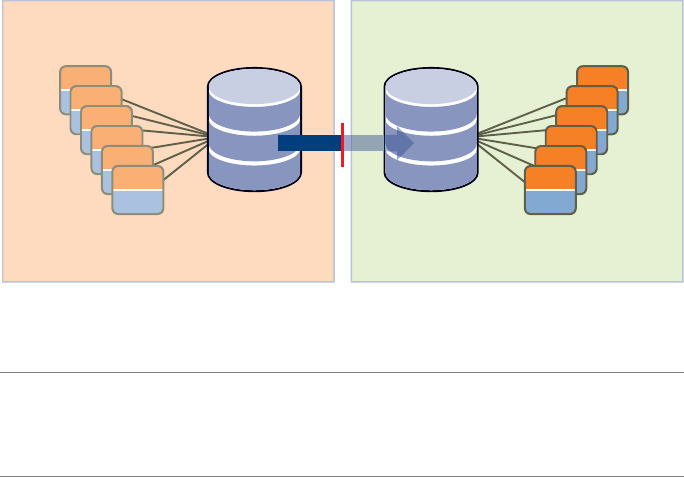
Site Recovery Manager Administration Guide
70 VMware, Inc.
Figure 7-1. Storage Configuration after Running an Actual Failover from Site A to
Site B for the shared-san-2 Datastore
ThisfailbackscenariodescribesthestepsforasuccessfulfailbackfromSiteBtoSiteA.
ItincludesthestepstocompletethereprotectionofSiteAafterthefailbackfromSiteB.
Thefollowingtermsandabbreviationsareused.
SiteA—Theoriginalprotectedsite.
SiteB—Theoriginalrecoverysite.
PG1—TheoriginalprotectiongroupdefinedatSiteA.
PG2—AnewprotectiongroupdefinedatSiteBtofacilitatethefailbackfrom
Site BbacktoSiteA.
PG3—AnewprotectiongroupdefinedatSiteAtofacilitatethefailovertoSiteB.
PG3isbasicallythesameprotectiongroupasPG1.
RP1—TheoriginalrecoveryplandefinedatSiteB.
RP2—AnewrecoveryplandefinedatSiteAtofacilitatethefailbackfromSiteB
backtoSiteA.
SourceLUN—AVMFSdatastorethatisbeingreplicatedtoanalternativedatacenter.
TargetLUN—Theresultingdatastoreatthealternatedatacenter.
CloneLUN—AcloneofthetargetLUNusedonlyduringatestoffailover.
NOTEIfyouhavenotpurchasedaprotection‐enablementlicensekey
(SRM_PROTECTED_HOST)fortheprotectedsite,youmusttransferthatkeyfromthe
recoverysitetotheprotectedsitebeforeyoucanrunafailback.Formoreinformation,
see“SRMLicensing”onpage 24
Site A — protected site Site B — recovery site
source LUN
(shared-san-2)
Write Disabled
(read only)
target LUN
(shared-san-2)
Read Write
enabled
protected
virtual machines
(app_vm7 to app_vm12)
apps
apps
apps
apps
apps
apps
OS
apps
apps
apps
apps
apps
apps
OS
all
powered
off by SRM
at start of
SRM Recovery
protected
virtual machines
(app_vm7 to app_vm12)
all
powered
on by SRM
during the
SRM Recovery
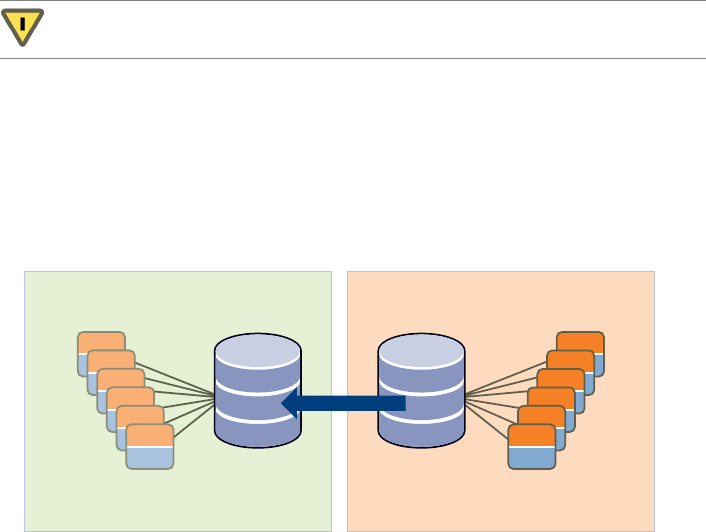
VMware, Inc. 71
Chapter 7 Failback
Thisscenariodescribesgeneralproceduresforperformingfailbackfromarecoverysite
backtotheoriginalprotectedsite.
Tohelpyoutrackthesestepsasyoucompletethem,seeAppendix B,“Failback
Checklist,”onpage 83.
To prepare for failback
1ShutdownallSiteBvirtualmachinesthatwererecoveredtoSiteBforthefailover.
2 CreatealistofalltheprotectedvirtualmachinesthatwererecoveredtoSiteB.You
willneedthisinformationforalaterstep.
3IntheVirtualCenterdatastorebrowser,cleanupthedirectoryatSiteBthat
containedthevirtualmachineconfigurationfilescreatedduringprotectiongroup
creationatSiteA.
Thisisthelocationselectedduringthecreationoftheoriginalprotectiongroupat
SiteA‐PG1.Specifically,deletethe.vmsd,.vmx,and.vmxffiles.Usethelistyou
createdinStep 2aboveasareferenceduringthisclean‐upstep.
To complete a storage configuration change so that the source LUN is now Site B
Workwithyourstorageteamtocompleteastorageconfigurationchangesothatthe
sourceLUNisnowassociatedwithSiteBandthetargetLUNisassociatedwithSiteA.
CAUTIONThedatastoreholdingthesevirtualmachinesistheoneusedfor
placeholdermachines.Donotremovethesefilesfortheactualvirtualmachines.
Site A — recovery site Site B — protected site
target LUN
(shared-san-2)
Write Disabled
(read only)
source LUN
(shared-san-2)
Read Write
enabled
protected
virtual machines
(app_vm7 to app_vm12)
apps
apps
apps
apps
apps
apps
OS
apps
apps
apps
apps
apps
apps
OS
protected
vms offline
in Site A
protected
virtual machines
(app_vm7 to app_vm12)
protected
vms that will
be recovered
to Site A
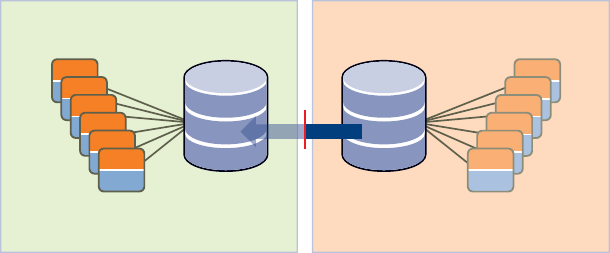
Site Recovery Manager Administration Guide
72 VMware, Inc.
To remove the out-of-date protected virtual machines from inventory on Site A
1AtSiteA,rescanthehostbusadapters(HBAs)onallthehosts.Thismakesiteasier
toidentifytheprotectedvirtualmachines,becausetheynowappearinvalidinthe
inventory,asdoestheprotectiongrouptowhichtheyareassigned.
2AtSiteA,removePG2fromtherecoveryplan,thendeletePG2.
3 SelectalltheprotectedvirtualmachinesatSiteAthatwererecoveredtoSite B.
Right‐clicktheselectedvirtualmachinesandselectRemove from Inventoryto
removethehighlightedprotectedvirtualmachinesfromtheinventoryatSite A.
To failback from Site B to Site A
1CompletetheArrayManagerconfigurationwizardatSiteB,whichnowhasthe
sourceLUNconfiguredatSiteBandthetargetLUNconfiguredatSiteA.The
recoverysitearraymanagernowbecomestheprotectedsitearraymanager,and
theprotectedsitearraymanagernowbecomestherecoverysitearraymanager.
2ConfigureinventorymappingsatSiteB.
Theseinventorypreferencesareassignedtotheprotectedvirtualmachineswhen
theyarerestartedatSiteAafterthefailback.
3AtSiteB,configurePG2tofailbacktoSiteA.
4AtSiteA,configureRP2.
DonotdeleteRP1,whichyoucreatedatSiteBtoprotectthedesignatedvirtual
machinesatSiteA.
5 ClickTesttotesttherecoveryplanwithclonesorsnapshotsofthetargetLUNson
theprotectedsite.Ifthetestissuccessful,clickRuntorunanactualrecoveryofRP 2.
Thefollowingfigureillustratesthestorageconfigurationaftertherecoveryagainst
RP2completes.
Site A — recovery site Site B — protected site
target LUN
(shared-san-2)
source LUN
(shared-san-2)
Write Disabled
(read only)
Read Write
enabled
protected
virtual machines
(app_vm7 to app_vm12)
apps
apps
apps
apps
apps
apps
OS
apps
apps
apps
apps
apps
apps
OS
all
powered
on by SRM
during the
SRM Recovery
protected
virtual machines
(app_vm7 to app_vm12)
all
powered
off by SRM
at start of
SRM Recovery
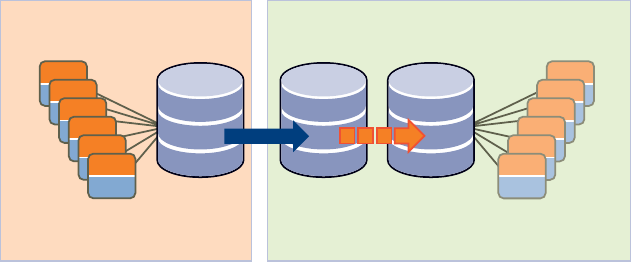
VMware, Inc. 73
Chapter 7 Failback
To prepare Site A for failover in case of a second disaster
1ShutdownalloftheprotectedvirtualmachinesatSiteAthatwerefailedbackfrom
SiteBduringtheSRMrecoveryoperationperformedin“TofailbackfromSiteBto
SiteA.”
TheshutdownensuredthatallI/OontheLUNshasstoppedbeforeswappingthe
replicationdirectiononthearrays.
2PerformacleanupofthedirectoryatSiteAthatcontainedthevirtualmachine
configurationfilescreatedduringprotectiongroupcreationatSiteB.(SeeStep 3of
theproceduretitled“Toprepareforfailback.”)
3IntheVirtualCenterdatastorebrowser,cleanupthedirectoryatSiteAthat
containedthevirtualmachineconfigurationfilescreatedduringprotectiongroup
creationatSiteB.
To complete a storage configuration change so the source LUN is now Site A
Workwithyourstorageteamtocompleteasecondstorageconfigurationchange.
ReassociatethesourceLUNwithSiteA,andreassociatethetargetLUNwithSiteBand
thecloneLUN,asshowninthefollowingfigure.
Thestorageconfigurationisnowrevertedtotheoriginalconfigurationbeforethesetup
ofSRM.Thestoragearrayvendordeterminesthedatasynchronizationmethod
(snapshotatintervalsorcontinuoussynchronization)ofthetargetLUNtotheclone
LUN.WhenasimulatedfailoverisinitiatedwiththetestoptioninSRM,finaldata
synchronizationisperformedfromthetargetLUNtothecloneLUN.
Site A — protected site Site B — recovery site
source LUN
(shared-san-2)
clone LUN
(shared-san-2)
Write Disabled
(read only)
target LUN
(shared-san-2)
Write Disabled
(read only)
Read Write
enabled
protected
virtual machines
(app_vm7 to app_vm12)
apps
apps
apps
apps
apps
apps
OS
apps
apps
apps
apps
apps
apps
OS
protected
vms that will
be recovered
to Site A
protected
virtual machines
(app_vm7 to app_vm12)
protected
vms offline
in Site B
Site Recovery Manager Administration Guide
74 VMware, Inc.
To prepare Site B for failover in case of a second disaster
1AtSiteB,rescanthehostbusadapters(HBAs)onallthehosts.Thismakesiteasier
toidentifytheprotectedvirtualmachines,becausetheynowappearinvalidinthe
inventory,asdoestheprotectiongrouptowhichtheyareassigned.
2AtSiteB,removePG2fromtherecoveryplan,thendeletePG2.
3AtSiteB,removealltheprotectedvirtualmachinesthatwererecoveredtoSite A
frominventoryatSiteB.Inthisscenario,thisisapp_vm7 to app_vm12.(See“To
removetheout‐of‐dateprotectedvirtualmachinesfrominventoryonSiteA.”)
4 CreatePG3atSiteAfortheprotectedvirtualmachines.
PG3shouldbeidenticaltoPG 1,theprotectiongroupthatwasoriginally
associatedwithRP1,therecoveryplanthatwasruninRecoverymodeand
resultedinthestartupoftheprotectedvirtualmachinesatSite B.
5ReassociatetheprotectiongroupsatSiteAwithRP1atSiteB.
YoudonotneedtodeleteRP2(therecoveryplanthatwascreatedatSiteAto
facilitatetherecoverybacktoSiteAfromSiteB).
YouhavecompletedthereprotectionoftheprotectedvirtualmachinesatSiteA.
VMwarerecommendsthatyounowconductafailovertestagainstRP1toensurethat
SiteAisprotectedandreadyforanyeventthatmaynecessitatearecoverytoSiteBif
anotherdisasteroccurs.
Other Failback Considerations
Thereareseveralmoreissuestoconsiderduringafailback.
SitePairing—SitesAandBneedtobepairedonlyonce.SRMmaintainsa
bidirectionalrelationshipbetweenpairedsites.
DNSUpdates—IfSiteAandSiteBarenotjoinedbyastretchedVLAN,manually
provideDNSupdatesasthevirtualmachinesaremovedbetweenSite AandSite B
andtheirIPaddresseschangetoaccommodatetheirnewnetwork.

VMware, Inc. 75
8
ThischapterdescribesSiteRecoveryManager(SRM)eventsandalarmnotification
configurationoptions.Thischapterincludesthefollowingtopics:
“SRMAlarms”onpage 75
“A b o u t SRMAlarmTriggers”onpage 76
“EditSRMAlarmSettings”onpage 76
“PrepareforAlarmNotificationbyEmail”onpage 78
SRM Alarms
SRMalarmsarenotificationsthatoccurinresponsetoselectedeventsthatSRMraises.
Theseevent‐triggeredalarmsareavailableandconfiguredwhenSiteRecoveryis
selectedintheVIClient.ThealarmsspecifictoSRMeventsaredefinedwhenSRMis
installed.
SRMalarmsuseemailmessagenotification.Forinformationabouthowtoconfigurea
VirtualCenterServertosupportemailmessagealarmnotificationbeforeyoueditSRM
alarms,see“PrepareforAlarmNotificationbyEmail”onpage 78.
TheAlarmstabintheSiteRecoveryviewdisplaysthelistofalarmsforSRMthatare
activatedwhendesignatedeventsoccur.ThesealarmsareSRMspecificandarenot
availablefromtheVirtualCenterServer.(SRMalarmsdonotappearintheVIClientʹs
TriggeredAlarmspane,thoughtheyareshownintheVirtualCenterEventLog.)
Alerting and Monitoring 8
NOTESRMalarmsforanyeventdonottriggermorethanonceeveryfiveminutes.
Multipleinstancesofthesameeventduringafive‐minuteperiodtriggeronlyasingle
alarm.
Site Recovery Manager Administration Guide
76 VMware, Inc.
About SRM Alarm Triggers
Alarmtriggerstakeseveralforms:
SRMgenerateseventsthatcanbeassociatedwithalarmsontheVirtualCenter
Server,suchas:
ProblemsontheSRMservergenerateSNMPtraps,emails,andsoon.
AlarmsareassociatedwithSRMeventsfromtheSRMplug‐in.
FailureoftheSRMserverorVirtualCenterserverattheprotectedorrecoverysite
generateseventsthatcanbeassociatedwithVirtualCenteralarms,suchas:
Problemswiththelocalsite(forexample,resourceconstraints).
Problemswiththeremotesite(forexample,beingunabletopingtheSRMor
VirtualCenterhostataremotesite).Remote‐sitefailureisreflectedintheSRM
eventsanddoesnottriggerarecovery.Recoverymustbeinitiatedmanually.
Diskspaceislow.
CPUuseexceededthelimit.
Memoryislow.
Theremotesitefailstorespond.
TheVirtualCenterServerorSRMserverattheremotesitefails.
Therecoveryteststarted,endedsuccessfully,failed,oriscancelled.
Virtualmachinerecoverystarted,ended,succeeded,failed,orreportsawarning.
Thefollowingarethealarmnotificationmethods:
Sendanotificationemailmessage
Sendanotificationtrap
Runascript
Edit SRM Alarm Settings
YoucanmodifySRMalarms.Asimplechangeistoenableordisablethealarm.Ifan
alarmisdisabled,anXappearsonthealarmlistingicon.
ToeditanSRMalarm,thefollowingconditionsmustbeinplace:
VIClientmustbeconnectedtotheprotectionorrecoverysite.
TheminimumrequiredprivilegesareModifyAlarm(Alarmsprivileges).

VMware, Inc. 77
Chapter 8 Alerting and Monitoring
To edit an alarm
1UsingaVIClient,logintotheprotectedsiteVirtualCenterServer.
2ClickSiteRecoveryontheVIClienttoolbar.
3ClicktheAlarmstab.
4Right‐clicktheeventandselectEditSettings.
5ClickActiontochoosetheactiontotakewhentheeventistriggeredandspecify
theassociatedinformation.
6Tocompletethealarm,clickOK.
7VirtualCenterverifiestheconfigurationofthealarmandaddsthealarmtothelist
ofalarmsforSRM.
Option Description
Sendanotification
email
ProvidetheemailaddressofthenotificationrecipientintheValuefield.
SMTPsendsanotificationemail.SMTPmustbereadywhentheemailis
sent.
TheVirtualCenterServergeneratestheemailmessagesubjectandbody
text.Onlythe“to”list(Value)isrequiredfromuserinput.Specifythe
emailaddresstowhichthemessageshouldbesent.
ForinformationaboutpreparingforemailmessageSMTPalarm
notificationforVirtualCenterServer,seetheVMwareInfrastructureBasic
SystemAdministration.
Sendanotification
trap
TheVirtualCenterServerisadefaultSNMPnotificationreceiver.An
SNMPtrapviewerisrequiredtoviewasenttrap.TheVirtualCenter
ServerhostmustbeconfiguredtoreceiveSNMPtraps.
ForinformationaboutpreparingforemailmessageSNMPalarmSMTP
alarmnotificationforVirtualCenterServer,seeVMwareInfrastructure
BasicSystemAdministration.
Runascript Ifthescriptisan.exefile,providethepathtothescript.Ifthescriptis
a.batfile,providethescriptpathasanargumenttothe
c:\windows\system32\cmd.execommand.Forexample,toruna
scriptlocatedinc:\alarmscript.bat,providethescriptpathas
c:\windows\system32\cmd.exe /c c:\alarmscript.cmd.
Site Recovery Manager Administration Guide
78 VMware, Inc.
Prepare for Alarm Notification by Email
Touseemailmessagestosendalarmnotifications,youmust:
DefinetheSMTPserverandemailmessageaddressinginformation.
Specifytheemailaddressesfortheuserswhoyouwanttoreceivetheemail
notifications.
Toprepareforemailmessagealarmnotification,thefollowingconditionsmustbein
place:
TheVIClientmustbeconnectedtotheVirtualCenterServer.
MinimumrequiredprivilegeisSettings(Globalprivileges).
To define the SMTP server and email message addressing information
1FromtheVIClient,chooseAdministration>VirtualCenterManagementServer
Configuration.
2ClickMailinthenavigationlist.
3Foremailmessagenotification,settheSMTPserverandSMTPportasfollows:
SMTPServer–ThehostnameorIPaddressoftheSMTPgatewaytousefor
sendingemailmessages.
SenderAccount–Theemailaddressofthesender,forexample,
srm_alarms@example.com.
4ClickOK.
5IntheSRMview,clicktheAlarmstab.
6 Selectanalarmtoaddamailnotificationevent.
7Right‐clickthealarmandselectEditSettings.
8 SelecttheActionstab.
9ClickAdd.
10 ChangethetypeoftheactiontoSendanotificationemail.
11 Setthevalueoftheactiontotheemailaddresstosendthenotificationto.

VMware, Inc. 79
9
SRMmonitorsandhandleschangestotheVirtualCenterServerattheprotectedand
recoverysites.
Thischapterincludesthefollowingtopics:
“ChangestoVirtualCenterServer”onpage 79
“ChangestoProtectedSites”onpage 79
“ChangestoRecoverySites”onpage 80
Changes to VirtualCenter Server
TheSRMserversdependontheavailabilityofcertaininventoryobjects,suchasvirtual
machinesandnetworks.ChangestotheVirtualCenterServerstatecanaffectSRM.
RenamingandrelocatingobjectsintheVirtualCenterServerinventorydoesnotaffect
SRMunlessitcausesresourcestobecomeinaccessibleduringtestorrecovery.
Changes to Protected Sites
SRMsupportsthefollowingchangesattheprotectedsitewithoutdisruption:
Modifyingprotectedvirtualmachineconfiguration,suchasadding,modifying,
removingdevices,orrelocatingvirtualmachines.
Changingavirtualmachine’smemorysizeontheprotectedsiteisnotreflectedon
therecoverysiteifthevirtualmachineisalreadyinaprotectiongroup.
Deletingprotectedvirtualmachines.
Deletinganobjectforwhichaninventorymappingexists.
Protected and Recovery
Site Changes 9
Site Recovery Manager Administration Guide
80 VMware, Inc.
SRMrequiresreinstallationofSRMattheprotectedandrecoverysites:
TheVirtualCenterServerisreinstalledattheprotectedsite,reinitializingthe
VirtualCenterdatabase.
SRMisreinstalledattheprotectedsite,reinitializingtheSRMdatabase.
Changes to Recovery Sites
SRMsupportsthefollowingchangesattherecoverysitewithoutdisruption:
Deletingrecoveryvirtualmachines.
Movingrecoveryvirtualmachinestoadifferentfolder,resourcepool,ornetwork.
Deletinganobjectforwhichaninventorymappingexists.
TheVirtualCenterServerisreinstalledattherecoverysite(re‐initializingthe
VirtualCenterdatabase).
SRMrequiresreinstallationofSRMattheprotectedandrecoverysitesifSRMis
reinstalledattherecoverysite(reinitializingtheSRMdatabase).

VMware, Inc. 81
Thefollowingisachecklisttohelpensurethatyourstorageplatformsarereadyfor
integrationwithSRM.
Preinstallation Checklist A
Description Protected Recovery
DownloadtheSRMsoftware,StorageReplicationAdapter(SRA),
andproductinformationfromtheVMwareWebsite.
EnsurethatasupportedreleaseofMicrosoftSQLServerorOracle
Databaseserverisconfiguredandreadyforuse.
CreateadatabaseinstanceforVirtualCenterServer.
CreateadatabaseuserfortheVirtualCenterinstancewith
db ownerandcreatetableprivileges.
CreateaDSNfortheVirtualCenterdatabase.
EnsurethatacompatibleversionofVirtualCenterServeris
installedandreadyforuse.
UsetheVIClienttosetupaccesstotheVirtualCenterServer.
EnsurethatasupportedversionofESXisinstalledandintegrated
intoVirtualCenter.TheESXmusthaveaccesstoaLUNonaSAN
thatisconfiguredasaVMFSdatastoreandissetupfordata
replicationtoacorrespondingSANintherecoverysite.

Site Recovery Manager Administration Guide
82 VMware, Inc.
CreateadatabaseinstanceforSRM.
Createadatabaseuser,withappropriateprivileges,fortheSRM
databaseinstance.
CreateaDSNfortheSRMdatabase.
IdentifyaphysicalorvirtualsystemonwhichtoinstallSRM.
InstalltheSRAfromyourarrayproviderontheSRMhost.
Description Protected Recovery

VMware, Inc. 83
Usethefollowingchecklisttotrackthefailbackstepsasyoucompletethem.
Failback Checklist B
Prepare for failback
_____ SiteBPowerdowntheprotectedvirtualmachines.
_____ SiteBCreatealistoftheprotectedvirtualmachinesthatwererecoveredto
SiteB.
_____ SiteBCleanupthedirectoryatSiteBthatcontainedthevirtualmachine
configurationfilescreatedwhenyouassignedtheprotectedmachines
toaprotectiongrouponSiteA.
Complete a storage configuration change so that the source LUN is now Site B
_____ Storage Workwithyourstorageteamtocompleteastorageconfiguration
changesothatthesourceLUNisnowassociatedwithSiteBandthe
targetLUNisassociatedwithSiteA.
Remove out-of-date protected virtual machines from inventory on Site A
_____ SiteARescanthehostbusadapters(HBAs)onallthehosts.
_____ SiteAConnecttotheVirtualCenterinstanceatSiteAanddeletetheoriginal
protectiongroup(PG2).
_____ SiteARemovealltheprotectedvirtualmachinesthatwererecoveredtoSite
BfromtheinventoryatSiteA.
Failback from Site B to Site A
_____ SiteBCompletetheArrayManagerconfigurationwizardatSiteB,which
nowhasthesourceLUNconfiguredatSiteBandthetargetLUN
configuredatSiteA.
_____ SiteBConfiguretheinventorypreferencesatSiteB.Thesearetheinventory
preferencesthatareassignedtotheprotectedvirtualmachineswhen
theyarerestartedatSiteAafterthefailback.
Site Recovery Manager Administration Guide
84 VMware, Inc.
_____ SiteBConnecttotheVirtualCenterinstanceatSiteBandconfigurePG2.
_____ SiteAConnecttotheVirtualCenterinstanceatSiteAandconfigureRP2.
_____ SiteAPerformarecoveryagainstRP2.
Prepare Site A for failover in case of a second disaster
_____ SiteAShutdowntheprotectedvirtualmachinesatSiteAthatwerefailed
backfromSiteBinthepreviousstep.
_____ SiteACleanupthedirectoryatSiteAthatcontainedthevirtualmachine
configurationfilescreatedduringprotectiongroupcreationatSiteB.
Complete a storage configuration change so the source LUN is now Site A
_____ Storage Workwithyourstorageteamtocompleteasecondstorage
configurationchangesothatthesourceLUNisassociatedwithSiteA
again,andthetargetLUNandcloneLUNareassociatedwithSiteB.
Prepare Site B for failover in case of a second disaster
_____ SiteBRescanthehostbusadapters(HBAs)onallthehosts.
_____ SiteBConnecttotheVirtualCenterinstanceatSiteBanddeletePG2.
_____ SiteBConnecttotheVirtualCenterinstanceatSiteBandremoveallthe
protectedvirtualmachinesatSiteB.Thesevirtualmachineswere
recoveredtoSiteA.
_____ SiteACreatePG3atSiteAfortheprotectedvirtualmachines.
_____ SiteBReassociatePG3(fromstep18atSiteA)withRP1atSiteB.
_____ SiteBPerformatestfailoveragainstRP1tomakesurethatSiteAis
protectedagain.

VMware, Inc. 85
Thesrm-configcommandconfiguresthenetworkconnectionbetweenanSRMserver
andtheVirtualCenterServerthatsupportsit.Anadministratorcanusethiscommand
torepairanSRMserverconnectionwheneithertheVirtualCenterServerortheSRM
serverIPaddresshaschanged,orwhentheuserIDorpasswordusedfor
credential‐basedauthenticationchanges.
Repair a connection after an SRM server IP address change
1LogintotheSRMserverhostandstartaWindowscommandshell.
2OpenC:\Program Files\VMware\VMware Site Recovery
Manager\config\extension.xmlfileinatexteditor.
3Intheopenfile,locatethe<url>tagandchangeitscontentstothenewIPaddress
andportoftheSRMserver:
<config>
<extension>
<key></key>
<version></version>
<description></description>
<servers>
<server>
<url>http://10.17.186.120:8095</url>
Use the srm-config
command to repair an SRM
server connection C
NOTEAfteryouhavecompletedanyoftheproceduresdescribedhere,youmust
reconfiguresitepairingasdescribedin“ConnectingtheProtectedandRecoverySites”
onpage 34.
Site Recovery Manager Administration Guide
86 VMware, Inc.
4 ChangedirectorytoC:\Program Files\VMware\VMware Site Recovery
Manager\bin.
5Runthefollowingcommandtoupdatetheextensionregistration:
C:\Program Files\VMware\VMware Site Recovery Manager\bin>srm-config.exe
-cmd updateext -cfg ..\config\vmware-dr.xml -extcfg
..\config\extension.xml
Repair a connection after a Virtual Center server IP address change
1LogintotheSRMserverhostandstartaWindowscommandshell.
2 ChangedirectorytoC:\Program Files\VMware\VMware Site Recovery
Manager\bin.
3Runthefollowingcommand,where<vc‐ip‐addr>istheIPaddressoftheVirtual
Centerhost:
C:\Program Files\VMware\VMware Site Recovery Manager\bin>srm-config.exe
-cmd updatevc -cfg ..\config\vmware-dr.xml -vc <vc-ip-addr>
Ifthatcommandreturnsanerrorindicatingthatthecertificateisnottrusted,run
thefollowingcommand,where<vc‐ip‐addr>istheIPaddressoftheVirtualCenter
hostand<thumbprint‐string>isthethumbprintstringreturnedintheerror
message:
C:\Program Files\VMware\VMware Site Recovery Manager\bin>srm-config.exe
-cmd updatevc -cfg ..\config\vmware-dr.xml -vc <vc-ip-addr> -thumbprint
<thumbprint-string>
Reinitializing credential-based authentication after a user ID or password change
1LogintotheSRMserverhostandstartaWindowscommandshell.
2 ChangedirectorytoC:\ProgramFiles\VMware\VMwareSiteRecovery
Manager\bin
3RunthefollowingcommandtoupdatetheuserIDandpassword,supplyingthe
new<userID>onthecommandlineandthepasswordwhenprompted:
C:\Program Files\VMware\VMware Site Recovery Manager\bin>srm-config.exe
-cmd updateuser -cfg ..\config\vmware-dr.xml -u <userID>

VMware, Inc. 87
WhileSRMallowsyoutoreplicatetransientdatasuchasWindowspagingfilesor
virtualmachineswapfiles,suchdataneednotbereplicated.Preventingreplicationof
suchdataavoidsunnecessaryconsumptionofnetworkbandwidth.
Specify a Nonreplicated Datastore for Swapfiles
Everyvirtualmachinerequiresaswapfile,whichisnormallycreatedinthesame
datastoreastheothervirtualmachinefiles.WhenyouuseSRM,thisdatastoreis
replicated.Topreventswapfilesfrombeingreplicated,createthemonanonreplicated
datastore.Thisproceduremustbecarriedoutforallprotectedclusters,atboththe
protectedandrecoverysites.Formoreinformation,seetheVMwareInfrastructure
documentation.
To create swapfiles on a nonreplicated datastore (ESX 3.5)
1IntheVIClient,right‐clickanESXclusterandclickEditSettings.
2IntheSettingswindowforthecluster,clickSwapfileLocationandselectStorethe
swapfileinthedatastorespecifiedbythehost,thenclickOK.
3Foreachvirtualmachineinthecluster:
aClicktheConfigurationtab.
bClickEditontheSwapfilelocationline.
cIntheVirtualMachineSwapfileLocationwindow,selectanonreplicated
datastoreandclickOK.
Avoiding Replication of
Paging Files and Other
Transient Data D
Site Recovery Manager Administration Guide
88 VMware, Inc.
To create swapfiles on a nonreplicated datastore (ESX 3.0.2)
1Intheselectedcluster,pickavirtualmachineandshutitdown.
2Makeabackupcopyofthevirtualmachine’s.vmxfile.
3Editthe.vmxfiletochangethevalueofthesched.swap.dirparametertospecify
thepathnameofanonreplicateddatastoreattheprotectedsite.
Adatastorewiththispathnamemustalsoexistattherecoverysite.Ifitdoesnot,
thevirtualmachinecannotpoweronattherecoverysite.
4Editthevmxfiletoremovethesched.swap.derivedNameline.
5 Savethemodified.vmxfile.
6Poweronthevirtualmachine.
7Repeattheprocedureforeachvirtualmachineinthecluster.
Creating a Nonreplicated Virtual Disk for Paging File
Storage
Inthedefaultconfiguration,Windowscreatesitspagingfileonthesystemdisk
(typicallyC:).Pagingfilescreatedinthislocationarealwaysreplicatedwhenyouuse
areplicateddatastore.Youcanavoidreplicationofpagingfilesbycreatingavirtual
disk(.vmdkfile)onanonreplicateddatastoreand,oneachvirtualmachineina
protectiongroup,configuringWindowstocreateitspagingfileonthatdisk.SRM
detectsthatanyvirtualmachineconfiguredthiswaydependsonatleastone
nonreplicatedvirtualdisk(thepagingfiledisk)andremovesthatvirtualmachinefrom
itsprotectiongroup.Youmustexplicitlydesignateacopyofthatvirtualdiskfileatthe
recoverysitefortherecoveredvirtualmachinetouse.
Tosimplifytherepetitionofthisprocedureforeveryvirtualmachineinaprotection
group,youcancreateavirtualdiskfiletemplateandthencloneittoprovide
nonreplicatedpagingfiledisksforvirtualmachinesatbothsites.
To force virtual machines to use nonreplicated paging file storage
1Attheprotectedsite,createatemporaryvirtualmachine.
2Onthetemporaryvirtualmachine,createanewdisk.
Storethediskfileinalocationwhereyoutypicallystorevirtualmachinetemplates.
3Poweronthetemporaryvirtualmachine,thencreateandformatapartitiononthe
newdisk.
4Disconnectthenewdiskfromthetemporaryvirtualmachine.
VMware, Inc. 89
Appendix D Avoiding Replication of Paging Files and Other Transient Data
5Copythetemplatedisktoatemplatefolderattherecoverysite.
Youmustcopythe .vmdkfileanditsflatcounterpart(forexample,pagedisk.vmdk
andpagedisk-flat.vmdk).
6Attheprotectedsite,foreachvirtualmachineinaprotectiongroup:
aUsethevmkfstoolscommandtocreateacloneofthetemplatediskina
nonreplicateddatastore.
bUsetheVIClienttoconnectthecloneddisktothevirtualmachine.
cPoweronthevirtualmachineandassignadrivelettertothecloneddisk.
dConfigurethevirtualmachinetocreateitspagingfileontheclonedvirtual
disk.
eShutdownandre‐startthevirtualmachinesothatitwritesitspagingfileto
thenewlocation(ontheclonedvirtualdisk).
Youcandeletetheold,unusedpagingfilefromthesystemdisk.
fUsethevmkfstoolscommandtoclonethetemplateyoucopiedinStep 5toa
.vmdkfileonanonreplicateddatastoreattherecoverysite.
gUsetheVIClienttoviewtheprotectiongroupthatcontainsthevirtual
machine.
Becausethevirtualmachineusesanonreplicateddiskforitspagingfile,SRM
notifiesyouthatthevirtualmachineusesoneormoredevicesthatdonothave
filebackingsonareplicatedLUN.Itthenremovesthevirtualmachinefrom
theprotectiongroupuntilyouresolvethisconfigurationproblem.
hIntheVIClient,usetheConfigureStorageforthisVMpagetoassignstorage
forthepagingfiledisktothe.vmdkfileyouclonedinStep f.
Afteryouconfigurethevirtualmachinetousethenonreplicateddiskatthe
protectedsite,SRMconsidersthevirtualmachine’sstoragetobeconfigured
andreturnsittotheprotectiongroup.
Afterthechangesyoumadeattheprotectedsitearereplicatedtotherecoverysite,you
canrunatestoftherecoveryplantoverifythattherecoveredvirtualmachinesare
usingthenonreplicatedpagingfile.
Site Recovery Manager Administration Guide
90 VMware, Inc.

VMware, Inc. 91
array‐basedreplication
Replicationofvirtualmachinesthatismanagedandrunbythestoragesubsystem
itselfratherthanfrominsidethevirtualmachines,thevmkernel,ortheservice
console.
failback
Theprocessofrestoringasystemtoitsoriginalstate,followingasystemfailure
thatautomaticallyswitchedthecomputerserver,system,ornetworktoastandby
server,systemornetwork.
failover
Eventthatoccurswhentherecoverysitetakesoveroperationinplaceofthe
protectedsiteafterthedeclarationofadisaster.
inventorymapping
Mappingbetweenresourcepools,networks,andvirtualmachinefoldersonthe
protectedsiteandtheirdestinationcounterpartsontherecoverysite.
LUN(logicalunitnumber)
Anidentifierforadiskvolumeinastoragearray.
protectedsite
Thedatacenterthatcontainsthevirtualmachinesforwhichdataisbeing
replicatedtotherecoverysite.
protectiongroup
Agroupofvirtualmachinesthatarefailedovertogetherduringtestandrecovery.
Glossary
Site Recovery Manager Administration Guide
92 VMware, Inc.
recoveryplan
Thenecessarystepstorecoverprotectedvirtualmachinesintheirassigned
protectiongroupsaccordingtoanorderofprioritydefinedintheplan.
recoverysite
Thedatacenterthatcontainstherecoveryvirtualmachinesperformingworkwhile
theprotectedsiteisunavailable.
recoveryvirtualmachine
Aplaceholderthatrepresentsaprotectedvirtualmachinerepresentingthevirtual
machinesreplicatedfromtheprotectedsite.
storagereplicationadapter(SRA)
Softwarethatstoragevendorsprovidethatensuresintegrationofstoragedevices
withSiteRecoveryManager.Thesevendor‐specificscriptssupportarray
discovery,replicatedLUNdiscovery,testfailover,andactualfailover.
storagearray
Astoragesystemthatcontainsmultiplediskdrives.
VMware, Inc. 93VMware, Inc. 93
Index
A
alarms
defined 75
defining message addressing
information 78
editing 77
events that trigger 76
notification 75
prerequisites for editing 76
prerequisites for email message
SMTP notification 78
API listener ports
HTTP 30
SOAP 30
array managers
repairing 47
array scripts 43
authentication
see secure connection 34
B
batch file 52
C
checklists
failback 83
pre-installation 81
clones 20
masking of 20
command steps
prerequisites for adding 52
purpose of 52
configuration
inventory preferences 47
prerequisites for virtual machine pro-
tection properties 50
protected site 43
recovery site 59
requirements for VMware
Infrastructure 44
connecting protected and recovery sites
see pairing 34
customization specifications 67
creating 67
importing 68
D
database requirements
Oracle Server 23
databases
Oracle 11
SQL 11
DataSourceName (DSN) 30
datastore
meta data 49
datastore groups
and protection groups 13
directory cleanup during failback 71, 73
disaster
definition of 9
DNS updates 74
E
export formats (for recovery plans) 61
Site Recovery Manager Administration Guide
94 VMware, Inc.
F
failback
change source LUN to site A 73
change source LUN to site B 71
checklist 83
directory cleanup 71, 73
failing back from recovery to protect-
ed site 72
managing 69
prepare Site A for another
failover 73
prepare Site B for another
failover 74
preparing for 71
scenario 69
features of SRM 10
CPU and memory quality 11
instant updates 11
leveraged storage 10
monitoring and alerts 11
network reconfiguration 10
non-disruptive tests 10
predictable management 11
prepared response 10
H
host bus adapters (HBAs) 72, 74
host system requirements 20
HTTP port 30
I
installation
array requirements for 20
operating systems required for
SRM 20
operating systems required for SRM
plug-in 21
prerequisites 28
procedure 28, 31
procedure for SRM plug-in 32
VMware Infrastructure requirements
for 19
inventory mapping
how used 17
inventory preferences
configuring 47
prerequisites for configuring 47
purpose of 47
L
licensing
finding more information 24
license server 24
SiteRecoveryManager.lic file 24
VMware License Server Tools 25
listener ports
HTTP 30
SOAP 30
LUN
clone 73
masking and zoning 20
replication verification 13
source LUN 71
target LUN 71
M
maximums
number of connections 30
response time for virtual
machines 61
message steps
prerequisites for adding 52
purpose of 52
meta data 49
Microsoft .NET 2.0 Framework 21
N
notification 75
VMware, Inc. 95
Index
O
operating system
20
P
pairing 74
prerequisites for 34
protected and recovery sites 34
PKCS#12 certificate file 29
placeholder virtual machine
purpose of 49
poweron categorization
High, Normal, Low, or No 60
pre-installation checklist 81
protected and recovery sites
setting up 15, 16
protected site
disruptive modifications 80
non-disruptive modifications 79
protection groups 13
and datastore groups 13
creating 48
defined 16, 48
on protected sites 16
prerequisites for creating 48
R
recovery plan
creating 60
defined 16, 59
editing 62
export formats 61, 66
exporting 66, 67
prerequisites for creating 60
prerequisites for removing 64
prerequisites for running actual 64
prerequisites for testing 63
removing 65
running actual 64, 72
testing 63, 72
viewing 66
viewing details 61
viewing history 67
recovery site
disruptive modifications 80
non-disruptive modifications 80
S
scripts
alarm notification 77
running batch file 53
running DOS command 53
secure connection
certificate based 34
credential based 34
SMTP port 78
SMTP server 78
snapshots 20
masking of 20
SNMP trap 77
SOAP
port 30
SRM
environment 12
installation process 15
requirements for using 11
SRM architecture components
ESX server 12
license server 12
Oracle or SQL database 12
SAN 13
SRM Server 12
VirtualCenter Server 12
VMware File System (VMFS) 13
SRM Bulk Insert feature 23
default file location 23
Site Recovery Manager Administration Guide
96 VMware, Inc.
storage replication adapters 20, 43
suspending virtual machines 60
system requirements 20
T
trigger events for alarms 76
trusted certificate 34
V
VI Client
logging into SRM from 33
using to manage SRM 33
Virtual Machine File System (VMFS) 13
virtual machines 16
configuring 17, 65
customization settings 67
mapping preferences 16
poweron categorization 60
prerequisites for configuring 65
prioritizing for restart after
recovery 16
removing from protected site
inventory 72
suspending non-critical 60
VMware Infrastructure
auditability 10
change control 10
Distributed Resource Scheduler 10
encapsulation 9
hardware independence 10
hardware re-purposing 10
how it supports SRM 9
resource pools 10
shared storage 9
VLANs and SRM testing 10
