Vmware Application Discovery Manager User’s Guide V Center 6.2.1 Vcadm 621 Ug Eng
User Manual: vmware vCenter Application Discovery Manager - 6.2.1 - User’s Guide Free User Guide for VMware vCenter Software, Manual
Open the PDF directly: View PDF  .
.
Page Count: 74
- Application Discovery Manager User’s Guide
- Contents
- About This Book
- Architecture Overview
- Getting Started
- Managing ADM
- Groups
- Discovery
- Application Patterns
- Report
- Connectors
- Solver
- Index
Application Discovery Manager
User’s Guide
vCenter Application Discovery Manager 6.2.1
This document supports the version of each product listed and
supports all subsequent versions until the document is replaced
by a new edition. To check for more recent editions of this
document, see http://www.vmware.com/support/pubs.
EN-000547-01

VMware, Inc.
3401 Hillview Ave.
Palo Alto, CA 94304
www.vmware.com
2VMware, Inc.
ADM User’s Guide
You can find the most up-to-date technical documentation on the VMware Web site at:
http://www.vmware.com/support/
The VMware Web site also provides the latest product updates.
If you have comments about this documentation, submit your feedback to:
docfeedback@vmware.com
Copyright © 2011 VMware, Inc. All rights reserved. This product is protected by U.S. and international copyright and
intellectual property laws. VMware products are covered by one or more patents listed at
http://www.vmware.com/go/patents.
VMware is a registered trademark or trademark of VMware, Inc. in the United States and/or other jurisdictions. All other marks
and names mentioned herein may be trademarks of their respective companies.
VMware, Inc. 3
Contents
Contents 3
AboutThisBook 7
1ArchitectureOverview 9
WhatDoesADMDo? 9
EssentialConcepts 10
ADMComponents 11
ActiveProbe 11
ADMArchitectureSolutions 12
Single‐BoxSetup 12
DistributedApplianceSolutions 12
2GettingStarted 15
AccessingtheADMConsole 15
LogIntotheADMConsole 15
3ManagingADM 17
Groups 17
Discovery 17
ApplicationPatterns 18
Changes 18
Fingerprints 19
IdentifyingApplicationbyPorts 19
Aging 20
DeletingAgingLogs 21
Users 21
Role‐BasedAccessControl 21
System 22
Licensing 22
4Groups 25
Overview 25
Requirements 26
Built‐InGroups 26
User‐DefinedGroups 26
ImportingandExportingGroupDefinitions 29
5Discovery 31
DiscoveryTypes 31
DiscoveryPlans 32
PassiveDiscovery 32
Policies 32
Plans 32
IPDiscovery 32
ADM User’s Guide
4VMware, Inc.
Policies 33
DetailDiscovery 33
DetailDiscoveryTab 33
DeployingDetailDiscovery 36
DetailDiscoveryConfiguration 36
HowDoActiveProbeConfigurationsAffectDetailDiscoveryPolicies? 36
DetailDiscoveryPolicies 36
ConfiguringStandardOSAgents 37
DealingwithFirewalls 37
CheckingforResults 37
DetailDiscoveryProtocols 37
SSH 38
SNMP 39
WMI 40
Telnet 43
VI‐SDK 45
DiscoveringDependencieswithDetailDiscovery 46
ADMDependencyDiscoveryMethods 46
ChoosingaMethodofDependencyDiscovery 47
DiscoveryStrategyforUsingOnlyDetailDiscoveryforDependencies 48
VMwareDiscovery 49
VMwareTerminologyOverview 49
VMwareDiscoveryinADM 49
UseCase 50
UsingVI‐SDKforDetailDiscovery 51
Capabilities 52
6ApplicationPatterns 55
Overview 55
ApplicationPatternDefinitions 55
NodeRules 56
ConnectivityRules 56
MandatoryNodeRules 56
UnifyingNodeRules 57
ApplicationPatternInstances 58
ViewingApplicationPatternDefinitionsandInstances 58
ApplicationPatternDefinitions 58
ApplicationPatternInstances 60
ApplicationDiscoveryProcess 61
UseCase:CreatingDefinitionsandViewingtheResultingInstances 61
7Report 63
Reporttypes 63
ExportingandPrintingReports 64
8Connectors 65
ConnectorsOverview 65
EMCSmartsIntegration 65
Status 66
Configuration 67
Log 68
UnregisterADM 68
ADM User’s Guide
6VMware, Inc.

VMware, Inc. 7
TheVMwarevCenter™ApplicationDiscoveryManagerUser’sGuidedescribestheuserinterfaceof
ApplicationDiscoveryManager(ADM).Italsoprovidesinformationthatthecustomersneed,tomanagethe
ADM.
Intended Audience
ThisdocumentispartoftheVMwarevCenterApplicationDiscoveryManagerdocumentationset,andis
intendedforusebycorporateinformationtechnology(IT)personnelwhoneedstomonitorenterprise
applicationsandresourcesandmakedecisionsaboutacquiring,allocating,andmodifyingtheseresources.
VMware Technical Publications Glossary
VMware®TechnicalPublicationsprovidesaglossaryoftermsthatmightbeunfamiliartoyou.Fordefinitions
oftermsastheyareusedinVMwaretechnicaldocumentationgotohttp://www.vmware.com/support/pubs.
Document Feedback
VMwarewelcomesyoursuggestionsforimprovingourdocumentation.Ifyouhavecomments,sendyour
feedbacktodocfeedback@vmware.com.
Technical Support and Education Resources
Thefollowingsectionsdescribethetechnicalsupportresourcesavailabletoyou.Toaccessthecurrentversion
ofthisbookandotherbooks,gotohttp://www.vmware.com/support/pubs.
Online and Telephone Support
Touseonlinesupporttosubmittechnicalsupportrequests,viewyourproductandcontractinformation,and
registeryourproducts,gotohttp://www.vmware.com/support.
Customerswithappropriatesupportcontractsshouldusetelephonesupportforthefastestresponseon
priority1issues.Gotohttp://www.vmware.com/support/phone_support.
Support Offerings
TofindouthowVMwaresupportofferingscanhelpmeetyourbusinessneeds,goto
http://www.vmware.com/support/services.
About This Book
ADM User’s Guide
8VMware, Inc.
VMware Professional Services
VMwareEducationServicescoursesofferextensivehands‐onlabs,casestudyexamples,andcoursematerials
designedtobeusedason‐the‐jobreferencetools.Coursesareavailableonsite,intheclassroom,andlive
online.Foronsitepilotprograms andimplementationbestpractices,VMwareConsultingServicesprovides
offeringsto helpyouassess,plan,build,andmanageyourvirtualenvironment.Toaccessinformationabout
educationclasses,certificationprograms,andconsultingservices,gotohttp://www.vmware.com/services.

VMware, Inc. 9
1
TheVMwarevCenter™ApplicationDiscoveryManager(ADM)isanenterprisedatacentermanagement
solutionthatusesagentlessdiscoveryandprovidescontinuousdependencymappingofapplications.
ADMhelpsyougainanunderstandingofyourservicedependencies.ADMalsoprovidesautomatedand
real‐timeapplicationdiscoverycapabilityacrossphysicalandvirtualenvironments.
Anaccurateapplicationdependencymapisessentialtovirtualizeapplications,movedatacenters,buildasite
recoveryplan,andtomoveaservicetothecloud.
ThischapterdescribesdifferentADMarchitecturesolutionsandalsodescribeshowtoconfigureanddeploy
them.Topicsinclude:
“WhatDoesADMDo?”onpage 9
“EssentialConcepts”onpage 10
“A D M Components”onpage 11
“A D M ArchitectureSolutions”onpage 12
What Does ADM Do?
ADMperformsthefollowinghigh‐levelfunctions:
ADMdiscoversConfigurationItems(CIs).Italsodiscoverstherelationshipsanddependenciesbetween
theseinstancesinrealtime.ThediscoverydataisstoredintheManagementDataRepository.Themap
featureintheUserInterface(UI)providesagraphicalrepresentationoftherelationshipsand
dependenciesbetweenalltheCIs.
ADMdeterminesthebaselineofusagefortheseconfigurationitems.Further,theADMdetects
inconsistenciesfromthenorm.
ADMprovidesimpactandpredictivereportingandhelpsyoutroubleshooterrors.
ADMhelpstoaccuratelyanswerthefollowingquestions:
Whathosts,applications,andconnectionsdoIhave?
HowareCIsused?
Whatarethedependenciesamongthem?
Architecture Overview 1
NOTEADMprovidesbothknownandunknowninformationaboutaninfrastructure.Ittellsyouwhat
youknow,andwhatyoudonotknow.Forexample,youmightthinkthatnolaptopsarecommunicating
withadatabaseserver.Usingthemap,youcanseethehoststhatyouknowareinyourinfrastructure.
However,youmightalsoseethattherearehostsorlaptopscommunicatingwiththedatabaseserver.
NOTEBaselineisthefirst24hoursofactivityofaconfigurationitem.

ADM User’s Guide
10 VMware, Inc.
WherearethehiddenoptimizationopportunitiesandhowcanIcapitalizeonthem?
Howwilltheseapplicationchangesimpactmybusiness?
Whataretherisks?
WhataretheproblemsandhowcanIsolvethem?
Essential Concepts
Table 1‐1definesessentialconceptsofADM.
Table 1-1. Essential Concepts
Concept Definition
ConfigurationItem(CI) ACIisahost(thiscanalsoincludenetworkdevicessuchasswitchesorrouters),an
application(alsoknownasaservice),oranetworkconnection.Forexample,aLinux
host,Ciscorouter,orVMware®ESX™ServerareallhostCIs.Oracleisanapplication
CI.HTTPandSSHarenetworkconnectionCIs.
Discovery Discoveryisacontinuousprocessthatcreatesandmaintainsadetailedmodelofyour
applicationenvironment.ADMdiscoversCIs.Chapter 5containsmoreinformation
aboutdiscovery.
ManagementData
Repository(MDR)
TheMDRisthedatabaseofADM.Whenconfigurationiteminformationis
discovered,itisstoredintheMDRafterreconciliation.
Groups Agroupisabuilt‐inoruser‐definedcollectionofoneormoreCIs.Theadminuserscan
creategroupssothattheycaneasilyview,analyze,andtrackthespecificsubsetof
data.GroupcreationallowstheadminusertoclassifyCIsintologicalsetsor
collectionssothatactionssuchascreatingreports,policies,orviewingtheinventory
isappliedtospecificgroups,insteadoftheentiredatabaseofCIs.Chapter 4contains
moreinformationaboutgroups.
Change AchangeisanychangetoaCI.Forexample,achangetoaconfigurationfileonahost
isachange.
Changetracking Changetrackingreferstoachangeinthediscoveredenvironment,suchasachange
intheamountofactivityonahost,achangeinthedemandonahostorservice,ora
newhostorconnectionthatispresentinthediscoveredenvironment.Change
trackingreferstobehavioralchanges.ADMallowsyoutocreatechangetracking
policiesthattrackbehavioralchangesinyourapplicationenvironment.
Applicationpattern ADMdiscoversbusinessapplicationsbycreatingapplicationpatterns.Theadminuser
cancreatethesefromtheManagetab,oraVMwareProfessionalServices
representativecanprovideyouthese.Anapplicationpatterndefinitionconsistsofset
ofrulesthatdescribetherequestedpattern.Thetwosetofrulesarenoderulesand
connectivityrules.ADManalyzestheapplicationpatterndefinitionanddiscovers
instancesoftheapplicationpattern.Noderulesaregroup‐likerulesthatdescribethe
instancesinthetopologygraph.Connectivityrulesdescribetheedgesinthetopology
graph(thatis,theconnectivitybetweentwoinstances).
Entityaging ADMletsyoucreateentityagingpolicies.Forexample,aservicerunninginyour
networkispopulatedintheMDR,andisthereforevisibletoyoufromtheUser
Interface(UI).Ifyouuninstallthisserviceatalatertime,youshouldnolongerseeit
asarunningserviceintheUI.Creatinganentityagingpolicyletsyouviewthemost
updatedstateofyournetwork,sinceitisaconstantlychangingenvironment.(An
entityisanetworkelement,serviceordependency,andanyoftheirderivedelements
suchasaJ2EEordatabaseinstance.)

VMware, Inc. 11
Chapter 1 Architecture Overview
ADM Components
VMwareprovidesADMononeormoreappliances.Themodeoftheappliancedetermineswhichcomponent
isrunning.ADMcomponentsaredescribedinTable 1‐2.
Active Probe
TheactiveprobeistheADMprocessusedforbothDetailandIPdiscovery.Activeproberespondstothe
policiesdefinedthroughthemanagementcomponent,discoverstheitemsassignedthroughthepolicies,and
returnsthedatatothemanagementcomponent.Thisdataisreconciled,stored,andpresentedintheconsole.
To configure the active probe
1Assign
discoveryitemstoaspecificCollector.
2Definetheprotocolsthataresupportedfordiscovery.
3 Connectthemanagementcomponent(Aggregator)tothediscoverycomponent(Collector).
TheVMwarevCenterApplicationDiscoveryManagerAdministrationGuideincludesthestepsforconfiguringthe
activeprobeforDetailandIPdiscovery.
Table 1-2. ADM Components
Component Description
ActiveDiscovery‐
Unix
Collectsdatafromtheconfigurationobjectsinyourdatacenter.Thefollowingdiscoverytypes
apply:
IPdiscovery:DetectshostsorotherconfigurationitemswithaspecificIPaddresswhen
passivediscoveryfailstodiscoverthem.
Detaildiscovery:ExtendstheinformationobtainedusingpassiveandIPdiscovery.Ituses
commonnetworkprotocolstoremotelyqueryserversinthemanagednetworkandobtains
supplementaryinformationaboutnetworkhoststhatisaddedtothedatabase.
ActiveDiscovery‐
Windows
AdiscoveryenginethatusesWMIbaseddiscoverypoliciesforperformingactivediscoveryon
Windowsmachines.
PassiveDiscovery Passivelyobservesthenetworktrafficbyperformingadeep‐packetanalysistodiscover
applicationsandcomponentrelationshipsinphysicalandvirtualenvironments.
Passivediscoveryalsoallowsyoutodothefollowing:
Mapdependencies.
Counttheactivityofthesedependencies.
Identifyservices.
Aggregator Receivesdatafromthediscoverycomponentsandreconcilesthedatabeforetransferringittothe
databasecomponent.TheaggregatoralsoprovidestheuserinterfaceforusingADMandisthe
integrationpointforvariousintegrations,forexample,ERDB.
Database AnOracleRDBMSusedtostorediscovereddataandADMconfiguration.
ADM User’s Guide
12 VMware, Inc.
ADM Architecture Solutions
ADMprovidesaSingle‐BoxsetupandDistributedsetuptomeettheneedsofdifferentenvironments.The
followingsectionscontainmoreinformationaboutthearchitecturesolutions.
Single-Box Setup
InaSingle‐Boxsetup,alltheADMmodesareenabledonasingleapplianceasshowninFigure 1‐1.
Figure 1-1. Single-Box Setup Architecture
Single-Box Appliance Configuration
IfyouareusingaSingle‐Boxsetup,youneedtoperformthestepsdescribedinVMwarevCenterApplication
DiscoveryManagerAdministrationGuide.
VMwarevCenterApplicationDiscoveryManagerAdministrationGuidealsodescribeshowtomoveanexisting
Single‐BoxsetuptoaDistributedsetuporDistributedwithremotedatabasesetup.
Distributed Appliance Solutions
ADistributedappliancesolutionhasthefollowingtwooptions:
Distributedsetup
Distributedwithremotedatabasesetup
Distributed Setup
TheDistributedsetuphasatleastonedesignatedapplianceenabledasaCollector,andanotherappliance
enabledasanAggregatorandDatabaseasshowninFigure 1‐2.
Database
All modes
Database
Aggregator
Collector
Management
Passive
Detail
Discovery
VMware, Inc. 13
Chapter 1 Architecture Overview
Figure 1-2. Distributed Setup Architecture
Distributed Appliance with Remote Database Solution
InaDistributedwithremotedatabasesetup,thereisadesignatedappliancetohostthedatabaseasshownin
Figure 1‐3.
Figure 1-3. Distributed with Remote Database (Split)
ThestepstoconfiguredistributedsetupanddistributedwithremotedatabasesetuparedescribedinVMware
vCenterApplicationDiscoveryManagerAdministrationGuide.
NOTEPassiveandDetailDiscoverycanrunonsingleormultipleCollectors.
NOTEPassiveandDetailDiscoverycanrunonsingleormultipleCollectors.
Discovery
Database
Management
passive
discovery
detail
discovery
Discovery
Aggregator Database
Collector
passive
discovery
vCollector
Discovery
Database
Management
passive
discovery
detail
discovery
Discovery
Aggregator Database
Collector
passive
discovery
vCollector
passive
discovery
detail
discovery
Discovery
Collector
ADM User’s Guide
14 VMware, Inc.

VMware, Inc. 15
2
ThischapterdescribesaccessingtheADMconsole.Topicsinclude:
“A c c e s s i n g theADMConsole”onpage 15
“LogIntotheADMConsole”onpage 15
Accessing the ADM Console
TheADMConsoleistheGraphicalUserInterface(GUI)toaccessandmanagetheapplianceprocesses.You
connecttotheADMconsoleusingabrowser.
Log In to the ADM Console
To log in to the system using the ADM Console
1OpenMicrosoftInternetExplorer
2TypetheIPaddressofthemanagementapplianceintotheURLandclickGo.TheWelcomescreen
appears.
3IntheUsernamefield,typeyourusername.
4InthePasswordfield,typeyourpassword.
5ClickLogin.
Getting Started 2
NOTEBeforerunningtheADMConsole,verifythattheMicrosoftWindowsclientmeetsthesystem
requirementsoutlinedintheVMwarevCenterApplicationDiscoveryManagerAdministrationGuide.
NOTETheadminusercanloginbytypingadminintheUsernamefieldand123456inthePasswordfield.
ADM User’s Guide
16 VMware, Inc.

VMware, Inc. 17
3
ThischapterdescribestheManagetabthatenablesyoutocreate,edit,anddeletegroups,policies,fingerprints,
andusers.Youcanrundiscoveryandmanagethesystemfromthistab.Also,itallowsyoutocreateand
manageapplicationpatternsandagingpolicies.Topicsinclude:
“Groups”onpage 17
“Discovery”onpage 17
“ApplicationPatterns”onpage 18
“Changes”onpage 18
“Fingerprints”onpage 19
“A g i n g ” onpage 20
“Users”onpage 21
“System”onpage 22
Groups
TheManagetabopenstotheGroupstabbydefault.Agroupisabuilt‐inoruser‐definedcollectionofoneor
moreCIs.ADMprovideswiththeabilitytocreategroupssothatyoucaneasilyview,analyze,andtrackthe
specificsubsetofdata.GroupcreationallowsyoutoclassifyCIsintologicalsetsorcollectionssothatactions
suchascreatingreports,policies,orviewingtheinventoryisappliedtospecificgroups,insteadoftheentire
databaseofCIs.
TheVMwarevCenterApplicationDiscoveryManagerOnlineHelpprovidesstep‐by‐stepinstructionsonhowto
performtheseactions.
Discovery
Discoveryisacontinuousprocessthatcreatesandmaintainsadetailedmodelofyourapplication
environment.ADMdiscoversCIs.
InADM,therearethreetypesofdiscovery:PassiveDiscovery,IPDiscovery,andDetailDiscovery.
TheVMwarevCenterApplicationDiscoveryManagerOnlineHelpprovidesstep‐by‐stepinstructionsonhowto
performdiscovery.
Managing ADM 3
NOTETheManagetabisvisibleonlytoadminuser.
IMPORTANTOnlyadminuserscancreategroupsfromManage>Groups.Chapter 4providesmore
informationonADMgroups.
NOTEChapter 5providesmoreinformationondiscovery.
ADM User’s Guide
18 VMware, Inc.
Application Patterns
ADMdiscoversbusinessapplicationsbycreatingapplicationpatterns.Anapplicationpatterndefinition
consistsofsetofrulesthatdescribetherequestedpattern.Thetwosetofrulesarenoderulesandconnectivity
rules.
ADManalyzestheapplicationpatterndefinitionanddiscoversinstancesoftheapplicationpattern.Node
rulesaregroup‐likerulesthatdescribetheinstancesinthetopologygraph.Connectivityrulesdescribethe
edgesinthetopologygraph(thatis,theconnectivitybetweentwoinstances).
TheVMwarevCenterApplicationDiscoveryManagerOnlineHelpcontainstask‐basedinformationonapplication
patterns.
Changes
ADMallowsyoutocreatepoliciesthathelpyoutrackapplicationbehaviorandalertsyouwhenchangesoccur
inyourenvironment.Thesechangesmightbedemandchanges,suchasahighernumberoftransactionsfora
service,orbehaviorchangessuchasnewclientsaccessingaserviceornewservicesaddedintotheapplication
environment.
Achangetrackingpolicyisarulethatgovernswhathappenswhenaspecifiedchangeoccursamongthe
discovereditemsinagroup.Agroupcanhavemultiplepoliciesdefinedforit.Changetrackingpoliciesrun
onlyafterthesystemisinthemonitoringstage,aftercompletingdiscovery.
ChangepoliciesaredisplayedintheChangeTrackingPoliciesList.Toaccessthislist,navigatetoManage>
Changes.Table 3‐1listsanddescribestheinformationintheChangeTrackingPoliciesList.
Clickonthetopofthecolumntosortthelistbythatcolumn.
Toviewchangesintheenvironment,navigatetoChangeTracking>Changes.Thechangesthataredefined
intheManage>ChangestabareactuallydisplayedintheChangeTracking>Changestab.
ChangesarealsodisplayedintheDashboard>Changespane.
YoucanperformthefollowingactionsthatareaccessedfromtheActionsmenuontheleftsideofthescreen:
AddPolicy:Createsanewchangetrackingpolicy.
CopyPolicy:Makesacopyofanexistingchangetrackingpolicy.
EditPolicy:Modifiesanexistingchangetrackingpolicy.
DeletePolicy:Removesachangetrackingpolicy.
IMPORTANTTheadminusercancreateapplicationpatternsfromtheManagetab,oraVMwareProfessional
Servicesrepresentativecanprovidethesetoyou.Chapter 6providesmoreinformationonapplication
patterns.
Table 3-1. Change Tracking Policies List
Column Description
Active Thisboxhasagreenflagforanactivepolicyandagreyflagforaninactivepolicy.Anactive
policygenerateschangenotifications.
Name Nameassignedtothechangetrackingpolicywhenyoucreatedit.
Description Changetrackingpolicydescription.
CreatedBy Usernameofthepersonwhocreatedthischangetrackingpolicy.
CreationDate DatethischangetrackingpolicywasoriginallycreatedontheADMappliancewherethis
changetrackingpolicyisdefined.
UpdatedBy Usernameofthepersonwholastmodifiedthischangetrackingpolicy.
UpdateDate Datethispolicywaslastmodified.ThedateisfortheADMappliancewherethispolicyis
defined.

VMware, Inc. 19
Chapter 3 Managing ADM
EnablePolicy:Enablesachangetrackingpolicy.
DisablePolicy:Disablesachangetrackingpolicy.
TheVMwarevCenterApplicationDiscoveryManagerOnlineHelpprovidesstep‐by‐stepinstructionsonhowto
performtheseactions.
Setting Up Scripts
YoucanconfigureachangetrackingpolicytorunascriptontheADMapplianceinresponsetoanalert.
TheADMconsolecanrunanyscriptthatcanrunonaLinux‐basedcomputer.Youcanwriteascriptforeach
changetrackingpolicy,orthesamescriptforseveralchangetrackingpolicies.Whenyouspecifyascript,the
changetrackingpolicyautomaticallyrunsitwhenevertheselectedchangeeventoccurs.Forexample,ifyou
wanttowriteascriptthatpagestheappropriatepersonorgrouptonotifythemofthechangeevent.
Thescript:
Needstobeinthe/home/nlayers/Seneca/custom_scriptsdirectory.
CanbeanyscriptthatcanrunonaLinux‐basedcomputer.
Runsinaseparateprocess.
RunsundertheADMuseraccount.Thisaccountdoesnothaverootpermissions.Itisjustaregularuser
account.
Canbeanyscriptthatcanperformalltheoperationsonthenetworkfromtheinterface.Thisdependson
thenetworkstructureandpermissions,butusuallythereisnointernetaccessandlimitedaccesstoother
resourcesonthenet.
Invokesotherprogramsinstalledontheappliance.
TheVMwarevCenterApplicationDiscoveryManagerOnlineHelpprovidesstep‐by‐stepinstructionsonhowto
setupascripttoautomateachangeresponse.
Fingerprints
FingerprintsarethecoreoftheADMbusinessapplicationdiscovery.Theyuniquelyidentifybothpackaged
andcustomdevelopedin‐houseapplications.
Identifying Application by Ports
Fingerprintsenableyoutoidentifycustomapplicationsbytheportstheyuse.Whenacustomserviceor
connectionthatmatchesadefinedfingerprintisdiscovered,itappearswiththeservice/connectionnamethat
yousupplied,insteadofanunclassifiedserviceorconnection.WhenyounavigatetoManage>Fingerprints,
alistofalldefinedfingerprintsappears.
Thefingerprintslistcontainstheinformationforeachfingerprint,asshowninTable 3‐2.
Table 3-2. Fingerprints List
Column Description
Port Portthatthisservice/connectionuses.
Transport Methodoftransportthattheportcoulduse,eitherTCPortheUserDatagramProtocol(UDP).
Protocol Communicationsprotocolyourservice/connectionuses.
Service Nameoftheservicethatyoucreatedtousethisport.
ADM User’s Guide
20 VMware, Inc.
YoucanperformthefollowingactionsfromtheActionspaneontheleftsideofthescreen:
AddFingerprint:Createsanewfingerprint.
EditFingerprint:Modifiesanexistingfingerprint.
DeleteFingerprint:Removesafingerprint.
TheVMwarevCenterApplicationDiscoveryManagerOnlineHelpprovidesstep‐by‐stepinstructionsonhowto
performtheseactions.
Aging
ADMallowsyoutocreateentityagingpolicies.Agingistheremovalofaninactiveentityanditsowned
entitiesfromADM.Aninactiveentityisanetworkelement,service,ordependency,andanyoftheirderived
elements,suchasaJ2EEordatabaseinstancethathavenotbeenverifiedasliveforsomepredefinedamount
oftime.Forexample,aservicerunninginyournetworkispopulatedintheMDR,andisthereforevisibleto
youthroughtheADMconsole.Ifthisserviceisuninstalledatalatertime,itshouldnolongerbeshownasa
runningserviceintheADMconsole.Creatinganentityagingpolicyallowsyoutoviewthemostupdatedstate
ofyournetwork,sinceitisaconstantlychangingenvironment.
Agingisperformedthroughagingpolicies.Whenyoucreateanewagingpolicy,thedefaulttimelimitisseven
days.YoucanchangethisdefaultasdescribedintheVMwarevCenterApplicationDiscoveryManagerOnlineHelp
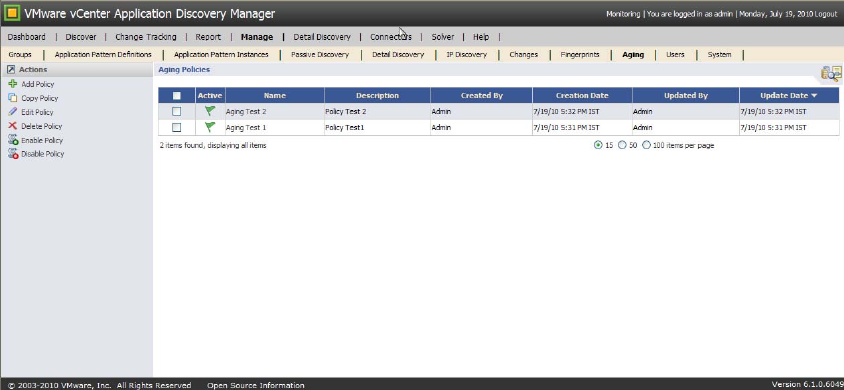
TheAgingPolicieslistcontainsgeneralinformationaboutexistingagingpolicies.ToaccesstheAgingPolicies
list,selectManage>Aging.TheAgingPolicieslistisshownbelow.
ClickonthetopofacolumnontheAgingPolicieslisttosortthelistbythatcolumn.
Youcanperformthefollowingactionswithagingpolicies:
AddPolicy:Createsanewagingpolicy.
CopyPolicy:Makesacopyofanexistingagingpolicy.
EditPolicy:Modifiesanexistingagingpolicy.
DeletePolicy:Removesanagingpolicy.
EnablePolicy:Enablesanagingpolicy.
DisablePolicy:Disablesanagingpolicy.
TheVMwarevCenterApplicationDiscoveryManagerOnlineHelpprovidesstep‐by‐stepinstructionsonhowto
performtheseactions.
Table 3‐3listsanddescribestheagingpolicyinformationintheAgingPolicieslist.

VMware, Inc. 21
Chapter 3 Managing ADM
Deleting Aging Logs
Todeletetheaginglogs,navigatetoManage>SystemandthenclickDeleteAllAgingLogsfromtheActions
paneontheleftsideofthescreen.
Users
InADM,therearetwotypesofusers:administratorsandoperators.Ifyouloginasanoperator,youdonot
haveaccesstotheManage,DetailDiscovery,andConnectorstabs.Ifyouloginasanadministrator,youhave
accesstoallthetabs.
OntheDiscover>Inventorypage,onlyanadministratorcanperformthefollowingactions:
Delete:Removesaselecteditementirely.
AddtoGroup:Addsaselecteditemtoagroup.
RemovefromGroup:Removesaselecteditemfromagroup.
Selecteditemsconsistofhosts,services,anddevices.
Onlyadministratorscanadd,copy,edit,delete,enable,anddisableauthorizedsystemusers.Navigateto
Manage>Userstoperformtheseactions:
AddUser:Createsanewuserdefinition.
CopyUser:Makesacopyofanexistinguserdefinition.
EditUser:Modifiesanexistinguserdefinition.
DeleteUser:Deletesauserdefinition.
EnableUser:Enablesauserdefinition.
DisableUser:Disablesauserdefinition.
TheVMwarevCenterApplicationDiscoveryManagerOnlineHelpprovidesstep‐by‐stepinstructionsonhowto
performtheseactions.
Role-Based Access Control
ADMprovidesrole‐basedaccesscontrol.Thisallowsyoutoassignpermissiontoaroleinsteadofdirectly
assigningpermissiontoauser.ADMrolesdefinethebasicpermissionlevelforoperationsthatusersassigned
totherolecanperform.Whenthereisalargeamountofdatainyourenvironment,role‐basedaccesscontrol
helpstodiscoverjusttheinformationthatyoumightbeinterestedin.
Youspecifyrole‐basedaccesscontrolwhenyouaddauser.Youmustselecttheoperatorrole,selecttheEnable
RoleBasedAccessControlcheckbox,andselectoneormoreexistinggroups.Thisensuresthattheoperator
accounthasaccessonlytocertaingroups.OnlythosegroupsaredisplayedfortheoperatorinADM.
Table 3-3. Aging Policy Information
Column Description
Active Thisboxhasagreenflagforanactivepolicyandagreyflagforaninactivepolicy.
Name Nameassignedtotheagingpolicywhenitwascreated.
Description Descriptionoftheagingpolicy.
CreatedBy UsernameofthepersonwhocreatedthisAgingPolicy.
CreationDate Datethisagingpolicywasoriginallycreated.ThedateisfortheADMappliancewherethis
AgingPolicyisdefined.
UpdatedBy UsernameofthepersonwholastmodifiedthisAgingPolicy.
UpdateDate DatethisAgingPolicywaslastmodified.ThedateisfortheADMappliancewherethis
AgingPolicyisdefined.

ADM User’s Guide
22 VMware, Inc.
TheVMwarevCenterApplicationDiscoveryManagerOnlineHelpprovidesstep‐by‐stepinstructionsonhowto
enablerole‐basedaccesscontrol.
System
TheadministratorcanperformseveralmanagementfunctionsonanADMsystem.Toperformthefollowing
functions,navigatetoManage>System:
SelfTest:Performsinternaltestsanddetectserrors.
SystemReboot:RebootstheADMappliance.
SystemLog:Displaysthesystemlogfile,whichshowsthetimeofeachevent,logmessage,andseverity.
DeleteAllSystemLogs:Deletesallthesystemlogfiles.
AgingLog:Displaystheaginglogfiles,whichshowsthetimeofeachevent,logmessage,andseverity.
DeleteAllAgingLogs:Deletesalltheaginglogfiles.
SupportPackageList:Displaysthelistofallcreatedsupportpackages.
CreateProductSupportPackage:Createsaproductsupportpackageandaddsittothelistofsupport
packages.
MailConfiguration:Setsyourmailserverandaddress.
ActiveProbesConfiguration:Configuresactiveprobes.VMwarevCenterApplicationDiscoveryManager
AdministrationGuideprovidesinformationaboutaddingandconfiguringanactiveprobe.
AdvancedConfiguration:Parsesconfigurationfiles.UseonlywhenanITComplianceAnalyzer‐
ApplicationEdition(ITCA‐AE)applianceisconnectedtoADM.
Update:UpdatescanbedonethroughthecommandlineinterfaceusingtheADMAppliancePlatform.
TheVMwarevCenterApplicationDiscoveryManagerAdministrationGuideprovidesmoreinformationabout
updatingADMusingADMAppliancePlatform.
RestartDiscovery:Restartsthediscoveryprocess.
ActiveDirectoryConfiguration:AllowsADMtoauthorizeandauthenticateuserscreatedinMicrosoft
WindowsServer2003ActiveDirectoryandMicrosoftWindowsServer2008ActiveDirectory.
Licensing:Displayslicenseinformationandallowsyoutouploadanewlicense.
TheVMwarevCenterApplicationDiscoveryManagerOnlineHelpprovidesstep‐by‐stepinstructionsonhowto
performtheseactions.
Licensing
YoumusthaveanADMlicensetoinitiatediscoveryprocess.
To view existing licenses
1FromtheADMconsole,navigatetoManage>System.
2IntheActionsleftpane,clickLicensingtodisplaytheLicensepropertiespage.
Thefollowingdetailsaredisplayedforexistinglicenses:
LicenseFeature:Thetypeoflicense.
AmountLicensed:Thenumberofserversregisteredinthelicense.
AmountUsed:Thenumberofserversalreadydiscovered.
IMPORTANTOnlytheAdministratorcanviewanduploadthelicensefromtheManagetab.

VMware, Inc. 23
Chapter 3 Managing ADM
ExpirationDate:Thedateonwhichthelicenseisscheduledtoexpire.
SerialNumber:The25digitserialnumberstring.
Upload a License
AnewlyinstalledADMsetupisnotlicensedbydefault.Beforeyoubegin,obtainthelicensefromtheVMware
salesrepresentative.
To upload a license
1FromtheADMconsole,navigatetoManage>System.
2IntheActionsleftpane,clickLicensingtodisplaytheLicensepropertiespage.
3ClickUploadanewlicense.
4TypetheserialnumberprovidedbyVMwareinthetextboxandclickApply.
Viewing License Details
Afteryouuploadalicense,youcanviewthelicensedetails,includingthelicensefeature,theamountlicensed,
theamountused,theexpirationdate,andtheserialnumberfromtheLicensepropertiespage.
To view license details
1FromtheADMconsole,navigatetoManage>System.
2IntheActionsleftpane,clickLicensingtodisplaytheLicensepropertiespage.
NOTEIfthenumberofdiscoveredserversexceedthenumberofserversregisteredinthelicense,thefollowing
notificationappearsintheDiscover>Inventorypage:
Maximum discovered Servers exceeded! Discovery may be incomplete. Please obtain additional
licenses from your VMware sales representative.
NOTEIftheserialnumberstringisinvalid,anerrormessageisdisplayedimmediately.
ADM User’s Guide
24 VMware, Inc.

VMware, Inc. 25
4
ThischapterdiscussesgroupsinADM.Topicsinclude:
“Overview”onpage 25
“Built‐InGroups”onpage 26
“User‐DefinedGroups”onpage 26
“ImportingandExportingGroupDefinitions”onpage 29
Overview
ADMiscapableofdiscoveringthousandsofconfigurationitemsonasingleappliance.Theadminusercan
creategroupssothattheycaneasilyview,analyze,andtrackthespecificsubsetofdata.Groupcreationlets
theadminuserclassifyconfigurationitemsintologicalsetsorcollectionssothatactionssuchascreating
reportsorpolicies,orviewingtheinventoryareappliedtospecificgroups,insteadoftheentiredatabaseof
configurationitems.
Agroupisabuilt‐inoruser‐definedcollectionofoneormorehosts,services,J2EEapplications,database
instances,hypervisors,orvirtualhosts.Therearethreetypesofgroups:View,BusinessApplication,and
Cluster.
ADMadministratorscanperformthefollowingactionsinthistab:
AddGroup:Addsanewgroup.
CopyGroup:Opensadialogboxtocopytheselectedgroup.
EditGroup:Opensadialogboxtomodifytheselectedgroup.
DeleteGroup:Deletestheselectedgroup(afterconfirming).
RefreshGroups:RefreshestheselectedgroupagainsttheADMdatabase.
AnautomaticnightlyrefreshprocesssynchronizesexistinggroupswithinformationintheADM
database.
Import:Importsthegroup(previouslysavedorexportedasanXMLfile).
IfagroupwiththesamenamealreadyappearsintheGroupsListthewordsCopy ofisappendedtothe
beginningofthegroupname.
Export:ExportsgroupasanXMLfile.
TheVMwarevCenterApplicationDiscoveryManagerOnlineHelpprovidesstep‐by‐stepinstructionsonhowto
performtheseactions.
Groups 4
IMPORTANTOnlyadminuserscancreategroupsfromtheManage>Groupspage.TheManagetabisvisible
onlytoadminusers.

ADM User’s Guide
26 VMware, Inc.
Requirements
Otherthanbeinganadminuser,groupcreationhasnootherprerequisites.Nopassiveordetaildiscoverymust
beperformedpriortogroupcreation,anddefiningthegroupdoesnotrequirethatspecificCIshavealready
beendiscovered.
Group Refresh
Ifyouhavenotyetstarteddiscovery,thennoCIsarepopulatedintheMDRandanypredefinedgroupsdonot
containanyservicesorhosts.AftertheMDRispopulated,however,servicesorhostsareaddedtothegroup.
Whenyoucreateagroup,youcandecidewhethertoautomaticallyrefreshthegroup.Thedefaultsettingis
thatthegroupwillrefreshautomatically.
Built-In Groups
ThefollowinggroupsarebuiltintoADM:
SharepointServers
MicrosoftSQLServers
MySQLdatabases
IISservers
VMwareESXServers
Jbossservers
VMwarevirtualmachines
Routers
Sybasedatabases
Oracledatabases
Switches
WebLogicservers
HostsrunningWindows
Apacheservers
Websphereservers
Tomcatservers
DB2databases
HostsrunningLinux
User-Defined Groups
NavigatetoManage>GroupsandclickAddGrouptoviewtheGroupDefinitionscreenandcreateagroup.
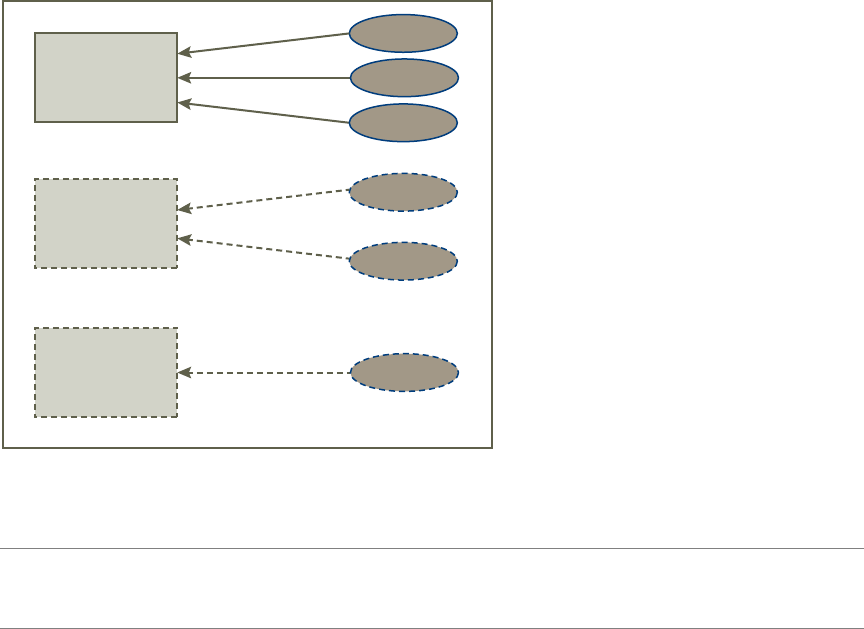
AnADMgroupisshowninFigure 4‐1.Tocreateagroup,selectaprimaryobjectandthendefineoneormore
rulesthatapplytothatprimaryobject.Aprimaryobjectisahost,service,J2EEapplication,J2EEmodule,or
databaseinstance.Basedontheprimaryobjectyouselect,thefieldsfordefiningtheruleschange.Table 4‐1
liststheseoptions.
VMware, Inc. 27
Chapter 4 Groups
Figure 4-1. ADM Group
NOTESinceyouhavetoselectaprimaryobjecttocreatearule,youcancreaterulesfordifferentprimary
objectsandthuscreateagroupthatconsistsofmultipleCIs.Forexample,youcancreateagroupthatconsists
ofbothLinuxhostsandOracledatabases.
rule 1
Primary object:
host, service,
J2EE application,
J2EE module or
database instance
rule 2
rule 3
rule 1
rule 2
rule 1
ADM group
A group consists of one or more primary objects. Each primary object
has one or more rules, which specify more details about the primary
objects that compose your group. Individual rules can be included or
excluded from the group definition.

ADM User’s Guide
28 VMware, Inc.
Table 4-1. Group Definition Parameters for Each Primary Object
Primary Object Parameters
Host Basic:
allhostsinscope
whichareoftype
runningservices
withincomingprotocolsconnection
withoutgoingprotocolsconnection
havingservicesaccessedbyURL
havinghostconfiguration
Extensions:
withitsconnectedclients
withitsconnectedservers
withitsvirtualizedvirtualmachines
withitshypervisors
Service Basic:
allservices
runningonhostsinscope
withincomingprotocolsconnection
withoutgoingprotocolsconnection
beingaccessedbyURL
runningonhosthavingconfiguration
Extensions:
withitsconnectedclients
withitsconnectedservers
withitsvirtualizedvirtualmachines
withitshypervisors
J2EEapplication Basic:
allJ2EEapplications
runningonservices
whereservicesrunningonhostsinscope
withincomingprotocolsconnection
withoutgoingprotocolsconnection
Extensions:
withitsconnectedclients
withitsconnectedservers
withitsvirtualizedvirtualmachines
withitshypervisors

VMware, Inc. 29
Chapter 4 Groups
Whenyouselectaparameter,itappearsintheRuleEditorandbecomesahyperlink.Whenyouclickthe
hyperlink,youcandefinetheparameter.
TheVMwarevCenterApplicationDiscoveryManagerOnlineHelpcontainsinformationonusingtheGroup
Definitionscreen.
Importing and Exporting Group Definitions
YoucanimportorexportgroupdefinitionsasXMLfilesfromManage>Groups.Toimportagroupdefinition,
clickImport.Toexportagroup,selectitfromthelistofgroupsandclickExport.
J2EEmodule Basic:
allJ2EEmodules
deployedonJ2EEapplications
runningonservices
whereservicesrunningonhostsinscope
withincomingprotocolsconnection
withoutgoingprotocolsconnection
Extensions:
withitsconnectedclients
withitsconnectedservers
withitsvirtualizedvirtualmachines
withitshypervisors
DBinstance Basic:
allDBinstances
runningonservices
whereservicesrunningonhostsinscope
withincomingprotocolsconnection
withoutgoingprotocolsconnection
havingDBtables
Extensions:
withitsconnectedclients
withitsconnectedservers
withitsvirtualizedvirtualmachines
withitshypervisors
Table 4-1. Group Definition Parameters for Each Primary Object (Continued)
Primary Object Parameters
ADM User’s Guide
30 VMware, Inc.

VMware, Inc. 31
5
ThischapterdescribestheDiscoveryfunctionalityandconfiguration.Topicsinclude:
“DiscoveryTypes”onpage 31
“PassiveDiscovery”onpage 32
“IPDiscovery”onpage 32
“DetailDiscovery”onpage 33
“DeployingDetailDiscovery”onpage 36
“DetailDiscoveryProtocols”onpage 37
“DiscoveringDependencieswithDetailDiscovery”onpage 46
“VMwareDiscovery”onpage 49
Discovery Types
DiscoveryistheprocessofpopulatingADMʹsmanagementdatarepositorywithCIsandidentifyingthe
relationshipsbetweenthem.ADMoffersthreetypesofdiscoveries:PassiveDiscovery,IPDiscovery,and
DetailDiscovery.Table 5‐1defineseachdiscoverytype.
Theconfigurationitemdetails(allhardwareandsoftwareconfigurationinformation)thatarediscovered
throughthesethreediscoverymethodsaredisplayedontheDiscover>Inventorypage.Clickingonahost,
service,ordevicewilldisplayitsproperties.
Discovery 5
Table 5-1. Types of Discovery
Discovery Types Definition
PassiveDiscovery PassiveDiscoveryistheprocessinwhichnetworktrafficislistenedtopassively.Passive
Discoveryisanon‐intrusiveprocesswhereyoucanspecifyanIPrangetosearchfor
hostsandapplications.
IPDiscovery IPDiscoveryistheprocessthatdiscovershostsorotherdeviceswithaspecificIP
addresswhenpassivediscoveryfailstodiscoverthem.AnICMP,Nmap,orTCP
connectionscandetectsdevicesthatareactivebutarenotsourcesordestinationsof
networktraffic,suchasswitchesorrouters.TheIPscandiscoversthedevicesandadds
themtotheinventorylist.YoucancreateIPdiscoverypoliciesandsetthemtorun
periodically.
DetailDiscovery DetailDiscoveryistheprocessthatprovidesthegranulardetailsofhostsandservices
(suchasOSinformation,theinstalledsoftwarelist,disksize,configurationfilesettings,
andsoon)thatarenotavailablewithpassivediscovery.

ADM User’s Guide
32 VMware, Inc.
Discovery Plans
Adiscoveryplanhelpsyoutocontrolthedepthofinformationdiscovered.Forexample,softwarechanges
frequentlyandhardwaredoesnotchangeoften.Therefore,youmightwanttodiscoversoftwareinformation
moreoftenthanhardwareinformation.Adiscoveryplanallowsyoutodefineexactlywhatwillbediscovered,
andthereforeimprovesperformance.ADMletsyouincludeorexcludeboththepassiveanddetaildiscovery
ofspecifichosts,services,andconnectionswiththecreationofpassivediscoveryplansanddetaildiscovery
plans.“PassiveDiscovery”onpage 32containsinformationonpassivediscoveryplans,and“Detail
Discovery”onpage 33containsinformationondetaildiscoveryplans.
Passive Discovery
PassiveDiscoverydetectshosts,services,relationshipsanddependencies.Further,itdetectstheuseofeach
relationship,extractssomebasicproperties(thatis,URLs,tablenames,versionnumbers),andresolvesIPsto
hostnames.
Policies
StartPassiveDiscoveryaftercreatingaPassiveDiscoverypolicyinwhichyouspecifyanIPaddressrangeto
searchfortrafficandhosts.NavigatetoManage>PassiveDiscoverytoviewthePassiveDiscoveryPolicy
Definitionscreenandcreateapolicy.TheonlinehelpcontainsproceduralinformationforPassiveDiscovery
tasks.
Plans
YoucancreateaPassiveDiscoveryplanfromthePlantabwithinthePassiveDiscoveryPolicyDefinition
screen.
To create a Passive Discovery plan
1 Selectthediscoveryplanrules.Youhaveanoptiontodiscover,nottodiscoverandignorethefollowing:
Services
Protocols
Ports
Servicecategories
2 SelectorclearDiscoverbehavioroption.
IfyouselecttheDiscoverBehavioroption,youcanutilizethebehavior‐relatedfeaturesofADM.For
example,youcanviewthebehaviorhistoryofanentity,createbehaviorrelatedreports.
3ClickUpdate.
PassiveDiscoveryplansareusefulwhenyouwanttoincludeorexcludethepassivediscoveryofcertainhosts,
services,orconnections.Thiswillalsoimproveperformance.Scenariosinwhichyoumightwanttocreatea
PassiveDiscoveryplanareasfollows:
TheSSHprotocolisnoisyandclutterstheMDRwithoutprovidinganyvalue.Sinceyouarenotinterested
indiscoveringtheSSHprotocolpassively,youcanspecifythisinthePassiveDiscoveryplan.
Forlicensingcontrol,youwanttoincludeorexcludeonlycertaindiscoveryservicessuchasBEAOEM.
IP Discovery
IPDiscoveryisamethodofdiscoveringhostsandotherconfigurationitemswithaspecificIPaddresswhen
passivediscoveryfailstodiscoverthem.Forexample,ifahostispoweredofforifitisoutsidethespecifiedIP
range,passivediscoveryfailstodiscoverit.Inthiscase,youcanuseIPdiscoverywithanICMP,Nmap,orTCP
connectiontofindCIs.YoucancreateIPdiscoverypoliciesfromtheManage>IPDiscoverypage.
VMware, Inc. 33
Chapter 5 Discovery
Policies
To create IP Discovery policy
1ClickAddPolicyontheIPDiscoveryPoliciespage.
2TypethenameoftheplanintheNamefield.
3Typethedescription.
4 Selectorclearthedifferentoptionsavailableonthethreetabs‐General,Scheduling,andScope.Typethe
informationrequiredinthesescreens.
5ClickCreate.
VMwarevCenterApplicationDiscoveryManagerOnlineHelpprovidesthedetailedstepsforcreatinganIP
Discoverypolicy.
Detail Discovery
DetailDiscoveryisamethodtofindmoregranulardetails,suchashardwareandsoftwareconfiguration
informationthatarenotavailablewithpassivediscovery.DetailDiscoveryextendstheinformationobtained
usingADM’sPassiveDiscoverytechnologyandusescommonnetworkprotocolstoremotelyqueryserversin
themanagednetwork.Usingtheseprotocols,youcanobtainsupplementaryinformationaboutnetworkhosts
andaddittotheMDR.Youcanviewtheadditionalconfigurationinformationfoundbydetaildiscoveryin
thepropertiesscreenforanyhost,service,ordevicethroughtheDiscover>Inventorypage.Allotherdetail
discoveryinformationandadministrativetasks,suchascreatingdetaildiscoverypolicies,aredonethrough
theDetailDiscoverytabasshownbelow.
Detail Discovery Tab
Dashboard
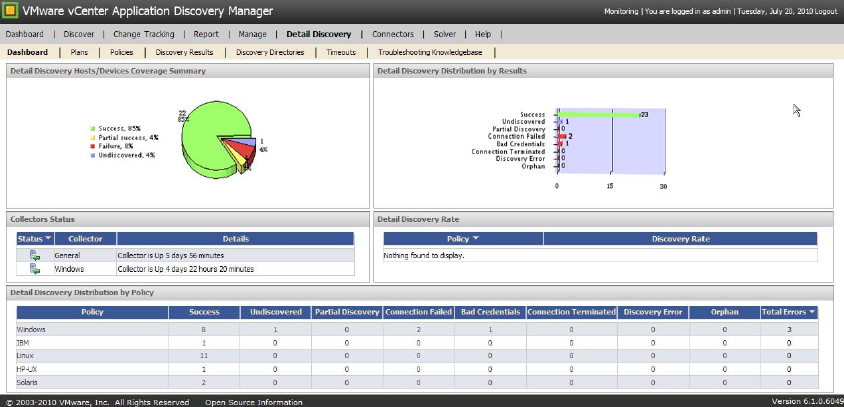
TheDetailDiscovery>Dashboardpagedisplaystwographsandthreetables.Dashboardisavisualtoolthat
letsyouunderstanddetaildiscoverystatus,process,andproblemstoberesolved.Youcanseethesystemstate
anddetaildiscoverypolicies.Dashboardsummarizesthedetaildiscoverystatusofthesystemandenablesyou
toanalyzedetaildiscoverystatus(success,failure,andsoon)indifferentviews.Thefollowinggraphsand
tablesareavailable:
DetailDiscoveryHosts/DevicesCoverageSummary
DetailDiscoveryDistributionbyResults
ADM User’s Guide
34 VMware, Inc.
CollectorsStatus
DetailDiscoveryRate
DetailDiscoveryDistributionbyPolicy
Plans
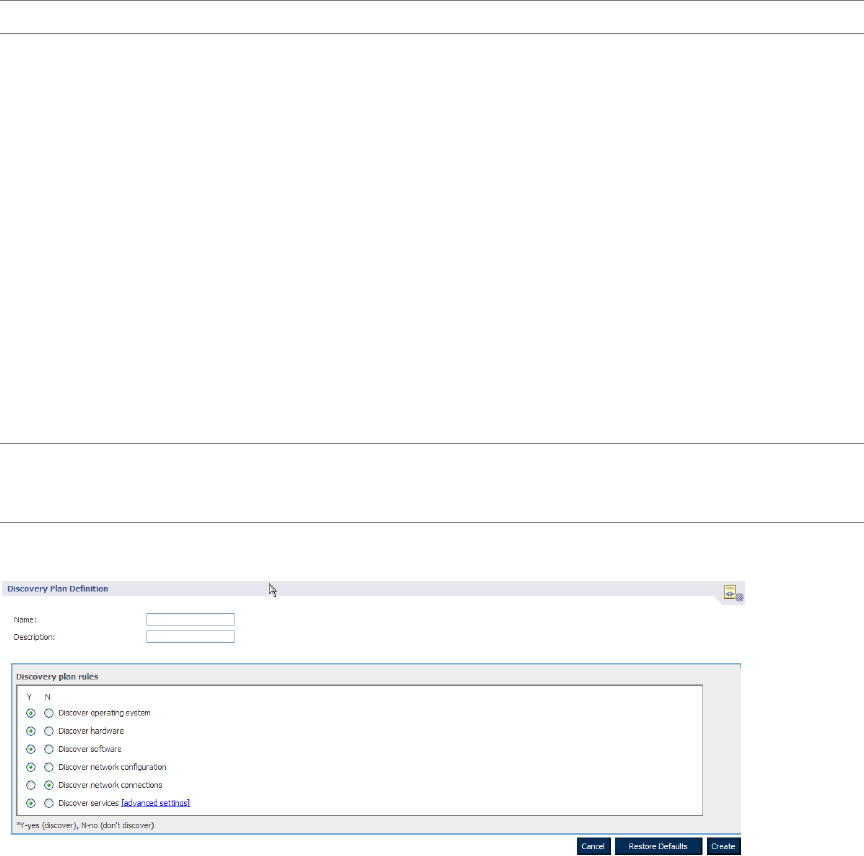
YoucancreateDetailDiscoveryplansfromtheDetailDiscovery>Planspage.Thispagedisplaysalistof
detaildiscoveryplans,includingthreebuilt‐inplans:
Shallow:Discoversoperatingsystemsandnetworkconfiguration.
Medium:Discoverseverything(OS,hardware,software)exceptservicesandnetworkconnections.
Deep:Discoverseverything,exceptnetworkconnections.
Detaildiscoveryplansareusefulwhenyouwanttoincludeorexcludethedetaildiscoveryofcertainhosts,
services,orconnections.NavigatetoDetailDiscovery>Plans>AddDiscoveryPlantocreateyourownplan.
Scenariosinwhichyoumightwanttocreateadetaildiscoveryplanareasfollows:
Thesoftwareinyourenvironmentchangesfrequentlyandthehardwarehardlychanges.ForDetail
Discovery,youwantsoftwarediscovereddaily,buthardwareinformationisdiscoveredonlyonceaweek.
YouwanttoexcludetheDetailDiscoveryofhostswithspecifichostnamesoroperatingsystems.
TheDiscoveryPlanDefinitionscreenisshownbelow.
Policies
YoucaninitiateDetailDiscoveryaftercreatingaDetailDiscoveryPolicyfromtheDetailDiscovery>Policies
page.Tomaximizesecurityandminimizetheriskofimpactonthemanagednetwork,onlyadminuserscontrol
thesetupandschedulingofdetaildiscoverypolicies.
DetailDiscoverypoliciesdescribeaquerythatrunsperiodicallytocollectnetworkinformation.Eachpolicy
definesthefollowingparameters:
Theprotocoltouse(SNMP,SSH,Telnet,WMI,orVI‐SDK),aswellastheauthenticationparameters
requiredforthespecifiedprotocol
Ascheduleforrunningthepolicy
Thescope(anamedgrouporIPaddressrange)ofhoststoquery
IMPORTANTTheDetailDiscoverytabisvisibleonlytotheadminuser.
NOTEEveryDetailDiscoverypolicyhasaplanassociatedwithit.Ofthethreebuilt‐inplans,Deepisthe
defaultplanforDetailDiscoverypolicies.ThechangesmadetotheplantakeeffectthenexttimethattheCIs
withinthepolicyscopearediscovered.

VMware, Inc. 35
Chapter 5 Discovery
Discovery Results
TheDetailDiscovery>DiscoveryResultspagedisplaysthelatestdetaildiscoveryresultsandallowsyouto
createormodifyadetaildiscoverypolicy,orviewthereportcardforapolicy.
Report Card
Youcanusethereportcardtoviewinformationaboutdiscovery,suchasthetotaldiscoverytime,detailed
statusinformation,protocolsused,discoverystagesandtheirtimes,andmuchmore.Youcanalsousethe
reportcardasatroubleshootingutility.Youcanviewandresolveerrorsdirectlyfromthereportcardaswell
ascreateasupportpackageforthespecificreportcard.Thereportcardisusefulinthefollowingscenarios:
Whenyouwanttofindoutmoredetailedinformationaboutthediscoveryprocesssuchassearch
strategiesanddirectories,orthetimetakentocompletethefulldiscovery.
Fortroubleshootingdiscoveryerrors.
Whendiscoveryisreportedassuccessful,butaCIseemstobemissingorhasanincorrectvalue,andthe
userwantstoinvestigatethisfurther.
Discovery Directories
TheDetailDiscovery>DiscoveryDirectoriespageallowsyoutospecifyorcustomizethedirectoriesthat
ADMwillsearchwhenitsearchesforapplications.ADMthensearchesthedirectoriesaddedthroughthis
interfaceinadditiontoallthedefaultdirectoriesthroughwhichitsearches.
Thefollowingisanexampleinwhichyouwouldusethispage:
1ThedefaultOracleinstallationonUNIXislocatedat /opt/oracle,butinyourenvironment,Oracleis
installedonadifferentlocationsuchas/opt/applications/oracle.
2Youneedtoadd/opt/applications/oracle asadiscoverydirectoryandcandosothroughthe
DetailDiscovery>DiscoveryDirectoriespage.
Timeouts
TheDetailDiscovery>Timeoutspageletsyouconfigurethetimeoutvaluesfordifferentprotocolmethods.
Eachprotocolusedfordiscovery(thatis,SNMP,SSH,Telnet,WMI,orVI‐SDK)usesadifferentmethod(such
asrunningaremotecommandinanSSHsessionorexecutingaremotequerywithWMI)inordertoacquire
information.Atimeoutisenforcedontheexecutionofeachprotocolmethod.Thispageallowsyoutomodify
thetimeoutvalues.Typically,thisisforadvancedusers.
Thefollowingisanexampleinwhichyouwouldconfigurethetimeoutvalues:
1YouperformadiscoveryandreceiveatimeouterrorintheDiscoveryResultstabofthereportcard.
Followingerrormessageisdisplayed:
Method “running remote shell command” has timed out. Current timeout is 10 minutes.
2ClicktheresolutionlinkthatredirectsyoutotheDetailDiscoveryTimeoutstableinthe
DetailDiscovery>Timeoutstab.
3 Changethetimeoutfor“Runashellcommand”from10minutesto20minutes.
NOTEThediscoverydirectoriesspecifiedinthistabapplyonlytodetaildiscovery.

ADM User’s Guide
36 VMware, Inc.
Troubleshooting Knowledgebase
NavigatetoDetailDiscovery>TroubleshootingKnowledgebasepagefortroubleshootingscenarios.The
followingisanexampleinwhichyouwouldusethistab:
1Youencounterdetaildiscoveryproblemsorerrors.
2YourCustomerSupportRepresentativecannotresolvetheproblem.Engineeringrequiresmore
informationandcreatesaspecializedknowledgebasefileinordertodebugtheproblem.
3YouuploadthefilefromtheDetailDiscovery>TroubleshootingKnowledgebasepage.
Deploying Detail Discovery
ThissectiondescribeshowtodeployDetailDiscovery.
Detail Discovery Configuration
ADMhasanextensivedetaildiscoveryfeaturethatenhancesandcomplementstheresultsobtainedthrough
PassiveDiscovery.DetailDiscoveryisperformedbycommunicationbetweenhostsinamanagednetwork,
usingfourcommonnetworkprotocols:SNMP,SSH,Telnet,andWMI.Detaildiscoveryisalsoperformedusing
thediscoveryprotocolVI‐SDK,whichisaVMwareproprietaryAPIusedtoquerymodelofVMware,control
thebehaviorofvirtualinfrastructure,andreceivenotificationsonchangesinthevirtualenvironment.
Usingtheseprotocols,supplementaryinformationaboutnetworkhostsisobtainedandaddedtothe
ConfigurationManagementDatabase(CMDB).Tomaximizesecurityandminimizetheriskofimpactonthe
managednetwork,theadministrativeuseroftheADMConsolecantightlycontrolthesetupandscheduling
oftheDetailDiscoveryqueriestothevariousnetworkhosts.
How Do Active Probe Configurations Affect Detail Discovery Policies?
ForDetailDiscoverytobesuccessfulinaDistributedsetup,thehoststobediscovered,needstobeincluded
inbothaDetailDiscoverypolicyandanActiveProbeconfiguration.TheDetailDiscoverypolicyincludesa
listofitemstoincludeintheDetailDiscovery,whiletheActiveProbeconfigurationassignsthespecifichosts
onwhicheachCollectorcanperformDetailDiscovery.
DetailDiscoveryisnotbeperformedonahostthatisincludedinaDetailDiscoverypolicyifitisnotincluded
inanActiveProbeconfiguration.However,thehostisstillrecognizedthroughPassiveDiscoveryandwill
appearasOrphanedintheDetailDiscoverydashboardbecausetheActiveProbeconfigurationhasno
correlationwithPassiveDiscovery.
Detail Discovery Policies
DetailDiscoveryiscontrolledandconfiguredthroughuser‐definedDetailDiscoverypolicies.Therecanbe
manypolicies,eachdescribingaquerythatisrunningperiodicallyandcollectingnetworkinformation.For
eachpolicy,thefollowingparametersaredefined:
Thediscoveryscope,thatis,thesetofnetworkhoststhatisqueriedforinformation.
Schedulinginformation:Howoftentoaccessthenetworkhostscoveredbythepolicy.Thescheduling
schemeletsADMuserscontrolandbalancetwoconflictingfactors.Thetwoconflictingfactorsare,the
needtohavethemostupdatedpictureandtheneedtoavoidoverloadingthenetworkwithtoomany
DetailDiscoveryqueries.
Discoveryplan:Adiscoveryplanallowsyoutodefineexactlywhatwillbediscovered,andtherefore
improveperformance.YoucancreatepassiveorDetailDiscoveryplansthatcanincludeorexcludethe
discoveryofspecifichosts,services,andconnections.
NOTETroubleshootingknowledgebaseappliesonlytocreateadetaildiscoverysupportpackageuntilthefile
isremoved.Itdoesnotcustomizethedetaildiscoveryknowledgebasepermanently.
VMware, Inc. 37
Chapter 5 Discovery
Protocol‐specificauthenticationandcommunicationparameters,suchasusernamesandpasswordsto
useforauthentication.
Theprotocolbeingused,whichisoneofthefollowing:SNMP,SSH,Telnet,WMI,orVI‐SDK.
Configuring Standard OS Agents
Toavoidagentinstallation,ADMperformsDetailDiscoveryusingonlystandardnetworkprotocols.Support
fortheseprotocolsisbuiltintomostmodernoperatingsystems,andsonospecialsoftwareneedstobe
installed.However,amoderateamountofconfigurationworkmightbeneededtomakenetworkhosts
respondtoDetailDiscoveryqueriesmadebyADM.Whetherandhowmuchconfigurationworkisneeded
dependsontheoperatingsystemsused,theirexistingconfiguration,andthestandardnetworkprotocolused
forDetailDiscovery.“DetailDiscoveryProtocols”onpage 37describesthestandardprotocolsandthe
necessaryconfiguration.
Dealing with Firewalls
WhendeployingDetailDiscovery,firewalls,whenplacedbetweentheADMapplianceandthehoststhatitis
discovering,mightblockthenetworkprotocolsusedforDetailDiscovery,andthuspreventDetailDiscovery
fromtakingplace.Thefollowingsolutionsdealswiththefirewall:
Openthenecessaryportsinthefirewall,ifonlyjustforclient‐sideusebytheIPaddressassignedtothe
ADMappliance.Therelevantportsaretypically:
ForSNMP,UDP/161
ForTelnet,TCP/22forSSHandTCP/23
ForWMIaccess,“WMIDeploymentRecommendations”onpage 41and“FirewallSettings”on
page 41includedetailsonfirewallsettings.
ForVI‐SDK,TCP/443forHTTPS
DeployanotherCollectorapplianceontheothersideofthefirewall.Thisextradevicecommunicateswith
theAggregatorappliance.ThiscommunicationusesstandardHTTPS(port443)orHTTP(port80)and
hastobeopeninthefirewallforconnectionsinitiatedbytheCollectorintotheAggregator.Thedefaultis
HTTPSonport443.TheremightbemultipleCollectorsinstalledatvariouslocationsinthenetwork.
Checking for Results
AfterDetailDiscoverypolicieshavebeendefined,checktheDetailDiscoverydashboardforthediscovery
statusofeachpolicyandeachhost.ClickDetailDiscoverytoviewthedashboard.
Detail Discovery Protocols
ThissectiondescribesthenetworkprotocolsusedforDetailDiscovery:SNMP,SSH,Telnet,WMI,andVI‐SDK.
TheVMwarevCenterApplicationDiscoveryManagerDiscoveryCoverageSpreadsheetcontainsalistofsystemson
whichADMhasbeentested.ADMsupportsthesystemsthatarelistedinthisdocument.
Discoverydataobtainedfrommorethanoneprotocolisreconciledaccordingtothepriorityorderbelow.More
informationondetaildiscoveryprotocolsisprovidedfor:
1“SSH”onpage 38
2“SNMP”onpage 39
3“WMI”onpage 40
4“Telnet”onpage 43
5“VI‐SDK”onpage 45

ADM User’s Guide
38 VMware, Inc.
6Listener(passive)
7IPDiscovery(passive)
SSH
SecureShell(SSH)isastandardprotocolforsecureremoteaccesstoUNIX‐likeoperatingsystems.SSHservers
arebuiltintomostLinuxdistributions,MacOS‐X,SunSolaris,OpenBSD,andmostotherUNIX‐likeoperating
systems.SSHserversfromvariousvendorsarealsoavailableforWindows.
RemoteaccesstoahostthatrunsanSSHserverstartsbyauthenticatingtheclient’sidentity.Aftertheclient
identityisauthenticated,anencryptedcommunicationchannelopens.Theclientcanthenexaminefilesand
runcommandsontheserverhost.Theprivilegesandpermissionsoftheclientaredeterminedbytheserver
accordingtoitsidentity.Forexample,iftheclientusesaguestaccountwithfewprivileges,mostofthe
informationisnotavailabletothisuser.
SSHhastwoversions.Version2isnormallyinuse,whileversion1islessrecommended.SinceSSHclientsand
serversautomaticallydetecteachother’sversionsandcoordinatetheircommunications,noactionisrequired.
Detail Discovery with SSH
ADMusesSSHtoaccesshoststhatrunSSHservers,andtoobtaininformationabouttheoperatingsystem,
hardware,andsoftwareinstalledontheserverhost.
BothSSHversions1and2aresupportedautomaticallywithnouserinteraction.Authenticationisbasedon
specifyingausernameandpasswordtousewhenaccessingthemanagedhosts;thesearestoredbyADM
internallyinanencryptedform.
SSH Server Deployment Recommendations
Firewall Settings
SSHqueriesarenormallyperformedonTCPport22ontheserver.IfafirewallexistsbetweentheADM
applianceandthemonitorednetwork,thisportneedstobeopenforconnectionsinitiatedbytheADM
appliance.
SSH Server Settings
DiscoverywithSSHofserversrunningtheOpenSSHserver(sshd)requiresthattheʺPasswordAuthenticationʺ
fieldcontainthevalue“yes”intheserversettingsfile(often,/etc/ssh/sshd_config).Insomeoperating
systems,suchasSuSE,thedefaultis“no”andneedstobechangedfortheSSHdiscoverytocomplete.
Credentials
DetaildiscoverywithSSHisbasedonaccessingthemanagedhostwithapredefinedusernameandpassword.
Formoreinformationonnecessaryprivileges,downloadthedocumentdiscovery_coverage.xlsfrom:
http://downloads.vmware.com/ApplicationDiscoveryManager
IfADMisusedtodiscoverconfigurationofservicessuchasapplicationservers,databases,andwebservers,
thisusermightneedmorereadprivilegesiftheconfigurationfilesoftheseservicesarenotaccessibleby
ordinaryusers.
Forexample,insomesites,theOracledatabaseserverisinstalledandrunwithaspecial“oracle”user
belongingtoaspecial“oracle”group.Theconfigurationfilesfortheservermightonlybereadablebyusersin
the“oracle”group.HavingADMuseauserinthisgroupwouldallowittoaccessthesefilesandretrieve
valuableanddetailedconfigurationinformationthatisotherwiseunavailable.
IMPORTANTItisnotrecommendedtousetheuser“root”forsecurityreasons.
VMware, Inc. 39
Chapter 5 Discovery
Asimilarscenariomightalsooccurwithothertypesofservers,dependingonhowtheyareinstalled.
However,oftenthisisnotanissue:forexample,inthedefaultinstallationoftheApachewebserverunderRed
HatLinux,allconfigurationinformationisstoredinalocationthatisreadablebythegeneralpublic(under
the/etcbranchofthefilesystem).Insuchcases,nogroupmembershipsarerequiredforADMtobeableto
readthisdetailedconfiguration.
SNMP
TheSimpleNetworkManagementProtocol(SNMP)isapopularandstandardprotocolforremotely
monitoringandmanagingvarioustypesofnetworknodes.Managednetworknodesareoftenregularservers,
butothernetworkdevicessuchasnetworkswitchesandnetworkprinterscanalsobemanagedusingSNMP.
SNMPisbasedonthenotionofagentsrunningonthemanagednetworknodes.Anagentisasoftware
component,installedonthemanagednodethatcananswerremotequeriesaboutthestateofthemanaged
node.TheremotecomponentthatmakessuchqueriesistermedtheSNMPmanager.AtypicalSNMP
deploymentincludesmanySNMPagentsinstalledonthevariousmanagednodes,andasingleSNMP
managerthatcollectsinformationfromallofthem.
ThemaindifferencesamongthethreeversionsofSNMP(1,2,and3)arethesecuritymechanisms.Versions1
and2relyonafairlyprimitivemechanismofcommunitystrings,eachdefiningadifferentsetofSNMP
operationsthatisperformed.Version3introducesmoreadvancedauthenticationandprivacymechanisms,
basedonusernamesandpasswords.SNMPagentsarebuiltintomostmodernoperatingsystems,butmight
needtobeturnedonorconfiguredtobeabletoproviderelevantinformation.Theinformationthatisobtained
fromtheSNMPagentisdefinedinmodulescalledManagementInformationBase(MIB).ThecoreMIB,which
isavailableinmostagents,iscalledMIB‐2,anditsuppliessystemandhardwareinformation.
Detail Discovery with SNMP
ADMcanactasanSNMPmanagerandcollectinformationfromanyhostthathasanSNMPagentrunningon
it.AllversionsoftheSNMPprotocolarefullysupported.Forversions1and2,communitystringsareused.
Forversion3,youcanselecttheauthenticationandprivacymodesincompliancewiththisnewerstandard.
SNMP Agent Deployment Recommendations
Firewall Settings
Bydefault,SNMPqueriesareperformedonUDPport161oftheagent,althoughthiscanbechangedifdesired.
IfthereisafirewallbetweentheADMapplianceandthemonitorednetwork,thisportneedstobeopenfor
connectionsthatareinitiatedbytheADMappliance.
Linux and Net-SNMP
TheSNMPagentthatisbuiltintoLinuxdistributionsisNet‐SNMP(http://net‐snmp.sourceforge.net).This
agentrunsasaservicecalled“snmpd”andislocatedintheservicesdirectory/etc/init.d/.
ThedefaultNet‐SNMPconfigurationallowstheuseofthepubliccommunitystringwithSNMPversion2,to
querytheSNMPagentforparticularsystemconfigurationitems.However,thisdefaultconfigurationonly
allowsaccesstoaportionofthestandardMIB‐2informationbase.Specifically,itdoesnotallowqueryingthe
listofnetworkinterfaces,whichisaveryimportantpieceofinformation.
ToallowNet‐SNMPtoalsoreportthismissinginformation,itisrecommendedthatyoumodifytheNet‐SNMP
configurationfilein/etc/snmp/snmpd.conf.Addthefollowinglinetothesectionofthefilethathaslines
startingwith“view”:
view systemview included .1.3.6.1.2.1.2
Windows
Windows2000isusuallyinstalledwithitsownSNMPagent.Ifitisnot,itisquicklyinstalledbyselecting:
ControlPanel>Add/RemovePrograms>Add/RemoveWindowsComponents>Managementand
MonitoringTools>Details>SimpleNetworkManagementProtocol.
Bydefault,thisserversupportsthe“public”communitystringforqueryingsysteminformation.

ADM User’s Guide
40 VMware, Inc.
Solaris and HP-UX
SolarisandHP‐UXsystemsdonotincludebuilt‐inSNMPagents.YoucandownloadandinstallNet‐SNMP
fromhttp://net‐snmp.sourceforge.netandconfigureitasinLinux.
BEA WebLogic Agent
TheBEAWebLogicapplicationservercomeswithitsownSNMPagentthatisbuiltintoitsinstallation.
To enable the BEA WebLogic application
1IntheWebLogicmanagementconsole,selectServices>SNMP.
2 SelectEnabled.
3Restarttheapplicationserver.
WMI
WindowsManagementInstrumentation(WMI)isaproprietaryMicrosofttechnologyformodeling,querying,
andmanagingtheconfigurationofWindowshosts.WMIfollowsapublicmodelingandmanagement
standardknownasCommonInformationModel(CIM),aswellasanotherrelatedstandardcalledWeb‐Based
EnterpriseManagement(WBEM).
TheWMIsoftwarecomponentisbuiltintoallServereditionsoftheWindowsoperatingsystemsincethe
Windows2000Server.ItmightormightnotbeinstalledbydefaultaspartofWindowsXP,butitiseasily
installedthereasanadd‐on.
WMIismodularandextendable:commoninformationaboutthehostisobtainedwiththebasicbuilt‐inWMI
module.AdditionalcomponentscalledWMIprovidersisinstalledtomodelandqueryindetailthe
configurationofservicessuchasIISServer,ActiveDirectory,BizTalkserver,andsoon.
TheWMIcomponentinWindowsisbasedonMicrosoftComponentObjectModel(COM)technology,andis
queriedbothlocallyandremotely.RemotequeriesarethroughRPCaccesstotheWMIcomponent,usingthe
remoteaccessflavoroftheCOMtechnologyknownasDistributedComponentObjectModel(DCOM).
Detail Discovery with WMI
ADMcanperformDetailDiscoveryusingtheWMIprotocol.WhencreatingaWMIDetailDiscoverypolicy,
youneedtospecifyausername,password,anddomainname.TheseareusedbytheWMIcomponentto
authenticateandauthorizeaccesstothehostinformation.
WMIdiscoveryisusedfordiscoveringmachinesthatrunthefollowingoperatingsystems:Windows2000
Server,WindowsServer2003,Windows2008,andWindowsXPSP2.
NOTEIfthereisanotherSNMPagentrunningonthesamemachine,suchasthenativeagentoftheoperating
system,itisrecommendedtochangetheportusedbytheWebLogicagent.Inthesamelocationinthe
managementconsole,settheporttothedesiredport.
NOTEWhenusinganondomainusertoperformWMIdiscovery,specify“WORKGROUP”inthedomain
field.
IMPORTANTThefollowingstepsarenewtoADM6.0andlaterversionsasitdiscoversmoreinformation
comparedto5.3.IfyouhavealreadysetupyourserversforWMIdiscoveryusingADM5.3,youneedto
performtheadditionalstepslistedunder“SettingExecutePermissionsforUsedExecutables”onpage 43.
IMPORTANTThepermissionsrequiredtocompletethesameWMIoperationsmightvarybetweendifferent
versionsofWindowsanddifferentServicePacksinstalled.SomewindowsversionssuchasWindows2003
ServerwithSP2requireanaccountwithlocaladministratorpermissionsinordertosuccessfullycompleteall
queriesperformedbyADM.

VMware, Inc. 41
Chapter 5 Discovery
WMI Deployment Recommendations
FollowingaretheWMIdeploymentrecommendations.
Creating a User for WMI Detail Discovery
UsingWMItoqueryremotehostsfortheirconfigurationdetailsrequiresappropriateprivileges,asdescribed
next.Toeasilymanagetheseprivileges,itisrecommendedtouseaseparatedomainuserforthispurpose.
Therefore,thefirststepindeployingWMIDetailDiscoveryistocreateadomainuseraccount.Thisuser
shouldnothaveanyspecialadministrativeprivileges.Infact,thereisnoreasonforittobelongtoanygroups
atall.
Intheeventthatalocaladministratoruserisusedinsteadofaspeciallycreateduser,itisimportantthat
DCOMconfigurationallowsremoteaccessandlaunchforadministratorusers.Troubleshootingtipsregarding
WMIandDCOMpermissionsisfoundinthearticleat:
http://blogs.technet.com/askperf/archive/2007/08/14/wmi-troubleshooting-permissions.aspx
YouneedtocreateaprofileandtemporaryfolderonallmachineswhereDetailDiscoveryistobeperformed
byloggingintothosemachines.
Ifalocaluserisusedratherthanadomainuser,followtheinstructionsin“ConfiguringtheWindowsTelnet
server”onpage 44regardinglocalsecuritypolicysettings.
Firewall Settings
WMIqueriesinvolvetheMicrosoftRPCnetworkprotocol,whichusesdynamicallyassignedportsonthe
serversideandmightresultinfirewall‐relatedproblems.Toavoidfirewallproblems,youcandeploythe
Collectorapplianceinthesamenetworkasthemanagedhostswithoutafirewallbetweenthem.
IfyourenvironmentrequiresafirewallbetweentheAggregatorapplianceandtheCollectorappliance,
configureittoallowRPCtraffic.Thisisdoneintwostages:
1ConfigurethemanagedhoststouseanarrowrangeofdynamicportsfortheirRPC.Formore
information,gotohttp://support.microsoft.com/kb/154596
2Inthefirewallsettings,openTCPport135(theportforRPCServiceControlManager)foraccessbythe
Collectorappliance.
Disabling Internal Firewall for Windows XP Service Pack 2
Theinternalfirewallshouldbeturnedofforpartiallydisabledtoallowdirectconnectiontothelocalnetwork.
To change the firewall configuration
1GotoControlPanel>SecurityCenter>WindowsFirewall.
2Tofullydisablethefirewall,intheGeneraltab,selectOff.
3IfyouwanttoleavethefirewallenabledbutstillallowRPC/DCOMcommunication,selectOninthe
Generaltab,andintheAdvancedtab,clearlocalnetwork.
Setting DCOM Privileges
Inthefollowingsteps,itisassumedthatthedomainnameisMYDOMAINandthattheuserusedforWMI
DetailDiscoveryandthatdomainisnamedDOMAINUSER.
SinceWMIaccesstoaWindowshostinvolvesDCOMtechnology,theDOMAINUSERneedstobeallowedto
performDCOMoperationsoneachmanagedhost.ThisisalreadythedefaultsettinginmostWindowsservers
(Windows2000and2003serverfamilies),butnotinWindowsXPorinserversthathadtheirdefaultschanged.
IMPORTANTWindowsXPwithServicePack2hasabuilt‐ininternalfirewallthatmightblockincoming
RPC/DCOMrequests.

ADM User’s Guide
42 VMware, Inc.
To enable DCOM for a host running Windows XP or Windows 2003
1Logintothehostasadminuser(eitheralocaladministratororadomainadministrator).
2ClickStartmenu,selectRunandtypeDCOMCNFG.ComponentServiceswindowappears.
3FromtheConsoleRootleftpane,selectComponentServices>Computers>MyComputer.
4Right‐clickMyComputer,andthenclickProperties.MyComputerPropertieswindowappears.
5 SelectCOMSecuritytab.
6UnderLaunchandActivationPermissions,clickEditLimits.LaunchPermissionwindowappears.
7Ifthedomainuser(DOMAINUSERinthisexample)isnotpresentintheGroupsorusernameslist,Click
Add,toaddthedomainuser.
8 SelecttheuseryouaddedfromtheGroupsorusernameslist.
9FromthePermissionsforAdministratorslist,selectRemoteLaunchandRemoteActivation.
10 ClearallothercheckboxesandclickOKtoreturntotheMyComputerPropertieswindow.
11 ClickApplytosaveyourchangesandclickOK.
Setting WMI Privileges
AfterWMIrequestspassthroughtheDCOMcommunicationlayer,Windowsrunsanotherauthorization
check,forspecificuserpermissionsattheleveloftheWMIservice.Therefore,toallowthedomainusertorun
WMIqueries,theWMIserviceneedstobeconfiguredforeverymanagedhost.Thisisdoneeitherlocallyon
thathostorremotely.
To configure WMI access on the managed hosts
1Ifyouareconfiguringaremotemachine,useadomainadministrativeaccount.Alocaladministrative
accountwillnotwork.
2Loginasadminuser(eitherlocalorremoteadministrator)tothetargethost.
3ClickStartmenu,selectRunandtypewmimgmt.msc.TheWindowsManagementInfrastructure(WMI)
windowappears.
4Right‐clickWMIControl(Local)intheleftpaneandclickProperties.WMIControl(Local)Properties
windowappears.
5ClickSecuritytabandnavigatetoRoot>Security.SecurityforRootwindowappears.
6ClickAdd.TheSelectUsersorGroupswindowappears.
7Typetheusernameinthefollowingformat:
Domainname\username
Forexample,MYDOMAIN\DOMAINUSER
NOTEInWindows2000,theDCOMmanagementconsoleissimpler.SoskipStep 3andStep 4.
NOTEIfyouareconfiguringremotesettingsforWMIprivileges,right‐clickWMIControl(Local)and
selectConnecttoanothercomputer.TypethenameoftheremotehostandclickOK.Fromthispoint,
configurationchangeswillbeappliedtotheselectedhostinsteadofthelocalhost.
NOTEByselectingtheSecurityoptioninRoot,youareallowingWMIqueriestoallavailableWMI
providers.IncaseRootcannotbeused,CIMV2shouldbeused;thisoptionisnotrecommended.Giving
theADMusersecuritypermissionstoRootprovideslittletonoriskthatquerieswillbenonintrusive.
NOTETypetheusernameoftheuserwhowillbeperformingtheDetailDiscovery.
VMware, Inc. 43
Chapter 5 Discovery
8ClickOKtoreturntotheSecurityforRootwindow.
9EnsurethatthenewlyaddedusernameishighlightedintheGroupsorusernameslist.
10 ClickAdvanced.TheAdvancedSecuritySettingsforRoot(Rootinsomesystems)windowappears.
11 SelectthenewlycreatedusernamefromthelistandclickEdit(View/Editinsomesystems).
12 SetApplyontotoThisnamespaceandsubnamespacesfromthedrop‐downmenu.
13 SelectRemoteEnable fromthePermissionslistandsetittoAllow.
14 ClearallothercheckboxesandclickOK.
15 ContinuetoclickOKuntilallofthedialogboxesareclosedandthenclosetheWindowsManagement
Infrastructure(WMI)window.
16 ClickYesifyouencounterthefollowingmessage:
Save console settings to winmgmt?
Setting Execute Permissions for Used Executables
ADM6.0andlaterversionsdiscovermoreinformationthanpreviousversions.Setexecutepermissionsfor
eachmanagedserver,oneachofthesefiles(cmd.exe,cscript.exe,andnetstat.exelocatedinthesystem32folder
whereWindowsisinstalled)todiscovertheadditionalinformation.
To set execute permissions
1Right‐clickthefileandclickProperties.ThePropertiesdialogboxappears.
2 SelecttheSecuritytab.
3FromtheGrouporusernameslist,selecttheuserwhowillbeperformingtheDetailDiscovery.
4 SelectRead&ExecuteandReadfromthePermissionsforuserlist,tograntthenecessarypermissions.
5ClickOKtoconfirm.
Telnet
TheTelnetprotocolisoneoftheoldestandmostcommonprotocolsforremoteshellaccess.However,inrecent
yearsitisreplacedinmanycaseswiththeSSHprotocol,whichencryptsitsnetworktrafficandisconsidered
moresecure.Still,somenetworkdevices,suchasnetworkroutersandswitches,supportremoteaccess
throughTelnetexclusively.Additionally,MicrosoftWindowshasabuilt‐inTelnetserver,anddoesnothavea
similarSSHserver.Therefore,TelnetisusedbyADMforDetailDiscovery,similarlytotheuseofSSH.
Detail Discovery with Telnet
Ingeneral,DetailDiscoverywithTelnetissupportedbyanymachinerunningaTelnetserverthat:
Supportstheterminaltypeknownasdumb.
Eitherallowssimplecommand‐lineauthenticationoracceptsNTLMauthentication.
Telnet Server Deployment Recommendations
ThissectionincludesTelnetrecommendationsfordeployment.
Firewall Settings
TelnetqueriesarenormallyperformedtoTCPport23ofthetargetdevice.Ifthereisafirewallbetweenthe
ADMapplianceandthemonitorednetwork,thisportneedstobeopenforconnectionsinitiatedbytheADM
appliance.Specifically,inWindowsXPProSP2,theinternalfirewallmustbeturnedoffforTelnetdiscovery
totakeplace.

ADM User’s Guide
44 VMware, Inc.
Credentials
AswithSSH,DetailDiscoverywithTelnetisbasedonaccessingthemanagedhostwithausernameand
passwordthatitrecognizes.Theconsiderationsregardingthechoiceofuseraccountandprivilegesarethe
sameasthoseforSSH,describedin“DetailDiscoverywithSSH”onpage 38.
Configuring the Windows Telnet server
CertainoperatingsystemsettingsmustapplyforaWindowshosttobeaccessiblewithTelnet.Dependingon
thespecificeditionofWindowsandontheexistingconfiguration,anyofthefollowingconfiguration
modificationsmightbenecessary.
To start up the Windows Telnet Services automatically using Windows
1FromtheWindowsStartmenu,navigatetoSetting>ControlPanel>AdministrativeTools>Services.
2 Locateandright‐clickTelnetservice.
3EnsurethestartuptypeisAutomaticandstarttheserviceifitisnotalreadystarted.Thischangeis
requiredinmostWindowseditions.
To start up the Windows Telnet Services automatically using a command line interface
Onalocalmachine,type:
sc config TlntSvr start= auto && sc start TlntSvr
OnaremotemachinewhereCOMPUTERistheremotecomputernameorIPaddress,type:
sc \\COMPUTER config TlntSvr start= auto && sc \\COMPUTER start TlntSvr
TologintoamachineusingTelnet,youneedtobelistedasamemberofeitherthelocalTelnetClientsgroup
onthatmachine,orasamemberofthedomain’sTelnetClientsgroup.
To modify users and groups using Windows
1FromtheWindowsStartmenu,navigatetoSetting>ControlPanel>AdministrativeTools>Computer
Management>LocalUsersandGroups>Groups.
2IftheTelnetClientsgroupexists,double‐clickTelnetClients.TelnetClientsPropertieswindowappears.
3ClickAddtoaddrelevantuserasitsmembers.
4IftheTelnetClientsgroupdoesnotexist,createanewgroupwiththenameTelnetClients,andthenadd
theusertoit.
Creating a Local TelnetClients Group
IfyouwanttoaddausertothelocalTelnetClientsgroup,butnosuchgroupexistsyet,youcansimplycreate
anewgroupbythisname.ThisoperationisautomatedusingVBScriptorJscript.Usethefollowing
commands:
computer = "COMPUTER"
user="USER"
domain="DOMAIN"
Set objGroup = GetObject("WinNT://" & strComputer & "/TelnetClients")
Set objUser = GetObject("WinNT:// " & domain & "/" & user)
objGroup.Add(objUser.ADsPath)
IMPORTANTEnsureyouhavelocaladministratorpermissionsonthemachinesyouareperformingthese
procedureson.
IMPORTANTInsomeeditions,particularlyXPProSP1andlater,remoteaccessbylocalusersisalwaystreated
asifthe“guest”userisinvolved.ThisextrasecuritymeasuremightcauseTelnet(andalsoWMI)tofailwith
localusers,butithasnoeffectondomainusers.

VMware, Inc. 45
Chapter 5 Discovery
To change this behavior for operating as a local user
1FromtheWindowsStartmenu,navigatetoSetting>ControlPanel>AdministrativeTools>Local
SecurityPolicy>SecuritySettings>LocalPolicies>SecurityOptions.
2 LocateNetworkaccess:sharingandsecuritymodelforlocalaccountspolicyfromthelist.
3Right‐clickNetworkaccess:sharingandsecuritymodelforlocalaccountsandclickProperties.
Networkaccess:sharingandsecuritymodelforlocalaccountsPropertieswindowappears.
4 SelectClassic–localusersauthenticateasthemselvesfromthedrop‐downmenuandclickApply.
Forsecurityreasons,itisrecommendedtoallowtheTelnetservertouseonlyNTLMauthentication,andto
disablepassword‐basedauthentication.
To view the current Telnet server authentication settings
1FromtheWindowsStartmenu,selectRunandtypecmd.TheCommandPromptappears.
2Typetlntadmn toviewthelocalhostsettings.
3Typetlntadmn config sec=+ntlm toturnonNTLMauthentication.
4Typetlntadmn config sec=-passwd toturnoffpassword‐basedauthentication.
VI-SDK
VI‐SDKisaVMwareproprietaryAPIusedbythird‐partyapplicationstoqueryVMware’smodel,controlthe
virtualinfrastructure’sbehavior,andreceivenotificationsonchangesinthevirtualinfrastructure
environment.VI‐SDKalsoallowsyoutodiscover,configure,andmonitorallaspectsofVMwareESXservers
andVirtualCenter.
VI‐SDKonVirtualCenteraccessesinformationabouttheentireVirtualInfrastructuredeployment,whereas
VI‐SDKonanESXonlyaccessinformationaboutthatESX.
VI‐SDKisimplementedbystandardwebserviceswithapublishedWSDLandrunsoverHTTPSbydefault.
AVI‐SDKURListheURLoftheVI‐SDKserveronthetargethost.ThisURLisusedonallhostsinthepolicies
scopesoitdoesnotcontaintheserverpartoftheURL.Forexample,iftheURLis/sdk:925anddiscoveryis
doneagainsthost1.2.3.4,theactualURLusedtoconnecttothehostishttps://1.2.3.4/sdk:925.Bydefault,the
URLfieldisinitializedto/sdk,whichisthedefaultVI‐SDKURL.
Detail Discovery with VI-SDK
ADMusesVI‐SDKtoaccessaVirtualCentertoobtaininformationaboutESXServerandthevirtualmachines
thatareinstalledonthem.
VI-SDK Deployment Recommendations
ForVI‐SDKtoworkproperly,theWebAccessOptionmustbeenabledintheVirtualCenter.VMware
recommendsthatyouassignread‐onlypermissiontotheuseraccountthatiscreatedforDetailDiscovery.
Firewall Settings
VI‐SDKqueriesareperformedoverHTTPS.IfafirewallexistsbetweentheADMapplianceandthemonitored
network,TCPport443mustbeopenforconnectionsthatareinitiatedbytheADMappliance.
NOTEYoumusthavelocaladministratorpermissionstouseNTLM.
NOTETheVI‐SDKreportstheIPaddressofavirtualmachineonlyifVM‐toolsisrunningonthevirtual
machine’sguestOS.

ADM User’s Guide
46 VMware, Inc.
Limitations
VI‐SDKdoesnotexposesomeinformationandthereforeADMcannotdiscoversomeCIs.Specifically,the
followingCIswillnotbediscoveredthroughVI‐SDK:
Services
Configurationfiles
Licensefiles
Installedsoftware
Operatingsystemkernelrelatedinformation(ForExample,kernelversion)
Discovering Dependencies with Detail Discovery
Thissectionprovidesthenecessaryinformationtodecidethemethodtodiscoverdependenciesandto
configureDetailDiscoverytodiscoverdependencies.
ADM Dependency Discovery Methods
DiscoveringdependenciesisdonethroughADMusingeitherofthefollowingmethods:PassiveandDetail
DiscoverytogetheroronlyusingDetailDiscovery.
PassiveDiscoveryassumesthatapacketrepresentsadependencybetweentwohosts,forexample,there’s
mostlikelyagoodreasonthathostAsentapackettohostB.TheshortcomingofthisassumptioninPassive
Discoverymightnotidentifytheserviceontheclient‐sideofaconnection(client‐servercommunication
usuallycontainsmuchmoreinformationontheserversidethanontheclientside)correctly.Asaresult,ADM
mightrelyonPassiveDiscoveryfordiscoveringdependencies,whileleveragingDetailDiscoverytocorrectly
identifytheserviceontheclientsideoftheconnection.
However,someclientshaveregulatory,business,orinfrastructuralbarriersthatpreventthemfromusing
PassiveDiscovery.Topenetratetheseclients,ADMallowsyoutocorrectlyidentifydependenciesusingDetail
Discoveryonly,withoutrelyingonPassiveDiscovery.
The Process of Dependency Discovery Using Only Detail Discovery
TodiscoverdependenciesusingDetailDiscovery,ADMmustleveragethecapabilitiesexposedtoitbythe
protocolitusestoconnectremotelytotheinterrogatedhost.ADMusesacross‐platformandwidelysupported
programcallednetstatforremoteshellprotocols(forexample,SSHandTelnet)andWMI.SinceWMIdoesnot
exposeanyport‐relatedinformation,netstatisusedtoruncommandsonthetargetWindowsmachine.With
SNMP,ADMinterrogatesastandardMIB2tablethatexposesinformationaboutopenTCPconnectionsand
portsusedbyapplicationsandservicesrunningontheinterrogatedhost.ADMthenusesheuristicstoguess
theprotocolsusedbythoseconnections.
Table 5‐2describeswhatADMdiscoversaboutdependenciesandhow.
NOTEADMusesheuristicstoguesstheprotocolsonlyforportsthatarelowerthan512.
Table 5-2. Dependency Discovering Methodology
What How
Discovertheopenconnectionsthatthe
interrogatedhosthastootherhostsonthe
network(muchlikepassive).
ByqueryingtheservicesexposedbytheADMprotocol,asdescribed
previously.
Foreachofthoseopenconnections,discover
theservicethatisusingtheconnections.
ADMfindstheprocessID(PID)oftheservicesrunningonthehost,and
matchesupthatPIDwiththePIDofeachopenconnection.
Note:ThereisalimitationwithsomemajorOSplatforms(SunOS,AIX,
andHP‐UX)forwhichnetstatisunabletoretrievePIDinformation.On
theseplatforms,thiscapabilityisdisabled.

VMware, Inc. 47
Chapter 5 Discovery
Choosing a Method of Dependency Discovery
Table 5‐3outlinesthedifferencesintheinformationthatarediscoveredthrougheitherPassiveDiscovery(PD)
orDetailDiscovery(DD)tohelpyoudeterminewhichtypetouseinyourenvironment.
NotethefollowingwhenyouareusingPassiveorDetailDiscoveryfordiscoveringdependencies:
IfthesameconnectionisdiscoveredthroughbothPassiveandDetailDiscovery,theconnectionis
reconciledtoappearasasingleconnection;forexample,ifPassiveDiscoverydiscoverstheprotocol,
activityandtheserver‐sideservice,andDetailDiscoverydiscoverstheclient‐sideservice,thetwo
discoverieswouldbereconciledtoincludealltheinformationcollectedbybothdiscoverytypes,without
redundancy.
Theprocessofreconcilinghostsmighttakesometime.
ADMusesthesamePassiveDiscoveryscopeIPfilterstofilterremotehosts(hostsconnectedtothe
interrogatedhost)discoveredduringDetailDiscovery.ThisfeatureavoidstheproblemofDetail
DiscoveryoverridingtheIPrangesthatwereexcludedaspartofthePassiveDiscoveryscope.
Bydefault,DetailDiscoverypoliciesdonotdiscovernetworkdependenciesduetoissuessurrounding
performance.Thediscoveryofnetworkdependenciessubstantiallyincreasestheamountoftimeittakes
toreconcilethediscoveredresults,andsincethedefaultdeploymentofADMincludesPassiveDiscovery,
thisdefaultconfigurationstillprovidesafullviewofthenetwork,includingnetworkdependencies.
vCollectorsupportPassiveDiscoveryonly.
Discovertheopenportsthattheservices
runningontheinterrogatedhostareusing
tolistenforincomingconnections(“service
endpoints”).
BothnetstatandSNMPtablesexposelisteningportsthatisusedtocreate
aserviceendpointwiththatport.Anexampleofthisisdiscoveringthat
anApacheserviceislisteningonports80and8080,evenifnoactive
connectionexistsatthetimeofthediscovery.
Guessthetop‐levelprotocolusedbythose
connections.
Toavoidfalsepositives,itisdoneonlyonlowports:<512.
Table 5-2. Dependency Discovering Methodology (Continued)
What How
Table 5-3. Comparison of Passive and Detail Discovery Information
Difference
Advantage
PD DD
Detaileddiscovereddependenciesdonotincludeactivity,whereaspassivelydiscovered
dependenciesdo.
ProtocolidentificationisbyfarmoreaccuratewithPassiveDiscovery.Thisofcourse,results
fromPassiveDiscoveryʹsspecializationinprotocolanalysis.
PassiveDiscoveryisweakindiscoveringthesourceofaconnectionforreasonsexplainedin
“A D M DependencyDiscoveryMethods”onpage 46.
PassiveDiscoverycannotdiscovertheportsonwhichaserviceislisteningunlessaclient
sentapackettoit.
DetailDiscoverydiscoversconnectionsthatareactiveatthetimeofdiscovery,whereas
PassiveDiscoverysamplesallcommunicationtrafficonthenetwork.Thismeansthat
ephemeralconnectionshavelessofachancetobediscoveredthroughDetailDiscovery.
Note:Howevertheconnectionsthatareactiveandrepresentinganinteractionwithalive
businessapplicationarenotlikelytobeephemeral.
OnlyDetailDiscoverydiscoversdocumenteddependenciesthataredependenciesdiscovered
bylookingattheconfigurationofservice,suchasinthefilesandregistry.

ADM User’s Guide
48 VMware, Inc.
Discovery Strategy for Using Only Detail Discovery for Dependencies
HereisonesuggestedstrategytousewhencreatingaDetailDiscoveryplanfordiscoveringdependencies:
1EnsurethatyousetupthePassiveDiscoveryscopewiththeIPrangesofthehostswiththedependencies
youwantincludedorexcludedfromdiscovery.
2 CreateaDetailDiscoverypolicy(orsetofpolicies,dependingonthediscoveryprotocol)withaShallow
planthatwillrunfrequently(forexample,allhostsonceaday)toquicklyscanthenetworkforminimal
OSandnetworkinginformation.
3 CreateaDetailDiscoverypolicy(orsetofpolicies,dependingonthediscoveryprotocol)withaDeepplan
thatwillrunlessfrequently(forexample,discoverahostonceeveryfewdays)thanthepolicycreatedin
Step 1.
4OncethepoliciesinStep 2andStep 3havediscoveredasubstantialpartofthenetwork,andtherateof
newdiscoverydecreases:
a CreateacustomdiscoveryplanthathastheonlyNetworkConnectionsenabled.
b CreateanewDetailDiscoverypolicythatrunsfrequentlyandapplythecustomdiscoveryplan
createdintheprevioussteptoit.
ThefrequentSHALLOWscan,inStep 2,servestwopurposes.First,hostswithmorethanoneIPare
mergedtoappearasasinglehost.Second,DetailDiscoverypolicieswillbetailoredtomatchthe
discoveryprotocolwiththeOSofthehostsintheirscope.
Thislessfrequent,DEEPpolicy,createdinStep 3,isusedtoretrievedeepconfigurationinformationofthe
environment.
TheNetworkConnectionspolicy,definedinStep 4,willdiscoveronlynetworkconnections,anddoso
afterthenewdiscoveryrateshavedecreased.ThisisimportantbecauseNetworkConnectionplanscan
haveaperformancepenalty,whichisthereasonthatdiscoveryofnetworkdependenciesisexcludedfrom
theDEEPdiscoveryplanbydefault.
NOTETheonlyNetworkConnectionsoptionisdisabledbydefault.
NOTEThisphasedapproachcreatesadelayofafewdaystodiscovernetworkdependencies,becauseoption 3
isenabledonlyafterthediscoveryratedecreases.Thisapproachisusedtoavoidtheperformancepenalty
causedbyusingDetailDiscoverytodiscoverdependencies(whichisthereasonthatdiscoveryofnetwork
dependenciesisexcludedfromtheDEEPdiscoveryplanbydefault).Bystartingtodiscovernetwork
dependenciesonlyaftermuchoftheenvironmenthasbeendiscoveredbyDetailDiscovery,theperformance
penaltyisminimized.Alternatively,ifthereisanimmediateneedtoseenetworkdependenciessoonerrather
thanlater,thereistheoptionofcreatingacustomdiscoveryplanthatincludesnetworkdependenciesand
runningitimmediately.

VMware, Inc. 49
Chapter 5 Discovery
VMware Discovery
VMwareproductssuchasESXServerareusedtocreatethevirtualmachinesintheformofasetof
configurationanddiskfilesthattogetherperformallthefunctionsofaphysicalmachine.Throughthe
virtualizationplatform,yourunthevirtualmachines,installoperatingsystems,runapplications,and
configurethevirtualmachines.Thisincludesidentifyingthevirtualmachineresources,suchasastorage
device.
VMware Terminology Overview
VirtualCentermonitorsandmanagescomponentsofyourvirtualandphysicalinfrastructure.These
componentsareasfollows:
Virtualmachines:Avirtualizedx86personalcomputerenvironmentinwhichaguestoperatingsystem
andassociatedapplicationsoftwarecanrun.Multiplevirtualmachinescanoperateonthesamemanaged
hostmachineconcurrently.
Hosts:Thephysicalcomputersonwhichthevirtualizationplatformsoftware,suchasESXServer,is
installed.Theyarehoststothevirtualmachines.
Resources:Selectedresourcesbelongingtothehostandassignedtothevirtualmachinesthatareresident
onthathost.ThemanagedresourcesareCPU,memory,diskspace,andI/O.VirtualCenterusesthe
resourcestoprovide,throughtheVMwareDRScomponents,variousoptionsformonitoringthestatusof
theresourcesandadjustingorsuggestingadjustmentstothevirtualmachines.
VirtualInfrastructureClient(VIC):TheUIusedtoconnecttotheVirtualCenterServer.
VMware Discovery in ADM
ADMcandiscoverVMwareenvironment,trackchangesintheenvironment,andfinddependencieswithin
thatenvironment.ADMcandiscovertheVMwarecomponentsandCIsinTable 5‐4.
NOTEAVirtualCenterhostisthephysicalmachineonwhichthevirtualmachinesarerunning.All
virtualmachineswithintheVMwareInfrastructureenvironmentarephysicallyonESXServerhosts.The
term“host”inthisHelpsystemreferstotheESXServerhostthathasvirtualmachinesonit.
Table 5-4. Discovered VMware Components and CIs
Component (CI type) CI Discovery Method
VirtualCenter
(service)
Product,vendor,andversion.
DocumenteddependenciestoallESXserversattachedtothat
VirtualCenter(onlywithVI‐SDK).
Telnet,WMI,
VI‐SDK
VirtualInfrastructure
Client(service)
Product,vendor,andversion. Telnet,WMI
VMwareESXServer AllstandardLinux‐basedhardwareandsoftware.
Foreachvirtualmachineconfiguredonit,thevirtualmachine
configuration.
GenericESXconfiguration.Virtualinfrastructureversion.
VI‐SDK(partial),
Telnet,SSH,SNMP
Virtualmachine
configuration
ConfigurationofavirtualmachineonanESXServer:
Thevirtualmachineconfiguration(contentof.vmxfile,license,and
stateofthevirtualmachine(runningorstopped)).
WhetherVM‐Toolsisinstalled.
Informationonthevirtualmachinehardwareasconfiguredonthe
ESXServer(memory,CPU,physicaldrives,andsoon).
InformationonthevirtualmachineOS,asconfiguredontheESX
Server(OStypeandfamily).
Telnet,SSH,
VI‐SDK
Virtualmachines Standardhostdiscovery. Allmethods
(excluding
VI‐SDK).

ADM User’s Guide
50 VMware, Inc.
Use Case
ThefollowingusecasedescribesthetypicalflowforpassiveanddetaildiscoveryofaVMwareenvironment.
Assumptions
AssumptionsforbothpassiveanddetailVMwareInfrastructurediscoveryareasfollows:
TheVMwareInfrastructurecomponents(VMwareInfrastructure3orhigher,VMwareVirtualCenterand
VMwareESXServer)areproperlyconfiguredandoperational.VMwareVirtualCenterisusedfor
management.
AwebinterfaceorVirtualInfrastructureClient(VIC)isusedforinterfacingwithVMwareVirtualCenter.
(AVICisafront‐endUIclientusedtoadministerVirtualCenter.ItiseitheraWindowsapplicationora
webapplication.)
OneofthefollowingprotocolsisallowedintheVMwareInfrastructureenvironment:
SSH/Telnet/SNMPontheVMwareESXServer.
VI‐SDKwitheitherVirtualCenteroralloftheESXServerintheVMwareInfrastructureenvironment.
YouhavethecredentialstologintothetargetmachineusingtheSSH,Telnet,SNMP,orVI‐SDKprotocols,
andthesecredentialsallowyoutoaccessinformationaboutvirtualmachines.
FordetaildiscoveryofVMwareenvironments,itisassumedthatVirtualCenterhostshavealreadybeen
discoveredwithpassiveorIPdiscovery.
Player(service) Product,vendor,andversion. Telnet,SSH,WMI
VM‐Tools(installed
software)
Product,vendor,andversion.
Note:VM‐ToolsisanattributeoftheguestOS,notthevirtualmachine
configuration.
Telnet,SSH,WMI
Table 5-4. Discovered VMware Components and CIs (Continued)
Component (CI type) CI Discovery Method

VMware, Inc. 51
Chapter 5 Discovery
VMware Infrastructure Discovery Flow
Table 5‐5describesthetypicalflowforVMwareInfrastructurediscovery.
Using VI-SDK for Detail Discovery
ADMincludestheVI‐SDKprotocolasanoptionwhencreatingDetailDiscoverypolicies.VI‐SDKisaVMware
proprietaryAPIusedbythird‐partyapplicationstoqueryaVMwaremodel,controlVMwareInfrastructure’s
behavior,andreceivenotificationsofchangesintheVMwareInfrastructureenvironment.Italsoallowsits
usertodiscover,configure,andmonitorallaspectsofVMwareESXServerandVirtualCenter.
Table 5-5. VMware Infrastructure Discovery Flow
Step Description Results
1Passivediscovery
(notmandatory)
Apassivediscoverypolicyiscreatedfromthe
Manage>PassiveDiscoverypage.
SincetheVMwareInfrastructureisdiscovered
passively,thiswillbeonlyapartialdiscovery.
Youwillbeabletoviewthefollowing
information:
TheVMwareInfrastructureenvironment
asawhole,theESXServersandservices
(VirtualCenter,VirtualInfrastructure
Client).
ConnectionsbetweenESXServersand
VirtualCenter.
Theclientsthataremanaging
VirtualCenter(thatis,Virtual
InfrastructureClient,webbrowser).
ConnectionsbetweenVirtual
InfrastructureClientandVirtualCenter,
alllabeledwithVMware’sproprietary
protocol,VMDB.
Third‐partysoftwareintegratedwith
VMwareInfrastructure.
Virtualmachines.
2Detaildiscovery Adetaildiscoverypolicyiscreatedfromthe
DetailDiscovery>Policiespage.
Whenenteringtheprotocoltypeduringdetail
discoverypolicycreation,useanyorallofthe
followingprotocols:
SSH/SNMPontheESXServerincludedin
theVMwareInfrastructuredeployment.
WMIonthehostrunningVirtualCenter.
VI‐SDKonanyoralloftheVMwareESX
ServersandhostsrunningVirtualCenter.
TheVMwareInfrastructureisdiscoveredfully.
Youwillbeabletoviewadditional
informationthatwasdiscoveredafterpassive
discovery:
Detailedconfigurationinformationofall
ESXServersandservices(VirtualCenter),
includingconfigurationinformationand
licenseinformation.
ForeachESXServer,allthevirtual
machinesdefinedonit,includingthe
detailedhardwareconfiguration
informationforeachvirtualmachine.
3 Application
patterncreation
(optional)
Afterperformingpassiveordetaildiscovery,
youmightdecidethatyouwantADMto
automaticallydetectinstancesofVMware
Infrastructureenvironmentsinyournetwork.
Todothis,createanapplicationpatternfrom
theManage>ApplicationPattern
Definitionspage.
ADMautomaticallydetectsinstancesof
VMwareInfrastructureenvironmentsinyour
networkandwillpopulatetheMDRwiththe
relevantdata.
4Virtual
Collector/vCollec
tordeployment
(optional)
Virtualmachinesrunningonthesame
physicalhostcommunicatewitheachother
withoutgoingouttothenetwork.SinceADM
listenstonetworktraffic,itwillnothave
visibilityintothiscommunication.Inthiscase,
thevCollectormustbedeployed.
DetailsonvCollectordeploymentisfoundin
theVMwarevCenterApplicationDiscovery
ManagerVersion6.0vCollectorInstallationand
ConfigurationGuide.
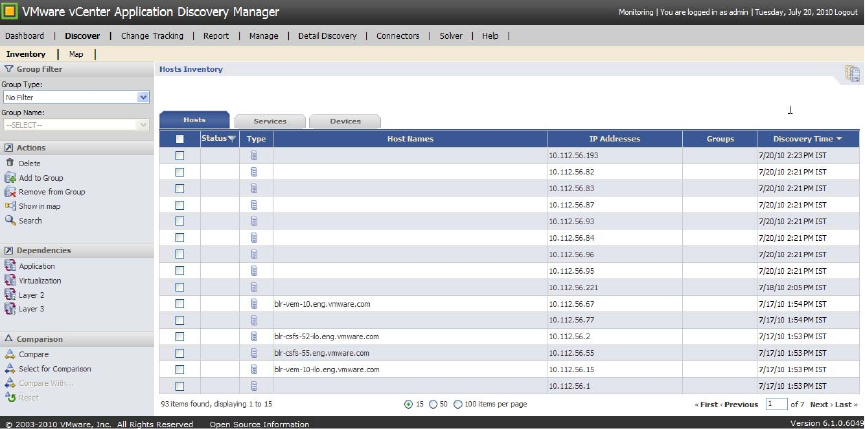
ADM User’s Guide
52 VMware, Inc.
Capabilities
OnceaVMwareenvironmentisdiscovered,youcanperformseveralfunctions.
Viewing Virtualization Dependencies
YoucanviewdependenciesinyourVMwareInfrastructureenvironmentbyselectingtherelevantitemsfrom
theDiscover>InventorypageandclickingVirtualizationintheDependenciespanel.Thisoptionallowsyou
toviewdependenciesfortheselectedobject.Forexample,youcanselectavirtualmachinefromtheinventory
andthenclickVirtualizationtoviewitscontainers.Youcanalsoviewdependenciesinthemap.
Virtualization-Related Search
AfterdiscoveringyourVMwareInfrastructureenvironment,youcanperformsearchesonit.Forexample,you
cansearchforvirtualmachinesorVMwareESXServer.Toperformasearch,gototheDiscover>Inventory
pageandclickSearch.Thisoptionisshownbelow.
Finding Dependencies Between a VMware Infrastructure and Virtualized Business
Applications
Assumptions
YouhavecompletedactivediscoveryoftheVMwareInfrastructureenvironmentatleastonce,anddiscovery
ofthevirtualmachinesintheVMwareInfrastructureatleastonce.
Goal
AfterdetectingVMwareInfrastructureenvironmentinstancesinyournetwork,youwanttofindoutwhich
businessapplications(forexample,PeopleSoft)areontheseinstances.
Flow 1: Foundation to Virtualized Environment
To view your VMware environment
1 CreateagroupthatcontainstheVMwareESXServer,VirtualCenter,andtheVirtualInfrastructure
Clients.
2ToviewallthevirtualmachinesintheVMwareInfrastructureenvironment,doeitherofthefollowing:
ExtendtheVMwareInfrastructureenvironmentgrouptoincludetheenvironment.
Viewtheenvironmentthroughthemap(Discover>Map)ortheinventory(Discover>Inventory).
Chapter 4containsmoreinformationongroups.
VMware, Inc. 53
Chapter 5 Discovery
Flow 2: Virtualized Environment to Foundation
To view your VMware environment
1 CreateagroupthatcontainsallthevirtualmachinesintheVMwareInfrastructureenvironment.
2ToviewtheVMwareInfrastructureenvironment,doanyofthefollowing:
AutomaticallyextendthegroupyoucreatedtoincludeitsVirtualInfrastructureenvironment.
Viewtheenvironmentthroughthemap(Discover>Map)ortheinventory(Discover>Inventory).
ADM User’s Guide
54 VMware, Inc.
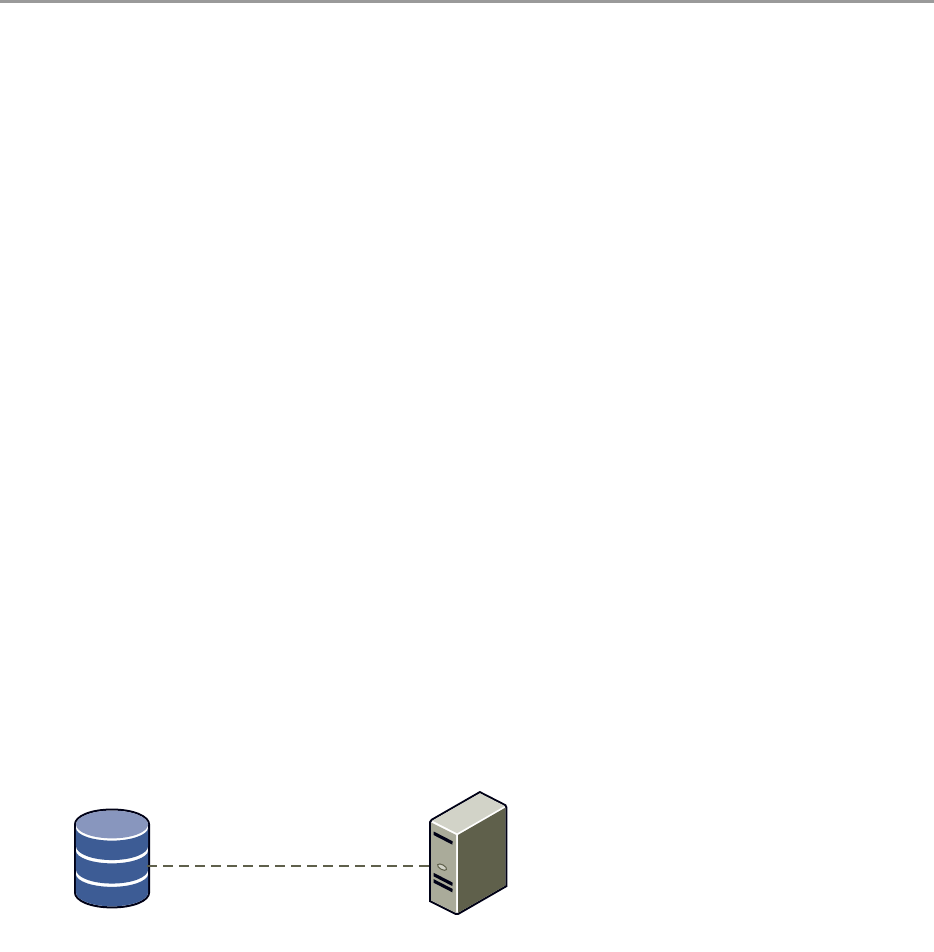
VMware, Inc. 55
6
Thischapterdescribeshowtocreateapplicationpatterndefinitionsandviewtheresultsasapplicationpattern
instances.Topicsinclude:
“Overview”onpage 55
“ApplicationPatternDefinitions”onpage 55
“ApplicationPatternInstances”onpage 58
“ViewingApplicationPatternDefinitionsandInstances”onpage 58
“ApplicationDiscoveryProcess”onpage 61
Overview
Datacentersrunbusinessapplicationsthathandlethecorebusinessandoperationaldataoftheorganization.
Thesebusinessapplicationstypicallyconsistofseveralhostsrunningdatabases,applicationservers,file
servers,andvariousothercomponents.ADMprovidesapplicationpatternsthatallowsyoutoidentifyand
grouptogetherentitiesthatcomprisethevariousinstancesofabusinessapplication.
Creatingapplicationpatternshelpsyoutoeasilyfollowanychangesinaspecificbusinessapplication.The
instanceisupdatedautomaticallyifthereareserverchangesorachangeinservicesintheapplication,thus
relievingyoufromhavingtomanuallytrackchanges.
Application Pattern Definitions
TouseApplicationPatterns,youmustfirstcreateanApplicationPatterndefinition.AnApplicationPattern
definitionisatopologydefinedbyasetofendpoints(suchashosts,services,anddatabases)andtherelations
(connections)betweenthem.Figure 6‐1demonstratesanexampleofanapplicationpatternthatisaJboss
Server,connectedtoanOracledatabasethroughaJavaDatabaseConnectivity(JDBC)connection.
Figure 6-1. Application Pattern Example
ADMprovidesthefollowingtypesofrulesforidentifyingApplicationPatterns:
Noderules
Connectivityrules
Application Patterns 6
Jboss
server
Oracle
database
JDBC
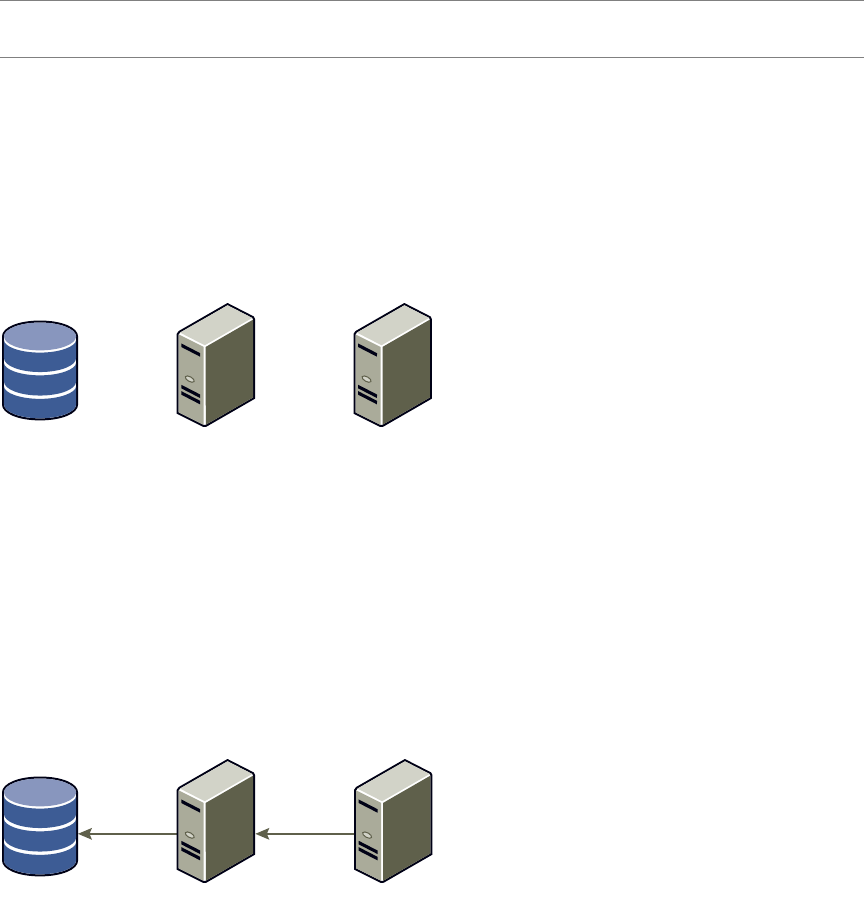
ADM User’s Guide
56 VMware, Inc.
Noderulesidentifytheendpointsoftheapplicationpattern.Therearetwotypesofnoderules:
“MandatoryNodeRules”onpage 56
“UnifyingNodeRules”onpage 57
Connectivityrulesidentifytheconnectionsbetweenthenodes.Connectivityrulesalsoassigneachnodeasa
sourceortargetoftheapplicationpatterndefinition.
Node Rules
InFigure 6‐2,therearethreeendpointsoftheapplicationpattern:
Oracledatabase
JbossServer
ApacheServer.
Figure 6-2. Application Pattern Endpoints
Thisapplicationpatterndefinitionrequiresthreenoderulestoidentifyeachendpoint.
Connectivity Rules
Connectivityrulesidentifytheconnectionsbetweentheendpointsandareusedtoassignanendpointasa
sourceortargetoftheapplicationpattern.
Figure 6‐3demonstratesaconnectivityrulethatincludesJDBCandHTTPconnections,aswellasassignsthe
ApacheServerasasourcetotheJbossServer(target)andtheJbossServerasasourcetotheOracledatabase
(target).
Figure 6-3. Connections Between Endpoints
Mandatory Node Rules
Applicationpatterndefinitionsalsorequirethatyoudefineanoderuleeitheras:
Mandatory
Optional
Mandatoryelementsmustexistintheenvironmenttobeidentifiedasaninstance.Theyarecoreelementsof
theapplicationpatterndefinition.
Optionalelementsarenotcoreand,iftheyexist,theyareincludedinthediscoveredinstance.
NOTEADMrequiresthatyoudefineatleasttwonoderules,oneforthesourceandoneforthetarget,plus
oneconnectivityruleforeachapplicationpatterndefinition.
Jboss
server
Oracle
database Apache
server
Jboss
server
Oracle
database Apache
server
JDBC HTTP
VMware, Inc. 57
Chapter 6 Application Patterns
Figure 6‐4showsanapplicationpatterndefinitionthatcontainsbothmandatoryandoptionalelements.
Figure 6-4. Mandatory and Optional Elements in an Application Pattern Definition
Unifying Node Rules
Theendpointsofanapplicationpatterninstancemightbesharedbyotherentities.Unificationallowsyouto
identifyallentitiesthatsharearesourceasasingleapplicationpatterninstance.
Tohelpidentifyallsimilarinstancesthatsharethesamecomponents,youcanspecifyanode‐basedruleasa
unificationrule.Whentheruleisapplied,itresultsinoneinstancebeingdetected,insteadofseveralthat
containallthesamecomponents.
Forexample,youmightnotknowhowmanyADMCollectorcomponentsexistinaninstanceofanADM
application.Youcouldendupwithmultipleinstancesinsteadofjustone,asshowninFigure 6‐5.
Figure 6-5. Multiple Instances Sharing the Same Components Identified Without Unification
Whenyouspecifyanoderuleasaunificationrule,theapplicationpatterndefinitionunitesall
aggregator‐collectorinstancesthatsharethesameADMaggregatorintooneinstanceasshowninFigure 6‐6.
Application
server
(mandatory)
Oracle
database
Gateway
(optional)
server
client
client
client
ADM User’s Guide
58 VMware, Inc.
Figure 6-6. Similar Instances Are Identified as One Instance With Unification
Application Pattern Instances
ADManalyzesnewlycreatedapplicationpatterndefinitionanddiscoversinstancesoftheapplicationpattern.
Anapplicationpatterninstanceisasetofcomponents(hosts,services,andsoon)andtheirrelationsthat
answeranapplicationpatterndefinition.Thisdefinitionisappliedagainsttherepositorythusresultingina
displayofallapplicationpatterninstancesthatmatchthatdefinition.
Viewing Application Pattern Definitions and Instances
TheapplicationpatterndefinitionsandinstancesareviewedandmanagedthroughtheManagetab.The
VMwarevCenterApplicationDiscoveryManagerOnlineHelpcontainsfielddescriptionsandinformationabout
usingtheinterface.
Application Pattern Definitions
TheApplicationPatternsListcontainsgeneralinformationaboutexistingapplicationpatterndefinitions.To
accesstheApplicationPatternsList,navigatetoManage>ApplicationPatternDefinitions.TheApplication
PatternsListisshownbelow.
Table 6‐1describesthecolumnsthatappearintheApplicationPatternsList.
server
client
client
client

VMware, Inc. 59
Chapter 6 Application Patterns
Clickthecolumnheadingtosortthelistbythatcolumn.
YoucanperformthefollowingactionswithApplicationPatternDefinitions:
AddApplicationPattern:Createsanewdefinition.
CopyApplicationPattern:Makesacopyofanexistingdefinition.
EditApplicationPattern:Modifiesanexistingdefinition.
DeleteApplicationPattern:Removesanexistingdefinition.
DiscoverNewInstances:Discoversnewinstancesofanapplicationpatterndefinition.
Import:ImportsapplicationpatterndefinitionsfromotherADMs.
Export:ExportsapplicationpatterndefinitionsfromotherADMs.
TheVMwarevCenterApplicationDiscoveryManagerOnlineHelpprovidesproceduresonhowtoperformthese
actions.
Table 6-1. Application Patterns Definition Column Descriptions
Column Description
BuiltIn ADMhasasetofdefaultApplicationPatternDefinitionsthatyoucanuseasisorastemplatestocreate
customApplicationPatternDefinitions.TheCopyoptionallowsyoutocopyabuilt‐inApplication
PatternDefinitionandcustomizethecopytocreateanewgroup.Discoveryofthebuilt‐inApplication
PatternDefinitionsisperformedonceadaybydefault.Theflagautomaticallydiscoversnewinstances
onceadayandisclearedbytheuser.
Name NamegiventotheApplicationPatternwhenitwascreated.
Description DescriptionoftheApplicationPatternDefinition(optional).
LastDiscovery ThelasttimetheADMsearchedfortheApplicationPattern.ThefirsttimeanApplicationPattern
Definitioniscreated,ADMsearchestheADMdatabasefortheCIsthatmeetthecriteriaspecifiedinthe
ApplicationPatternDefinition.ApplicationPatternInstancesareofferedforeachdiscoveredinstance
ofthedefinedpattern.SelecttheinstancesyouwanttheADMtosave.Theseinstanceswillnowbe
displayedintheApplicationPatternInstancestab.
IftheAutomaticallydiscoveroptionisselectedinthedefinition,theADMwillautomaticallysearch
fornewinstancesonceadayandupdatetheexistinginstances.
CreatedBy UsernameofthepersonwhocreatedthisApplicationPatternDefinition.
CreationDate DatetheApplicationPatternDefinitionwascreated.ThedateisfortheADMappliancewherethis
definitionisdefined.
UpdatedBy UsernameofthepersonwholastmodifiedtheApplicationPatternDefinition.
UpdateDate DatetheApplicationPatternDefinitionwaslastmodified.ThedateisfortheADMappliancewhere
thisdefinitionisdefined.
NOTEYoucannotdeleteanApplicationPatternDefinitionifitisbuilt‐inorifoneormoreApplication
PatternInstancesreferencethatdefinition.
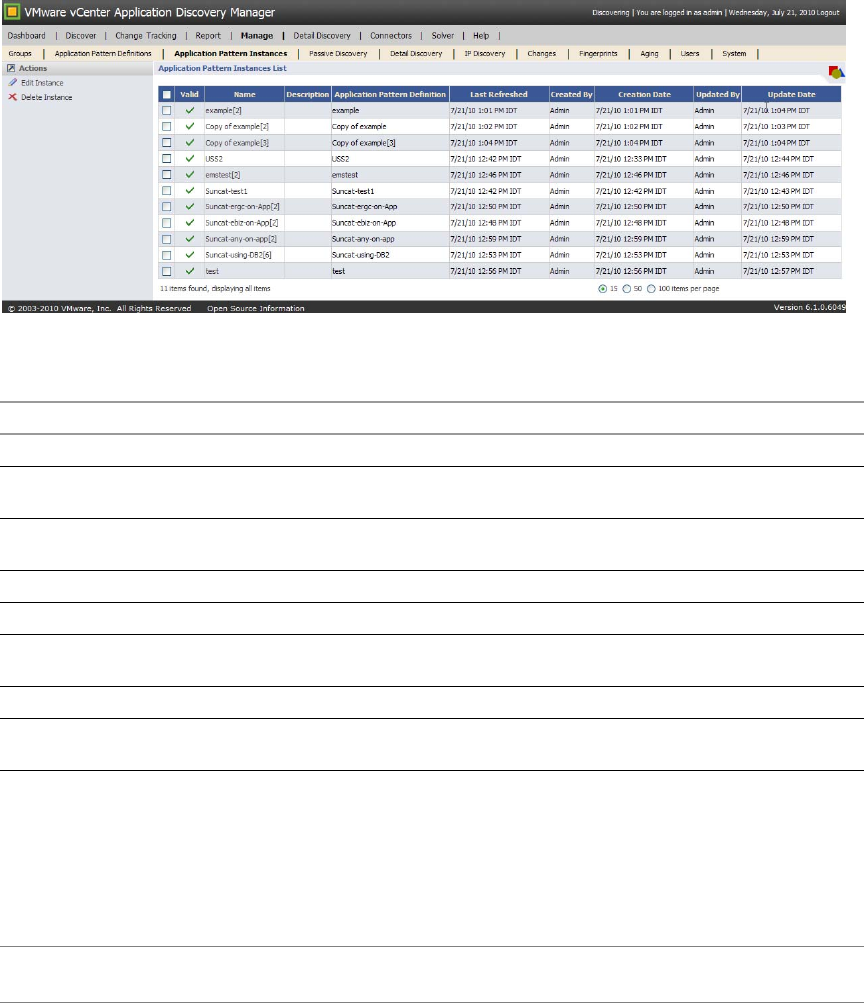
ADM User’s Guide
60 VMware, Inc.
Application Pattern Instances
TheApplicationPatternInstancesListcontainstheapplicationpatterninstancecreatedasaresultofdiscovery
ofinstancesofassociatedapplicationpatterndefinitions.
ToaccesstheApplicationPatternInstancesList,selectManage>ApplicationPatternInstances.The
ApplicationPatternsInstancesListisshownbelow.
Table 6‐2describesthecolumnsthatappearintheApplicationPatternsInstancesList.
Clickthetopofacolumntosortthelistbythatcolumn.
YoucanperformthefollowingactionsonApplicationPatternInstances:
EditInstance:ModifiesNameorDescriptionofanexistinginstance.
DeleteInstance:Removesanexistinginstance.
TheVMwarevCenterApplicationDiscoveryManagerOnlineHelpprovidesstep‐by‐stepinstructionsonhowto
performtheseactions.
Table 6-2. Application Patterns Instances Column Descriptions
Column Description
Valid AgreencheckmarkmeanstheapplicationpatterninstancewasvalidasofthelastRefresh.
Name ThenameoftheApplicationPatternInstance.ADMprovidesadefaultname,butyoucanprovidea
customnameusingtheEditaction.
Description Theinstancedescriptionisanoptionalfieldandmightnothavebeendefined.UsetheEditactionto
enteradescriptionfortheinstance.
LastRefreshed ThelasttimetheADMdatabasewascheckedforapplicationpatterninstancevalidity.
CreatedBy Usernameofthepersonwhocreatedthisapplicationpatterndefinition.
CreationDate ThetimethisapplicationpatterndefinitionwasoriginallycreatedontheADMappliancewherethis
patternwasdefined.
UpdatedBy Usernameofthepersonwholastmodifiedthenameordescriptionofthisapplicationpatterninstance.
UpdateDate ThetimethisapplicationpatterndefinitionwaslastmodifiedontheADMappliancewherethispattern
wasdefined.
NOTEYoucannotdeleteanApplicationPatternInstanceiftheinstanceispartofthescopeofeitherActive
probingorAgingpolicies,orpartofauserʹsconfiguration.
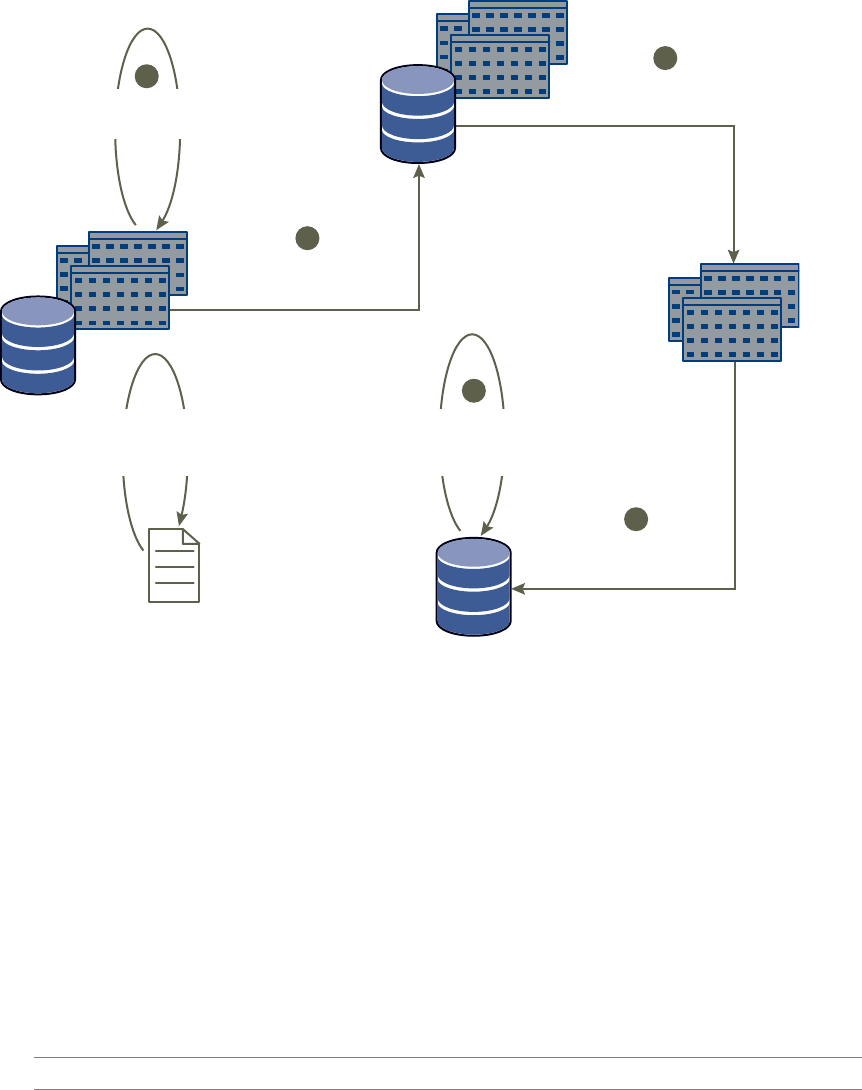
VMware, Inc. 61
Chapter 6 Application Patterns
Application Discovery Process
Figure 6‐7showsahigh‐leveloverviewoftheprocesstocreateapplicationpatternsandviewtheresultsinthe
ADMconsole.Thecalloutscorrespondtothe“UseCase:CreatingDefinitionsandViewingtheResulting
Instances”onpage 61.
Figure 6-7. Overview of the Application Discovery Process
Use Case: Creating Definitions and Viewing the Resulting Instances
Thisusecaseprovidesanoverviewonhowtocreateanapplicationpatterndefinitionandviewtheresulting
instances.TheVMwarevCenterApplicationDiscoveryManagerOnlineHelpdescribesthefieldsinthedisplay.
Step 1: Create an application pattern definition
To create an application pattern definition
1 NavigatetoManage>ApplicationPatternDefinitions.
2ClickAddApplicationPatternfromtheActionspaneontheleftsideofthescreen.
3 CreatethenoderulesforeachendpointoftheapplicationpatternfromtheNodeRulestab.
4UsetheConnectivityRulestabtodefinethetypeofconnectionstoincludeintheinstanceandtodefine
thenodesasasourceortargetoftheapplicationpatterninstance.
XML file
ADM
database
ADM
ADM
database
ADM
1
2
3
4
5
User creates an
application pattern definition
using ADM’s UI.
ADM discovers all
instances that match
the definition.
The chosen instances
are stored in the
database as groups.
All discovered
instances are listed
to the user.
ADM
database
ADM
New instances are
discovered and existing
instances are refreshed
and validated nightly.
The definition can
be exported to
(or imported from)
an XML file.
IMPORTANTAtleastonenoderuleismandatory.
ADM User’s Guide
62 VMware, Inc.
Step 2: Discover All Instances That Match the Definition
Thediscoveryprocessrunsthefirsttimeanapplicationpatterndefinitioniscreated.ADMsearchesthe
databasefortheCIsthatmeetthecriteriaspecifiedintheapplicationpatterndefinition.Ifthecriteriaismet,
thenanapplicationpatterninstanceiscreated.
Alternatively,thediscoveryprocessistriggeredmanuallyatanytimeasfollows:
1 NavigatetoManage>ApplicationPatternDefinitions.
2 Selecttheappropriateapplicationpatterndefinition.
3ClickDiscoverNewInstancesfromtheActionspaneontheleftsideofthescreen.
MonitoringofthebackgroundprocessisdonethroughtheLastDiscoverycolumn.Whenthediscovery
processiscomplete,thenumberofnewlydetectedapplicationpatterninstancesappearinthestatusbar
ofthewindow.
4IntheLastDiscoverycolumn,clickclickheretoviewtheapplicationpatterninstancesthatwere
discovered.
Step 3: Viewing All Discovered Instances
Aftercompleting“Step2:DiscoverAllInstancesThatMatchtheDefinition”onpage 62,theDiscovered
ApplicationPatternInstancespageappearsdisplayingthescopeoftheseinstances.
SelecttheapplicationpatterninstancesthatyouwouldliketostoreandclickCreate.
Step 4: Storing Selected Instances as Groups
TheapplicationpatterninstancesarestoredasgroupsandareviewedandmanagedfromtheManage>
ApplicationPatternInstancestab.
Step 5: Discovering New Instances Automatically
Youhaveanoptiontoenableordisabletheautomaticdiscoveryofnewinstances.
IftheoptionAutomaticallydiscovernewinstancesonceadayisselectedintheApplicationPatternDefinition,
theADMdatabaseissearchedfornewApplicationPatterninstances.Newlydiscoveredinstancesare
displayedandaresavedmanuallyasshownin“Step3:ViewingAllDiscoveredInstances”onpage 62.
Iftheoptionisnotselected,nonewinstancesarediscoveredbutanightlyrefreshprocesssynchronizes
existinginstanceswithinformationintheADMdatabase.IfchangesintheApplicationPatternInstance(for
example,relevantCIswerenolongerdiscovered)renderthatinstanceirrelevant,thegreencheckmark
disappearsintheValidcolumn.Youcandeletesuchaninstancemanually,providedtheinstanceisnotpartof
thescopeofeitherActiveProbingorAgingpolicies,norpartofauserʹsconfiguration.

VMware, Inc. 63
7
ThischapterdescribestheReporttabinADM.Topicsinclude:
“Reporttypes”onpage 63
“ExportingandPrintingReports”onpage 64
Report types
Table 7‐1listsallofthereportsyoucancreateintheReporttab.
Report 7
Table 7-1. Available Reports in the Report Tab
Report Type Definition Choices For Each Report Type
Inventoryreports Inventoryreportsshowwhathardwareand
softwareareinstalled,theversions,and
dependenciesrelatedtoyourbusiness
application.
HostInventoryReport
DeviceInventoryReport
ServiceInventoryReport
ConnectionInventoryReport
HostOperatingSystemBreakdown
Report
HostCPUBreakdownReport
HostKernelVersionBreakdownReport
HostPhysicalMemoryBreakdown
Report
ServiceInventoryBreakdownReport
InstalledSoftwareInventoryReport
IsolatedHostsReport
IsolatedServicesReport
AbandonedServicesReport
UnclassifiedConnectionsReport
UnclassifiedServicesReport
ChangesReport
HostConfigurationReport
Dependencyreports Dependencyreportsshowwhatobjectsare
dependentuponyourhosts,services,and
applications.
HostDependencyReport
ServiceDependencyReport
ApplicationDependencyReport

ADM User’s Guide
64 VMware, Inc.
Exporting and Printing Reports
Onceareportisgenerated,youcanexportandprintit.Theexportchoicesareasfollows:
Excelformat:EnablesyoutodownloadthereportthroughyourbrowserasaMicrosoftExcelspreadsheet.
RichTextFormat(RTF):EnablesyoutosavethereportinRTFthatisopenedinMicrosoftWord.
PortableDocumentFormat(PDF):EnablesyoutosavethereportinPDF.
Print:OpensthestandardPrintdialogboxandallowsyoutoprintthereport.
Demandreports Demandreportsshowuseinformationfor
hosts.
HostBaselineBehaviorReport
ServiceBaselineBehaviorReport
HostBaselineComparisonReport
ServiceBaselineComparisonReport
MostUsedHostsReport
LeastUsedHostsReport
MostActiveHostUsersReport
LeastActiveHostUsersReport
HostDemandAnalysisReport
ServiceDemandAnalysisReport
MostUsedServicesReport
LeastUsedServicesReport
MostUsedConnectionsReport
LeastUsedConnectionsReport
MostActiveApplicationUsersReport
MostActiveServiceUsersReport
HostDemandTrend
ServiceDemandTrend
HostActivityBreakdownReport
CurrentChangesReport
Configurationreports Configurationreportsshoweitherhostswith
fewornoconnections,oralistofalerts.
GroupReport
ChangePolicyReport
Table 7-1. Available Reports in the Report Tab (Continued)
Report Type Definition Choices For Each Report Type

VMware, Inc. 65
8
ThischapterdescribestheConnectorstabthatenablesyoutointegrateADMwithotherapplications.Topics
include:
“ConnectorsOverview”onpage 65
“EMCSmartsIntegration”onpage 65
“CustomReports”onpage 70
Connectors Overview
TheConnectorstabenablesyoutointegrateADMwithotherapplications,ifyouhavetheminstalled.You
mustalsohavealicenseforthem.IntegrationbetweenADMandotherapplicationsallowsdetailed
informationtobediscoveredandpopulatedintotheotherapplication.
Informationabouthosts,routers,switches,services,andconnectionsaretransferredbetweenapplications.For
example,youmightwanttousethenetworkdevicesfromEMCSmartsServiceAssuranceManager(SAM)
withtheapplicationsfromADM.InformationaboutADMcouldbecollectedanddisplayedintheSAM.
ToviewtheintegrationscreenfromtheADMConsole,clickConnectorstab.Dependingontheapplications
youhaveinstalledandlicensed,youseethefollowingtabs:
EMCSmarts
Reports
TheVMwarevCenterApplicationDiscoveryManagerOnlineHelpprovidesspecificdetailsandsteps.
EMC Smarts Integration
IntegrationbetweentheADMandtheSAMallowsthedetailedinformationcollectedbytheADMtobe
populatedintotheSAM.
Connectors 8
NOTETheintegrationsoftwarerequiresalicensetoworkwithADM.ContactyourCustomerSales
Representativeforinformationonpurchasingalicense.
NOTEBeforeADMdatacanappearinSAM,youmustverifythattheics.conffilehasbeeneditedtospecify
thatthedataistoflowfromtheSAMAdapterPlatformtotheSAM.Thesection“DefiningDomain
Parameters”intheEMCSmartsServiceAssuranceManagerConfigurationGuideprovidesdetailedinformation
oneditingtheics.conffile.Onceallintegrationstepsarecomplete,theADMdataisviewedusingthe
Smarts,LaunchinContextfeature.
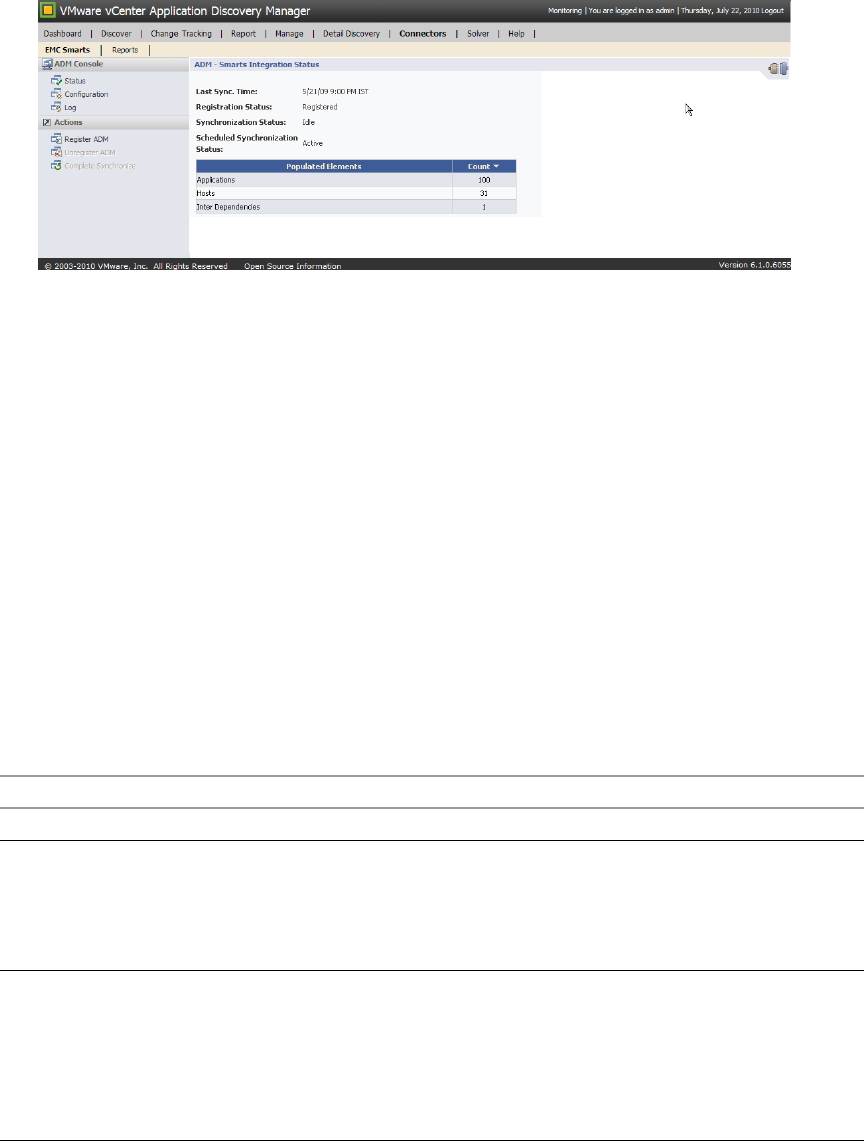
ADM User’s Guide
66 VMware, Inc.
To view the ADM and SAM Integration screens
1FromtheADMConsole,clickConnectorstab.
2ClickEMCSmartstoviewtheSmartsIntegrationStatusasshownbelow.
TheADM‐SmartsIntegrationStatusscreendisplaysasummaryoftheADMSmartsintegrationstatus.
ThefollowingmenuitemsareavailableintheADMConsoleleftpane:
Status
Configuration
Log
ThefollowingactionsitemsareavailableintheActionsleftpane:
RegisterADM
UnregisterADM
CompleteSynchronize
Thesemenuitemsaredescribedinthefollowingsections.
Status
Table 8‐1describesthevariousfieldsoftheADM‐SmartsIntegrationStatusscreen.
Table 8-1. ADM-Smarts Integration Status Screen Information
Field Description
LastSync.Time DisplaysthetimeofthelastsuccessfulADM‐SAMsynchronization.
RegistrationStatus DisplaysthecurrentstatusoftheADMregistrationintheSAM.Availablevalues
include:
Notconfigured:Theintegrationhasnotbeenconfigured.
Unregistered:TheADMdeviceisnotregisteredintheSAM.
Registered:TheADMdeviceisregisteredintheSAM.
SynchronizationStatus DisplaysthecurrentstatusoftheADMdeviceandtheSAMsynchronization.
Availablevaluesinclude:
Idle:IndicatesthatnosynchronizationbetweentheADMdeviceandtheSAM
isoccurring.
CompleteinProgress:Acompletesynchronizationiscurrentlyinprogress.
IncrementalinProgress:Anincrementalsynchronizationiscurrentlyin
progress.

VMware, Inc. 67
Chapter 8 Connectors
UseyourWebbrowserRefreshoptiontoupdatetheADM‐SmartsIntegrationStatusscreeninformation.
ClickStatusintheleftpanetoviewtheADM‐SmartsIntegrationstatus.
Configuration
TheADM‐SmartsIntegrationConfigurationscreenincludesthefollowingtabs:
Publisher:ConfigurestheSAMserverconnectingtoanADMdevice.
Scheduling:Configuresautomaticschedulingoftheintegration.
Scope:DefinestheentitiesthatarepopulatedtotheSAM.
To configure the EMC Smarts Connector
1ConfiguretheSAMserverconnectingtotheADMdevice.
2SchedulethesynchronizationbetweentheADMdeviceandtheSAM.
Thefollowingsynchronizationoptionsareavailable:
Incremental:Theincrementalupdateoptionpopulatesallobjectsthatwerecreatedormodifiedsince
thelastsynchronization.
SincetheIncrementalupdateoptiontransfersdeltasofdatabetweentwopointsintime,itisused
morefrequently.
Complete:Thecompleteupdateoptionpopulatesallobjectsthatareincludedintheconfigured
ADMtotheSAMscope.
Sincethisoptionpopulatesallobjects,donotuseitfrequently.Itisrecommendedthatyouperform
acompleteupdatetocorrectanysynchronizationissuesthathaveoccurredovertime.
3DefinetheresourcesthatarepopulatedfromtheADMdevicetotheSAM.
TheScopetabdefinestheresourcesthatarepopulatedfromtheADMtotheSAM.
SincetheADMdiscoveryprocesscanresultinarelativelylargesetofserverandclientresources,you
mustcarefullyplanonthescopeofintegration.Thescopeofintegrationshouldbelimitedtoresources
thatareofinterestwithintheSAMcontext.Abroadscopecanresultinslowsynchronizationandalarge
setofentitiesintheSAM.
4RegistertheADMintheSAM.
BeforetransferringanyinformationfromtheADMdevicetotheSAM,ADMneedstoberegisteredinthe
SAM.
OnlyoneADMdeviceisregisteredintheSAMatanygiventime.IfyouregisteranewADMdeviceby
supplyingadifferentnameintheADMNamefield,theexistingADMdeviceisunregistered.Ifyou
registeranewADMdevicewithanamesimilartoanexistingADMdevice,theintegrationassumesthat
thisisareplacementADMdeviceandattemptstosynchronizethedataoftheADMdeviceandtheSAM.
TheVMwarevCenterApplicationDiscoveryManagerOnlineHelpprovidesthecompleteproceduresforthese
steps.
ScheduledSynchronizationStatus DisplaysthestatusofthescheduledADMdeviceandtheSAMsynchronization.
Availablevaluesinclude:
Active:Automaticsynchronizationschedulinghasbeenactivated.
NotActive:Automaticsynchronizationschedulinghasnotbeenactivated.
PopulatedElements/Count DisplaysthetypeandthenumberofelementspopulatedtotheSAM.
Table 8-1. ADM-Smarts Integration Status Screen Information (Continued)
Field Description
NOTEWhenschedulinganintegration,theschedulebecomesactiveat12:00A.M.thenextday.

ADM User’s Guide
68 VMware, Inc.
Log
ClickLogintheADMConsoleleftpanetoviewthelogsfortheADM‐Smartsintegration.Thelogfilesare
displayedfromthemostrecenttotheleastrecent.ClickTimeorMessageheadertoreversetheorderofthe
logfilesdisplayed.TheTimeheaderwilltogglebetweenthemostcurrenttotheleastcurrent.Sortingbythe
MessagecolumnwillfirstsortalphanumericalA–Z.ClickMessageagaintoreversethisorder.
Unregister ADM
ClickUnregisterADMintheActionsleftpanetounregisterADManddisablesanysynchronizationbetween
ADMandtheSAM.OncetheADMdevicehasbeenunregistered,theRegistrationStatusappearsas
UnregisteredandallobjectsdiscoveredbytheADMdevicearedeleted.
UnregisteringanADMdevicewhentheSAMisnotavailabledisplaysaForceUnregistermessage.ClickYes
tounregistertheADMdevicefromtheSAMwithoutnotifyingtheSAM.Youmustmanuallyunregisterthe
ADMdevicefromtheSAMusingtheSAMconsole.
Complete Synchronize
AfteryouhaveconfiguredtheADMandSAMintegration,thesystemmustbesynchronizedfortheSAMto
retrievethedata.Thefollowingtwooptionsareavailableforsynchronizing:
SchedulethesynchronizationbetweentheADMdeviceandtheSAM.
Performacompletesynchronizationnow:Toperformasynchronizationnow,clickComplete
SynchronizationintheActionsleftpane.
Acompletesynchronizationisperformedanytimeafterthetwosystemshavebeenconfiguredforintegration.
TheVMwarevCenterApplicationDiscoveryManagerOnlineHelpprovidesinstructionsforsynchronizingthe
integration.
Displaying ADM data in SAM
BeforeADMdatacanappearinSAM,youmustverifythattheics.conffilehasbeeneditedtospecifythat
thedataistoflowfromtheSAMAdapterPlatformtotheSAM.
To display discovered and populated ADM data in the SAM
1FromtheNotificationLogConsole,navigatetoInChargeManager>Attach.ThisdisplaystheAttach
InChargeManagerdialogbox.
2 SelectINCHARGE‐SAfromtheInChargeManagerlistbox.
3 NavigatetoFile>New>MapConsole.TheMapConsoleappears.
NOTETheDefiningDomainParameterssectionintheEMCSmartsServiceAssuranceManagerConfiguration
Guideprovidesdetailedinformationoneditingtheics.conffile.
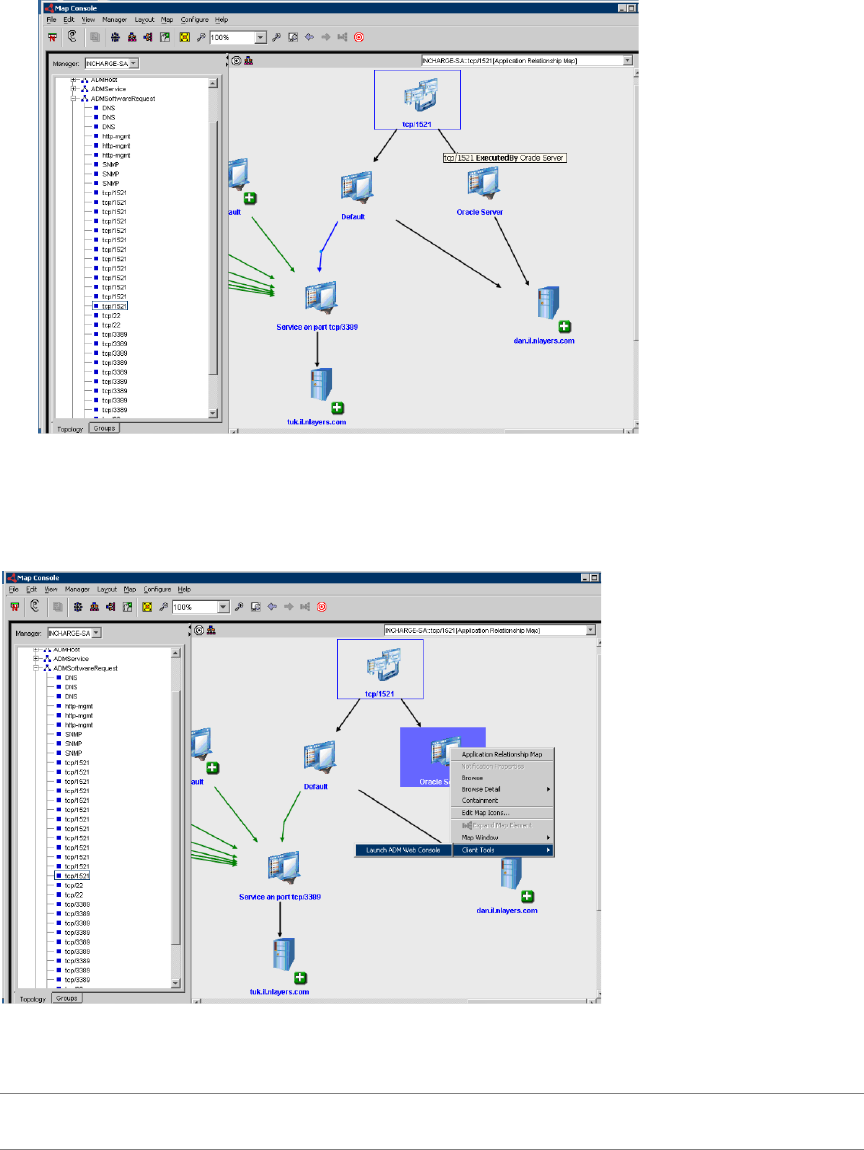
VMware, Inc. 69
Chapter 8 Connectors
4FromtheleftpaneoftheMapConsoleopentheADMSoftwareRequestfolder.
5 Selectanitem.Thegraphicalrepresentationofthesoftwarerequestwiththerelatedsoftwareservices
appearsintherightpaneoftheconsoleasshownbelow.
Launch in Context
ToopenanADMconsoleincontextusingtheSmartsLaunchinContextfunctionality,right‐clickanobjectand
navigatetoClientTools>LaunchADMWebConsoleasshownbelow.
Asaresultofintegration,theADMConsoledisplaysdetailedinformationabouttheselectedobjectpopulated
intotheSAM.
NOTEOnahostrunningSolaris9or10,fortheSmartsLaunchincontextfunctionalitytoopentheADM
Consoleincontext,youmustedittheAMDLIC.shfiletoconfigurethelocationofyourMozillabrowser.
ADM User’s Guide
70 VMware, Inc.
Editing the ADMLIC.sh File
InSolaris9andSolaris10,theMozillabrowserreplacedtheNetscapebrowser.Becauseofthischange,the
ADMLIC.shfilemustbeeditedtoconfigurethelocationofthebrowserofyourchoice.
To edit the ADMLIC.sh file
1OpentheADMLIC.shfileusingatexteditor.
2 Locatethefollowingsection:
# ==========| Customize only until next dashed line |==============
# ---------------------------------------
### Required:
# Some typical browser locations
# /usr/dt/bin/netscape (Solaris)
# /opt/netscape/netscape (HPUX)
# /usr/bin/mozilla (Linux)
BROWSER=/usr/sfw/bin/mozilla
# --------------------
# =====================| End Customizations |======================
# ----------------------
3EditthepathforthebrowserrunningonaSolarishost.
Forexample,BROWSER=/usr/sfw/bin/mozilla
4 SavethefiletotheBASEDIR/smarts/actions/client/ADMdirectory.
Custom Reports
Inadditiontostandardreports,ADMprovidesfunctionalityforcreatingcustomreports.Tocreatecustom
reports,anexternaldatabasemustbeinstalledandconfigured.Oncetheexternaldatabaseissynchronized
withtheADMdatabase,youcancreatecustomqueriestocollectdataandgeneratecustomreports.The
VMwarevCenterApplicationDiscoveryManagerRepositoryReferenceGuideprovidesinformationaboutsettingup
andconfiguringtheADMexternaldatabase.Tohelpyouwiththecustomreports,italsoprovidesexamples
ofreportsthatcanbegeneratedfromtheADMexternaldatabase.

VMware, Inc. 71
9
ThischapterdescribestheSolvertabthatallowsyoutogenerateusefulreportsandtohelpyousolve
importantbusinessinitiatives.Topicsinclude:
“Overview”onpage 71
“ReportsintheSolverTab”onpage 71
Overview
ADMincludesaseriesofbestpracticesolutionstohelpyouwithyourstrategicbusinessinitiativeslikelicense
contractauditing;application,software,andserverconsolidation;disasterrecoveryplanning;campus
relocations;mergersandacquisitions;compliancewiththeSarbanes‐OxleyActof2002section404(SOX);and
manyothers.Theseanalyticsandbest‐practicesolutionsprovideyouwithinformationtohelpyouoptimize
yourbusinessapplicationsandtheirresources.
Reports in the Solver Tab
Table 9‐1listsallthereportsyoucangeneratefromthistab.
Solver 9
Table 9-1. Reports in the Solver Tab
Business
Initiative Definition Reports
Application
upgrade
Beforeupgradingyour
applications,usethis
solutiontoidentify
applications,hosts,and
servicesthatareheavily
utilizedandareexcellent
candidatesforupgrading.
Thishelpsyouimprove
yourapplication
performanceandservice
levels.
Createashortlistofhoststhatareupgradecandidates.
Createashortlistofservicesthatareupgradecandidates.
Listallhoststhatareheavilyusedandcouldbeupgraded.
Listallservicesthatareheavilyusedandcouldbeupgraded.
Createashortlistofthemostactiveserviceclientsforservices
thatareupgradecandidates.
Createashortlistofthemostactiveapplicationclientsfor
applicationsthatareupgradecandidates.
Determinetheimpactofhoststhatareupgradecandidateson
otherhostsandservices.
Graphthedemandplacedonhoststhatareupgradecandidates
overaspecifiedtime.
Graphthedemandplacedontheservicesthatareupgrade
candidatesoveraspecifiedtime.
Determinetheimpactofapplicationsthatareupgrade
candidatesonotherhostsandservices.

ADM User’s Guide
72 VMware, Inc.
Application
consolidation
Beforerunningan
applicationconsolidation
initiative,usethissolution
toidentifyapplications,
hostsandservicesthatare
underutilizedandare
excellentcandidatesfor
consolidation.
Createashortlistofhoststhatareretirementcandidates.
Createashortlistofservicesthatareretirementcandidates.
Listallhoststhatarenotheavilyusedandcouldberetired.
Listallservicesthatarenotheavilyusedandcouldberetired.
Determinetheimpactofthehoststhatareretirementcandidates
onotherhostsandservices.
Determinetheimpactofbusinessapplicationretirementon
otherhostsandservices.
Createashortlistofhoststhathaveminimaldependencyon
otherhostsandservices.
Application
migration
Beforemigratingyour
applicationstonew
vendors,versions,or
systems,usethissolutionto
getaclearpictureofyour
applicationarchitecture,
theirdependencies,andthe
demandplacedoneach
application,host,and
service.
Listallhoststhatsupportyourapplicationinfrastructure.
Listallservicesthatsupportyourapplicationinfrastructure.
Showwhichotherhostsandservicesaredependentonthehosts
thatsupportthisapplication.
Graphthedemandplacedonhoststhatismigratedovera
specifiedtime.
Graphthedemandplacedonservicesthatismigratedovera
specifiedtime.
Determinetheimpactofapplicationsthatareupgrade
candidatesonotherhostsandservices.
Mergersand
acquisitions
Asyouacquireordivest
businessoperations,use
thissolutiontominimize
theimpactofacquiringor
sellingassetsandensure
yourbusinessapplications
continuefunctioning
withoutinterruption.
Createashortlistofhoststhatarebeingacquiredorsold.
Createashortlistofservicesthatarebeingacquiredorsold.
Showwhichotherhostsandservicesaredependentonhosts
thatarebeingacquiredorsold.
Graphthedemandplacedonhoststhatarebeingacquiredor
soldoveraspecifiedtime.
Graphthedemandplacedonservicesthatarebeingacquiredor
soldoveraspecifiedtime.
Determinetheimpactofapplicationsthatareupgrade
candidatesonotherhostsandservices.
Disaster
recovery
planning
Createandautomatically
maintainaccurateand
up‐to‐datedocumentation
ofyourdisasterrecovery
plans.Youcanalsousethis
solutiontoaudityour
disasterrecoveryplans,
ensuringyourbusinesswill
continuewithout
interruption.
Listallhoststhatsupportyourapplicationinfrastructure.
Listallservicesthatsupportyourapplicationinfrastructure.
Showwhichotherhostsandservicesaredependentonhostsin
yourapplicationinfrastructure.
Determinetheimpactofapplicationsthatareupgrade
candidatesonotherhostsandservices.
SOX
compliancy
audit
Section404ofthe
Sarbanes‐OxleyAct
requiresyoutodocument
yourkeyfinancial
applications,amongstother
things.Thissolution
providesyouwiththe
necessaryinformation
requiredfor
Sarbanes‐Oxleycompliance
readiness.
Showthelistofhoststhatsupportyourcriticalfinancial
applications.
Showthelistofservicesthatsupportyourcriticalfinancial
applications.
Showthelistofhoststhatdependonotherhoststhatsupport
yourcriticalfinancialapplications.
Graphthedemandplacedonhoststhatsupportyourcritical
financialapplications.
Graphthedemandplacedonservicesthatsupportyourcritical
financialapplications.
Table 9-1. Reports in the Solver Tab
Business
Initiative Definition Reports
VMware, Inc. 73
Index
A
ADM, architecture solutions 12
Aging 20
All-in-one appliance solution 12
Application discovery process 61
Application Pattern Fingerprints 10
Application pattern instances 58
Application patterns 55
Architecture 12
C
Checking for results 37
Configuration Item 10
Connectivity rules 56
D
Detail Discovery 31
Directory, for scripts 19
Discovery
IP Discovery 32
VMware Discovery 49
Discovery Plans 32
Distributed appliance solution 12
Distributed appliance with Remote Database
solution 13
E
Entity Aging 10
F
Firewalls 37
G
Groups
Built-in groups 26
User-defined groups 26
L
License 22
M
Management Data Repository 10
Mandatory node rules 56
N
Node rules 56
P
Policies 36
Policy, defined 18, 20, 58
Protocols 37
R
Report card 35
S
SAM, configuration 67
Scripts, for policies 19
Setting DCOM privileges 42
Setting WMI privileges 42
Smarts
Configuring for ADM 67
Integration with ADM 67
SNMP 39
SSH 38
System page 22
T
Telnet 43
U
Unifying node rules 57
User, Users page 21
V
VI-SDK 51
W
Windows Management Instrumentation (WMI) 40
ADM User’s Guide
74 VMware, Inc.
