A and H Design Group BV-001RX Wireless remote control vibrator User Manual

A&H; Design Group, Ltd. Wireless remote control vibrator

User manual

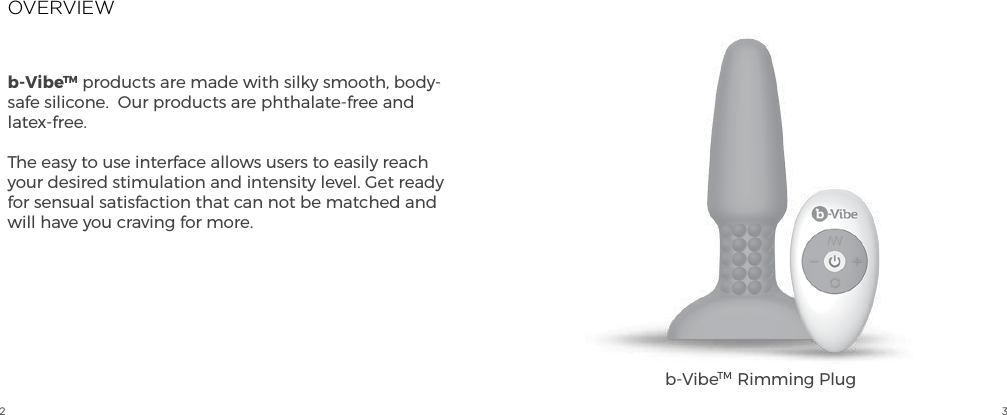
2 3OVERVIEWb-VibeTM products are made with silky smooth, body-safe silicone.  Our products are phthalate-free and latex-free.The easy to use interface allows users to easily reach your desired stimulation and intensity level. Get ready for sensual satisfaction that can not be matched and will have you craving for more.b-VibeTM  Rimming Plug
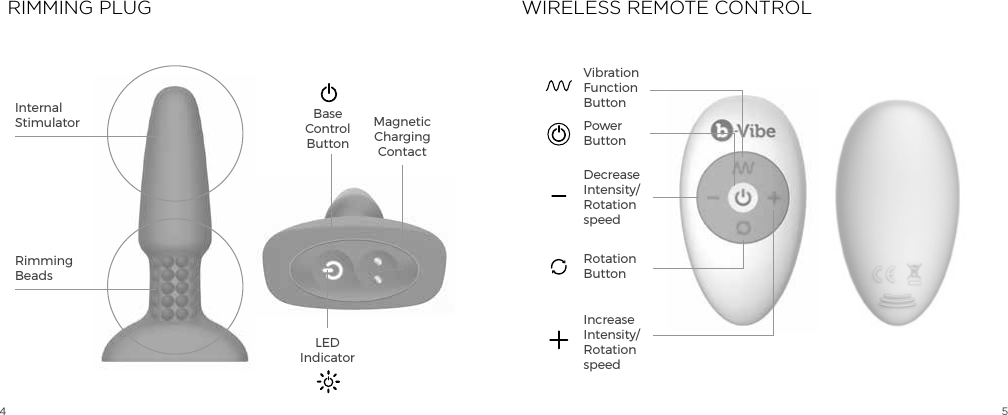
4 5Internal StimulatorRimmingBeadsBase ControlButtonMagnetic Charging ContactLED IndicatorDecreaseIntensity/Rotation speedPowerButtonVibrationFunction ButtonRotationButtonIncreaseIntensity/Rotation speedRIMMING PLUG WIRELESS REMOTE CONTROL
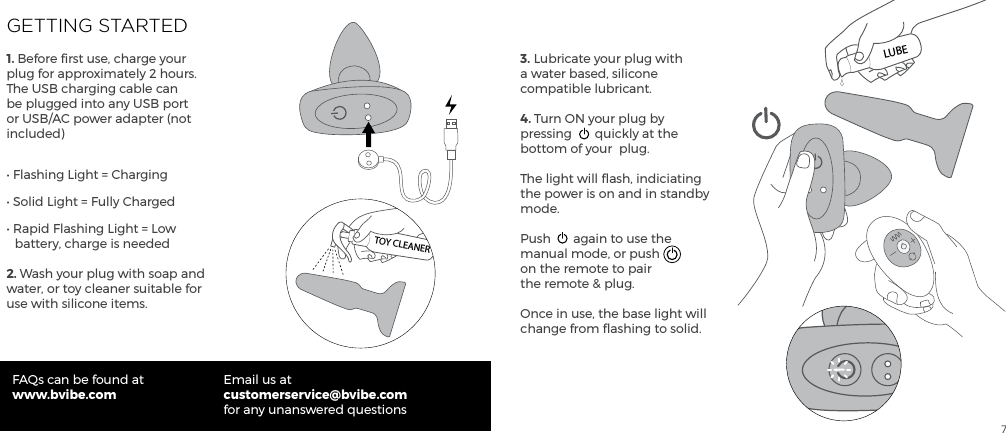
7GETTING STARTED1. Before first use, charge your plug for approximately 2 hours. The USB charging cable can be plugged into any USB port or USB/AC power adapter (not included)• Flashing Light = Charging• Solid Light = Fully Charged• Rapid Flashing Light = Low     battery, charge is needed2. Wash your plug with soap and water, or toy cleaner suitable for use with silicone items.FAQs can be found atwww.bvibe.comEmail us atcustomerservice@bvibe.com for any unanswered questions3. Lubricate your plug with a water based, silicone compatible lubricant.4. Turn ON your plug by pressing  quickly at the bottom of your  plug.The light will flash, indiciating the power is on and in standby mode.Push  again to use the manual mode, or push on the remote to pair the remote & plug.Once in use, the base light will change from flashing to solid.TOY CLEANERLUBE
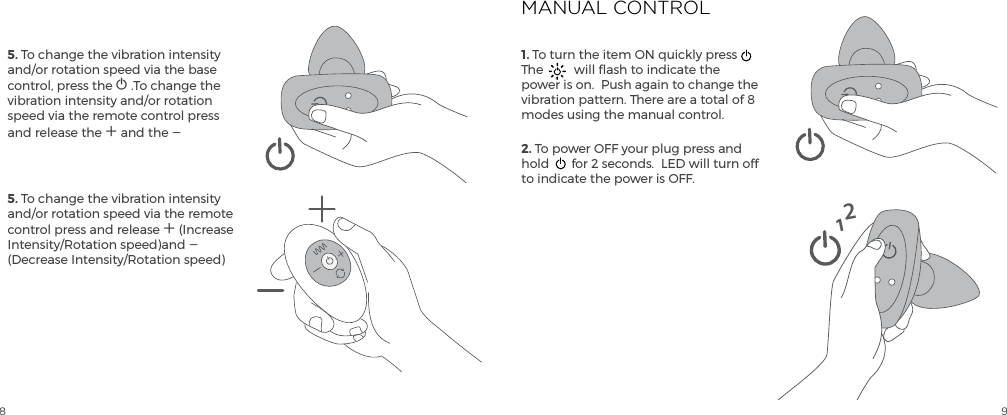
8 95. To change the vibration intensity and/or rotation speed via the base control, press the A .To change the vibration intensity and/or rotation speed via the remote control press and release the A and the A 5. To change the vibration intensity and/or rotation speed via the remote control press and release A (Increase Intensity/Rotation speed)and A (Decrease Intensity/Rotation speed)1. To turn the item ON quickly press  The  will flash to indicate the power is on.  Push again to change the vibration pattern. There are a total of 8 modes using the manual control.  2. To power OFF your plug press and hold  for 2 seconds.  LED will turn off to indicate the power is OFF.MANUAL CONTROL12
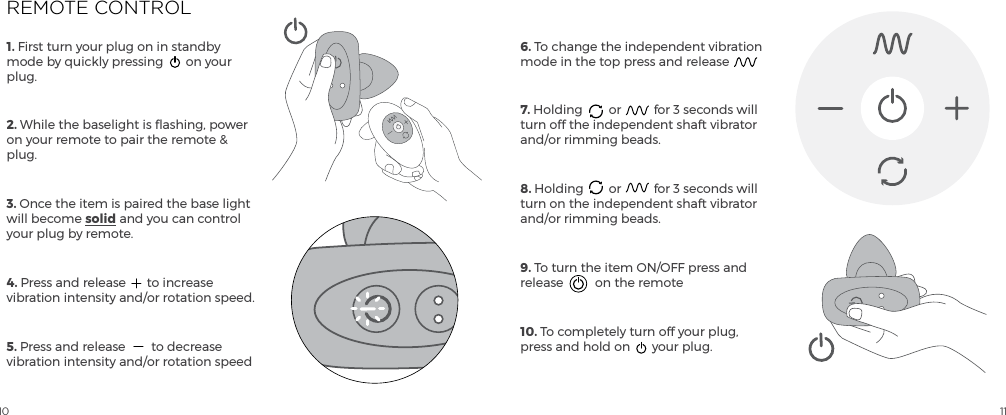
10 111. First turn your plug on in standby mode by quickly pressing  on your plug.2. While the baselight is flashing, power on your remote to pair the remote & plug. 3. Once the item is paired the base light will become solid and you can control your plug by remote.4. Press and release  to increase vibration intensity and/or rotation speed.5. Press and release  to decrease vibration intensity and/or rotation speed6. To change the independent vibration mode in the top press and release7. Holding  or  for 3 seconds will turn off the independent shaft vibrator and/or rimming beads.8. Holding  or  for 3 seconds will turn on the independent shaft vibrator and/or rimming beads.9. To turn the item ON/OFF press and release  on the remote10. To completely turn off your plug, press and hold on  your plug.REMOTE CONTROL
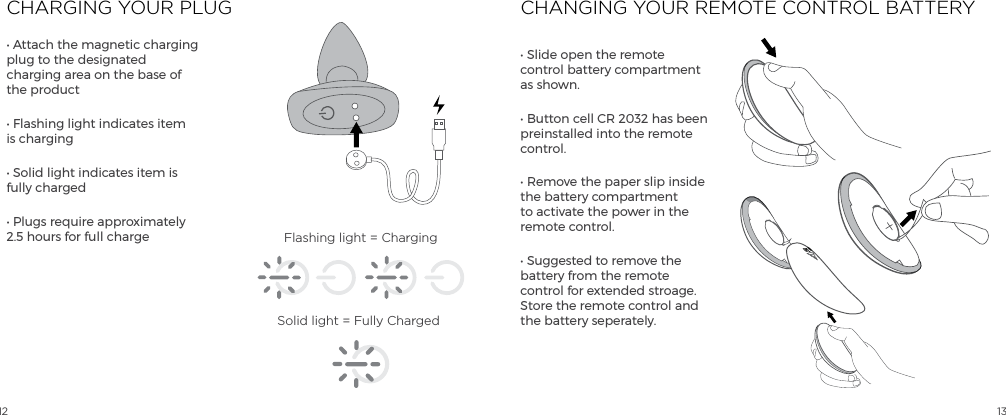
12 13CHARGING YOUR PLUG CHANGING YOUR REMOTE CONTROL BATTERY• Attach the magnetic charging plug to the designated charging area on the base of the product• Flashing light indicates item is charging• Solid light indicates item is fully charged• Plugs require approximately 2.5 hours for full charge• Slide open the remote control battery compartment as shown.• Button cell CR 2032 has been preinstalled into the remote control.  • Remove the paper slip inside the battery compartment to activate the power in the remote control.• Suggested to remove the battery from the remote control for extended stroage.  Store the remote control and the battery seperately.Flashing light = ChargingSolid light = Fully ChargedOPEN
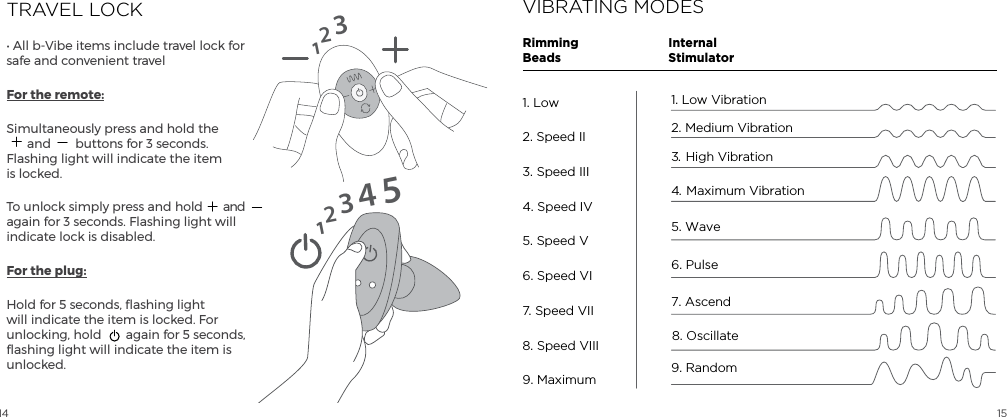
14 15TRAVEL LOCK• All b-Vibe items include travel lock for safe and convenient travelFor the remote:Simultaneously press and hold the  and  buttons for 3 seconds. Flashing light will indicate the item is locked.To unlock simply press and hold  and again for 3 seconds. Flashing light will indicate lock is disabled.For the plug:Hold for 5 seconds, flashing light will indicate the item is locked. For unlocking, hold  again for 5 seconds, flashing light will indicate the item is unlocked.1231234515VIBRATING MODESInternalStimulatorRimmingBeads1. Low Vibration2. Medium Vibration5. Wave4.  Maximum Vibration3.  High Vibration6. Pulse 7. Ascend8. Oscillate9. Random1. Low2. Speed II3. Speed III4. Speed IV5. Speed V6. Speed VI7. Speed VII8. Speed VIII9. Maximum
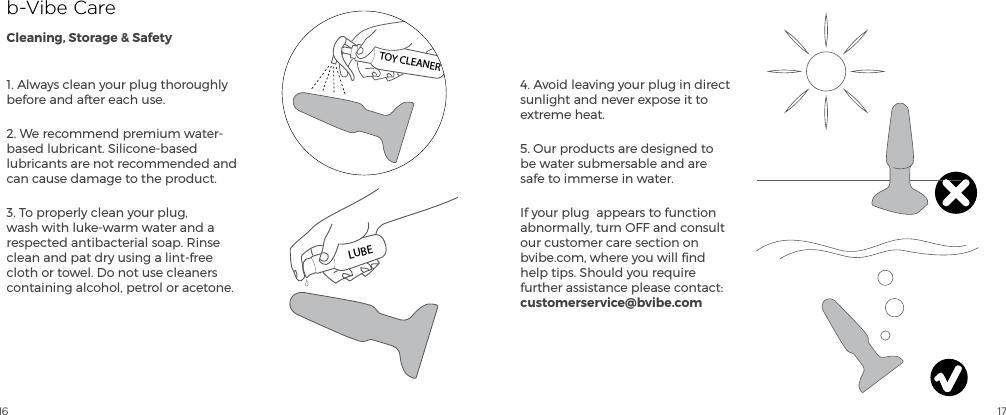
16 171. Always clean your plug thoroughly before and after each use.2. We recommend premium water-based lubricant. Silicone-based lubricants are not recommended and can cause damage to the product. 3. To properly clean your plug, wash with luke-warm water and a respected antibacterial soap. Rinse clean and pat dry using a lint-free cloth or towel. Do not use cleaners containing alcohol, petrol or acetone.4. Avoid leaving your plug in direct sunlight and never expose it to extreme heat.5. Our products are designed to be water submersable and are safe to immerse in water.If your plug  appears to function abnormally, turn OFF and consult our customer care section on bvibe.com, where you will find help tips. Should you require further assistance please contact: customerservice@bvibe.comb-Vibe CareCleaning, Storage & SafetyTOY CLEANERLUBE
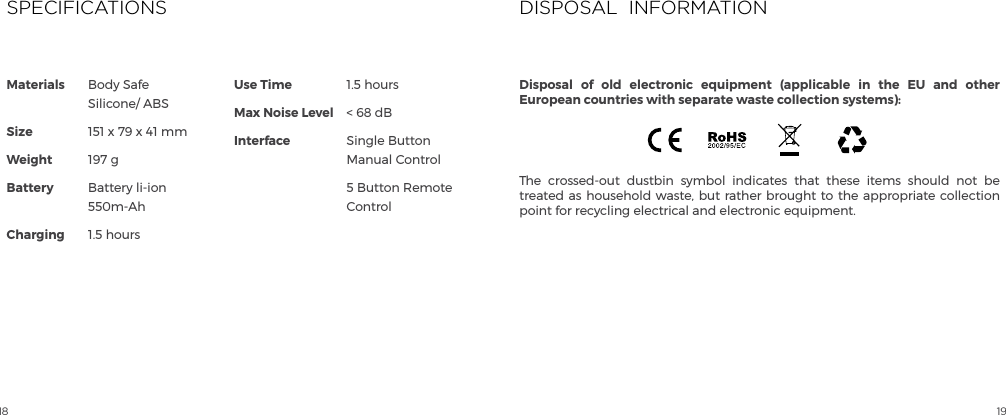
18 19Materials             SizeWeightBattery ChargingUse TimeMax Noise LevelInterfaceBody Safe Silicone/ ABS151 x 79 x 41 mm197 gBattery li-ion 550m-Ah1.5 hours1.5 hours< 68 dBSingle Button Manual Control5 Button Remote ControlSPECIFICATIONSThe crossed-out dustbin symbol indicates that these items should not be treated as household waste, but rather brought to the appropriate collection point for recycling electrical and electronic equipment.DISPOSAL  INFORMATIONDisposal of old electronic equipment (applicable in the EU and other European countries with separate waste collection systems):
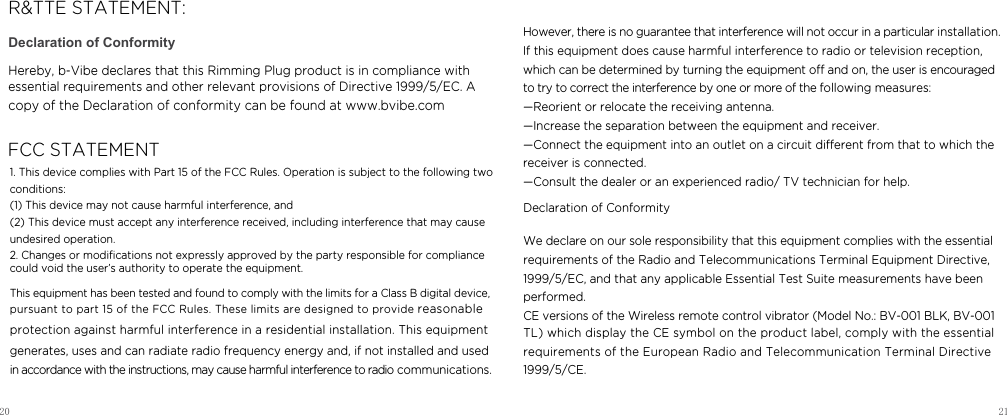
20 21Declaration of ConformityHereby, b-Vibe declares that this Rimming Plug product is in compliance with essential requirements and other relevant provisions of Directive 1999/5/EC. A copy of the Declaration of conformity can be found at www.bvibe.com  R&TTE STATEMENT:FCC STATEMENT1. This device complies with Part 15 of the FCC Rules. Operation is subject to the following two conditions:   (1) This device may not cause harmful interference, and   (2) This device must accept any interference received, including interference that may cause undesired operation.   2. Changes or modifications not expressly approved by the party responsible for compliance  could void the user’s authority to operate the equipment.      This equipment has been tested and found to comply with the limits for a Class B digital device, pursuant to part 15 of the FCC Rules. These limits are designed to provide reasonable protection against harmful interference in a residential installation. This equipment generates, uses and can radiate radio frequency energy and, if not installed and used in accordance with the instructions, may cause harmful interference to radio communications. However, there is no guarantee that interference will not occur in a particular installation. If this equipment does cause harmful interference to radio or television reception, which can be determined by turning the equipment o and on, the user is encouraged to try to correct the interference by one or more of the following measures:   —Reorient or relocate the receiving antenna.   —Increase the separation between the equipment and receiver.    —Connect the equipment into an outlet on a circuit dierent from that to which the receiver is connected.    —Consult the dealer or an experienced radio/ TV technician for help.  Declaration of ConformityWe declare on our sole responsibility that this equipment complies with the essentialrequirements of the Radio and Telecommunications Terminal Equipment Directive,1999/5/EC, and that any applicable Essential Test Suite measurements have been performed.CE versions of the Wireless remote control vibrator (Model No.: BV-001 BLK, BV-001 TL) which display the CE symbol on the product label, comply with the essential requirements of the European Radio and Telecommunication Terminal Directive 1999/5/CE.
22 23Designed and Developed byb-VibeTMMade in China© 2015 b-VibeTMComplete user instructions in additional languages and FAQ can be found at:www.bvibe.comEmail us atcustomerservice@bvibe.comfor any unanswered questions
bvibe.com

Navigation menu