ACS Alcohol Countermeasure Systems ALG2H GR Alcolock Handset User Manual
ACS Alcohol Countermeasure Systems Corp. GR Alcolock Handset
user manual
© Alcohol Countermeasure Systems Corp.
The information disclosed in this document is the valuable property of Alcohol Countermeasure
Systems Corp. and all copyright and other proprietary rights to this document are reserved. No
reproduction of this document is permitted without the prior written consent of Alcohol
Countermeasure Systems Corp.
FCC Disclaimer
Changes or modifications not expressly approved by the party responsible for
compliance could void the user's authority to operate the equipment.
To comply with RF exposure requirements, a separation distance of at least 20
cm must be maintained between the antenna(s) of the Electronic Control Unit
and all persons
This device complies with Part15 of the FCC Rules. Operations is subject to the
following two conditions: (1). this device may not cause harmful intereference,
and (2). this device must accept any intereference received, including
intereference that may casue undesired operation.

Safety and Precautions
G Series has been designed for easy and safe operation. The alcohol interlock is to be used only
for the purposes specified herein. To help ensure your safety, you must follow these precautions:
• In response to a retest request, carefully stop your vehicle at the side of the road. Complete a
successful breath test before you resume driving.
• Do not open the handset case. Doing so will potentially damage the components within and void
the warranty.
• Avoid exposing the handset to direct sunlight for extended periods of time.
• If liquid spills onto the handset, remove the excess with a cloth and allow the handset to dry
thoroughly. If there is substantial moisture damage, do not turn the handset on. Contact your
local service centre.
• Keep all radio frequency (RF) transmitting devices (such as cell phones) away from G Series to
minimize interference.
• Do not attempt to tamper with or circumvent G Series. This is considered a program violation.
Maintenance
During field use, G Series is susceptible to dirt and debris. Clean the handset with a damp cloth
and mild soap. Do not use abrasive cleaners or solvents.
Periodic service appointments are required. Consult your compliance guide for more
information.
Information and Support
For information and support, please contact your local service centre.

v
G Series User Guide
Table of Contents
Safety and Precautions .............................................................iii
Maintenance ..........................................................................iii
Information and Support ...........................................................iii
Getting Started 1
What is an alcohol interlock? ................................................... 1
How does it work? .................................................................. 1
User Fees ............................................................................... 2
Installation .............................................................................. 2
Maintenance .......................................................................... 2
Handset Configuration ............................................................. 2
Handset Cable ........................................................................ 3
To Disconnect ...................................................................... 3
To Connect .......................................................................... 3
More information .................................................................... 4
Alcohol Influence on Testing ..................................................4
Operating Temperature ......................................................... 4
Battery Voltage .................................................................... 4
Using the Interlock 5
Starting the Motor ................................................................... 5
Warm-up and Standby (where applicable) ................................. 7
Restarting the Motor ................................................................ 8
Running retests ........................................................................ 9
Menu OPTIONS 11
Main Menu .......................................................................... 11
Shut down ......................................................................... 11
Sleep ................................................................................ 12
Calibration ........................................................................ 12
TABLE OF CONTENTS

vi G Series User Guide
Dates ................................................................................ 12
Language ..........................................................................12
Settings ............................................................................. 12
Bypass ..............................................................................13
Lockout Reset .....................................................................13
Test ................................................................................... 13
Maintenance & Troubleshooting 15
Troubleshooting Table ............................................................ 15
Service Dates ........................................................................ 15
Error Messages ..................................................................... 16
Reset Codes .......................................................................... 18
Emergency Override (where applicable) ...............................18
Third-Party Maintenance (TPM) ............................................. 18
Other ................................................................................ 18
Disposal of Unit at End of Service Life ...................................... 18
Replacement Parts ................................................................. 19
Index 21
Service Record 23
1
G Series User Guide
Getting Started
What is an alcohol interlock?
An Alcohol Interlock is an in-car breath alcohol
screening instrument. It prevents a vehicle from
starting if it detects that a driver’s breath alcohol
concentration (BrAC) is over a preset limit. It is
designed to fit inside the vehicle, near the driver’s
seat, and connects directly to the vehicle’s ignition
system.n
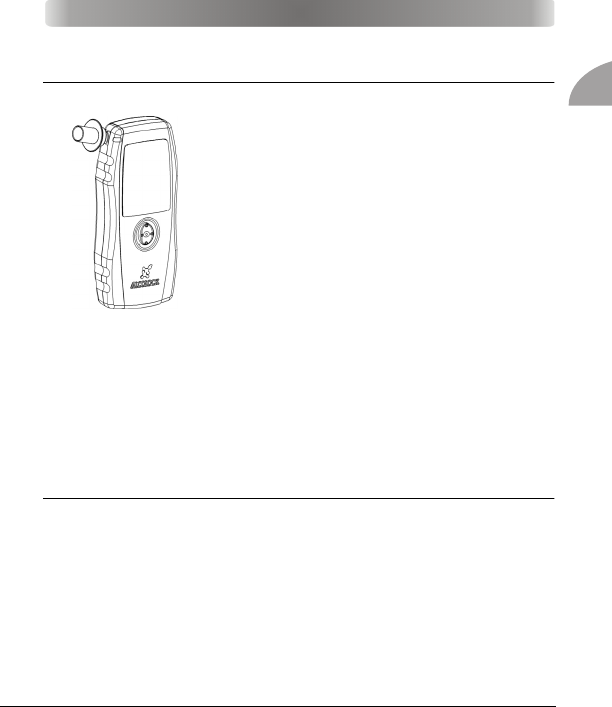
The interlock consists of a handset and an Electronic
Control Unit (ECU). The ECU enables and disables
the ignition of the motor and stores the handset
settings.
The G series handset can have a wired or wireless connection to the
ECU, depending on its version.
To help prevent other people from providing the required breath
samples, the interlock requests additional breath samples at random
intervals during the trip.
How does it work?
The G Series uses the same alcohol sensing technology used by police
in roadside screening. A special alcohol-sensitive cell detects the
amount of alcohol in the breath. Breath alcohol is directly
proportional to the blood alcohol concentration (BAC).
GETTING STARTED

2G Series User Guide
User Fees
Drivers who are subject to an alcohol interlock program are
responsible for all installation and maintenance costs. Refer to your
compliance guide for a complete list of costs.
Installation
Installation centres are conveniently located, and the interlock is
installed while you wait. You receive full training on site, and
technicians help to ensure that everything operates properly.
The interlock is installed by a qualified installer in accordance with
national regulations. An unqualified installation may invalidate the
type approval of the vehicle.
Maintenance
You must visit the installation centre a short time after installation. You
must also visit at certain intervals for maintenance and data
download. Maintenance appointments typically take less than 20
minutes.
Refer to your compliance guide for the interval dates.
Handset Configuration
There are two versions of the handset, a wired version and a wireless
version. The handset can have either a wired or wireless connection
with the ECU. The handset uses a single navigation button to scroll up,
down, right and left. Pressing the middle of the navigation button
selects the desired option.
3
G Series User Guide
Getting Started
Handset Cable
The handset cable connects the wired version of the handset to the
ECU, which in turn is connected to the vehicle’s ignition. This cable
can also be used to charge the wireless unit. The handset should
remain connected at all times, but follow these steps if the handset
needs to be removed:
To Disconnect
1. Make sure that the vehicle motor is off.
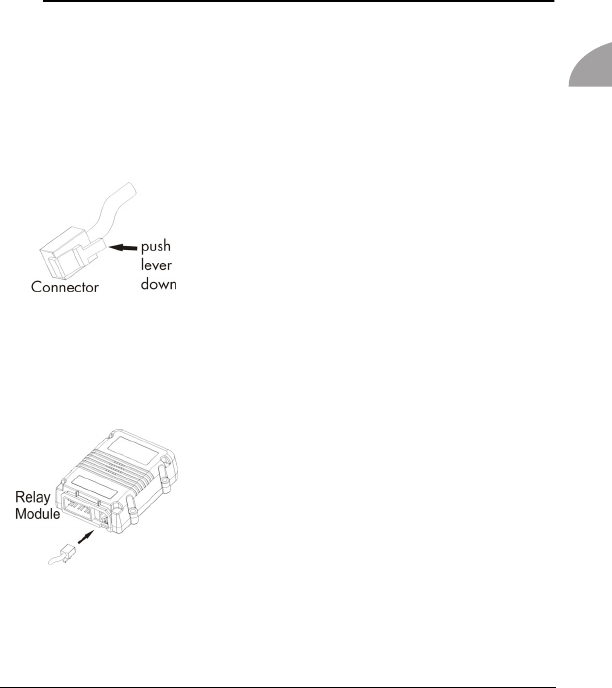
The handset cable consists of a connector and a
coiled cord.
2. Release the RJ-11 connector from the ECU
plug by pushing the connector lever down.
This disconnects the handset cable.
Warning! Do not pull on the handset cord or turn the connector. This could
damage the cable.
To Connect
1. With the vehicle motor off, locate the handset
cable plug in the ECU.
Note! If the vehicle’s motor is running, the ECU
beeps every 15 seconds.
2. Connect the RJ-11 connector to the ECU. You
should hear a light click when they connect
properly.
3. If the vehicle motor is running, a WAIT mes-
sage displays. G Series may require another
breath test. Observe the message on the dis-
play.

4G Series User Guide
More information
Alcohol Influence on Testing
Drinking alcohol and eating foods containing alcohol will cause a
failed alcohol test.
Some other factors that may affect a test (because they may contain or
produce residual alcohol in the mouth) are medicines, drops,
smoking, using mouthwash or mouth spray.
Rinsing the mouth with water after using mouthwash or mouth spray
will remove the alcohol content in the mouth.
According to the previous information, do not eat, smoke or drink for
at least 10 minutes before taking a test.
Additionally do not spray any air fresheners, disinfectants, cologne or
perfume in the vehicle prior to a test, as these can also contain
alcohol.
Note! The above mentioned list of factors that may affect a test is not
exhaustive. There are additional items that may affect the results of a breath
test. Follow this guide carefully to avoid incorrect results.
Operating Temperature
The maximum ambient operational temperature is between -45°C and
+85°C.
Note! Depending on the ambient temperature, the handset takes a few
seconds to warm up (approximately 15 seconds at 20°C, approximately
1 minute at 0°C).
Battery Voltage
The vehicle battery supplies the voltage to the ECU, which in turn
powers the handset.
For the 12V Interlock system, the vehicle battery voltage can range
from 9V - 18V. For a 24V Interlock system, the vehicle battery voltage
can range from 16V - 36V.
5
G Series User Guide
Using the Interlock
Starting the Motor
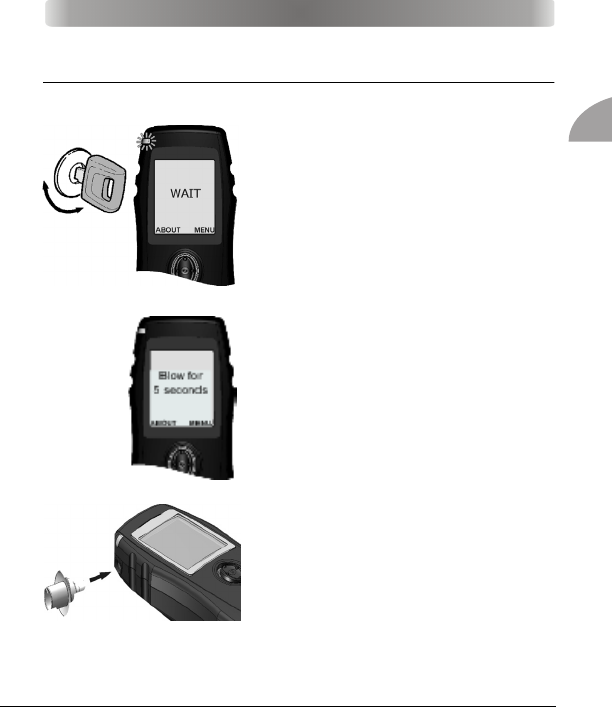
1. The interlock turns on automatically
when you plug it in, or when you
turn the key to ON. WAIT displays as
the unit warms up.
If the interlock is plugged in, but has
gone into sleep mode, turn the power on
again by pressing the navigation button.
Alternatively, you can move the key
between the On and Off positions.
Note: The ignition must be OFF before you can
continue. Turning on the ignition
2. The handset displays Blow for 5
seconds when it has finished warm-
ing up. The warm-up time may be
longer in cold temperatures.
Note: Do not store the mouthpiece to be used
in a cold area. This causes condensation in the
mouthpiece and increases the chance for water
to enter the handset.
3. Insert a clean mouthpiece. Using a
clean mouthpiece is good hygiene,
and it helps ensure a usable breath
sample.
Note: Do not eat, drink or smoke for at least 15 minutes before the test. This
could contaminate the breath sample.
USING THE INTERLOCK
6G Series User Guide
4. Blow moderately and continuously as you simultaneously hum into
the mouthpiece. The handset makes a tone to indicate proper air-
flow and hum. If you are not blowing correctly, you will see a mes-
sage to give you instructions on correcting it.
5. Stop blowing when the handset clicks and stops the tone. WAIT...
displays as the breath sample is analyzed.
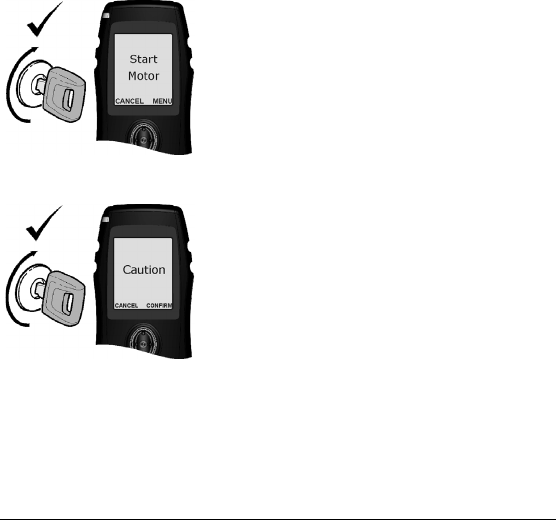
6. The handset beeps and displays the result:
Start Motor
You have passed the breath test, and no
alcohol has been detected. You can start
the motor.
Note! You must start the motor within five
minutes.
Caution (i.e., BAC limit warning)
You have passed the breath test, but
alcohol (below the allowable limit) has
been detected. You have two options:
•Press CANCEL, wait five minutes and try
the test again if you are certain there is
no alcohol in your system.
•Press CONFIRM to acknowledge that
you intend to drive with alcohol in your
system. The motor must be started within
five minutes.
Note! You can continue driving, but G Series
will have warned you about the alcohol
detected.
7
G Series User Guide
Using the Interlock
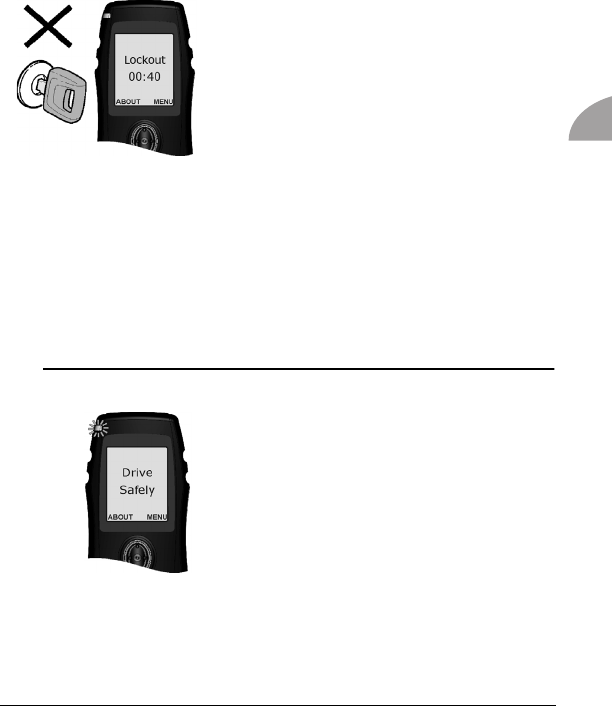
Lockout
You have failed the breath test. The alcohol level
detected is over the preset limit. You may NOT
start the motor.
Lockout and a countdown timer display. Wait for
the countdown to finish before attempting another
breath test.
WARNING! Do not attempt another breath test until you are sure that your
alcohol level is under the limit. A second failed test may result in a longer
lockout time. Please refer to your compliance guide for actual program
requirements and details specifying program violations.
All breath tests are logged by G Series and are downloaded during
routine service appointments. Any instance of alcohol detected in the
breath samples may be considered as a program violation. Refer to
your compliance guide for specific limit amounts.
Warm-up and Standby (where applicable)
Once you have started your vehicle, Drive
Safely displays.
You can place G Series in Warm-up mode by
holding the navigation button. Warm-Up
displays, and your vehicle can remain idle
without requiring another breath test for up to
30 minutes.
To exit this mode, hold the right button. This
mode automatically terminates if the RPM of
your engine increases.
8G Series User Guide
Note! For commercial vehicles, the corresponding mode is Standby. Standby
displays, but the idle time is not limited to 30 minutes. The idle time for Standby
mode is unlimited.
Restarting the Motor
If the motor is turned off for a short period of time, you can restart it
without another breath test. This safety feature is helpful if the motor
stalls, or if you need to make frequent, short stops. Refer to your
compliance guide for the restarting time limit.
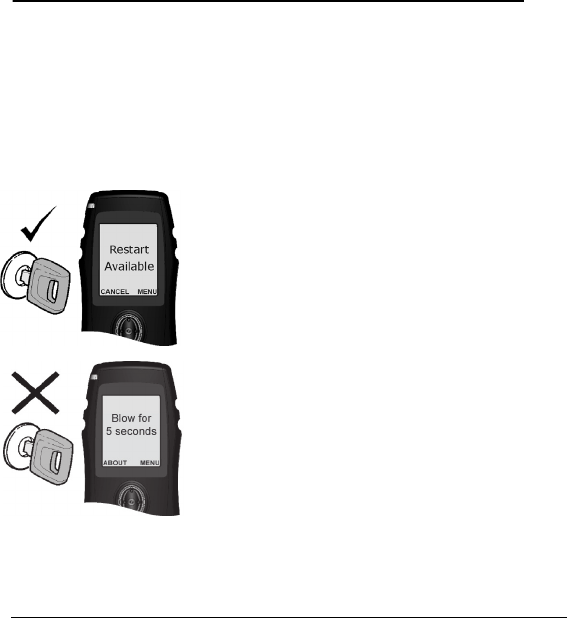
Observe the message on the handset:
Restart Available
You can restart the motor without providing
another breath test.
To cancel the restart, press CANCEL.
Blow for 5 seconds
The restart period has expired. You need to
pass a breath test to start the motor.
9
G Series User Guide
Using the Interlock
Running retests
Additional breath tests are required at random times to ensure that the
driver has not consumed alcohol since the motor has been started.
This occurs at random intervals during the trip. Refer to your
compliance guide for more information.
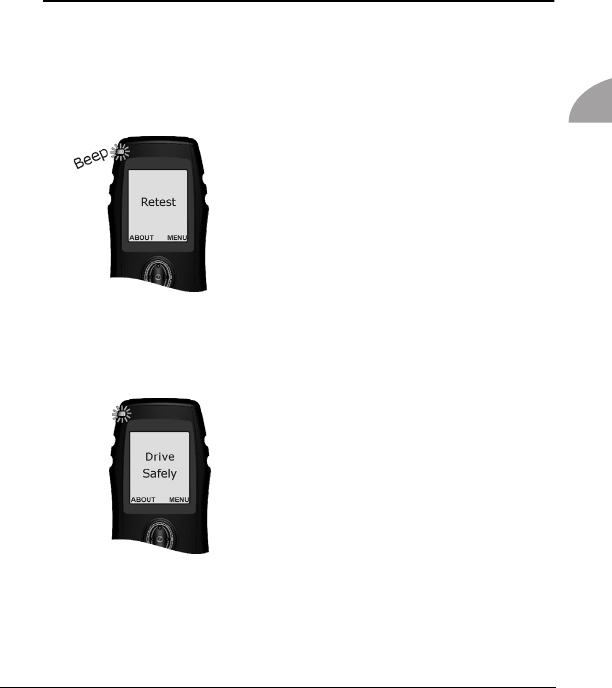
1. The handset beeps and displays Retest.
2. Do not provide a breath test while the
vehicle is in motion. The interlock pro-
vides sufficient time for you to stop in a
safe location.
3. Provide a breath sample and observe the display messages as
they apply:
Drive Safely
You have passed the breath test. You can
continue driving.

10 G Series User Guide
Pull Over
The alcohol level detected is over the preset
limit. Pull over in a safe location and turn the
motor off.
Once the motor is turned off the Restart
Available message will be displayed, this is
in case there is a need to restart the engine
to park in a safer location.
Once the vehicle is parked in a safer location (if the restart is used),
turn the engine off and when the Restart Available screen is displayed
again, press the left CANCEL button.
Lockout and a countdown timer display. Wait for the countdown to
finish before attempting another breath test. You cannot start the motor
until a passed breath test is provided.
WARNING! Do not attempt another breath test until you are sure that your
alcohol level is under the limit. A second failed breath test may result in a longer
lockout time.
In response to a retest request, carefully stop your vehicle at the side of the road.
Complete a successful breath test before you resume driving.

11
G Series User Guide
Menu Options
G Series has a number of customizable options, such as volume
control, language selection, and wake-up/sleep times. These options
are found in the main menu, which can be accessed by pressing
MENU.
Main Menu
The Main Menu contains the following menu options:
• Shut down
• Sleep
• Calibration
• Dates
• Language
• Settings
• Bypass
• Lockout Reset
• Test
Shut down
You can use this menu to shut down the handset manually. To shut
down, select MENU and press enter, by pressing in the centre of the
navigation button. You will see a 3 seconds count down as the
handset shuts down. You can select Back at this time, if you do not
wish to shut down the handset at this time.
MENU OPTIONS

12 G Series User Guide
Sleep
The handset can be put into sleep mode manually by selecting the
Sleep menu. It can also go to sleep automatically when the ignition is
switched off. This conserves the battery.
Calibration
This menu option should not be used by anyone other than authorized
service personnel. It is used to calibrate the handset.
Dates
This menu lists service dates and other important dates and times. To
view, push MENU to access the main menu. Scroll down to Dates with
the navigation button and select it. The following dates are displayed:
• Current
• Last calibration
• Calibration expiry
• Service
• Service lockout
Language
This menu lets you choose a language to display all the messages in.
Settings
This menu lets you customize the brightness and speaker volume. The
handset produces audio tones. You can set their volume from here.
Note! This applies to the handset only. The volume of the ECU cannot
be set.

13
G Series User Guide
Menu Options
Bypass
This menu should not be used by anyone other than authorized
service personnel. It allows to bypass a alcohol test, before starting
the vehicle and requires a service code that is only available with the
authorized personnel.
Lockout Reset
The handset may sometimes get locked out, if there is a violation in
doing a breath test. It will then have to be reset using a lockout reset
code, which is only available with the authorized service personnel.
Each lockout is logged by the hand set.
Test
This menu lets you perform certain test on the handset. The test
available are:
• Sleep: Puts the handset in sleep mode immediately, to test that the
mode is working properly.
• Reset HS: Lets you reset the handset. Resetting handset may be
required occasionally, if there is a communication error and gets
frozen. Selecting this option, first turns the handset off and then on,
before it goes through a warm-up sequence.
• Reset RM: Resets the ECU.
• Analog Signals: Displays analog signals from the battery, heater
and so on.
• Speaker Test: Allows you to test if the speaker is functioning
properly. To test, select the option and press the navigation button to
Switch. You can switch speaker on and off for the test.
• LED Test: Makes sure that the LED indictor near the mouthpiece is
working properly. It tests all the colours and flashing sequence.
Press the navigation button to the right to change the colour. The

14 G Series User Guide
sequence is: dark > green > red > orange > green blinking > red
blinking > orange blinking > back to dark.
• USB Test: Ensures that the connection to USB is working without any
problems.
• Date/Time: Allows you to change the date and time. Scroll up and
down to select what you wish you to change and scroll left and right
to set the desired date and time.

15
G Series User Guide
Troubleshooting
Troubleshooting Table
The following table lists basic problems that can occur, along with
their solutions. For other problems, contact your service provider.
Service Dates
After G Series installation, you need to return for a follow-up
appointment. Service appointments are then scheduled at regular
intervals. See your compliance guide for the interval dates.
The service appointments are for verifying interlock accuracy and
downloading the log of breath tests.
If G Series... You should...
Will not turn on Check the vehicle battery
Displays an error code Refer to the table of errors
Displays an early or immediate recall Contact your service provider
Aborts a breath test Retry the test, or investigate the Abort
code
Is in permanent lockout Contact your service provider
Requires service Contact your service provider
MAINTENANCE & TROUBLESHOOTING

16 G Series User Guide
Error Messages
G Series may not accept a breath test (and may display error
messages instead). To minimize errors, make sure that the handset is
connected properly, the motor’s battery is in good condition, and that
mobile phones are not in use during breath tests.
Messages Description What to do
ABORT 10, 30,
40, 45, 50
There is a problem with
the handset.
Try the test again. If the mes-
sage persists, contact your ser-
vice provider.
Early Recall
A service reminder displays for
12 days, followed by a perma-
nent lockout.
Immediate
Recall 1, 4, 5,
6, 7, 11
Immediate recalls result
from failed tests, missed
retests, failure to pull
over on a failed retest,
a start violation, and/
or the use of emergency
override (where
applicable).
A service reminder displays for
five days, followed by a per-
manent lockout.
Missed Retest
Occurs when a retest is
not done within the
3-minute time frame.
The horn sounds for 3
minutes, and an Early
Recall follows.
Complete the test as required.
Missed Service
If a service request is
ignored, there is a 5-
day grace period.
Call your service provider to
schedule an appointment.

17
G Series User Guide
Troubleshooting
Permanent
Lockout
The service request and
grace period have
been ignored. The vehi-
cle cannot be started
until the interlock is
reset by the service pro-
vider.
Contact your service provider
immediately to schedule an
appointment. The motor can-
not be started, so towing may
be required.
Pull Over
Occurs in response to a
failed retest.
The driver has 3 minutes to
safely stop and shut off the
motor.
Service Due
Reminder that a service
appointment is coming
up.
Arrive at the scheduled time to
avoid any program violations.
Start Violation
If you start the vehicle
without passing a
breath test, a violation
results. G Series
requests a retest, and
the Start Violation mes-
sage displays.
Take the breath test and contact
your service provider.
Try again
There is a problem with
the test.
Try the test again. Call your ser-
vice provider if the problem
persists.
Turn key off
The ignition key is in
the On position.
Turn the key to the Off position
and wait for the Start Motor
message to display.
Messages Description What to do

18 G Series User Guide
Reset Codes
Reset codes are used by service personnel to change the service
dates, early recall dates, lockout dates, and in emergency situations,
override the interlock. These codes are randomly generated and
change daily. Attempting to circumvent these codes results in a
program violation.
Emergency Override (where applicable)
The Emergency Override code is available for true emergency
situations. Using this code for any other reason results in a Program
Violation.
Third-Party Maintenance (TPM)
The repair shop enters a TPM code when work needs to be done on
your vehicle.
Other
Reset codes can apply in other instances, too. For example, an early
recall might occur by mistake, or a client might not be able to attend a
service appointment for valid reasons.
Disposal of Unit at End of Service Life
Return to your dealer for removal of the interlock from your vehicle.
Following the removal, proper disposal of the alcohol interlock (ECU,
handset, or both) at the end of its service life will be done by the
manufacturer.

19
G Series User Guide
Troubleshooting
Replacement Parts
Contact your service centre for the following parts:
• Mouthpieces (Bag of 25), ACS Part Number: 95-000145

20 G Series User Guide

21
G Series User Guide
Index
A
Alcohol influence 4
Alcohol interlock 1
B
Battery voltage 4
C
Caution 6
Customizing 11
E
Error Messages 16
F
Fees 2
I
Idle time 8
Information and support iii
Installation 2
L
Lockout 7, 10
M
Main menu 11
Maintenance iii, 2
R
Replacement parts 19
Reset Codes 18
Restart 8
RF Interference iii
Running retests 9
S
Service 15
Record 23
Service dates 12, 15
Service Record 23
Sleep 12
Stall Protect 8
Standby mode 7
Start Motor 6
Starting the vehicle 5
T
Tampering iii
Temperature 4
Troubleshooting 15
V
Volume 14
W
Warm-up 5
Warm-up mode 7
INDEX

22 G Series User Guide

Date Service Performed Initial
SERVICE RECORD

Date Service Performed Initial

Date Service Performed Initial

UG-ENG-60-000139-B
© 2010