ACS Solutions FranceS VPE420 Interactive Contactless Validator User Manual EN OPE2791 B
ACS Solutions France SAS Interactive Contactless Validator EN OPE2791 B
user manual

Diffusion interne/Internal diffusion
1
Binding: A = Simple Stapling B = Binding C = Hole Perforation M = Distribution by Mail
Reference :
OPE2791
Revision :
B
Text :
EN
Titre/Title
INTERACTIVE CONTACTLESS VALIDATOR VPE420 ON-SITE AND
WORKSHOP MAINTENANCE MANUAL
Affaire/Subject :
- - -
Classement fichier informatique :
Computer file classification : DTAO
Classement original papier :
Hard copy classification : SERVICE CLIENT PEAGE/TOLL SYSTEM CUSTOMER SERVICE
Destinataires/To Nbr. of
copies Rel
1
/Binding
1
Observations/Comments
DTAO Circulation sheet
BERNARD J-L M
BERNE G M
CARRON E M
CHIZAT G M
COURTIAL R. M
FROMENT M M
GUETTARD F M
LACOUR M M
LEBIDAN G M
MARROT A M
MOURADKHANIAN A M
SAINTCIERGE Y M
VALETTE P M
VIAL-TISSOT S M
VILLERET E M

- - -
Reference:
OPE2791
Revision:
B
Text:
EN
This document is property of the association Affiliated Computer Services Solutions France SAS. It can not be reproduced or distributed without prior authorization.
INTERACTIVE CONTACTLESS VALIDATOR VPE420 ON-SITE AND
WORKSHOP MAINTENANCE MANUAL

This document is property of the association Affiliated Computer Services Solutions France SAS. It can not be reproduced or distributed without prior authorization.
OPE2791 Issue: B Text: EN Page: M1
Contact Details
Affiliated Computer Services Solutions France SAS
Customer Service:
* Address : Affiliated Computer Services Solutions France SAS,
Rue Claude Chappe - BP 345
07503 GUILHERAND GRANGES CEDEX (FRANCE)
Phone : 33. (0)4.75.81.42.21
Fax : 33. (0)4.75.81.43.38
Return Service (repair):
* Adresse : ASCODI Industries SAS
1 rue Gilles de Roberval
Quartier Briffaut - BP 161
26906 VALENCE Cedex 9 (FRANCE)
Téléphone : 33 (0)4 75 81 42 77
Télécopie : 33 (0)4 75 81 84 41
* Adresse : Affiliated Computer Services Solutions France SAS
Service Clients Public Transport
12, rue Jules Ferry
93110 ROSNY-SOUS-BOIS (FRANCE)
Téléphone : 33.(0)1.56.63.92.00
Télécopie : 33.(0)1.56.63.92.22

This document is property of the association Affiliated Computer Services Solutions France SAS. It can not be reproduced or distributed without prior authorization.
Page: M2 OPE2791 Issue: B Text: EN
WARNING
THIS DOCUMENT DESCRIBES ALL THE FUNCTIONS AND OPTIONS THAT CAN BE
IMPLEMENTED ON THIS EQUIPMENT.
IN THIS DOCUMENT, THE FIGURES AND DRAWINGS ARE PROVIDED ONLY AS
EXAMPLE.
IN THIS DOCUMENT, MMI SCREENS OF SOFTWARE TOOLS ARE PROVIDED AS
EXAMPLE.AND CAN BE GIVEN IN EITHER FRENCH OR ENGLISH LANGUAGE.
THE MMI LANGUAGE IS A SETTING PARAMETER.
IN ORDER TO KNOW YOUR EQUIPMENT SETTINGS, REFER TO THE HARDWARE
SPECIFICATIONS OF THE EQUIPMENT.

This document is property of the association Affiliated Computer Services Solutions France SAS. It can not be reproduced or distributed without prior authorization.
OPE2791 Issue: B Text: EN Page: M3
Modification Sheet
Revision Approval: B
Name Position
Signature
Written by:
G. BERNE Customer Service
Checked or Approved by:
P. VALETTE Technical Project Leader
Authorized by :
A. MARROT Head of Customer
Service
Revision Validation/
Application Date No. of Pages
No. of Attached
Pages Object and Description of Modification
A November 29, 2010 46 0 First issue.
B February 01, 2011 46 0 Second issue: Modification for FCC and
IC certification
In this document the association of "Affiliated Computer Services Solutions France SAS" is designated by the
following abbreviation: ACS.

This document is property of the association Affiliated Computer Services Solutions France SAS. It can not be reproduced or distributed without prior
authorization.
OPE2791 Issue: B Text: EN Page: S1
TABLE OF CONTENTS
Page
CHAPTER 1 : OVERVIEW .................................................................................................. 1
1.
ABBREVIATIONS.................................................................................................. 1
2.
PRESENTATION................................................................................................... 2
2.1
GENERAL PRESENTATION................................................................................. 2
3.
DESCRIPTION....................................................................................................... 4
3.1
BLOCK DIAGRAM ................................................................................................ 4
3.2
DESCRIPTION OF FUNCTIONS ........................................................................... 5
3.2.1
Validator casing...................................................................................................... 5
3.2.2
Support .................................................................................................................. 5
3.2.3
Internal resources .................................................................................................. 5
3.2.4
Touch screen ......................................................................................................... 5
3.2.5
Sound module........................................................................................................ 5
3.2.6
Contactless interface.............................................................................................. 6
3.2.7
Communication interfaces...................................................................................... 6
4.
MODES OF OPERATION...................................................................................... 7
5.
MAIN CHARACTERISTICS................................................................................... 8
5.1
PHYSICAL CHARACTERISTICS .......................................................................... 8
5.2
ENVIRONMENTAL CHARACTERISTICS ............................................................. 8
5.2.1
Climatic characteristics........................................................................................... 8
5.2.2
Electrical characteristics......................................................................................... 8
5.3
FUNCTIONAL CHARACTERISTICS..................................................................... 9
6.
EXTERNAL CONNECTIONS................................................................................. 10
6.1
VALIDATOR CONNECTION ................................................................................. 11
6.2
CONNECTIONS ON CONNECTION BOARD........................................................ 12
6.2.1
Details of the connections bo ard .......................................................................... 13
7.
CONFIGURATION VPE420................................................................................... 18
7.1
VALIDATOR ADDRESS........................................................................................ 18
7.2
CONFIGURATIONS AND POLARISATION COM 1 ET COM2.............................. 19
7.2.1
Configuration COM1............................................................................................... 19
7.2.2
Configuration COM 2.............................................................................................. 20
8.
INTERCONNEXIONS ............................................................................................ 21
9.
DOCUMENTATION OF ASSOCIATED EQUIPMENT ........................................... 22

This document is property of the association Affiliated Computer Services Solutions France SAS. It can not be reproduced or distributed without prior
authorization.
Page: S2 OPE2791 Issue: B Text: EN
CHAPTER 2 : PREVENTIVE MAINTENANCE ................................................................... 23
1.
CHANGING “OPERATIONAL” CONSUMABLES................................................ 23
2.
ON-SITE PREVENTIVE MAINTENANCE ............................................................. 24
2.1
PURPOSE OF THE ON SITE PREVENTIVE MAINTENANCE ............................. 24
2.2
NECESSARY TOOLS........................................................................................... 24
2.3
ON SITE PREVENTIVE MAINTENANCE OPERATIONS ..................................... 24
3.
PREVENTIVE MAINTENANCE IN WORKSHOP.................................................. 25
3.1
PURPOSE OF THE WORKSHOP PREVENTIVE MAINTENANCE ...................... 25
3.2
NECESSARY TOOLS........................................................................................... 25
3.3
ON SITE PREVENTIVE MAINTENANCE OPERATIONS ..................................... 25
CHAPTER 3 : CORRECTIVE MAINTENANCE .................................................................. 27
1.
ON-SITE CORRECTIVE MAINTENANCE............................................................. 27
1.1
PURPOSE OF SITE MAINTENANCE................................................................... 27
1.2
NECESSARY TOOLS........................................................................................... 27
1.3
SITE CHECKLIST AND REPAIR ACTIONS FOR FAILURE AND ALARM CODES 27
1.3.1
Component code (atlas system) ............................................................................ 27
1.3.2
Alarm Code: XXX (atlas system) ........................................................................... 27
1.3.3
List of alarms......................................................................................................... 27
1.4
TABLE OF FAULT CODES .................................................................................. 28
1.4.1
Power up of the VPE 420 ...................................................................................... 29
1.4.2
Application launch ................................................................................................. 29
1.4.3
Application load Procedure in cases where the VPE 420 is on boot ...................... 29
1.4.4
Maintenance menu integral to application software ............................................... 29
1.5
INITIALIZING VPE 420 ......................................................................................... 30
1.6
TESTS................................................................................................................... 30
1.6.1
Processing of a transport medium ......................................................................... 30
1.6.2
Functional tests ..................................................................................................... 30
1.7
VPE 420 EXCHANGE ........................................................................................... 31
1.8
SUBASSEMBLIES EXCHANGE........................................................................... 32
1.8.1
SAM EXCHANGE.................................................................................................. 32
2.
CORRECTIVE MAINTENANCE IN THE WORKSHOP......................................... 33
2.1
PURPOSE OF CORRECTIVE MAINTENANCE IN THE WORKSHOP................. 33
2.2
NECESSARY TOOLS........................................................................................... 33
2.3
ADJUSTMENTS.................................................................................................... 33
2.4
TEST ..................................................................................................................... 34

This document is property of the association Affiliated Computer Services Solutions France SAS. It can not be reproduced or distributed without prior
authorization.
OPE2791 Issue: B Text: EN Page: S3
2.5
SUBASSEMBLIES EXCHANGE ........................................................................... 34
2.5.1
Particular point due to the replacement .................................................................. 34
2.5.2
Dismantling/mounting – VPE 420........................................................................... 35
2.5.3
Dismantling/mounting – VPE 420 Front hood assembly......................................... 36
2.5.4
Dismantling/mounting – VPE 420 rear hood assembly........................................... 37
2.5.5
Dismantling/mounting – VPE 420 Frame assembly................................................ 38
2.5.6
Dismantling/mounting – VPE 420 kit touch screen resistive ................................... 39
2.5.7
Dismantling/mounting – VPE 420 kit touch screen capacitive................................. 40
ANNEX 1:
......
INTERVENTION AND TROUBLESHOOTING FILE ..................................... 41
1.
COMPOSITION...................................................................................................... 41
2.
MODE OF USE...................................................................................................... 41
3.
DESCRIPTION OF HEADINGS/LINE ITEMS ........................................................ 41
3.1
FRAME 1 ............................................................................................................... 41
3.2
FRAME 2 ............................................................................................................... 41
3.3
FRAME 3 ............................................................................................................... 41
3.4
FRAME 4 ............................................................................................................... 41
ANNEX 2:
......
APPENDIX – "PRECAUTIONS AND SAFETY" ........................................... 43
1.
PRESENTATION................................................................................................... 43
2.
CERTIFICATION ................................................................................................... 43
3.
EXTERNAL CONNECTION................................................................................... 43
3.1
POWER SUPPLY .................................................................................................. 43
3.2
SIGNALS............................................................................................................... 43
4.
PRECAUTIONS..................................................................................................... 44
4.1
DISCONNECTING THE EQUIPMENT................................................................... 44
4.2
VENTILATION ....................................................................................................... 44
4.3
ELECTRONIC CARD............................................................................................. 44
4.3.1
Special Cases ........................................................................................................ 44
4.4
PACKAGING ......................................................................................................... 44
4.5
CONTACTLESS FUNCTION FOR INDUSTRY CANADA AND FCC..................... 44
5.
SAFETY................................................................................................................. 45
6.
STANDARDS......................................................................................................... 46
7.
REPAIRS............................................................................................................... 46
8.
CONCLUSION....................................................................................................... 46

This document is property of the association Affiliated Computer Services Solutions France SAS. It can not be reproduced or distributed without prior
authorization.
Page: S4 OPE2791 Issue: B Text: EN
LIST OF FIGURES
Page
Figure 1: Interactive contactless validator + flange assembly....................................... 2
Figure 2: VPE 420 block diagram..................................................................................... 4
Figure 3: Presentation of the external connection.......................................................... 10
Figure 4: Connection board.............................................................................................. 12
Figure 5: Interactive Contactless validator VPE 420 interconnexions .......................... 21
Figure 6: VPE 420 exchange............................................................................................. 31
Figure 7: SAM exchange................................................................................................... 32
Figure 8: Dismantling/mounting – VPE 420..................................................................... 35
Figure 9: Dismantling/mounting – VPE 420 Front hood assembly................................ 36
Figure 10: Dismantling/mounting – VPE 420 rear hood assembly ................................ 37
Figure 11: Dismantling/mounting – VPE 420 Frame assembly ...................................... 38
Figure 12: Dismantling/mounting – VPE 420 kit touch screen resistive ....................... 39
Figure 13: Dismantling/mounting – VPE 420 kit touch screen capacitive..................... 40

Chapter 1: Overview
Ce document est la propriété de la société Affiliated Computer Services Solutions France SAS. Il ne peut être reproduit ou communiqué sans son autorisation
OPE2791 Issue: B Texte : EN Page : 1
CHAPTER 1: OVERVIEW
1. ABBREVIATIONS
VPE 420 Interactive contactless validator type VPE420
CPU Central Processing Unit
FLASH Electrically Programmable Memory (parallel access)
LCD Liquid Cristal Display
LED Light Emitting Diode
MMI Man machine Interface
N.U. Not Used
RS232
RS422 Standard data links
RS485
Ethernet
TLB Teleticketing (ContactLess Ticketing)
Chapter 1: Overview
Ce document est la propriété de la société Affiliated Computer Services Solutions France SAS. Il ne peut être reproduit ou communiqué sans son autorisation
Page : 2 OPE2791 Issue: B Texte : EN
2. PRESENTATION
2.1 GENERAL PRESENTATION
This device is a contactless reader-encoder unit which processes ISO/IEC 14 443-compliant
contactless cards.
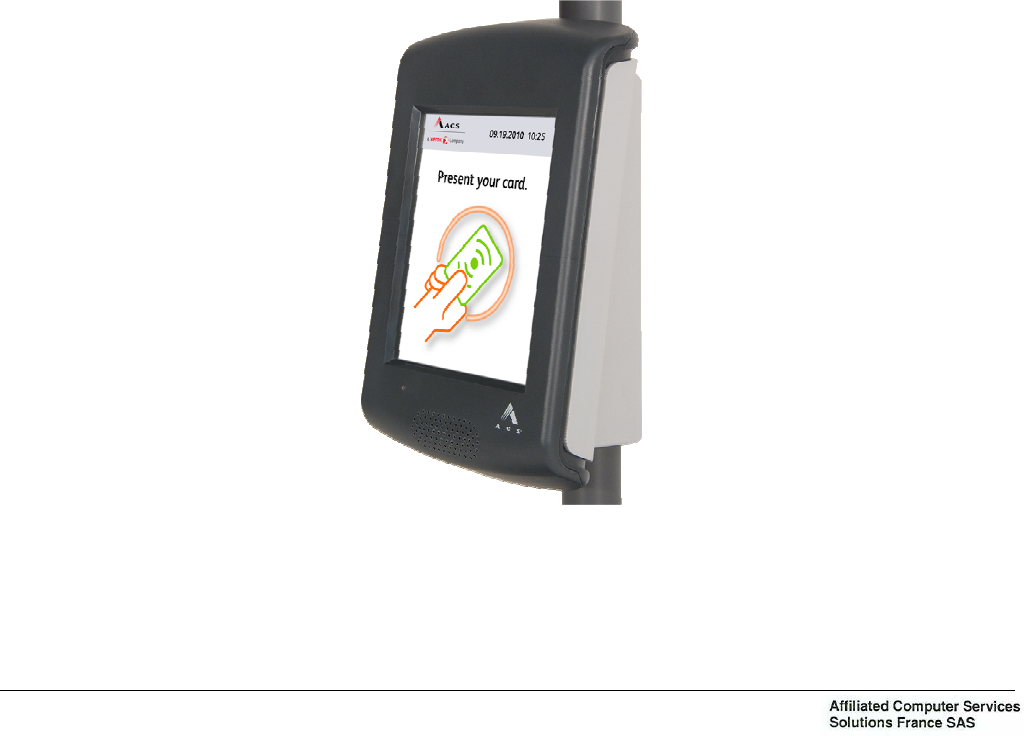
With its modern design similar to mobile communication devices, this interactive validator
VPE420 is much more than a simple validation tool.
With a large color touch screen and voice synthesis, it is a truly modern communication tool,
prestigious for the image of transport networks.
The screen offers a contextual display which indicates only the right information at the right
time (contactless target, keys, pictograms…). This helps user understanding and the flow of
validations is therefore increased.
Of an innovative concept, the wide-range contactless antenna integrated in the screen enables
the easy validation of all types of contactless media: card, ticket, NFC telephone, NFC Smart
Object, simply by placing the media in front of the screen when invited to do so.
Activated on request, the voice synthesis effectively guides users with sight impairments.
Over and beyond ticketing, the combination of sound, image and touch enables a multitude of
possibilities such as the display and vocal announcement of the next stop, transmission of
passenger information messages; performing "on the spot" satisfaction surveys, transmission
of video spots or advertising banners …
However with all this, the validator still remains reliable, robust and ecological. In fact it
contains no battery, which reduces its impact on the environment and eliminates preventive
maintenance operations.
Figure 1: Interactive contactless validator + flange assembly
Chapter 1: Overview
Ce document est la propriété de la société Affiliated Computer Services Solutions France SAS. Il ne peut être reproduit ou communiqué sans son autorisation
OPE2791 Issue: B Texte : EN Page : 3
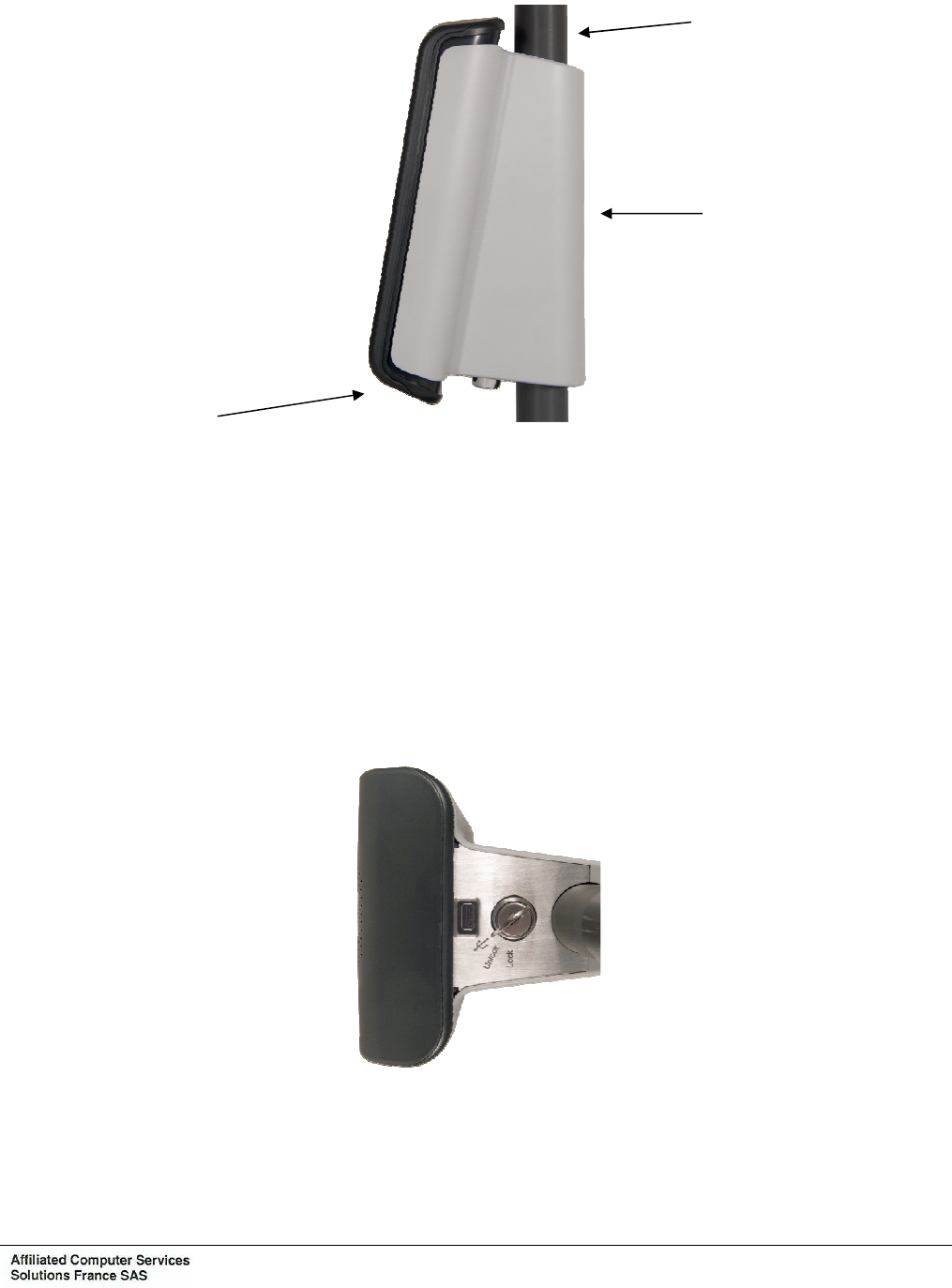
The validator can be fixed on a vertical tube of 25 to 35 mm diameter through a support which
integrates and hides the connectors and cables.
Once installed on its support the validator is slightly inclined to facilitate reading and entry on
the screen.
The support integrates an identification memory module which enables the memorization of
information such as the identification of the validator, of the vehicle, its IP address... Thus, in
case of replacement of the validator, the new one automatically recovers the context
information.
The unit is locked by a hidden lock underneath the support.
Unlocking opens a flap with gives access to a USB connector thus enabling the connection of
a USB peripheral (key, keyboard, mouse).
Tube
Support
Validator
Chapter 1: Overview
Ce document est la propriété de la société Affiliated Computer Services Solutions France SAS. Il ne peut être reproduit ou communiqué sans son autorisation
Page : 4 OPE2791 Issue: B Texte : EN
3. DESCRIPTION
3.1 BLOCK DIAGRAM
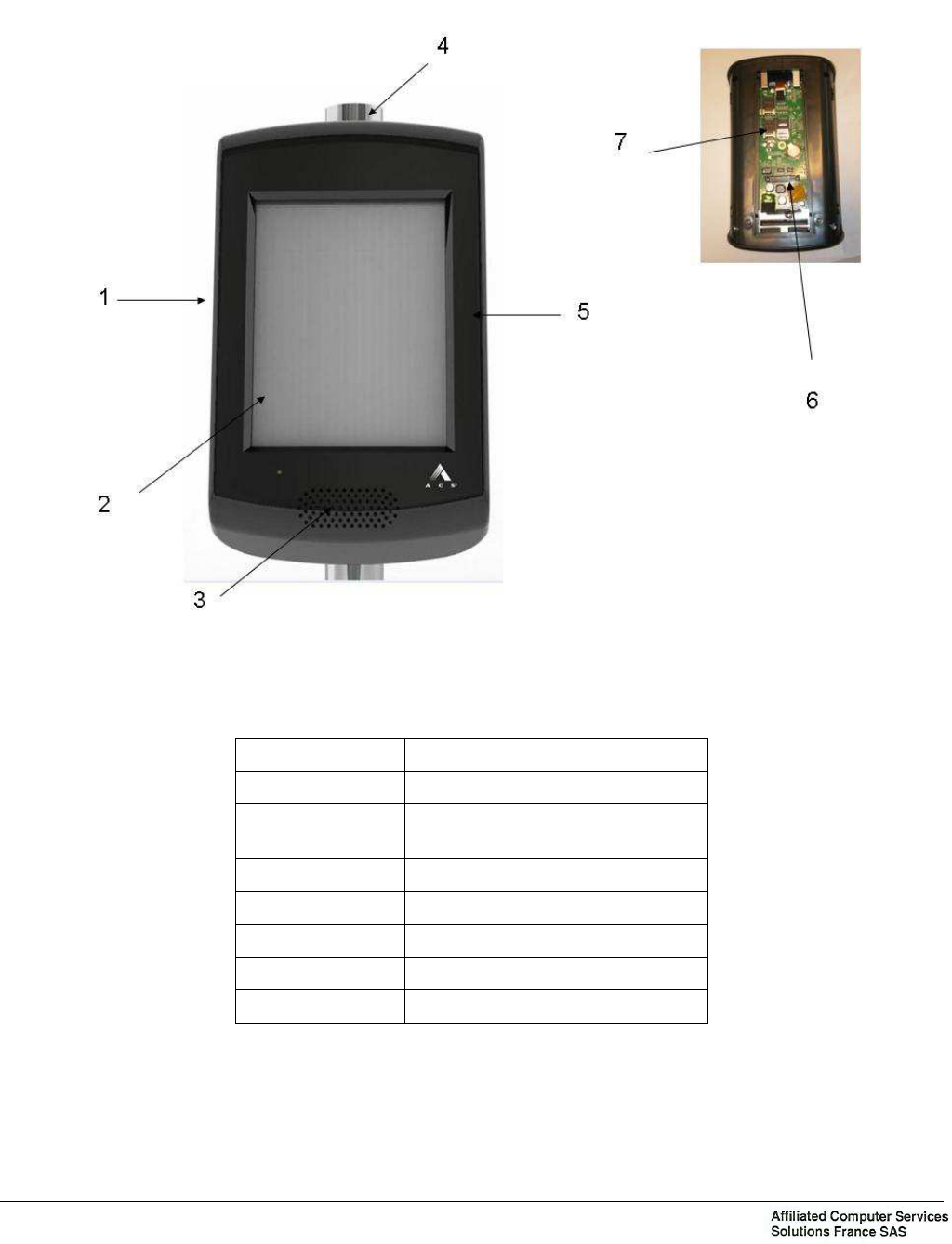
Item Designation
1 Validator VPE 420
2 VPE 420 Touch screen
(capacitive or resistive)
3 Speaker
4 RFID Antenna
5 Capacitive touch
6 External connector
7 Brackets SAM
Figure 2: VPE 420 block diagram

Chapter 1: Overview
Ce document est la propriété de la société Affiliated Computer Services Solutions France SAS. Il ne peut être reproduit ou communiqué sans son autorisation
OPE2791 Issue: B Texte : EN Page : 5
3.2 DESCRIPTION OF FUNCTIONS
For details, refer to the interactive contactless validator VPE 420 hardware
specifications.
3.2.1 Validator casing
This comprises a front and rear cover in molded ABS/PC with no screw apparent when the
validator is mounted on its support.
3.2.2 Support
It consists of an aluminium flange attached to the tube by 2 threaded rods bent into a U and a
flange cover moulded in ABS-PC attached to the flange to decorate the back of validator.
The flange has an anti-rotation peg to prevent the validator to turn around the tube.
As an option, the validator may be supplied with a support enabling its mounting on a flat
surface (wall, panel…).
3.2.3 Internal resources
− ARM core processor.
− Memories:
SDRAM: 128 Mbytes
FLASH: 256 Mbytes extensible to 32 Gbytes
− Identification module (present in the support): 256 bytes.
− Calendar, protected at least 3 days in the event of power supply cutout.
− Operating system: Windows CE 6.0 R3.
3.2.4 Touch screen
6"5 TFT screen mounted in portrait mode.
− Technology: color TFT graphic.
− Definition: 640 x 480 pixels (VGA).
− Touch panel: Projected capacitive, or resistive.
3.2.5 Sound module
The sound module is formed by a loudspeaker by which pre-recorded messages or sounds are
broadcast in Wav or MP3 format (optional) with a sound rating of up to 72 dB at 1 m.

Chapter 1: Overview
Ce document est la propriété de la société Affiliated Computer Services Solutions France SAS. Il ne peut être reproduit ou communiqué sans son autorisation
Page : 6 OPE2791 Issue: B Texte : EN
3.2.6 Contactless interface
The contactless interface comprises:
− A radio coupler complying with standard ISO/IEC 14443 (type A and B) supporting the
Innovatron B’ protocol. Optionally, the coupler can integrate the Felica standard (Type C)
and be "EMV contactless" compatible.
− An antenna.
− Four SAM supports.
Main characteristics of interface:
− Carrier frequency: 13.56 MHz.
− Communication speed with contactless card: up to 424 Kbit/s.
− Range: 0 to 10 cm depending on type of contactless media.
3.2.7 Communication interfaces
3.2.7.1 RS232/RS422/RS485/SAEJ1708
Two ports, configurable for RS232 or RS422 or RS485, with one configurable additionally for
SAEJ1708.
3.2.7.2 Ethernet
One Ethernet, 10/100 base TX.
3.2.7.3 USB
One USB 2.0 master interface; accessible under the validator after unlocking.
3.2.7.4 Input - Output interfaces
Two opto-isolated inputs and four dry contact outputs.

Chapter 1: Overview
Ce document est la propriété de la société Affiliated Computer Services Solutions France SAS. Il ne peut être reproduit ou communiqué sans son autorisation
OPE2791 Issue: B Texte : EN Page : 7
4. MODES OF OPERATION
According to the address to which the validator is wired, it can work in “master” or “slave”
mode of peripheral equipment.
“Master” Mode
In this mode, the validator is master of the dialogue between equipment (console, beacons,
validator, etc.).
Data exchange and loading of the RTP file may be carried out:
− through an infrared connection from a portable terminal,
− or through a beacon or WiFi system to a land site.
Generally, this mode is used when the validator is alone.
"Slave" Mode
In this case, the validator is linked in long distance transmission through a serial connection to
the master equipment (console or validator).
Generally, this mode is used as slave of a master validator or when the console has a printer.
“Autonomous” Mode
Thanks to the internal ticket machine and a back up memory, the validator may function in
“autonomous” mode, i.e. not connected to master equipment.
“Degraded” Mode
Due to a dialogue failure, the validator may function in “degraded” mode until the system works
correctly again. This functioning mode is defined by application parameters. During this mode,
the validations are memorized and will be transmitted to the master machine when the
dialogue is resumed.
Refer to the interactive contactless validator VPE 420 hardware specifications,
functional specifications.

Chapter 1: Overview
Ce document est la propriété de la société Affiliated Computer Services Solutions France SAS. Il ne peut être reproduit ou communiqué sans son autorisation
Page : 8 OPE2791 Issue: B Texte : EN
5. MAIN CHARACTERISTICS
5.1 PHYSICAL CHARACTERISTICS
− Height: approximately 250 mm
− Width: approximately 146 mm
− Depth: approx. 95 mm (in relation to the front of the tube)
− Weight of the Validator with the flange support: < 1,5 Kg approximately
These values are given for the Validator + flange assembly.
5.2 ENVIRONMENTAL CHARACTERISTICS
5.2.1 Climatic characteristics
− Operating temperature range: -25°C to +55°C
− Storage temperature range: -30°C to +70°C
− Humidity: 95% HR
− Without condensation at 35°C
− Protection index: IP54.
− Protection impact index IK07.
5.2.2 Electrical characteristics
The Validator is powered on vehicles equipped with a nominal 12-Volt or 24-Volt battery.
− For 24 Vdc Battery 18 Vdc to 32 Vdc.
24Vdc nominal
Maximum power
consumption 600mA
− For 12 Vdc Battery 9 Vdc to 16 Vdc.
12Vdc nominal
Maximum power
consumption 1200mA
The Validator is protected against polarity reversals and against power surges.
The Validator’s power line must be protected by a circuit breaker or fuse, calibrated as follows:
− 2 amperes for one Validator – VPE420.
− 4 optional digital outputs (isolated relay):
2 SPST-NO relays isolated outputs
2 SPDT relays isolated outputs
Contacts ratings:
Max switching voltage: 60VDC
Max switching current: 1A
Contacts protections against overvoltage and over current due to switching operations.

Chapter 1: Overview
Ce document est la propriété de la société Affiliated Computer Services Solutions France SAS. Il ne peut être reproduit ou communiqué sans son autorisation
OPE2791 Issue: B Texte : EN Page : 9
−2 optional opto-coupled isolated inputs:
Forward voltage: from 8VDC to 60 VDC.
Forward current: 10 mA.
Protection against reverse voltage.
5.3 FUNCTIONAL CHARACTERISTICS
Refer to the interactive contactless validator VPE 420 functional specifications.
Chapter 1: Overview
Ce document est la propriété de la société Affiliated Computer Services Solutions France SAS. Il ne peut être reproduit ou communiqué sans son autorisation
Page : 10 OPE2791 Issue: B Texte : EN
6. EXTERNAL CONNECTIONS
Figure 3: Presentation of the external connection
Link to support kit for external
connections (power, serial
connections, maintenance)
Flange assembly
Chapter 1: Overview
Ce document est la propriété de la société Affiliated Computer Services Solutions France SAS. Il ne peut être reproduit ou communiqué sans son autorisation
OPE2791 Issue: B Texte : EN Page : 11
6.1 VALIDATOR CONNECTION
Refer to the interactive contactless validator VPE 420 hardware specifications.
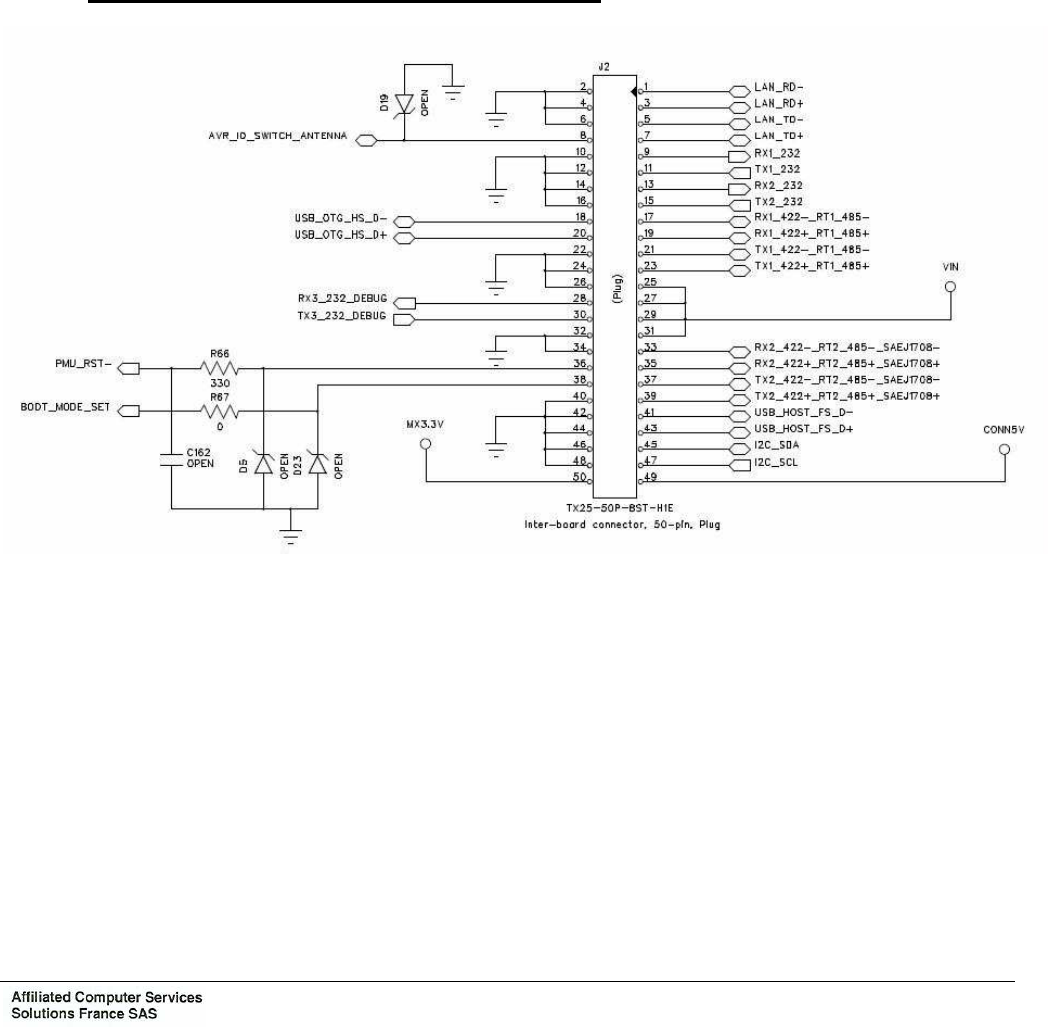
The functional connections of VPE 420 are made through a single male connector (J2),
Connector type 50P TX25-50P-8ST-H1E:
− DC power supply: +24V,
− the COM1 to COM2 links,
− the Relay outputs,
− the isolated inputs,
− one USB 2.0 master interface,
− the Ethernet link (COM4).
Connecteur J2 of UC board: External Connection:
Chapter 1: Overview
Ce document est la propriété de la société Affiliated Computer Services Solutions France SAS. Il ne peut être reproduit ou communiqué sans son autorisation
Page : 12 OPE2791 Issue: B Texte : EN
6.2 CONNECTIONS ON CONNECTION BOARD
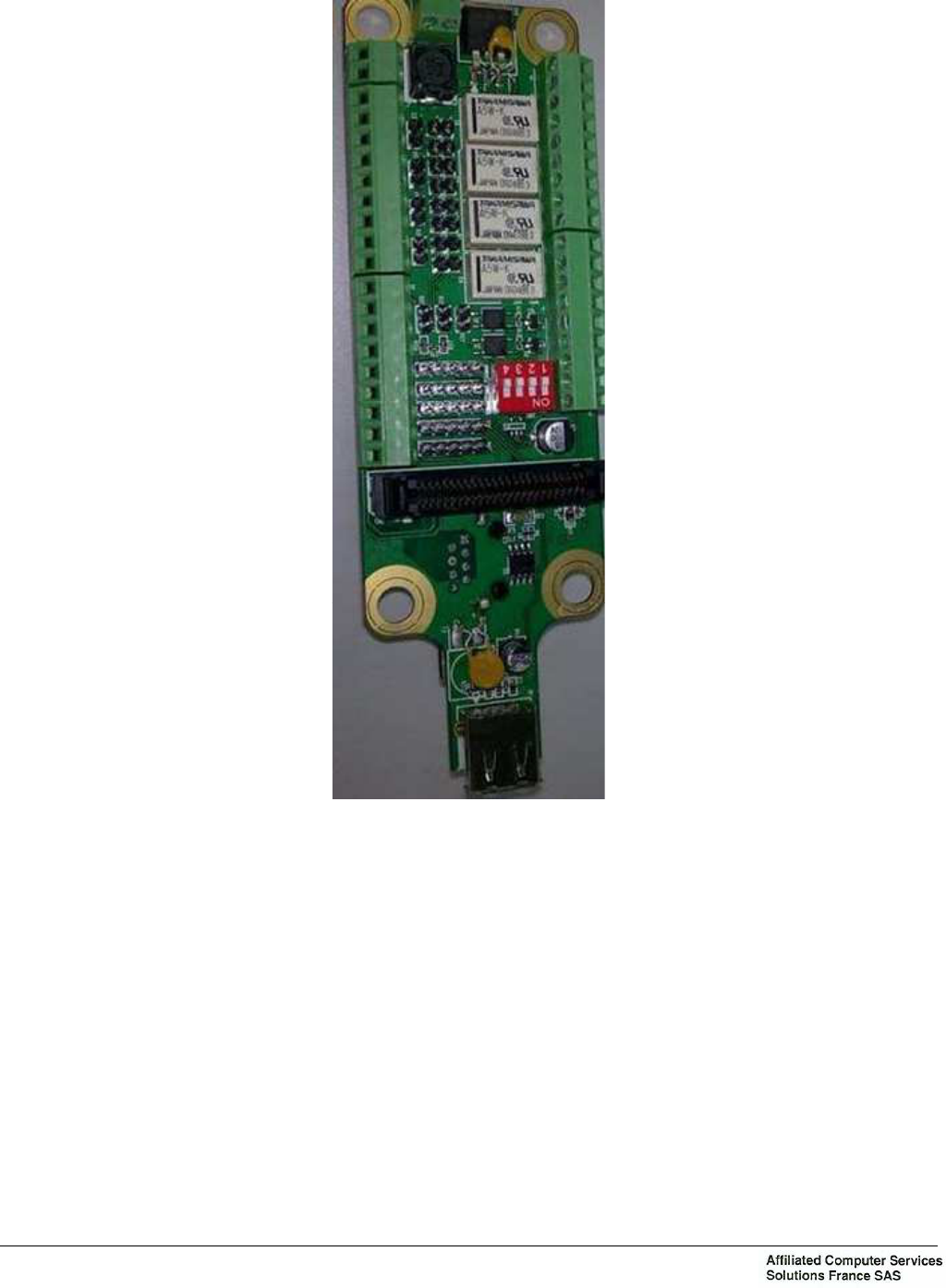
Figure 4: Connection board
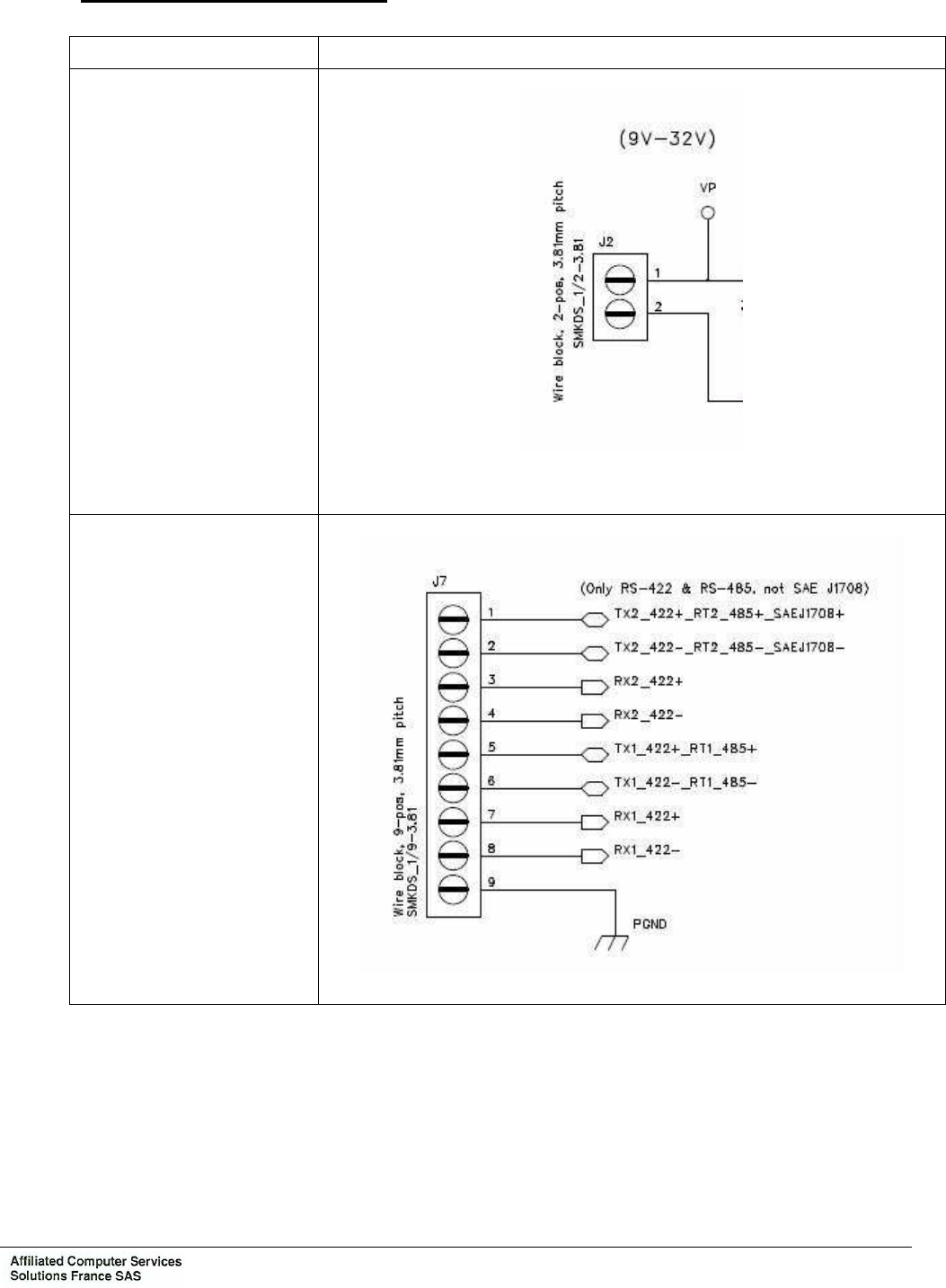
Connector J2: power supply
Connector J7: COM 1 and COM2 only RS485 and RS422 configured
Connector J6: COM 1 and COM2 only RS232 configured, and Ethernet COM
Connector J5: several configuration of two outputs
Connector J4: two inputs and one outputs
Connector J31: COM2 SAEJ1708 configured
Chapter 1: Overview
Ce document est la propriété de la société Affiliated Computer Services Solutions France SAS. Il ne peut être reproduit ou communiqué sans son autorisation
OPE2791 Issue: B Texte : EN Page : 13
6.2.1 Details of the connections board
Connector Schema
Connector J2: power
supply
Pin1 : VP
Pin 2 : PGND
Connector J7: COM1 and
COM2 only RS485 and
RS422 configured
Chapter 1: Overview
Ce document est la propriété de la société Affiliated Computer Services Solutions France SAS. Il ne peut être reproduit ou communiqué sans son autorisation
Page : 14 OPE2791 Issue: B Texte : EN
Connector Schema
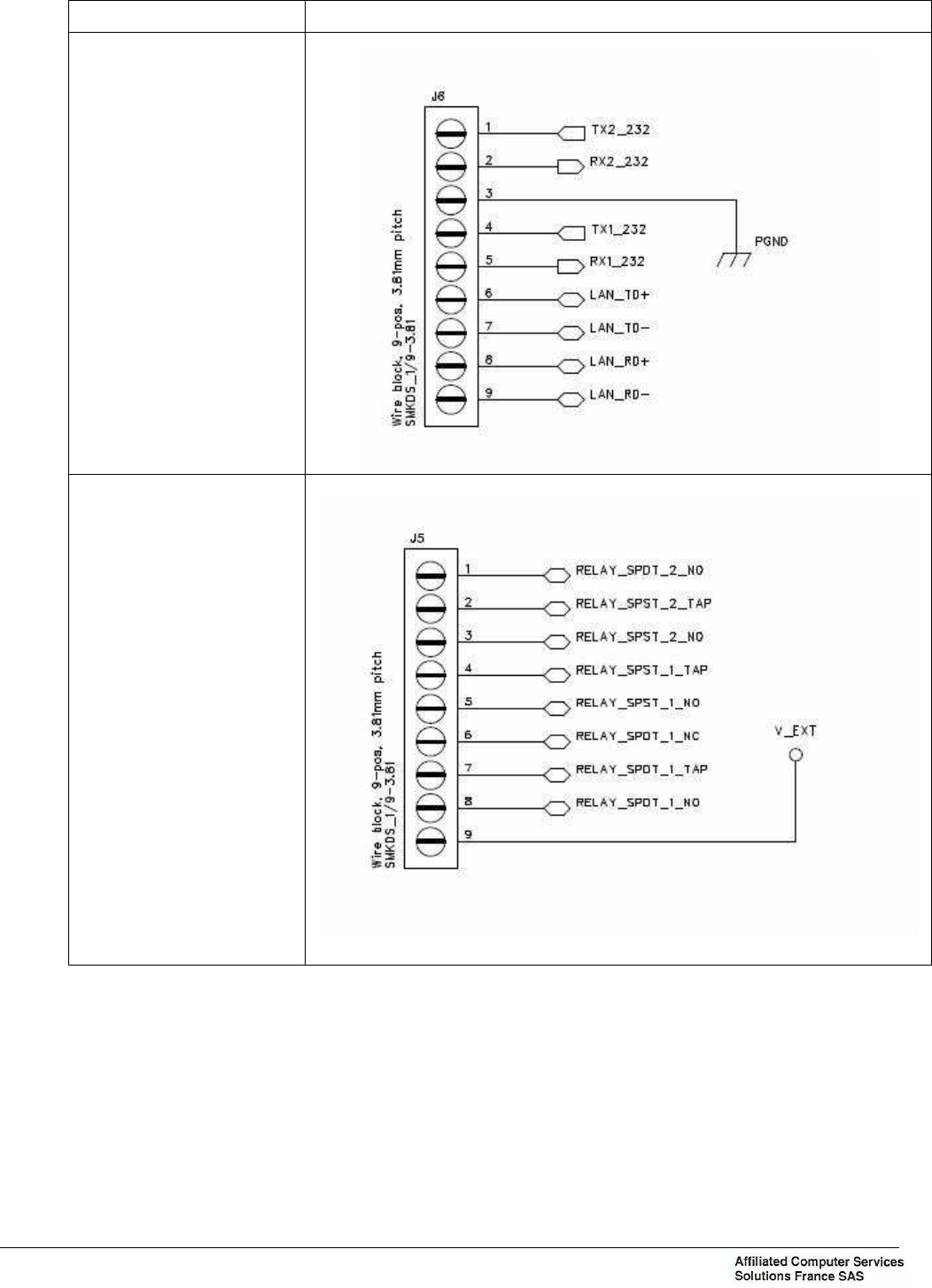
Connector J6: COM1
and COM2 only RS232
configured, and
Ethernet COM
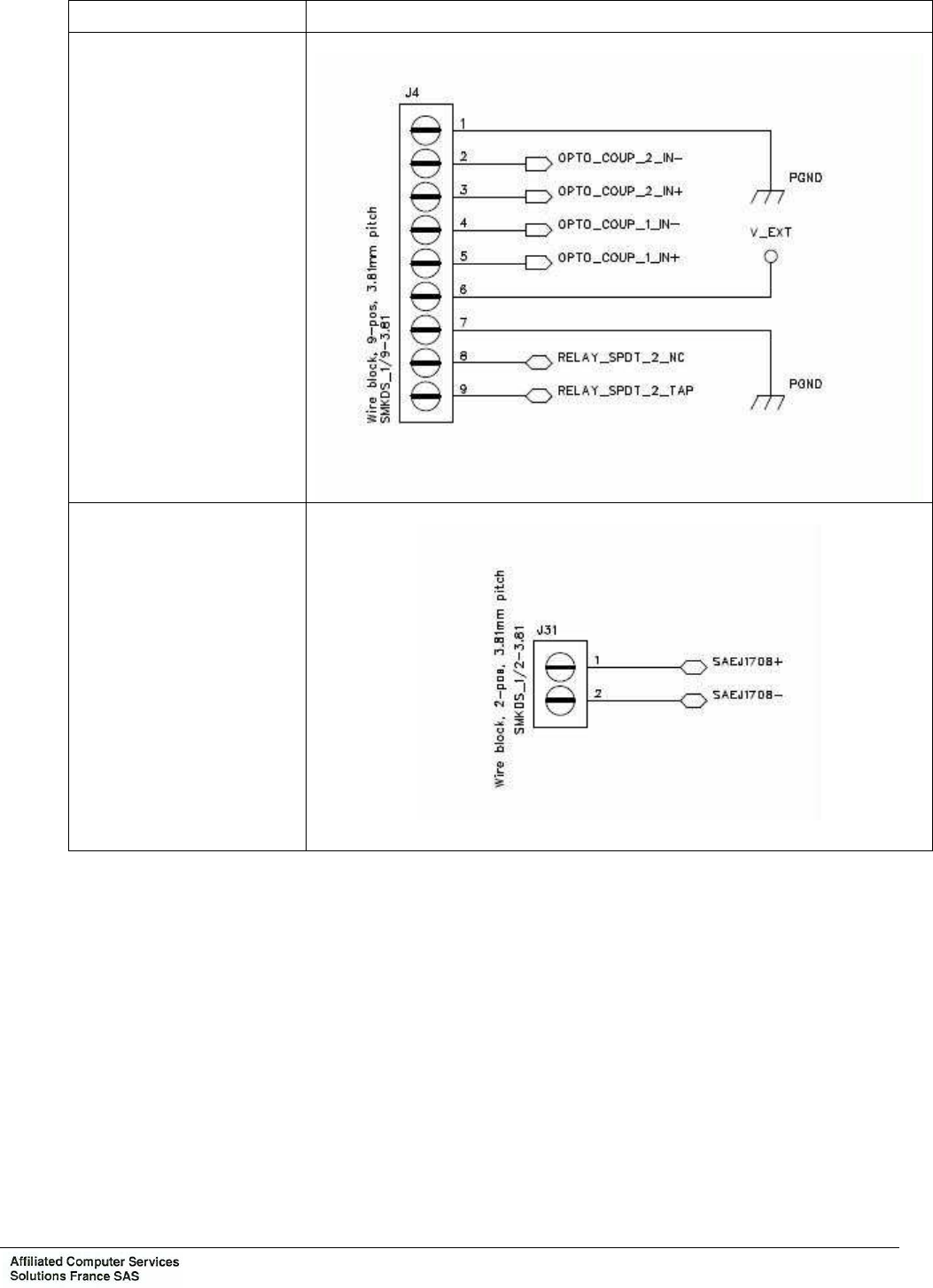
Connector J5: several
configuration of two
outputs
Chapter 1: Overview
Ce document est la propriété de la société Affiliated Computer Services Solutions France SAS. Il ne peut être reproduit ou communiqué sans son autorisation
OPE2791 Issue: B Texte : EN Page : 15
Connector Schema
Connector J4: two
inputs and one outputs
Connector J31: COM2
SAEJ1708 configured
Chapter 1: Overview
Ce document est la propriété de la société Affiliated Computer Services Solutions France SAS. Il ne peut être reproduit ou communiqué sans son autorisation
Page : 16 OPE2791 Issue: B Texte : EN
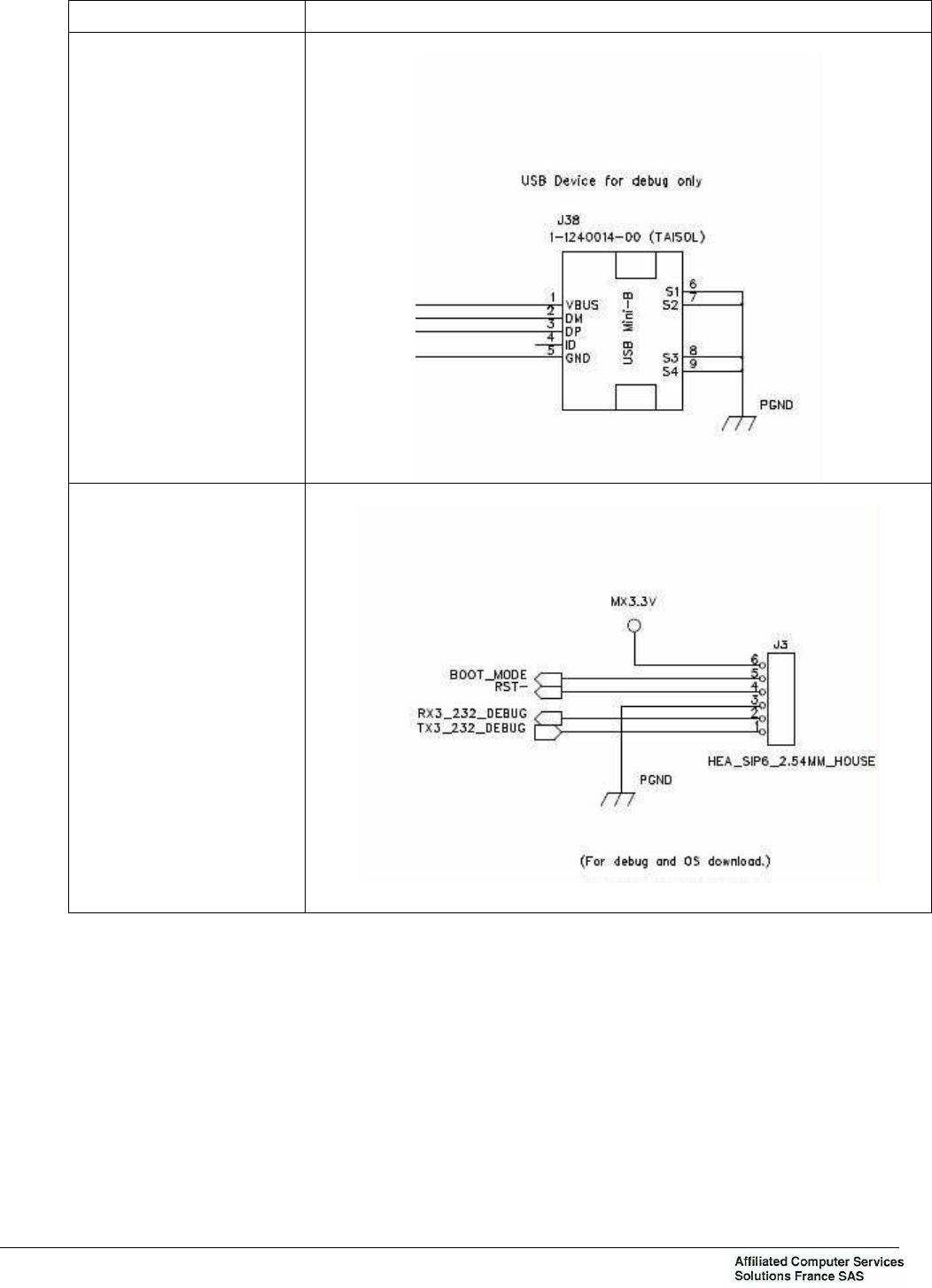
Connector Schema
Connector J38: for USB
KEY, USB KEYBOARD,
etc.
Connector J3: for
DEBUG and OS
download
Chapter 1: Overview
Ce document est la propriété de la société Affiliated Computer Services Solutions France SAS. Il ne peut être reproduit ou communiqué sans son autorisation
OPE2791 Issue: B Texte : EN Page : 17
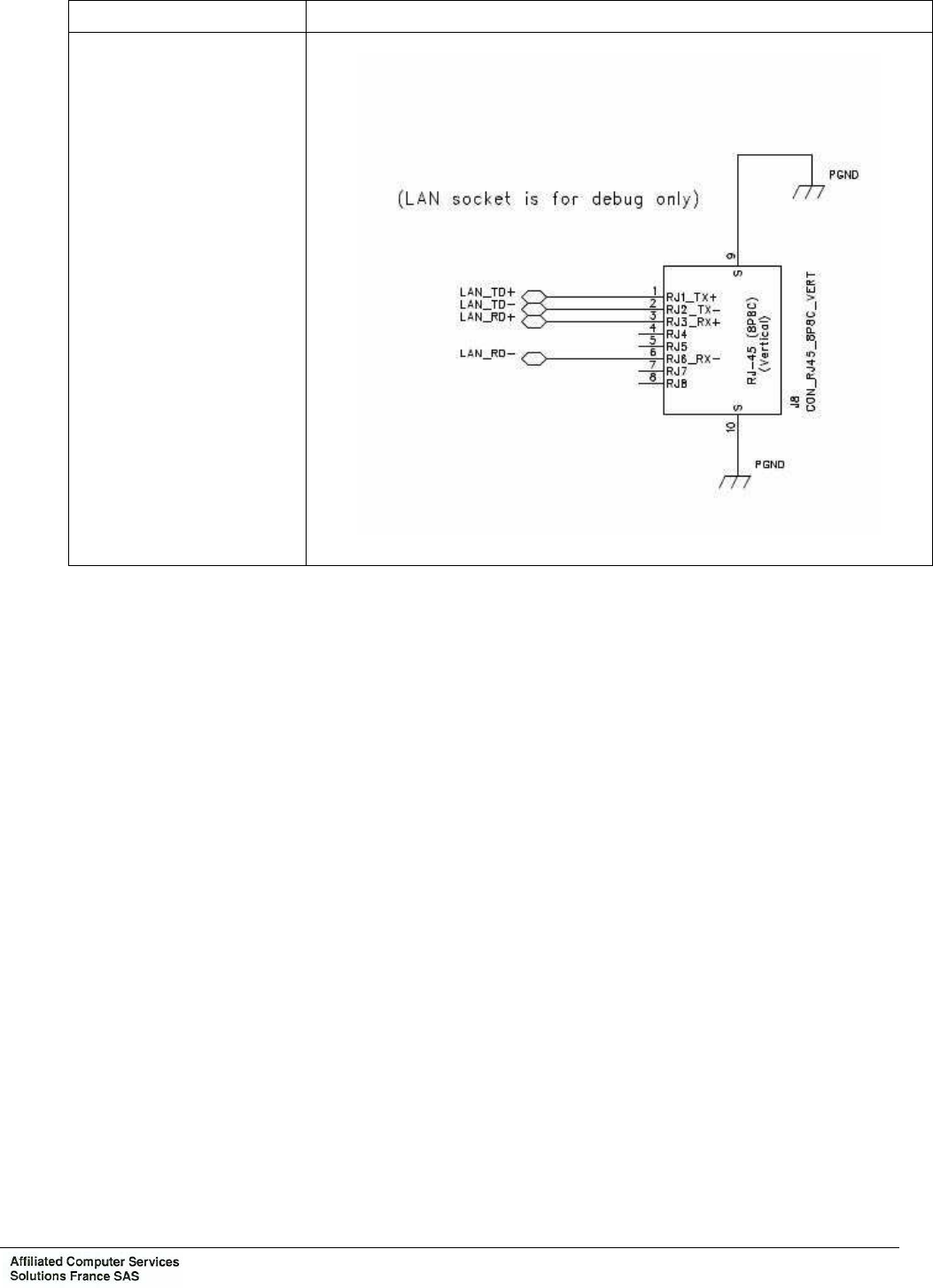
Connector Schema
Connector J8: LAN
socket is for debug only

Chapter 1: Overview
Ce document est la propriété de la société Affiliated Computer Services Solutions France SAS. Il ne peut être reproduit ou communiqué sans son autorisation
Page : 18 OPE2791 Issue: B Texte : EN
7. CONFIGURATION VPE420
7.1 VALIDATOR ADDRESS
Addressing is done by switches SW2 of the VPE420 connection board.
Address SW2 number 1
SW2 number 2
SW2 number 3
SW2 number 4
Signal RT_ADDR3 RT_ADDR2 RT_ADDR1 RT_ADDR0
VPE420 N° 0 OFF OFF OFF OFF
VPE420 N° 1 OFF OFF OFF ON
VPE420 N° 2 OFF OFF ON OFF
VPE420 N° 3 OFF OFF ON ON
VPE420 N° 4 OFF ON OFF OFF
VPE420 N° 5 OFF ON OFF ON
VPE420 N° 6 OFF ON ON OFF
VPE420 N° 7 OFF ON ON ON
VPE420 N° 8 ON OFF OFF OFF
VPE420 N° 9 ON OFF OFF ON
VPE420 N° 10 ON OFF ON OFF
VPE420 N° 11 ON OFF ON ON
VPE420 N° 12 ON ON OFF OFF
VPE420 N° 13 ON ON OFF ON
VPE420 N° 14 ON ON ON OFF
VPE420 N° 15 ON ON ON ON
Warning: Switches are set 1 when they are set on position "ON".

Chapter 1: Overview
Ce document est la propriété de la société Affiliated Computer Services Solutions France SAS. Il ne peut être reproduit ou communiqué sans son autorisation
OPE2791 Issue: B Texte : EN Page : 19
7.2 CONFIGURATIONS AND POLARISATION COM 1 ET COM2
7.2.1 Configuration COM1
CONFIG COM1
SW1.10 SW1.9 SW1.8 SW1.7 SW1.6 SW1.5 SW1.4 SW1.3 SW1.2 SW1.1
RS-232 N.U OFF OFF OFF OFF OFF OFF OFF OFF OFF
RS-422 non-
polarized and
non adapted
N.U OFF OFF OFF OFF OFF OFF OFF OFF ON
RS-485 non-
polarized and
non adapted
N.U OFF OFF OFF OFF OFF OFF ON ON ON
RS-422
polarized and
adapted
N.U ON ON ON ON ON ON OFF OFF ON
RS-485
polarized and
adapted
N.U OFF OFF OFF ON ON ON ON ON ON
When The COM1 is configured in RS 422
− SW1.4: Enable to polarize TX1_422+ with a pull-up
− SW1.5: Enable to adapt the emission of RS422
− SW1.6: Enable to polarize TX1_422- with a pull-down
− SW1.7: Enable to polarize RX1_422+ with a pull-up
− SW1.8: Enable to adapt the reception of RS422
− SW1.9: Enable to polarize RX1_422- with a pull-down

Chapter 1: Overview
Ce document est la propriété de la société Affiliated Computer Services Solutions France SAS. Il ne peut être reproduit ou communiqué sans son autorisation
Page : 20 OPE2791 Issue: B Texte : EN
7.2.2 Configuration COM 2
CONFIG COM2
SW3.10 SW3.9 SW3.8 SW3.7 SW3.6 SW3.5 SW3.4 SW3.3 SW3.2 SW3.1
RS-232 OFF OFF OFF OFF OFF OFF OFF OFF OFF OFF
RS-422 ON ON ON OFF OFF OFF OFF OFF OFF OFF
RS-485 ON ON ON ON ON OFF OFF OFF OFF OFF
SAJ1708 OFF OFF OFF OFF OFF ON ON ON ON ON
CONFIG COM2
SW2.10 SW2.9 SW2.8 SW2.7 SW2.6 SW2.5
RS-232 OFF OFF OFF OFF OFF OFF
RS-422 non-
polarized and
non adapted
OFF OFF OFF OFF OFF OFF
RS-485 non-
polarized and
non adapted
OFF OFF OFF OFF OFF OFF
SAJ1708 OFF OFF OFF OFF OFF OFF
RS-422
polarized and
adapted
ON ON ON ON ON ON
RS-485
polarized and
adapted
OFF OFF OFF ON ON ON
When The COM2 is configured in RS 422
− SW2.10: Enable to polarize TX2_422-with a pull-down
− SW2.9: Enable to adapt the emission of RS422
− SW2.8: Enable to polarize TX2_422+ with a pull-up
− SW2.7: Enable to polarize RX2_422+ with a pull-up
− SW2.6: Enable to adapt the reception of RS422
− SW2.5: Enable to polarize RX2_422- with a pull-down
Chapter 1: Overview
Ce document est la propriété de la société Affiliated Computer Services Solutions France SAS. Il ne peut être reproduit ou communiqué sans son autorisation
OPE2791 Issue: B Texte : EN Page : 21
8. INTERCONNEXIONS
Figure 5: Interactive Contactless validator VPE 420 interconnexions

Chapter 1: Overview
Ce document est la propriété de la société Affiliated Computer Services Solutions France SAS. Il ne peut être reproduit ou communiqué sans son autorisation
Page : 22 OPE2791 Issue: B Texte : EN
9. DOCUMENTATION OF ASSOCIATED EQUIPMENT
− Interactive contactless validator product datasheet
Reference: SES5409
− Interactive Contactless Validator VPE420 - installation specifications and requirements
Reference: OPE2790

Chapter 2: Preventive maintenance
Ce document est la propriété de la société Affiliated Computer Services Solutions France SAS. Il ne peut être reproduit ou communiqué sans son autorisation
OPE2791 Issue: B Texte : EN Page : 23
CHAPTER 2: PREVENTIVE MAINTENANCE
1. CHANGING “OPERATIONAL” CONSUMABLES
Not applicable.

Chapter 2: Preventive maintenance
Ce document est la propriété de la société Affiliated Computer Services Solutions France SAS. Il ne peut être reproduit ou communiqué sans son autorisation
Page : 24 OPE2791 Issue: B Texte : EN
2. ON-SITE PREVENTIVE MAINTENANCE
2.1 PURPOSE OF THE ON SITE PREVENTIVE MAINTENANCE
The purpose to check and possibly repair, worn parts in order to keep the equipment in
permanent good working condition.
2.2 NECESSARY TOOLS
Not applicable.
2.3 ON SITE PREVENTIVE MAINTENANCE OPERATIONS
Not applicable.

Chapter 2: Preventive maintenance
Ce document est la propriété de la société Affiliated Computer Services Solutions France SAS. Il ne peut être reproduit ou communiqué sans son autorisation
OPE2791 Issue: B Texte : EN Page : 25
3. PREVENTIVE MAINTENANCE IN WORKSHOP
3.1 PURPOSE OF THE WORKSHOP PREVENTIVE MAINTENANCE
The roles of the maintenance technician, who must be trained to work on this type of
equipment, are:
− Analyze the defect related to the specified alarm code.
− If possible, start-up the VPE 420 again.
− Complete 1
st
level section service sheet if the VPE 420 is dismantled.
− Keep track of the dismantled VPE 420, with the service sheet attached, to the maintenance
workshop.
3.2 NECESSARY TOOLS
Not applicable.
3.3 ON SITE PREVENTIVE MAINTENANCE OPERATIONS
Not applicable.

Chapter 2: Preventive maintenance
Ce document est la propriété de la société Affiliated Computer Services Solutions France SAS. Il ne peut être reproduit ou communiqué sans son autorisation
Page : 26 OPE2791 Issue: B Texte : EN
Page left blank intentionally

Chapter 3: Corrective maintenance
Ce document est la propriété de la société Affiliated Computer Services Solutions France SAS. Il ne peut être reproduit ou communiqué sans son autorisation
OPE2791 Issue: B Texte : EN Page : 27
CHAPTER 3: CORRECTIVE MAINTENANCE
1. ON-SITE CORRECTIVE MAINTENANCE
1.1 PURPOSE OF SITE MAINTENANCE
The tasks of the maintenance technician, who must be trained to operate this type of
equipment, are:
− Analyze the defects relative to customer information.
− Complete the first level section of the intervention sheet.
− Keep track of the equipment, with the intervention sheet attached, to the maintenance
workshop.
1.2 NECESSARY TOOLS
Tooling is in metric measurement.
− Equipment key wrench.
− Star screwdriver set from 6 to 30 (not provided by ACS).
− Flat screwdriver set from 4 to 8 (not provided by ACS).
− Digital multimeter.
1.3 SITE CHECKLIST AND REPAIR ACTIONS FOR FAILURE AND ALARM CODES
To be defined.
1.3.1 Component code (atlas system)
To be defined.
1.3.2 Alarm Code: XXX (atlas system)
To be defined.
1.3.3 List of alarms
See project alarm list or the functional specification of the equipment.
Chapter 3: Corrective maintenance
Ce document est la propriété de la société Affiliated Computer Services Solutions France SAS. Il ne peut être reproduit ou communiqué sans son autorisation
Page : 28 OPE2791 Issue: B Texte : EN
1.4 TABLE OF FAULT CODES
For a detailed description of alarm codes available on the equipment, see the alarm
specification.
The table below lists all the maintenance procedures to be performed before returning
equipment to the ACS Repair Workshop.
A group of logical diagrams describes these different maintenance interventions to be
performed according to the alarm code present on the equipment.
Removal-Installation Procedure Paragraph concerned
VPE 420 exchange See 1.7 page 31.
Application loading procedure for cases where the VPE 420 is
on boot Chapter 11.4.3 page 29
Maintenance menu integrated in the application software Chapter 11.4.4 page 29
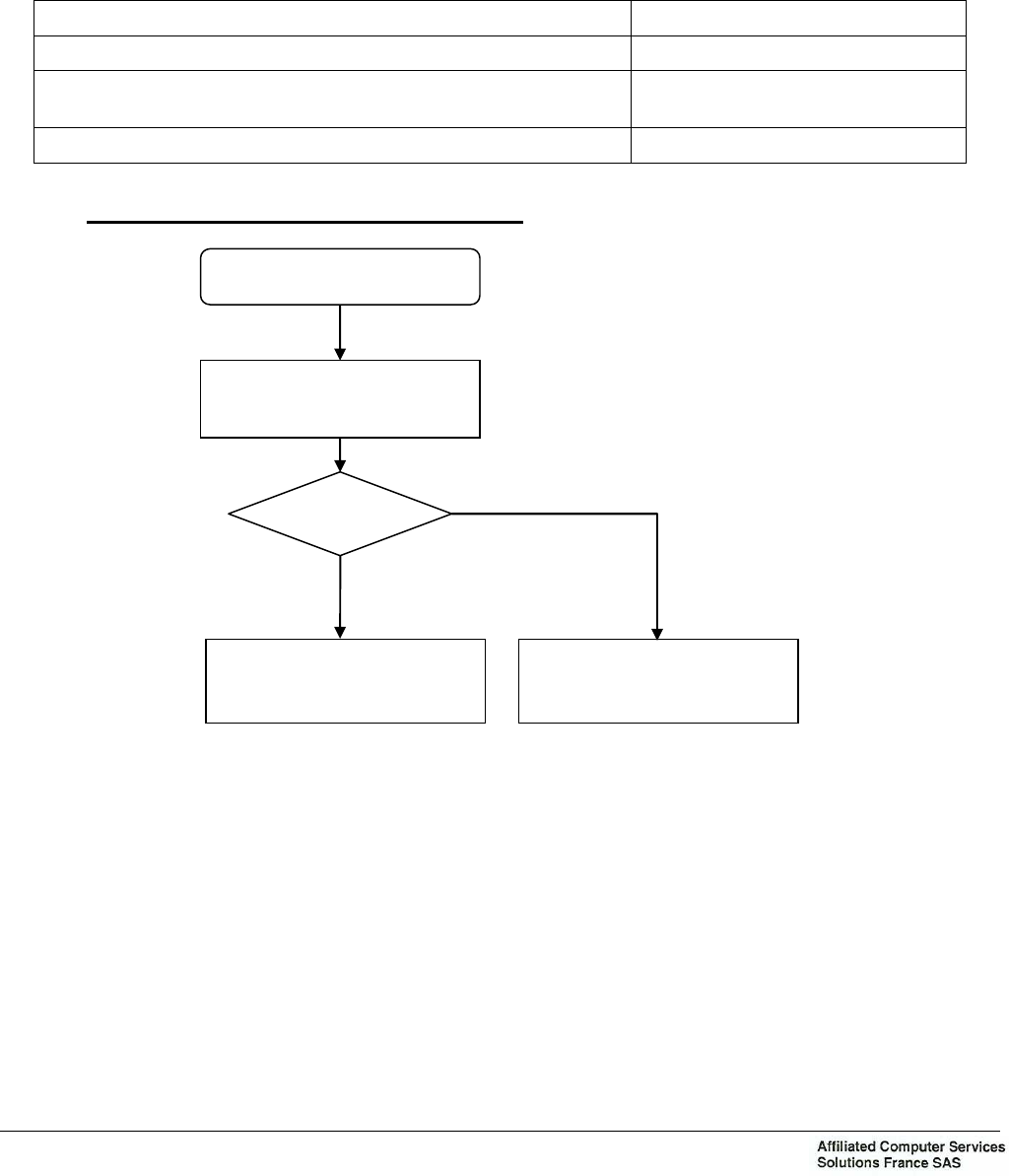
Logical Diagram N°1: Absence of software
Absence of software
Result
OK
Return to ACS
NOK
Return to Spares Park
Application Loading
Chapter 3: Corrective maintenance
Ce document est la propriété de la société Affiliated Computer Services Solutions France SAS. Il ne peut être reproduit ou communiqué sans son autorisation
OPE2791 Issue: B Texte : EN Page : 29
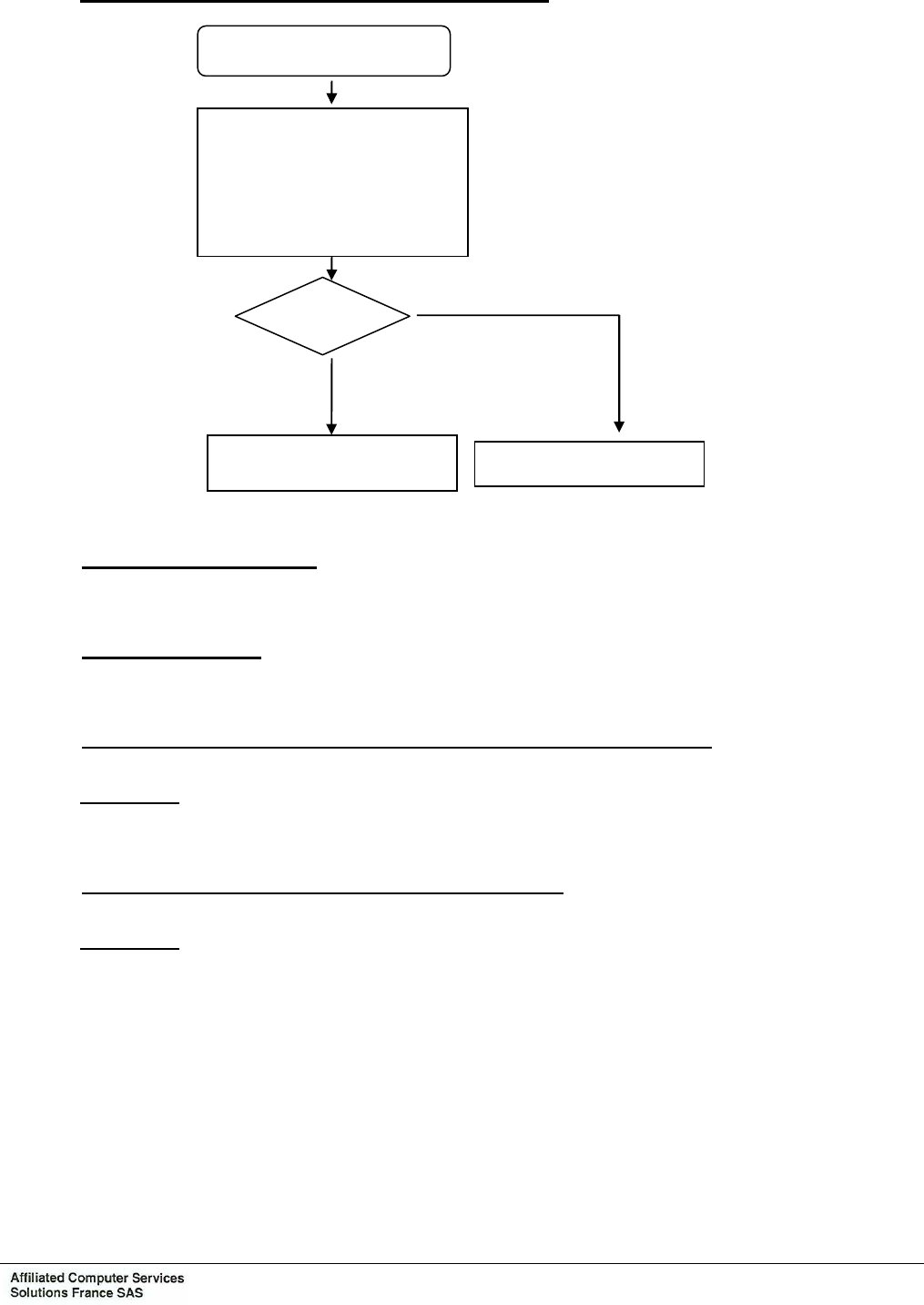
Logical Diagram N°2: Factory Initialization Defect
Factory initialization defect
Initialize again
The serial number … using
the command
« PARAM»
Result NOK
Return to ACS
OK
Return to Spares Park
1.4.1 Power up of the VPE 420
To be defined.
1.4.2 Application launch
To be defined.
1.4.3 Application load Procedure in cases where the VPE 420 is on boot
Procedure:
To be defined.
1.4.4 Maintenance menu integral to application software
Procedure:
To be defined.

Chapter 3: Corrective maintenance
Ce document est la propriété de la société Affiliated Computer Services Solutions France SAS. Il ne peut être reproduit ou communiqué sans son autorisation
Page : 30 OPE2791 Issue: B Texte : EN
1.5 INITIALIZING VPE 420
To be defined.
1.6 TESTS
1.6.1 Processing of a transport medium
To be defined.
1.6.2 Functional tests
To be defined.
Chapter 3: Corrective maintenance
Ce document est la propriété de la société Affiliated Computer Services Solutions France SAS. Il ne peut être reproduit ou communiqué sans son autorisation
OPE2791 Issue: B Texte : EN Page : 31
1.7 VPE 420 EXCHANGE
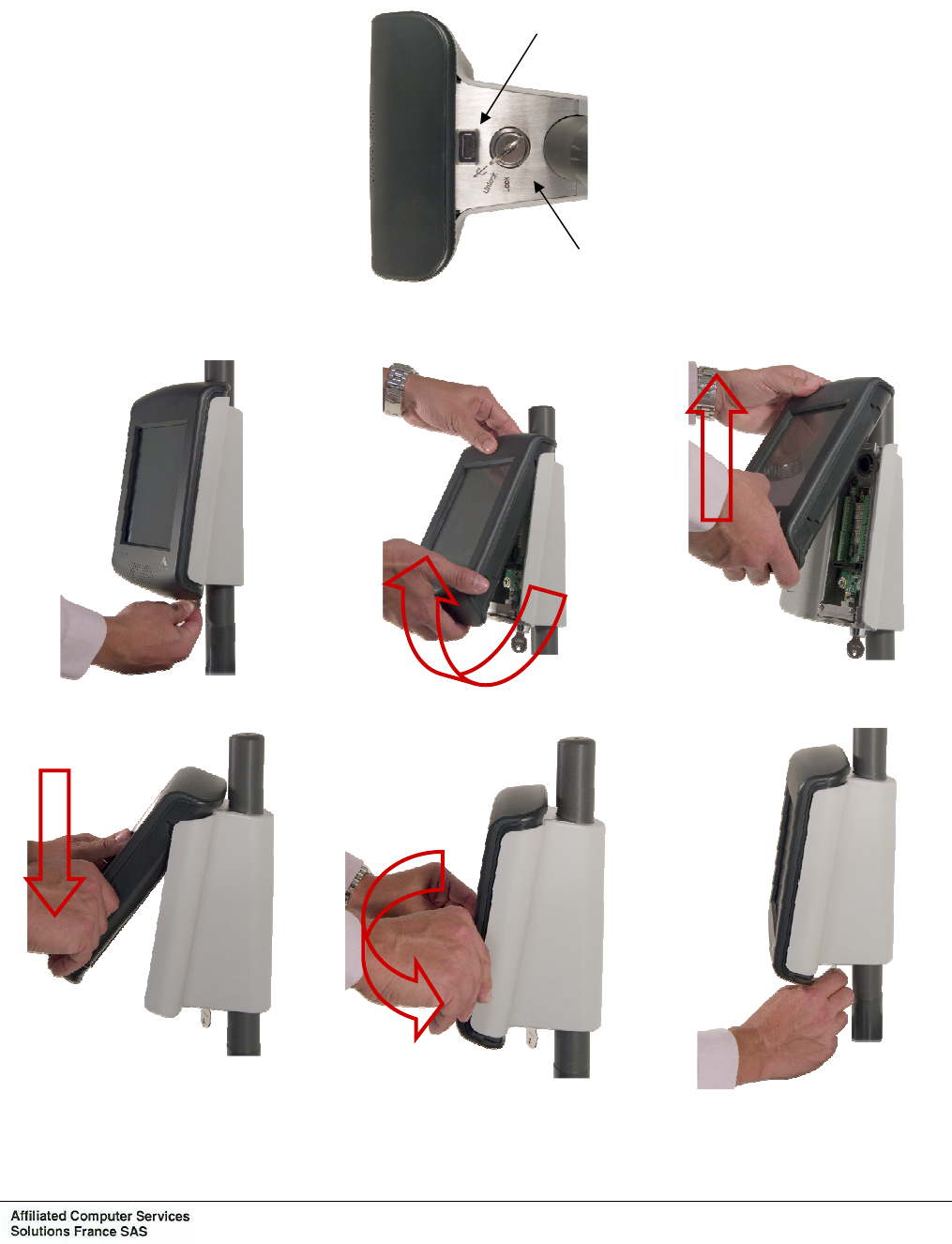
The unit is locked by a hidden lock underneath the support.
Unlocking opens a flap with gives access to a USB connector thus enabling the connection of
a USB peripheral (key, keyboard, mouse).
The mounting/dismantling of the validator on its support is done easily in a few seconds.
Dismantling the validator
Mounting of the validator
Figure
6
: VPE 420 exchange
Lock
Access flap to USB
connector
Chapter 3: Corrective maintenance
Ce document est la propriété de la société Affiliated Computer Services Solutions France SAS. Il ne peut être reproduit ou communiqué sans son autorisation
Page : 32 OPE2791 Issue: B Texte : EN
1.8 SUBASSEMBLIES EXCHANGE
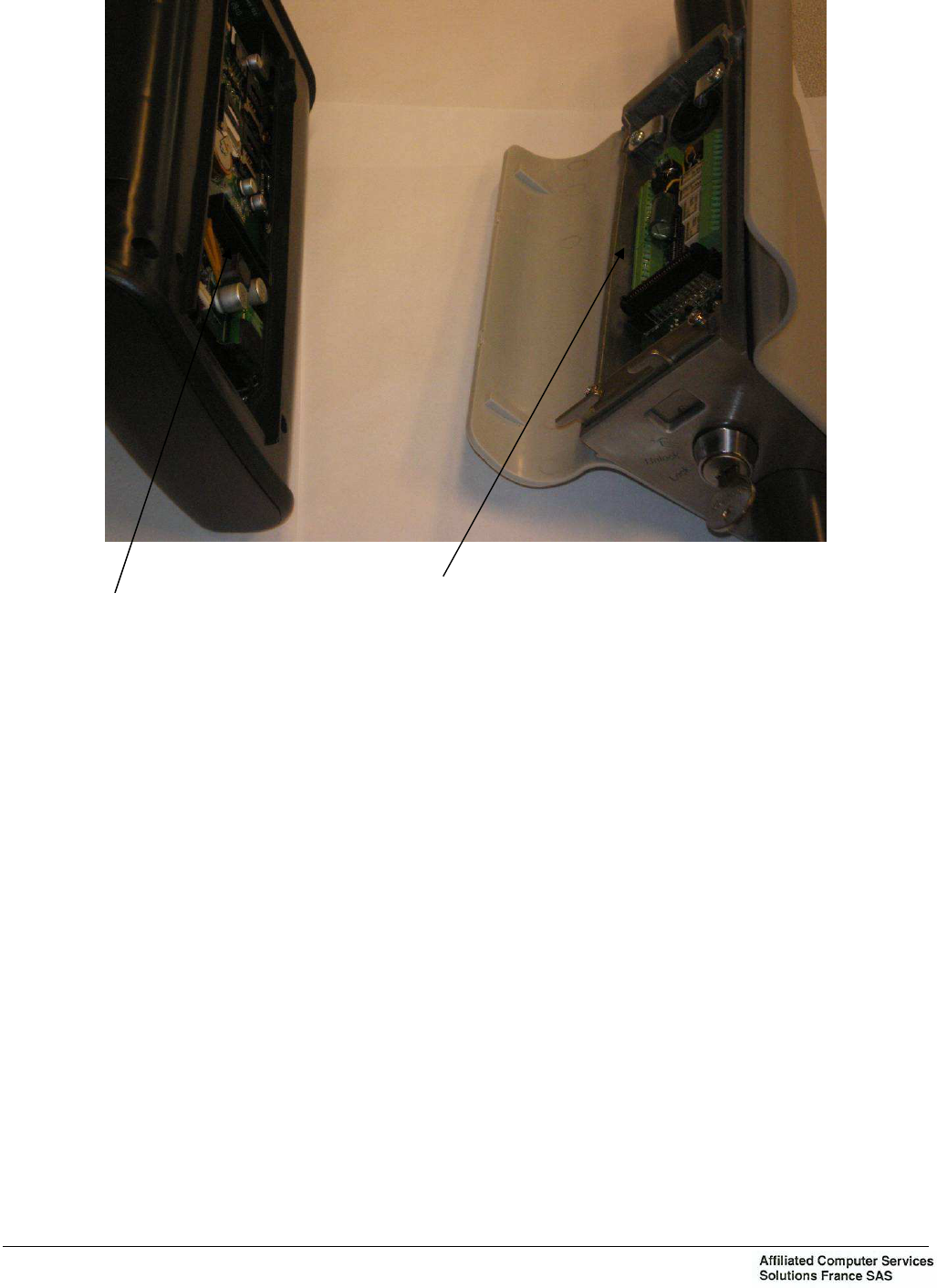
1.8.1 SAM EXCHANGE
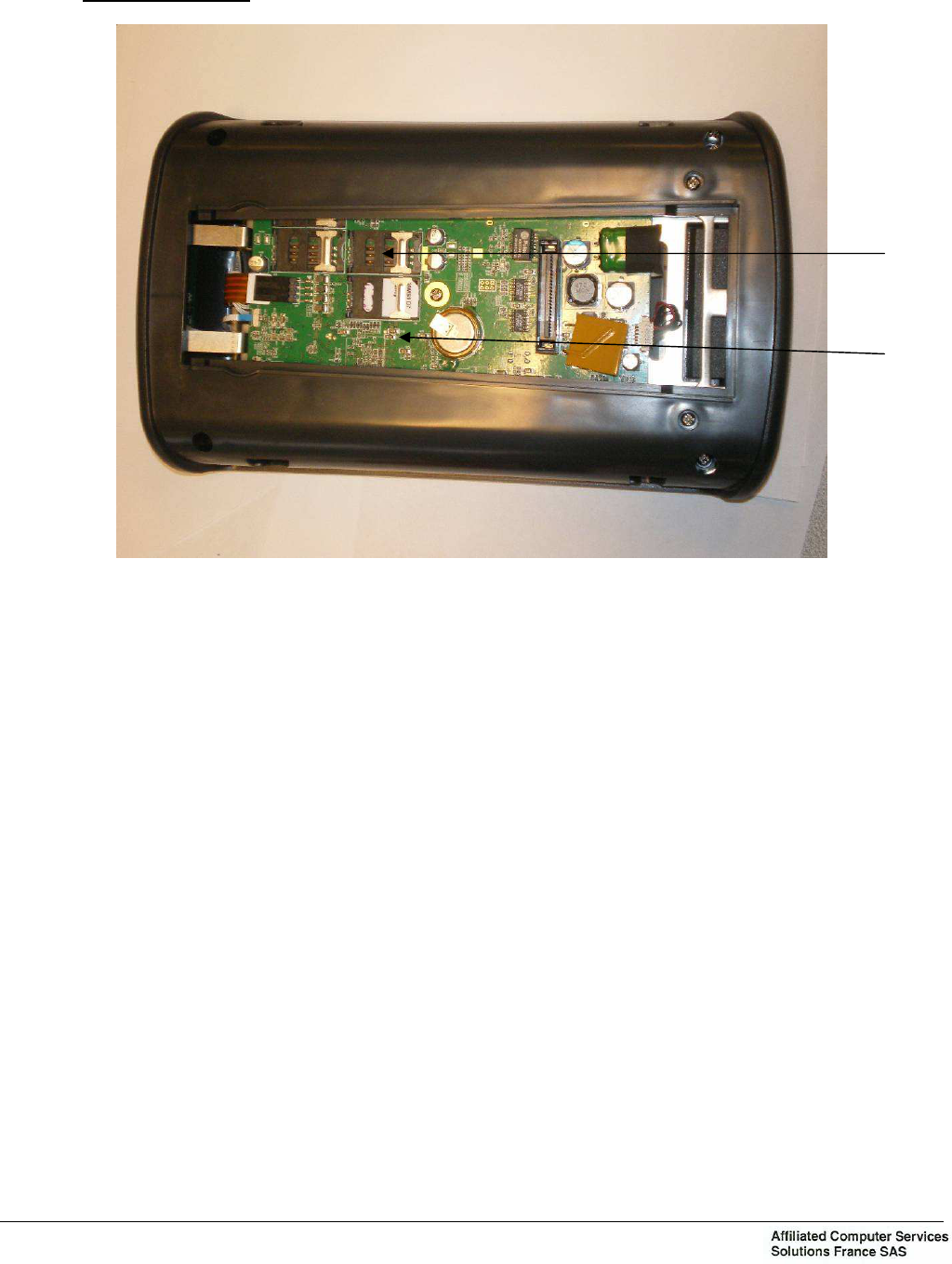
Figure 7: SAM exchange
Removing
− Remove the VPE 420.
− On the CPU (1), remove the SAMs from brackets (2).
− For the fourth SAM, disassembled the new Hood assembly.
Installation
− On the CPU (1), install the SAMs from brackets (2).
− Mount the VPE 420.
− For the fourth SAM, Mount the rear Hood assembly.
Note 1 : The CPU has 4 brackets SAM.
1
2

Chapter 3: Corrective maintenance
Ce document est la propriété de la société Affiliated Computer Services Solutions France SAS. Il ne peut être reproduit ou communiqué sans son autorisation
OPE2791 Issue: B Texte : EN Page : 33
2. CORRECTIVE MAINTENANCE IN THE WORKSHOP
2.1 PURPOSE OF CORRECTIVE MAINTENANCE IN THE WORKSHOP
The tasks of the maintenance technician, who must be trained to operate this kind of
equipment, are:
− to analyze the defects with the instruments supplied by the on-site maintenance personnel,
− to repair the equipment by replacing subassemblies or components,
− to complete the worksheet,
− to return the equipment to the site to which it is assigned.
Note : If a replacement is necessary, CUT power supply of equipment.
2.2 NECESSARY TOOLS
− Star screw driver.
− Multimeter.
− Adjustable stable feeding 35 V - 1 A.
− Equipment key.
2.3 ADJUSTMENTS
To be defined.

Chapter 3: Corrective maintenance
Ce document est la propriété de la société Affiliated Computer Services Solutions France SAS. Il ne peut être reproduit ou communiqué sans son autorisation
Page : 34 OPE2791 Issue: B Texte : EN
2.4 TEST
To be defined.
2.5 SUBASSEMBLIES EXCHANGE
Only an authorized and qualified person qualified and trained in the maintenance can remove
and install subassemblies.
Exchange procedures concern all subassemblies that can be mounted. Do not consider those
that are not part of your applications.
In exchanging subassemblies, refer to the interconnections 7 page 18.
Before performing any work on equipment, make sure power is OFF.
Tightening torque to be observed during assembly:
− M 2 ⇒ 2 daN/cm
− M 2,5 ⇒ 3 daN/cm
− M 3 ⇒ 7 daN/cm
− M 4 ⇒ 9 daN/cm
− M 10 ⇒ 30 daN/cm
2.5.1 Particular point due to the replacement
− The CPU must be initialized.
Chapter 3: Corrective maintenance
Ce document est la propriété de la société Affiliated Computer Services Solutions France SAS. Il ne peut être reproduit ou communiqué sans son autorisation
OPE2791 Issue: B Texte : EN Page : 35
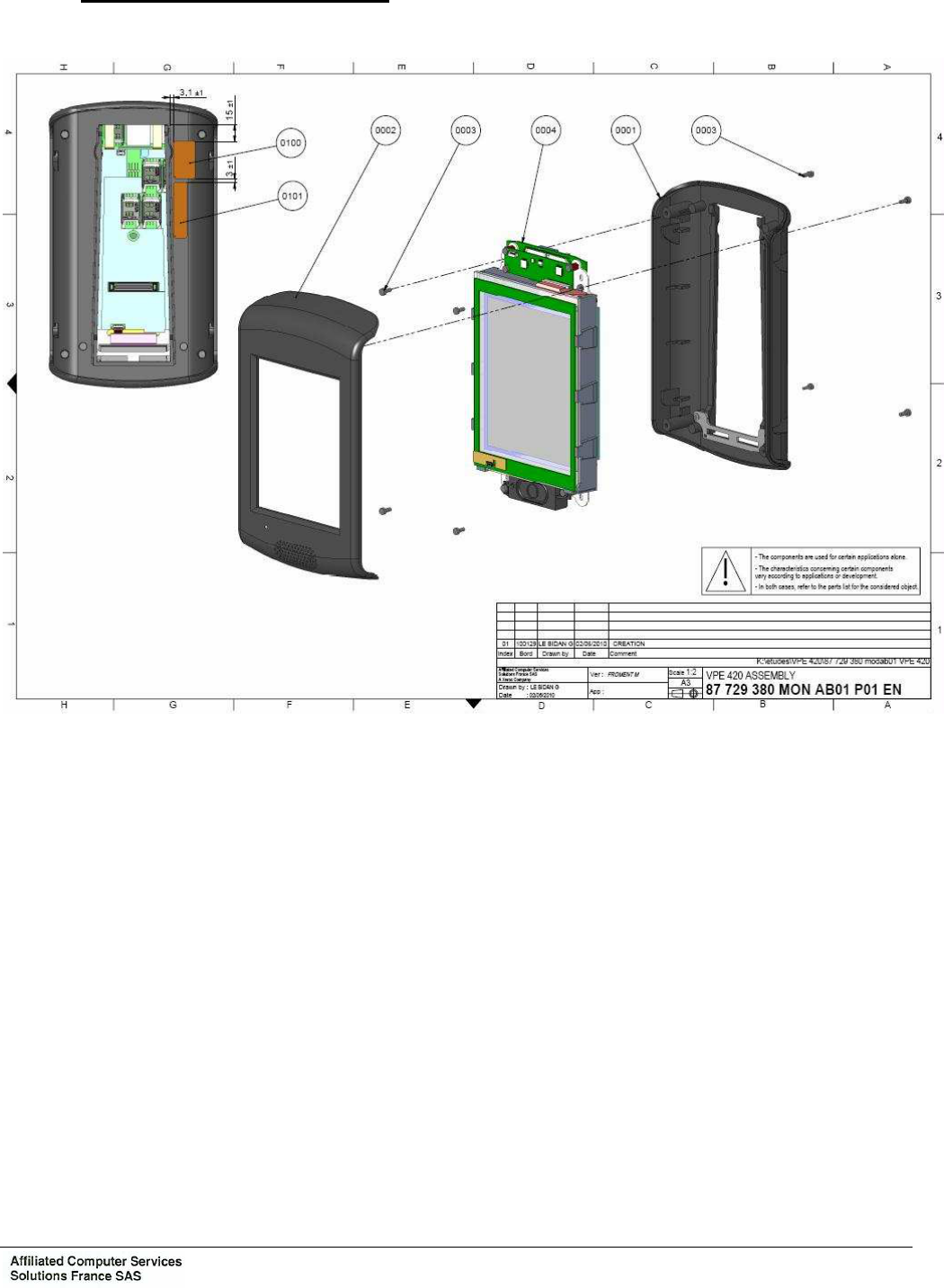
2.5.2 Dismantling/mounting – VPE 420
Figure 8: Dismantling/mounting – VPE 420
Chapter 3: Corrective maintenance
Ce document est la propriété de la société Affiliated Computer Services Solutions France SAS. Il ne peut être reproduit ou communiqué sans son autorisation
Page : 36 OPE2791 Issue: B Texte : EN
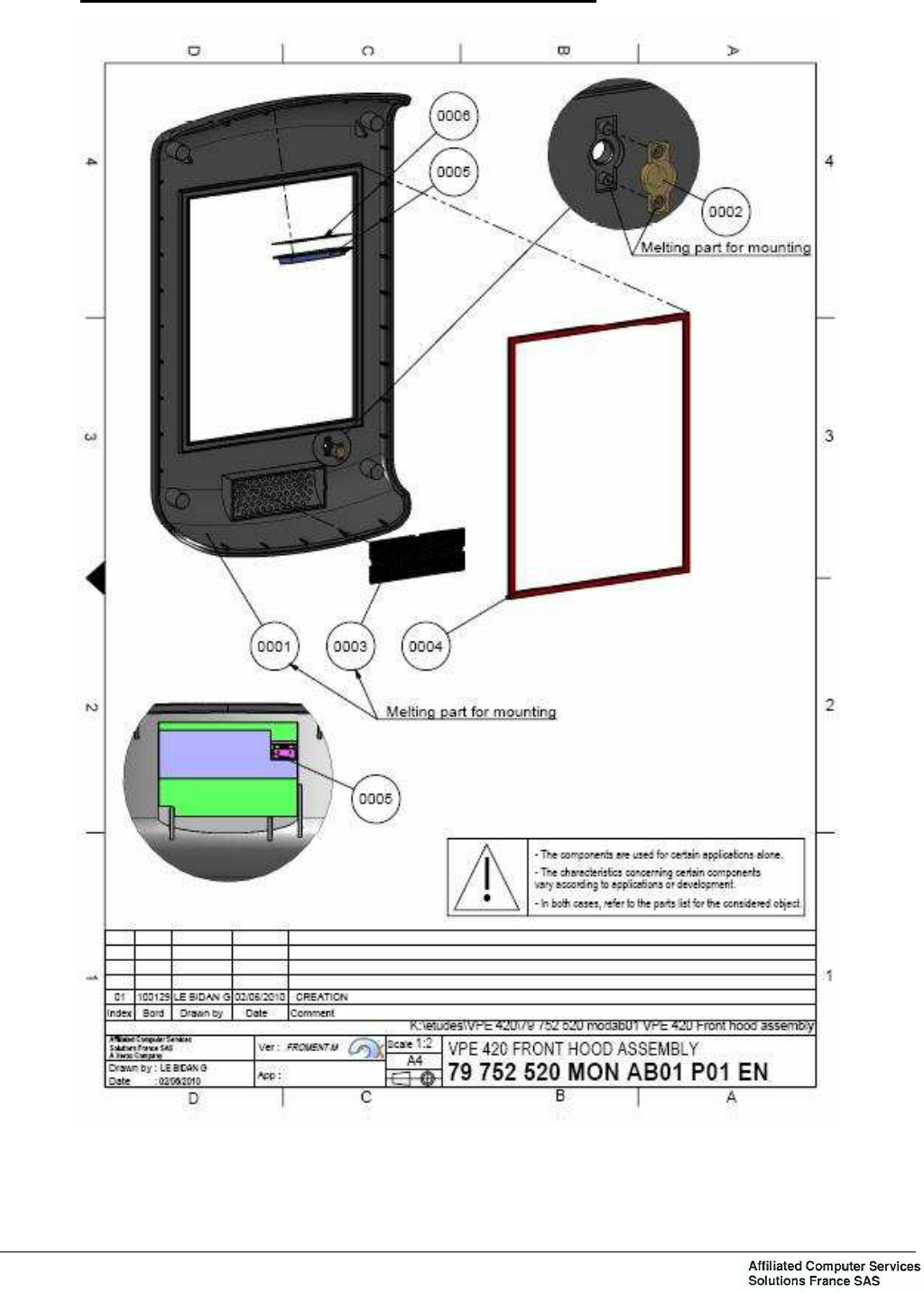
2.5.3 Dismantling/mounting – VPE 420 Front hood assembly
Figure 9: Dismantling/mounting – VPE 420 Front hood assembly
Chapter 3: Corrective maintenance
Ce document est la propriété de la société Affiliated Computer Services Solutions France SAS. Il ne peut être reproduit ou communiqué sans son autorisation
OPE2791 Issue: B Texte : EN Page : 37
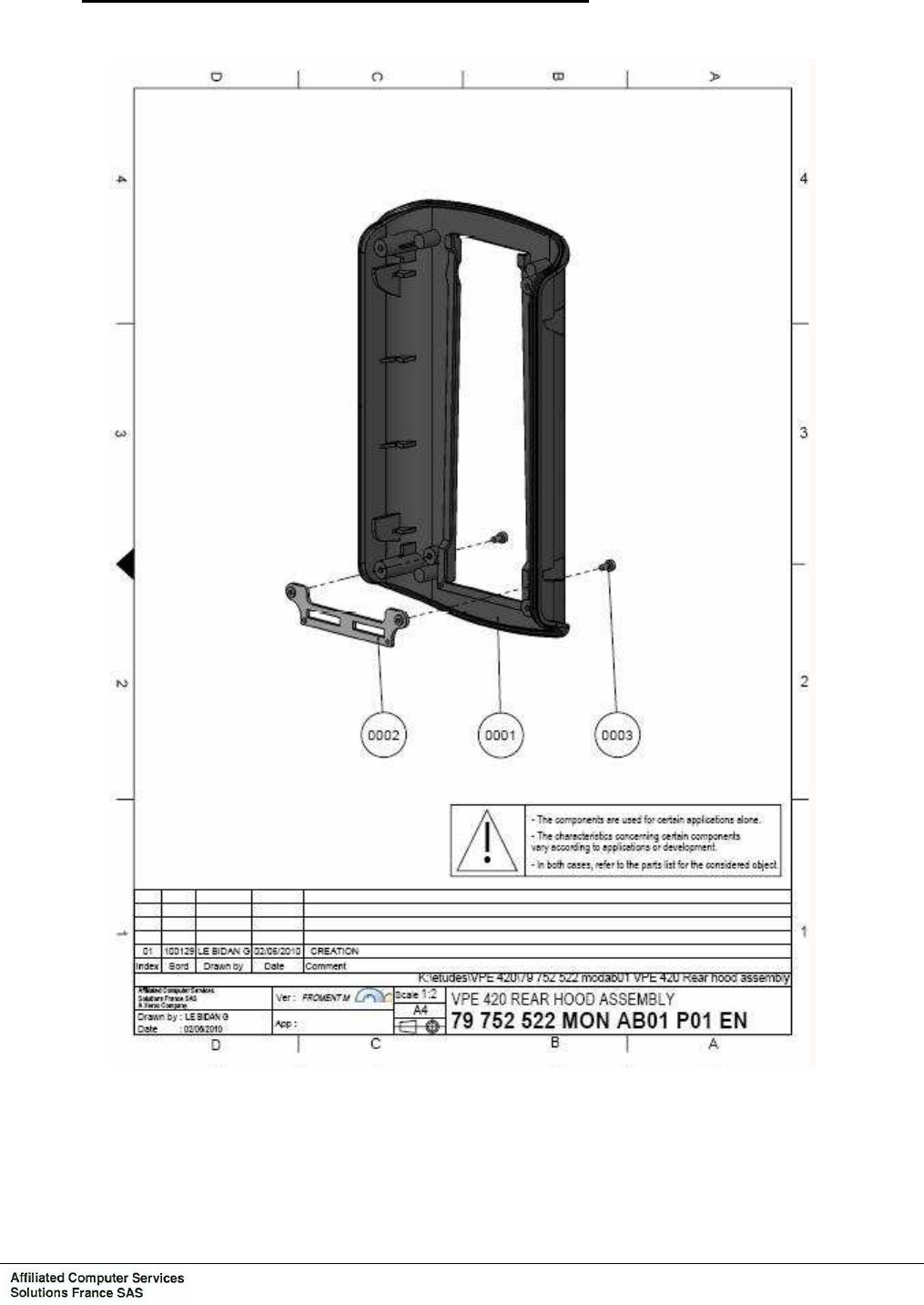
2.5.4 Dismantling/mounting – VPE 420 rear hood assembly
Figure 10: Dismantling/mounting – VPE 420 rear hood assembly
Chapter 3: Corrective maintenance
Ce document est la propriété de la société Affiliated Computer Services Solutions France SAS. Il ne peut être reproduit ou communiqué sans son autorisation
Page : 38 OPE2791 Issue: B Texte : EN
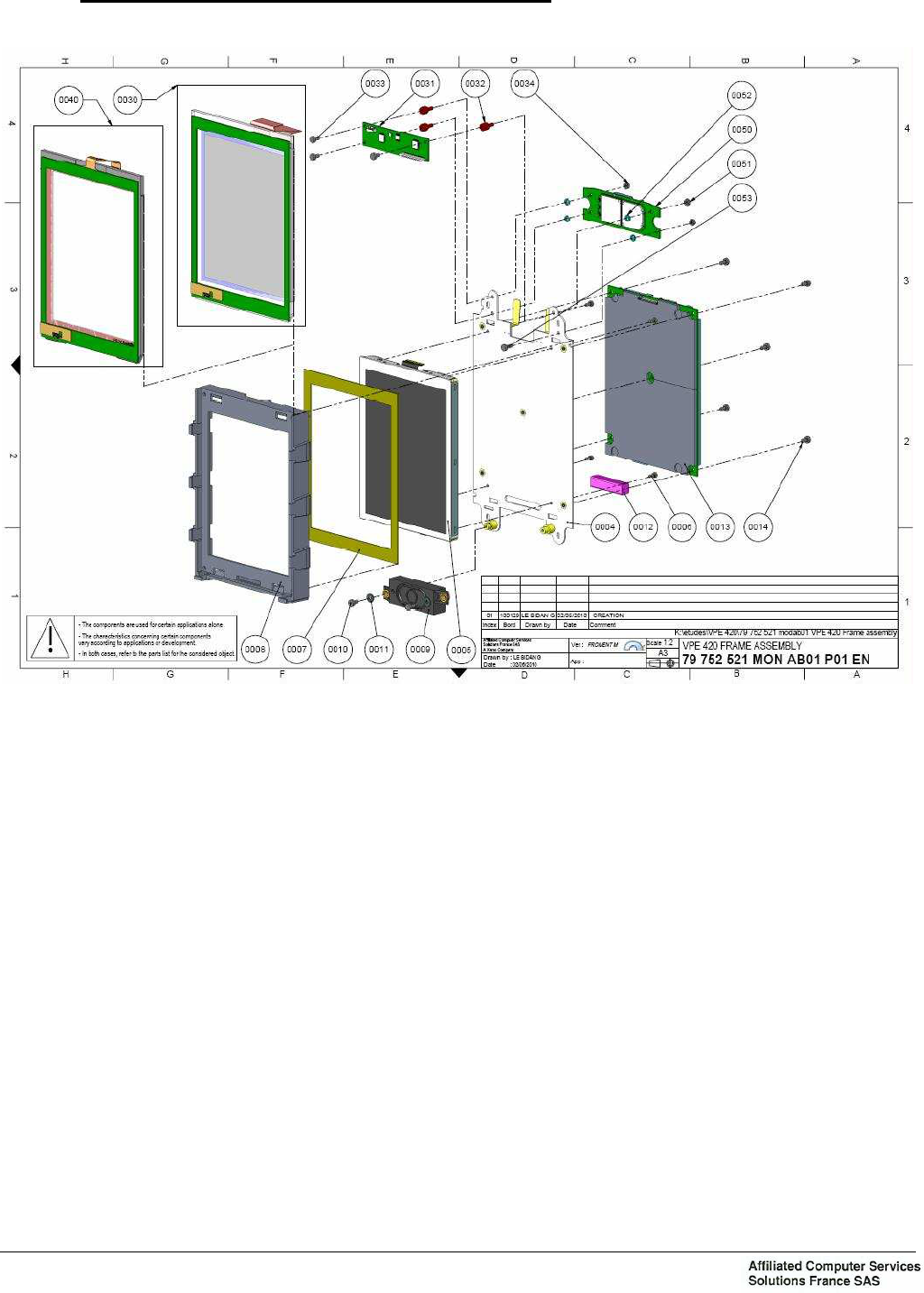
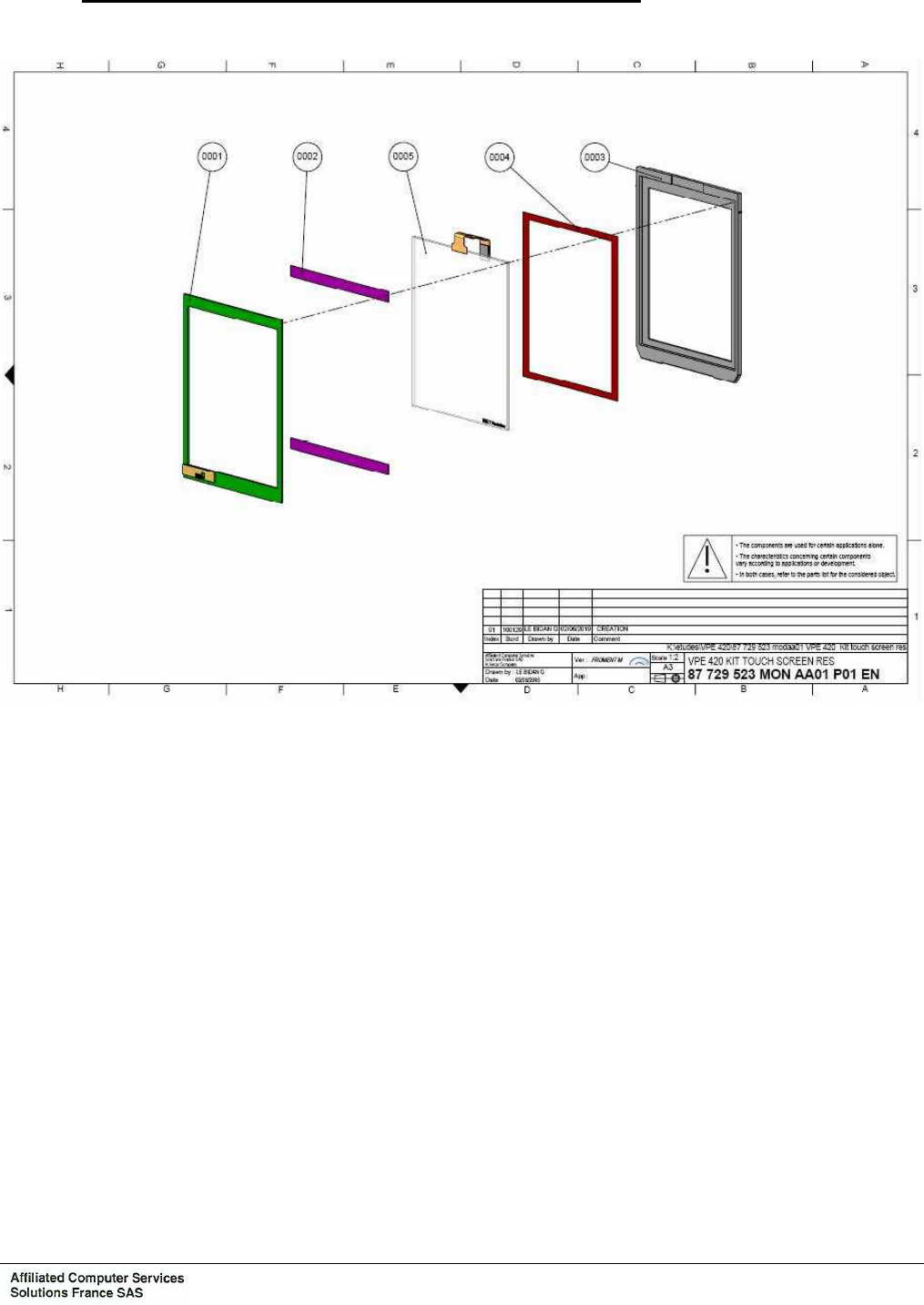
2.5.5 Dismantling/mounting – VPE 420 Frame assembly
Figure 11: Dismantling/mounting – VPE 420 Frame assembly
Chapter 3: Corrective maintenance
Ce document est la propriété de la société Affiliated Computer Services Solutions France SAS. Il ne peut être reproduit ou communiqué sans son autorisation
OPE2791 Issue: B Texte : EN Page : 39
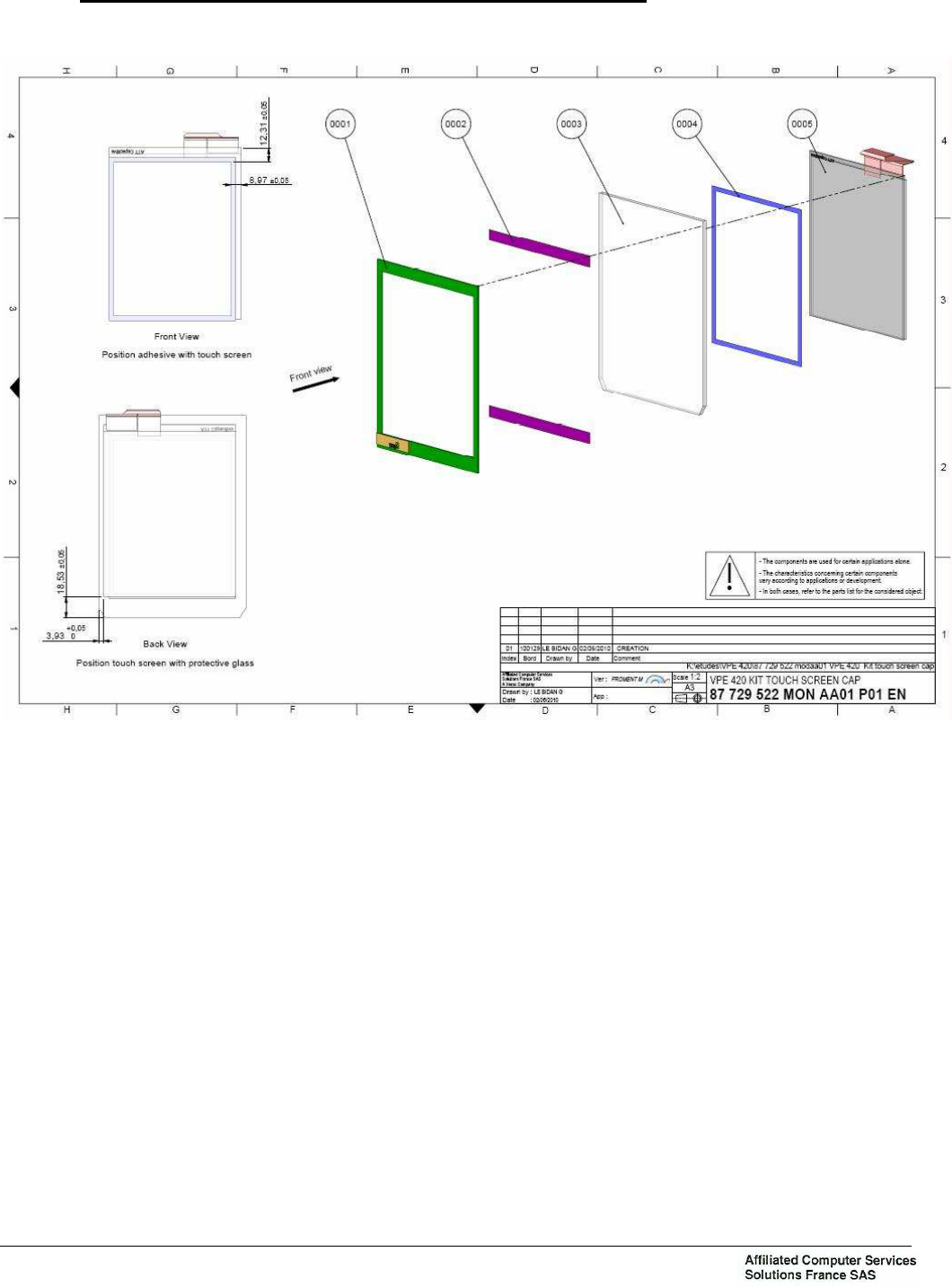
2.5.6 Dismantling/mounting – VPE 420 kit touch screen resistive
Figure 12: Dismantling/mounting – VPE 420 kit touch screen resistive
Chapter 3: Corrective maintenance
Ce document est la propriété de la société Affiliated Computer Services Solutions France SAS. Il ne peut être reproduit ou communiqué sans son autorisation
Page : 40 OPE2791 Issue: B Texte : EN
2.5.7 Dismantling/mounting – VPE 420 kit touch screen capacitive
Figure 13: Dismantling/mounting – VPE 420 kit touch screen capacitive

Annex 1: INTERVENTION AND TROUBLESHOOTING FILE
Ce document est la propriété de la société Affiliated Computer Services Solutions France SAS. Il ne peut être reproduit ou communiqué sans son autorisation
OPE2791 Issue: B Texte : EN Page : 41
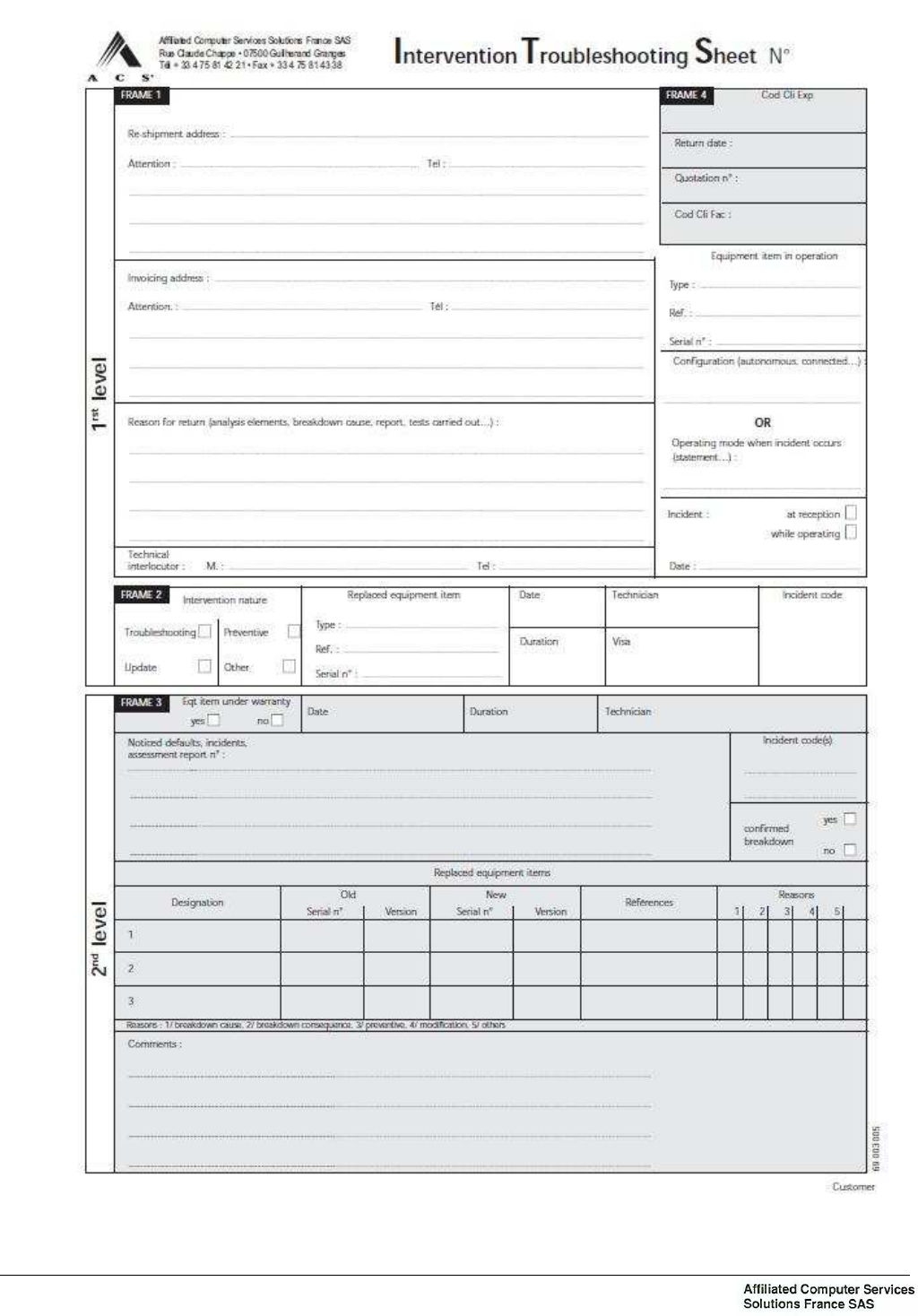
ANNEX 1: INTERVENTION AND TROUBLESHOOTING FILE
1. COMPOSITION
Each file breaks down into five sheets:
− 1 exemplar is retained by the "User" customer’s maintenance department,
− 1 exemplar is returned to the customer after repairs are made,
− 3 exemplars are assigned to the repair and follow-up of the equipment/materiel.
If the customer performs its own 2
nd
level maintenance, it must, on a monthly basis, return the
“Quality-Reliability” (Q.F.) and the “After Sales Service” (S.A.V.) exemplars to ACS Customer
Services so that it can perform functional monitoring of the equipment.
2. MODE OF USE
During each intervention on equipment, the maintenance technician must, imperatively, fill out
an intervention sheet, regardless of whether or not a replacement has been made.
3. DESCRIPTION OF HEADINGS/LINE ITEMS
3.1 FRAME 1
− Re-shipment address
Address at which customer maintenance is conducted, to be filled out in all cases, even if
the customer itself performs the trouble shooting.
− Invoicing address.
− Reason for return
To be filled out in the same manner, in as much detail as possible.
− Materiel/equipment in operation
Complete reference concerning the defective equipment.
3.2 FRAME 2
To be filled out by the 1
st
level maintenance service at the time of intervention.
3.3 FRAME 3
To be filled out by the 2
nd
level maintenance service at the time of intervention, while noting the
exchanges of sub-assemblies and the reason for the exchange.
3.4 FRAME 4
Reserved to ACS.
Annex 1: INTERVENTION AND TROUBLESHOOTING FILE
Ce document est la propriété de la société Affiliated Computer Services Solutions France SAS. Il ne peut être reproduit ou communiqué sans son autorisation
Page : 42 OPE2791 Issue: B Texte : EN

Annex 2: APPENDIX – "PRECAUTIONS AND SAFETY"
Ce document est la propriété de la société Affiliated Computer Services Solutions France SAS. Il ne peut être reproduit ou communiqué sans son autorisation
OPE2791 Issue: B Texte : EN Page : 43
ANNEX 2: APPENDIX – "PRECAUTIONS AND SAFETY"
1. PRESENTATION
This general appendix indicates the precautions and safety instructions to be applied for all
ACS products, Public Transport Toll Activity.
Some paragraphs in this document may be unnecessary for the type of equipment that you
have just acquired.
2. CERTIFICATION
Our quality control begins with inspection and testing of most of the components used in our
products. After assembly, all equipment is tested.
Mastery of the industrial process enabled ACS to obtain ISO 9001 certification.
3. EXTERNAL CONNECTION
3.1 POWER SUPPLY
Before the equipment is connected, make sure to check for compatibility in voltage between
the equipment and the power source (aid: product identification label).
Note : The particular constraints of specific products must also be respected (see PRODUCT
DOCUMENTATION) or the particular chapter in the installation notice for the product under
consideration.
3.2 SIGNALS
The different signals, such as:
− low voltage power supply,
− remote transmission,
− wire alarms,
are Very Low Safety Voltage circuits (TBTS) and must absolutely be interconnected to
equipment whose interfaces are powered by circuits of the same type.
The equipment that is interconnected by the TBTS connections must have the same protective
ground if the signals do not have galvanic insulation (relays, opto-couplers, etc.).
Note : TBTS: a connection whose voltage is ≤ at 60 V continuous or at ≤ 42.4 V alternating.

Annex 2: APPENDIX – "PRECAUTIONS AND SAFETY"
Ce document est la propriété de la société Affiliated Computer Services Solutions France SAS. Il ne peut être reproduit ou communiqué sans son autorisation
Page : 44 OPE2791 Issue: B Texte : EN
4. PRECAUTIONS
Alarm symbol - failure to comply on the part of the operator could have serious
consequences.
Take into account all of the notices affixed in the form of labels or other means.
4.1 DISCONNECTING THE EQUIPMENT
Whenever disconnecting the cable, place the equipment OFF TENSION. If the equipment is
powered by a backup supply, wait for it to be cut off.
4.2 VENTILATION
If the equipment is furnished with aeration vents, never obstruct them so as to avoid the risk of
overheating.
If the equipment is mounted in embedded fashion, leave a clearance zone around the walls in
order to promote heat exchange.
4.3 ELECTRONIC CARD
If the electronic card has a battery or a power cell, do not lay it on a metallic surface.
4.3.1 Special Cases
In the case of cards containing integrated circuits, it is necessary to take precautions to
prevent electrostatic discharges.
Precautions to take for handling these cards:
− Transport and storage in anti-static packaging.
− Leave sensitive components in their packaging until they are used.
− Put the components down on a grounded metal surface BEFORE they are unpacked.
− Do not touch the integrated circuits’ plugs and the card’s conduit paths.
− Wear a grounded anti-static bracelet.
4.4 PACKAGING
If the equipment is delivered in individual packages, save several of these packages for use in
the event equipment is returned to ACS.
4.5 CONTACTLESS FUNCTION FOR INDUSTRY CANADA AND FCC
For Industry Canada IC: 6330A-VPE420
Operation is subject to the following two conditions:
(1) this device may not cause interference, and
(2) this device must accept any interference, including interference that may cause undesired
operation of the device.

Annex 2: APPENDIX – "PRECAUTIONS AND SAFETY"
Ce document est la propriété de la société Affiliated Computer Services Solutions France SAS. Il ne peut être reproduit ou communiqué sans son autorisation
OPE2791 Issue: B Texte : EN Page : 45
For FCC ID: U36-VPE420
Note 1 : Changes or Modifications not expressly approved by the party responsible could void the user’s authority
to operate this device.
Note 2 : This equipment has been tested and found to comply with the limits for a Class B digital device, pursuant
to Part 15 of the FCC Rules. These limits are designed to provide reasonable protection against harmful
interference in a residential installation. This equipment generates uses and can radiate radio frequency
energy and, if not installed and used in accordance with the instructions, may cause harmful interference
to radio communications. However, there is no guarantee that interference will not occur in a particular
installation. If this equipment does cause harmful interference to radio or television reception, which can
be determined by turning the equipment off and on, the user is encouraged to try to correct the
interference by one or more of the following measures:
-- Reorient or relocate the receiving antenna.
-- Increase the separation between the equipment and receiver.
-- Connect the equipment into an outlet on a circuit different from that to which the receiver is connected.
-- Consult the dealer or an experienced radio/TV technician for help.
Note 3 : This device complies with Part 15 of the FCC Rules.
Operation is subject to the following two conditions:
(1) this device may not cause harmful interference, and
(2) this device must accept any interference received, including interference that may cause undesired
operation.
5. SAFETY
Symbol indicating the presence of dangerous voltage inside the equipment (risk of
electrocution).

Annex 2: APPENDIX – "PRECAUTIONS AND SAFETY"
Ce document est la propriété de la société Affiliated Computer Services Solutions France SAS. Il ne peut être reproduit ou communiqué sans son autorisation
Page : 46 OPE2791 Issue: B Texte : EN
6. STANDARDS
EUROPE:
Directive R&TTE 1999/5/EC:
RADIO Standards EN302291-2 or EN300330-2
EMC Standards EN301489-3 and EN50121-3-2
EMF standard EN50364
Directive Automotive 2004/104/EC:
Standard CISPR25
Standard ISO7637-2
Low Voltage Directive 2006/95/EC
Standard EN60950-1 Edition 2006 + Amendment A11 Edition 2009
NORTH AMERICA:
FCC Part 15 Subpart C 15.225
RSS-210 Issue 8 and RSS-Gen Issue 3
RSS-102
7. REPAIRS
All equipment that is replaced must be approved by ACS. The use of unapproved items may
lead to malfunctions, even degradation of the equipment, or may render the equipment
hazardous.
Once the repairs have been made, proceed to perform the necessary controls and testing to
ensure correct operations and worker safety.
8. CONCLUSION
For various reasons, the installation and use of any type of equipment present more or less
serious risks. Adhering to safety rules and installation constraints, and reading the
documentation will enable you to minimize the risks and to correctly operate the equipment,
with complete safety.
When you read this sentence, are you sure of having read the previous pages of the
APPENDIX - "PRECAUTIONS & SAFETY"
If not, take the time to read them
Affiliated Computer Services Solutions France SAS
B.P. 345 – 07503 Guilherand Granges Cedex (France)
Phone : 33 4 75 81 44 44 - Fax : 33 4 75 81 41 00