AEE Wireless Technology CT011 2.4 GHz Wireless Camera User Manual 011CF

Shenzhen AEE Wireless Technology Co., Ltd. 2.4 GHz Wireless Camera 011CF

User Manual

Please read this manual thoroughly before any attempt to install andoperate this product and retain it for your future reference.User's ManualCar Back View Monitor Night Vision & Weather-proof Model:011CFEnglish
TABLE OF CONTENTSSPECIFICATIONS 10TROUBLESHOOTING 11INSTALLATION & USAGELCD InstallationCamera InstallationFind Reversing Power6~78~9INTRODUCTION 1~3NoticeApproval Information (FCC/CE)12~37EU Environmental ProtectionWaste electrical products should not be disposed of with household waste. Please recycle where facilities exist. Check with your Local Authority or retailer for recycling advice.  96~9PRODUCT 4~5Package ContentsFeature Locations445FeaturesMaintenace
INTRODUCTIONThank you for purchasing our car back view monitor. This product eel confident that you will be pleased withthe quality and features of this product.The product is made of alloyed shell and special weather-proof enclosurethat protect it against power and water sprays. It passed the IP67 testing.The product offers a new solution and experience for drivers. Driverscan check the back situations through the camera mounted  on the rearcar, and does not need to look back and forth.This product is only for accessorial reminding tool, thus we will not takeany responsibility for resulting accident.Please read the manual thoroughly before using, and following theinstruction accordingly.worksat ISM-2.4GHz frequency band, which could be legally used worldwidewithout permission. We fNoticeNotice: This product may cause interferences with other wireless equipment that operates at 2.4GHz ISM band. Please turn off one ofthe equipments to eliminate the interference. Product Assurance: This camera will emit electromagnetic wave, just like other wireless products, however, its transmitting power isless than other wireless products such as mobile phones. The 2.4GHzwireless camera meets wireless frequency security standards and recommended indexes while working. These standards and indexes are certificated by academic organization and represent the cogitativeresearch of the scientific workers who continuously explore and annotate the involved fields. So we believe that our products are safefor customers.1
3This product complies with standards including Low Voltage Device Directive 2006/95/EC; EMC Directive 2004/108/EC and R&TTE Directive 1999/5/EC. It passed the subject tests by the authority concerned and is authorized to bear CE mark.CE
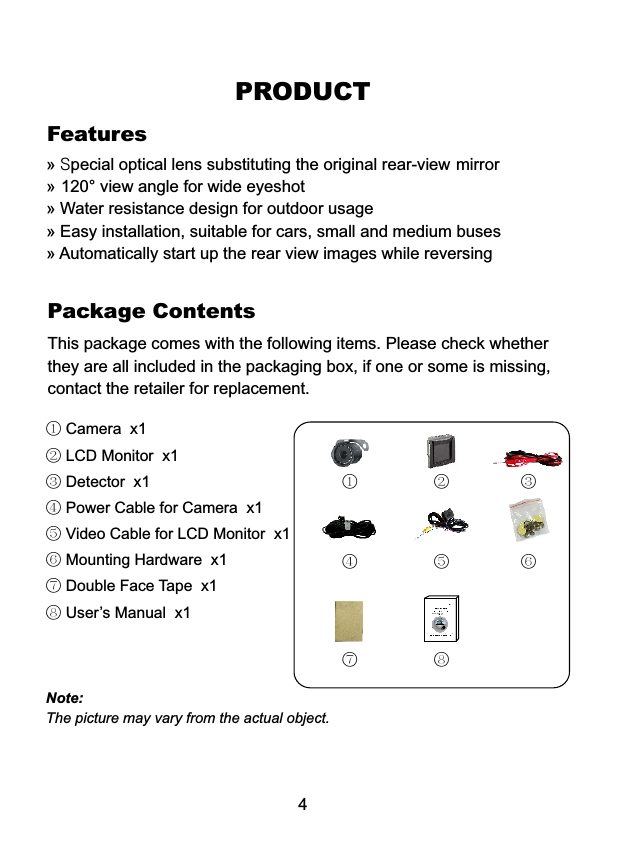
This package comes with the following items. Please check whether they are all included in the packaging box, if one or some is missing, contact the retailer for replacement.Package ContentsPRODUCT4① Camera  x1② LCD Monitor  x1③ Detector  x1④ Power Cable for Camera  x1 ⑤ Video Cable for LCD Monitor  x1⑥ Mounting Hardware  x1 ⑦ Double Face Tape  x1 ⑧ User’s Manual  x1① ② ③④ ⑤ ⑥⑦ ⑧Note:The picture may vary from the actual object.Features»»»»» Special optical lens substituting the original rear-view mirror 120° view angle for wide eyeshot Water resistance design for outdoor usage Easy installation, suitable for cars, small and medium buses Automatically start up the rear view images while reversing
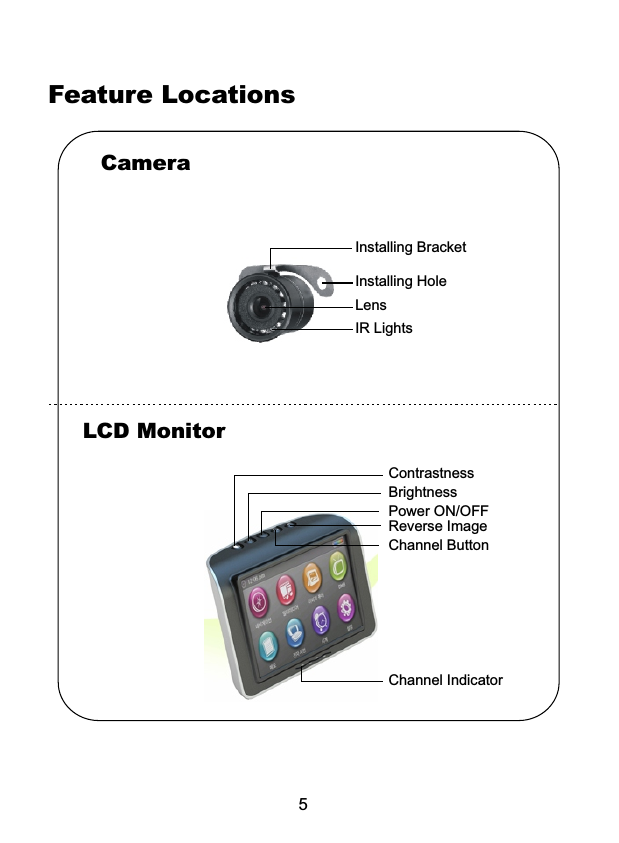
Camera5LCD MonitorFeature LocationsInstalling HoleLensIR LightsInstalling BracketBrightnessContrastnessPower ON/OFFReverse ImageChannel ButtonChannel Indicator
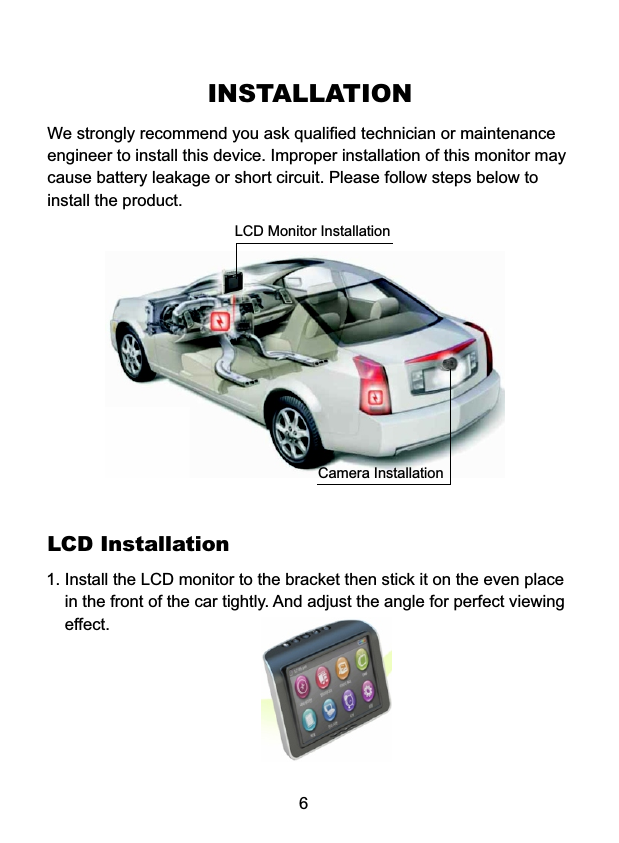
INSTALLATIONWe strongly recommend you ask qualified technician or maintenanceengineer to install this device. Improper installation of this monitor maycause battery leakage or short circuit. Please follow steps below toinstall the product.6LCD Installation1. Install the LCD monitor to the bracket then stick it on the even place     in the front of the car tightly. And adjust the angle for perfect viewing    effect. LCD Monitor InstallationCamera Installation
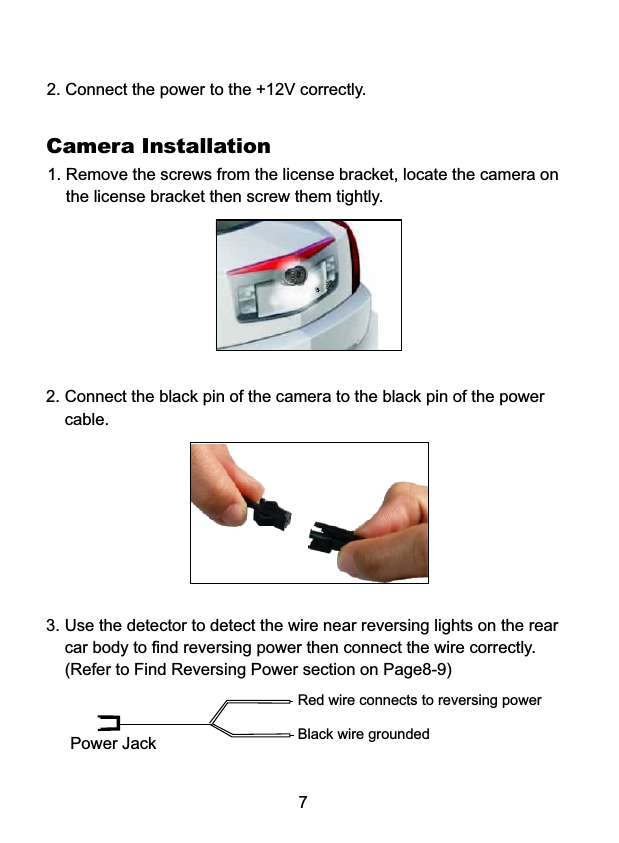
72. Connect the power to the +12V correctly.Camera Installation1. Remove the screws from the license bracket, locate the camera on     the license bracket then screw them tightly. 2. Connect the black pin of the camera to the black pin of the power     cable.3. Use the detector to detect the wire near reversing lights on the rear     car body to find reversing power then connect the wire correctly.     (Refer to Find Reversing Power section on Page8-9)Red wire connects to reversing powerBlack wire groundedPower Jack
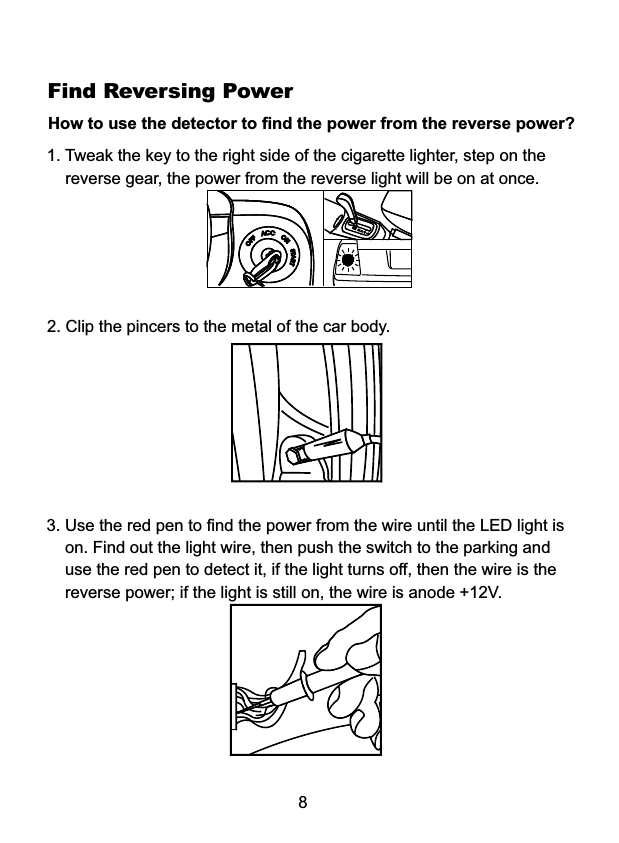
Find Reversing PowerHow to use the detector to find the power from the reverse power? 1. Tweak the key to the right side of the cigarette lighter, step on the    reverse gear, the power from the reverse light will be on at once. 82. Clip the pincers to the metal of the car body.3. Use the red pen to find the power from the wire until the LED light is    on. Find out the light wire, then push the switch to the parking and    use the red pen to detect it, if the light turns off, then the wire is the    reverse power; if the light is still on, the wire is anode +12V.
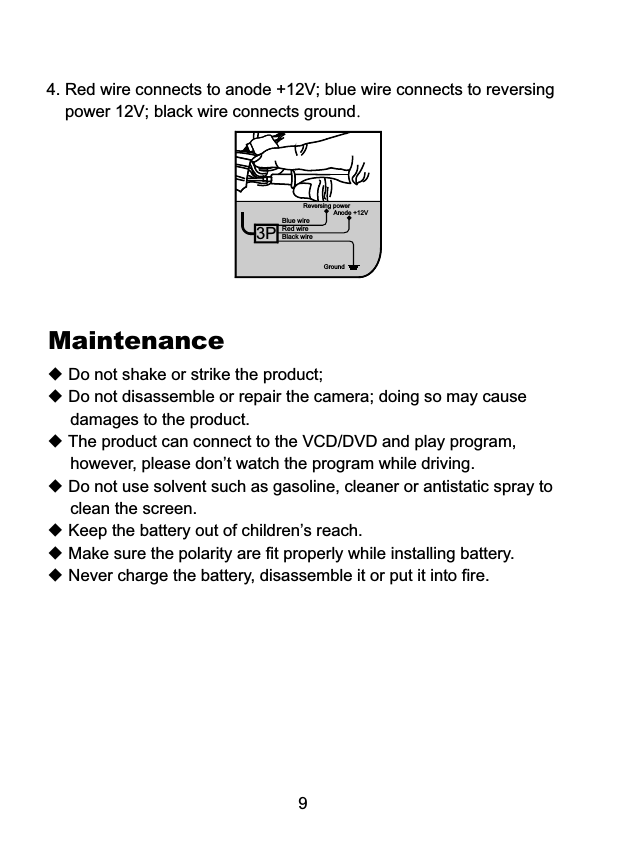
Black wireBlue wireReversing powerGround4. Red wire connects to anode +12V; blue wire connects to reversing     power 12V; black wire connects ground.9Red wireAnode +12V3P◆ Do not shake or strike the product;◆ Do not disassemble or repair the camera; doing so may cause      damages to the product.◆ The product can connect to the VCD/DVD and play program,      however, please don’t watch the program while driving.◆ Do not use solvent such as gasoline, cleaner or antistatic spray to      clean the screen.◆ Keep the battery out of children’s reach.◆ Make sure the polarity are fit properly while installing battery.◆ Never charge the battery, disassemble it or put it into fire.Maintenance
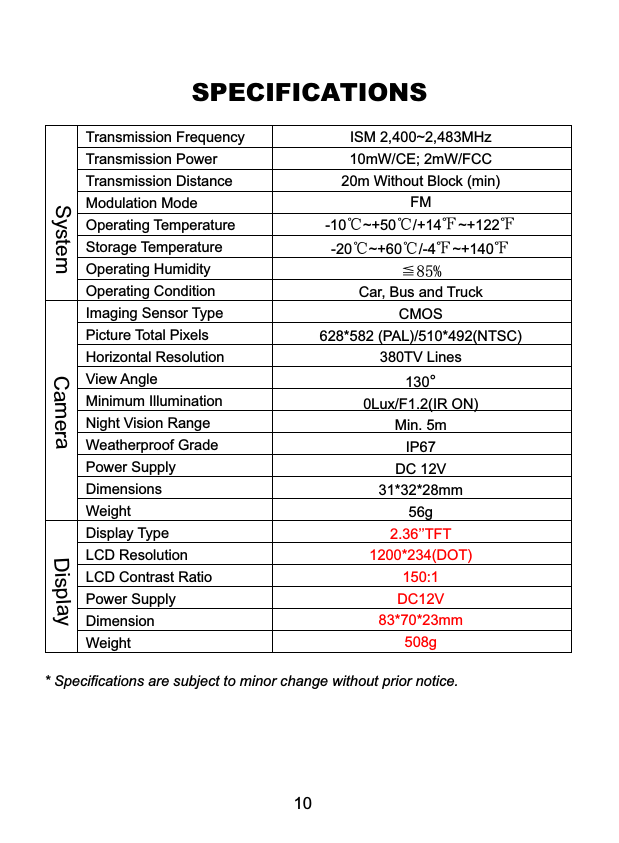
Systemam raC eDplayisSPECIFICATIONS* Specifications are subject to minor change without prior notice.10Transmission FrequencyTransmission PowerTransmission DistanceModulation Mode Operating Temperature Storage TemperatureOperating HumidityOperating ConditionImaging Sensor TypePicture Total PixelsHorizontal ResolutionView Angle Minimum IlluminationNight Vision RangeWeatherproof GradePower SupplyDimensionsWeightDisplay TypeLCD ResolutionLCD Contrast RatioPower SupplyDimensionWeightISM 2,400~2,483MHz10mW/CE; 2mW/FCC20m Without Block (min)FM-10℃~+50℃/+14℉~+122℉-20℃~+60℃/-4℉~+140℉≦85%Car, Bus and TruckCMOS628*582 (PAL)/510*492(NTSC)380TV Lines1300Lux/F1.2(IR ON)Min. 5mIP67DC 12V31*32*28mm56g°2.36’’TFT1200*234(DOT)150:1DC12V83*70*23mm508g
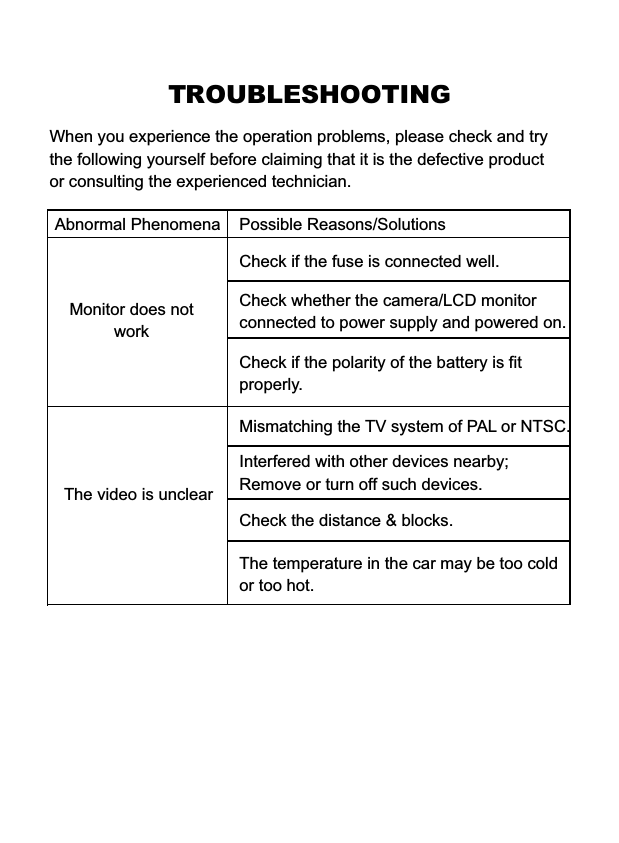
TROUBLESHOOTINGWhen you experience the operation problems, please check and try the following yourself before claiming that it is the defective product or consulting the experienced technician. Abnormal Phenomena Possible Reasons/SolutionsCheck whether the camera/LCD monitorconnected to power supply and powered on.Mismatching the TV system of PAL or NTSC.Check the distance & blocks.Interfered with other devices nearby; Remove or turn off such devices. Monitor does not workCheck if the fuse is connected well.The video is unclearCheck if the polarity of the battery is fit properly.The temperature in the car may be too coldor too hot.

Navigation menu