ANHUI KONKA ELECTRONIC ELST4316S 43 inch FHD Digital LED TV User Manual Parts 1
ANHUI KONKA ELECTRONIC CO., LTD 43 inch FHD Digital LED TV Parts 1
Contents
- 1. User Manual Parts 1
- 2. User Manual Parts 2
- 3. Users Manual Parts 3
User Manual Parts 1
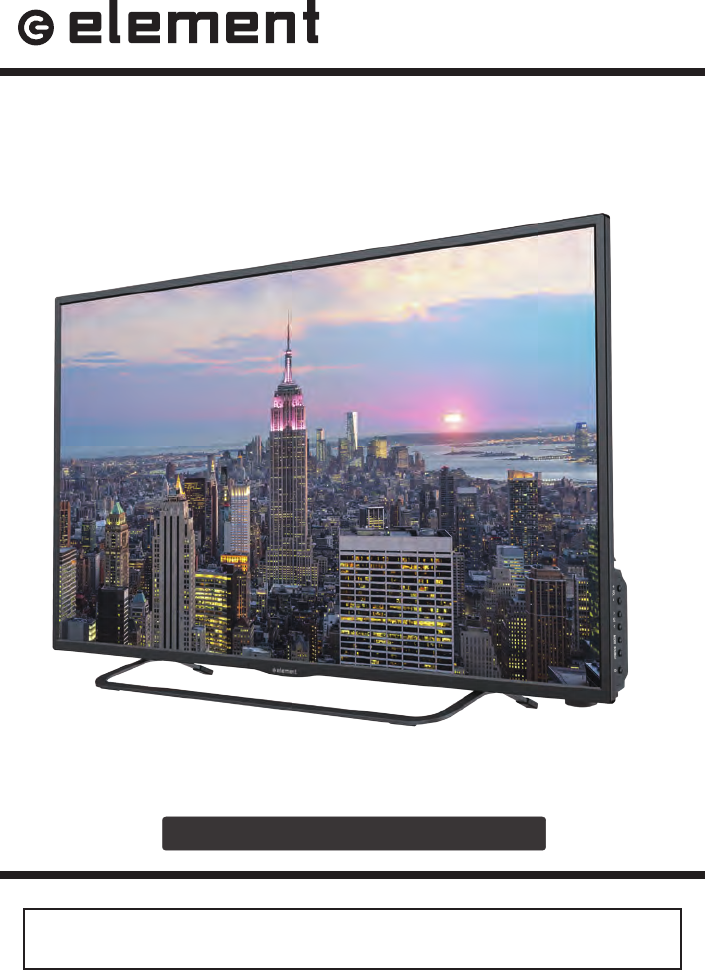
ELST4316S
INSTRUCTION MANUAL
Please read all the instructions carefully before using this TV,
and keep the manual for future reference.
43" FHD Digital LED TV

1
CONTENTS
CONTENTS
Important Safety Instructions 2
Additional Safety Information 3
Preparations 4
What's Included
Front/Side View
Rear View
Wall Mounting
Remote Control
Connecting External Devices 8
Customizing TV Settings 9
Turning On/Off Your TV
Setup Wizard
Navigating The On-screen Display
Streaming
Media
Viewing Photos
Listening To Music
Selecting The Input Source
Channel Selection
Volume Adjustment
Setup
Settings
Audio Settings
Picture Settings
Channel Settings
Time Settings
Network Settings
Lock Settings
Parental Control
Troubleshooting 24
FCC Notes 27
OTT APP Service 28
27
2
IMPORTANT SAFETY INSTRUCTIONS
• Read these instructions – All the safety
and operating instructions should be read
before this product is operated.
•Keep these instructions – The safety
and operating instructions should be
retained for future reference.
•Heed all warnings – All warnings on
the appliance and in the operating
instructions should be adhered to.
•Follow all instructions – All operating
and use instructions should be followed.
• Do not use this apparatus near water
– The appliance should not be used near
water or moisture – for example, in a wet
basement or near a swimming pool, and
the like.
• Clean only with dry cloth.
• Do not block any ventilation openings.
Ins t a l l i n a c c o rda n c e w i t h t h e
manufacturer’s instructions.
• Do not install near any heat sources such
as radiators, heat registers, stoves, or
other apparatus (including that
produce heat.
• Do not defeat the safety purpose of
the polarized or grounding-type plug. A
polarized plug has two blades with one
wider than the other. A grounding-type
plug has two blades and a third grounding
prong. The wide blade or the third
prong are provided for your safety. If the
provided plug does not into your outlet,
consult an electrician for replacement of
the obsolete outlet.
• Protect the power cord from being walked
on or pinched particularly at plugs,
convenience receptacles, and the point
where they exit from the apparatus.
• Only use attachments/accessories
by the manufacturer.
• Use only with the cart, stand, tripod,
bracket, or table specified by the
manufacturer, or sold with the apparatus.
When a cart is used, use caution when
moving the cart/apparatus combination to
avoid injury from tip-over.
• Unplug this apparatus during lightning
storms or when unused for long periods
of time.
• Refer all servicing to qualified service
personnel. Servicing is required when
the apparatus has been damaged in any
way, such as the power-supply cord or
plug is damaged, liquid has been spilled
or objects have fallen into the apparatus,
the apparatus has been exposed to rain
or moisture, does not operate normally, or
has been dropped.
• Please keep the unit in a well-ventilated
environment.
This lightning flash with arrowhead
symbol within an equilateral triangle
is intend ed to ale rt t he us er t o
the presence of non-insulated “dangerous voltage”
within the product’s enclosure that may be of
sufficient magnitude to constitute a risk of electric
shock. The ex cla mat ion poi nt wi thi n an
equilateral triangle is intended to
alert the user to the presence of
important operating and maintenance instructions in
the literature accompanying the appliance.
This equipment is a Class II or double
insula ted electr ical ap pliance. It
has been designed in such a way
that it does not require a safety connection to
electrical earth.
This product meets ENERGY
STAR®guidelines for energy
eff iciency. ENERGY STAR ®
and the ENERGY STAR® mark
ar e registered U.S. marks.
ENERGY STAR® is a registered
m a rk o w n e d b y t h e U.S .
government.
RISQUE DE CHOC ELECTRIQUE NE
PAS OUVRIR
WARNING: To reduce the risk of or electric shock,
do not expose this apparatus to rain or moisture.
The apparatus should not be exposed to dripping or
splashing. Objects filled with liquids, such as vases
should not be placed on apparatus.
WARNING: The batteries shall not be exposed to
excessive heat such as sunshine, or the like.
WARNING: The mains plug is used as disconnect
device, the disconnect device shall remain readily
operable.
WARNING: To reduce the risk of electric shock, do not
remove cover (or back) as there are no user-serviceable
parts inside. Refer servicing to
WARNING: yb dedepmi eb ton dluohs noitalitnev ehT
covering the ventilation openings with items, such as
newspapers, table-cloths, curtains, etc.
WARNING:No naked flame sorces, such as lighted
candles, should be placed on apparatus.
WARNING: The use of apparatus in moderate climates.
personnel.

3
ADDITIONAL SAFETY INFORMATION
To ensure reliableand safe operation of this equipment, please read carefully all the
instructions in this user guide, especially the safety information below.
Electrical Safety
• The TV set should only be connected to a main power supply with voltage that
matches the label at the rear of the product.
• To prevent overload, do not share the same power supply socket with too many other
electronic components.
• Do not place any connecting wires where they may be stepped on or tripped over.
• Do not place heavy items on them, which may damage the leads.
• Hold the main plug, not the wires, when removing from a socket.
• During a thunderstorm, or when not using the television for extended period of time,
turn off the power switch on the back of the television.
• Do not allow water or moisture to enter the TV or power adapter. Do NOT use in wet,
moist areas, such as bathrooms, steamy kitchens or near swimming pools.
• Pulltheplugout immediately, and seek professional help if the main plug or cable
is damaged, liquid is spilt onto the set, if accidentally exposed to water or moisture,
if anything accidentally penetrates the ventilation slots or if the set does not work
normally.
• Do not remove the safety covers. There are no user serviceable parts inside. Trying
to service the unit yourself is dangerous and may invalidate the product’s warranty.
personnel must only service this apparatus.
• To avoidbattery leakage, remove exhausted batteries from the remote control, or
when not using for long period.
• Do not break open or throw exhausted batteries on a
• Do not mix old and new batteries.
• Do not mix Alkaline,Standard (Carbon-Zinc) or Rechargeable (Nickel Cadmium) or
(Nickel Metal Hydride) batteries.
Physical Safety
• Do not block ventilation slots in the back cover. You may place the TV in a cabinet,
but ensure at least 5cm (2'') clearance all around.
• Do not tap or shake the TV screen, or youmaydamage the internal circuits. Take
good care of the remote control.
• To clean the TV use a soft dry cloth. Do not use solvents or petroleum based
• Do not install near any heat sources such as radiators, heat registers, stoves or other
apparatus (including that produce heat.
• Do not defeat the safety purpose of the polarized or grounding-type plug. A polarized
plug has two blades with onewider than the other. A grounding type plug has two
blades and a third grounding prong, the wide blade, or the third prong is provided for
your safety. If the provided plug does not into your outlet, consult an electrician for
replacement of the obsolete outlet.
• Protect the power cord from being walked on or pinched particularly at plugs.
• Unplug the apparatus during lightning storms or when unused for long periods.
• Refer all servicing to a service personnel. Servicing is required when the
apparatus has been damaged in any way, such as power-supply cord or plug is
damaged, liquid has been spilled, or objects have fallen into the apparatus, has been
exposed to rain or moisture, does not operate normally, or has been dropped.
• Please always connectyour television to a power outlet with protective ground
connection.
4
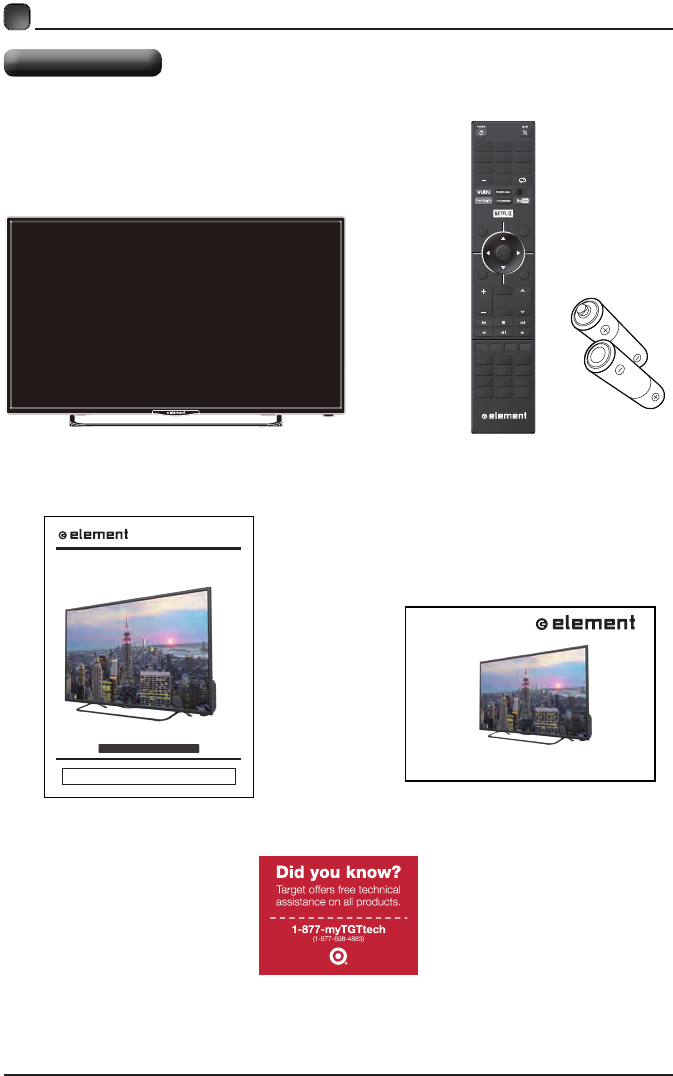
What is Included?
PREPARATIONS
TV Set Remote Control with Batteries
User Manual Quick Start Guide
ELST4316S
INSTRUCTION MANUAL
Please read all the instructions carefully before using this TV,
and keep the manual for future reference.
43" FHD Digital LED TV
OK
ME NU SO UR C E
RETURN EX IT
VOL
USB
REPEAT
CH
C H. L IS
INFO FREEZE ADD/ERASE FAV
T P. MO D E S . M O DE
V- CH IP C C MT S
AS P E C T
HDMI VGA TV
SL E EP AUT O
1
4
7
2
5
8
0
3
6
9
QUICK START GUIDE
Products Technical Assistance
5
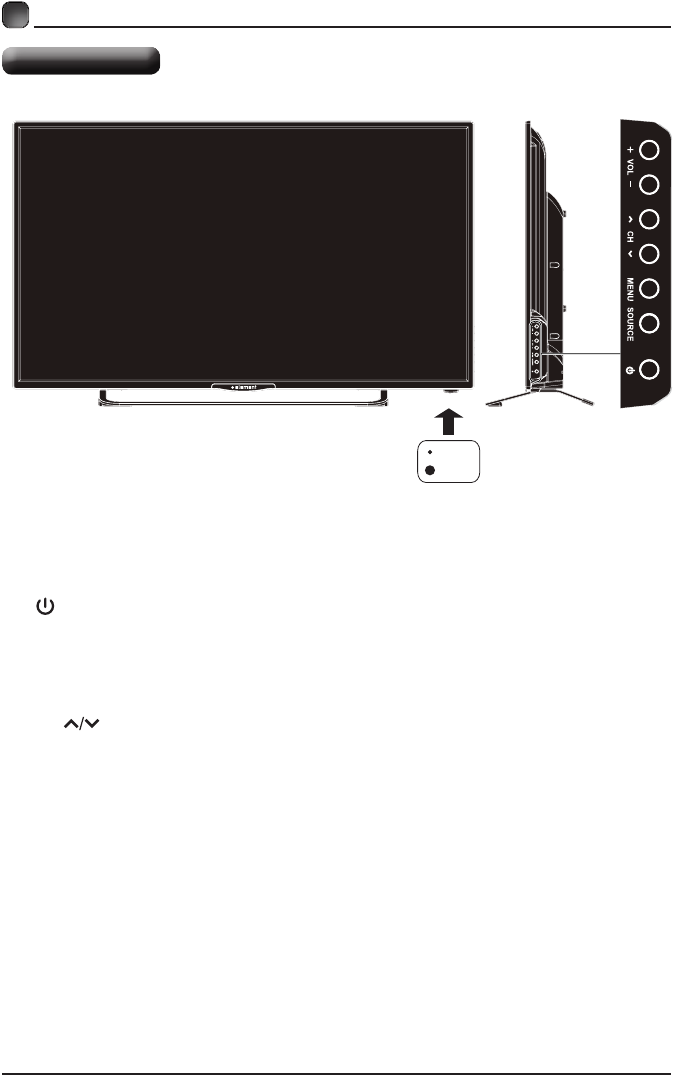
•
Switch the TV between On / Standby mode.
• SOURCE
Press to select among different input signal sources.
• MENU
DisplaytheOSD(onscreendisplay)menu.
• CH
Press to select a channel.
• VOL +/-
Press to adjust the volume.
• LED
The LED light indicates when the TV is activated.
• IR
Infrared Receiver.
PREPARATIONS
Front/Side View
LED
IR
6
PREPARATIONS
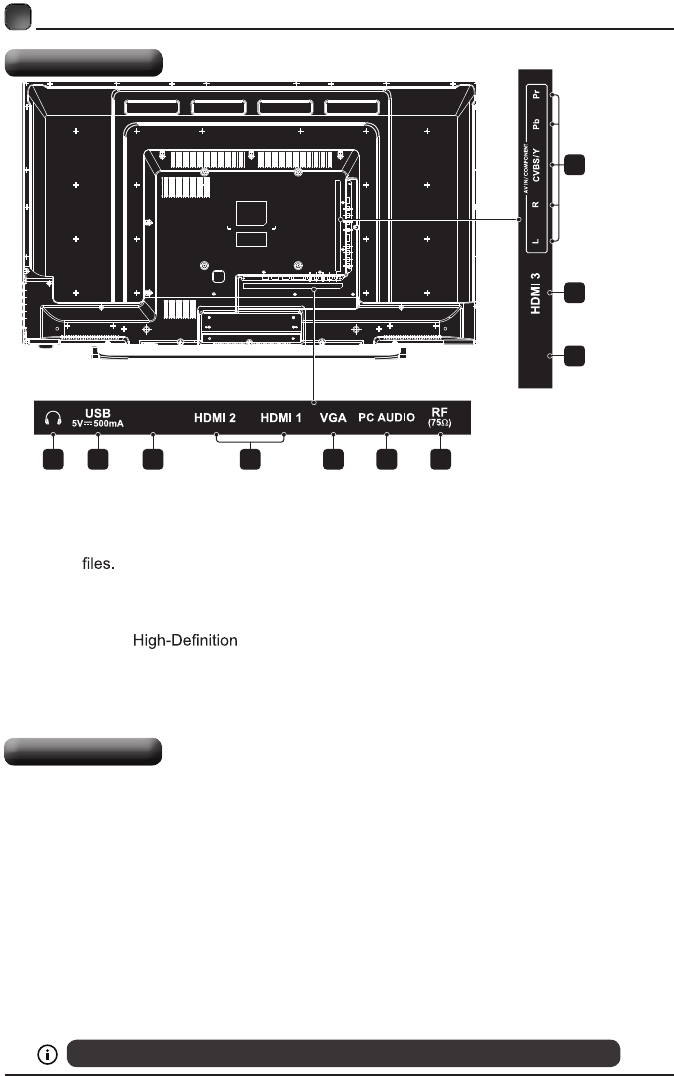
Rear View
Wall Mounting
1.Headphone output
Connect to the Headphones.
2.USB Input
Connect to a USB storage device to play
photo (USB mode)
3. LAN
Network connection port.
4. HDMI Inputs
Connect to a (HD) signal
input device.
5. VGA Input
Connect to a computer or other devices
with a VGA interface.
6. PC Audio Input
Connect to a computer audio output.
7. Antenna Input (75Ω VHF/UHF)
Connect to the antenna (75Ω VHF/UHF)
socket with the RF coaxial cable.
8. Optical Output
Connect a digital sound system to this
jack.
9. COMPONENT/AV Input
Connect to AV devices with composite/
component (Y/Pb/Pr) video and audio
output sockets. COMPOSITE VIDEO and
COMPONENT(Y/PB/PR) share with AUDIO
IN (L/R).
LAN
OPTICAL
1
8
4
9
2 3 5 6 74
Your new TV is heavy, please consult with professional wall mount installer to perform this installation.
The TV is provided with mounting holes for a VESA approved wall mounting bracket (Not Supplied).
Remove the screws holding the base to the base bracket and lift the base away (do not remove the base
mounting brackets). Mount the VESA bracket using 4*M6 isometric threaded screws (Not Supplied).
WARNING
Never place a television set in an unstable location. A television set may fall, causing serious personal
injury or death. Many injuries, particularly to children, can be avoided by taking simple precautions such
as:
-Using cabinets or stands recommended by the manufacturer of the television set.
-Only using furniture that can safely support the television set.
-Ensuring the television set is not overhanging the edge of the supporting furniture.
-Not placing the television set on tall furniture(for example, cupboards or bookcases) without anchoring
both the furniture and the television set to a suitable support.
-Not placing the television set on cloth or other materials that may be located between the television set
and supporting furniture.
-Educating children about the dangers of climbing on furniture to reach the television set or its controls.
If your existing television set is being retained and relocated, the same considerations as above should
be applied.
7
PREPARATIONS
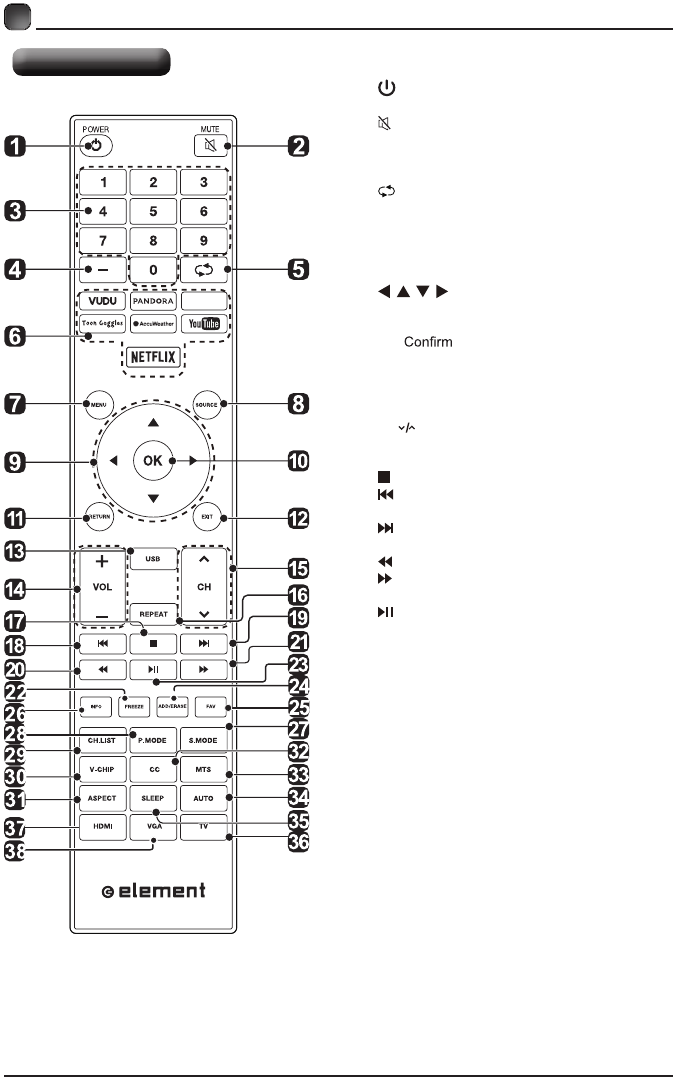
Remote Control
1. :Switch the TV between On and
Standby mode.
2. :Mute and restore TV sound.
3. 0~9:Select a program.(ATV/DTV mode)
4. —:Enter multiple program channel number
such as 2-1.
5. :Return to the previous viewing channel.
6. APP:Press to select the desired APP.
7. MENU:Display the main menu.
8. SOURCE:Select among the different input
signal sources:TV/AV/COMPONENT/HDMI1/
HDMI2/HDMI3/VGA.
9. :Allows you to navigate the on
screen display menus and adjust the system
settings to your preference.
10. OK: the selection.
11. RETURN:Return to previous menu.
12. EXIT:Exit the on screen display menu.
13. USB:Access into the USB directly.
14. VOL+/-:Adjust the volume.
15. CH :Select the channel.
16. REPEAT:Press repeatedly to select the repeat
mode.
17. :Stop the playback.
18. :Skip to the beginning of the previous
chapter/track/photo.
19. :Skip to the beginning of the next chapter/
track/photo.
20. :Reverse playback rapidly.
21. :Advance playback rapidly.
22. FREEZE:Freeze the picture.
23. :Start playback or pause.
24. ADD/ERASE:Add or delete Favorite channels.
25. FAV:Display the favorite channel list.
26. INFO:Display the present screen information
such as the current channel and input source.
27. S.MODE:Select sound mode:standard/music/
movie/user.
28. P.MODE:Select picture mode:dynamic/movie/
energy saving/user/standard.
29. CH.LIST:Display program list.
30. V-CHIP:Set up parental control.
31. ASPECT:Select the aspect ratio.
settings:standard/wide/wide zoom/zoom/Just Scan
(HDMI)/Dot to Dot(VGA).
32. CC:Closed Caption selection:ON/OFF/CC On
Mute.
33. MTS:Switch among different audio
channels:STEREO/MONO/SAP.
34. AUTO:Press to adjust the picture automatically
in VGA source.
35. SLEEP:Set the TV sleep timer: OFF/5/10.../180
/ 240 min.
36. TV:Press to turn to TV mode.
37. HDMI:Access into the HDMI directly.
38. VGA:Access into the VGA directly.