ATBS Technology SC-BT6000C TPMS for iPod, iPhone, iPad User Manual

ATBS Technology Co. TPMS for iPod, iPhone, iPad Users Manual

Users Manual

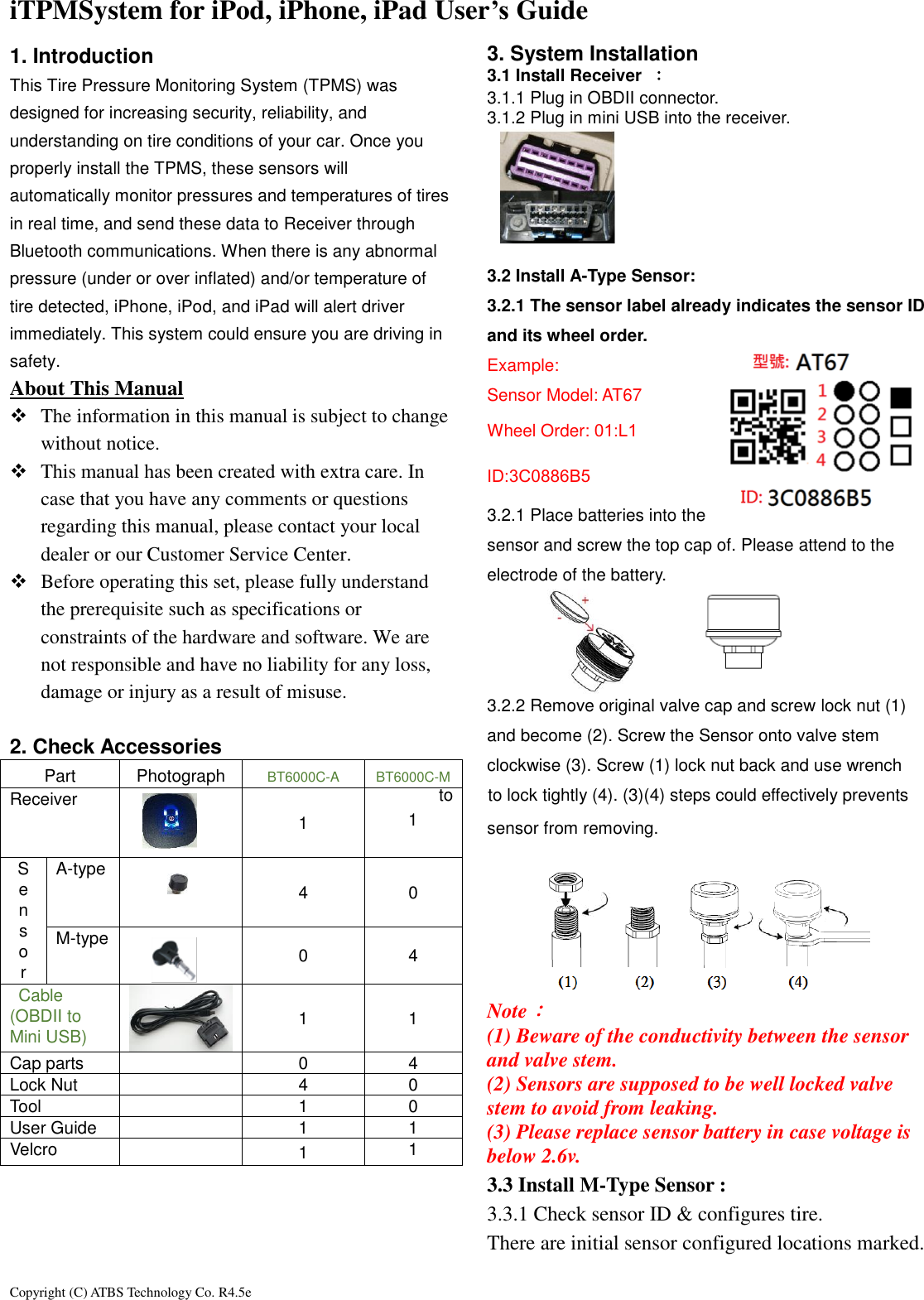
Copyright (C) ATBS Technology Co. R4.5e                                                                                                                                                                 iTPMSystem for iPod, iPhone, iPad User’s Guide   1. Introduction This Tire Pressure Monitoring System (TPMS) was designed for increasing security, reliability, and understanding on tire conditions of your car. Once you properly install the TPMS, these sensors will automatically monitor pressures and temperatures of tires in real time, and send these data to Receiver through Bluetooth communications. When there is any abnormal pressure (under or over inflated) and/or temperature of tire detected, iPhone, iPod, and iPad will alert driver immediately. This system could ensure you are driving in safety.   About This Manual    The information in this manual is subject to change without notice.    This manual has been created with extra care. In case that you have any comments or questions regarding this manual, please contact your local dealer or our Customer Service Center.  Before operating this set, please fully understand the prerequisite such as specifications or constraints of the hardware and software. We are not responsible and have no liability for any loss, damage or injury as a result of misuse.  2. Check Accessories Part Photograph BT6000C-A BT6000C-M Receiver  1  1 S e n s o r A-type  4 0 M-type  0 4   Cable (OBDII to Mini USB)  1 1 Cap parts  0 4 Lock Nut  4 0 Tool  1 0 User Guide  1 1 Velcro  1 1     3. System Installation   3.1 Install Receiver  : 3.1.1 Plug in OBDII connector.   3.1.2 Plug in mini USB into the receiver.        3.2 Install A-Type Sensor: 3.2.1 The sensor label already indicates the sensor ID and its wheel order. Example: Sensor Model: AT67 Wheel Order: 01:L1 ID:3C0886B5 3.2.1 Place batteries into the sensor and screw the top cap of. Please attend to the electrode of the battery.    3.2.2 Remove original valve cap and screw lock nut (1) and become (2). Screw the Sensor onto valve stem clockwise (3). Screw (1) lock nut back and use wrench to    to lock tightly (4). (3)(4) steps could effectively prevents   sensor from removing.       Note: (1) Beware of the conductivity between the sensor and valve stem. (2) Sensors are supposed to be well locked valve   stem to avoid from leaking. (3) Please replace sensor battery in case voltage is below 2.6v. 3.3 Install M-Type Sensor :   3.3.1 Check sensor ID & configures tire. There are initial sensor configured locations marked.
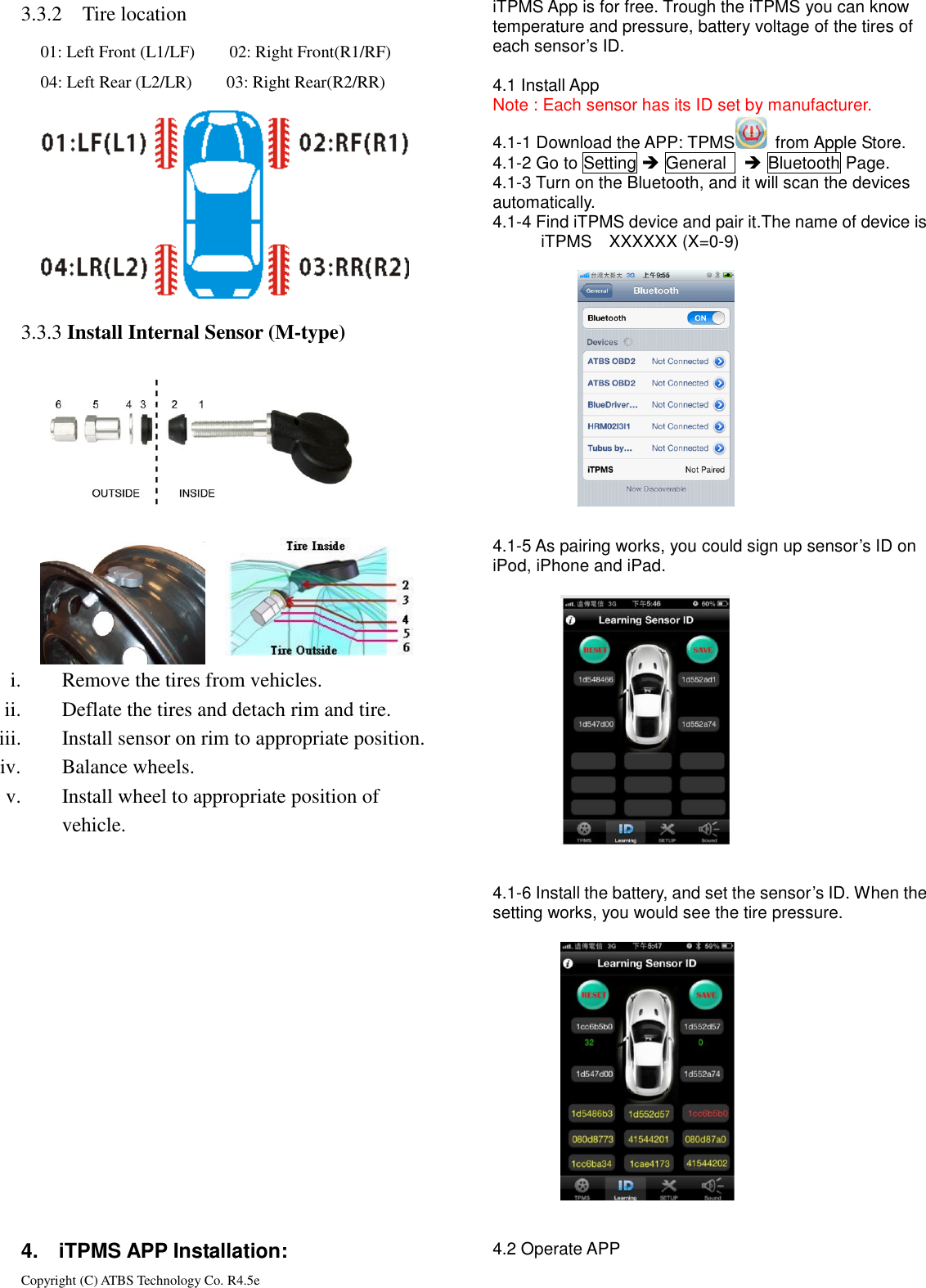
Copyright (C) ATBS Technology Co. R4.5e                                                                                                                                                                 3.3.2 Tire location         3.3.3  3.3.3 Install Internal Sensor (M-type)            i. Remove the tires from vehicles. ii. Deflate the tires and detach rim and tire. iii. Install sensor on rim to appropriate position.   iv. Balance wheels. v. Install wheel to appropriate position of   vehicle.                  4.    iTPMS APP Installation: iTPMS App is for free. Trough the iTPMS you can know temperature and pressure, battery voltage of the tires of each sensor’s ID.  4.1 Install App Note : Each sensor has its ID set by manufacturer. 4.1-1 Download the APP: TPMS   from Apple Store. 4.1-2 Go to Setting  General     Bluetooth Page. 4.1-3 Turn on the Bluetooth, and it will scan the devices   automatically. 4.1-4 Find iTPMS device and pair it.The name of device is   iTPMS    XXXXXX (X=0-9)            4.1-5 As pairing works, you could sign up sensor’s ID on iPod, iPhone and iPad.                       4.1-6 Install the battery, and set the sensor’s ID. When the setting works, you would see the tire pressure.                     4.2 Operate APP 01: Left Front (L1/LF)        02: Right Front(R1/RF) 04: Left Rear (L2/LR)        03: Right Rear(R2/RR)
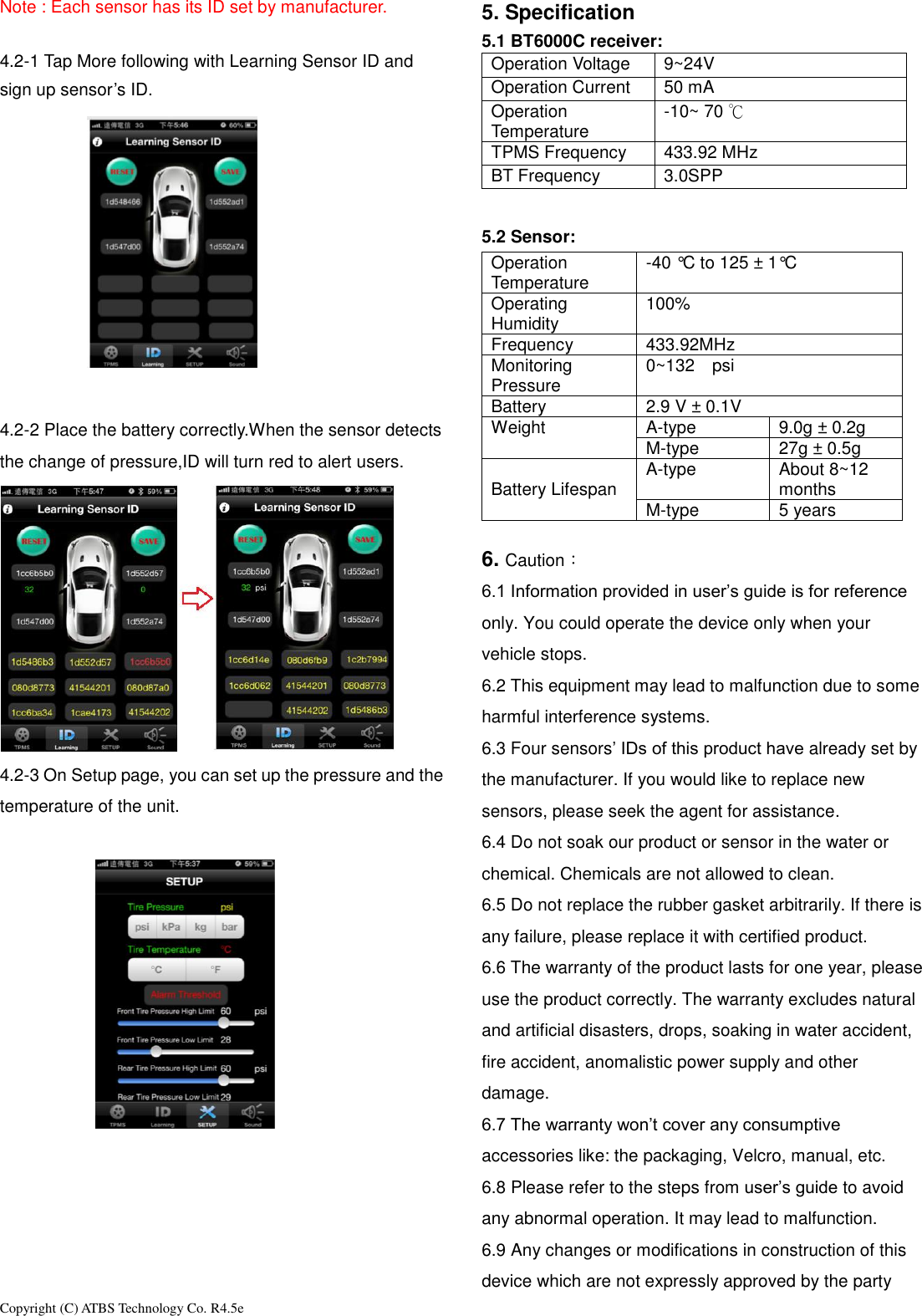
Copyright (C) ATBS Technology Co. R4.5e                                                                                                                                                                 Note : Each sensor has its ID set by manufacturer.  4.2-1 Tap More following with Learning Sensor ID and sign up sensor’s ID.   4.2-2 Place the battery correctly.When the sensor detects the change of pressure,ID will turn red to alert users.  4.2-3 On Setup page, you can set up the pressure and the temperature of the unit.        5. Specification 5.1 BT6000C receiver:   Operation Voltage 9~24V Operation Current 50 mA Operation Temperature -10~ 70 ℃ TPMS Frequency 433.92 MHz BT Frequency 3.0SPP  5.2 Sensor:   Operation Temperature -40 °C to 125 ± 1°C Operating Humidity 100% Frequency 433.92MHz Monitoring Pressure 0~132  psi    Battery 2.9 V ± 0.1V Weight A-type 9.0g ± 0.2g M-type 27g ± 0.5g  Battery Lifespan A-type About 8~12 months M-type 5 years  6. Caution: 6.1 Information provided in user’s guide is for reference only. You could operate the device only when your vehicle stops. 6.2 This equipment may lead to malfunction due to some harmful interference systems. 6.3 Four sensors’ IDs of this product have already set by the manufacturer. If you would like to replace new sensors, please seek the agent for assistance. 6.4 Do not soak our product or sensor in the water or chemical. Chemicals are not allowed to clean.   6.5 Do not replace the rubber gasket arbitrarily. If there is any failure, please replace it with certified product.   6.6 The warranty of the product lasts for one year, please use the product correctly. The warranty excludes natural and artificial disasters, drops, soaking in water accident, fire accident, anomalistic power supply and other damage. 6.7 The warranty won’t cover any consumptive accessories like: the packaging, Velcro, manual, etc. 6.8 Please refer to the steps from user’s guide to avoid any abnormal operation. It may lead to malfunction. 6.9 Any changes or modifications in construction of this device which are not expressly approved by the party
Copyright (C) ATBS Technology Co. R4.5e                                                                                                                                                                 responsible for compliance could void the user’s authority to operate the equipment.   6.10 Please follow the instruction of power supply. Wrong process of power supply would cause malfunction. Please use the certified battery. Improper battery or wrong procedures will affect efficiency or cause malfunction of sensors. 6.11 Please observe the pressure, temperature and voltage of battery. If the sensor hasn’t worked for a long time, please check your sensor. 6.12 FCC Notice           This device complies with Part 15 of the FCC Rules. Operation is subject to the following two conditions (1) the device may not cause harmful interference, and (2) this device must accept any interference received, including interference that may cause undesired operation. This equipment has been tested and found to comply with the limits for a Class B digital device, pursuant to Part 15 of the FCC Rules. These limits are designed to provide reasonable protection against harmful interference in a residential installation. This equipment generates, uses and can radiate radio frequency energy and, if not installed and used in accordance with the instructions, may cause harmful interference to radio communications. However, there is no guarantee that interference will not occur in a particular installation. If this equipment does cause harmful interference to radio or television reception, which can be determined by turning the equipment off and on, the user is encouraged to try to correct the interference by one or more of the following measures: Reorient or relocate the receiving antenna. Increase the separation between the equipment and receiver. Connect the equipment into an outlet on a circuit different from that to which the receiver is connected.   Consult the dealer or an experienced radio/TV technician for help. Notice: Any modifications or any system alterations cannot guarantee the user’s rights is protected continuously.

Navigation menu