ATEN Technology IOGEAR KMGKM571R RF 2.4G Keyboard User Manual
ATEN Technology, Inc., dba IOGEAR RF 2.4G Keyboard
user manual

1
IogearRF2.4GKeyboardUser’sManual
Thank you for your purchase of our iogear RF 2.4G Keyboard. For your own
safety and convenience, please read this manual thoroughly before using this
product. After you have read this manual, please keep it in a place for
reference when necessary.
Contents in the package
These following items are included in the package. Please make sure all items
are complete when open the package at first time. If there is any item missing
or damaged, please contact the reseller where the product was purchased or
our support center.
Iogear RF 2.4G Keyboard x 1
Manual x 1
USB receiver x1
AA Alkaline batteries x2
Installation Procedure
A. Setting up the Dongle Receiver
1. Plug the dongle receiver into an available USB port.
2. Wait for operating system to install drivers for the dongle receiver, keyboard
and mouse.
B. Setting up the Keyboard and Mouse
1. Open the keyboard’s battery compartment cover and insert the two pieces
of AA Alkaline batteries. Make sure they are properly installed.
2. Open the top cover, the power will be turned on automatically.
3. Usually the keyboard and mouse have bound in the factory, and it can be
used after inserting batteries. If the keyboard and mouse cannot be
recognized from system, please follow steps below.
4. Press the ID button of receiver and the LED light will start to blink.
5. Press the RESET button of keyboard and the LED light will stop blinking.
6. If the keyboard and mouse cannot be connected after setting, please
repeat the steps 4~6 to reset the ID button.
Battery Low

2
1. Built in LED light for low power indicator. Low-Battery is indicated by the
illumination of the LED light, which is located on the top-left. Please replace
the battery when the LED lights up.
2. While the keyboard is entered sleep mode, please press any keyboard
button or mouse button to wake it up.
3. We recommend using alkaline batteries for the keyboard.
4. You may need to reset the keyboard connection status after replacing new
batteries for the keyboard.
Attention
ATEN Technology Inc., dba Iogear and its respective distributors and resellers are
not responsible for any malfunction, damage or personal injury incurs which
are caused by:
Any malfunction, damage or personal injury caused by the malfunctioning or
damage of the user’s personal computer or misuse of this product. Any
attempt to dismantle, change or modify this product in any manner.
Warning
Please do not use this product in ashy, wet, or oily environment(s). Failure to
do so may shorten the life of this product and may cause bodily harm.
Please keep this product away from radio frequency interruption area(s).
This is not an outdoor product. This product is not for outdoor use. Exposing
the product outdoors may cause damage to it.
Please do not use alcohol, petroleum, benzene or thinner-based solutions to
clean this product. We recommend wiping this product with a damp cloth.
Warranty Information
This product is backed by a One-Year Manufacturer’s Warranty, starting from
the date of purchase. The warranty covers for free repair in accordance with
the contents stated herein but does not cover wear and tear and any
malfunction or damages as results of improper usage as stated in this manual.
Product Appearance
3
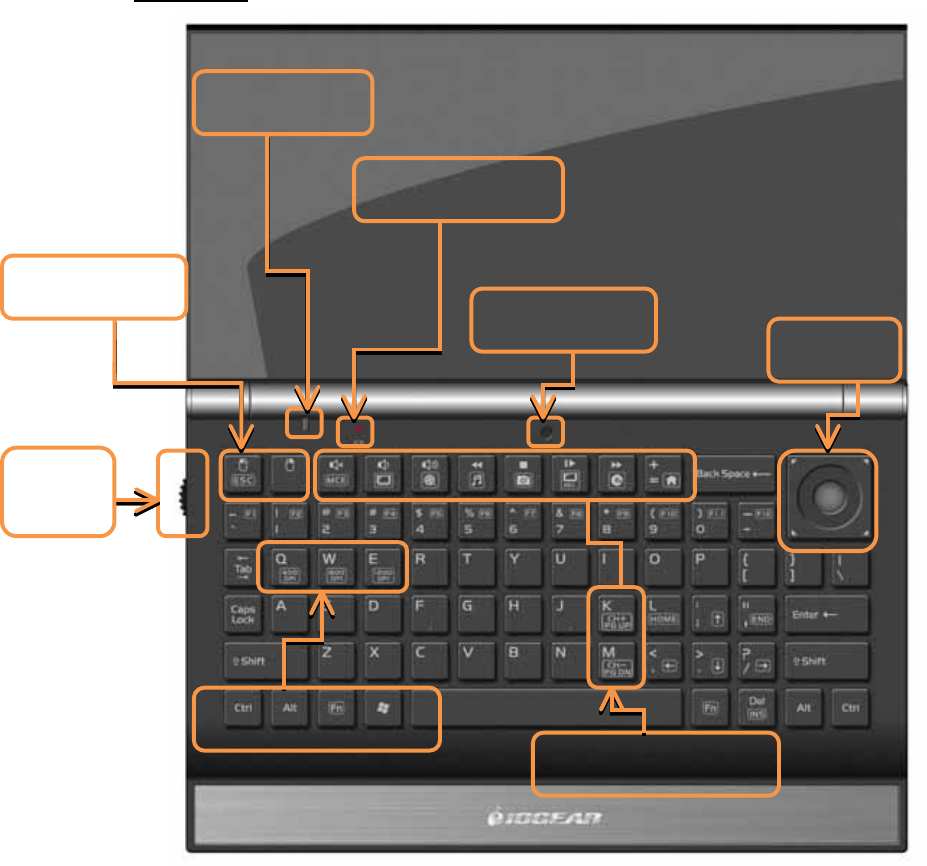
Front View
Media Center Keys
Mouse Keys
Scroll
W
heel
Trackball
Light Sensor
Battery Indicate
Trackball Resolution
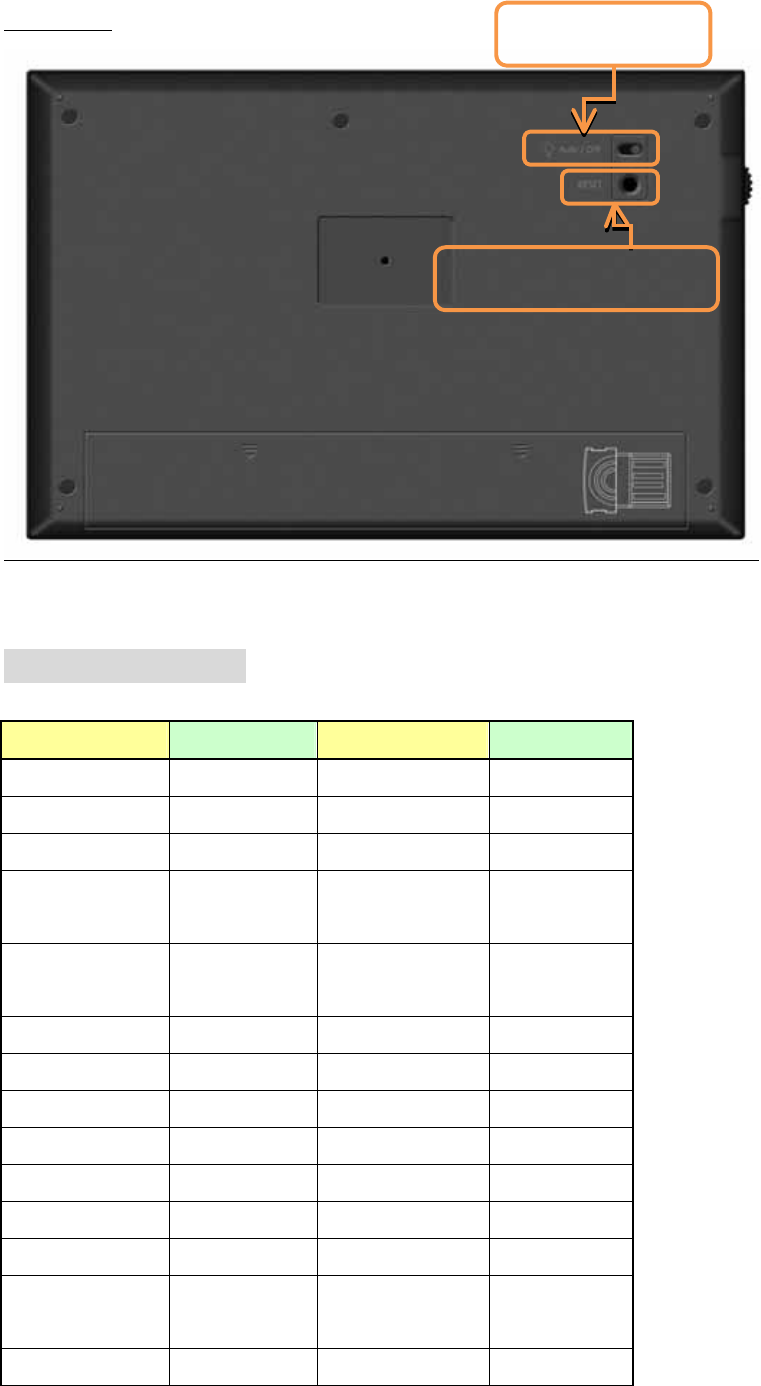
Power Switch
4
Back View
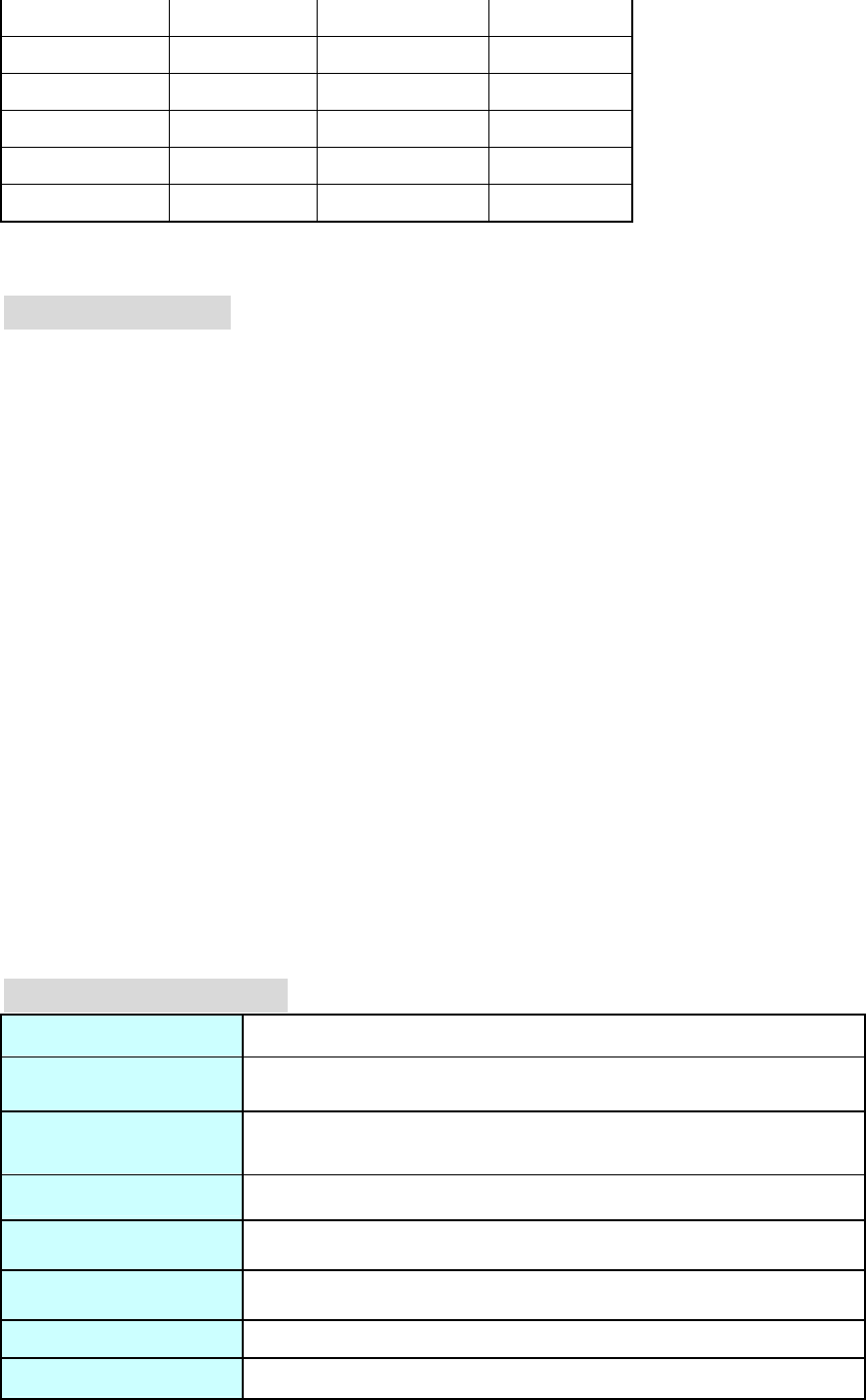
Hot Key Functions
Key Function Key Function
mouse left Fn+Q 400DPI
mouse right Fn+W 800DPI
mute Fn+E 1200DPI
Volume
decrease Fn+J Page Up
Volume
increase Fn+K CH+
Pre-Track Fn+L Home
Stop Fn+; ↑
Play/Pause Fn+’ END
Next-Track Fn+N Page Down
Fn+mouse left ESC Fn+M CH-
Fn+, ←
Fn+mute MCE Fn+. ↓
Fn+volume
decrease My TV Fn+/ →
Fn+volume My Video Fn+Del INS
Backlight Switch
RF Signal Reset Button
5
increase
Fn+Pre-Track My Music
Fn+Stop My Picture
Fn+Play/Pause Record TV
Fn+Next-Track DVD
Fn+ + Home
Product Features
Palm size cordless mini keyboard with trackball Mouse Function and Mouse
right, left button &scroll wheel functions.
Stylish blue LED backlight keys.
Automatically backlight adjust.
Connect your HTPC to control Windows Media Center friendly.
Built in 7 multimedia keys: Skip back, Skip forward, Play/Pause, Stop, Mute,
Volume up, Volume down, WWW.
10 Media Center Keys: MCE, My TV, My Video, My Music, My Picture, Record
TV, DVD, Home, CH+, CH-.
1200DPI precisely laser trackball.
2.4HGz Wireless.
Ultra-micro USB receiver.
Separate 78 channels for KB with unique ID to avoid interference.
Auto Power-Saving mode for extended battery life.
Hold the slip resistance design on both sides.
Effective range up to 30-ft (10m) the perfect data-input solutions for Digital
Living-Rooms!
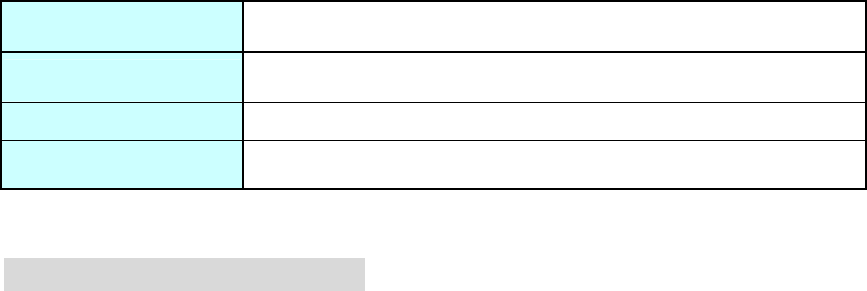
Product Specification
Dimensions 160x 105 x 23mm
Weight g
Key number 71 Key for US Version (By Language)
Hot Key 17 hotkeys
Interface USB
Keystroke Life 5 Millions
Key Switch Type Membrane
Key Operating Force
6
Power Consumption DC 5V ± 5%,
Safety Approval FCC Class B, CE
Operation System Windows 2000 / XP / XP x64 / Vista x86 x64 /7 x86 x64
Accessory USB Receiver
FCC Statement on CLASS B
This equipment has been tested and found to comply with the limits foe a Class B
digital device, pursuant to part 15 of the FCC Rules. These limits are designed to
provide reasonable protection against harmful interference in a residential installation.
This equipment generates uses and can radiate radio frequency energy and, if not
installed and used in accordance with the instructions, may cause harmful
interference to radio communications. However, there is no guarantee that
interference will not occur in a particular installation. If this equipment does cause
harmful interference to radio or television reception, which can be determined by
turning the equipment off and on, the user is encouraged to try to correct the
interference by one or more of the following measures:
-Reorient or relocate the receiving antenna.
-Increase the separation between the equipment and receiver.
-Connect the equipment into and outlet on a circuit different from that to which the
receiver is connected.
-Consult the dealer or an experienced radio / TV technician for help.
You are cautioned that changes or modifications not expressly approved by the party
responsible for compliance could void your authority to operate the equipment.
All brand names, trademarks and logos are the properties of their respective owners.
FCC ID: QLEKMGKM571R