AVATARCONTROLS AFCS01 Bluetooth Speaker User Manual

SHENZHEN AVATARCONTROLS CO., LTD. Bluetooth Speaker

User Manual

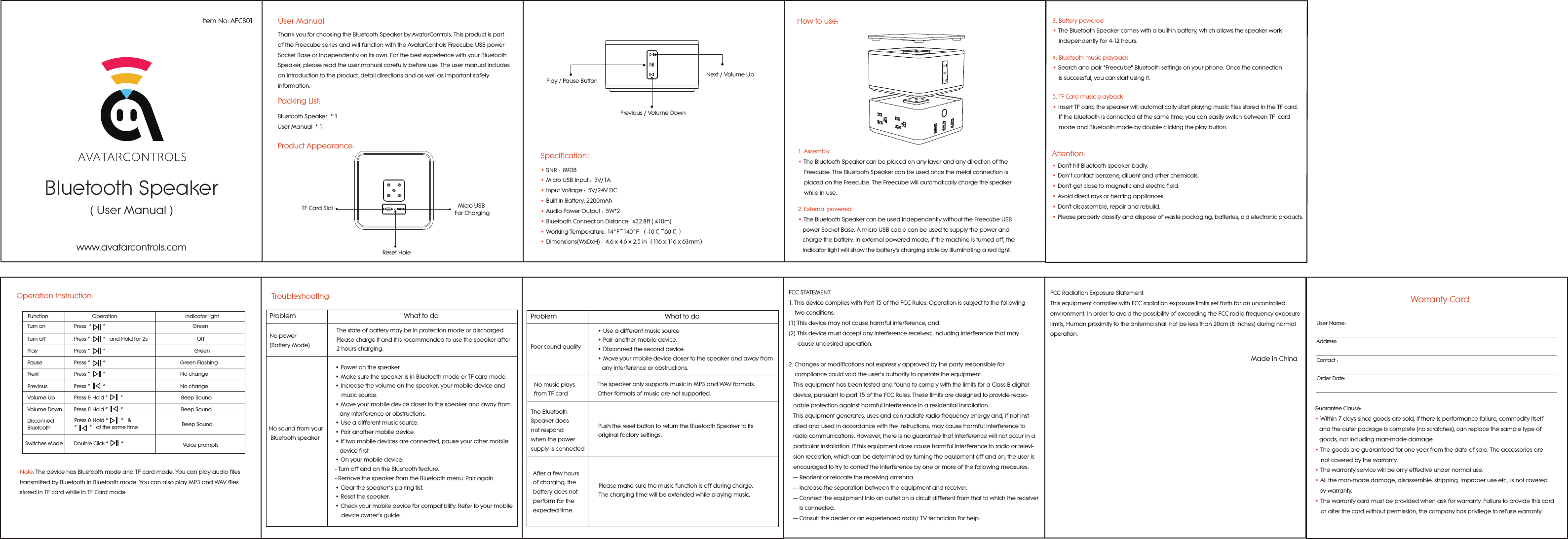
Bluetooth Speaker( User Manual )Item No: AFCS01www.avatarcontrols.comUser ManualPacking List:Bluetooth Speaker  * 1User Manual  * 1Product Appearance:Thank you for choosing the Bluetooth Speaker by AvatarControls. This product is part of the Freecube series and will function with the AvatarControls Freecube USB power Socket Base or independently on its own. For the best experience with your Bluetooth Speaker, please read the user manual carefully before use. The user manual includes an introduction to the product, detail directions and as well as important safety information.TF Card Slot Micro USB For ChargingReset HoleNext / Volume UpPlay / Pause Button Previous / Volume Down• SNR :  89DB                    • Micro USB Input :  5V/1A• Input Voltage :  5V/24V DC• Built in Battery: 2200mAh• Audio Power Output :  5W*2• Bluetooth Connection Distance:  ≤32.8ft ( ≤10m) • Working Temperature: 14°F~140°F (-10℃~60℃)• Dimensions(WxDxH) :  4.6 x 4.6 x 2.5 in(116 x 116 x 63mm)Specification:How to use:1. Assembly• The Bluetooth Speaker can be placed on any layer and any direction of the     Freecube. The Bluetooth Speaker can be used once the metal connection is     placed on the Freecube. The Freecube will automatically charge the speaker     while in use.2. External powered• The Bluetooth Speaker can be used independently without the Freecube USB    power Socket Base. A micro USB cable can be used to supply the power and    charge the battery. In external powered mode, if the machine is turned off, the    indicator light will show the battery's charging state by illuminating a red light.3. Battery powered• The Bluetooth Speaker comes with a built-in battery, which allows the speaker work     independently for 4-12 hours.4. Bluetooth music playback • Search and pair "Freecube" Bluetooth settings on your phone. Once the connection     is successful, you can start using it.5. TF Card music playback• Insert TF card, the speaker will automatically start playing music files stored in the TF card.     If the bluetooth is connected at the same time, you can easily switch between TF  card     mode and Bluetooth mode by double clicking the play button.Note: The device has Bluetooth mode and TF card mode. You can play audio files transmitted by Bluetooth in Bluetooth mode. You can also play MP3 and WAV files stored in TF card while in TF Card mode.Operation Instruction:Switches ModeTurn on  Press  “        ”                                 GreenTurn off  Press “         ”   and Hold for 2s                       OffPlay  Press “         ”                                                               GreenPause  Press “         ”                                                     Green FlashingNext  Press “         ”                                                     No changePrevious  Press “         ”                                                     No changeVolume Up  Press & Hold “         ”                                         Beep SoundVolume Down  Press & Hold “         ”                                         Beep SoundDisconnect Bluetooth Beep SoundDouble Click “         ”         Voice promptsPress & Hold “         ”   & “         ”   at the same timeFunction                               Operation                                                Indicator light• Don't hit Bluetooth speaker badly.• Don’t contact benzene, diluent and other chemicals.• Don't get close to magnetic and electric field.• Avoid direct rays or heating appliances.• Don't disassemble, repair and rebuild.• Please properly classify and dispose of waste packaging, batteries, old electronic products.Attention:Troubleshooting:Problem                                                            What to doNo power (Battery Mode)The state of battery may be in protection mode or discharged. Please charge it and it is recommended to use the speaker after 2 hours charging.No sound from your Bluetooth speaker• Power on the speaker. • Make sure the speaker is in Bluetooth mode or TF card mode.• Increase the volume on the speaker, your mobile device and     music source. • Move your mobile device closer to the speaker and away from    any interference or obstructions. • Use a different music source. • Pair another mobile device. • If two mobile devices are connected, pause your other mobile    device first. • On your mobile device:- Turn off and on the Bluetooth feature. - Remove the speaker from the Bluetooth menu. Pair again. • Clear the speaker’s pairing list. • Reset the speaker. • Check your mobile device for compatibility. Refer to your mobile     device owner’s guide.Problem                                                            What to doPoor sound quality• Use a different music source• Pair another mobile device.• Disconnect the second device.• Move your mobile device closer to the speaker and away from   any interference or obstructions.No music plays from TF cardThe speaker only supports music in MP3 and WAV formats. Other formats of music are not supported.The Bluetooth Speaker does not respond when the power supply is connectedPush the reset button to return the Bluetooth Speaker to its original factory settings.After a few hours of charging, the battery does not perform for the expected time.Please make sure the music function is off during charge. The charging time will be extended while playing music.FCCSTATEMENT1.ThisdevicecomplieswithPart15oftheFCCRules.Operationissubjecttothefollowing    twoconditions:(1)Thisdevicemaynotcauseharmfulinterference,and(2)Thisdevicemustacceptanyinterferencereceived,includinginterferencethatmay      causeundesiredoperation.2.Changesormodificationsnotexpresslyapprovedbythepartyresponsiblefor    compliancecouldvoidtheuser’sauthoritytooperatetheequipment.   ThisequipmenthasbeentestedandfoundtocomplywiththelimitsforaClassBdigital   device,pursuanttopart15oftheFCCRules.Theselimitsaredesignedtoprovidereaso-   nableprotectionagainstharmfulinterferenceinaresidentialinstallation.   Thisequipmentgenerates,usesandcanradiateradiofrequencyenergyand,ifnotinst-   alled andusedinaccordancewiththeinstructions,maycauseharmfulinterferenceto   radiocommunications.However,thereisnoguaranteethatinterferencewillnotoccurina   particularinstallation.Ifthisequipmentdoescauseharmfulinterferencetoradioortelevi-   sionreception,whichcanbedeterminedbyturningtheequipmentoffandon,the useris   encouragedtotrytocorrecttheinterferencebyoneormoreofthefollowing measures:   — Reorientorrelocatethereceivingantenna.   — Increasetheseparationbetweentheequipmentandreceiver.   — Connecttheequipmentintoanoutletonacircuitdifferentfromthattowhichthereceiver      isconnected.   — Consultthedealeroranexperiencedradio/TVtechnicianforhelp.Warranty CardUser Name:Address:Contact :Order Date:Guarantee Clause:• Within 7 days since goods are sold, if there is performance failure, commodity itself    and the outer package is complete (no scratches), can replace the sample type of    goods, not including man-made damage.• The goods are guaranteed for one year from the date of sale. The accessories are     not covered by the warranty.• The warranty service will be only effective under normal use.• All the man-made damage, disassemble, stripping, improper use etc., is not covered   by warranty. • The warranty card must be provided when ask for warranty. Failure to provide this card     or alter the card without permission, the company has privilege to refuse warranty.    FCCRadiationExposureStatement:ThisequipmentcomplieswithFCCradiationexposurelimitssetforthforanuncontrolledenvironment.InordertoavoidthepossibilityofexceedingtheFCCradiofrequencyexposurelimits,Humanproximitytotheantennashallnotbelessthan20cm(8inches)duringnormaloperation.Made in China

Navigation menu