AWOX SCW Awox StriimCAST User Manual SC W Quick Start GuideV1 1 1125

AWOX Awox StriimCAST SC W Quick Start GuideV1 1 1125

Users Manual

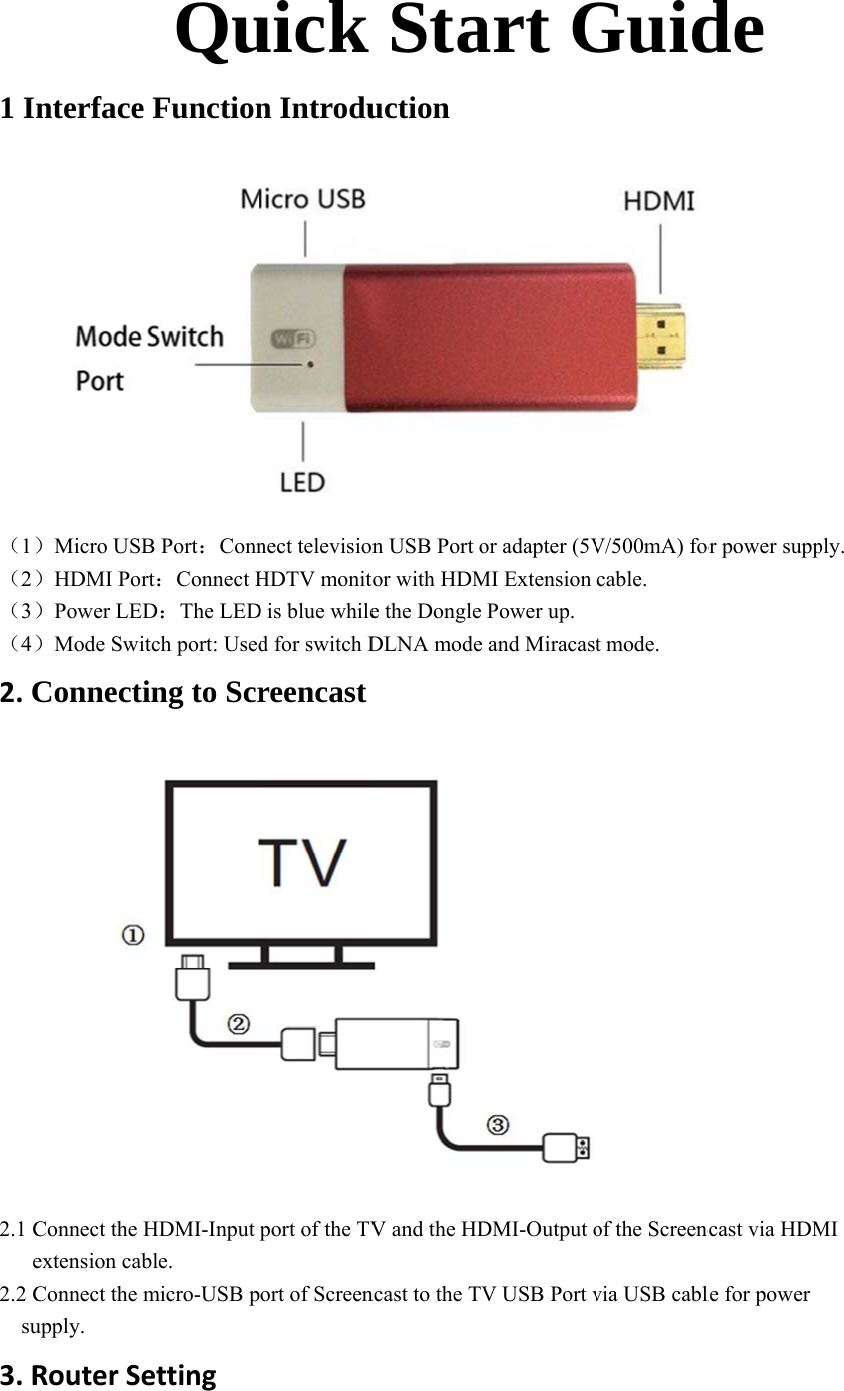
1 I(1)(2)(3)(4)2.C2.1 Ce2.2 C  su3.Rnterface )Micro USB)HDMI Por)Power LED)Mode SwitConnectiConnect the Hextension cabConnect the mupply. RouterSeQuFunctionB Port:Connrt:Connect HD:The LEDtch port: Useding to ScrHDMI-Input ble. micro-USB pettinguick n Introdunect televisionHDTV monitD is blue whiled for switch Dreencastport of the TVort of ScreenStauction n USB Port otor with HDMe the Dongle DLNA mode V and the HDncast to the TVart Gor adapter (5VMI Extension Power up. and MiracastDMI-Output oV USB Port vGuidV/500mA) forcable. t mode.    of the Screencvia USB cablde or power suppncast via HDMle for power ply. MI
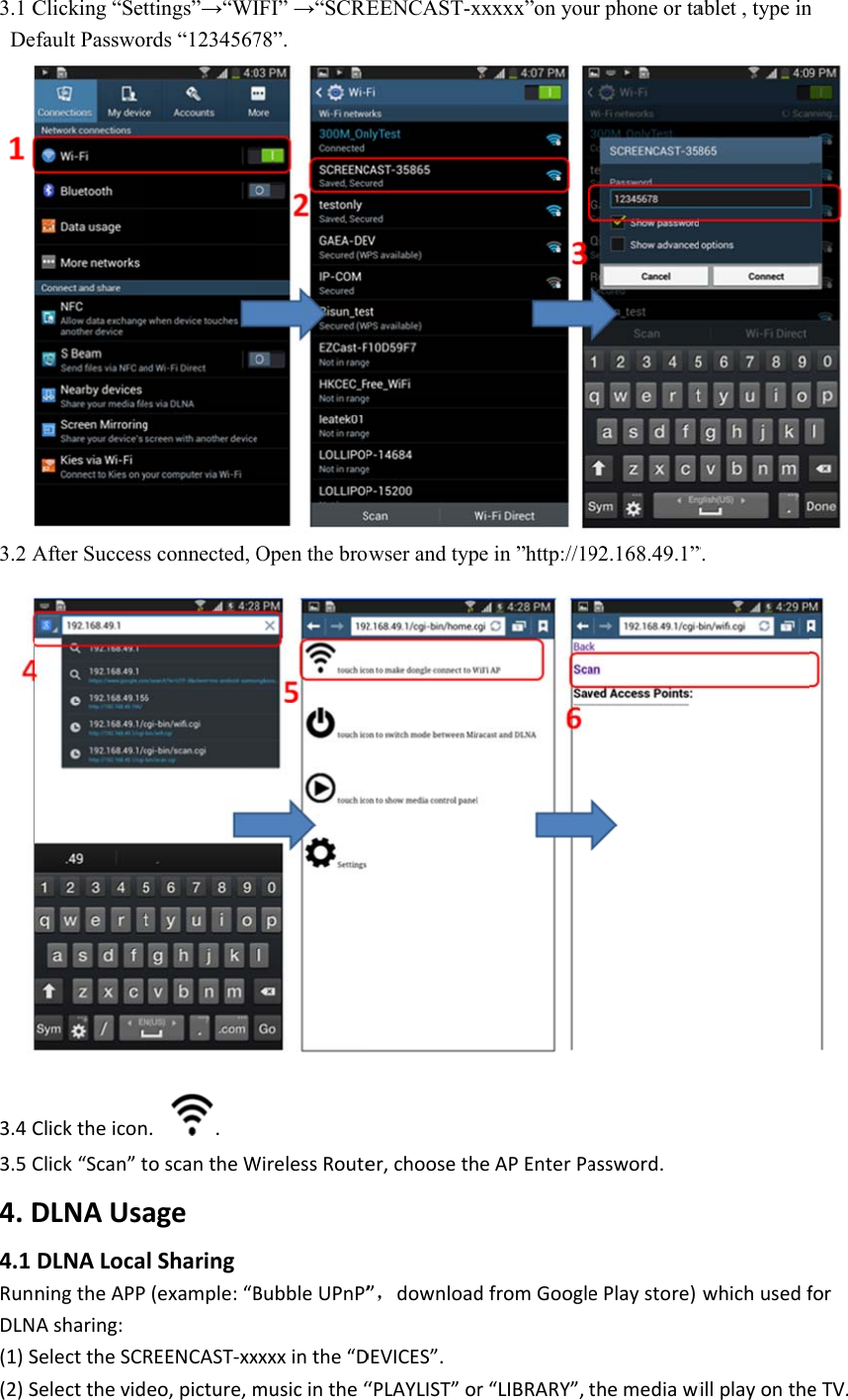
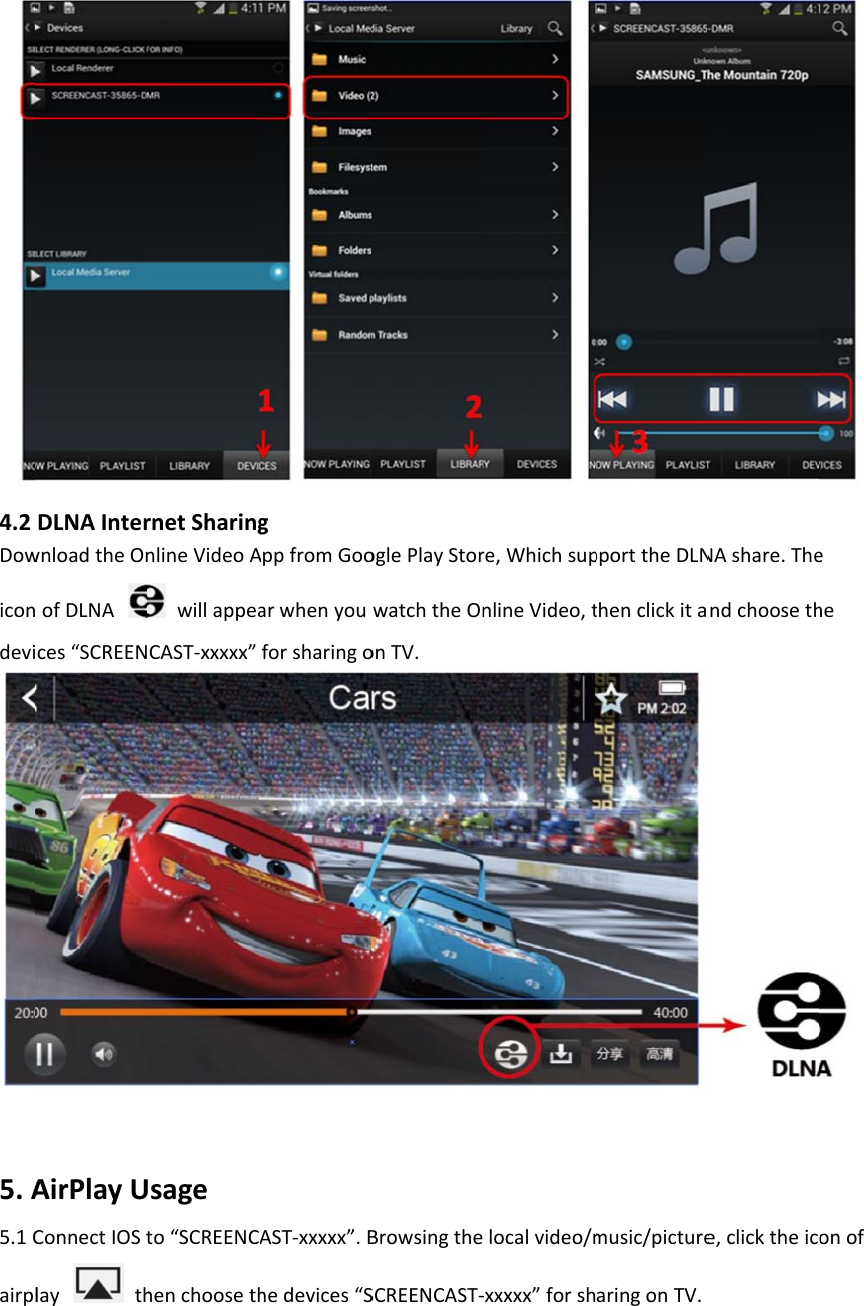
3.1 CDe3.2 A3.4C3.5C4.D4.1RunnDLN(1)S(2)SClicking “Setfault PassworAfter SuccessClicktheiconClick“Scan”tDLNAUsaDLNALocaningtheAPPAsharing:SelecttheSCRSelectthevidttings”→“WIrds “1234567s connected, On..toscantheWagelSharing(example:“BREENCAST‐xxeo,picture,mIFI” →“SCRE78”. Open the broWirelessRouteBubbleUPnP”xxxxinthe“Dmusicinthe“EENCAST-xowser and typer,chooseth”,downloadDEVICES”.“PLAYLIST”orxxxxx”on youe in ”http://1eAPEnterPadfromGooglr“LIBRARY”,ur phone or ta92.168.49.1”assword.ePlaystore)themediawiablet , type in”. whichusedfillplayonthen  foreTV.
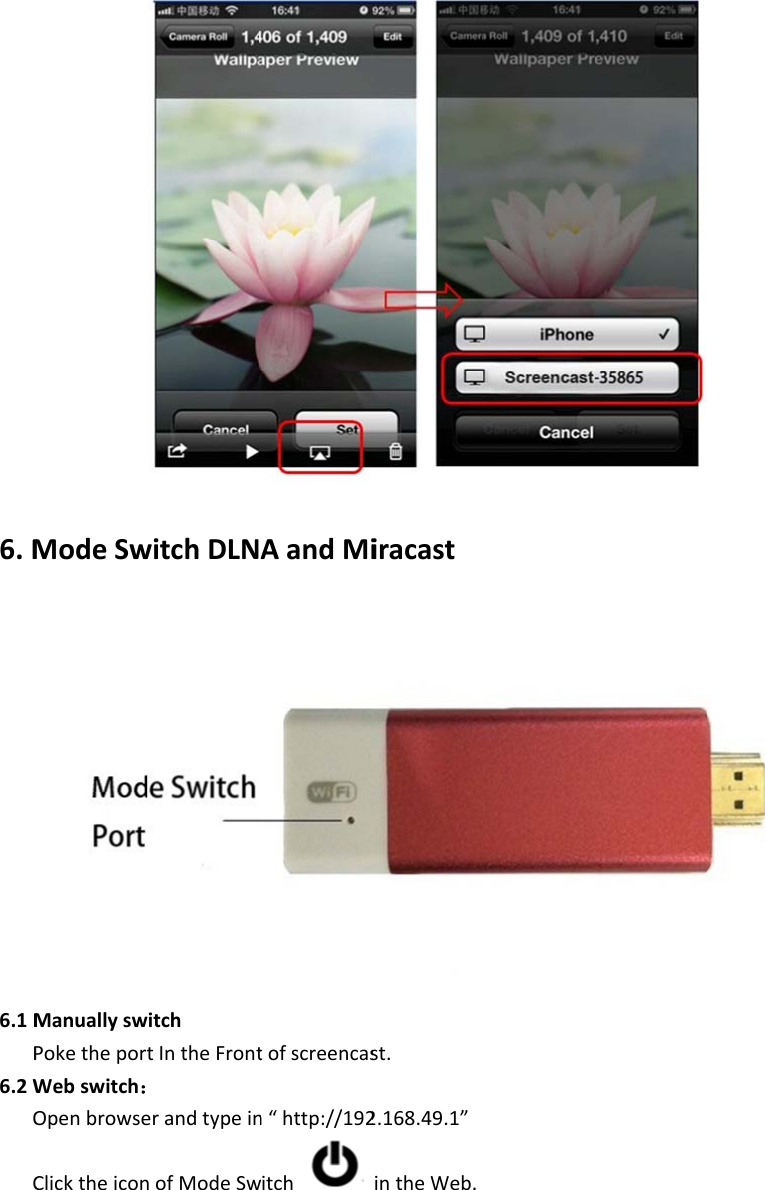
4.2Dowicondevi5.A5.1Cairpl DLNAInterwnloadtheOnofDLNAces“SCREENAirPlayUConnectIOStlaythrnetSharingnlineVideoAwillappeaCAST‐xxxxx”sageto“SCREENCAhenchoosethgAppfromGooarwhenyouforsharingoAST‐xxxxx”.Bhedevices“SoglePlayStorwatchtheOnonTV.BrowsingtheSCREENCAST‐re,WhichsupnlineVideo,tlocalvideo/mxxxxx”forshpporttheDLNthenclickitamusic/picturearingonTV.NAshare.Thendchoosethe,clicktheico eheonof
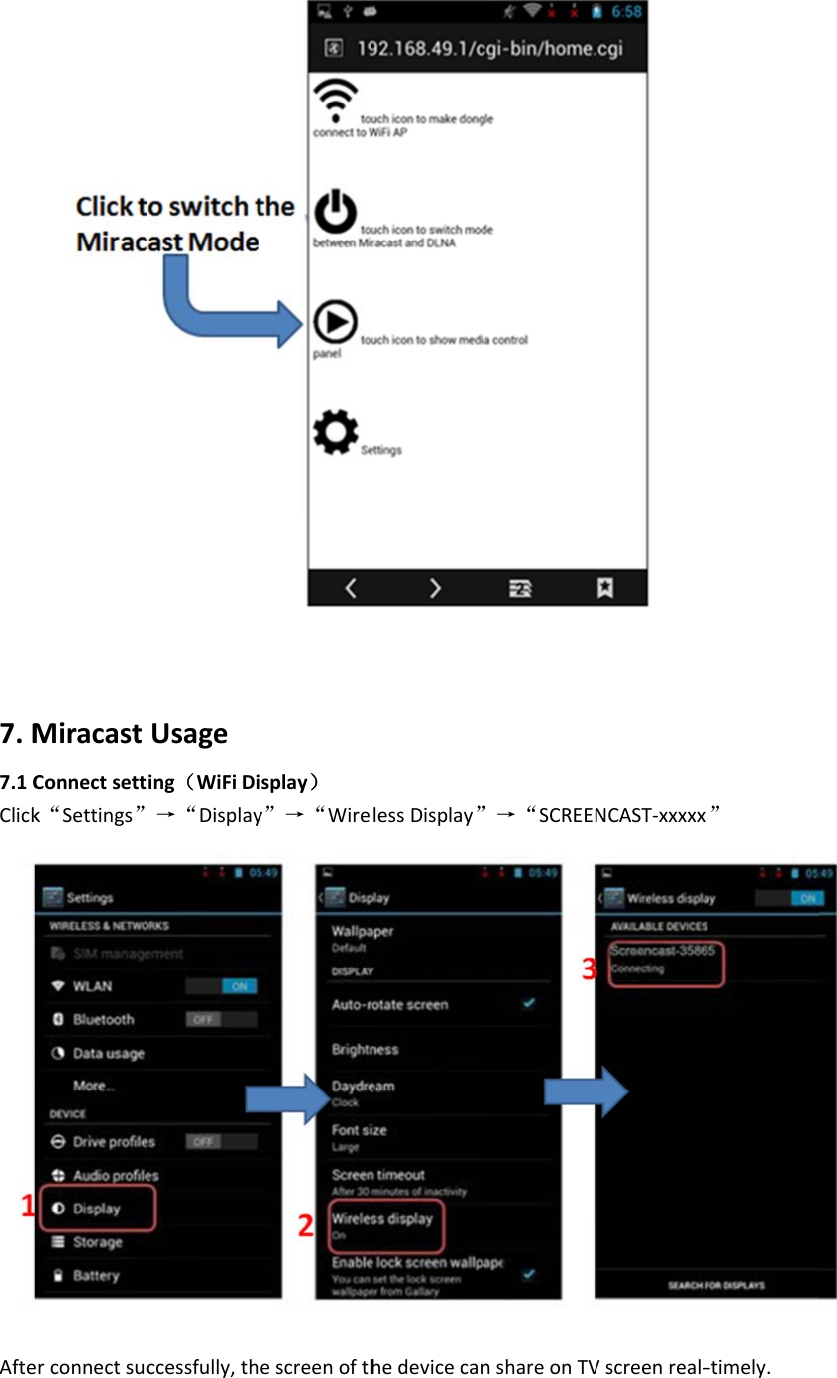
6.M6.1MP6.2WOC ModeSwManuallyswPoketheportWebswitch:OpenbrowseClicktheiconwitchDLNitchtIntheFronterandtypeinnofModeSwAandMitofscreencasn“http://192witchiracastst.2.168.49.1”intheWeb.
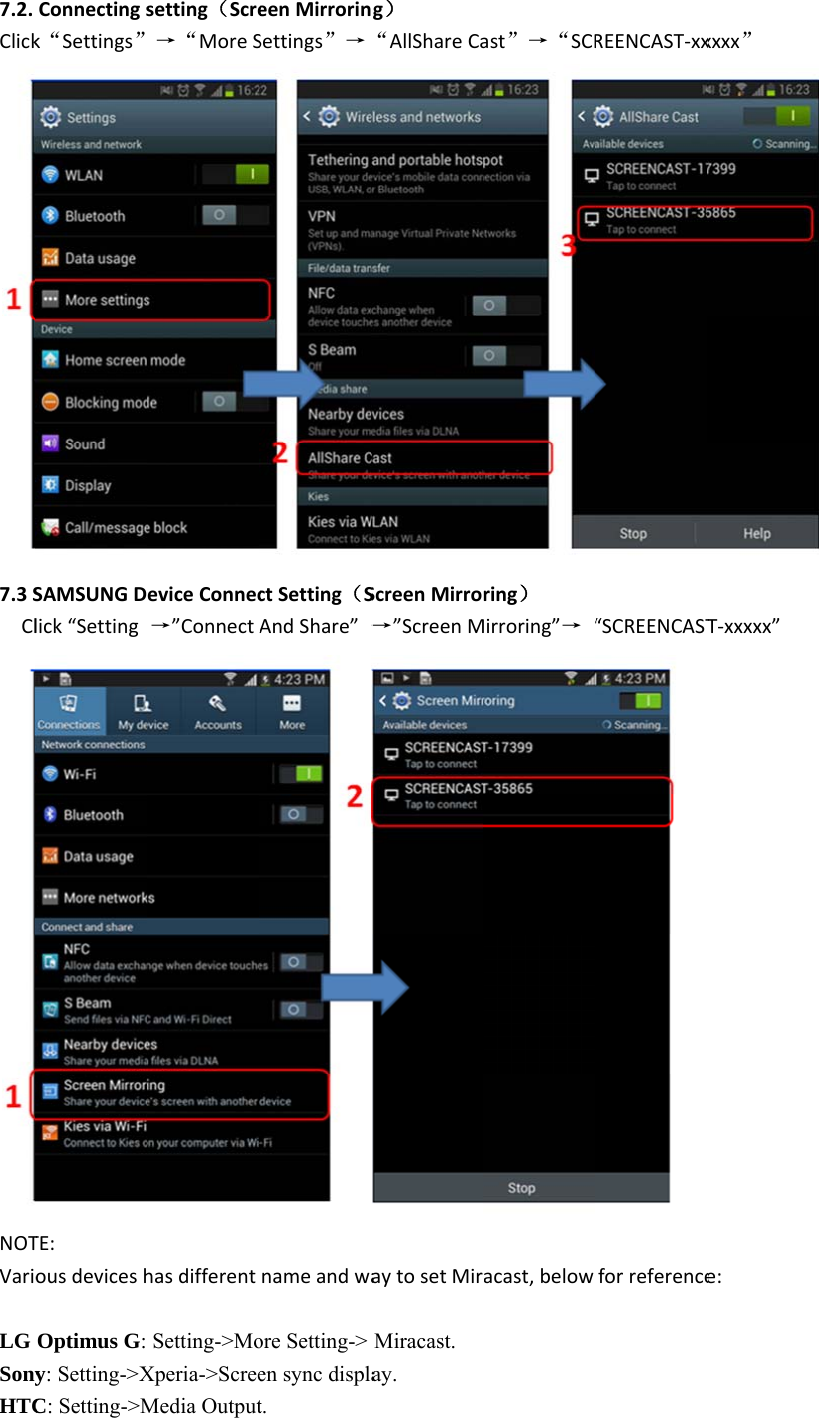
 7.M7.1CClickAfteMiracastConnectsettk“Settings”erconnectsucUsageing(WiFiDi→“Displayccessfully,thsplay)y”→“WireescreenofthlessDisplay”hedevicecan”→“SCREENnshareonTVNCAST‐xxxxxVscreenreal‐ ”‐timely.
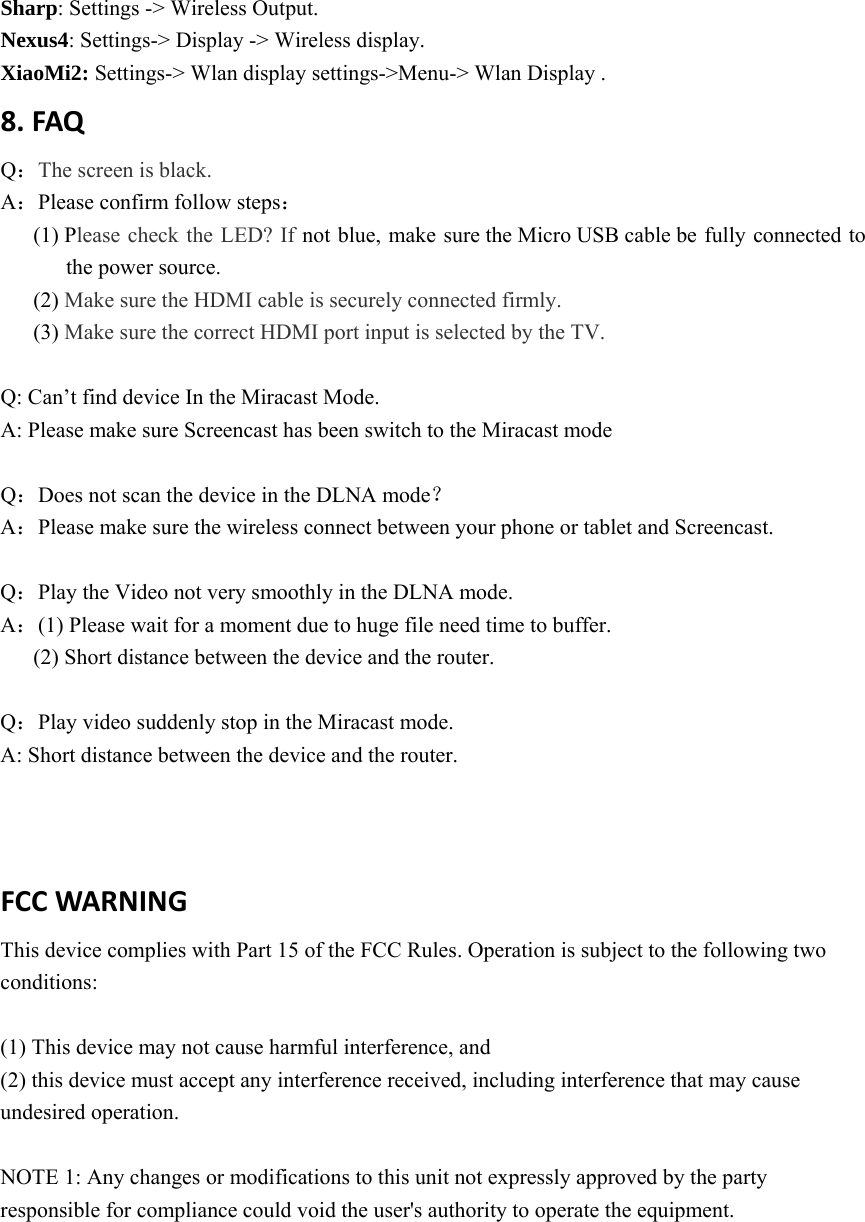
7.2.Click7.3SClNOTVarioLG SonyHTCConnectingsk“Settings”SAMSUNGDelick“SettingTE:ousdeviceshOptimus G: y: Setting->XC: Setting->Msetting(Scre→“MoreSeviceConnec→”ConnectAhasdifferentSetting->MoXperia->ScreeMedia OutputeenMirrorinSettings”→ctSetting(SAndShare”→nameandwaore Setting-> en sync displat. g)“AllShareCaScreenMirror→”ScreenMaytosetMirMiracast. ay. ast”→“SCRring)irroring”→ “acast,belowREENCAST‐xx“SCREENCAST forreferencexxxx”T‐xxxxx” e:
Sharp: Settings -> Wireless Output. Nexus4: Settings-> Display -> Wireless display. XiaoMi2: Settings-> Wlan display settings->Menu-> Wlan Display . 8.FAQQ:The screen is black. A:Please confirm follow steps: (1) Please check the LED? If not blue, make sure the Micro USB cable be fully connected to the power source.   (2) Make sure the HDMI cable is securely connected firmly. (3) Make sure the correct HDMI port input is selected by the TV.  Q: Can’t find device In the Miracast Mode. A: Please make sure Screencast has been switch to the Miracast mode  Q:Does not scan the device in the DLNA mode? A:Please make sure the wireless connect between your phone or tablet and Screencast.  Q:Play the Video not very smoothly in the DLNA mode. A:(1) Please wait for a moment due to huge file need time to buffer.   (2) Short distance between the device and the router.    Q:Play video suddenly stop in the Miracast mode. A: Short distance between the device and the router. FCCWARNING This device complies with Part 15 of the FCC Rules. Operation is subject to the following two conditions:  (1) This device may not cause harmful interference, and (2) this device must accept any interference received, including interference that may cause undesired operation.  NOTE 1: Any changes or modifications to this unit not expressly approved by the party responsible for compliance could void the user's authority to operate the equipment. 

Navigation menu