Actia Nordic ACUII-06 ACUII-06 User Manual 6001 40023 acuii 06 nas 1 4

ACTIA Nordic AB ACUII-06 6001 40023 acuii 06 nas 1 4

6001_40023_acuii-06 user manual (nas)_1.4

OwnerNicklas AnderssonDate2016-05-23ClassificationDocument number6001_40023Revision1.4TitleACUII-06 User ManualPage1(14)ACUII-06User Manual(NAS)
OwnerNicklas AnderssonDate2016-05-23ClassificationDocument number6001_40023Revision1.4TitleACUII-06 User ManualPage2(14)Content1 General ...................................................................................................................................................... 31.1 Revision history................................................................................................................................. 31.2 Abbreviations .................................................................................................................................... 31.3 References ......................................................................................................................................... 32 Introduction ............................................................................................................................................... 43 Technical Description................................................................................................................................ 53.1 Connectors......................................................................................................................................... 53.1.1 WLAN antenna.......................................................................................................................... 53.1.2 DLC Ethernet connector............................................................................................................ 53.1.3 IHU Ethernet connector............................................................................................................. 53.1.4 Main connector.......................................................................................................................... 53.1.5 GNSS antenna............................................................................................................................ 53.1.6 3G/4G diversity antenna............................................................................................................ 53.1.7 2G/3G/4G antenna..................................................................................................................... 53.2 Power supply ..................................................................................................................................... 63.3 SIM interface..................................................................................................................................... 63.4 Backup antenna ................................................................................................................................. 63.5 External antenna................................................................................................................................ 64 RF parameters............................................................................................................................................ 74.1.1 Supported bands ........................................................................................................................ 74.2 GNSS................................................................................................................................................. 74.2.1 Supported bands ........................................................................................................................ 74.3 WLAN............................................................................................................................................... 74.3.1 Supported bands ........................................................................................................................ 75 Mechanical design..................................................................................................................................... 96 Functional Description ............................................................................................................................ 106.1 Diagnostics ...................................................................................................................................... 106.1.1 DoIP connection...................................................................................................................... 106.1.2 CAN connection...................................................................................................................... 106.1.3 WLAN..................................................................................................................................... 106.2 WLAN access point......................................................................................................................... 106.3 Data gateway ................................................................................................................................... 106.4 Positioning information................................................................................................................... 106.5 Telematics applications ................................................................................................................... 106.5.1 Automatic emergency call....................................................................................................... 116.5.2 Manual emergency call............................................................................................................ 116.5.3 Roadside assistance call........................................................................................................... 116.5.4 Theft Warning.......................................................................................................................... 116.5.5 Stolen Vehicle Tracking.......................................................................................................... 116.5.6 Remote Vehicle Imobilization................................................................................................. 116.5.7 Remote door unlock................................................................................................................. 116.5.8 Other applications.................................................................................................................... 117 Installation and maintenance................................................................................................................... 127.1 Installation....................................................................................................................................... 127.2 Maintenance .................................................................................................................................... 128 Regulatory Certifications......................................................................................................................... 138.1 USA (FCC)...................................................................................................................................... 138.1.1 FCC Warnings and Notices..................................................................................................... 138.1.2 OEM Requirements................................................................................................................. 138.2 Canada (IC) ..................................................................................................................................... 138.2.1 OEM Requirements................................................................................................................. 14
OwnerNicklas AnderssonDate2016-05-23ClassificationDocument number6001_40023Revision1.4TitleACUII-06 User ManualPage3(14)1 GeneralThis document describes the North American (NAS) version of ACTIA’s product ACUII-06.1.1 Revision historyRevisionAuthorDateDescription1.0Nicklas Andersson2016-04-06First version1.1Nicklas Andersson2016-04-26Added chapter 3.5 External antenna.1.2Nicklas Andersson2016-04-27Added English text in 8.2.1.1.3Nicklas Andersson2016-05-094.3.1 Product variant only uses2.4GHz WLAN channels 1-11.1.4Nicklas Andersson2016-05-238.2 Removed text about ICES-003.1.2 AbbreviationsAbbreviationMeaningDoIPDiagnostics over IPECUElectrical Control UnitGNSSGlobal Navigation Satellite SystemOBDOn-Board DiagnosticsSRSSupplemental Restraint SystemWLANWireless Local Area Network1.3 ReferencesReferenceTitleDoc. numberRevision
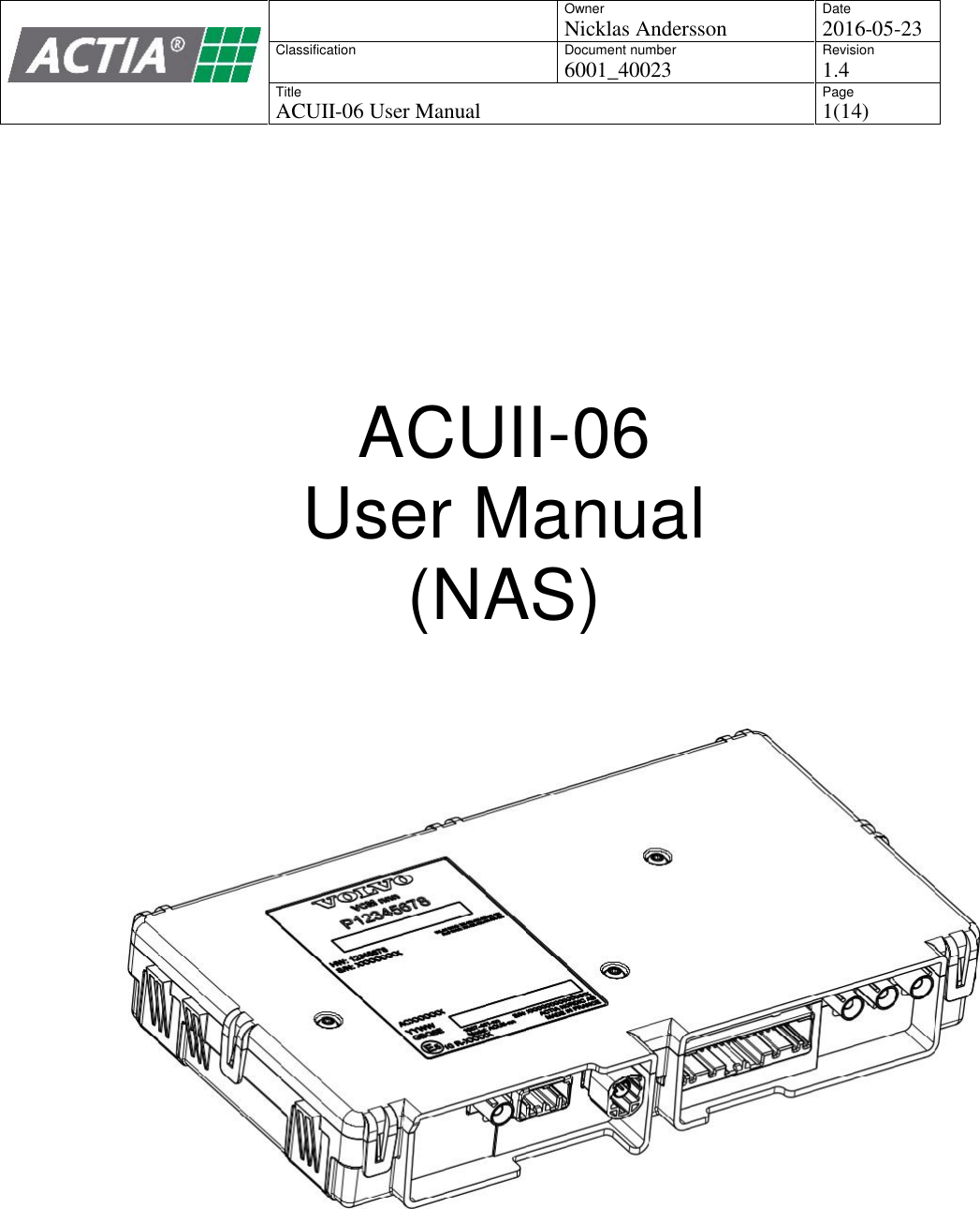
OwnerNicklas AnderssonDate2016-05-23ClassificationDocument number6001_40023Revision1.4TitleACUII-06 User ManualPage4(14)2 IntroductionThe ACUII-06 is a connectivity ECU that is factory fitted in cars. It provides followingfunctionality:Diagnostics - routing of diagnostics data between the vehicle and external test equipment,via CAN, Ethernet and WLAN.WLAN access point - for people inside the vehicle.Data gateway - for the WLAN access point and other ECUs in the vehicle.Positioning information - for other ECUs in the vehicle, such as the navigation system.Telematics applications - like emergency calls, breakdown calls and stolen vehicletracking.The ACUII-06 has an integrated 2G/3G/4G modem that provides data connection and voice callfunctionality needed for the different applications.
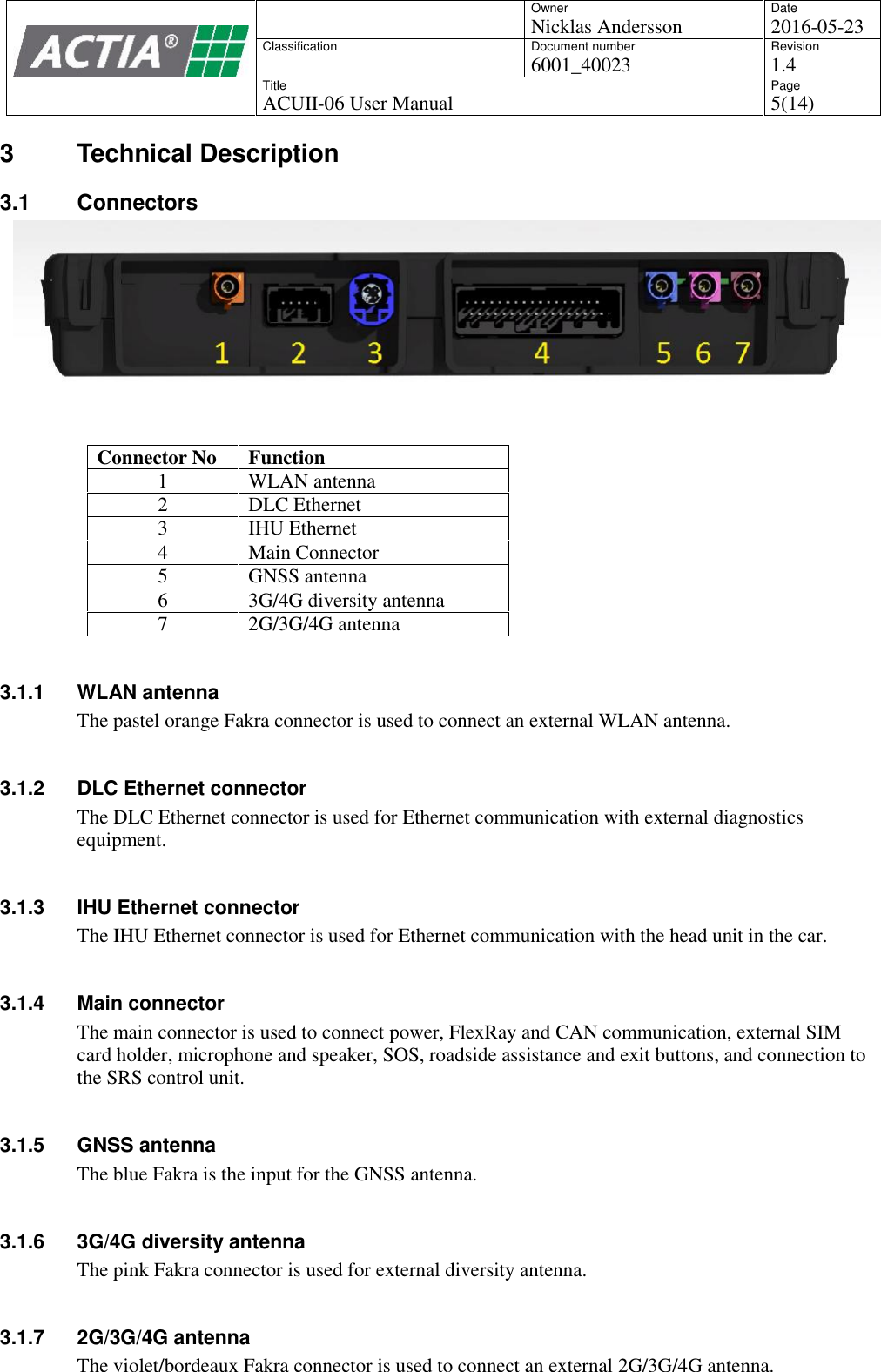
OwnerNicklas AnderssonDate2016-05-23ClassificationDocument number6001_40023Revision1.4TitleACUII-06 User ManualPage5(14)3 Technical Description3.1 ConnectorsConnector NoFunction1WLAN antenna2DLC Ethernet3IHU Ethernet4Main Connector5GNSS antenna63G/4G diversity antenna72G/3G/4G antenna3.1.1 WLAN antennaThe pastel orange Fakra connector is used to connect an external WLAN antenna.3.1.2 DLC Ethernet connectorThe DLC Ethernet connector is used for Ethernet communication with external diagnosticsequipment.3.1.3 IHU Ethernet connectorThe IHU Ethernet connector is used for Ethernet communication with the head unit in the car.3.1.4 Main connectorThe main connector is used to connect power, FlexRay and CAN communication, external SIMcard holder, microphone and speaker, SOS, roadside assistance and exit buttons, and connection tothe SRS control unit.3.1.5 GNSS antennaThe blue Fakra is the input for the GNSS antenna.3.1.6 3G/4G diversity antennaThe pink Fakra connector is used for external diversity antenna.3.1.7 2G/3G/4G antennaThe violet/bordeaux Fakra connector is used to connect an external 2G/3G/4G antenna.
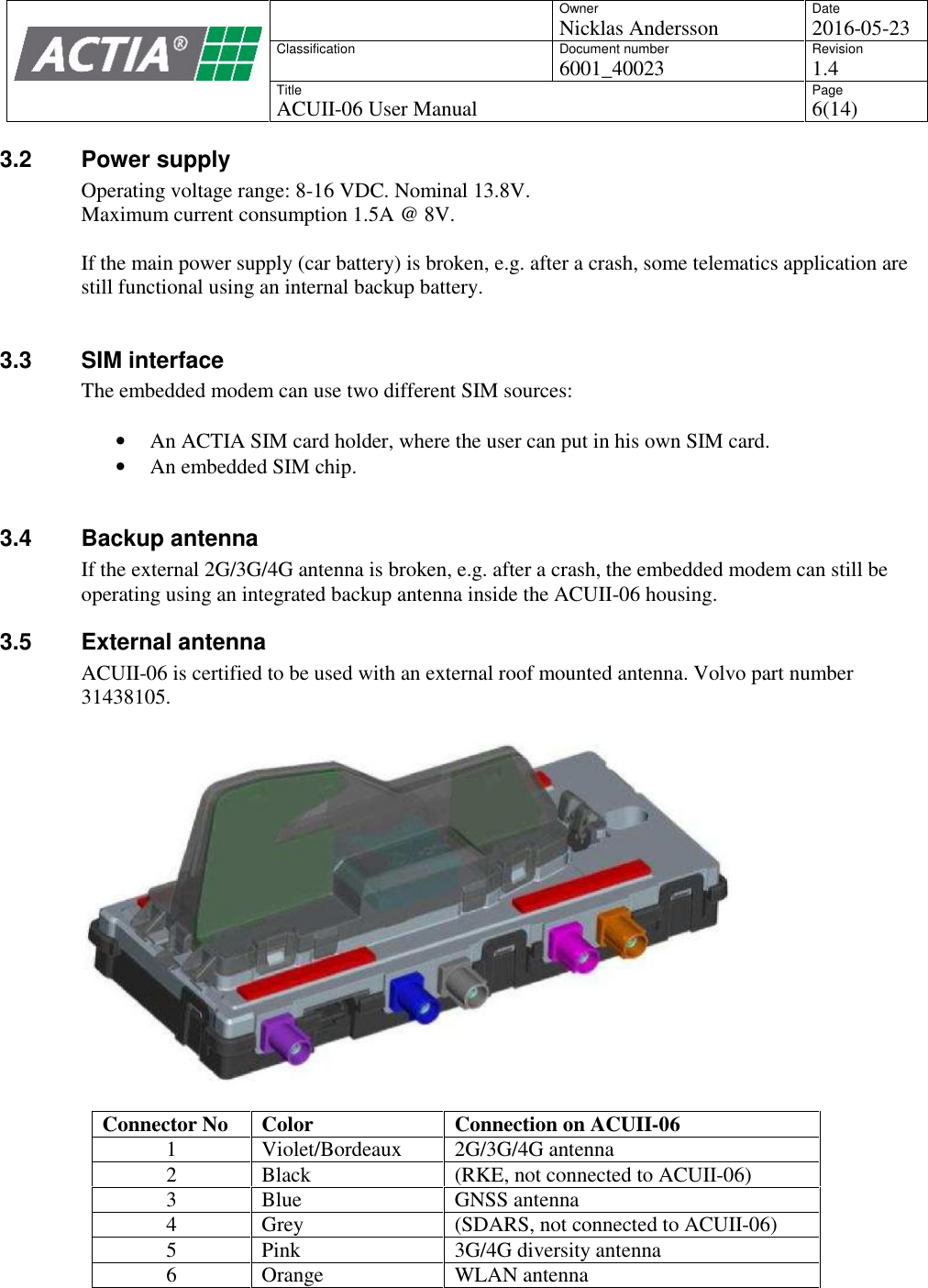
OwnerNicklas AnderssonDate2016-05-23ClassificationDocument number6001_40023Revision1.4TitleACUII-06 User ManualPage6(14)3.2 Power supplyOperating voltage range: 8-16 VDC. Nominal 13.8V.Maximum current consumption 1.5A @ 8V.If the main power supply (car battery) is broken, e.g. after a crash, some telematics application arestill functional using an internal backup battery.3.3 SIM interfaceThe embedded modem can use two different SIM sources:An ACTIA SIM card holder, where the user can put in his own SIM card.An embedded SIM chip.3.4 Backup antennaIf the external 2G/3G/4G antenna is broken, e.g. after a crash, the embedded modem can still beoperating using an integrated backup antenna inside the ACUII-06 housing.3.5 External antennaACUII-06 is certified to be used with an external roof mounted antenna. Volvo part number31438105.Connector NoColorConnection on ACUII-061Violet/Bordeaux2G/3G/4G antenna2Black(RKE, not connected to ACUII-06)3BlueGNSS antenna4Grey(SDARS, not connected to ACUII-06)5Pink3G/4G diversity antenna6OrangeWLAN antenna
OwnerNicklas AnderssonDate2016-05-23ClassificationDocument number6001_40023Revision1.4TitleACUII-06 User ManualPage7(14)4 RF parameters4.1.1 Supported bandsTechnologyBandsGSM/GPRS/EDGE850/900/1800/1900WCDMA/HSPAI  (2100),  V  (850),  VI  (800),  VIII(900/GSM)LTE FDDBd2 (1900), Bd4 (AWS), Bd5 (850),Bd17 (700)4.2 GNSSGNSS antenna input is the blue Fakra connector.4.2.1 Supported bandsTechnologyBandsGPSL1GLONASSL1 FDMA4.3 WLANThe WLAN antenna is connected to the orange Fakra connector.The product supports dual-band 802.11b/g/n at 2.4GHz and 802.11a/n/ac at 5GHz. Supportedchannels are listed below. When the product is installed in a vehicle the useable channels arelimited to what is allowed in the current country.4.3.1 Supported bands4.3.1.1 802.11bParameterChannels1-11Data rates1, 2, 5.5, 11 Mbps4.3.1.2 802.11gParameterChannels1-11Data rates6, 9, 12, 18, 24, 36, 48, 54 Mbps4.3.1.3 802.11nParameterChannels1-11 (2.4GHz), 36-165 (5GHz)Data ratesMCS0-MCS7
OwnerNicklas AnderssonDate2016-05-23ClassificationDocument number6001_40023Revision1.4TitleACUII-06 User ManualPage8(14)4.3.1.4 802.11aParameterChannels36-165Data rates6, 9, 12, 18, 24, 36, 48, 54 Mbps4.3.1.5 802.11acParameterChannels36-165Data ratesMCS0-MCS9
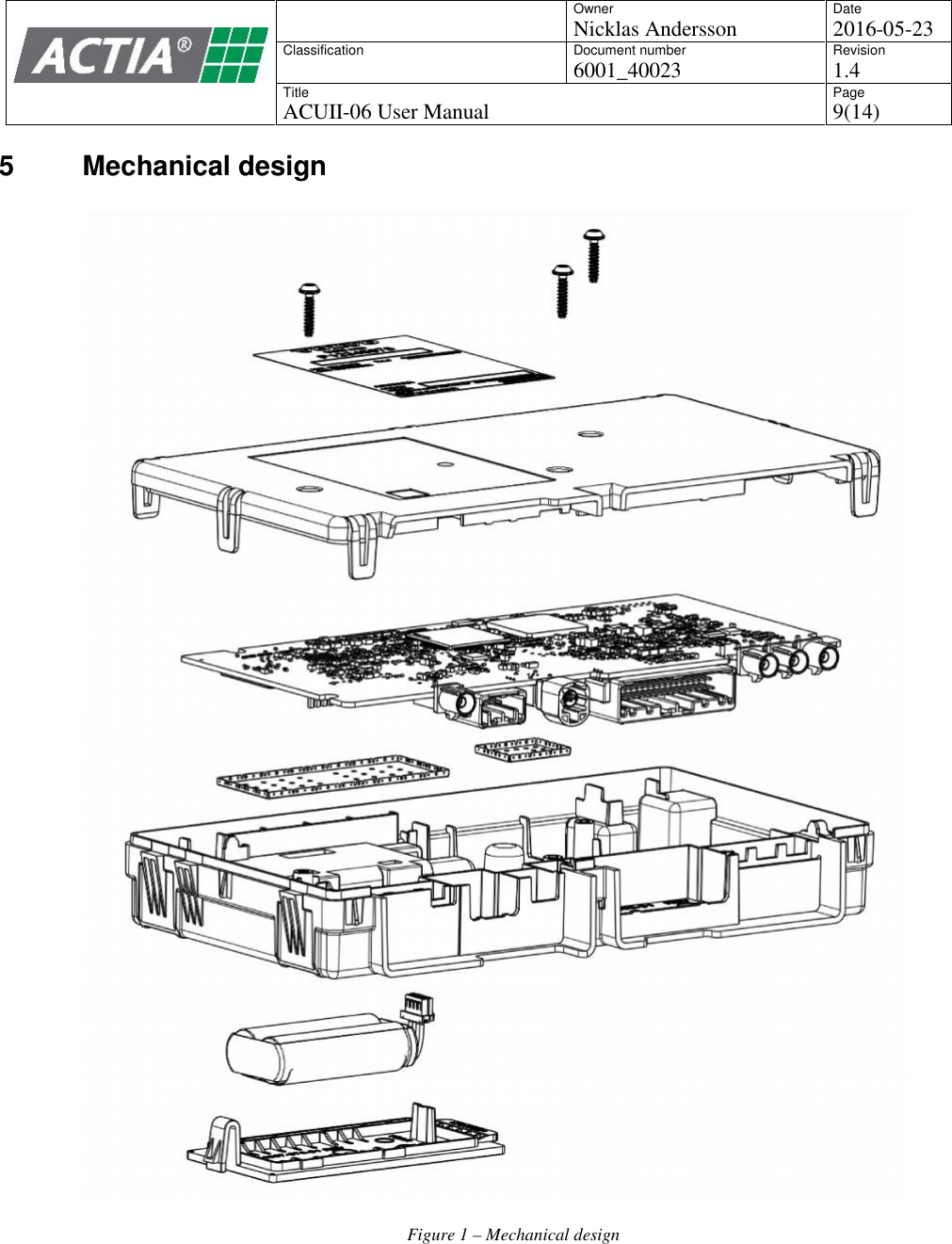
OwnerNicklas AnderssonDate2016-05-23ClassificationDocument number6001_40023Revision1.4TitleACUII-06 User ManualPage9(14)5 Mechanical designFigure 1 –Mechanical design
OwnerNicklas AnderssonDate2016-05-23ClassificationDocument number6001_40023Revision1.4TitleACUII-06 User ManualPage10(14)6 Functional Description6.1 Diagnostics6.1.1 DoIP connectionInterface to diagnostics functionality is via the DLC Ethernet interface. This interface should beconnected to DoIP interface in the vehicle, located in the OBD connector.When test equipment is connected to the OBD Ethernet port in the vehicle, the ACUII-06 presentsitself on the network using a “Vehicle Announcement Message”, as specified in ISO 13400-2.Based on the content of this message, an external tester tool can connect to the ACUII-06 andcreate a diagnostic session.6.1.2 CAN connectionThe can interface of ACUII-06 should also be connected to the OBD connector in the vehicle.To communicate with the ACUII-06 and the ECUs behind the ACUII-06 in the vehicle topology,the diagnostic requests shall be sent with 29-bit addressing.The same CAN interface is used for legislated ODB diagnostics. For such purposes, 11-bitaddressing is used.6.1.3 WLANDiagnostics functionality is also available via WLAN. The unit ca be set in a mode where it actslike a WLAN station and attaches to a hotspot in the workshop.6.2 WLAN access pointACUII-06 can act as a WLAN access point for passengers in the car.User interface needs to be implemented in an external unit, e.g. in a head unit with display. TheWLAN access point functionality is controlled via IHU Ethernet interface.6.3 Data gatewayACUII-06 acts as a data gateway for the WLAN access point and other ECUs in the vehicle. It cane.g. provide internet connectivity for the head unit.The data gateway is controlled via the IHU Ethernet interface.6.4 Positioning informationThe product automatically outputs GNSS raw position data on the CAN bus.The GNSS data is used by other ECUs in the vehicle, for instance the Navigation system6.5 Telematics applicationsThe product hosts a number of telematics applications. Some examples:
OwnerNicklas AnderssonDate2016-05-23ClassificationDocument number6001_40023Revision1.4TitleACUII-06 User ManualPage11(14)6.5.1 Automatic emergency callIf the car is in a crash and the SRS control unit indicates seat belt pretensioners, airbags orinflatable curtain has deployed, an automatic alarm is sent to a predefined Customer ServiceCenter, via data connection or SMS, with information about the vehicle's location and that one ormore of the previously mentioned systems has deployed.A voice call is also set up to the call center.6.5.2 Manual emergency callIt is also possible to start an emergency call manually by pressing a SOS button for at least 2seconds.A service that has been initiated can be cancelled by pressing the EXIT button within 10 seconds.6.5.3 Roadside assistance callAnother button for roadside assistance will send data message and set up a voice call to apredefined road side assistance number.A service that has been initiated can be cancelled by pressing the EXIT button within 10 seconds.6.5.4 Theft WarningThe call center and the car owner is contacted with a data message if the car alarm indicates the caris being stolen.6.5.5 Stolen Vehicle TrackingThe call center can initiate tracking of the car if it has been reported stolen. The vehicle locationwill then be reported to the call center.6.5.6 Remote Vehicle ImobilizationIf the car has been reported stolen the call center can instruct the car not to start.6.5.7 Remote door unlockThe call center or the car owner can unlock the car remotely.6.5.8 Other applicationsWith data provided from ACUII-06 it is also possible to build applications in e.g. mobile phones tobe used by the car owner. Examples:Vehicle location (present car location on a map)Instrument panel information (show e.g. mileage, fuel level)Status check (if service is needed)
OwnerNicklas AnderssonDate2016-05-23ClassificationDocument number6001_40023Revision1.4TitleACUII-06 User ManualPage12(14)7 Installation and maintenance7.1 InstallationThe product is factory fitted in vehicles. It is not possible to buy this product separately.7.2 MaintenanceThe status of the product can be read via diagnostic connections using special workshop tools. Inaddition, other ECUs monitor the communication from the product and in case of missing/invalidcommunication, the Central Electronic Module in the vehicle is alerted, and will display a warningto the driver.Maintenance and replacement of the product can only be performed by certified workshops.
OwnerNicklas AnderssonDate2016-05-23ClassificationDocument number6001_40023Revision1.4TitleACUII-06 User ManualPage13(14)8 Regulatory Certifications8.1 USA (FCC)This device complies with Part 15 of the FCC rules. Operation is subject to the following twoconditions:(1) This device may not cause harmful interference, and(2) This device must accept any interference received, including interference that may causeundesired operation.8.1.1 FCC Warnings and NoticesWARNING: The FCC requires the user to be notified that any changes or modifications made tothis device that are not expressly approved by ACTIA Nordic AB could void the user's authority tooperate the equipment.RF EXPOSURE WARNING: This equipment complies with FCC radiation exposure limits setforth for an uncontrolled environment. This equipment should be installed and operated withminimum distance 20 cm between the radiator and your body. This transmitter must not be co-located or operating in conjunction with any other antenna or transmitter.NOTICE: This equipment has been tested and found to comply with the limits for a Class B digitaldevice, pursuant to part 15 of the FCC Rules. These limits are designed to provide reasonableprotection against harmful interference in a residential installation. This equipment generates, uses,and can radiate radio frequency energy and, if not installed and used in accordance with theinstructions, may cause harmful interference to radio communications. However, there is noguarantee that interference will not occur in a particular installation. If this equipment does causeharmful interference to radio or television reception, which can be determined by turning theequipment off and on, the user is encouraged to try to correct the interference by one or more of thefollowing measures:- Reorient or relocate the receiving antenna.- Increase the separation between the equipment and receiver.- Connect the equipment into an outlet on a circuit different from that to which the receiver isconnected.- Consult the dealer or an experienced radio/TV technician for help.8.1.2 OEM RequirementsFollowing text should be printed in the user manual for vehicles in US:Type Approval USAFCC ID: 2AGKKACUII-06This device complies with Part 15 of the FCC rules. Operation is subject to the following twoconditions:(1) This device may not cause harmful interference, and(2) This device must accept any interference received, including interference that may causeundesired operation.WARNING: Changes or modifications not expressly approved by the party responsible forcompliance could void the user's authority to operate the equipment.8.2 Canada (IC)Le présent appareil est conforme aux CNR d'Industrie Canada applicables aux appareils radioexempts de licence. L'exploitation est autorisée aux deux conditions suivantes : (1) l'appareil nedoit pas produire de brouillage, et (2) l'utilisateur de l'appareil doit accepter tout brouillageradioélectrique subi, même si le brouillage est susceptible d'en compromettre le fonctionnement.
OwnerNicklas AnderssonDate2016-05-23ClassificationDocument number6001_40023Revision1.4TitleACUII-06 User ManualPage14(14)8.2.1 OEM RequirementsFollowing text should be printed in the user manual for vehicles in Canada:Type Approval CanadaIC: 20839-ACUII06This device complies with Industry Canada license-exempt RSS standard(s). Operation is subject tothe following two conditions:(1) this device may not cause harmful interference, and(2) this device must accept any interference received, including interference that may causeundesired operationLe présent appareil est conforme aux CNR d'Industrie Canada applicables aux appareils radioexempts de licence. L'exploitation est autorisée aux deux conditions suivantes :(1) l'appareil ne doit pas produire de brouillage(2) l'utilisateur de l'appareil doit accepter tout brouillage radioélectrique subi, même si le brouillageest susceptible d'en compromettre le fonctionnement.

Navigation menu