Adaptive Sound Technologies ASM1021 LectroFan micro2 User Manual LFMicro2 QSG REV indd
Adaptive Sound Technologies Inc. LectroFan micro2 LFMicro2 QSG REV indd
User Manual
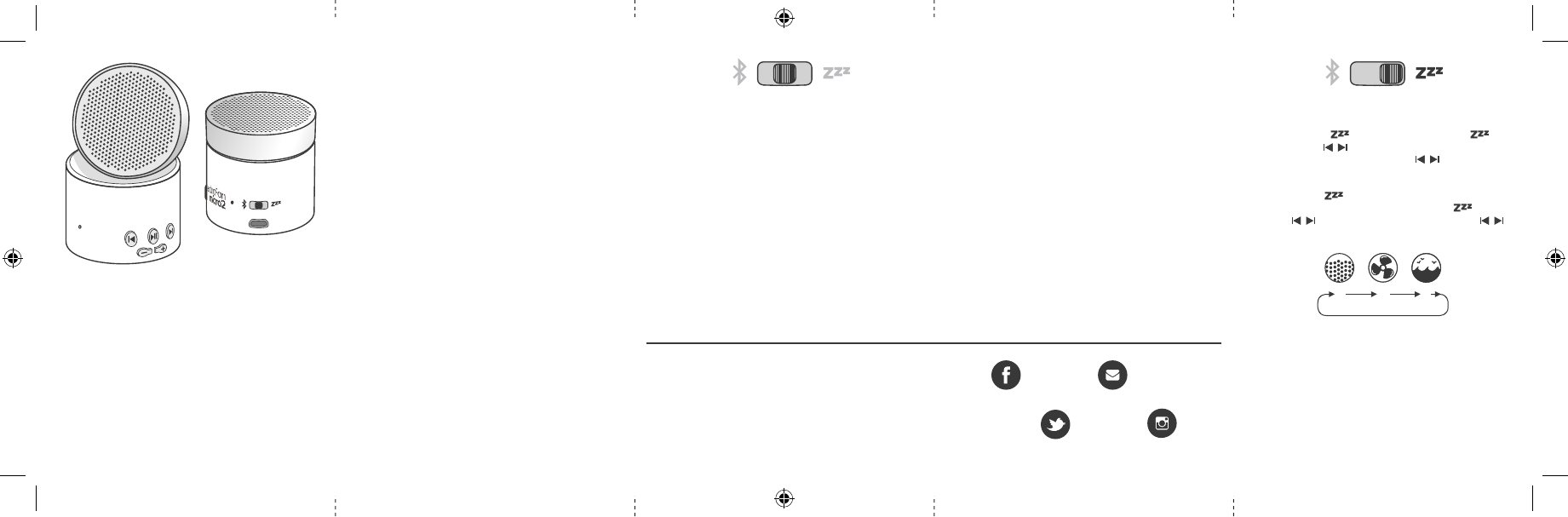
1245
33
6 8
7
1245
33
6 8
7
Charge Your Micro 2 Before First Use
Connect the Micro 2 to a USB power source using the
supplied cable. The indicator lamp will glow red, then change
to green when fully charged. A power adapter for any smart-
phone or a PC USB jack can be used to charge your Micro 2.
Tip: to conserve battery power, always place the slider in the
OFF position when not in use.
Chargez votre Micro 2 avant sa première utilisation
Connectez le Micro 2 à une source d’alimentation USB à l’aide
du câble fourni. Le voyant lumineux s’allumera en rouge, puis
passera au vert une fois le chargement terminé. Vous pouvez
utiliser n’importe quel adaptateur électrique pour téléphone
ou un port USB sur votre PC pour recharger votre Micro 2.
Conseil : pour économiser la batterie, placez toujours
l’interrupteur en position OFF lorsque vous n’utilisez pas
l’appareil.
Laden Sie Ihr Micro 2 vor dem ersten Gebrauch auf
Verbinden Sie den Micro 2 über das mitgelieferte Kabel
mit einer USB-Stromquelle. Die Anzeigelampe leuchtet rot
und wechselt bei voller Ladung auf grün. Ihr Micro 2 kann
unter Verwendung eines standardmäßigen Netzadapters
für ein Smartphone oder über einen PC mit USB-Anschluss
aufgeladen werden.
Tipp: Um Akkustrom zu sparen, stellen Sie den Schieberegler
immer auf die Position OFF, wenn Sie das Gerät nicht
verwenden.
Carica il tuo Micro 2 prima del primo utilizzo
Collega il Micro 2 a una fonte di alimentazione USB
utilizzando il cavo in dotazione. La spia luminosa si illumina
di rosso e diventa verde quando è completamente carica.
Per caricare il Micro 2 è possibile utilizzare un alimentatore
per qualsiasi smartphone o un jack USB per PC.
Suggerimento: per conservare la carica della batteria,
posiziona sempre il cursore su OFF quando non è in uso.
5 EN: Next Track/Sound
FR: Piste / son suivant
DE: Nächste Titel / Ton
IT: Traccia/Suono successivo
6 EN: Indicator Lamp
Solid Blue: Bluetooth Connected
Blinking Blue: Bluetooth Audio Playing
Red: Charging
Green: Charging Complete
FR: Voyant témoin
Bleu fi xe : Bluetooth connecté
Bleu clignotant : Lecture audio Bluetooth en cours
Rouge : Chargement en cours
Vert : Chargement terminé
DE: Anzeigelampe
Durchgehend blau leuchtend: Bluetooth verbunden
Blau blinkend: Wiedergabe Bluetooth-Audio
Rot: Ladevorgang
Grün: Ladevorgang abgeschlossen
IT: Spia luminosa
Blu fi sso: Bluetooth connesso
Blu lampeggiante: riproduzione audio Bluetooth
Rosso: in carica
Verde: ricarica completa
7 EN: Charging Port
FR: Port de chargement
DE: Ladeanschluss
IT: Porta di ricarica
8 EN: Power Switch (left–right): Bluetooth, Off , Sleep Sounds
FR: interrupteur d’alimentation (gauche–droite) Bluetooth,
Arrêt, Sons de ventilateur et bruit blanc
DE: Netzschalter (links–rechts) Bluetooth, Aus, Ventilator-
Geräusch / Weißes Rauschen
IT: interruttore di alimentazione (sinistra–destra)
Bluetooth, Off , Ventola/rumore bianco
1 EN: Microphone 2 EN: Previous Track/Sound
FR: Microphone FR: Piste / son précédent
DE: Mikrofon DE: Vorheriger Titel / Ton
IT: Microfono IT: Traccia/Suono precedente
3 EN: Volume Down/Up
FR: Diminuer / augmenter le volume
DE: Leiser / Lauter
IT: Volume giù/su
4 EN: Play/Pause, Answer/Hang Up/Redial
FR: Lecture / Pause, Répondre / Raccrocher / Rappeler
DE: Wiedergabe / Pause, Beantworten / Aufl egen /
Wahlwiederholung
IT: Riproduci/Pausa, Rispondi/Termina/Richiama
Off / Arrêt / Aus / Off
Sound Masking:
1. Slide switch to
2. Select sound
Masquage sonore :
1. Faites basculer
l’interrupteur
2. Sélectionnez
le son
Geräuschüberdeckung:
1. Schiebeschalter
2. Wählen Sie einen
To n
Suono Masking:
1. Interruttore a
scorrimento
2. Seleziona il suono
Warranty and Licensing Information:
Informations de garantie et de licence :
Garantie- und Lizenzinformationen:
Informazioni sulla garanzia e sulla licenza:
astisupport.com
4 5 2
/SoundOfSleep
/SoundOfSleep
hello@soundofsleep.com
/SoundofSleepOffi cial
LFMicro2 QSG_REV.indd 1 10/17/18 1:41 PM
SOUND
OFSLEEP
USER GUIDE
GUIDE DE L’UTILISATEUR
BENUTZERHANDBUCH
GUIDA PER L’UTENTE
astisupport.com
▲
Answering Calls:
When your Micro 2 is connected to a smartphone, press
to answer the call, and again to end the call. Double-press
to redial the last dialed number.
Répondre aux appels :
Lorsque votre Micro 2 est connecté à un téléphone,
appuyez sur pour répondre à l’appel, et une nouvelle
fois pour mettre fin à l’appel. Appuyez deux fois sur
pour rappeler le dernier numéro composé.
Anrufentgegennahme:
Wenn Ihr Micro 2 mit einem Smartphone verbunden ist,
drücken Sie das
, um Anruf entgegenzunehmen und
drücken Sie es ein zweites Mal, um den Anruf zu beenden.
Drücken Sie zweimal auf
, um die zuletzt gewählte
Nummer erneut zu wählen.
Rispondere alle chiamate:
Quando Micro 2 è collegato a uno smartphone, premi
per rispondere alla chiamata e premilo di nuovo per terminare
la chiamata. Premi due volte
per ricomporre l’ultimo
numero chiamato.
Bluetooth Audio:
1. Slide switch to the left
2. Select LectroFan MICRO 2 from your Bluetooth device.
If it doesn’t appear, make sure it is not connected to
another phone and is within range.
Tip: only one Bluetooth device can be connected at a time.
Bluetooth Audio:
1. Basculez l’interrupteur vers la gauche
2. Sélectionnez LectroFan MICRO 2 parmi les périphériques
Bluetooth. S’il n’apparaît pas, assurez-vous qu’il ne soit pas
connecté à un autre téléphone à portée.
Astuce : vous ne pouvez connectez qu’un seul périphérique
Bluetooth à la fois.
Bluetooth-Audio:
1. Schieben Sie den Schalter nach links
2. Wählen Sie LectroFan MICRO 2 auf Ihrem Bluetooth-Gerät
aus. Sollte das Gerät nicht angezeigt werden, stellen Sie
bitte sicher, dass es nicht mit einem anderen Telefon
verbunden ist und sich in Reichweite befindet.
Hinweis: Sie können zu jedem Zeitpunkt immer nur ein
Bluetooth-Gerät verbinden.
Audio Bluetooth:
1. Fai scorrere l’interruttore a sinistra
2. Seleziona LectroFan MICRO 2 sul tuo dispositivo Bluetooth.
Se non appare, assicurati che non sia connesso a un altro
telefono e che si trovi all’interno del raggio d’azione.
Suggerimento: è possibile collegare un solo dispositivo
Bluetooth alla volta.
Specifications
Power: 5V, 1A USB-A
Audio Output: < = 3W
Bluetooth Range: Up to 50 feet/15 meters
Lithium-ion Battery Capacity: 1200 mAh
Battery Run Time (at typical volumes):
Bluetooth Audio: Up to 20 hours
White Noise/Fan/Ocean Sounds: Up to 40 hours
Battery Charge Time: 2 ½ hours
Caractéristiques
Puissance : 5V, 1A USB-A
Sortie audio : < = 3W
Portée Bluetooth : Jusqu’à 15 mètres / 50 pieds
Capacité de la batterie lithium-ion : 1200 mAh
Autonomie de la batterie (à un volume habituel) :
Audio Bluetooth : Jusqu’à 20 heures
Bruit blanc / Ventilateur / Océan : Jusqu’à 40 heures
Durée de chargement de la batterie : 2 heures et demie
Spezifikationen
Leistung: 5V, 1A USB-A
Audioausgang: < = 3W
Bluetooth-Reichweite: Bis zu 15 Meter
Kapazität des Lithium-Ionen-Akkus: 1200 mAh
Batterielaufzeit (bei normaler Lautstärke):
Bluetooth-Audio: Bis zu 20 Stunden
Weißes Rauschen / Ventilator-Geräusch /
Meeresrauschen: Bis zu 40 Stunden
Akkuladezeit: 2,5 Stunden
Specifiche
Alimentazione: 5V, 1A USB-A
Output audio: < = 3W
Raggio d’azione Bluetooth: Fino a 15 metris
Capacità della batteria agli ioni di litio: 1200 mAh
Durata della batteria (a volumi normali):
Audio Bluetooth: Fino a 20 ore
Rumore bianco/ventola/suoni dell’oceano: Fino a 40 ore
Tempo di ricarica della batteria: 2 ore e mezza
This device complies with Part 15 of the FCC Rules. Operation is
subject to the following two conditions: (1) This device may not
cause harmful interference, and (2) this device must accept any
interference received, including interference that may cause
undesired operation. Changes or modifications not expressly
approved by the party responsible for compliance could void
the user’s authority to operate the equipment.
Note: This equipment has been tested and found to comply with the limits for a
Class B digital device, pursuant to part 15 of the FCC Rules. These limits are
designed to provide reasonable protection against harmful interference in a
residential installation. This equipment generates uses and can radiate radio
frequency energy and, if not installed and used in accordance with the
instructions, may cause harmful interference to radio communications.
However, there is no guarantee that interference will not occur in a particular
installation. If this equipment does cause harmful interference to radio or
television reception, which can be determined by turning the equipment off and
on, the user is encouraged to try to correct the interference by one or more of
the following measures:
© 2018 Adaptive Sound T
echnologies, Inc. All Rights Reserved.
LectroFan, LectroFan Micro 2, Adaptive Sound Technologies,
the Sound of Sleep logo and the ASTI logo are trademarks
or registered trademarks of Adaptive Sound Technologies, Inc.
All other marks, including Bluetooth®, are registered trademarks
of their respective owners. ?
LFMicro2 QSG_REV.indd 2 10/17/18 1:41 PM
-Reorient or relocate the receiving antenna.
-Increase the separation between the equipment and receiver.
-Connect the equipment into an outlet on a circuit different from that to
which the receiver is connected.
-Consult the dealer or an experienced radio/TV technician for help.
This equipment complies with FCC/ISED radiation exposure limits set forth for
an uncontrolled environment.
- French:
Le présent appareil est conforme aux CNR d'Industrie Canada applicables aux
appareils radio exempts de licence. L'exploitation est autorisée aux deux
conditions suivantes:
(1) l'appareil ne doit pas produire de brouillage, et
(2) l'utilisateur de l'appareil doit accepter tout brouillage radioélectrique subi,
même si le brouillage est susceptible d'en compromettre le fonctionnement.