Advanced Vehicle Electronic Technology AVE-TPMS-T100C TPMS User Manual AVE TECHNOLOGY TPMS MANUAL
Advanced Vehicle Electronic Technology Co., Ltd. TPMS AVE TECHNOLOGY TPMS MANUAL
User manual

Advanced Vehicle Electronic Technology Co., Ltd. Phone: 886-07-3310885
B-2, 23F-2, No.29, Haibian Road, Lingya District, Kaohsiung 802, Taiwan Fax: 886-07-3311351
Website: www.avetechnology.com E-mail: sales@avetecnology.com
Installation and Operating Instructions
Advanced Vehicle Electronic Technologies Co. Ltd
FCC ID : VMUAVE-TPMS-T100C

1 www.avetechnology.com
TABLE OF CONTENTS
1. AVE Tire Pressure Monitoring System (TPMS) …………………… 2
2. Notice …………………………………………………………………… 2
3. Caution …………………………………………………………………… 3
4. Specifications of AVE TPMS …………………………………… 4
5. AVE TPMS Components …………………………………………… 5
6. System Setup …………………………………………………………… 6
7. Tire Sensors Installation …………………………………………… 7
8. Display Unit Introduction …………………………………………… 10
9. Operating AVE TPMS
9-1. Operating Mode ……………………………………………… 12
9-2. Function Mode (To review every tire’s condition quickly)…… 12
9-3. Unit Mode (To review every tire’s condition quickly)…….…… 13
9-4. Pressure setup mode (To change vehicle mode & pressure) … 14
9-5. Setup the 2nd Standard Pressure …………………………….. 16
9-6. Match Tires and the 1st or 2nd Standard Pressure…..……… 16
9-7. Mount/Dismount the Trailer …………………………………… 16
9-8. Tire setup mode (To change/rotate tires) ….……………… 17
9-9. Set up sensor position ……………………………………….. 18
9-10. Reacting to Alerts …….……………………………………….. 19
10. LF Remote Control ………………...………………………………….. 22
11. Chart of Tire Setup Mode and Leak Test …………………………… 23
12. AVE TPMS Extended Antenna Cable ……………………………….. 24
13. AVE TPMS Optional Accessories …………………………………… 25
14. Appendixes …………………………………………………………… 26
15. Warranty …………………………………………………………… 27

2 www.avetechnology.com
1. AVE Tire Pressure Monitoring System (TPMS)
Thank you for purchasing AVE’s Tire Pressure Monitoring System (TPMS).
AVE’s TPMS was designed to provide you with extra protection while driving. Our
TPMS informs you of tire pressure and tire temperature and immediately notifies
you of any problems such as a slow or fast leak. After proper installation, AVE’s
TPMS will continually monitor your vehicles’ tire pressure and temperature with
accurate and up-to-date information. If the TPMS detects any irregularity in the
tires’ pressure and/or temperature, it will immediately sound an alarm and flash
on the LCD display to notify the driver. Prompt action needs to be taken to avoid
accidents and ensure the safety of the driver and their passenger.
2. Notice
FCC Notice
This device complies with part 15 of the FCC Rules. Operation is subject to the
following two conditions: (1) This device may not cause harmful interference, and
(2) this device must accept any interference received, including interference that
may cause undesired operation.
This equipment has been tested and found to comply with the limits for Class B
devices, pursuant to part 15 of the FCC rules. These limits are designed to
provide reasonable protection against harmful interference. This equipment can
radiate radio frequency energy and if not installed and used in accordance with
the instructions, may cause harmful interference to radio communications.
However, there is no guarantee that interference will not occur in a correct
installation.
If this equipment does cause harmful interference to radio and television
reception, which can be determined by turning the equipment off and on, the user
is encouraged to try to correct the interference by one or more of the factoring
measures.
•Reorient or relocate the receiving antenna
•Increase the separation between the equipment the system
•Change the place and connection way of receiver.
Attention
Any changes or modifications in construction of this device could void the user’s
authority to operate the equipment. To comply with the FCC RF exposure
compliance requirements, this device’s antenna must not be co-located or
operating to conjunction with any other antenna or transmitter.

3 www.avetechnology.com
3. CAUTION
• AVE’s TPMS system is designed to monitor the tires condition and alert
the user if there is any irregularity detected.
• Use of chemical sealants for temporary resealing or re-inflation in tire
assembly may affect or even damage the sensors function.
• For your own safety, please read and understand the instruction manual
before proceeding to the installation and setup.
• Please seek qualified personnel for proper tire sensor installation.
• Only use the power cord cigarette adapter supplied by AVE Technology.
• Do not use AVE Technologies power cord in any other USB device. It is
NOT USB compatible and may damage your USB device.
• AVE TECHNOLOGY shall not be held responsible for any damage caused
to any USB device if you use this power adaptor in any other device.
• When you unplug the power adaptor, do not pull from the cord. It may
damage the adaptor.
• If the power cable is damaged in any way, and is under warranty, contact
your dealer.
• Never try to disassemble or repair the product yourself.
4 www.avetechnology.com
4. Specifications of AVE TPMS
Sensors/Transmitter Specifications
Battery life
Estimated 5 to 7 years
(under normal operating condition)
Battery voltage
3 V
Storage Temperature
-55°C to 125°C
Operating Temperature
-40°C to 125°C
Temperature Resolution
±3°C
Pressure range
700kPa(Car ), 1400kPa(Truck)
Pressure Resolution
2.66kPa(Car), 5.5kPa(Truck)
Operating Humidity
100%
Operating Frequency
434 MHz
Receiver Specifications
Operating Voltage
9V to 18V
Operating Temperature
-20°C to 85°C
Monitored Temperature
-40°C to100°C
5 www.avetechnology.com
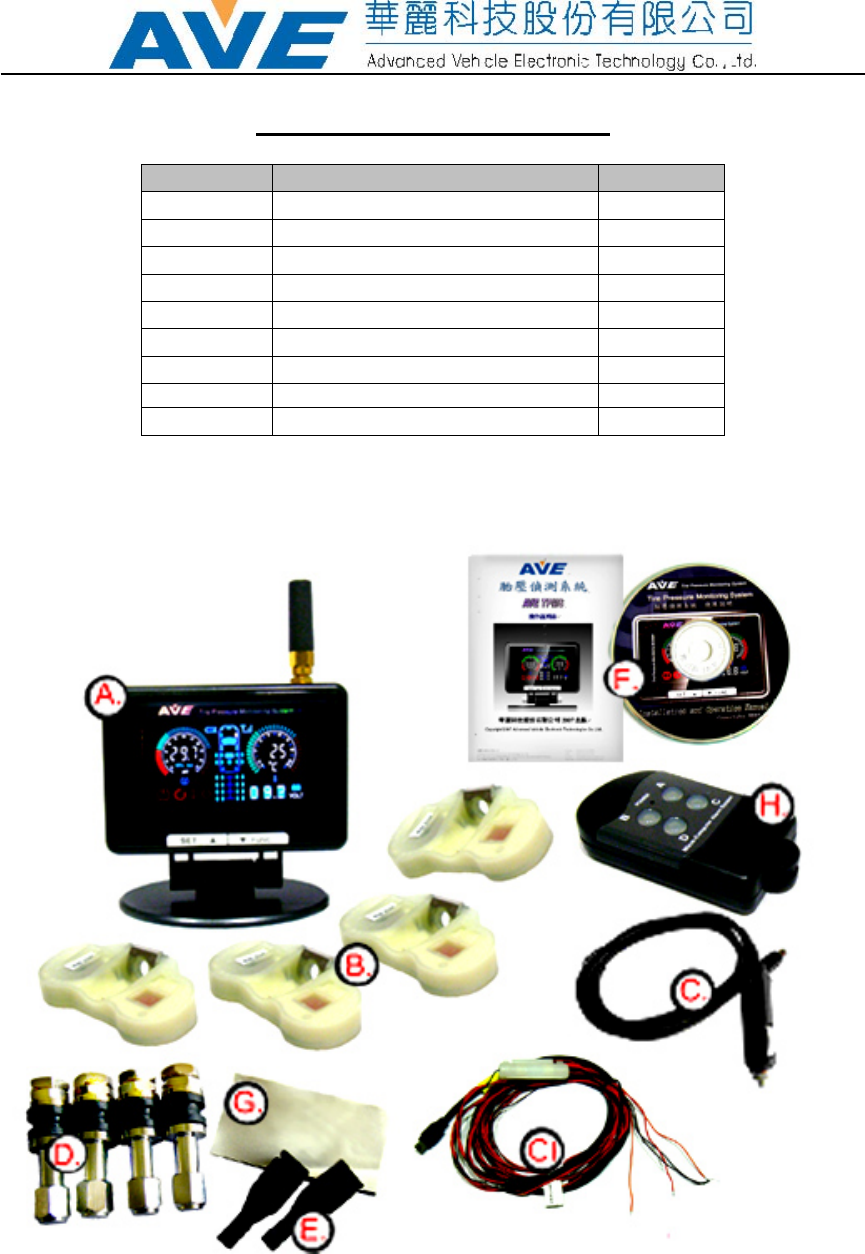
5. AVE TPMS Components
ITEM
Accessory
Quantity
A
Display Unit
1
B
Tire Sensors
4
C
Power cord cigarette adapter
1
C1
Hard wire kit
Optional
D
Common metal valve
4
E
Air conditioner clip
2
F
User manual or CD
1
G
Base Adhesive
1
H
Remote Control
Optional
6 www.avetechnology.com
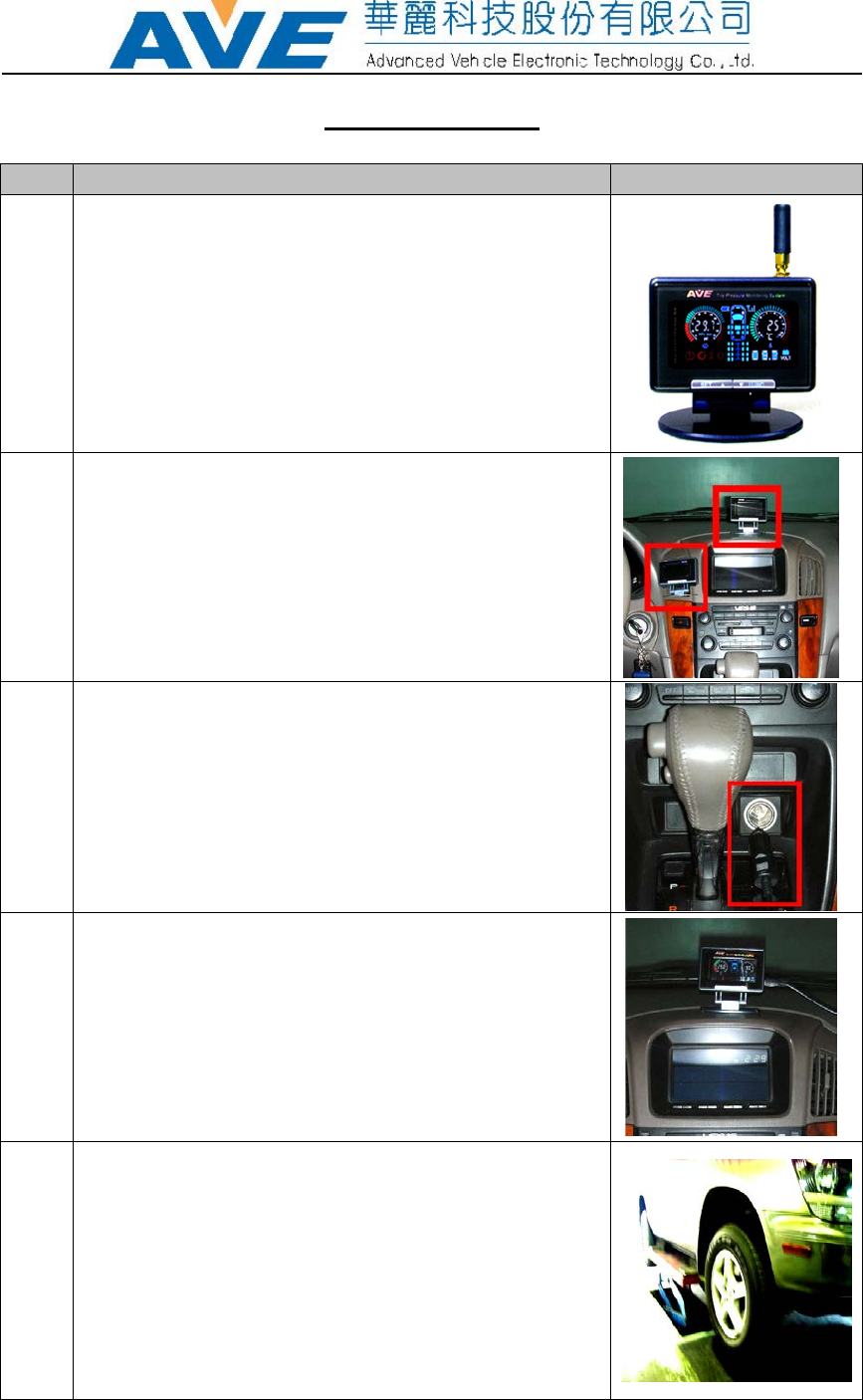
6. System Setup
Step
Process
Photo
1
Connect the Mini USB End of the Power Adaptor to the
display unit.
Attach the antenna by gently screwing it on clockwise,
finger tight.
2
Install the display unit into the desired location.
Install the air-vent clips for vent mounting.
Apply the enclosed double sided adhesive cushion to the
base of the Display Unit for dashboard mounting.
3
Plug in the Cigarette Adapter to vehicles cigarette lighter
socket.
Note: It must be a 12 V power supply!
For OE power cable, connect different wires according to
the label. Connect Ground, IGN, BATTERY (12V), while
ANTENNA wire does not need to be connected. Please
refer to the appendix chart.
4
AVE TPMS display unit setup is now complete.
Please start the engine or turn the key to IGN position.
AVE TPMS display unit will start receiving signals from tire
sensors only if the tire sensor has been installed and after
the tire is inflated.
5
Please proceed to Tire Sensor Installation on page 5.
Note: There is no need to set the tire position on the
TPMS Unit. It has been pre-set at the factory.
It is important to install the tire according to the tire
position on the sensors label.
(Vehicle with four wheels: front left, front right, rear right,
rear left. To set up a vehicle with more than 4 wheels,
please set up tire location in accordance with page 13.)

7 www.avetechnology.com
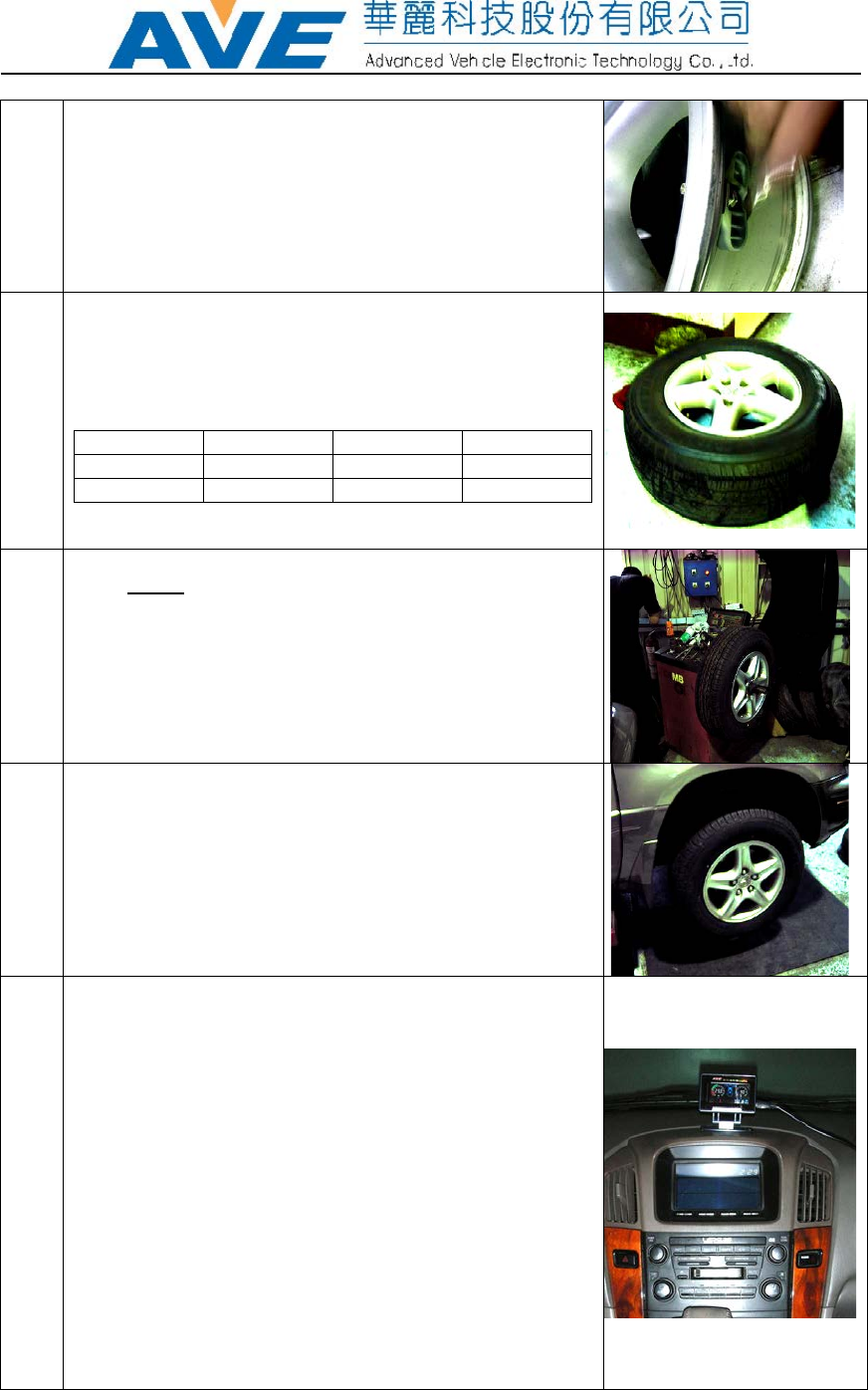
7. Tire Sensor Installation
*Screw the 2 nuts one by one. After you screw the first nut, try to move the valve to see if it's still,
then the next one. And make sure they are all on the thread.
Step
Process
Photo
1
Remove tire from the vehicle.
Deflate the tire and remove the tire from the rim.
Seek assistance from qualified personnel if necessary.
2
Each sensor has a small label attached showing the wheel
position it needs to be;
Front Left (1) Front Right (2)
I
Rear Left (3) Rear Right (4)
(Vehicles with more than 4 wheels please set up in
accordance with page 13)
3
Install the sensor inside the wheel.
MAKE SURE the tire sensor is installed into the intended
tire. (Front right, Rear Left etc.)
Note: AVE TPMS uses a common metal valve.
If necessary, it is easy to change the valve at any
tire shop.
Do not hit the tire sensor when the wheel is taken apart!
8 www.avetechnology.com
4
Be sure the rubber seal is properly positioned between the
rim and the valve.
5
Clean the inside of the tire from any dust and inflate the
tire to the proper pressure as recommended by the tire
manufacturer. The tire must be inflated to the proper tire
pressure to activate the tire sensor.
Pressure unit
kpa
psi
bar
700Kpa
260
37.7
2.6
1400Kpa
560
81.2
5.6
6
Tires MUST be balanced after the tire sensor has been
properly installed.
Tires must be balanced by professional personnel.
Be sure to install the tire into the proper location as
per the tire sensor. If you fail to do this, the TPMS
unit will give you readings from the wrong location.
7
Follow the above procedure for the other 3 tires.
8
Once the tire sensors have been properly installed,
connect the display unit to vehicles cigarette lighter power.
AVE TPMS will then detect signals from the tire sensors.
If there is no signal, disconnect the power to the display
unit, re-connect it and try again. If there is still no display,
try a third time. If after the third try you still have no signal
please reset the display unit.
(Please refer to Tire Setup Mode on page 19)
Note: There is no need to setup up th
e tire location as it is
preset at the factory. (This is only applicable if the
tire installation is according to the position on the
sensors label.)

9 www.avetechnology.com
Anti-theft installation of external sensor
1. (Left→Right) Anti-theft nut, Original metal valve on car, External sensor
2. Take off the cap of valve, and screw the nut on valve
3. Install the external sensor on valve by hand, and use wrench to screw the nut opposite
way up, until you can’t easily take off the cap by hand. Please avoid using any other tool
to touch the external sensor, in order not to destroy the structure.
Notice:
You can soap liquid test after installation to make sure they don't leak. (A complete
external sensor is water-proof outside)
10 www.avetechnology.com
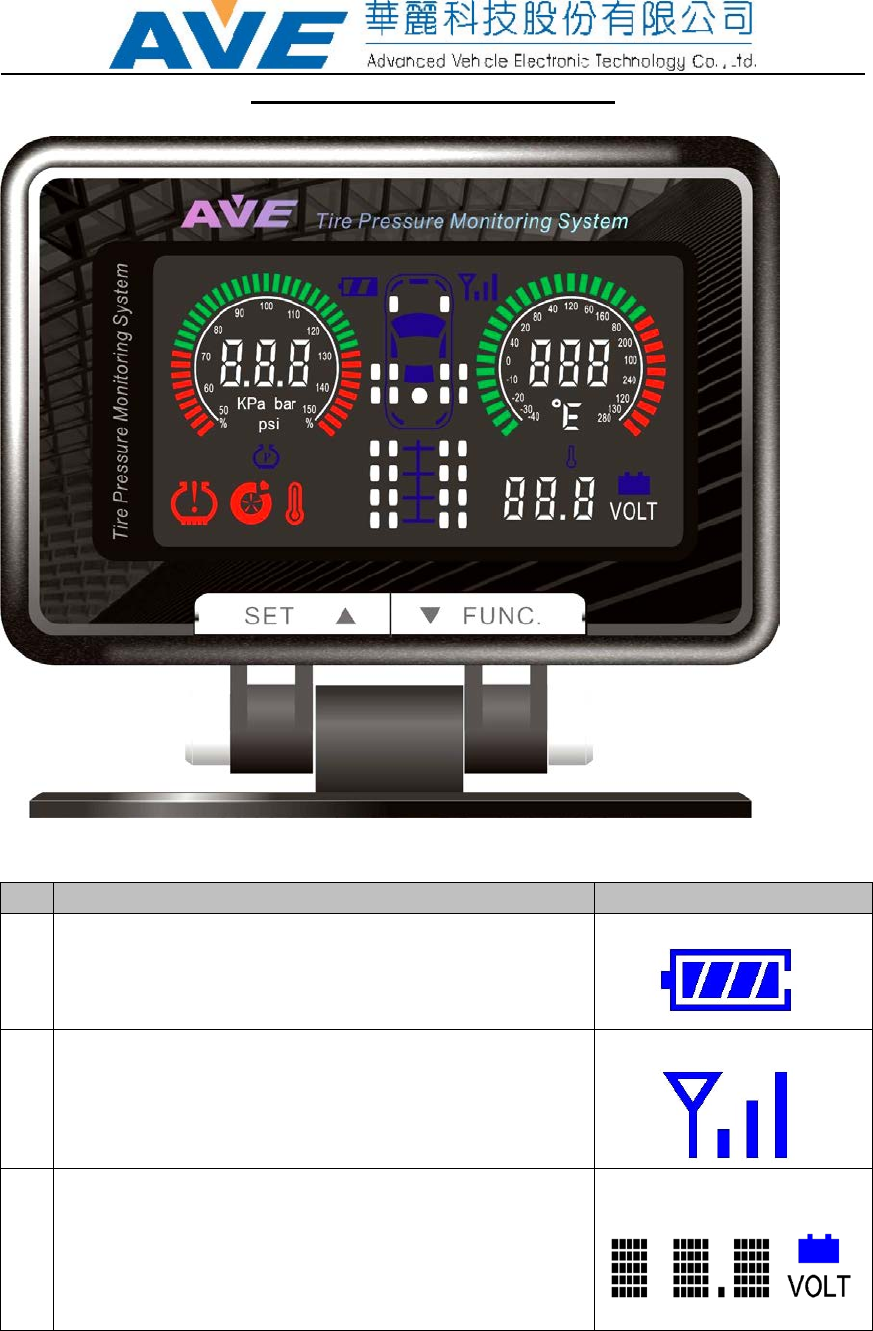
8. Display Unit Introduction
No.
Description
Photo
1
Sensor battery icon
Measures the Tire Sensor battery level
2
Signal strength icon
Measures the signal strength from the tires sensor.
3
Vehicle battery reading
Monitors the vehicles battery (in operating mode)
(If it is above 15.5V or below 11.5V, it will flash and has a
warning sound)
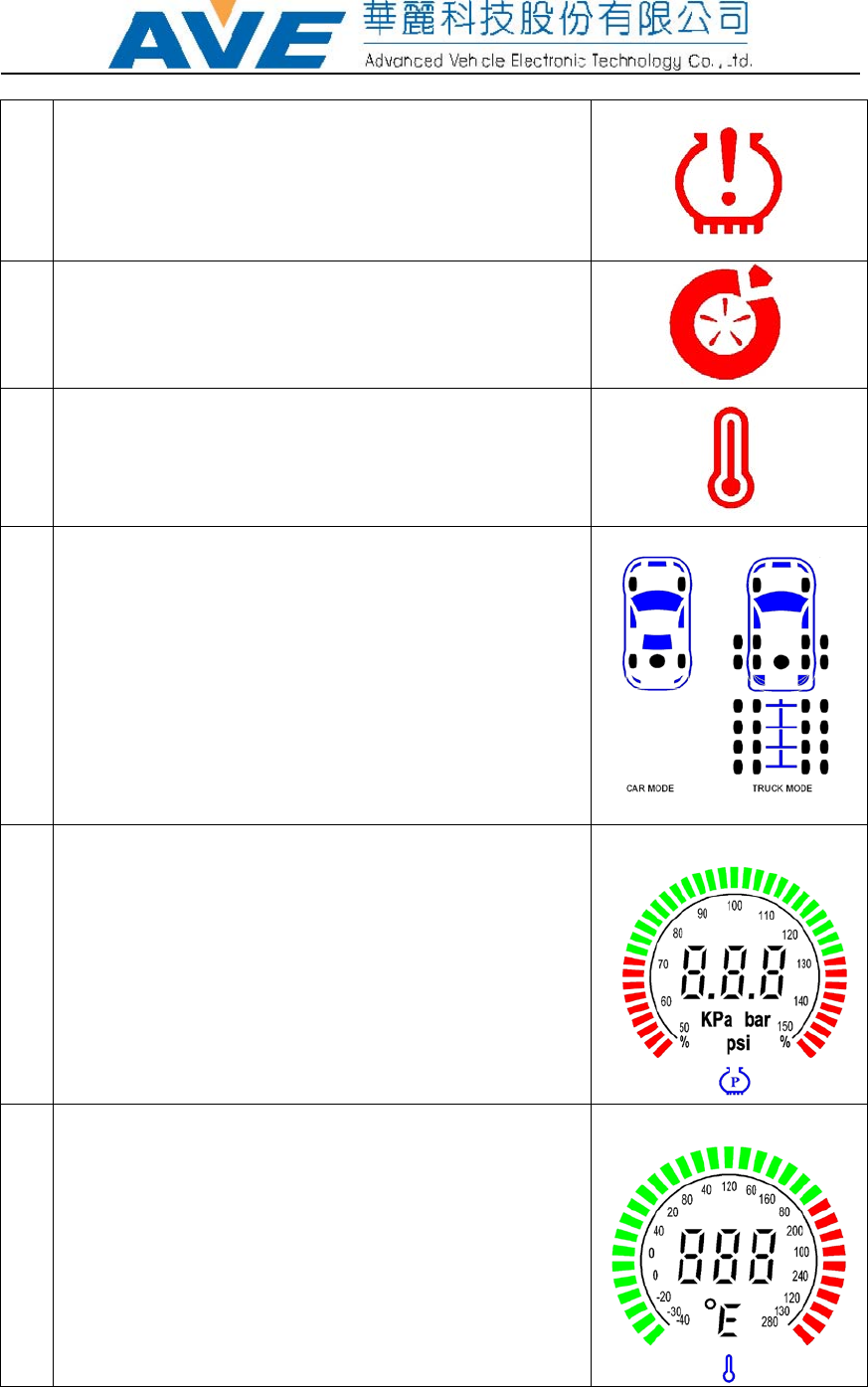
11 www.avetechnology.com
4
Pressure Warning icon
Will light when the Tire Sensor detects any irregularities in
Tire Pressure .
i.e.:. Fast/Slow leak, tire pressure above or below 30% of
recommended pressure
5
Flat tire icon
Will light when flat tire is detected.
6
High Temperature Icon
Will light when the temperature inside the tire is above
85°C (185°F)
7
Wheel types (car or truck mode)
• Up to 8 modes of vehicle type selection
• Programmable up to 27 tires.
• Optional monitoring for spare tire.
8
Pressure Meter
• Measures 3 different pressure units (KPa, bar, psi)
• Color difference to differentiate between normal
(Green) and warning (Red)
• Displays actual pressure value on display unit.
Note:
Before receiving the signal, it shows last recorded
pressure.
9
Temperature Meter
• Measures degrees Celsius (°C) or Fahrenheit (°F)
• Different colours to differentiate between normal
(green) and high temperature (red)
• Displays actual temperature value
on the display
unit.
Note:
Before receiving the signal, it shows last recorded
temperature.
12 www.avetechnology.com
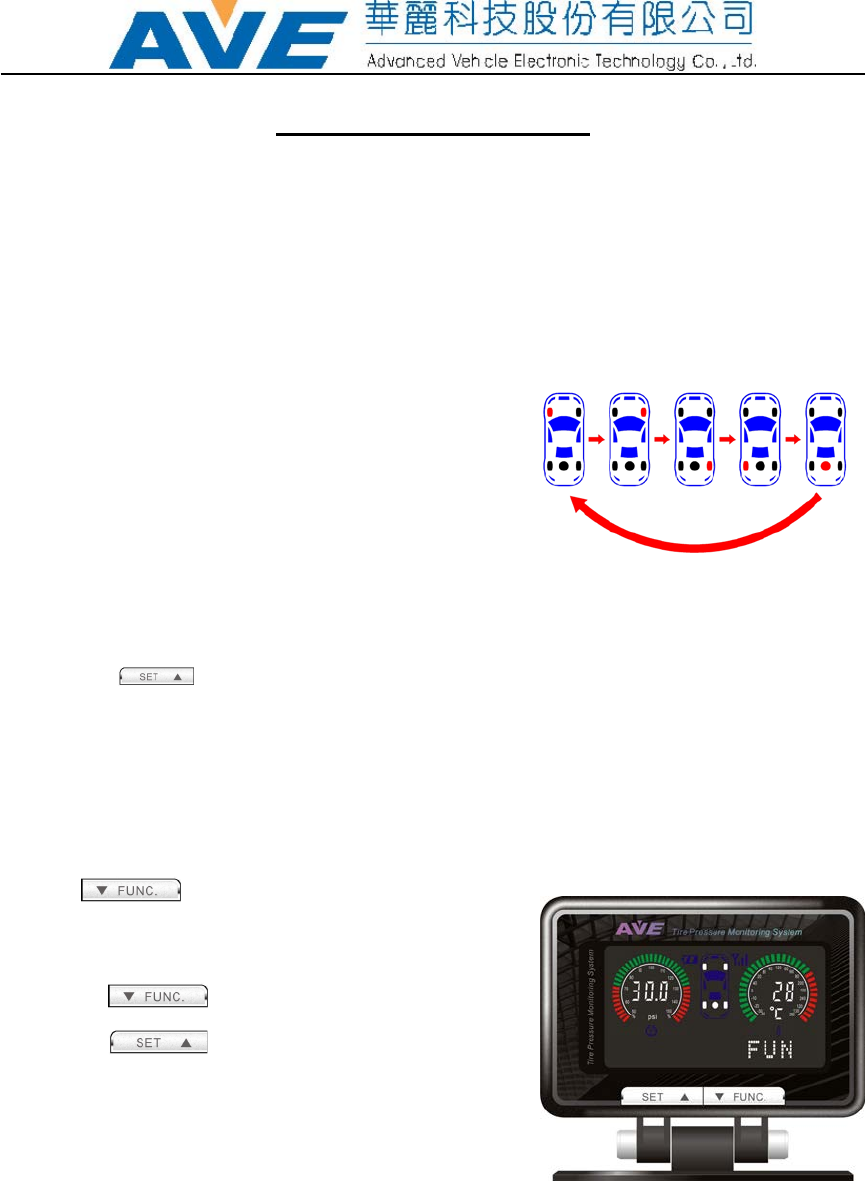
9. Operating AVE TPMS
9-1. OPERATING MODE
AVE TPMS display unit will monit
or each tire for 10
seconds and then proceed to the next tire.
Problematic tire will be monitored for 15 seconds before
proceeding to the next tire. It will keep displaying the
warning code until the problem has been taken care of
by the user.
For the a
lerts/warnings codes, please refer to the
Reacting to Alerts section.
The tire being monitored will light and its information will
be displayed.
( i.e.: pressure, temperature, tire sensor battery level
and signal strength)
Note: User has the option to turn off the beeping sound
by pressing button.
9-2. FUNCTION MODE (To review every tire’s condition quickly)
Press button once to enter FUNCTION
MODE.
Message area will display FUN.
Press for next tire selection.
Press for previous tire selection.
To exit, do not touch the display unit for 20 seconds.
Note: If there is 20 seconds or more of inactivity, the
system will quit the FUNCTION MODE
and return to
OPERATING MODE.
13 www.avetechnology.com
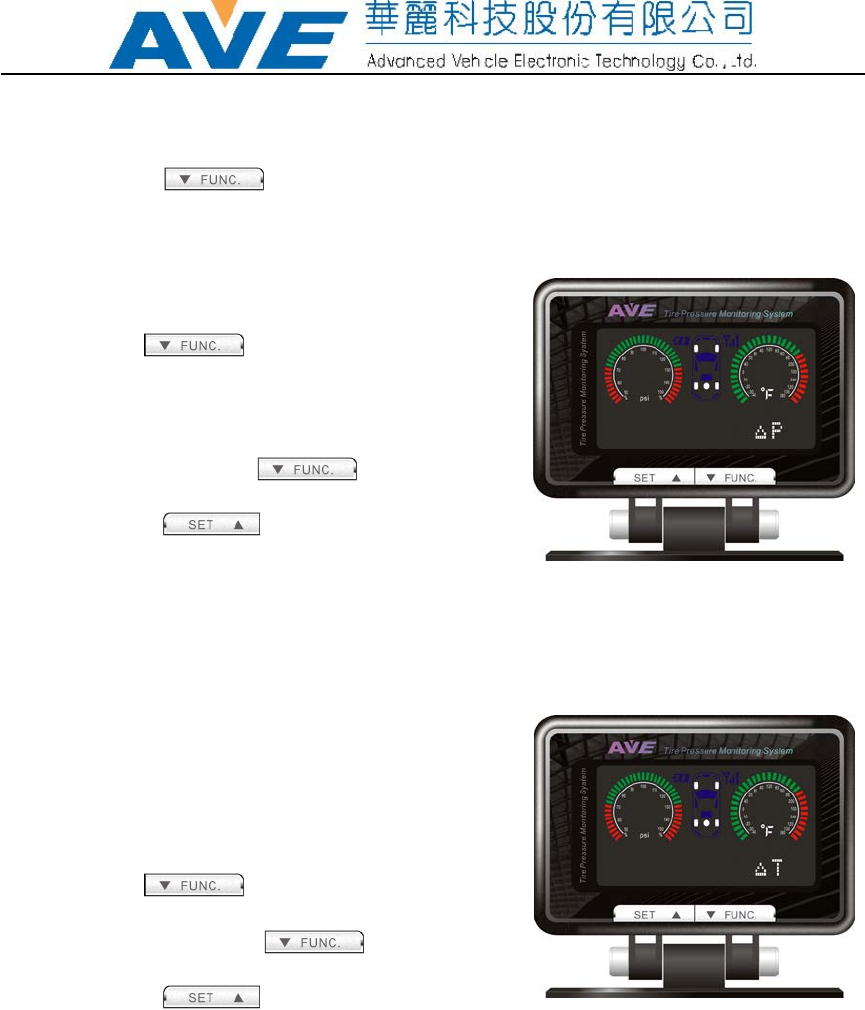
9-3. UNIT MODE (To change pressure or temperature unit)
Press and hold
button for 3 seconds to
enter UNIT MODE.
1) The message area displays ΔP
2) Psi icon will light (the default pressure unit or
the previously selected unit).
3) Press to change pressure unit.
( psi kpa bar psi )
Note:
If Truck pressure is above 999 kpa, you can only
select psi or bar Unit
4) Continue to press for pressure unit
selection.
5) Press
to confirm the selection.
Pressure unit is then saved.
Note:
To bypass pressure unit change, skip step (3) & (4).
Go to step (5) to confirm the default unit settings.
The default pressure unit is in
psi or previously
selected unit of measure.
To exit Unit Mode, do not touch any buttons for 20
seconds. Changes will not be saved (before step 5) and
the system will use the default pressure unit.
6) Immediately after step (5), message area will
display ΔT.
7)
°
C icon will light (default temperature unit or
previously selected unit).
8) Press to change temperature unit.
( °C °F °C )
9) Continue to press for temperature
unit selection.
10) Press
to confirm the selection.
Temperature unit is then saved.
11) UNIT MODE setup is now complete. System will
automatically return to OPERATING MODE.
Note:
To bypass temperature unit change, skip step (8) & (9).
Go to step (10) to confirm the default unit settings.
Default temperature unit is in Celsius or previously
selected unit
To exit, do not touch any buttons for 20 seconds.
Changes will not be saved (before step 10)
and the
system will use the default temperature unit.
14 www.avetechnology.com
9-4. PRESSURE SETUP MODE (To change vehicle mode & pressure)
Press and hold button for 3 seconds to enter
PRESSURE SETUP MODE.
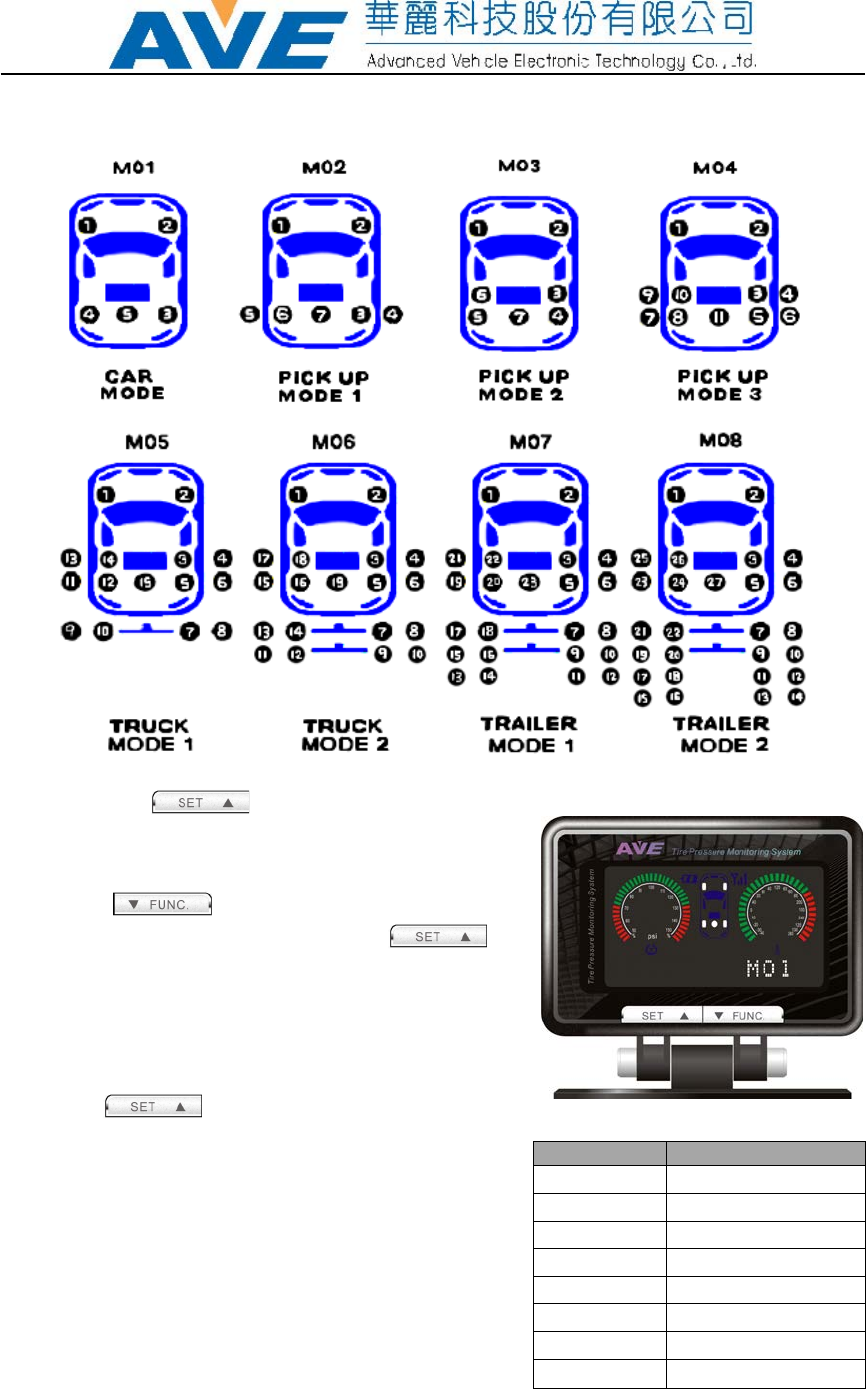
1) The message area will display M01 (The default
vehicle mode) or the previously selected mode.
2) Press to change vehicle mode. ( M01
M02 ~ M08 M01 ) Or press to
keep the default or the previously selected vehicle
mode. Then the system will allow you to setup the
2nd standard tire pressure. (Please refer to page 15.)
20 seconds or more of inactivity at this step will exit
the setting and get back to the operation mode.
Change will not be launched.
3) Press to confirm and save the selection
of vehicle mode. Immediately after this step, the
message area will display the default pressure
value. (
Default pressure value depends on the
vehicle mode selection.) Follow step 4 to confirm or
set the standard pressure value.
This step will erase the previously selected vehicle
mode and pressure. Moreover, the display will also lose
every sensor’s ID code. Afterwards, the leak test will be
necessary to launch for reset the sensor ID.
Vehicle Mode
Default pressure (psi)
M01 029
M02 039
M03 039
M04 049
M05 049
M06 059
M07 059
M08 059
15 www.avetechnology.com
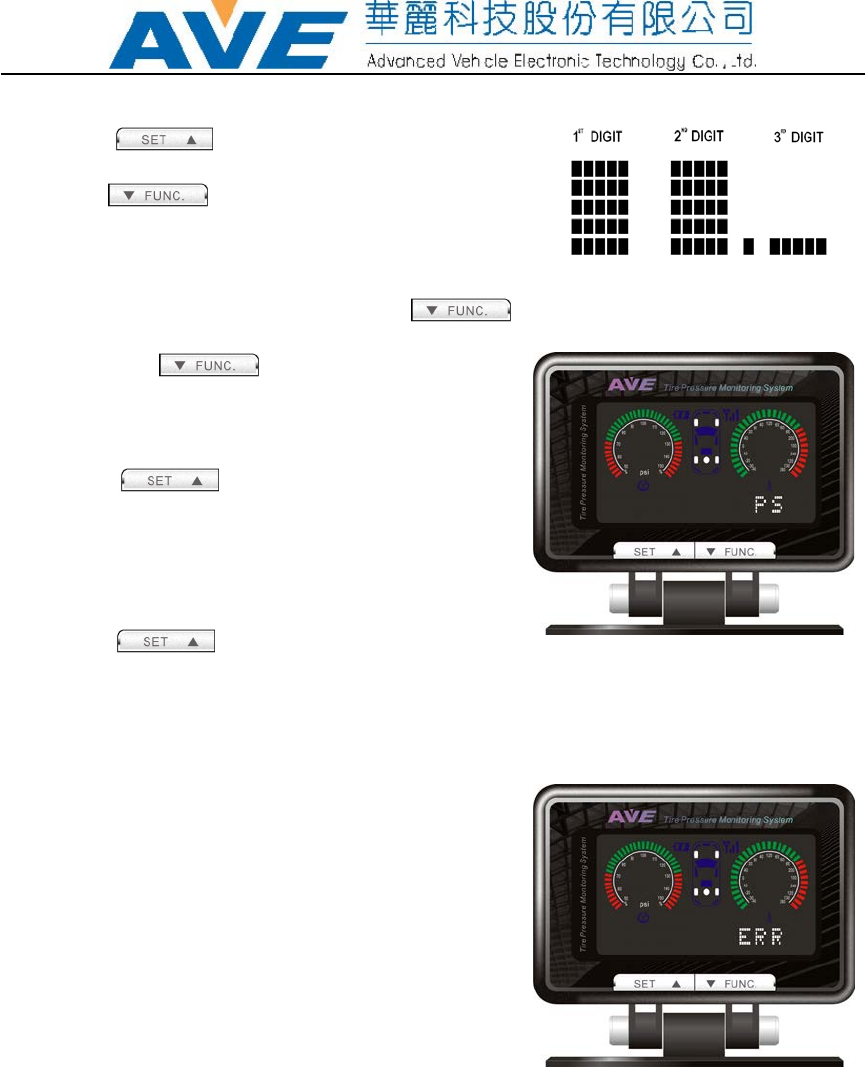
4) Press to accept the default pressure
value.
5) Press to change the pressure value.
6) The pressure value on the far right digit will flash
when entering the last digit.
• To change the pressure value, press
button. The displayed number will increase by 1
every time button is pressed. Continue
to press the button until you see the value you
want. The number will loop from 0 to 9 and then
back to 0.
8) Press to accept the input value. The
message area will then proceed to
the middle
number. The pressure value in the middle will flash.
9) Repeat step (6) to (8) to set up 2nd, which is the
pressure value on the far left.
10) Press to accept the displayed value on
the 3rd digit.
Note: If the target pressure value is 28 psi, please enter
it as 028 psi. Different unit, if needed, should be
selected before setting up the pressure value.
Please refer to UNIT MODE on page 12.
Once done, the system will perform a check on the
pressure entered. This is to avoid improper pressure
setup for selected vehicle mode.
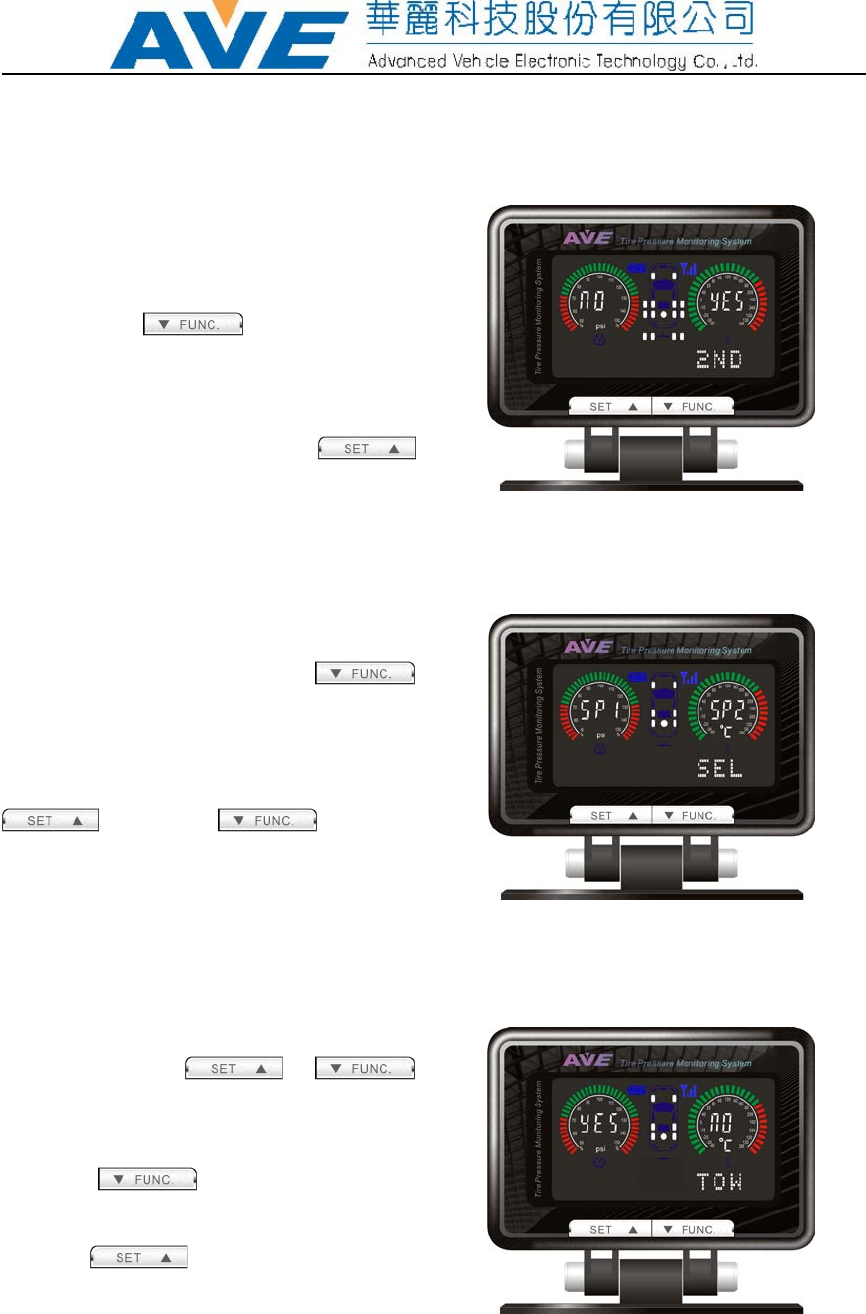
11) If the proper pressure has been entered,
• Message area will display PS (Pressure Saved).
• Display Unit will beep once.
• Entered pressure value will be saved.
• Return to the operating mode.
12) If improper pressure has been entered,
• Message area will display
ERR (Pressure
Error).
• Display Unit will beep twice.
• User will automatically be returned to step (6) to
re-enter information.
• If error (ERR) occurs for the second time, the
system will replace the pressure to the default
value, and then return to the operating mode.
Note: If the pressure is above 999 kpa, only psi or bar
Unit can work. Please refer to Unit Mode (p.12).
Correctly Enter Pressure
Error in pressure
16 www.avetechnology.com
9-5. Setup the 2nd Standard Pressure Value
Only with setting up the standard tire pressure
value, the message area will display 2ND,
which is to setup the s
econd standard
pressure when necessary. The previous setup
will be the 1st standard tire pressure value.
1) To set up the second standard pressure
value, press (YES) and follow
the steps (7) to (10) of PRESSURE SETUP
MODE on page 14.
2) To exit without setting up the second
standard pressure value, press
(NO) to return to the OPERATING MODE.
10 seconds of inactivity will also exit this
setting and return to the operating mode.
9-6. Match Tires and the 1st or 2nd Standard Pressure
To launch this setting, two different standard
pressure values should be done first. In the
operating mode, press and hold
button for 6 seconds, and the message area
displays SEL (Select 1st or 2nd standard
pressure value). Tires in the same row will
flash together, one row by one row. The spare
tire will flash individually. Please press
(SP1) or
(SP2) to
match every row of tires and the 1st or the
2nd standard pressure value. The unit will beep
once when matched. Afterwards, the unit will
automatically return to the operating mode.
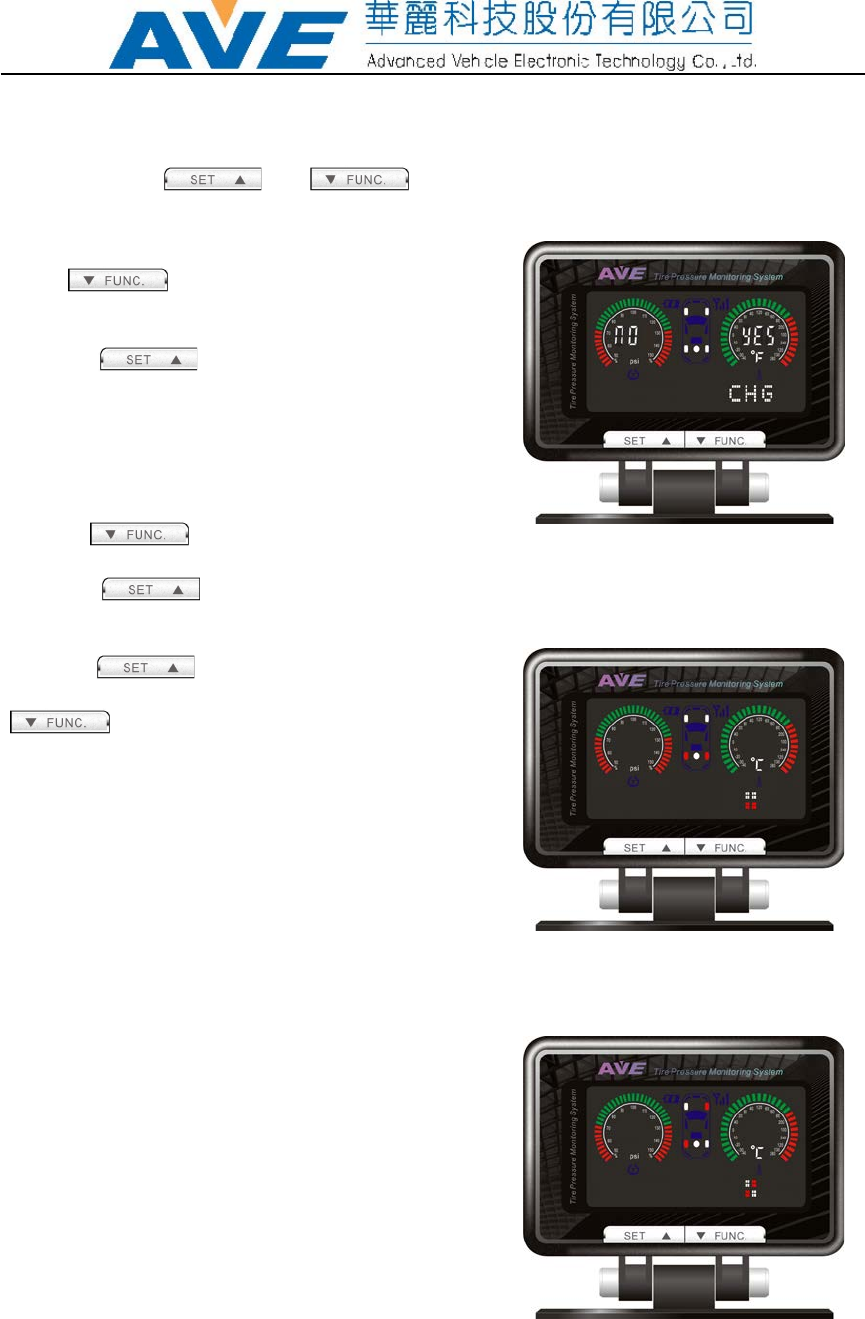
9-7. Mount/Dismount the Trailer (only for MO2-8 of the vehicle mode)
To launch this setting, tires should be matched
with two different standard pressure values
first. Press and hold and
for 9 seconds, and the message a
rea will
display TOW. The trailer part will flash.
1) Press
(NO) to dismount the
trailer. The unit will beep once when
dismounted.
2) Press (YES) to keep the trailer.
The unit will beep once when done.
20 seconds of inactivity, or finishing the trailer
mounting/dismounting, will get the unit back to
the operating mode.
17 www.avetechnology.com
9-8. TIRE SETUP MODE (To change/rotate tires)
Press and hold and buttons
together for 3 seconds to enter TIRE SETUP MODE.
In this mode, message area will display CHG.
Press (YES) to change tire position and
change tire position function.
Pressing (NO)
will not change the tire
position and will goes to setting up sensor position.
There are 2 patterns:
(1) Front Wheels and Rear Wheels
(2) Front Right and Rear Left
1) Press to change patterns.
2) Press to confirm.
Message area will
display OK?
Pressing (YES) will display OK and then
goes back to operating mode, while pressing
(NO) will display IDX and then goes back
to operating mode.
If no any activity for 20 seconds, it will automatically
goes to setting up sensor position.
Note: TIRE SETUP MODE is only for MO1 (Vehicle
mode, please refer to page 13). As any other
vehicle mode is picked, TIRE SETUP MODE
will not be launched.
TIRE SETUP MODE
1) front left and rear left
front right and rear right
2) front right and rear left
front left and rear right

18 www.avetechnology.com
9-9. Setup the sensor position
It is sometimes necessary to re-set up the sensor
position,
especially when replacing a tire sensor,
replacing a new tire, or mixing up tires after rotating
them. To set up the sensor position, follow the steps
below:
1) Press and hold the two buttons and
for 3 seconds.
Message area will
display LT (Leak Test) and the front left tire will
flash. User will have 240 seconds (4 minutes) to
perform the leak test on each tire.
2) Inflate or deflate the tire by 34 kpa or 5 psi within 4
minutes. A sudden change in the tire pressure will
cause the sensor to transmit signals continuously
to let the display learn the sensor position.
3) The display unit will beep once and the message
area will show “OK” if the signal is received. The
flashing tire on the display unit will stop flashing.
Then the front right tire takes the turn
to flash.
Follow step 2 to setup the front right tire.
Note: All the tires take turns to be setup in the order
1>2>3>4…..Please refer to page 13 or the tire
numbers of each vehicle mode.
4) To delete a tire, press . The message
area will display DEL (tire location doesn’t save)
and the unit will beep once. Then message area
display “OK?”
• Press to delete this tire if there is
no sensor installed or no tire existing in the
position. Deleted position will not be monitored
by the system.
• Press to skip the leak test on the
tire. The message area will display “SKP”. The
last default value will be kept.
5) System will proceed to the next tire to set up.
Note: If all tires are completely set up, the system will
exit TIRE SETUP MODE.
Inactivity of more
than 240 seconds (4 minutes), and the system
will automatically return to the operating mode
and save the last setting.
Optional to leak test:
User can avoid performing a leak test on the tire by
using the Optional AVE TPMS sensor’s LF remote
control. Kindly refer to the page 21.
19 www.avetechnology.com
9-10. Reacting to Alerts
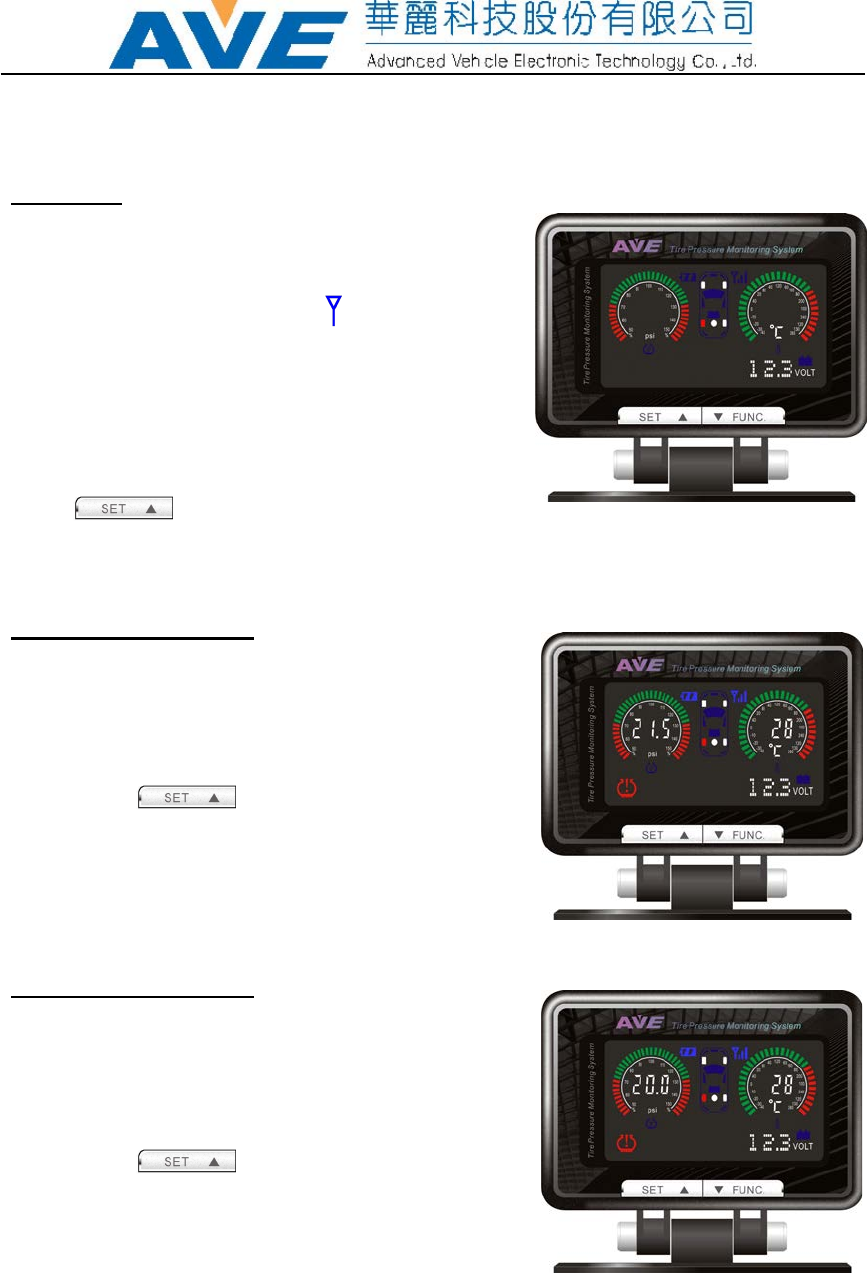
NO SIGNAL
• Affected tire will flash during its turn when the
unit is in operating mode.
• Unit will beep once every second.
• Antenna signal Icon shows with no bars.
• Pressure and Temperature bar indicators will
light.
• No numbers will be in the Pressure and
Temperature display.
Note: Interference will affect signal’s reception.
Press to turn off the sound. If the sound is
turned off, the Warning will remain on t
he display until
the problem is taken care of by the user.
UNDER-INFLATION (25%)
• Affected tire will flash during its turn when the
unit is in operating mode.
• Unit will beep once every two seconds
• Pressure bar indicator will flash at 75%
Note: Press to turn off the sound. If the
sound is turned off, the Warning will remain on the
display until the problem is taken care of by the user.
The 25% under-inflation value in pressure display is
based on default 29 psi.
UNDER-INFLATION (30%)
• Affected tire will flash during its turn when the
unit is in operating mode.
• Unit will beep once every two seconds
• Pressure bar indicator will flash at 70%
• Tire leak icon will light
Note: Press to turn off the sound. If the
sound is turned off, the
Warning will remain on the
display until the problem is taken care of by the user.
The 30% under-inflation value in pressure display is
based on default 29 psi.
20 www.avetechnology.com
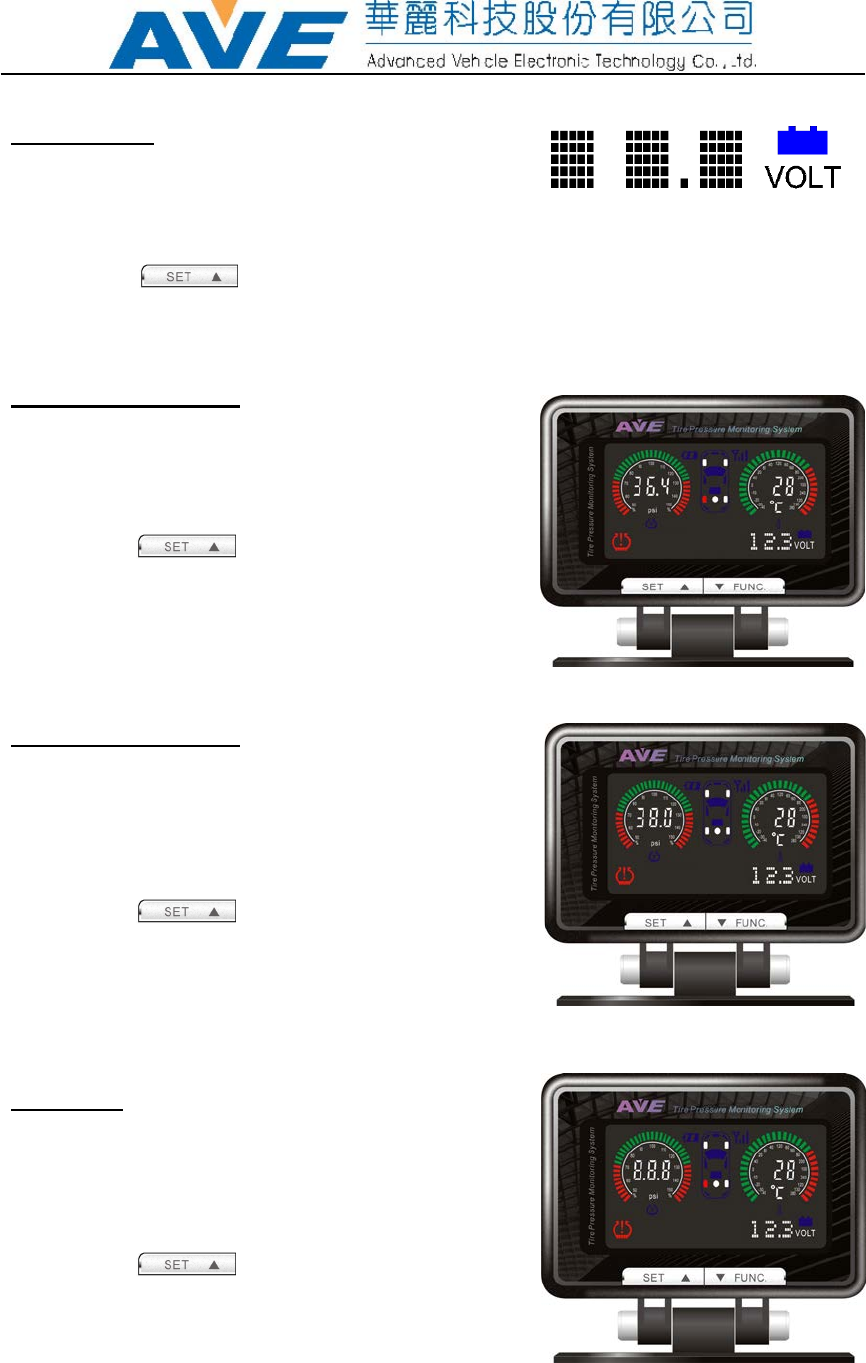
CAR BATTERY
If the b
attery voltage falls below 11.5 volts or goes
higher than 15.5 volts, the Battery chart will flash and
the unit will beep once every two seconds.
Note: Press to turn off the sound. If the
sound is turned off, the Warning will remain on the
display until the problem is taken care of by the user.
OVER-INFLATION (25%)
• Affected tire will flash during its turn when the
unit is in operating mode.
• Unit will beep once every two seconds
• Pressure bar indicator will flash at 75%
Note: Press to turn off the sound. If the
sound is turned off, the Warning will remain on the
display until the problem is taken care of by the user.
The 25% over-
inflation value in pressure display is
based on default 29psi.
OVER-INFLATION (30%)
• Affected tire will flash during its turn when the
unit is in operating mode.
• Unit will beep twice every two seconds
• Pressure bar indicator will flash at 70%
• Tire leak icon will light
Note: Press to turn off the sound. If the
sound is turned off, the Warning will remain on the
display until the problem is taken care of by the user.
The 30% under-
inflation value in pressure display is
based on default 29 psi.
FAST LEAK
• Affected tire will flash during its turn when the
unit is in operating mode.
• Unit will beep twice every second.
• Tire leak icon will light.
Note: Press to turn off the sound. If the
sound is turned off, the Warning will remain on the
display until the problem is taken care of by the user.
21 www.avetechnology.com
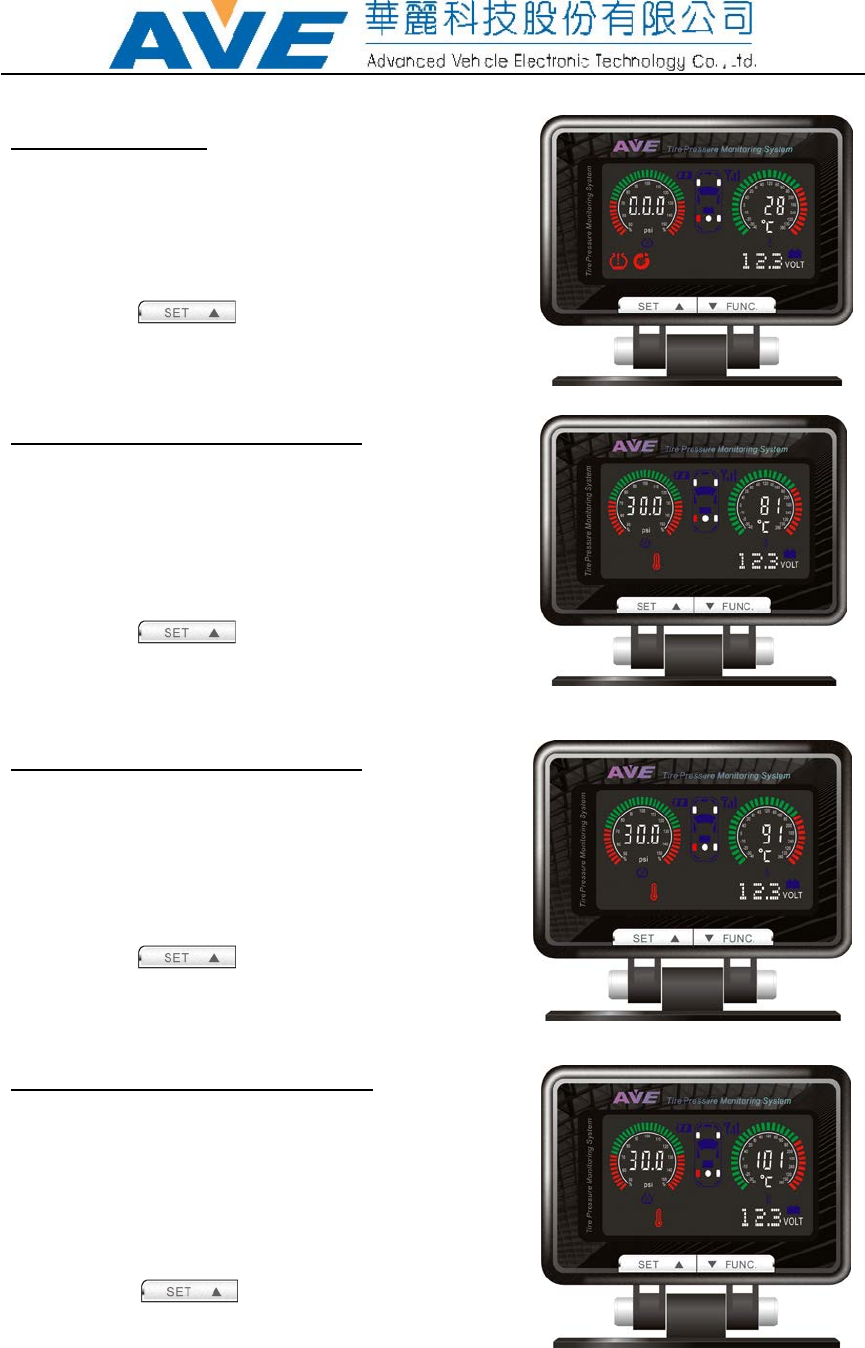
NO TIRE PRESSURE
• Affected tire will flash during its turn when the
unit is in operating mode.
• Unit will beep twice every second
• Flat Tire icon will light
Note: Press to turn off the sound. If the
sound is turned off, the Warning will remain on the
display until the problem is taken care of by the user.
TEMPERATURE ABOVE 80
°
C (176
°
F)
• Affected tire will flash during its turn when the
unit is in operating mode.
• Unit will sound one long beep followed by a one
second delay
• Temperature icon will light
• Temperature bar indicator will flash
Note: Press to turn off the sound. If the
sound is turned off, the Warning will remain on the
display until the problem is taken care of by the user.
TEMPERATURE ABOVE 90
°
C (194
°
F)
• Affected tire will flash during its turn when the
unit is in operating mode.
• Unit will sou
nd one long beep follow by one
short beep and a one second delay.
• Temperature icon will light.
• Temperature bar indicator will flash.
Note: Press to turn off the sound. If the
sound is turned off, the Warning will remain on the
display until the problem is taken care of by the user.
TEMPERATURE ABOVE 100
°
C (212
°
F)
• Affected tire will flash during its turn when the
unit is in operating mode.
• Unit will sound one long beep followed by two
short beeps and a one second delay.
• Temperature icon will light.
• Temperature bar indicator will flash.
Note: Press to turn off the sound. If the
sound is turned off, the Warning will remain on the
display until the problem is taken care of by the user.
22 www.avetechnology.com
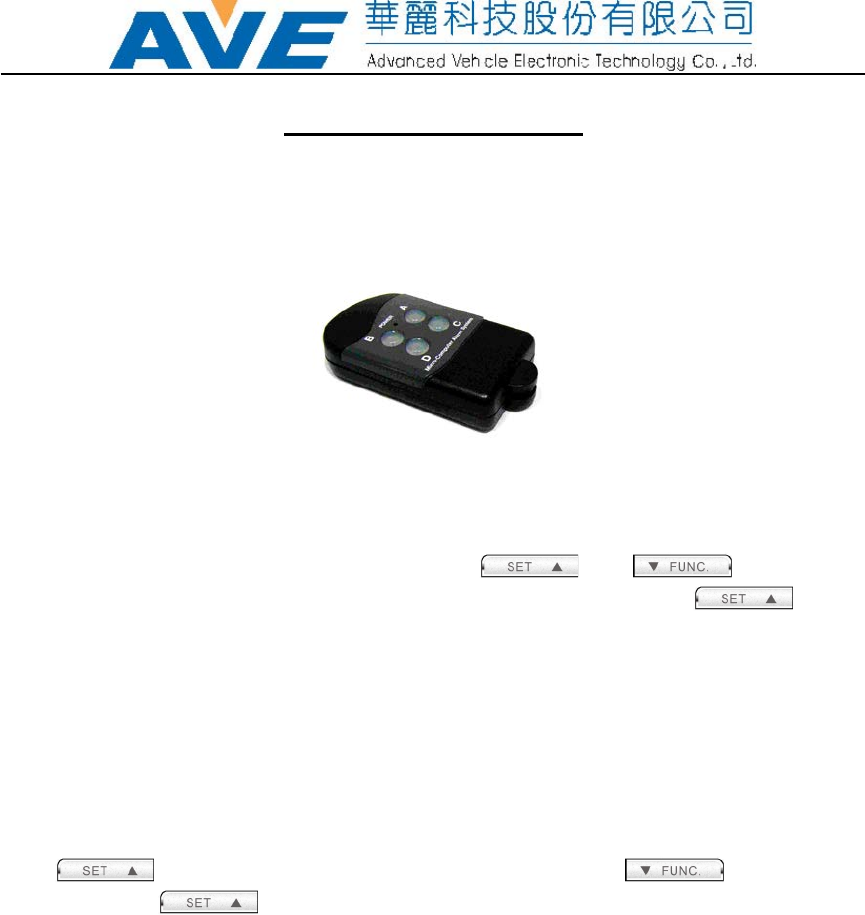
10. LF Remote Control
In order to simply the complicated procedure of resetting the sensor position by inflating/deflating
the wheels when rotating or changing the tires, Remote Control is the best choice.
Without an LF Remote control, please rapidly inflate or deflate the tires, which functions the same
as pressing the button B of the LF Remote control.
Set/Reset the sensor position with LF
Setting the sensor position:
1. First, press and hold the buttons on the display and together for 3
seconds to enter TIRE SETUP MODE. It will display “CHG” and then press (NO) to
learn the ID CODE of the sensors, while the message area will display “LT” (Leak Test) and the
front left tire will flash. (TIRE SETUP MODE is only launched for MO1, p.13.)
2. Press the learning key “B” of LF (make LF near the valve stem of the front left tire), which will
force the sensor to transmit signals so that the display can learn the position of the wheel. The
display unit will beep once if the signal is received and the message area will display “OK”, and
then the message area will turn to the next tire automatically. Before “OK” displayed, please do
not move the LF away from the wheel. Repeat the same for the remaining tires.
Delete/Skip one sensor:
Follow step one to enter TIRE SETUP MODE. When “LT” is displayed on the message area,
press (NO). The message area will display “DEL”. Press (YES) to delete
the tire, or press (NO) to skip setting the tire. If any sensor is skipped, its previous
status will be also kept.
Once the tire has been deleted, it should be added back by repeating the procedure of setting
sensor position. When the deleted tire is flashing again, learn the ID CODE with an LF or by
rapidly deflating/inflating the tire. Spare tire can be deleted or added back in the same way.
(Please attend: when you learn the sensor ID into the display, please take other sensors away in
the distance of 3 meters to avoid learning the other sensor ID.)
Functions of the four buttons of LF:
A. Warning mode: Make sensors transmit signals per second for two minutes. After two minutes
the sensors will get into normal mode.
B. Walk up mode: Make sensors transfer signals every second for one minute. After one minute
the sensors will get into normal mode.
C. Normal mode: Make sensors transfer signals every 30 second.
D. Sleep mode: Make sensors into sleep mode without transmitting any signal and save the
battery’s life. But when the sensor is put in the tire, the sensor will detect having
pressure and automatically wake up. So when the sensor is installed in tire and
you press D, it will not sleep due to the pressure.
23 www.avetechnology.com
Yes, delete
tire 1
Tire 1 flash
Don’t set up the
tire but confirm
to delete the tire.
No, don’t delete but
skip tire 1
Tire 2 flash
Get the remote control near
tire 1 and press and hold “B”
button for 5 seconds.
Tire 3 flash
Tire 4 flash
Follow the same steps to
get to others
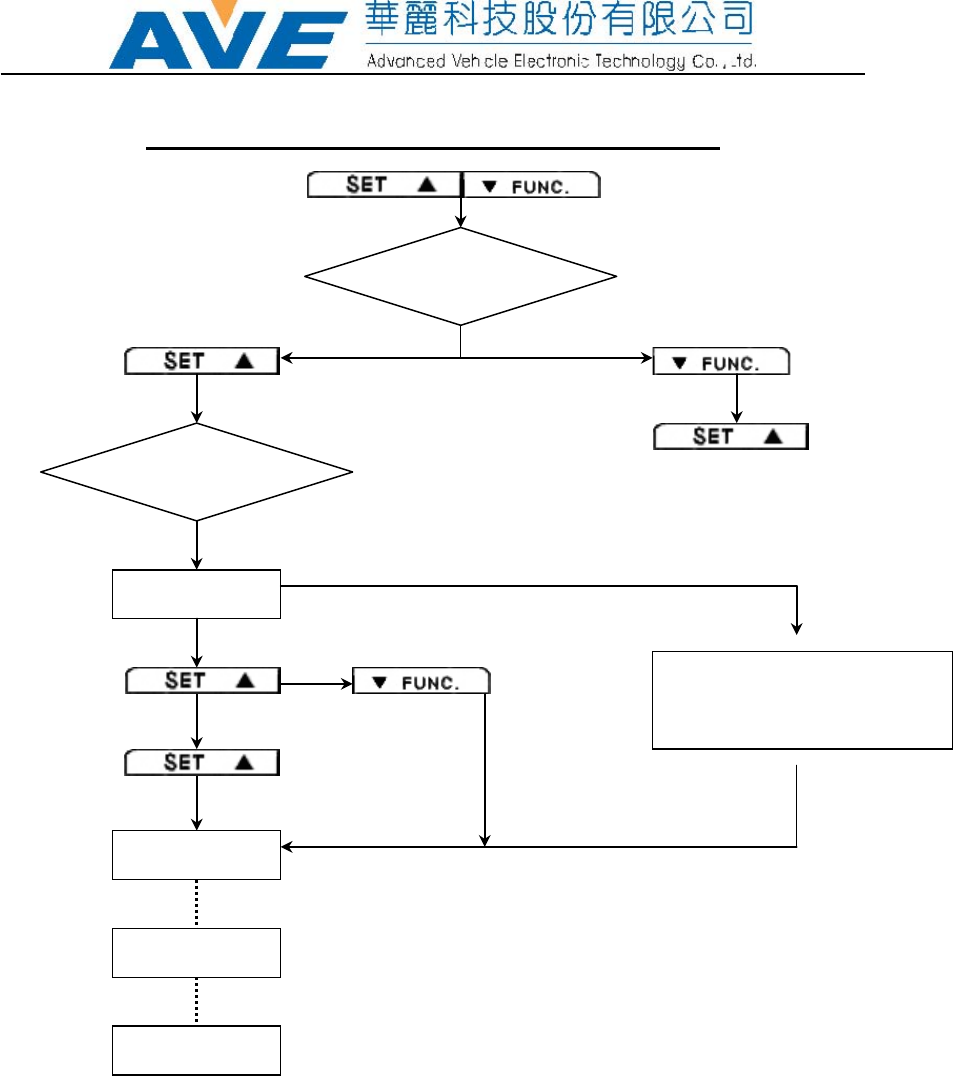
11. Chart of Tire Setup Mode and Leak Test
Press and hold for 3 seconds
Quit tire change
mode and get to
tire set up mode
Select the tire
changing way
Confirm the tire
change and get
to tire set up
mode
“LT” shown on
the right bottom
of the display.
“CHG” shown on the right
bottom of the display.
Tire Set Up
Tire Change Mode
Set up Tire 1
(NO)
(YES)
(NO)
(YES)
(NO)
24 www.avetechnology.com
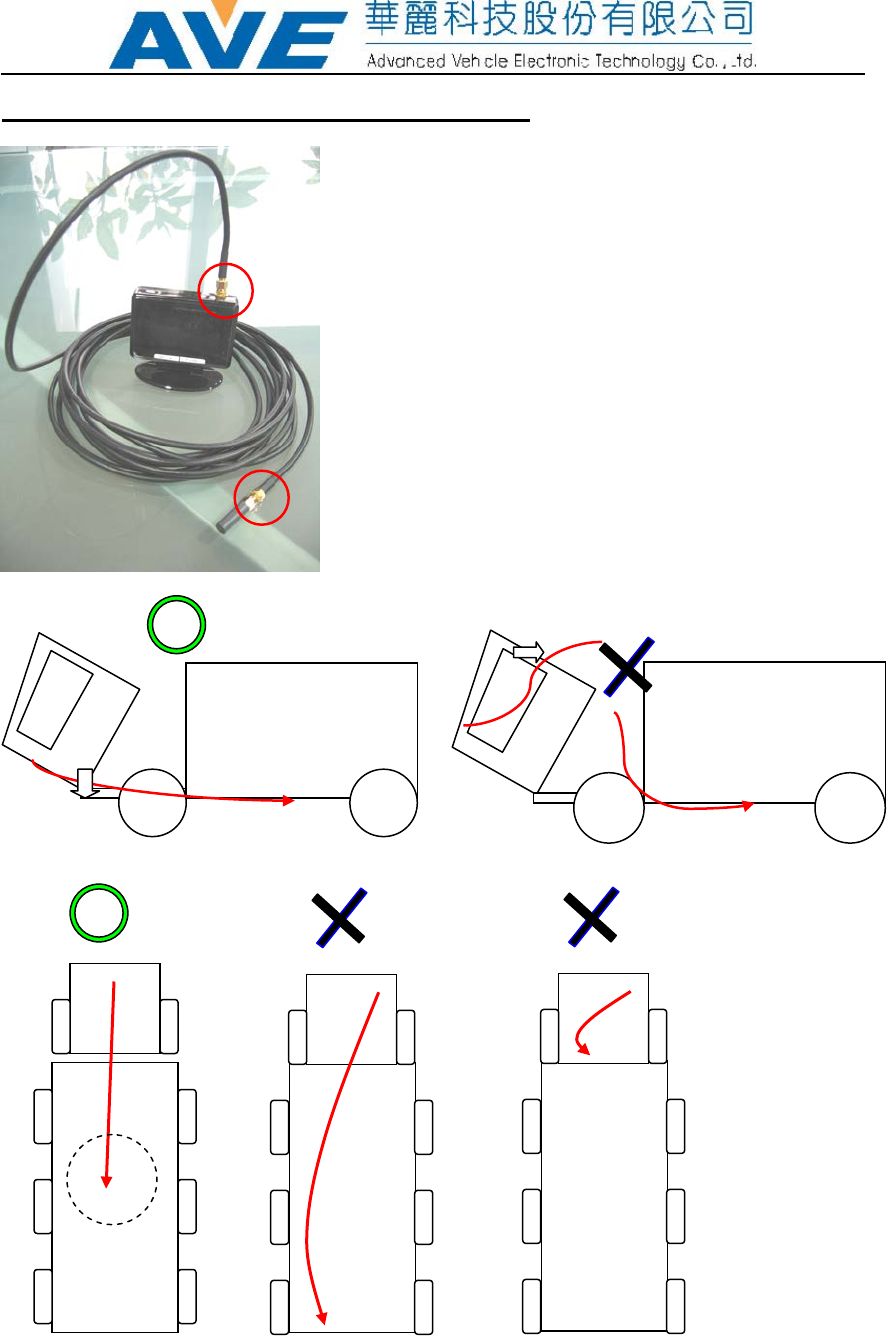
12. AVE TPMS Extended Antenna Cable (for Trucks/Buses/Trailers)
Figure 2
Red line = Antenna Cable.
Figure 3
Must set the antenna cable to the central area among all the wheels.
The far distance between the driver cabinet and the rear tires
(like a truck or bus) may cause the poor antenna. Besides, the
thickness of the vehicle stamping parts, car window films with
volumes of metal material, and so on will also cause the
interference with the signal transmitting. To make sure of the
signal well-transmitted and well-received, an extended antenna
cable would be strongly in need for trucks/buses/trailers.
Make sure the connection is tight enough.
Figure 1
25 www.avetechnology.com
13. AVE TPMS Optional Accessories
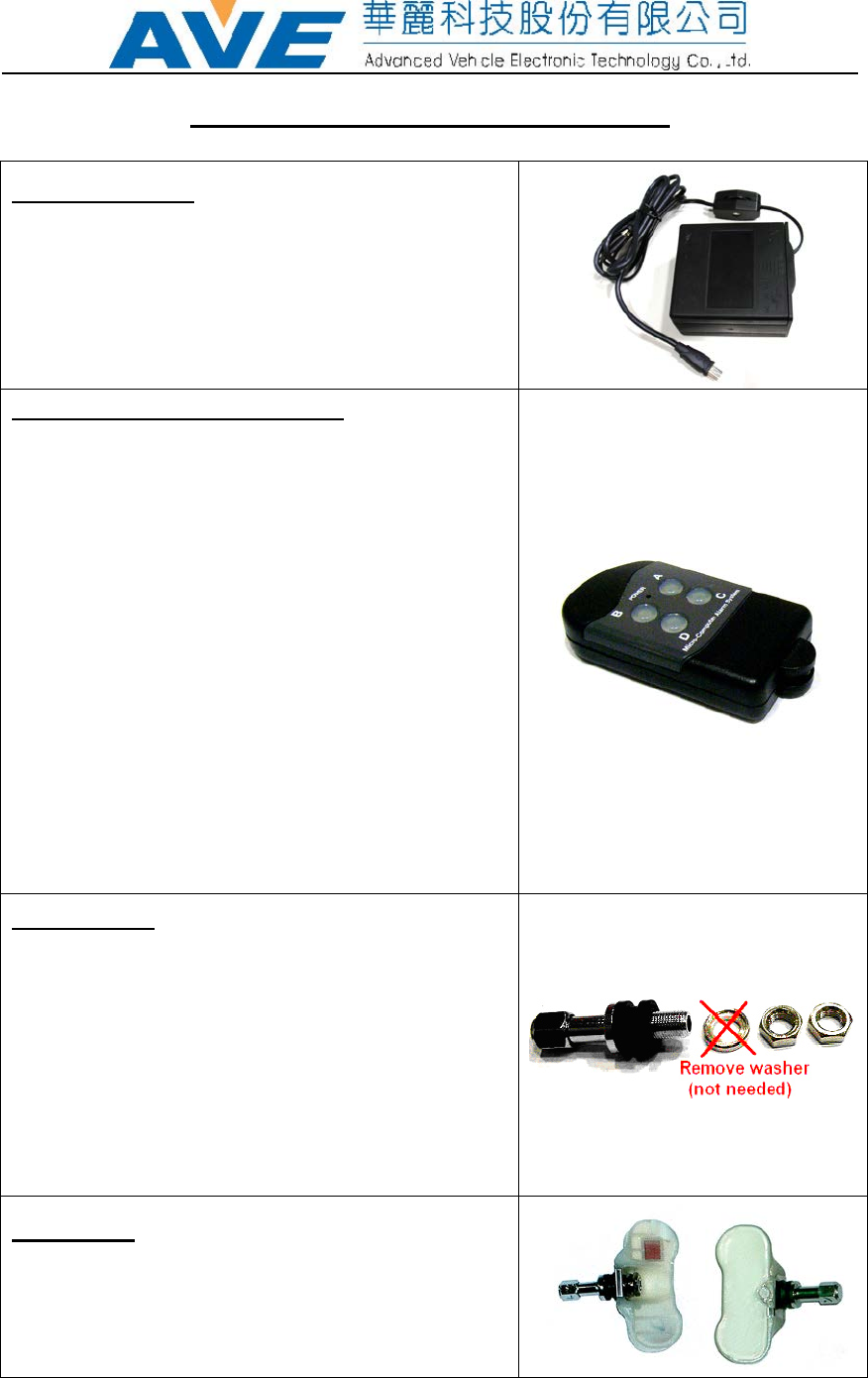
Battery Pack (8AA )
• Battery Pack allows display unit to be carried
around for easier setup.
•
Users do not have to rely on the power from the
vehicles cigarette lighter power cord.
•
Useful when setting up vehicles with a lot of
wheels.
• AVE TPMS will support up to 27 wheels
LF Remote control for Tire Sensors
• The LF remote control is used to control the tire
sensors. The 2 main functions include;
☆Learning Key (A)
Press this key to force the sensor to transmit a
signal without inflating or deflating the tire’s
pressure to learn the wheel position. It also has
the function to exchange the tire’s position.
☆ Sleep Key (D)
It will force the sensor into sleep mode so it will
save the tire sensor’s battery power.
• This will only work if the sensor is removed from
the wheel, or there is no air pressure in the tire.
As soon as the sensor detects air pressure, the
sensor will automatically “wake-up”.
This is
useful when changing tire location (tire rotation)
to setup up the tire position. It will force the tire’s
sensor to transmit a signal instead of performing
the leak test (page 19).
• Use as a diagnostic tool to test the tire’s sensor
if a sensor is transmitting a signal.
Standard Valve
• AVE TPMS uses a standard metal valve.
• Common valve which is available anywhere.
• Allows you to replace just the tire valve if it is
damaged or broken. You do not have to replace
the entire sensor.
• With other TPMS units, you have to replace
both the valve and the sensor if either one is
broken or damaged.
Tire’s sensor
• Tire sensor is available for the spare tire.
• To purchase more tire sensors, please contact
your AVE TPMS retailer.
26 www.avetechnology.com
14. Appendix
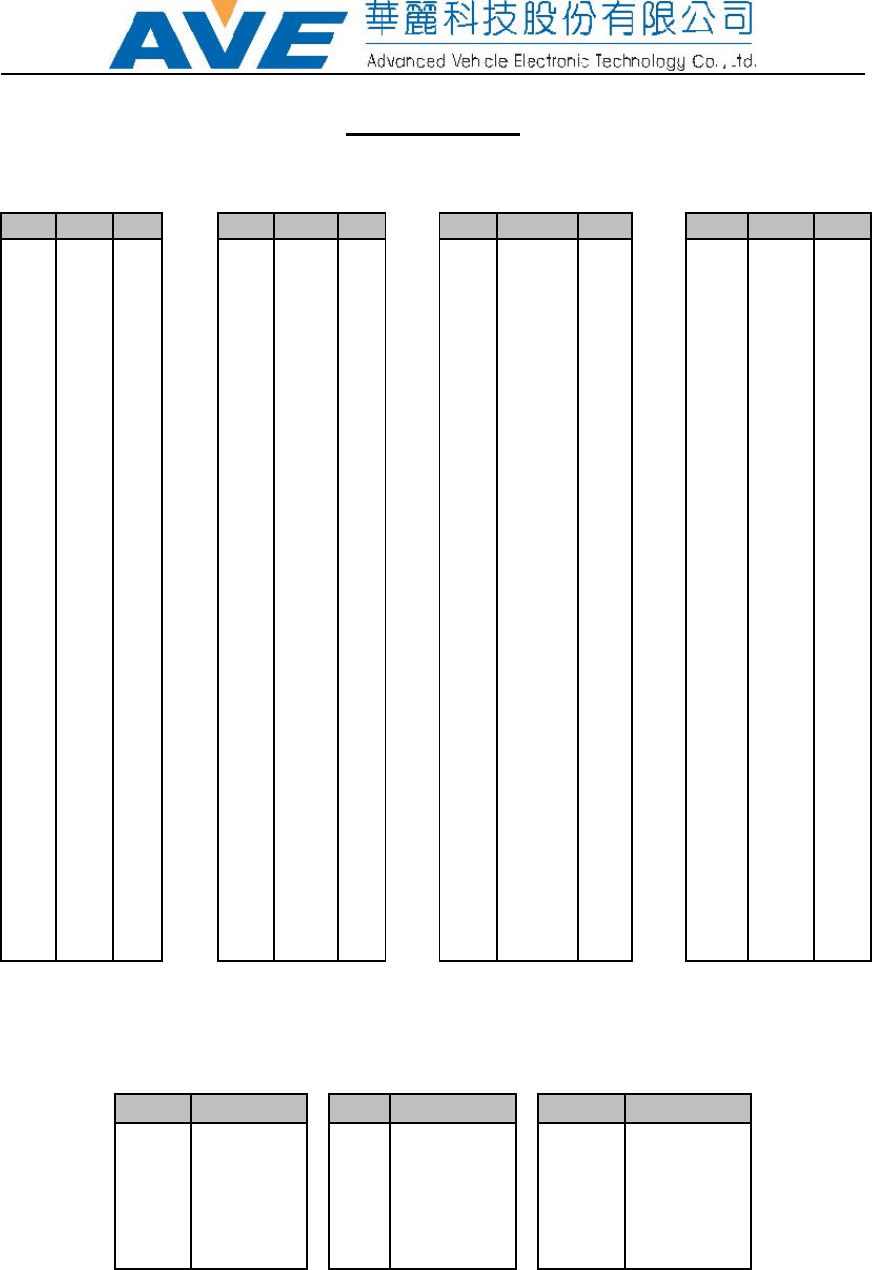
Pressure Conversion Table
KPa
psi
bar
KPa
psi
bar
KPa
psi
bar
KPa
psi
bar
10
1.5
0.1
310
45.0
3.1
610
88.5
6.1
910
132.0
9.1
20
2.9
0.2
320
46.4
3.2
620
89.9
6.2
920
133.4
9.2
30
4.4
0.3
330
47.9
3.3
630
91.4
6.3
930
134.9
9.3
40
5.8
0.4
340
49.3
3.4
640
92.8
6.4
940
136.3
9.4
50
7.3
0.5
350
50.8
3.5
650
94.3
6.5
950
137.8
9.5
60
8.7
0.6
360
52.2
3.6
660
95.7
6.6
960
139.2
9.6
70
10.2
0.7
370
53.7
3.7
670
97.2
6.7
970
140.7
9.7
80
11.6
0.8
380
55.1
3.8
680
98.6
6.8
980
142.1
9.8
90
13.1
0.9
390
56.6
3.9
690
100.1
6.9
990
143.6
9.9
100
14.5
1.0
400
58.0
4.0
700
101.5
7.0
1000
145.0
10.0
110
16.0
1.1
410
59.5
4.1
710
103.0
7.1
1010
146.5
10.1
120
17.4
1.2
420
60.9
4.2
720
104.4
7.2
1020
147.9
10.2
130
18.9
1.3
430
62.4
4.3
730
105.9
7.3
1030
149.4
10.3
140
20.3
1.4
440
63.8
4.4
740
107.3
7.4
1040
150.8
10.4
150
21.8
1.5
450
65.3
4.5
750
108.8
7.5
1050
152.3
10.5
160
23.2
1.6
460
66.7
4.6
760
110.2
7.6
1060
153.7
10.6
170
24.7
1.7
470
68.2
4.7
770
111.7
7.7
1070
155.2
10.7
180
26.1
1.8
480
69.6
4.8
780
113.1
7.8
1080
156.6
10.8
190
27.6
1.9
490
71.1
4.9
790
114.6
7.9
1090
158.1
10.9
200
29.0
2.0
500
72.5
5.0
800
116.0
8.0
1100
159.5
11.0
210
30.5
2.1
510
74.0
5.1
810
117.5
8.1
1110
161.0
11.1
220
31.9
2.2
520
75.4
5.2
820
118.9
8.2
1120
162.4
11.2
230
33.4
2.3
530
76.9
5.3
830
120.4
8.3
1130
163.9
11.3
240
34.8
2.4
540
78.3
5.4
840
121.8
8.4
1140
165.3
11.4
250
36.3
2.5
550
79.8
5.5
850
123.3
8.5
1150
166.8
11.5
260
37.7
2.6
560
81.2
5.6
860
124.7
8.6
1160
168.2
11.6
270
39.2
2.7
570
82.7
5.7
870
126.2
8.7
1170
169.7
11.7
280
40.6
2.8
580
84.1
5.8
880
127.6
8.8
1180
171.1
11.8
290
42.1
2.9
590
85.6
5.9
890
129.1
8.9
1190
172.6
11.9
300
43.5
3.0
600
87.0
6.0
900
130.5
9.0
1200
174.0
12.0
Temperature Conversion Table
°C
°F
°C
°F
°C
°F
-40
-40.0
20
68.0
80
176.0
-30
-22.0
30
86.0
90
194.0
-20
-4.0
40
104.0
100
212.0
-10
14.0
50
122.0
110
230.0
0
32.0
60
140.0
120
248.0
10
50.0
70
158.0
125
257.0
27 www.avetechnology.com
15. WARRANTY
AVE Technology warrants to the original end user that the product purchased is free from defects
in material and workmanship for a period of one (1) year from the date of original purchase.
Should the product fail within the warranty period, it will be replaced or repaired at the option of
AVE Technology. AVE Technology reserves the right to replace defected products with either a
new or refurbished unit, to be functionally equivalent to new.
The Warranty is void and inapplicable if:
1. the product has been used or handled other than accordance with the instructions in the
user manual
2. the product is abused, misused, damaged by accident or neglect
3. the damage is due from being repaired or tampered with by anyone other than an AVE
Technology or an authorized AVE Technology repair center.
4. the damage is due from shipping during transit.
The damaged product must be delivered prepaid to AVE Technology or its authorized AVE
Technology repair center. The RETURNED PRODUCT MUST BE ACCOMPANIED BY A
WRITTEN DESCRIPTION OF THE DEFECT AND A PHOTOCOPY OF THE ORIGINAL
PURCHASE RECEIPT. This warranty is valid in the country of purchase
This warranty is limited to the terms stated herein. AVE Technology shall not be liable for any
special, incidental or consequential damages relating to the product sold. This Warranty gives
you specific legal rights and you may also have other rights which vary from state to state.
-------------------------------------------(Please cut along line)--------------------------------------------------
WARRANTY REGISTRATION FORM
Last Name
First Name
Apartment
Number
House
Number
Street Name
City
State/Province
Country
Zip/Postal
Phone
-
-
Product
Model
Warranty Purchase Date
1 Year
2 Years
YEAR
MO
DD