Advantra AR1800 4 Line Alphanumeric ReFlex Pager User Manual AR1800

Advantra International 4 Line Alphanumeric ReFlex Pager AR1800

AR1800

MessengerAR1800
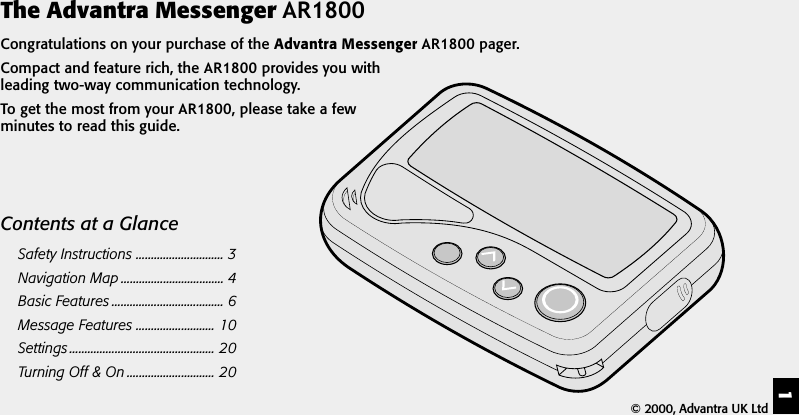
1The Advantra Messenger AR1800Congratulations on your purchase of the Advantra Messenger AR1800 pager.Compact and feature rich, the AR1800 provides you withleading two-way communication technology.To get the most from your AR1800, please take a fewminutes to read this guide.Contents at a GlanceSafety Instructions ............................. 3Navigation Map .................................. 4Basic Features ..................................... 6Message Features .......................... 10Settings ................................................ 20Turning Off & On ............................. 20© 2000, Advantra UK Ltd
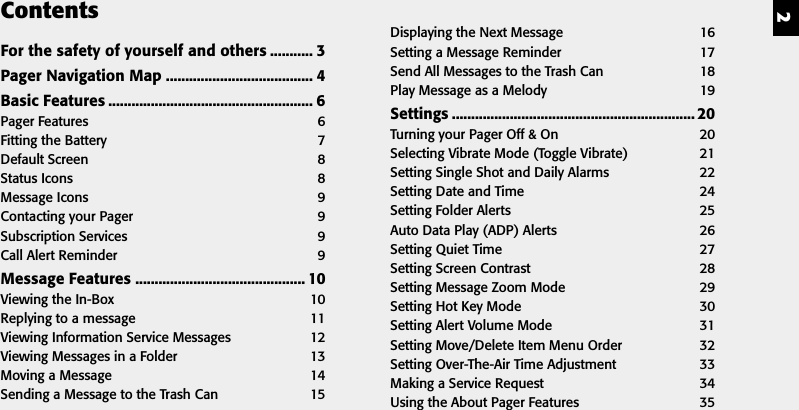
2ContentsFor the safety of yourself and others ........... 3Pager Navigation Map ...................................... 4Basic Features ..................................................... 6Pager Features 6Fitting the Battery 7Default Screen 8Status Icons 8Message Icons 9Contacting your Pager 9Subscription Services 9Call Alert Reminder 9Message Features ............................................ 10Viewing the In-Box 10Replying to a message 11Viewing Information Service Messages 12Viewing Messages in a Folder 13Moving a Message 14Sending a Message to the Trash Can 15Displaying the Next Message 16Setting a Message Reminder 17Send All Messages to the Trash Can 18Play Message as a Melody 19Settings ............................................................... 20Turning your Pager Off & On 20Selecting Vibrate Mode (Toggle Vibrate) 21Setting Single Shot and Daily Alarms 22Setting Date and Time 24Setting Folder Alerts 25Auto Data Play (ADP) Alerts 26Setting Quiet Time 27Setting Screen Contrast 28Setting Message Zoom Mode 29Setting Hot Key Mode 30Setting Alert Volume Mode 31Setting Move/Delete Item Menu Order 32Setting Over-The-Air Time Adjustment 33Making a Service Request 34Using the About Pager Features 35
3For the safety of yourself and others:Read these instructions. Keep these instructions. Heed all warnings. You must obey all operatingrequirements posted or announced for two-way radio, mobile phones and two-way pagers.In common with all two-way pagers, the AR1800 incorporates a low power transmitter. When the pager isswitched ON the transmitter will periodically transmit to post replies and maintain a link with your serviceprovider’s network. Compared with most other mobile equipment the transmitter uses low power (150 milli-W)and only operates periodically for a short duration (around160 milli-seconds).Planes, Hospitals and Other AreasSwitch OFF your pager whilst near medical equipment, within healthcare and Hospital facilities and whilst onboard any aircraft. Switch OFF your pager when entering a blasting area. Avoid bringing your pager into areaswhere the atmosphere may contain explosive gasses or particles.Lanyard/ChainOnly use attachments/accessories specified by the manufacturer. The lanyard (or chain), if supplied with yourpager, is for securing your pager only and for no other purpose. It is possible that in certain circumstances it couldcause injury if used otherwise.ServicingRefer all servicing to qualified service personnel. Contact your service provider for more information.FCC Compliance StatementThis device complies with part 15 of the FCC rules. Operation is subject to the condition that this device does notcause harmful interference.
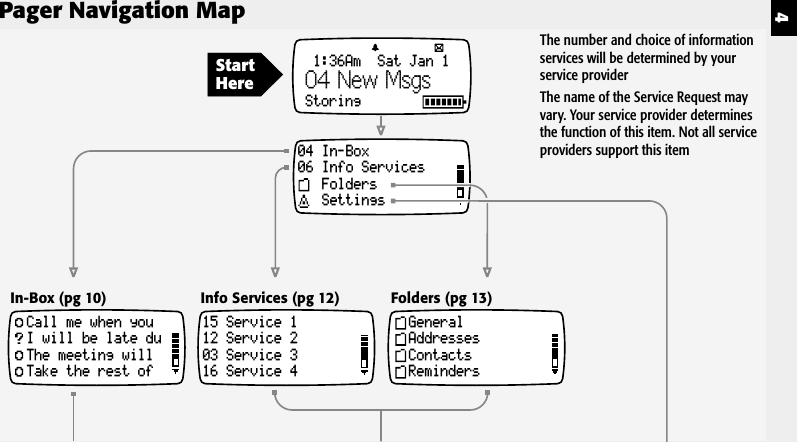
4Pager Navigation MapIn-Box (pg 10)15 Service 112 Service 203 Service 316 Service 4Info Services (pg 12)GeneralAddressesContactsRemindersFolders (pg 13)04 In-Box06 Info ServicesFoldersSettingsCall me when youI will be late duThe meeting willTake the rest of1:36Am  Sat Jan 1Storing04 New MsgsStartHereThe number and choice of informationservices will be determined by yourservice providerThe name of the Service Request mayvary. Your service provider determinesthe function of this item. Not all serviceproviders support this item
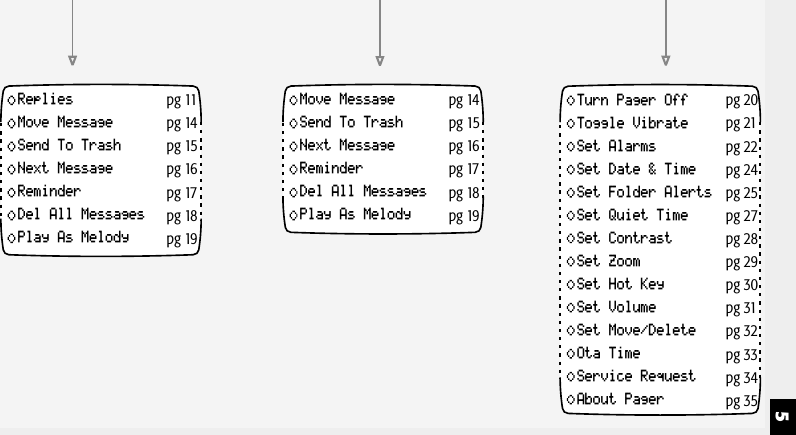
5RepliesMove MessageSend To TrashNext MessageReminderDel All MessagesPlay As Melodypg 11pg 14pg 15pg 16pg 17pg 18pg 19Move MessageSend To TrashNext MessageReminderDel All MessagesPlay As Melodypg 14pg 15pg 16pg 17pg 18pg 19Turn Pager OffToggle VibrateSet AlarmsSet Date & TimeSet Folder AlertsSet Quiet TimeSet ContrastSet ZoomSet Hot KeySet VolumeSet Move/DeleteOta TimeService RequestAbout Pagerpg 20pg 21pg 22pg 24pg 25pg 27pg 28pg 29pg 30pg 31pg 32pg 33pg 34pg 35
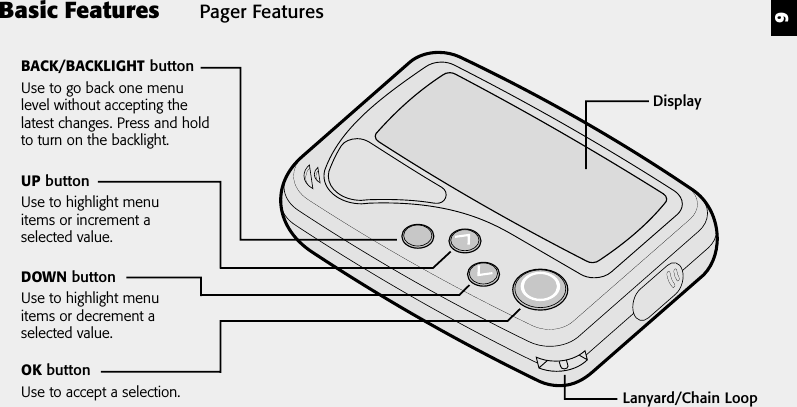
6Pager FeaturesBasic FeaturesDisplayLanyard/Chain LoopOK buttonUse to accept a selection.UP buttonUse to highlight menuitems or increment aselected value.DOWN buttonUse to highlight menuitems or decrement aselected value.BACK/BACKLIGHT buttonUse to go back one menulevel without accepting thelatest changes. Press and holdto turn on the backlight.
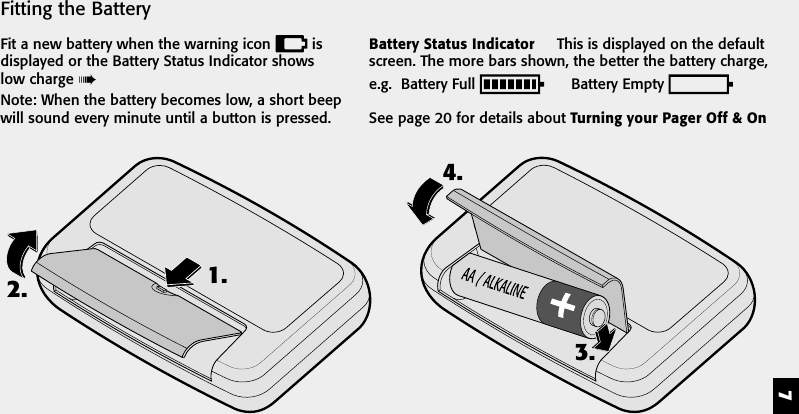
72. 1.3.4.Fitting the BatteryFit a new battery when the warning icon   isdisplayed or the Battery Status Indicator showslow charge Note: When the battery becomes low, a short beepwill sound every minute until a button is pressed.Battery Status Indicator     This is displayed on the defaultscreen. The more bars shown, the better the battery charge,e.g.  Battery Full        Battery Empty See page 20 for details about Turning your Pager Off & On
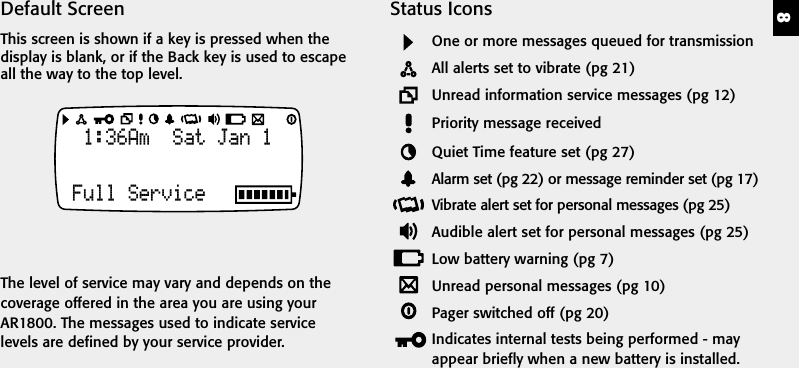
8Status IconsOne or more messages queued for transmissionAll alerts set to vibrate (pg 21)Unread information service messages (pg 12)Priority message receivedQuiet Time feature set (pg 27)Alarm set (pg 22) or message reminder set (pg 17)Vibrate alert set for personal messages (pg 25)Audible alert set for personal messages (pg 25)Low battery warning (pg 7)Unread personal messages (pg 10)Pager switched off (pg 20)Indicates internal tests being performed - mayappear briefly when a new battery is installed.Default ScreenThis screen is shown if a key is pressed when thedisplay is blank, or if the Back key is used to escapeall the way to the top level.1:36Am  Sat Jan 1Full ServiceThe level of service may vary and depends on thecoverage offered in the area you are using yourAR1800. The messages used to indicate servicelevels are defined by your service provider.
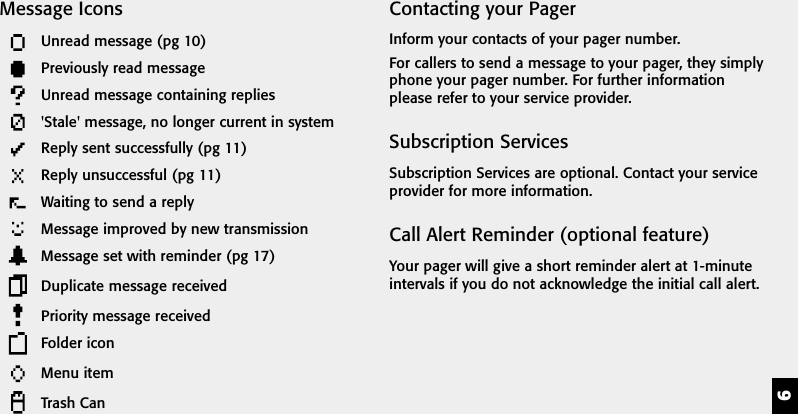
9Contacting your PagerInform your contacts of your pager number.For callers to send a message to your pager, they simplyphone your pager number. For further informationplease refer to your service provider.Subscription ServicesSubscription Services are optional. Contact your serviceprovider for more information.Call Alert Reminder (optional feature)Your pager will give a short reminder alert at 1-minuteintervals if you do not acknowledge the initial call alert.Message IconsUnread message (pg 10)Previously read messageUnread message containing replies'Stale' message, no longer current in systemReply sent successfully (pg 11)Reply unsuccessful (pg 11)Waiting to send a replyMessage improved by new transmissionMessage set with reminder (pg 17)Duplicate message receivedPriority message receivedFolder iconMenu itemTrash Can
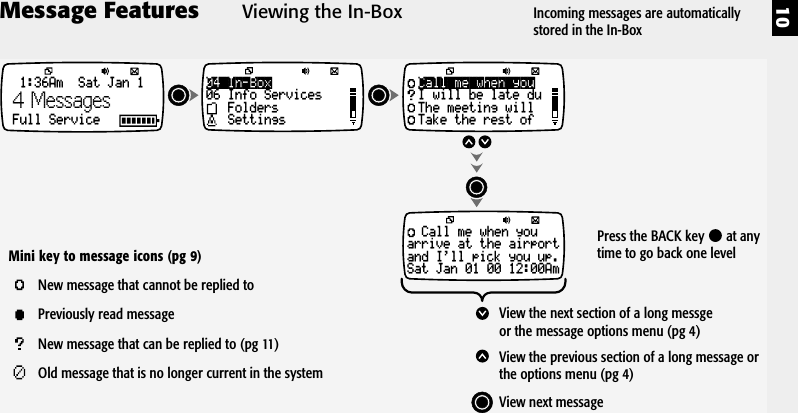
10Message Features04 In-Box06 Info ServicesFoldersSettings1:36Am  Sat Jan 1Full Service4 MessagesCall me when youarrive at the airportand I'll pick you up.Sat Jan 01 00 12:00AmCall me when youI will be late duThe meeting willTake the rest ofView the next section of a long messgeor the message options menu (pg 4)View the previous section of a long message orthe options menu (pg 4)View next messageMini key to message icons (pg 9)New message that cannot be replied toPreviously read messageNew message that can be replied to (pg 11)Old message that is no longer current in the systemViewing the In-Box Incoming messages are automaticallystored in the In-BoxPress the BACK key   at anytime to go back one level
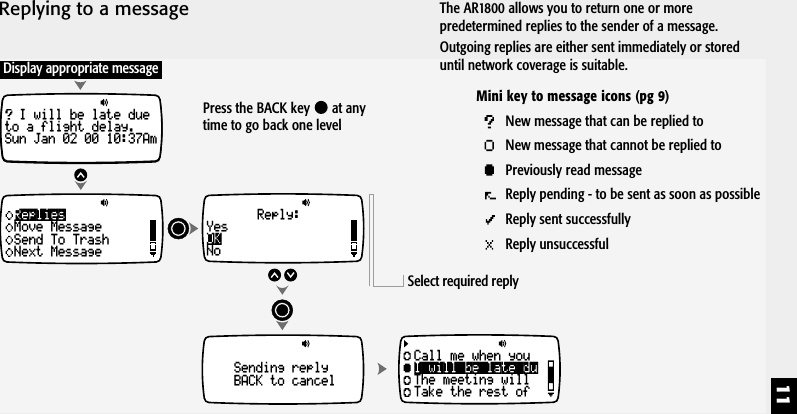
11Replying to a messageCall me when youarrive at the airportand I'll pick you up.Sat Jan 01 00 12:00AmDisplay appropriate messageI will be late dueto a flight delay.Sun Jan 02 00 10:37AmRepliesMove MessageSend To TrashNext MessageSending replyBACK to cancelReply:YesNoOKCall me when youThe meeting willTake the rest ofI will be late duSelect required replyThe AR1800 allows you to return one or morepredetermined replies to the sender of a message.Outgoing replies are either sent immediately or storeduntil network coverage is suitable.Press the BACK key   at anytime to go back one levelMini key to message icons (pg 9)New message that can be replied toNew message that cannot be replied toPreviously read messageReply pending - to be sent as soon as possibleReply sent successfullyReply unsuccessful
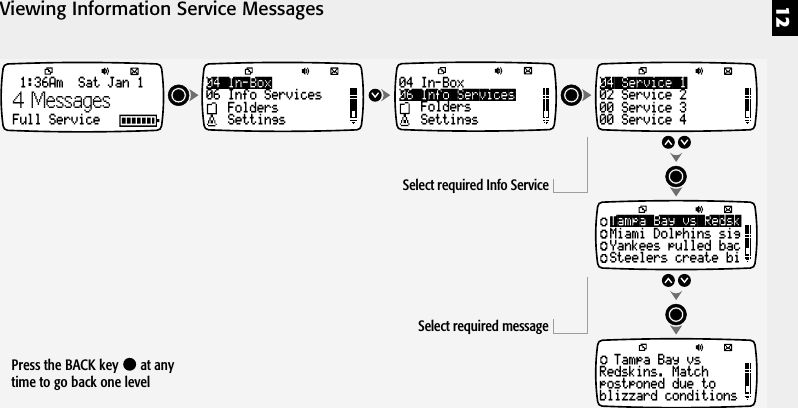
12Viewing Information Service Messages04 In-Box06 Info ServicesFoldersSettings04 In-Box06 Info ServicesFoldersSettings1:36Am  Sat Jan 1Full Service04 Service 102 Service 200 Service 300 Service 4Tampa Bay vs RedskMiami Dolphins sigYankees pulled bacSteelers create biTampa Bay vsRedskins. Matchpostponed due toblizzard conditionsSelect required Info ServiceSelect required message4 MessagesPress the BACK key   at anytime to go back one level
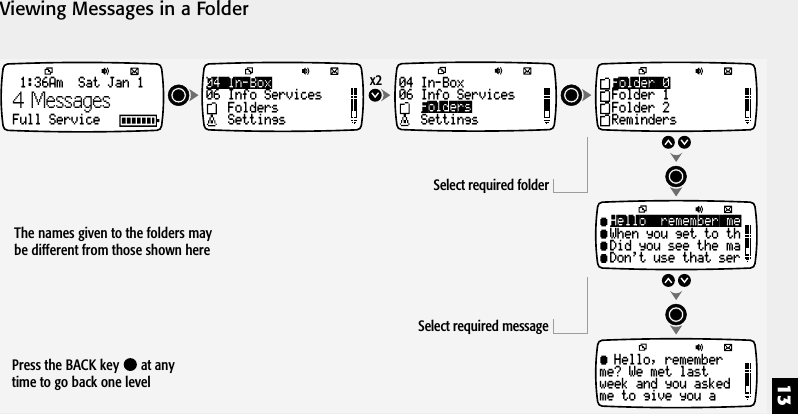
13Viewing Messages in a Folder04 In-Box06 Info ServicesFoldersSettings04 In-Box06 Info ServicesSettingsFoldersSelect required folderSelect required messagex2 Folder 0Folder 1Folder 2RemindersHello, remember meWhen you get to thDid you see the maDon't use that serHello, rememberme? We met lastweek and you askedme to give you a1:36Am  Sat Jan 1Full Service4 MessagesPress the BACK key   at anytime to go back one levelThe names given to the folders maybe different from those shown here
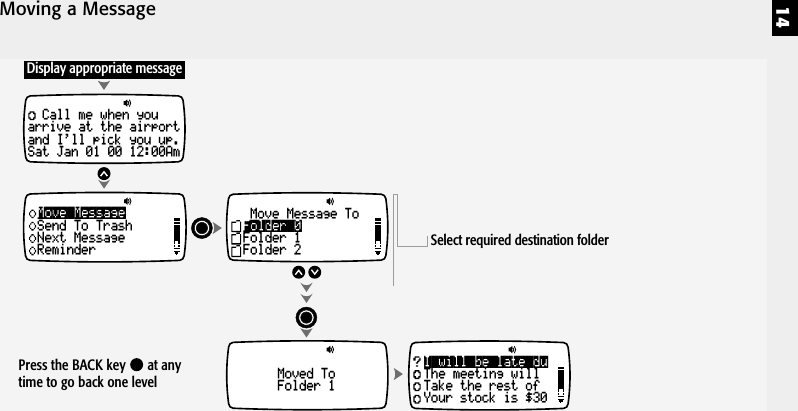
14Moving a MessageI will be late duThe meeting willTake the rest ofYour stock is $30Call me when youarrive at the airportand I'll pick you up.Sat Jan 01 00 12:00AmMoved ToFolder 1Move MessageSend To TrashNext MessageReminderDisplay appropriate messageMove Message ToFolder 0Folder 1Folder 2 Select required destination folderPress the BACK key   at anytime to go back one level
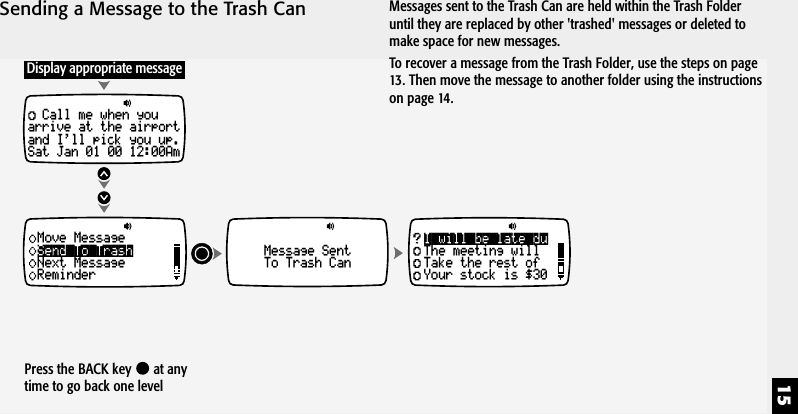
15Sending a Message to the Trash CanI will be late duThe meeting willTake the rest ofYour stock is $30Call me when youarrive at the airportand I'll pick you up.Sat Jan 01 00 12:00AmMessage SentTo Trash CanSend To TrashMove MessageNext MessageReminderDisplay appropriate messageMessages sent to the Trash Can are held within the Trash Folderuntil they are replaced by other 'trashed' messages or deleted tomake space for new messages.To recover a message from the Trash Folder, use the steps on page13. Then move the message to another folder using the instructionson page 14.Press the BACK key   at anytime to go back one level
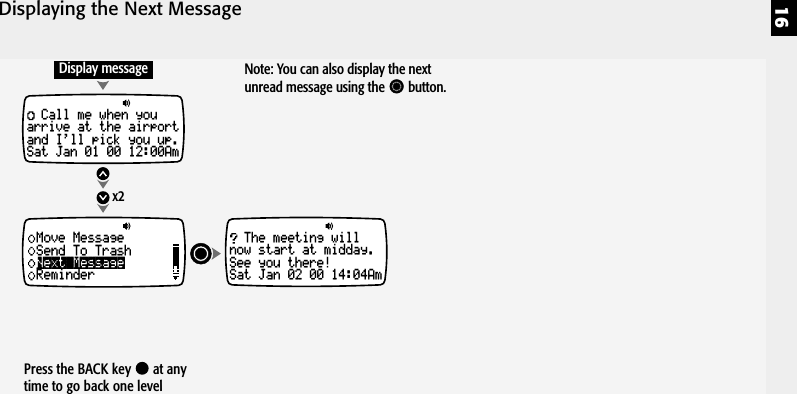
16Displaying the Next MessageCall me when youarrive at the airportand I'll pick you up.Sat Jan 01 00 12:00AmNext MessageMove MessageSend To TrashReminderDisplay message Note: You can also display the nextunread message using the       button.x2The meeting willnow start at midday.See you there!Sat Jan 02 00 14:04AmPress the BACK key   at anytime to go back one level
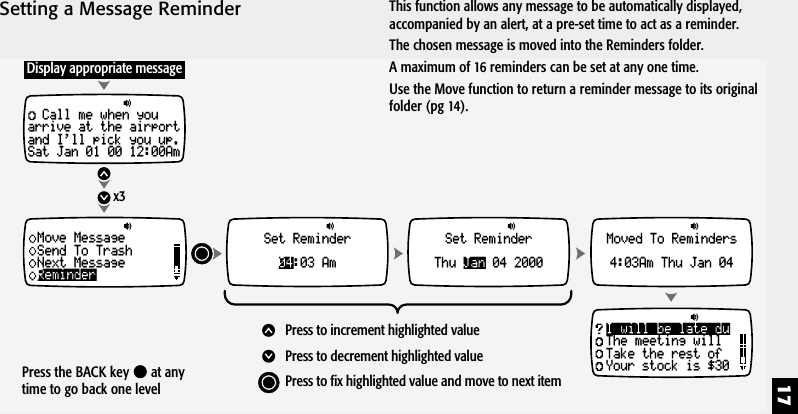
17Setting a Message Reminderx3Call me when youarrive at the airportand I'll pick you up.Sat Jan 01 00 12:00AmSet Reminder:03 Am04Set ReminderThu 04 2000JanMoved To Reminders4:03Am Thu Jan 04ReminderMove MessageSend To TrashNext MessageDisplay appropriate messagePress to increment highlighted valuePress to decrement highlighted valuePress to fix highlighted value and move to next itemI will be late duThe meeting willTake the rest ofYour stock is $30Press the BACK key   at anytime to go back one levelThis function allows any message to be automatically displayed,accompanied by an alert, at a pre-set time to act as a reminder.The chosen message is moved into the Reminders folder.A maximum of 16 reminders can be set at any one time.Use the Move function to return a reminder message to its originalfolder (pg 14).
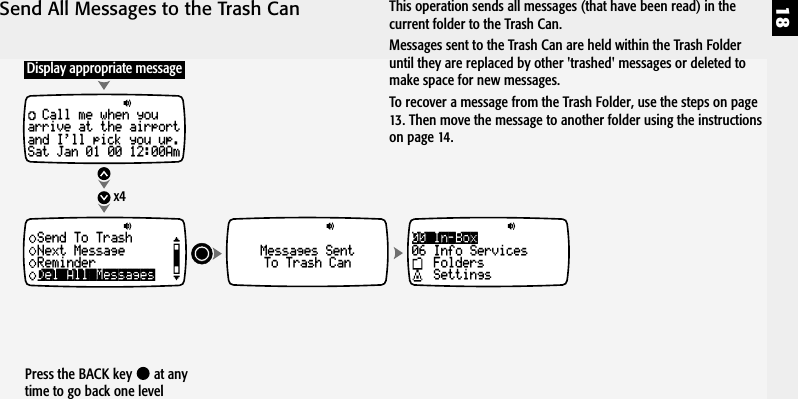
18Send All Messages to the Trash Can00 In-Box06 Info ServicesFoldersSettingsx4Call me when youarrive at the airportand I'll pick you up.Sat Jan 01 00 12:00AmMessages SentTo Trash CanDel All MessagesSend To TrashNext MessageReminderDisplay appropriate messageThis operation sends all messages (that have been read) in thecurrent folder to the Trash Can.Messages sent to the Trash Can are held within the Trash Folderuntil they are replaced by other 'trashed' messages or deleted tomake space for new messages.To recover a message from the Trash Folder, use the steps on page13. Then move the message to another folder using the instructionson page 14.Press the BACK key   at anytime to go back one level
19Play Message as a Melodyx5Call me when youarrive at the airportand I'll pick you up.Sat Jan 01 00 12:00AmCall me when youarrive at the airportand I'll pick you up.Sat Jan 01 00 12:00AmDisplay appropriate messageMessage playsPlay As MelodyNext MessageReminderDel All MessagesYesSave As MelodyNoPlay Melody Again1Save As Melody No.Own MelodyPress to increment Melody numberPress to decrementPress to store melodyMelody numberPress the BACK key   at anytime to go back one levelNote: You can also configure your pager to play all incomingmessages as melodies by selecting the Adp option in the FolderAlerts function (pg 25).Messages saved as 'Own Melody' settings can be applied for use asmain folder alerts (pg 25).
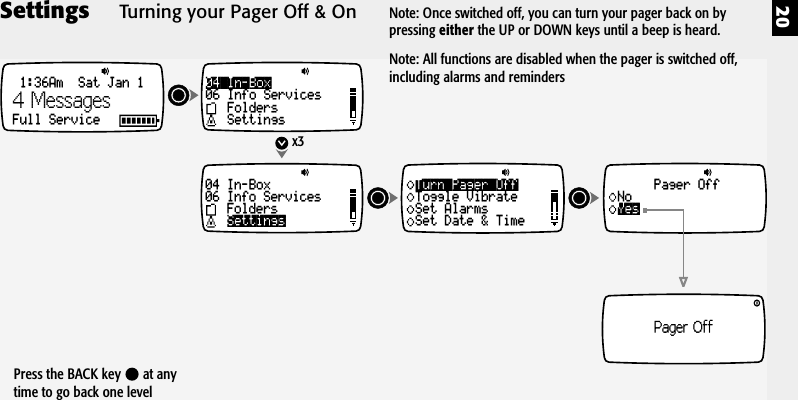
20Settings04 In-Box06 Info ServicesFoldersSettings04 In-Box06 Info ServicesFoldersSettingsx3Turn Pager OffToggle VibrateSet AlarmsSet Date & TimeYesPager OffNoPager Off1:36Am  Sat Jan 1Full Service4 MessagesTurning your Pager Off & OnPress the BACK key   at anytime to go back one levelNote: Once switched off, you can turn your pager back on bypressing either the UP or DOWN keys until a beep is heard.Note: All functions are disabled when the pager is switched off,including alarms and reminders
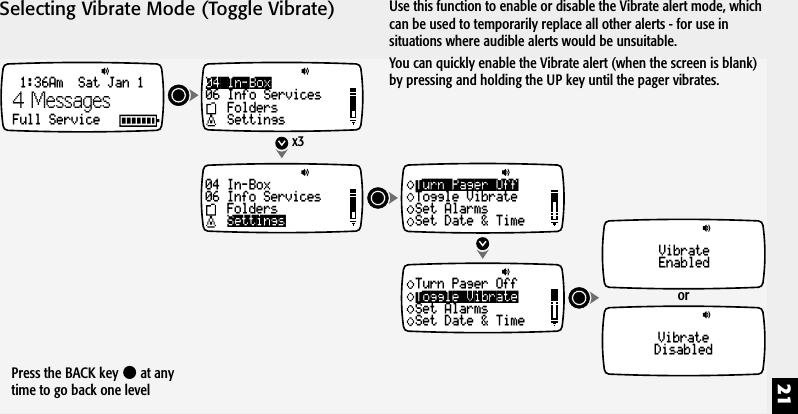
21Selecting Vibrate Mode (Toggle Vibrate)VibrateDisabled04 In-Box06 Info ServicesFoldersSettings04 In-Box06 Info ServicesFoldersSettings1:36Am  Sat Jan 1Full Servicex3orTurn Pager OffToggle VibrateSet AlarmsSet Date & TimeToggle VibrateTurn Pager OffSet AlarmsSet Date & TimeVibrateEnabled4 MessagesUse this function to enable or disable the Vibrate alert mode, whichcan be used to temporarily replace all other alerts - for use insituations where audible alerts would be unsuitable.You can quickly enable the Vibrate alert (when the screen is blank)by pressing and holding the UP key until the pager vibrates.Press the BACK key   at anytime to go back one level
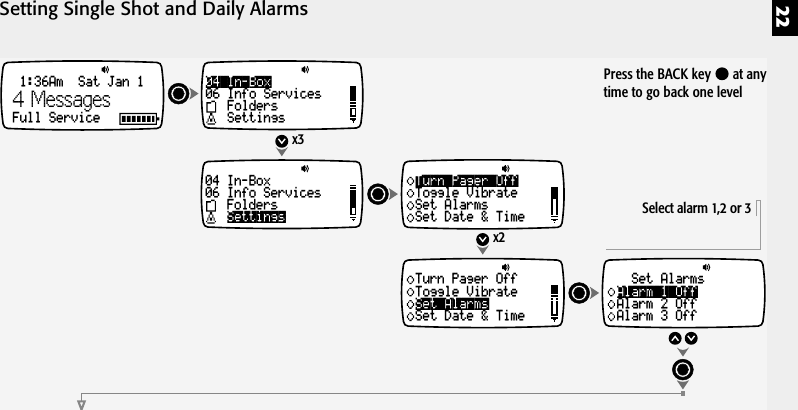
22Setting Single Shot and Daily Alarms04 In-Box06 Info ServicesFoldersSettings04 In-Box06 Info ServicesFoldersSettingsx3x2Turn Pager OffToggle VibrateSet AlarmsSet Date & TimeSet AlarmsTurn Pager OffToggle VibrateSet Date & TimeAlarm 1 OffSet AlarmsAlarm 2 OffAlarm 3 OffSelect alarm 1,2 or 31:36Am  Sat Jan 1Full Service4 MessagesPress the BACK key   at anytime to go back one level
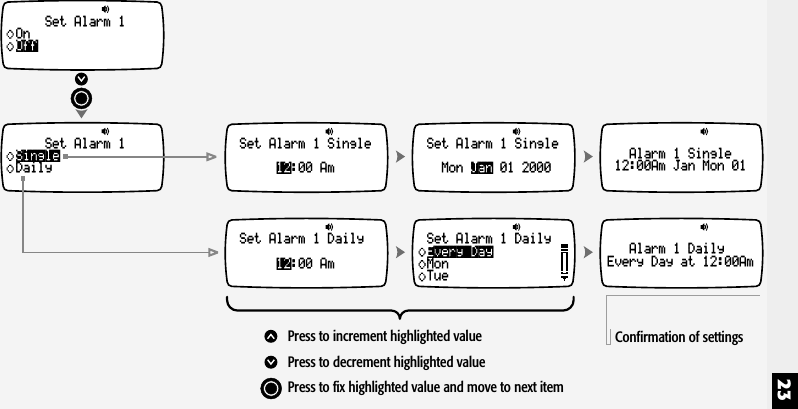
23SingleSet Alarm 1Daily 12Set Alarm 1 Single:00 Am12Set Alarm 1 Daily:00 AmJanSet Alarm 1 SingleMon 01 2000Alarm 1 Single12:00Am Jan Mon 01Alarm 1 DailyEvery Day at 12:00AmPress to increment highlighted valuePress to decrement highlighted valuePress to fix highlighted value and move to next itemEvery DaySet Alarm 1 DailyMonTueConfirmation of settingsOffSet Alarm 1On
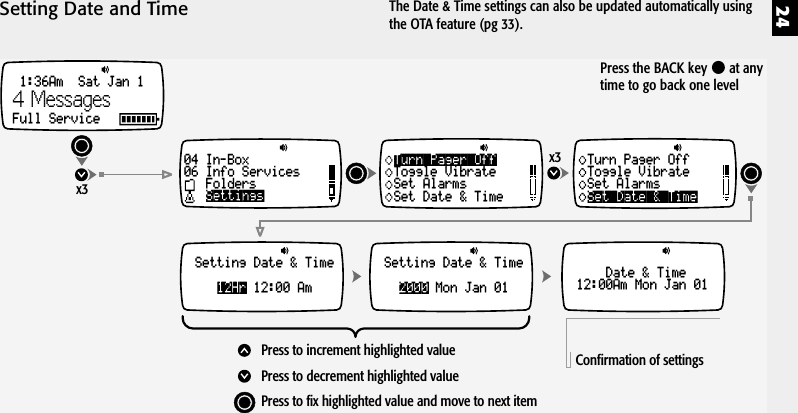
24Setting Date and Time04 In-Box06 Info ServicesFoldersSettingsx3x3Turn Pager OffToggle VibrateSet AlarmsSet Date & TimeSetting Date & Time12:00 Am12HrSetting Date & TimeMon Jan 012000Set Date & TimeTurn Pager OffToggle VibrateSet AlarmsDate & Time12:00Am Mon Jan 01Press to increment highlighted valuePress to decrement highlighted valuePress to fix highlighted value and move to next itemConfirmation of settings1:36Am  Sat Jan 1Full Service4 MessagesPress the BACK key   at anytime to go back one levelThe Date & Time settings can also be updated automatically usingthe OTA feature (pg 33).
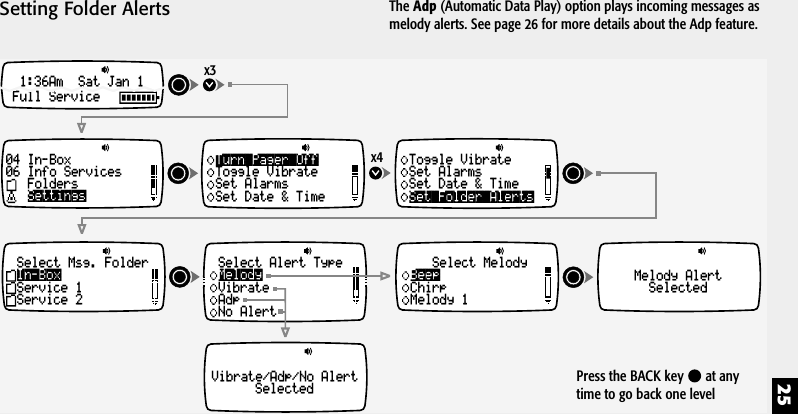
25Setting Folder Alerts04 In-Box06 Info ServicesFoldersSettingsx3x4Turn Pager OffToggle VibrateSet AlarmsSet Date & TimeSelect Msg. FolderService 1Service 2In-BoxSelect Alert TypeVibrateAdpNo AlertMelodySelect MelodyChirpMelody 1Beep Melody AlertSelectedVibrate/Adp/No AlertSelectedSet Folder AlertsToggle VibrateSet AlarmsSet Date & Time1:36Am  Sat Jan 1Full ServiceThe Adp (Automatic Data Play) option plays incoming messages asmelody alerts. See page 26 for more details about the Adp feature.Press the BACK key   at anytime to go back one level
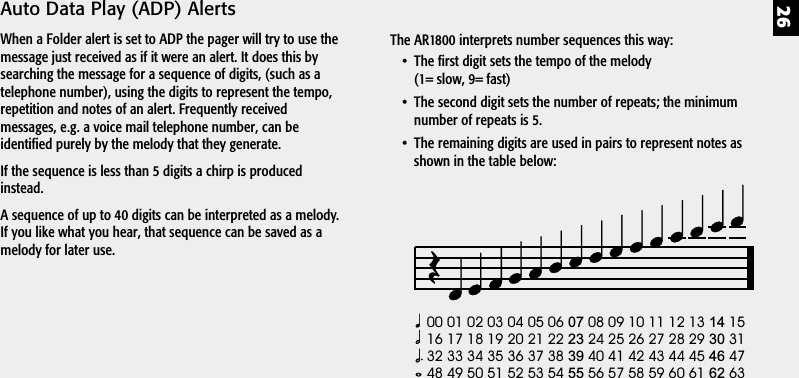
26Auto Data Play (ADP) AlertsWhen a Folder alert is set to ADP the pager will try to use themessage just received as if it were an alert. It does this bysearching the message for a sequence of digits, (such as atelephone number), using the digits to represent the tempo,repetition and notes of an alert. Frequently receivedmessages, e.g. a voice mail telephone number, can beidentified purely by the melody that they generate.If the sequence is less than 5 digits a chirp is producedinstead.A sequence of up to 40 digits can be interpreted as a melody.If you like what you hear, that sequence can be saved as amelody for later use.00 01 02 03 04 05 06 08 09 10 11 12 13 1516 17 18 19 20 21 22 24 25 26 27 28 29 3132 33 34 35 36 37 38 40 41 42 43 44 45 4748 49 50 51 52 53 54 56 57 58 59 60 61 6307 1423 3039 4655 62The AR1800 interprets number sequences this way:• The first digit sets the tempo of the melody(1= slow, 9= fast)• The second digit sets the number of repeats; the minimumnumber of repeats is 5.• The remaining digits are used in pairs to represent notes asshown in the table below:
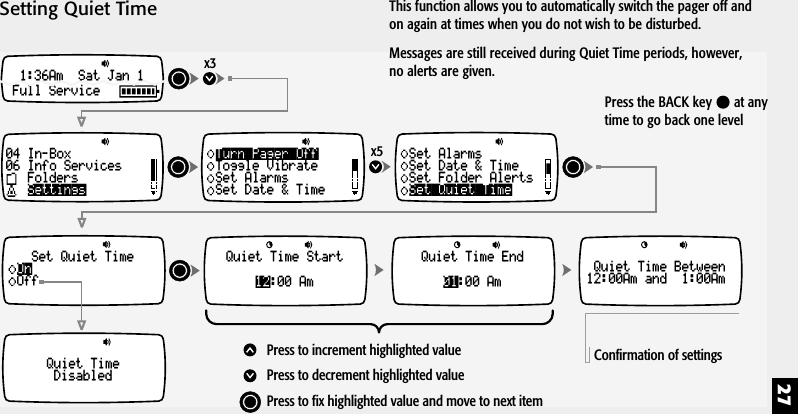
27Setting Quiet Time04 In-Box06 Info ServicesFoldersSettingsx3x5Turn Pager OffToggle VibrateSet AlarmsSet Date & TimeSet Quiet TimeOffOnSet Quiet TimeSet AlarmsSet Date & TimeSet Folder Alerts1:36Am  Sat Jan 1Full Service12Quiet Time Start:00 Am 01Quiet Time End:00 AmQuiet Time Between12:00Am and  1:00AmQuiet TimeDisabledPress to increment highlighted valuePress to decrement highlighted valuePress to fix highlighted value and move to next itemConfirmation of settingsThis function allows you to automatically switch the pager off andon again at times when you do not wish to be disturbed.Messages are still received during Quiet Time periods, however,no alerts are given.Press the BACK key   at anytime to go back one level
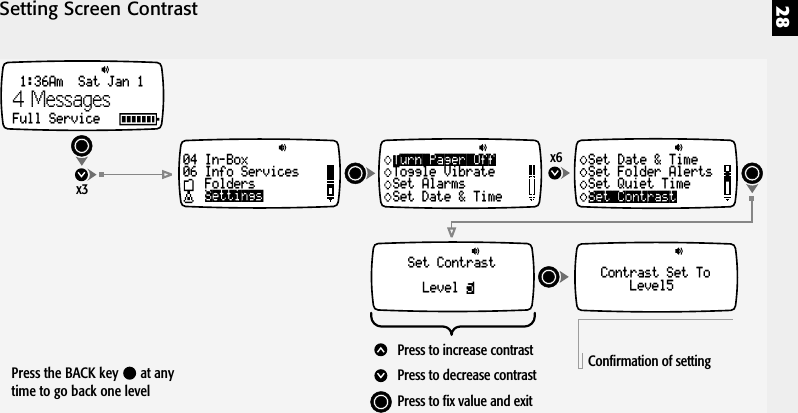
28Setting Screen Contrastx6Set ContrastLevel 5Set ContrastSet Date & TimeSet Folder AlertsSet Quiet TimeContrast Set ToLevel5Press to increase contrastPress to decrease contrastPress to fix value and exitConfirmation of settingx31:36Am  Sat Jan 1Full Service04 In-Box06 Info ServicesFoldersSettingsTurn Pager OffToggle VibrateSet AlarmsSet Date & Time4 MessagesPress the BACK key   at anytime to go back one level
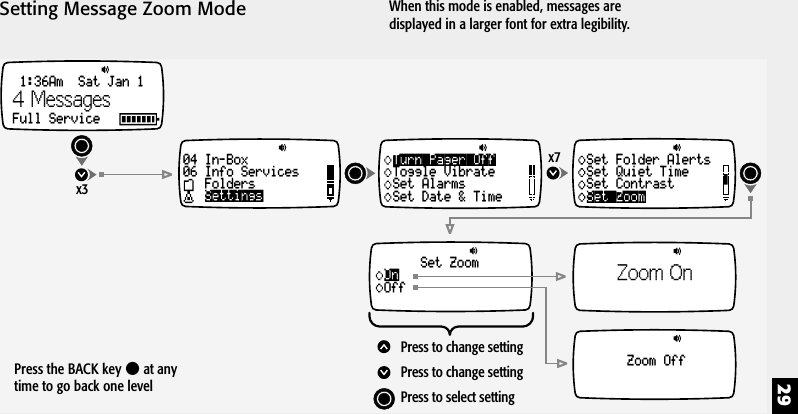
29Setting Message Zoom Modex7Set ZoomSet Folder AlertsSet Quiet TimeSet ContrastZoom OnZoom OffSet ZoomOffOnPress to change settingPress to change settingPress to select settingx31:36Am  Sat Jan 1Full Service04 In-Box06 Info ServicesFoldersSettingsTurn Pager OffToggle VibrateSet AlarmsSet Date & Time4 MessagesWhen this mode is enabled, messages aredisplayed in a larger font for extra legibility.Press the BACK key   at anytime to go back one level
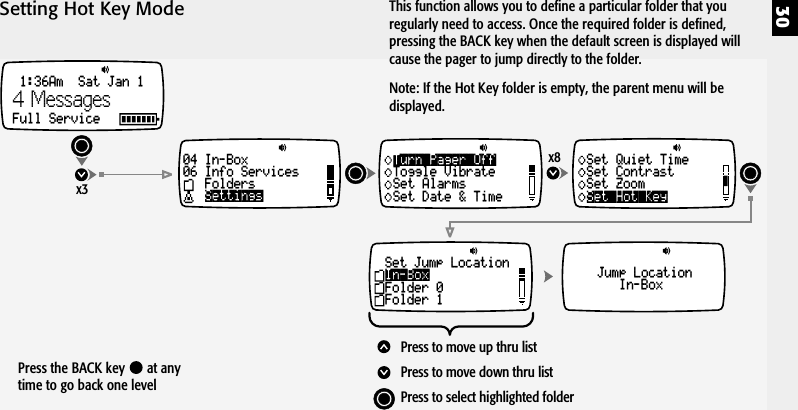
30Setting Hot Key Modex8Turn Pager OffToggle VibrateSet AlarmsSet Date & Time Set Hot KeySet Quiet TimeSet ContrastSet ZoomJump LocationIn-BoxSet Jump LocationFolder 0Folder 1In-BoxPress to move up thru listPress to move down thru listPress to select highlighted folderx31:36Am  Sat Jan 1Full Service04 In-Box06 Info ServicesFoldersSettings4 MessagesThis function allows you to define a particular folder that youregularly need to access. Once the required folder is defined,pressing the BACK key when the default screen is displayed willcause the pager to jump directly to the folder.Note: If the Hot Key folder is empty, the parent menu will bedisplayed.Press the BACK key   at anytime to go back one level
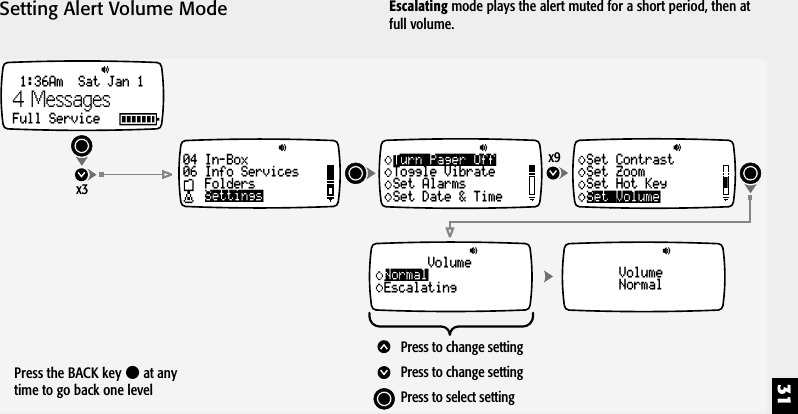
31Setting Alert Volume Modex9Set VolumeSet ContrastSet ZoomSet Hot KeyVolumeNormalVolumeEscalatingNormalPress to change settingPress to change settingPress to select settingTurn Pager OffToggle VibrateSet AlarmsSet Date & Timex31:36Am  Sat Jan 1Full Service04 In-Box06 Info ServicesFoldersSettings4 MessagesPress the BACK key   at anytime to go back one levelEscalating mode plays the alert muted for a short period, then atfull volume.
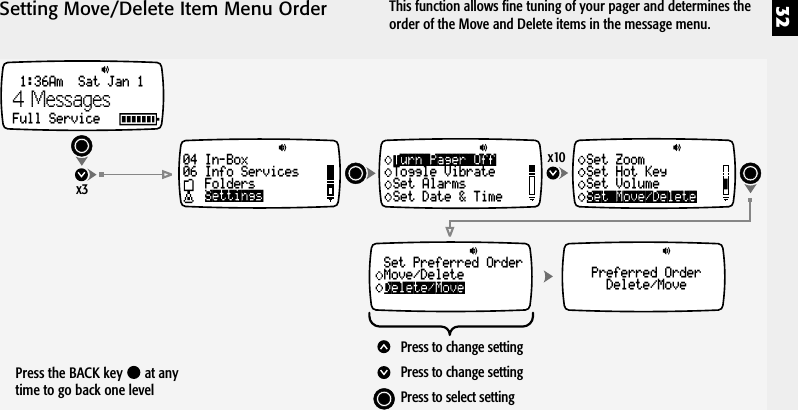
32Setting Move/Delete Item Menu Orderx10Set Move/DeleteSet ZoomSet Hot KeySet VolumePreferred OrderDelete/MoveSet Preferred OrderMove/DeleteDelete/MovePress to change settingPress to change settingPress to select settingTurn Pager OffToggle VibrateSet AlarmsSet Date & Timex31:36Am  Sat Jan 1Full Service04 In-Box06 Info ServicesFoldersSettings4 MessagesPress the BACK key   at anytime to go back one levelThis function allows fine tuning of your pager and determines theorder of the Move and Delete items in the message menu.
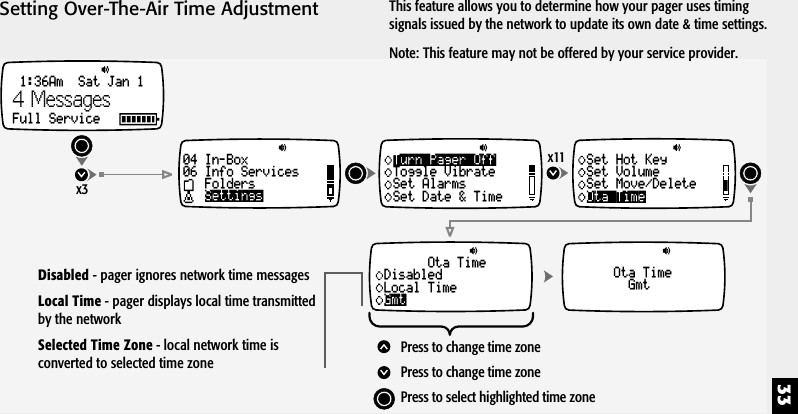
33Setting Over-The-Air Time Adjustmentx11Ota TimeSet Hot KeySet VolumeSet Move/DeleteOta TimeGmtOta TimeDisabledLocal TimeGmtPress to change time zonePress to change time zonePress to select highlighted time zoneTurn Pager OffToggle VibrateSet AlarmsSet Date & Timex31:36Am  Sat Jan 1Full Service04 In-Box06 Info ServicesFoldersSettings4 MessagesThis feature allows you to determine how your pager uses timingsignals issued by the network to update its own date & time settings.Note: This feature may not be offered by your service provider.Disabled - pager ignores network time messagesLocal Time - pager displays local time transmittedby the networkSelected Time Zone - local network time isconverted to selected time zone
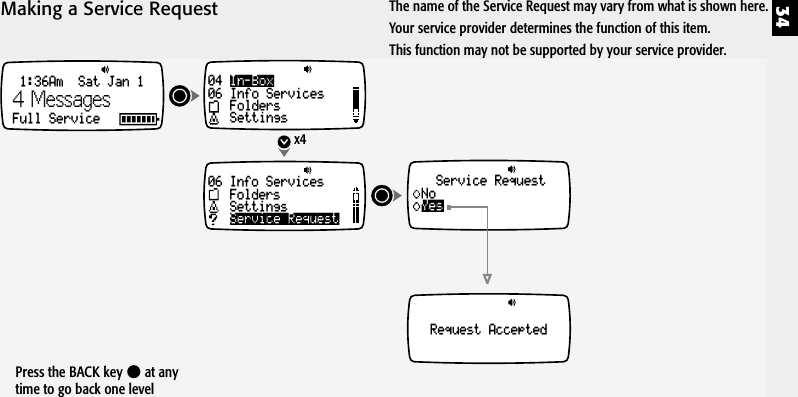
340406 Info ServicesIn-BoxFoldersSettingsx4Request Accepted1:36Am  Sat Jan 1Full Service06 Info ServicesFoldersSettingsService RequestYesService RequestNo4 MessagesMaking a Service RequestPress the BACK key   at anytime to go back one levelThe name of the Service Request may vary from what is shown here.Your service provider determines the function of this item.This function may not be supported by your service provider.
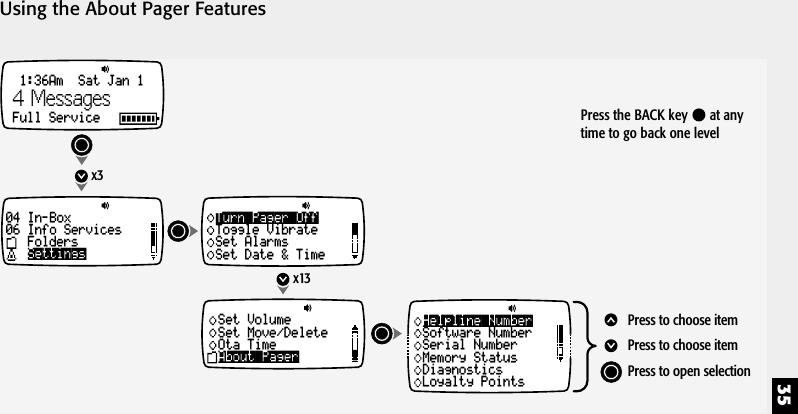
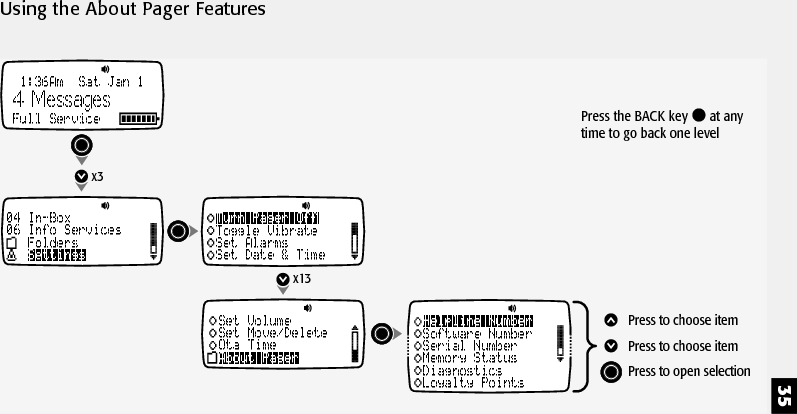
35Using the About Pager Features04 In-Box06 Info ServicesFoldersSettingsx3x13Turn Pager OffToggle VibrateSet AlarmsSet Date & TimeAbout PagerSet VolumeSet Move/DeleteOta TimeHelpline NumberSoftware NumberSerial NumberMemory StatusDiagnosticsLoyalty PointsPress to choose itemPress to choose itemPress to open selection1:36Am  Sat Jan 1Full Service4 Messages Press the BACK key   at anytime to go back one level
36Notes
37Notes
38Notes
39Notes
40Notes
4313 396 71771

Navigation menu