Airsmart Technology 2A OTR metal portable FM radio & Bluetooth speaker User Manual

Shenzhen Airsmart Technology Co.,Ltd. OTR metal portable FM radio & Bluetooth speaker

User manual

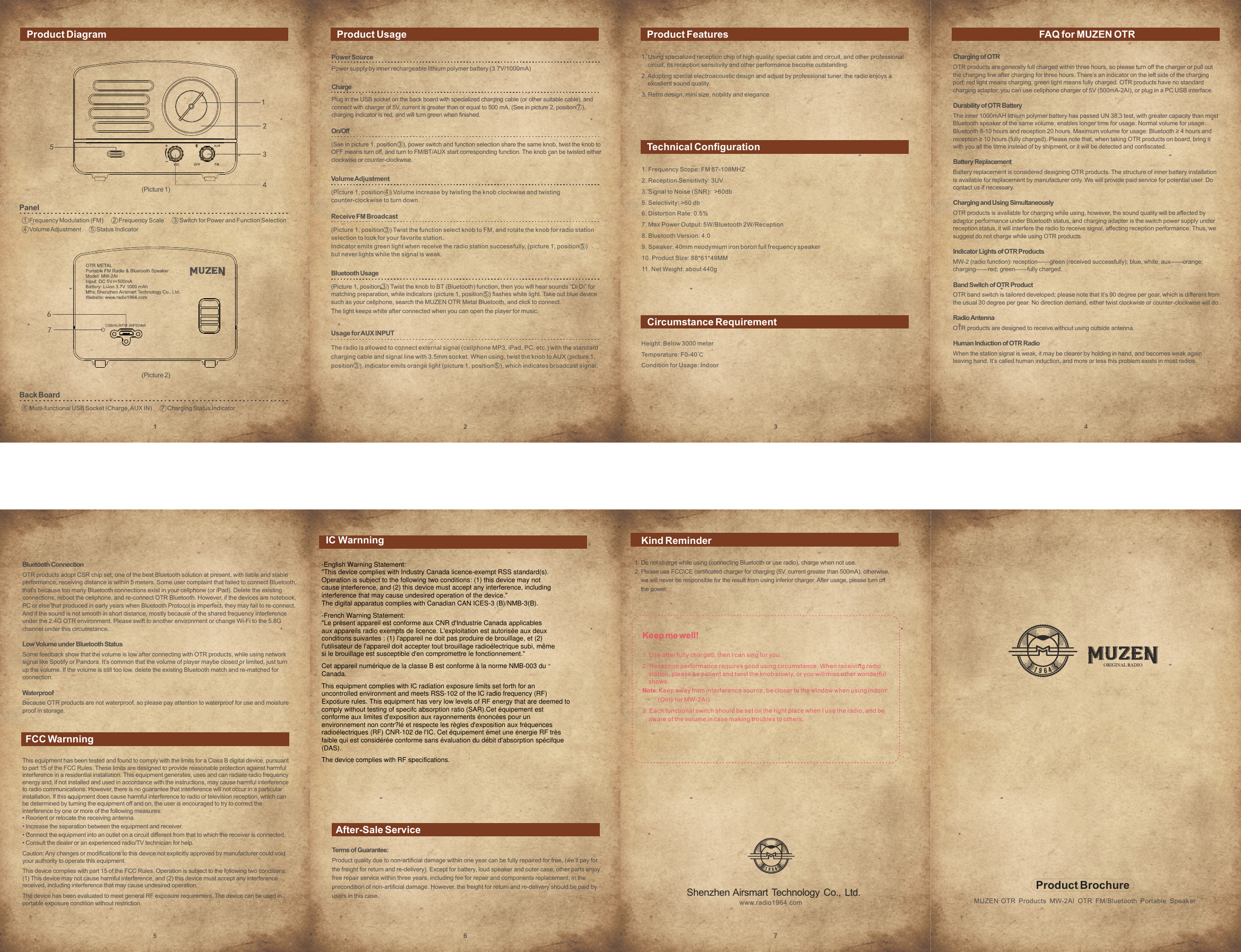
 1. Frequency Scope: FM 87-108MHZ2. Reception Sensitivity: 3UV3. Signal to Noise (SNR):  >60db5. Selectivity: >60 db6. Distortion Rate: 0.5%7. Max Power Output: 5W/Bluetooth 2W/Reception8. Bluetooth Version: 4.09. Speaker: 40mm neodymium iron boron full frequency speaker10. Product Size: 88*61*49MM11. Net Weight: about 440g1. Using specialized reception chip of high quality, special cable and circuit, and other professional    circuit, its reception sensitivity and other performance become outstanding.2. Adopting special electroacoustic design and adjust by professional tuner, the radio enjoys a    excellent sound quality.3. Retro design, mini size, nobility and elegance.Product Diagram Product Usage Product FeaturesTechnical ConfigurationCircumstance RequirementFAQ for MUZEN OTRFCC WarnningAfter-Sale ServicePanel1  Frequency Modulation (FM)       2  Frequency Scale       3  Switch for Power and Function Selection4  Volume Adjustment       5  Status IndicatorBack Board6  Multi-functional USB Socket(Charge, AUX IN)       7  Charging Status IndicatorProduct BrochureMUZEN·OTR Products MW-2AI OTR FM/Bluetooth Portable SpeakerShenzhen Airsmart Technology Co., Ltd.www.radio1964.comTerms of Guarantee:Product quality due to non-artificial damage within one year can be fully repaired for free, (we’ll pay forthe freight for return and re-delivery). Except for battery, loud speaker and outer case, other parts enjoyfree repair service within three years, including fee for repair and components replacement, in theprecondition of non-artificial damage. However, the freight for return and re-delivery should be paid byusers in this case.1. Do not charge while using (connecting Bluetooth or use radio), charge when not use.2. Please use FCC\CE certificated charger for charging (5V, current greater than 500mA), otherwise,    we will never be responsible for the result from using inferior charger. After usage, please turn off    the power.Keep me well!1. Use after fully charged, then I can sing for you.2. Reception performance requires good using circumstance. When receiving radio    station, please be patient and twist the knob slowly, or you will miss other wonderful    shows.Note: Keep away from interference source, be closer to the window when using indoor.          (Only for MW-2AI)3. Each functional switch should be set on the right place when I use the radio, and be    aware of the volume in case making troubles to others.Power SourcePower supply by inner rechargeable lithium polymer battery (3.7V/1000mA)ChargePlug in the USB socket on the back board with specialized charging cable (or other suitable cable), andconnect with charger of 5V, current is greater than or equal to 500 mA. (See in picture 2, position 7 ), charging indicator is red, and will turn green when finished.On/Off(See in picture 1, position 3 ), power switch and function selection share the same knob, twist the knob toOFF means turn off, and turn to FM/BT/AUX start corresponding function. The knob can be twisted eitherclockwise or counter-clockwise.Volume Adjustment(Picture 1, position 4 ) Volume increase by twisting the knob clockwise and twistingcounter-clockwise to turn down.Receive FM Broadcast(Picture 1, position 3 ) Twist the function select knob to FM, and rotate the knob for radio stationselection to look for your favorite station. Indicator emits green light when receive the radio station successfully, (picture 1, position 5 )but never lights while the signal is weak.Bluetooth Usage(Picture 1, position 3 ) Twist the knob to BT (Bluetooth) function, then you will hear sounds “Di Di” formatching preparation, while indicators (picture 1, position 5 ) flashes white light. Take out blue devicesuch as your cellphone, search the MUZEN OTR Metal Bluetooth, and click to connect.The light keeps white after connected when you can open the player for music.Usage for AUX INPUTThe radio is allowed to connect external signal (cellphone MP3, iPad, PC, etc.) with the standardcharging cable and signal line with 3.5mm socket. When using, twist the knob to AUX (picture 1,position 3 ), indicator emits orange light (picture 1, position 5 ), which indicates broadcast signal.Height: Below 3000 meterTemperature: F0-40℃Condition for Usage: IndoorCharging of OTROTR products are generally full charged within three hours, so please turn off the charger or pull outthe charging line after charging for three hours. There’s an indicator on the left side of the chargingport: red light means charging, green light means fully charged. OTR products have no standardcharging adaptor, you can use cellphone charger of 5V (500mA-2AI), or plug in a PC USB interface.Durability of OTR BatteryThe inner 1000mAH lithium polymer battery has passed UN 38.3 test, with greater capacity than mostBluetooth speaker of the same volume, enables longer time for usage. Normal volume for usage:Bluetooth 8-10 hours and reception 20 hours. Maximum volume for usage: Bluetooth ≥ 4 hours andreception ≥ 10 hours (fully charged). Please note that, when taking OTR products on board, bring itwith you all the titme instead of by shipment, or it will be detected and confiscated.Battery ReplacementBattery replacement is considered designing OTR products. The structure of inner battery installationis available for replacement by manufacturer only. We will provide paid service for potential user. Docontact us if necessary.Charging and Using SimultaneouslyOTR products is available for charging while using, however, the sound quality will be affected byadaptor performance under Bluetooth status, and charging adapter is the switch power supply underreception status, it will interfere the radio to receive signal, affecting reception performance. Thus, wesuggest do not charge while using OTR products.Indicator Lights of OTR ProductsMW-2 (radio function): reception——green (received successfully); blue, white, aux——orange;charging——red; green——fully charged.Band Switch of OTR ProductOTR band switch is tailored developed; please note that it’s 90 degree per gear, which is different fromthe usual 30 degree per gear. No direction demand, either twist clockwise or counter-clockwise will do.Radio AntennaOTR products are designed to receive without using outside antenna.Human Induction of OTR RadioWhen the station signal is weak, it may be clearer by holding in hand, and becomes weak againleaving hand. It’s called human induction, and more or less this problem exists in most radios.Bluetooth ConnectionOTR products adopt CSR chip set, one of the best Bluetooth solution at present, with liable and stableperformance, receiving distance is within 5 meters. Some user complaint that failed to connect Bluetooth,that's because too many Bluetooth connections exist in your cellphone (or iPad). Delete the existingconnections, reboot the cellphone, and re-connect OTR Bluetooth. However, if the devices are notebook,PC or else that produced in early years when Bluetooth Protocol is imperfect, they may fail to re-connect. And if the sound is not smooth in short distance, mostly because of the shared frequency interferenceunder the 2.4G OTR environment. Please swift to another environment or change Wi-Fi to the 5.8Gchannel under this circumstance.Low Volume under Bluetooth StatusSome feedback show that the volume is low after connecting with OTR products, while using networksignal like Spotify or Pandora. It’s common that the volume of player maybe closed or limited, just turnup the volume. If the volume is still too low, delete the existing Bluetooth match and re-matched forconnection.WaterproofBecause OTR products are not waterproof, so please pay attention to waterproof for use and moistureproof in storage.(Picture 1)(Picture 2)This equipment has been tested and found to comply with the limits for a Class B digital device, pursuantto part 15 of the FCC Rules. These limits are designed to provide reasonable protection against harmfulinterference in a residential installation. This equipment generates, uses and can radiate radio frequencyenergy and, if not installed and used in accordance with the instructions, may cause harmful interferenceto radio communications. However, there is no guarantee that interference will not occur in a particularinstallation. If this equipment does cause harmful interference to radio or television reception, which canbe determined by turning the equipment off and on, the user is encouraged to try to correct theinterference by one or more of the following measures:• Reorient or relocate the receiving antenna.• Increase the separation between the equipment and receiver.• Connect the equipment into an outlet on a circuit different from that to which the receiver is connected.• Consult the dealer or an experienced radio/TV technician for help.Caution: Any changes or modifications to this device not explicitly approved by manufacturer could voidyour authority to operate this equipment.This device complies with part 15 of the FCC Rules. Operation is subject to the following two conditions:(1) This device may not cause harmful interference, and (2) this device must accept any interferencereceived, including interference that may cause undesired operation.The device has been evaluated to meet general RF exposure requirement. The device can be used inportable exposure condition without restriction.Kind ReminderIC Warnning-English Warning Statement:"This device complies with Industry Canada licence-exempt RSS standard(s).Operation is subject to the following two conditions: (1) this device may notcause interference, and (2) this device must accept any interference, includinginterference that may cause undesired operation of the device."The digital apparatus complies with Canadian CAN ICES-3 (B)/NMB-3(B).-French Warning Statement:"Le présent appareil est conforme aux CNR d'Industrie Canada applicablesaux appareils radio exempts de licence. L'exploitation est autorisée aux deuxconditions suivantes : (1) l'appareil ne doit pas produire de brouillage, et (2)l'utilisateur de l'appareil doit accepter tout brouillage radioélectrique subi, mêmesi le brouillage est susceptible d'en compromettre le fonctionnement."Cet appareil numérique de la classe B est conforme à la norme NMB-003 duCanada.This equipment complies with IC radiation exposure limits set forth for anuncontrolled environment and meets RSS-102 of the IC radio frequency (RF)Exposure rules. This equipment has very low levels of RF energy that are deemed tocomply without testing of specifc absorption ratio (SAR).Cet équipement estconforme aux limites d'exposition aux rayonnements énoncées pour unenvironnement non contr?lé et respecte les règles d'exposition aux fréquencesradioélectriques (RF) CNR-102 de l'IC. Cet équipement émet une énergie RF trèsfaible qui est considérée conforme sans évaluation du débit d'absorption spécifque(DAS).The device complies with RF specifications.

Navigation menu