Airtronics ATX038 Radio controller module for RC Models User Manual DSS Module and Receiver Manual

Airtronics Inc Radio controller module for RC Models DSS Module and Receiver Manual

Users Manual

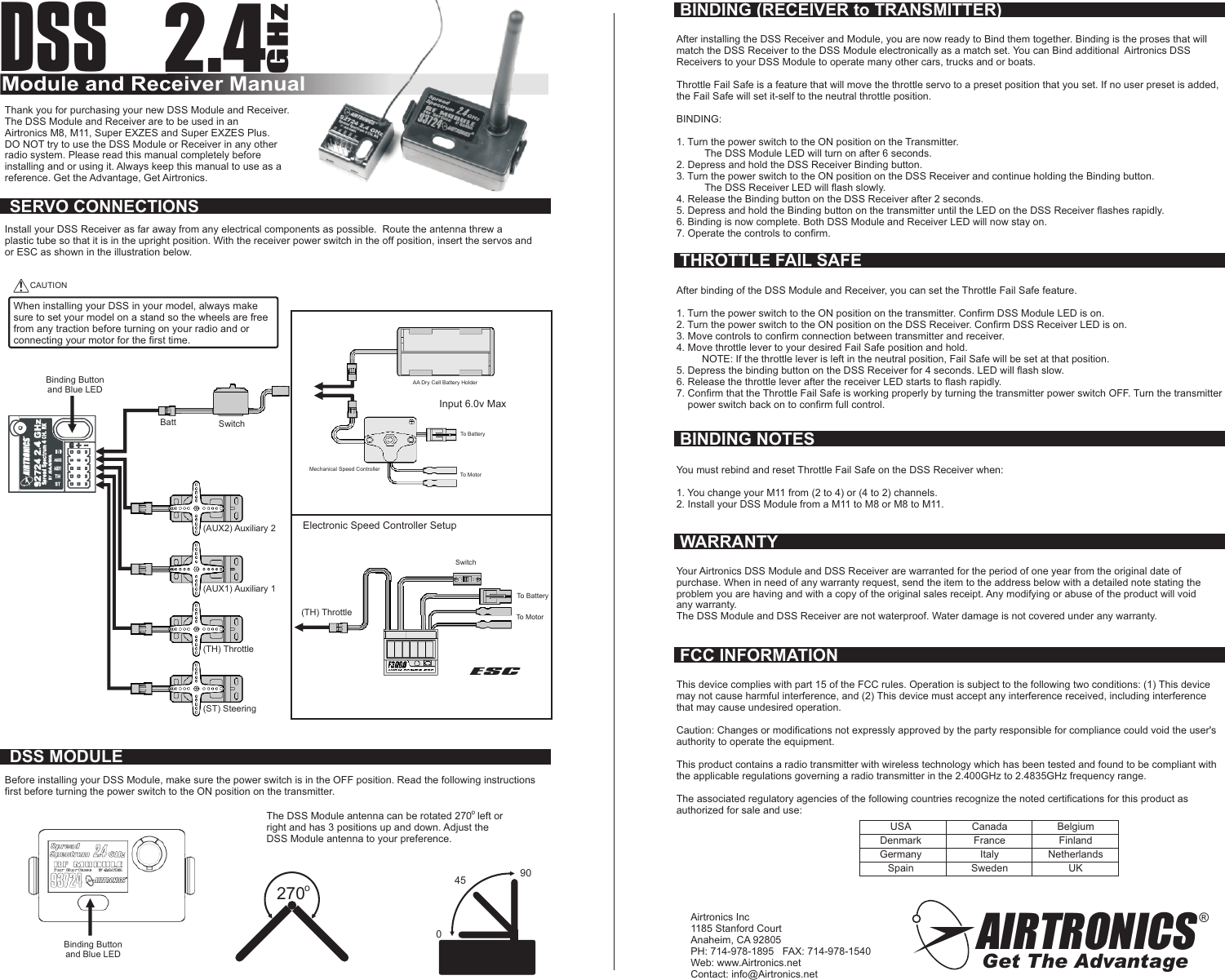
DSSModule and Receiver Manual2.4GHzAIRTRONICSGet The Advantage®Airtronics Inc1185 Stanford CourtAnaheim, CA 92805PH: 714-978-1895   FAX: 714-978-1540Web: www.Airtronics.netContact: info@Airtronics.net(ST) SteeringBatt SwitchAA Dry Cell Battery HolderMechanical Speed ControllerElectronic Speed Controller SetupESCSwitchTo BatteryTo Motor!CAUTIONWhen installing your DSS in your model, always makesure to set your model on a stand so the wheels are freefrom any traction before turning on your radio and orconnecting your motor for the first time.To BatteryTo MotorBinding Buttonand Blue LEDAfter installing the DSS Receiver and Module, you are now ready to Bind them together. Binding is the proses that willmatch the DSS Receiver to the DSS Module electronically as a match set. You can Bind additional  Airtronics DSSReceivers to your DSS Module to operate many other cars, trucks and or boats.Throttle Fail Safe is a feature that will move the throttle servo to a preset position that you set. If no user preset is added,the Fail Safe will set it-self to the neutral throttle position.BINDING:1. Turn the power switch to the ON position on the Transmitter.          The DSS Module LED will turn on after 6 seconds.2. Depress and hold the DSS Receiver Binding button.3. Turn the power switch to the ON position on the DSS Receiver and continue holding the Binding button.          The DSS Receiver LED will flash slowly.4. Release the Binding button on the DSS Receiver after 2 seconds.5. Depress and hold the Binding button on the transmitter until the LED on the DSS Receiver flashes rapidly.6. Binding is now complete. Both DSS Module and Receiver LED will now stay on.7. Operate the controls to confirm.Thank you for purchasing your new DSS Module and Receiver.The DSS Module and Receiver are to be used in anAirtronics M8, M11, Super EXZES and Super EXZES Plus.DO NOT try to use the DSS Module or Receiver in any otherradio system. Please read this manual completely beforeinstalling and or using it. Always keep this manual to use as areference. Get the Advantage, Get Airtronics.Install your DSS Receiver as far away from any electrical components as possible.  Route the antenna threw aplastic tube so that it is in the upright position. With the receiver power switch in the off position, insert the servos andor ESC as shown in the illustration below.(TH) Throttle(AUX1) Auxiliary 1(AUX2) Auxiliary 2Input 6.0v Max(TH) ThrottleSERVO CONNECTIONSDSS MODULEBefore installing your DSS Module, make sure the power switch is in the OFF position. Read the following instructionsfirst before turning the power switch to the ON position on the transmitter.Binding Buttonand Blue LEDThe DSS Module antenna can be rotated 270  left orright and has 3 positions up and down. Adjust theDSS Module antenna to your preference.270o045 90BINDING (RECEIVER to TRANSMITTER)THROTTLE FAIL SAFEAfter binding of the DSS Module and Receiver, you can set the Throttle Fail Safe feature.1. Turn the power switch to the ON position on the transmitter. Confirm DSS Module LED is on.2. Turn the power switch to the ON position on the DSS Receiver. Confirm DSS Receiver LED is on.3. Move controls to confirm connection between transmitter and receiver.4. Move throttle lever to your desired Fail Safe position and hold.         NOTE: If the throttle lever is left in the neutral position, Fail Safe will be set at that position.5. Depress the binding button on the DSS Receiver for 4 seconds. LED will flash slow.6. Release the throttle lever after the receiver LED starts to flash rapidly.7. Confirm that the Throttle Fail Safe is working properly by turning the transmitter power switch OFF. Turn the transmitter    power switch back on to confirm full control.BINDING NOTESYou must rebind and reset Throttle Fail Safe on the DSS Receiver when:1. You change your M11 from (2 to 4) or (4 to 2) channels.2. Install your DSS Module from a M11 to M8 or M8 to M11.oWARRANTYYour Airtronics DSS Module and DSS Receiver are warranted for the period of one year from the original date ofpurchase. When in need of any warranty request, send the item to the address below with a detailed note stating theproblem you are having and with a copy of the original sales receipt. Any modifying or abuse of the product will voidany warranty.The DSS Module and DSS Receiver are not waterproof. Water damage is not covered under any warranty.FCC INFORMATIONThis device complies with part 15 of the FCC rules. Operation is subject to the following two conditions: (1) This devicemay not cause harmful interference, and (2) This device must accept any interference received, including interferencethat may cause undesired operation.Caution: Changes or modifications not expressly approved by the party responsible for compliance could void the user'sauthority to operate the equipment.This product contains a radio transmitter with wireless technology which has been tested and found to be compliant withthe applicable regulations governing a radio transmitter in the 2.400GHz to 2.4835GHz frequency range.The associated regulatory agencies of the following countries recognize the noted certifications for this product asauthorized for sale and use:USADenmarkGermanySpainCanadaFranceItalySwedenBelgiumFinlandNetherlandsUK

Navigation menu