Alcatel Mobile Phones Omnipcx Office 4018 4019 Users Manual
2015-02-02
: Alcatel-Mobile-Phones Alcatel-Mobile-Phones-Alcatel-Omnipcx-Office-4018-4019-Users-Manual-413880 alcatel-mobile-phones-alcatel-omnipcx-office-4018-4019-users-manual-413880 alcatel-mobile-phones pdf
Open the PDF directly: View PDF  .
.
Page Count: 26
- Introduction
- How to use this guide
- Making a call
- Answering a call
- Using the telephone in 'handsfree' mode (Alcatel 4018 only)
- Activating the speaker during a conversation (receiver lifted) - Speaker
- Calling your correspondent by name (company directory)
- Make a call using the personal phone book
- Screening calls using the voice mailbox (Alcatel 4018 only)
- Redial
- Making a callback request to a busy number
- Answering an internal call in intercom mode (Alcatel 4018 only)
- Sending DTMF signals
- Mute, so that your correspondent cannot hear you
- Making a second call during a conversation
- Answering a second call during a conversation
- Switching between calls (Broker call)
- Transferring a call
- Three-way conference with internal and/or external correspondents (conference)
- Placing a call on hold (HOLD)
- Placing an outside call on hold (parking)
- Intrusion into an internal conversation
- Store a number
- Adjust audio volume
- Receiving supervised call ringing
- Answering a night or a general bell
- Manager/assistant screening
- Individual pick-up
- Answering briefly in place of the attendant
- Hunting groups
- Calling an internal correspondent on his/her pager
- Answering a call on your pager
- Calling a correspondent on his/her loudspeaker
- Sending a written message to an internal correspondent
- Sending a copy of a voice message
- Sending a recorded message to a number/a distribution list
- Broadcasting a message on the loudspeakers of a station group
- Selecting calls to be forwarded
- Forwarding calls to another number (immediate forwarding)
- Forwarding your calls to your voice message service
- When you return, review your recorded messages
- Activate/deactivate the personal assistant
- Personal assistant: reaching you with one number only
- Forwarding calls to your pager
- Forwarding your calls from the receiving terminal (“Follow me”)
- Applying a selective forward
- Forwarding all group calls
- Cancelling all forwardings
- Forwarding calls when your line is busy (forward if busy)
- Do not disturb
- Leaving a recorded message for internal callers
- Consulting written messages
- Message notification
- Charging your calls directly to business accounts
- Finding out the cost of an outside call made for an internal user from your terminal
- Initializing your voice mailbox
- Customizing your voice greeting
- Modifying your personal code
- Configuring the telephone ringer
- Adjusting screen brightness
- Selecting language
- Make a call using the personal phone book
- Programming speed dialing (direct calls) keys
- Programming an appointment reminder
- Identifying the terminal you are on
- Broadcasting background music on your loudspeaker
- Lock / unlock your telephone
- Activating/deactivating 'forced headset' mode

Alcatel OmniPCX Office
Alcatel 4018/4019
First
User manual
3
How
Introduction
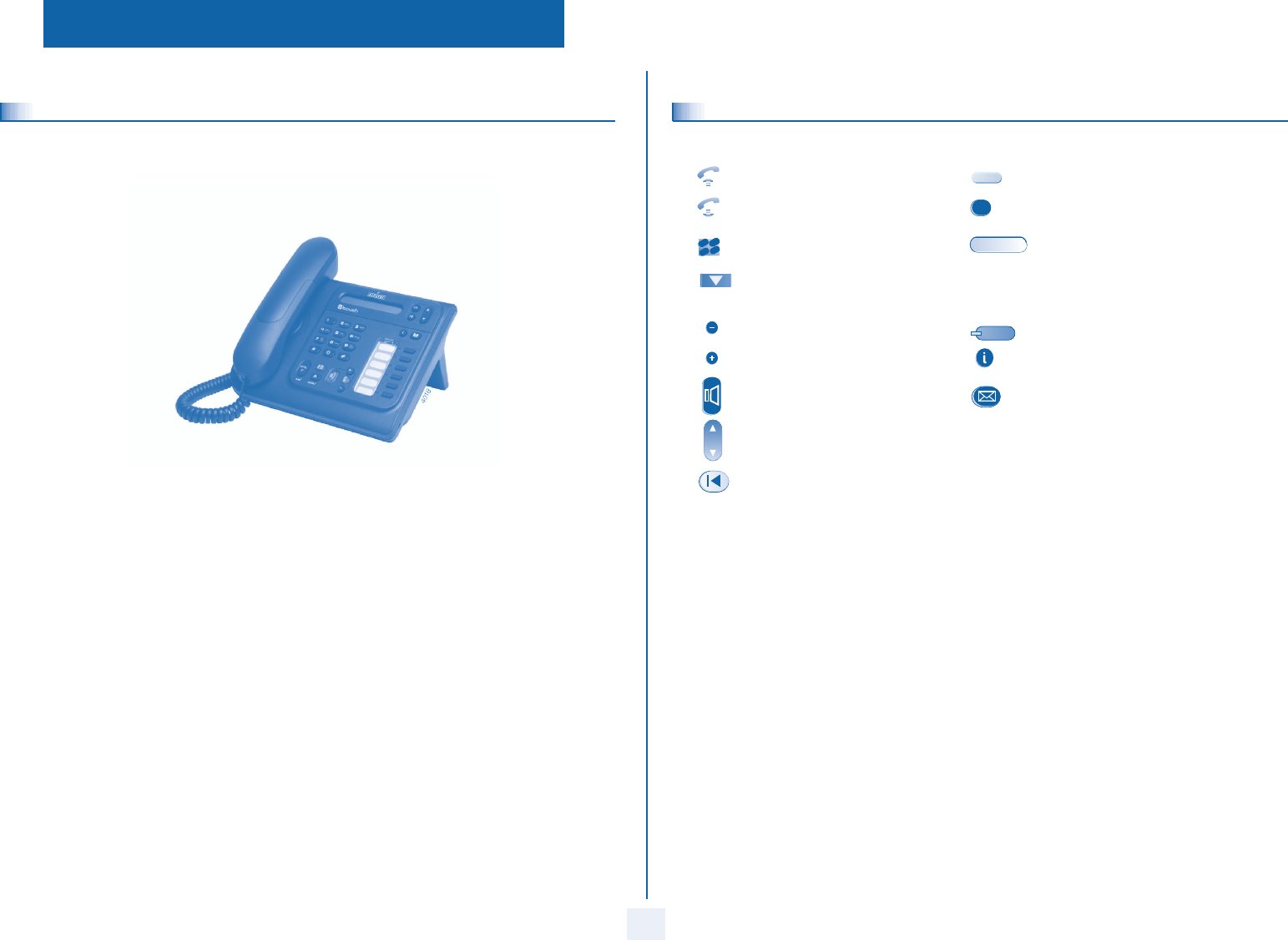
Thank you for choosing a telephone from the 4018/4019 range manufactured by Alcatel.
Your terminal has a new ergonomic layout for more effective communication.
How to use this guide
These symbols may be supplemented by small icons or text.
Lift the receiver. Line key.
Hang up. Specific key on numeric keypad.
Numeric keypad. Partial view of display.
Means that the feature is subject to programming. If necessary, contact your installer.
Adjustment “reduce”. Fixed key.
Adjustment “increase”. MENU key.
Speaker,
Handsfree. Voice mail access key.
Move the navigation key up or down.
To go back one level (press and release) or to return to the welcome page (press and hold) ;
during a conversation, can be used to access the different pages and to return to the telephone
screens.
2
2
6
5
3
abc
def
jkl
mno
How

Contents
5
Toc
Getting to know your telephone . . . . . . . . . . . . . . . . . . . . . . . . . . . . . . . . p. 6
1. Using your telephone . . . . . . . . . . . . . . . . . . . . . . . . . . . . . . . . . . . . . . . . . p. 7
1.1 Making a call . . . . . . . . . . . . . . . . . . . . . . . . . . . . . . . . . . . . . . . . . . . . . . . . . . . . . . . . . . . . p. 7
1.2 Answering a call . . . . . . . . . . . . . . . . . . . . . . . . . . . . . . . . . . . . . . . . . . . . . . . . . . . . . . . . . p. 7
1.3 Using the telephone in "handsfree" mode . . . . . . . . . . . . . . . . . . . . . . . . . . . . . . . . . . . . . p. 7
1.4 Activating the loudspeaker during a conversation (receiver lifted). . . . . . . . . . . . . . . . . . p. 7
1.5 Calling your correspondent by name (company directory) . . . . . . . . . . . . . . . . . . . . . . . p. 8
1.6 Make a call using the personal phone book . . . . . . . . . . . . . . . . . . . . . . . . . . . . . . . . . . . . p. 8
1.7 Screening calls using the voice mailbox . . . . . . . . . . . . . . . . . . . . . . . . . . . . . . . . . . . . . . . p. 8
1.8 Redial. . . . . . . . . . . . . . . . . . . . . . . . . . . . . . . . . . . . . . . . . . . . . . . . . . . . . . . . . . . . . . . . . . p. 8
1.9 Making a callback request to a busy number . . . . . . . . . . . . . . . . . . . . . . . . . . . . . . . . . . . p. 8
1.10 Answering an internal call in intercom mode . . . . . . . . . . . . . . . . . . . . . . . . . . . . . . . . . . p. 9
1.11 Sending DTMF signals . . . . . . . . . . . . . . . . . . . . . . . . . . . . . . . . . . . . . . . . . . . . . . . . . . . . . p. 9
1.12 Mute, so that your correspondent cannot hear you . . . . . . . . . . . . . . . . . . . . . . . . . . . . . p. 9
2. During a call . . . . . . . . . . . . . . . . . . . . . . . . . . . . . . . . . . . . . . . . . . . . . . . . p. 10
2.1 Making a second call during a conversation . . . . . . . . . . . . . . . . . . . . . . . . . . . . . . . . . . . . p. 10
2.2 Answering a second call during a conversation . . . . . . . . . . . . . . . . . . . . . . . . . . . . . . . . . p. 10
2.3 Switching between calls (Broker call). . . . . . . . . . . . . . . . . . . . . . . . . . . . . . . . . . . . . . . . . p. 10
2.4 Transferring a call . . . . . . . . . . . . . . . . . . . . . . . . . . . . . . . . . . . . . . . . . . . . . . . . . . . . . . . . p. 11
2.5 Three-way conference with internal and/or external correspondents (conference). . . . p. 11
2.6 Placing a call on hold (HOLD) . . . . . . . . . . . . . . . . . . . . . . . . . . . . . . . . . . . . . . . . . . . . . . p. 11
2.7 Placing an outside call on hold (parking) . . . . . . . . . . . . . . . . . . . . . . . . . . . . . . . . . . . . . . p. 11
2.8 Intrusion into an internal conversation . . . . . . . . . . . . . . . . . . . . . . . . . . . . . . . . . . . . . . . p. 12
2.9 Store a number . . . . . . . . . . . . . . . . . . . . . . . . . . . . . . . . . . . . . . . . . . . . . . . . . . . . . . . . . . p. 12
2.10 Adjust audio volume . . . . . . . . . . . . . . . . . . . . . . . . . . . . . . . . . . . . . . . . . . . . . . . . . . . . . . p. 12
3. Sharing. . . . . . . . . . . . . . . . . . . . . . . . . . . . . . . . . . . . . . . . . . . . . . . . . . . . . p. 13
3.1 Receiving supervised call ringing. . . . . . . . . . . . . . . . . . . . . . . . . . . . . . . . . . . . . . . . . . . . . p. 13
3.2 Answering a night or a general bell . . . . . . . . . . . . . . . . . . . . . . . . . . . . . . . . . . . . . . . . . . p. 13
3.3 Manager/assistant screening . . . . . . . . . . . . . . . . . . . . . . . . . . . . . . . . . . . . . . . . . . . . . . . . p. 13
3.4 Individual pick-up . . . . . . . . . . . . . . . . . . . . . . . . . . . . . . . . . . . . . . . . . . . . . . . . . . . . . . . . p. 13
3.5 Answering briefly in place of the attendant . . . . . . . . . . . . . . . . . . . . . . . . . . . . . . . . . . . . p. 14
3.6 Hunting groups . . . . . . . . . . . . . . . . . . . . . . . . . . . . . . . . . . . . . . . . . . . . . . . . . . . . . . . . . . p. 14
3.7 Calling an internal correspondent on his/her pager . . . . . . . . . . . . . . . . . . . . . . . . . . . . . p. 14
3.8 Answering a call on your pager . . . . . . . . . . . . . . . . . . . . . . . . . . . . . . . . . . . . . . . . . . . . . p. 14
3.9 Calling a correspondent on his/her loudspeaker. . . . . . . . . . . . . . . . . . . . . . . . . . . . . . . . p. 14
3.10 Sending a written message to an internal correspondent . . . . . . . . . . . . . . . . . . . . . . . . . p. 15
3.11 Sending a copy of a voice message . . . . . . . . . . . . . . . . . . . . . . . . . . . . . . . . . . . . . . . . . . . p. 15
3.12 Sending a recorded message to a number/a distribution list. . . . . . . . . . . . . . . . . . . . . . . p. 16
3.13 Broadcasting a message on the loudspeakers of a station group . . . . . . . . . . . . . . . . . . . p. 16
4. Keeping in touch . . . . . . . . . . . . . . . . . . . . . . . . . . . . . . . . . . . . . . . . . . . . . p. 17
4.1 Selecting calls to be forwarded. . . . . . . . . . . . . . . . . . . . . . . . . . . . . . . . . . . . . . . . . . . . . . p. 17
4.2 Forwarding calls to another number (immediate forwarding). . . . . . . . . . . . . . . . . . . . . . p. 17
4.3 Forwarding your calls to your voice message service . . . . . . . . . . . . . . . . . . . . . . . . . . . . p. 17
4.4 When you return, review your recorded messages . . . . . . . . . . . . . . . . . . . . . . . . . . . . . p. 17
4.5 Activate/deactivate the personal assistant . . . . . . . . . . . . . . . . . . . . . . . . . . . . . . . . . . . . . p. 17
4.6 Personal assistant: reaching you with one number only . . . . . . . . . . . . . . . . . . . . . . . . . . p. 18
4.7 Forwarding calls to your pager. . . . . . . . . . . . . . . . . . . . . . . . . . . . . . . . . . . . . . . . . . . . . . p. 18
4.8 Forwarding your calls from the receiving terminal (“Follow me”) . . . . . . . . . . . . . . . . . . p. 18
4.9 Applying a selective forward. . . . . . . . . . . . . . . . . . . . . . . . . . . . . . . . . . . . . . . . . . . . . . . . p. 18
4.10 Forwarding all group calls . . . . . . . . . . . . . . . . . . . . . . . . . . . . . . . . . . . . . . . . . . . . . . . . . . p. 18
4.11 Cancelling all forwardings . . . . . . . . . . . . . . . . . . . . . . . . . . . . . . . . . . . . . . . . . . . . . . . . . . p. 19
4.12 Forwarding calls when your line is busy (Forward if busy) . . . . . . . . . . . . . . . . . . . . . . . . p. 19
4.13 Do not disturb . . . . . . . . . . . . . . . . . . . . . . . . . . . . . . . . . . . . . . . . . . . . . . . . . . . . . . . . . . p. 19
4.14 Leaving a recorded message for internal callers . . . . . . . . . . . . . . . . . . . . . . . . . . . . . . . . p. 19
4.15 Consulting written messages . . . . . . . . . . . . . . . . . . . . . . . . . . . . . . . . . . . . . . . . . . . . . . . p. 20
4.16 Message notification . . . . . . . . . . . . . . . . . . . . . . . . . . . . . . . . . . . . . . . . . . . . . . . . . . . . . . p. 20
5. Managing your charges . . . . . . . . . . . . . . . . . . . . . . . . . . . . . . . . . . . . . . . . p. 21
5.1 Charging your calls directly to business accounts . . . . . . . . . . . . . . . . . . . . . . . . . . . . . . . p. 21
5.2 Finding out the cost of an outside call made for an internal user from your terminal . . . p. 21
6. Programming your telephone . . . . . . . . . . . . . . . . . . . . . . . . . . . . . . . . . . p. 22
6.1 Initializing your voice mailbox. . . . . . . . . . . . . . . . . . . . . . . . . . . . . . . . . . . . . . . . . . . . . . . p. 22
6.2 Customizing your voice greeting . . . . . . . . . . . . . . . . . . . . . . . . . . . . . . . . . . . . . . . . . . . . p. 22
6.3 Modifying your personal code . . . . . . . . . . . . . . . . . . . . . . . . . . . . . . . . . . . . . . . . . . . . . . p. 22
6.4 Configuring the telephone ringer . . . . . . . . . . . . . . . . . . . . . . . . . . . . . . . . . . . . . . . . . . . . p. 22
6.5 Adjusting screen brightness . . . . . . . . . . . . . . . . . . . . . . . . . . . . . . . . . . . . . . . . . . . . . . . . p. 23
6.6 Selecting language . . . . . . . . . . . . . . . . . . . . . . . . . . . . . . . . . . . . . . . . . . . . . . . . . . . . . . . . p. 23
6.7 Make a call using the personal phone book . . . . . . . . . . . . . . . . . . . . . . . . . . . . . . . . . . . . p. 23
6.8 Programming speed dialing (direct calls) keys . . . . . . . . . . . . . . . . . . . . . . . . . . . . . . . . . . p. 24
6.9 Programming an appointment reminder . . . . . . . . . . . . . . . . . . . . . . . . . . . . . . . . . . . . . . p. 24
6.10 Identifying the terminal you are on . . . . . . . . . . . . . . . . . . . . . . . . . . . . . . . . . . . . . . . . . . p. 24
6.11 Broadcasting background music on your loudspeaker . . . . . . . . . . . . . . . . . . . . . . . . . . . p. 24
6.12 Lock / unlock your telephone. . . . . . . . . . . . . . . . . . . . . . . . . . . . . . . . . . . . . . . . . . . . . . . p. 25
6.13 Activating/deactivating "forced headset" mode . . . . . . . . . . . . . . . . . . . . . . . . . . . . . . . . . p. 25
Compliance . . . . . . . . . . . . . . . . . . . . . . . . . . . . . . . . . . . . . . . . . . . . . . . . . p. 26
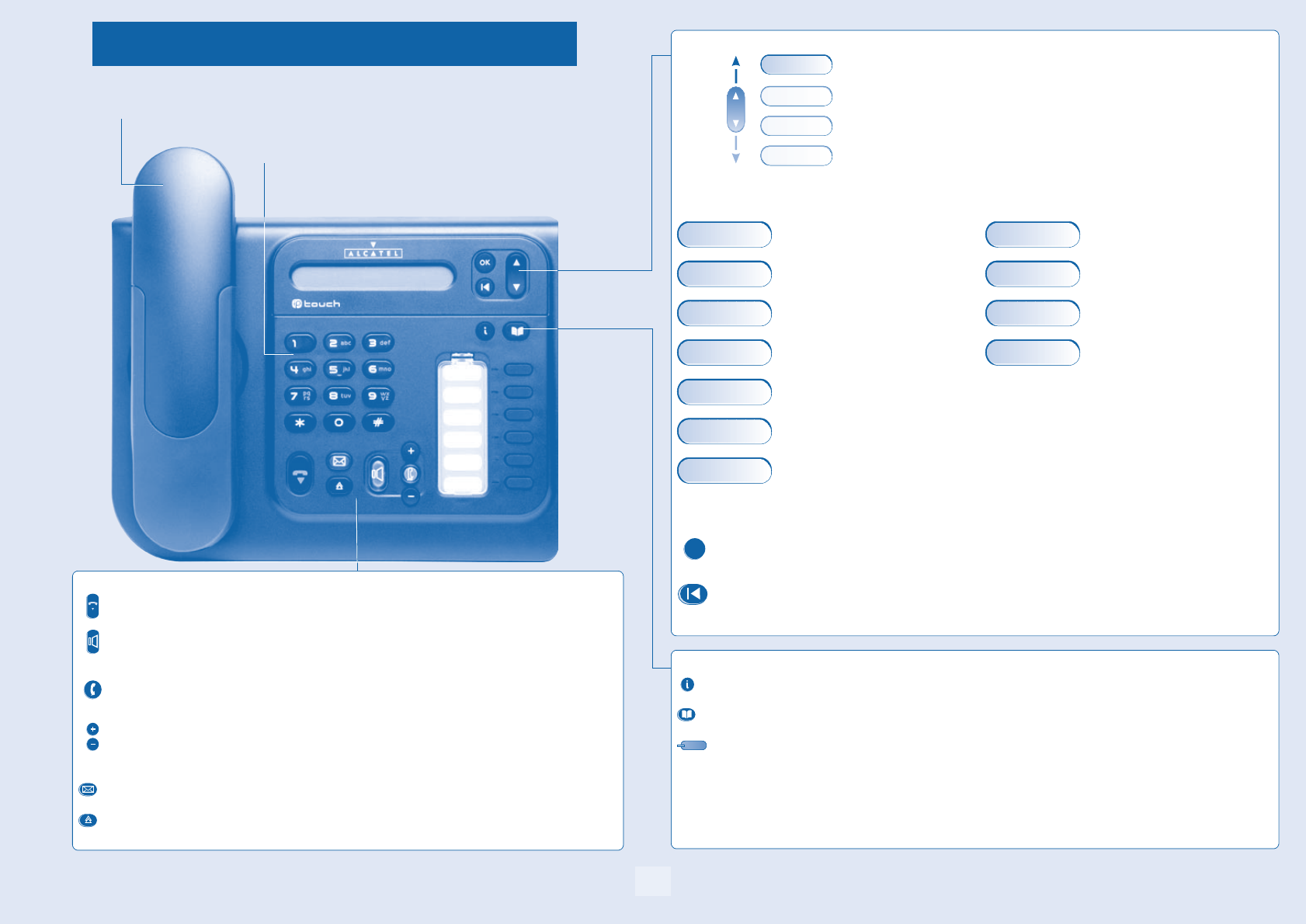
Getting to know your telephone
6
redialend
Telephone
Receiver
Audio keys
Feature keys
END key:
to terminate a call.
Handsfree/Speaker Key:
to make or answer a call without lifting the receiver (Alcatel 4018).
•Lit in handsfree mode or headset mode (short press).
•Flashing in speaker mode(long press).
Intercom/Mute key:
•During a call: press this key so that your party cannot hear you.
•Terminal idle: press this key so that you can automatically answer a call without lifting the receiver.
To adjust the speaker or receiver volume up or down
Messaging key to access various mail services:
if the key flashes, a new voice message or a new text message has been received.
'Redial' key:
•to access the 'Redial' feature (short press)
•call back on the last 10 number dialled (long press).
Navigation
Up-down navigator:
used to navigate around the home page, through the menus or in a text zone
when entering characters.
The home page consists of:
•information on the status of the set (set locked, call forward, etc.),
•date and time,
•set programming and configuration features.
Features accessible (set in idle position): Features accessible in conversation:
Identifying the terminal you are on, Placing a call on hold (HOLD),
Call back on the last 10 number dialled, Sending DTMF signals,
Lock / unlock your telephone, Store the number in the personal phone
book,
Programming an appointment reminder, Call a second correspondent using call by na-
me.
Forward your calls to another number. (im-
mediate forwarding, forward to voice mail,
forward to bleeper),
Configure the set (personal assistant, display,
ring tone, voice mail, etc.),
Using dial by name.
.
Other features can be accessed depending on the configuration of the system.
OK key:
used to validate your choices and options while programming or configuring.
Back/Exit key:
to return to previous menu (short press) or return to first screen (long press). You can also use this key to correct
a character you entered.
Who Am I
Lock
Settings
Who Am I Hold
Rediallist ¤DTMF
Lock »Directory
Appointment Dial by name
Forward
Settings
Dial by name
OK
Feature keys and programmable keys
Guide key:
use to obtain information on the pre-programmed keys or to access the set programming or configuration.
Phone book key:
phone book key to access your personal phone book (short press) or to make a call by name (long press or press
twice).
Pre-programmed feature keys and programmable key.
Lit when the feature associated with the key is activated.
The 6-key block consists of:
two line keys,
one 'immediate forwarding or cancel call-forward' key,
one 'conference' key,
one 'transfer' key,
one direct call key to programme.
Alphanumeric keypad
Alcatel 4018
Using your telephone
1
7
Other
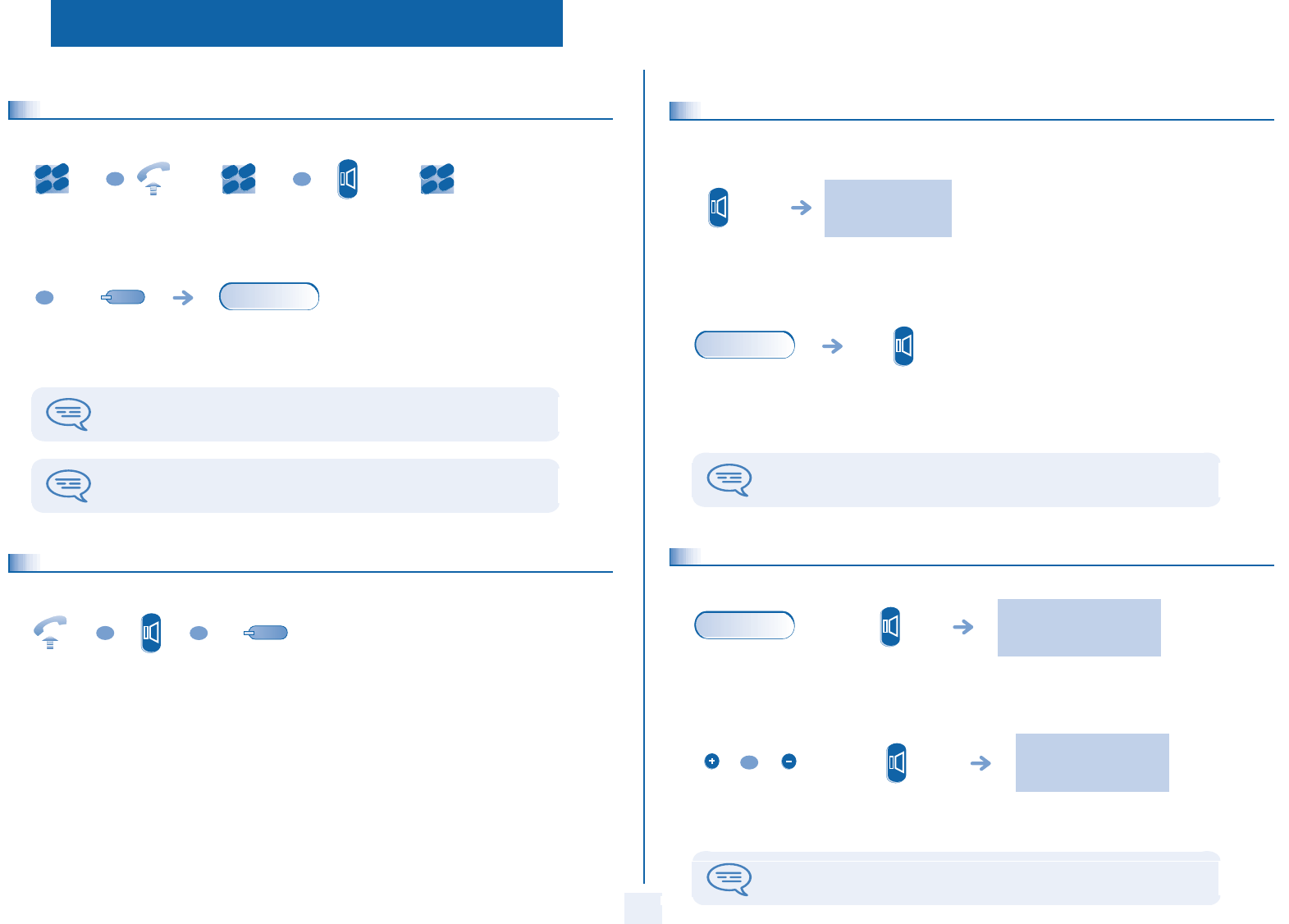
1.1 Making a call
1.2 Answering a call
dial the
number for
your call
lift the
receiver
number
required
handsfree
(Alcatel 4018
only)
number
required
programmable
line key
you are in conversation
with the destination
number
To make an external call, dial the outside line access code (9) before dialing your
party's number. 9 is the default code for an outside line.
For the attendant, dial '0' (by default).
2
6
5
3
ab c
def
jkl
mn
o
OR
2
6
5
3
ab c
def
jkl
mno
OR
2
6
5
3
ab c
def
jkl
mn
o
OR
conv.
lift the
receiver
handsfree
(Alcatel 4018
only)
press the key for
the line that is lit
up
OR
OR
1.3
Using the telephone in 'handsfree' mode (Alcatel 4018 only)
Terminal idle:
Call in progress:
1.4
Activating the speaker during a conversation (receiver lifted) - Speaker
you are in handsfree
mode
press and
release
you are in
conversation with
the destination
number
press and release
During a conversation, you can lift the receiver without terminating the call.
conv.
the loudspeaker key flashes
you are in
conversation with
the destination
number
activate loudspeaker
(long press)
The key is no longer lit
adjust volume
(9 levels)
deactivate
loudspeaker
(long press)
Press and release the loudspeaker key to switch to handsfree mode (light steady).
conv.
OR

Using your telephone
8
1
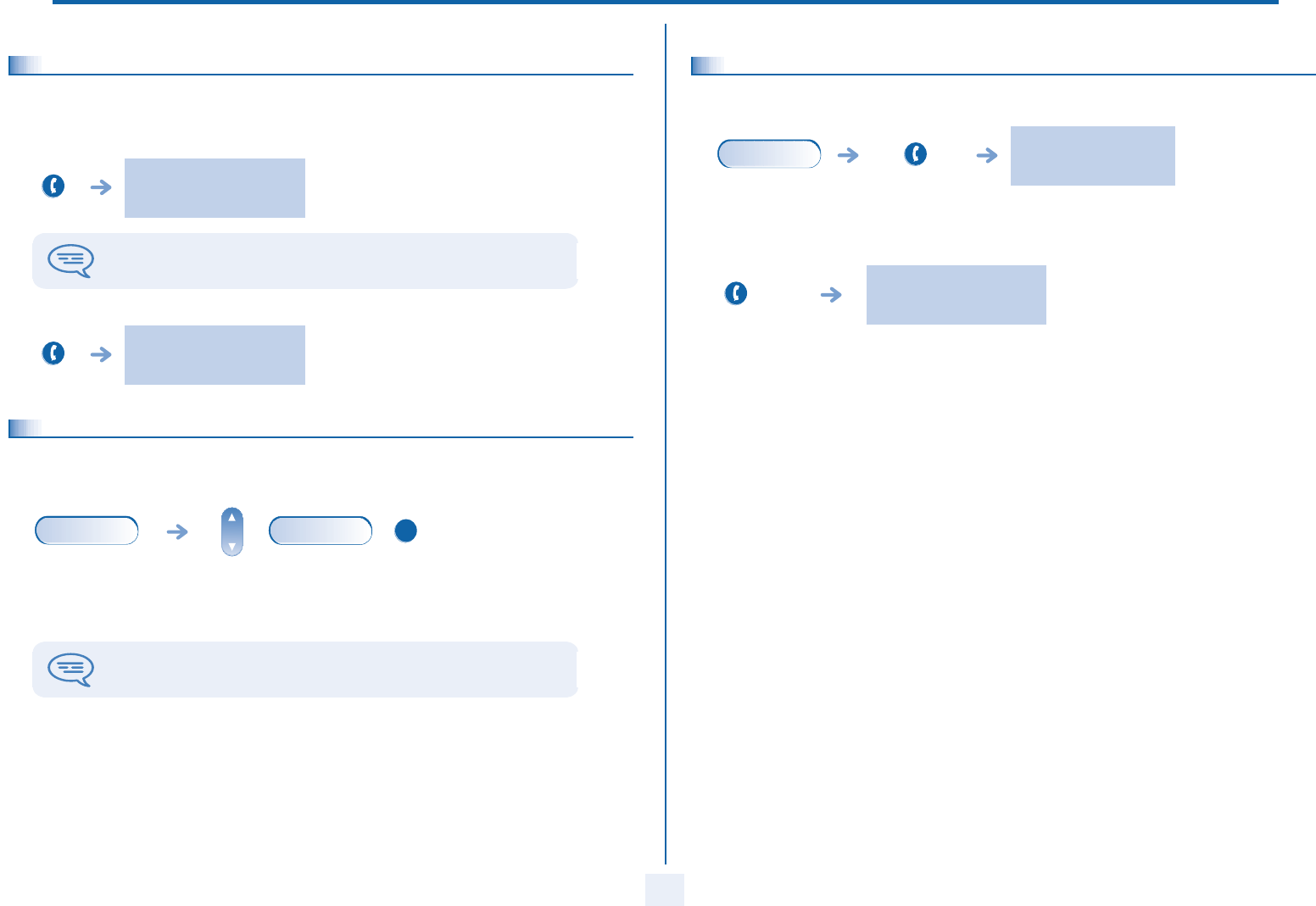
1.5 Calling your correspondent by name (company directory)
You enter your contact's name in predictive text mode. In this mode, enter each letter of the name by pressing only once on the
key with this letter.
1.6 Make a call using the personal phone book
1.7 Screening calls using the voice mailbox (Alcatel 4018 only)
This service lets you screen incoming calls to your voice mailbox. When your caller leaves his message you can choose to
communicate with him.
•Activating call screening:
long press
or press
twice
first letters of your
correspondent’s
name
select the name from
the displayed list
OK
Press and
release
press the
programmed key
directly (0 to 9)
select the contact to
call
start the call
2
6
5
3
ab c
def
jkl
mn
o
OR
OK
'voice mailbox
screening'
programmed key
enter your personal
code
same key to stop listening and
deactivate the screening
2
6
5
3
ab c
def
jkl
mn
o
•When you receive a call:
1.8
Redial
Redialling the last number dialled (redial):
Call back on the last 10 number dialled:
1.9
Making a callback request to a busy number
you hear the message left by your
caller
name or number of
the caller
to take the call to stop listening only
call
OR
OR
last number redial
'Redial'
key(short
press)
'Redial' key
(long press)
select the No. from
the last ten dialed
start the call
OR
Rediallist
OK
OK
the number you are calling is
busy
¤Callback
OK
Using your telephone
9
1
1.10 Answering an internal call in intercom mode (Alcatel 4018 only)
You can answer without lifting the receiver. When you receive an internal call, your telephone rings and you are connected
directly in handsfree mode. The screen shows the caller’s identity.
•To activate - Terminal idle:
•To deactivate - Terminal idle:
1.11 Sending DTMF signals
During a conversation you sometimes have to send DTMF signals, such as with a voice server, an automated attendant or a
remotely consulted answering machine.
corresponding LED lights up
When your caller hangs up, intercom mode remains active.
The corresponding LED goes out
you are in
conversation with
the destination
number
to activate
The feature is automatically cancelled when you hang up.
conv.
¤DTMF
OK
1.12 Mute, so that your correspondent cannot hear you
You can hear your correspondent but he/she cannot hear you:
The key lights up
you are in
conversation with
the destination
number
disable microphone
The key is no longer lit
resume the
conversation
conv.

During a call
10
2
Other
2.1 Making a second call during a conversation
•Other methods for calling a second correspondent
•To cancel your second call and recover the first:
The first call is placed on hold
you are in
conversation with
the destination
number
number of
second party
auto call back
(short press)
Call back on the last 10 number dialled (long press).
Calling from your personal directory (PersSpDial) (long press or press
twice (phone book key))
.Using dial by name.
Programmable line key.
you are in
conversation with
the destination
number
key for the line
whose light is
flashing
If you make an error, hang up: your telephone will ring and you will recover your first
call.
conv.
2
6
5
3
ab c
def
jkl
mn
o
OR
OR
Dial by name
OK
conv.
2.2 Answering a second call during a conversation
•A second correspondent is trying to call you:
Answer call displayed:
•To return to your first caller and end the conversation in progress:
2.3 Switching between calls (Broker call)
During a call, a second call is put on hold.
To alternate between calls:
you are in
conversation with
the destination
number
name or no. of the caller
displayed for 3 seconds
light flashes
The first call is placed on hold
line key for which
icon is flashing
you are in
conversation with
the destination
number
key associated
with the
'incoming call'
icon
conv.
call
conv.
OR
Place your first party on hold
light flashes

During a call
11
2
2.4 Transferring a call
•To transfer your call to another number:
•If the number receiving the transfer answers:
You can also transfer your call immediately, without waiting for the number to answer, using either of the two methods described
above.
2.5
Three-way conference with internal and/or external correspondents
(conference)
During a call, a second call is on hold.
Cancel the conference and remain with your second correspondent (Place your first party on hold).
The first call is placed on hold
you are in
conversation with
the destination
number
no. of the 2nd
terminal
'transfer'
programmed key
Transfer between two outside calls is not generally possible (depends on country
concerned and system configuration).
conv.
2
6
5
3
ab c
def
jkl
mn
o
you are in
conversation with
the destination
number
“Conference” programmed
key
“Conference”
programmed key
conv.
Hang up on all correspondant:
After the conference, to leave your two correspondents talking together:
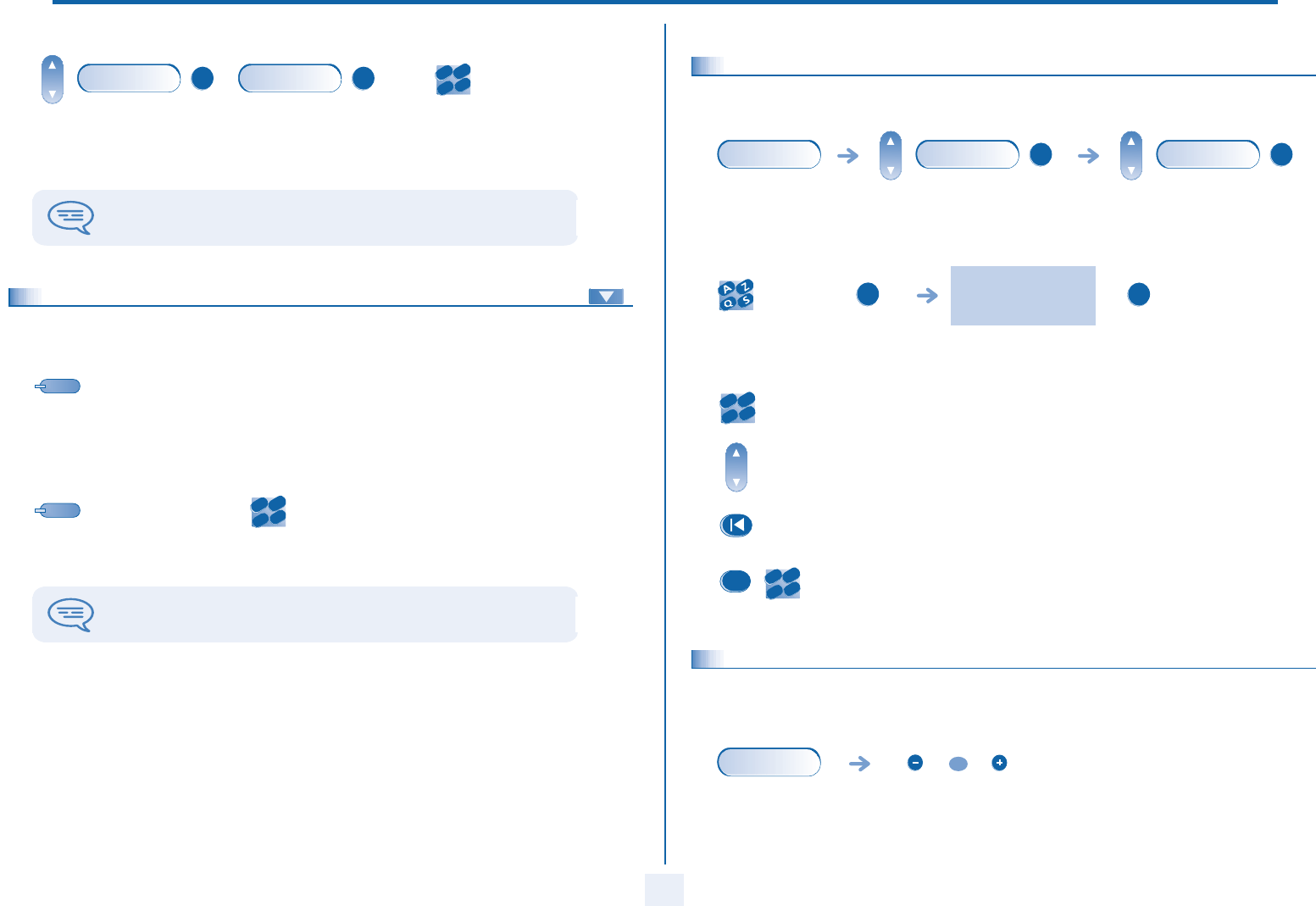
2.6 Placing a call on hold (HOLD)
•Exclusive hold:
During a call, you may place the call on hold and recover it later, on the same telephone
•Press 'Hold' to recover the call on hold
2.7 Placing an outside call on hold (parking)
You can place an outside call on hold and recover the call on another telephone:
cancel the conference 'transfer' programmed key
your call is placed on hold
you are in
conversation with
the destination
number
key for the line
whose light is
flashing
conv.
Hold
OK
conv.
you are in
conversation with
the destination
number
conv.
Park
OK
During a call
12
2
•To recover the parked call:
2.8 Intrusion into an internal conversation
Your correspondent’s line is busy. If the number is not “protected” and if authorised, you can intrude into the call:
•Protection against intrusion:
number of
telephone from
which call was
parked
If the parked call is not recovered within a preset time (default value 1 min 30), it is
transferred to the attendant.
PickUp OK
Unparkcall OK
2
6
5
3
ab c
def
jkl
mn
o
'Intrude on a call'
programmed key
'protection of a call'
programmed key
enter the number
desired
Protection is cancelled when you hang up.
2
6
5
3
ab c
def
jkl
mn
o
2.9
Store a number
During a call, to save the number onto a call key:
* Enter the name of your party :
2.10
Adjust audio volume
During a call, to adjust the volume level of the loudspeaker or receiver:
you are in
conversation with
the destination
number
select the key to
programme (0 to 9)
display number
enter the name of
your party*
confirm confirm
Enter the text: the number pad keys have letters
that you can display by successive presses.
Position the cursor in the entry field.
Erase last character entered.
Enter a digit (keys 0 to 9).
conv.
»Directory
OK
OK
OK
OK
2
6
5
3
ab c
def
jkl
mno
2
6
5
3
ab c
def
jkl
mno
#
you are in
conversation with
the destination
number
adjust audio volume
conv.
OR

Sharing
3
13
Other
3.1 Receiving supervised call ringing
To receive the special ringing for calls to another number:
3.2 Answering a night or a general bell
When the attendant is absent, outside calls to the attendant are indicated by a general bell. To answer:
3.3 Manager/assistant screening
System configuration allows “manager/assistant” groups to be formed, so that the manager’s calls can be directed to one or more
secretaries.
•From the manager’s or assistant’s telephone:
“Supervised call
ringing” programmed
key
press the same key to
cancel
you are in
conversation with
the destination
number
conv.
PickUp
OK
GeneralBell
OK
Incoming calls are screened by a designated
person (assistant, etc.)
Press
“Screening”
key
press the same key
to cancel
Screening is indicated on the manager’s telephone by the icon corresponding to the
“screening” programmed key.
3.4
Individual pick-up
You hear a telephone ringing in an office where no-one can answer. If authorised, you can answer the call on your own telephone.
•If the telephone ringing is in your own pick-up group:
•If the telephone ringing is not in your pick-up group:
'group call pick-up'
programmed key
dial the number of
the ringing
telephone
'telephone call
pick-up'
programmed key
dial the number of
the ringing
telephone
The system can be configured to prevent call pick-up on certain telephones.
PickUp
OK
IndivPickup
OK
2
6
5
3
ab c
def
jkl
mn
o
OR
2
6
5
3
ab c
def
jkl
mn
o

Sharing
14
3
3.5 Answering briefly in place of the attendant
Outside calls to the attendant will ring on your telephone and you can answer the call:
•Calls to the switchboard:
3.6 Hunting groups
•Hunting group call:
Certain numbers can form a hunting group and can be called by dialling the group number.
•Temporary exit from your hunting group:/Return into your group:
your telephone will ring at the
same time as the switchboard
“Attendant
help” programmed
key
press the same
key to cancel
calls to the switchboard will ring on
your telephone
“Attendant help”
programmed key
no. of group to be called
'exit group'
programmed key
your group number
Belonging to a group does not affect the management of direct calls. A specific
telephone within a group can always be called by using its own number.
2
6
5
3
ab c
def
jkl
mn
o
2
6
5
3
ab c
def
jkl
mn
o
3.7 Calling an internal correspondent on his/her pager
The number called does not answer and you know that the person called has a pager:
3.8 Answering a call on your pager
A call on your pager can be answered from any telephone within the system.
3.9 Calling a correspondent on his/her loudspeaker
Your internal correspondent does not answer. If authorised, you can remotely activate your correspondent’s phone:
your party does
not answer
'page' programmed
key
Paging in progress is displayed
Your correspondent can answer from any telephone in the system.
alert
your pager beeps
'answer page'
programmed key
your group
number
2
6
5
3
ab c
def
jkl
mn
o
your party does
not answer
you are connected to the loudspeaker on your correspondent’s
phone (if he/she has the handsfree feature)
alert
ForcedAnsw
OK

Sharing
15
3
3.10 Sending a written message to an internal correspondent
•Predefined message:
•Personal message:
* Create a temporary personal message :
dial the
number to be
called
select the
message to be
sent
enter the no. of
the message to
be sent
(01 to 27)
apply your
choice
change language of message send
message
create a temporary
personal message*
Send message
Enter the text: the number pad keys have letters
that you can display by successive presses.
Position the cursor in the entry field.
Erase last character entered.
Enter a digit (keys 0 to 9).
SendTxtMsg OK
2
6
5
3
ab c
def
jkl
mn
o
OK
OR
GoTo OK
2
6
5
3
ab c
def
jkl
mn
o
OK
Language OK
OK
Create
OK
2
6
5
3
ab c
def
jkl
mno
2
6
5
3
ab c
def
jkl
mno
#
•The 27 standard messages are shown below:
3.11
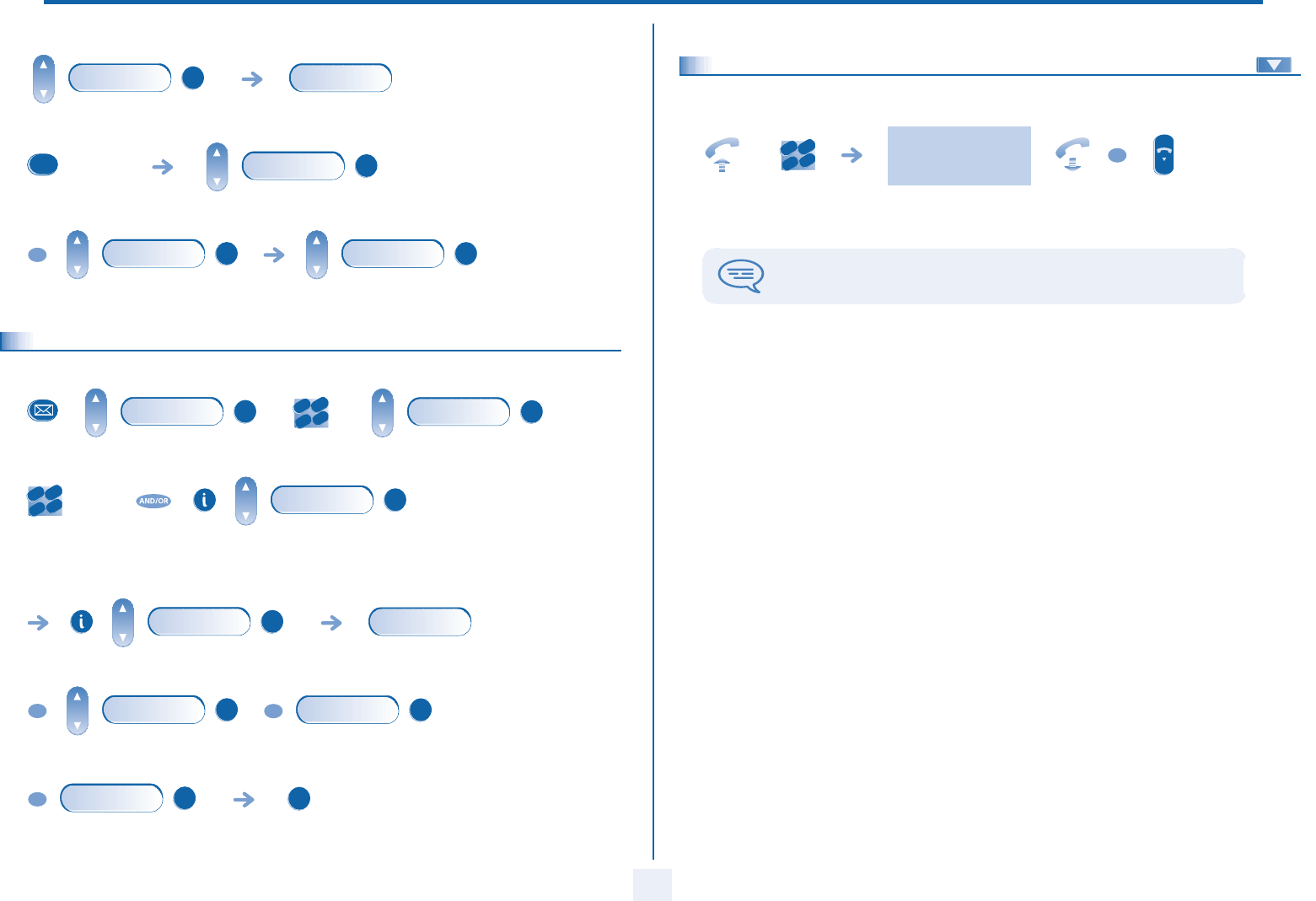
Sending a copy of a voice message
1 Call me back 15 Meeting on ___ (*)
2 Call me back tomorrow 16 Meeting on ___ at _:_ (*)
3 Call me back at _:_ (*) 17 Out for a while
4 Call back _____ (*) 18 Absent for the rest of the day
5 Call the attendant 19 Absent, back at _:_ (*)
6 Call the assistant 20 Absent, back on ___ at _:_ (*)
7 I will call back at _:_ (*) 21 On vacation, back on ___ (*)
8 Use paging 22 External meeting
9 Please fetch your fax 23 External meeting, back on ___ (*)
10 Please fetch your mail 24 I am in room nr __ (*)
11 Please cancel your forwarding 25 In a meeting - do not disturb
12 Visitors are waiting 26 At lunch
13 You are expected at reception 27 Indisposed
14 Meeting at _:_ (*) (*) Messages to be completed using numeric keypad
Display shows the number of
new and old messages
personal code
select message
to copy by
consecutive
presses
dial the
number to
be called
send message record a comment*
add an additional party send message
Voice
OK
2
6
5
3
ab c
def
jkl
mn
o
Consult
OK
Sendcopy
OK
2
6
5
3
ab c
def
jkl
mn
o
#
Record
OK
Add
OK
Sendcopy
OK
Sharing
16
3
• *To record a comment:
3.12 Sending a recorded message to a number/a distribution list
start recording the comment recording
end recording replay comment
re-record a comment send message
Record OK
recording
#
Listen OK
OR
Record
OK
OK OK
personal code
dial the
number to be
called
other correspondents if necessary
start message recording Recording
end recording; replay message
re-record a message confirm
Voice OK
2
6
5
3
ab c
def
jkl
mn
o
Sendmessage
OK
2
6
5
3
ab c
def
jkl
mn
o
Add
OK
Record
OK
recording
OR
Stop
OK
OR
Listen
OK
OR
Record
OK
OK
3.13
Broadcasting a message on the loudspeakers of a station group
A message not requiring an answer can be broadcast on the loudspeakers within your broadcast group:
speak, you have 20 seconds
number of
broadcast
group
The message will only be broadcast on terminals not in use and which have a
loudspeaker.
2
6
5
3
ab c
def
jkl
mn
o
OR

Keeping in touch
4
17
Other
4.1 Selecting calls to be forwarded
When a forwarding is applied, you can select the types of call to be forwarded: outside, internal, all.
4.2 Forwarding calls to another number (immediate forwarding)
The number can be your home, portable or car phone, voice message or an internal extension (attendant, etc.).
type of call forwarded is
displayed
select the 'Forward'
feature
select the type of Out/Int
call
if the type of call forwarded
is not appropriate
all calls
the new type of forwarded
call is displayed
internal or outside calls confirm
Forward OK
Ext/Int OK
Div
OR
Div
OR
Div
OK
select the 'Forward'
feature
dial the number to
be called
forwarding is acknowledged
select the number
of your choice
You can make calls, but only the destination number can call you.
Forward OK
Immediate» OK
2
6
5
3
ab c
def
jkl
mn
o
OR
OK
4.3 Forwarding your calls to your voice message service
4.4 When you return, review your recorded messages
The light indicates that messages have been received.
4.5
Activate/deactivate the personal assistant
forwarding is acknowledged
select the 'forward'
feature
Forward
OK
Immediate»VM
OK
Display shows the number of new and old
messages
personal code
Display shows name of sender, with date,
time and ranking of message
select message
listen to message erase message
call sender of message send a copy of a message
Voice
OK
2
6
5
3
ab c
def
jkl
mn
o
Consult
OK
Play
OK
OR
Clear
OK
OR
Call
OK
OR
Sendcopy
OK
display of personal assistant
state (active or not actve)
Settings
OK
Assistant
OK
ON/OFF
OK
On
OK
OR
Off
OK

Keeping in touch
18
4
4.6 Personal assistant: reaching you with one number only
4.7 Forwarding calls to your pager
Callers will thus be able to contact you while you are moving around the company:
select type of forwarding
dial number of a colleague
or other key individual
dial an outside line number
dial number of your mobile
or DECT
activate/deactivate transfer
to the attendant
Settings OK
Assistant OK
Menu OK
InternalNo. OK
ExternalNo. OK
MobileNo. OK
Operator
OK
select the 'Forward'
feature
forwarding is acknowledged
'forward to pager'
programmed key
Forward OK
Page» OK
OR
4.8 Forwarding your calls from the receiving terminal (“Follow me”)
You wish to receive your calls in your present location:
Use the “Follow me” feature.
4.9
Applying a selective forward
You can selectively forward calls, according to the caller’s identity:
4.10 Forwarding all group calls
You can forward all your group calls to another internal number:
select the 'Forward'
feature
your extension
number
forwarding is acknowledged
'forward calls'
programmed key
your extension
number
Forward
OK
Followme»
OK
2
6
5
3
ab c
def
jkl
mn
o
OR
2
6
5
3
ab c
def
jkl
mn
o
forwarding is acknowledged
'selective
forwarding'
programmed key
forwarding is acknowledged
'forward group
calls' programmed
key
number receiving
forwarding
2
6
5
3
ab c
def
jkl
mno

Keeping in touch
19
4
4.11 Cancelling all forwardings
4.12 Forwarding calls when your line is busy (forward if busy)
Callers can be forwarded to another telephone if you are already on the line.
4.13 Do not disturb
You can make your terminal temporarily unavailable for all calls.
press the 'call
forward' feature
key
select the 'Forward'
feature
OR
Forward OK
Cancelforw» OK
select the 'Forward'
feature
number
receiving
forwarding
Forwarding is acknowledged
Forward OK
OnBusy» OK
2
6
5
3
ab c
def
jkl
mn
o
Forwarding is acknowledged
select the 'Forward'
feature
Callers wishing to contact you will see the 'Do Not Disturb' message displayed on their
sets when they try to call.
Forward OK
DND OK
4.14
Leaving a recorded message for internal callers
You can leave a message on your terminal which will be displayed on the screen of the terminal calling you.
•Predefined message:
•Personal message:
*Create a temporary personal message:
select the 'Forward'
feature
select the
message to be
sent
enter the no. of
the message to
be sent
(01 to 27)
apply your
choice
change language of message send
message
create a temporary
personal message*
Send message
Enter the text: the number pad keys have letters
that you can display by successive presses.
Pposition the cursor in the entry field.
Erase last character entered.
Enter a digit (keys 0 to 9).
Forward
OK
Text
OK
OK
OR
GoTo
OK
2
6
5
3
ab c
def
jkl
mn
o
OK
Language
OK
OK
GoTo
OK
2
6
5
3
ab c
def
jkl
mno
2
6
5
3
ab c
def
jkl
mno
#

Keeping in touch
20
4
•The 27 standard messages are shown below:
4.15 Consulting written messages
The light indicates that messages have been received.
During the display of the information:
1 Call me back 15 Meeting on ___ (*)
2 Call me back tomorrow 16 Meeting on ___ at _:_ (*)
3 Call me back at _:_ (*) 17 Out for a while
4 Call back _____ (*) 18 Absent for the rest of the day
5 Call the attendant 19 Absent, back at _:_ (*)
6 Call the assistant 20 Absent, back on ___ at _:_ (*)
7 I will call back at _:_ (*) 21 On vacation, back on ___ (*)
8 Use paging 22 External meeting
9 Please fetch your fax 23 External meeting, back on ___ (*)
10 Please fetch your mail 24 I am in room nr __ (*)
11 Please cancel your forwarding 25 In a meeting - do not disturb
12 Visitors are waiting 26 At lunch
13 You are expected at reception 27 Indisposed
14 Meeting at _:_ (*) (*) Messages to be completed using numeric keypad
Number of
messages received
Display shows name of
sender, with date, time and
ranking of message
Call back the message sender (the message is erased
automatically after the call).
Next message.
Previous message.
Text OK
OK
During consultation of a message, pressing the 'i' key provides access to the following features ( ):
4.16 Message notification
A message is left in your mailbox but you are not at your desk. You can configure your telephone so that you receive notification
of the message on another telephone.
•Activate/deactivate message notification:
•Enter the number of the set where the notification is to be received:
•Change the time slot:
the time slot during which notification is activated can be changed.
Erase message.
Call sender of message.
Sending a written message to an internal correspondent.
save the sender's number in your directory
terminate consultation
Clear
Call
Sendmessage
»Directory
enter the number
desired
confirm
change times confirm
Settings OK
Notification OK
ON/OFF OK
On OR Off OK
Number
OK
2
6
5
3
ab c
def
jkl
mno
OK
Schedule
OK
2
6
5
3
ab c
def
jkl
mno
OK

Managing your charges
5
21
Other
5.1 Charging your calls directly to business accounts
You can charge the cost of your outside calls to business account numbers.
•Adding or changing a business code during a call:
5.2
Finding out the cost of an outside call made for an internal user from
your terminal
“Business
account code”
programmed key
enter the number
of the terminal to
receive the
message
password for this
internal telephone
enter the party’s
number
“Business account code during call” programmed key
2
6
5
3
ab c
def
jkl
mn
o
2
6
5
3
ab c
def
jkl
mn
o
the call is placed on hold
programmed key
'Meter Total
Recall'
outside
number
called
transfer call to your
correspondent on hold
conv.
2
6
5
3
ab c
def
jkl
mn
o
Transfer
OK
OR
•At the end of the call, you are called back and you can:
1. Read information concerning call (cost, duration, number of units...).
name of internal user and cost of
call
2. Print a charge ticket. 3. Terminate consultation.
OK
OK
Print
OK
OK
OK

Programming your telephone
22
6
Other
6.1 Initializing your voice mailbox
6.2 Customizing your voice greeting
You can replace the greeting message by a personal message.
During consultation of a message, pressing the 'i' key provides access to the following features: ( )
Light flashes
Enter your personal code, then record
your name following the voice guide
instructions
Your personal code is used to access your voice mailbox and to lock your telephone.
recording
To stop the recording.
To pause recording.
To record the message again.
Settings OK
Mailbox OK
CustomMsg
OK
recording
Stop
Pause
Record
6.3
Modifying your personal code
Your personal code is used to access your voice mailbox and to lock your telephone.
6.4
Configuring the telephone ringer
T
Choose the tune:
T
Adjusting the ringer volume:
pld code
(4 digits)
new code
(4 digits)
display requests
confirmation of new
password
As long as your voice mailbox has not been initialized, the personal code is 1515.
Settings OK
My options
OK
Password OK
2
6
5
3
ab c
def
jkl
mn
o
2
6
5
3
ab c
def
jkl
mn
o
OK
select the melody of
your choice (16 tunes)
apply your choice
select the level of your choice
(12 levels)
apply your choice
Settings
OK
My phone
OK
Ringing
OK
Tune+
OK
OK
Level+
OK
OK

Programming your telephone
23
6
TActivate/disable meeting mode (progressive ringing):
TActivate/deactivate discreet ring mode:
TAdjust ringer volume while a call arrives:
6.5 Adjusting screen brightness
to activate to deactivate apply your choice
to activate to deactivate apply your choice
your telephone
rings
adjusting the ringer volume:
Progressive OK
On OR Off
OK
Beeps
OK
On
OR
Off
OK
call
OR
adjusting screen brightness
Settings
OK
My phone
OK
Contrast
OK
OR
6.6 Selecting language
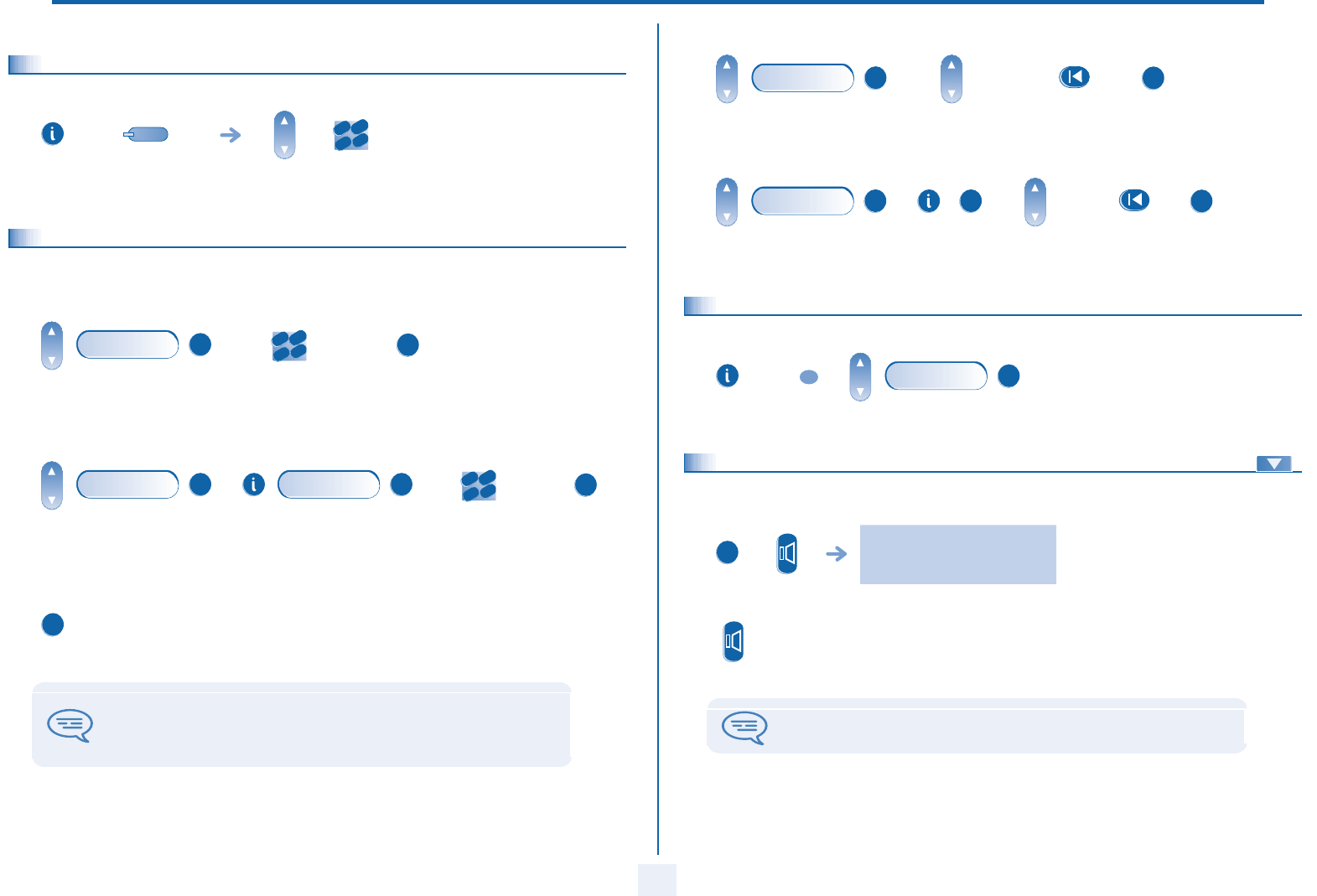
6.7 Make a call using the personal phone book
* Enter the name :
select the language
of your choice
apply your choice
Settings
OK
My options
OK
Language
OK
OK
press and
release
enter the name* enter the number
Enter the text: the number pad keys have letters
that you can display by successive presses.
Position the cursor in the entry field.
Erase last character entered.
Enter a digit (keys 0 to 9).
OK
2
6
5
3
ab c
def
jkl
mno
OK
2
6
5
3
ab c
def
jkl
mn
o
OK
2
6
5
3
ab c
def
jkl
mno
2
6
5
3
ab c
def
jkl
mno
#
Programming your telephone
24
6
6.8 Programming speed dialing (direct calls) keys
6.9 Programming an appointment reminder
You can define the time of a temporary reminder (one in 24 hours) or a permanent reminder (every day at the same time).
•Program a temporary reminder call:
•Program a permanent reminder call:
•At the programmed time, your telephone rings:
one direct call key to
programme
enter the number
2
6
5
3
ab c
def
jkl
mn
o
enter time of
appointment
apply the
appointment
time
enter time of
appointment
apply the
appointment
time
If you are in conversation, the display flashes and an audio tone is generated. After
three calls without reply, a temporary request is cancelled but a permanent request
remains in memory.
If your calls are forwarded to another terminal, the forwarding is not applied to the
reminder call.
Appointment
OK
2
6
5
3
ab c
def
jkl
mn
o
OK
Appointment
OK
Choice
OK
2
6
5
3
ab c
def
jkl
mn
o
OK
OK
•To cancel your temporary reminder call request:
•To cancel your permanent reminder call request:
6.10
Identifying the terminal you are on
6.11 Broadcasting background music on your loudspeaker
You can broadcast background music on the loudspeaker of your telephone (depending on configuration):
move to the end of
the line
enter the reminder
time
move to the end
of the line
enter the
reminder time
Appointment
OK
OK
Appointment
OK
OK
OK
press twice
OR
Who Am I
OK
when telephone is not in use,
background music is played
(Long press)
Press the same key to cancel
(Long press)
The music stops when a call is made or received and starts again when you hang up.
OK

Programming your telephone
25
6
6.12 Lock / unlock your telephone
6.13 Activating/deactivating 'forced headset' mode
'Forced headset' mode must be activated as soon as a headset is installed instead of the receiver;.
your telephone is
locked/unlocked
enter your personal code
Lock OK
2
6
5
3
ab c
def
jkl
mn
o
activating/deactivating 'forced headset' mode
Settings OK
My phone OK
ForcedHead OK
On
OR
Off
OK

Compliance
26
howtoc
Independently of the legal warranty that covers this appliance, it is
guaranteed for 1 year, parts and labour, counting from the date indicated
on your invoice.
The invoice will be demanded if making a claim under the warranty. The
warranty does not however apply in the following cases: in the event of use
that does not comply with the instructions given in this user’s manual, faults
or damage caused by natural wear, damage resulting from a cause external
to the appliance (e.g. impact, fall, exposure to dampness, etc.),
noncompliant installation or modifications or repairs carried out by people
who are not approved by the manufacturer or retailer.
Warning: never place your telephone in contact with water. To clean your
telephone, you may however use a damp soft cloth. Never use solvents
(trichlorethylene, acetone, etc.) which may damage the plastic parts of your
telephone. Never spray it with cleaning products.
Earpiece may retain magnetic objects.
The wording is not contractual and may be subject to change. Some features
of your telephone are controlled by a software key and the configuration of
the unit.
Declaration of compliance
We, Alcatel Business Systems, hereby declare that we assume the Alcatel
4018 or 4019 product to be compliant with the essential requirements of
Directive 1999/5/CE of the European Parliament and Council. A copy of the
original of this declaration of compliance can be obtained from your
installer.
Alcatel Business Systems, in keeping with its policy of constant product
improvement for the customer, reserves the right to modify product
specifications without prior notice.
Copyright © Alcatel Business Systems. 2005.
All rights reserved.
MU19002USAA-O400ed01-1305
