Aldi Sourcing Asia 00054160S RC Weather Station Digital USA User Manual 4

Aldi Sourcing Asia Limited RC Weather Station Digital USA 4

Users Manual

English .....06 Español ....45EnEsDIGITAL WEATHER STATIONESTACIÓN METEOROLÓGICA DIGITALID: #07177myhansecontrol.comCERTIFIEDUser-friendlyManualUser ManualManual  del usuario
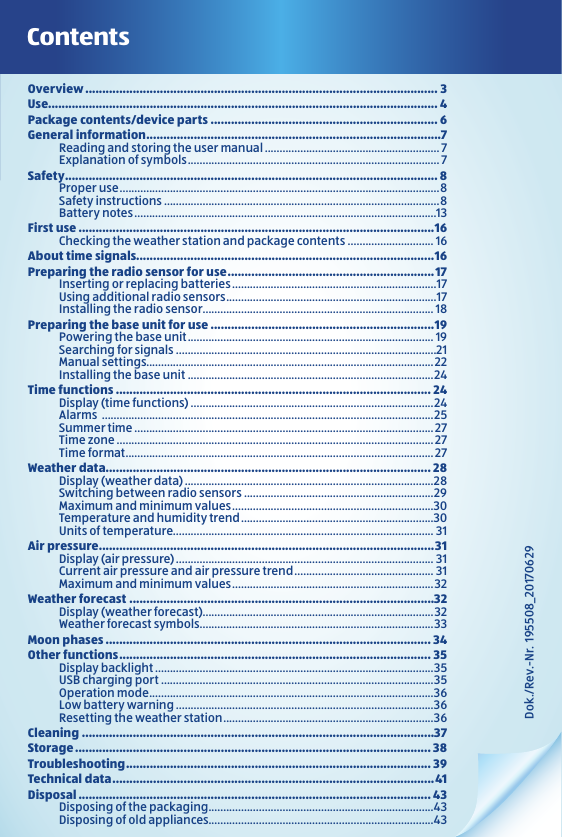
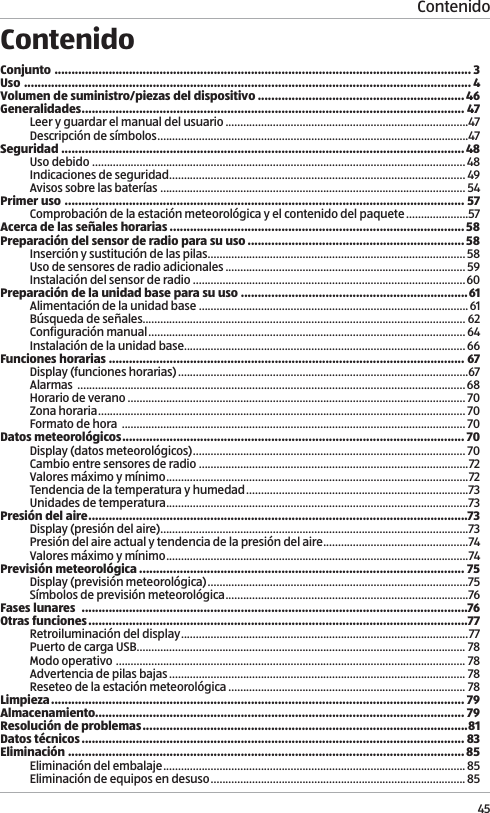
Dok./Rev.-Nr.  195508_20170629ContentsOverview ........................................................................................................ 3Use................................................................................................................... 4Package contents/device parts ................................................................... 6General information .......................................................................................7Reading and storing the user manual ........................................................... 7Explanation of symbols ..................................................................................... 7Safety ..............................................................................................................8Proper use ............................................................................................................8Safety instructions .............................................................................................8Battery notes ......................................................................................................13First use .........................................................................................................16Checking the weather station and package contents ............................. 16About time signals........................................................................................16Preparing the radio sensor for use .............................................................17Inserting or replacing batteries .....................................................................17Using additional radio sensors .......................................................................17Installing the radio sensor .............................................................................. 18Preparing the base unit for use ..................................................................19Powering the base unit ................................................................................... 19Searching for signals ........................................................................................21Manual settings.................................................................................................22Installing the base unit ...................................................................................24Time functions ............................................................................................. 24Display (time functions) ..................................................................................24Alarms  ................................................................................................................25Summer time ..................................................................................................... 27Time zone ........................................................................................................... 27Time format ........................................................................................................ 27Weather data ................................................................................................ 28Display (weather data) ....................................................................................28Switching between radio sensors ................................................................29Maximum and minimum values ....................................................................30Temperature and humidity trend .................................................................30Units of temperature........................................................................................ 31Air pressure ...................................................................................................31Display (air pressure) ....................................................................................... 31Current air pressure and air pressure trend ............................................... 31Maximum and minimum values ....................................................................32Weather forecast ..........................................................................................32Display (weather forecast)..............................................................................32Weather forecast symbols ...............................................................................33Moon phases ................................................................................................ 34Other functions ............................................................................................ 35Display backlight ..............................................................................................35USB charging port ............................................................................................35Operation mode ................................................................................................36Low battery warning .......................................................................................36Resetting the weather station .......................................................................36Cleaning ........................................................................................................37Storage ......................................................................................................... 38Troubleshooting .......................................................................................... 39Technical data ...............................................................................................41Disposal ........................................................................................................ 43Disposing of the packaging ............................................................................43Disposing of old appliances............................................................................43
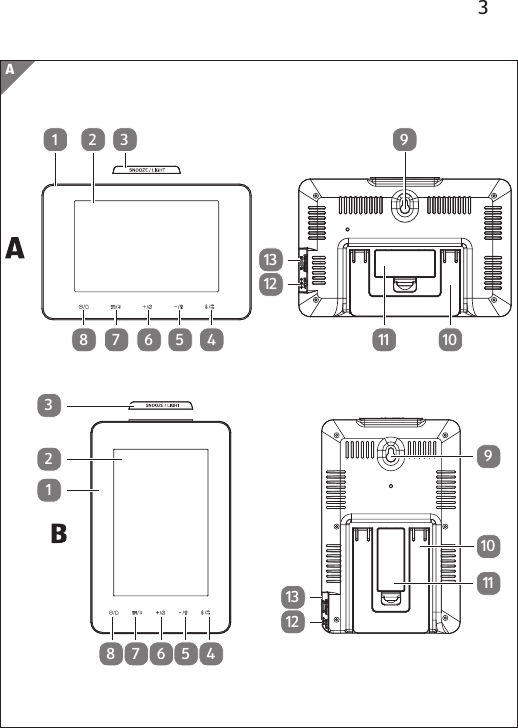
3A45678123912131 2 3456789121311 101011
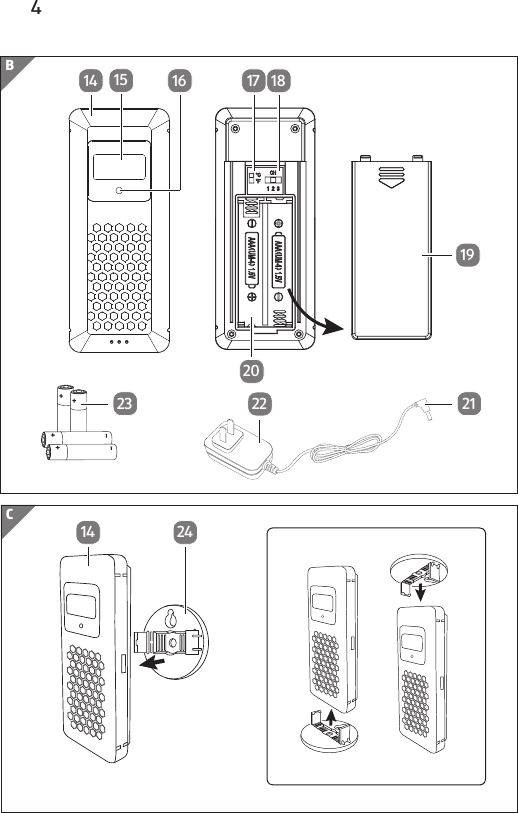
4C14 24B14 15 16 17 181920212223
5D25 26 272829303127263031282925AB
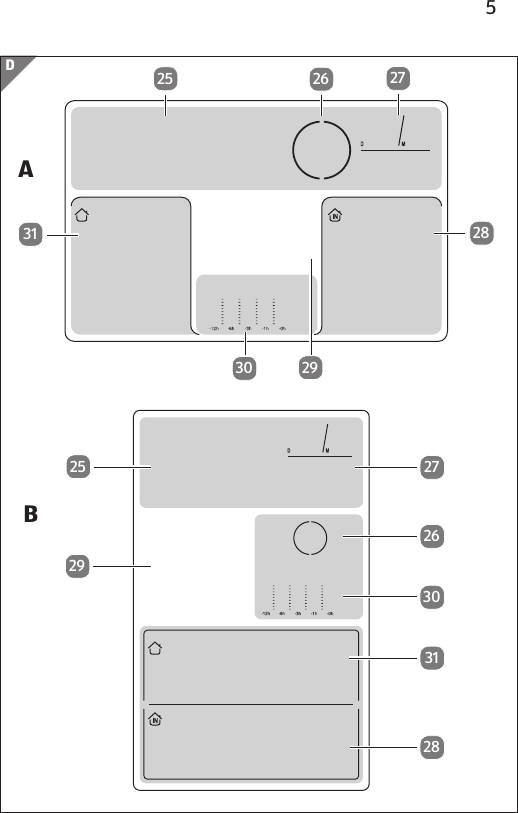
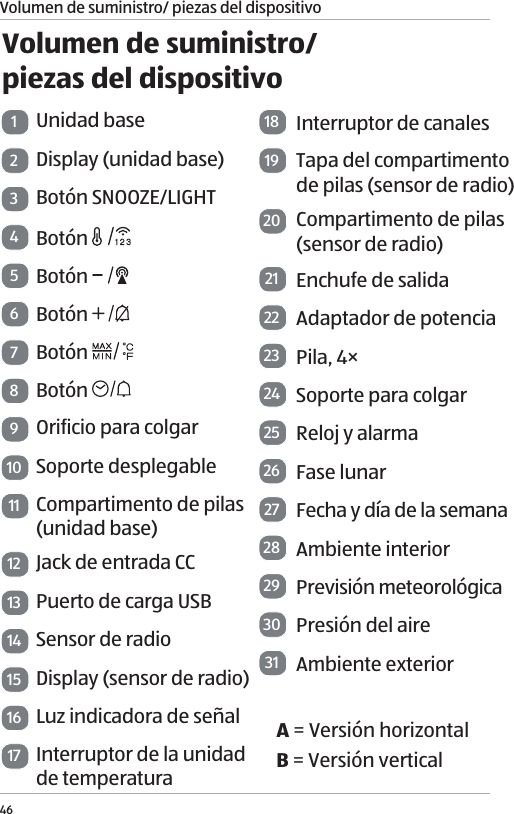
6Package contents⁄device parts1Base unit2Display (base unit)3SNOOZE/LIGHT button4 button5 button6 button7 button8 button9Hanging hole10 Foldout stand11 Battery compartment (base unit)12 DC input jack13 USB charging port14 Radio sensor15 Display (radio sensor)16 Signal indicator light17 Temperature unit switch18 Channel switch19 Battery compartment door (radio sensor)20 Battery compartment (radio sensor)21 Output plug22 Power adaptor23 Battery, 4×24 Hanging bracket25 Clock and alarm26 Moon phase27 Date and weekday28 Indoor weather29 Weather forecast30 Air pressure31 Outdoor weatherA = Horizontal versionB = Vertical version
General information7General informationReading and storing the user manualThis user manual accompanies the digital weather station (hereafter referred to as “weather station”), and contains important information on setup and use. Before using the weather station, read the user manual carefully. This particularly applies to the safety instructions. Failure to do so may result in personal injury or damage to the weather station.Store the user manual for future use. Make sure to include  this user manual when passing the weather station on to  third parties.Explanation of symbolsThe following symbols and signal words are used in this user manual, on the weather station or on the packaging. WARNING!This signal symbol/word designates a hazard with moderate risk, which may result in death or severe injury if not avoided. CAUTION!This signal symbol/word designates a hazard with low risk, which may result in minor or moderate injury if not avoided.
Safety8NOTICE!This signal word warns of possible damage to property.This symbol provides you with useful additional information regarding setup and use.SafetyProper useThe weather station is exclusively designed for showing time and weather information. It is only intended for indoor private use and not suitable for commercial purposes.Only use the weather station as described in this user manual. Any other use is considered improper and may result in damage to property or even personal injury. The weather station is not a toy for children.The manufacturer or vendor cannot be held liable for damages incurred through improper or incorrect use.Safety instructions WARNING!Risk of electric shock!A faulty electrical installation, excessive line voltage or incorrect operation may result in an electric shock.
Safety9 − Only use the power adaptor provided with the weather station. − Only use the power adaptor in dry and indoor areas. Do not let the power adaptor come into contact with water or other liquids. − Connect the power adaptor only to an alternating current (AC) power supply. Make sure that the voltage corresponds with the voltage details on the device. The power adaptor must be operated using (100 ~ 240 V, 50/60 Hz) alternating current (AC). − Only connect the power adaptor to a properly installed and easily accessible power outlet so that you can quickly pull the plug in an emergency.  − Fully unwind the power adaptor cord before connecting it. Make sure that the cord cannot get damaged by sharp edges or hot objects. − Never cover the power adaptor. Ensure that sufficient ventilation is provided in order to prevent the power adaptor from overheating.
Safety10 − Do not use the power adaptor if the housing or cord is defective or has other visible damages. In the event of damage, only have the power adaptor serviced by the manufacturer, its customer service team or a similarly qualified person to avoid risks.  − The power adaptor cord cannot be replaced. If the cord or the power adaptor is damaged, they must be thrown away and replaced by a power adaptor of the same model.  − Always remove the power adaptor from the power outlet if:•  you want to clean the weather station or do not intend on using the weather station for a prolonged period of time;•  the weather station is not working properly;•  during thunderstorms. − Always pull the plug, not the cord when you are removing the power adaptor from the power outlet.
Safety11 WARNING!Danger for children and persons with impaired physical, sensory or mental capacities (e.g. partially disabled persons, older persons with reduced physical and mental capacities) or lack of experience and knowledge (e.g. older children). − If they are supervised or have been instructed in how to safely use the weather station and have understood the risks associated with operating it, this weather station may be used by children ages eight and over as well as persons with impaired physical, sensory or mental capacities or those lacking experience and knowledge. Children may not play with the weather station. Cleaning and user maintenance must not be performed by unsupervised children. − Keep children under the age of eight away from the weather station and power cord. − Make sure that children do not play with the plastic wrapping. They may get caught in it when playing and suffocate.
Safety12NOTICE!Risk of damage!If you do not use the weather station (base unit and radio sensor) properly, you may damage it. − Do not use the weather station in a damp place (e. g. bathroom) and avoid dust, splashing or dripping water, heat sources, extreme temperatures and direct sunlight. − Make sure the weather station stays away from magnetic fields (e. g. speakers). − Make sure no foreign objects penetrate the housing of the weather station. − Do not exert pressure on the display surface of the weather station, as this may cause the surface to break. − Do not allow sharp or pointed objects to come in contact with the surface of the weather station. − Keep the weather station from falling. Failure to do so may break the weather station. − Do not place the weather station near
Safety13any heat sources. Never place naked flames such as burning candles on or immediately next to the weather station. − Under no circumstances should you open the housing of the weather station. There are no user-serviceable parts inside. Improper repairs may damage the weather station. Repairs should only be carried out by professional technicians. The only exception is the removal of the battery compartment door to replace the batteries. − The radio sensor must be protected from direct exposure to moisture such as rain.Battery notes WARNING!Health hazards!There is a high health hazard if children or animals swallow the batteries. − Store the batteries so they are not accessible to children and animals. If you suspect a battery has been swallowed, seek immediate medical advice.
Safety14 WARNING!Risk of explosionImproper handling of batteries increases the risk of explosion. − Store the batteries in a cool, dry place. Never expose the batteries to excessive heat (e.g. direct sunlight) and never dispose of them in a fire. − Only use batteries of the same type. − Ensure the correct polarity when inserting the batteries. This is shown in the battery compartments. Incorrect installation may damage the weather station. − Always use batteries of premium quality. Batteries of poor quality may leak and cause damage. − Before inserting the batteries, make sure the contacts inside the battery compartment and on the battery itself are clean and intact. Clean them if necessary. − Always replace all batteries in a battery compartment at the same time.
Safety15 − Remove the batteries from the weather station if they are dead. Also remove the batteries if you do not intend on using the weather station for a prolonged period of time. Otherwise, the batteries may leak and cause damages. − If the batteries are leaking, remove them immediately to prevent damaging the weather station. Do not remove the batteries with your bare hands or allow the battery fluid to come into contact with skin, eyes or mucus membranes. Wear normal household rubber gloves to do so. If, however, your skin has come into contact with the battery fluid, wash your hands immediately and consult a physician if necessary. − Batteries should only be installed or replaced by an adult. − Keep the weather station away from children when the battery cover is removed. − Remove the batteries before disposing of the weather station.
First use16First useChecking the weather station and  package contentsNOTICE!Risk of damage!If you are not cautious when opening the packaging with a sharp knife or other pointed object, you may quickly damage the weather station.  − For this reason, be very careful when opening it.1. Take the weather station out of the packaging.2. Check to make sure that all components and accessories have been received (see Fig. A and B).3. Check whether the weather station or the individual parts exhibit damage. If this is the case, do not use the weather station. Contact the manufacturer via the service address indicated on the warranty card.About time signalsThe base unit of the weather station is a radio-controlled clock and can receive the time signals emitted through the signal transmitter in your country. If the base unit is located within the transmission range, it can receive the signals and synchronize with the broadcasted time and date several times a day. In case of a failure in signal reception, the base
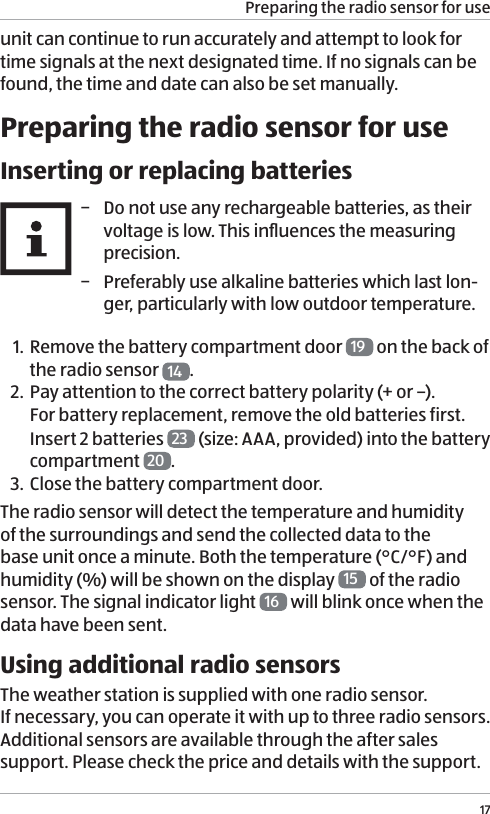
Preparing the radio sensor for use17unit can continue to run accurately and attempt to look for time signals at the next designated time. If no signals can be found, the time and date can also be set manually. Preparing the radio sensor for useInserting or replacing batteries − Do not use any rechargeable batteries, as their voltage is low. This influences the measuring precision.  − Preferably use alkaline batteries which last lon-ger, particularly with low outdoor temperature.1. Remove the battery compartment door  19  on the back of the radio sensor  14 .2. Pay attention to the correct battery polarity (+ or –). For battery replacement, remove the old batteries first. Insert 2 batteries  23  (size: AAA, provided) into the battery compartment  20 . 3. Close the battery compartment door. The radio sensor will detect the temperature and humidity  of the surroundings and send the collected data to the base unit once a minute. Both the temperature (°C/°F) and humidity (%) will be shown on the display  15  of the radio sensor. The signal indicator light  16  will blink once when the data have been sent. Using additional radio sensorsThe weather station is supplied with one radio sensor.  If necessary, you can operate it with up to three radio sensors. Additional sensors are available through the after sales support. Please check the price and details with the support.
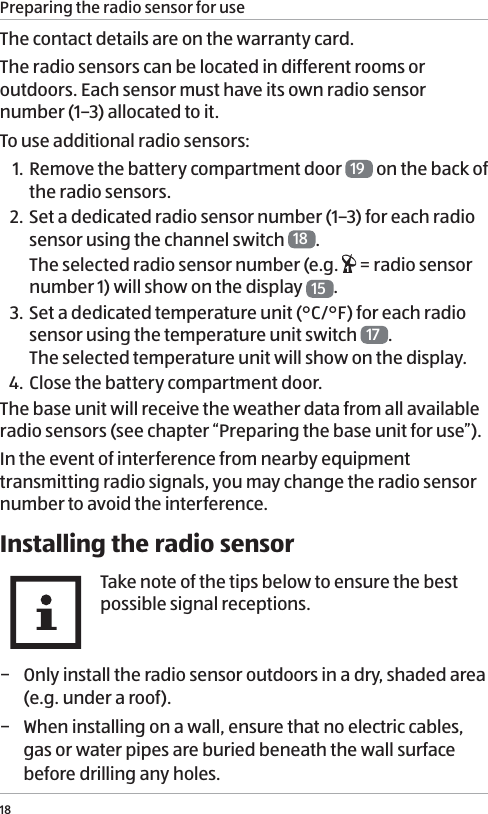
Preparing the radio sensor for use18The contact details are on the warranty card. The radio sensors can be located in different rooms or outdoors. Each sensor must have its own radio sensor number (1–3) allocated to it.To use additional radio sensors:1. Remove the battery compartment door  19  on the back of the radio sensors.2. Set a dedicated radio sensor number (1–3) for each radio sensor using the channel switch  18 . The selected radio sensor number (e.g.   = radio sensor number 1) will show on the display  15 . 3. Set a dedicated temperature unit (°C/°F) for each radio sensor using the temperature unit switch  17 .  The selected temperature unit will show on the display.4.  Close the battery compartment door.The base unit will receive the weather data from all available radio sensors (see chapter “Preparing the base unit for use”). In the event of interference from nearby equipment transmitting radio signals, you may change the radio sensor number to avoid the interference. Installing the radio sensorTake note of the tips below to ensure the best possible signal receptions. − Only install the radio sensor outdoors in a dry, shaded area (e.g. under a roof).  − When installing on a wall, ensure that no electric cables, gas or water pipes are buried beneath the wall surface before drilling any holes.
Preparing the base unit for use19 − The maximum distance between the base unit and radio sensor should not be greater than 100 m (direct visible distance). Building materials, such as concrete walls, may reduce or prevent signal reception between the base unit and radio sensor.  − Do not place the base unit and radio sensor on the floor. This limits the transmission range. − Electronic devices such as televisions and computers can disrupt the signal reception. − At low temperature during winter, the performance of the radio sensor batteries may fall significantly. This reduces the transmission range. 1. Mount the hanging bracket  24  on a wall using the hanging or screw hole (nail or screw not provided).2. Attach the radio sensor  14  to the hanging bracket  (see Fig. C).Preparing the base unit for usePowering the base unitThe base unit can be powered by batteries or an alternating current (AC) power supply using the power adaptor. Inserting or replacing batteries1. Open the battery compartment  11  on the back of the base unit  1.2. Pay attention to the correct battery polarity (+ or –). For battery replacement, remove the old batteries first. Insert 2 batteries  23  (size: AAA, provided) into the battery compartment.
Preparing the base unit for use203. Close the battery compartment. 4.  The display  2 will turn on and an alarm tone will sound once the batteries have been inserted. Wait for about 30 minutes. During this time the base unit gathers the weather data and receives the time signals (see chapter “Searching for signals”). Operating with the power adaptorNOTICE!Risk of damage!If the weather station is connected via the power adaptor to a power outlet, it operates with a DC voltage. The batteries may leak and damage the unit. − Remove any batteries from the base unit when connecting it to a power outlet.1. Connect the output plug  21  of the power adapter  22  to the DC input jack  12  of the base unit  1.2. Connect the power adaptor to a power outlet. Only connect the power adaptor to an AC power supply  (100 ~ 240 V, 50/60 Hz). The display  2 will turn on and an alarm tone will sound once the power adaptor has been connected to an outlet. Wait for about 30 minutes. During this time the base unit gathers the weather data and receives the time signals (see chapter “Searching for signals”).
Preparing the base unit for use21Searching for signalsOnce the base unit has been powered, it will start searching for weather data and time signals:1. The base unit will first detect the air pressure for about 20 seconds. During this time, the value of air pressure will blink in the air pressure display area  30 .  − Press the   button  8 if you want to stop the detection.2. The base unit will then search for weather data from all available radio sensors. During this time, the reception icon (   )  51  (see chapter “Weather data”) blinks in the outdoor weather display area  31 , indicating the base unit is searching for the weather data. − When the weather data have been successfully received, the reception icon will turn off and the current weather data will show in the outdoor weather display area. − When no weather data have been received, the reception icon will turn off and no outdoor weather data will be available. − In case of an unsuccessful search for weather data, press and hold the   button  4 to initiate a new search. However, this can only be carried out after the search for time signals has been completed.3. Around 3 minutes after the base unit has been powered, it will search for time signals emitted through the signal transmitter in your country.During this time, the time signal icon (   or   ) 38  (see chapter “Time functions”) blinks in the clock and alarm display area  25 , indicating the base unit is searching for the time signals.  − When the time signals have been successfully received, the time signal icon (   or   ) will remain visible and the current date and time will show in the clock and alarm
Preparing the base unit for use22display area. The base unit will continue to receive time signals every night (up to 3 times) and synchronize with the displayed time.  − During the search for time signals, all other setting functions (e.g. manual and alarm settings) will be disabled.  − When no time signals have been received after about  7 minutes, the time signal icon will turn off.  − In case of an unsuccessful search for the time signals, press and hold the   button  5 to initiate a new search.  In order to ensure the best possible signal receptions, avoid placing the base unit in buildings with lots of concrete and metal structures, or near electronic equipment such as TVs, computers, power lines, radio transmitters, etc. If necessary, relocate the base unit.4.  As the synchronized time is only a coordinated universal time, press the   button to select a time zone (indicated by the time zone icon on the display, see chapter “Time functions”) that corresponds to your location. − Time zone: P = Pacific, M = Mountain, C = Central, E = EasternManual settingsThis operation allows you to manually set the date and time, select the time format, adjust the weather forecast and air pressure, etc.1. Press and hold the   button  8 until the “year” blinks on the display.2. Press the   6 or    5 button to set the year. 3. Press the  button. The “month” will blink on the display.4.  Press the   or   button to set the month.5. Press the  button. The “day” will blink on the display.
Preparing the base unit for use236. Press the   or   button to set the day.7. Press the  button. The “hour time” will blink on the display.8. Press the   or   button to set the hour time.9. Press the  button. The “minute time” will blink on  the display.10. Press the   or   button to set the minute time.11. Press the  button. The “time format” will blink on the display.12. Press the   or   button to select a time format  (12-hour or 24-hour).13.  Press the SET button. The “summer time” (default value: 0FF) will blink and the summer time icon (  or  )  37  (see chapter “Time functions”) will show on the display.14. Press the   or   button to turn ON or OFF the summer time.15. Press the   button. The graphical weather forecast will blink on the display.16. Press the   or   button to select a weather forecast condition according to the forecast on TV or internet.  The weather station computes weather forecasts based on changes in air pressure. However, when using the weather station for the first time, it may take up to a few days of collecting sufficient information for more accurate forecasts. Manual setting of the weather forecast can slightly accelerate this process. 17. Press the   button. The “air pressure” will blink on the display.18.  Press the   or   button to adjust the air pressure. If desired, enter the altitude-related or more accurate
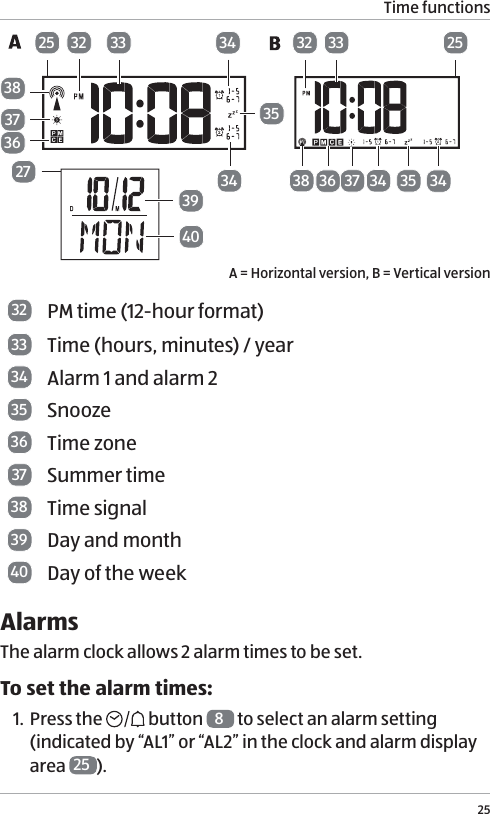
Time functions24air pressure values of your location obtained from the internet or the local authorities.19. Press the   button. The manual settings are now complete.The base unit will automatically exit manual settings when no buttons have been pressed for about 20 seconds.Installing the base unit − For best signal reception,  install the base unit near a window. − When installing on a wall, ensure that no electric cables, gas or water pipes are buried beneath the wall surface before drilling any holes.Using the foldout stand1. Pull out the foldout stand  10  on the back of the base unit. The stand has two locking positions.2. Place the base unit on a flat surface.Hanging on a wall1. Fix a nail or screw (not provided) on the wall. 2. Slip the hanging hole  9 over the head of the nail or screw.Time functionsDisplay (time functions)The date and time information is displayed in the date and weekday area  27  and clock and alarm area  25  of the display.
Time functions25383336 37 34 3425 25273940373832 33363435323534A = Horizontal version, B = Vertical version32 PM time (12-hour format)33 Time (hours, minutes) / year34 Alarm 1 and alarm 235 Snooze36 Time zone37 Summer time 38 Time signal39 Day and month40 Day of the weekAlarms The alarm clock allows 2 alarm times to be set. To set the alarm times:1. Press the   button  8 to select an alarm setting  (indicated by “AL1” or “AL2” in the clock and alarm display area  25 ).
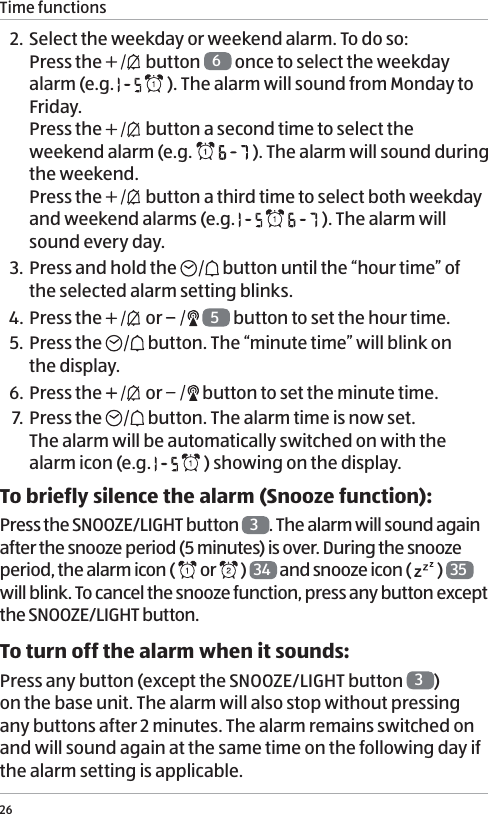
Time functions262. Select the weekday or weekend alarm. To do so: Press the   button  6 once to select the weekday alarm (e.g.     ). The alarm will sound from Monday to Friday. Press the   button a second time to select the weekend alarm (e.g.     ). The alarm will sound during the weekend.  Press the   button a third time to select both weekday and weekend alarms (e.g.       ). The alarm will sound every day. 3. Press and hold the   button until the “hour time” of the selected alarm setting blinks. 4.  Press the   or    5 button to set the hour time.5. Press the   button. The “minute time” will blink on  the display.6. Press the   or   button to set the minute time.7. Press the   button. The alarm time is now set.  The alarm will be automatically switched on with the alarm icon (e.g.     ) showing on the display. To briefly silence the alarm (Snooze function):Press the SNOOZE/LIGHT button  3. The alarm will sound again after the snooze period (5 minutes) is over. During the snooze period, the alarm icon (   or   )  34  and snooze icon (   )  35  will blink. To cancel the snooze function, press any button except the SNOOZE/LIGHT button.To turn off the alarm when it sounds:Press any button (except the SNOOZE/LIGHT button  3)  on the base unit. The alarm will also stop without pressing any buttons after 2 minutes. The alarm remains switched on and will sound again at the same time on the following day if the alarm setting is applicable.
Time functions27To switch the alarms on or off:1. Press the   button  6 once to switch on Alarm 1.  The alarm 1 icon (   ) with the selected weekday or weekend alarm setting will show on the display.2. Press the   button a second time to switch on Alarm 2. The alarm 2 icon (   ) with the selected weekday or weekend alarm setting will show on the display.3. Press the   button a third time to switch on both Alarm 1 and Alarm 2. The alarm 1 (   ) and alarm 2 icons (   ) with the selected weekday or weekend alarm setting will show on the display.4. Press the   button a fourth time to switch all alarms off. Summer timeSummer time or daylight saving time information is included in the broadcasted time signals. When summer time or daylight saving time is in force, the summer time icon  (  or  )  37  will show on the display. Time zonePress   button  5 to change the time zone.  The corresponding time zone icon  36  will show on the display.Time zone: P = Pacific, M = Mountain, C = Central, E = Eastern.Time formatTo change between 12 and 24-hour time formats, see chapter “Manual settings”. If 12-hour format is selected, the afternoon hours are identified with the PM time icon  32 .
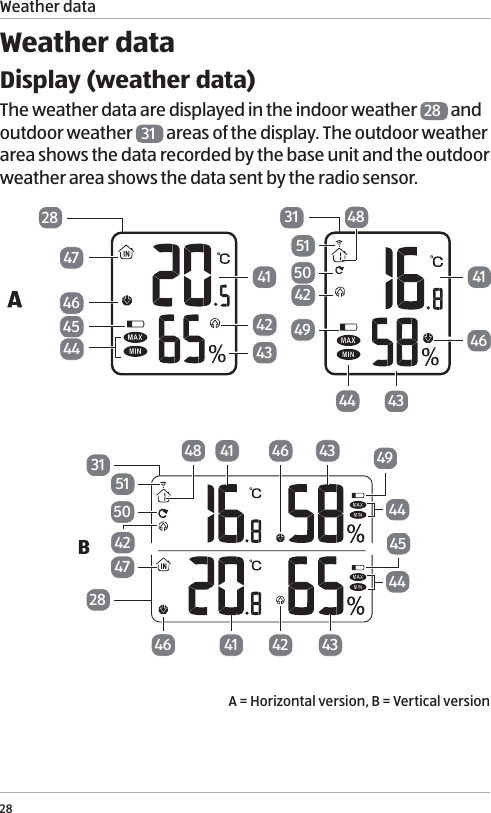
Weather data28Weather dataDisplay (weather data)The weather data are displayed in the indoor weather  28  and outdoor weather  31  areas of the display. The outdoor weather area shows the data recorded by the base unit and the outdoor weather area shows the data sent by the radio sensor.28474645444142434146434449425048513141 43 49444645444342414647425051483128A = Horizontal version, B = Vertical version
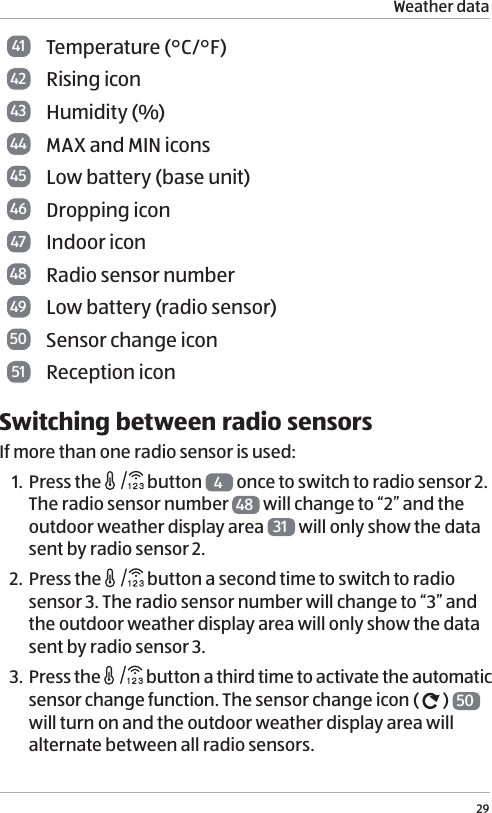
Weather data2941 Temperature (°C/°F) 42 Rising icon43 Humidity (%)44 MAX and MIN icons45 Low battery (base unit) 46 Dropping icon47 Indoor icon48 Radio sensor number49 Low battery (radio sensor) 50 Sensor change icon51 Reception iconSwitching between radio sensorsIf more than one radio sensor is used:1. Press the   button  4 once to switch to radio sensor 2. The radio sensor number  48  will change to “2” and the outdoor weather display area  31  will only show the data sent by radio sensor 2. 2. Press the   button a second time to switch to radio sensor 3. The radio sensor number will change to “3” and the outdoor weather display area will only show the data sent by radio sensor 3. 3. Press the   button a third time to activate the automatic sensor change function. The sensor change icon (   )  50  will turn on and the outdoor weather display area will alternate between all radio sensors.
Weather data304. Press the   button a fourth time to cancel the automatic sensor change function and switch to radio sensor 1.  The radio sensor number will change to “1” and the outdoor weather display area will only show the data sent by radio sensor 1.See chapter “Using additional radio sensors” if you want to assign numbers to radio sensors. Maximum and minimum valuesTo display the highest and lowest values for the last 24 hours in relation to temperature and humidity:1. Press the   button  7 once to display the maximum values.2. Press the   button a second time to display the minimum values.3. Press the   button a third time to display the current weather data. The maximum or minimum value is indicated by the MAX or MIN icon  44 , respectively. The stored values will be deleted daily at 12:00 am.Temperature and humidity trendFor the temperature and humidity values measured by the base unit and radio sensor, the trend is shown in the form of an arrow. A rising trend is indicated by a rising icon (   )  42 . A falling trend is indicated by a dropping icon (   )  46 .A change in trend is displayed when the temperature changes by 1 °C or more, or the humidity by 3 % or more within one hour.
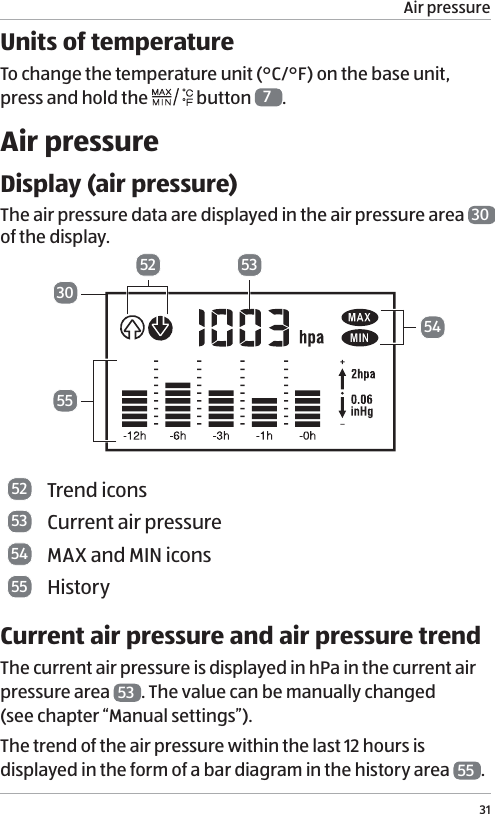
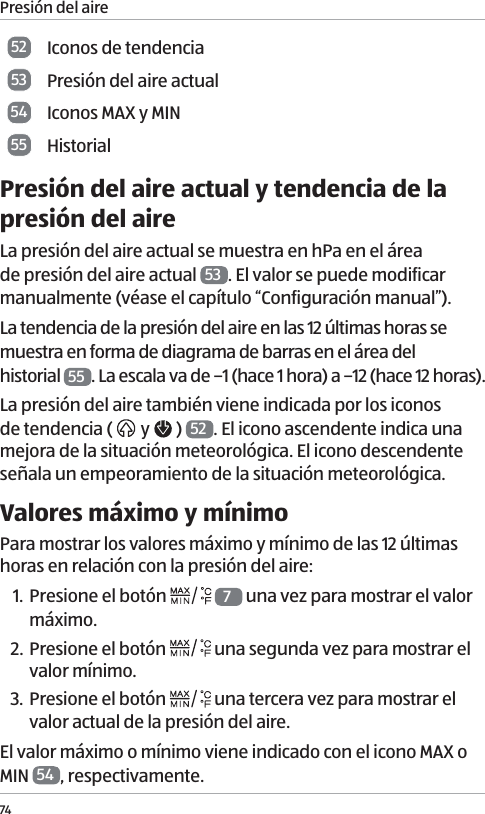
Air pressure31Units of temperatureTo change the temperature unit (°C/°F) on the base unit,  press and hold the   button  7.Air pressureDisplay (air pressure)The air pressure data are displayed in the air pressure area  30  of the display. 533052545552 Trend icons53 Current air pressure54 MAX and MIN icons55 HistoryCurrent air pressure and air pressure trendThe current air pressure is displayed in hPa in the current air pressure area  53 . The value can be manually changed  (see chapter “Manual settings”).The trend of the air pressure within the last 12 hours is displayed in the form of a bar diagram in the history area  55 .
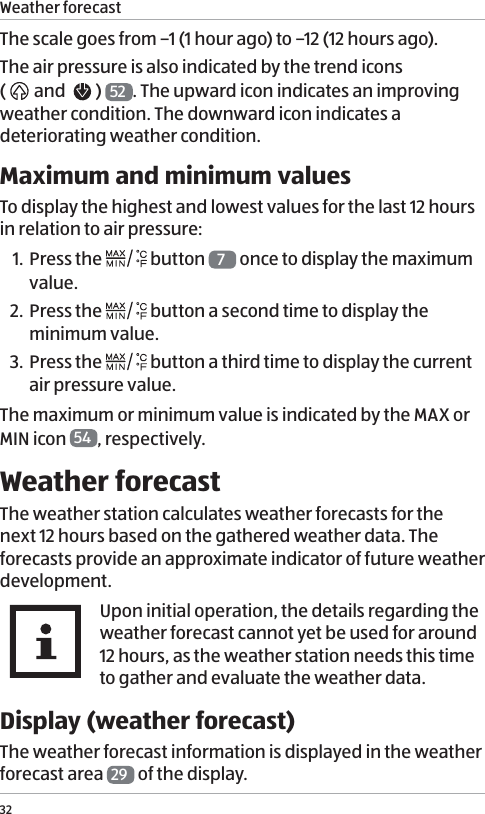
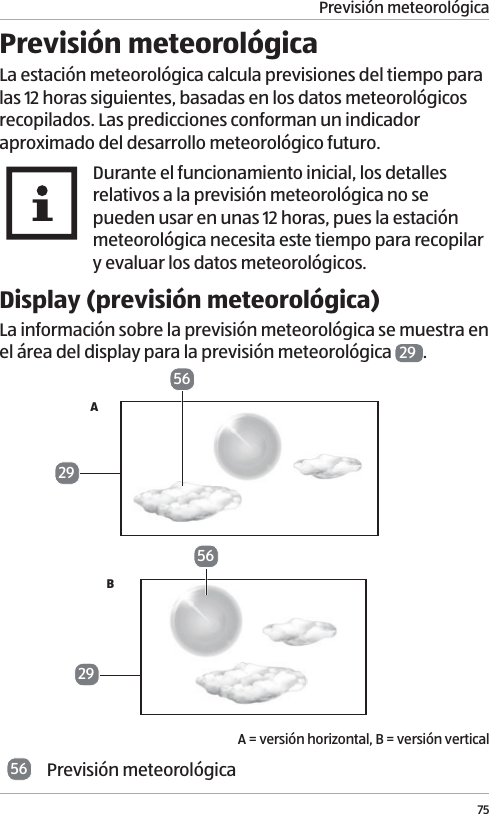
Weather forecast32The scale goes from –1 (1 hour ago) to –12 (12 hours ago).  The air pressure is also indicated by the trend icons  (  and    )  52 . The upward icon indicates an improving weather condition. The downward icon indicates a deteriorating weather condition. Maximum and minimum valuesTo display the highest and lowest values for the last 12 hours in relation to air pressure:1. Press the   button  7 once to display the maximum value.2. Press the   button a second time to display the minimum value.3. Press the   button a third time to display the current air pressure value. The maximum or minimum value is indicated by the MAX or MIN icon  54 , respectively. Weather forecastThe weather station calculates weather forecasts for the next 12 hours based on the gathered weather data. The forecasts provide an approximate indicator of future weather development. Upon initial operation, the details regarding the weather forecast cannot yet be used for around 12 hours, as the weather station needs this time to gather and evaluate the weather data.Display (weather forecast)The weather forecast information is displayed in the weather forecast area  29  of the display.
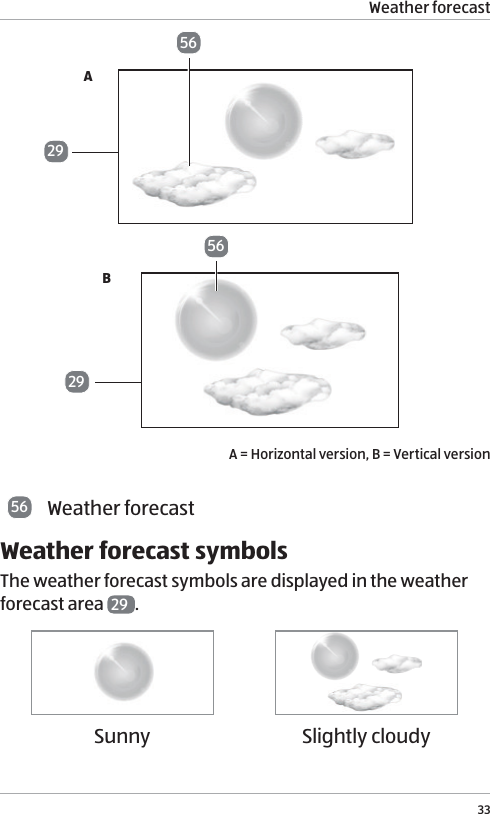
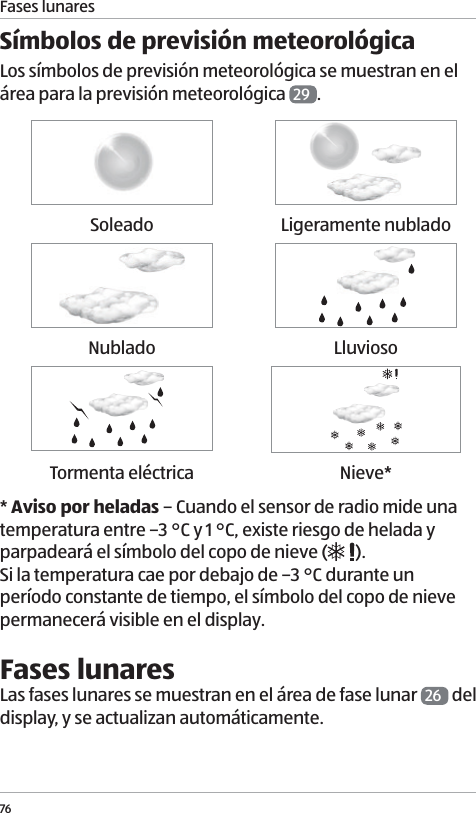
Weather forecast3356562929ABA = Horizontal version, B = Vertical version56 Weather forecastWeather forecast symbolsThe weather forecast symbols are displayed in the weather forecast area  29 . Sunny Slightly cloudy
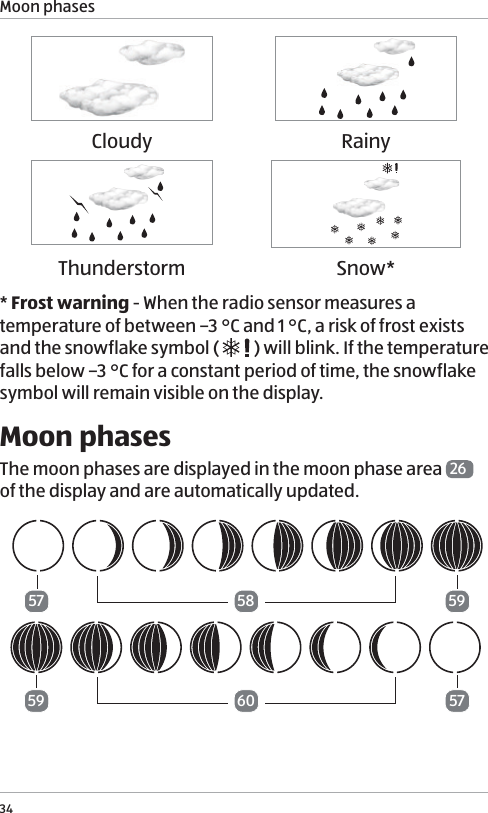
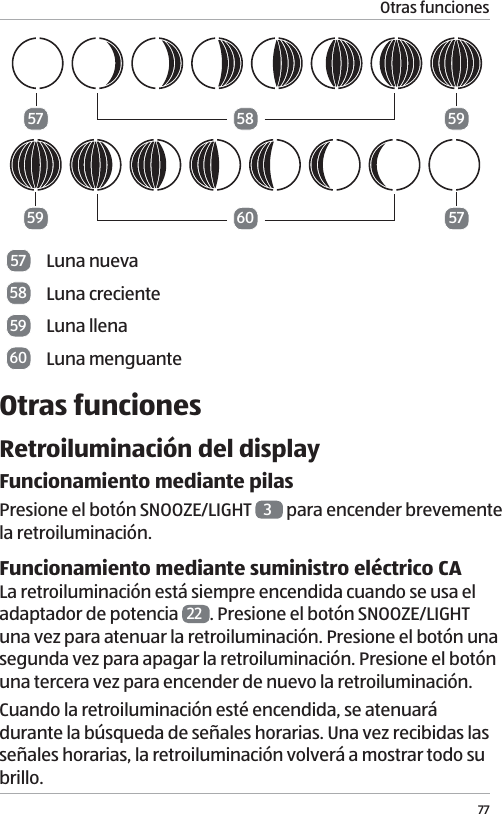
Moon phases34Cloudy RainyThunderstorm Snow** Frost warning - When the radio sensor measures a temperature of between –3 °C and 1 °C, a risk of frost exists and the snowflake symbol (   ) will blink. If the temperature falls below –3 °C for a constant period of time, the snowflake symbol will remain visible on the display. Moon phasesThe moon phases are displayed in the moon phase area  26  of the display and are automatically updated.575759595860
Other functions3557 New moon58 Waxing moon59 Full moon60 Waning moonOther functionsDisplay backlightBattery operationPress the SNOOZE/LIGHT button  3 to briefly switch the backlight on.AC power supply operationThe backlight is always switched on when the power  adaptor  22  is used. Press the SNOOZE/LIGHT button once to dim the backlight. Press the button a second time to turn the backlight off. Press the button a third time to turn the backlight on again. When the backlight is on, it will become dimmer during searching time signals. Once the time signals have been successfully received, the backlight will return to full brightness again.USB charging portThe USB charging port  13  (output: 5.0 V   1000mA) can be used for charging external devices (such as mobile phones and mp3 players) through a USB cable (not provided).  The external devices cannot be charged when the base unit is powered by batteries.
Other functions36Operation modeThe main unit will enter sleeping mode when it is left idle for a set period of time. To resume the normal operation mode, press and hold any button (except the SNOOZE/LIGHT button) for 5 seconds to return to normal operation mode.Low battery warningThe base unit will lose all settings after a battery change. You may have to manually reset the base unit before using it again (see chapter “Manual settings”).There is a low battery icon for the base unit (   45  )  and each radio sensor (    49 , and corresponds to the displayed radio sensor number). When the low battery icon is displayed, replace the batteries in the respective device  (see chapters “Inserting or replacing batteries” and “Powering the base unit”).The low battery icon (   ) will also show on the display  15  of the radio sensor when the batteries are weak.Resetting the weather stationIf incorrect values are being displayed, you should reset the weather station by removing and then re-inserting the batteries. If the power adaptor is used, pull the power adaptor out of the power outlet and then reconnect it.
Cleaning37CleaningNOTICE!Risk of damage!If you do not clean the weather station (base unit and radio sensor) properly, you may damage it. − Do not use any aggressive cleaners, sharp or metallic cleaning utensils such as knives, hard putty knives and the like. They may damage the surfaces of the weather station. − Make sure that no water penetrates the housing of the weather station.1. Remove the power adaptor from the power outlet if you are using AC power supply for the base unit.2. Clean the weather station with a damp cloth.3. Dry the weather station with a soft, dry cloth.
Storage38Storage CAUTION!Risk associated with leaking battery fluid and risk of damage!If you store the weather station for a prolonged period of time, and the batteries are still inserted, the batteries may leak and cause permanent damage. The battery acid (electrolyte) is corrosive. − If you do not use the weather station for a prolonged period of time, store the batteries separately. Store the batteries so that they are not accessible to children. − Do not remove leaking batteries with your bare hands. Wear normal household rubber gloves to do so. Do not allow battery acid to come into contact with skin, eyes or mucus membranes.   If, however, your skin has come into contact with battery fluid, wash your hands immediately and consult a physician if necessary.
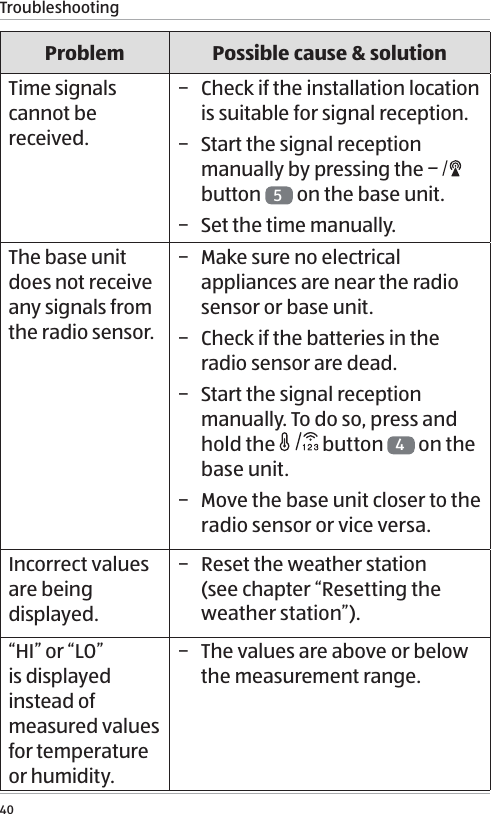
Troubleshooting39 − Wipe up the leaked battery acid with a damp cloth and dispose of it with your household waste.1. Clean the weather station (see chapter “Cleaning”).2. Take the inserted batteries out of the battery compart-ment and store them properly.3. Store the weather station in a clean, dry location. TroubleshootingNOTICE!Risk of damage!If you do not handle the weather station properly, you may damage it. − Do not open the housing of the weather station. Liability and warranty claims are waived in the event of repairs performed by the user or incorrect operation.Some problems may be caused by minor faults that you can fix yourself. To do so, follow the instructions in the following table. If it is still not possible to resolve the problem, contact after sales support. Do not repair the weather station yourself.
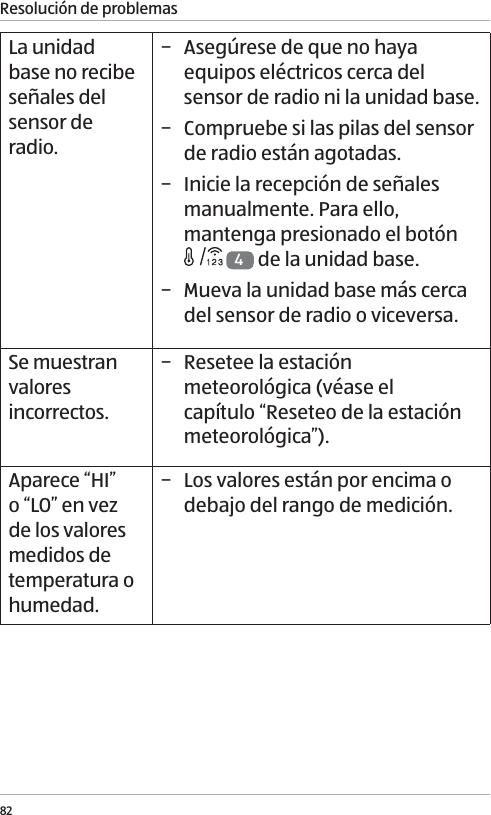
Troubleshooting40Problem Possible cause & solutionTime signals cannot be received. − Check if the installation location is suitable for signal reception. − Start the signal reception manually by pressing the   button  5 on the base unit. − Set the time manually.The base unit does not receive any signals from the radio sensor. − Make sure no electrical appliances are near the radio sensor or base unit. − Check if the batteries in the radio sensor are dead. − Start the signal reception manually. To do so, press and hold the   button 4 on the base unit. − Move the base unit closer to the radio sensor or vice versa.Incorrect values are being displayed. − Reset the weather station  (see chapter “Resetting the weather station”).“HI” or “LO” is displayed instead of measured values for temperature or humidity. − The values are above or below the measurement range.
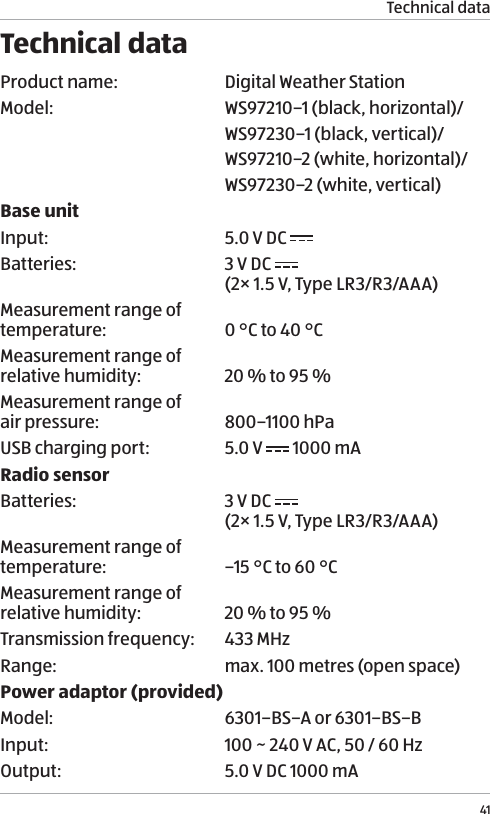
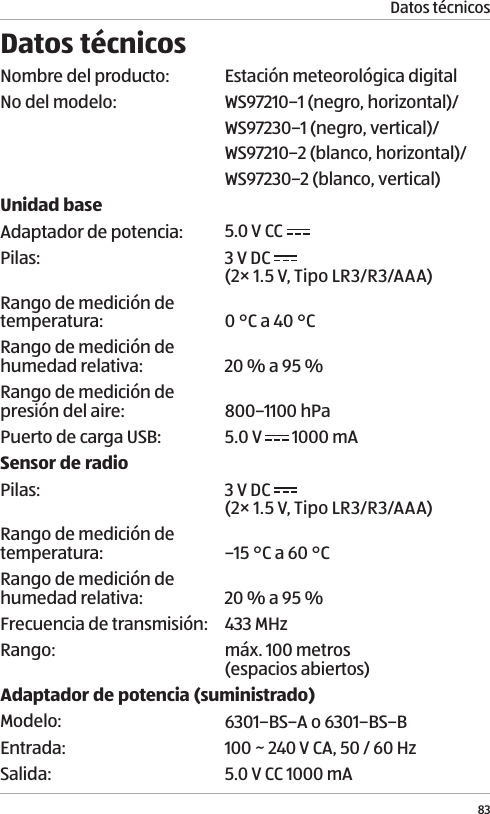
Technical data41Technical dataProduct name: Digital Weather StationModel: WS97210–1 (black, horizontal)/WS97230–1 (black, vertical)/ WS97210–2 (white, horizontal)/WS97230–2 (white, vertical)Base unitInput: 5.0 V DC Batteries: 3 V DC   (2× 1.5 V, Type LR3/R3/AAA) Measurement range of temperature: 0 °C to 40 °CMeasurement range of relative humidity: 20 % to 95 % Measurement range of  air pressure: 800–1100 hPaUSB charging port: 5.0 V   1000 mARadio sensorBatteries: 3 V DC   (2× 1.5 V, Type LR3/R3/AAA)Measurement range of temperature: –15 °C to 60 °CMeasurement range of  relative humidity: 20 % to 95 % Transmission frequency: 433 MHzRange: max. 100 metres (open space)Power adaptor (provided)Model: 6301–BS–A or 6301–BS–BInput: 100 ~ 240 V AC, 50 / 60 HzOutput:  5.0V DC 1000mA
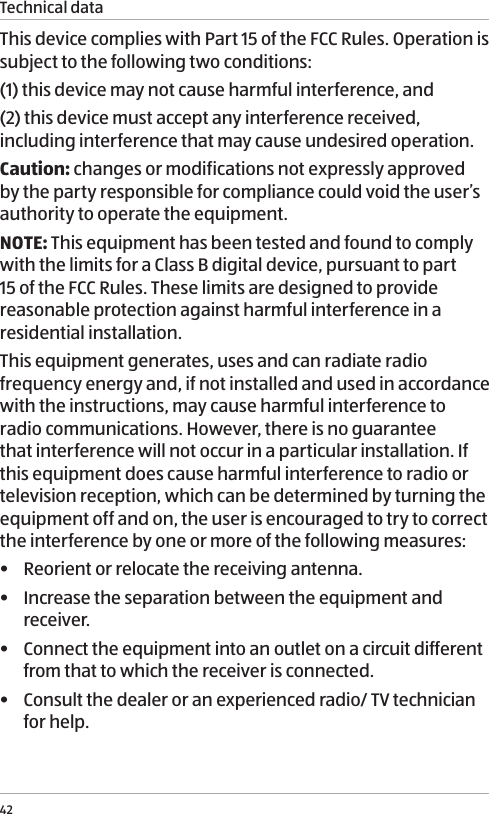
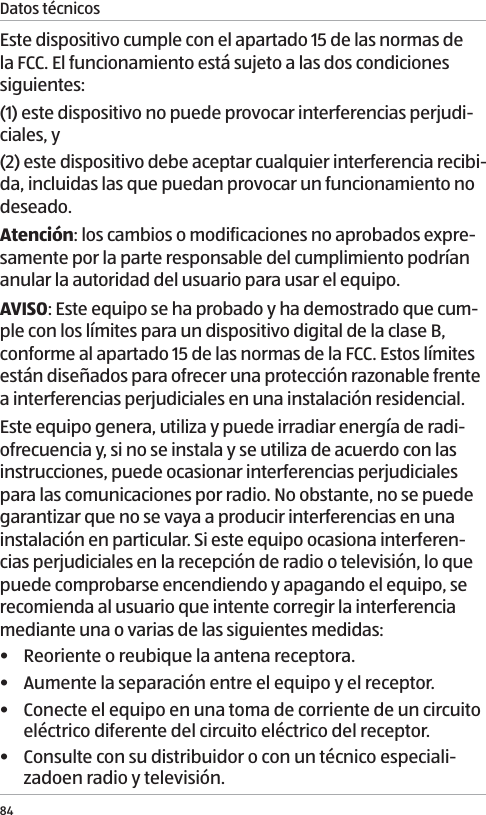
Technical data42This device complies with Part 15 of the FCC Rules. Operation is subject to the following two conditions:(1) this device may not cause harmful interference, and(2) this device must accept any interference received, including interference that may cause undesired operation.Caution: changes or modifications not expressly approved by the party responsible for compliance could void the user’s authority to operate the equipment.NOTE: This equipment has been tested and found to comply with the limits for a Class B digital device, pursuant to part 15 of the FCC Rules. These limits are designed to provide reasonable protection against harmful interference in a residential installation. This equipment generates, uses and can radiate radio frequency energy and, if not installed and used in accordance with the instructions, may cause harmful interference to radio communications. However, there is no guarantee that interference will not occur in a particular installation. If this equipment does cause harmful interference to radio or television reception, which can be determined by turning the equipment off and on, the user is encouraged to try to correct the interference by one or more of the following measures:•  Reorient or relocate the receiving antenna.•  Increase the separation between the equipment and receiver.•  Connect the equipment into an outlet on a circuit different from that to which the receiver is connected.•  Consult the dealer or an experienced radio/ TV technician for help.
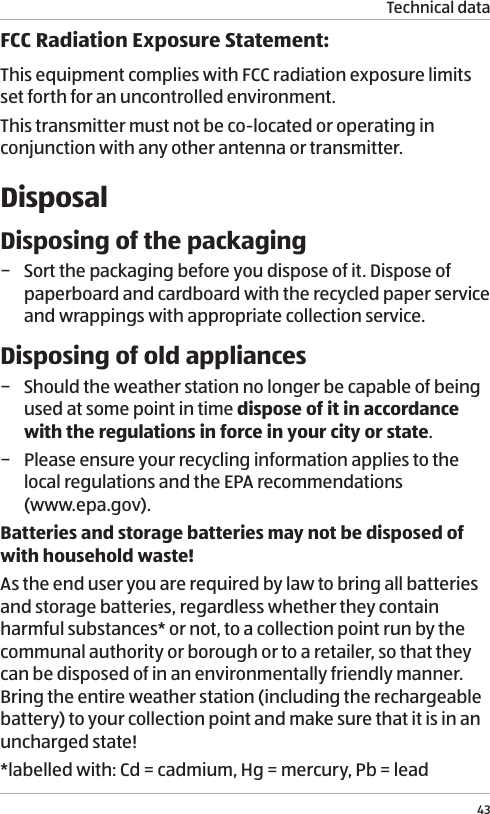
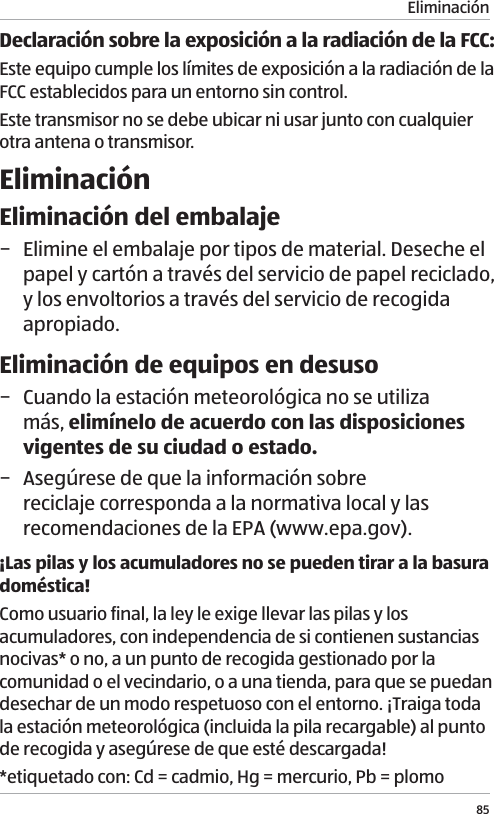
Technical data43FCC Radiation Exposure Statement:This equipment complies with FCC radiation exposure limits set forth for an uncontrolled environment. This transmitter must not be co-located or operating in conjunction with any other antenna or transmitter.DisposalDisposing of the packaging − Sort the packaging before you dispose of it. Dispose of paperboard and cardboard with the recycled paper service and wrappings with appropriate collection service.Disposing of old appliances − Should the weather station no longer be capable of being used at some point in time dispose of it in accordance with the regulations in force in your city or state. − Please ensure your recycling information applies to the local regulations and the EPA recommendations  (www.epa.gov).Batteries and storage batteries may not be disposed of with household waste! As the end user you are required by law to bring all batteries and storage batteries, regardless whether they contain harmful substances* or not, to a collection point run by the communal authority or borough or to a retailer, so that they can be disposed of in an environmentally friendly manner. Bring the entire weather station (including the rechargeable battery) to your collection point and make sure that it is in an uncharged state!*labelled with: Cd = cadmium, Hg = mercury, Pb = lead
44
Contenido45ContenidoConjunto  ........................................................................................................................... 3Uso  .................................................................................................................................... 4Volumen de suministro/piezas del dispositivo .............................................................46Generalidades ................................................................................................................. 47Leer y guardar el manual del usuario ..................................................................................47Descripción de símbolos .........................................................................................................47Seguridad  .......................................................................................................................48Uso debido  ..............................................................................................................................48Indicaciones de seguridad .................................................................................................... 49Avisos sobre las baterías ....................................................................................................... 54Primer uso  ...................................................................................................................... 57Comprobación de la estación meteorológica y el contenido del paquete .....................57Acerca de las señales horarias .......................................................................................58Preparación del sensor de radio para su uso ................................................................58Inserción y sustitución de las pilas .......................................................................................58Uso de sensores de radio adicionales ................................................................................. 59Instalación del sensor de radio ............................................................................................60Preparación de la unidad base para su uso ...................................................................61Alimentación de la unidad base ...........................................................................................61Búsqueda de señales............................................................................................................. 62Configuración manual ........................................................................................................... 64Instalación de la unidad base...............................................................................................66Funciones horarias ......................................................................................................... 67Display (funciones horarias) ..................................................................................................67Alarmas  ...................................................................................................................................68Horario de verano  .................................................................................................................. 70Zona horaria ............................................................................................................................ 70Formato de hora  .................................................................................................................... 70Datos meteorológicos ..................................................................................................... 70Display (datos meteorológicos) ............................................................................................ 70Cambio entre sensores de radio ...........................................................................................72Valores máximo y mínimo ......................................................................................................72Tendencia de la temperatura y humedad ...........................................................................73Unidades de temperatura ......................................................................................................73Presión del aire ................................................................................................................73Display (presión del aire) ........................................................................................................73Presión del aire actual y tendencia de la presión del aire .................................................74Valores máximo y mínimo ......................................................................................................74Previsión meteorológica ................................................................................................ 75Display (previsión meteorológica) ........................................................................................75Símbolos de previsión meteorológica ..................................................................................76Fases lunares  ..................................................................................................................76Otras funciones ................................................................................................................77Retroiluminación del display .................................................................................................77Puerto de carga USB............................................................................................................... 78Modo operativo  ...................................................................................................................... 78Advertencia de pilas bajas .................................................................................................... 78Reseteo de la estación meteorológica ................................................................................ 78Limpieza  .......................................................................................................................... 79Almacenamiento............................................................................................................. 79Resolución de problemas ................................................................................................81Datos técnicos ................................................................................................................. 83Eliminación  ..................................................................................................................... 85Eliminación del embalaje ......................................................................................................85Eliminación de equipos en desuso ...................................................................................... 85
Volumen de suministro/ piezas del dispositivo46Volumen de suministro/ piezas del dispositivo18 Interruptor de canales19 Tapa del compartimento  de pilas (sensor de radio)20 Compartimento de pilas (sensor de radio)21 Enchufe de salida22 Adaptador de potencia23 Pila, 4×24 Soporte para colgar25 Reloj y alarma26 Fase lunar27 Fecha y día de la semana28 Ambiente interior29 Previsión meteorológica30 Presión del aire31 Ambiente exteriorA = Versión horizontalB = Versión vertical1Unidad base2Display (unidad base)3Botón SNOOZE/LIGHT4Botón 5Botón 6Botón 7Botón 8Botón 9Orificio para colgar10 Soporte desplegable11 Compartimento de pilas  (unidad base)12 Jack de entrada CC13 Puerto de carga USB14 Sensor de radio15 Display (sensor de radio)16 Luz indicadora de señal17 Interruptor de la unidad  de temperatura
Generalidades47GeneralidadesLeer y guardar el manual del usuarioEste manual del usuario viene con la estación meteorológica digital (en adelante, “estación meteorológica”) y contiene información importante sobre la puesta en marcha y uso. Antes de usar la estación meteorológica, lea detenidamente el manual del usuario, en especial el apartado correspondiente a las instrucciones de seguridad. Si no lo hace, se pueden provocar lesiones personales o daños en la estación meteorológica.Guarde el manual del usuario para consultarlo en el futuro. Asegúrese de incluir este manual del usuario al transferir la estación meteorológica a terceros.Descripción de símbolosLos siguientes símbolos y términos de advertencia se emplean en este manual del usuario, en la estación meteorológica o en el embalaje. ¡ADVERTENCIA!Este término/símbolo de advertencia hace referencia a un grado de riesgo medio que, si no se evita, puede provocar la muerte o lesiones graves. ¡ATENCIÓN!Este símbolo/término de advertencia designa un peligro de riesgo leve que puede provocar lesiones menores o moderadas si no se evita.
Seguridad48¡AVISO!Este término de advertencia avisa de posibles daños materiales.Este símbolo le ofrece información práctica adicional sobre el manejo y el uso.SeguridadUso debidoLa estación meteorológica está diseñada exclusivamente para mostrar la hora y la información meteorológica. Está concebida únicamente para uso privado interior, y no está prevista para fines comerciales.Utilice la estación meteorológica únicamente como se describe en este manual del usuario. Cualquier otra utilización se considerará inapropiada y puede provocar daños materiales o incluso lesiones personales. La estación meteorológica no es un juguete para niños.El fabricante o proveedor no asume ninguna responsabilidad por los daños derivados de un uso inapropiado o incorrecto.
Seguridad49Indicaciones de seguridad ¡ADVERTENCIA!¡Riesgo de descarga eléctrica!Una instalación eléctrica defectuosa, un voltaje de línea excesivo o un funcionamiento incorrecto pueden provocar una descarga eléctrica. − Utilice solo el adaptador de potencia suministrado con la estación meteorológica. − Emplee únicamente el adaptador de potencia en áreas interiores y secas. No deje que el adaptador de potencia entre en contacto con el agua ni demás líquidos. − Conecte el adaptador de potencia solo a un suministro eléctrico de corriente alterna (CA). Asegúrese de que la tensión corresponde a los datos de tensión del dispositivo. El adaptador de potencia debe funcionar con corriente alterna (CA) a 100 ~ 240 V, 50/60 Hz. − Conecte el adaptador de potencia solo
Seguridad50a una toma de corriente accesible bien instalada de la que pueda extraer el enchufe rápidamente en caso de emergencia.  − Desenrolle del todo el cable del adaptador de potencia antes de conectarlo. Asegúrese de que el cable no pueda resultar dañado por bordes afilados u objetos calientes. − Nunca cubra el adaptador de potencia. Asegure una ventilación suficiente para evitar que el adaptador de potencia se sobrecaliente. − No emplee el adaptador de potencia si la carcasa o el cable están defectuosos o presentan otros daños visibles. En caso de daño, mande reparar el adaptador de potencia únicamente al fabricante, su equipo de servicio al cliente o una persona con una cualificación similar para evitar riesgos.  − El cable del adaptador de potencia no se puede sustituir. Si el cable o el adaptador de potencia están dañados, se deben desechar y sustituir por un
Seguridad51adaptador de potencia del mismo modelo. − Retire siempre el adaptador de potencia de la toma de corriente si:•  quiere limpiar la estación meteorológica o prevé no usar la estación meteorológica durante mucho tiempo;•  la estación meteorológica no funciona bien;•  durante tormentas eléctricas. − Tire siempre del enchufe, y no del cable, cuando retire el adaptador de potencia de la toma de corriente. ¡ADVERTENCIA!Peligro para niños y personas con prob-lemas físicos, sensoriales o mentales (p. ej. personas parcialmente discapacitadas, ancianos con aptitudes físicas y mentales reducidas) o falta de experiencia y cono-cimientos (p. ej. niños de mayor edad). − Si están supervisados o han recibido instrucciones sobre cómo usar la estación meteorológica de forma segura, y han comprendido los riesgos asociados al uso, la estación
Seguridad52meteorológica podrá ser usada por niños de más de ocho años y por personas con aptitudes físicas, sensoriales o mentales reducidas o con falta de experiencia y conocimientos. Los niños no deben jugar con la estación meteorológica. Los niños sin supervisión no deben efectuar la limpieza ni el mantenimiento de usuario. − Mantenga a los niños menores de ocho años alejados de la estación meteorológica y del cable eléctrico. − Asegúrese de que los niños no jueguen con el embalaje de plástico. Pueden quedar atrapados al jugar y asfixiarse.¡AVISO!¡Riesgo de daños!Si no usa la estación meteorológica (unidad base y sensor de radio) correctamente, podría dañarla. − No utilice la estación meteorológica en un lugar húmedo (p. ej. cuarto de baño) y evite el polvo, salpicaduras o goteo de
Seguridad53agua, fuentes de calor, temperaturas extremas y la luz solar directa. − Asegúrese de que la estación meteorológica esté alejada de campos magnéticos (p. ej. altavoces). − Asegúrese de que no entren objetos extraños en la carcasa de la estación meteorológica. − No ejerza presión sobre la superficie del display de la estación meteorológica, pues podría romperse. − No permita que objetos afilados o puntiagudos entren en contacto con la superficie de la estación meteorológica. − Evite que la estación meteorológica pueda caer. De lo contrario, podría romper la estación meteorológica. − No coloque la estación meteorológica cerca de fuentes de calor. Nunca coloque llamas abiertas como velas prendidas encima o al lado de la estación meteorológica. − En ningún caso debería abrir la carcasa de la estación meteorológica. Dentro no hay piezas que requieran
Seguridad54mantenimiento por el usuario. Una reparación incorrecta puede dañar la estación meteorológica. Las reparaciones solo deberían ser llevadas a cabo por técnicos profesionales.  La única excepción es la retirada de la tapa del compartimento de pilas para sustituir las pilas. − El sensor de radio debe estar protegido de la exposición directa a la humedad, como la lluvia.Avisos sobre las baterías ¡ADVERTENCIA!¡Riesgos para la salud!Existe un riesgo elevado para la salud en caso de que niños o animales ingieran las pilas. − Guarde las pilas de forma que queden fuera del alcance de niños y animales. Si sospecha que se ha ingerido una pila, busque asesoramiento médico de inmediato.
Seguridad55 ¡ADVERTENCIA!Riesgo de explosiónUna manipulación inapropiada de las pilas incrementa el riesgo de explosión. − Almacene las pilas en un lugar fresco y seco. Nunca exponga las pilas a calor excesivo (p. ej. luz solar directa) ni las lance al fuego. − Use pilas solo del mismo tipo. − Cerciórese de que la polaridad sea correcta al insertar las pilas, tal como se muestra en el compartimento de pilas. Una instalación incorrecta puede dañar la estación meteorológica. − Utilice siempre pilas de buena calidad. Las pilas de mala calidad pueden derramarse y causar daños. − Antes de insertar las pilas, asegúrese de que los contactos en el interior del compartimento de las pilas y de las propias pilas estén limpios e intactos. Límpielos si fuera necesario.
Seguridad56 − Sustituya siempre todas las pilas del compartimento de pilas a la vez. − Retire las pilas de la estación meteorológica si ya están gastadas. Extraiga las pilas también si no prevé usar la estación meteorológica durante mucho tiempo. De lo contrario, las pilas se pueden derramar y causar daños. − Si las pilas se derraman, retírelas de inmediato para evitar daños en la estación meteorológica. No saque las pilas con las manos desprotegidas ni permita que el líquido de las pilas entre en contacto con piel, ojos o membranas mucosas. Emplee guantes normales de goma para uso doméstico. No obstante, si el líquido de las pilas entra en contacto con la piel, lávese las manos de inmediato y consulte a un médico si fuera necesario. − Las pilas deberían ser instaladas o sustituidas por un adulto únicamente. − Mantenga la estación meteorológica alejada de los niños cuando quite la tapa de las pilas.
Primer uso57 − Retire las pilas antes de eliminar la estación meteorológica.Primer usoComprobación de la estación meteorológica y el contenido del paquete¡AVISO!¡Riesgo de daños!Si no tiene cuidado al abrir el embalaje con un cuchillo afilado u otro objeto puntiagudo, podría dañar rápidamente la estación meteorológica.  − Por este motivo, sea muy cuidadoso al abrirlo.1. Saque la estación meteorológica del embalaje.2. Asegúrese de haber recibido todos los componentes y accesorios (véase la fig. A y B).3. Compruebe si la estación meteorológica o las piezas individuales presentan daños. De ser así, no use la estación meteorológica. Contacte con el fabricante a través de la dirección de servicio técnico especificada en la tarjeta de garantía.
Acerca de las señales horarias58Acerca de las señales horariasLa unidad base de la estación meteorológica es un reloj controlado por radio y puede recibir las señales horarias emitidas por un transmisor de señales de su país. Si la unidad base queda dentro del alcance de transmisión, puede recibir las señales y sincronizarse con la hora y la fecha emitidas varias veces al día. En caso de fallo en la recepción de la señal, la unidad base puede seguir funcionando bien e intentar buscar señales horarias en la próxima hora designada. Si no se localizan señales, la hora y la fecha también se pueden ajustar manualmente. Preparación del sensor de radio para su usoInserción y sustitución de las pilas − No utilice pilas recargables, puesto que su voltaje es bajo, lo que influye en la precisión de la medición.  − Emplee mejor pilas alcalinas que duren mucho, sobre todo cuando la temperatura exterior sea baja.1. Retire la tapa del compartimento de pilas  19  en la parte trasera del sensor de radio  14 .2. Preste atención a la polaridad correcta de las pilas (+ o –). Para sustituir las pilas, retire primero las antiguas. Inserte 2 pilas  23  (tamaño: AAA, suministradas) en el compartimento de pilas  20 . 3. Cierre la tapa del compartimento de pilas.
Preparación del sensor de radio para su uso59El sensor de radio detectará la temperatura y humedad ambiental y enviará los datos recopilados a la unidad base cada minuto. Tanto la temperatura (°C/°F) como la humedad (%) se mostrarán en el display  15  del sensor de radio. La luz indicadora de señal  16  parpadeará una vez cuando se envíen los datos. Uso de sensores de radio adicionalesLa estación meteorológica viene con un sensor de radio.  En caso necesario, puede usarla con hasta tres sensores de radio. Los sensores adicionales están disponibles a través del servicio postventa. Compruebe el precio y los detalles con el servicio de asistencia. Los datos de contacto se encuentran en la tarjeta de garantía. Los sensores de radio se pueden ubicar en diferentes espacios interiores o exteriores. Cada sensor debe tener su propio número de sensor de radio (1–3) asignado.Para emplear sensores de radio adicionales:1. Retire la tapa del compartimento de pilas  19  en la parte trasera de los sensores de radio.2. Fije un número de sensor de radio exclusivo (1–3) para cada sensor de radio usando el interruptor de canales  18 . El número de sensor de radio seleccionado (p. ej.   = número de sensor de radio 1) se mostrará en el display  15 . 3. Fije una unidad de temperatura exclusiva (°C/°F) para cada sensor de radio usando el interruptor de la unidad de temperatura  17 . La unidad de temperatura seleccionada se mostrará en el display.4. Cierre la tapa del compartimento de pilas.La unidad base recibirá los datos meteorológicos de todos los sensores de radio disponibles (véase el capítulo “Preparación de la unidad base para su uso”).
Preparación del sensor de radio para su uso60En caso de interferencias de equipos cercanos que emitan señales de radio, puede cambiar el número de sensor de radio para evitar las interferencias. Instalación del sensor de radioTome nota de los siguientes consejos para garantizar la mejor recepción posible de las señales. − Instale el sensor de radio en exteriores únicamente en una zona seca y a la sombra (p. ej. bajo un tejado). − Al instalarlo en una pared, asegúrese de que no haya cables eléctricos, tuberías de gas o conductos de agua bajo la superficie de la pared antes de perforar ningún agujero. − La distancia máxima entre la unidad base y el sensor de radio no debería ser superior a 100 m (distancia de visibilidad directa). Los materiales de construcción, como las paredes de concreto, pueden reducir o impedir la recepción de señales entre la unidad base y el sensor de radio.  − No coloque la unidad base ni el sensor de radio sobre el piso, pues se limita el alcance de la transmisión. − Los dispositivos electrónicos, como televisores y computadoras, pueden perturbar la recepción de señales. − Con temperaturas bajas en invierno, el rendimiento de las pilas del sensor de radio puede disminuir mucho, lo que reduce el alcance de la transmisión.
Preparación de la unidad base para su uso611. Monte el soporte para colgar  24  en una pared usando el orificio para colgar o atornillar (clavo o tornillo no suministrados).2. Enganche el sensor de radio  14  al soporte para colgar (véase la fig. C).Preparación de la unidad base para su usoAlimentación de la unidad baseLa unidad base se puede alimentar con pilas o con un suministro eléctrico de corriente alterna (CA) a través del adaptador de potencia. Inserción y extracción de las pilas1. Abra el compartimento de pilas  11  en la parte trasera de la unidad base  1.2. Preste atención a la polaridad correcta de las pilas (+ o –). Para sustituir las pilas, retire primero las antiguas. Inserte 2 pilas  23  (tamaño: AAA, suministradas) en el compartimento de pilas. 3. Cierre el compartimento de pilas. 4. El display  2 se encenderá y sonará un tono de alarma una vez insertadas las pilas. Espere unos 30 minutos. En este tiempo, la unidad base recopila los datos meteorológicos y recibe las señales horarias (véase el capítulo “Búsqueda de señales”).
Preparación de la unidad base para su uso62Funcionamiento mediante el adaptador de potencia¡AVISO!¡Riesgo de daños!Si la estación meteorológica está conectado a través del adaptador de potencia a una toma de corriente, funciona con una tensión de CC. Las pilas podrían derramarse y dañar el dispositivo. − Retire las pilas de la unidad base cuando la conecte a una toma de corriente.1. Conecte el enchufe de salida  21  del adaptador de potencia  22  al jack de entrada de CC  12  de la unidad base  1.2. Conecte el adaptador de potencia a una toma de corriente. Conecte solo el adaptador de potencia a un suministro eléctrico CA (100 ~ 240 V CA, 50/60 Hz). El display  2 se encenderá y sonará un tono de alarma cuando el adaptador de potencia se conecte a la toma de corriente. Espere unos 30 minutos. En este tiempo, la unidad base recopila los datos meteorológicos y recibe las señales horarias (véase el capítulo “Búsqueda de señales”). Búsqueda de señalesUna vez encendida la unidad base, comenzará a buscar datos meteorológicos y señales horarias:1. La unidad base detectará primero la presión del aire durante 20 segundos aprox. En este tiempo, el valor de la
Preparación de la unidad base para su uso63presión del aire parpadeará en el área del display para la presión del aire  30 . − Presione el botón   8 si quiere detener la detección.2. La unidad base buscará entonces los datos meteorológicos de todos los sensores de radio disponibles. En este tiempo, el icono de recepción (   )  51  (véase el capítulo “Datos meteorológicos”) parpadeará en el área del display para el ambiente exterior  31 , lo que indica que la unidad base está buscando datos meteorológicos. − Una vez recibidos los datos meteorológicos, el icono de recepción se apagará y los datos meteorológicos actuales se mostrarán en el área del display para el ambiente exterior. − Si no se hayan recibido datos meteorológicos, el icono de recepción se apagará y no habrá disponibles datos del ambiente exterior. − Si no se localizan datos meteorológicos, mantenga presionado el botón   4 para iniciar otra búsqueda. No obstante, esta acción solo se puede ejecutar tras completar la búsqueda de señales horarias. 3. Unos 3 minutos después de encender la unidad base, esta buscará señales horarias emitidas a través del transmisor de señales en su país. En este tiempo, el icono de señal horaria (   o   )  38  (véase el capítulo “Funciones horarias”) parpadeará en el área del display para el reloj y las alarmas  25 , lo que indica que la unidad base está buscando señales horarias.  − Una vez recibidas las señales horarias, el icono de señal horaria (   o   ) permanecerá visible, y la fecha y la hora actuales se mostrarán en el área del display para el reloj y las alarmas. La unidad base seguirá recibiendo señales horarias cada noche (hasta 3 veces) y sincronizará con la
Preparación de la unidad base para su uso64hora mostrada.  − Durante la búsqueda de señales horarias, todas las demás funciones de configuración (p. ej. ajuste manual y de alarmas) se deshabilitarán.  − Si no se reciben señales horarias tras unos 7 minutos,  el icono de señal horaria se apagará.  − Si no se localizan señales horarias, mantenga presionado el botón   5 para iniciar otra búsqueda. Para garantizar la mejor recepción posible de señales, evite colocar la unidad base en edificios con muchas estructuras de concreto y metal, o cerca de equipos electrónicos como TV, computadoras, líneas eléctricas, transmisores de radio, etc. En caso necesario, reubique la unidad base.4. Como la hora sincronizada es solo una hora universal coordinada, presione el botón   para seleccionar una zona horaria (indicada por el icono de zona horaria en el display, véase el capítulo “Funciones horarias”) que corresponde a su ubicación. − Zona horaria: P = Pacífico, M = Montaña, C = Central, E = EsteConfiguración manualEsta función le permite fijar manualmente la fecha y hora, seleccionar el formato horario, ajustar la previsión meteorológica y la presión del aire, etc. 1.  Mantenga presionado el botón   8 hasta que parpadee el “año” en el display.2.  Presione el botón   6 o    5 para fijar el año. 3.  Presione el botón  . El “mes” parpadeará en el display.4.  Presione el botón   o   para fijar el mes.5.  Presione el botón  . El “día” parpadeará en el display.
Preparación de la unidad base para su uso656.  Presione el botón   o   para fijar el día.7.  Presione el botón  . La “hora” parpadeará en el display.8.  Presione el botón   o   para fijar la hora.9.  Presione el botón  . Los “minutos” parpadearán en el display.10. Presione el botón   o   para fijar los minutos.11.  Presione el botón  . El “formato horario” parpadeará en el display.12. Presione el botón   o   para seleccionar un formato horario (12 o 24 horas).13. Presione el botón SET. El “horario de verano” (valor predeterminado: OFF) parpadeará y el icono de horario de verano (   o  )  37  (véase el capítulo “Funciones horarias”) se mostrará en el display.14. Presione el botón   o   para activar (ON) o desactivar (OFF) el horario de verano.15. Presione el botón  . La previsión meteorológica gráfica parpadeará en el display.16. Presione el botón   o   para seleccionar una situación meteorológica prevista conforme a la predicción en TV o Internet. La estación meteorológica calcula previsiones meteorológicas conforme a cambios en la presión del aire. Sin embargo, cuando use la estación meteorológica por primera vez, puede tardar algunos días en recopilar suficiente información y poder ofrecer predicciones más precisas. El ajuste manual de la previsión meteorológica puede acelerar un poco este proceso. 17. Presione el botón  . La “presión del aire” parpadeará en el display.
Preparación de la unidad base para su uso6618. Presione el botón   o   para ajustar la presión del aire. Si lo desea, introduzca los valores de presión del aire más precisos o relativos a la altitud de su ubicación, obtenidos en Internet o por parte de autoridades locales.19. Presione el botón  . La configuración manual ya se ha completado.La unidad base saldrá automáticamente de la configuración manual cuando no se presione ningún botón durante  20 segundos aprox.Instalación de la unidad base − Para optimizar la recepción de señales, instale la unidad base cerca de una ventana. − Al instalarlo en una pared, asegúrese de que no haya cables eléctricos, tuberías de gas o conductos de agua bajo la superficie de la pared antes de perforar ningún agujero.Uso del soporte desplegable1. Saque el soporte desplegable  10  en la parte trasera de la unidad base. El soporte presenta dos posiciones de bloqueo.2. Coloque la unidad base sobre una superficie plana.Fijación en una pared1. Fije un clavo o tornillo (no suministrados) en la pared. 2. Meta el orificio para colgar  9 sobre la cabeza del clavo o tornillo.
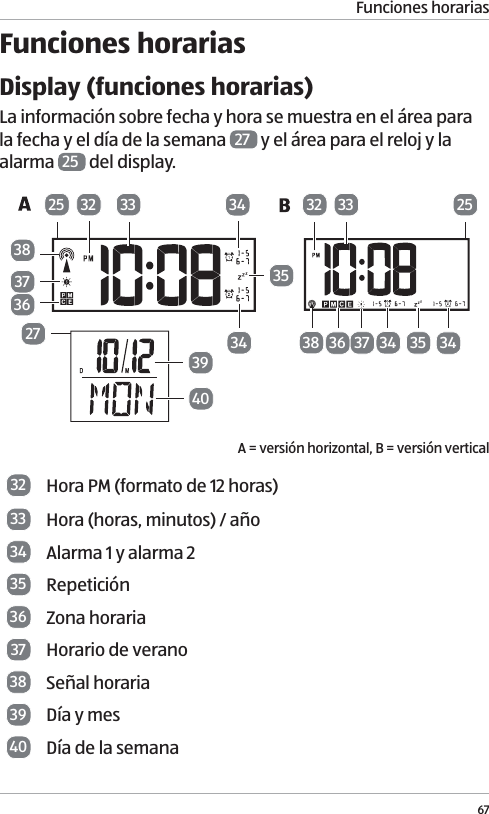
Funciones horarias67Funciones horariasDisplay (funciones horarias)La información sobre fecha y hora se muestra en el área para la fecha y el día de la semana  27  y el área para el reloj y la alarma  25  del display. A = versión horizontal, B = versión vertical32 Hora PM (formato de 12 horas)33 Hora (horas, minutos) / año34 Alarma 1 y alarma 235 Repetición36 Zona horaria37 Horario de verano 38 Señal horaria39 Día y mes40 Día de la semana383336 37 34 3425 25273940373832 33363435323534
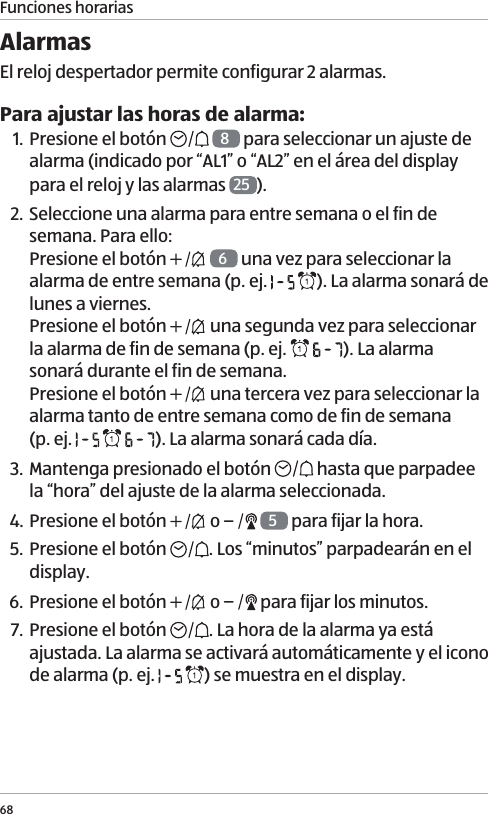
Funciones horarias68Alarmas El reloj despertador permite configurar 2 alarmas. Para ajustar las horas de alarma:1. Presione el botón    8 para seleccionar un ajuste de alarma (indicado por “AL1” o “AL2” en el área del display para el reloj y las alarmas  25 ).2. Seleccione una alarma para entre semana o el fin de semana. Para ello: Presione el botón    6 una vez para seleccionar la alarma de entre semana (p. ej.    ). La alarma sonará de lunes a viernes.  Presione el botón   una segunda vez para seleccionar la alarma de fin de semana (p. ej.    ). La alarma sonará durante el fin de semana.  Presione el botón   una tercera vez para seleccionar la alarma tanto de entre semana como de fin de semana  (p. ej.      ). La alarma sonará cada día. 3. Mantenga presionado el botón   hasta que parpadee la “hora” del ajuste de la alarma seleccionada. 4. Presione el botón   o    5 para fijar la hora.5. Presione el botón  . Los “minutos” parpadearán en el display.6. Presione el botón   o   para fijar los minutos.7. Presione el botón  . La hora de la alarma ya está ajustada. La alarma se activará automáticamente y el icono de alarma (p. ej.    ) se muestra en el display.
Funciones horarias69Para silenciar brevemente la alarma (función de repetición):Presione el botón SNOOZE/LIGHT  3. La alarma volverá a sonar tras una pausa de 5 minutos. Durante el período de repetición, el icono de alarma (  o  )  34  y el de repetición ( )  35  parpadearán. Para cancelar la función de repetición, presione cualquier botón excepto el de SNOOZE/LIGHT.Para apagar la alarma cuando suena:Presione cualquier botón (excepto el de SNOOZE/LIGHT  3) en la unidad base. La alarma se detendrá también sin presionar ningún botón tras 2 minutos. La alarma sigue activada y sonará de nuevo a la misma hora al día siguiente si así corresponde con el ajuste de la alarma. Para activar o desactivar las alarmas:1. Presione el botón    6 una vez para activar la alarma 1. El icono de la alarma 1 ( ) con el ajuste seleccionado para la alarma de entre semana o fin de semana se mostrará en el display.2. Presione el botón   una segunda vez para activar la alarma 2. El icono de la alarma 2 ( ) con el ajuste seleccionado para la alarma de entre semana o fin de semana se mostrará en el display.3. Presione el botón   una tercera vez para activar la alarma 1 y la 2. Los iconos de la alarma 1 ( ) y de la  alarma 2 ( ) con el ajuste seleccionado para la alarma de entre semana o fin de semana se mostrarán en el display.4. Presione el botón   una cuarta vez para desactivar todas las alarmas.
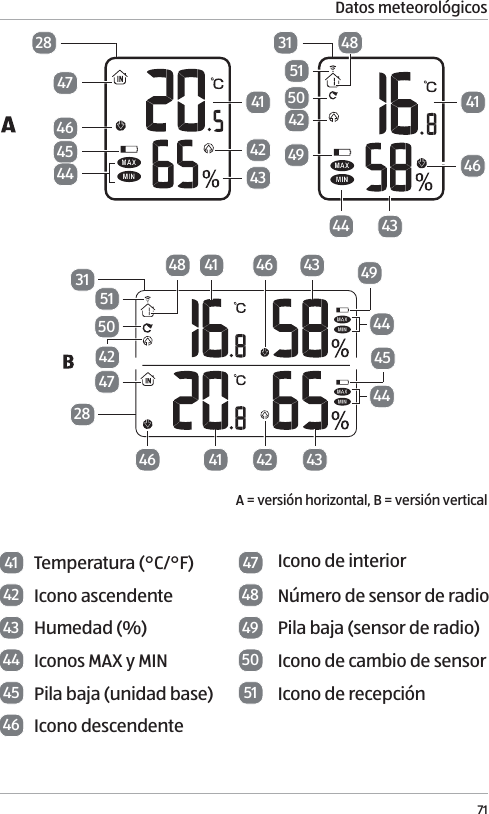
70Datos meteorológicosHorario de veranoEl horario de verano o la información sobre la hora de ahorro de luz viene con las señales horarias emitidas. Cuando el horario de verano o la hora de ahorro de luz esté vigente, el icono de horario de verano (   o   )  37  se verá en el display. Zona horariaPresione el botón   5 para cambiar la zona horaria.  El correspondiente icono de zona horaria  36  se mostrará en el display. Zona horaria: P = Pacífico, M = Montaña, C = Central,  E = Este.Formato de horaPara cambiar entre los formatos de 12 y 24 horas, consulte el capítulo “Configuración manual”. Si se selecciona el formato de 12 horas, las horas de la tarde se identifican con el icono horario PM  32 .Datos meteorológicosDisplay (datos meteorológicos)Los datos meteorológicos se muestran en las áreas del display para ambiente interior  28  y ambiente exterior  31 . El área para el ambiente interior presenta los datos registrados por la unidad base, y el área para el ambiente exterior muestra los datos enviados por el sensor de radio.
Datos meteorológicos71A = versión horizontal, B = versión vertical28474645444142434146434449425048513141 43 4944464544434241464742505148312841 Temperatura (°C/°F)  47 Icono de interior42 Icono ascendente 48 Número de sensor de radio43 Humedad (%) 49 Pila baja (sensor de radio) 44 Iconos MAX y MIN 50 Icono de cambio de sensor45 Pila baja (unidad base)  51 Icono de recepción46 Icono descendente
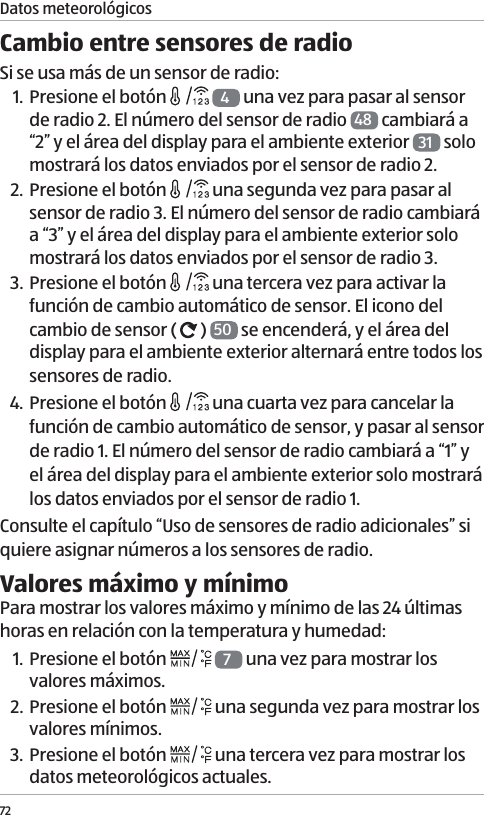
72Cambio entre sensores de radioSi se usa más de un sensor de radio:1. Presione el botón   4 una vez para pasar al sensor de radio 2. El número del sensor de radio  48  cambiará a “2” y el área del display para el ambiente exterior  31  solo mostrará los datos enviados por el sensor de radio 2. 2. Presione el botón   una segunda vez para pasar al sensor de radio 3. El número del sensor de radio cambiará a “3” y el área del display para el ambiente exterior solo mostrará los datos enviados por el sensor de radio 3. 3. Presione el botón   una tercera vez para activar la función de cambio automático de sensor. El icono del cambio de sensor (   )  50  se encenderá, y el área del display para el ambiente exterior alternará entre todos los sensores de radio. 4. Presione el botón   una cuarta vez para cancelar la función de cambio automático de sensor, y pasar al sensor de radio 1. El número del sensor de radio cambiará a “1” y el área del display para el ambiente exterior solo mostrará los datos enviados por el sensor de radio 1.Consulte el capítulo “Uso de sensores de radio adicionales” si quiere asignar números a los sensores de radio. Valores máximo y mínimoPara mostrar los valores máximo y mínimo de las 24 últimas horas en relación con la temperatura y humedad:1. Presione el botón   7 una vez para mostrar los valores máximos.2. Presione el botón   una segunda vez para mostrar los valores mínimos.3. Presione el botón   una tercera vez para mostrar los datos meteorológicos actuales. Datos meteorológicos
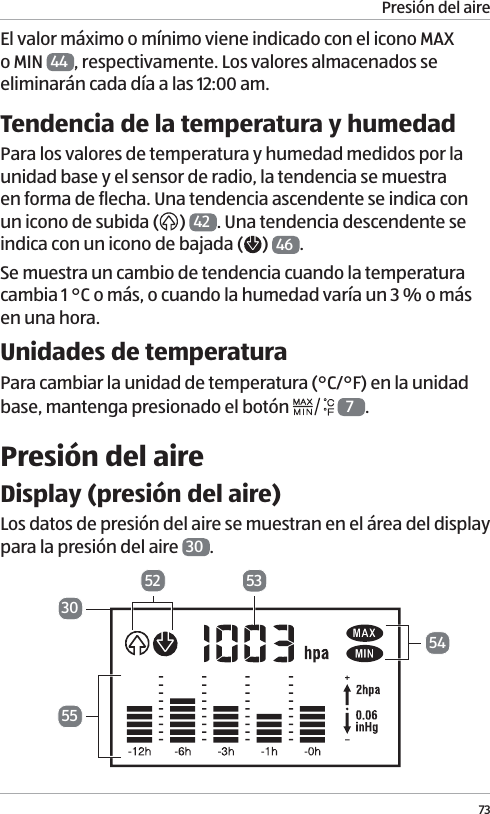
Presión del aire73El valor máximo o mínimo viene indicado con el icono MAX o MIN  44 , respectivamente. Los valores almacenados se eliminarán cada día a las 12:00 am.Tendencia de la temperatura y humedadPara los valores de temperatura y humedad medidos por la unidad base y el sensor de radio, la tendencia se muestra en forma de flecha. Una tendencia ascendente se indica con un icono de subida ( )  42 . Una tendencia descendente se indica con un icono de bajada ( )  46 .Se muestra un cambio de tendencia cuando la temperatura cambia 1 °C o más, o cuando la humedad varía un 3 % o más en una hora.Unidades de temperaturaPara cambiar la unidad de temperatura (°C/°F) en la unidad base, mantenga presionado el botón   7.Presión del aireDisplay (presión del aire)Los datos de presión del aire se muestran en el área del display para la presión del aire  30 . 5330525455
Presión del aire7452 Iconos de tendencia53 Presión del aire actual54 Iconos MAX y MIN55 HistorialPresión del aire actual y tendencia de la presión del aireLa presión del aire actual se muestra en hPa en el área de presión del aire actual  53 . El valor se puede modificar manualmente (véase el capítulo “Configuración manual”).La tendencia de la presión del aire en las 12 últimas horas se muestra en forma de diagrama de barras en el área del  historial  55 . La escala va de –1 (hace 1 hora) a –12 (hace 12 horas). La presión del aire también viene indicada por los iconos de tendencia (   y   )  52 . El icono ascendente indica una mejora de la situación meteorológica. El icono descendente señala un empeoramiento de la situación meteorológica. Valores máximo y mínimoPara mostrar los valores máximo y mínimo de las 12 últimas horas en relación con la presión del aire:1. Presione el botón   7 una vez para mostrar el valor máximo.2. Presione el botón   una segunda vez para mostrar el valor mínimo.3. Presione el botón   una tercera vez para mostrar el valor actual de la presión del aire. El valor máximo o mínimo viene indicado con el icono MAX o MIN  54 , respectivamente.
Previsión meteorológica75Previsión meteorológicaLa estación meteorológica calcula previsiones del tiempo para las 12 horas siguientes, basadas en los datos meteorológicos recopilados. Las predicciones conforman un indicador aproximado del desarrollo meteorológico futuro. Durante el funcionamiento inicial, los detalles relativos a la previsión meteorológica no se pueden usar en unas 12 horas, pues la estación meteorológica necesita este tiempo para recopilar y evaluar los datos meteorológicos.Display (previsión meteorológica)La información sobre la previsión meteorológica se muestra en el área del display para la previsión meteorológica  29 . AB A = versión horizontal, B = versión vertical56 Previsión meteorológica56292956
Fases lunares76Símbolos de previsión meteorológicaLos símbolos de previsión meteorológica se muestran en el área para la previsión meteorológica  29 . Soleado Ligeramente nubladoNublado LluviosoTormenta eléctrica Nieve** Aviso por heladas – Cuando el sensor de radio mide una temperatura entre –3 °C y 1 °C, existe riesgo de helada y parpadeará el símbolo del copo de nieve ( ). Si la temperatura cae por debajo de –3 °C durante un período constante de tiempo, el símbolo del copo de nieve permanecerá visible en el display. Fases lunaresLas fases lunares se muestran en el área de fase lunar  26  del display, y se actualizan automáticamente.
Otras funciones7757575959586057 Luna nueva58 Luna creciente59 Luna llena60 Luna menguanteOtras funcionesRetroiluminación del displayFuncionamiento mediante pilasPresione el botón SNOOZE/LIGHT  3 para encender brevemente la retroiluminación.Funcionamiento mediante suministro eléctrico CALa retroiluminación está siempre encendida cuando se usa el adaptador de potencia  22 . Presione el botón SNOOZE/LIGHT una vez para atenuar la retroiluminación. Presione el botón una segunda vez para apagar la retroiluminación. Presione el botón una tercera vez para encender de nuevo la retroiluminación. Cuando la retroiluminación esté encendida, se atenuará durante la búsqueda de señales horarias. Una vez recibidas las señales horarias, la retroiluminación volverá a mostrar todo su brillo.
Otras funciones78Puerto de carga USBEl puerto de carga USB  13  (salida: 5.0 V,   1000mA) se puede emplear para cargar dispositivos externos (como celulares y reproductores mp3) a través de un cable USB (no suministrado). Los dispositivos externos no se pueden cargar cuando la unidad base funciona con pilas.Modo operativoLa unidad principal entrará en modo de hibernación cuando esté inactiva cierto tiempo. Para volver al modo operativo normal, mantenga presionado cualquier botón (excepto el de SNOOZE/LIGHT) durante 5 segundos para regresar al modo operativo normal.Advertencia de pilas bajasLa unidad base perderá todos los ajustes tras un cambio de pilas. Quizá tenga que resetear manualmente la unidad base antes de usarla de nuevo (véase el capítulo “Configuración manual”).Hay un icono de pila baja para la unidad base (   45  ) y para cada sensor de radio (    49 , y corresponde al número mostrado de sensor de radio). Cuando aparece el icono de pila baja, sustituya las pilas en el dispositivo pertinente (véanse los capítulos “Inserción y sustitución de las pilas” y “Alimentación de la unidad base”).El icono de pila baja (   ) también se verá en el display  15  del sensor de radio cuando las pilas estén débiles.Reseteo de la estación meteorológicaSi aparecen valores incorrectos, debería resetear la estación meteorológica retirando y reinsertando las pilas. Si usa el adaptador de potencia, desenchúfelo de la toma de corriente y vuelva a conectarlo.
Limpieza79Limpieza¡AVISO!¡Riesgo de daños!Si no limpia la estación meteorológica (unidad base y sensor de radio) correctamente, podría dañarla. − No utilice limpiadores agresivos, ni utensilios de limpieza afilados o metálicos como cuchillos, espátulas duras y objetos similares. Podrían dañar las superficies de la estación meteorológica. − Asegúrese de que no entre agua en la carcasa de la estación meteorológica.1. Desenchufe el adaptador de potencia de la toma de corriente si está usando el suministro eléctrico CA para la unidad base.2. Pase un paño húmedo por la estación meteorológica.3.  Seque la estación meteorológica con un paño suave y seco.Almacenamiento ¡ATENCIÓN!¡Riesgo asociado al líquido derramado de las pilas, y riesgo de daños!
Almacenamiento80Si guarda la estación meteorológica mucho tiempo, y las pilas se quedan dentro, estas se pueden derramar y provocar daños permanentes. El ácido de las pilas (electrolito) es corrosivo. − Si no usa la estación meteorológica mucho tiempo, almacene las pilas aparte. Guarde las pilas de forma que queden fuera del alcance de los niños. − No extraiga las pilas derramadas con las manos desprotegidas. Emplee guantes normales de goma para uso doméstico. No permita que el ácido de las pilas entre en contacto con la piel, los ojos y las mucosas. No obstante, si el líquido de las pilas entra en contacto con la piel, lávese las manos de inmediato y consulte a un médico si fuera necesario. − Limpie el ácido derramado de las pilas con un paño húmedo y elimínelo en la basura doméstica.1. Limpie la estación meteorológica (véase el capítulo “Limpieza”).2. Saque las pilas insertadas del compartimento de pilas y guárdelas bien.3. Almacene la estación meteorológica en un lugar limpio y seco.
Resolución de problemas81Resolución de problemas¡AVISO!¡Riesgo de daños!Si no maneja la estación meteorológica correctamente, podría dañarla. − No abra la carcasa de la estación meteorológica. No se aceptarán reclamaciones derivadas de la garantía en caso de reparaciones efectuadas por el usuario o por un manejo incorrecto.Algunos problemas pueden estar provocados por fallos menores que puede solucionar usted mismo. Para ello, siga las instrucciones de la siguiente tabla. Si el problema persiste, contacte con el servicio postventa. No repare la estación meteorológica por sí mismo.Problema Posible causa y soluciónNo se pueden recibir las señales horarias. − Compruebe si la ubicación de la instalación es adecuada para la recepción de señales. − Inicie la recepción de señales manualmente presionando el botón   5 de la unidad base. − Fije la hora manualmente.
Resolución de problemas82La unidad base no recibe señales del sensor de radio. − Asegúrese de que no haya equipos eléctricos cerca del sensor de radio ni la unidad base. − Compruebe si las pilas del sensor de radio están agotadas. − Inicie la recepción de señales manualmente. Para ello, mantenga presionado el botón  4 de la unidad base. − Mueva la unidad base más cerca del sensor de radio o viceversa.Se muestran valores incorrectos. − Resetee la estación meteorológica (véase el capítulo “Reseteo de la estación meteorológica”).Aparece “HI” o “LO” en vez de los valores medidos de temperatura o humedad. − Los valores están por encima o debajo del rango de medición.
Datos técnicos83Datos técnicosNombre del producto: Estación meteorológica digitalNo del modelo: WS97210–1 (negro, horizontal)/WS97230–1 (negro, vertical)/ WS97210–2 (blanco, horizontal)/WS97230–2 (blanco, vertical)Unidad baseAdaptador de potencia: 5.0 V CC Pilas: 3 V DC   (2× 1.5 V, Tipo LR3/R3/AAA) Rango de medición de temperatura:  0 °C a 40 °CRango de medición de humedad relativa:  20 % a 95 % Rango de medición de presión del aire:  800–1100 hPaPuerto de carga USB: 5.0 V   1000 mASensor de radioPilas: 3 V DC   (2× 1.5 V, Tipo LR3/R3/AAA) Rango de medición de temperatura:  –15 °C a 60 °CRango de medición de humedad relativa:  20 % a 95 % Frecuencia de transmisión: 433 MHzRango: máx. 100 metros  (espacios abiertos)Adaptador de potencia (suministrado)Modelo: 6301–BS–A o 6301–BS–BEntrada: 100 ~ 240 V CA, 50 / 60 HzSalida:  5.0V CC 1000mA
Datos técnicos84Este dispositivo cumple con el apartado 15 de las normas de la FCC. El funcionamiento está sujeto a las dos condiciones siguientes:(1) este dispositivo no puede provocar interferencias perjudi-ciales, y(2) este dispositivo debe aceptar cualquier interferencia recibi-da, incluidas las que puedan provocar un funcionamiento no deseado.Atención: los cambios o modificaciones no aprobados expre-samente por la parte responsable del cumplimiento podrían anular la autoridad del usuario para usar el equipo.AVISO: Este equipo se ha probado y ha demostrado que cum-ple con los límites para un dispositivo digital de la clase B, conforme al apartado 15 de las normas de la FCC. Estos límites están diseñados para ofrecer una protección razonable frente a interferencias perjudiciales en una instalación residencial.Este equipo genera, utiliza y puede irradiar energía de radi-ofrecuencia y, si no se instala y se utiliza de acuerdo con las instrucciones, puede ocasionar interferencias perjudiciales para las comunicaciones por radio. No obstante, no se puede garantizar que no se vaya a producir interferencias en una instalación en particular. Si este equipo ocasiona interferen-cias perjudiciales en la recepción de radio o televisión, lo que puede comprobarse encendiendo y apagando el equipo, se recomienda al usuario que intente corregir la interferencia mediante una o varias de las siguientes medidas:•  Reoriente o reubique la antena receptora.•  Aumente la separación entre el equipo y el receptor.•  Conecte el equipo en una toma de corriente de un circuito eléctrico diferente del circuito eléctrico del receptor.•  Consulte con su distribuidor o con un técnico especiali-zadoen radio y televisión.
Eliminación85Declaración sobre la exposición a la radiación de la FCC:Este equipo cumple los límites de exposición a la radiación de la FCC establecidos para un entorno sin control.Este transmisor no se debe ubicar ni usar junto con cualquier otra antena o transmisor.EliminaciónEliminación del embalaje − Elimine el embalaje por tipos de material. Deseche el papel y cartón a través del servicio de papel reciclado, y los envoltorios a través del servicio de recogida apropiado.Eliminación de equipos en desuso − Cuando la estación meteorológica no se utiliza más, elimínelo de acuerdo con las disposiciones vigentes de su ciudad o estado.  − Asegúrese de que la información sobre reciclaje corresponda a la normativa local y las recomendaciones de la EPA (www.epa.gov).¡Las pilas y los acumuladores no se pueden tirar a la basura doméstica! Como usuario final, la ley le exige llevar las pilas y los acumuladores, con independencia de si contienen sustancias nocivas* o no, a un punto de recogida gestionado por la comunidad o el vecindario, o a una tienda, para que se puedan desechar de un modo respetuoso con el entorno. ¡Traiga toda la estación meteorológica (incluida la pila recargable) al punto de recogida y asegúrese de que esté descargada!*etiquetado con: Cd = cadmio, Hg = mercurio, Pb = plomo
IMPORTED BY • IMPORTADO POR: ALDI INC., BATAVIA, IL 60510 WWW.ALDI.USUSAAFTER SALES SUPPORT • SERVICIO POSVENTAMODEL/NO DEL MODELO:  WS97210–1/WS97230–1/WS97210–2/WS97230–25416010/2017USA 1 855 754 8297Aldi-US@protel-service.comYEAR WARRANTYAÑOS DE GARANTÍA3

Navigation menu