Aliph com J2011 BIG JAMBOX User Manual manual
Aliph com BIG JAMBOX manual
manual

QUICK START GUIDE
GUÍA RÁPIDA DE INICIO
™
by
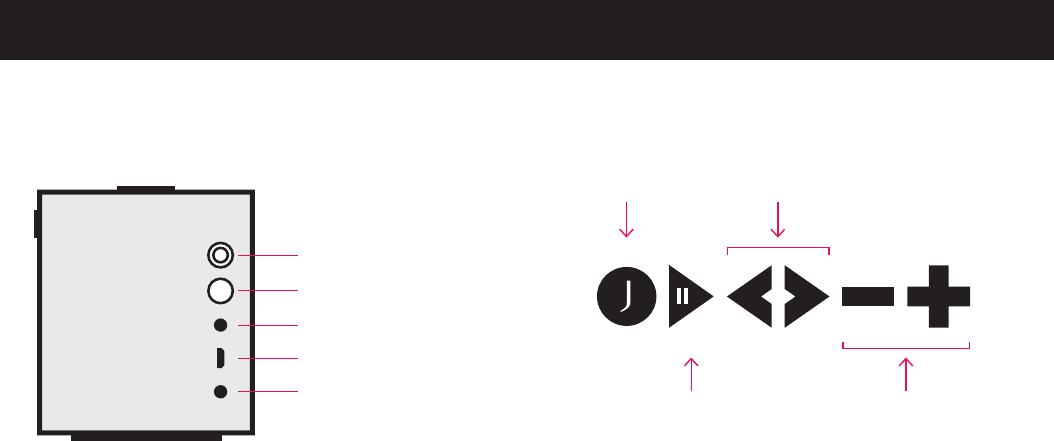
2 3
PLAY / PAUSE
REPRODUCIR / PAUSA
PREVIOUS / NEXT
ANTERIOR / SIGUIENTE
VOLUME DOWN / UP
VOLUMEN ABAJO / ARRIBA
TALK
HABLAR
POWER BUTTON & LED
BOTÓN DE ENCENDIDO Y LED
PAIRING BUTTON
BOTÓN DE EMPAREJAMIENTO
LINE IN
LÍNEA DE ENTRADA
USB
USB
DC IN
ENTRADA DE CORRIENTE
CONTÍNUA
BUTTONS & CONTROLS
BOTONES Y CONTROLES
4 5
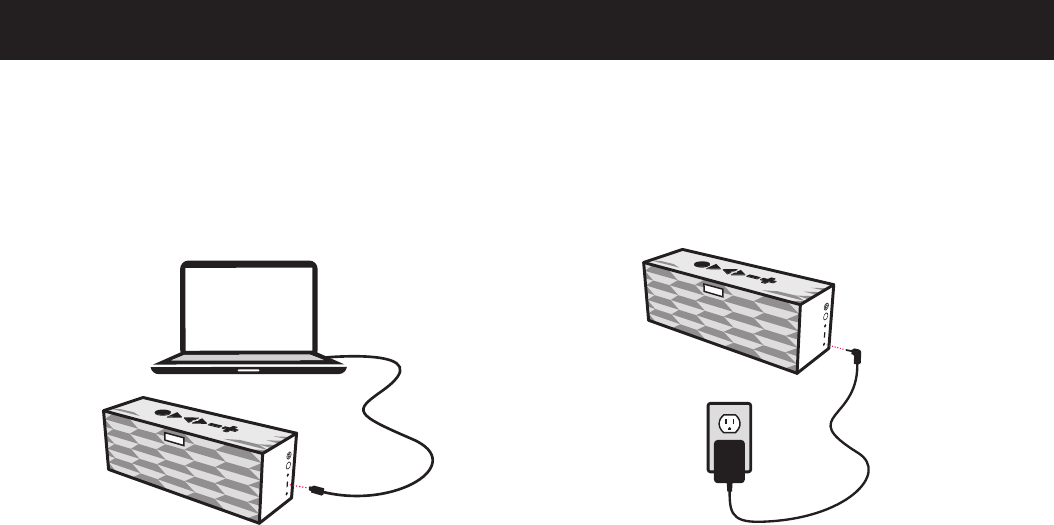
Plug BIG JAMBOX™ into a wall outlet using the included
wall charger. Full charge takes about 2.5 hours.
Enchufe BIG JAMBOX™ a una toma de corriente
mendiante el cargador de pared. Una carga completa
tarda aproximadamente 2,5 horas.
BIG JAMBOX™ is always improving and gets better with
time. Download the latest software, features and apps
at MYTALK.JAWBONE.COM. Turn BIG JAMBOX™ off
before updating.
BIG JAMBOX™ siempre esta mejorando a traves del tiempo.
Descargue la última versión del software, características y
aplicaciones en MYTALK.JAWBONE.COM. Apague BIG JAMBOX™
antes de actualizar.
UPDATE AT MYTALK
ACTUALIZAR EN MYTALK
CHARGE IT UP
CÁRGUELO
DC IN
ENTRADA DE CORRIENTE
CONTÍNUA
USB
USB
MYTALK
6 7
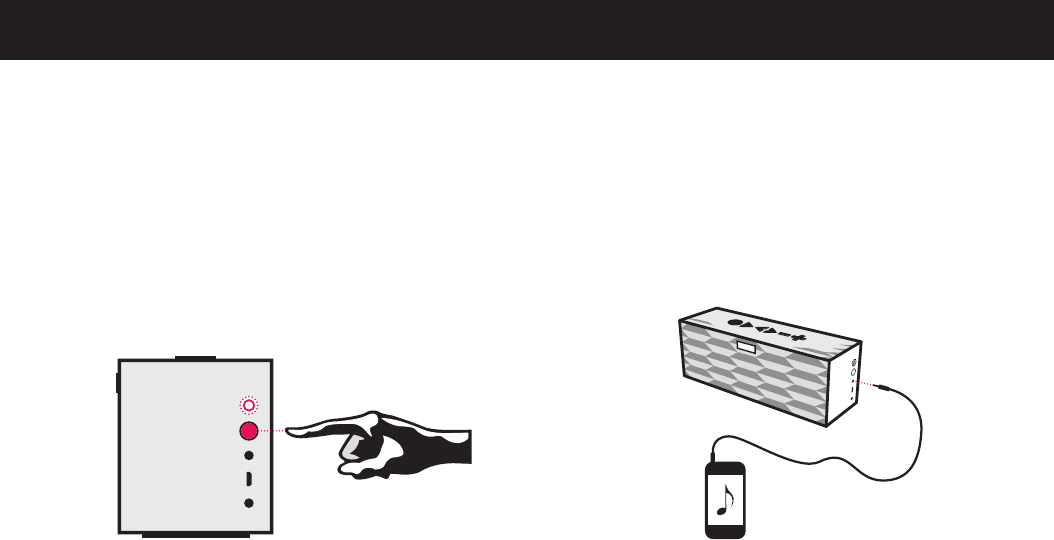
Connect BIG JAMBOX™ to any device with a headphone jack
or line out using the included 3.5mm audio cable.
Note: Media control only works when connected wirelessly
via Bluetooth®.
Conecte BIG JAMBOX™ a cualquier dispositivo con un
conector para auriculares o salida de línea utilizando el cable
de audio de 3,5 mm.
Nota: El control de medios sólo funciona cuando se conecta
de forma inalámbrica vía Bluetooth®.
When turned on for the first time, BIG JAMBOX™ will
automatically enter pairing mode. To pair, go to Bluetooth®
settings on your smartphone, tablet, computer or device
and connect to “BIG JAMBOX by Jawbone”. Enter “0000”
if asked for a passcode. To enter pairing mode thereafter,
hold the pairing button until the LED flashes red & white.
Cuando se enciende por primera vez, BIG JAMBOX™ entrará
automáticamente en modo de emparejamiento. Para establecer
el vínculo, vaya a la configuración de Bluetooth® en su smartphone,
tablet PC, computadora o dispositivo y conéctese a “BIG JAMBOX
por Jawbone”. Introduzca “0000” si se le pide una clave de acceso.
Para entrar en modo de emparejamiento a partir de entonces,
mantenga presionado el boton de emparejamiento hasta que el
LED parpadee rojo y blanco.
OPTION 1 CONNECT WIRELESSLY
OPCIÓN 1 CONECTARSE DE FORMA INALÁMBRICA
OPTION 2 PLUG & PLAY
OPCIÓN 2 PLUG & PLAY
LINE IN
LÍNEA DE
ENTRADA
LINE OUT
LÍNEA DE
SALIDA
PAIRING
EMPAREJAMIENTO
POWER/LED
ENCENDIDO/LED

8 9
Use BIG JAMBOX™ as a portable speakerphone when
connected wirelessly via Bluetooth®. To mute and unmute
the built-in microphone, press the PLAY/PAUSE button.
Use BIG JAMBOX™ como teléfono con altavoz cuando se
conecte de forma inalambrica vía Bluetooth®. Para activar
o desactivar el microfono incorporado, pulse el botón
REPRODUCIR/PAUSA.
SPEAKERPHONE
TELÉFONO CON ALTAVOZ
WHERE & HOW
DÓNDE Y CÓMO
BUILT-IN MICROPHONE
MICRÓFONO INCORPORADO
WHERE WILL YOU USE IT?
Living Room
Bedroom
Kitchen
Dinner Table
Office
Hotel Room
BBQ
Beach
Camping
Other
HOW WILL YOU USE IT?
Music
Movies
Games
Conference Calls
Presentations
iTunes®
Netflix®
YouTube®
SiriusXM®
Other
¿DÓNDE LO UTILIZARÁ?
Sala
Dormitorio
Cocina
Mesa de comedor
Oficina
Habitación de hotel
Barbacoa
Playa
Campamento
Otros
¿CÓMO LO UTILIZARÁ?
Música
Cine
Juegos
Llamadas en conferencia
Presentaciones
iTunes®
Netflix®
YouTube®
SiriusXM®
Otros
10 11
CHEAT SHEET
REFERENCIAS
SPEAKERPHONE
TELÉFONO CON ALTAVOZ
SPEAKERPHONE
TELÉFONO CON ALTAVOZ
SPEAKERPHONE
TELÉFONO CON ALTAVOZ
ACCIÓN
GENERAL*
Activar el modo de
emparejamiento
Reconectar al dispositivo vinculado
Encender/Apagar LiveAudio
Escuchar estado de la batería
Reproducir Demo de Audio
Encender/Apagar sin sonido
ALTAVOZ**
Responder/Finalizar llamada
Activar VoiceDial/DialApps
Alternar llamadas
Finalizar llamada y responder llamada entrante
Para activar y desactivar micrófono
Remarcar el último número*
* No durante una llamada ** Sólo Bluetooth®
CONTROL
Mantenga presionado el BOTÓN DE
EMPAREJAMIENTO hasta que el LED
parpadee rojo y blanco
Presione el botón HABLAR
Mantenga presionados los botones
de VOLUMEN
Presione el botón HABLAR
Mantenga presionados los botones
HABLAR y ambos botones de VOLUMEN
Mantenga presionado el botón VOLUMEN
ABAJO (–) y desliza el BOTÓN DE
ENCENDIDO
Presione el botón HABLAR
Mantenga presionado el botón HABLAR
Presione el botón HABLAR
Presione el botón HABLAR 2 veces
Presione el botón REPRODUCIR/PAUSA
Presione el botón HABLAR 2 veces
ACTION
GENERAL*
Activate Pairing Mode
Re-Connect to Paired Device
Turn LiveAudio On/Off
Hear Battery Status
Play Audio Demo
Power On/Off Without Sound
SPEAKERPHONE**
Answer/End Call
Activate Voicedial/DialApps
Switch Between Calls
End Call & Answer Incoming
Mute & Unmute Microphone
Redial Last Number*
* Not during a call ** Bluetooth® only
CONTROL
Hold PAIRING BUTTON until
LED flashes red & white
Press TALK Button
Hold both VOLUME Buttons
Press TALK Button
Hold TALK & both VOLUME Buttons
Hold VOLUME DOWN (–) Button
& Turn ON/OFF
Press TALK Button
Hold TALK Button
Press TALK Button
Press TALK Button 2x
Press PLAY/PAUSE Button
Press TALK Button 2x
LiveAudio uses BACCH 3D
sound technology
Learn more about LiveAudio
at jawbone.com/liveaudio
LiveAudio utiliza la tecnología
de sonido BACCH 3D
Aprender más acerca de LiveAudio
en jawbone.com/liveaudio

12 13
FOR MORE INFORMATION
PARA OBTENER MÁS INFORMACIÓN
VISIT JAWBONE.COM/SUPPORT
for more information
CALL 1 - 877- 254 -7426
GO TO JAWBONE.COM / WARR ANTY
for warranty info
PURCHASE Jawbone® products and
accessories at JAWBONE.COM
FOLLOW us on Facebook® & Twitter®
JAWBONE.COM/FACEBOOK
JAWBONE.COM/ TWITTER
VISITE JAWBONE.COM/SUPPORT
para obtener más información
LLAME AL 1-877-254-7426
VAYA A JAWBONE.COM/WARRANTY
para información de garantía
COMPRE productos y accesorios Jawbone® en
JAWBONE.COM
SÍGANOS en Facebook® y Twitter®
JAWBONE.COM/FACEBOOK
JAWBONE.COM/TWITTER

14 15
SAFETY INFORMATION
INFORMACIÓN DE SEGURIDAD
Fire and Electric Shock Hazard
• Do not expose your Jawbone® Speaker to
liquid, moisture, humidity, or rain. Do not
use the Jawbone® Speaker near a bathtub,
sink, sauna, pool, or steam room. Exposure
of the Jawbone® Speaker to moisture could
result in electric shock.
• Do not drop, disassemble, open, crush,
bend, deform, puncture, shred, microwave,
incinerate, paint, or insert foreign objects
in to the Jawbone® Speaker. Such actions
could result in electric shock.
• Clean the Jawbone® Speaker only with
a dry cloth.
• Do not expose your Jawbone® Speaker
to extremely high or low temperatures.
• Do not leave your Jawbone® Speaker in di-
rect sunlight for extended periods of time.
• Do not leave your Jawbone® Speaker near
open flames such as cooking burners,
candles, or fireplaces.
• Do not block any ventilation openings.
Battery/Charger Hazard
• Do not dispose of your Jawbone® Speaker
in a fire. The battery could explode causing
injury or death.
WARNING
Please read these safety
warnings and cautions carefully
to ensure your personal safety
and prevent property damage.
• Only charge the battery in accordance
with the user instructions supplied with
the Jawbone® Speaker.
• Do not attempt to disassemble the
Jawbone® Speaker charger or force open
the built-in battery because this may
result in electric shock.
• Do not charge the Jawbone® Speaker in
damp areas or in extremely high or low
temperatures because this could result
in electric shock.
• Do not clean the Jawbone® Speaker
when it is being charged. Always unplug
the charger first before cleaning the
Jawbone® Speaker.
Automobile Accident Hazard
• Do not leave or store the Jawbone®
Speaker or any of its accessories near or
over your automobile’s air bag because
serious injury may result when an air
bag deploys.
Fall Hazard
• Do not place the Jawbone® Speaker on
high surfaces such as shelves. During
music playback the Jawbone® Speaker
may move which could cause the Jawbone®
Speaker to shift and fall off of the edge.
CAUTION
• Do not use abrasive cleaners to clean your
Jawbone® Speaker because this could
cause scratches and damage.
• Do not bring your Jawbone® Speaker in to
contact with any sharp objects because
this could cause scratches and damage.
• Do not insert anything into your Jawbone®
Speaker unless otherwise specified in the
user instructions. This may damage the
internal components.
• Do not attempt to repair, modify, or
disassemble your Jawbone® Speaker
yourself, it does not contain any user-
serviceable components.
• Do not attempt to replace your Jawbone®
Speaker battery, it is built-in and is
not changeable.
• Use only the manufacturer supplied
charger to charge your Jawbone® Speaker.
Other chargers may look similar, but using
them could result in electric shock and
could damage the Jawbone® Speaker.
•Observe all signs and displays that require
an electrical device or RF radio product to
be switched off in designated areas.
•Turn off your Jawbone® Speaker prior
to boarding an aircraft. Do not use the
Jawbone® Speaker inside an aircraft unless
allowed by your airline.
• Dispose of the Jawbone® Speaker and the
Jawbone® Speaker’s battery in accordance
with local regulations. Do not dispose of
the battery with regular household waste.

16 17
PRECAUCIÓN
•No utilice limpiadores abrasivos para
su altavoz Jawbone® ya que esto podría
ocasionarle raspones y daños.
•No ponga el altavoz Jawbone® en
contacto con ningún objeto filoso porque
esto podría ocasionarle raspones y daños.
•No inserte ningún objeto en el altavoz
Jawbone®, a menos que se especifique
de otro modo en las instrucciones para
el usuario. Esto puede dañar los
componentes internos.
•No intente reparar, modificar o desarmar
su altavoz Jawbone® por su cuenta,
ya que no contiene ningún componente
reparable por el usuario.
•No intente reemplazar la batería de su
altavoz Jawbone®, ya que viene
incorporada y no se puede cambiar.
•Utilice sólo el cargador proporcionado
por el fabricante para cargar su altavoz
Jawbone®. Es posible que otros
cargadores tengan una apariencia similar,
pero su uso podría causar una
descarga eléctrica y podría dañar el
altavoz Jawbone®.
•Respete todos los signos y anuncios que
exigen que los dispositivos eléctricos o
productos de radiofrecuencia se apaguen
en áreas designadas.
•Apague su altavoz Jawbone® antes de
subirse a un avión. No utilice el altavoz
Jawbone® dentro de un avión,
a menos que la línea aérea lo permita.
• Deseche el altavoz y la batería Jawbone®
según las reglamentaciones locales. No
deseche la batería junto con los residuos
habituales de la casa.
Peligro de la batería/el cargador
• No tire el altavoz Jawbone® al fuego para
desecharlo. La batería podría explotar
y ocasionar lesiones o la muerte.
• Sólo cargue la batería de acuerdo con las
instrucciones para el usuario provistas con
el altavoz Jawbone®.
• No intente desarmar el cargador del altavoz
Jawbone® ni abrir a la fuerza la batería
incorporada, ya que esto puede causar una
descarga eléctrica.
• No cargue el altavoz Jawbone® en lugares
húmedos ni en lugares con temperaturas
extremadamente altas o bajas, ya que esto
podría causar una descarga eléctrica.
• No limpie el altavoz Jawbone® mientras se
esté cargando. Siempre desenchufe el car-
gador antes de limpiar el altavoz Jawbone®.
Peligro de accidente automovilístico
• No deje o guarde el altavoz Jawbone® ni
ninguno de sus accesorios cerca o encima
de la bolsa de aire de su automóvil, ya
que podría ocasionar lesiones graves al
activarse la bolsa de aire.
Peligro de caída
• No coloque el altavoz Jawbone® en
superficies altas como repisas. Durante la
reproducción de música, el altavoz puede
moverse, lo que podría ocasionar que se
deslice y caiga por el borde.
ADVERTENCIA
Lea atentamente estas
advertencias de seguridad y
precauciones para garantizar
su seguridad personal y evitar
causar daños materiales.
Peligro de incendio y descarga eléctrica
• No exponga el altavoz Jawbone® a líquidos,
humedad o lluvia. No utilice el altavoz
Jawbone® cerca de una tina, lavatorio, sau-
na, piscina o sala de vapor. La exposición
del altavoz Jawbone® a la humedad podría
causar una descarga eléctrica.
• No deje caer, desarme, abra, aplaste,
doble, deforme, perfore, triture, coloque
en el microondas, incinere, pinte ni
introduzca objetos extraños en el altavoz
Jawbone®. Tales acciones podrían causar
una descarga eléctrica.
• Limpie el altavoz Jawbone® únicamente
con un paño seco.
• No exponga su altavoz Jawbone® a tem-
peraturas extremadamente altas o bajas.
• No deje su altavoz Jawbone® en contacto
con la luz solar directa durante períodos
prolongados.
• No deje su altavoz Jawbone® cerca de
llamas expuestas, como los quemadores
de la cocina, velas o chimeneas.
• No bloquee ninguna abertura de ventilación.

18 19
DECLARACIÓN DE LA COMISIÓN
FEDERAL DE COMUNICACIONES (FCC)
Este equipo ha sido probado y se ha
determinado que cumple con los límites
de un dispositivo digital de Clase B, de
acuerdo con la Parte 15 de las Reglas de
la FCC. Estos límites están diseñados para
proporcionar protección razonable contra
interferencias perjudiciales en instalaciones
residenciales. Este equipo genera, utiliza
y tiene la capacidad de irradiar energía de
frecuencia de radio y, de no ser instalado
y utilizado de acuerdo con lasinstrucciones,
podría causar interferencia perjudicial con
las comunicaciones de radio. Sin embargo,
no hay garantía de que no ocurrirá interfer-
encia en una instalaciónespecífica. Si este
equipo causa interferencia perjudicial a la
recepción de radio otelevisión, lo cual se
puede determinar al apagar y encender el
equipo, se sugiere al usuario intentar
corregir la interferencia mediante una de
las siguientes medidas:
•Cambiar la orientación o la posición de la
antena receptora.
•Aumentar la distancia de separación entre
el equipo y el receptor.
•Conectar el equipo a un toma corriente
de un circuito distinto al que se encuentra
conectado el receptor.
•Consultar al concesionario o a un técnico
de radio o televisión con experiencia para
obtener ayuda.
AVISO DE LA FCC Este dispositivo cumple
con la Parte 15 de las normas de la Comisión
2. This device must accept any interference
received,including interference that may
cause undesired operation.
FCC CAUTION
•Any changes or modifications not expressly
approved by the party responsible for
compliance could void the user's authority
to operate this equipment.
•This device and its antenna(s) must not be
co-located or operating in conjunction with
any other antenna or transmitter.
FCC ID: V3J-J2011. IC: 7589A-J2011.
To locate the FCC and IC identification
numbers, please look on the underside
of the Jawbone® Speaker.
Please only use with the power supply
adapter provided. Jawbone model number
HDP40-145248W-1.
Federal de Comunicaciones (FCC). Su
funcionamiento está sujeto a las siguientes
dos condiciones:
1. Este dispositivo puede no causar
interferencia perjudicial y
2. Este dispositivo debe aceptar cualquier
interferencia recibida, lo cual incluye
interferencias que puedan causar un
funcionamiento no deseado.
ADVERTENCIA DE LA FCC
•Los cambios o modificaciones que no
estén expresamente aprobados por la
parte responsable del cumplimiento
podrían anular la facultad del usuario
de usar el equipo.
•Este dispositivo y su(s) antena(s) no
deberán localizarse junto ni funcionar
conjuntamente con otra antena o
transmisor.
IDENT. DE LA FCC: V3J-J2011.
IC: 7589A-J2011.
Para ubicar los números de identificación
de la FCC y de la IC, búsquelos en la parte
inferior del altavoz Jawbone®.
Utilícelo únicamente con el adaptador
de corriente provisto, modelo Jawbone
número HDP40-145248W-1.
This product is compliant with the
CE directive. All returns must be made
to the original place of purchase.
Este producto cumple con la directiva
CE. Todas las devoluciones deben re-
alizarse en el lugar de compra original.
©2012 JAWBONE. ALL RIGHTS
RESERVED. 770-00641 REV D
©2012 JAWBONE. TODOS LOS DERECHOS
RESERVADOS. 770-00641 REV D
FCC STATEMENT This equipment has
been tested and found to comply with the
limits for a Class B digital device, pursuant
to Part 15 of the FCC Rules. These limits are
designed to provide reasonable protection
against harmful interference in a residential
installation. This equipment generates, uses,
and can radiate radio frequency energy and,
if not installed and used in accordance with
the instructions, may cause harmful interfer-
ence to radio communications. However,
there is no guarantee that interference will
not occur in a particular installation. If this
equipment does cause harmful interference
to radio or television reception, which can
be determined by turning the equipment
off and on, the user is encouraged to try to
correct the interference by one of the
following measures:
• Reorient or relocate the receiving antenna.
• Increase the separation between the
equipment and receiver.
•Connect the equipment into an outlet on
a circuit different from that to which the
receiver is connected.
•Consult the dealer or an experienced
radio/TV technician for help.
FCC NOTICE This device complies with
Part 15 of the FCC Rules. Operation is
subject to the following two conditions:
1. This device may not cause harmful
interference, and

JAWBONE.COM