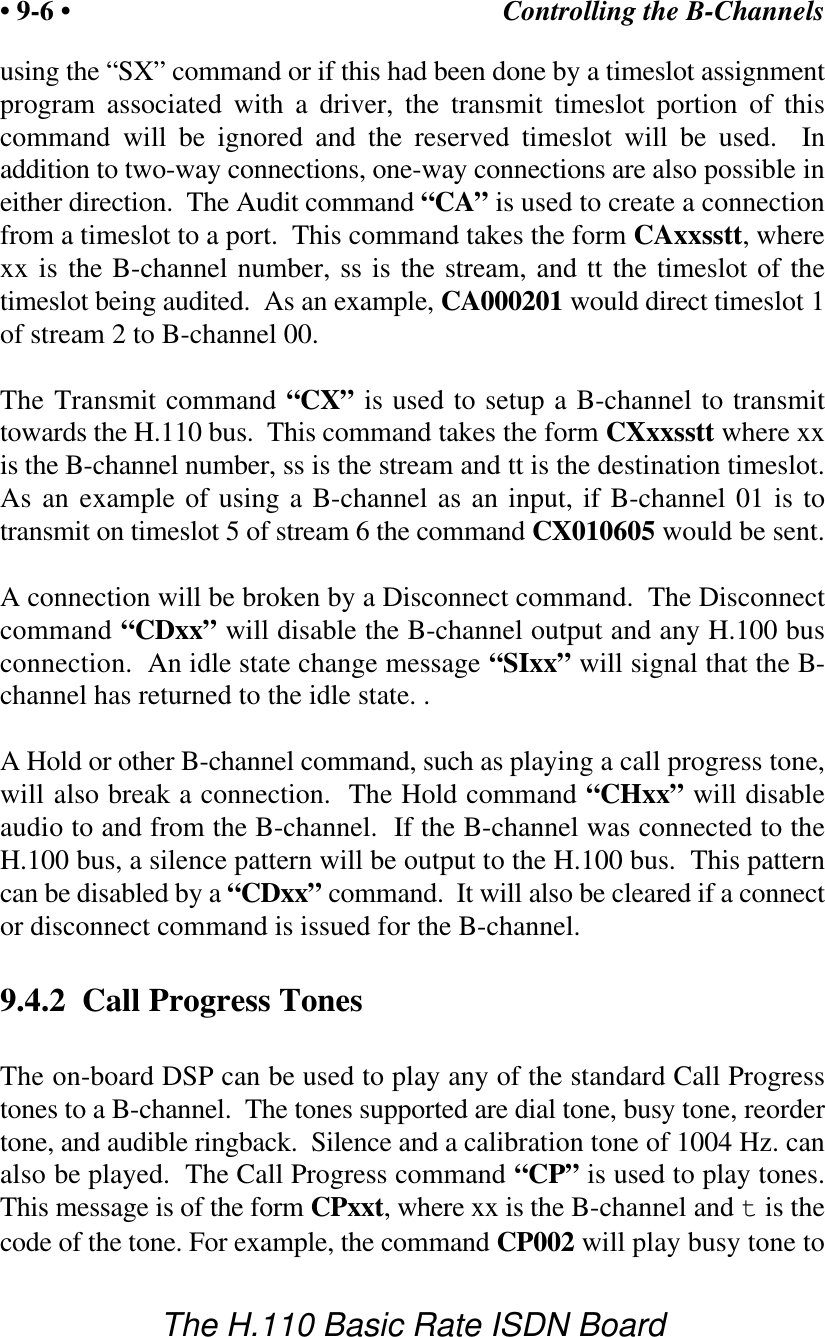
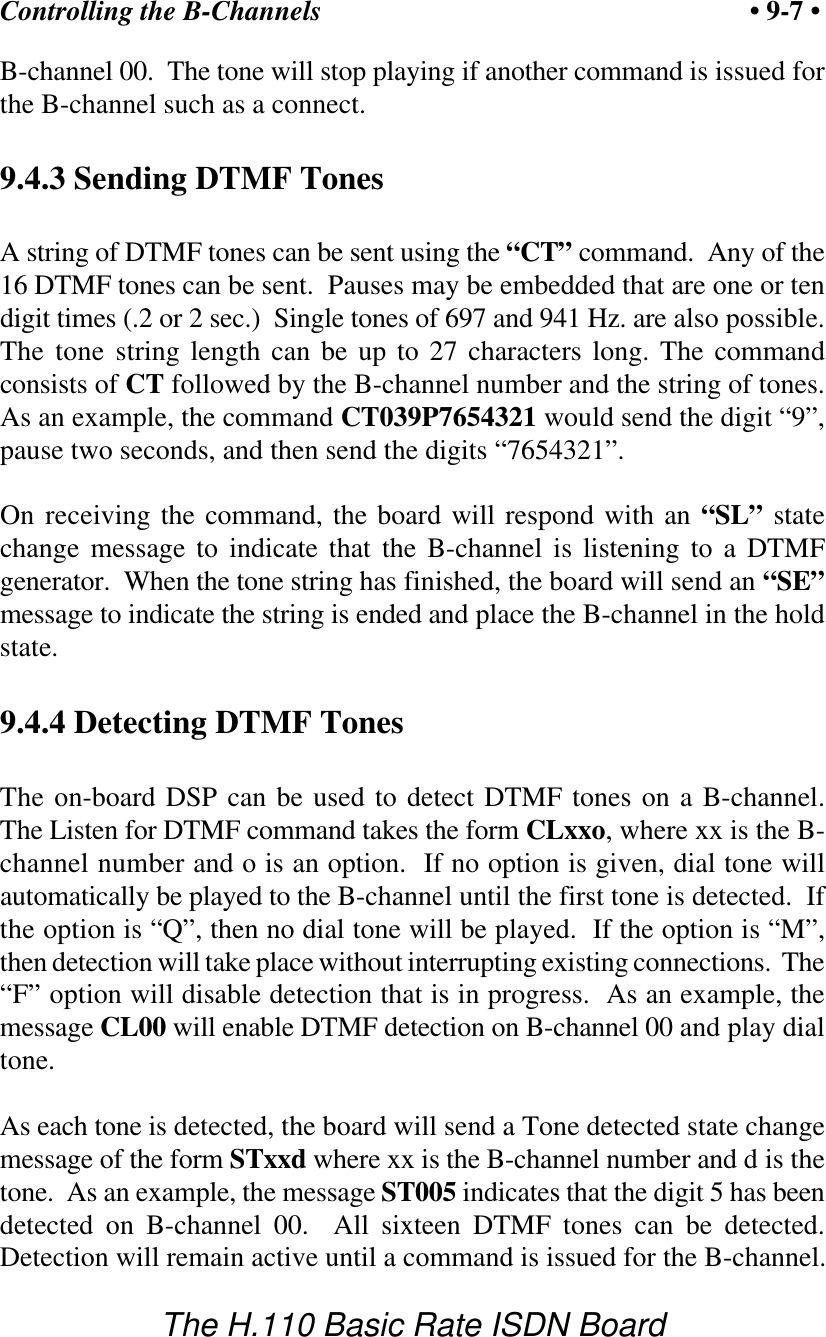
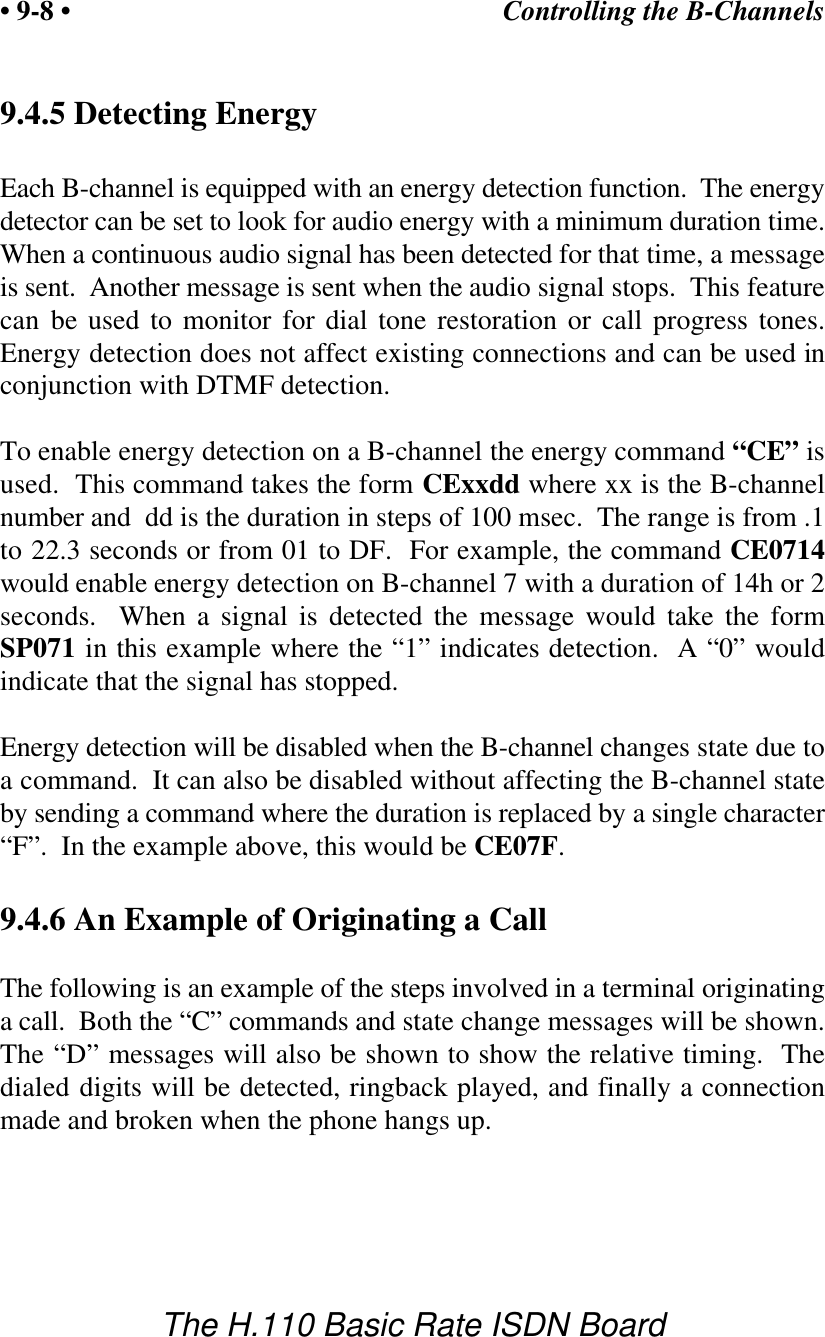
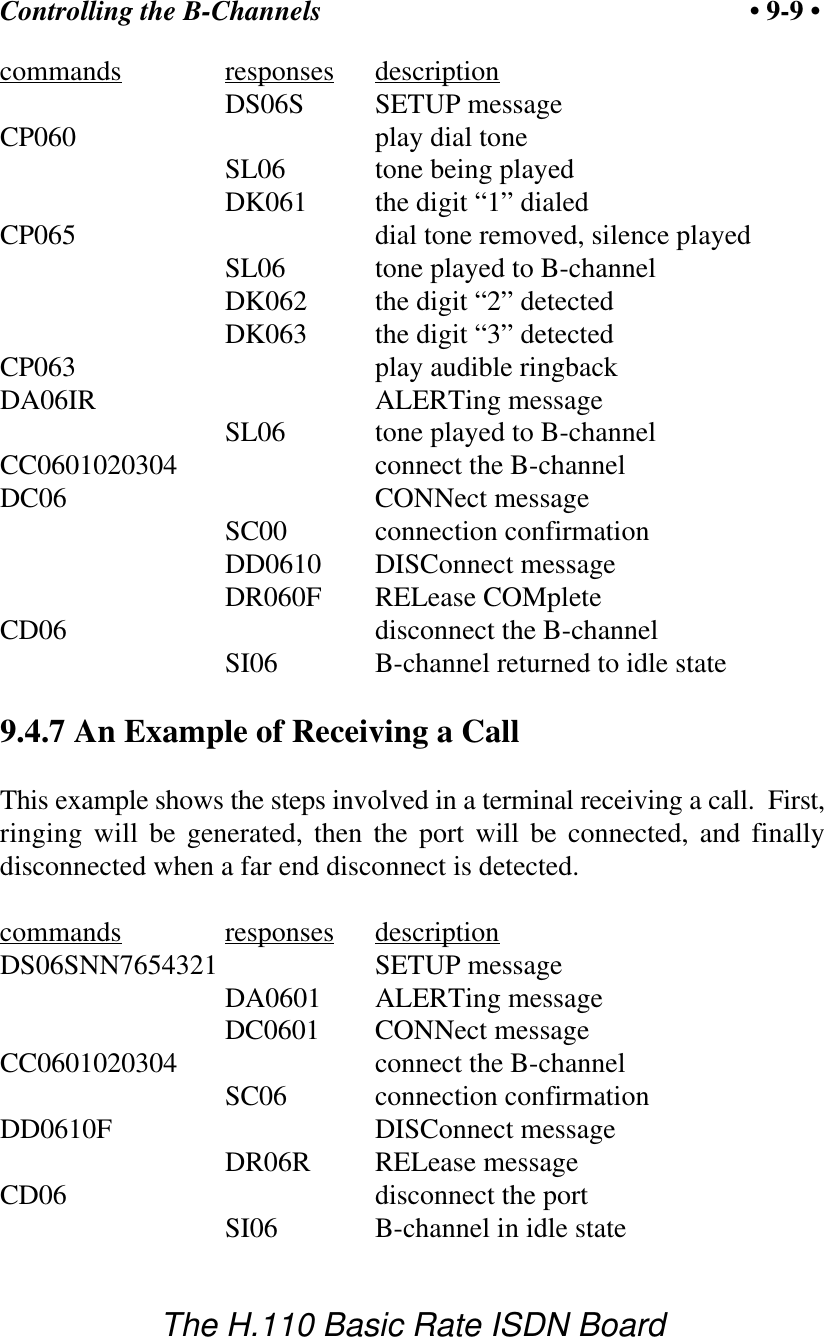
Amtelco 258A008 H.110 Basic Rate Interface ISDN User Manual

Amtelco (American Tel-A-Systems, Inc. H.110 Basic Rate Interface ISDN Users Manual

Contents

Users Manual

Infinity Series H.110Basic Rate ISDN BoardTECHNICAL MANUALDocumentation Revision 0.3: June 7, 2000Copyright © 2000by American Tel-A-Systems, Inc.All rights reserved.258M001
This page left intentionally blank
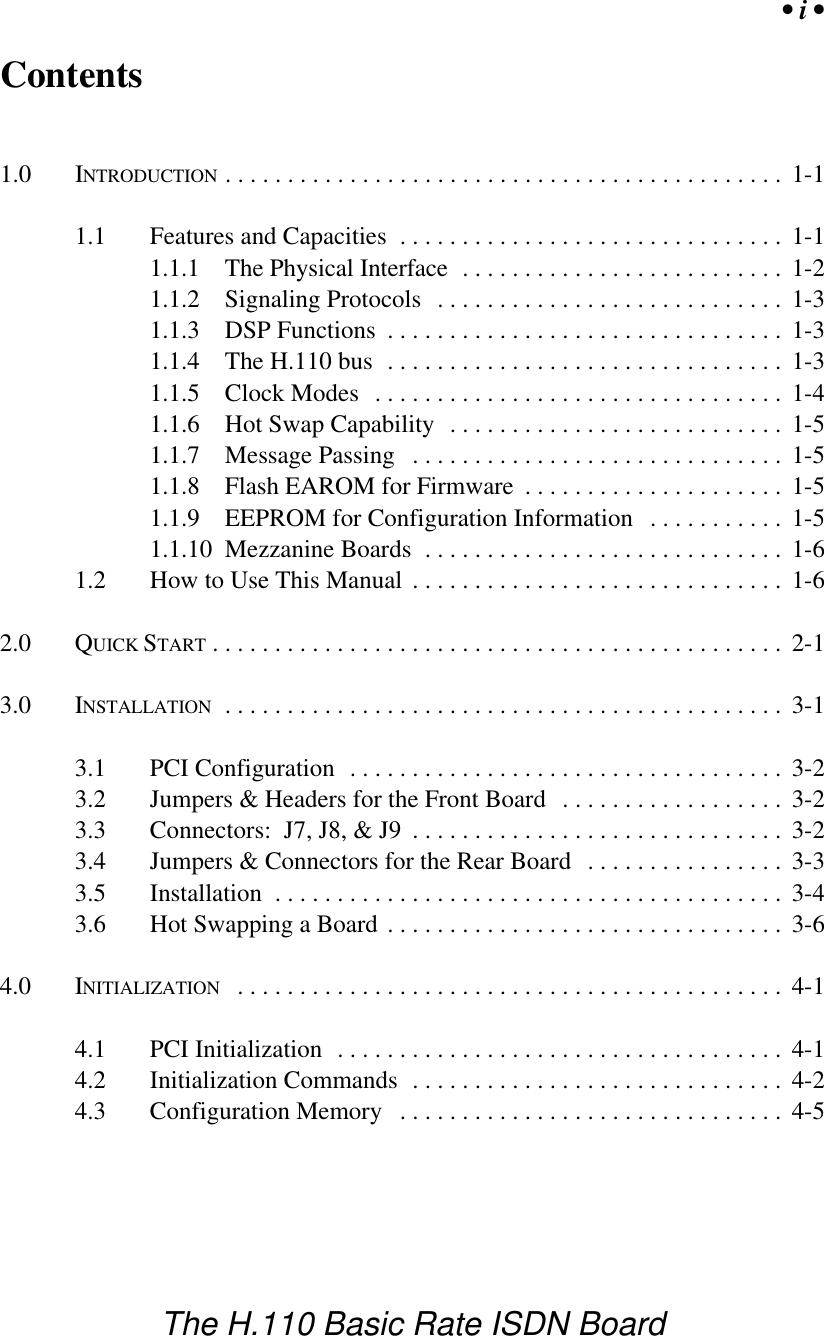
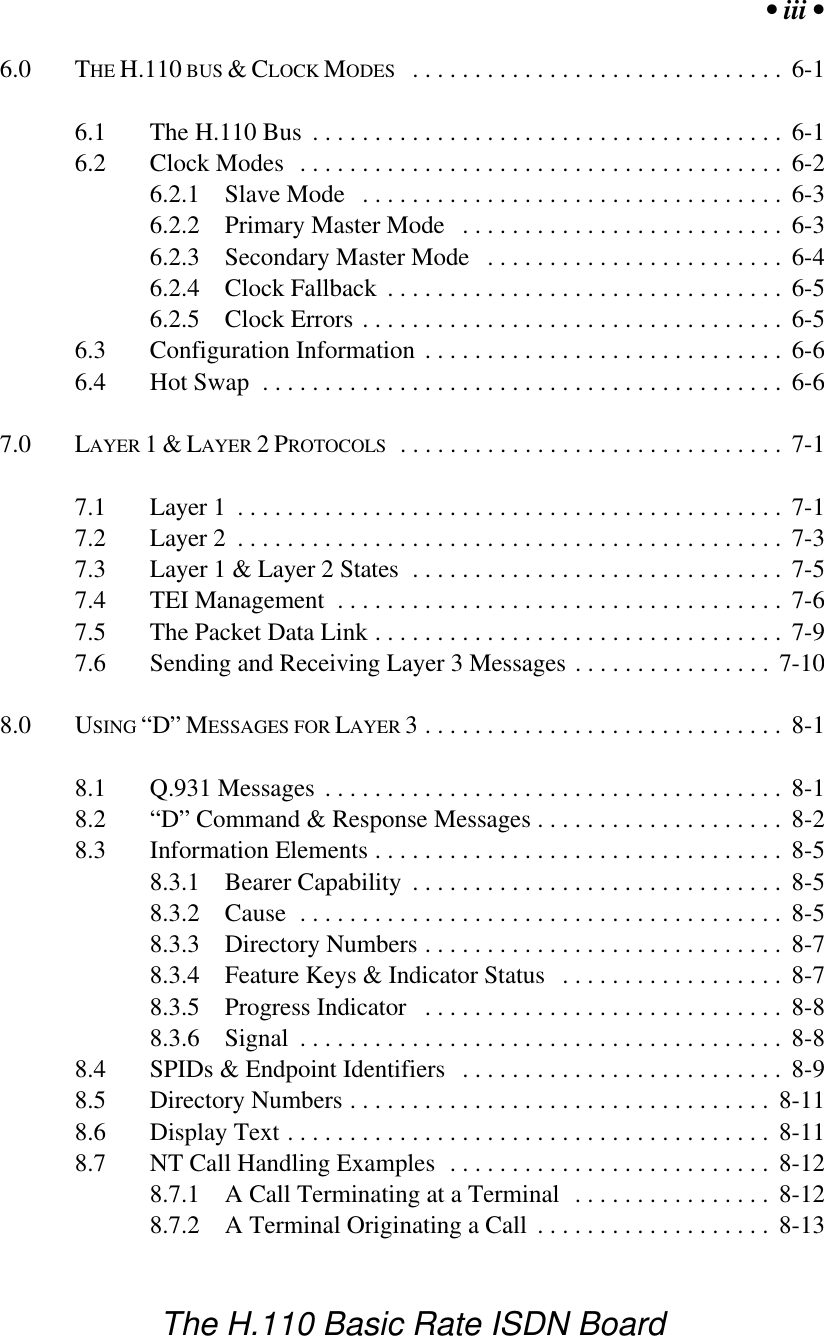
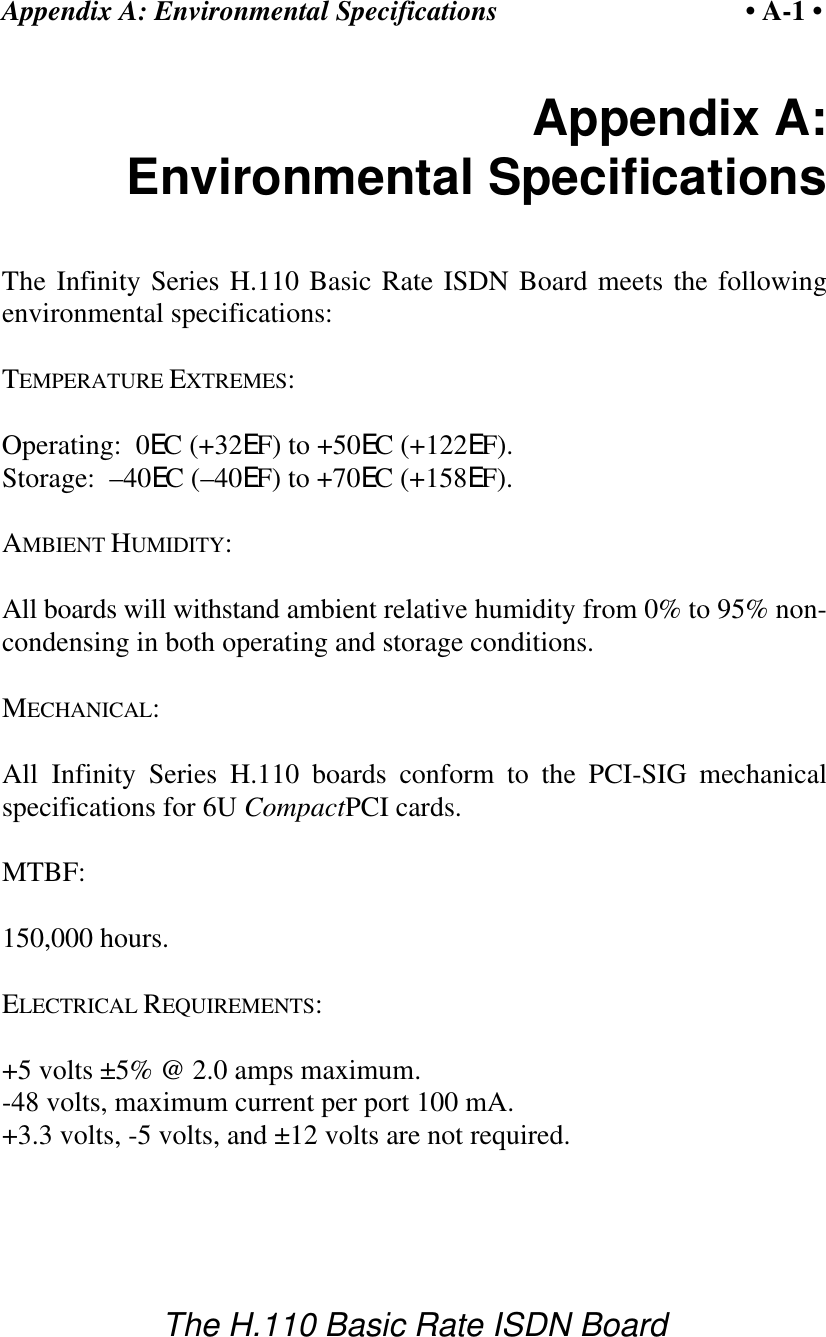
• i •The H.110 Basic Rate ISDN BoardContents1.0 INTRODUCTION ............................................. 1-11.1 Features and Capacities ............................... 1-11.1.1 The Physical Interface  .......................... 1-21.1.2 Signaling Protocols ............................ 1-31.1.3 DSP Functions ................................ 1-31.1.4 The H.110 bus ................................ 1-31.1.5 Clock Modes ................................. 1-41.1.6 Hot Swap Capability ........................... 1-51.1.7 Message Passing .............................. 1-51.1.8 Flash EAROM for Firmware ..................... 1-51.1.9 EEPROM for Configuration Information ........... 1-51.1.10 Mezzanine Boards ............................. 1-61.2 How to Use This Manual .............................. 1-62.0 QUICK START .............................................. 2-13.0 INSTALLATION ............................................. 3-13.1 PCI Configuration ................................... 3-23.2 Jumpers & Headers for the Front Board .................. 3-23.3 Connectors:  J7, J8, & J9 .............................. 3-23.4 Jumpers & Connectors for the Rear Board ................ 3-33.5 Installation ......................................... 3-43.6 Hot Swapping a Board ................................ 3-64.0 INITIALIZATION ............................................ 4-14.1 PCI Initialization .................................... 4-14.2 Initialization Commands .............................. 4-24.3 Configuration Memory ............................... 4-5
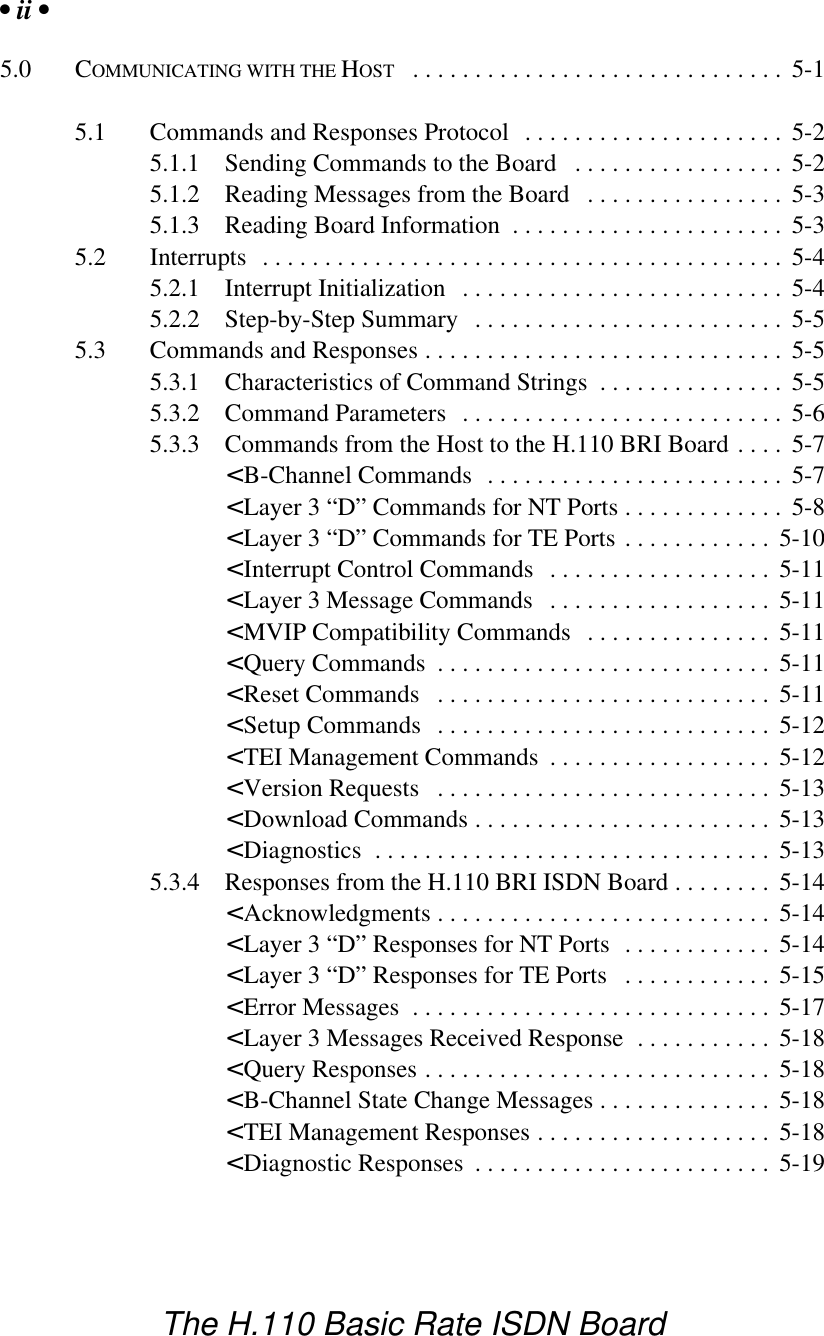
• ii •The H.110 Basic Rate ISDN Board5.0 COMMUNICATING WITH THE HOST .............................. 5-15.1 Commands and Responses Protocol ..................... 5-25.1.1 Sending Commands to the Board ................. 5-25.1.2 Reading Messages from the Board ................ 5-35.1.3 Reading Board Information ...................... 5-35.2 Interrupts .......................................... 5-45.2.1 Interrupt Initialization .......................... 5-45.2.2 Step-by-Step Summary ......................... 5-55.3 Commands and Responses ............................. 5-55.3.1 Characteristics of Command Strings ............... 5-55.3.2 Command Parameters .......................... 5-65.3.3 Commands from the Host to the H.110 BRI Board .... 5-7< B-Channel Commands  ........................ 5-7< Layer 3 “D” Commands for NT Ports ............. 5-8< Layer 3 “D” Commands for TE Ports ............ 5-10< Interrupt Control Commands .................. 5-11< Layer 3 Message Commands  .................. 5-11< MVIP Compatibility Commands ............... 5-11< Query Commands ........................... 5-11< Reset Commands ........................... 5-11< Setup Commands ........................... 5-12< TEI Management Commands .................. 5-12< Version Requests ........................... 5-13< Download Commands ........................ 5-13< Diagnostics ................................ 5-135.3.4 Responses from the H.110 BRI ISDN Board ........ 5-14< Acknowledgments ........................... 5-14< Layer 3 “D” Responses for NT Ports ............ 5-14< Layer 3 “D” Responses for TE Ports ............ 5-15< Error Messages ............................. 5-17< Layer 3 Messages Received Response ........... 5-18< Query Responses ............................ 5-18< B-Channel State Change Messages .............. 5-18< TEI Management Responses ................... 5-18< Diagnostic Responses ........................ 5-19
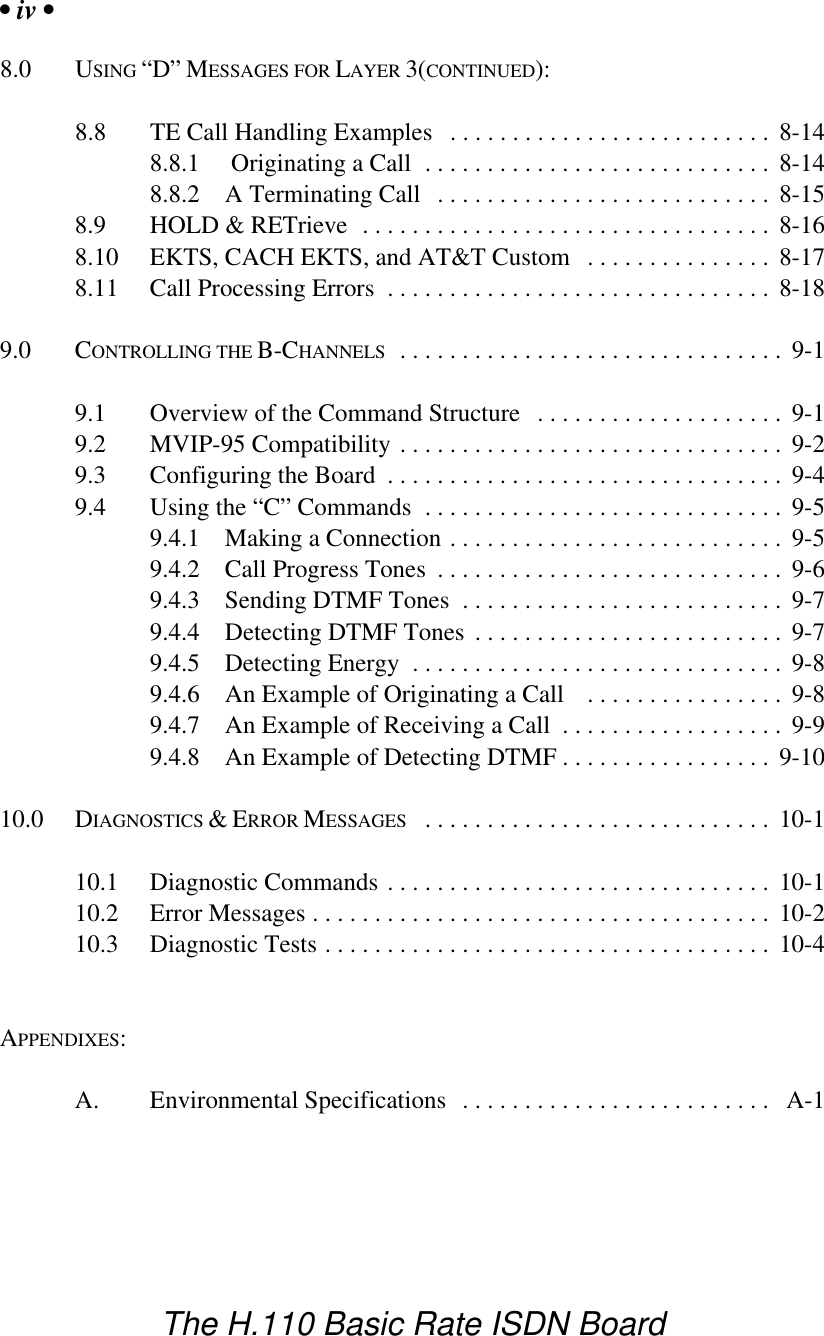
• iii •The H.110 Basic Rate ISDN Board6.0 THE H.110 BUS & CLOCK MODES .............................. 6-16.1 The H.110 Bus ...................................... 6-16.2 Clock Modes ....................................... 6-26.2.1 Slave Mode .................................. 6-36.2.2 Primary Master Mode .......................... 6-36.2.3 Secondary Master Mode ........................ 6-46.2.4 Clock Fallback ................................ 6-56.2.5 Clock Errors .................................. 6-56.3 Configuration Information ............................. 6-66.4 Hot Swap .......................................... 6-67.0 LAYER 1 & LAYER 2 PROTOCOLS ............................... 7-17.1 Layer 1 ............................................ 7-17.2 Layer 2 ............................................ 7-37.3 Layer 1 & Layer 2 States .............................. 7-57.4 TEI Management  .................................... 7-67.5 The Packet Data Link ................................. 7-97.6 Sending and Receiving Layer 3 Messages ................ 7-108.0 USING “D” MESSAGES FOR LAYER 3............................. 8-18.1 Q.931 Messages ..................................... 8-18.2 “D” Command & Response Messages .................... 8-28.3 Information Elements ................................. 8-58.3.1 Bearer Capability .............................. 8-58.3.2 Cause ....................................... 8-58.3.3 Directory Numbers ............................. 8-78.3.4 Feature Keys & Indicator Status .................. 8-78.3.5 Progress Indicator ............................. 8-88.3.6 Signal ....................................... 8-88.4 SPIDs & Endpoint Identifiers .......................... 8-98.5 Directory Numbers .................................. 8-118.6 Display Text ....................................... 8-118.7 NT Call Handling Examples .......................... 8-128.7.1 A Call Terminating at a Terminal ................ 8-128.7.2 A Terminal Originating a Call ................... 8-13
• iv •The H.110 Basic Rate ISDN Board8.0 USING “D” MESSAGES FOR LAYER 3(CONTINUED):8.8 TE Call Handling Examples .......................... 8-148.8.1  Originating a Call ............................ 8-148.8.2 A Terminating Call ........................... 8-158.9 HOLD & RETrieve ................................. 8-168.10 EKTS, CACH EKTS, and AT&T Custom ............... 8-178.11 Call Processing Errors ............................... 8-189.0 CONTROLLING THE B-CHANNELS ............................... 9-19.1 Overview of the Command Structure .................... 9-19.2 MVIP-95 Compatibility ............................... 9-29.3 Configuring the Board ................................ 9-49.4 Using the “C” Commands ............................. 9-59.4.1 Making a Connection ........................... 9-59.4.2 Call Progress Tones ............................ 9-69.4.3 Sending DTMF Tones .......................... 9-79.4.4 Detecting DTMF Tones ......................... 9-79.4.5 Detecting Energy .............................. 9-89.4.6 An Example of Originating a Call  ................ 9-89.4.7 An Example of Receiving a Call .................. 9-99.4.8 An Example of Detecting DTMF ................. 9-1010.0 DIAGNOSTICS & ERROR MESSAGES ............................ 10-110.1 Diagnostic Commands ............................... 10-110.2 Error Messages ..................................... 10-210.3 Diagnostic Tests .................................... 10-4APPENDIXES:A. Environmental Specifications ......................... A-1
• v •The H.110 Basic Rate ISDN BoardInfinity Series H.110 Basic Rate ISDN Board Technical ManualCopyright © American Tel-A-Systems, Inc., February 2000Printed in U.S.A.   All rights reserved.This document and the information herein is proprietary to American Tel-A-Systems, Inc.It is provided and accepted in confidence only for use in the installation, operation, repairand maintenance of Amtelco equipment by the original owner.  It also may be used forevaluation purposes if submitted with the prospect of sale of equipment.This document is not transferable. No part of this document may be reproduced in wholeor in part, by any means, including chemical, electronic, digital, xerographic, facsimile,recording, or other, without the express written permission of American Tel-A-Systems,Inc.The following statement is in lieu of a trademark symbol with every occurrence oftrademarked names: trademarked names are used in this document only in an editorialfashion, and to the benefit of the trademark owner with no intention of infringement of thetrademark.  “MVIP”, “H-MVIP”, “MVIP-90”, and “MVIP-95” are registered trademarksof GO-MVIP.  "SCSA" and “SCbus” are registered trademarks of the DialogicCorporation.  “CT bus” and “ECTF” are registered trademarks of the EnterpriseComputer Telephony ForumAmerican Tel-A-System, Inc.800-356-9148• 4800 Curtin Drive • McFarland, WI  53558 •• 4145 North Service Road, Suite 200 • Burlington, Ontario  L7L 6A3 •• 258M001 •
• vi •The H.110 Basic Rate ISDN BoardFCC Part 15 RequirementsWARNING:  This equipment generates, uses, and can radiate radio frequency energy andif not installed and used in accordance with the instruction manual, may cause interferenceto radio communications. Operation of this equipment in a residential area is likely to causeinterference in which case the user at his own expense will be required to take whatevermeasures may be required to correct the interference.FCC Part 68 RegistrationThis equipment is registered with the FCC under Part 68 as a component device for usewith any generic PC Type computer or compatible.  In order for FCC registration of thisproduct to be retained, all other products used in conjunction with this product to provideyour telephony function must also be FCC Part 68 registered for use with these hosts.  Ifany of these components are not registered, then you are required to seek FCC Part 68registration of the assembled equipment prior to connection to the telephone network.  Part68 registration specifies that you are required to maintain the approval and as such becomeresponsible for the following:-any component device added to your equipment, whether it bears componentregistration or not, will require that a Part 68 compliance evaluation is done andpossibly that you have testing performed and make a modification filing to the FCCbefore that new component can be used;-any modification/update made by a manufacturer to any component device withinyour equipment, will require that a Part 68 compliance evaluation is done andpossibly that you have testing performed and make a modification filing to the FCCbefore the new component can be used;-if you continue to assemble additional quantities of this compound equipment, youare required to comply with the FCC’s Continuing Compliance requirements.The telephone company has the right to request the registration information.The Digital I/F FIC code for this equipment is 02IS5.The Service Order code for this equipment is 6.oP.The network Interface Jack for this equipment is an RJ49C.The telephone company has the right to temporarily discontinue service.  They are requiredto provide notification and advise of the right to file a complaint.
• vii •The H.110 Basic Rate ISDN BoardChanges to the BRI protocols offered by the telephone company may require changes tothe setup parameters of the board.  The board may cease functioning until such changesare made.In case of trouble, you may be required to disconnect the board from the telephone linesuntil the problem is resolved.Connection to telephone company coin service is prohibited.Connection to party lines is subject to state tariffs.The authorized repair center is:American Tel-A-System, Inc.800-356-91484800 Curtin DriveMcFarland, WI  53558There are no user serviceable components on the board.  All repairs should beaccomplished by returning the board to Amtelco with a description of the problem.
• viii •The H.110 Basic Rate ISDN BoardCanadian CustomersCP-01, Issue 8, Part 1Section 14.1Notice: “The industry Canada label identifies certified equipment.  Thiscertification means that the equipment meets certain telecommunications networkprotective, operational and safety requirements as prescribed in the appropriateTerminal Equipment Technical Requirements document(s).  The Department doesnot guarantee the equipment will operate to the user’s satisfaction.Before installing this equipment, users should ensure that it is permissible to beconnected to the facilities of the local telecommunications company.  Theequipment must also be installed using an acceptable method of connection.  Thecustomer should be aware that compliance with the above conditions may notprevent degradation of service in some situations.Repairs of certified equipment should be coordinated by a representativedesignated by the supplier.  Any repairs or alterations made by the user to thisequipment, or equipment malfunctions, may give the telecommunications companycause to request the user to disconnect the equipment.Users should ensure for their own protection that the electrical ground connectionsof the power utility, telephone lines and internal metallic water pipe system, irpresent, are connected together.  This precaution may be particularly important inrural areas.CAUTION: Users should not attempt to make such connections themselves, butshould contact the appropriate electric inspection authority, or electrician, asappropriate.
• ix •The H.110 Basic Rate ISDN BoardEuropean Approvalsto be added after certification
• x •The H.110 Basic Rate ISDN BoardProduct SafetyThe ISDN cord(s) must remain disconnected from the telecommunicationssystem until the card has been installed within a host which provides thenecessary protection of the operator.If it  is subsequently desired to open the host equipment for any reason, theISDN cord(s) must be disconnected prior to effecting access to any internalparts which may carry telecommunications network voltages.This board is not intended to be connected directly to the PSTN network.Connection must be made by way of an approved NT-1 interface device.It is the responsibility of the NT-1 to provide primary high voltageprotection.
Introduction • 1-1 •The H.110 Basic Rate ISDN Board1.0 IntroductionThe Infinity Series H.110 Basic Rate Interface ISDN Board is designed toprovide thirty-two Basic Rate ISDN (Integrated Services Digital Network)interfaces connected to the H.110 bus on a board with the CompactPCIbus form factor.  Each interface or port provides a D channel for callcontrol signaling and two 64 kbps. B channels for either speech or circuitswitched data.  Each port can be independently configured as either a TE(Terminal Equipment) or NT (Network Termination) interface.  The boardprovides complete support for the ISDN Layer 1 and Layer 2 protocols, aswell as optional support for the Layer 3 protocols as defined in Q.931.  Inaddition, the board is equipped with several DSP’s to provide tonegeneration and detection. The H.110 bus was devised by the Enterprise Computer Telephony Forum(ECTF) to provide a single telecom bus for the entire industry.  It isintended for add-in boards using the CompactPCI form factor.  A varietyof boards are available from a number of different vendors.  The H.110specifications also provides for hot swap capabilities for use in highavailability applications.The board is equipped with a processor that can be used to control thelower level functions of the board. The host PC controls the board usingmessages passed through dual-ported RAM.  The board shares a commonmessage passing and control scheme with other Infinity Series H.110boards.1.1 Features and CapabilitiesThis section presents an overview of the features and capabilities of theInfinity Series H.110 Basic Rate Interface ISDN Board.
Introduction• 1-2 •The H.110 Basic Rate ISDN BoardFigure 1: The H.110 Basic Rate ISDN Board Functional Areas1.1.1  The Physical InterfaceThirty-two independent ports are provided on the board.  Each port on theboard provides a complete S/T Basic Rate ISDN interface.  This interfacecan be configured under software control as either a piece of terminalequipment to interface to a central office or PBX, or as a networktermination to interface to terminal equipment such as ISDN phone sets orISDN modems.  Layer 1 support is provided by the board to handle all thedetails of framing and clocking.Each port provides two independent B1 channels which operate at 64 kbps.
Introduction • 1-3 •The H.110 Basic Rate ISDN BoardThese channels can be switched to the H.110 bus, to each other, or to oneof the DSP resources.  In addition, there is a 16 kbps D channel which isused for signaling.1.1.2  Signaling ProtocolsISDN uses the LAPD protocol on the D channel for call control.  TheLayer 2 protocol defines the mechanism used for the exchange of messagesbetween terminal equipment and the network termination.  The boardmanages the details of this protocol while providing commands to controlaspects such as TEI (Terminal Endpoint Identifier) address management.Call control is handled by the exchange of Layer 3 messages as defined bythe Q.931 standard.  The H.110 BRI Board allows the application todirectly read and write the raw binary information field of these messages.Optionally, a higher level interface is provided that masks some of thedetails of these messages, making for a simplified applications interface.This is done through the use of “D” messages.1.1.3  DSP FunctionsThe H.110 BRI ISDN Board is equipped with DSP’s that performs avariety of functions.  DTMF and Energy detectors are available for each Bchannel.   DTMF generators are available for each B channel for signalingpurposes.  Call Progress tones are also available, with dial-tone, busy,reorder, and audible ringback being provided as well as silence and a 1004Hz. calibration tone.  1.1.4  The H.110 BusThe H.110 bus is a digital bus for transporting PCM (Pulse CodeModulation) signals between telephony boards.  It was created by theECTF to provide a common bus structure for future development thatwould end the “bus wars” between the various legacy busses such as theSCbus and the MVIP bus.
Introduction• 1-4 •The H.110 Basic Rate ISDN BoardPCM is a standard method of digitizing phone signals.  It involves encodingeach channel at an 8 kHz rate using eight bits.  The signals from multiplechannels are then combined into a frame.  On the H.110 bus, each frameconsists of 128 channels or timeslots.  The bit rate of the H.110 bus is8.192 MHZ.  Thirty-two wires, also called streams, each carrying 128timeslots, are combined to form the bus, and provide a total of 4096timeslots.  Two timeslots are required for a full conversation, one for eachtalker.In addition to the streams, a number of other signals necessary to maintainsynchronization between all the boards in the system are carried on the bus.These signals provide the clocking and framing information.  Redundantclocks are provided to aid in recovery if the primary clock should fail.The H.110 bus consists of backplane connections on a 6U CompactPCIbackplane that is used to interconnect the boards in the system.  The CTBus connections are made through the J4/P4 connector.  The electrical andmechanical requirements of H.110 boards are tightly specified to insure thereliability and consistent performance of the CT Bus in any validconfiguration of conforming boards.1.1.5  Clock ModesThe H.110 BRI Board can operate in a variety of clock modes.  Modes areavailable so that the master clock can either be derived from the H.110 bus,one of the Basic Rate Interfaces, or be provided by the H.110 BRI Board.The clock redundancy and clock fallback functions of the H.110 bus arealso supported so that the H.110 BRI Board can be set to provide a clockto the H.110 bus if the master clock on that bus should fail.1.1.6 Hot Swap CapabilityThe H.110 Specification includes “hot swap” capability.  This capabilityallows for the insertion and removal of boards from a live system.  Notonly are there provisions for controlling the electrical signals to preventdisruption when inserting and removing boards, but also for informing
Introduction • 1-5 •The H.110 Basic Rate ISDN Boarddrivers and applications so that the board resources can be managed as theyare added or deleted.  Each H.110 board is provided with a blue LED thatis used to inform an operator when it is safe to insert or remove a board.1.1.7 Message PassingThe board occupies 8K of memory space on the host PC.  This 8K mayreside anywhere within the PC’s address space.  As a CompactPCI board,the address and interrupt of the board is assigned at boot time.  Themessage passing scheme used by the Infinity Series H.110 BRI Board isidentical to that of the other Infinity Series H.110 boards, allowing for theeasy combination of a variety of Infinity Series H.110 boards in a singlesystem.The message passing scheme and message syntax of Infinity Series H.110boards is similar to that of the older Infinity Series H.100 boards and XDSseries of MVIP and SCbus boards.  This facilitates the easy migration fromISA and PCI systems to designs using CompactPCI boards1.1.8 Flash EAROM for FirmwareThe firmware for both the main processors and for the DSP’s is containedin Flash EAROM.  This allows for easy upgrades of the firmware on theboard in the field without requiring time consuming downloads every timea system boots.  Once reprogrammed, the new firmware is retained evenwhen the power is removed.  The original, factory programmed firmwareis also retained on board and can be accessed by installing a jumper.1.1.9 EEPROM for Configuration InformationISDN interfaces can require a substantial amount of information to beprogrammed into the system.  These includes items such as the SPIDs(Service Profile Identifiers) and DNs (Directory Numbers) associated witheach interface as well as board configuration information such as the typeof port (NT or TE) and the protocol level supported.  To reduce the burden
Introduction• 1-6 •The H.110 Basic Rate ISDN Boardon the application, the board has an EEPROM capable of providing non-volatile storage for this information.  This allows the board to automaticallyconfigure itself upon a restart.1.1.10 Mezzanine BoardsThe H.100 BRI Board provides connectors for attaching two mezzanineboards.  These mezzanine boards can be used for additional processing ofsignals on the B-channels.  The connectors are compatible with the BicomFlex Port DSP Card which can be used for speech processing or providingfax services.  Future mezzanine boards may be provided to allow for digitaldata services using the B-channels.1.2  How to Use This ManualThe first five sections in this manual are organized in the order you shouldread and use them to get started with your H.110 BRI ISDN Board.  Werecommend that you begin with these three steps.1. Follow the instructions in section 2.0 (Quick Start) and 3.0(Installation).  These sections will tell you if your board is operatingcorrectly within your system.  You don’t need to be familiar with theboard’s command set to complete this step.2.  Read section 4.0 (Initialization) to initialize the board within yoursystem.  Your application must perform these initializationprocedures whenever the computer is powered up in order for theboard to communicate with application.3.  Read section 5.0 (Communications with the Computer) for anoverview of how to communicate with the H.110 BRI ISDN Board.Section 5.0 includes a summary of the commands for constructingyour application and details concerning system interrupts.
Introduction • 1-7 •The H.110 Basic Rate ISDN BoardBefore you can actually build your application, read section 6.0 (The H.110Bus and Clock Modes), 7.0 (Layer 1 and Layer 2 Protocols), 8.0 (Using“D” Messages for Layer 3) and 9.0 (Controlling the B-Channels).  Thesesections explain, with practical examples, how the H.110 BRI ISDN Boardoperates and how to use the command set to achieve the desired results.  Section 10.0 explains diagnostic and error messages that may occur.The Appendix contains information on power requirements and interfacingthat will be helpful installing your H.110 BRI ISDN Board.
Introduction• 1-8 •The H.110 Basic Rate ISDN Boardthis page intentionally left blank
Quick Start • 2-1 •The H.110 Basic Rate ISDN Board2.0  Quick StartThis section describes the first steps you should perform to determine ifyour Infinity Series H.110 Basic Rate ISDN Board is communicatingcorrectly with your CompactPCI system. You can perform this quick checkwithout connecting any cables.The exact procedure will vary depending on which operating system youare running.  For each operating systems, drivers are required to interfaceto the boards.  The drivers supplied by Amtelco have  tests built into themto verify communications with the boards.  These drivers also comesupplied with utility programs that allow the developer to testcommunications with the board.  Please consult the appropriatedocumentation for the driver and operating system you are using.Quick Start Procedure1. With the chassis power off, insert the board into a slot.2. Turn on the computer.3. If the Amtelco driver is not already installed, install it now,following the instructions supplied with the driver.4. Most Amtelco drivers will display a list of boards that areinstalled (see the documentation for the particular driver thatyou are using).  If the H.110 Basic Rate ISDN Board is listed,skip to step 6.5. If the board is not listed, there may be a problem with theboard not being seated correctly in the backplane.  There mayalso be a problem with a memory or interrupt conflict.  Powerdown the chassis and check that the board is properly seated
Quick Start• 2-2 •The H.110 Basic Rate ISDN Boardin the connector and repeat steps 1-4.  If this does notremedy the problem, try removing any other computertelephony boards in the system.  If your chassis is unable tofind the board, consult the number at the end of this section.6. Run the program “xdsutil” supplied with the driver.  Send themessage “IN” to the H.110 Basic Rate ISDN Board.  Theboard should respond with the message “IA”.7. Send the message “VC” to the board.  Verify that the ReceiveMessage reads:  VCxxxxvvvvHBN  (where xxxxvvvv isa variable indicating the firmware version).8. If the Communications screen shows the correct commandresponses, your H.110 Basic Rate ISDN Board iscommunicating with the host.  You may now power down thecomputer and attach the necessary cables (see section 3.4)For technical assistance, call Amtelco at 1-608-838-4194 ext.168.
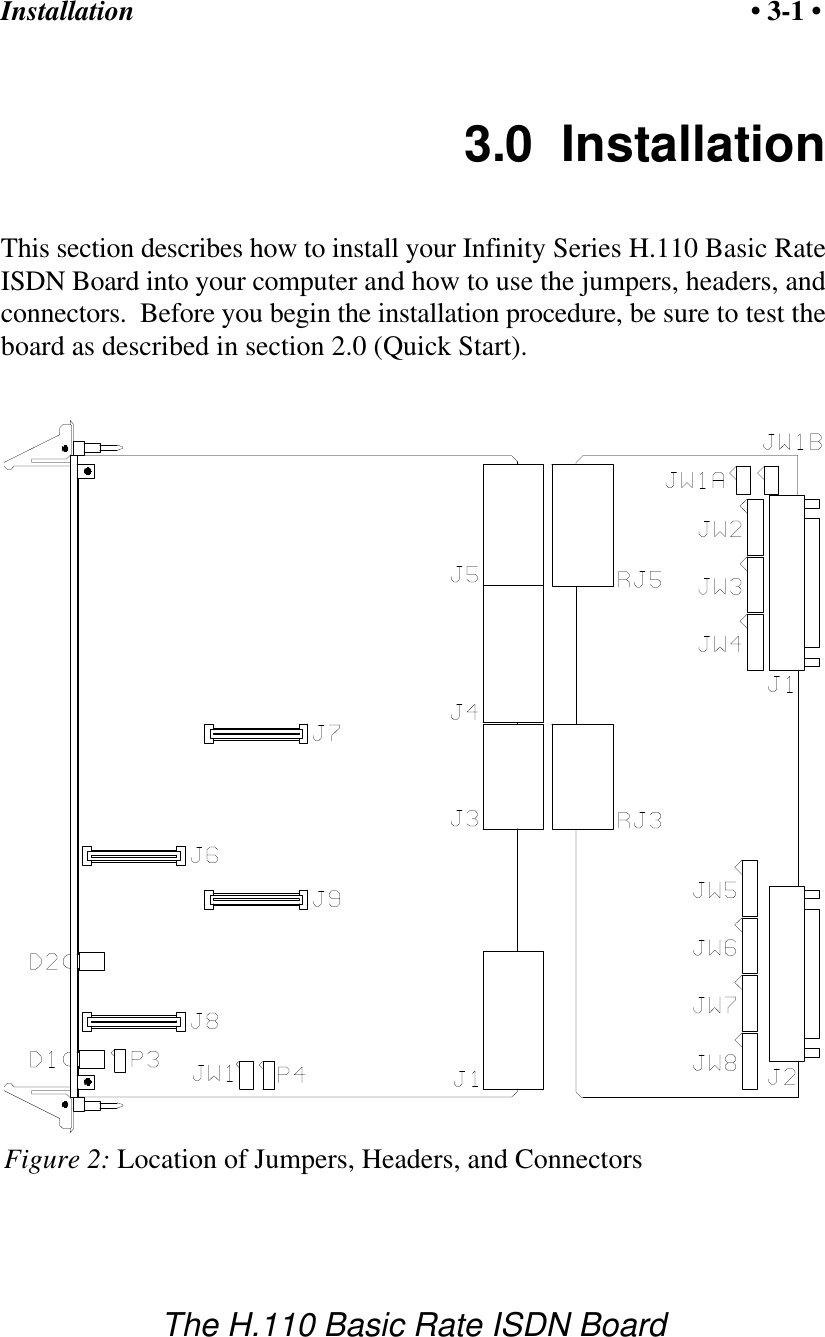
Installation • 3-1 •The H.110 Basic Rate ISDN BoardFigure 2: Location of Jumpers, Headers, and Connectors3.0  InstallationThis section describes how to install your Infinity Series H.110 Basic RateISDN Board into your computer and how to use the jumpers, headers, andconnectors.  Before you begin the installation procedure, be sure to test theboard as described in section 2.0 (Quick Start).
Installation• 3-2 •The H.110 Basic Rate ISDN BoardThe Infinity Series H.110 Basic Rate ISDN Board actually consists of  twoboards.  The  front board which contains the processor, DSP’s, switching,HDLC controllers, and logic.  The rear board contains the interface andconnectors to the Basic Rate Interface ports.3.1  PCI ConfigurationAs Infinity Series boards conform to the PCI standards, there are noswitches to set to configure the H.110 BRI Board's memory address, I/Oaddresses, or interrupt.  The host processor’s bios will automaticallyconfigure the board at boot time to avoid conflicts with other boards in thesystem.3.2  Jumpers & Headers for the Front BoardThe following is a complete list of all jumpers for the H.110 BRI ISDNBoard:JW1-1 Firmware Select.  If firmware has been downloaded to theboard, this jumper selects whether the downloaded firmwareor the factory default firmware is used.  When this jumper isinstalled, the factory default firmware is executed wheneverthe board is reset.  When the jumper is not installed, thedownloaded firmware will be executed after a reset if it ispresent.  If no downloaded firmware is present, the factorydefault firmware is executed after reset.  JW1-2 DSP Firmware Select.  Two separate firmware programs areincluded in the EAROM, one for the  board processor andone for the DSP.  If JW1-2 is installed and downloaded DSPfirmware is present, the factory DSP firmware is executedafter reset.  Otherwise, the downloaded firmware is executedif present.  See JW1-1.
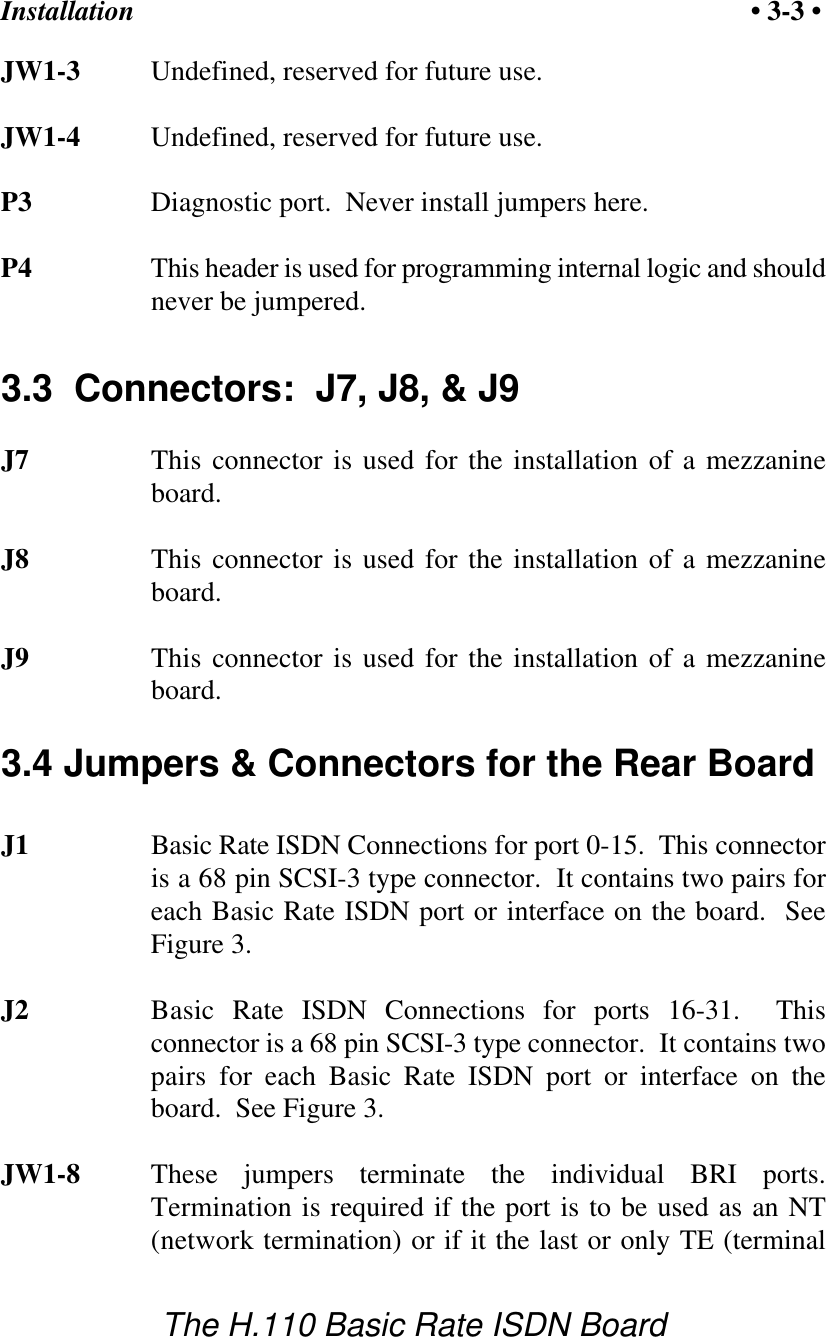
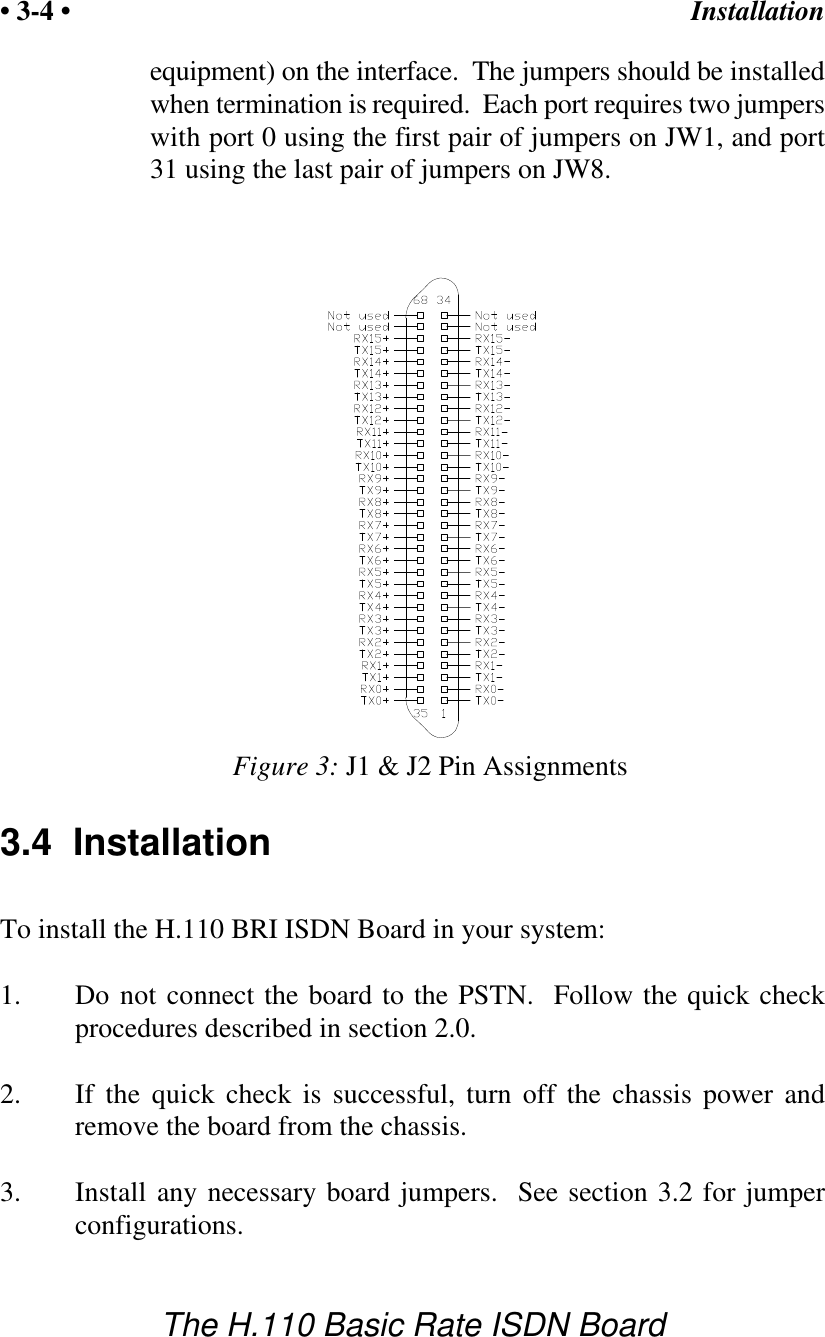
Installation • 3-3 •The H.110 Basic Rate ISDN BoardJW1-3 Undefined, reserved for future use.JW1-4 Undefined, reserved for future use.P3 Diagnostic port.  Never install jumpers here.P4 This header is used for programming internal logic and shouldnever be jumpered.3.3  Connectors:  J7, J8, & J9J7 This connector is used for the installation of a mezzanineboard.J8 This connector is used for the installation of a mezzanineboard.J9 This connector is used for the installation of a mezzanineboard.3.4 Jumpers & Connectors for the Rear BoardJ1 Basic Rate ISDN Connections for port 0-15.  This connectoris a 68 pin SCSI-3 type connector.  It contains two pairs foreach Basic Rate ISDN port or interface on the board.  SeeFigure 3.J2 Basic Rate ISDN Connections for ports 16-31.  Thisconnector is a 68 pin SCSI-3 type connector.  It contains twopairs for each Basic Rate ISDN port or interface on theboard.  See Figure 3.JW1-8 These jumpers terminate the individual BRI ports.Termination is required if the port is to be used as an NT(network termination) or if it the last or only TE (terminal
Installation• 3-4 •The H.110 Basic Rate ISDN BoardFigure 3: J1 & J2 Pin Assignmentsequipment) on the interface.  The jumpers should be installedwhen termination is required.  Each port requires two jumperswith port 0 using the first pair of jumpers on JW1, and port31 using the last pair of jumpers on JW8.3.4  InstallationTo install the H.110 BRI ISDN Board in your system:1. Do not connect the board to the PSTN.  Follow the quick checkprocedures described in section 2.0.2. If the quick check is successful, turn off the chassis power andremove the board from the chassis.3. Install any necessary board jumpers.  See section 3.2 for jumperconfigurations.
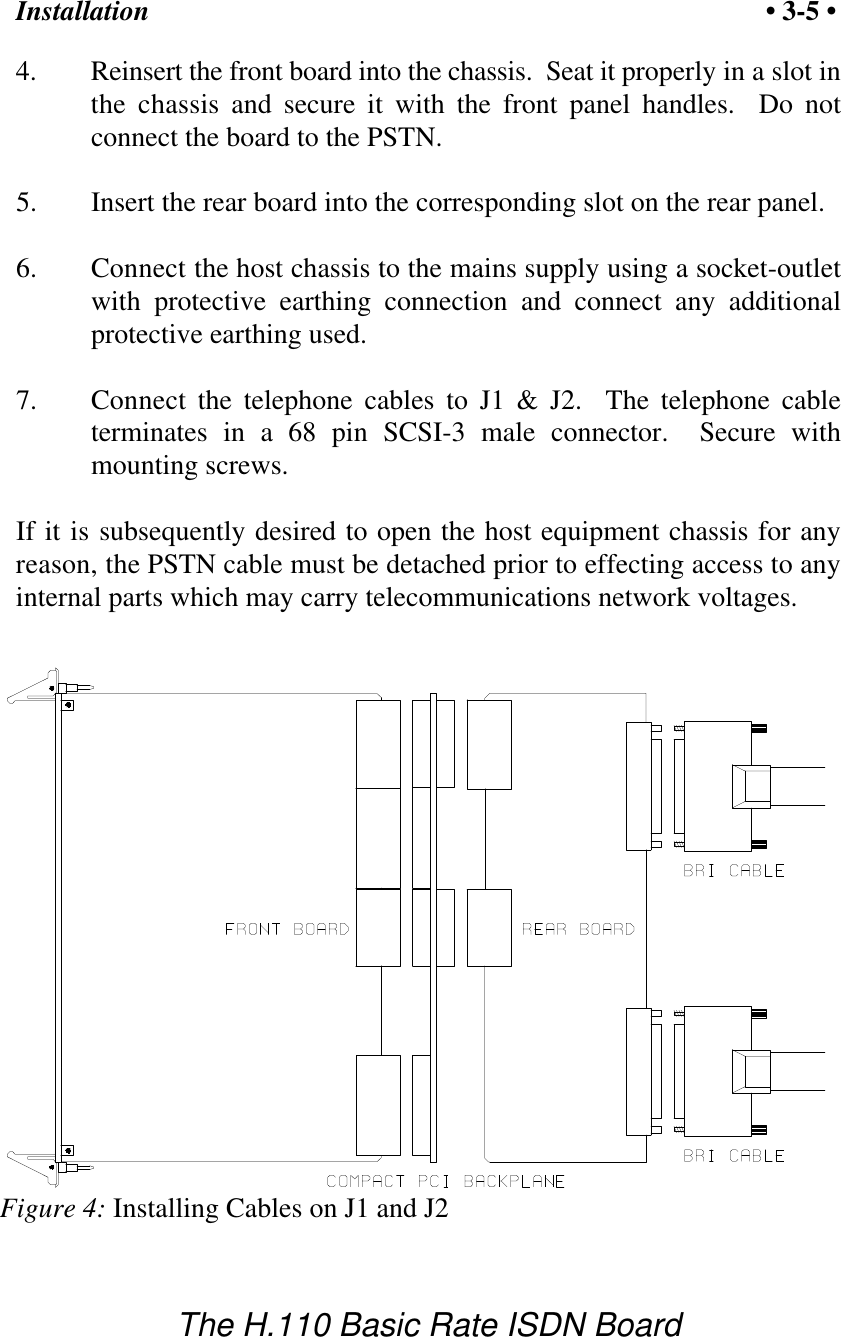
Installation • 3-5 •The H.110 Basic Rate ISDN BoardFigure 4: Installing Cables on J1 and J24. Reinsert the front board into the chassis.  Seat it properly in a slot inthe chassis and secure it with the front panel handles.  Do notconnect the board to the PSTN.5. Insert the rear board into the corresponding slot on the rear panel.6. Connect the host chassis to the mains supply using a socket-outletwith protective earthing connection and connect any additionalprotective earthing used.7. Connect the telephone cables to J1 & J2.  The telephone cableterminates in a 68 pin SCSI-3 male connector.  Secure withmounting screws.If it is subsequently desired to open the host equipment chassis for anyreason, the PSTN cable must be detached prior to effecting access to anyinternal parts which may carry telecommunications network voltages.
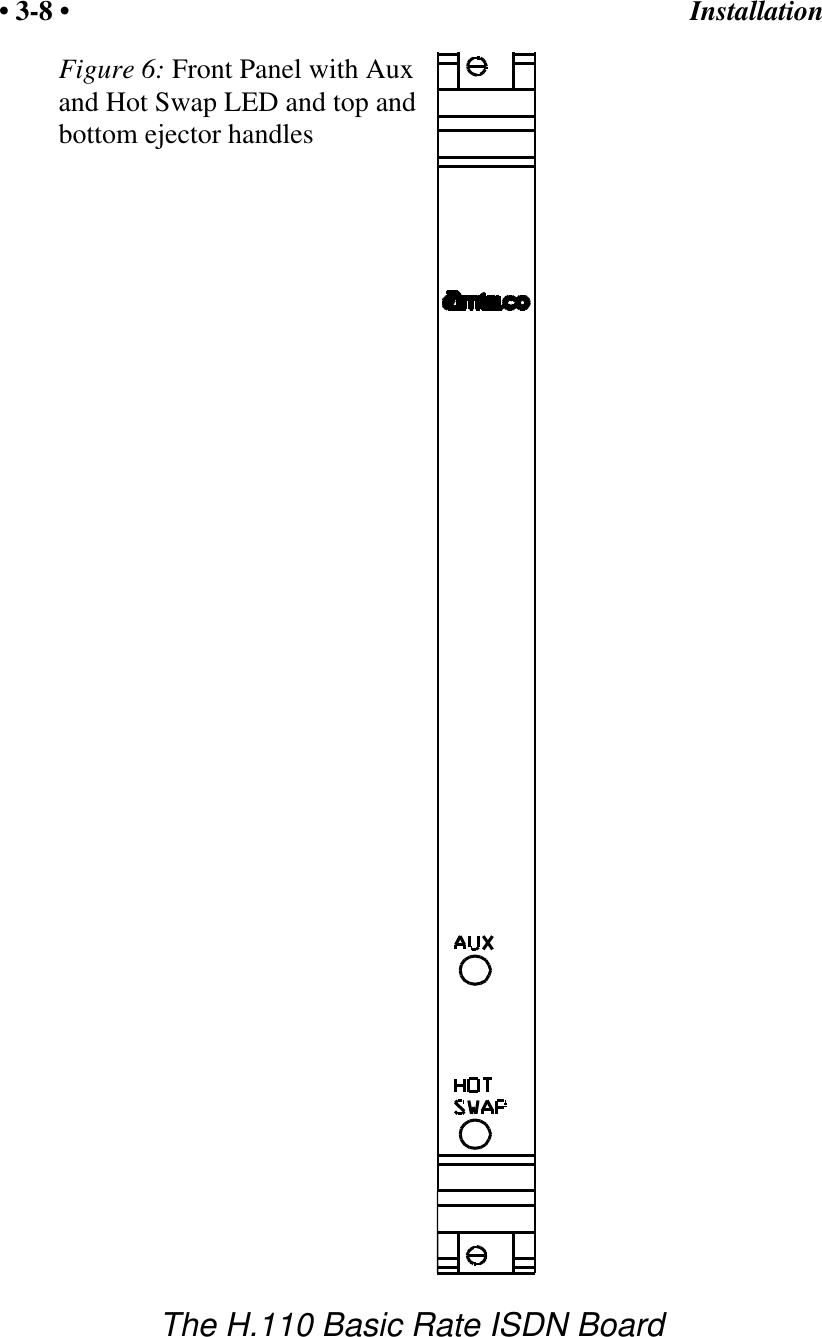
Installation• 3-6 •The H.110 Basic Rate ISDN Board3.5 Hot Swapping a BoardThe Infinity Series H.110 Basic Rate ISDN Board can be “hot swapped,”that is it can be removed from a functioning system without turning thepower off or interrupting applications.  However, to be able to do this, thehost processor must be equipped with suitable hot swap drivers as well asa hot swap manager which will alert applications when a board has beeninserted or removed from the system so that resources can be properlymanaged.  It is beyond the scope of this manual to describe the operationof either the hot swap driver or hot swap manager.Each H.110 board is equipped with a switch linked to the lower ejector taband a blue LED.  This combination is used to coordinate the actions of anoperator with the system software.  When inserting a board, the board ispushed in part of the way until the blue LED is illuminated.  The insertionmay then be completed.  When the connection process is complete, theLED will go out.  To remove a board, the lower ejector handle is depresseduntil it is in the unlatched position.  When the blue LED comes on,  theboard may be removed from the system.The rear board MUST ALWAYS be inserted BEFORE the front board,and  removed AFTER the front board.To install the front board in a system under power:1. Insert the board with the ejector tabs spread apart until partiallyengaged.2. Wait until the blue LED is illuminated.3.  Finish inserting the board by pushing the ejector tabs towards eachother.  The LED should then go out.
Installation • 3-7 •The H.110 Basic Rate ISDN BoardTo remove the front board from a system under power:1. Depress the lower ejector tab until it is in the unlatched position.2. Wait until the blue LED is illuminated.3. Finish removing the board by spreading the ejector tabs apart untilthe board is ejected.To insert the rear panel board into a system under power:1. The rear board should be disconnected from the PSTN.  Make surethere is no board in the corresponding front panel slot.2. Insert the rear board.3. Connect the telephone cables to J1 & J2.  The telephone cableterminates in a 68 pin SCSI-3 male connector.  Secure withmounting screws.4. Insert the front board as described above.To remove a rear panel board from a system under power:1. Remove the front board as described above.2. Disconnect the PSTN cables from J1 and J2.3. Remove the rear board from the system.
Installation• 3-8 •The H.110 Basic Rate ISDN BoardFigure 6: Front Panel with Auxand Hot Swap LED and top andbottom ejector handles
Initialization • 4-1 •The H.110 Basic Rate ISDN Board4.0  InitializationThis section describes the procedures necessary to initialize the system andenable the host computer to communicate with the Infinity Series H.110Basic Rate ISDN Board.  XDS drivers will implement some of theseprocedures.4.1  PCI InitializationThe system BIOS is responsible for recognizing CompactPCI boards andmapping them into the I/O and memory spaces as required.  It is alsoresponsible for assigning interrupts to the board.  This is done through a setof on board registers which contain information specifying the memory,I/O, and interrupt needs of the board.  A set of BIOS functions exist foraccessing this information.  A detailed description of these functions can befound in the PCI BIOS Specification published by the PCI SIG, the PCISpecial Interest Group.Normally, the drivers supplied by Amtelco will take care of the process  offinding Infinity Series boards and establishing communications.  Theinformation in the rest of this subsection is for background only.The configuration registers of every CompactPCI board contain a vendorID and device ID code.  These codes are unique to each board vendor.  AllInfinity Series H.110 boards have the same vendor and device IDs.  Thevendor ID is 14E3h and the device ID is 0101h.  A BIOS function existsthat will find each instance of a particular vendor and device ID, and whichreturns with a bus and device number.  The bus and device number is thenused in functions to read the configuration registers.The configuration registers contain information on the base address of thememory and I/O assigned to the board by the BIOS.  A PCI board may
Initialization• 4-2 •The H.110 Basic Rate ISDN Boardhave up to six different base addresses.  On Infinity Series H.110 boards,the first two base addresses are used by the PCI bus interface logic.  Thethird base address which is contained in registers 18-1Bh contains thememory location of the dual-ported memory that is used to pass messages.The interrupt information is contained in register 3Ch.  The information inthese configuration registers can be used by a driver to address the board.4.2  Initialization CommandsThe H.110 BRI ISDN Board is initialized by sending a sequence ofcommand messages to the board.  The process of sending messages isdescribed in detail in Section 5.0, but normally it is accomplished eitherwith a low-level driver XMT command or the API functionxds_msg_send.  Response messages are read using the low-level driverRCV command or the API function xds_message_receive.To enable communications with the H.110 BRI ISDN Board, an INcommand message should be sent to the board.  The board will respondwith an IA message.The board may be reset using the command message RA.  The board willrespond with an RA message.Your application can now configure the H.110 BRI Board using thesecommandsCommand PurposeSCmsabb(c) Sets the clock mode for the board.  The parameter  mis the clock-mode. The parameter s is the clock sub-mode.  The parameters a, bb, and c are used tospecify additional clock control information such asclock rates, local network, and CT_NETREF settings.The default mode on power-up or restart is mode 0.See section 6.0 of this manual for details of clockmode arguments.
Initialization • 4-3 •The H.110 Basic Rate ISDN BoardSEx Sets the encoding mode for the board.  The parameterx can be either M for Mu-Law as used in NorthAmerica and Japan, or A for A-Law as used in Europeand Asia.  The default value is for Mu-Law.SFb(xx...xx) Sets the power feed enable for each port in a bank ofsixteen on the board.  The H.110 BRI ISDN Boardcan supply PS1 power for terminal devices connectedto ports configured as an NT.  The bank b can beeither “L” for the ports 0-15 or “H” for ports 16-31.The parameter can be “F” to turn the power feed off,“N” to turn it on, or “*” for no change.   The port typeparameter must be included of each of the 16 ports inthe bank.  SSxy Set Layer 2 system options.  x and y can take valuesof 0 or 1.  If x is a 1, timer TWAIT is disabled, and aTE port will not automatically request a TEIassignment.  Option y controls the form of the TEICheck Response message.  If this option is a 0, allTEI’s are reported in a single message, if a 1, eachTEI is reported in a separate message.  The defaultsare 0 for both options.STb(xx...xx) Set the port type for each port in a bank of sixteen onthe board.  The bank b can be either “L” for the ports0-15 or “H” for ports 16-31.  Port types can be “N”for NT or network termination, “T” for TE or terminalequipment, or “U” for undefined for unused ports.  An“*” may be used to indicate no change.  The N type isused when interfacing to terminal equipment such asISDN station sets or ISDN modems.  The T type isused when interfacing to the central office equipmentor when the board is acting as a terminal device.  Theport type parameter must be included of each of the 16ports in the bank.
Initialization• 4-4 •The H.110 Basic Rate ISDN BoardIf the optional Layer 3 support is to be used, it will be necessary to setseveral additional parameters for each port or B channel.  The followingcommands are used for that purpose:SLb(ll...ll) This command is used to set the protocol levelsupported by the board for each port in a bank ofsixteen.    The bank b can be either “L” for ports 0-15or “H” for ports 16-31.  The choices are:2 - Layer 2 support only3 - Layer 3 supportA - AT&T Custom protocol supportD - NI-1 support (DMS-100 & 5ESS switches)E - CACH EKTS supportN - NI-1 support (Siemens EWSD switch) If Layer 2 support is selected, it is the responsibility ofthe application to compose and interpret the Q.931messages using the auxiliary mailboxes.  Layer  3support is provided through the “D” messages. (Seesection 8.0).  The D protocol level option should beselected for Layer 3 support when operating as a TEconnected to a Nortel DMS-100 or Lucent 5ESSswitch.  This option controls some aspects of TEI anddirectory number usage as implemented by theseswitches.  The Siemens EWSD switch will operatewith either the 3 or N setting which are equivalent.The default is Layer 2 support.  The protocol levelparameter must be included for each of the 16 portswithin the bank.SDxx(dn)/(spid) This command sets the default directory number andSPID for each B channel xx.  For a port defined as anNT, only the directory number is specified.  This is thenumber that will be used as the default called directorynumber for calls originating on the port. For portsdefined as a TE, it will be necessary to define both a
Initialization • 4-5 •The H.110 Basic Rate ISDN BoardSPID and a directory number.  The directory numberwill be the calling number used for calls originatingfrom the port.  If only a single SPID is required for theinterface, this should be defined for the B1 channel.If two SPID’s are required, the voice SPID should bedefined for the B1 channel and the data SPID for theB2 channel.  Directory numbers are seven digits inlength and SPIDs are 10-14 digits.4.3 Configuration MemoryMuch of the configuration information used to initialize the board is fixedin nature, such as the port types, SPID’s and Directory Numbers.  Tosimplify initialization of the board, the configuration can be stored in anonboard EEPROM.  This information can be recalled upon a restart of theboard eliminating the need to send this information to the board each timean application runs.  To control the EEPROM, three commands areprovided.  These are:SMS This command saves the current configuration including porttypes, the protocol level, SPID’s and Directory Numbers.SML This command will cause the configuration saved in theEEPROM to be loaded into the processor memory.  It is notnecessary to use this command on a restart as the informationsaved in the EEPROM will automatically be loaded into theprocessor memory.SMC This command will clear the EEPROM.  If this command isused, the board will not read the EEPROM on a power up orrestart and all required configuration information will have tobe sent from the application.If the board configuration is saved in the EEPROM, it will still be necessaryto send the IN and SC messages to enable messages and set the clockmode.
Initialization• 4-6 •The H.110 Basic Rate ISDN Boardthis page intentionally left blank
Communicating with the Host • 5-1 •The H.110 Basic Rate ISDN Board5.0 Communicating with the HostThis section describes how the host computer communicates with theInfinity Series H.110 Basic Rate ISDN Board.  It includes the definitionsfor the H.110 BRI Board commands and responses along with a descriptionof the mailboxes used for messaging.The board is controlled by the host computer through a system of fourmailboxes.  The messages consist of short NUL-terminated ASCII strings,which are easy for the host software to compose and parse.  The board iscapable of buffering up to eight messages in either direction and can drivean interrupt line when it has a message for the host.  Messages may notexceed 32 characters.There are two main mailboxes, one for messages to the board and one formessages from the board, and two flags associated with them.  A 00h in aflag byte indicates the mailbox is free, a non-zero value indicates that themailbox is occupied.  The mailboxes and their flags are contained in an 8Kblock of  dual-ported memory at the following offsets:receive mailbox 1F80htransmit mailbox 1FC0htransmit flag 1FFChreceive flag 1FFEhThe board's base address is determined by reading PCI ConfigurationSpace offset 18h.  The 32-bit value at this location is the base address forthe dual-ported memory on the board.To send a message, the message is placed in the mailbox and the flag is setto 01h.  To read a message, the message is removed from the mailbox andthe flag is cleared to 00h.  This will clear the interrupt hardware.
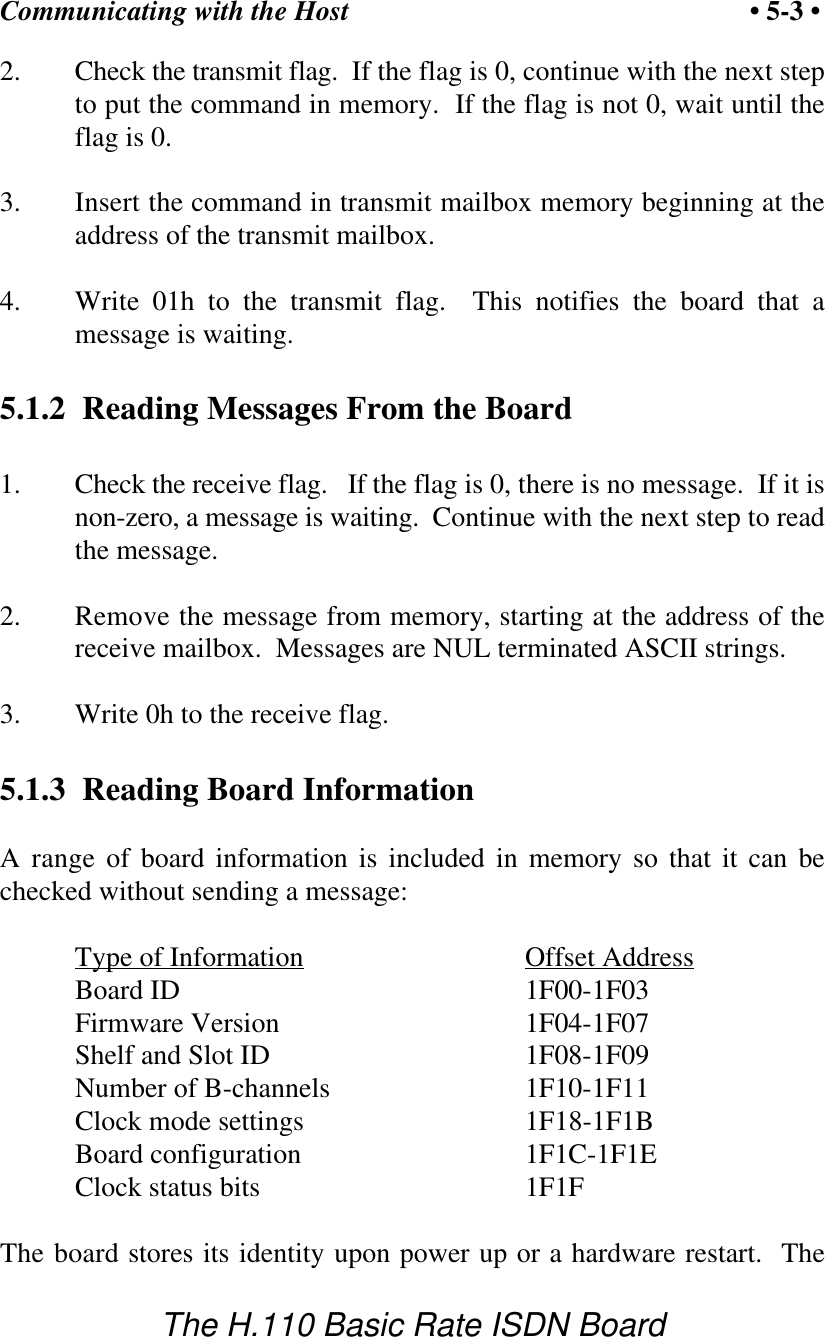
Communicating with the Host• 5-2 •The H.110 Basic Rate ISDN BoardIn addition to the two main mailboxes, there are two auxiliary mailboxesthat are used for passing Layer 3 messages to and from the board.  Thesemailboxes are only used in conjunction with the “LC” and “LR” commandand response messages in the main mailboxes.  Each of these auxiliarymailboxes begins with two bytes indicating the length of the Layer  3message (low order byte first)  and 260 bytes for the body of the message(the maximum size of a information field for Q.931 messages).  Themailbox for messages to the board has an offset of 1400h and the mailboxfor messages from the board is at an offset of 1600h.To send a Layer 3 message, the transmit flag for the main mailbox must beclear.  The message and its length is first placed in the auxiliary mailbox.An “LC” or “LR” command is then placed in the main mailbox, and finally,the transmit flag is set to 01h.  It is important that both the Layer 3 messageand the command be placed in the appropriate mailboxes before thetransmit flag is set.The presence of a Layer 3 message from the board is indicated by eitheran “LC” or “LR” message in the main mailbox.  The Layer 3 message mustbe read before the receive flag is cleared.  Failure to do so may result in themessage being overwritten.5.1  Commands and Responses ProtocolThis section describes the necessary step-by-step procedures for the hostto send a command to the board and to remove a response from the board.5.1.1  Sending Commands to the BoardThe basic steps to sending a command to the H.110 BRI ISDN Board are:1. Build a command.  Broadly speaking, a command is a string ofASCII characters with a NUL (00h) termination character.
Communicating with the Host • 5-3 •The H.110 Basic Rate ISDN Board2. Check the transmit flag.  If the flag is 0, continue with the next stepto put the command in memory.  If the flag is not 0, wait until theflag is 0.3. Insert the command in transmit mailbox memory beginning at theaddress of the transmit mailbox.4. Write 01h to the transmit flag.  This notifies the board that amessage is waiting.5.1.2  Reading Messages From the Board1. Check the receive flag.   If the flag is 0, there is no message.  If it isnon-zero, a message is waiting.  Continue with the next step to readthe message.2. Remove the message from memory, starting at the address of thereceive mailbox.  Messages are NUL terminated ASCII strings.3. Write 0h to the receive flag.5.1.3  Reading Board InformationA range of board information is included in memory so that it can bechecked without sending a message:Type of Information Offset AddressBoard ID 1F00-1F03Firmware Version 1F04-1F07Shelf and Slot ID 1F08-1F09Number of B-channels  1F10-1F11Clock mode settings 1F18-1F1BBoard configuration 1F1C-1F1EClock status bits 1F1FThe board stores its identity upon power up or a hardware restart.  The
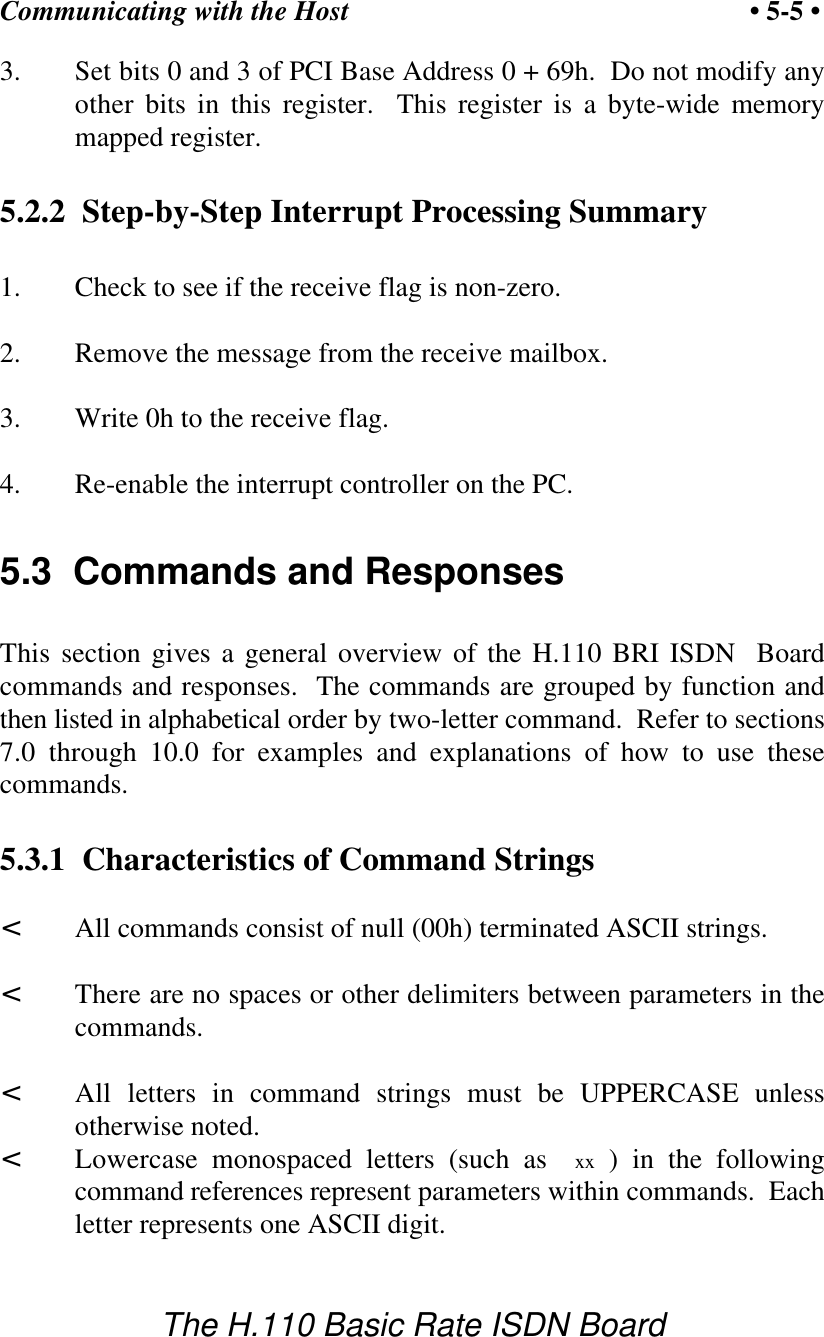
Communicating with the Host• 5-4 •The H.110 Basic Rate ISDN Boardphrase  Restart HB 00 (c) Amtelco 1999  appears in the receive mailbox.  Thereceive flag is not set and no interrupt is generated.5.2  InterruptsThe H.110 Basic Rate ISDN Board can generate an interrupt to the PCindicating that a message is available.  The interrupt for PCI boards isassigned by the BIOS or Operating System at boot time.  The assignmentis dependent on which PCI slot the board is in.  The interrupt line is usuallyshared by more than one device.  If multiple Infinity Series boards areinstalled they may or may not all share the same interrupt line.In order for an Infinity Series board to send interrupts to the PC, the PCIInterface circuit on the board must be programmed to enable interrupts.This is accomplished by setting bits 0 and 3 in the board's InterruptControl/Status Register.  This is a byte-wide register located at an offset of69h from PCI Base Address 0.  PCI Base Address 0 is contained in PCIConfiguration Space register 10h.  The Base address is a 32-bit value andis mapped into memory.  When an Infinity Series board sends a message, it generates a localinterrupt to the PCI Interface circuit on the board.  If the PCI Interfacecircuit has been programmed to generate interrupts to the PC, the localinterrupt is passed through to the PC.  When the PC receives an interrupt,its Interrupt Service Routine (ISR) should check the Infinity board's receiveflag to see if a message is pending (i.e. the receive flag is non-zero).  Itshould then process the message for the board and write a 0 to the board'sreceive flag.5.2.1  Interrupt Initialization1. Clear the board's receive flag.2. Read the PCI Base Address 0 from PCI Configuration Space offset10h (this must be a 32-bit access).
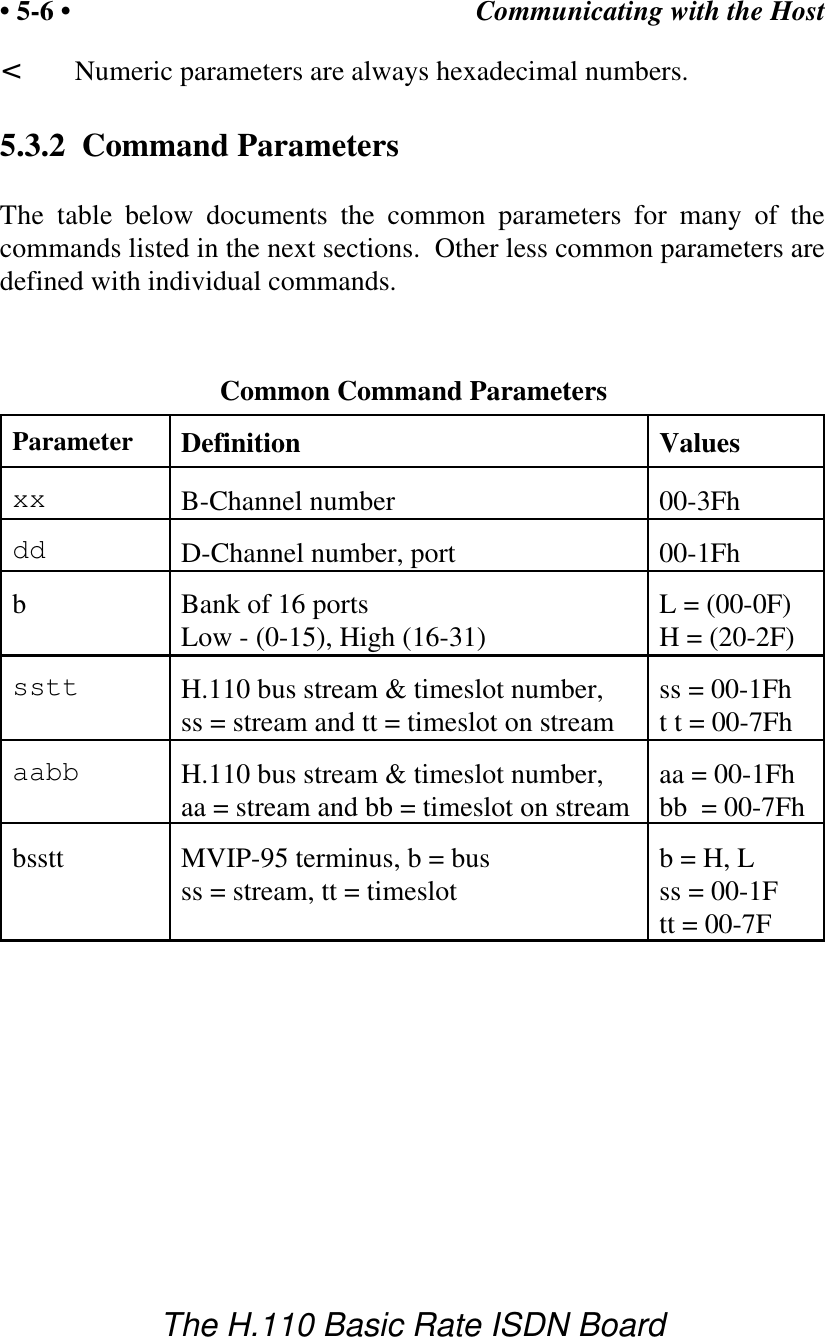
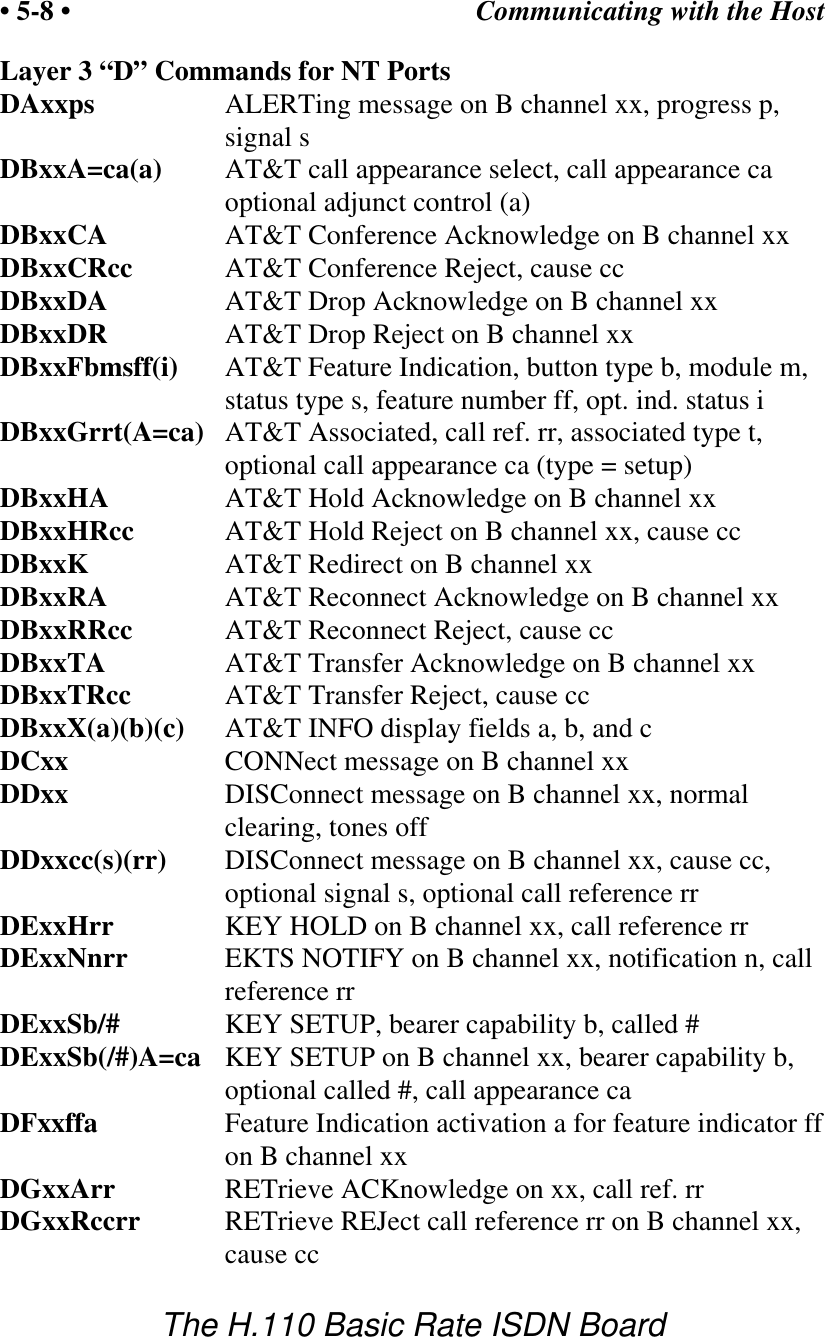
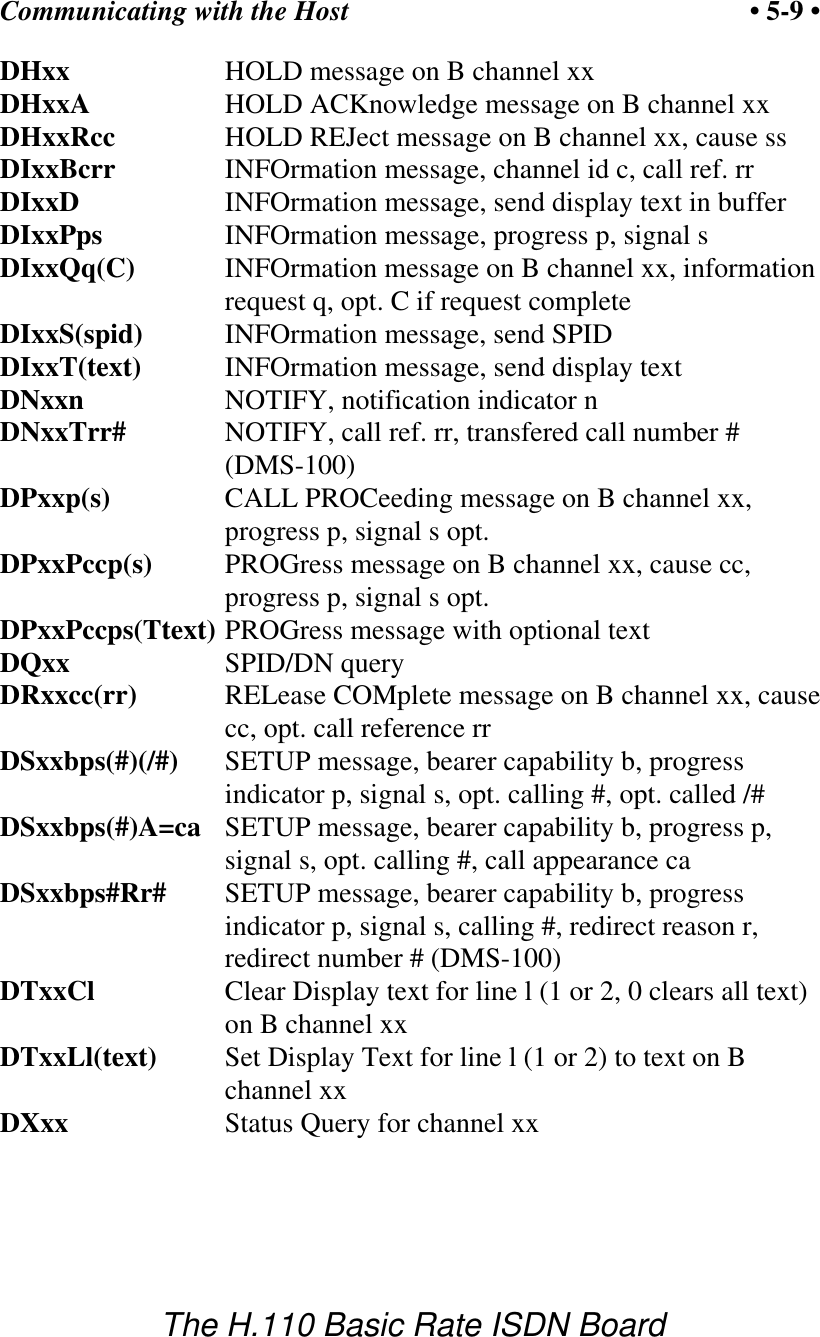
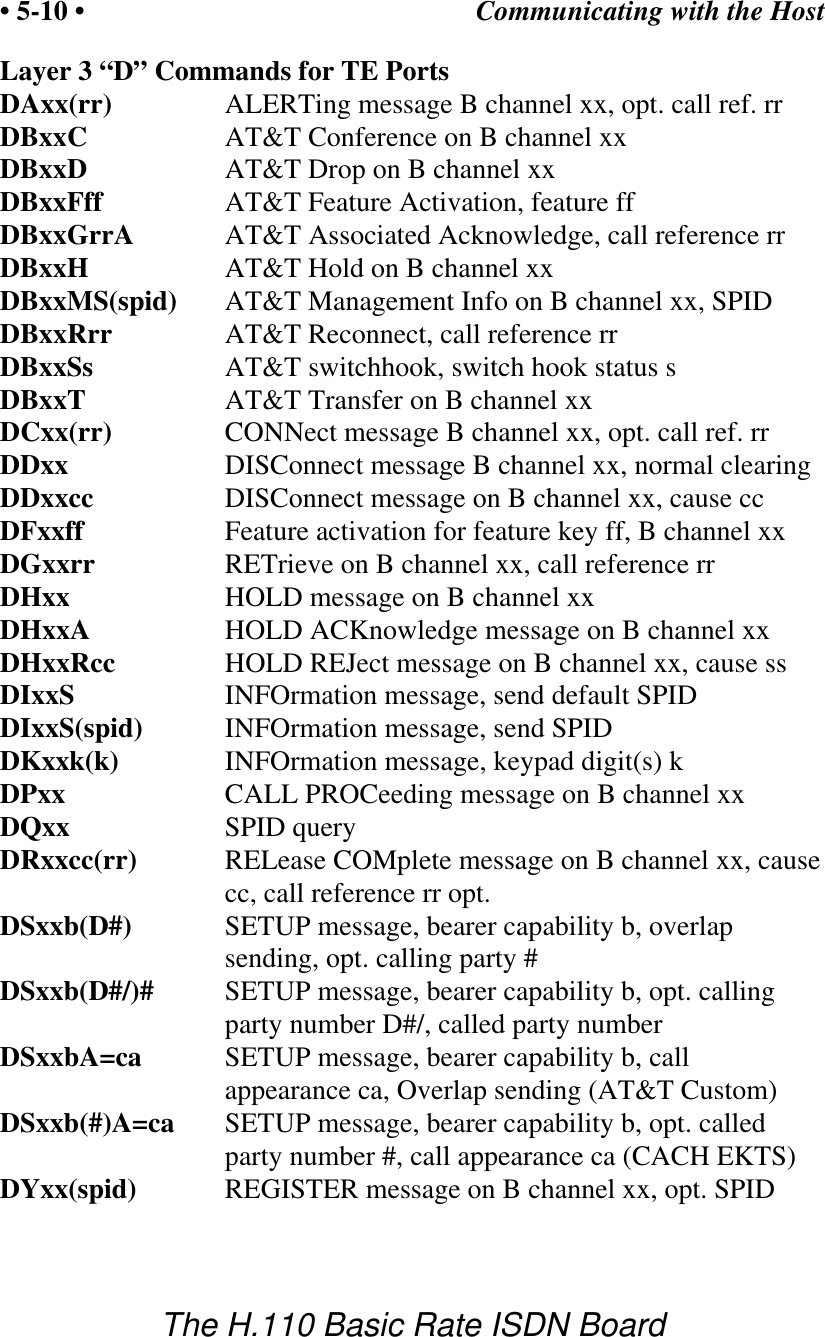
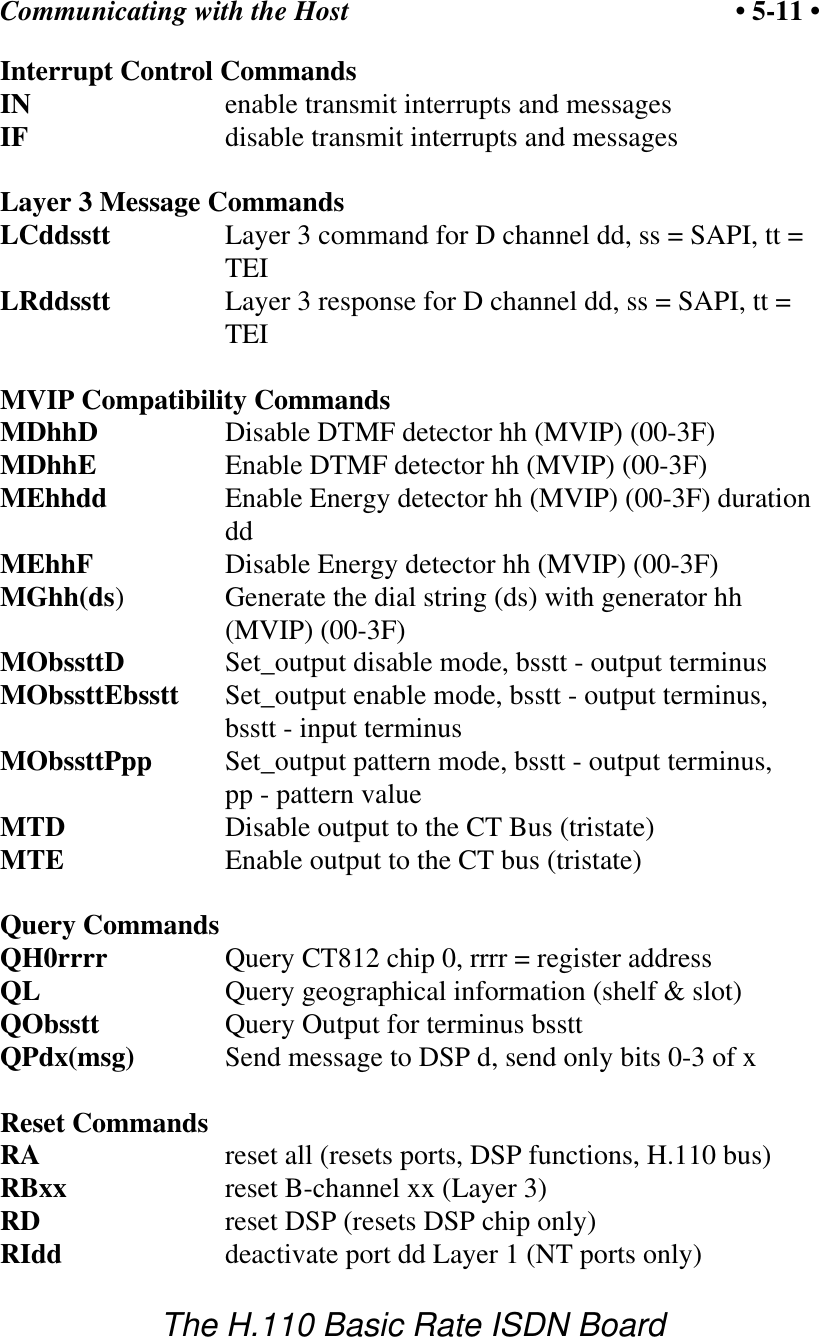
Communicating with the Host • 5-5 •The H.110 Basic Rate ISDN Board3. Set bits 0 and 3 of PCI Base Address 0 + 69h.  Do not modify anyother bits in this register.  This register is a byte-wide memorymapped register.5.2.2  Step-by-Step Interrupt Processing Summary1. Check to see if the receive flag is non-zero.2. Remove the message from the receive mailbox.3. Write 0h to the receive flag.4. Re-enable the interrupt controller on the PC.5.3  Commands and ResponsesThis section gives a general overview of the H.110 BRI ISDN  Boardcommands and responses.  The commands are grouped by function andthen listed in alphabetical order by two-letter command.  Refer to sections7.0 through 10.0 for examples and explanations of how to use thesecommands.5.3.1  Characteristics of Command Strings<All commands consist of null (00h) terminated ASCII strings.<There are no spaces or other delimiters between parameters in thecommands.<All letters in command strings must be UPPERCASE unlessotherwise noted.<Lowercase monospaced letters (such as  xx ) in the followingcommand references represent parameters within commands.  Eachletter represents one ASCII digit.
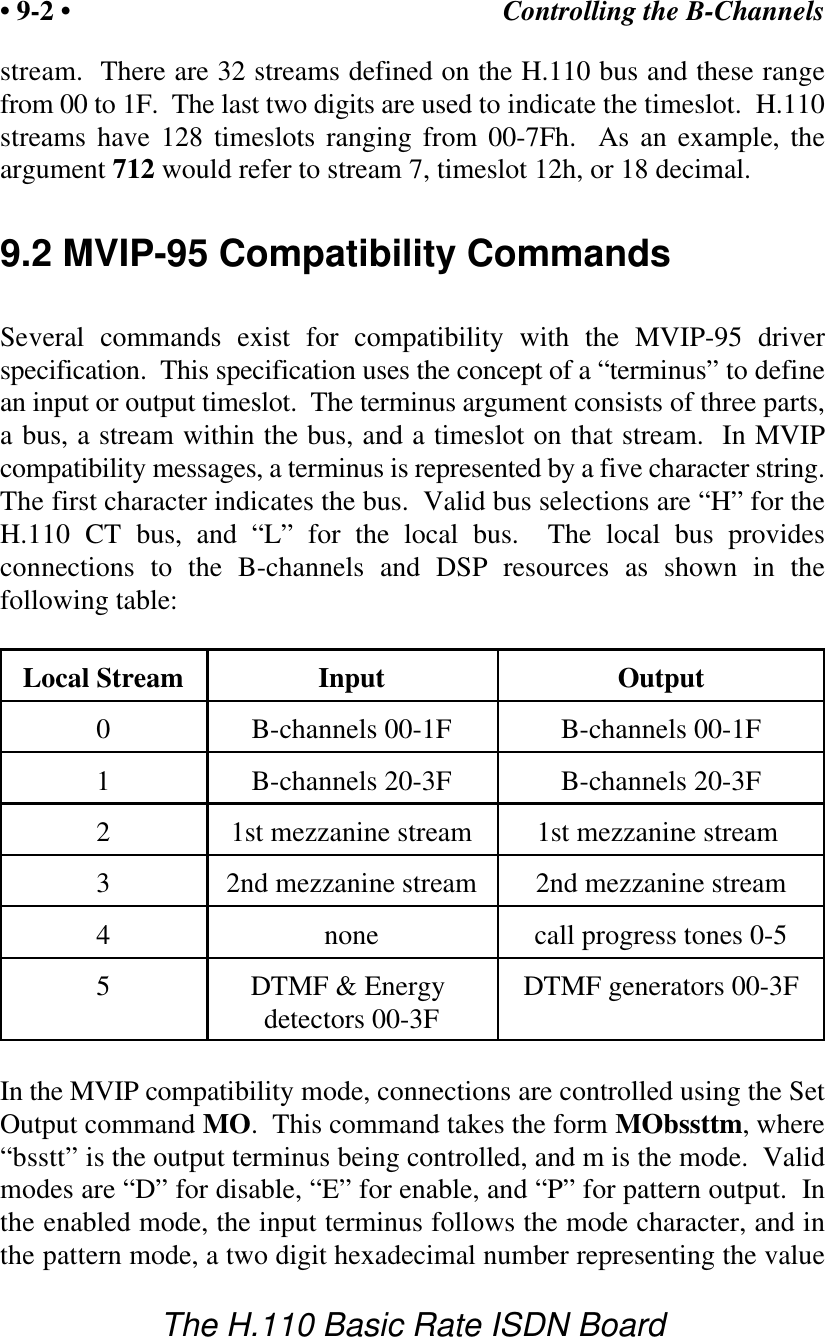
Communicating with the Host• 5-6 •The H.110 Basic Rate ISDN Board<Numeric parameters are always hexadecimal numbers.5.3.2  Command ParametersThe table below documents the common parameters for many of thecommands listed in the next sections.  Other less common parameters aredefined with individual commands.Common Command ParametersParameter Definition Valuesxx B-Channel number  00-3Fhdd D-Channel number, port 00-1FhbBank of 16 ports  L = (00-0F)Low - (0-15), High (16-31) H = (20-2F)sstt H.110 bus stream & timeslot number,   ss = 00-1Fhss = stream and tt = timeslot on stream t t = 00-7Fhaabb H.110 bus stream & timeslot number,    aa = 00-1Fhaa = stream and bb = timeslot on stream bb  = 00-7Fhbsstt MVIP-95 terminus, b = bus b = H, Lss = stream, tt = timeslot ss = 00-1Ftt = 00-7F
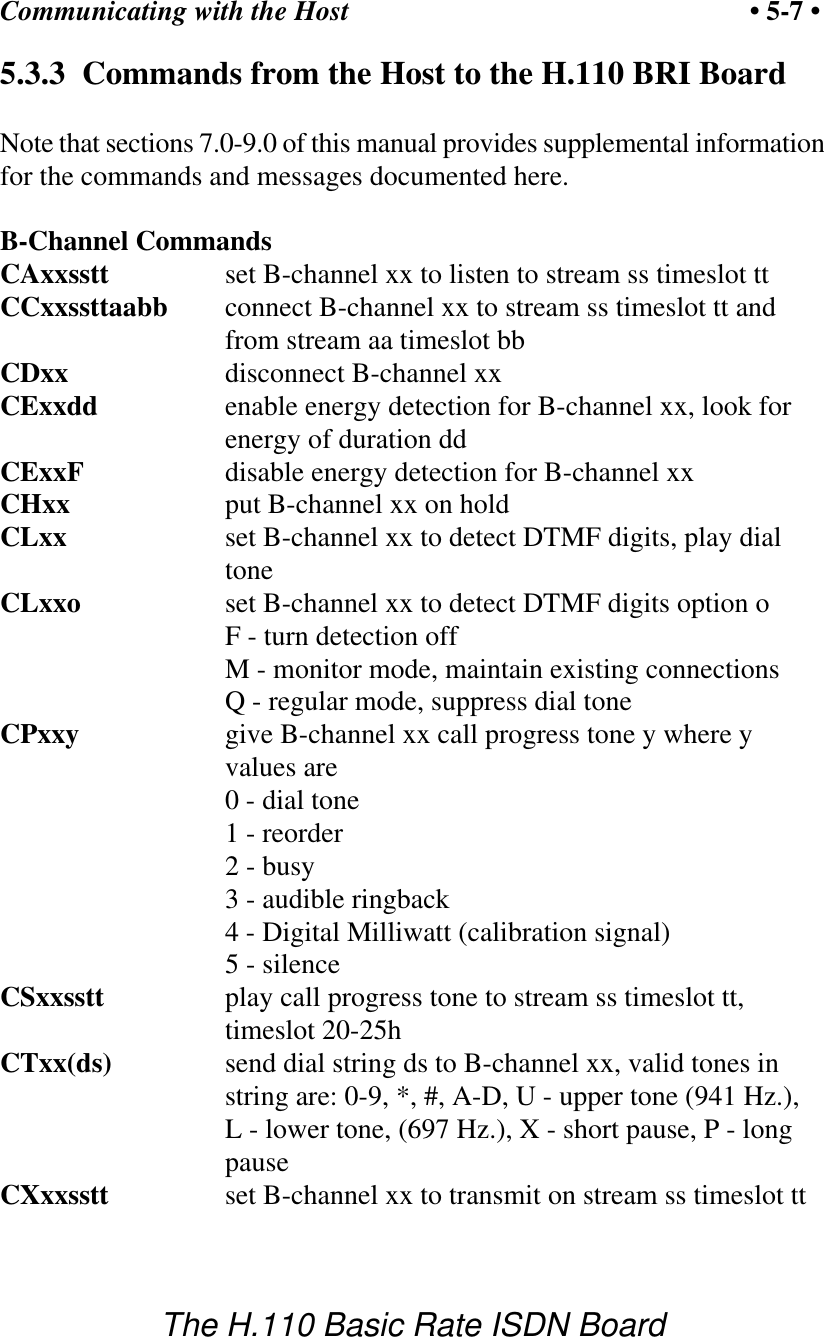
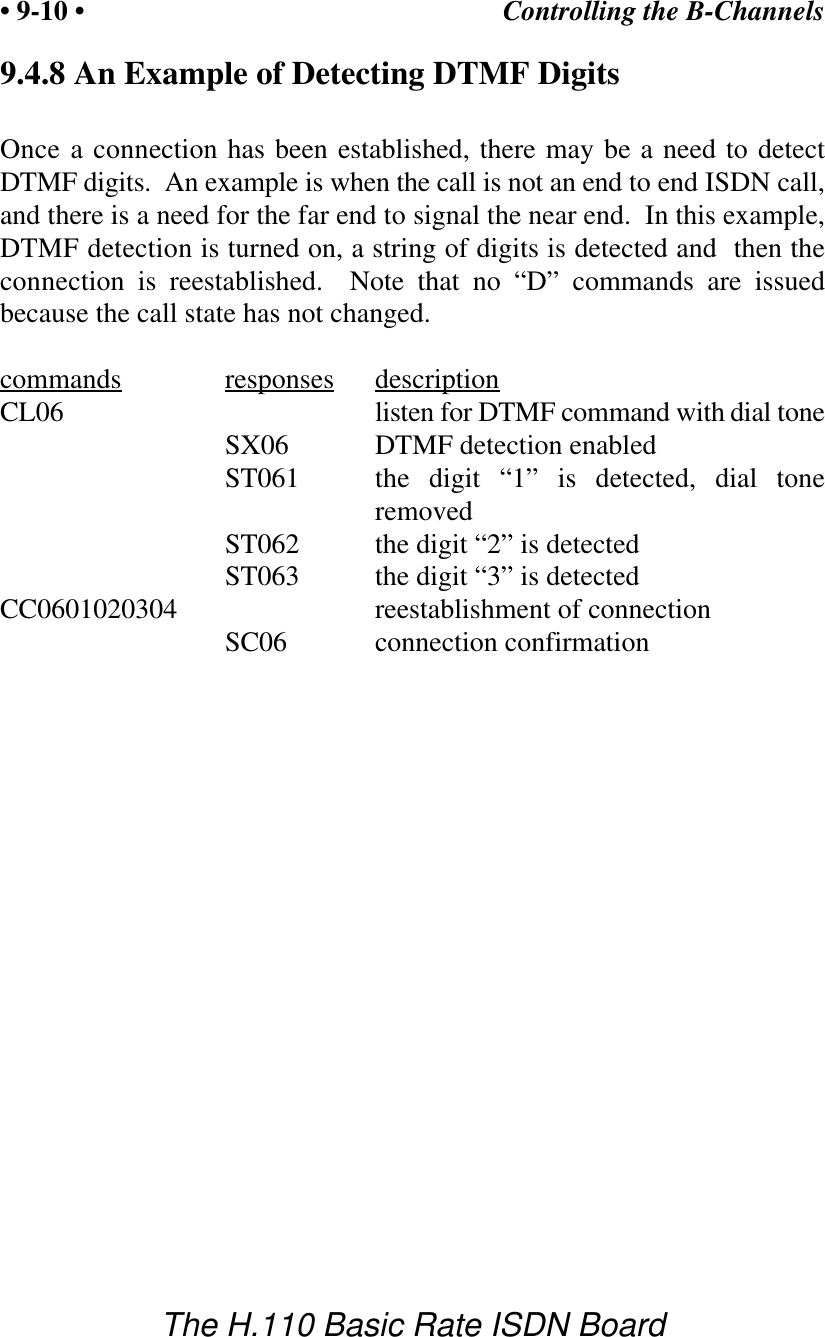
Communicating with the Host • 5-7 •The H.110 Basic Rate ISDN Board5.3.3  Commands from the Host to the H.110 BRI BoardNote that sections 7.0-9.0 of this manual provides supplemental informationfor the commands and messages documented here.B-Channel CommandsCAxxsstt   set B-channel xx to listen to stream ss timeslot ttCCxxssttaabb connect B-channel xx to stream ss timeslot tt andfrom stream aa timeslot bbCDxx       disconnect B-channel xxCExxdd enable energy detection for B-channel xx, look forenergy of duration ddCExxF disable energy detection for B-channel xxCHxx       put B-channel xx on holdCLxx       set B-channel xx to detect DTMF digits, play dialtoneCLxxo set B-channel xx to detect DTMF digits option oF - turn detection offM - monitor mode, maintain existing connectionsQ - regular mode, suppress dial toneCPxxy      give B-channel xx call progress tone y where yvalues are           0 - dial tone           1 - reorder           2 - busy           3 - audible ringback           4 - Digital Milliwatt (calibration signal)5 - silenceCSxxsstt play call progress tone to stream ss timeslot tt,timeslot 20-25hCTxx(ds)   send dial string ds to B-channel xx, valid tones instring are: 0-9, *, #, A-D, U - upper tone (941 Hz.),L - lower tone, (697 Hz.), X - short pause, P - longpauseCXxxsstt   set B-channel xx to transmit on stream ss timeslot tt
Communicating with the Host• 5-8 •The H.110 Basic Rate ISDN BoardLayer 3 “D” Commands for NT PortsDAxxps ALERTing message on B channel xx, progress p,signal sDBxxA=ca(a) AT&T call appearance select, call appearance caoptional adjunct control (a)DBxxCA AT&T Conference Acknowledge on B channel xxDBxxCRcc AT&T Conference Reject, cause ccDBxxDA AT&T Drop Acknowledge on B channel xxDBxxDR AT&T Drop Reject on B channel xxDBxxFbmsff(i) AT&T Feature Indication, button type b, module m,status type s, feature number ff, opt. ind. status iDBxxGrrt(A=ca) AT&T Associated, call ref. rr, associated type t,optional call appearance ca (type = setup)DBxxHA AT&T Hold Acknowledge on B channel xxDBxxHRcc AT&T Hold Reject on B channel xx, cause ccDBxxK AT&T Redirect on B channel xxDBxxRA AT&T Reconnect Acknowledge on B channel xxDBxxRRcc AT&T Reconnect Reject, cause ccDBxxTA AT&T Transfer Acknowledge on B channel xxDBxxTRcc AT&T Transfer Reject, cause ccDBxxX(a)(b)(c) AT&T INFO display fields a, b, and cDCxx CONNect message on B channel xxDDxx DISConnect message on B channel xx, normalclearing, tones offDDxxcc(s)(rr) DISConnect message on B channel xx, cause cc,optional signal s, optional call reference rrDExxHrr KEY HOLD on B channel xx, call reference rrDExxNnrr EKTS NOTIFY on B channel xx, notification n, callreference rrDExxSb/# KEY SETUP, bearer capability b, called #DExxSb(/#)A=ca KEY SETUP on B channel xx, bearer capability b,optional called #, call appearance caDFxxffa Feature Indication activation a for feature indicator ffon B channel xxDGxxArr RETrieve ACKnowledge on xx, call ref. rrDGxxRccrr RETrieve REJect call reference rr on B channel xx,cause cc
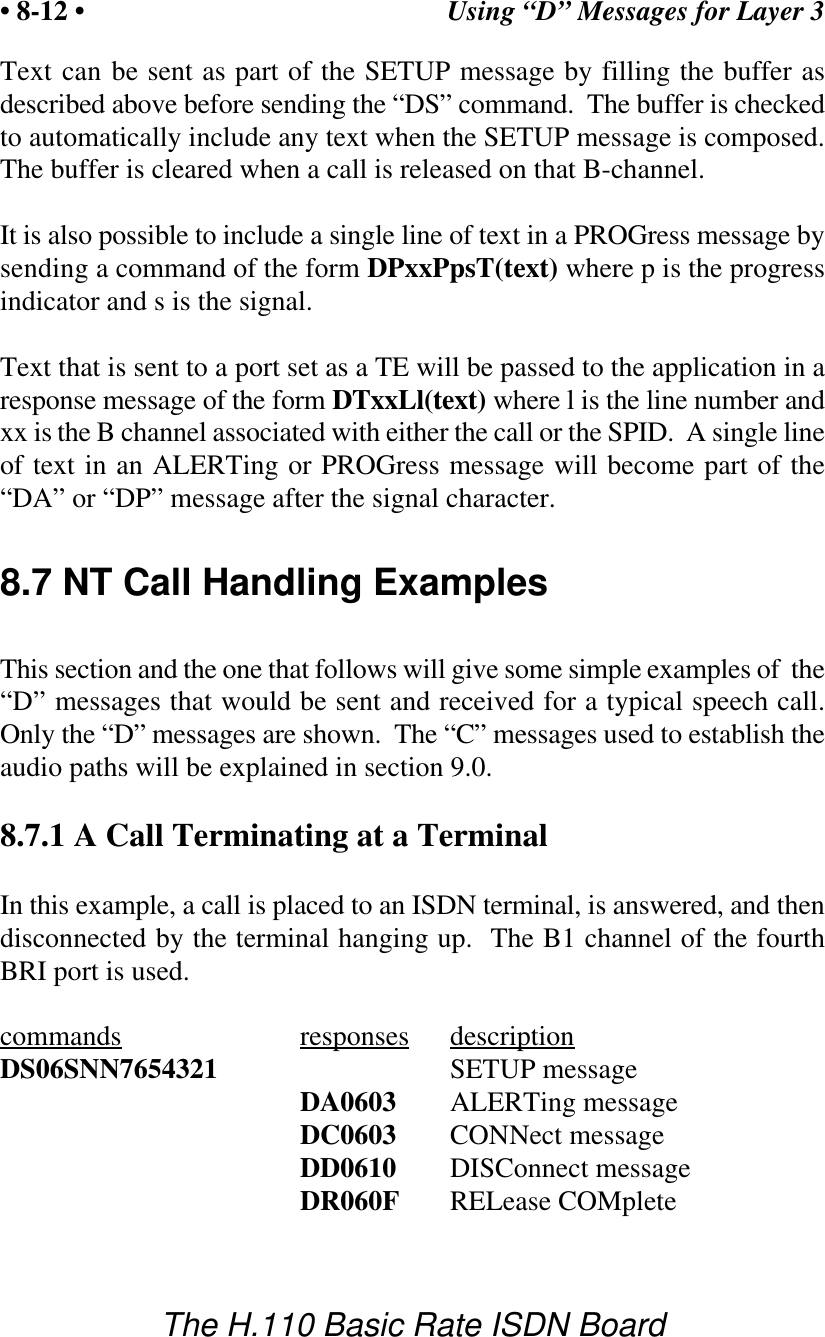
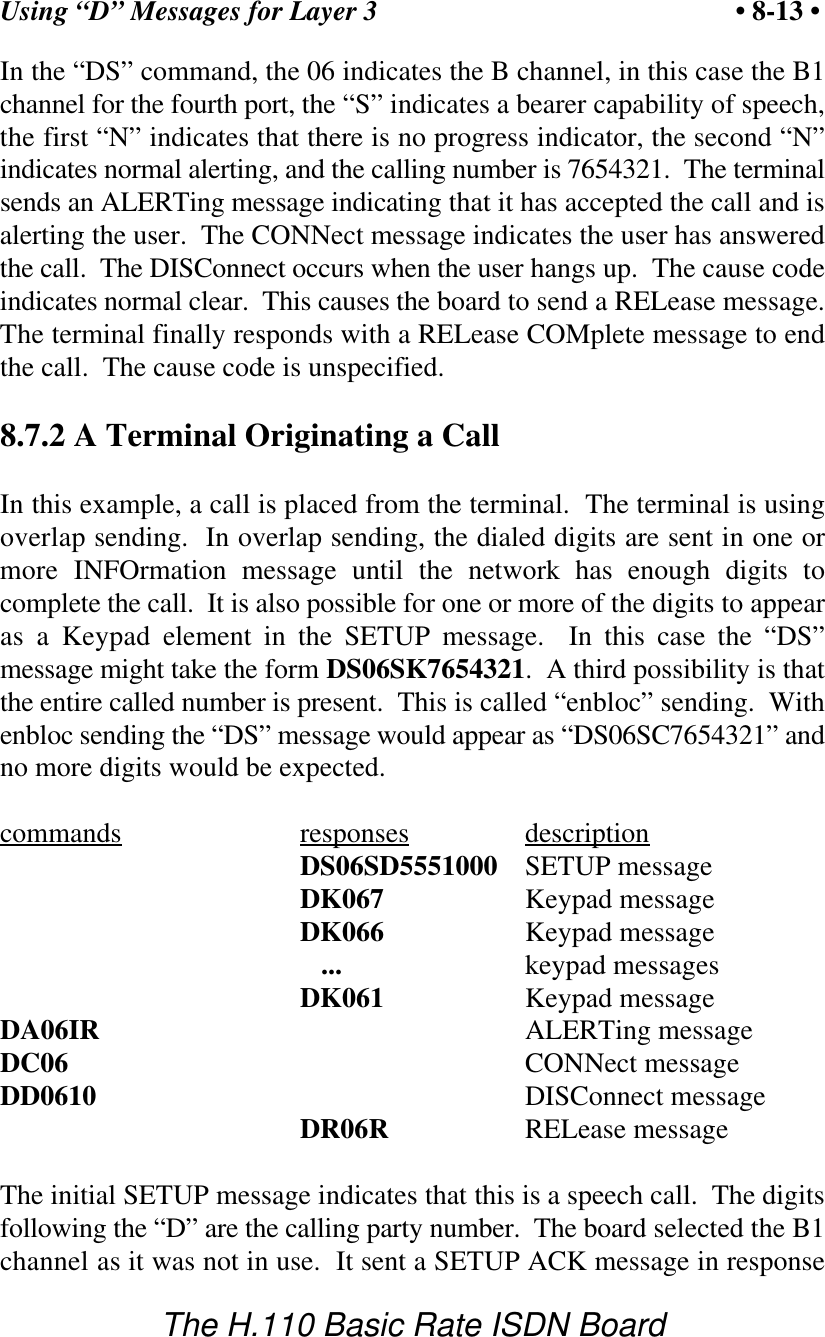
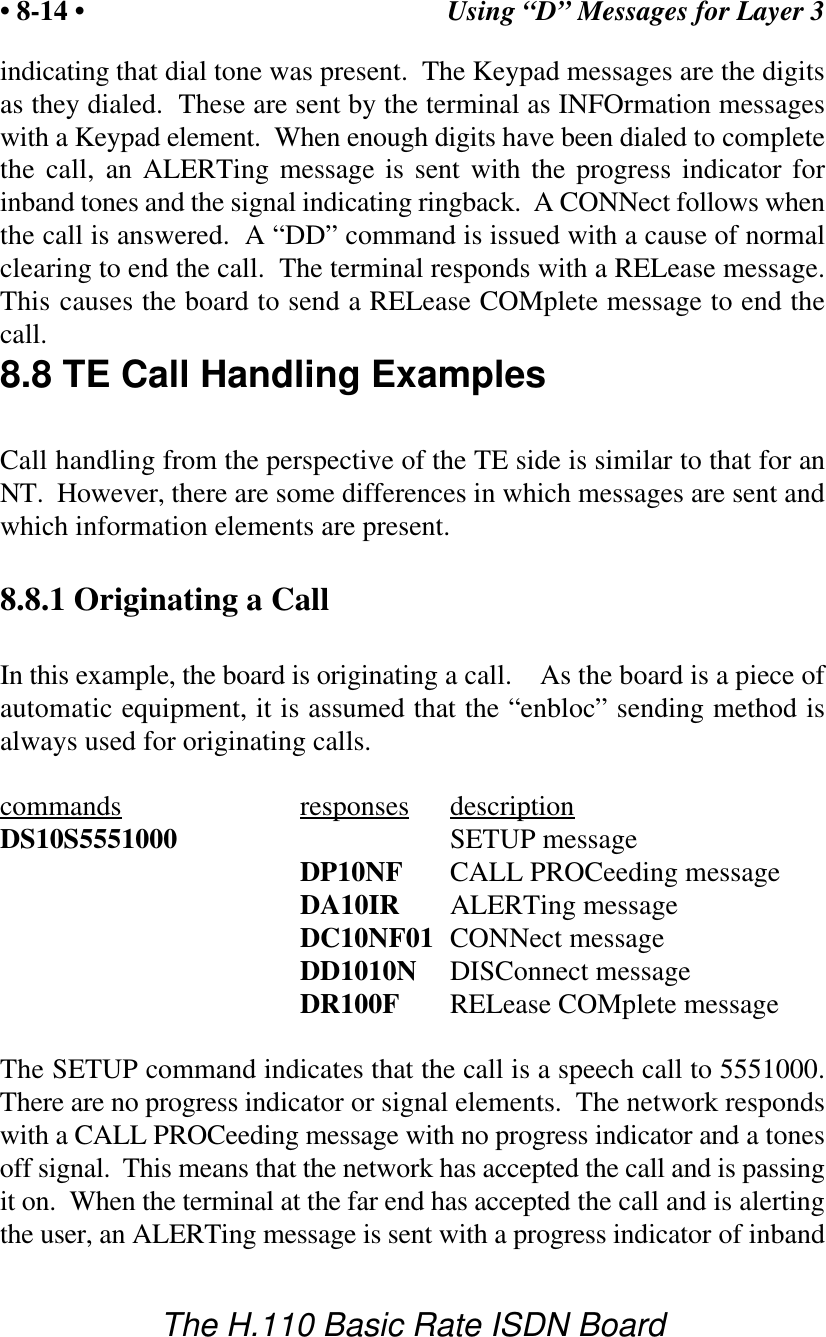
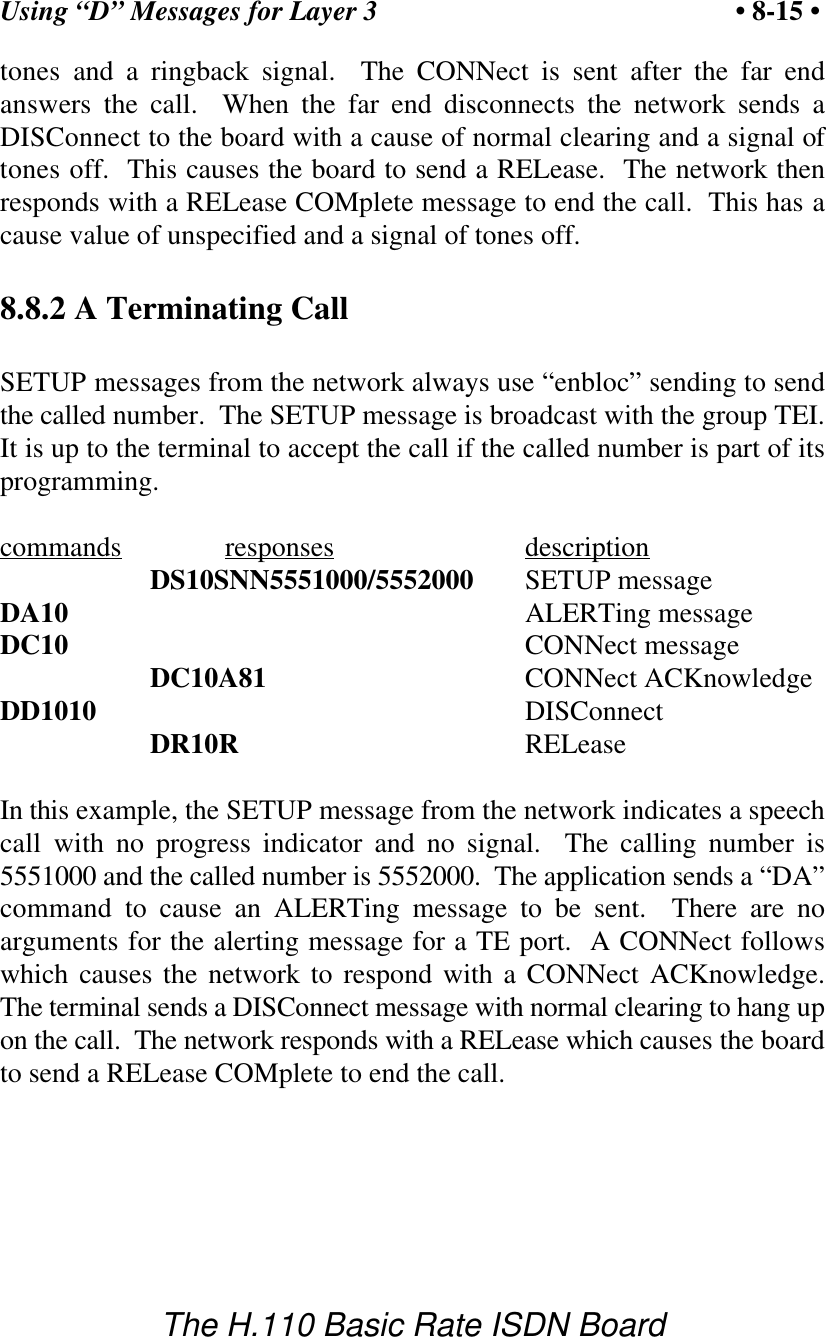
Communicating with the Host • 5-9 •The H.110 Basic Rate ISDN BoardDHxx HOLD message on B channel xxDHxxA HOLD ACKnowledge message on B channel xxDHxxRcc HOLD REJect message on B channel xx, cause ssDIxxBcrr INFOrmation message, channel id c, call ref. rrDIxxD INFOrmation message, send display text in bufferDIxxPps INFOrmation message, progress p, signal sDIxxQq(C) INFOrmation message on B channel xx, informationrequest q, opt. C if request completeDIxxS(spid) INFOrmation message, send SPID DIxxT(text) INFOrmation message, send display textDNxxn NOTIFY, notification indicator nDNxxTrr# NOTIFY, call ref. rr, transfered call number #(DMS-100)DPxxp(s) CALL PROCeeding message on B channel xx,progress p, signal s opt.DPxxPccp(s) PROGress message on B channel xx, cause cc,progress p, signal s opt.DPxxPccps(Ttext) PROGress message with optional textDQxx SPID/DN queryDRxxcc(rr) RELease COMplete message on B channel xx, causecc, opt. call reference rrDSxxbps(#)(/#) SETUP message, bearer capability b, progressindicator p, signal s, opt. calling #, opt. called /#DSxxbps(#)A=ca SETUP message, bearer capability b, progress p,signal s, opt. calling #, call appearance caDSxxbps#Rr# SETUP message, bearer capability b, progressindicator p, signal s, calling #, redirect reason r,redirect number # (DMS-100)DTxxCl Clear Display text for line l (1 or 2, 0 clears all text)on B channel xx DTxxLl(text) Set Display Text for line l (1 or 2) to text on Bchannel xxDXxx Status Query for channel xx
Communicating with the Host• 5-10 •The H.110 Basic Rate ISDN BoardLayer 3 “D” Commands for TE PortsDAxx(rr) ALERTing message B channel xx, opt. call ref. rrDBxxC AT&T Conference on B channel xxDBxxD AT&T Drop on B channel xxDBxxFff AT&T Feature Activation, feature ffDBxxGrrA AT&T Associated Acknowledge, call reference rrDBxxH AT&T Hold on B channel xxDBxxMS(spid) AT&T Management Info on B channel xx, SPIDDBxxRrr AT&T Reconnect, call reference rrDBxxSs AT&T switchhook, switch hook status sDBxxT AT&T Transfer on B channel xxDCxx(rr) CONNect message B channel xx, opt. call ref. rrDDxx DISConnect message B channel xx, normal clearingDDxxcc DISConnect message on B channel xx, cause ccDFxxff Feature activation for feature key ff, B channel xxDGxxrr RETrieve on B channel xx, call reference rrDHxx HOLD message on B channel xxDHxxA HOLD ACKnowledge message on B channel xxDHxxRcc HOLD REJect message on B channel xx, cause ssDIxxS INFOrmation message, send default SPIDDIxxS(spid) INFOrmation message, send SPID DKxxk(k) INFOrmation message, keypad digit(s) kDPxx CALL PROCeeding message on B channel xx DQxx SPID queryDRxxcc(rr) RELease COMplete message on B channel xx, causecc, call reference rr opt.DSxxb(D#) SETUP message, bearer capability b, overlapsending, opt. calling party #DSxxb(D#/)# SETUP message, bearer capability b, opt. callingparty number D#/, called party numberDSxxbA=ca SETUP message, bearer capability b, callappearance ca, Overlap sending (AT&T Custom)DSxxb(#)A=ca SETUP message, bearer capability b, opt. calledparty number #, call appearance ca (CACH EKTS)DYxx(spid) REGISTER message on B channel xx, opt. SPID
Communicating with the Host • 5-11 •The H.110 Basic Rate ISDN BoardInterrupt Control CommandsIN         enable transmit interrupts and messagesIF         disable transmit interrupts and messagesLayer 3 Message CommandsLCddsstt Layer 3 command for D channel dd, ss = SAPI, tt =TEILRddsstt Layer 3 response for D channel dd, ss = SAPI, tt =TEIMVIP Compatibility CommandsMDhhD Disable DTMF detector hh (MVIP) (00-3F)MDhhE     Enable DTMF detector hh (MVIP) (00-3F)MEhhdd Enable Energy detector hh (MVIP) (00-3F) durationddMEhhF Disable Energy detector hh (MVIP) (00-3F)MGhh(ds)  Generate the dial string (ds) with generator hh(MVIP) (00-3F)MObssttD Set_output disable mode, bsstt - output terminusMObssttEbsstt Set_output enable mode, bsstt - output terminus, bsstt - input terminusMObssttPpp Set_output pattern mode, bsstt - output terminus, pp - pattern valueMTD Disable output to the CT Bus (tristate)MTE Enable output to the CT bus (tristate)Query CommandsQH0rrrr Query CT812 chip 0, rrrr = register addressQL Query geographical information (shelf & slot)QObsstt Query Output for terminus bssttQPdx(msg) Send message to DSP d, send only bits 0-3 of xReset CommandsRA reset all (resets ports, DSP functions, H.110 bus)RBxx reset B-channel xx (Layer 3)RD         reset DSP (resets DSP chip only)RIdd deactivate port dd Layer 1 (NT ports only)
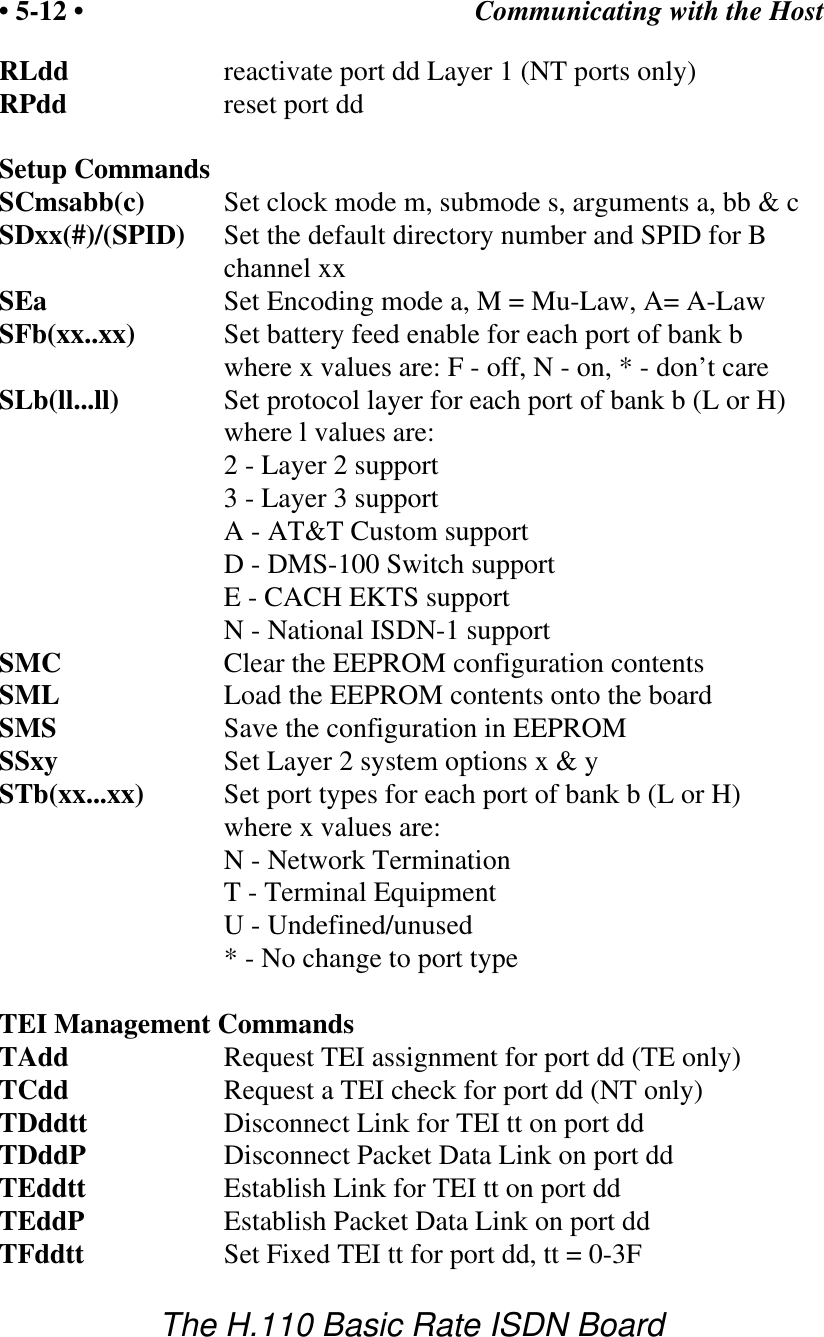
Communicating with the Host• 5-12 •The H.110 Basic Rate ISDN BoardRLdd reactivate port dd Layer 1 (NT ports only)RPdd reset port ddSetup CommandsSCmsabb(c) Set clock mode m, submode s, arguments a, bb & cSDxx(#)/(SPID) Set the default directory number and SPID for Bchannel xxSEa Set Encoding mode a, M = Mu-Law, A= A-LawSFb(xx..xx) Set battery feed enable for each port of bank bwhere x values are: F - off, N - on, * - don’t careSLb(ll...ll) Set protocol layer for each port of bank b (L or H)where l values are:2 - Layer 2 support3 - Layer 3 supportA - AT&T Custom supportD - DMS-100 Switch supportE - CACH EKTS supportN - National ISDN-1 supportSMC Clear the EEPROM configuration contentsSML Load the EEPROM contents onto the boardSMS Save the configuration in EEPROMSSxy Set Layer 2 system options x & ySTb(xx...xx) Set port types for each port of bank b (L or H)where x values are:           N - Network TerminationT - Terminal EquipmentU - Undefined/unused* - No change to port typeTEI Management CommandsTAdd Request TEI assignment for port dd (TE only)TCdd Request a TEI check for port dd (NT only)TDddtt Disconnect Link for TEI tt on port ddTDddP Disconnect Packet Data Link on port ddTEddtt Establish Link for TEI tt on port ddTEddP Establish Packet Data Link on port ddTFddtt Set Fixed TEI tt for port dd, tt = 0-3F
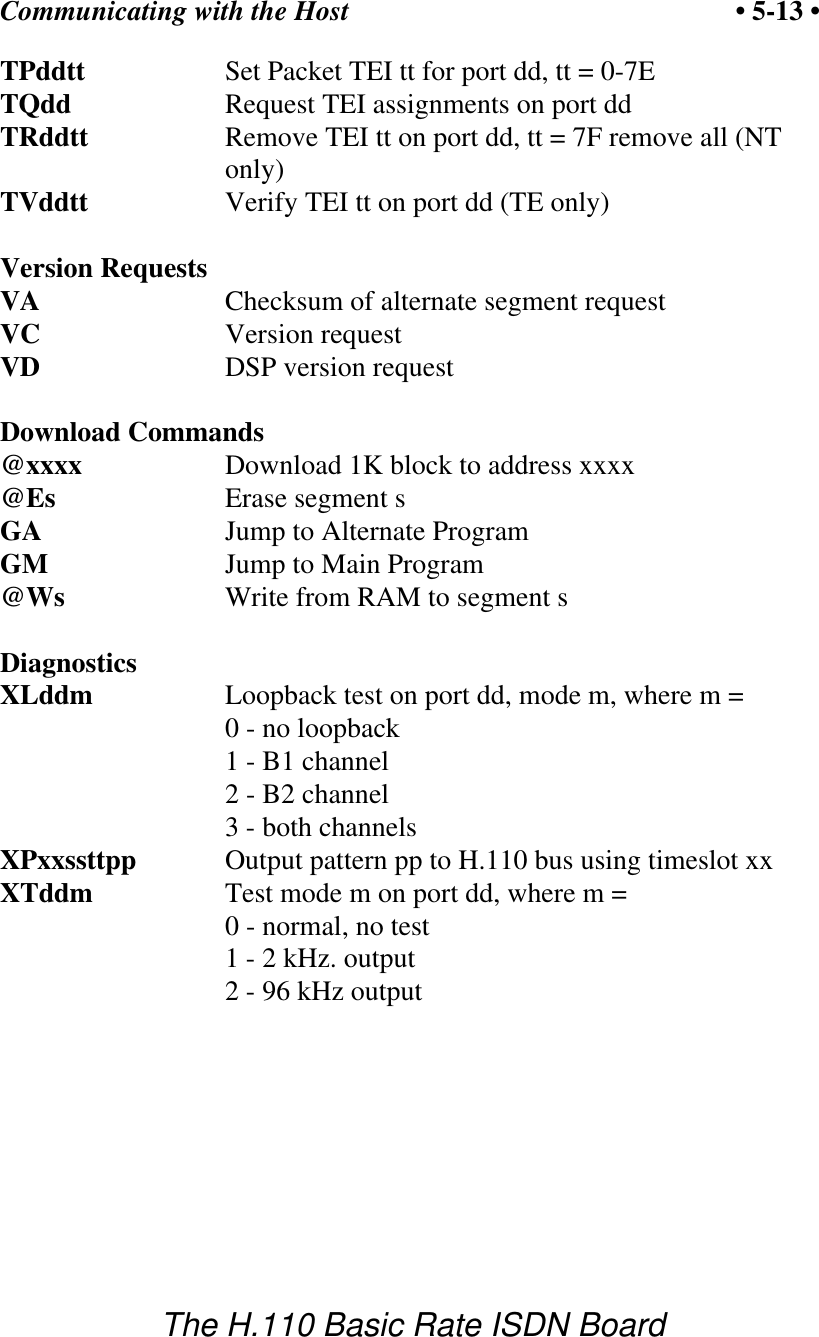
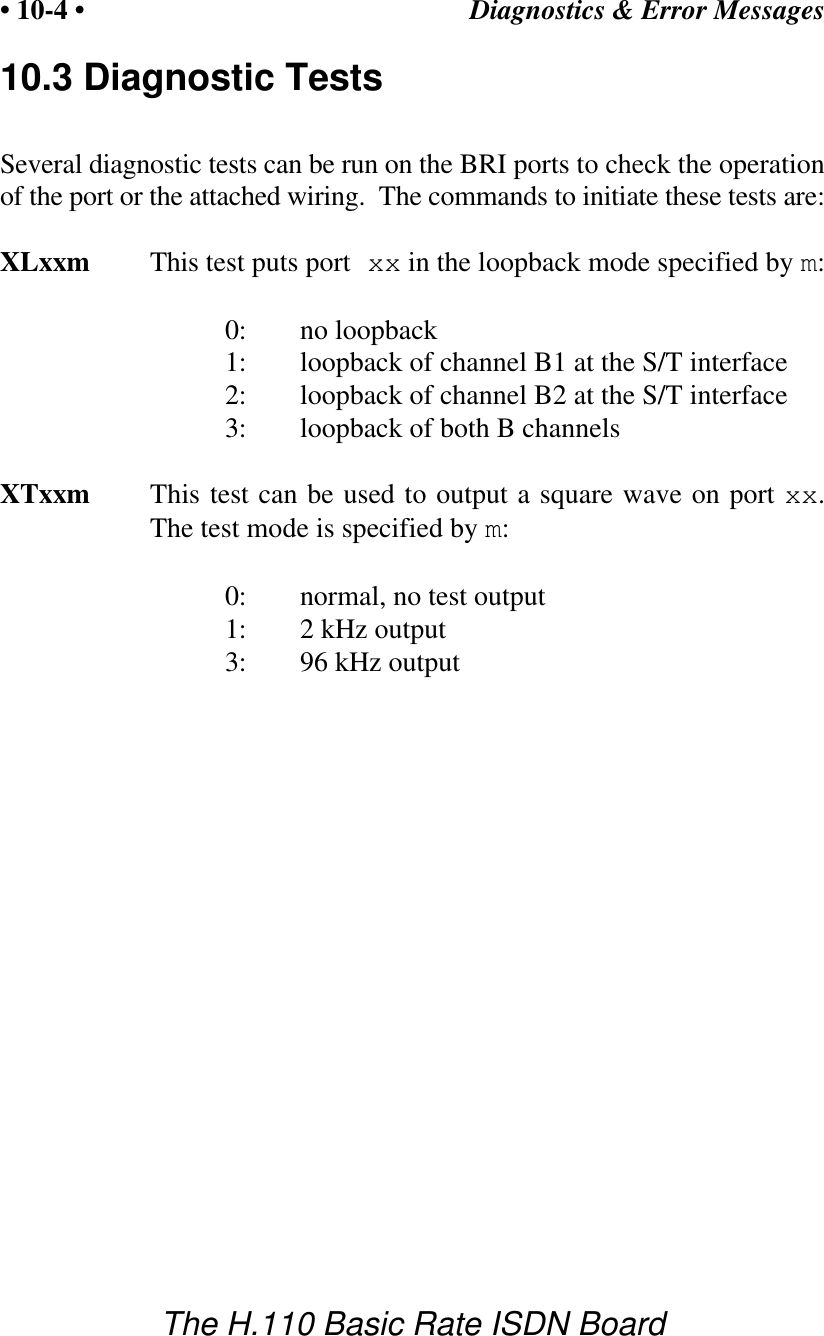
Communicating with the Host • 5-13 •The H.110 Basic Rate ISDN BoardTPddtt Set Packet TEI tt for port dd, tt = 0-7ETQdd Request TEI assignments on port ddTRddtt Remove TEI tt on port dd, tt = 7F remove all (NTonly)TVddtt Verify TEI tt on port dd (TE only)Version RequestsVA Checksum of alternate segment requestVC         Version requestVD         DSP version requestDownload Commands@xxxx      Download 1K block to address xxxx@Es Erase segment sGA         Jump to Alternate Program GM      Jump to Main Program@Ws Write from RAM to segment sDiagnosticsXLddm Loopback test on port dd, mode m, where m =0 - no loopback1 - B1 channel2 - B2 channel3 - both channelsXPxxssttpp Output pattern pp to H.110 bus using timeslot xxXTddm Test mode m on port dd, where m =0 - normal, no test1 - 2 kHz. output2 - 96 kHz output
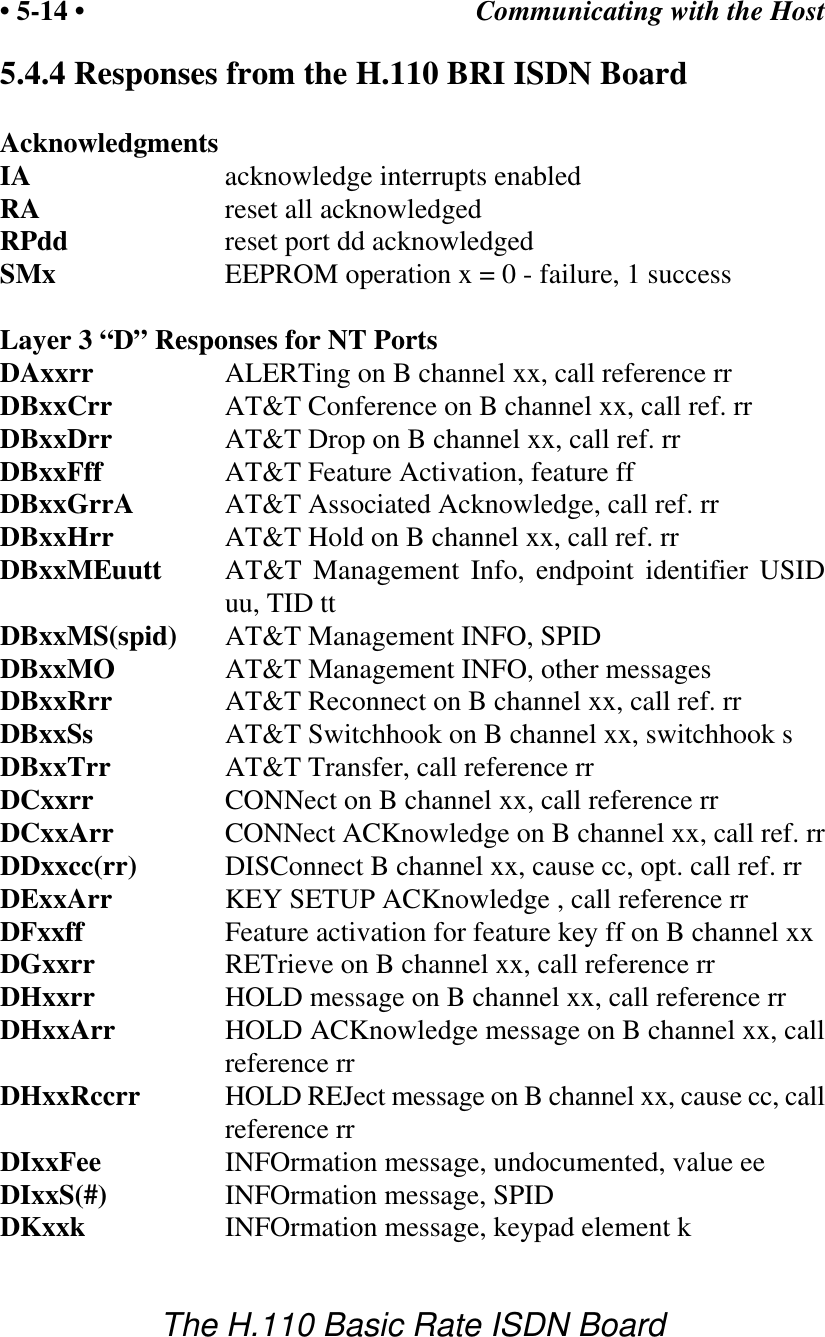
Communicating with the Host• 5-14 •The H.110 Basic Rate ISDN Board5.4.4 Responses from the H.110 BRI ISDN BoardAcknowledgmentsIA         acknowledge interrupts enabledRA         reset all acknowledgedRPdd reset port dd acknowledgedSMx EEPROM operation x = 0 - failure, 1 successLayer 3 “D” Responses for NT PortsDAxxrr ALERTing on B channel xx, call reference rrDBxxCrr AT&T Conference on B channel xx, call ref. rrDBxxDrr AT&T Drop on B channel xx, call ref. rrDBxxFff AT&T Feature Activation, feature ffDBxxGrrA AT&T Associated Acknowledge, call ref. rrDBxxHrr AT&T Hold on B channel xx, call ref. rrDBxxMEuutt AT&T Management Info, endpoint identifier USIDuu, TID ttDBxxMS(spid) AT&T Management INFO, SPIDDBxxMO AT&T Management INFO, other messagesDBxxRrr AT&T Reconnect on B channel xx, call ref. rrDBxxSs AT&T Switchhook on B channel xx, switchhook sDBxxTrr AT&T Transfer, call reference rrDCxxrr CONNect on B channel xx, call reference rrDCxxArr CONNect ACKnowledge on B channel xx, call ref. rrDDxxcc(rr) DISConnect B channel xx, cause cc, opt. call ref. rrDExxArr KEY SETUP ACKnowledge , call reference rrDFxxff Feature activation for feature key ff on B channel xxDGxxrr RETrieve on B channel xx, call reference rrDHxxrr HOLD message on B channel xx, call reference rrDHxxArr HOLD ACKnowledge message on B channel xx, callreference rrDHxxRccrr HOLD REJect message on B channel xx, cause cc, callreference rrDIxxFee INFOrmation message, undocumented, value eeDIxxS(#) INFOrmation message, SPIDDKxxk INFOrmation message, keypad element k
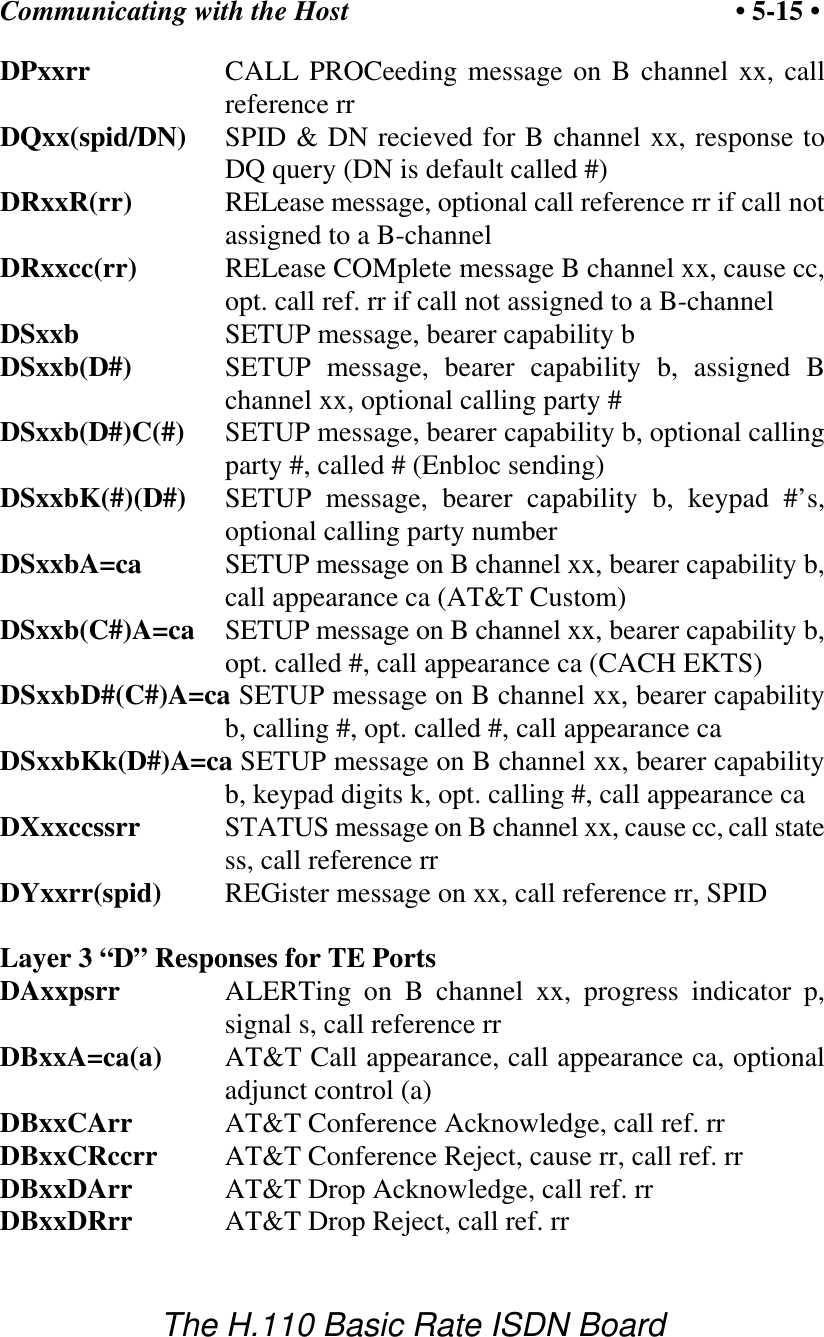
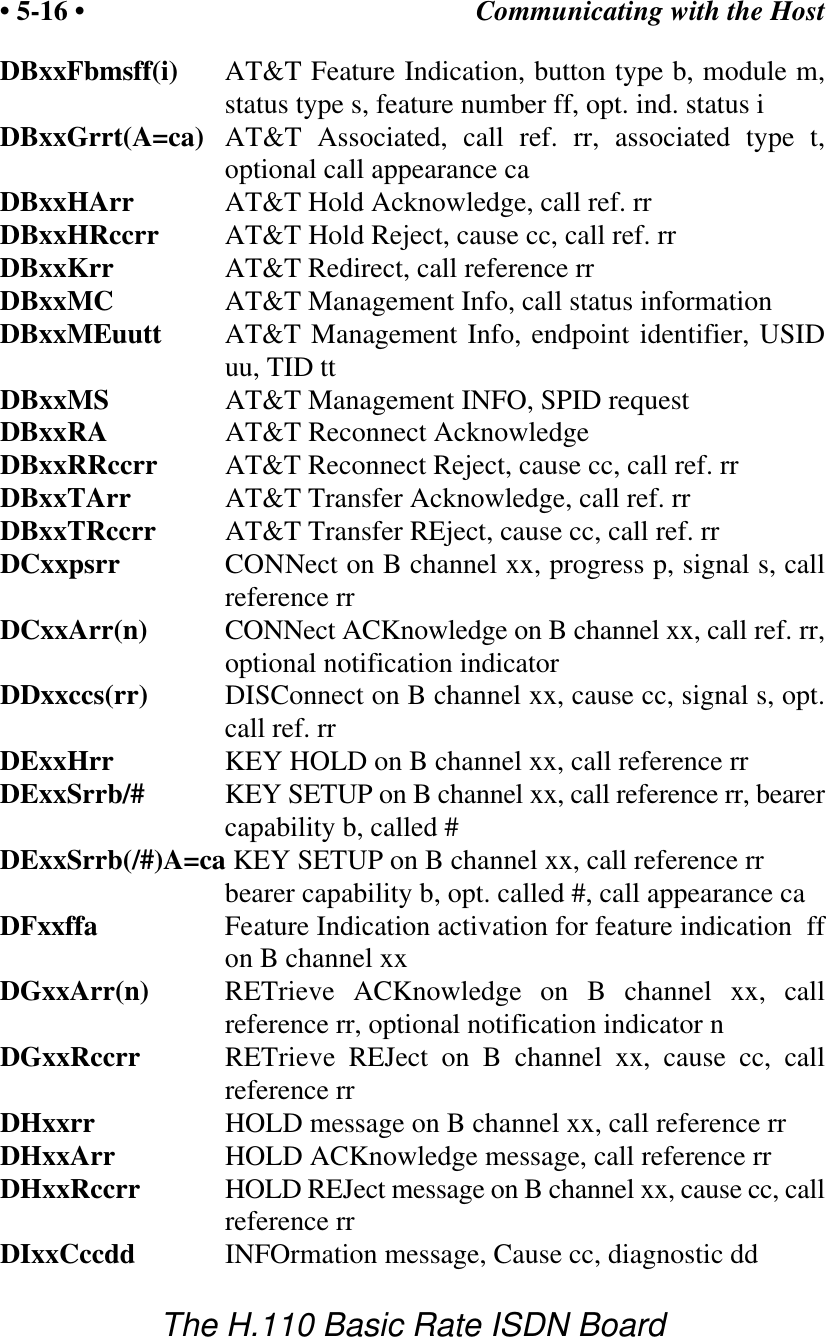
Communicating with the Host • 5-15 •The H.110 Basic Rate ISDN BoardDPxxrr CALL PROCeeding message on B channel xx, callreference rrDQxx(spid/DN) SPID & DN recieved for B channel xx, response toDQ query (DN is default called #)DRxxR(rr) RELease message, optional call reference rr if call notassigned to a B-channelDRxxcc(rr) RELease COMplete message B channel xx, cause cc,opt. call ref. rr if call not assigned to a B-channelDSxxb SETUP message, bearer capability bDSxxb(D#) SETUP message, bearer capability b, assigned Bchannel xx, optional calling party #DSxxb(D#)C(#) SETUP message, bearer capability b, optional callingparty #, called # (Enbloc sending)DSxxbK(#)(D#) SETUP message, bearer capability b, keypad #’s,optional calling party numberDSxxbA=ca SETUP message on B channel xx, bearer capability b,call appearance ca (AT&T Custom) DSxxb(C#)A=ca SETUP message on B channel xx, bearer capability b,opt. called #, call appearance ca (CACH EKTS)DSxxbD#(C#)A=ca SETUP message on B channel xx, bearer capabilityb, calling #, opt. called #, call appearance caDSxxbKk(D#)A=ca SETUP message on B channel xx, bearer capabilityb, keypad digits k, opt. calling #, call appearance caDXxxccssrr STATUS message on B channel xx, cause cc, call statess, call reference rrDYxxrr(spid) REGister message on xx, call reference rr, SPIDLayer 3 “D” Responses for TE PortsDAxxpsrr ALERTing on B channel xx, progress indicator p,signal s, call reference rrDBxxA=ca(a) AT&T Call appearance, call appearance ca, optionaladjunct control (a)DBxxCArr AT&T Conference Acknowledge, call ref. rrDBxxCRccrr AT&T Conference Reject, cause rr, call ref. rrDBxxDArr AT&T Drop Acknowledge, call ref. rrDBxxDRrr AT&T Drop Reject, call ref. rr
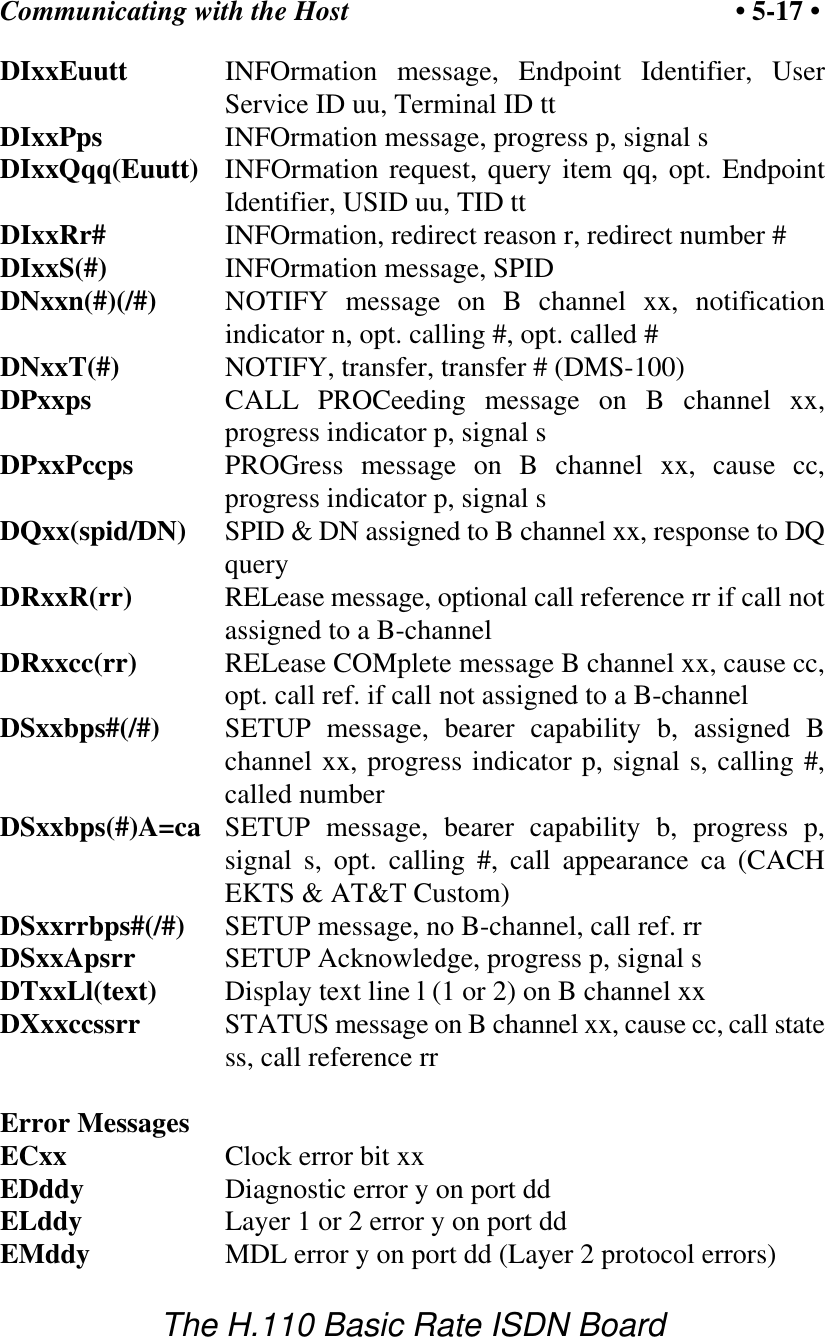
Communicating with the Host• 5-16 •The H.110 Basic Rate ISDN BoardDBxxFbmsff(i) AT&T Feature Indication, button type b, module m,status type s, feature number ff, opt. ind. status iDBxxGrrt(A=ca) AT&T Associated, call ref. rr, associated type t,optional call appearance caDBxxHArr AT&T Hold Acknowledge, call ref. rrDBxxHRccrr AT&T Hold Reject, cause cc, call ref. rrDBxxKrr AT&T Redirect, call reference rrDBxxMC AT&T Management Info, call status informationDBxxMEuutt AT&T Management Info, endpoint identifier, USIDuu, TID ttDBxxMS AT&T Management INFO, SPID requestDBxxRA AT&T Reconnect AcknowledgeDBxxRRccrr AT&T Reconnect Reject, cause cc, call ref. rrDBxxTArr AT&T Transfer Acknowledge, call ref. rrDBxxTRccrr AT&T Transfer REject, cause cc, call ref. rrDCxxpsrr CONNect on B channel xx, progress p, signal s, callreference rrDCxxArr(n) CONNect ACKnowledge on B channel xx, call ref. rr,optional notification indicatorDDxxccs(rr) DISConnect on B channel xx, cause cc, signal s, opt.call ref. rrDExxHrr KEY HOLD on B channel xx, call reference rrDExxSrrb/# KEY SETUP on B channel xx, call reference rr, bearercapability b, called #DExxSrrb(/#)A=ca KEY SETUP on B channel xx, call reference rrbearer capability b, opt. called #, call appearance caDFxxffa Feature Indication activation for feature indication  ffon B channel xxDGxxArr(n) RETrieve ACKnowledge on B channel xx, callreference rr, optional notification indicator nDGxxRccrr RETrieve REJect on B channel xx, cause cc, callreference rrDHxxrr HOLD message on B channel xx, call reference rrDHxxArr HOLD ACKnowledge message, call reference rrDHxxRccrr HOLD REJect message on B channel xx, cause cc, callreference rrDIxxCccdd INFOrmation message, Cause cc, diagnostic dd
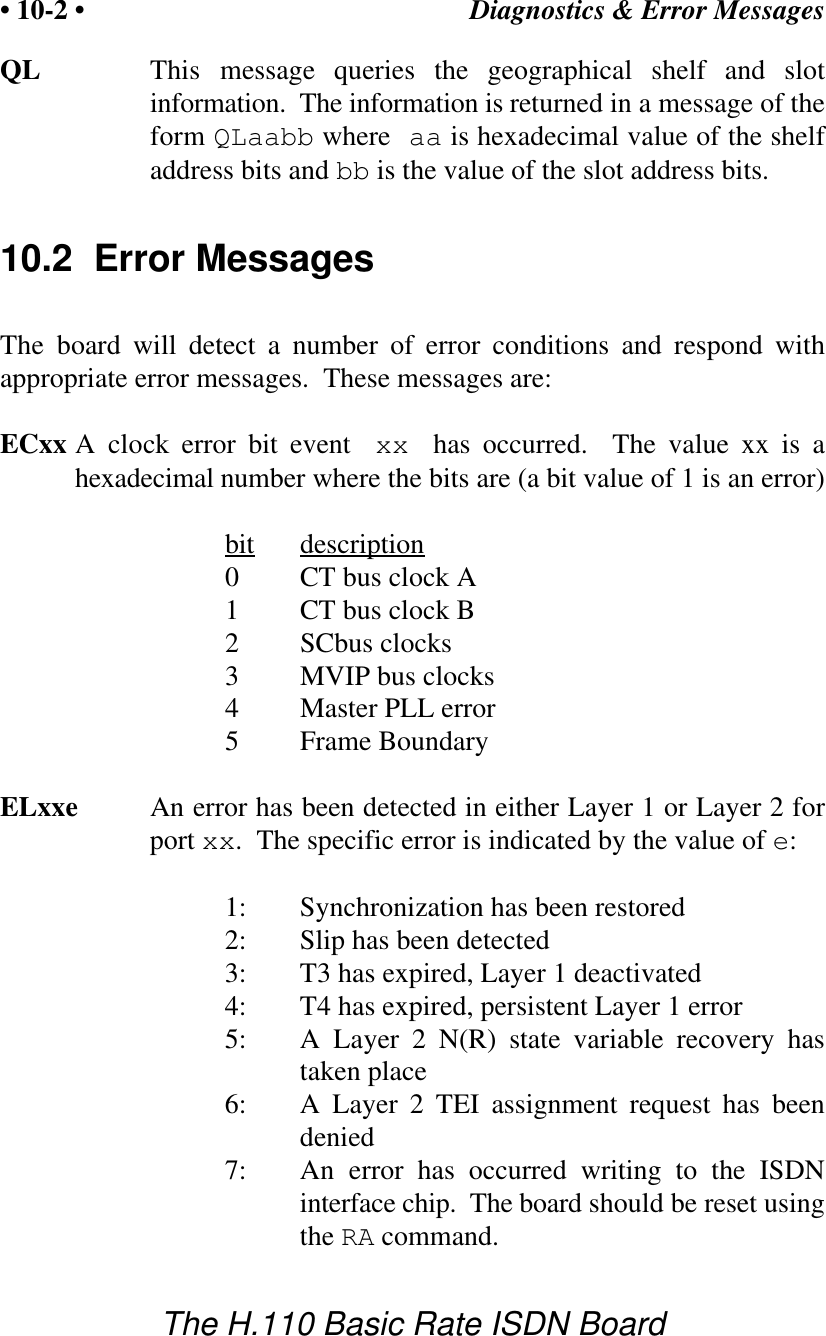
Communicating with the Host • 5-17 •The H.110 Basic Rate ISDN BoardDIxxEuutt INFOrmation message, Endpoint Identifier, UserService ID uu, Terminal ID ttDIxxPps INFOrmation message, progress p, signal sDIxxQqq(Euutt) INFOrmation request, query item qq, opt. EndpointIdentifier, USID uu, TID ttDIxxRr# INFOrmation, redirect reason r, redirect number #DIxxS(#) INFOrmation message, SPIDDNxxn(#)(/#) NOTIFY message on B channel xx, notificationindicator n, opt. calling #, opt. called #DNxxT(#) NOTIFY, transfer, transfer # (DMS-100)DPxxps CALL PROCeeding message on B channel xx,progress indicator p, signal sDPxxPccps PROGress message on B channel xx, cause cc,progress indicator p, signal sDQxx(spid/DN) SPID & DN assigned to B channel xx, response to DQqueryDRxxR(rr) RELease message, optional call reference rr if call notassigned to a B-channelDRxxcc(rr) RELease COMplete message B channel xx, cause cc,opt. call ref. if call not assigned to a B-channelDSxxbps#(/#) SETUP message, bearer capability b, assigned Bchannel xx, progress indicator p, signal s, calling #,called numberDSxxbps(#)A=ca SETUP message, bearer capability b, progress p,signal s, opt. calling #, call appearance ca (CACHEKTS & AT&T Custom)DSxxrrbps#(/#) SETUP message, no B-channel, call ref. rrDSxxApsrr SETUP Acknowledge, progress p, signal sDTxxLl(text) Display text line l (1 or 2) on B channel xxDXxxccssrr STATUS message on B channel xx, cause cc, call statess, call reference rrError MessagesECxx Clock error bit xxEDddy Diagnostic error y on port ddELddy Layer 1 or 2 error y on port ddEMddy MDL error y on port dd (Layer 2 protocol errors)
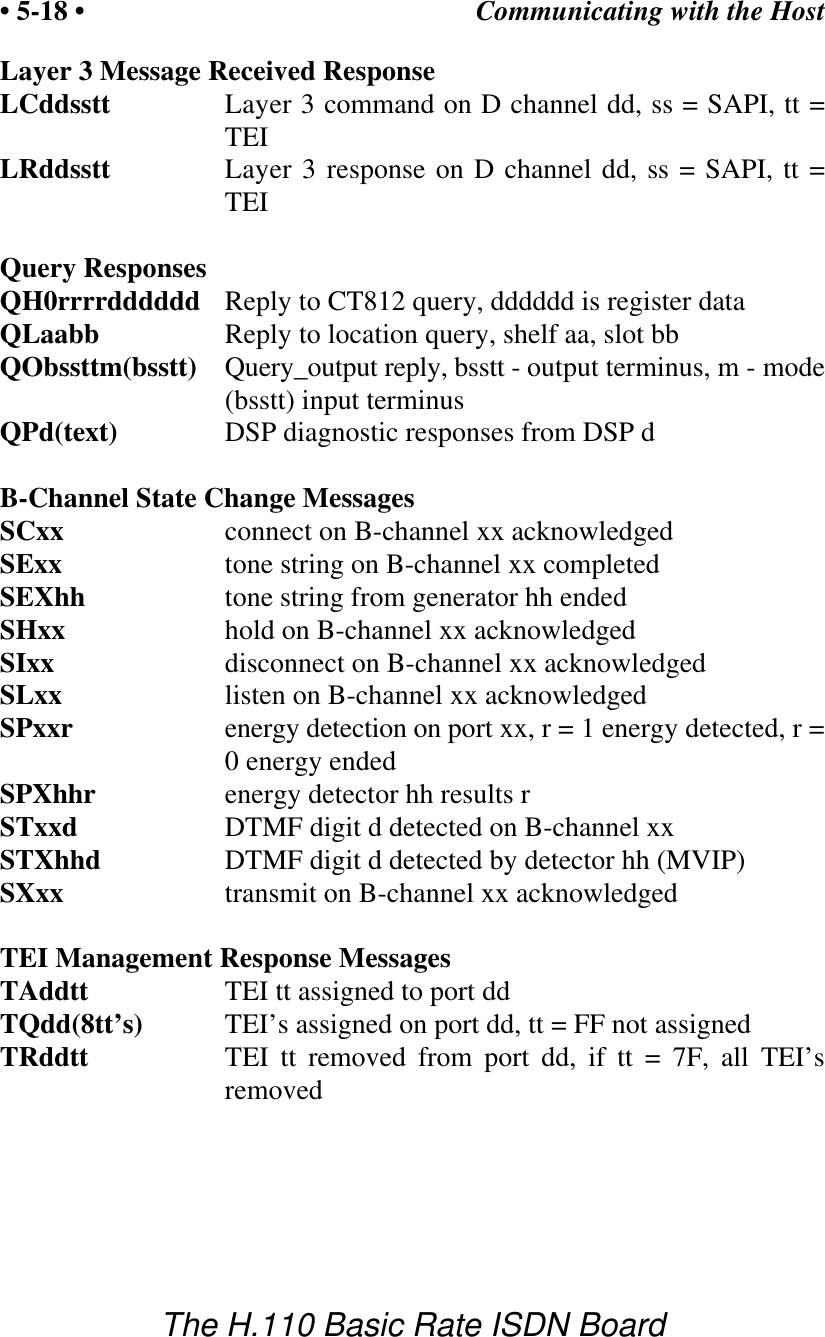
Communicating with the Host• 5-18 •The H.110 Basic Rate ISDN BoardLayer 3 Message Received Response LCddsstt Layer 3 command on D channel dd, ss = SAPI, tt =TEILRddsstt Layer 3 response on D channel dd, ss = SAPI, tt =TEIQuery ResponsesQH0rrrrdddddd Reply to CT812 query, dddddd is register dataQLaabb Reply to location query, shelf aa, slot bbQObssttm(bsstt) Query_output reply, bsstt - output terminus, m - mode(bsstt) input terminusQPd(text)    DSP diagnostic responses from DSP dB-Channel State Change MessagesSCxx connect on B-channel xx acknowledgedSExx tone string on B-channel xx completedSEXhh tone string from generator hh endedSHxx hold on B-channel xx acknowledgedSIxx disconnect on B-channel xx acknowledgedSLxx listen on B-channel xx acknowledgedSPxxr energy detection on port xx, r = 1 energy detected, r =0 energy endedSPXhhr energy detector hh results rSTxxd DTMF digit d detected on B-channel xxSTXhhd DTMF digit d detected by detector hh (MVIP)SXxx transmit on B-channel xx acknowledgedTEI Management Response MessagesTAddtt TEI tt assigned to port ddTQdd(8tt’s) TEI’s assigned on port dd, tt = FF not assignedTRddtt TEI tt removed from port dd, if tt = 7F, all TEI’sremoved
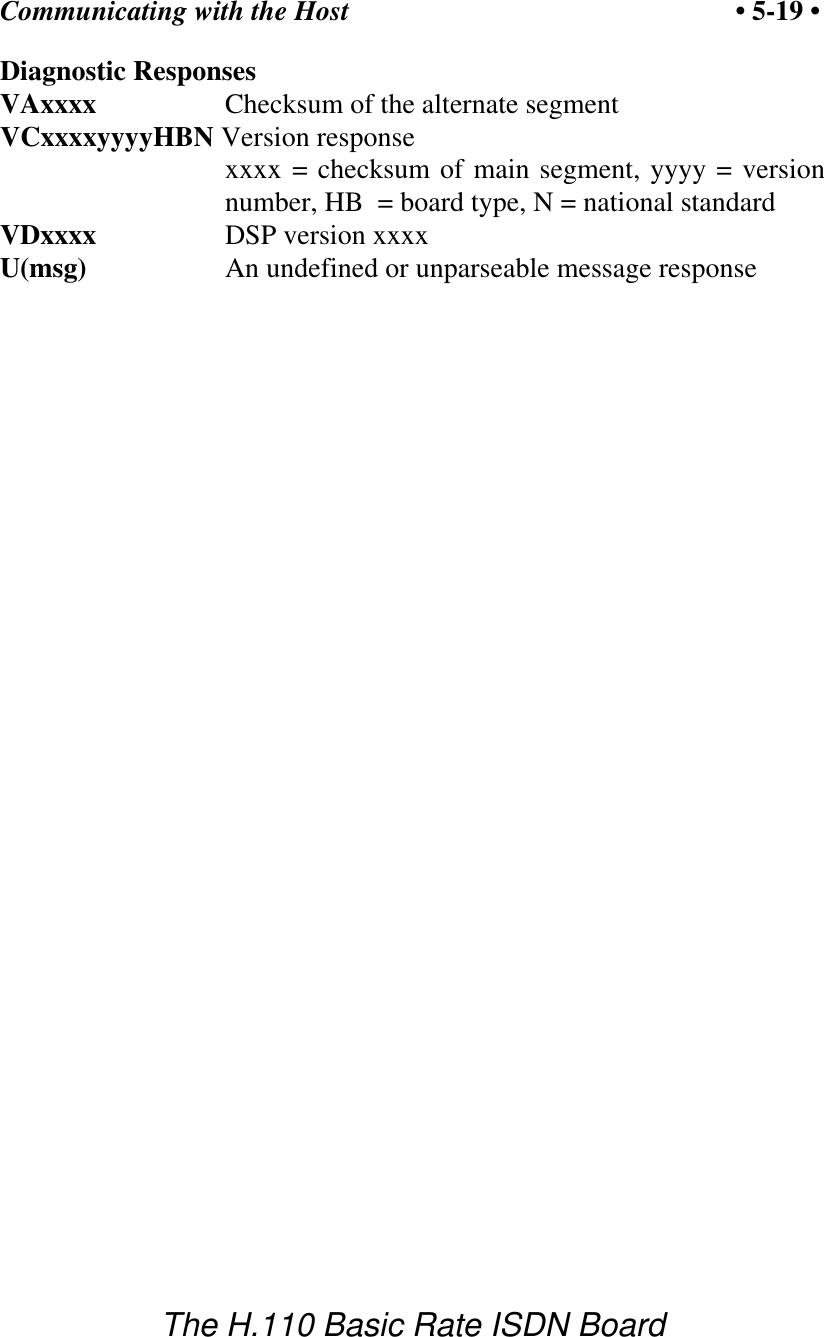
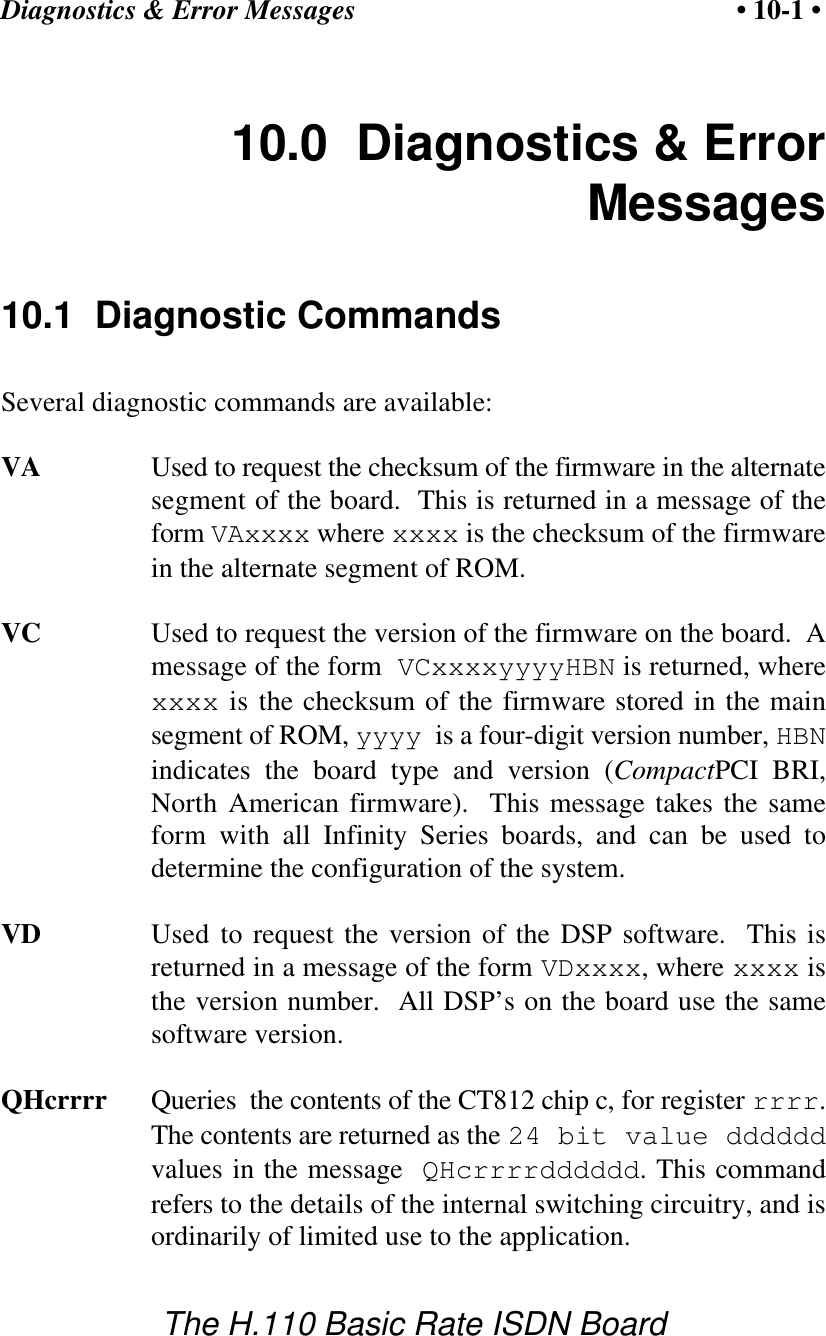
Communicating with the Host • 5-19 •The H.110 Basic Rate ISDN BoardDiagnostic ResponsesVAxxxx Checksum of the alternate segmentVCxxxxyyyyHBN Version responsexxxx = checksum of main segment, yyyy = versionnumber, HB  = board type, N = national standard VDxxxx DSP version xxxxU(msg)     An undefined or unparseable message response
Communicating with the Host• 5-20 •The H.110 Basic Rate ISDN Boardthis page intentionally left blank
The H.110 Bus & Clock Modes • 6-1 •The H.110 Basic Rate ISDN Board6.0  The H.110 Bus & Clock ModesThe Infinity Series H.110 Basic Rate ISDN Board provides a means ofconnecting BRI B-channels to the digital H.110 computer telephony bus.Through this bus, the B-channels can be connected to other H.110compatible boards.  To accomplish this, the board  has complete access toall streams and timeslots on the bus.  It is capable of operating in a varietyof clock modes compatible with H.110 operation.  6.1  The H.110 BusThe H.110 bus consists of 32 Pulse Code Modulation (PCM) streamsoperating at an 8.192 MHZ. clock rate.  Each stream contains 128timeslots, for a total of 4096 timeslots.  In addition to the PCM data signals,there are a number of bit, frame, and network reference signals that areused to synchronize the operation of multiple boards.  For the purposes of commands, a particular H.110 timeslot is referred toby a four digit hexadecimal number.  The first two digits are the streamnumber, while the last two digits are the timeslot within the stream.Streams range from 00h to 1Fh, and timeslots from 00-7Fh.The physical H.110 bus is a backplane connection using the J4/P4connector.  The H.110 specification defines allowable impedance and signallengths on each board so that additional bus termination is not needed toinsure the proper operation of the bus.  The maximum length of the bus(24.8 in.) and the maximum number of slots (21) are also specified.Different length pins are also used on the various connectors.  This is doneso that the various signals are staged in the correct order.
The H.110 Bus & Clock Modes• 6-2 •The H.110 Basic Rate ISDN Board6.2 Clock ModesThe H.110 bus specification defines a variety of clock signals.  Two clocksignals CT bus A and CT bus B are provided for redundancy.  In addition,two signals called CT_NETREF_1 and CT_NETREF_2 are defined whichmay be referenced to an external clock source such as a T1 or E1 span.These signals exists to aid in recovery if the primary clock source shouldfail.The clock mode must be set before any connections can be made withother boards.  The clock mode is set using the Set Clock command“SCmsabbc”, where m is the clock mode, s is the sub-mode, and a, bb, andc are additional arguments used to select clock sources and specifycompatibility modes.  This command takes the same form on all InfinitySeries H.100 boards.  Because of this, some of the possible options are notrelevant to the H.110 boards, but the format is retained to make it easier tocreate applications that are portable between the two bus structures.The default clock mode on a power up is to provide a local clock, but toneither source clock signals to the bus or derive the clock from the bus.The possible clock modes are:0no clocks to or from the bus1clocks slaved to the CT bus2the board is clock master CT bus clock A3the board is clock master CT bus clock B4the board is secondary master for CT bus clock A5the board is secondary master for CT bus clock BConnections are possible only when all boards within a system aresynchronized to the same clock.  Only one board in a system can providethe H.110 bus clock.  The other boards in the system must slave theirinternal clocks to the master.   If the H.110 Basic Rate ISDN Board is touse the H.110 bus clock, this clock must be provided by another boardbefore switching can be accomplished.
The H.110 Bus & Clock Modes • 6-3 •The H.110 Basic Rate ISDN Board6.2.1 Slave ModeIn the Slave Mode, the H.110 Basic Rate ISDN Board derives its clocksfrom one of the clock signals on the CT bus.  The clock signal is selectedwith the submode argument in the SC command.  The possible clocksignals are:0 - CT bus clock A1 - CT bus clock B6 - CT bus clock A, auto-fallback mode7 - CT bus clock B, auto-fallback modeArgument a is used to set the CT_NETREF mode, while argument bb isused to select the source of CT_NETREF.  The choices for argument a are:0 - No CT_NETREF output1 - CT_NETREF_1 output is enabled2 - CT_NETREF_2 output is enabledIt should be noted that CT_NETREF_2 is defined only for the H.110 busand not the H.100 bus.  The CT_NETREF source is specified by argumentbb, and can be any of the Basic Rate ISDN interfaces that is operating asTE (terminal equipment). 6.2.2 Primary Master ModeIn modes 2 or 3, the board supplies the CT master clocks A or Brespectively.  Other boards on the H.110 bus will synchronize to one ofthese clocks.  The source of the clock is selected by the submode arguments.  The choices are:0 - freerun, the board’s internal clock1 - CT_NETREF_12 - CT_NETREF_2 (not present on the H.100 bus)3 - a local network, any TE BRI interface4 - a local network (TE port) with auto-fallback to CT_NETREF_1
The H.110 Bus & Clock Modes• 6-4 •The H.110 Basic Rate ISDN Board5 - a local network (TE port) with auto-fallback to CT_NETREF_2For submode 1 and 2, argument bb will select the frequency of theCT_NETREF signal.  The choices are:00 - 8 kHz. (frame rate)01 - 1.536 MHZ. (T1 rate)02 - 1.544 MHZ. (T1 extended superframe rate)03 - 2.048 MHZ. (E1 rate)For submodes 3-5, argument bb will select one of the Basic Rate ISDNinterfaces.  This interface must be operating as TE (terminal equipment).For submodes 4 and 5, the optional argument c will specify the frequencyof the selected CT_NETREF source.For all modes, argument a should be set to 0.  On H.100 boards, thisargument is used to select the legacy bus compatible clocks that the boardwill supply.  As the H.110 bus is not compatible with the SC or MVIP bus,the only valid option is 0, no compatibility clocks provided.6.2.3 Secondary Master ModesWhen a board is operating as a secondary master, it uses the other clocksignal as a source, i.e. if a board is the secondary master for CT clock B,it uses CT clock A as a source and provides CT clock B.  If the primaryclock fails, the secondary master then becomes the clock master.Typically, one board will be set as the master for clock A and anotherboard as the secondary master for clock B, or vice versa.  If the clocksource specified by the submode is either of the CT_NETREF signals ora local network, the board will automatically fall-back on that source if theprimary clock should fail.  If set to free-run, it will fall back to a PLL thatwas locked to the primary master clock.In all secondary master modes, if the primary master fails, the board willautomatically become the new primary master.  If the original primarymaster is  restored, the clock mode for the original secondary master must
The H.110 Bus & Clock Modes • 6-5 •The H.110 Basic Rate ISDN Boardbe reset.When operating in secondary master mode, submodes 0-3 are valid, andthe arguments a and bb are the same as when operating as a primarymaster.6.2.4 Clock FallbackThe H.110 Specification details a scheme for automatically recovering froma clock failure.  One of the CT bus clocks, either A or B is designated themaster clock.  The other clock is the secondary master and is generated bya different board than the primary clock.  While the primary clock is valid,the secondary clock is locked to it.  If the primary clock should fail, thesecondary clock takes over using a local oscillator, CT_NETREF_1,CT_NETREF_2, or a local network as the source.  Boards that are slavesshould automatically fall back to the secondary clock.  After a failure of themaster clock, system software should designate new primary and secondaryclocks.  The new primary may be the previous secondary clock master.For Infinity Series H.110 boards, this will involve sending a set clockcommand with the new primary clock information.When an Infinity Series board is set for automatic fallback, the board willautomatically switch to the secondary clock if the primary clock fails.When this occurs, the board will send an “EC” message indicating thefailure.  When the application designates a new primary master, it shouldsend a new clock mode command to the board even though auto-fallbackmay have occurred.6.2.5 Clock ErrorsIf the board detects a problem with the clocks, it will generate a clock error,which notifies the application that it should take appropriate action.  Clockerrors are reported in the Clock Error Bit message, ECxx where the xx  isa hexadecimal value in which each bit identifies the specific error.  A valueof 1 indicates an error condition.  The bits are as follows:
The H.110 Bus & Clock Modes• 6-6 •The H.110 Basic Rate ISDN Boardbit Error Description0CT bus clock A1CT bus clock B2SCbus clocks3MVIP bus clocks4Master PLL error5Frame BoundaryAs the SC and MVIP bus signals are not present, bits 2 and 3 can beignored.6.3 Configuration InformationInformation on the clock mode setting, stream rates, and otherconfiguration settings is available in the dual-ported memory in an eightbyte block beginning at an offset of 1F18h.  The first four bytes are theclock mode, the submode, and the a and bb arguments from the set clockcommand SC.  The next byte contains the stream rate information from theSB command with bits 0-1 containing the value for streams 0-3, bits 2-3 forstreams 4-7, and so on.  On H.100 boards the sixth byte is used indicate thestate of the H.100 and MVIP termination and can be ignored for H.110boards.  If bit 7 of the seventh byte is 1, bits 0-3 indicate the BRI interfacethat is providing the reference for clocks on the board.  If bit 7 is 0, theclocks are not being derived from an interface. The eighth byte contains theclock error status bits.  These are in the same order as in the EC clockerror message (Sec. 6.2.5).6.4 Hot SwapHot swapping is the capability of being able to insert or remove a boardfrom a live system without having to power down or interrupt the operationof the system.  The H.110 specification provides for hot swap capabilities,and these are implemented on the H.110 Basic Rate ISDN Board.Each board has a switch that is linked to the ejector tab.  This switch is
The H.110 Bus & Clock Modes • 6-7 •The H.110 Basic Rate ISDN Boardused to assert a signal called ENUM# when a board is inserted or about tobe removed.  Each board also has a blue LED which is used to indicate thestatus of the board.  Upon insertion, this LED is illuminated until thehardware connection process is complete.  The LED is then turned off.When removing the board, the ejector tab is partially depressed to signalthat the board is to be removed.  The blue LED will then be illumimatedindicating that it the board may be fully removed.The ENUM# signal is used to notify a Hot Swap Driver of the impendinginsertion or removal of the board.  It is the responsibility of the driver totake what ever steps are necessary to connect or disconnect the hardware.
The H.110 Bus & Clock Modes• 6-8 •The H.110 Basic Rate ISDN Boardthis page intentionally left blank
Layer 1 & Layer 2 Protocols • 7-1 •The H.110 Basic Rate ISDN Board7.0  Layer 1 & Layer 2 ProtocolsBasic Rate ISDN conforms to a model defined in a set of standards (I.430,Q.921, Q.931 etc.) that is composed of a number of layers dealing with thephysical interface, peer to peer signaling and call control.  The InfinitySeries H.110 Basic Rate ISDN Board provides most of the control over thefirst two layers and optionally provides an interface to deal with the detailsof the third or call control layer.  This section will give a brief descriptionof the first two layers and how they relate to the inter-workings of theboard and the application.  It is not meant as a exhaustive reference ordefinition.  For this, the reader is referred to the relevant specifications orBellcore documents.7.1  Layer 1The physical characteristics of the Basic Rate Interface are defined by I.430and are referred to as Layer 1.  Layer 1 deals with the functions of timingand synchronization.  It also provides the following services,activation/deactivation, D-channel access for signaling, transmission of theB and D channels, and Layer 1 status indication to Layer 2.On the H.110 Basic Rate ISDN Board, the details of Layer 1 operation arecarried out by the hardware and the on board processor and are largelyhidden from the application.  However, error messages will be sent toindicate a change of status that might affect the operation of the interface.Examples are the loss or restoration of synchronization.  Details of thesemessages may be found in Section 10.2.Activation, deactivation, and synchronization are achieved through theexchange of bit specific bit patterns referred to as INFO signals.  These are:
Layer 1 & Layer 2 Protocols• 7-2 •The H.110 Basic Rate ISDN BoardINFO0 No signal (either side)INFO1 Positive ZERO, negative ZERO, six ONEs repeated(TE side)INFO2 Frame with all bits of the B, D and D-echo channelsset to ZERO, bit A set to ZERO (NT side)INFO3 Synchronized frames with operational data on the Band D channels (TE side)INFO4 Frames with operation data on the B, D, and D-echochannels, bit A set to ONE (NT side)Layer 1 operation is described by a state machine model.  This model hasa different sequence of states depending on whether the device is a TE(terminal equipment) or NT (network termination).  The states for the TEdevice are referred to as F states while the NT states are G states.  Thestates are:TE StatesF1 InactiveF2 SensingF3 DeactivatedF4 Awaiting a signal, transmitting an INFO1F5 Identifying input, awaiting an INFO2 or INFO4F6 Synchronized, INFO2 detected, transmitting INFO3, awaitingan INFO4F7 Activated, INFO 4 detected, transmitting INFO3F8 Lost framing, awaiting resynchronization by INFO2 orINFO4 or deactivation by INFO0NT StatesG1 DeactivatedG2 Pending activation transmitting INFO2, awaiting INFO3G3 Activated transmitting INFO4, INFO3 detectedG4 Pending deactivationOn the H.110 Basic Rate ISDN Board, the Layer 1 states sequencingproceeds automatically at the chip level without requiring the interventionof the application.  However, indications of a change of state are reported
Layer 1 & Layer 2 Protocols • 7-3 •The H.110 Basic Rate ISDN Boardin “EL” messages.  In addition, the current state of each port is available tothe application in the dual-ported memory.  For details on this, see Section7.3.7.2  Layer 2Layer 2 deals with the exchange of messages between peer devices and isreferred to as the Data Link Layer. It is defined by the Q.921 specification.The protocol for the establishment of data links and the exchange ofmessages is called LAPD.  On a Basic Rate Interface, LAPD messages orframes are exchanged over the 16 kHz. D-channel.More than one data link can be active on a D-channel at the same time.  Infact, in normal operation, at least three data links are required, one forLayer 2 management, one for network broadcast messages, and one for auser device.  The data links are identified by a two part address called theData Link Connection Identifier or DLCI.  The two parts are the ServiceAccess Point Identifier or SAPI, and the Terminal Endpoint Identifier orTEI.  SAPI values can have a range of 0-63 and TEI values can range from0-127.  However, for the purposes of the Basic Rate ISDN interfaces onlya limited number of possibilities are available.  These are:SAPI = 63, TEI = 127 Layer 2 management proceduresSAPI = 0, TEI = 127 Group TEI for broadcast messagesSAPI = 0, TEI = 0-126 Individual TEI’s for terminal equipment for callcontrol proceduresSAPI = 16, TEI = 0-126 Packet communicationLAPD messages or frames can take three formats.  Information or I framesare used to perform information transfers between Layer 3 entities.Supervisory or S frames are used to perform data link supervisory controlfunctions such as the acknowledgment of I frames, requesting theretransmission of I frames, or request the suspension or resumption of thetransmission of I frames.  The third format is Unnumbered or U frameswhich provide additional data link control functions and unnumberedinformation transfers for unacknowledged information transfers.
Layer 1 & Layer 2 Protocols• 7-4 •The H.110 Basic Rate ISDN BoardSupervisory FramesRR Receive Ready, used to acknowledge I framesRNR Receiver Not Ready, used to suspend transmissionREJ Reject, reject an I frame due to an errorUnnumbered FramesSABME Set Asynchronous Balanced Mode ExtendedCommandDISC Disconnect CommandUA Unnumbered Acknowledgment ResponseDM Disconnect Mode ResponseUI Unnumbered Information CommandFRMR Frame Reject ResponseTo exchange Information frames, a data link must first be established.  Thisis done by a terminal requesting a TEI using a UI frame.  The network cangrant the TEI also using a UI frame.  There are a number of possible statesa data link can have once a TEI has been assigned.  To exchange I frames,the link must be in the multi-frame established state.  This is achieved byone end or the other sending an SABME frame and receiving a UAresponse.  Once the data link is in the multi-frame state it can remain thereindefinitely unless an error is detected or a request is made to disconnectfrom the multi-frame state.Each I frame contains two state variables N(S) and N(R) which aresequence numbers for the I frame sent and the next I frame that is expectedto be received.  The supervisory frame that acknowledges the I frame hascorresponding variables.  These are used to insure that no I frames are lost.They can also be used to request the retransmission of an I frame shouldan error in transmission occur.  Each frame also includes  Frame CheckSequence or FCS field to insure the integrity of the I frame contents.The H.110 Basic Rate ISDN Board manages all the details of the Layer 2protocol.  For ports set as TE’s, a SABME frame is automatically sentupon assignment of a TEI to put the data link into the multi-frameestablished state.  Acknowledgments and supervisory frames are sent asneeded and recovery procedures initiated without requiring the intervention
Layer 1 & Layer 2 Protocols • 7-5 •The H.110 Basic Rate ISDN Boardof the host application.  The necessary timers are maintained on the boardto handle retransmissions as specified by Q.921.  Under normalcircumstances, an application need only deal with the information fieldusing the “LC” and “LR” commands and responses (see section 7.5).The LAPD protocol provides for the establishment of multiple data linksthrough the assignment and management of TEI’s.  Provisions exist fordetecting the assignment of the same TEI to multiple devices, and theremoval of that TEI to correct the situation.  Each piece of terminalequipment should have a unique TEI so that the network termination candistinguish between different terminals.  It is, however, possible for aterminal to have more than one TEI.  As an example, under National ISDN1 one TEI may be required for control of speech calls and another forcircuit switched data (this requirement is switch dependent).The H.110 Basic Rate ISDN Board supports up to seven TEI’s per port inaddition to the group TEI and the Layer 2 DLCI at (63,127).  An additionalPacket TEI is also supported (see section 7.5).  A single TEI isautomatically requested by the board if the port is set as a TE, butadditional TEI’s can be requested (see section 7.4).It is not necessary for the application to deal directly with the Layer 2 datalink states.  However, the state information for the seven supported TEI’sis available in the dual-ported memory.  For details see section 7.3.  If aLayer 2 error condition is detected that can not be handled with the normalrecovery procedures, an “EM” error message will be sent by the board tothe application allowing the application to take further action such asinitiating a TEI management procedure or restarting the port.  See section10.2 for details of these messages.7.3 Layer 1 & Layer 2 StatesEach of the thirty-two ports has a byte of memory reserved in the dual-ported memory for Layer 1 information beginning at an offset of 1D00h.The bytes are arranged sequentially by port so that the first port is at anoffset of 1D00h, the second at 1D01h and so on.  If the port is an NT, the
Layer 1 & Layer 2 Protocols• 7-6 •The H.110 Basic Rate ISDN Boardmost significant bit will be set to 1.  For a TE port, this bit will be a 0.  Thelower four bits represent the F or G state as defined in section 7.1.  Thus,state F7 will be represented by a 07h and state G3 will be represented as an83h.Each port also has eight bytes reserved for Layer 2 state informationbeginning at an offset of 1C00h.  The first seven bytes for a port representthe Layer 2 states for each of the seven possible TEI’s.  The last byte ofthe eight is the Layer 2 state of the Packet Data Link.  These states are:1TEI unassigned2TEI assigned, a TEI has been assigned, but multi-frameoperation has not been established3Awaiting multi-frame operation, an SABME frame has beensent and awaiting a UA frame acknowledgment4Multi-frame operation, exchange of I frames is possible5Timer recovery, a timer has expired and recovery proceduresare in progress6Awaiting release from multi-frame state, a DISC frame hasbeen sent and awaiting a DM frame7.4 TEI ManagementWhile the board handles the basic procedures of TEI assignment, it is theresponsibility of the application to manage the process and keep track ofwhich TEI’s have been assigned for use in sending and receiving Layer 3messages.  A number of command and response messages have beenprovided to facilitate this function.TEI’s come in two types.  One type, fixed TEI’s are in the range 0-63 andare assigned by presubscription to a piece of terminal equipment.  Thevalue of a fixed TEI is usually set in the terminal by some means such asa set of switches or fixed in non-volatile memory.  The second type ofTEI’s are assigned dynamically from the range 64-126.  These TEI’s arenegotiated between the TE and NT every time the TE powers up, restarts,or otherwise needs a new TEI.  The TEI assigned to a particular piece of
Layer 1 & Layer 2 Protocols • 7-7 •The H.110 Basic Rate ISDN Boardterminal equipment may be different each time assignment takes place.Dynamically assigning  TEI’s is the preferred method.If a port is set as a TE, the board will automatically request a single TEIupon power up or resetting unless the Layer 2 system option 1 is set to “1”with the SS command.  There will be a delay of a random interval of up to15 seconds before this request is made.  This delay is part of the Bellcorespecifications for an ISDN BRI terminal and the timer used is calledTWAIT.  The purpose of this delay is to prevent too many terminals fromrequesting TEI assignment at a time in cases such as the restoration aftera power outage.  This delay can be eliminated by the application sending aTEI assignment request command.  Once this has been done, TWAIT isno longer active.  If needed, additional TEI’s up to seven can be requestedby the application.  As each TEI assignment is made, a message informingthe application of the assignment is sent by the board.If a port is set as an NT, it will grant TEI requests up to the limit of sevenTEI’s for the port.  TEI values are granted sequentially beginning at 64 andwrapping around at 126.  Resetting the port or removing TEI’s does notalter the sequence.  Each time a TEI is assigned, a message is sent to theapplication reporting the assignment.  The application can request theremoval of a specific TEI or of all TEI’s if an error in TEI assignment issuspected.The command message to request a TEI assignment takes the form TAxxwhere xx is the port number in hexadecimal notation.  Thus, “TA0A” is arequest for a TEI assignment for the eleventh port (ports are numbered 00-0B).  TEI assignment requests can only be made for TE ports.  If a TEI isassigned, the board will send a message of the form TAxxtt where xx is theport number and tt is the TEI assigned in hexadecimal.  This message issent both by a TE port being granted a TEI and an NT port granting theTEI.  An example would be “TA0A40” which would indicate that a TEI of64 has been assigned to or by the eleventh port.A fixed TEI can be assigned to a port by using the fixed TEI command.This command takes the form TFxxtt where xx is the port number and ttis the TEI number in the range 00-3F.  This command does not
Layer 1 & Layer 2 Protocols• 7-8 •The H.110 Basic Rate ISDN Boardautomatically place the data link in the multi-frame established state, butinstead puts it in the TEI assigned state.  It is not necessary to issue thiscommand for an NT port, as the board will automatically reserve space fora fixed TEI upon receiving a message with a TEI in the range of fixedTEI’s.  However, space can be reserved by the command before receivinga message.  This may be desirable, as fixed TEI’s count toward the limit ofseven TEI’s per port.The application can request the removal of a TEI by issuing  the TEIremoval command for an NT port.  This command is of the form TRxxtt,where xx is the port and tt is the TEI.  If the TEI value is 127 or 7Fh, allTEI’s on that port will be removed.  If a TE port receives a request toremove a TEI it will send a response message of the form TRxxtt to theapplication where xx is the port number and tt is the TEI value.  If thisvalue is 7F, the request was to remove all TEI’s.If there is a question of whether all TEI’s are currently valid, theapplication can request a TEI check be performed by sending a commandof the form TCxx where xx is the port number.  This can only be done forNT ports.  If the check detects any TEI’s that are assigned to multipledevices or that are not assigned, it will remove them.  The application canverify the validity of a TEI on a TE port by sending a command of theform TVxxtt.  The NT on the far end will then initiate a TEI checkprocedure.  The TEI Check response can take one of two forms.  Thedefault form is to include all TEI’s in a single TEI Check Responsemessage.  The alternate form is for each TEI to be reported in a separateTEI Check Response message.  Either form is correct and central officeequipment should respond correctly to both, however, this may not be thecase with some older equipment, and so the option is provided.The Layer 2 System Option command is used to control the Layer  2behavior.  This command takes the form SSxy where x and y control thefirst and second option and can take the values 0 or 1.  The first option, ifset to 1 disables the timer TWAIT and therefore disables the automatic TEIrequest for a TE port.  The second option controls the form of the TEICheck Response message.  If the option is set to 0, one response messageis sent containing all TEI’s, if the option is set to 1, each TEI is reported in
Layer 1 & Layer 2 Protocols • 7-9 •The H.110 Basic Rate ISDN Boarda separate message.  The default for these options is 0, and in most casesit will not be necessary to issue this command.The application can query the board at any time for the TEI’s that areassigned.  This is done by sending a command of the form TQxx where xxis the port number.  The response will take the form TQxxtttttttttttttt,where xx is the port number and each tt pair is one of the eight TEI’s.  ThePacket TEI is the last one.  If a TEI is not assigned, the value returned forthat TEI will be “FF”.  As an example, a port with the TEI’s 64 and 65assigned would return “TQxx4041FFFFFFFFFFFF”.  This command canbe issued for either a TE or an NT port.Normally, once a TEI is assigned, the data link is in the multi-frameestablished state.  However, the link can be disconnected or reestablishedby using commands of the form TDxxtt and TExxtt where xx is the portnumber and tt is the TEI.  A data link that is disconnected is placed in theTEI assigned state.  If an attempt is made to send a Layer 3 message on adata link in the TEI assigned state, an attempt to reestablish the multi-frameestablished state will automatically be made by the board.7.5 The Packet Data LinkOne Data Link is reserved for sending X.31 Packet Data using the DChannel.  The TEI for this data link is managed is a slightly differentmanner than the other seven data links.  The TEI will default to a value of0 on a power up or restart of the board.  The Packet TEI can be set to anyvalue in the range 00-126 using a command of the form TPxxtt where xxis the port number and tt is the TEI.  If a fixed packet TEI is used, the TEImay be set to any value in the range 00-63.  If dynamic TEI’s are to beused for packet data, then it will be necessary to set the TEI to the samevalue as one of the seven data links.  This can be done after the TEI hasbeen assigned.The Packet Data Link is put in the Multi-frame Established state by sendinga message of the form TExxP where xx is the port number.  The link canbe disconnected by sending a message of the form TDxxP.  Packet
Layer 1 & Layer 2 Protocols• 7-10 •The H.110 Basic Rate ISDN Boardmessages are sent using the “LC” command as described in the nextsection.  The SAPI for these messages must be 16 (10h) and the TEI mustmatch that set using the “TP” command.  The packet messages can be upto 260 octets long.7.6 Sending and Receiving Layer 3 MessagesWhen the protocol level for a port is set at Layer 2 using the “SL”command, Layer 3 messages are sent and received using the auxiliarymailboxes.  To send a message, the application must first check to makesure that the transmit flag is 0.  The contents of the information field areplaced in the auxiliary transmit mailbox at an offset of 1402h bytes.  Thelength of the information field is placed at an offset of 1400h bytes.  Thisis a sixteen bit value with the low order byte first.  An “LC” message of theform LCxxsstt is then placed in the main transmit mailbox where xx is theport number, ss is the SAPI, and tt is the TEI of the data link to be used.The transmit flag is then set to 01h.When a Layer 3 message is received, an “LC” message of the formLCxxsstt will be placed in the receive mailbox.  This indicates that a Layer3 message for the DLCI (ss,tt) on port xx is available in the auxiliaryreceive mailbox.  The length of the message will be at an offset of 1600hand the contents of the information field will begin at 1602h.There is no restriction on the contents of the Layer 3 message other thana maximum length of 260 octets.  Messages may be sent for any DLCIwith a SAPI of 0 and an assigned TEI or a SAPI of 16 and the Packet TEI,as well as DLCI’s (0,127) and (63,127).As an example to send a Q.931 CONNect message for a call reference of1, the following bytes would be place in the auxiliary mailbox:offset bytes description1400h 04h length1401h 00h high order byte of length1402h 08h Q.931 message
Layer 1 & Layer 2 Protocols • 7-11 •The H.110 Basic Rate ISDN Board1403h 01h call reference length of 11404h 81h call reference of 11405h 07h CONNect message typeTo send this message with a DLCI of (0,64) on port 3, the command“LC030040” would then be placed in the main transmit mailbox and thetransmit flag would then be set to 01h.  Receiving a message is the mirrorimage of this process.
Layer 1 & Layer 2 Protocols• 7-12 •The H.110 Basic Rate ISDN Boardthis page left intentionally blank
Using “D” Messages for Layer 3 • 8-1 •The H.110 Basic Rate ISDN Board8.0  Using “D” Messages for Layer 38.1  Q.931 MessagesCall control for ISDN interfaces is handled at the Network Layer, alsoknown as Layer 3.  The specification that defines the message set used forcall control is Q.931.  Specifics for the U.S. implementation of the BasicRate interface can be found in the Bellcore documents Generic Guidelinesfor ISDN Terminal Equipment on Basic Access Interfaces (SR-NWT-001953) and  National ISDN Generic Guidelines for ISDN TerminalEquipment on Basic Rate Interfaces (SR-NWT-002661).  These latter twodocuments give details of the messaging on services of the National ISDN-1specification which is to be supported by most switch and terminalequipment manufacturers in the U.S.The message set defined in Q.931 consists of a number of commandmessages to establish and break down a call.  These include SETUP toinitiate a call, ALERTing, CALL PROCeeding, and  PROGress, tohandle the various stages involved in accepting or rejecting a call,CONNect to complete the connection, and DISConnect, release, andRELEASE COMplete to break down a call.  Additional messages areprovided as acknowledgments, SETUP ACKnowledge and  CONNectACKnowledge.Features beyond the basics of making a call are supported by additionalmessages.  A call may be placed on hold and retrieved using the messagesHOLD and RETrieve.  These messages have correspondingacknowledgment messages,  HOLD ACKnowledge and  RETRIEVEACKnowledge, as well rejection messages, HOLD REJect and RETreiveREJect.  INFOrmation messages can be used for a variety of purposessuch as sending text for display, activating features or indicators, or
Using “D” Messages for Layer 3• 8-2 •The H.110 Basic Rate ISDN Boardexchanging configuration information such as SPID’s.  Additional messagesare defined for maintenance or management purposes including NOTIFY,STATus, STATus ENQuiry, FACILITY and REGister.In addition to the basic codes for the various message types, each Q.931message consists of a number of information elements.  These informationelements are used to contain items such as the called and calling numbers,whether a call is speech or data, the B channel involved, and otherinformation about the progress of a call.  For some messages such as theSETUP message a large number of information elements are possible,many of which are optional or only used for certain types of calls.  As anexample a typical SETUP message from a central office switch containseight information elements and ninety octets of information.Each active call has a call reference that is part of every Q.931 messagedealing with that call.  This allows for the juggling of multiple calls on aninterface.  The call reference is granted by the originating party and remainsin effect until the call is finally released, no matter what happens in theinterim.  However, a call reference is only valid at that particular interfacein messages between the network termination and the terminal equipment.Q.931 also describes a state model for the progress of a call.  The states aredefined by which type of message has been received or sent.  Stateinformation may be exchanged through STATus messages as a check onthe operation of the terminal and to insure that the terminal and network arein agreement on the condition of a particular call.  For each state of a call,only certain message types are appropriate.8.2  “D” Command & Response MessagesThe Q.931 message set can be complicated, with many options andinformation elements to deal with.  On the H.110 Basic Rate ISDN Board,an application can directly access the information field of a Q.931 messageby using the Layer 2 support level.  In some cases this may be desirablewhen dealing with equipment that does not support National ISDN 1 or hasnon-standard features or messages.  However, the  H.110 BRI Board does
Using “D” Messages for Layer 3 • 8-3 •The H.110 Basic Rate ISDN Boardprovide a simpler interface through the Layer 3 support level for thoseinstances when only simple call control is needed for equipment thatconforms to NI-1.The Layer 3 support level is achieved using “D” channel commands andresponses.  These messages consist of an initial “D”, a second characterindicating the Q.931 message type, for example an “A” for an ALERTingmessage or a “C” for a CONNect message, a two digit number indicatingthe B channel, and for some messages additional arguments.  Each of theseadditional arguments are typically encoded as a single character or as a pairof hexadecimal digits in the case of the Cause element or Call references.The intent is to keep the messages short and simple with only the necessaryinformation and allow the on board firmware to fill in the details of theactual Q.931 messages sent.  The “D” messages are also similar in theirorganization to other XDS messages such as the “C” and “S” messagesused to control the B-channel connections on the H.110  BRI Board andports on other XDS line boards.  This simplifies the  overall task of theapplication.“D” channel messages and the corresponding Q.931 messages are given inthe following list:DAxx ALERTingDCxx CONNectDCxxA CONNect ACKnowledgeDDxx DISConnectDFxx Feature activation or indication using anINFOrmation messageDGxx RETrieveDGxxA RETrieve ACKnowledgeDGxxR RETrieve REJectDHxx HOLDDHxxA HOLD ACKnowledgeDHxxR HOLD REJectDIxx INFOrmationDKxx Keypad element INFOrmation messageDNxx NOTIFY
Using “D” Messages for Layer 3• 8-4 •The H.110 Basic Rate ISDN BoardDPxx CALL PROCeedingDPxxP PROGressDRxx RELease or RELease COMpleteDSxx SETUPDXxx STATusDYxx REGisterBecause of the fact that the required information elements in specificmessages are not identical for the network and terminal or user side, theargument details are different of NT and TE ports.  A complete list ofmessages and arguments can be found in section 5.4.To further simplify the application interface, the board will automaticallysend an acknowledgment message.  A CONNect ACK is sent where neededin response to a CONNect message.  A RELease is sent in response to aDISConnect, and a RELease COMplete is sent in response to a RELeasemessage.  A SETUP ACK or a CALL PROCeeding message is sent inresponse to a SETUP message from a terminal.The on board firmware normally hides call references from the application.Calls are instead associated with B channels.  If incoming calls do not havea B channel assignment, the board will make that assignment.  However,when the association of a call and a B channel is not maintained, as in thecase when a call is placed on hold, the call reference is passed on to theapplication so that it can be used to track the calls progress or be used toretrieve the call.  Call references are used more extensively with EKTS andCACH EKTS.The “D” message set provides the application with a simple interface thatgives the application complete control of the call but frees it and theprogrammer from being forced to deal with the details of coding Q.931messages.
Using “D” Messages for Layer 3 • 8-5 •The H.110 Basic Rate ISDN Board8.3 Information ElementsInformation elements are used to encode information that may be requiredto handle a call.  In “D” messages on the H.110 BRI Board, theseelements are represented by single argument characters.  Only thoseelements that are needed are included in the messages.  Elements that areunambiguous or constant are encoded by the board in the Q.931 messagesbut are not part of the “D” messages.  Some elements that are rarely usedsuch as sub-addresses are not part of the “D” message scheme.  Details onwhich arguments are used in which specific message can be found inSection 5.4.8.3.1 Bearer CapabilityBearer capability is used to describe the type of call being placed.  Thisargument is present in both SETUP commands and responses.  The fouroptions for bearer capability are:A3.1 kHz audio, 64 kbps, circuit mode, Mu-LawDUnrestricted digital information, 64 kbps, circuit modeRRate adaption from 56 kbps, 64 kbps, circuit modeSSpeech, 64 kbps, circuit mode, Mu-Law8.3.2 CauseThe Cause element is present in a number of different messages.  Itspurpose is to give a reason why a particular message such as a DISConnectwas issued.  Some causes such as Normal Clearing are part  of a normalcall while other causes may indicate an error condition.  The cause elementis quite lengthy, and therefore the argument is represented by a two digithexadecimal number in “D” messages.  The first digit of the cause servesto divide the causes into different classes, i.e. a ‘0’ indicates a cause relatedto dialing.  The list of causes are:01 Unallocated Number02 No route to specified transit network
Using “D” Messages for Layer 3• 8-6 •The H.110 Basic Rate ISDN Board03 No route to destination06 Channel unacceptable07 Call awarded and being delivered in an established channel10 Normal clearing11 User busy12 No user responding13 User alerting, no answer15 Call rejected16 Number changed1A Non-selected user clearing1B Destination out of order1C Invalid number format (incomplete address)1D Facility rejected1E Response to STATus ENQuiry1F Normal, unspecified22 Circuit/channel congestion29 Temporary failure2A Switching equipment congestion2B Access information discarded2C Requested channel not available2F Resource unavailable, unspecified32 Requested facility not subscribed39 Bearer Capability not authorized3A Bearer Capability not presently available3F Service or Option not available, unspecified41 Bearer capability not implemented45 Requested facility not implemented4F Service or option not implemented, unspecified51 Invalid call reference value58 Incompatible destination60 Mandatory information element is missing61 Message type non-existent or not implemented63 Information element non existent or not implemented64 Invalid information element contents65 Message not compatible with call state66 Recovery of timer expiry6F Protocol error, unspecified
Using “D” Messages for Layer 3 • 8-7 •The H.110 Basic Rate ISDN Board7F Interworking, unspecified8.3.3 Directory NumbersThe called or calling numbers in “D” messages are represent by the stringof digits.  Additional information that is encoded into the informationelement such as the type of number or numbering plan are added by thefirmware based on the context and length.  For NT ports, presentation ofcalling numbers is always allowed as the application has control ofpresenting this number.  If the default called number is used, it isconsidered part of a Local ISDN numbering plan.  For TE ports, thenumbering plan of the called number is based on the length, with numbersshorter than 7 digits being considered private plans, 7 digit numbers local,10 digit numbers national and longer numbers international.8.3.4 Feature Keys & Indication StatusFeature Keys are keys on a station set that can be used to signal thenetwork that a specific feature should be implemented.  Feature codesrange from 0 to 63 and are encoded as two hexadecimal digits in “DF”messages.  The exact meaning of a feature key code is dependent both oncontext and on the particular piece of network equipment involved.Feature Indicators are lights or other indicators on ISDN Station sets.These can be used for a variety of purposes such as indicating a featuresuch as conferencing is in use or that messages are waiting.  The encodingof the meaning of a particular feature is both hardware dependent andsystem dependent, that is the same code may represent different things ondifferent station sets.  However, the status of the indicator is restricted tofour choices.  These are:IIdle or offAActive or on constantlyQPrompt, a fast blinkPPending, a slow blink
Using “D” Messages for Layer 3• 8-8 •The H.110 Basic Rate ISDN Board8.3.5 Progress IndicatorProgress indicators are used to indicate something about the nature of theinterworking of a call.  This can be information about the fact that the callmay not be an end to end ISDN call, or it may indicate the presence ofinband information such as call progress tones or announcements.  Thiselement is present only in commands to NT ports or responses on TE portsas it is never found in messages sent by a user.  The codes for a progressindicator are:CCall is not end to end ISDN, call progress information may beavailable inbandDDestination address is non-ISDNOOrigination address is non-ISDNIInband information or appropriate pattern now availableWDelay in response at destination interfaceNno progress indicator8.3.6 SignalThe Signal data element is used to inform a terminal that a condition existsin which a user should be alerted by an audible tone or signal.  There aretwo instances in which the Signal element is used.  One is in a  SETUPmessage to a terminal indicating the presence of a terminating call.  In thisinstance the Signal takes the place of ringing on an analog line to alert theuser of an incoming call.  The second instance is in messages to a terminaloriginating a call to inform the user of the progress of the call.  This takesthe place of the traditional inband call progress tones such as dial tone,busy, ringback, and reorder.  The messages that the Signal may appear inare ALERTing, CALL PROCeeding, PROGress, CONNect, DISConnect,RELease, and RELease COMplete.  The Signal element may be present atthe same time that the Progress Indicator indicates inband signaling andtones are present in band.  The signal codes in “D” messages are:
Using “D” Messages for Layer 3 • 8-9 •The H.110 Basic Rate ISDN BoardFor SETUP messagesNNormal AlertingDDistinctive AlertingSSpecial AlertingIIntercom AlertingRReminder RingFAlerting OffFor other messagesDDial ToneRRingbackNNetwork Congestion/ReorderBBusy ToneCConfirmation ToneWWaiting CallFTones OffWhile most ISDN Station sets support different ring patterns and tones forthe various codes, sets from different manufacturers do not necessarily usethe same tone patterns for the different alerting codes.8.4 SPIDs & Endpoint IdentifiersService Profile Identifiers or SPIDs are numbers that are programmed intoterminals and sent to the network switch to identify a specific terminaldevice so that it can be associated with the features subscribed to by thatterminal.  The SPID is usually an 11 to 14 digit number of which the first10 digits are normally the Directory Number for the interface.  Theremaining digits are used to identify the different terminal devices on theinterface.  In the NI-1 specification, one or two SPIDs can be associatedwith a Basic Rate Interface.  The SPIDs can be associated with two piecesof terminal equipment, or the same TE can have two SPIDs.  Some COswitches require that one SPID be used for Speech or Audio calls and theother SPID be used for Data calls.
Using “D” Messages for Layer 3• 8-10 •The H.110 Basic Rate ISDN BoardTerminal equipment designed for NI-1 will send its SPID or SPIDs uponassignment of TEI’s during power up or a resetting of the interface.  Aseparate data link and TEI will be associated with each SPID.  The TE willexpect to receive an Endpoint Identifier for each SPID from the networkswitch in reply, and will not function until it receives an INFOrmationmessage with that element.  The Endpoint Identifier consists of twonumber, the User Service Identifier or USID and the Terminal Identifier orTID.  These are not to be confused with the SPID or TEI.  The networkswitch may or may not use the Endpoint Identifier in call processingmessages.For ports that are set as TEs, the SPID is sent to the network switch byusing a message of the form DIxxS where xx is one of two data linkarguments that are of the same form as the B-channels associated with theport.  If no number follows the “S”, the board will use the default SPIDprogrammed into the board using the “SD” command (see section 4.3).  Ifno default is programmed, the SPID digits must follow the “S”.  TheEndpoint Identifier reply will be in a response message of the formDIxxEuutt where xx is the data link argument, uu is the USID, and tt is theTID.  Both of these numbers are in hexadecimal.  Note that the SPID forthe even data link argument is used for speech and audio calls and theSPID for the odd data link argument is used for data calls.  If only oneSPID is defined, it is used for both and should be assigned to the even datalink.For terminal equipment connected to ports defined as NT, the programmedSPID can be any number with at least 12 digits.  Only the last digit is used.The SPID for speech or audio calls for the first terminal should have a “1”as the twelfth digit. If the terminal uses a separate SPID for data calls, thisshould have a “2” as the twelfth digit.  A second terminal should have a “3”as the twelfth digit.  The board will automatically respond with an EndpointIdentifier messages.  Endpoint identifiers are assigned on a fixed basis basedon the SPID.
Using “D” Messages for Layer 3 • 8-11 •The H.110 Basic Rate ISDN Board8.5 Directory NumbersEach B-channel has a default directory number associated with it.  Thesenumbers are set using the “SD” command (see section 4.3).  This numberis a seven digit number.  On TE ports, it is used for the calling numberelement in the SETUP message for calls originating from the port.  If nonumber is defined for the default, the calling number element will be absentfrom the SETUP message.  For NT ports, the directory number is used forthe default called number element in SETUP messages for calls originatingfrom the board and terminating on the terminal.  If the application wishesto use a number other than the default, this can be encoded in the “DS”message after the calling number with a “/” as a separator.8.6 Display TextMany ISDN terminals have the ability to display several lines of text.  Thistext can contain information about the caller, the status of the call, orfeatures.  Text can be sent to a terminal in an INFOrmation message or itcan be included as an information element if another message. Mostdisplays have one or two lines of twenty characters and this has beenassumed for the purposes of the “D” message set.  When text informationis sent to the a port set as a TE, this text will be passed on to the applicationin one or more “D” messages.Text can be sent to a terminal in several ways using “D” commands.  Thesimplest way for one line of text to be sent is with a “DI” command of theform DIxxT(text), where xx is the B-channel and (text) is text of up to 20characters.  If there is no call currently associated with the B channel, theINFOrmation message will be sent without a call reference.  However, ifa call is present, the message will be sent with a call reference and will beassociated with the call.  This may affect how the terminal displays the text.To send multiple lines of text, each line can be set up using a command ofthe form DTxxL1(text) for the first line and DTxxL2(text) for the secondline.  This will place text in a buffer.  The text can then be sent with acommand of the form DIxxB.
Using “D” Messages for Layer 3• 8-12 •The H.110 Basic Rate ISDN BoardText can be sent as part of the SETUP message by filling the buffer asdescribed above before sending the “DS” command.  The buffer is checkedto automatically include any text when the SETUP message is composed.The buffer is cleared when a call is released on that B-channel.It is also possible to include a single line of text in a PROGress message bysending a command of the form DPxxPpsT(text) where p is the progressindicator and s is the signal.Text that is sent to a port set as a TE will be passed to the application in aresponse message of the form DTxxLl(text) where l is the line number andxx is the B channel associated with either the call or the SPID.  A single lineof text in an ALERTing or PROGress message will become part of the“DA” or “DP” message after the signal character.8.7 NT Call Handling ExamplesThis section and the one that follows will give some simple examples of  the“D” messages that would be sent and received for a typical speech call.Only the “D” messages are shown.  The “C” messages used to establish theaudio paths will be explained in section 9.0.8.7.1 A Call Terminating at a TerminalIn this example, a call is placed to an ISDN terminal, is answered, and thendisconnected by the terminal hanging up.  The B1 channel of the fourthBRI port is used.commands responses descriptionDS06SNN7654321 SETUP messageDA0603 ALERTing messageDC0603 CONNect messageDD0610 DISConnect messageDR060F RELease COMplete
Using “D” Messages for Layer 3 • 8-13 •The H.110 Basic Rate ISDN BoardIn the “DS” command, the 06 indicates the B channel, in this case the B1channel for the fourth port, the “S” indicates a bearer capability of speech,the first “N” indicates that there is no progress indicator, the second “N”indicates normal alerting, and the calling number is 7654321.  The terminalsends an ALERTing message indicating that it has accepted the call and isalerting the user.  The CONNect message indicates the user has answeredthe call.  The DISConnect occurs when the user hangs up.  The cause codeindicates normal clear.  This causes the board to send a RELease message.The terminal finally responds with a RELease COMplete message to endthe call.  The cause code is unspecified.8.7.2 A Terminal Originating a CallIn this example, a call is placed from the terminal.  The terminal is usingoverlap sending.  In overlap sending, the dialed digits are sent in one ormore INFOrmation message until the network has enough digits tocomplete the call.  It is also possible for one or more of the digits to appearas a Keypad element in the SETUP message.  In this case the “DS”message might take the form DS06SK7654321.  A third possibility is thatthe entire called number is present.  This is called “enbloc” sending.  Withenbloc sending the “DS” message would appear as “DS06SC7654321” andno more digits would be expected.commands responses descriptionDS06SD5551000 SETUP messageDK067 Keypad messageDK066 Keypad message   ... keypad messagesDK061 Keypad messageDA06IR ALERTing messageDC06 CONNect messageDD0610 DISConnect messageDR06R RELease messageThe initial SETUP message indicates that this is a speech call.  The digitsfollowing the “D” are the calling party number.  The board selected the B1channel as it was not in use.  It sent a SETUP ACK message in response
Using “D” Messages for Layer 3• 8-14 •The H.110 Basic Rate ISDN Boardindicating that dial tone was present.  The Keypad messages are the digitsas they dialed.  These are sent by the terminal as INFOrmation messageswith a Keypad element.  When enough digits have been dialed to completethe call, an ALERTing message is sent with the progress indicator forinband tones and the signal indicating ringback.  A CONNect follows whenthe call is answered.  A “DD” command is issued with a cause of normalclearing to end the call.  The terminal responds with a RELease message.This causes the board to send a RELease COMplete message to end thecall.8.8 TE Call Handling ExamplesCall handling from the perspective of the TE side is similar to that for anNT.  However, there are some differences in which messages are sent andwhich information elements are present.8.8.1 Originating a CallIn this example, the board is originating a call.    As the board is a piece ofautomatic equipment, it is assumed that the “enbloc” sending method isalways used for originating calls.commands responses descriptionDS10S5551000 SETUP messageDP10NF CALL PROCeeding messageDA10IR ALERTing messageDC10NF01 CONNect messageDD1010N DISConnect messageDR100F RELease COMplete messageThe SETUP command indicates that the call is a speech call to 5551000.There are no progress indicator or signal elements.  The network respondswith a CALL PROCeeding message with no progress indicator and a tonesoff signal.  This means that the network has accepted the call and is passingit on.  When the terminal at the far end has accepted the call and is alertingthe user, an ALERTing message is sent with a progress indicator of inband
Using “D” Messages for Layer 3 • 8-15 •The H.110 Basic Rate ISDN Boardtones and a ringback signal.  The CONNect is sent after the far endanswers the call.  When the far end disconnects the network sends aDISConnect to the board with a cause of normal clearing and a signal oftones off.  This causes the board to send a RELease.  The network thenresponds with a RELease COMplete message to end the call.  This has acause value of unspecified and a signal of tones off.8.8.2 A Terminating CallSETUP messages from the network always use “enbloc” sending to sendthe called number.  The SETUP message is broadcast with the group TEI.It is up to the terminal to accept the call if the called number is part of itsprogramming.commands responses descriptionDS10SNN5551000/5552000 SETUP messageDA10 ALERTing messageDC10 CONNect messageDC10A81 CONNect ACKnowledgeDD1010 DISConnectDR10R RELeaseIn this example, the SETUP message from the network indicates a speechcall with no progress indicator and no signal.  The calling number is5551000 and the called number is 5552000.  The application sends a “DA”command to cause an ALERTing message to be sent.  There are noarguments for the alerting message for a TE port.  A CONNect followswhich causes the network to respond with a CONNect ACKnowledge.The terminal sends a DISConnect message with normal clearing to hang upon the call.  The network responds with a RELease which causes the boardto send a RELease COMplete to end the call.
Using “D” Messages for Layer 3• 8-16 •The H.110 Basic Rate ISDN Board8.9 HOLD & RETrieveAn active ISDN call can be placed on hold to free up a B-channel for useby another call.  The held call remains active and retains its call reference,but the connection is broken.  The connection can be restored by retrievingthe call and assigning a new B-channel for the circuit.  This does not haveto be the same B-channel as was originally used.A terminal connected to an NT port can initiate a hold by sending a HOLDmessage.  This results in the “D” response message DHxxrr, where xx isthe B-channel and rr is the call reference.  The call reference is importantas it is the only way a call can be retrieved once it is placed on hold.  Oncea call has been placed on hold, it is the responsibility of the application toretain the call reference until the call is retrieved or released.  To confirmthe hold, the application would send a message of the form DHxxArr toacknowledge the hold.  If it did not want to accept the hold, it would senda message of the form DHxxRccrr, where cc is the reason the hold wasrejected.  Once the HOLD ACK message has been sent, the B-channel isavailable for a new call.To retrieve the held call, the terminal would send a RETrieve message.This would cause a “D” response message of the form DGxxrr, where xxis the B-channel and rr is the call reference.  If the terminal did not choosea B-channel, the board would assign one if available.  To allow theretrieval, the application would send the command DGxxArr.  To rejectthe retrieval, the application would send the command DGxxRccrr wherecc is the cause for rejecting the retrieval.When the port on the H.110 BRI Board is a TE, it can request that a callbe placed on hold in a similar manner.  The application would send acommand of the form DHxx where xx is the B-channel of the call to beheld.  If the network responds with a HOLD ACK, the board would senda response message of the form DHxxArr where rr is the call reference.A rejection would result is a response message of the form DHxxRccrr,where cc is the cause for rejection.
Using “D” Messages for Layer 3 • 8-17 •The H.110 Basic Rate ISDN BoardThe call would be retrieved by the application sending a command of theform DGxxrr, where xx is an available B-channel and rr is the callreference of the held call.  This message should not be sent if a B-channelis not available.  If the call is retrieved the network will send a RETrieveACK message which will result in a response message of the formDGxxArr.  If the network sends a RETrieve REJect message, the responsemessage would be DGxxRccrr, where cc is the cause for the rejection.In the examples above, it is the terminal that initiates the hold.  It is alsopossible for the network side to place a call on hold to free the B-channel.However, only the terminal side can retrieve a call.It is possible to release a held call by sending a RELease COMplete.  Thismight be done if the far end disconnects.  In this case, the “DR” commandor response message would include not only the cause, but the callreference.  It would be of the form DRxxccrr, where rr is the callreference.8.10 EKTS, CACH EKTS, and AT&T CustomElectronic Key Telephone Service or EKTS and Call Appearance CallHandling Electronic Key Telephone Service of CACH EKTS are ISDNservices which allow a group of  ISDN BRI station sets emulate a keytelephone system.  These services provide a means for the handling ofmultiple calls as well as for the appearance of the same call on multiplestation sets.  The procedures for Basic EKTS are similar to those for BasicCall Handling, and require no special setup.  CACH EKTS uses aninformation element called the call appearance to associate calls with aspecific button on the station set.  To use CACH EKTS, the protocol levelfor the port must be set to “E”, and a call appearance argument must bepresent in SETUP commands.  This argument takes the form A=ca whereca is the call appearance.The AT&T Custom Protocol predates National ISDN-1, but is stilldeployed on many AT&T switches and PBXs.  In some ways it resemblesCACH EKTS in that it uses call appearances for handling calls.  While
Using “D” Messages for Layer 3• 8-18 •The H.110 Basic Rate ISDN Boardbased on Q.931 it uses many network specific extensions for features suchas conferencing and transferring calls.  To use the AT&T Custom Protocol,the protocol level for the port must be set to “A”.The details of how to use the H.110 Basic Rate ISDN Board with EKTS,CACH EKTS, and AT&T Custom Protocol are beyond the scope of thisdocument and may be found in the XDS Layer 3 ISDN Protocol SoftwareReference Manual (251M031).8.11 Call Processing ErrorsCalls do not always progress smoothly.  Sometimes there is an error indialing, the called number is busy, or no route may be available.  It is alsopossible for a terminal to request a facility that is not supported orsubscribed to.  Switching errors can occur or some other problem may arisecreating an error situation.In these cases the network will send a PROGress message.  This messagewill indicate the nature of the problem and for speech or audio calls mayindicate the presence of an inband tone or message.  To send a PROGressmessage to a terminal, the application would send a command of the formDPxxPccps, where xx is the B-channel of the call, cc is the cause of thePROGress message, p is the progress indicator, and s is the signal if any.As an example, the message DP06P11IB, would indicate that the terminaltrying to place a call on the B1 channel of the fourth port has dialed a busynumber (cause 11).  Many ISDN Station sets will display an error messagebased on the cause.  The “IB” indicates that there is an inband tone presentand that the tone is busy.  It is the application’s responsibility to provide theinband signal using a “CP062” command (see section 9.0).For ports set as a TE, a response of the form DPxxPccps will indicate thata problem has occurred.  The cause will be indicated by the cc, and theprogress indicator and signal will indicate if any error tones or messages areavailable.
Controlling the B-Channels • 9-1 •The H.110 Basic Rate ISDN Board9.0 Controlling the B-ChannelsThis section describes the process used for controlling the B-channels onthe Infinity Series H.110 Basic Rate ISDN Board.  The steps necessary forconfiguring a board will be described.  Basic functions such as making aconnection, playing call progress and DTMF tones, and detecting DTMFtones and energy will be described.  In addition, examples of makingincoming and outgoing calls combining several functions are included.Control of the B-channels is completely independent of call controlprocedures involving Layer 3 messages.  Neither “LC” or “D” commandsaffect the switching of the B-channels, and the commands described in thissection do not result in any Layer 3 Q.931 messages being sent.9.1  Overview of the Command StructureThe command set described in this section are called the “C” Commands.Each of these commands instructs the board to take all the actionsnecessary to perform a function such as making a connection, playing atone, or detecting DTMF digits.  Thus, the command to detect DTMFdigits will play dial tone to the B-channel, connect it to a DTMF detector,and activate that detector.Many of the commands use a common form for the various arguments.The B-channel number is usually the first argument, and will be between00  and 1F.  Two B-channels are allocated to each port, with the B1channels having even numbers and B2 channels having odd numbers.Thus, B-channels 00 and 01 are the B1 and B2 channels for port 0, 02 and03 are the B-channels for port 1, and so on through 3E and 3F which arethe B-channels for port 1F.The arguments used to define the source or destination consist of a fourdigit hexadecimal number.  The first two digits are used to indicate the
Controlling the B-Channels• 9-2 •The H.110 Basic Rate ISDN Boardstream.  There are 32 streams defined on the H.110 bus and these rangefrom 00 to 1F.  The last two digits are used to indicate the timeslot.  H.110streams have 128 timeslots ranging from 00-7Fh.  As an example, theargument 712 would refer to stream 7, timeslot 12h, or 18 decimal.9.2 MVIP-95 Compatibility CommandsSeveral commands exist for compatibility with the MVIP-95 driverspecification.  This specification uses the concept of a “terminus” to definean input or output timeslot.  The terminus argument consists of three parts,a bus, a stream within the bus, and a timeslot on that stream.  In MVIPcompatibility messages, a terminus is represented by a five character string.The first character indicates the bus.  Valid bus selections are “H” for theH.110 CT bus, and “L” for the local bus.  The local bus providesconnections to the B-channels and DSP resources as shown in thefollowing table:Local Stream Input Output0B-channels 00-1F B-channels 00-1F1B-channels 20-3F B-channels 20-3F21st mezzanine stream 1st mezzanine stream 32nd mezzanine stream 2nd mezzanine stream4none call progress tones 0-55DTMF & Energy  DTMF generators 00-3Fdetectors 00-3F In the MVIP compatibility mode, connections are controlled using the SetOutput command MO.  This command takes the form MObssttm, where“bsstt” is the output terminus being controlled, and m is the mode.  Validmodes are “D” for disable, “E” for enable, and “P” for pattern output.  Inthe enabled mode, the input terminus follows the mode character, and inthe pattern mode, a two digit hexadecimal number representing the value
Controlling the B-Channels • 9-3 •The H.110 Basic Rate ISDN Boardof the byte to be output follows the mode.  As an example, the message“MOH0123EL0000” would enable a connection from the B1 channel ofthe first BRI interface to the H.110 timeslot 23h, stream 1.  Connectionscan be made between the H.110 bus and the local bus, or betweentimeslots on the local bus.In the MVIP compatibility mode, additional commands are needed tocontrol the DSP resources.  The DTMF detectors are controlled with acommand of the form MDhhm where hh is the detector number or handleand m is the mode, either “D” to disable or “E” to enable the detector.When a detector is enabled, detected digits are reported in a message of theform STXhhd where hh is the detector number and d is the digit.  TheEnergy detectors are controlled with a command of the form MEhhddwhere hh is the detector number and dd is the minimum duration of thesignal to be detected in .1 second increments.  To disable an energydetector, the command takes the form MEhhF.  To generate DTMF digitsthe command takes the form MGhh(string) where hh is the generator and“string” is the string of DTMF digits.  This string may include pauses.Completion of the string is indicated by a message of the form SEXhhwhere hh is the generator number.  To access the DSP resources, a “MO”Set Output command must be issued to connect the resource to the desiredB-channel or H.100 timeslot as well as issuing the resource controlcommand.  It is the responsibility of the application to manage the DSPresource in the MVIP compatibility mode.As an example of  detecting digits in the MVIP compatibility mode:commands responses descriptionMOL0000EL0400 connect B-channel 00 to dial toneMOL0501EL0000 connect DTMF detector 1 to B-channel 00MD01E enable DTMF detector 1STX011 digit 1 detectedMOL0000D disable dial-toneSTX012 digit 2 detectedSTX013 digit 3 detectedMOL0501D disable input to detector 1
Controlling the B-Channels• 9-4 •The H.110 Basic Rate ISDN BoardMD01D disable DTMF detector 1A query command QObsstt is also available top query the state of theoutput terminus “bsstt”.  This command corresponds to the Query_Outputcommand in the MVIP-95 specification.  The response takes the formQObssttm(bsstt) where “bsstt” is the output terminus, “m” is the mode,and if the mode is enable, the second “bsstt” is the input terminus.9.3 Configuring the BoardSeveral steps are necessary when configuring the board.  The mostimportant item is to select the clock mode.  Only one board in the systemcan generate the Master Clock.  If available, an E1, T1, or Primary RateISDN board should serve as the master.  If no such board exists in thesystem, and one or more of the Basic Rate ISDN ports configured as aterminal equipment interface is connected to the public switched telephonenetwork, then one of these ports should be the source of the master clock.(See Sec. 6.2 for clock mode details)  The clocks must be configuredbefore any switching can take place.Several other steps may be necessary to configure individual ports.  A portcan be configured as unused or undefined, a network termination, or  asterminal equipment. The “ST” command is used to configure the ports.  Itconsists of a character to specify the a bank of sixteen ports followed bysixteen characters representing the port type, one for each port.  The bankis specified by either an “L” for the low bank (ports 0-15) or an “H: for thehigh bank (ports 16-31.)  An “N” defines a port as a “network termination”or NT, a “T” as “terminal equipment” or TE, and a “U” as undefined orunused.  As an example, if the first four ports are to operate as TEs, thenext four as NTs, and the rest as unused ports, then the “ST” message tobe sent would be:STLTTTTNNNNUUUUUUUUIf the “D” command set is to be used for call control, it will also benecessary to set the protocol level of the ports.  This is done with an “SL”
Controlling the B-Channels • 9-5 •The H.110 Basic Rate ISDN Boardmessage.  Like the “ST” message, the “SL” message has  a characterspecifying the bank followed by sixteen characters that act as arguments foreach of the ports.  For the “SL” message the choices are “2” if only “LC”messages are to be used for call control, “3”, “A”, “D”, “E”, or  “N”  if“D” messages are to be used.  The “A” is used for AT&T Customswitches, “D” for DMS-100 or 5ESS switches with National ISDNsoftware, “N” for other National ISDN switches, and “E” if “D” messagesare used and the port is being used for CACH EKTS.  The default is “2”.The port type and protocol level information can be stored in the EEPROMto be loaded automatically on power up or a restart.  See Section 4.3 fordetails.9.4 Using the “C” CommandsThe B-channels on the H.100 Basic Rate ISDN Board can be set toprovide full-duplex connections as well as half-duplex connections in eitherdirection.  They can also  be used to send DTMF and call progress tonesas well as provide DTMF and energy detection. Changes in the B-channel state are reported in state change messages.These consist of the letter “S” followed by a letter indicating the change,the B-channel number, and an optional information character.  An exampleis the message SI00 which indicates that B-channel 00 has returned to theidle state.9.4.1 Making a ConnectionA two-way connection can be made with a port using the ConnectCommand “CC”.  This command takes the form CCxxssttaabb, wherexx is the B-channel number, sstt is the destination stream and timeslot andabb is the source stream and timeslot to be connected to.  As an example,the message CC0001020304 would connect B-channel 00 with timeslot 2,stream 1 being the transmit timeslot and timeslot 4, stream 3 the receivetimeslot.  Note that if a transmit timeslot had been reserved for the port
Controlling the B-Channels• 9-6 •The H.110 Basic Rate ISDN Boardusing the “SX” command or if this had been done by a timeslot assignmentprogram associated with a driver, the transmit timeslot portion of thiscommand will be ignored and the reserved timeslot will be used.  Inaddition to two-way connections, one-way connections are also possible ineither direction.  The Audit command “CA” is used to create a connectionfrom a timeslot to a port.  This command takes the form CAxxsstt, wherexx is the B-channel number, ss is the stream, and tt the timeslot of thetimeslot being audited.  As an example, CA000201 would direct timeslot 1of stream 2 to B-channel 00. The Transmit command “CX” is used to setup a B-channel to transmittowards the H.110 bus.  This command takes the form CXxxsstt where xxis the B-channel number, ss is the stream and tt is the destination timeslot.As an example of using a B-channel as an input, if B-channel 01 is totransmit on timeslot 5 of stream 6 the command CX010605 would be sent.  A connection will be broken by a Disconnect command.  The Disconnectcommand “CDxx” will disable the B-channel output and any H.100 busconnection.  An idle state change message “SIxx” will signal that the B-channel has returned to the idle state. .A Hold or other B-channel command, such as playing a call progress tone,will also break a connection.  The Hold command “CHxx” will disableaudio to and from the B-channel.  If the B-channel was connected to theH.100 bus, a silence pattern will be output to the H.100 bus.  This patterncan be disabled by a “CDxx” command.  It will also be cleared if a connector disconnect command is issued for the B-channel.9.4.2  Call Progress TonesThe on-board DSP can be used to play any of the standard Call Progresstones to a B-channel.  The tones supported are dial tone, busy tone, reordertone, and audible ringback.  Silence and a calibration tone of 1004 Hz. canalso be played.  The Call Progress command “CP” is used to play tones.This message is of the form CPxxt, where xx is the B-channel and t is thecode of the tone. For example, the command CP002 will play busy tone to
Controlling the B-Channels • 9-7 •The H.110 Basic Rate ISDN BoardB-channel 00.  The tone will stop playing if another command is issued forthe B-channel such as a connect.9.4.3 Sending DTMF TonesA string of DTMF tones can be sent using the “CT” command.  Any of the16 DTMF tones can be sent.  Pauses may be embedded that are one or tendigit times (.2 or 2 sec.)  Single tones of 697 and 941 Hz. are also possible.The tone string length can be up to 27 characters long. The commandconsists of CT followed by the B-channel number and the string of tones.As an example, the command CT039P7654321 would send the digit “9”,pause two seconds, and then send the digits “7654321”.On receiving the command, the board will respond with an “SL” statechange message to indicate that the B-channel is listening to a DTMFgenerator.  When the tone string has finished, the board will send an “SE”message to indicate the string is ended and place the B-channel in the holdstate.9.4.4 Detecting DTMF TonesThe on-board DSP can be used to detect DTMF tones on a B-channel.The Listen for DTMF command takes the form CLxxo, where xx is the B-channel number and o is an option.  If no option is given, dial tone willautomatically be played to the B-channel until the first tone is detected.  Ifthe option is “Q”, then no dial tone will be played.  If the option is “M”,then detection will take place without interrupting existing connections.  The“F” option will disable detection that is in progress.  As an example, themessage CL00 will enable DTMF detection on B-channel 00 and play dialtone.As each tone is detected, the board will send a Tone detected state changemessage of the form STxxd where xx is the B-channel number and d is thetone.  As an example, the message ST005 indicates that the digit 5 has beendetected on B-channel 00.  All sixteen DTMF tones can be detected.Detection will remain active until a command is issued for the B-channel.
Controlling the B-Channels• 9-8 •The H.110 Basic Rate ISDN Board9.4.5 Detecting EnergyEach B-channel is equipped with an energy detection function.  The energydetector can be set to look for audio energy with a minimum duration time.When a continuous audio signal has been detected for that time, a messageis sent.  Another message is sent when the audio signal stops.  This featurecan be used to monitor for dial tone restoration or call progress tones.Energy detection does not affect existing connections and can be used inconjunction with DTMF detection.To enable energy detection on a B-channel the energy command “CE” isused.  This command takes the form CExxdd where xx is the B-channelnumber and  dd is the duration in steps of 100 msec.  The range is from .1to 22.3 seconds or from 01 to DF.  For example, the command CE0714would enable energy detection on B-channel 7 with a duration of 14h or 2seconds.  When a signal is detected the message would take the formSP071 in this example where the “1” indicates detection.  A “0” wouldindicate that the signal has stopped.Energy detection will be disabled when the B-channel changes state due toa command.  It can also be disabled without affecting the B-channel stateby sending a command where the duration is replaced by a single character“F”.  In the example above, this would be CE07F.9.4.6 An Example of Originating a CallThe following is an example of the steps involved in a terminal originatinga call.  Both the “C” commands and state change messages will be shown.The “D” messages will also be shown to show the relative timing.  Thedialed digits will be detected, ringback played, and finally a connectionmade and broken when the phone hangs up.
Controlling the B-Channels • 9-9 •The H.110 Basic Rate ISDN Boardcommands responses descriptionDS06S SETUP messageCP060 play dial tone SL06 tone being played DK061 the digit “1” dialed CP065 dial tone removed, silence playedSL06 tone played to B-channel DK062 the digit “2” detectedDK063 the digit “3” detectedCP063 play audible ringbackDA06IR ALERTing messageSL06 tone played to B-channelCC0601020304 connect the B-channelDC06 CONNect messageSC00 connection confirmationDD0610 DISConnect messageDR060F RELease COMpleteCD06 disconnect the B-channelSI06 B-channel returned to idle state9.4.7 An Example of Receiving a CallThis example shows the steps involved in a terminal receiving a call.  First,ringing will be generated, then the port will be connected, and finallydisconnected when a far end disconnect is detected.commands responses descriptionDS06SNN7654321 SETUP message DA0601 ALERTing messageDC0601 CONNect messageCC0601020304 connect the B-channelSC06 connection confirmationDD0610F DISConnect messageDR06R RELease messageCD06 disconnect the portSI06 B-channel in idle state
Controlling the B-Channels• 9-10 •The H.110 Basic Rate ISDN Board9.4.8 An Example of Detecting DTMF DigitsOnce a connection has been established, there may be a need to detectDTMF digits.  An example is when the call is not an end to end ISDN call,and there is a need for the far end to signal the near end.  In this example,DTMF detection is turned on, a string of digits is detected and  then theconnection is reestablished.  Note that no “D” commands are issuedbecause the call state has not changed.commands responses descriptionCL06 listen for DTMF command with dial toneSX06 DTMF detection enabledST061 the digit “1” is detected, dial toneremovedST062 the digit “2” is detectedST063 the digit “3” is detectedCC0601020304 reestablishment of connectionSC06 connection confirmation
Diagnostics & Error Messages • 10-1 •The H.110 Basic Rate ISDN Board10.0  Diagnostics & ErrorMessages10.1  Diagnostic CommandsSeveral diagnostic commands are available:VA Used to request the checksum of the firmware in the alternatesegment of the board.  This is returned in a message of theform VAxxxx where xxxx is the checksum of the firmwarein the alternate segment of ROM.VC Used to request the version of the firmware on the board.  Amessage of the form  VCxxxxyyyyHBN is returned, wherexxxx is the checksum of the firmware stored in the mainsegment of ROM, yyyy  is a four-digit version number, HBNindicates the board type and version (CompactPCI BRI,North American firmware).  This message takes the sameform with all Infinity Series boards, and can be used todetermine the configuration of the system.VD Used to request the version of the DSP software.  This isreturned in a message of the form VDxxxx, where xxxx isthe version number.  All DSP’s on the board use the samesoftware version.QHcrrrr Queries  the contents of the CT812 chip c, for register rrrr.The contents are returned as the 24 bit value ddddddvalues in the message QHcrrrrdddddd. This commandrefers to the details of the internal switching circuitry, and isordinarily of limited use to the application.
Diagnostics & Error Messages• 10-2 •The H.110 Basic Rate ISDN BoardQL This message queries the geographical shelf and slotinformation.  The information is returned in a message of theform QLaabb where aa is hexadecimal value of the shelfaddress bits and bb is the value of the slot address bits.10.2  Error MessagesThe board will detect a number of error conditions and respond withappropriate error messages.  These messages are:ECxx A clock error bit event  xx  has occurred.  The value xx is ahexadecimal number where the bits are (a bit value of 1 is an error)bit description0CT bus clock A1CT bus clock B2SCbus clocks3MVIP bus clocks4Master PLL error5Frame Boundary ELxxe An error has been detected in either Layer 1 or Layer 2 forport xx.  The specific error is indicated by the value of e:1: Synchronization has been restored2: Slip has been detected3: T3 has expired, Layer 1 deactivated4: T4 has expired, persistent Layer 1 error5: A Layer 2 N(R) state variable recovery hastaken place6: A Layer 2 TEI assignment request has beendenied7: An error has occurred writing to the ISDNinterface chip.  The board should be reset usingthe RA command.
Diagnostics & Error Messages • 10-3 •The H.110 Basic Rate ISDN Board8: Layer 1 anomaly has occurred, no actionneededEMxxe A Layer 2 protocol error has occurred on port xx.  The erroris indicated by the value of e.  This corresponds to theManagement Data Layer Indication in parentheses as definedby Q.921:1: MDL error (A) unsolicited supervisory response(F=1)2: MDL error (B) or (E) unsolicited DM response3: MDL error (C) or (D) unsolicited UA response4: MDL error (F) peer initiated reestablishment(SABME)5: MDL error (G) or (H) unsuccessfulretransmission of SABME or DISC6: MDL error (I) unsuccessful retransmission of astatus enquiry7: MDL error (J) N(R) state variable error8: MDL error (K) receipt of FRMR responseSM0 An EEPROM operation has failed.  This indicates that eithera read or write to the EEPROM was unsuccessful.SM1 An EEPROM operation successfully completed.U[cmnd] If the board does not recognize a command message, or if itdoes not have the appropriate number of arguments, the samemessage will be returned by the board preceded by a  U  toindicate an undefined message.
Diagnostics & Error Messages• 10-4 •The H.110 Basic Rate ISDN Board10.3 Diagnostic TestsSeveral diagnostic tests can be run on the BRI ports to check the operationof the port or the attached wiring.  The commands to initiate these tests are:XLxxm This test puts port xx in the loopback mode specified by m:0: no loopback1: loopback of channel B1 at the S/T interface2: loopback of channel B2 at the S/T interface3: loopback of both B channelsXTxxm This test can be used to output a square wave on port xx.The test mode is specified by m:0: normal, no test output1: 2 kHz output3: 96 kHz output
Appendix A: Environmental Specifications • A-1 •The H.110 Basic Rate ISDN BoardAppendix A:Environmental SpecificationsThe Infinity Series H.110 Basic Rate ISDN Board meets the followingenvironmental specifications:TEMPERATURE EXTREMES:Operating:  0EC (+32EF) to +50EC (+122EF).Storage:  –40EC (–40EF) to +70EC (+158EF).AMBIENT HUMIDITY:All boards will withstand ambient relative humidity from 0% to 95% non-condensing in both operating and storage conditions.MECHANICAL:All Infinity Series H.110 boards conform to the PCI-SIG mechanicalspecifications for 6U CompactPCI cards.MTBF:150,000 hours.ELECTRICAL REQUIREMENTS:+5 volts ±5% @ 2.0 amps maximum.-48 volts, maximum current per port 100 mA.+3.3 volts, -5 volts, and ±12 volts are not required.
Appendix A: Environmental Specifications• A-2 •The H.110 Basic Rate ISDN BoardTERMINAL EQUIPMENT COMPATIBILITY:The following ISDN Station sets have been tested for compatibility with the“D” message set:AT&T 8510T AT&T Custom ProtocolFujitsu SRS-1050V and SRS-1050D National ISDNCortelco CI1800-MOE-25D and CI3000-MOE-25DLodestar LTI-1001LS and LTI-1501-LS TelesetsTone Commander 6210TThe Lodestar set has been marketed by a number of other companies, butthe firmware for these models may be different than the LTI-1001LS

Navigation menu