Ardi Technology S01C1GP Digital RF Tracker 105 User Manual Exhibit E User Manual
Ardi Technology Corp. Digital RF Tracker 105 Exhibit E User Manual
User manual
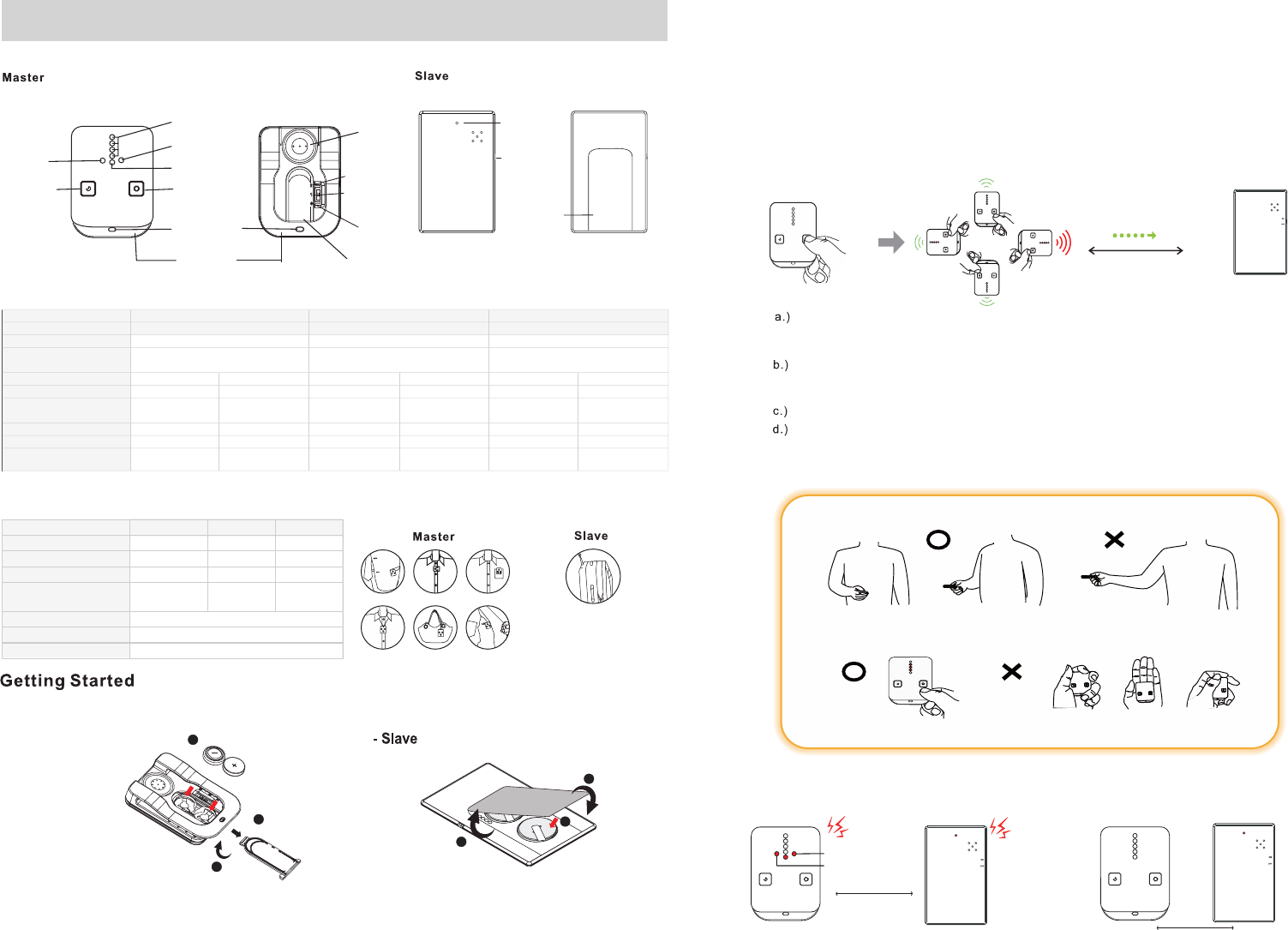
Front & Rear View
Specifications
Package Contents
Front Back
Search button 1
Signal indication
Distance
indication
Short Distance
Power off
Buzzer
Battery cover
Hanging hole
for strap
Clip
Holding Way
*** Do not cover the top side of Master.
Correct
Holding
Wrong
Holding
During Search
Correct
Holding
Wrong
Holding
*** Do not sway Master. Master is always in front the body when take a turn.
Search
Luggage Tracker User Manual 2.Switch the power button of the Master and the Slave to “ON”, it will enter ”Search Mode”, please press search
button to enter ”Standby mode”.
3.Place the Slave to your kids, and take the Master with you or clip it on your belt.
3. Replace the battery cover.
-Master
Front Back
Alarm
If you hear a high beep alarm from the Master, it means that distance between the Master and Slave has been over
safe range (Set in short distance is 6~15m, and Long distance is 15~25m). The Master unit alarms and vibrates at
this moment. .
Suggested Setting place
Long Distance
6~15m(short distance)
15~25m(long distance)
.
Over Come with beep! Stop alarm (beep) if both devices
comes within safe range again.
Search button 2
for Slave 2 or
Mute for one Slave
1
1
3
3
2
1.For the first time use, please insert the batteries into the Master and the Slave sets according to the battery
installation instruction as follows.
1. Slide out the battery cover.
2. Insert the batteries. Make sure that the
polarity +/- of the battery follow the markings
on the bottom of the battery compartment.
the Master. Contrarily, if the distance between the Master and the Slave is farther, less LED light are lit and the melody
on the Master becomes slower . Use the LED and the melody indication as guides to find the Slave unit.
One Slave only: To search the Slave unit, please press the "Search button 1" on the Master unit once.
Two Slaves: To search the Slave 1, please press the "Search button 1" on the Master unit once.
To search the Slave 2, please press the "Search button 2" on the Master unit once.
The closer the distance between the Master and the Slave, the more LED lights are lit and the rapider the melody on
If the distance between the Master and the Slave is out of detectable range and you turn to the
wrong direction making the distance farther, the Master plays the melody and beeps every
second to remind you to go back to the correct direction and detectable distance.
While searching, the Slave makes low beep sounds every second. This can assist you in
finding its position by tracking the sound when the Master and the Slave are already close.
(Suggestion: Press and hold the Mute button on the Master to turn of the melody temporarily.
Once you release the Mute button, the searching melody resumes again.)
Press the "Search button" on the Master unit again to stop searching.
While searching, always place the Master in front of your body and turn around slowly to find the
connect direction by following signal indicator and distance melody. If you point at the correct direction,
the Master shows more LED light and plays the melody more rapidly. .
for Slave 1
Slave 1 status
Slave 2 status
Alarm from Slave 1
Alarm from Slave 2
working range 0~500m/1640ft (line of sight)
(the distance may be short depends on the
terrain environment )
Power & Signal
indication
Power on/off
ON
OFF
Battery cover
2
Search Range
Alarm Distance
Master/Slave Master (M05S)x1 Slave (S01)x1 Master (M05S)x1 Slave (S01)x1 Master (M05S)x1 Slave (S01)x2
Battery Type LR44x2 CR2016x2 LR44x2 CR2016x2 LR44x2 CR2016x4
Battery Life Time with Standby 50 days 60 days 50 days 60 days 30 days 60 days
Battery Life Time with Sleep over 90 days over 90 days over 90 days over 90 days over 90 days over 90 days
Beep Sound (at 10cm/3.9inch) 95 db 95 db 95 db 95 db 95 db 95 db
Bulid-in None None Vibration Motor None Vibration Motor None
Dimension (L/W/H)
52.8x39x13.2mm
2x1.6x0.52inch
80x50x2.8mm
3.1x1.9x0.11inch
52.8x39x13.2mm
2x1.6x0.52inch
80x50x2.8mm
3.1x1.9x0.11inch
52.8x39x13.2mm
2x1.6x0.52inch
80x50x2.8mm
3.1x1.9x0.11inch
105LM2
0~120m/328ft
Short Distance : 6~15m/19~49ft
Long Distance : 15~25m/49~82ft
0~120m/328ft
Short Distance : 6~15m/19~49ft
Long Distance : 15~25m/49~82ft
105L 105LM
0~120m/328ft
Short Distance : 6~15m/19~49ft
Long Distance : 15~25m/49~82ft
Search, Alarm, 1 to 1 Search, Alarm with Vibration, 1 to 1 Search, Alarm with Vibration, 1 to 2
Model Name
Function
Package Contents 105L 105LM 105LM2
Master(M05S) 1 set 1 set 1 set
Slave(S01) 1 set 1 set 2 sets
Nameplate of Barrtery 1 set 1 set 2 sets
Batteries LR44x2
CR2016x2
LR44x2
CR2016x2
LR44x2
CR2016x4
User manual
Strap
Luggage tag
9
9
9
Search Tip:
may
Search, detection, and alarm range depend on the terrain environment.
kitthe the
If the beep sound is not loud enough, the batteries may be low. Change with new batteries for louder alarm sound.
use the device trips,
batteries
your
batteries sources. It may cause danger or even explosion.
Sleeping
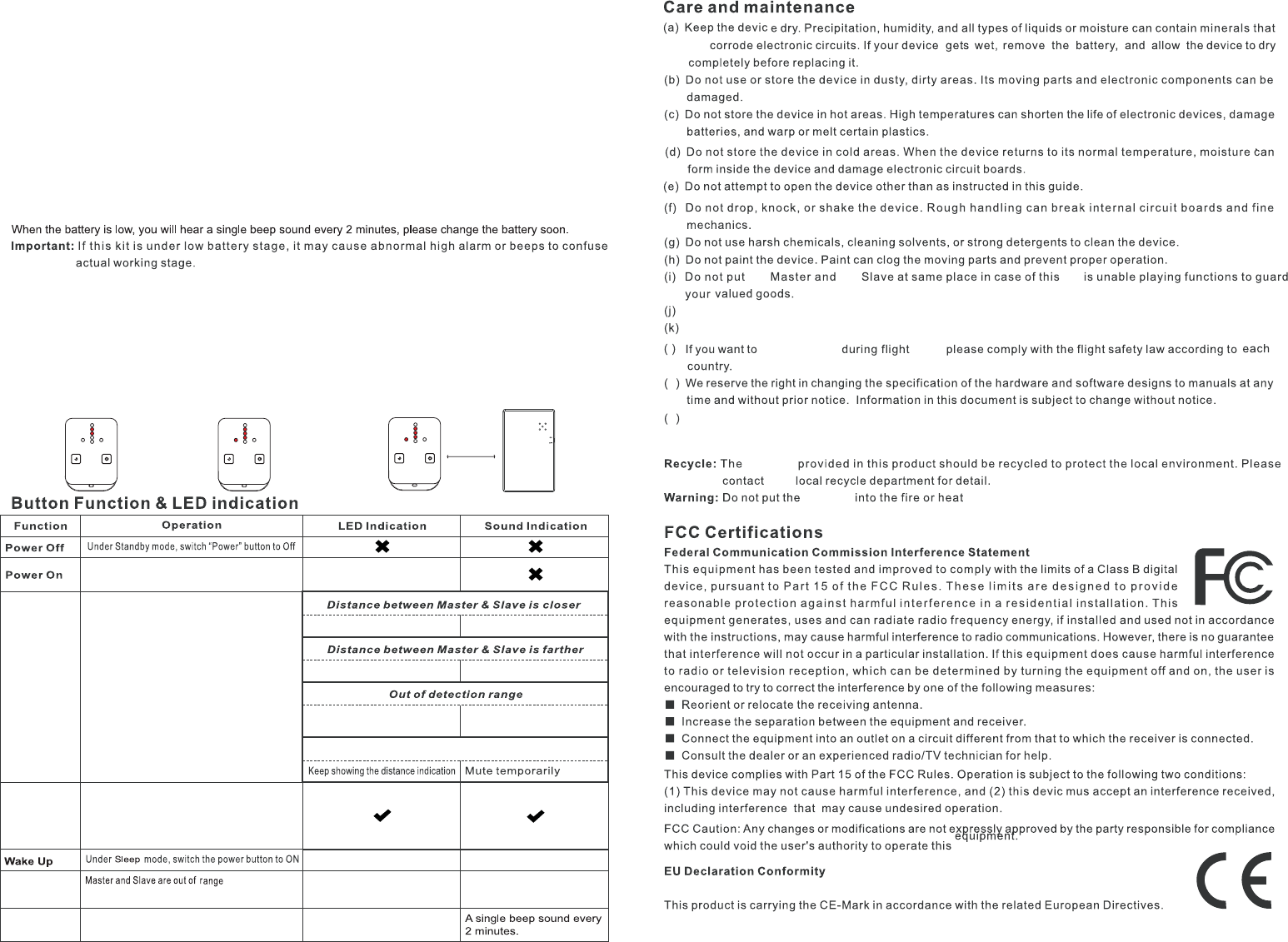
Low battery
Mute
For 1 master and 1 slave: Press the Mute button to mute searching melody from the Master unit. Listen to
beep sound from the Slave unit to assist short range searching.
For 1 master and 2 slaves: Keep pressing the Serach button to mute searching melody from the Master unit.
List beep sound from the Slave unit to assist short range searching.
1. To avoid the pairing failure, please make sure the Slave 1, 2 and Master unit are under power off status.
2. Press the "left" key on Master unit and turn on the Power at the same time. At the moment, two of the LEDs
light. (As Graph 1)
3. Keep pressing "left" key and press the "right" key. Then release "left" key and LEDs start flashing, and then
release "right" key.
4. At this moment the Master unit is under code-setting status and awaiting to be paired. (As Graph 2)
5. Turn on the power of Slave unit and position it 5~10cm from Master unit to proceed the pairing.(As Graph 3)
6. While Master unit and Slave unit are paired, both units enter Search mode.
The pairing process of additional Slave unit
Graph 1 Graph 2
m
l
b.) When switching the Master unit power on, the Signal indication LED flashed as searching the
Slave unit. If the Master and Slave units are out of working range, the Signal indication LED
remains light while the Master unit could not find Slave unit.
Switch the power button of the Master unit to OFF, when search function is not needed. Once you need this
kit to resume the standy mode, just turn the power button of the Master to ON.
Important: a.) Please keep the Slave at ON status if you would turn the Master into Sleep mode.
c.) Please trun off the Master and Slave unit if NOT in sue to save battery life.
o
5~10cm
Graph 3
Signal indication LEDs flash
every second
Melody is rapider
Melody is slower and diminuendo
Signal indication LEDs flash
every second
Melody is slower and short
beep every second
!
Alarm
Diasble Alarm funstion: During at standby
mode, the master and Sllave wuthin 2
meters, power off the Master unit.
Enable Alarm function: Switch the Master
power on.
Switch the Power button to ON
More LEDs light up
LEDs light decreasingly
Turn off the search melody of Master(long press the Mute button)
Search
Signal indication LEDs flash
Signal indication LEDs flash
every second
Signal indication LEDs flash
every second
High beeps while re-linking
High beep every second
Low battery
Disconnect
Under standy mode, press the
”Search” button
This product operation temperature is between 32ʲ ~140ʲÛ&aÛ&. Storage temperature is between -4ʲ ~185ʲ
Û&aÛ&
91E-02B5-U50G00
** The connection range depends on the terrain
environment because of readio efficiency.