Ardi Technology S07CXX Bike Guard / Motor Bike Guard Tag / Bike Alarm User Manual 708A3 20130912 ai

Ardi Technology Corp. Bike Guard / Motor Bike Guard Tag / Bike Alarm 708A3 20130912 ai

Users Manual

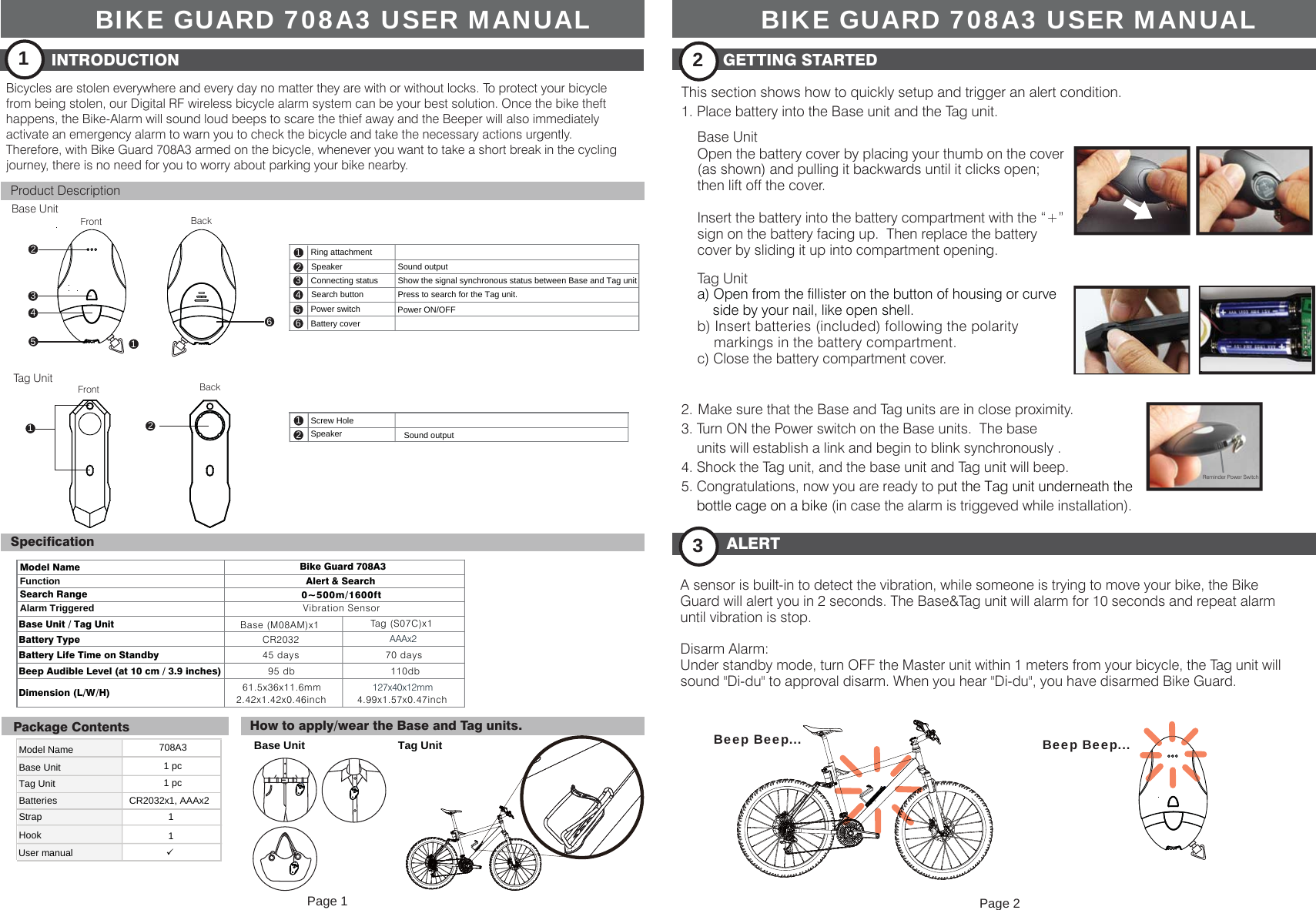
Base UnitSearch button Press to search for the Tag unit.Model Name 708A3Base UnitTag Unit 1 pcBatteries CR2032x1, AAAx2User manualStrapHook11Base Unit Tag Unit1 pcTag UnitModel NameFunctionSearch RangeAlarm TriggeredBase Unit / Tag Unit Base (M08AM)x1Battery Type CR2032Battery Life Time on Standby 45 daysBeep Audible Level (at 10 cm / 3.9 inches)95 dbDimension (L/W/H) Bike Guard 708A3Alert & Search 0~500m/1600ft12Speaker Sound outputBIKE GUARD 708A3 USER MANUALBicycles are stolen everywhere and every day no matter they are with or without locks. To protect your bicyclefrom being stolen, our Digital RF wireless bicycle alarm system can be your best solution. Once the bike theft happens, the Bike-Alarm will sound loud beeps to scare the thief away and the Beeper will also immediately activate an emergency alarm to warn you to check the bicycle and take the necessary actions urgently. Therefore, with Bike Guard 708A3 armed on the bicycle, whenever you want to take a short break in the cycling journey, there is no need for you to worry about parking your bike nearby.123456Ring attachmentSpeakerConnecting statusPower switchBattery coverPower ON/OFFShow the signal synchronous status between Base and Tag unitSound outputTa g  ( S 0 7 C ) x 1Vibration SensorFront Back12  61.5x36x11.6mm2.42x1.42x0.46inchFront Back123456INTRODUCTION1Product DescriptionSpecificationPackage Contents How to apply/wear the Base and Tag units.GETTING STARTED2This section shows how to quickly setup and trigger an alert condition.1. Place battery into the Base unit and the Tag unit.Base UnitALERT3A sensor is built-in to detect the vibration, while someone is trying to move your bike, the Bike Guard will alert you in 2 seconds. The Base&Tag unit will alarm for 10 seconds and repeat alarm until vibration is stop.Disarm Alarm: Under standby mode, turn OFF the Master unit within 1 meters from your bicycle, the Tag unit will sound "Di-du" to approval disarm. When you hear "Di-du", you have disarmed Bike Guard.Screw Hole  110dbAAAx270 days      127x40x12mm 4.99x1.57x0.47inch2.  Make sure that the Base and Tag units are in close proximity.3. Turn ON the Power switch on the Base units.  The base    units will establish a link and begin to blink synchronously .4. Shock the Tag unit, and the base unit and Tag unit will beep. 5. Congratulations, now you are ready to put the Tag unit underneath the    bottle cage on a bike (in case the alarm is triggeved while installation). Tag UnitBeep Beep... Beep Beep...Open the battery cover by placing your thumb on the cover (as shown) and pulling it backwards until it clicks open; then lift off the cover.Insert the battery into the battery compartment with the “+” sign on the battery facing up.  Then replace the battery cover by sliding it up into compartment opening.a) Open from the fillister on the button of housing or curve     side by your nail, like open shell.b) Insert batteries (included) following the polarity      markings in the battery compartment.c) Close the battery compartment cover. Reminder Power SwitchBIKE GUARD 708A3 USER MANUALPage 1 Page 2
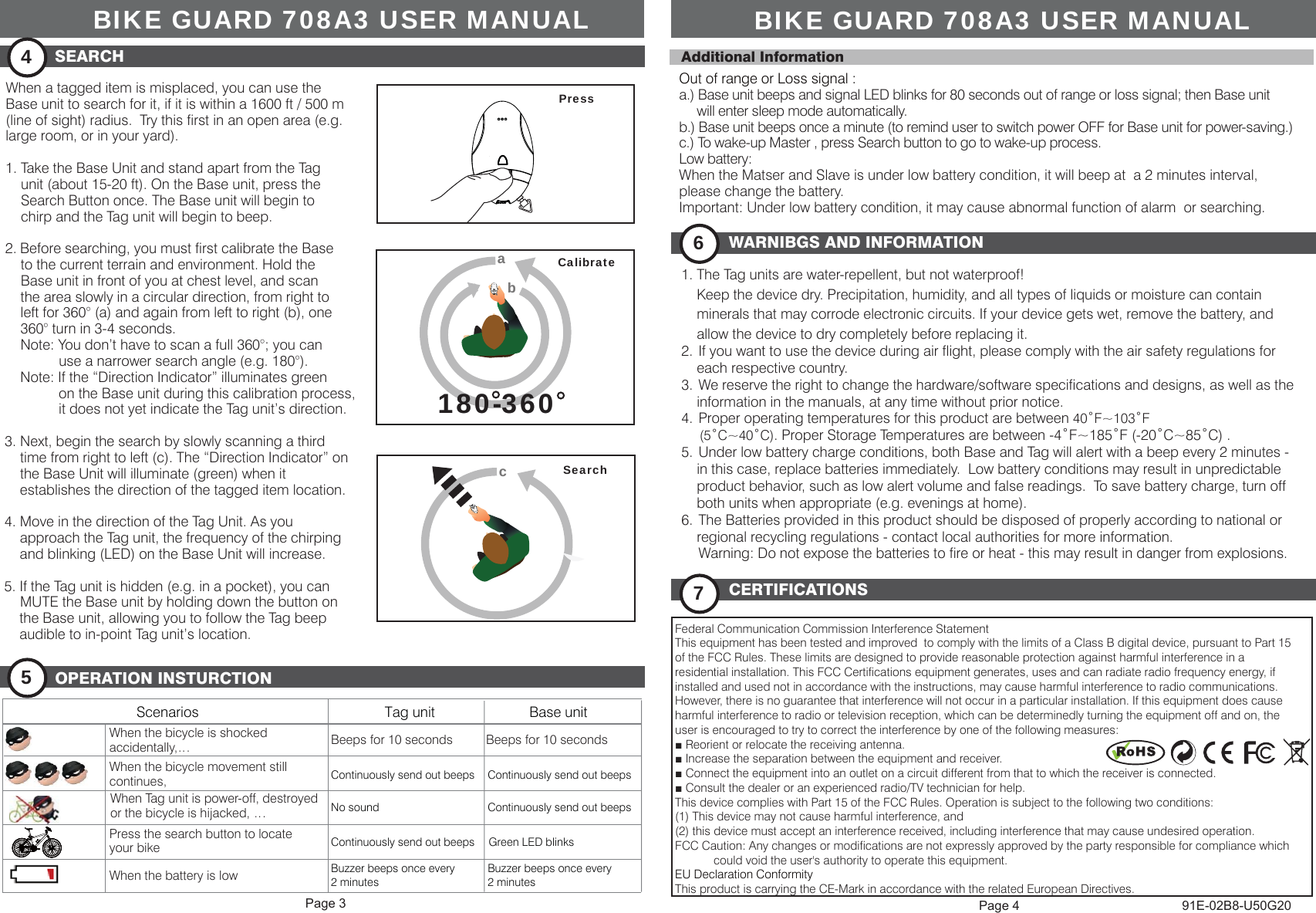
WARNIBGS AND INFORMATION61. The Tag units are water-repellent, but not waterproof!    Keep the device dry. Precipitation, humidity, and all types of liquids or moisture can contain     minerals that may corrode electronic circuits. If your device gets wet, remove the battery, and     allow the device to dry completely before replacing it.2.  If you want to use the device during air flight, please comply with the air safety regulations for     each respective country.3.  We reserve the right to change the hardware/software specifications and designs, as well as the    information in the manuals, at any time without prior notice. 4.  Proper operating temperatures for this product are between 40˚F~103˚F      (5˚C~40˚C). Proper Storage Temperatures are between -4˚F~185˚F (-20˚C~85˚C) .5.  Under low battery charge conditions, both Base and Tag will alert with a beep every 2 minutes -     in this case, replace batteries immediately.  Low battery conditions may result in unpredictable     product behavior, such as low alert volume and false readings.  To save battery charge, turn off     both units when appropriate (e.g. evenings at home).6.  The Batteries provided in this product should be disposed of properly according to national or     regional recycling regulations - contact local authorities for more information.  Warning: Do not expose the batteries to fire or heat - this may result in danger from explosions.CERTIFICATIONS7OPERATION INSTURCTION591E-02B8-U50G20Federal Communication Commission Interference StatementThis equipment has been tested and improved  to comply with the limits of a Class B digital device, pursuant to Part 15of the FCC Rules. These limits are designed to provide reasonable protection against harmful interference in aresidential installation. This FCC Certifications equipment generates, uses and can radiate radio frequency energy, ifinstalled and used not in accordance with the instructions, may cause harmful interference to radio communications.However, there is no guarantee that interference will not occur in a particular installation. If this equipment does causeharmful interference to radio or television reception, which can be determinedly turning the equipment off and on, theuser is encouraged to try to correct the interference by one of the following measures:■ Reorient or relocate the receiving antenna.■ Increase the separation between the equipment and receiver.■ Connect the equipment into an outlet on a circuit different from that to which the receiver is connected.■ Consult the dealer or an experienced radio/TV technician for help.This device complies with Part 15 of the FCC Rules. Operation is subject to the following two conditions:(1) This device may not cause harmful interference, and(2) this device must accept an interference received, including interference that may cause undesired operation.FCC Caution: Any changes or modifications are not expressly approved by the party responsible for compliance which            could void the user's authority to operate this equipment.EU Declaration ConformityThis product is carrying the CE-Mark in accordance with the related European Directives.Out of range or Loss signal :a.) Base unit beeps and signal LED blinks for 80 seconds out of range or loss signal; then Base unit     will enter sleep mode automatically. b.) Base unit beeps once a minute (to remind user to switch power OFF for Base unit for power-saving.) c.) To wake-up Master , press Search button to go to wake-up process.Low battery:When the Matser and Slave is under low battery condition, it will beep at  a 2 minutes interval, please change the battery.Important: Under low battery condition, it may cause abnormal function of alarm  or searching. Additional InformationScenariosBeeps for 10 secondsContinuously send out beepsNo soundContinuously send out beepsBuzzer beeps once every2 minutesWhen the bicycle is shocked accidentally,… Beeps for 10 secondsWhen the bicycle movement still continues, When Tag unit is power-off, destroyedor the bicycle is hijacked, …Press the search button to locateyour bike When the battery is lowTag unit Base unitBuzzer beeps once every2 minutesContinuously send out beepsContinuously send out beepsGreen LED blinksWhen a tagged item is misplaced, you can use the Base unit to search for it, if it is within a 1600 ft / 500 m (line of sight) radius.  Try this first in an open area (e.g. large room, or in your yard).1. Take the Base Unit and stand apart from the Tag     unit (about 15-20 ft). On the Base unit, press the      Search Button once. The Base unit will begin to     chirp and the Tag unit will begin to beep.2. Before searching, you must first calibrate the Base     to the current terrain and environment. Hold the     Base unit in front of you at chest level, and scan     the area slowly in a circular direction, from right to     left for 360° (a) and again from left to right (b), one     360° turn in 3-4 seconds.     Note: You don’t have to scan a full 360°; you can               use a narrower search angle (e.g. 180°).    Note: If the “Direction Indicator” illuminates green               on the Base unit during this calibration process,              it does not yet indicate the Tag unit’s direction.3. Next, begin the search by slowly scanning a third     time from right to left (c). The “Direction Indicator” on    the Base Unit will illuminate (green) when it     establishes the direction of the tagged item location.4. Move in the direction of the Tag Unit. As you    approach the Tag unit, the frequency of the chirping    and blinking (LED) on the Base Unit will increase.5. If the Tag unit is hidden (e.g. in a pocket), you can   MUTE the Base unit by holding down the button on     the Base unit, allowing you to follow the Tag beep     audible to in-point Tag unit’s location.180-360180-360aabbCalibrateSearchccPressSEARCH4BIKE GUARD 708A3 USER MANUALBIKE GUARD 708A3 USER MANUALPage 3 Page 4

Navigation menu