B and W Electronics Development 14BTH450 SPORTS BLUETOOTH HEADSET User Manual

Shenzhen B&W; Electronics Development Limited SPORTS BLUETOOTH HEADSET Users Manual

Users Manual

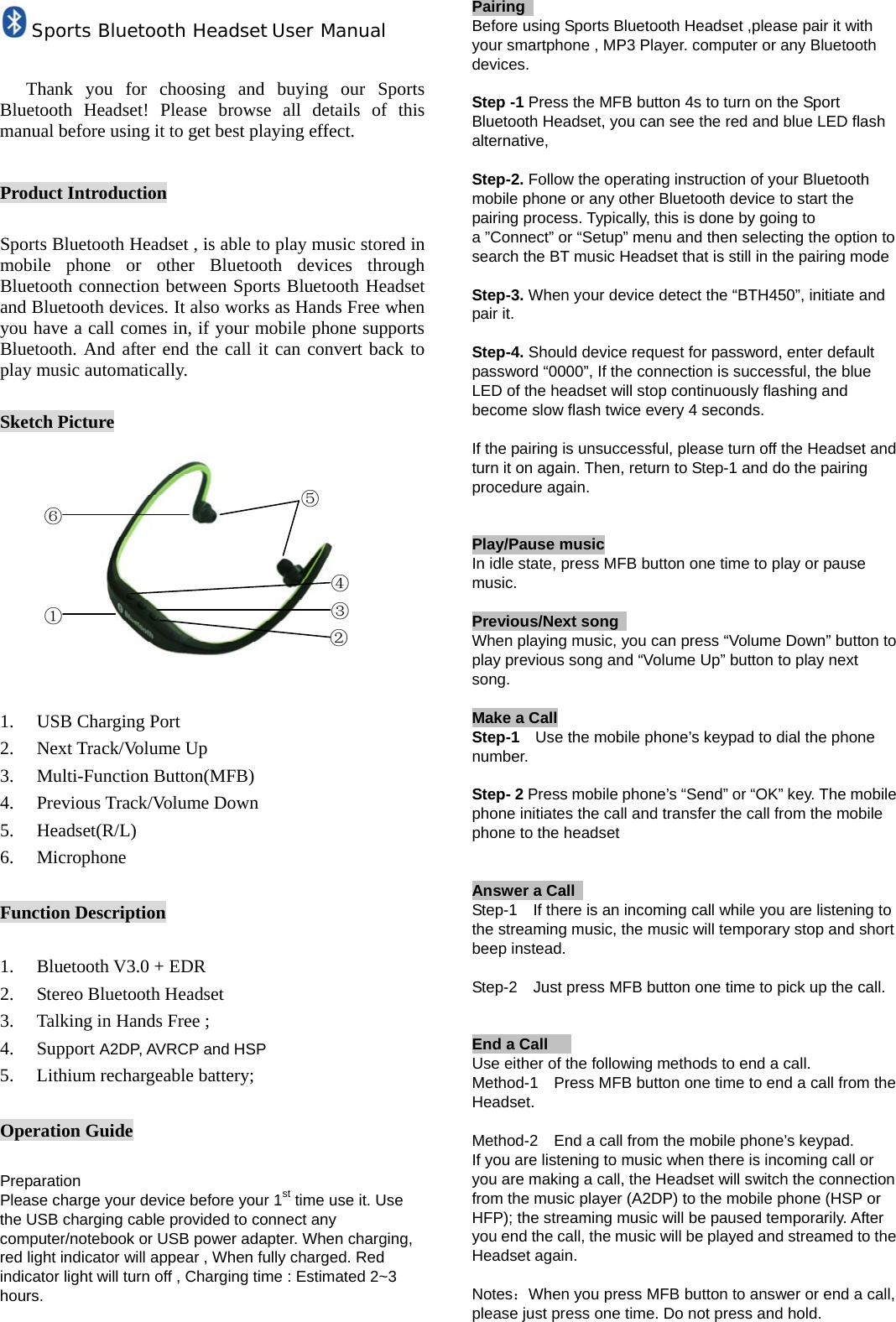
Sports Bluetooth Headset User Manual  Thank you for choosing and buying our Sports Bluetooth Headset! Please browse all details of this manual before using it to get best playing effect.  Product Introduction  Sports Bluetooth Headset , is able to play music stored in mobile phone or other Bluetooth devices through Bluetooth connection between Sports Bluetooth Headset and Bluetooth devices. It also works as Hands Free when you have a call comes in, if your mobile phone supports Bluetooth. And after end the call it can convert back to play music automatically.  Sketch Picture           1. USB Charging Port 2. Next Track/Volume Up 3. Multi-Function Button(MFB) 4. Previous Track/Volume Down 5. Headset(R/L) 6. Microphone  Function Description  1. Bluetooth V3.0 + EDR 2. Stereo Bluetooth Headset 3. Talking in Hands Free ; 4. Support A2DP, AVRCP and HSP 5. Lithium rechargeable battery;  Operation Guide  Preparation Please charge your device before your 1st time use it. Use the USB charging cable provided to connect any computer/notebook or USB power adapter. When charging, red light indicator will appear , When fully charged. Red indicator light will turn off , Charging time : Estimated 2~3 hours.   Pairing                    Before using Sports Bluetooth Headset ,please pair it with your smartphone , MP3 Player. computer or any Bluetooth devices.  Step -1 Press the MFB button 4s to turn on the Sport Bluetooth Headset, you can see the red and blue LED flash alternative,   Step-2. Follow the operating instruction of your Bluetooth mobile phone or any other Bluetooth device to start the pairing process. Typically, this is done by going to a ”Connect” or “Setup” menu and then selecting the option to search the BT music Headset that is still in the pairing mode  Step-3. When your device detect the “BTH450”, initiate and pair it.  Step-4. Should device request for password, enter default password “0000”, If the connection is successful, the blue LED of the headset will stop continuously flashing and become slow flash twice every 4 seconds.  If the pairing is unsuccessful, please turn off the Headset and turn it on again. Then, return to Step-1 and do the pairing procedure again.   Play/Pause music In idle state, press MFB button one time to play or pause music.  Previous/Next song                                              When playing music, you can press “Volume Down” button to play previous song and “Volume Up” button to play next song.   Make a Call                                                      Step-1    Use the mobile phone’s keypad to dial the phone number.  Step- 2 Press mobile phone’s “Send” or “OK” key. The mobile phone initiates the call and transfer the call from the mobile phone to the headset   Answer a Call   Step-1    If there is an incoming call while you are listening to the streaming music, the music will temporary stop and short beep instead.  Step-2    Just press MFB button one time to pick up the call.   End a Call                                                       Use either of the following methods to end a call. Method-1    Press MFB button one time to end a call from the Headset.  Method-2    End a call from the mobile phone’s keypad. If you are listening to music when there is incoming call or you are making a call, the Headset will switch the connection from the music player (A2DP) to the mobile phone (HSP or HFP); the streaming music will be paused temporarily. After you end the call, the music will be played and streamed to the Headset again.  Notes:When you press MFB button to answer or end a call, please just press one time. Do not press and hold.    ⑥ ① ⑤ ④ ③ ②
 Refuse a Call                                                                         When there is incoming call, press and hold MFB button for about 2 second until you hear prompt from the Headset. Release the button and the call is refused.   Redial the last dialed number                                                  Press and hold MFB button for 2 second to redial the last dialed number.  Adjust volume                                                                         In call mode or music mode, long press volume up or volume down key to adjust volume. When the volume reaches max or min, when you press, the Headset will prompt “du-du”.    Troubleshooting Fail to pair BT Headset                Make sure the Headsets is in pairing mode , if blue light indicators is not in flashing mode , it indicates Headsets not in pairing mode , Please long press the MFB button 4s till the red and blue LED flash alternative..           FCC STATEMENT : This device complies with Part 15 of the FCC Rules. Operation is subject to the following two conditions: (1) This device may not cause harmful interference, and (2) This device must accept any interference received, including interference that may cause undesired operation. Warning: Changes or modifications not expressly approved by the party responsible for compliance could void the user's authority to operate the equipment.  NOTE: This equipment has been tested and found to comply with the limits for a Class B digital device, pursuant to Part 15 of the FCC Rules. These limits are designed to provide reasonable protection against harmful interference in a residential installation.                            Fail to locate BT Headsets         ·Check that the Headsets is in pairing mode.  ·Ensure your device is within Bluetooth use range (About 10M)  ·Reset/restart your device to activate Bluetooth. ·Ensure that your device is not connected/paired to any other Bluetooth devices at one time  Caution/Note                  ·Prolong not charging of the battery may affect the performance of the battery .Hence it is recommended to charge them occasionally  ·Battery Saver—Headset’s built in battery will move into sleep mode when there is no sound output for more than 1 minute.              This equipment generates uses and can radiate radio frequency energy and, if not installed and used in accordance with the instructions, may cause harmful interference to radio communications. However, there is no guarantee that interference will not occur in a particular installation. If this equipment does cause harmful interference to radio or television reception, which can be determined by turning the equipment off and on, the user is encouraged to try to correct the interference by one or more of the following measures: Reorient or relocate the receiving antenna. Increase the separation between the equipment and receiver. Connect the equipment into an outlet on a circuit different from that to which the receiver is connected. Consult the dealer or an experienced radio/TV technician for help.  RF warning statement: The device has been evaluated to meet general RF exposure requirement. The device can be used in portable exposure condition without restriction.

Navigation menu