BAOLONG AUTOMOTIVE TPMSIDBOX ID BOX User Manual TIRE PRESSURE MONITORING SYSTEM

SHANGHAI BAOLONG AUTOMOTIVE CORPORATION ID BOX TIRE PRESSURE MONITORING SYSTEM

User Manual

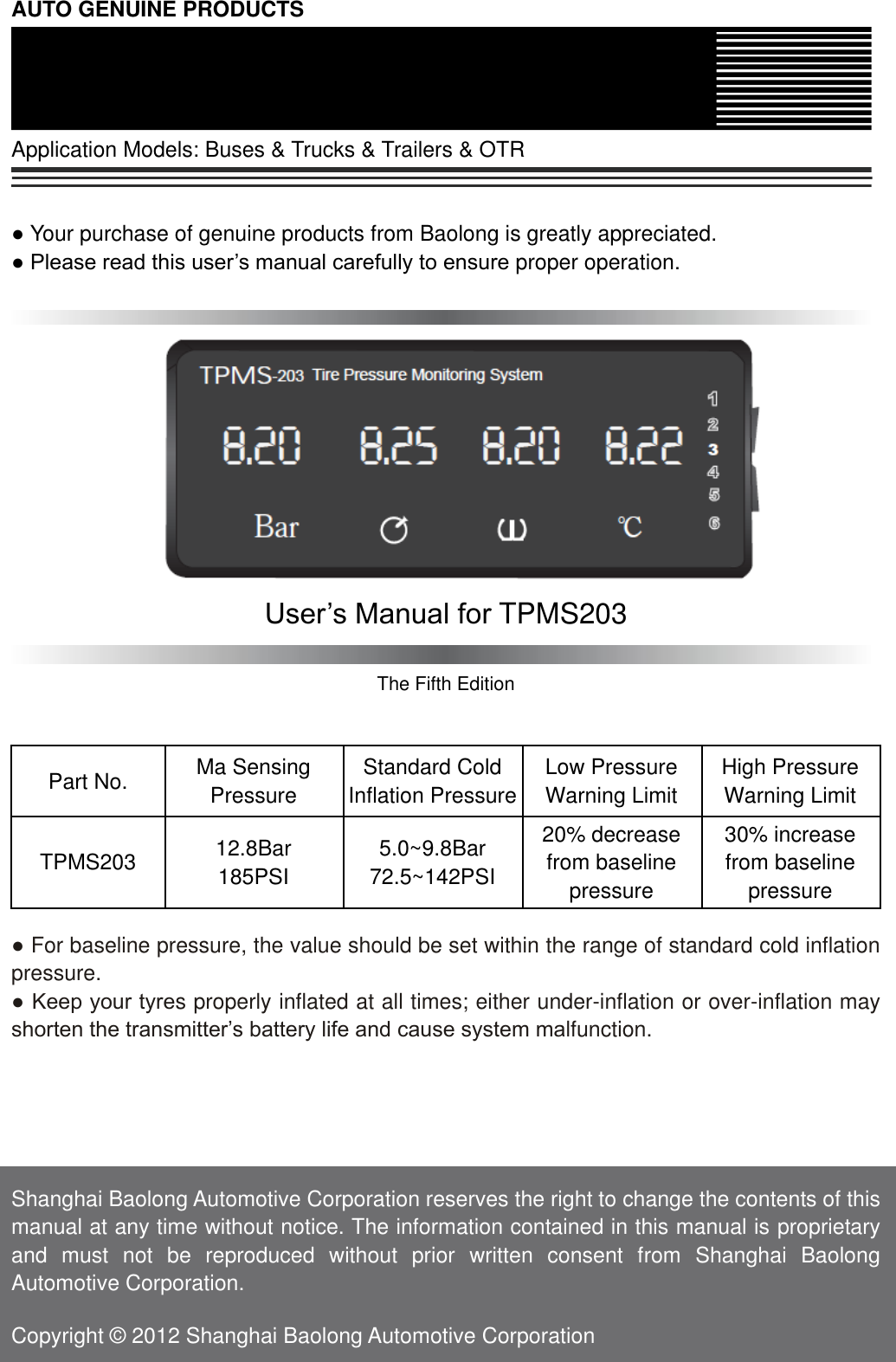
AUTO GENUINE PRODUCTS  Application Models: Buses & Trucks & Trailers & OTR   ● Your purchase of genuine products from Baolong is greatly appreciated. ● Please read this user’s manual carefully to ensure proper operation.             User’s Manual for TPMS203  The Fifth Edition   Part No. Ma Sensing Pressure Standard Cold Inflation Pressure Low Pressure Warning Limit High Pressure Warning Limit TPMS203 12.8Bar 185PSI 5.0~9.8Bar 72.5~142PSI 20% decrease from baseline pressure 30% increase   from baseline pressure  ● For baseline pressure, the value should be set within the range of standard cold inflation pressure. ● Keep your tyres properly inflated at all times; either under-inflation or over-inflation may shorten the transmitter’s battery life and cause system malfunction.      Shanghai Baolong Automotive Corporation reserves the right to change the contents of this manual at any time without notice. The information contained in this manual is proprietary and  must  not  be  reproduced  without  prior  written  consent  from  Shanghai  Baolong Automotive Corporation.  Copyright © 2012 Shanghai Baolong Automotive Corporation
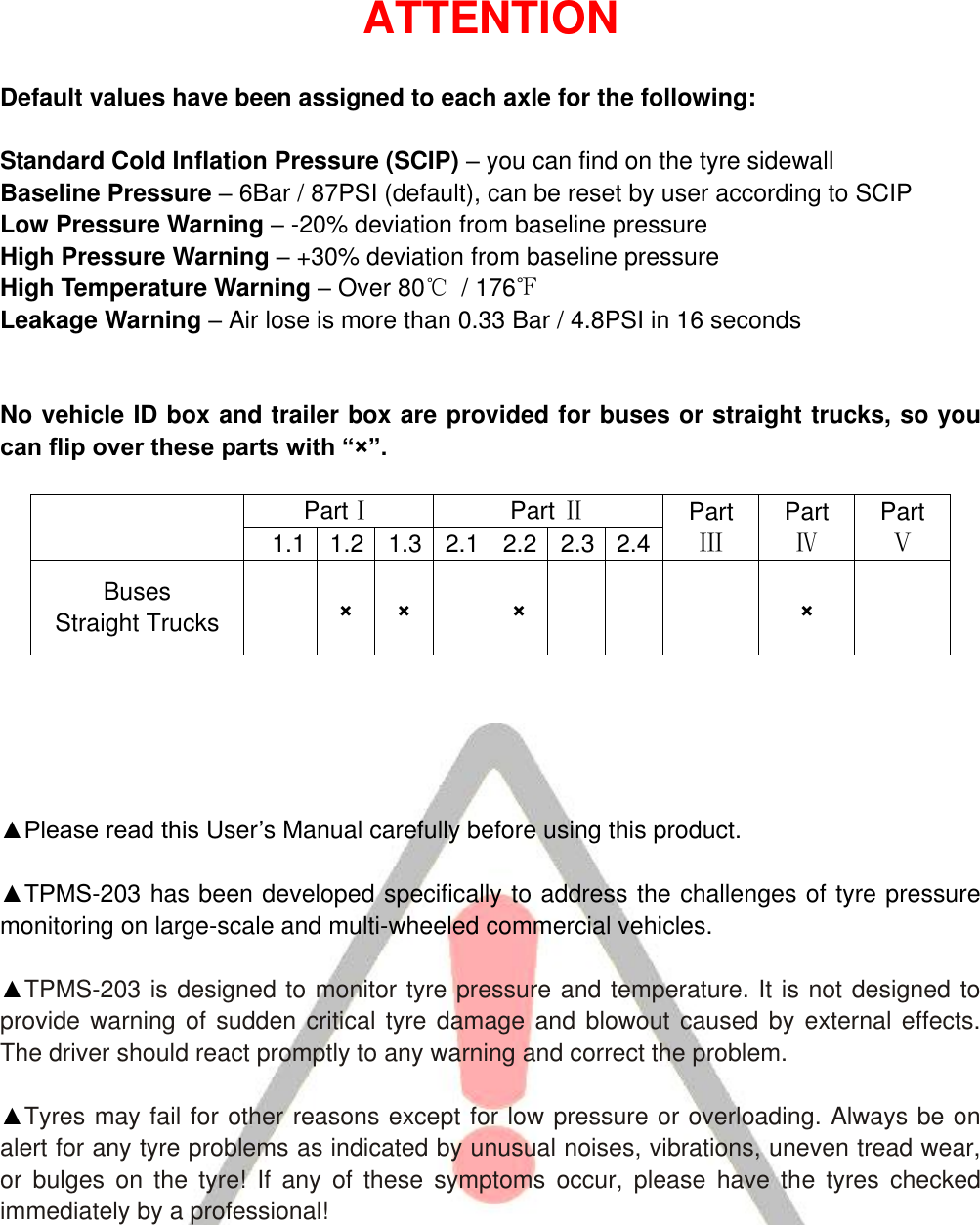
ATTENTION  Default values have been assigned to each axle for the following:  Standard Cold Inflation Pressure (SCIP) – you can find on the tyre sidewall Baseline Pressure – 6Bar / 87PSI (default), can be reset by user according to SCIP Low Pressure Warning – -20% deviation from baseline pressure High Pressure Warning – +30% deviation from baseline pressure High Temperature Warning – Over 80℃  / 176℉ Leakage Warning – Air lose is more than 0.33 Bar / 4.8PSI in 16 seconds   No vehicle ID box and trailer box are provided for buses or straight trucks, so you can flip over these parts with “×”.    PartⅠ   Part Ⅱ Part Ⅲ Part Ⅳ Part Ⅴ 1.1 1.2 1.3 2.1 2.2 2.3 2.4 Buses   Straight Trucks   × ×   ×     ×        ▲Please read this User’s Manual carefully before using this product.  ▲TPMS-203 has been developed specifically to address the challenges of tyre pressure monitoring on large-scale and multi-wheeled commercial vehicles.  ▲TPMS-203 is designed to monitor tyre pressure and temperature. It is not designed to provide warning of sudden critical tyre damage and blowout caused by external effects. The driver should react promptly to any warning and correct the problem.  ▲Tyres may fail for other reasons except for low pressure or overloading. Always be on alert for any tyre problems as indicated by unusual noises, vibrations, uneven tread wear, or  bulges  on  the  tyre!  If  any  of  these  symptoms  occur,  please  have  the  tyres  checked immediately by a professional!
TABLE OF CONTENTS Part  ⅠINTRODUCTION .......................................................................................................................... 1 1.1 DISPLAY ........................................................................................................................................... 1 1.2 TRAILER BOX .................................................................................................................................... 2 1.3 VEHICLE ID BOX ............................................................................................................................... 2 Part  ⅡOPERATION ................................................................................................................................ 2 2.1 GETTING STARTED ............................................................................................................................ 2 2.2 SETTING THE BASELINE PRESSURE .................................................................................................... 3 2.2.1 TRACTOR .................................................................................................................................. 3 2.2.2 TRAILER .................................................................................................................................... 3 2.3 CHECKING TYRE CONDITIONS ............................................................................................................ 4 2.4 SETTING TIME ................................................................................................................................... 5 Part  Ⅲ  WARNINGS ............................................................................................................................... 6 3.1 LOW PRESSURE WARNING ................................................................................................................ 6 3.2 HIGH PRESSURE WARNING ................................................................................................................ 6 3.3 LEAKAGE WARNING ........................................................................................................................... 6 3.4 HIGH TEMPERATURE WARNING .......................................................................................................... 7 3.5 WARNING OF MULTIPLE AXLES ........................................................................................................... 7 Part  Ⅳ  TRAILER CHANGE AND REGISTERATION ............................................................................ 8 Part  Ⅴ  WHEEL ROTATION ................................................................................................................... 8 Part  Ⅵ  REPLACEMENT OF A DAMAGED TRANSMITTER ................................................................. 9 Part  Ⅶ  RESTART DISPLAY AND TRAILER BOX ................................................................................. 9 Part  Ⅷ  PARAMETERS OF THE PRODUCT ........................................................................................ 10 Part  Ⅸ  TROUBLE SHOOTING ............................................................................................................ 11 Part  Ⅹ  CERTIFICATES ....................................................................................................................... 12 10.1 FCC AND IC'S AUTHENTICATION ANNOUNCEMENT ........................................................................... 12 10.2 EUROPEAN REGULATIONS ANNOUNCEMENT .................................................................................... 13 10.3 CE DIRECTIVE ANNOUNCEMENT .................................................................................................... 13 Part  Ⅺ  WARRANTY POLICY .............................................................................................................. 13
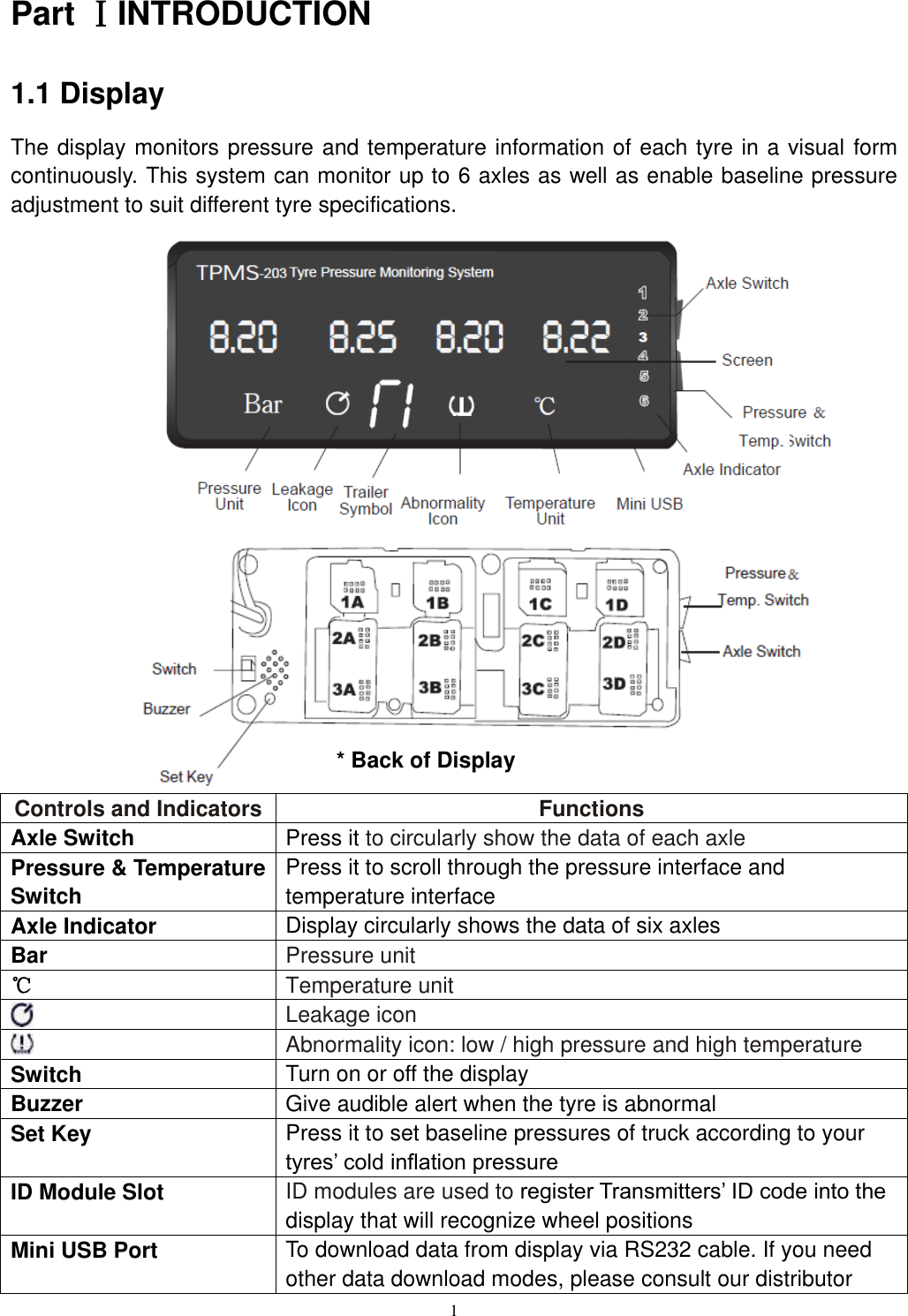
1  Part ⅠINTRODUCTION 1.1 Display The display monitors pressure and temperature information of each tyre in a visual form continuously. This system can monitor up to 6 axles as well as enable baseline pressure adjustment to suit different tyre specifications.                      Controls and Indicators Functions Axle Switch Press it to circularly show the data of each axle Pressure & Temperature Switch Press it to scroll through the pressure interface and temperature interface Axle Indicator Display circularly shows the data of six axles Bar Pressure unit ℃ Temperature unit  Leakage icon    Abnormality icon: low / high pressure and high temperature Switch Turn on or off the display Buzzer Give audible alert when the tyre is abnormal Set Key Press it to set baseline pressures of truck according to your tyres’ cold inflation pressure ID Module Slot ID modules are used to register Transmitters’ ID code into the display that will recognize wheel positions   Mini USB Port To download data from display via RS232 cable. If you need other data download modes, please consult our distributor * Back of Display
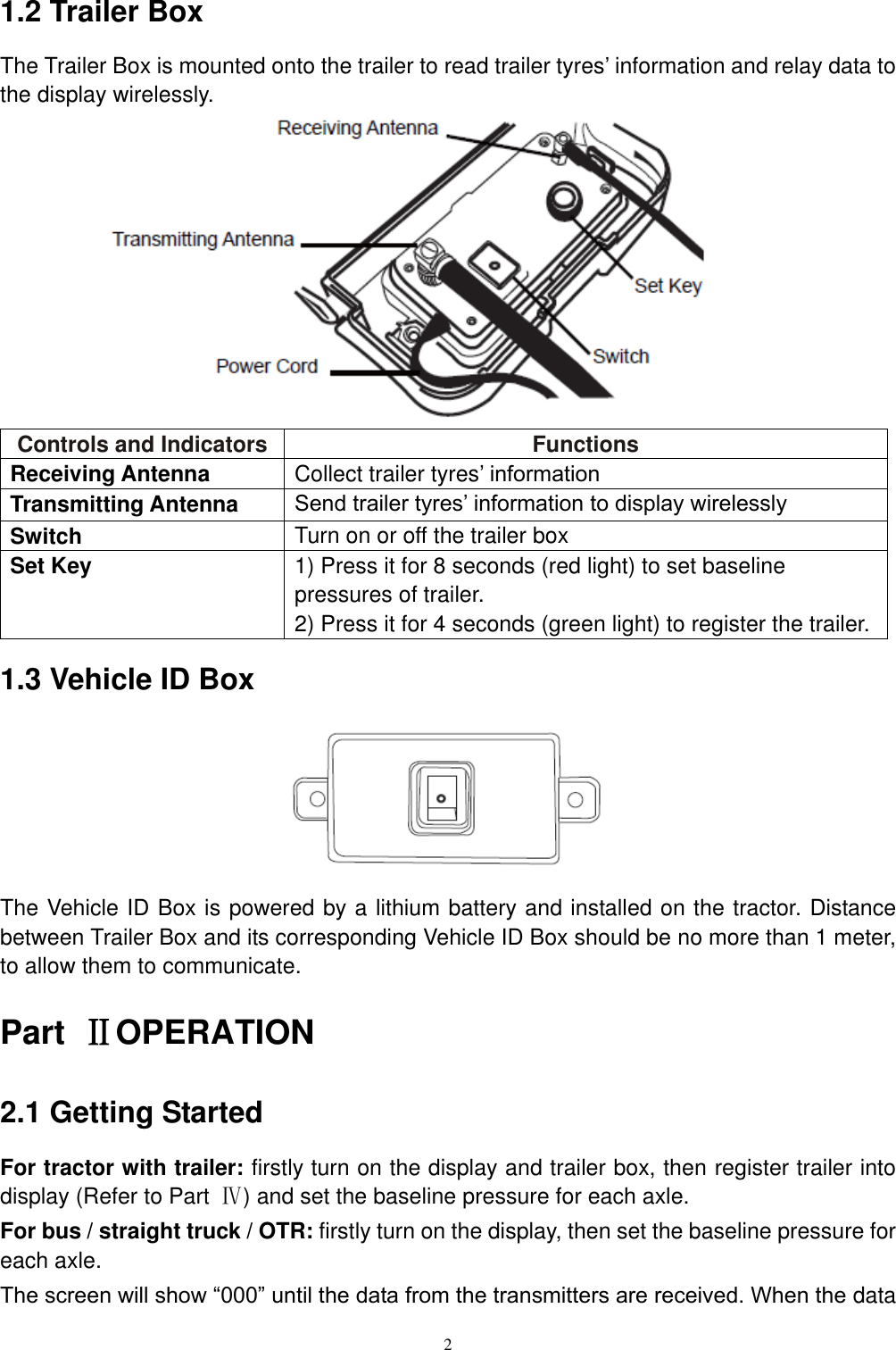
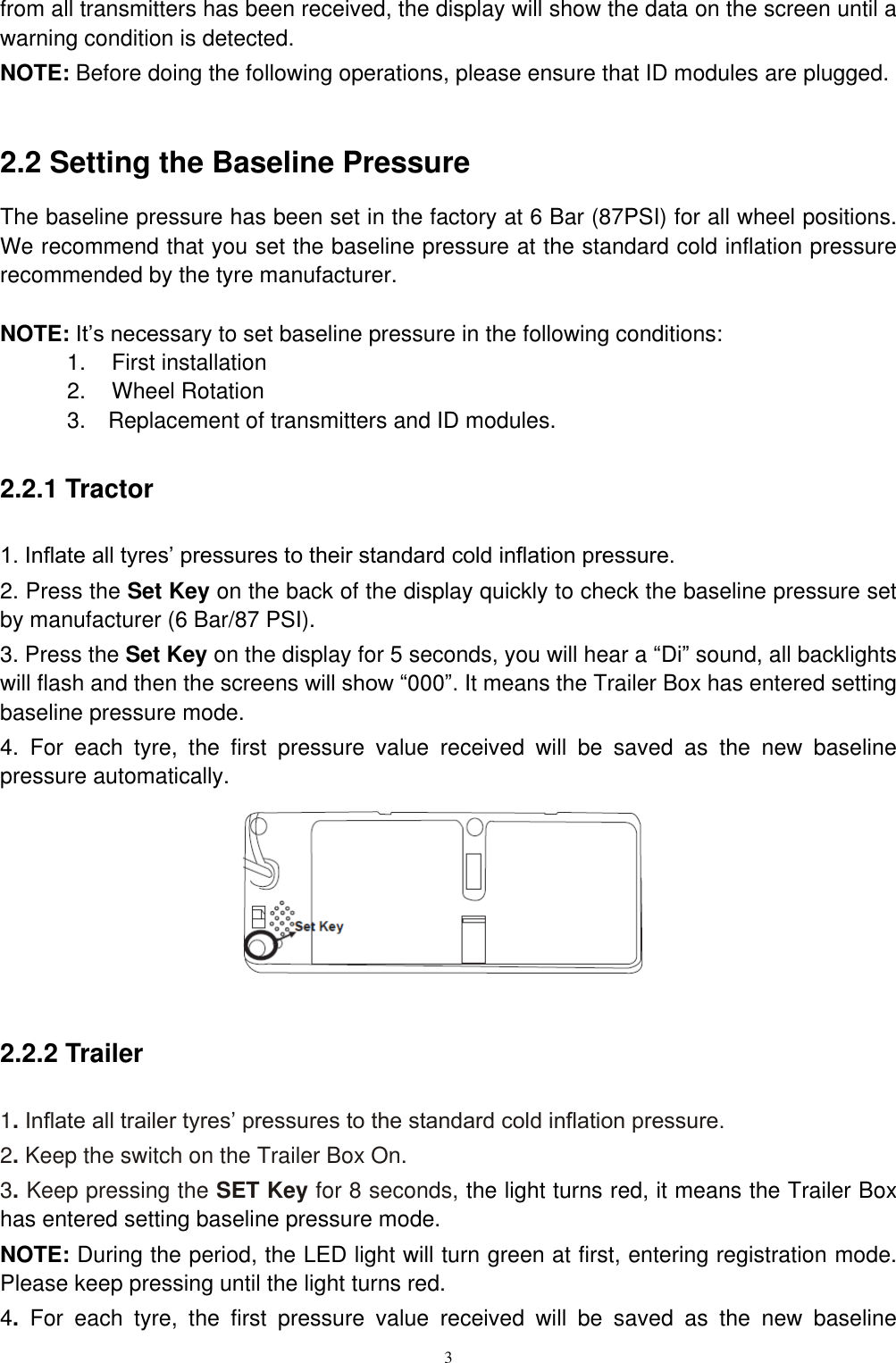
2  1.2 Trailer Box The Trailer Box is mounted onto the trailer to read trailer tyres’ information and relay data to the display wirelessly.            Controls and Indicators Functions Receiving Antenna Collect trailer tyres’ information Transmitting Antenna Send trailer tyres’ information to display wirelessly Switch Turn on or off the trailer box Set Key 1) Press it for 8 seconds (red light) to set baseline pressures of trailer. 2) Press it for 4 seconds (green light) to register the trailer. 1.3 Vehicle ID Box       The Vehicle ID Box is powered by a lithium battery and installed on the tractor. Distance between Trailer Box and its corresponding Vehicle ID Box should be no more than 1 meter, to allow them to communicate. Part  ⅡOPERATION 2.1 Getting Started For tractor with trailer: firstly turn on the display and trailer box, then register trailer into display (Refer to Part  Ⅳ) and set the baseline pressure for each axle. For bus / straight truck / OTR: firstly turn on the display, then set the baseline pressure for each axle. The screen will show “000” until the data from the transmitters are received. When the data
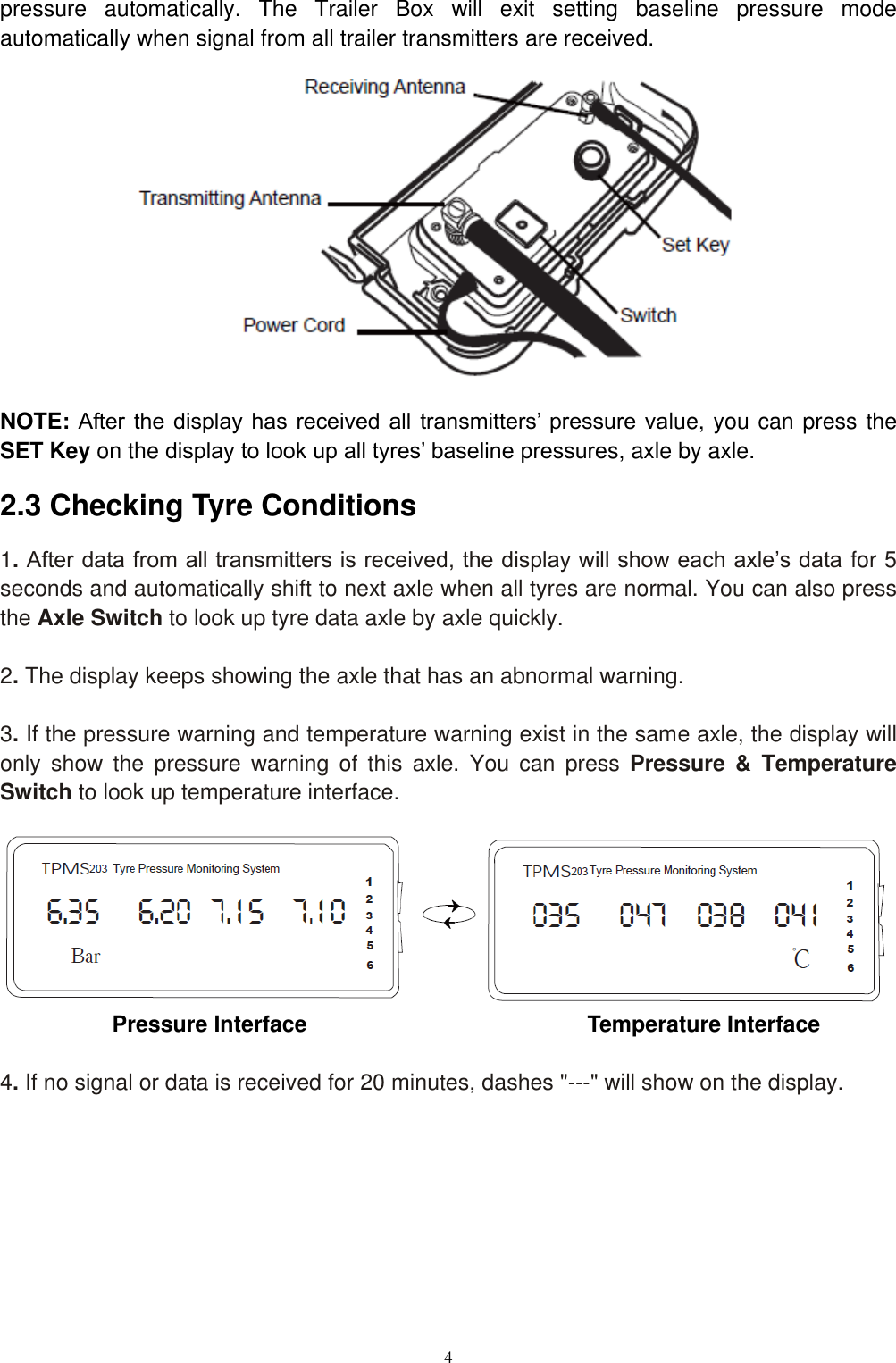
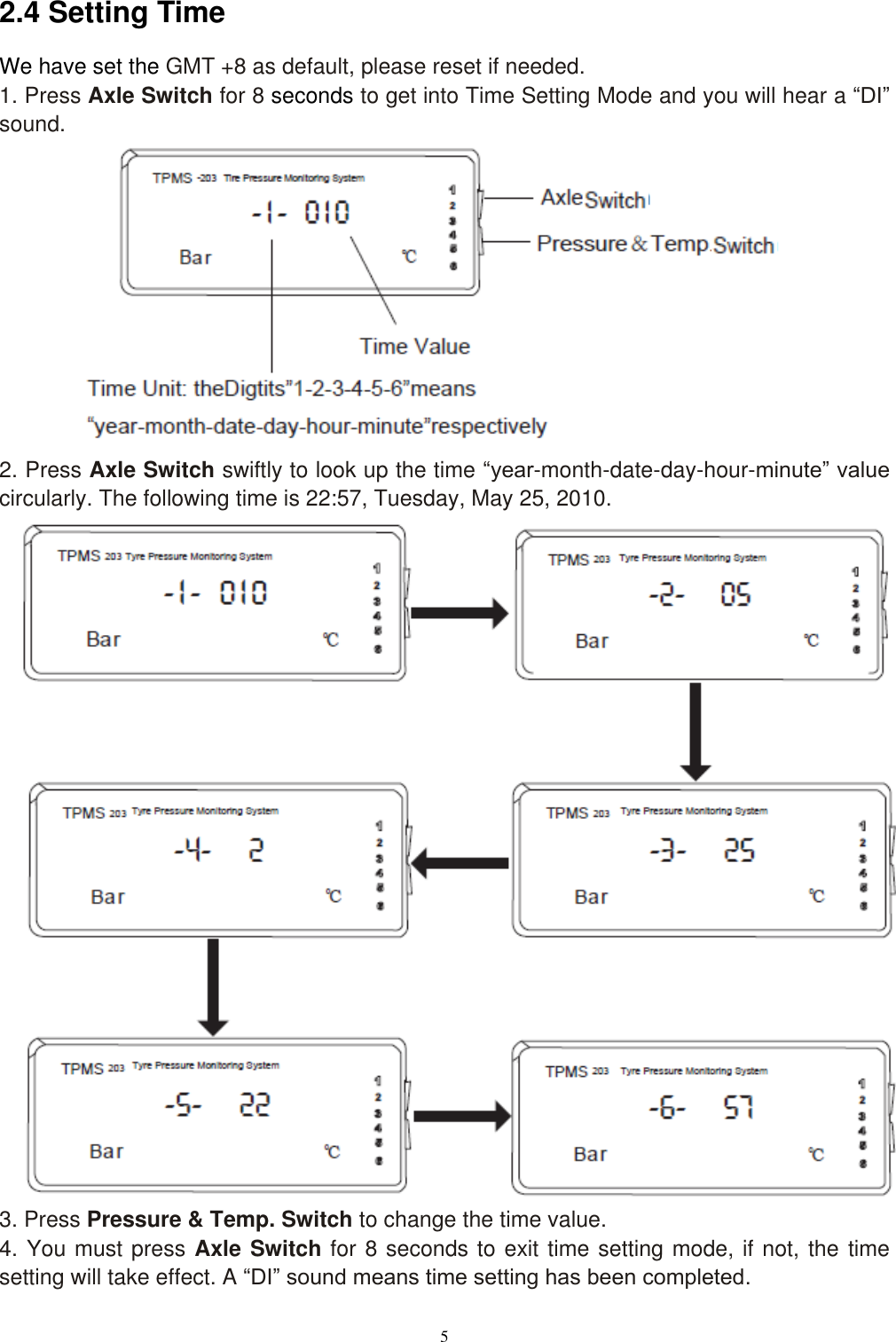
3  from all transmitters has been received, the display will show the data on the screen until a warning condition is detected. NOTE: Before doing the following operations, please ensure that ID modules are plugged.  2.2 Setting the Baseline Pressure   The baseline pressure has been set in the factory at 6 Bar (87PSI) for all wheel positions. We recommend that you set the baseline pressure at the standard cold inflation pressure recommended by the tyre manufacturer.  NOTE: It’s necessary to set baseline pressure in the following conditions: 1.    First installation 2.    Wheel Rotation 3.    Replacement of transmitters and ID modules. 2.2.1 Tractor 1. Inflate all tyres’ pressures to their standard cold inflation pressure. 2. Press the Set Key on the back of the display quickly to check the baseline pressure set by manufacturer (6 Bar/87 PSI). 3. Press the Set Key on the display for 5 seconds, you will hear a “Di” sound, all backlights will flash and then the screens will show “000”. It means the Trailer Box has entered setting baseline pressure mode. 4.  For  each  tyre,  the  first  pressure  value  received  will  be  saved  as  the  new  baseline pressure automatically.       2.2.2 Trailer 1. Inflate all trailer tyres’ pressures to the standard cold inflation pressure. 2. Keep the switch on the Trailer Box On. 3. Keep pressing the SET Key for 8 seconds, the light turns red, it means the Trailer Box has entered setting baseline pressure mode. NOTE: During the period, the LED light will turn green at first, entering registration mode. Please keep pressing until the light turns red. 4.  For  each  tyre,  the  first  pressure  value  received  will  be  saved  as  the  new  baseline
4  pressure  automatically.  The  Trailer  Box  will  exit  setting  baseline  pressure  mode automatically when signal from all trailer transmitters are received.               NOTE: After the display has received  all  transmitters’ pressure  value, you can press the SET Key on the display to look up all tyres’ baseline pressures, axle by axle. 2.3 Checking Tyre Conditions 1. After data from all transmitters is received, the display will show each axle’s data for 5 seconds and automatically shift to next axle when all tyres are normal. You can also press the Axle Switch to look up tyre data axle by axle quickly.  2. The display keeps showing the axle that has an abnormal warning.  3. If the pressure warning and temperature warning exist in the same axle, the display will only  show  the  pressure  warning  of  this  axle.  You  can  press  Pressure  &  Temperature Switch to look up temperature interface.        Pressure Interface                                                Temperature Interface  4. If no signal or data is received for 20 minutes, dashes "---" will show on the display.
5  2.4 Setting Time   We have set the GMT +8 as default, please reset if needed. 1. Press Axle Switch for 8 seconds to get into Time Setting Mode and you will hear a “DI” sound.            2. Press Axle Switch swiftly to look up the time “year-month-date-day-hour-minute” value circularly. The following time is 22:57, Tuesday, May 25, 2010.                           3. Press Pressure & Temp. Switch to change the time value. 4. You must press Axle Switch for 8 seconds to exit time setting mode, if not, the time setting will take effect. A “DI” sound means time setting has been completed.
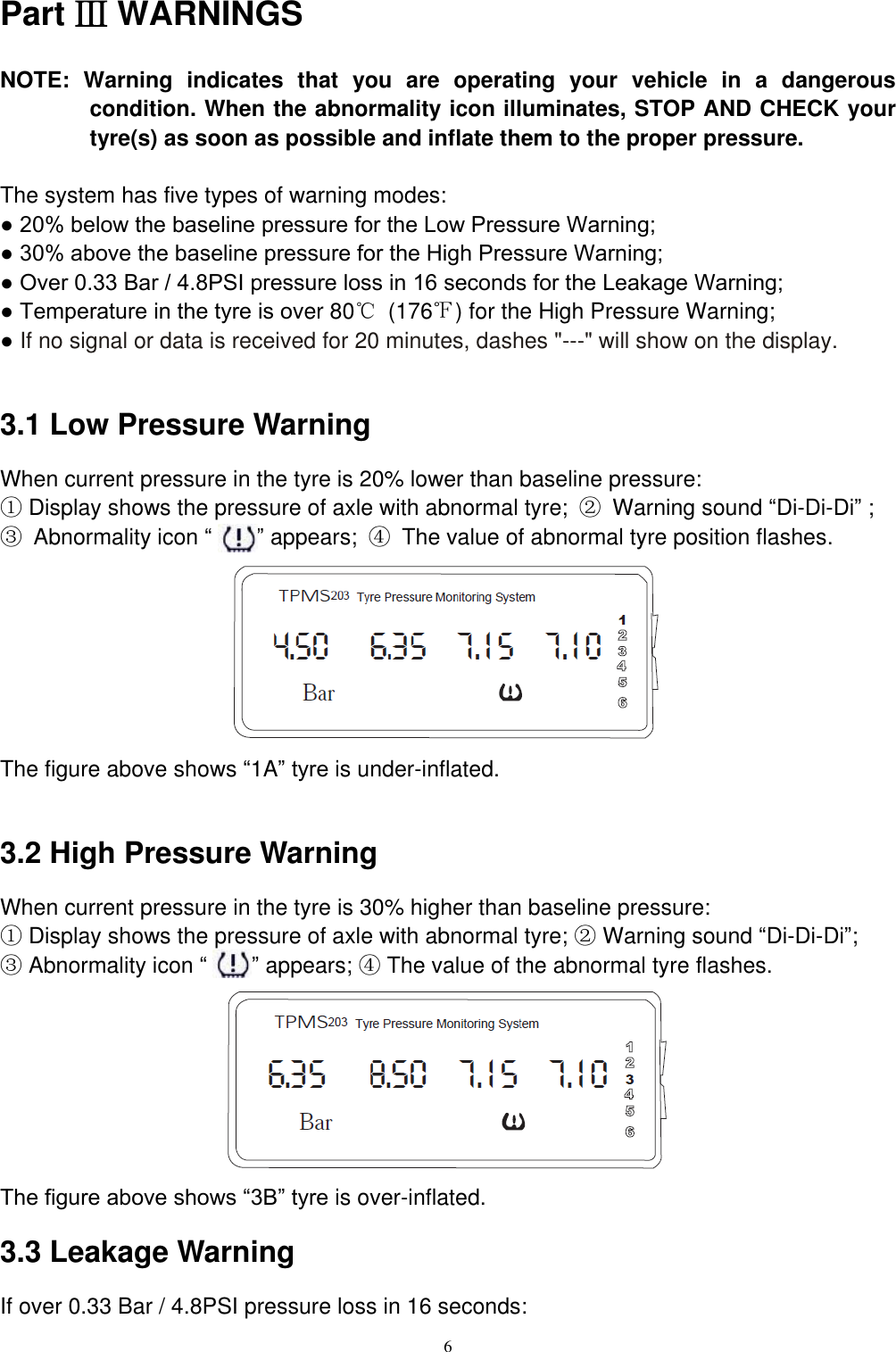
6  Part Ⅲ WARNINGS NOTE:  Warning  indicates  that  you  are  operating  your  vehicle  in  a  dangerous condition. When the abnormality icon illuminates, STOP AND CHECK your tyre(s) as soon as possible and inflate them to the proper pressure.  The system has five types of warning modes: ● 20% below the baseline pressure for the Low Pressure Warning; ● 30% above the baseline pressure for the High Pressure Warning; ● Over 0.33 Bar / 4.8PSI pressure loss in 16 seconds for the Leakage Warning; ● Temperature in the tyre is over 80℃  (176℉) for the High Pressure Warning; ● If no signal or data is received for 20 minutes, dashes "---" will show on the display.  3.1 Low Pressure Warning When current pressure in the tyre is 20% lower than baseline pressure: ① Display shows the pressure of axle with abnormal tyre;  ②  Warning sound “Di-Di-Di” ;   ③  Abnormality icon “    ” appears;  ④  The value of abnormal tyre position flashes.        The figure above shows “1A” tyre is under-inflated.    3.2 High Pressure Warning When current pressure in the tyre is 30% higher than baseline pressure:   ① Display shows the pressure of axle with abnormal tyre; ② Warning sound “Di-Di-Di”;   ③ Abnormality icon “    ” appears; ④ The value of the abnormal tyre flashes.        The figure above shows “3B” tyre is over-inflated.   3.3 Leakage Warning If over 0.33 Bar / 4.8PSI pressure loss in 16 seconds:
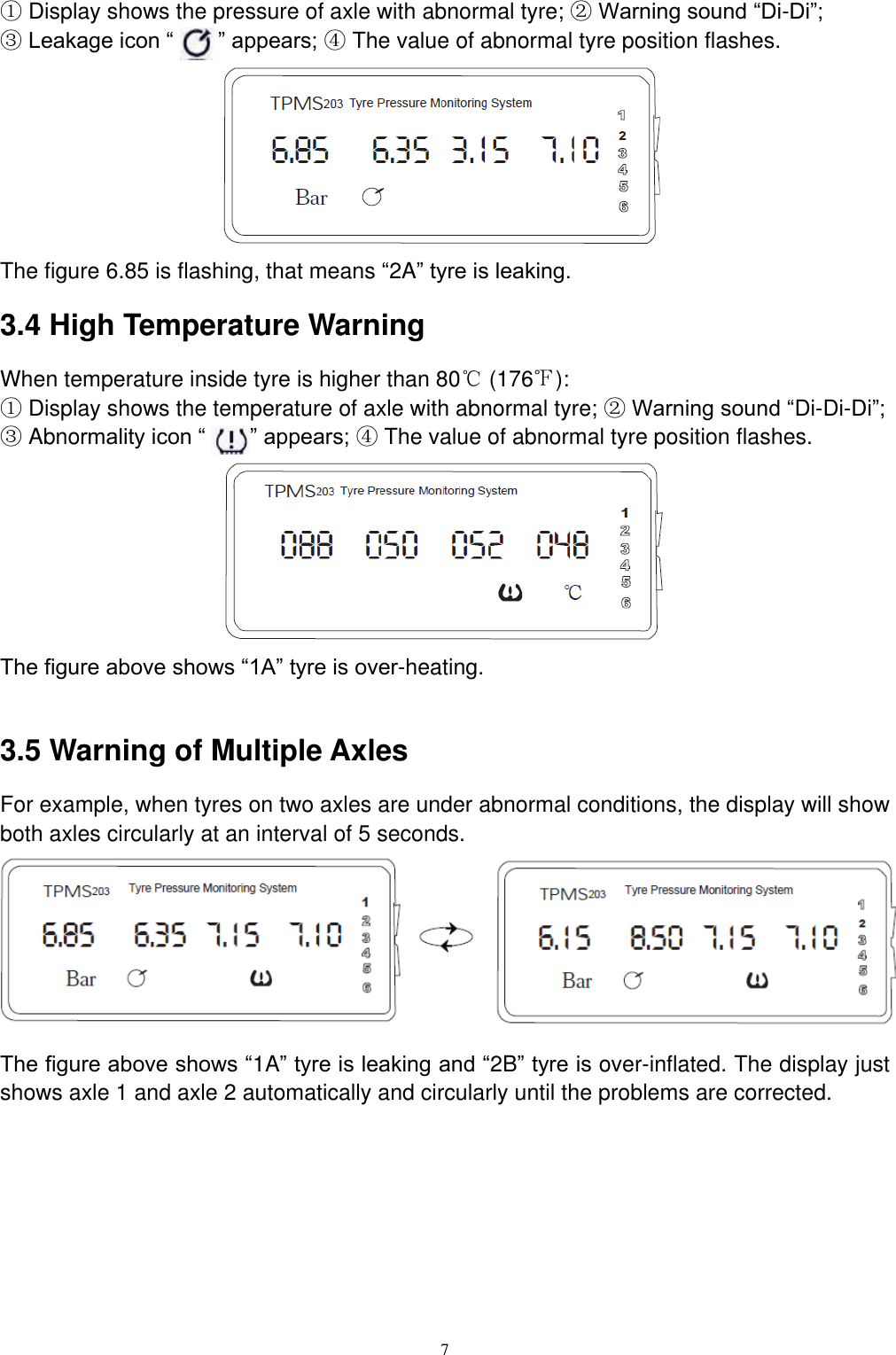
7  ① Display shows the pressure of axle with abnormal tyre; ② Warning sound “Di-Di”;   ③ Leakage icon “       ” appears; ④ The value of abnormal tyre position flashes.        The figure 6.85 is flashing, that means “2A” tyre is leaking.   3.4 High Temperature Warning When temperature inside tyre is higher than 80℃ (176℉):   ① Display shows the temperature of axle with abnormal tyre; ② Warning sound “Di-Di-Di”;   ③ Abnormality icon “    ” appears; ④ The value of abnormal tyre position flashes.        The figure above shows “1A” tyre is over-heating.    3.5 Warning of Multiple Axles For example, when tyres on two axles are under abnormal conditions, the display will show both axles circularly at an interval of 5 seconds.        The figure above shows “1A” tyre is leaking and “2B” tyre is over-inflated. The display just shows axle 1 and axle 2 automatically and circularly until the problems are corrected.
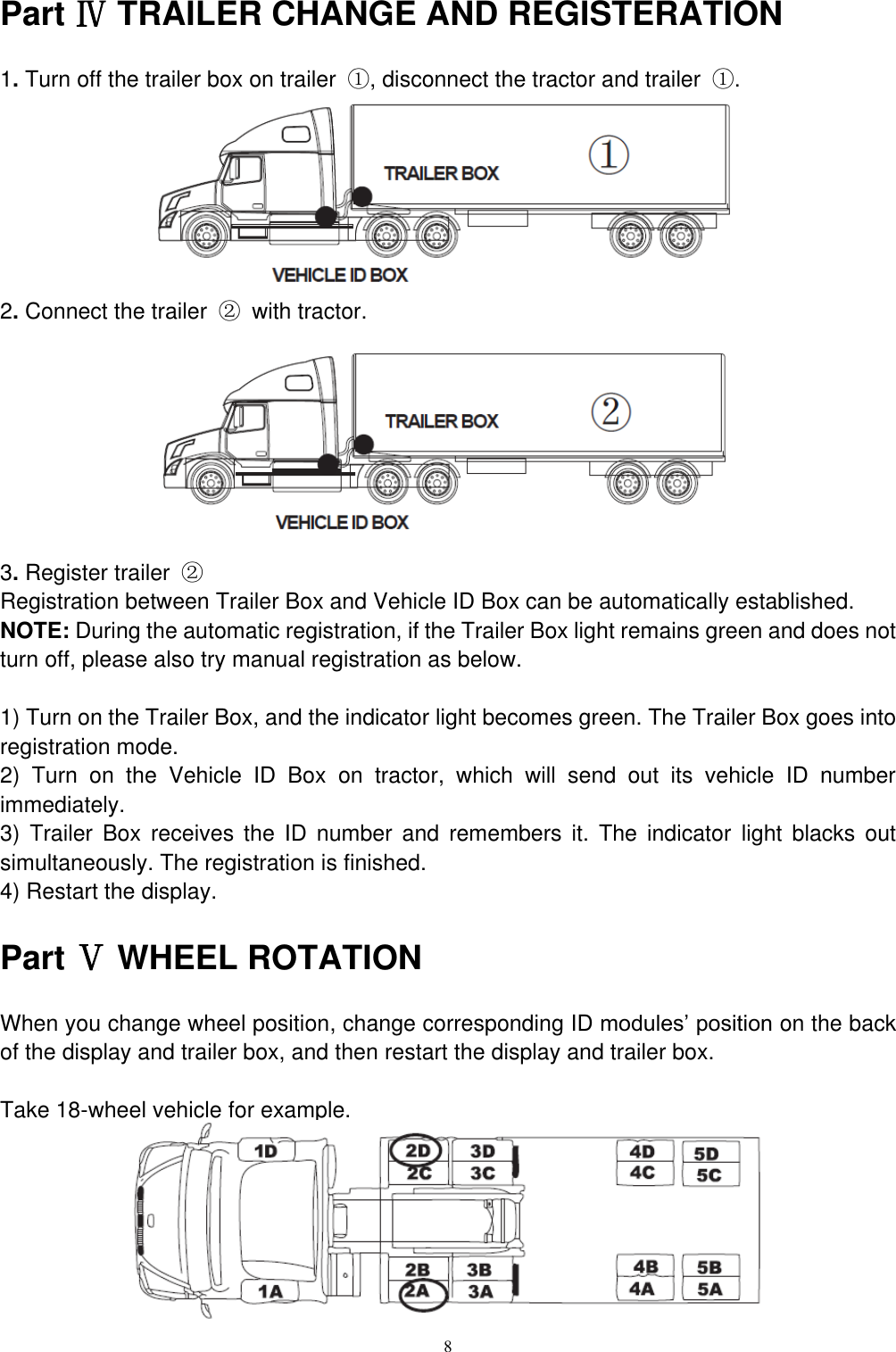
8  Part Ⅳ TRAILER CHANGE AND REGISTERATION 1. Turn off the trailer box on trailer  ①, disconnect the tractor and trailer  ①.        2. Connect the trailer  ②  with tractor.         3. Register trailer  ② Registration between Trailer Box and Vehicle ID Box can be automatically established. NOTE: During the automatic registration, if the Trailer Box light remains green and does not turn off, please also try manual registration as below.  1) Turn on the Trailer Box, and the indicator light becomes green. The Trailer Box goes into registration mode. 2)  Turn  on  the  Vehicle  ID  Box  on  tractor,  which  will  send  out  its  vehicle  ID  number immediately. 3)  Trailer  Box  receives  the  ID  number  and  remembers  it.  The  indicator  light  blacks  out simultaneously. The registration is finished.   4) Restart the display. Part Ⅴ WHEEL ROTATION When you change wheel position, change corresponding ID modules’ position on the back of the display and trailer box, and then restart the display and trailer box.    Take 18-wheel vehicle for example.
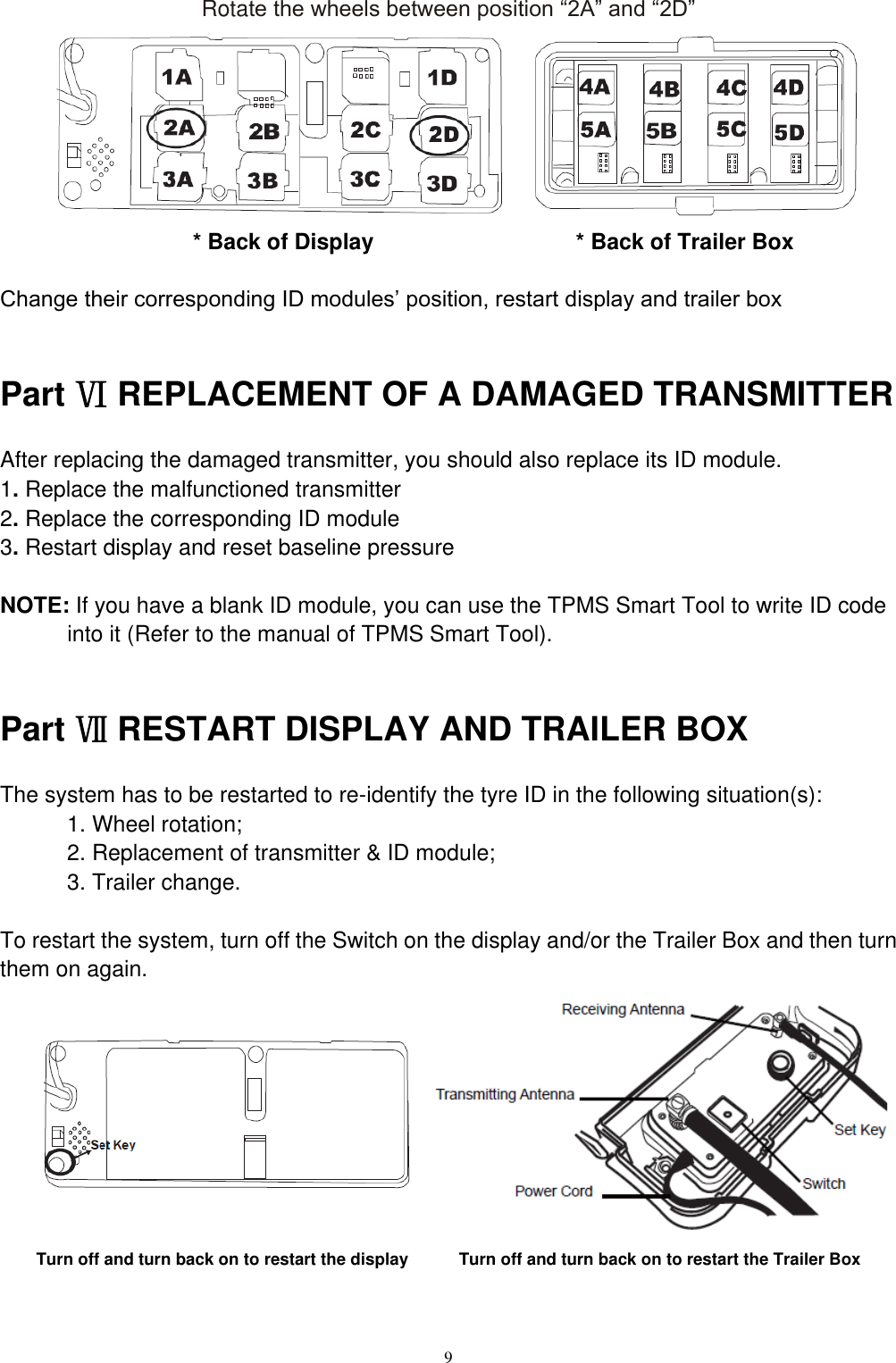
9  Rotate the wheels between position “2A” and “2D”                        * Back of Display                                  * Back of Trailer Box  Change their corresponding ID modules’ position, restart display and trailer box  Part Ⅵ REPLACEMENT OF A DAMAGED TRANSMITTER After replacing the damaged transmitter, you should also replace its ID module. 1. Replace the malfunctioned transmitter   2. Replace the corresponding ID module   3. Restart display and reset baseline pressure  NOTE: If you have a blank ID module, you can use the TPMS Smart Tool to write ID code into it (Refer to the manual of TPMS Smart Tool).  Part Ⅶ RESTART DISPLAY AND TRAILER BOX The system has to be restarted to re-identify the tyre ID in the following situation(s): 1. Wheel rotation; 2. Replacement of transmitter & ID module; 3. Trailer change.  To restart the system, turn off the Switch on the display and/or the Trailer Box and then turn them on again.          Turn off and turn back on to restart the display            Turn off and turn back on to restart the Trailer Box
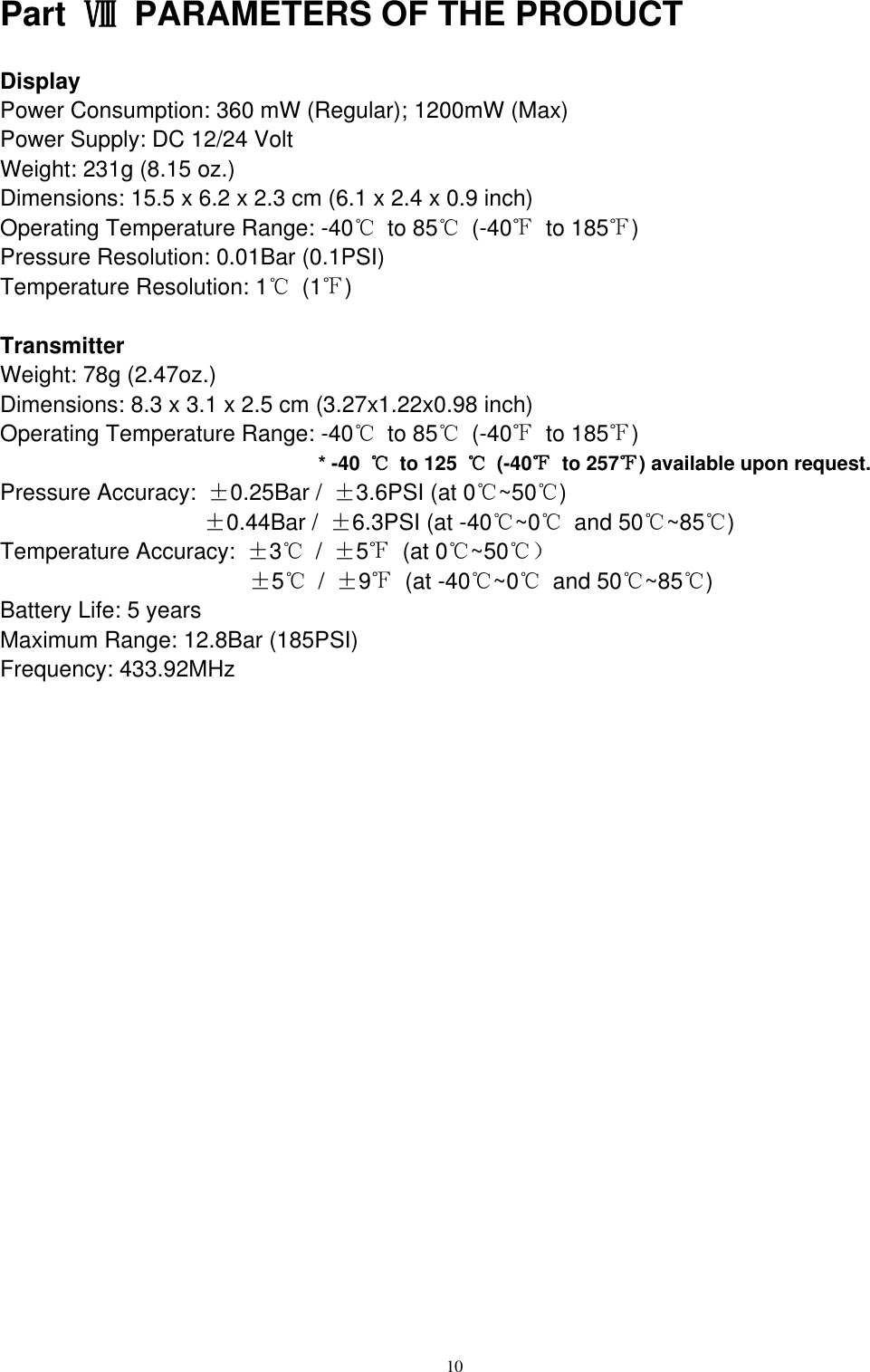
10  Part  Ⅷ  PARAMETERS OF THE PRODUCT Display Power Consumption: 360 mW (Regular); 1200mW (Max) Power Supply: DC 12/24 Volt Weight: 231g (8.15 oz.) Dimensions: 15.5 x 6.2 x 2.3 cm (6.1 x 2.4 x 0.9 inch) Operating Temperature Range: -40℃  to 85℃  (-40℉  to 185℉) Pressure Resolution: 0.01Bar (0.1PSI) Temperature Resolution: 1℃ (1℉)  Transmitter Weight: 78g (2.47oz.) Dimensions: 8.3 x 3.1 x 2.5 cm (3.27x1.22x0.98 inch) Operating Temperature Range: -40℃  to 85℃  (-40℉  to 185℉)   * -40  ℃  to 125  ℃  (-40℉  to 257℉) available upon request. Pressure Accuracy:  ±0.25Bar /  ±3.6PSI (at 0℃~50℃)                   ±0.44Bar /  ±6.3PSI (at -40℃~0℃  and 50℃~85℃) Temperature Accuracy:  ±3℃ /  ±5℉  (at 0℃~50℃)                       ±5℃ /  ±9℉  (at -40℃~0℃  and 50℃~85℃) Battery Life: 5 years Maximum Range: 12.8Bar (185PSI) Frequency: 433.92MHz
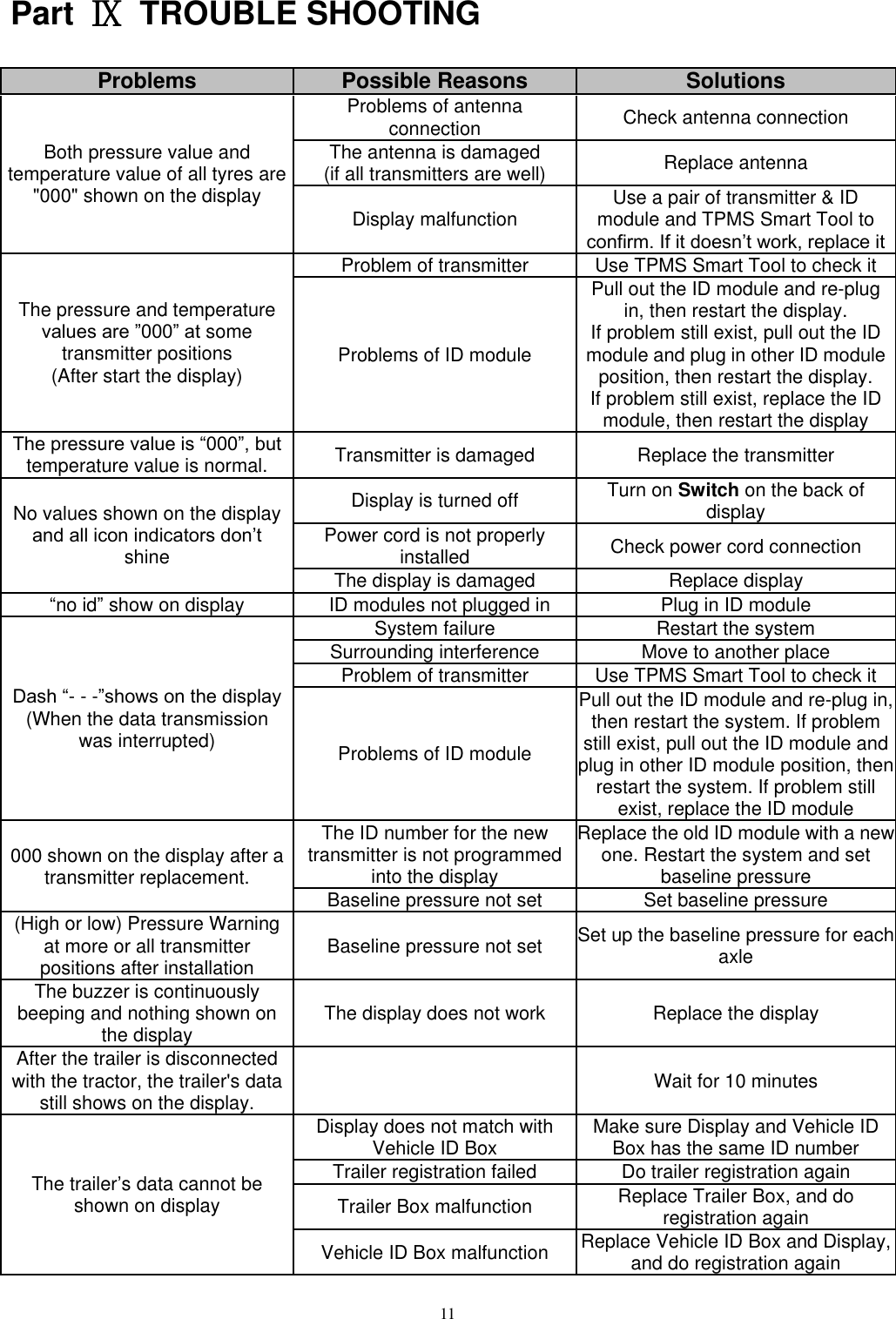
11  Part  Ⅸ  TROUBLE SHOOTING Problems Possible Reasons Solutions Both pressure value and temperature value of all tyres are "000" shown on the display Problems of antenna connection Check antenna connection The antenna is damaged (if all transmitters are well) Replace antenna Display malfunction Use a pair of transmitter & ID module and TPMS Smart Tool to confirm. If it doesn’t work, replace it The pressure and temperature values are ”000” at some transmitter positions (After start the display) Problem of transmitter Use TPMS Smart Tool to check it Problems of ID module Pull out the ID module and re-plug in, then restart the display. If problem still exist, pull out the ID module and plug in other ID module position, then restart the display.   If problem still exist, replace the ID module, then restart the display The pressure value is “000”, but temperature value is normal. Transmitter is damaged Replace the transmitter No values shown on the display and all icon indicators don’t shine Display is turned off Turn on Switch on the back of display Power cord is not properly installed Check power cord connection The display is damaged Replace display “no id” show on display   ID modules not plugged in Plug in ID module Dash “- - -”shows on the display (When the data transmission was interrupted) System failure Restart the system Surrounding interference Move to another place Problem of transmitter Use TPMS Smart Tool to check it Problems of ID module Pull out the ID module and re-plug in, then restart the system. If problem still exist, pull out the ID module and plug in other ID module position, then restart the system. If problem still exist, replace the ID module 000 shown on the display after a transmitter replacement. The ID number for the new transmitter is not programmed into the display Replace the old ID module with a new one. Restart the system and set baseline pressure Baseline pressure not set Set baseline pressure (High or low) Pressure Warning at more or all transmitter positions after installation   Baseline pressure not set Set up the baseline pressure for each axle The buzzer is continuously beeping and nothing shown on the display The display does not work Replace the display After the trailer is disconnected with the tractor, the trailer's data still shows on the display.  Wait for 10 minutes The trailer’s data cannot be shown on display Display does not match with Vehicle ID Box Make sure Display and Vehicle ID Box has the same ID number Trailer registration failed Do trailer registration again Trailer Box malfunction Replace Trailer Box, and do registration again Vehicle ID Box malfunction Replace Vehicle ID Box and Display, and do registration again
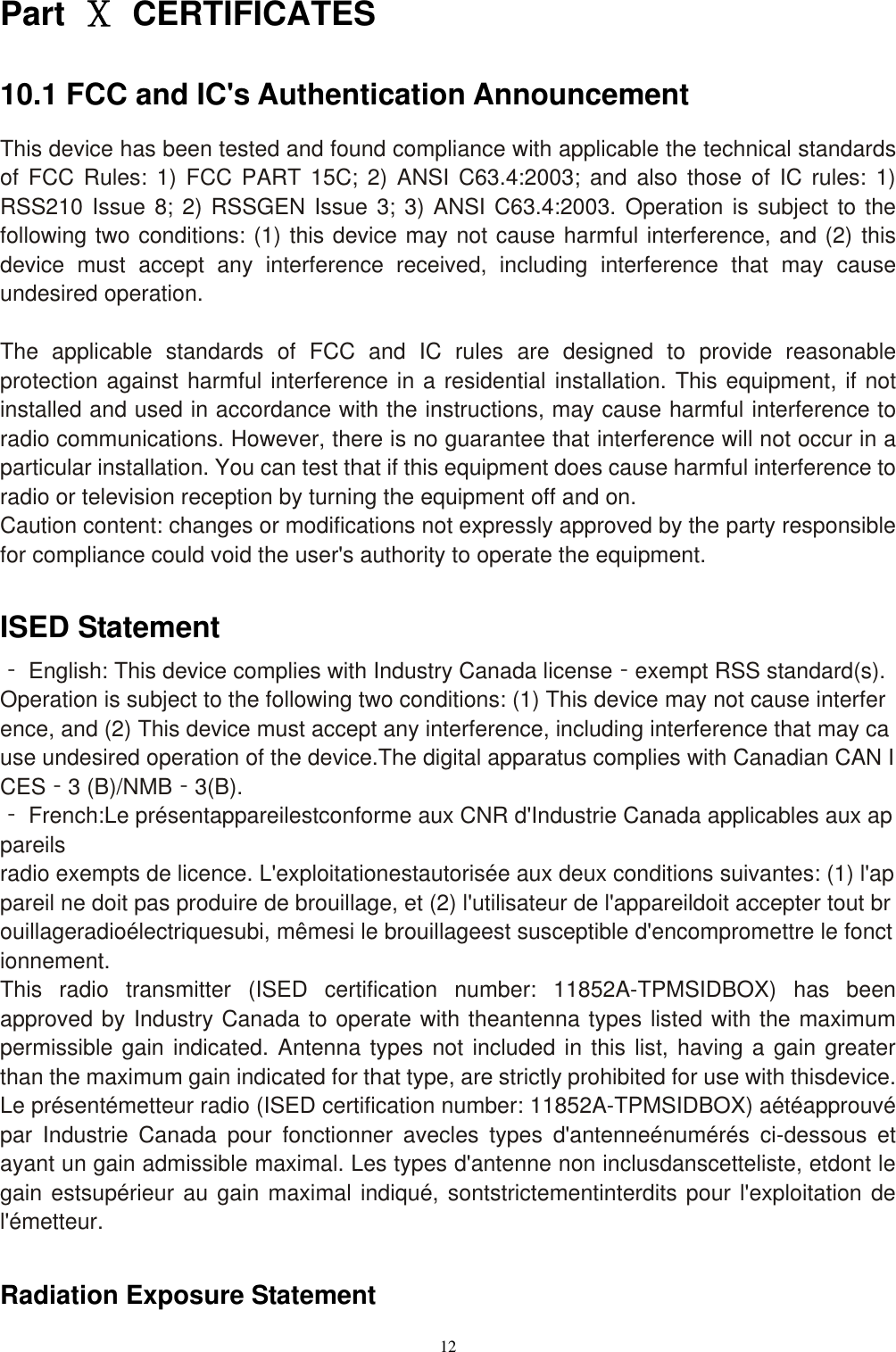
12  Part  Ⅹ  CERTIFICATES 10.1 FCC and IC's Authentication Announcement This device has been tested and found compliance with applicable the technical standards of  FCC  Rules:  1)  FCC PART 15C;  2)  ANSI  C63.4:2003; and  also  those  of  IC rules:  1) RSS210 Issue 8; 2) RSSGEN Issue 3; 3) ANSI C63.4:2003. Operation is subject to the following two conditions: (1) this device may not cause harmful interference, and (2) this device  must  accept  any  interference  received,  including  interference  that  may  cause undesired operation.  The  applicable  standards  of  FCC  and  IC  rules  are  designed  to  provide  reasonable protection against harmful interference in a residential installation. This equipment, if not installed and used in accordance with the instructions, may cause harmful interference to radio communications. However, there is no guarantee that interference will not occur in a particular installation. You can test that if this equipment does cause harmful interference to radio or television reception by turning the equipment off and on. Caution content: changes or modifications not expressly approved by the party responsible for compliance could void the user's authority to operate the equipment.  ISED Statement ‐ English: This device complies with Industry Canada license‐exempt RSS standard(s).Operation is subject to the following two conditions: (1) This device may not cause interference, and (2) This device must accept any interference, including interference that may cause undesired operation of the device.The digital apparatus complies with Canadian CAN ICES‐3 (B)/NMB‐3(B). ‐ French:Le présentappareilestconforme aux CNR d'Industrie Canada applicables aux appareils radio exempts de licence. L'exploitationestautorisée aux deux conditions suivantes: (1) l'appareil ne doit pas produire de brouillage, et (2) l'utilisateur de l'appareildoit accepter tout brouillageradioélectriquesubi, mêmesi le brouillageest susceptible d'encompromettre le fonctionnement. This  radio  transmitter  (ISED  certification  number:  11852A-TPMSIDBOX)  has  been approved by Industry Canada to operate with theantenna types listed with the maximum permissible gain indicated. Antenna types not included in this list, having a gain greater than the maximum gain indicated for that type, are strictly prohibited for use with thisdevice. Le présentémetteur radio (ISED certification number: 11852A-TPMSIDBOX) aétéapprouvé par  Industrie  Canada  pour  fonctionner  avecles  types  d'antenneénumérés  ci-dessous  et ayant un gain admissible maximal. Les types d'antenne non inclusdanscetteliste, etdont le gain estsupérieur au gain maximal indiqué, sontstrictementinterdits pour l'exploitation de l'émetteur.  Radiation Exposure Statement
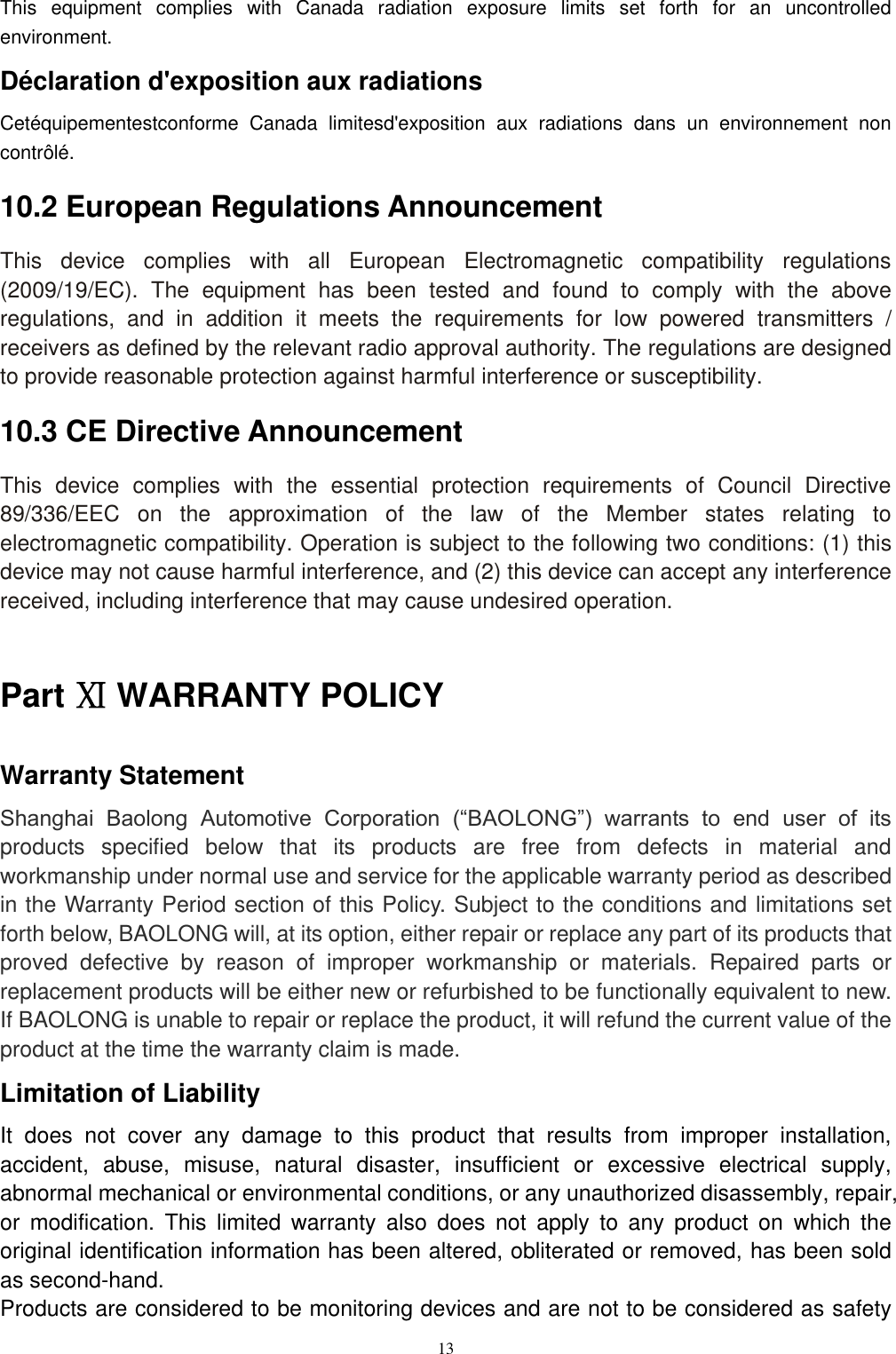
13  This  equipment  complies  with  Canada  radiation  exposure  limits  set  forth  for  an  uncontrolled environment.   Déclaration d'exposition aux radiations Cetéquipementestconforme  Canada  limitesd'exposition  aux  radiations  dans  un  environnement  non contrôlé.   10.2 European Regulations Announcement This  device  complies  with  all  European  Electromagnetic  compatibility  regulations (2009/19/EC).  The  equipment  has  been  tested  and  found  to  comply  with  the  above regulations,  and  in  addition  it  meets  the  requirements  for  low  powered  transmitters  / receivers as defined by the relevant radio approval authority. The regulations are designed to provide reasonable protection against harmful interference or susceptibility. 10.3 CE Directive Announcement This  device  complies  with  the  essential  protection  requirements  of  Council  Directive 89/336/EEC  on  the  approximation  of  the  law  of  the  Member  states  relating  to electromagnetic compatibility. Operation is subject to the following two conditions: (1) this device may not cause harmful interference, and (2) this device can accept any interference received, including interference that may cause undesired operation.  Part Ⅺ WARRANTY POLICY Warranty Statement Shanghai  Baolong  Automotive  Corporation  (“BAOLONG”)  warrants  to  end  user  of  its products  specified  below  that  its  products  are  free  from  defects  in  material  and workmanship under normal use and service for the applicable warranty period as described in the Warranty Period section of this Policy. Subject to the conditions and limitations set forth below, BAOLONG will, at its option, either repair or replace any part of its products that proved  defective  by  reason  of  improper  workmanship  or  materials.  Repaired  parts  or replacement products will be either new or refurbished to be functionally equivalent to new. If BAOLONG is unable to repair or replace the product, it will refund the current value of the product at the time the warranty claim is made. Limitation of Liability It  does  not  cover  any  damage  to  this  product  that  results  from  improper  installation, accident,  abuse,  misuse,  natural  disaster,  insufficient  or  excessive  electrical  supply, abnormal mechanical or environmental conditions, or any unauthorized disassembly, repair, or  modification.  This  limited  warranty  also  does  not  apply  to  any  product  on  which  the original identification information has been altered, obliterated or removed, has been sold as second-hand. Products are considered to be monitoring devices and are not to be considered as safety
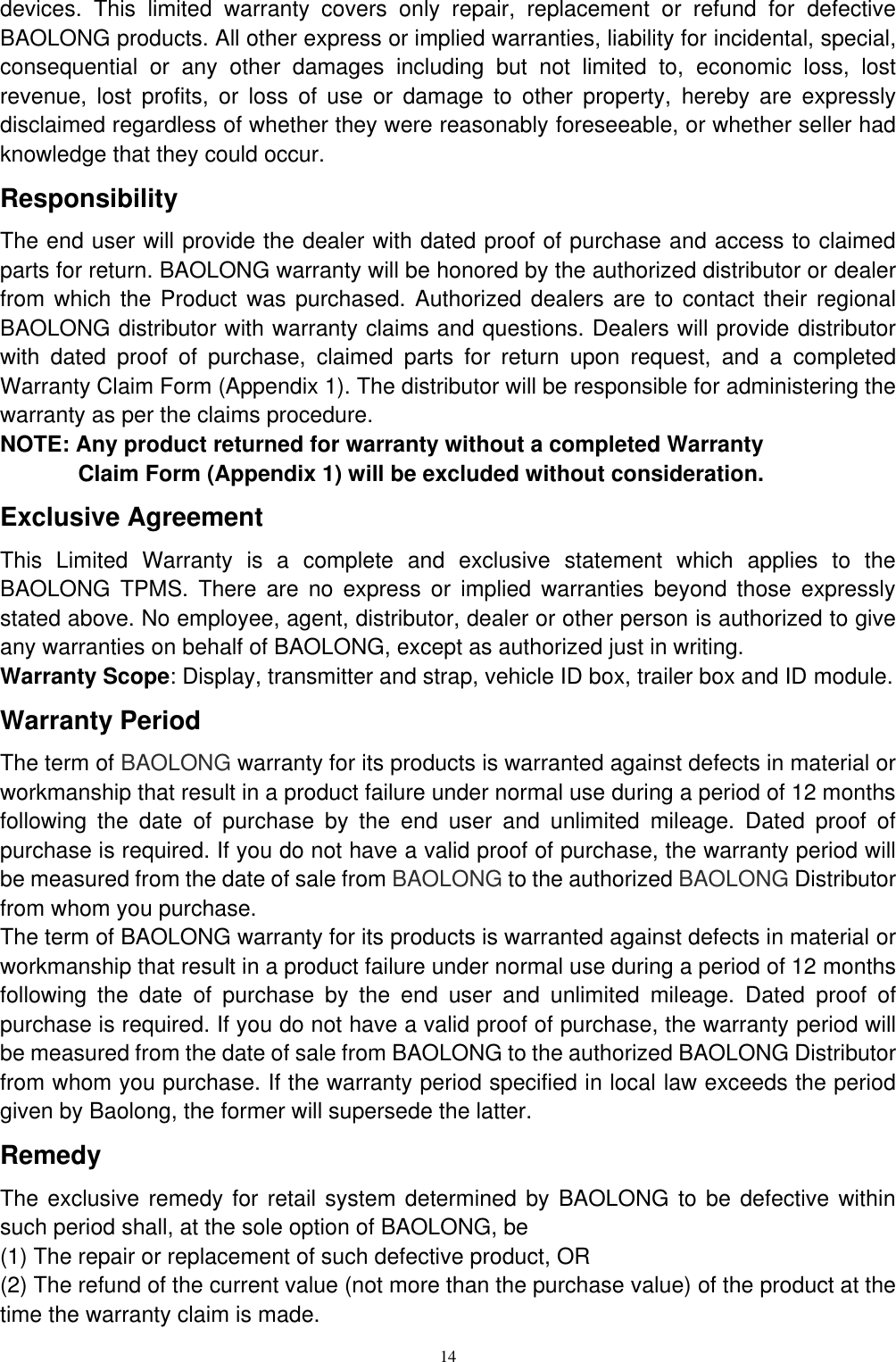
14  devices.  This  limited  warranty  covers  only  repair,  replacement  or  refund  for  defective BAOLONG products. All other express or implied warranties, liability for incidental, special, consequential  or  any  other  damages  including  but  not  limited  to,  economic  loss,  lost revenue,  lost  profits,  or  loss  of  use  or  damage  to  other  property,  hereby  are  expressly disclaimed regardless of whether they were reasonably foreseeable, or whether seller had knowledge that they could occur. Responsibility The end user will provide the dealer with dated proof of purchase and access to claimed parts for return. BAOLONG warranty will be honored by the authorized distributor or dealer from which the Product was purchased. Authorized dealers are to contact their regional BAOLONG distributor with warranty claims and questions. Dealers will provide distributor with  dated  proof  of  purchase,  claimed  parts  for  return  upon  request,  and  a  completed Warranty Claim Form (Appendix 1). The distributor will be responsible for administering the warranty as per the claims procedure. NOTE: Any product returned for warranty without a completed Warranty Claim Form (Appendix 1) will be excluded without consideration. Exclusive Agreement This  Limited  Warranty  is  a  complete  and  exclusive  statement  which  applies  to  the BAOLONG  TPMS.  There  are  no  express  or  implied  warranties  beyond  those  expressly stated above. No employee, agent, distributor, dealer or other person is authorized to give any warranties on behalf of BAOLONG, except as authorized just in writing. Warranty Scope: Display, transmitter and strap, vehicle ID box, trailer box and ID module. Warranty Period The term of BAOLONG warranty for its products is warranted against defects in material or workmanship that result in a product failure under normal use during a period of 12 months following  the  date  of  purchase  by  the  end  user  and  unlimited  mileage.  Dated  proof  of purchase is required. If you do not have a valid proof of purchase, the warranty period will be measured from the date of sale from BAOLONG to the authorized BAOLONG Distributor from whom you purchase. The term of BAOLONG warranty for its products is warranted against defects in material or workmanship that result in a product failure under normal use during a period of 12 months following  the  date  of  purchase  by  the  end  user  and  unlimited  mileage.  Dated  proof  of purchase is required. If you do not have a valid proof of purchase, the warranty period will be measured from the date of sale from BAOLONG to the authorized BAOLONG Distributor from whom you purchase. If the warranty period specified in local law exceeds the period given by Baolong, the former will supersede the latter. Remedy The exclusive remedy for  retail system determined by BAOLONG to be defective within such period shall, at the sole option of BAOLONG, be (1) The repair or replacement of such defective product, OR (2) The refund of the current value (not more than the purchase value) of the product at the time the warranty claim is made.
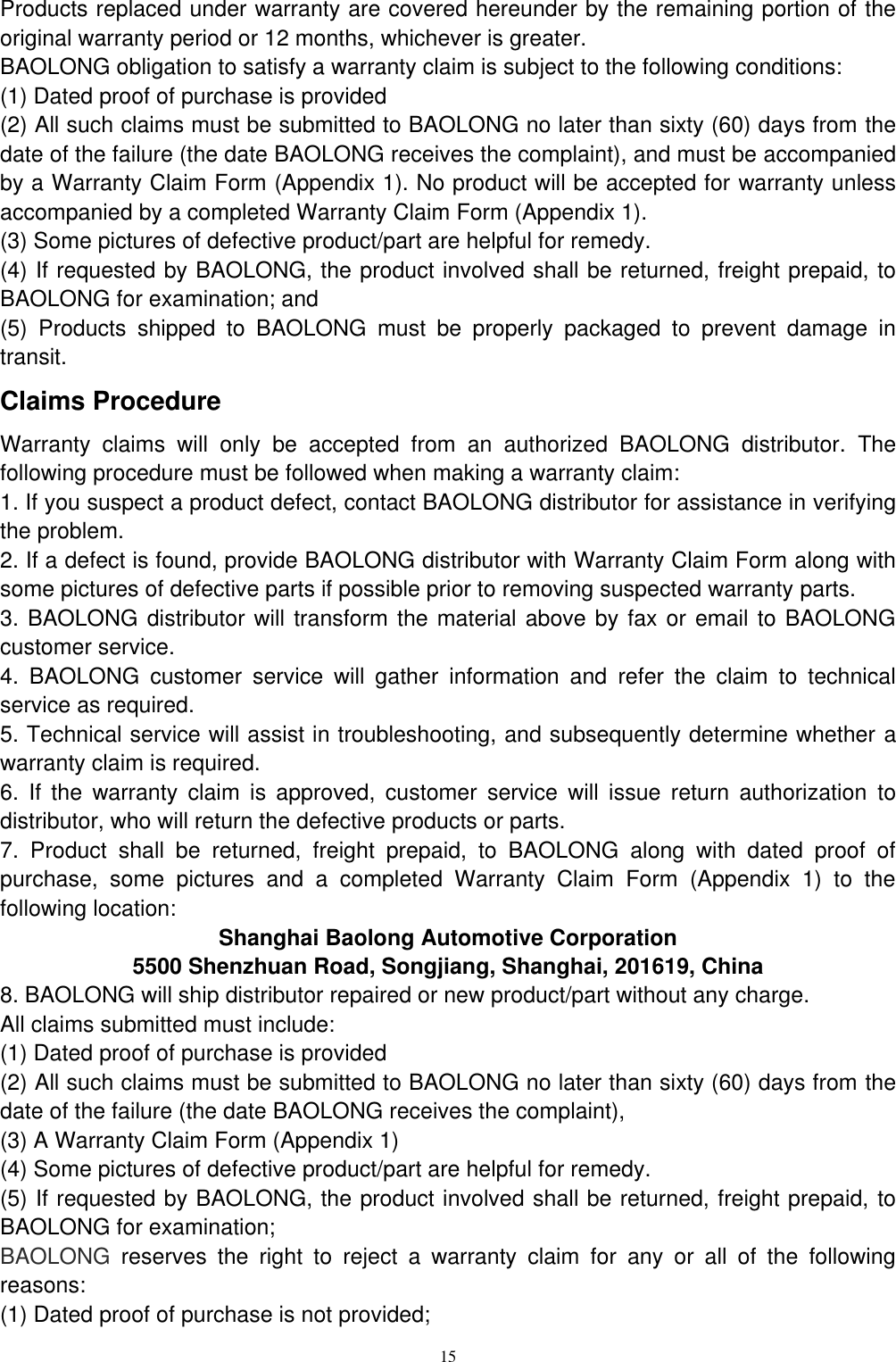
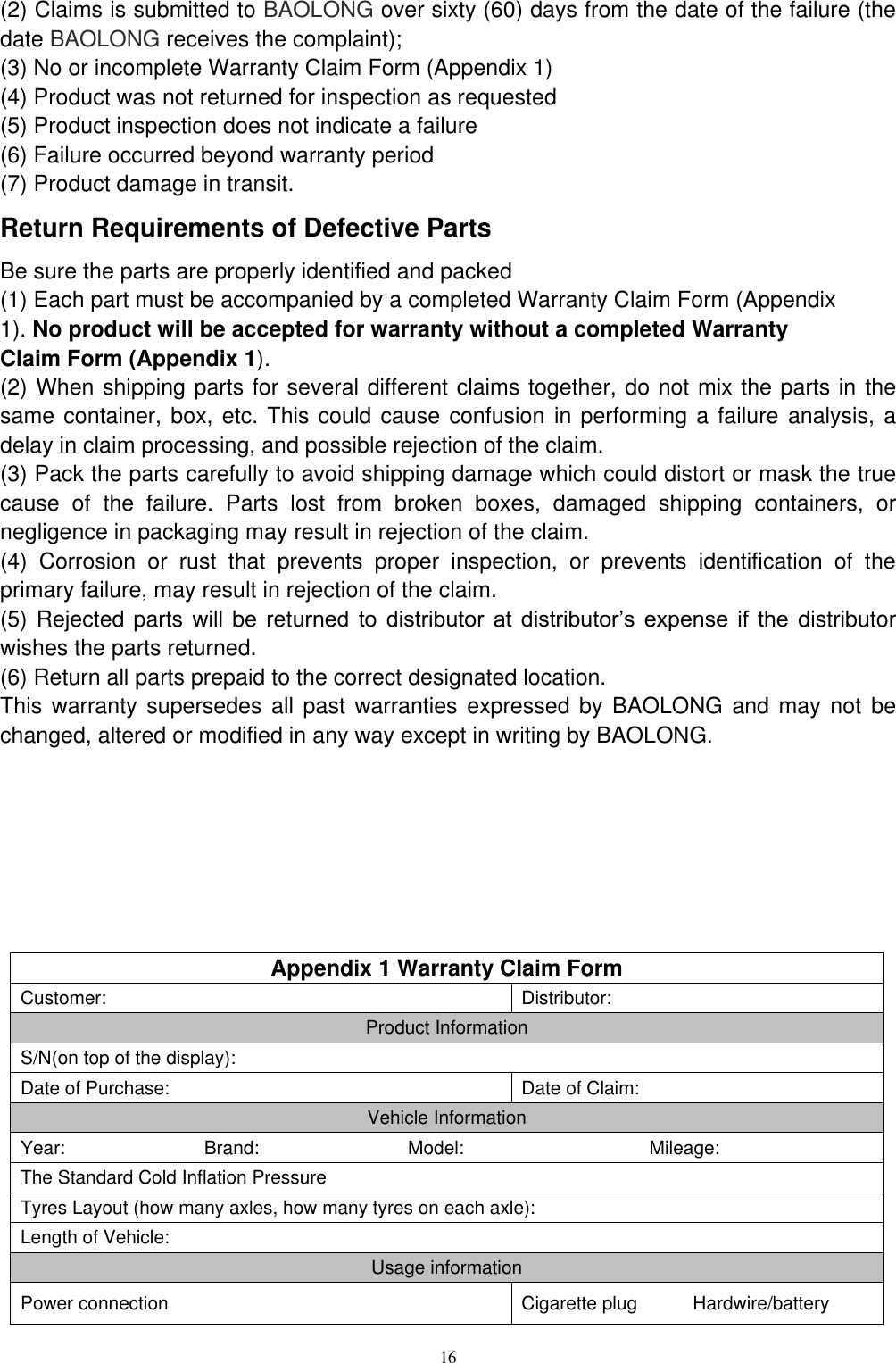
15  Products replaced under warranty are covered hereunder by the remaining portion of the original warranty period or 12 months, whichever is greater. BAOLONG obligation to satisfy a warranty claim is subject to the following conditions: (1) Dated proof of purchase is provided (2) All such claims must be submitted to BAOLONG no later than sixty (60) days from the date of the failure (the date BAOLONG receives the complaint), and must be accompanied by a Warranty Claim Form (Appendix 1). No product will be accepted for warranty unless accompanied by a completed Warranty Claim Form (Appendix 1). (3) Some pictures of defective product/part are helpful for remedy. (4) If requested by BAOLONG, the product involved shall be returned, freight prepaid, to BAOLONG for examination; and   (5)  Products  shipped  to  BAOLONG  must  be  properly  packaged  to  prevent  damage  in transit. Claims Procedure Warranty  claims  will  only be  accepted  from  an  authorized  BAOLONG  distributor.  The following procedure must be followed when making a warranty claim:   1. If you suspect a product defect, contact BAOLONG distributor for assistance in verifying the problem. 2. If a defect is found, provide BAOLONG distributor with Warranty Claim Form along with some pictures of defective parts if possible prior to removing suspected warranty parts. 3. BAOLONG distributor will transform the material above by fax or email to BAOLONG customer service. 4.  BAOLONG  customer  service  will  gather  information  and  refer  the  claim  to  technical service as required. 5. Technical service will assist in troubleshooting, and subsequently determine whether a warranty claim is required. 6.  If  the  warranty  claim  is  approved,  customer  service  will  issue  return  authorization  to distributor, who will return the defective products or parts. 7.  Product  shall  be  returned,  freight  prepaid,  to  BAOLONG  along  with  dated  proof  of purchase,  some  pictures  and  a  completed  Warranty  Claim  Form  (Appendix  1)  to  the following location: Shanghai Baolong Automotive Corporation 5500 Shenzhuan Road, Songjiang, Shanghai, 201619, China 8. BAOLONG will ship distributor repaired or new product/part without any charge. All claims submitted must include: (1) Dated proof of purchase is provided (2) All such claims must be submitted to BAOLONG no later than sixty (60) days from the date of the failure (the date BAOLONG receives the complaint), (3) A Warranty Claim Form (Appendix 1) (4) Some pictures of defective product/part are helpful for remedy. (5) If requested by BAOLONG, the product involved shall be returned, freight prepaid, to BAOLONG for examination; BAOLONG  reserves  the  right  to  reject  a  warranty  claim  for  any  or  all  of  the  following reasons: (1) Dated proof of purchase is not provided;
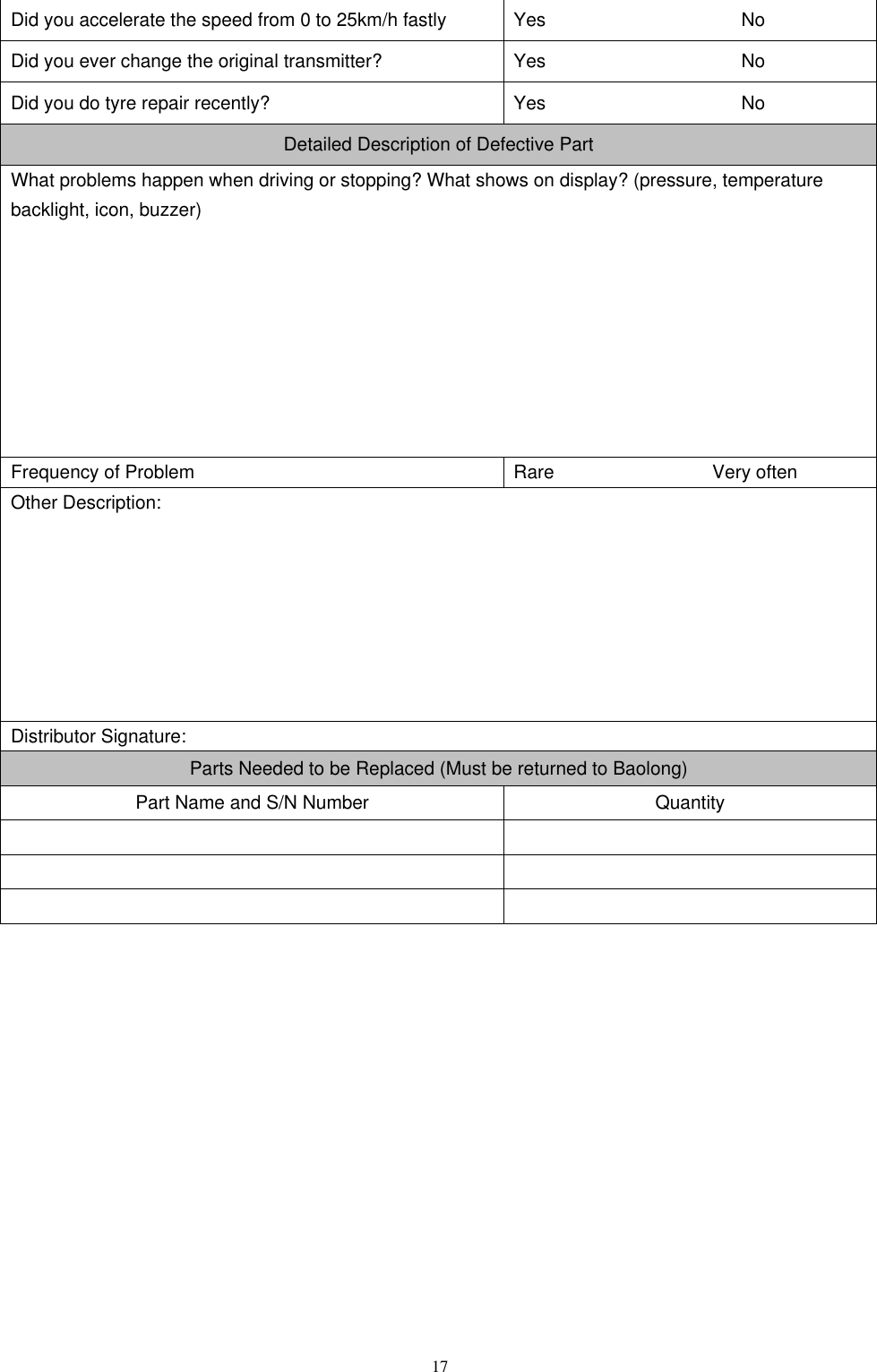
16  (2) Claims is submitted to BAOLONG over sixty (60) days from the date of the failure (the date BAOLONG receives the complaint); (3) No or incomplete Warranty Claim Form (Appendix 1) (4) Product was not returned for inspection as requested (5) Product inspection does not indicate a failure (6) Failure occurred beyond warranty period (7) Product damage in transit. Return Requirements of Defective Parts Be sure the parts are properly identified and packed (1) Each part must be accompanied by a completed Warranty Claim Form (Appendix 1). No product will be accepted for warranty without a completed Warranty Claim Form (Appendix 1). (2) When shipping parts for several different claims together, do not mix the parts in the same container, box, etc. This could cause confusion in performing a failure analysis, a delay in claim processing, and possible rejection of the claim. (3) Pack the parts carefully to avoid shipping damage which could distort or mask the true cause  of  the  failure.  Parts  lost  from  broken  boxes,  damaged  shipping  containers,  or negligence in packaging may result in rejection of the claim. (4)  Corrosion  or  rust  that  prevents  proper  inspection,  or  prevents  identification  of  the primary failure, may result in rejection of the claim. (5) Rejected parts will be returned  to  distributor  at  distributor’s  expense if  the distributor wishes the parts returned. (6) Return all parts prepaid to the correct designated location. This warranty supersedes all past  warranties  expressed by BAOLONG and may not be changed, altered or modified in any way except in writing by BAOLONG.        Appendix 1 Warranty Claim Form Customer: Distributor: Product Information S/N(on top of the display): Date of Purchase: Date of Claim: Vehicle Information Year:                              Brand:                                Model:                                        Mileage: The Standard Cold Inflation Pressure   Tyres Layout (how many axles, how many tyres on each axle): Length of Vehicle: Usage information Power connection Cigarette plug            Hardwire/battery
17  Did you accelerate the speed from 0 to 25km/h fastly Yes                     No Did you ever change the original transmitter? Yes                     No Did you do tyre repair recently? Yes                     No Detailed Description of Defective Part What problems happen when driving or stopping? What shows on display? (pressure, temperature backlight, icon, buzzer)         Frequency of Problem Rare                                  Very often Other Description:        Distributor Signature: Parts Needed to be Replaced (Must be returned to Baolong) Part Name and S/N Number Quantity
                                          Shanghai Baolong Automotive Corporation 5500, Shenzhuan Rd., Songjiang, Shanghai 201619, China Tel.: +86-21-31273333   Fax: +86-21-31190319 E-mail: sbic@chinabaolong.net      sbic@baolong.biz   Web: www.baolong.biz Important Claim must be submitted within 60 days after failure Fill out one claim form for each claim Dated proof of purchase is provided Some pictures of defective product/part are helpful for remedy.

Navigation menu