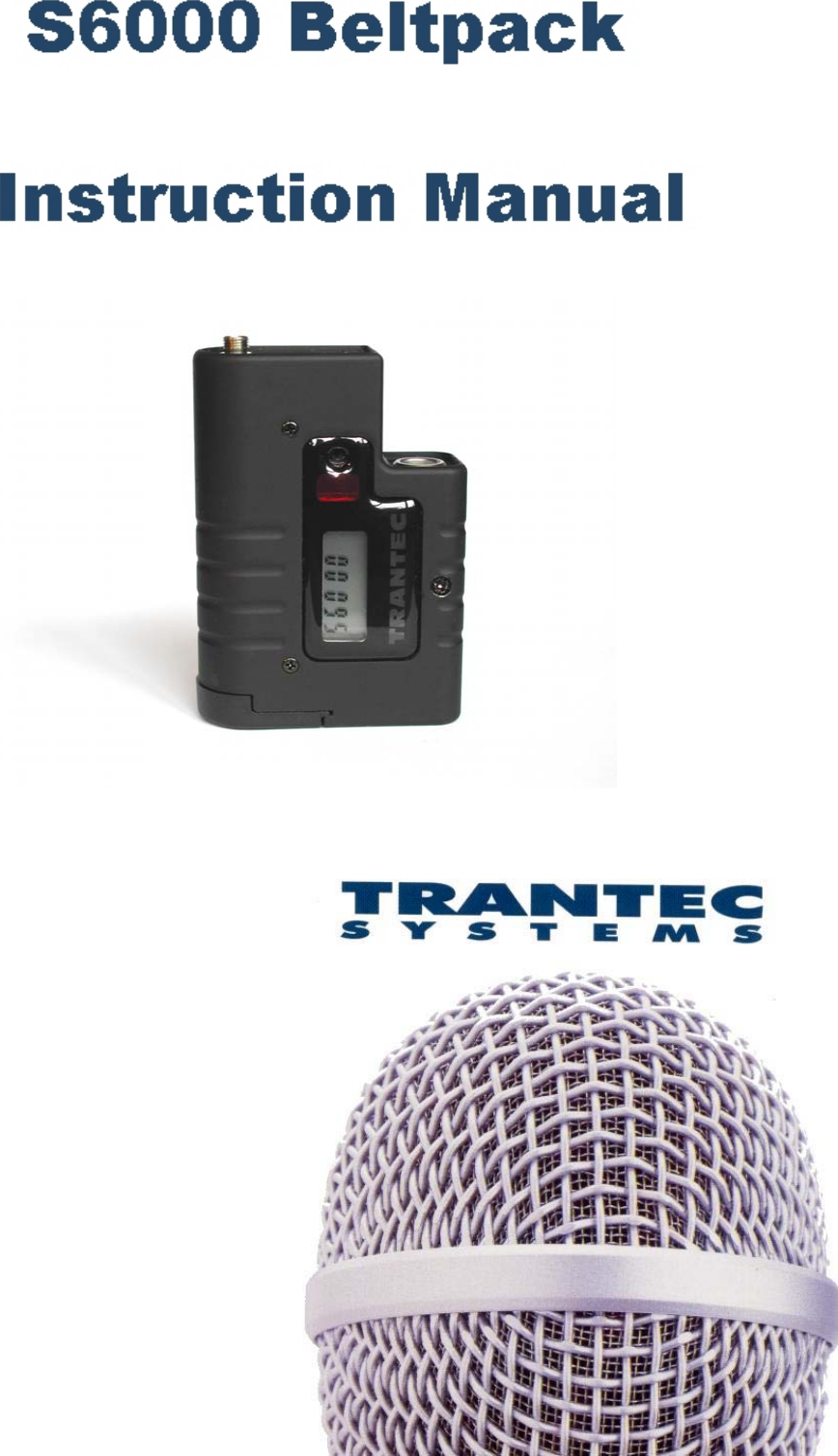
BBM Electronics Group 6KLTX Wireless microphone transmitter belt pack User Manual S6000 belt instructions V1 2

BBM Electronics Group Ltd Wireless microphone transmitter belt pack S6000 belt instructions V1 2

Instructions

Page 2 of 6 S6000 Beltpack Instructions V1.0Introduction:Thank you for purchasing your Trantec S6000 Beltpack.If you require additional copies of these instructions, they can be obtained from our web site,http://www.trantec.co.uk, along with other information about the Trantec range.• Background Information:The S6000 Beltpack is a microprocessor controlled UHF transmitter, which can operate on up to 64 differentchannels. The exact selection of channels available will depend on how your system has been configured. The abilityto change operating channel will be immediately useful when configuring for a multi-user site or where the presenceof other radio microphone users may cause problems when using a fixed channel system.• General Radio Microphone Operating Guidelines:Always try to locate the receiver as close as possible to the transmitter, as this minimises the chance of there beingany drop out. Although this is most unlikely with a diversity system, the greater the transmitting range, the greater thechance of problems. Always try to ensure a line of sight signal path between the transmitter and receiver - obstaclessuch as walls can significantly reduce the radio signal strength.  Obviously the transmitter and receiver must be onthe same channel. If you are using more than one system simultaneously, choose a set of intermodulation freefrequencies. Please refer to the channel listings at the end of these instructions as a guide to finding a suitable set offrequencies. Note that although your system may be capable of operating on channels other than the license exemptones, it is illegal to do this in the UK without first obtaining a license. It is wise to avoid placing the receiver near tocomputer or mobile telephone equipment, as this can create unwanted radio interference. As emphasised in theseinstructions, always operate any radio microphone system with its antennas fully extended. Always test a radiomicrophone system in the location where it is to be used by doing a ‘walk test’. This is where the system is tested asthe transmitter is walked around the area in which it is to be used. This will normally show up any problem areas,allowing you to try a new receiver location. By adjusting the location of the receiver, or even just the alignment of itsantennas, it should be possible to obtain trouble free operation over the desired area, provided that it is not too largeto exceed the transmitter’s range, which is typically around 100m.• Guarantee:All Trantec products are guaranteed for a period of one year from date of purchase against defects in materials andworkmanship. In the event of a claim under guarantee the system should be returned to your dealer in its originalpackaging and with proof of purchase. Defects caused by modification, misuse or accident are not covered by theguarantee.Due to our continual policy of research and development we reserve the right to alter specifications without priornotice.Trantec SystemsBBM Electronics Group LtdKestrel HouseGarth RoadMordenSurreySM4 4LPUKTel: +44 (020) 8330 3111Fax: +44 (020) 8330 3222E-Mail: enquiries@trantec.co.ukWeb: http://www.trantec.co.uk
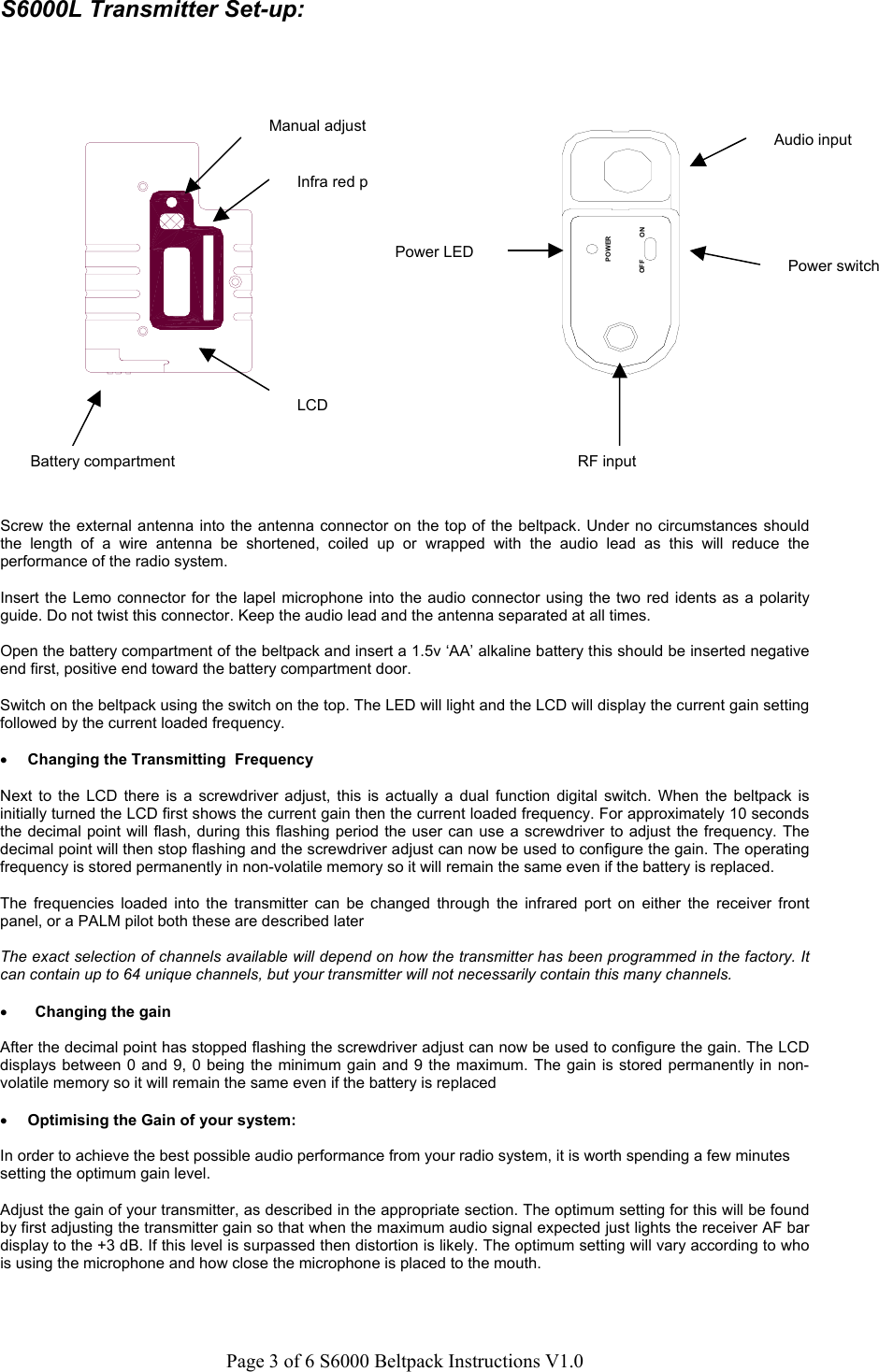
Page 3 of 6 S6000 Beltpack Instructions V1.0S6000L Transmitter Set-up:Screw the external antenna into the antenna connector on the top of the beltpack. Under no circumstances shouldthe length of a wire antenna be shortened, coiled up or wrapped with the audio lead as this will reduce theperformance of the radio system.Insert the Lemo connector for the lapel microphone into the audio connector using the two red idents as a polarityguide. Do not twist this connector. Keep the audio lead and the antenna separated at all times.Open the battery compartment of the beltpack and insert a 1.5v ‘AA’ alkaline battery this should be inserted negativeend first, positive end toward the battery compartment door.Switch on the beltpack using the switch on the top. The LED will light and the LCD will display the current gain settingfollowed by the current loaded frequency.• Changing the Transmitting  FrequencyNext to the LCD there is a screwdriver adjust, this is actually a dual function digital switch. When the beltpack isinitially turned the LCD first shows the current gain then the current loaded frequency. For approximately 10 secondsthe decimal point will flash, during this flashing period the user can use a screwdriver to adjust the frequency. Thedecimal point will then stop flashing and the screwdriver adjust can now be used to configure the gain. The operatingfrequency is stored permanently in non-volatile memory so it will remain the same even if the battery is replaced.The frequencies loaded into the transmitter can be changed through the infrared port on either the receiver frontpanel, or a PALM pilot both these are described laterThe exact selection of channels available will depend on how the transmitter has been programmed in the factory. Itcan contain up to 64 unique channels, but your transmitter will not necessarily contain this many channels.• Changing the gainAfter the decimal point has stopped flashing the screwdriver adjust can now be used to configure the gain. The LCDdisplays between 0 and 9, 0 being the minimum gain and 9 the maximum. The gain is stored permanently in non-volatile memory so it will remain the same even if the battery is replaced• Optimising the Gain of your system:In order to achieve the best possible audio performance from your radio system, it is worth spending a few minutessetting the optimum gain level.Adjust the gain of your transmitter, as described in the appropriate section. The optimum setting for this will be foundby first adjusting the transmitter gain so that when the maximum audio signal expected just lights the receiver AF bardisplay to the +3 dB. If this level is surpassed then distortion is likely. The optimum setting will vary according to whois using the microphone and how close the microphone is placed to the mouth.Battery compartmentLCDInfra red pManual adjustONPOWEROFFAudio inputRF inputPower switchPower LED
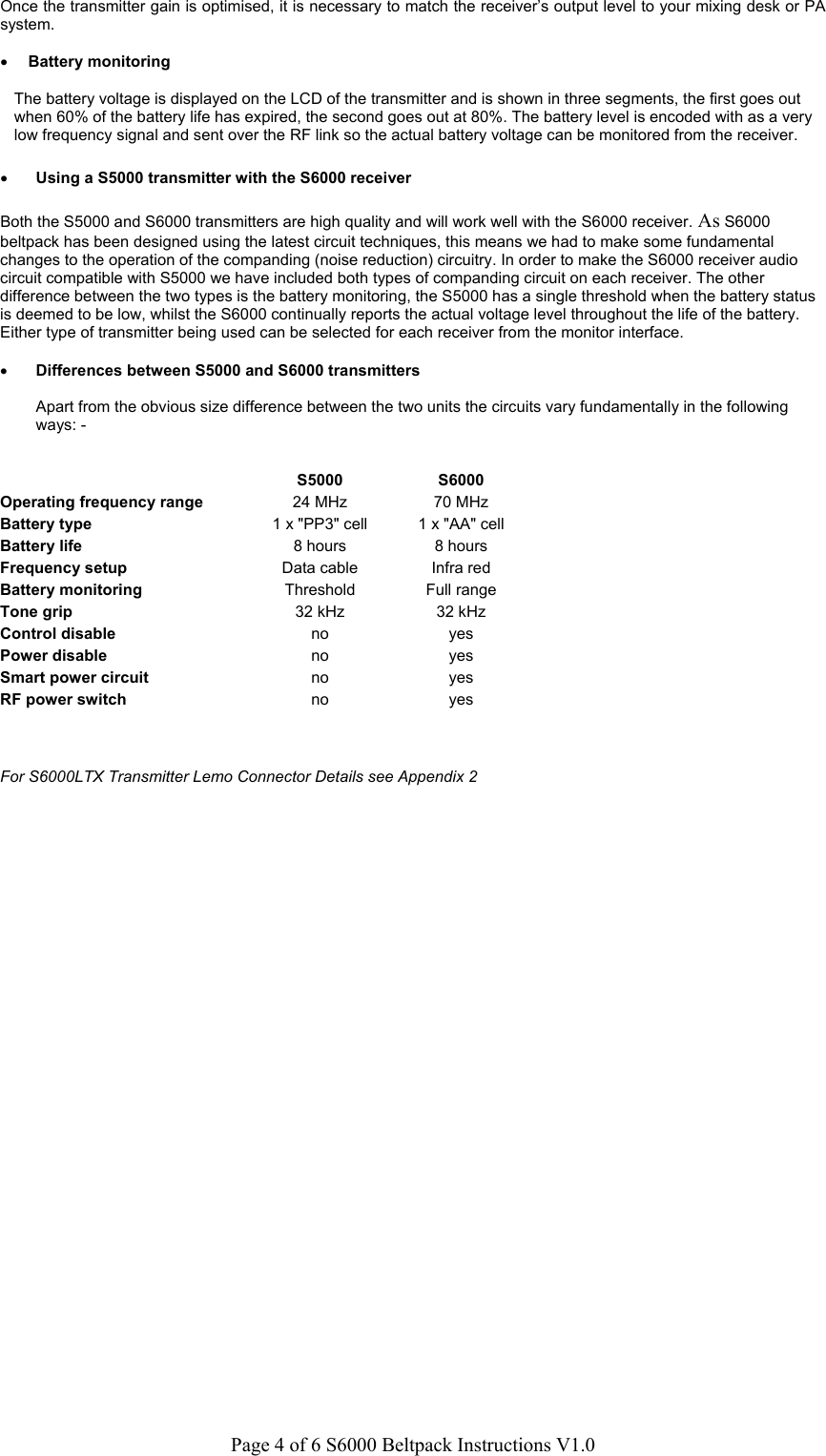
Page 4 of 6 S6000 Beltpack Instructions V1.0Once the transmitter gain is optimised, it is necessary to match the receiver’s output level to your mixing desk or PAsystem.• Battery monitoringThe battery voltage is displayed on the LCD of the transmitter and is shown in three segments, the first goes outwhen 60% of the battery life has expired, the second goes out at 80%. The battery level is encoded with as a verylow frequency signal and sent over the RF link so the actual battery voltage can be monitored from the receiver.• Using a S5000 transmitter with the S6000 receiverBoth the S5000 and S6000 transmitters are high quality and will work well with the S6000 receiver. As S6000beltpack has been designed using the latest circuit techniques, this means we had to make some fundamentalchanges to the operation of the companding (noise reduction) circuitry. In order to make the S6000 receiver audiocircuit compatible with S5000 we have included both types of companding circuit on each receiver. The otherdifference between the two types is the battery monitoring, the S5000 has a single threshold when the battery statusis deemed to be low, whilst the S6000 continually reports the actual voltage level throughout the life of the battery.Either type of transmitter being used can be selected for each receiver from the monitor interface.• Differences between S5000 and S6000 transmittersApart from the obvious size difference between the two units the circuits vary fundamentally in the followingways: -S5000 S6000Operating frequency range 24 MHz 70 MHzBattery type 1 x "PP3" cell 1 x "AA" cellBattery life 8 hours 8 hoursFrequency setup Data cable Infra redBattery monitoring Threshold Full rangeTone grip 32 kHz 32 kHzControl disable no yesPower disable no yesSmart power circuit no yesRF power switch no yesFor S6000LTX Transmitter Lemo Connector Details see Appendix 2
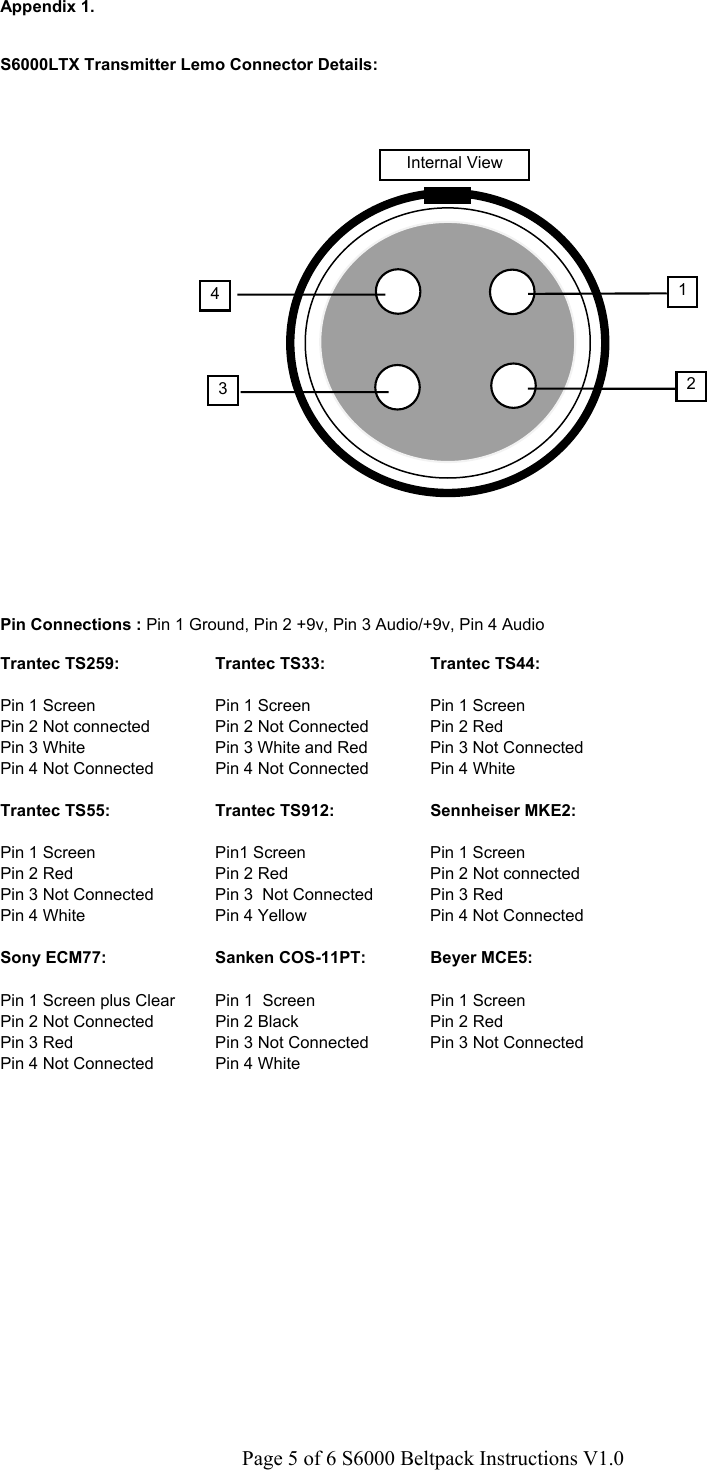
Page 5 of 6 S6000 Beltpack Instructions V1.02Appendix 1.S6000LTX Transmitter Lemo Connector Details:Pin Connections : Pin 1 Ground, Pin 2 +9v, Pin 3 Audio/+9v, Pin 4 AudioTrantec TS259: Trantec TS33: Trantec TS44:Pin 1 Screen Pin 1 Screen Pin 1 ScreenPin 2 Not connected Pin 2 Not Connected Pin 2 RedPin 3 White Pin 3 White and Red Pin 3 Not ConnectedPin 4 Not Connected Pin 4 Not Connected Pin 4 WhiteTrantec TS55: Trantec TS912: Sennheiser MKE2:Pin 1 Screen Pin1 Screen Pin 1 ScreenPin 2 Red Pin 2 Red Pin 2 Not connectedPin 3 Not Connected Pin 3  Not Connected Pin 3 RedPin 4 White Pin 4 Yellow Pin 4 Not ConnectedSony ECM77: Sanken COS-11PT: Beyer MCE5:Pin 1 Screen plus Clear Pin 1  Screen Pin 1 ScreenPin 2 Not Connected Pin 2 Black Pin 2 RedPin 3 Red Pin 3 Not Connected Pin 3 Not ConnectedPin 4 Not Connected Pin 4 White134Internal View
Page 6 of 6 S6000 Beltpack Instructions V1.0Appendix 2.Frequency Guide:See web site for US freq plans.• Technical SpecificationsFrequency Range: 590-806MHz excluding 608-614Mhz.Available in 3 Groups 734-806,  662-734, 590-662MHzFrequency Arrangement: 64 Frequencies on a 25kHz gridOutput Power:  13dBm @ 50 OhmNominal Deviation: 15RF Harmonic & Spurious Radiation: < -45dBCFrequency Stability: < 50ppm -30 – 50degrees CPower Consumption: 150mA, 1.5V “AA” Alkaline BatteryBattery End Point: 1.0VOperating Time: 8 hours (Typical)AF Frequency Response: 70Hz-18kHzAudio Input: LEMO FGG304, Pin 1 - 0v, Pin 2 - DC 9v Bias, Pin 3 - Audio + Plus, Pin 4 - AC Coupled AudioAF Gain: 10 Step Gain (Input level 0dB to -22dB)Dimensions: 50 x 68 x 20Weight: 68gRegulatory information: Fully meets requirements of FCC pts 74 subpart H• AccessoriesSpare Lemo connector (audio) - Trantec part number xxxxSpare Lemo connector (RF) - Trantec part number xxxxSennheiser MKE2 lavalier microphone – Lemo - Trantec Part number xxxx¼ wave whip antenna - Trantec part number xxxxLeather carry case for transmitter - Trantec part number XXXX

Navigation menu