BEA 75.0151.05 Remote Control 20060903 Reference Guide Universal
User Manual: BEA Reference Guide - BEA Universal Remote Reference Guide
Open the PDF directly: View PDF  .
.
Page Count: 2
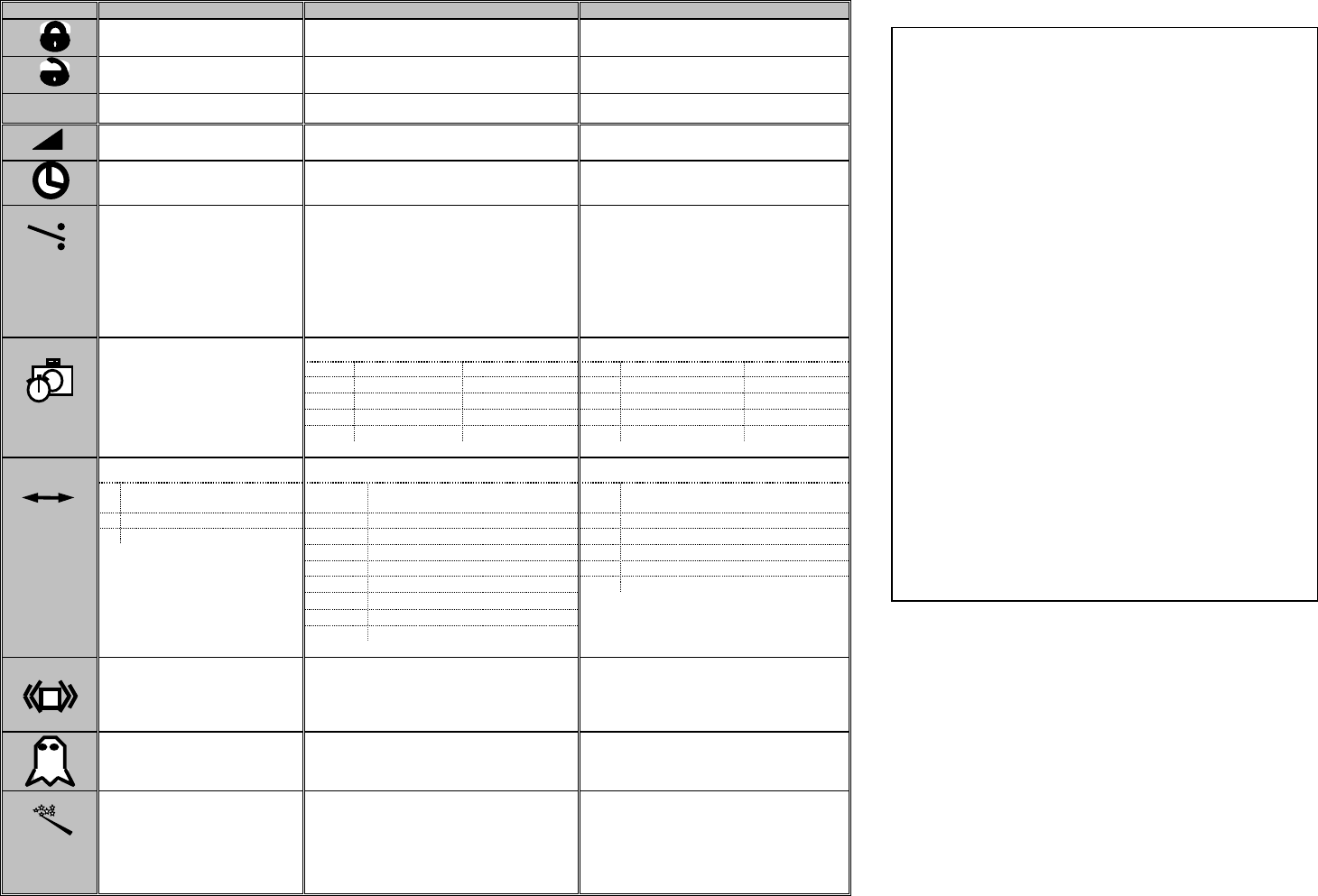
BEA INC. UNIVERSAL REMOTE CONTROL REFERENCE GUIDE 75.0151 V5 July 2003
*Passive output (Fail-Safe): NO-COM circuit is closed and NC-COM circuit is open
** Active output (Fail-Secure): NC-COM circuit is closed and NO-COM circuit is open.
FUNCTION
EAGLE
BODYGUARD
DK-12
LOCK
LOCK
NOT USED
UNLOCK
UNLOCK
NOT USED
INQUIRY
INQUIRY
INQUIRY
SENSITIVITY
(0 – 9 max) Default = 8
SENSITIVITY
(0 – 9 max) Default = 8 closed, 8 open
SENSITIVITY
(0 – 9 max) Default = 8 closed, 7 open
HOLD TIME (0-9)
(0.5 sec – 9 sec)
Default = 0 (.5 sec)
HOLD TIME (0-9)
(1 - 10 sec)
Default = 0 (1 sec)
HOLD TIME (0-9)
(1 sec – 10 sec)
Default = 0 (1 sec)
RELAY OUTPUT (1-4)
1. Active output*
2. Passive output**
3. ON
4. OFF
Default = 1 (Active)
RELAY OUTPUT (1-4)
1. Active output*
2. Passive output**
3. ON
4. OFF
Default = 1 (Active)
RELAY OUTPUT (1-4)
1. Passive output**
2. Active output*
3. ON
4. OFF
Default = (Active)
NOT USED
AUTO LEARN TIME (0-9)
AUTO LEARN TIME (0-9)
0
30 sec
5
7 min
0
30 sec
5
7 min
1
1 min
6
10 min
1
1 min
6
10 min
2
2 min
7
15 min
2
2 min
7
15 min
3
3 min
8
20 min
3
3 min
8
20 min
4
5 min
9
25 min
4
5 min
9
25 min
DETECTION MODE (1-3)
PATTERN WIDTH (1-9)
PATTERN WIDTH (1-6)
1
Bidirectional
1
Wide (Default – door closed)
1
Wide (Default – door open &
closed)
2
Unidirectional
2
Middle (Default – door open)
2
Left Wide
3
Unidirectional with MTF
3
Asymmetrical Left Narrow
3
Right Wide
Default = 3 (Uni-Directional
With MTF)
4
Asymmetrical Right Narrow
4
Left Narrow
5
Narrow Left
5
Center Narrow
6
Narrow Right
6
Right Narrow
7
Asymmetrical Left Wide
8
Asymmetrical Right Wide
Default = 1 (Wide)
9
Center Narrow
Default = 1 (Wide/Middle)
IMMUNITY (1-3)
1. Extreme sensitivity
2. Normal sensitivity
3. Decreased sensitivity
PATTERN DEPTH (1-3)
1. Deep pattern
2. Medium pattern
3. Limited pattern
Default = 1 door closed, 1 door open
NOT USED
NOT USED
FREQUENCY (1-2)
1. Normal frequency
2. Random frequency 1
3. Random frequency 2
FREQUENCY (1-2)
1. High impulse
2. Low impulse
RESTORE DEFAULT
SETTINGS (1)
SET-UP (1-3) – See manual
1. Door closed
2. Door open
3. Restore factory defaults
SET-UP (1-3) – See manual
1. Door closed
2. Door open
3. Restore factory defaults
?
Using The Remote Control
1. Every programming session with the remote
control MUST begin by unlocking the sensor
(except for DK-12). Press the UNLOCK key
once, and the sensor will unlock, unless there
has been a passcode previously stored. If so,
press UNLOCK once, then enter the code. If
code is unknown, power the sensor OFF, then
power back ON. Press UNLOCK with 60
seconds, then re-lock with the new code when
programming is complete. The default code is
0000 and is not required to be entered.
2. To INQUIRE a setting, simply UNLOCK the
sensor, then press the desired function key,
followed by the “?” key. Observe the LED on
the sensor and count the number of flashes to
determine current setting.
3. When programming is complete, press the
LOCK key twice. If a passcode is desired,
press the LOCK key once, followed by a 4-
digit code.
4. If there are several sensors in close proximity
to one another, be sure to exercise caution
when programming, as to not unlock more
than one sensor at a time.
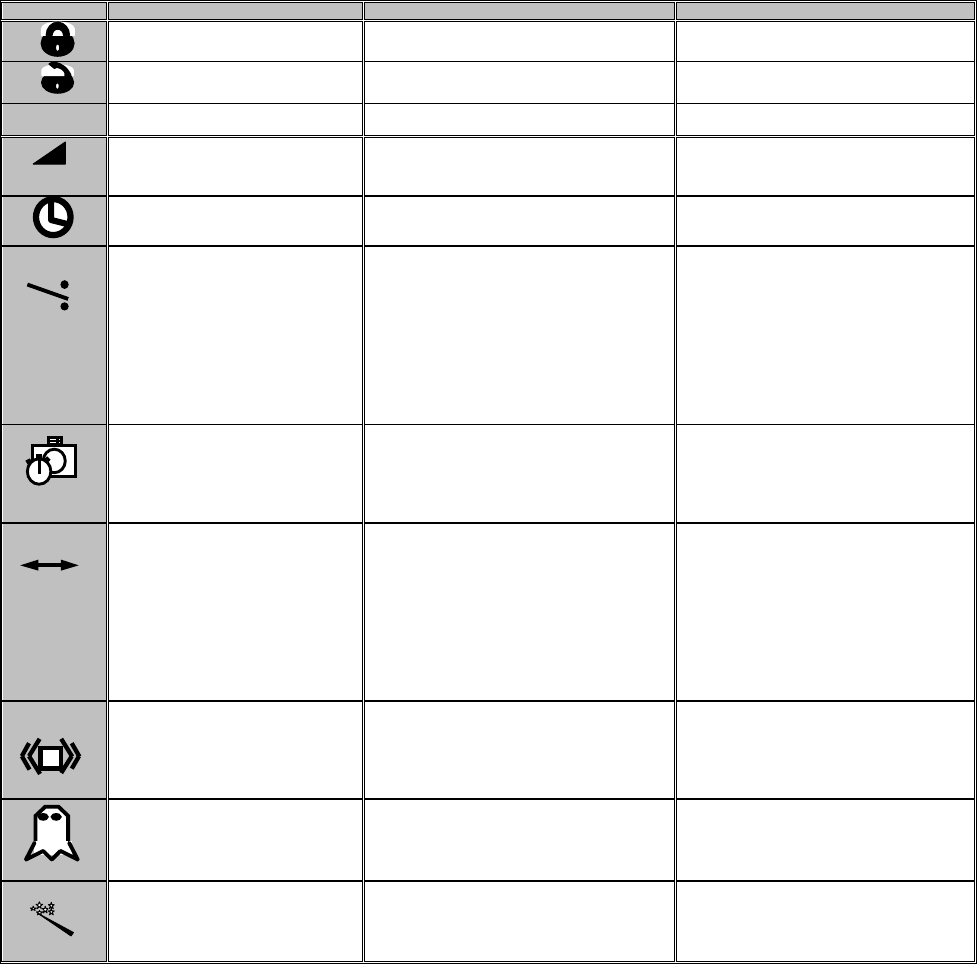
BEA INC. UNIVERSAL REMOTE CONTROL REFERENCE GUIDE 75.0151 V5 July 2003
*Passive output (Fail-Safe): NO-COM circuit is closed and NC-COM circuit is open
** Active output (Fail-Secure): NC-COM circuit is closed and NO-COM circuit is open.
Defaults shown in bold print if not not stated.
FUNCTION
IS-87/ IS-87XL
FALCON
WIZARD
LOCK
LOCK
LOCK
UNLOCK
UNLOCK
UNLOCK
INQUIRY
INQUIRY
INQUIRY
SENSITIVITY
(0 min – 9 max)
Default = 7
SENSITIVITY
(0 min – 9 max)
Default = 7
SENSITIVITY
(0 min – 9 max)
Default = 7
HOLD TIME (0-9)
(0.5 sec – 9 sec)
Default = 0 (0.5sec)
HOLD TIME (0-9)
(0.5 sec – 9 sec)
Default = 0 (0.5sec)
HOLD TIME (0-9)
(0.5 sec – 9 sec)
Default = 0 (0.5sec)
RELAY OUTPUT (1-4)
1. Active output*
2. Passive output**
3. ON
4. OFF
Default = 1 (Active)
RELAY OUTPUT (1-4)
1. Active Output*
2. Passive Output**
3. ON
4. OFF
Default = 1 (Active)
RELAY OUTPUT (1-4)
1. Active Relay / Passive Transistor
2. Passive Relay / Active Transistor
3. Passive Relay / Passive
Transistor
4. Active Relay / Active
Transistor
5. All Relay Output – Active
6. All Relay Output – Passive
(5 & 6 on SN 52000 and higher only)
NOT USED
NOT USED
0 = 30 Sec
1 = 1 Minute
2 = 2 Minutes
3 = 5 Minutes
4 = 10 Minutes
5 = 15 Minutes
6 = 20 Minutes
9 = Infinity
(9 is on SN 60000
and higher only)
DETECTION MODE (1-3)
1. Bidirectional
2. Unidirectional approach
3. Unidirectional depart
Default = 2 (Unidirectional
Approach)
DETECTION MODE (1-3)
1. Bidirectional
2. Unidirectional approach
3. Unidirectional depart
Default = 2 (Unidirectional Approach)
DETECTION MODE (1-3)
1. Bidirectional
2. Unidirectional
3. Unidirectional With MTF
Default = 3 (Unidirectional with MTF)
TYPE OF DETECTION (1-2)
1. Pedestrian & Vehicle
2. Pedestrian only
IS-87 Default = 2 (Ped. Only)
IS-87XL = 1 (Ped. And vehicle)
REJECTION MODE (1-5)
1. Detects all traffic :pedestrian & vehicle
2. Detects all traffic + interference immunity
3. Low Pedestrian / Parallel traffic rejectiion
4. Mid Pedestrian / Parallel traffic rejectiion
5. High Pedestrian / Parallel traffic rejectiion
IMMUNITY (1-3) (MOTION)
1. Extreme sensitivity
2. Normal sensitivity
3. Decreased sensitivity
NOT USED
NOT USED
INFRARED SENSITIVITY (1-2)
1. Low gloss (high sensitivity)
2. High gloss (lNormal
sensitivity)
RESTORE DEFAULT SETTINGS (1)
RESTORE DEFAULT SETTINGS (1)
SET-UP (0-2) – see manual
0. Infrared – Learn Background
1. Normal mounting height (7-10’)
2. Higher mounting height (10-12’)
?
