BNCOM BHS-100 Bluetooth Stereo Headset User Manual EMISSION TEST REPORT
BNCOM Co.,Ltd Bluetooth Stereo Headset EMISSION TEST REPORT
BNCOM >
Users Manual

Order Number
: GETEC-C1-11-056
FCC Part 15 subpart C
Test Report Number
: GETEC-E3-11-022
Page 1 / 1
EUT Type: Bluetooth Stereo Headset
FCC ID.: XX5BHS-100
APPENDIX H
: USER’S MANUAL
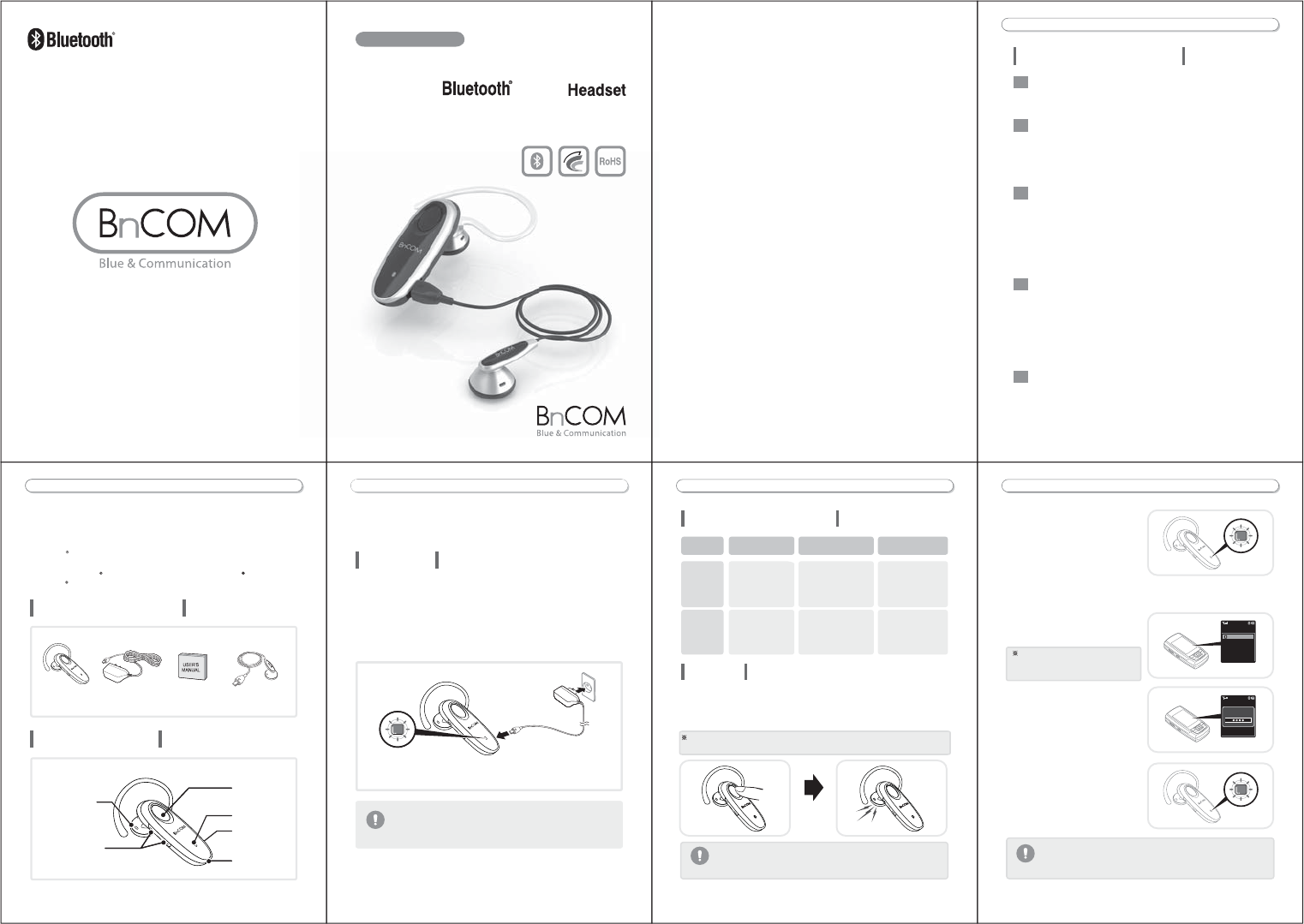
Wireless freedom
-3-
BLUETOOTH HEADSET USER GUIDE
Table of contents
Included in package ....................................................................4
Parts description..........................................................................4
Play music .................................................................................11
Pause music..............................................................................11
Stop music.................................................................................11
Next track ..................................................................................11
Previous track............................................................................11
Fast forward ..............................................................................11
Rewind ......................................................................................11
Frequently asked questions ......................................................12
Safety precautions.....................................................................13
Specification and Features........................................................14
Declaration of confirmation........................................................15
Limited Warranty .......................................................................16
Making a call ...............................................................................8
Answering a call ......................................................................... 9
Ending a call................................................................................9
Volume control...........................................................................10
Call waiting ................................................................................10
Transferring a call......................................................................10
Mic mute....................................................................................10
Charging......................................................................................5
Power on / Power off ...................................................................6
Pairing .........................................................................................6
Fitting headset on your ear..........................................................8
-5--4-
Using the headset Before using the Headset
Charging
BHS-100 is powered by a rechargeable battery pack. You must
charge the battery fully before using the headset for the first time.
1. Plug Adapter into headset charging port.
2. The headset cannot be used while charging.
3. Charging will be completed within three hours.
Do not attempt to charge the headset with anything other than
adapter provided. Using unauthorized adapter may damage the
headset.
WarningWarning
· While Charging : Red LED turn on
· Charging completed : Blue LED turn on
The Bluetooth headset, BHS-100 is a wireless headset using
Bluetooth technology.
This Product support A2DP, AVRCP as well as headset and handsfree
Profiles. Bluetooth is registered trademark of Bluetooth SIG and
Bluetooth can be used only certified manufacturers.
Included in package
Parts description
BHS-100
headset
Adapter User manual Stereo earphone
Charging port
Power/call/play
button
LED indicator
MIC
Volume +/- button
Speaker
BLUETOOTH HEADSET USER GUIDE BLUETOOTH HEADSET USER GUIDE
-5--4-
time.
Do not attempt to charge the headset with anything other than
adapter provided. Using unauthorized adapter may damage the
headset.
WarningWarning
and
Before using the Headset
Using the headset
Actual use
Hearing the music
Appendix
WarningWarning
BLUETOOTH HEADSET USER GUIDE BLUETOOTH HEADSET USER GUIDE
-7--6-
Power on / Poweroff
Press and hold the
power/call/pay
button for 3
seconds.
You will hear melody
as the power is turned
on.
Blue LED blinks
5 times.
Press and hold the
power/call/play
button for 3
seconds.
You will hear melody
as the power is
turned off.
Red LED is on for
2 seconds and then
turns off.
Pairing
1. While the power is turned off, press and hold the power/call/play
button for 6 seconds.
2. You will hear the melody indicating that the power is on.
After that, you will hear the short beep.
When turning on the power initially after purchase, the headset will enter to the
'Pairing Mode' automatically
In order for all the functions of the headset to be available, pair the
headset in the stereo headset mode. Paired in hands-free or headset
mode, some functions are restricted.
WarningWarning
Your headset may not be compatible with some handset.
Ensure that your handset has bluetooth capability.
Your headset may not be compatible with some handset.
Ensure that your handset has bluetooth capability.
3. When Pairing mode, The blue
LED indicator blinking rapidly.
4. Using your handset, find the 'Bluetooth menu' and 'search for' or
'add' new device.
5. Select 'BHS-100' from the list
of devices and pair it with your
handset.
6. When asked for the Pass/PIN
code during the pairing
procedure, please enter '0000'.
7. If pairing was successful.
the Blue LED indicator blinks
2 times every 5 seconds.
The way of pairing or screen
indication should be different
according to the handset model.
WarningWarning
Search Device
Input
Password
Action
Power on
Tone LED indication
Power off
Stereo
BHS-100
BnCOM CO.,LTD. /www.bncomm.co.kr/
Search Device
BHS-100
BLUETOOTH HEADSET USER GUIDE
-9-
Briefly press the power/call/play button to answer an incoming call.
Your handset must support the 'voice dial' function.
BLUETOOTH HEADSET USER GUIDE
-8-
1. Making a call
After entering the telephone number, press the power/call/play button briefly.
2. Last number redial
Press the power/call/play button for 1 second to activate last number redial.
(Some handset will show the list of calls.)
3. Voice dialing
Briefly press the power/call/play button to activated 'voice command'.
Making a call
Answering a call
Briefly press the power/call/play button or handset end key.
Ending a call
Wear headset on you ear. Depending on which ear you are going to
wear the headset, simply adjust the earloop accordingly.
Right Left
Actual use
Fitting headset on your ear
BLUETOOTH HEADSET USER GUIDE
-10-
BLUETOOTH HEADSET USER GUIDE
-11 -
Briefly press the volume + or volume - button to adjust the speaker
volume.
Volume control
Pressing too long may cause turning off the headset.
While on a call briefly press the power/call/play button for transferring
the audio to the headset.
Transferring a call
Press the power/call/play button twice in series.
Play music
While playing music, press the power/call/play button twice in series.
Pause music
In the condition of playing music or stop, press the power/call/play
button for 1 second.
Stop music
While playing music, press the volume + button 1 second.
Next track
While playing music, press the volume - button 1 second.
Previous track
While playing music, press the volume + button for 3 seconds,
releasing the button causes to replay from the stopped point.
Fast forward
While playing music, press the volume - button for 3 seconds, releasing
the button causes to replay from the stopped point.
Rewind
To make mute Mic during an active call, press volume + and volume -
button simultaneously for 1 second.
When repeating again, mute function is just cancelled.
(On mute Mic, you will hear a beep per 10 seconds.)
Mic mute
Hearing the music
Answer a second call without hanging up the first call by pressing
the power/call/play button for 1 second.
Call waiting
This function is not available in the headset mode.
- Do not drop or cause severe impact to your headset.
- Keep your headset within normal operating temperatures and avoid
storage at extreme temperature.
- Maintain your headset in dry conditions and do not expose you
headset to water or other liquids.
- Keep your headset out of the reach of children or pets.
The use of unauthorized batteries, battery chargers or accessories
can shorten the life of the headset and cause malfunction and damage
to the headset.
The use in prohibited areas such as hospital or airplane may cause
serious problems and risks to communication system or navigation of
the hospital or airplane.
Make sure that you abide by the instructions, directions or cautions of
the explosion sensitive area.
Make sure to visit a designated customer service center for repair.
Damages caused by disassembly, modification or repair by yourself
are not covered by warranty.
It may cause malfunction or noise to your headset as they use same
frequency as your headset.
Make sure to comply with the rules and regulations of use of headset
in driving.
BLUETOOTH HEADSET USER GUIDE
-12-
BLUETOOTH HEADSET USER GUIDE
-13-
How far away from my handset
will the headset work?
The operating range is typically up to 30feet
(10meters). The actual distance may vary
depending on the situation.
Will the headset work with
laptop, PDA, and PC?
The headset will work with devices that are
compliant with bluetooth function and support
the headset, hands-free, A2DP and AVRCP profiles.
How do I take care of the
headset?
To clean the headset, use a clean, soft cloth that
is slightly damp.
Will the headset work with my
cordless phone at home?
The headset is not designed for use with cordless
phones.
Will anything cause interference
with my conversation when I'm
using the headset?
Appliance such as cordless phone and wireless networking
equipment may cause interference with your conversation.
To reduce any interference, keep the headset away from
other devices that use or produce radio waves.
Can other bluetooth headset
users hear my conversation?
When you pair the headset to your handset, you are creating
a private link between only these two bluetooth technology
in the headset is not easily monitored by third parties,
because bluetooth wireless signals are significantly lower in
radio frequency power than those produced by a typical
mobile handset.
Will the headset interfere with
my car's electronics, radio, or
computer?
The headset produces significantly less power than a typical
mobile handset. It also only emits signals that are in compliance
with standard consumer-grade electronics equipment.
Can I change battery in the
headset?
Warranty and parts replacement of this product is 6 months.
If you want to replace the battery, visit the authorized A/S
center. Battery life will vary due to usage patterns and
environmental conditions.
I cannot pair the headset with
my handset.
You can delete the headset pairing on
your handset. Try following [pairing] on page 6.
Appendix
Frequently asked questions
Safety precautions
BLUETOOTH HEADSET USER GUIDE
Version 2.1
Headset / Handsfree / A2DP / AVRCP
2402 ~ 2480 MHz
0.25 ~ 2.5 mW
9.8g
Up to 33 feet (10meters)
3.7V, Li-Polymer
-10°C ~ 60°C
Up to 7 hours
Up to 5 hours
Up to 120 hours
< 3 hours
Bluetooth Wireless Headset
(BHS-100)
-14-
Product Name
Bluetooth specification
Supported Bluetooth Profiles
Output power
Frequency range
Operating Range
Weight
55.6mm(L) * 17.8mm(w) * 11mm(H) Dimensions
Operating Temperature
Battery type
Talk time
Stand by time
Music play time
Charging time
Time of battery may differ from the above, depending on your using
conditions and circumstances.
Time of battery may differ from the above, depending on your using
conditions and circumstances.
Specification and Features
FCC NOTICE TO USERS
NOTE
To comply with the FCC RF exposure compliance requirements, no
change to the antenna or the device is permitted. Any change to the
antenna or the device could result in the device exceeding the RF
exposure requirements and voik user's authority to operate the device.
Declaration of confirmation
BLUETOOTH HEADSET USER GUIDE
-15-
Please note the followings in using your headset.
Please use only authorized products.
Do not use in a place where its use is prohibited.
Please turn o in an explosion sensitive area.
Do not attempt to disassemble your headset.
Do not use it near a microwave oven or wireless LAN products.
Do not use your headset while you are driving.
According to the KDB447498 (3)(b)(c), The output power is lower than 25 mW
for any simultaneous transmitting antenna for which stand-alone SAR
evaluation is not required. This equipment complies with FCC radiation
exposure. Any change to the antenna or the device could result in the device
exceeding the RF exposure requirements and voik user's authority to operate
the device
Caution: Changes or modifications not expressly approved
by the party responsible for compliance could void the user's
(or your) authority to operate the equipment.
This device complies with part 15 of the FCC Rules. Operation is subject to the
following two conditions:
(1) This device may not cause harmful interference, and (2) this device must
accept any interference received, including interference that may cause
undesired operation (of the device).