Beckwith Electric M2911 Universal Data Transciever User Manual M 2911 SP 00MC1 11 02

Beckwith Electric Co., Inc. Universal Data Transciever M 2911 SP 00MC1 11 02

Contents

Exhibit D Users Manual per 2 1033 b3
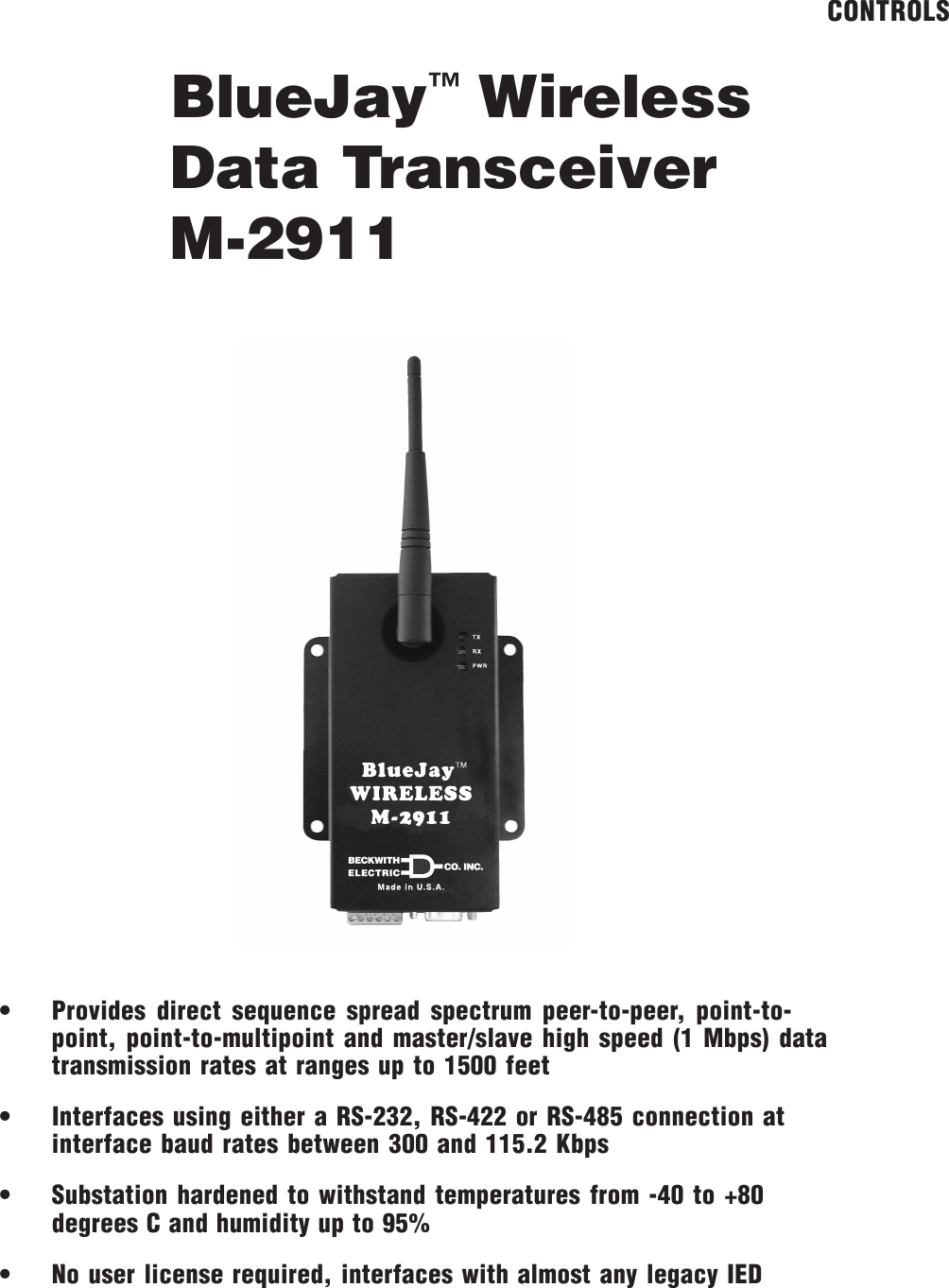
BlueJay™ WirelessData TransceiverM-2911CONTROLS• Provides direct sequence spread spectrum peer-to-peer, point-to-point, point-to-multipoint and master/slave high speed (1 Mbps) datatransmission rates at ranges up to 1500 feet• Interfaces using either a RS-232, RS-422 or RS-485 connection atinterface baud rates between 300 and 115.2 Kbps• Substation hardened to withstand temperatures from -40 to +80degrees C and humidity up to 95%• No user license required, interfaces with almost any legacy IED
M-2911 BlueJay Wireless Data Transceiver–2–WARNINGThis equipment has been tested and found to comply with the limit requirements, pursuant to Part 15.247 ofthe FCC Rules. These limits are designed to provide reasonable protection against harmful interference whenthe equipment is operated in a commercial environment. This equipment generates, uses, and can radiateradio frequency energy, and, if not installed and used in accordance with the instruction manual, may causeharmful interference to radio communications. Operation of this equipment in a residential area is likely tocause harmful interference in which case the user will be required to correct the interference at his ownexpense.Only the antenna provided is authorized for use with the M-2911. If the antenna is lost or damaged, pleasecontact Beckwith Electric Co., Inc. to secure a replacement antenna.This product generates, uses, and can radiate radio frequency (RF). If it is not installed and used inaccordance with the operating instructions, it can cause harmful interference to communications. If thisequipment causes harmful interference to radio or television reception, the user should try and correct theinterference by:• Reorienting or relocating the receiving/transmitting antenna• Increasing the separation between the equipment and the M-2911• Connecting the equipment into an outlet on a different circuit from the M-2911.If these do not correct the interference, consult an experienced radio/television technician for assistance.Correcting such interference is the responsibility of the user, not the manufacturer.Changes or modifications not expressly approved by Beckwith Electric Co., Inc. may void the user'sauthority to operate the equipment.FCC Radiation Exposure StatementThis equipment complies with FCC radiation exposure limits set forth for uncontrolled equipment. Thisequipment should be installed and operated with a minimum distance of at least 20 cm between the radiatorand person's body (excluding extremities) and must not be located or operated with any other antenna ortransmitter.
–3–M-2911 BlueJay Wireless Data TransceiverThe M-2911 BlueJay™ Wireless Data Transceiver is a self-contained short-range wireless communicationdevice (SRD) that is used for transferring serial communication data between Intelligent Electrical Devices(IEDs) and computers hosting control software in an industrial environment.  The M-2911 is based on anIntersil direct sequence spread spectrum chip set that operates in the 2.4 GHz ISM band. The M-2911 designmeets the category for low power devices (LPDs) standard requirement for license-free operation.InterfaceThe M-2911 is equipped with two serial data connectors, one is a DE-9 connector for use with an RS-232serial data port and the other is a 6-pin bare wire Phoenix–type connector for use with an RS-422/RS-485(twisted shielded pair) serial data ports. Only one port can be used at a time. Each port is capable of serialdata speeds of up to 115 kbps.Data Transmission:• Error Detection – 16 bit CRC (10-5 BER at –70dBm)• Maximum throughput – 1 Mbps RF, 300 to 115.2 Kbps interface baud rateCommunicationThe M-2911 conditions the data and transmits it over a half-duplex direct sequence spread spectrum radiooperating in the 2.4 GHz ISM band. The over-the-air data rate is 1 Mbps.Transmit:• Frequency Range – 2400 MHz to 2483.5 MHz• Output Power – 30 mW• Modulation – DBPSK• Occupied Bandwidth – 20 MHz• Spurious Emissions – 50 mV/meter• Harmonic Emissions – 500 uV/meter• Spreading Method – Direct Sequence 11 bit code• Center Band – Carrier 2.450 GHzReceive:• Sensitivity – -93 dBm• Selectivity – 25 MHzThe M-2911 BlueJay Wireless Data Transceiver must be used with a cable extension if the M-2911 ismounted inside a metal enclosure. Antennas must be oriented in the same plane and located in view of thecorresponding M-2911. Beckwith Electric antenna and cable accessories are listed below.■NOTE: For maximum range, all antennas must be oriented in the same plane.AccessoriesM-2924-4R – 4 foot cable extension for provided antenna (1/4 wave dipole)M-2924-4S – 4 foot cable extension for optional antennas■NOTE: Both optional antennae will require the M-2924-4S at a minimum.M-2924-10 – 10 foot cable extension for optional antennasM-2924-25 – 25 foot cable extension for optional antennas421-00228 – 9 dB Omni-directional outdoor antenna
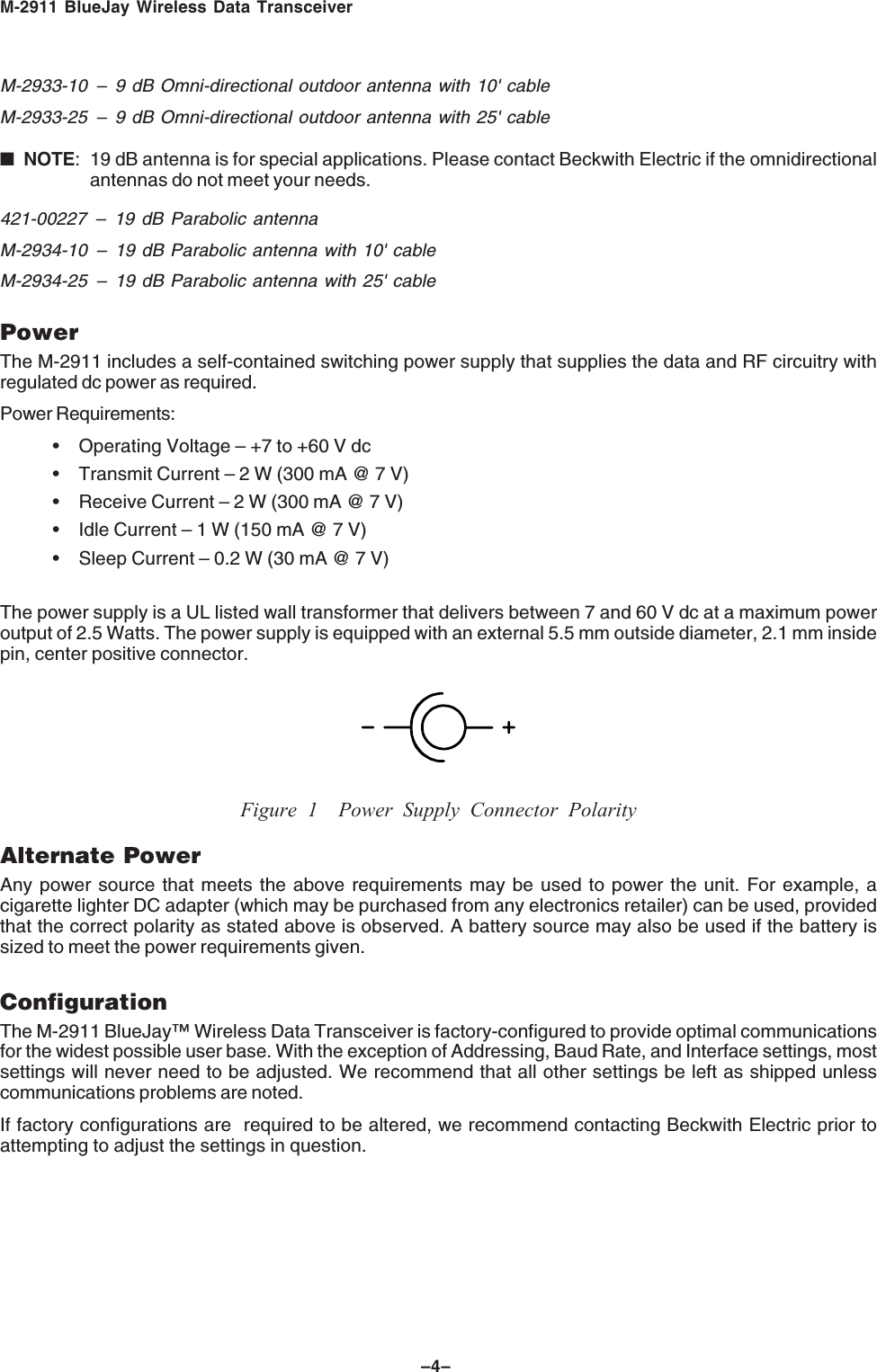
M-2911 BlueJay Wireless Data Transceiver–4–M-2933-10 – 9 dB Omni-directional outdoor antenna with 10' cableM-2933-25 – 9 dB Omni-directional outdoor antenna with 25' cable■NOTE: 19 dB antenna is for special applications. Please contact Beckwith Electric if the omnidirectionalantennas do not meet your needs.421-00227 – 19 dB Parabolic antennaM-2934-10 – 19 dB Parabolic antenna with 10' cableM-2934-25 – 19 dB Parabolic antenna with 25' cablePowerThe M-2911 includes a self-contained switching power supply that supplies the data and RF circuitry withregulated dc power as required.Power Requirements:• Operating Voltage – +7 to +60 V dc• Transmit Current – 2 W (300 mA @ 7 V)• Receive Current – 2 W (300 mA @ 7 V)• Idle Current – 1 W (150 mA @ 7 V)• Sleep Current – 0.2 W (30 mA @ 7 V)The power supply is a UL listed wall transformer that delivers between 7 and 60 V dc at a maximum poweroutput of 2.5 Watts. The power supply is equipped with an external 5.5 mm outside diameter, 2.1 mm insidepin, center positive connector.Figure 1 Power Supply Connector PolarityAlternate PowerAny power source that meets the above requirements may be used to power the unit. For example, acigarette lighter DC adapter (which may be purchased from any electronics retailer) can be used, providedthat the correct polarity as stated above is observed. A battery source may also be used if the battery issized to meet the power requirements given.ConfigurationThe M-2911 BlueJay™ Wireless Data Transceiver is factory-configured to provide optimal communicationsfor the widest possible user base. With the exception of Addressing, Baud Rate, and Interface settings, mostsettings will never need to be adjusted. We recommend that all other settings be left as shipped unlesscommunications problems are noted.If factory configurations are  required to be altered, we recommend contacting Beckwith Electric prior toattempting to adjust the settings in question.
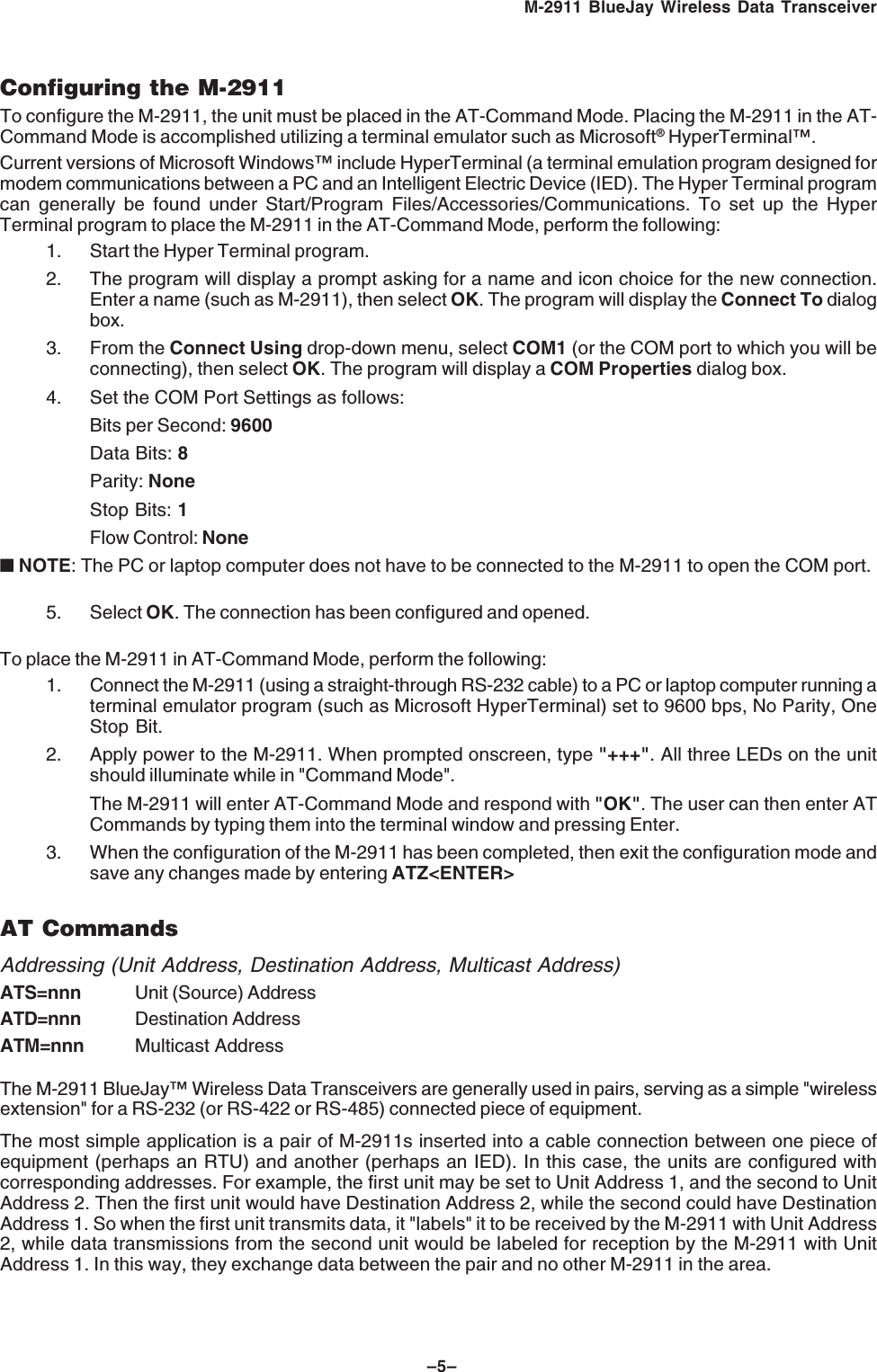
–5–M-2911 BlueJay Wireless Data TransceiverConfiguring the M-2911To configure the M-2911, the unit must be placed in the AT-Command Mode. Placing the M-2911 in the AT-Command Mode is accomplished utilizing a terminal emulator such as Microsoft® HyperTerminal™.Current versions of Microsoft Windows™ include HyperTerminal (a terminal emulation program designed formodem communications between a PC and an Intelligent Electric Device (IED). The Hyper Terminal programcan generally be found under Start/Program Files/Accessories/Communications. To set up the HyperTerminal program to place the M-2911 in the AT-Command Mode, perform the following:1. Start the Hyper Terminal program.2. The program will display a prompt asking for a name and icon choice for the new connection.Enter a name (such as M-2911), then select OK. The program will display the Connect To dialogbox.3. From the Connect Using drop-down menu, select COM1 (or the COM port to which you will beconnecting), then select OK. The program will display a COM Properties dialog box.4. Set the COM Port Settings as follows:Bits per Second: 9600Data Bits: 8Parity: NoneStop Bits: 1Flow Control: None■ NOTE: The PC or laptop computer does not have to be connected to the M-2911 to open the COM port.5. Select OK. The connection has been configured and opened.To place the M-2911 in AT-Command Mode, perform the following:1. Connect the M-2911 (using a straight-through RS-232 cable) to a PC or laptop computer running aterminal emulator program (such as Microsoft HyperTerminal) set to 9600 bps, No Parity, OneStop Bit.2. Apply power to the M-2911. When prompted onscreen, type "+++". All three LEDs on the unitshould illuminate while in "Command Mode".The M-2911 will enter AT-Command Mode and respond with "OK". The user can then enter ATCommands by typing them into the terminal window and pressing Enter.3. When the configuration of the M-2911 has been completed, then exit the configuration mode andsave any changes made by entering ATZ<ENTER>AT CommandsAddressing (Unit Address, Destination Address, Multicast Address)ATS=nnn Unit (Source) AddressATD=nnn Destination AddressATM=nnn Multicast AddressThe M-2911 BlueJay™ Wireless Data Transceivers are generally used in pairs, serving as a simple "wirelessextension" for a RS-232 (or RS-422 or RS-485) connected piece of equipment.The most simple application is a pair of M-2911s inserted into a cable connection between one piece ofequipment (perhaps an RTU) and another (perhaps an IED). In this case, the units are configured withcorresponding addresses. For example, the first unit may be set to Unit Address 1, and the second to UnitAddress 2. Then the first unit would have Destination Address 2, while the second could have DestinationAddress 1. So when the first unit transmits data, it "labels" it to be received by the M-2911 with Unit Address2, while data transmissions from the second unit would be labeled for reception by the M-2911 with UnitAddress 1. In this way, they exchange data between the pair and no other M-2911 in the area.
M-2911 BlueJay Wireless Data Transceiver–6–Generally, the other parameters (Baud Rate, Data Bits, Parity, Packet Size, Time-out, etc.) would beidentical, though there are instances when this would not be the case. Those instances will be explained ingreater detail later on in this section.Another M-2911 application would be to configure a "Network" of units, where a Master unit polls severalSlave units. This would be the case where there is a Data Collection unit communicating with several IED’s.In this case, the Multicast Address would be used to allow one unit to communicate with several otherssimultaneously.  For this example, the Master Unit would be set with a normal Unit Address (1-250), which isthe address the Slave units would use for their Destination Address. The Master unit would have aDestination Address between 251 and 254, which are the "Multicast Addresses". These addresses aredistinct in that transmissions sent to these addresses are not acknowledged by the receiving M-2911, whichallows data to be sent to many Slave units without causing data clashes since these Slave units do notattempt to acknowledge the Master units transmission. The Slave units would all have their MulticastAddress set to the selected Multicast Address (251-254), while their Destination Address would all be set tothe Master units address (1-250). They would each be given a separate Unit Address (1-250) different fromthe Master unit and other Slave units.For this application, data sent from the Master unit would be passed out to all Slave units (to the individualIEDs) simultaneously, while response data from a Slave unit would be passed back to the Master unit (to theRTU).For this application, the data transfers must involve a protocol where each Slave unit can be addressedindividually within the data transferred to all units, such that only one of the Slave units at a given time willaccept, and respond to, the data.Address 255 is a special case in that all units within the range of transmission of a unit set to DestinationAddress 255 will receive these transmissions, no matter what their Unit or Multicast Address is. This is the"Broadcast Address", and is used for system-wide commands, for example Load Reduction commands. Inthis case also, units receiving data with this Broadcast Address will not attempt to acknowledge thistransmission.Baud Rate:ATB=nnnnnn 4800, 9600, 14400, 19200, 28800, 38400, 57600, 76800, 115200Generally M-2911s that communicate with each other would have the same baud rate, as dictated by theequipment to which they are attached.The baud rate is selectable between 4800 and 115,200 bits per second (bps), over the standard baud rates:4800, 9600, 14400, 19200, 28800, 38400, 57600, 76800, and 115200.In some applications, IEDs in a system may not have equal baud rates, and in some instances, the M-2911can be used to convert between these baud rates. The limitation of converting between baud rates is that thedata transferred must be in packets of less than 128 bytes (including packet overhead such as addressesand checksums, etc.), as this is the size of the data buffer within the M-2911. If data is transferred in suchpackets, and the protocol waits for acknowledgment (or response) to each packet, the M-2911 will provide forbaud-rate conversion over their operating range (4800-115200 bps). In such a situation, data will flow into thefaster-set unit in less time than it flows out of the slower-set unit, and communication speed will be limited tothe rate of the slower unit. For this application, the receive time-outs in the protocol must be configured totolerate the slower rate.Parity:ATP=xE, O, N  (Even, Odd, None)Most IEDs no longer use Parity (an extra bit added to each character to serve as a simple checksum), andsend just the eight data bits preceded by a Start Bit and are followed by a Stop Bit. For these IEDs, the Parityis set to NONE.For those devices that still utilize parity, the M-2911 should be set with the same parity – EVEN or ODD.Even parity is where the appended parity bit serves to keep the total number of ‘1’ bits in the data and parityan even number (if the data has an odd number of "1" bits the parity bit is set to "1", if the data has an evennumber of "1" bits the parity bit is set to ‘0’).
–7–M-2911 BlueJay Wireless Data TransceiverThe M-2911 does not transmit the parity between units, so it is possible to have different parity settings onthe different units, to match equipment which must have a certain parity setting. The M-2911s then alsoserve as ‘Parity Converters’.If possible, disabling parity (setting it to NONE on both the M-2911s and connected equipment) will speed upcommunication, since there are 10 bits per character with no parity, and 11 bits per character in EVEN orODD parity.Transmit Retries:ATR=n0 to 9The M-2911 utilizes an acknowledged-transfer protocol, where each data packet sent from one unit toanother is acknowledged by the receiving unit. If the sending unit does not receive an acknowledge packetwithin 2 milliseconds, it will retransmit the data as many times as specified in this parameter. A setting of 0indicates the data packet will be transmitted only once. A setting of 1 means it will be retransmitted one time,etc. Note that if the sending unit has a destination address of 251 to 254 (Multicast) or 255 (Broadcast), it willalways retransmit the data packet as many times as specified by this parameter, since there will never be anacknowledge packet for these addresses. The default value is 4, indicating the data will be sent a maximumof five total times (4 retries).Interface:ATI=RS232,  ATI=RS422,  ATI=RS485The M-2911 can communicate using RS-232 ("five wire" mode – TxD, RxD, RTS, CTS, and GROUND),RS-422 (TxD+, TxD-, RxD+, RxD-, GROUND), or RS-485 (D+, D-, GROUND). This parameter selects whichinterface mode is active. The RS-232 signals are available from the 9-pin DB female connector, while theRS-422/485 signals are on the terminal strip. The unit should have only one type of communications cableconnected at a time.RS-232 Mode:ATI=CTSxL, H, F (Low, High, Flow-thru)The RS-232 interface includes one ‘Hardware Flow-Control’ signal – CTS (Clear-To-Send from the M-2911 tothe connected equipment).The  CTS output is used to gate data into the M-2911 from the IED (using TxD). When set to Low, the signalis forced Inactive (negative voltage). When set to High, the signal is forced Active (positive voltage).Most  modern protocol-based equipment no longer use these signals, and in many cases, they can simply beignored. If the connected equipment does not use Flow Control, the default setting of CTSH (CTS forcedactive High) are suitable. If hardware flow control is used, then set this parameter as required by theconnected equipment.RS-422/485 Mode:ATI=TXO, ATI=TXLnnnms,  ATI=TXHnnnms(1 to 200 milliseconds)In RS-422 or RS-485 mode, the Transmit Data lines (TxD+ and TxD-) can be forced on (always driven –TXO), or gated on for a certain “Lead Time” before the start of data transmission (TXL = nnn for nnnmilliseconds) and held on for a certain “Hold Time” after the end of data transmission (TXH = nnnn for nnnmilliseconds.) The resolution of these parameters is 1mS, so the actual times will be the closest 1mS to thatset.
M-2911 BlueJay Wireless Data Transceiver–8–Intercharacter Time-out:ATT=nnC,  ATT=nnn ms1 to 50 Character Times, or 1 to 199 millisecondsThis parameter sets the time that the M-2911 will wait after receiving characters to send a packet. If databytes are coming in as a constant stream, the M-2911 will transmit a data packet each time the number ofbytes specified by the ATN parameter is received. If there is a pause in the data (such as at the end of an IEDpacket), the M-2911 will transmit the bytes received after the ATT delay. As with the RS-422/485 transmitgating parameters, this can be specified in Character Times or milliseconds. The default value is 3 CharacterTimes, or 3mS at 9600 bps. A low setting is desirable since it allows data to be sent as soon as possible, butat times, a high setting is necessary to permit data to be collected into reasonably sized packets to allow forbetter efficiency.Maximum Packet Size:ATN=nn 1 to 64 CharactersThe M-2911 sends data in packets of multiple bytes, and will transmit the data packet after a specifiednumber of bytes is received (or if there is a delay greater than the ATT Timeout described above). Thenumber of bytes can be specified between 1 and 64 Characters, with a default value of 64. In general thelargest size is desirable, but in some cases (for example a protocol with fixed number of bytes in eachtransfer) a setting to match the IED characteristics may be better.View Settings:ATVThis command will display the model name, software version, serial number, and basic settings of the unit.Exit and Save:ATZ▲CAUTION: This command MUST be sent to the unit after any changes are made to save and exit fromcommand mode, otherwise all information will be lost.Typical Connections GuideThe M-2911 can be applied in one of two methods.  An example of each connection configuration utilizing aBeckwith Electric M-2001B as the target IED is given below:1. Point-to-Point Configuration:  In the Point to Point configuration, two M-2911s are configured tocommunicate only to each other. One is connected to a PC, modem, etc. and the other isconnected to an IED.Detailed elements of a typical Point-to-Point configuration are as follows:a. One M-2911 is connected to a PC COM port using a straight-through RS-232 cable.b. The second M-2911 is connected to the RS-232 port of a M-2001B Tapchanger Controlusing an RS-232 straight through cable and gender changer.Communications can now be established between the PC and M-2001B as if they were directlyconnected using a RS-232 cable.  In this example, if the M-2001B TapTalk CommunicationsSoftware were to be used, the user would select the COM Port the M-2911 is connected to on thePC side, and then connect normally to the M-2001B.2. Point-to-Multipoint configuration (also known as Master/Slave):  In the Point-to-Multipointconfiguration, one M-2911 is configured as the Master unit with multiple-connected IED unitsconfigured as Slaves (see AT Commands, Addressing section for Master/Slave setup). Thisconfiguration may be used where, for example, the Master unit is located in a control house andthe slaves are spread out throughout a substation yard.
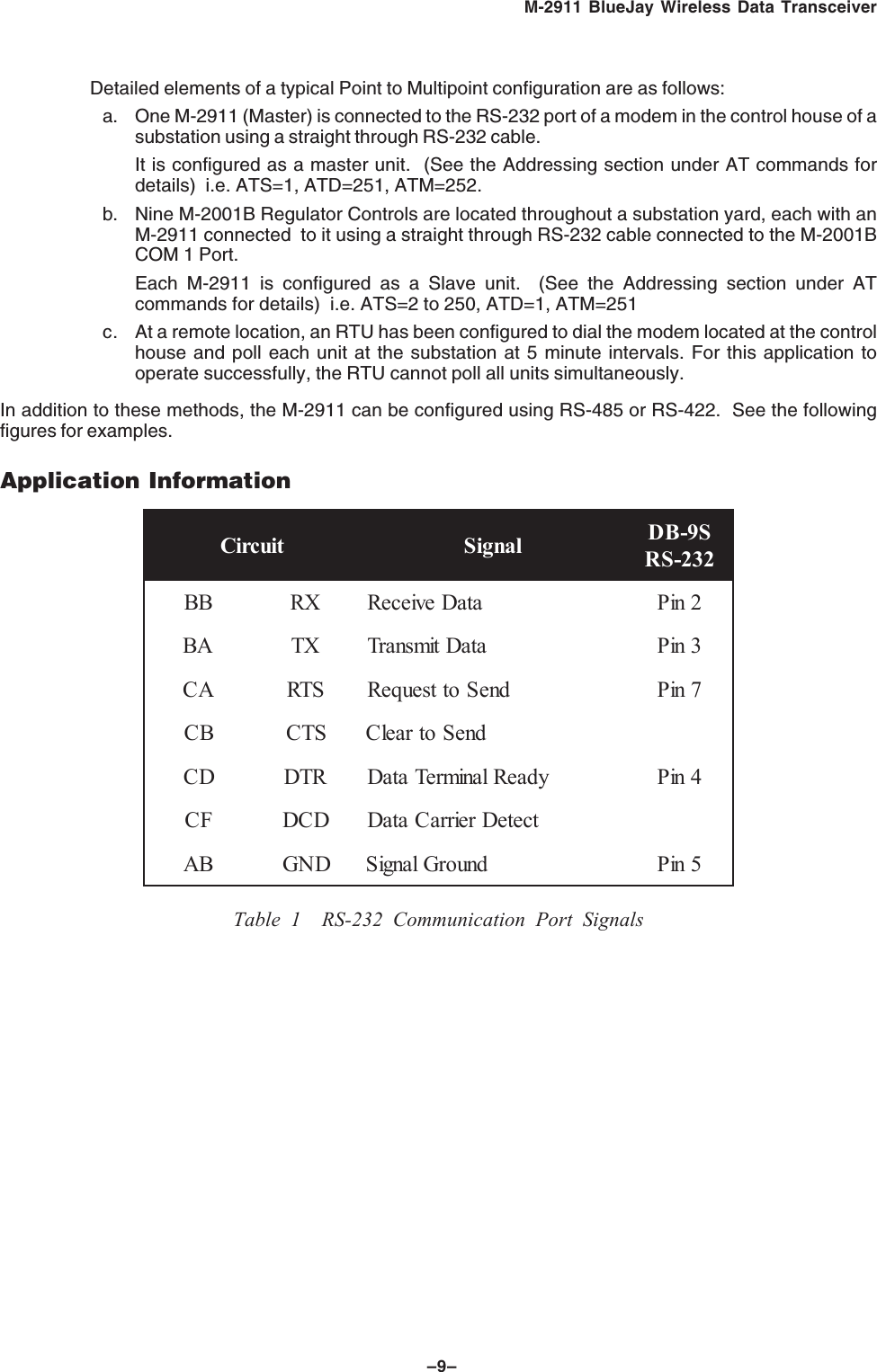
–9–M-2911 BlueJay Wireless Data TransceiverDetailed elements of a typical Point to Multipoint configuration are as follows:a. One M-2911 (Master) is connected to the RS-232 port of a modem in the control house of asubstation using a straight through RS-232 cable.It is configured as a master unit.  (See the Addressing section under AT commands fordetails)  i.e. ATS=1, ATD=251, ATM=252.b. Nine M-2001B Regulator Controls are located throughout a substation yard, each with anM-2911 connected  to it using a straight through RS-232 cable connected to the M-2001BCOM 1 Port.Each M-2911 is configured as a Slave unit.  (See the Addressing section under ATcommands for details)  i.e. ATS=2 to 250, ATD=1, ATM=251c. At a remote location, an RTU has been configured to dial the modem located at the controlhouse and poll each unit at the substation at 5 minute intervals. For this application tooperate successfully, the RTU cannot poll all units simultaneously.In addition to these methods, the M-2911 can be configured using RS-485 or RS-422.  See the followingfigures for examples.Application InformationtiucriC langiS S9-BD232-SRBBXRataDevieceR2niPABXTataDtimsnarT3niPACSTRdneSottseuqeR7niPBCSTCdneSotraelCDCRTDydaeRlanimreTataD4niPFCDCDtceteDreirraCataDBADNGdnuorGlangiS5niPTable 1 RS-232 Communication Port Signals
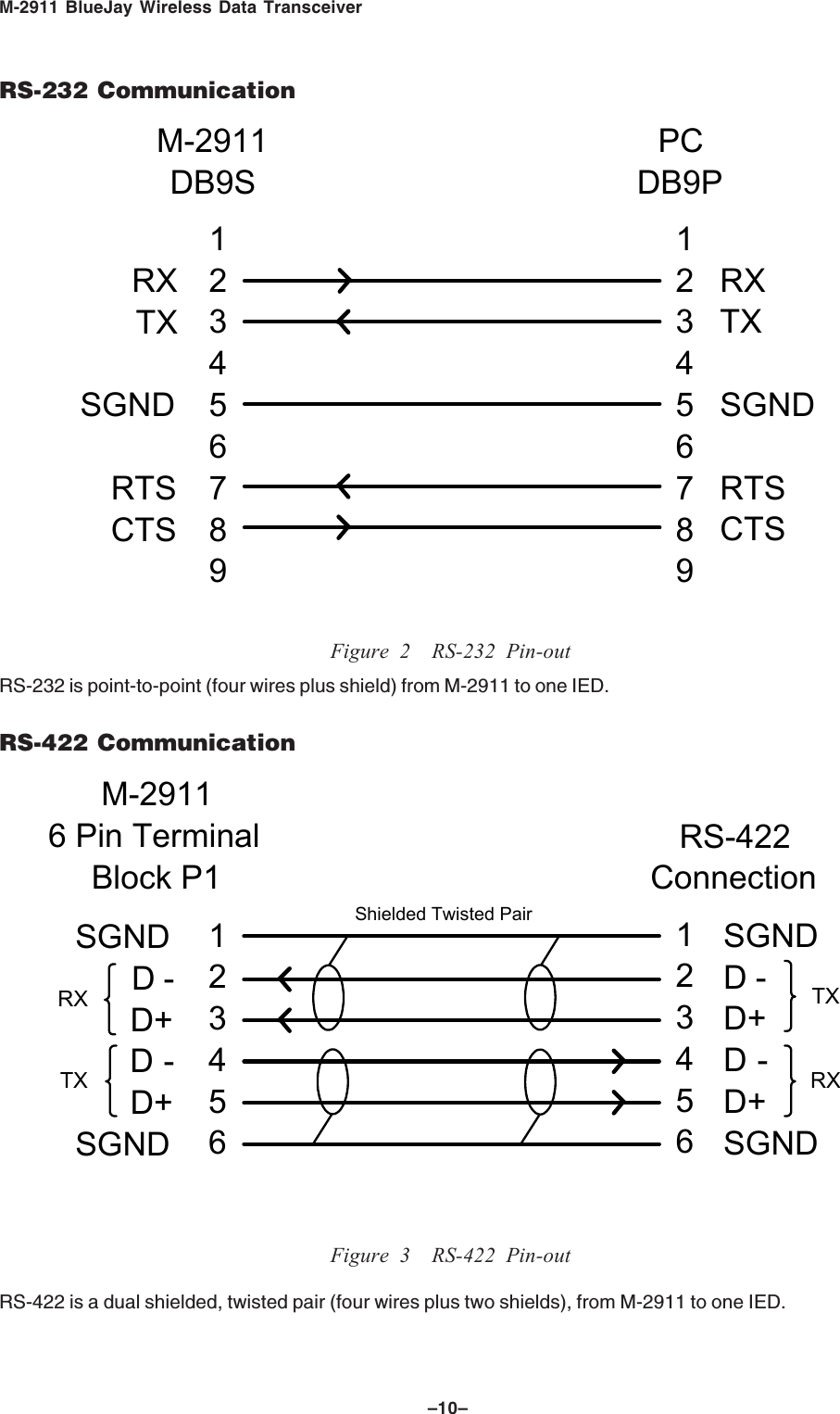
M-2911 BlueJay Wireless Data Transceiver–10–RS-232 Communication123456789123456789RXTXSGNDRTSCTSRXTXSGNDRTSCTSM-2911DB9SPCDB9PFigure 2 RS-232 Pin-outRS-232 is point-to-point (four wires plus shield) from M-2911 to one IED.RS-422 Communication123456SGNDD-D+D-D+SGNDM-29116 Pin TerminalBlock P1RS-422Connection123456SGNDD-D+D-D+SGNDShielded Twisted PairRXTXTXRXFigure 3 RS-422 Pin-outRS-422 is a dual shielded, twisted pair (four wires plus two shields), from M-2911 to one IED.
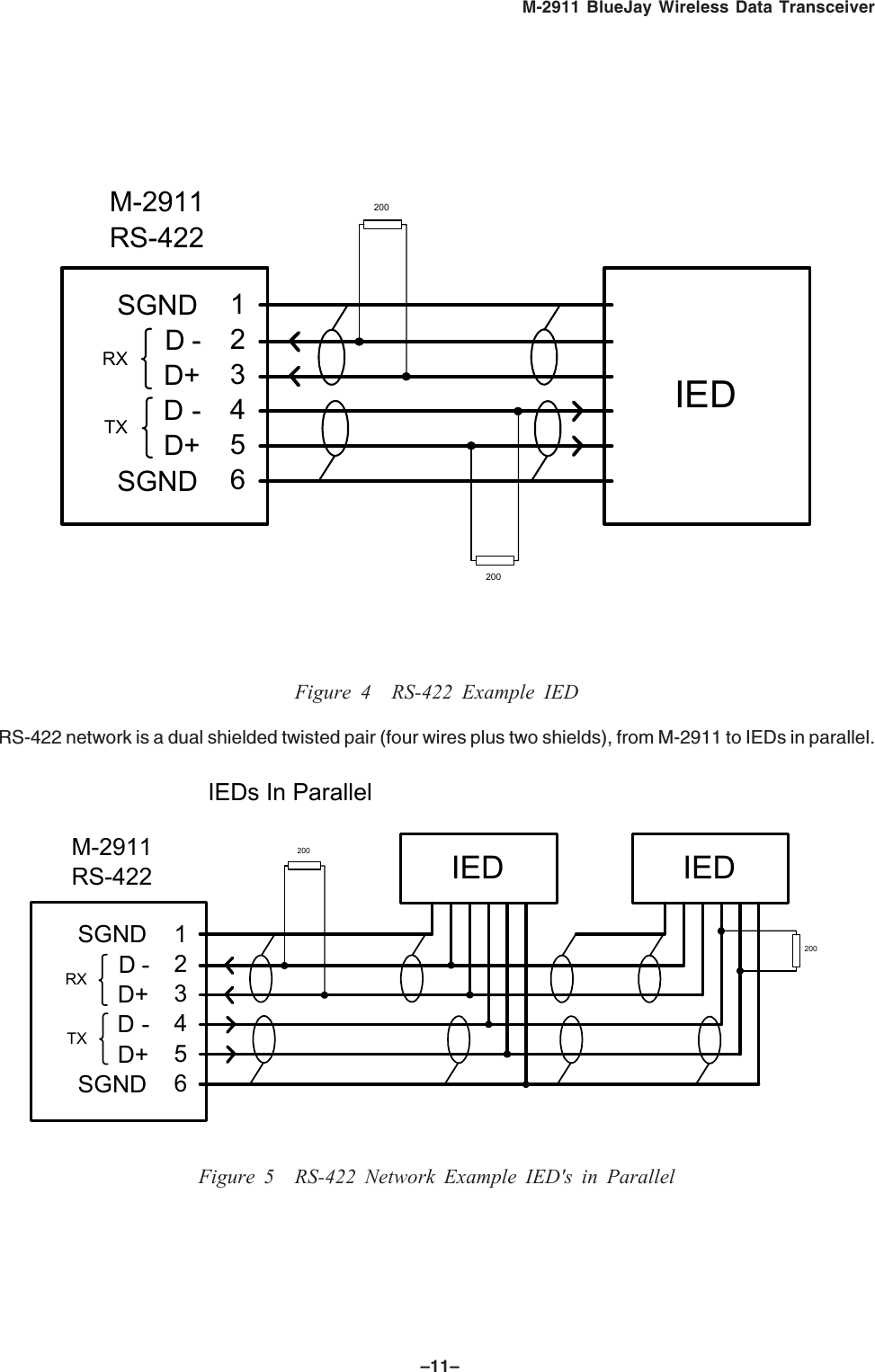
–11–M-2911 BlueJay Wireless Data Transceiver123456SGNDD-D+D-D+SGNDM-2911RS-422RXTXIED200   200   Figure 4 RS-422 Example IEDRS-422 network is a dual shielded twisted pair (four wires plus two shields), from M-2911 to IEDs in parallel.123456SGNDD-D+D-D+SGNDM-2911RS-422RXTX200   200   IEDs In ParallelIEDIEDFigure 5 RS-422 Network Example IED's in Parallel
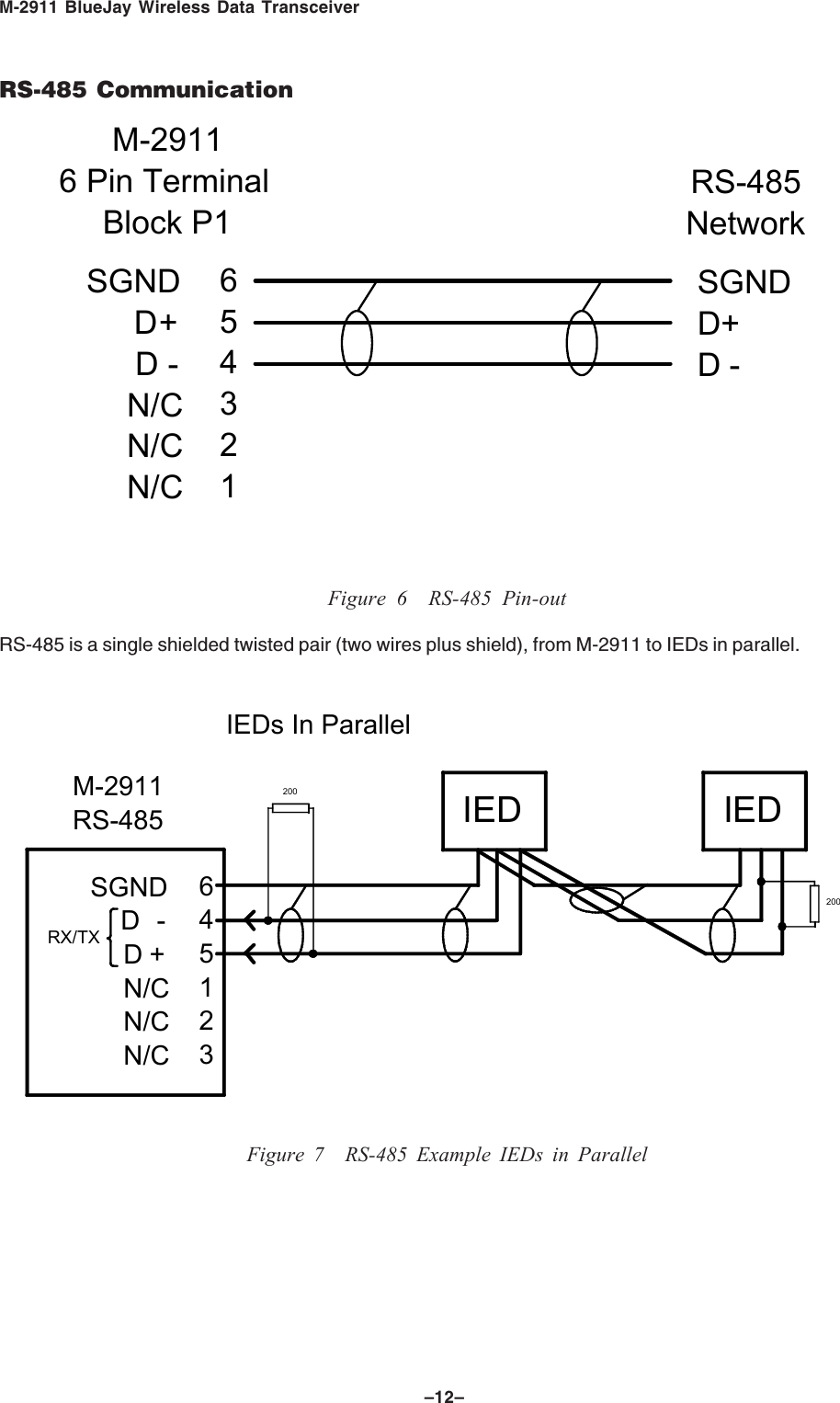
M-2911 BlueJay Wireless Data Transceiver–12–RS-485 Communication654321SGNDD+D-N/CN/CN/CM-29116 Pin TerminalBlock P1RS-485NetworkSGNDD+D-Figure 6 RS-485 Pin-outRS-485 is a single shielded twisted pair (two wires plus shield), from M-2911 to IEDs in parallel.M-2911RS-485200   200   IEDs In ParallelIEDIED645123SGNDD  -D+N/CN/CN/CRX/TXFigure 7 RS-485 Example IEDs in Parallel
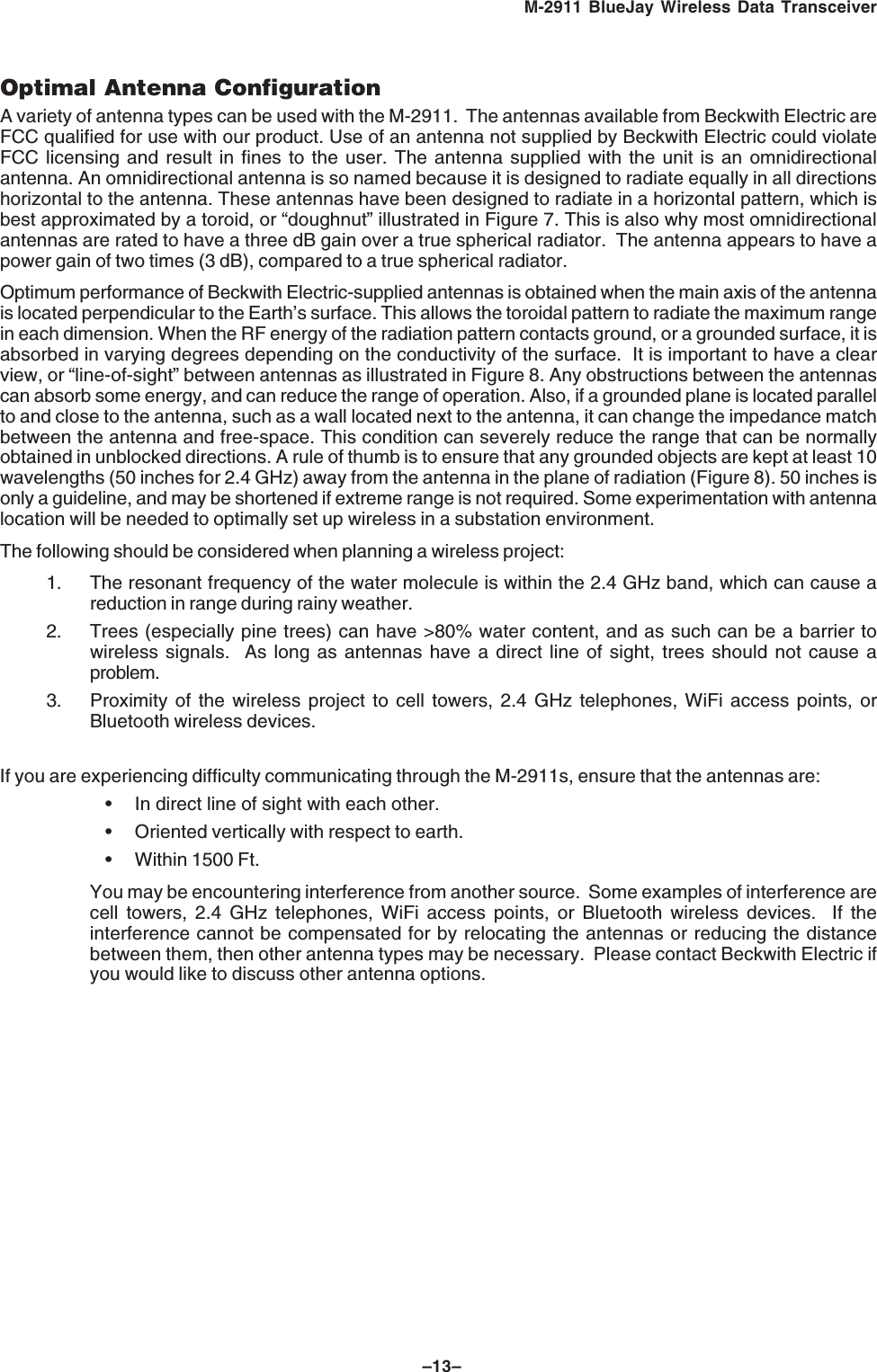
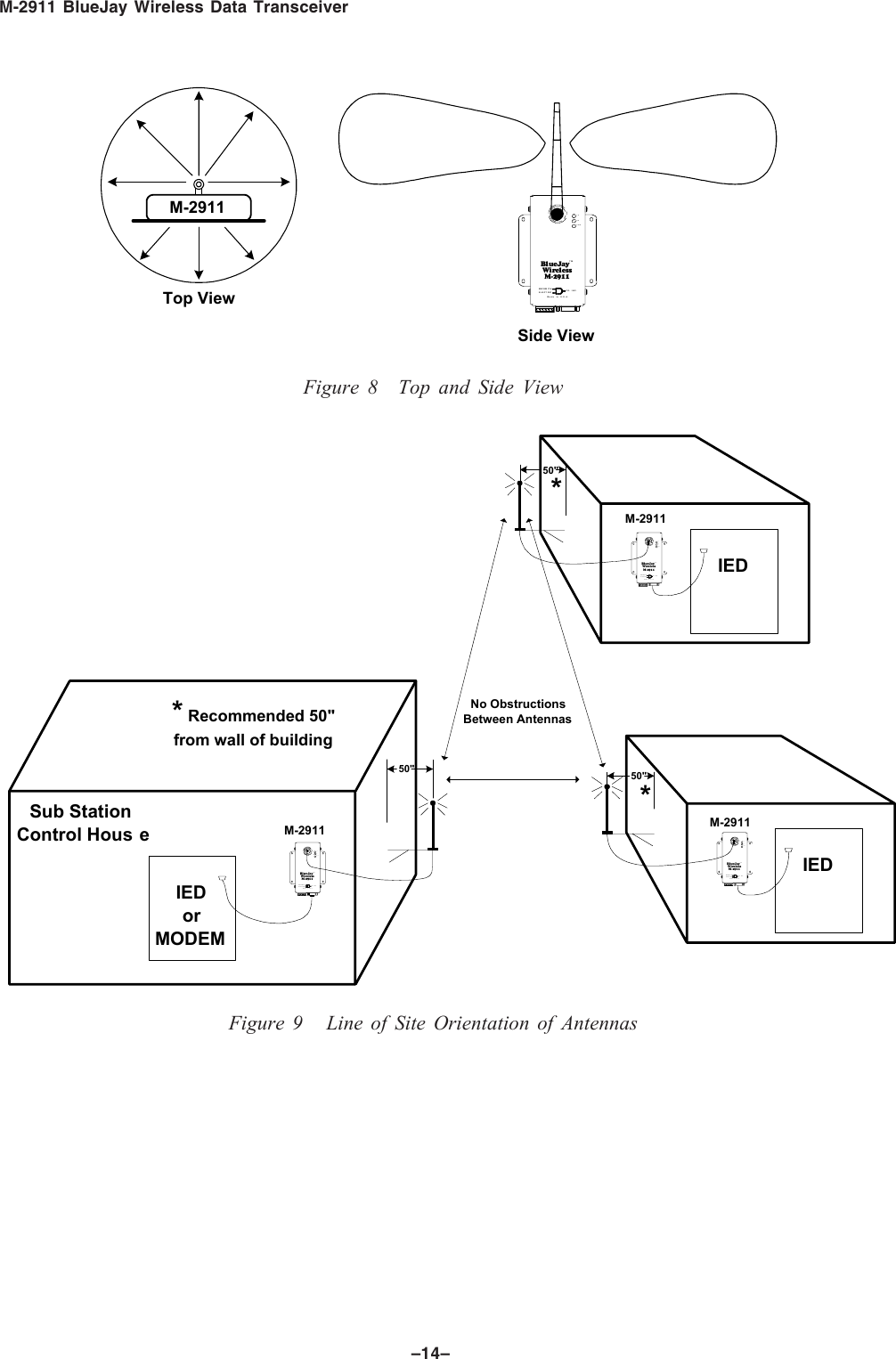
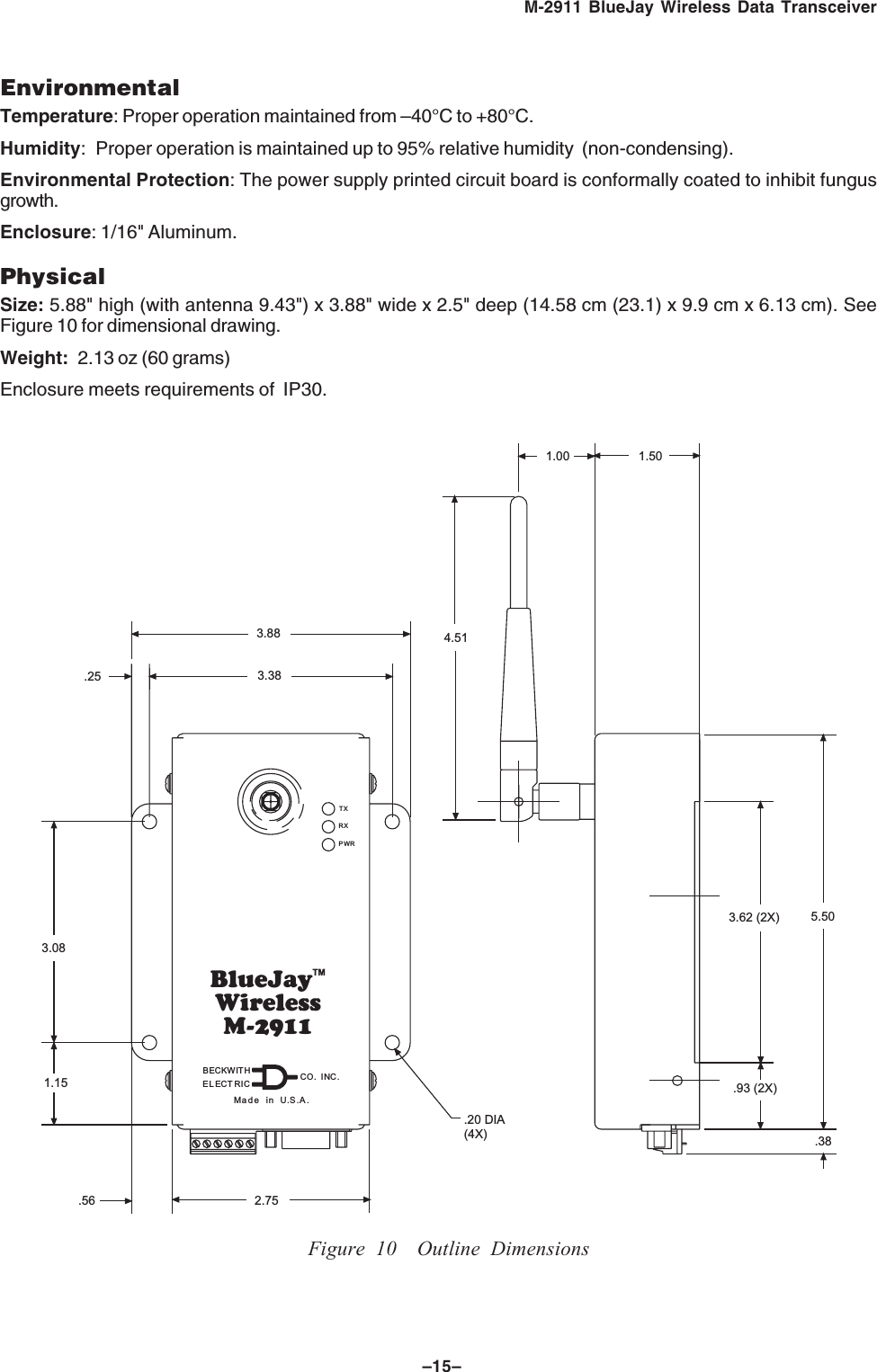
–13–M-2911 BlueJay Wireless Data TransceiverOptimal Antenna ConfigurationA variety of antenna types can be used with the M-2911.  The antennas available from Beckwith Electric areFCC qualified for use with our product. Use of an antenna not supplied by Beckwith Electric could violateFCC licensing and result in fines to the user. The antenna supplied with the unit is an omnidirectionalantenna. An omnidirectional antenna is so named because it is designed to radiate equally in all directionshorizontal to the antenna. These antennas have been designed to radiate in a horizontal pattern, which isbest approximated by a toroid, or “doughnut” illustrated in Figure 7. This is also why most omnidirectionalantennas are rated to have a three dB gain over a true spherical radiator.  The antenna appears to have apower gain of two times (3 dB), compared to a true spherical radiator.Optimum performance of Beckwith Electric-supplied antennas is obtained when the main axis of the antennais located perpendicular to the Earth’s surface. This allows the toroidal pattern to radiate the maximum rangein each dimension. When the RF energy of the radiation pattern contacts ground, or a grounded surface, it isabsorbed in varying degrees depending on the conductivity of the surface.  It is important to have a clearview, or “line-of-sight” between antennas as illustrated in Figure 8. Any obstructions between the antennascan absorb some energy, and can reduce the range of operation. Also, if a grounded plane is located parallelto and close to the antenna, such as a wall located next to the antenna, it can change the impedance matchbetween the antenna and free-space. This condition can severely reduce the range that can be normallyobtained in unblocked directions. A rule of thumb is to ensure that any grounded objects are kept at least 10wavelengths (50 inches for 2.4 GHz) away from the antenna in the plane of radiation (Figure 8). 50 inches isonly a guideline, and may be shortened if extreme range is not required. Some experimentation with antennalocation will be needed to optimally set up wireless in a substation environment.The following should be considered when planning a wireless project:1. The resonant frequency of the water molecule is within the 2.4 GHz band, which can cause areduction in range during rainy weather.2. Trees (especially pine trees) can have >80% water content, and as such can be a barrier towireless signals.  As long as antennas have a direct line of sight, trees should not cause aproblem.3. Proximity of the wireless project to cell towers, 2.4 GHz telephones, WiFi access points, orBluetooth wireless devices.If you are experiencing difficulty communicating through the M-2911s, ensure that the antennas are:• In direct line of sight with each other.• Oriented vertically with respect to earth.• Within 1500 Ft.You may be encountering interference from another source.  Some examples of interference arecell towers, 2.4 GHz telephones, WiFi access points, or Bluetooth wireless devices.  If theinterference cannot be compensated for by relocating the antennas or reducing the distancebetween them, then other antenna types may be necessary.  Please contact Beckwith Electric ifyou would like to discuss other antenna options.
M-2911 BlueJay Wireless Data Transceiver–14–BlueJayTMWirelessM-2911Made in U.S.A.PWRRXTXCO. INC.ELECTRICBECKW ITHM-2911Top ViewSide ViewFigure 8 Top and Side ViewBlueJayTMWirelessM-2911Made in U.S.A.PWRRXTXCO.INC.ELECT RICBECKW ITHIED50"*Sub StationControl Hous e M-2911Blue JayTMWire lessM-2911Made inU.S.A.PWRRXTXCO.INC.ELECTRICBECKWITHIEDorMODEM50"* Recommended 50"from wall of buildingBlueJayTMWire lessM-2911Madein U.S.A.PWRRXTXCO.INC.ELECTRICBECKWITH IED50"*M-2911M-2911No ObstructionsBetween AntennasFigure 9   Line of Site Orientation of Antennas
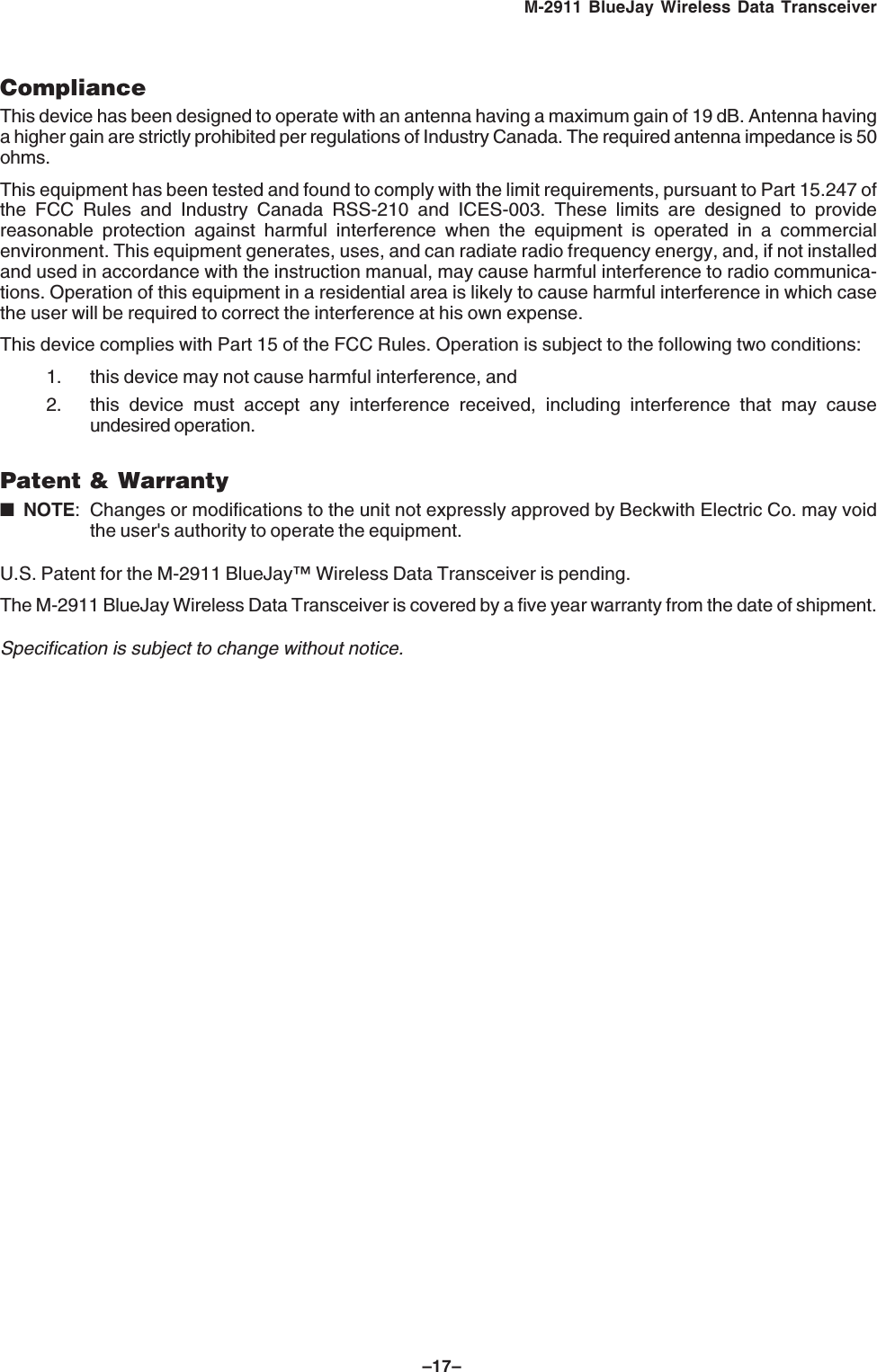
–15–M-2911 BlueJay Wireless Data TransceiverEnvironmentalTemperature: Proper operation maintained from –40°C to +80°C.Humidity: Proper operation is maintained up to 95% relative humidity  (non-condensing).Environmental Protection: The power supply printed circuit board is conformally coated to inhibit fungusgrowth.Enclosure: 1/16" Aluminum.PhysicalSize: 5.88" high (with antenna 9.43") x 3.88" wide x 2.5" deep (14.58 cm (23.1) x 9.9 cm x 6.13 cm). SeeFigure 10 for dimensional drawing.Weight: 2.13 oz (60 grams)Enclosure meets requirements of  IP30.BlueJayTMWirelessM-2911Made in U.S.A..25PWRRXTX1.152.753.083.383.88.93 (2X).381.003.62 (2X) 5.501.504.51.56.20 DIA(4X)CO. INC.ELECTRICBECKWITHFigure 10 Outline Dimensions
M-2911 BlueJay Wireless Data Transceiver–16–Safety and Cautions8WARNING: The installation, maintenance, and/or operation of this equipment could presentpotentially unsafe conditions, including, but not limited to, electrical shock or improper voltage tocomponents. Improper operation could cause personal injury, death, or damage to property.Read all safety instructions before operating the M-2911, and retain them for further reference. Follow alloperating and usage instructions, and make special note of the following safety symbols:– This sign warns that the area is connected to a dangerous high voltage, and you mustnever touch it.– This sign means that you should refer to the corresponding section of the operationmanual for important information before proceeding.Do not attempt to perform maintenance or service functions that are not described in the operatinginstructions. Instead, refer all such service requirements to Beckwith Electric Co., Inc. Unit must be returnedfor service in secure (preferably original) packaging. Shipping cost must be paid by user.Only the antenna provided is authorized for use with the M-2911. If the antenna is lost or damaged, pleasecontact Beckwith Electric Co., Inc. to secure a replacement antenna.This product generates, uses, and can radiate radio frequency (RF). If it is not installed and used inaccordance with the operating instructions, it can cause harmful interference to communications. If thisequipment causes harmful interference to radio or television reception, the user should try and correct theinterference by:• Reorienting or relocating the receiving/transmitting antenna• Increasing the separation between the equipment and the M-2911• Connecting the equipment into an outlet on a different circuit from the M-2911.If these do not correct the interference, consult an experienced radio/television technician for assistance.Correcting such interference is the responsibility of the user, not the manufacturer.
–17–M-2911 BlueJay Wireless Data TransceiverComplianceThis device has been designed to operate with an antenna having a maximum gain of 19 dB. Antenna havinga higher gain are strictly prohibited per regulations of Industry Canada. The required antenna impedance is 50ohms.This equipment has been tested and found to comply with the limit requirements, pursuant to Part 15.247 ofthe FCC Rules and Industry Canada RSS-210 and ICES-003. These limits are designed to providereasonable protection against harmful interference when the equipment is operated in a commercialenvironment. This equipment generates, uses, and can radiate radio frequency energy, and, if not installedand used in accordance with the instruction manual, may cause harmful interference to radio communica-tions. Operation of this equipment in a residential area is likely to cause harmful interference in which casethe user will be required to correct the interference at his own expense.This device complies with Part 15 of the FCC Rules. Operation is subject to the following two conditions:1. this device may not cause harmful interference, and2. this device must accept any interference received, including interference that may causeundesired operation.Patent & Warranty■NOTE: Changes or modifications to the unit not expressly approved by Beckwith Electric Co. may voidthe user's authority to operate the equipment.U.S. Patent for the M-2911 BlueJay™ Wireless Data Transceiver is pending.The M-2911 BlueJay Wireless Data Transceiver is covered by a five year warranty from the date of shipment.Specification is subject to change without notice.
ISO9001:2000RegisteredBECKWITH ELECTRIC CO., INC.6190 - 118th Avenue North • Largo, Florida 33773-3724 U.S.A.PHONE (727) 544-2326 • FAX (727) 546-0121E-MAIL marketing@beckwithelectric.comWEB PAGE www.beckwithelectric.com800-2911-SP-02MC1 11/04© 2002 Beckwith ElectricPrinted in U.S.A. (8.26.03)

Navigation menu