Beijing Choice Electronic Technology MD100P10 Heart Observer USB Equipment User Manual

Beijing Choice Electronic Technology Co., Ltd. Heart Observer USB Equipment

User Manual

HEART OBSERVERINSTRUCTIONMANUALEdition: V1.0P10Non-medical Equipment
2Customer InstructionsDistinguished customers, thank you for purchasing our product Heart Observer. Please be sure toread the manual carefully before using this unit for the first time. Failure to follow these instructionsmay cause measuring abnormality, equipment damage or personal injury. We assume noresponsibility for personal injury or damage sustained by or through use of this product.We have the ultimate right to explain this manual. No part of this manual may be photocopied,reproduced or translated into another language without the prior written consent. We reserve the rightto improve and amend it at any time without prior notice.In case of modifications, you will NOT be advised with a Modification Notice. The information in thismanual should NOT be regarded as the promise of our company.All rights reserved!Issue Date: February 2, 2010
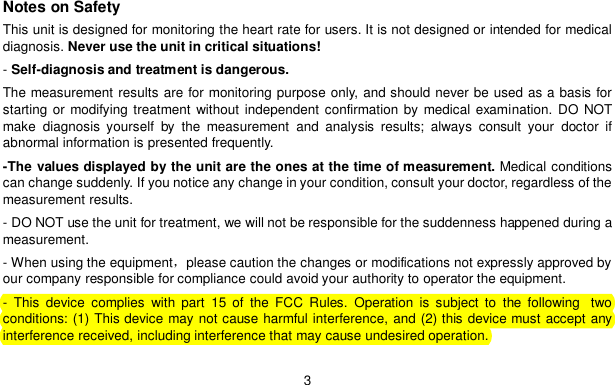
3Notes on SafetyThis unit is designed for monitoring the heart rate for users. It is not designed or intended for medicaldiagnosis. Never use the unit in critical situations!-Self-diagnosis and treatment is dangerous.The measurement results are for monitoring purpose only, and should never be used as a basis forstarting or modifying treatment without independent confirmation by medical examination. DO NOTmake diagnosis yourself by the measurement and analysis results; always consult your doctor ifabnormal information is presented frequently.-The values displayed by the unit are the ones at the time of measurement. Medical conditionscan change suddenly. If you notice any change in your condition, consult your doctor, regardless of themeasurement results.- DO NOT use the unit for treatment, we will not be responsible for the suddenness happened during ameasurement.- When using the equipmentplease caution the changes or modifications not expressly approved byour company responsible for compliance could avoid your authority to operator the equipment.- This device complies with part 15 of the FCC Rules. Operation is subject to the following  twoconditions: (1) This device may not cause harmful interference, and (2) this device must accept anyinterference received, including interference that may cause undesired operation.
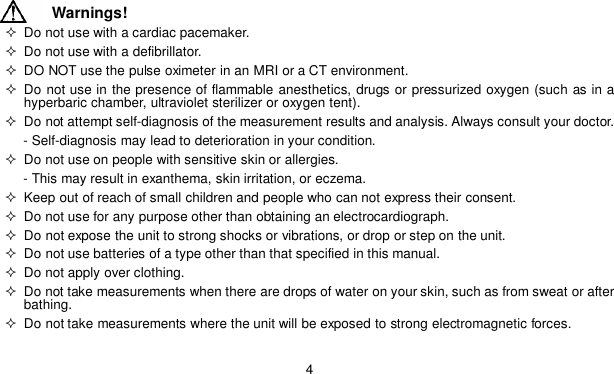
4Warnings!  Do not use with a cardiac pacemaker.  Do not use with a defibrillator.  DO NOT use the pulse oximeter in an MRI or a CT environment. Do not use in the presence of flammable anesthetics, drugs or pressurized oxygen (such as in ahyperbaric chamber, ultraviolet sterilizer or oxygen tent).  Do not attempt self-diagnosis of the measurement results and analysis. Always consult your doctor.- Self-diagnosis may lead to deterioration in your condition.  Do not use on people with sensitive skin or allergies.- This may result in exanthema, skin irritation, or eczema.  Keep out of reach of small children and people who can not express their consent.  Do not use for any purpose other than obtaining an electrocardiograph.  Do not expose the unit to strong shocks or vibrations, or drop or step on the unit.  Do not use batteries of a type other than that specified in this manual.  Do not apply over clothing.  Do not take measurements when there are drops of water on your skin, such as from sweat or afterbathing.  Do not take measurements where the unit will be exposed to strong electromagnetic forces.
5Caution! Do not expose the unit to static electricity. Always disperse any static electricity from your bodybefore handling the unit.  Do not take measurements in a moving vehicle.  Do not use a cellular phone near the unit.  Do not disassemble, repair, or modify the unit.  Do not insert batteries with their polarities reversed.  The chest electrode will be impeded by excessive body hair, regularly remove hair at the electrodecontact point.General  Avoid extremes in temperature and humidity. Do not use this unit in locations subject to high or lowtemperatures or humidity.Use at a temperature within 5°C to 40 °C and below 80% RH. Do not sterilize this unit in an autoclave or gas sterilizer (EOG, formaldehyde, high density ozoneetc.)  Do not wash this unit with water.  Do not store the unit in the following ambient conditions.--- Locations exposed to direct sunlight.--- Locations subject to high temperatures and high humidity.
6--- Wet or damp locations where water may get on the unit.--- Dusty locations.--- Near fires or open flames.--- Locations exposed to strong vibration.--- Locations exposed to strong electromagnetic fields.  Dispose of the unit and its accessory according to applicable local regulations.  Federal Law(U.S.A) restricts this device to sale by or on the order of a physician. All Choice devices are designed to be compliant with rules and regulations in locations they aresold and will be labeled as required.  Any changes or modifications to Choice equipment, not expressly approved by Choice, could avoidthe user’s authority to operate the equipment.  All necessary information, as regards toxicity and/or action on tissues, about materials with whichthe patient or any other person can come into contact.
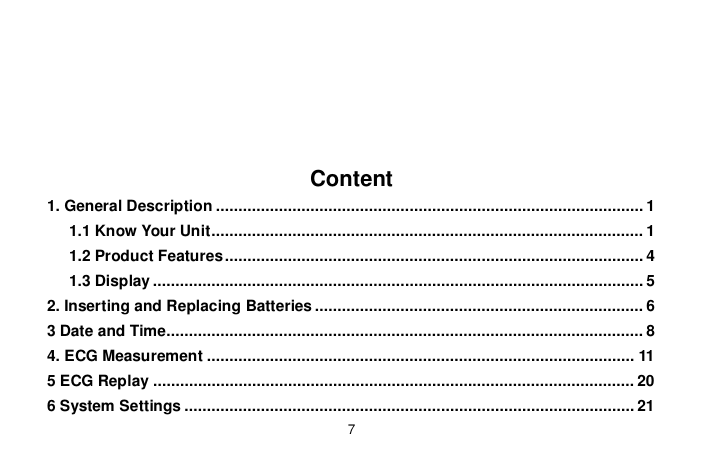
7Content1. General Description ............................................................................................... 11.1 Know Your Unit ................................................................................................ 11.2 Product Features ............................................................................................. 41.3 Display ............................................................................................................. 52. Inserting and Replacing Batteries ......................................................................... 63 Date and Time.......................................................................................................... 84. ECG Measurement ............................................................................................... 115 ECG Replay ........................................................................................................... 206 System Settings .................................................................................................... 21
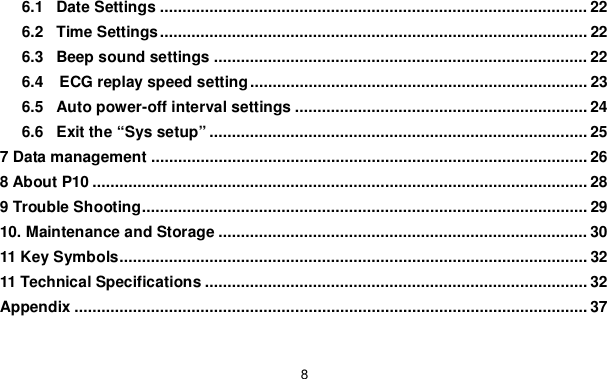
86.1 Date Settings ............................................................................................... 226.2 Time Settings ............................................................................................... 226.3 Beep sound settings ................................................................................... 226.4   ECG replay speed setting ........................................................................... 236.5 Auto power-off interval settings ................................................................. 246.6 Exit the “Sys setup” .................................................................................... 257 Data management ................................................................................................. 268 About P10 .............................................................................................................. 289 Trouble Shooting ................................................................................................... 2910. Maintenance and Storage .................................................................................. 3011 Key Symbols ........................................................................................................ 3211 Technical Specifications ..................................................................................... 32Appendix .................................................................................................................. 37
Heart Observer Instruction Manual11. General DescriptionThank you for purchasing and using Heart Observer monitor. The unit is designed for business menand sub-health men. Business men should pay more attention to their health conditionfatigue andwork stress can lead to physical decline. Heart Observer is convenient for checking and improvingpoor living habits.The unit provides helpful ECG and analysis for the user, and can help you learn the condition for user’sheart in a short period. If the measurement result is frequently abnormal, it is recommended the usersee a doctor, so that the detail or exact diagnosis can be done in time at hospital.Note: The instruction describes all the functions of which some might not be applied to your units.1.1 Know Your Unit
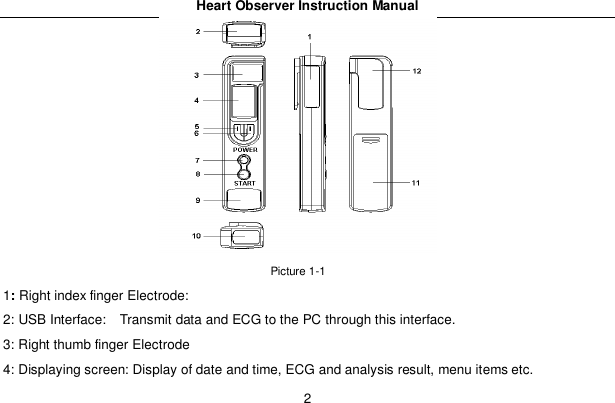
Heart Observer Instruction Manual2Picture 1-11:Right index finger Electrode:2: USB Interface:   Transmit data and ECG to the PC through this interface.3: Right thumb finger Electrode4: Displaying screen: Display of date and time, ECG and analysis result, menu items etc.
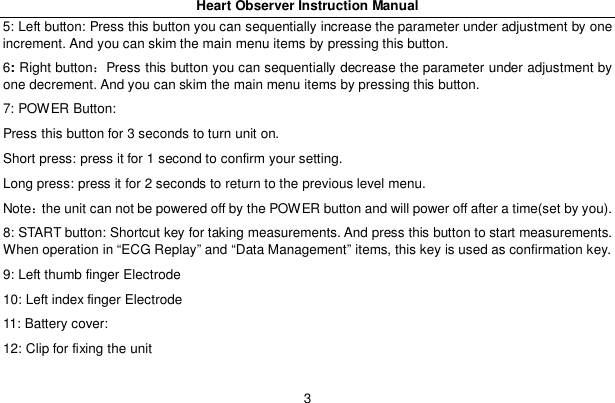
Heart Observer Instruction Manual35: Left button: Press this button you can sequentially increase the parameter under adjustment by oneincrement. And you can skim the main menu items by pressing this button.6:Right buttonPress this button you can sequentially decrease the parameter under adjustment byone decrement. And you can skim the main menu items by pressing this button.7: POWER Button:Press this button for 3 seconds to turn unit on.Short press: press it for 1 second to confirm your setting.Long press: press it for 2 seconds to return to the previous level menu.Notethe unit can not be powered off by the POWER button and will power off after a time(set by you).8: START button: Shortcut key for taking measurements. And press this button to start measurements.When operation in “ECG Replay” and “Data Management” items, this key is used as confirmation key.9: Left thumb finger Electrode10: Left index finger Electrode11: Battery cover:12: Clip for fixing the unit
Heart Observer Instruction Manual41.2 Product FeaturesSmall, portable and easy to useCompletely cable freeMeasurementrecord and deletion of ECG and HRTwo measuring modes for selectionTransmit data to management software by USB dataFast measurement in just 30 seconds20 records of heart rate, data analysis and ECGOrganic Light Emitting Display (OLED) screen displayAuto power-off during a period no operation is takenAutomatically analysis of heart statusPowered by two AAA batteriesSuitable for business men and sub-health men
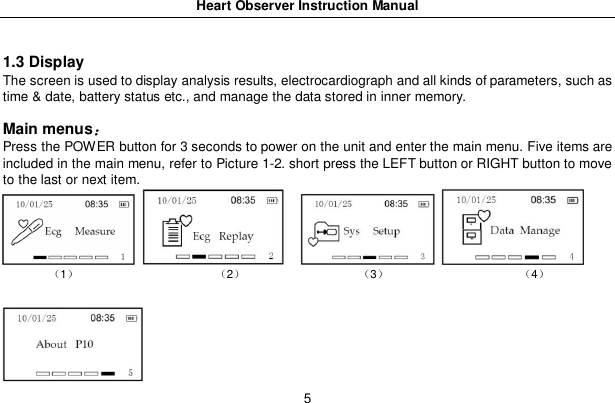
Heart Observer Instruction Manual51.3 DisplayThe screen is used to display analysis results, electrocardiograph and all kinds of parameters, such astime & date, battery status etc., and manage the data stored in inner memory.Main menusPress the POWER button for 3 seconds to power on the unit and enter the main menu. Five items areincluded in the main menu, refer to Picture 1-2. short press the LEFT button or RIGHT button to moveto the last or next item.1 2 3 4
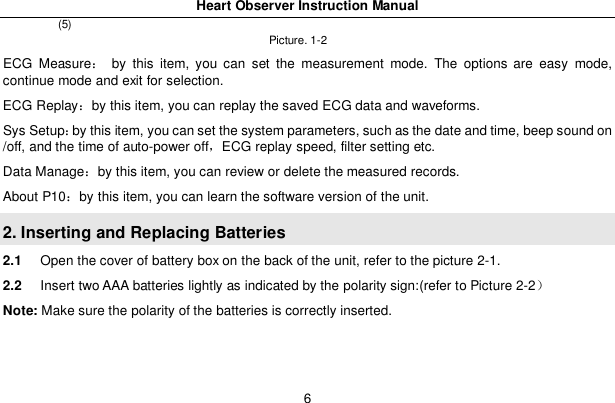
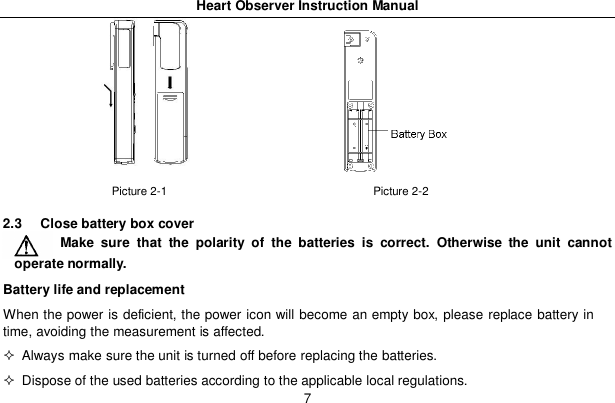
Heart Observer Instruction Manual6(5)Picture. 1-2ECG Measure by this item, you can set the measurement mode. The options are easy mode,continue mode and exit for selection.ECG Replayby this item, you can replay the saved ECG data and waveforms.Sys Setupby this item, you can set the system parameters, such as the date and time, beep sound on/off, and the time of auto-power offECG replay speed, filter setting etc.Data Manageby this item, you can review or delete the measured records.About P10by this item, you can learn the software version of the unit.2. Inserting and Replacing Batteries2.1 Open the cover of battery box on the back of the unit, refer to the picture 2-1.2.2 Insert two AAA batteries lightly as indicated by the polarity sign:(refer to Picture 2-2Note: Make sure the polarity of the batteries is correctly inserted.
Heart Observer Instruction Manual7Picture 2-1                                     Picture 2-22.3  Close battery box coverMake sure that the polarity of the batteries is correct. Otherwise the unit cannotoperate normally.Battery life and replacementWhen the power is deficient, the power icon will become an empty box, please replace battery intime, avoiding the measurement is affected.  Always make sure the unit is turned off before replacing the batteries.  Dispose of the used batteries according to the applicable local regulations.
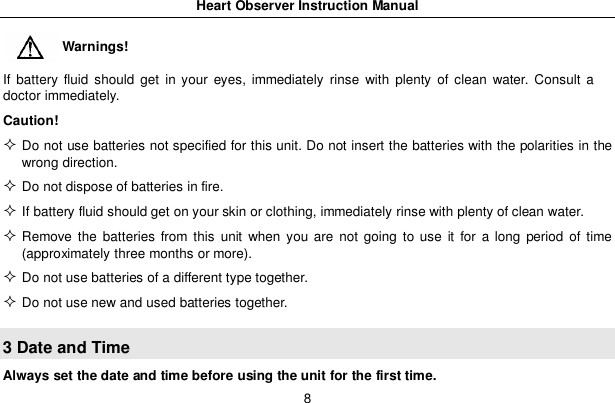
Heart Observer Instruction Manual8Warnings!If battery fluid should get in your eyes, immediately rinse with plenty of clean water. Consult adoctor immediately.Caution!Do not use batteries not specified for this unit. Do not insert the batteries with the polarities in thewrong direction.Do not dispose of batteries in fire.If battery fluid should get on your skin or clothing, immediately rinse with plenty of clean water.Remove the batteries from this unit when you are not going to use it for a long period of time(approximately three months or more).Do not use batteries of a different type together.Do not use new and used batteries together.3 Date and TimeAlways set the date and time before using the unit for the first time.
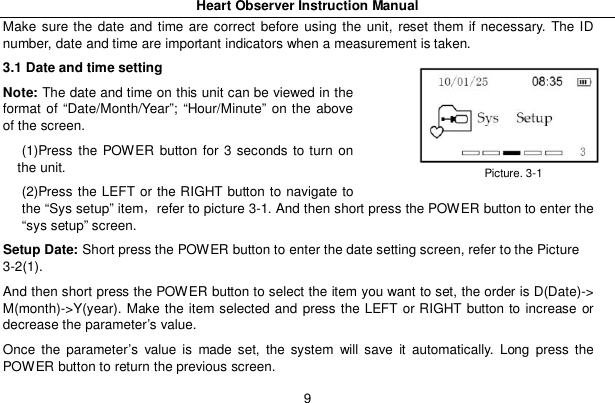
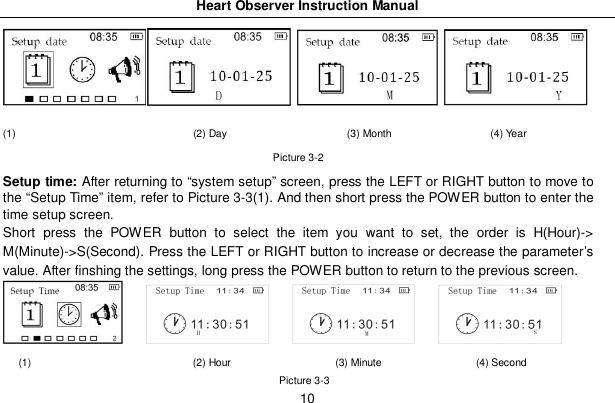
Heart Observer Instruction Manual9Make sure the date and time are correct before using the unit, reset them if necessary. The IDnumber, date and time are important indicators when a measurement is taken.3.1 Date and time settingNote: The date and time on this unit can be viewed in theformat of “Date/Month/Year”; “Hour/Minute” on the aboveof the screen.(1)Press the POWER button for 3 seconds to turn onthe unit.(2)Press the LEFT or the RIGHT button to navigate tothe “Sys setup” itemrefer to picture 3-1. And then short press the POWER button to enter the“sys setup” screen.Setup Date: Short press the POWER button to enter the date setting screen, refer to the Picture3-2(1).And then short press the POWER button to select the item you want to set, the order is D(Date)->M(month)->Y(year). Make the item selected and press the LEFT or RIGHT button to increase ordecrease the parameter’s value.Once the parameter’s value is made set, the system will save it automatically. Long press thePOWER button to return the previous screen.Picture. 3-1
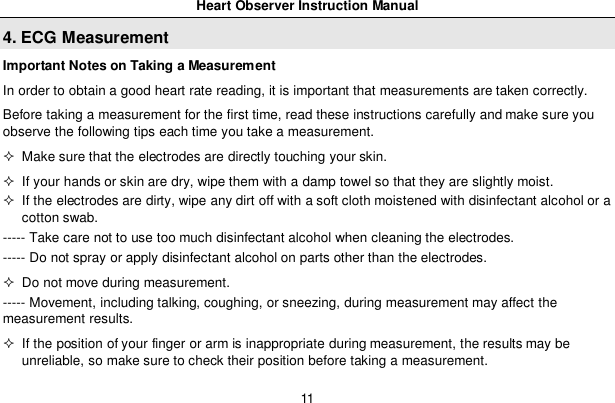
Heart Observer Instruction Manual10(1)                                  (2) Day                       (3) Month                   (4) YearPicture 3-2Setup time: After returning to “system setup” screen, press the LEFT or RIGHT button to move tothe “Setup Time” item, refer to Picture 3-3(1). And then short press the POWER button to enter thetime setup screen.Short press the POWER button to select the item you want to set, the order is H(Hour)->M(Minute)->S(Second). Press the LEFT or RIGHT button to increase or decrease the parameter’svalue. After finshing the settings, long press the POWER button to return to the previous screen.(1)                               (2) Hour                    (3) Minute                  (4) SecondPicture 3-3
Heart Observer Instruction Manual114. ECG MeasurementImportant Notes on Taking a MeasurementIn order to obtain a good heart rate reading, it is important that measurements are taken correctly.Before taking a measurement for the first time, read these instructions carefully and make sure youobserve the following tips each time you take a measurement.  Make sure that the electrodes are directly touching your skin.  If your hands or skin are dry, wipe them with a damp towel so that they are slightly moist.  If the electrodes are dirty, wipe any dirt off with a soft cloth moistened with disinfectant alcohol or acotton swab.----- Take care not to use too much disinfectant alcohol when cleaning the electrodes.----- Do not spray or apply disinfectant alcohol on parts other than the electrodes.  Do not move during measurement.----- Movement, including talking, coughing, or sneezing, during measurement may affect themeasurement results.  If the position of your finger or arm is inappropriate during measurement, the results may beunreliable, so make sure to check their position before taking a measurement.
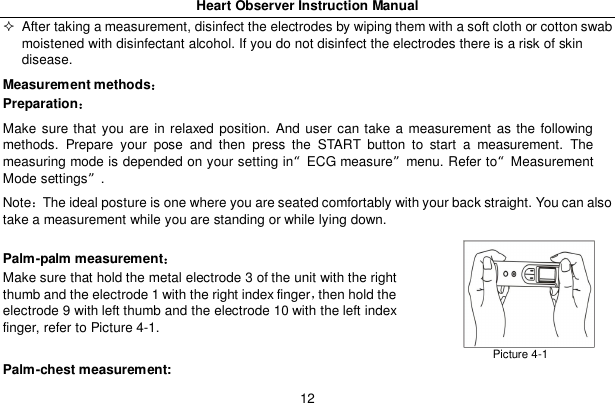
Heart Observer Instruction Manual12  After taking a measurement, disinfect the electrodes by wiping them with a soft cloth or cotton swabmoistened with disinfectant alcohol. If you do not disinfect the electrodes there is a risk of skindisease.Measurement methodsPreparationMake sure that you are in relaxed position. And user can take a measurement as the followingmethods. Prepare your pose and then press the START button to start a measurement. Themeasuring mode is depended on your setting in“ECG measure”menu. Refer to“MeasurementMode settings”.NoteThe ideal posture is one where you are seated comfortably with your back straight. You can alsotake a measurement while you are standing or while lying down.Palm-palm measurementMake sure that hold the metal electrode 3 of the unit with the rightthumb and the electrode 1 with the right index fingerthen hold theelectrode 9 with left thumb and the electrode 10 with the left indexfinger, refer to Picture 4-1.Palm-chest measurement:Picture 4-1
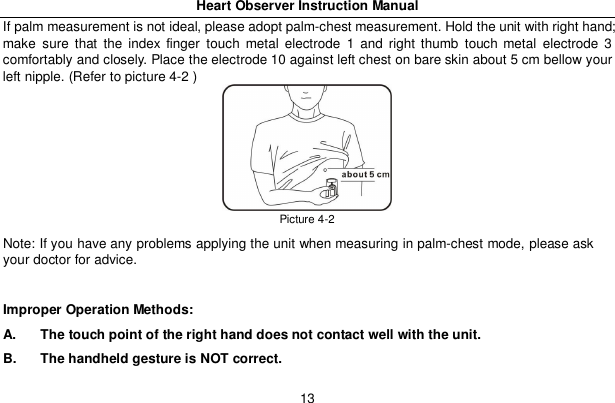
Heart Observer Instruction Manual13If palm measurement is not ideal, please adopt palm-chest measurement. Hold the unit with right hand;make sure that the index finger touch metal electrode 1 and right thumb touch metal electrode 3comfortably and closely. Place the electrode 10 against left chest on bare skin about 5 cm bellow yourleft nipple. (Refer to picture 4-2 )Picture 4-2Note: If you have any problems applying the unit when measuring in palm-chest mode, please askyour doctor for advice.Improper Operation Methods:A.  The touch point of the right hand does not contact well with the unit.B.  The handheld gesture is NOT correct.
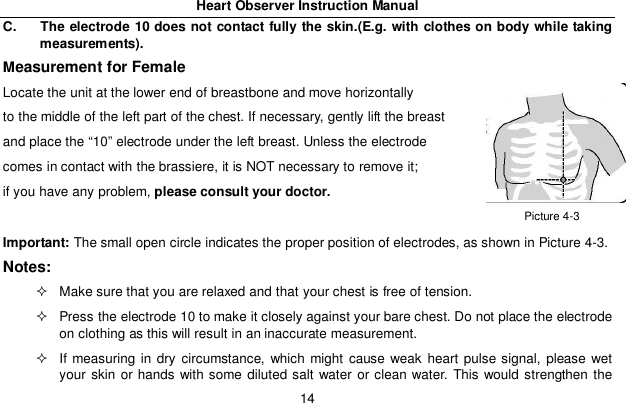
Heart Observer Instruction Manual14C.  The electrode 10 does not contact fully the skin.(E.g. with clothes on body while takingmeasurements).Measurement for FemaleLocate the unit at the lower end of breastbone and move horizontallyto the middle of the left part of the chest. If necessary, gently lift the breastand place the “10” electrode under the left breast. Unless the electrodecomes in contact with the brassiere, it is NOT necessary to remove it;if you have any problem, please consult your doctor.Important: The small open circle indicates the proper position of electrodes, as shown in Picture 4-3.Notes:  Make sure that you are relaxed and that your chest is free of tension.  Press the electrode 10 to make it closely against your bare chest. Do not place the electrodeon clothing as this will result in an inaccurate measurement.  If measuring in dry circumstance, which might cause weak heart pulse signal, please wetyour skin or hands with some diluted salt water or clean water. This would strengthen thePicture 4-3
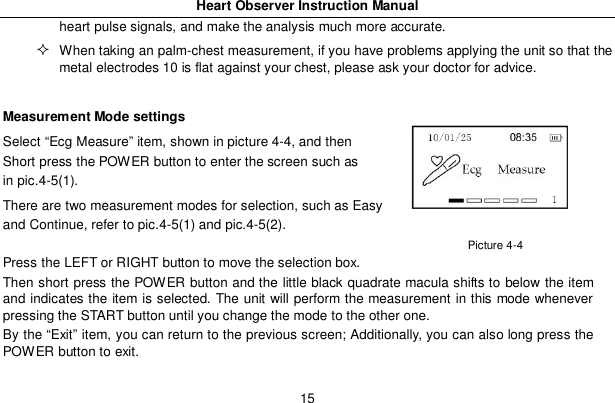
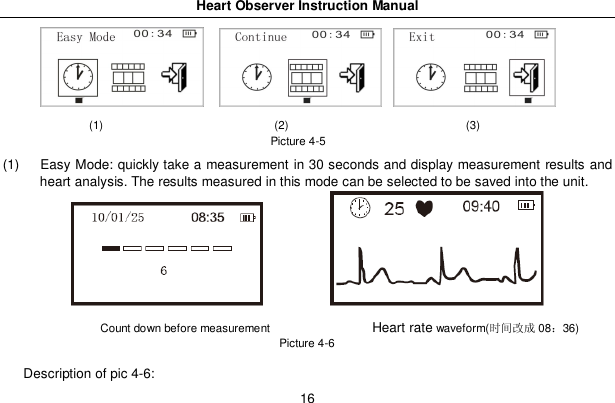
Heart Observer Instruction Manual15heart pulse signals, and make the analysis much more accurate.When taking an palm-chest measurement, if you have problems applying the unit so that themetal electrodes 10 is flat against your chest, please ask your doctor for advice.Measurement Mode settingsSelect “Ecg Measure” item, shown in picture 4-4, and thenShort press the POWER button to enter the screen such asin pic.4-5(1).There are two measurement modes for selection, such as Easyand Continue, refer to pic.4-5(1) and pic.4-5(2).Press the LEFT or RIGHT button to move the selection box.Then short press the POWER button and the little black quadrate macula shifts to below the itemand indicates the item is selected. The unit will perform the measurement in this mode wheneverpressing the START button until you change the mode to the other one.By the “Exit” item, you can return to the previous screen; Additionally, you can also long press thePOWER button to exit.Picture 4-4
Heart Observer Instruction Manual16(1)                              (2)                               (3)Picture 4-5(1)  Easy Mode: quickly take a measurement in 30 seconds and display measurement results andheart analysis. The results measured in this mode can be selected to be saved into the unit.Count down before measurement                Heart ratewaveform(󰋋󳋉󰈎 0836)Picture 4-6Description of pic 4-6:
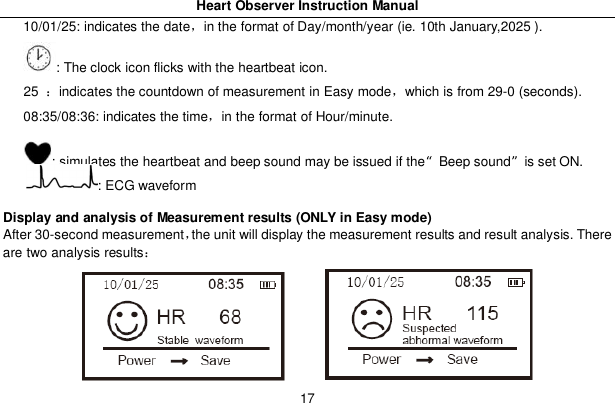
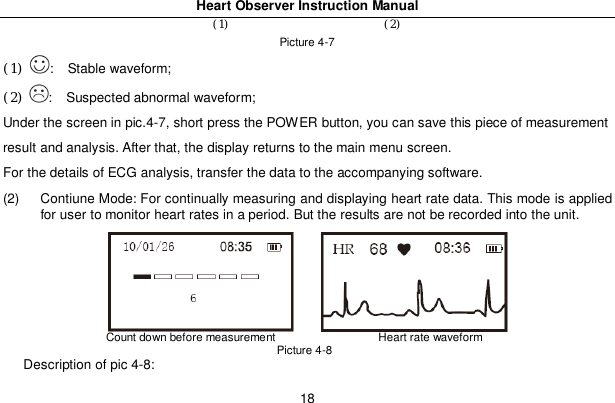
Heart Observer Instruction Manual1710/01/25: indicates the datein the format of Day/month/year (ie. 10th January,2025 ).: The clock icon flicks with the heartbeat icon.25 indicates the countdown of measurement in Easy modewhich is from 29-0 (seconds).08:35/08:36: indicates the timein the format of Hour/minute.: simulates the heartbeat and beep sound may be issued if the“Beep sound”is set ON.: ECG waveformDisplay and analysis of Measurement results (ONLY in Easy mode)After 30-second measurementthe unit will display the measurement results and result analysis. Thereare two analysis results
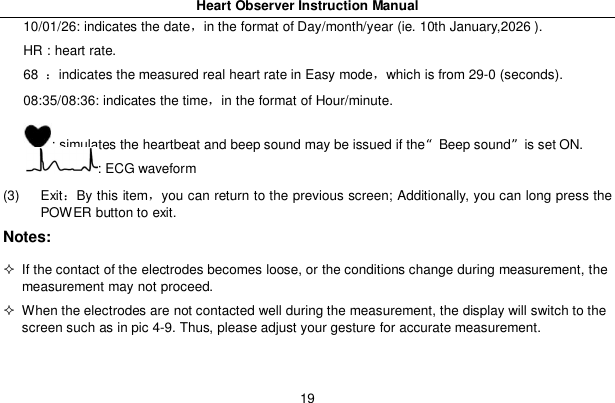
Heart Observer Instruction Manual18(1) (2)Picture 4-7(1) :   Stable waveform;(2) :   Suspected abnormal waveform;Under the screen in pic.4-7, short press the POWER button, you can save this piece of measurementresult and analysis. After that, the display returns to the main menu screen.For the details of ECG analysis, transfer the data to the accompanying software.(2)  Contiune Mode: For continually measuring and displaying heart rate data. This mode is appliedfor user to monitor heart rates in a period. But the results are not be recorded into the unit.Count down before measurement                   Heart rate waveformPicture 4-8Description of pic 4-8:
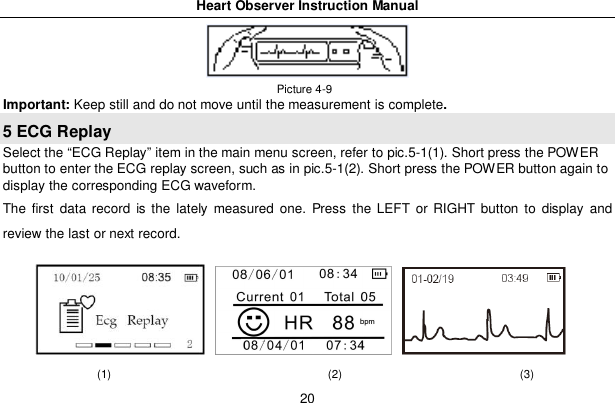
Heart Observer Instruction Manual1910/01/26: indicates the datein the format of Day/month/year (ie. 10th January,2026 ).HR : heart rate.68 indicates the measured real heart rate in Easy modewhich is from 29-0 (seconds).08:35/08:36: indicates the timein the format of Hour/minute.: simulates the heartbeat and beep sound may be issued if the“Beep sound”is set ON.: ECG waveform(3) ExitBy this itemyou can return to the previous screen; Additionally, you can long press thePOWER button to exit.Notes:  If the contact of the electrodes becomes loose, or the conditions change during measurement, themeasurement may not proceed.  When the electrodes are not contacted well during the measurement, the display will switch to thescreen such as in pic 4-9. Thus, please adjust your gesture for accurate measurement.
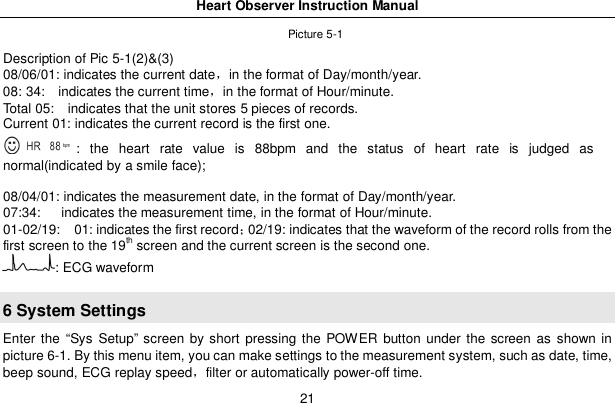
Heart Observer Instruction Manual20 Picture 4-9Important: Keep still and do not move until the measurement is complete.5 ECG ReplaySelect the “ECG Replay” item in the main menu screen, refer to pic.5-1(1). Short press the POWERbutton to enter the ECG replay screen, such as in pic.5-1(2). Short press the POWER button again todisplay the corresponding ECG waveform.The first data record is the lately measured one. Press the LEFT or RIGHT button to display andreview the last or next record.(1)                                      (2)                               (3)
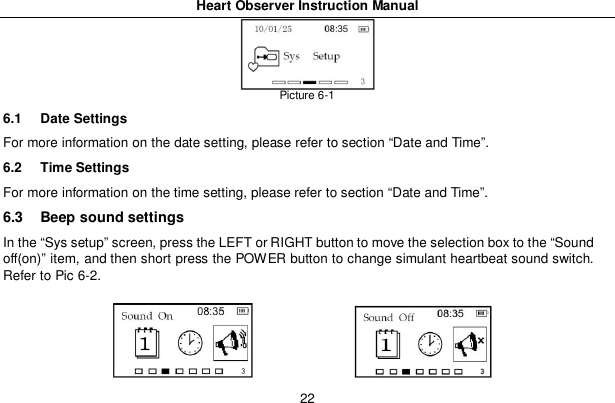
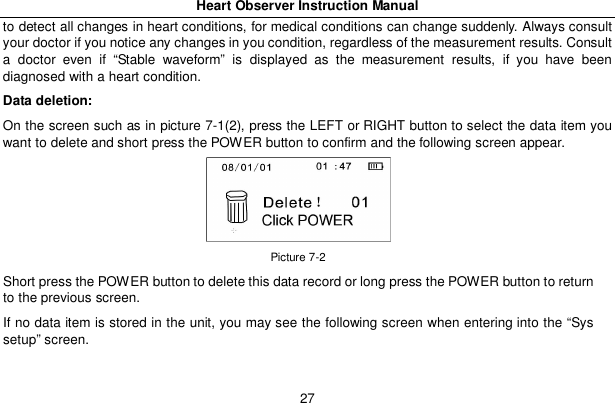
Heart Observer Instruction Manual21Picture 5-1Description of Pic 5-1(2)&(3)08/06/01: indicates the current datein the format of Day/month/year.08: 34:   indicates the current timein the format of Hour/minute.Total 05:   indicates that the unit stores 5 pieces of records.Current 01: indicates the current record is the first one.: the heart rate value is 88bpm and the status of heart rate is judged asnormal(indicated by a smile face);08/04/01: indicates the measurement date, in the format of Day/month/year.07:34:    indicates the measurement time, in the format of Hour/minute.01-02/19:   01: indicates the first record02/19: indicates that the waveform of the record rolls from thefirst screen to the 19th screen and the current screen is the second one.: ECG waveform6 System SettingsEnter the “Sys Setup” screen by short pressing the POWER button under the screen as shown inpicture 6-1. By this menu item, you can make settings to the measurement system, such as date, time,beep sound, ECG replay speedfilter or automatically power-off time.
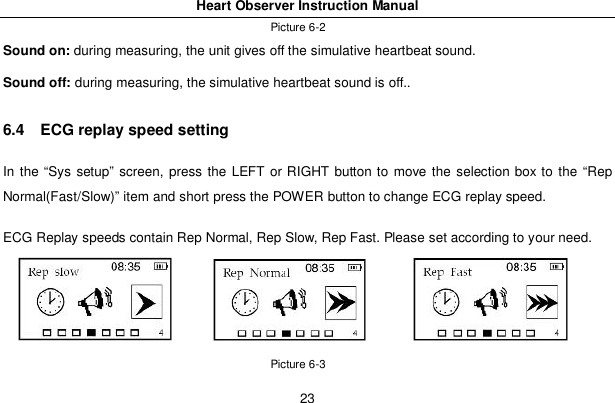
Heart Observer Instruction Manual22Picture 6-16.1  Date SettingsFor more information on the date setting, please refer to section “Date and Time”.6.2  Time SettingsFor more information on the time setting, please refer to section “Date and Time”.6.3  Beep sound settingsIn the “Sys setup” screen, press the LEFT or RIGHT button to move the selection box to the “Soundoff(on)” item, and then short press the POWER button to change simulant heartbeat sound switch.Refer to Pic 6-2.
Heart Observer Instruction Manual23Picture 6-2Sound on: during measuring, the unit gives off the simulative heartbeat sound.Sound off: during measuring, the simulative heartbeat sound is off..6.4   ECG replay speed settingIn the “Sys setup” screen, press the LEFT or RIGHT button to move the selection box to the “RepNormal(Fast/Slow)” item and short press the POWER button to change ECG replay speed.ECG Replay speeds contain Rep Normal, Rep Slow, Rep Fast. Please set according to your need.Picture 6-3
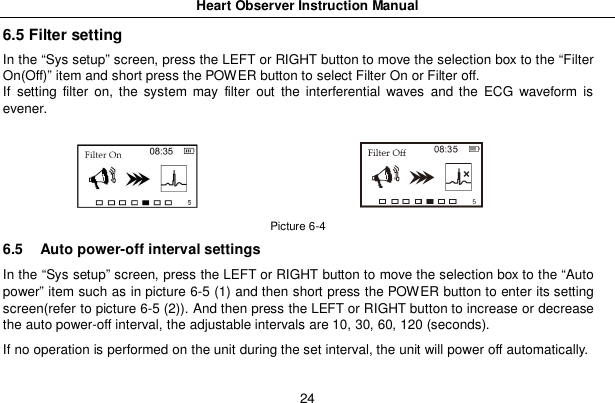
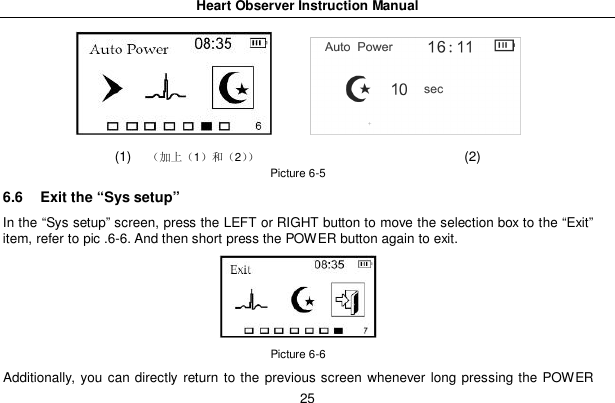
Heart Observer Instruction Manual246.5 Filter settingIn the “Sys setup” screen, press the LEFT or RIGHT button to move the selection box to the “FilterOn(Off)” item and short press the POWER button to select Filter On or Filter off.If setting filter on, the system may filter out the interferential waves and the ECG waveform isevener.Picture 6-46.5  Auto power-off interval settingsIn the “Sys setup” screen, press the LEFT or RIGHT button to move the selection box to the “Autopower” item such as in picture 6-5 (1) and then short press the POWER button to enter its settingscreen(refer to picture 6-5 (2)). And then press the LEFT or RIGHT button to increase or decreasethe auto power-off interval, the adjustable intervals are 10, 30, 60, 120 (seconds).If no operation is performed on the unit during the set interval, the unit will power off automatically.
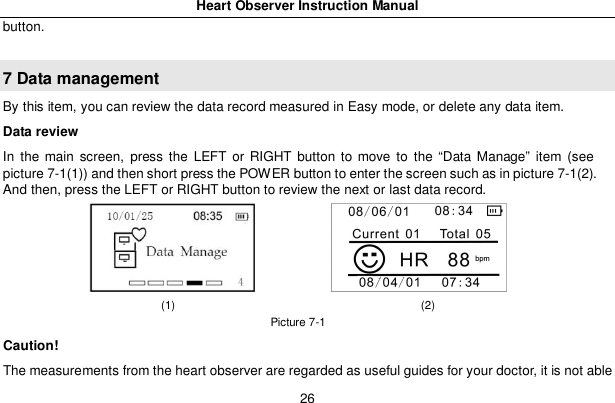
Heart Observer Instruction Manual25(1) 12 (2)Picture 6-56.6  Exit the “Sys setup”In the “Sys setup” screen, press the LEFT or RIGHT button to move the selection box to the “Exit”item, refer to pic .6-6. And then short press the POWER button again to exit.Picture 6-6Additionally, you can directly return to the previous screen whenever long pressing the POWER
Heart Observer Instruction Manual26button.7 Data managementBy this item, you can review the data record measured in Easy mode, or delete any data item.Data reviewIn the main screen, press the LEFT or RIGHT button to move to the “Data Manage” item (seepicture 7-1(1)) and then short press the POWER button to enter the screen such as in picture 7-1(2).And then, press the LEFT or RIGHT button to review the next or last data record.(1)                                           (2)Picture 7-1Caution!The measurements from the heart observer are regarded as useful guides for your doctor, it is not able
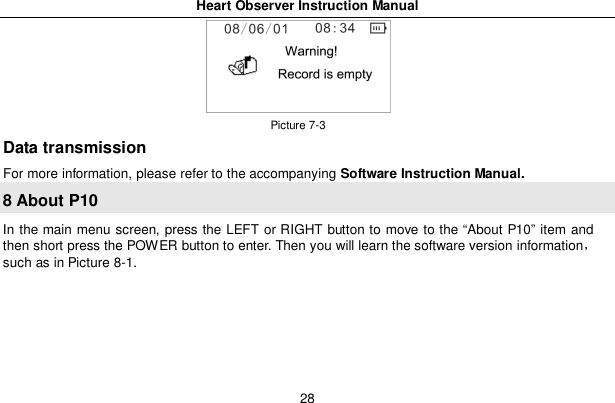
Heart Observer Instruction Manual27to detect all changes in heart conditions, for medical conditions can change suddenly. Always consultyour doctor if you notice any changes in you condition, regardless of the measurement results. Consulta doctor even if “Stable waveform” is displayed as the measurement results, if you have beendiagnosed with a heart condition.Data deletion:On the screen such as in picture 7-1(2), press the LEFT or RIGHT button to select the data item youwant to delete and short press the POWER button to confirm and the following screen appear.Picture 7-2Short press the POWER button to delete this data record or long press the POWER button to returnto the previous screen.If no data item is stored in the unit, you may see the following screen when entering into the “Syssetup” screen.
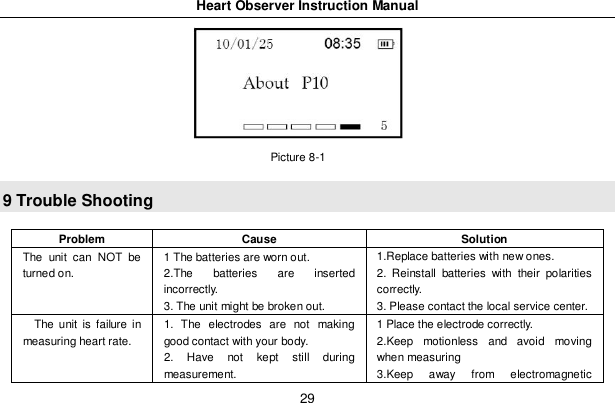
Heart Observer Instruction Manual28Picture 7-3Data transmissionFor more information, please refer to the accompanying Software Instruction Manual.8 About P10In the main menu screen, press the LEFT or RIGHT button to move to the “About P10” item andthen short press the POWER button to enter. Then you will learn the software version informationsuch as in Picture 8-1.
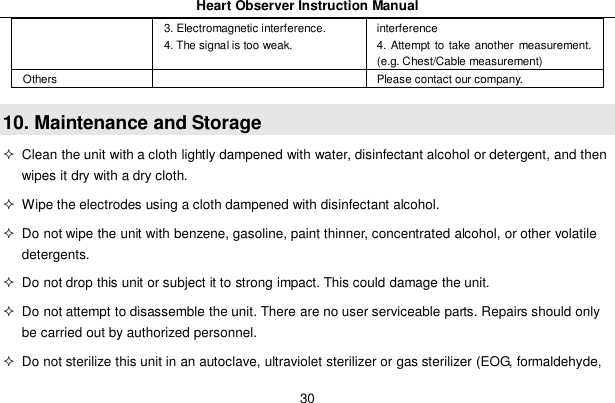
Heart Observer Instruction Manual29Picture 8-19 Trouble ShootingProblem Cause SolutionThe unit can NOT beturned on.1 The batteries are worn out.2.The batteries are insertedincorrectly.3. The unit might be broken out.1.Replace batteries with new ones.2. Reinstall batteries with their polaritiescorrectly.3. Please contact the local service center.The unit is failure inmeasuring heart rate.1. The electrodes are not makinggood contact with your body.2. Have not kept still duringmeasurement.1 Place the electrode correctly.2.Keep motionless and avoid movingwhen measuring3.Keep away from electromagnetic
Heart Observer Instruction Manual303. Electromagnetic interference.4. The signal is too weak.interference4. Attempt to take another measurement.(e.g. Chest/Cable measurement)Others Please contact our company.10. Maintenance and Storage  Clean the unit with a cloth lightly dampened with water, disinfectant alcohol or detergent, and thenwipes it dry with a dry cloth.  Wipe the electrodes using a cloth dampened with disinfectant alcohol.  Do not wipe the unit with benzene, gasoline, paint thinner, concentrated alcohol, or other volatiledetergents.  Do not drop this unit or subject it to strong impact. This could damage the unit.  Do not attempt to disassemble the unit. There are no user serviceable parts. Repairs should onlybe carried out by authorized personnel.  Do not sterilize this unit in an autoclave, ultraviolet sterilizer or gas sterilizer (EOG, formaldehyde,
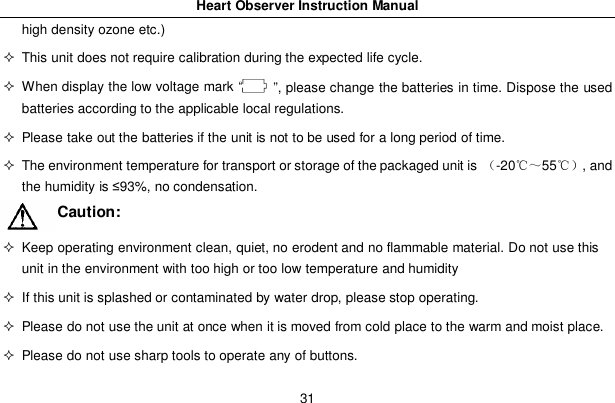
Heart Observer Instruction Manual31high density ozone etc.)  This unit does not require calibration during the expected life cycle.  When display the low voltage mark “   ”, please change the batteries in time. Dispose the usedbatteries according to the applicable local regulations.  Please take out the batteries if the unit is not to be used for a long period of time.  The environment temperature for transport or storage of the packaged unit is -2055, andthe humidity is 93%, no condensation.Caution:  Keep operating environment clean, quiet, no erodent and no flammable material. Do not use thisunit in the environment with too high or too low temperature and humidity  If this unit is splashed or contaminated by water drop, please stop operating.  Please do not use the unit at once when it is moved from cold place to the warm and moist place.  Please do not use sharp tools to operate any of buttons.
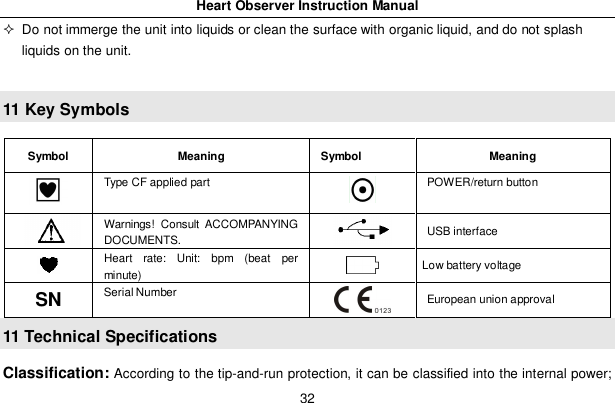
Heart Observer Instruction Manual32  Do not immerge the unit into liquids or clean the surface with organic liquid, and do not splashliquids on the unit.11 Key SymbolsSymbol Meaning Symbol MeaningType CF applied part POWER/return buttonWarnings! Consult ACCOMPANYINGDOCUMENTS. USB interfaceHeart rate: Unit: bpm (beat perminute) Low battery voltageSN Serial Number European union approval11 Technical SpecificationsClassification: According to the tip-and-run protection, it can be classified into the internal power;
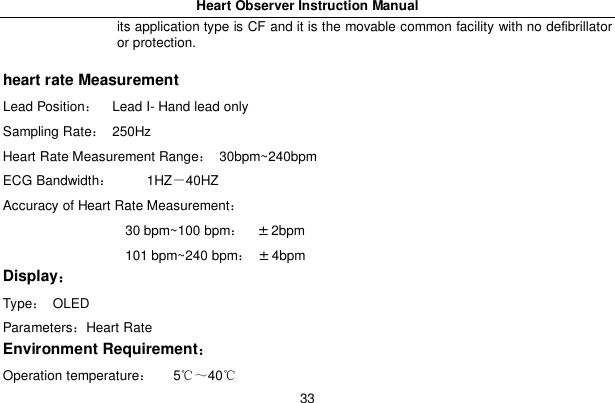
Heart Observer Instruction Manual33its application type is CF and it is the movable common facility with no defibrillatoror protection.heart rate MeasurementLead Position   Lead I- Hand lead onlySampling Rate 250HzHeart Rate Measurement Range 30bpm~240bpmECG Bandwidth     1HZ40HZAccuracy of Heart Rate Measurement                   30 bpm~100 bpm±2bpm                   101 bpm~240 bpm±4bpmDisplayType OLEDParametersHeart RateEnvironment RequirementOperation temperature   540
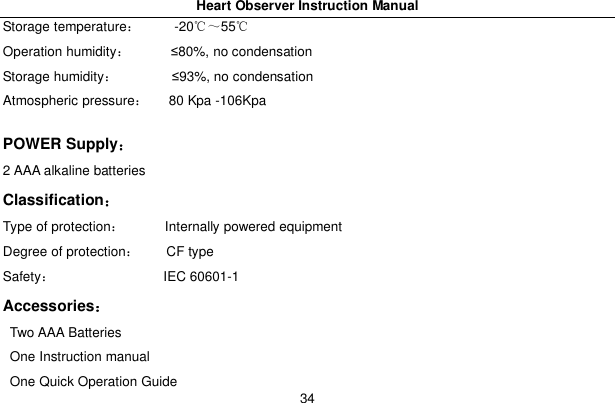
Heart Observer Instruction Manual34Storage temperature     -2055Operation humidity       80%, no condensationStorage humidity         93%, no condensationAtmospheric pressure    80 Kpa -106KpaPOWER Supply2 AAA alkaline batteriesClassificationType of protection       Internally powered equipmentDegree of protection     CF typeSafety                 IEC 60601-1AccessoriesTwo AAA BatteriesOne Instruction manualOne Quick Operation Guide
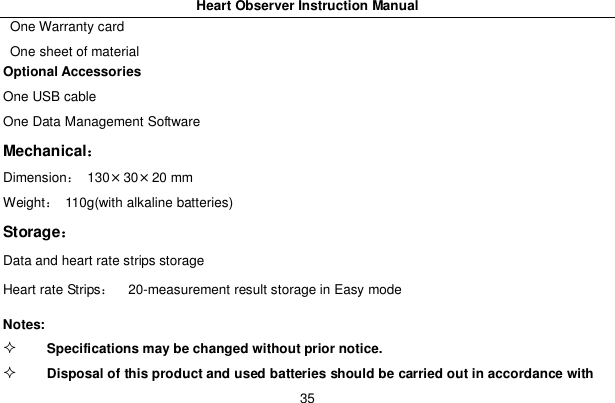
Heart Observer Instruction Manual35One Warranty cardOne sheet of materialOptional AccessoriesOne USB cableOne Data Management SoftwareMechanicalDimension 130×30×20 mmWeight  110g(with alkaline batteries)StorageData and heart rate strips storageHeart rate Strips   20-measurement result storage in Easy modeNotes:Specifications may be changed without prior notice.Disposal of this product and used batteries should be carried out in accordance with
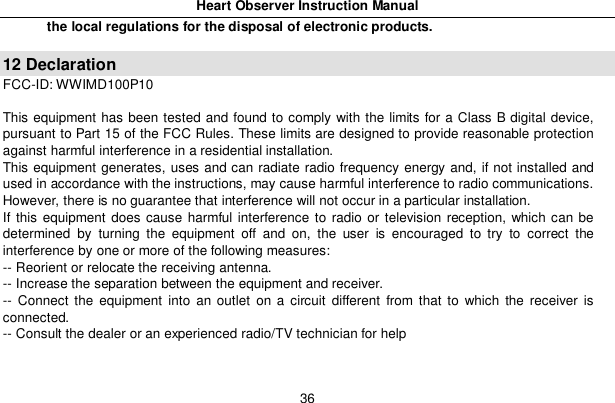
Heart Observer Instruction Manual36the local regulations for the disposal of electronic products.12 DeclarationFCC-ID: WWIMD100P10This equipment has been tested and found to comply with the limits for a Class B digital device,pursuant to Part 15 of the FCC Rules. These limits are designed to provide reasonable protectionagainst harmful interference in a residential installation.This equipment generates, uses and can radiate radio frequency energy and, if not installed andused in accordance with the instructions, may cause harmful interference to radio communications.However, there is no guarantee that interference will not occur in a particular installation.If this equipment does cause harmful interference to radio or television reception, which can bedetermined by turning the equipment off and on, the user is encouraged to try to correct theinterference by one or more of the following measures:-- Reorient or relocate the receiving antenna.-- Increase the separation between the equipment and receiver.-- Connect the equipment into an outlet on a circuit different from that to which the receiver isconnected.-- Consult the dealer or an experienced radio/TV technician for help
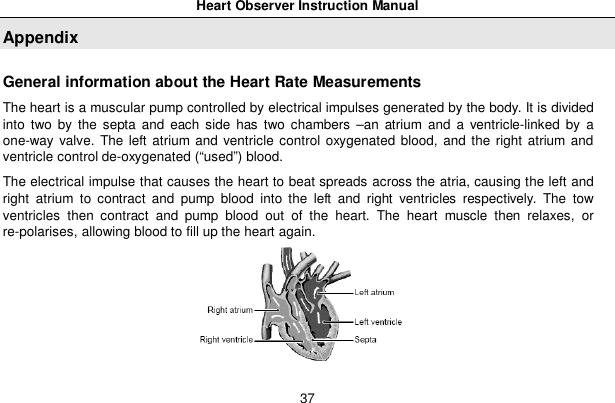
Heart Observer Instruction Manual37AppendixGeneral information about the Heart Rate MeasurementsThe heart is a muscular pump controlled by electrical impulses generated by the body. It is dividedinto two by the septa and each side has two chambers –an atrium and a ventricle-linked by aone-way valve. The left atrium and ventricle control oxygenated blood, and the right atrium andventricle control de-oxygenated (“used”) blood.The electrical impulse that causes the heart to beat spreads across the atria, causing the left andright atrium to contract and pump blood into the left and right ventricles respectively. The towventricles then contract and pump blood out of the heart. The heart muscle then relaxes, orre-polarises, allowing blood to fill up the heart again.
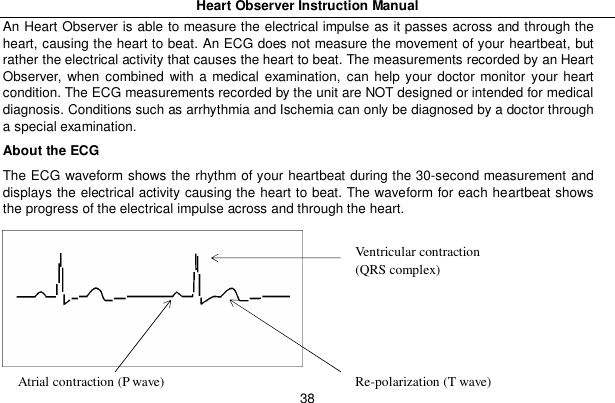
Heart Observer Instruction Manual38An Heart Observer is able to measure the electrical impulse as it passes across and through theheart, causing the heart to beat. An ECG does not measure the movement of your heartbeat, butrather the electrical activity that causes the heart to beat. The measurements recorded by an HeartObserver, when combined with a medical examination, can help your doctor monitor your heartcondition. The ECG measurements recorded by the unit are NOT designed or intended for medicaldiagnosis. Conditions such as arrhythmia and Ischemia can only be diagnosed by a doctor througha special examination.About the ECGThe ECG waveform shows the rhythm of your heartbeat during the 30-second measurement anddisplays the electrical activity causing the heart to beat. The waveform for each heartbeat showsthe progress of the electrical impulse across and through the heart.Ventricular contraction(QRS complex)Re-polarization (T wave)Atrial contraction (P wave)
Heart Observer Instruction Manual39The first peak indicates the spread of the impulse over the atria and the beginning of theircontraction. This is known as the P wave. The second peak indicates the spread of impulse overthe ventricles and the beginning of their contraction. This is known as the QRS complex. The thirdpeak indicates the activity as the heart relaxes (re-polarization), and is known as the T wave.What is Arrhythmia?Arrhythmia is a condition where the heartbeat rhythm is abnormal due to flaws in the bio-electricalsystem that drives the heartbeat. Typical symptoms are skipped heartbeats, premature contraction,an abnormally rapid (tachycardia) or slow (bradycardia) pulse. This can be caused by heart disease,ageing, physical predisposition, stress, lack of sleep, fatigue etc. Arrhythmia can only be diagnosedby a doctor through a special examination.What is Ischemia?Ischemia is a condition in which insufficient oxygen is supplied to parts of the heart or other parts ofthe body. This is usually due to a blockage or partial blockage of an artery.Ischemia can only be diagnosed by a doctor through a special examination.
Heart Observer Instruction Manual40
Heart Observer Instruction Manual41
Heart Observer Instruction Manual42

Navigation menu