Bellman and Symfon Group BE2022 Maxi Pro TV streamer User Manual Users manual

Bellman & Symfon AB Maxi Pro TV streamer Users manual

Users manual

ENGLISHBE2022BELLMAN & SYMFON AB
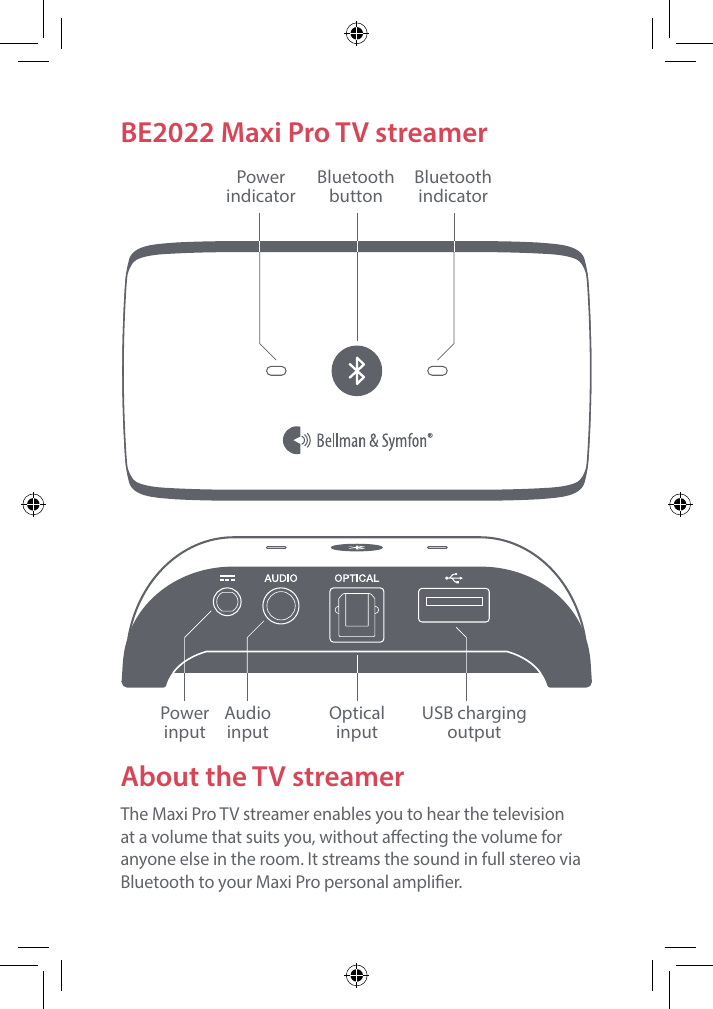
LAUDIO OUTPUT HEADPHONES OPTICALRBE2022 Maxi Pro TV streamerAbout the TV streamerThe Maxi Pro TV streamer enables you to hear the television at a volume that suits you, without aecting the volume for anyone else in the room. It streams the sound in full stereo via Bluetooth to your Maxi Pro personal amplier.PowerindicatorBluetooth indicatorBluetooth buttonPower  inputAudio  inputOptical  inputUSB charging output
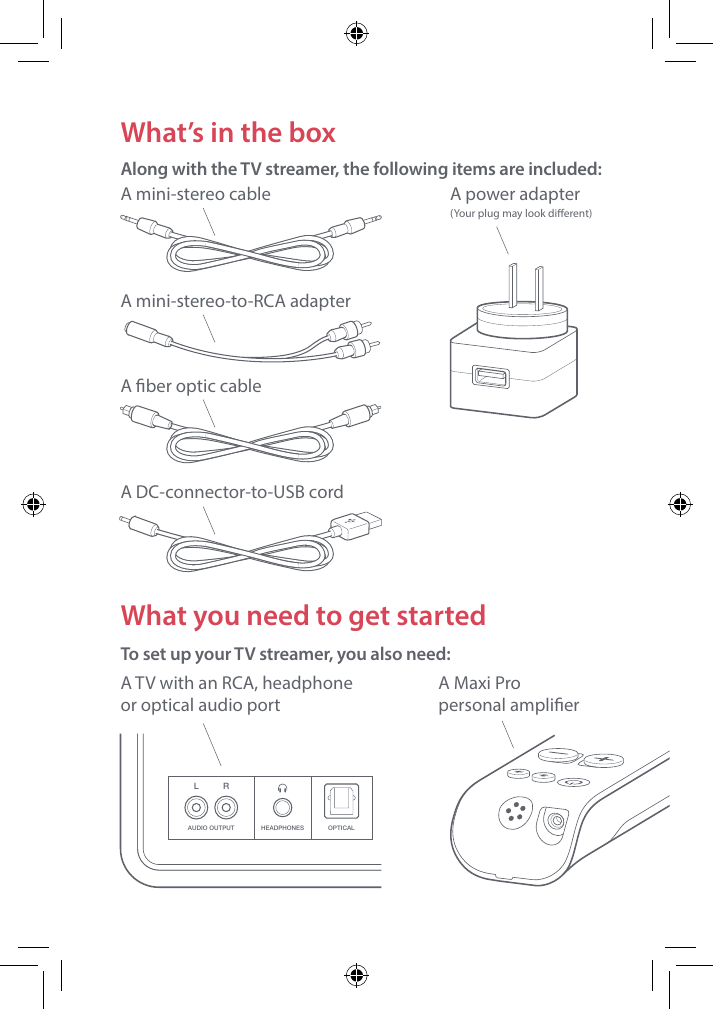
LAUDIO OUTPUT HEADPHONES OPTICALRWhat you need to get startedTo set up your TV streamer, you also need: A TV with an RCA, headphone  or optical audio portWhat’s in the box Along with the TV streamer, the following items are included: A mini-stereo cable A mini-stereo-to-RCA adapterA ber optic cableA power adapter  (Your plug may look dierent) A Maxi Pro  personal amplierA DC-connector-to-USB cord
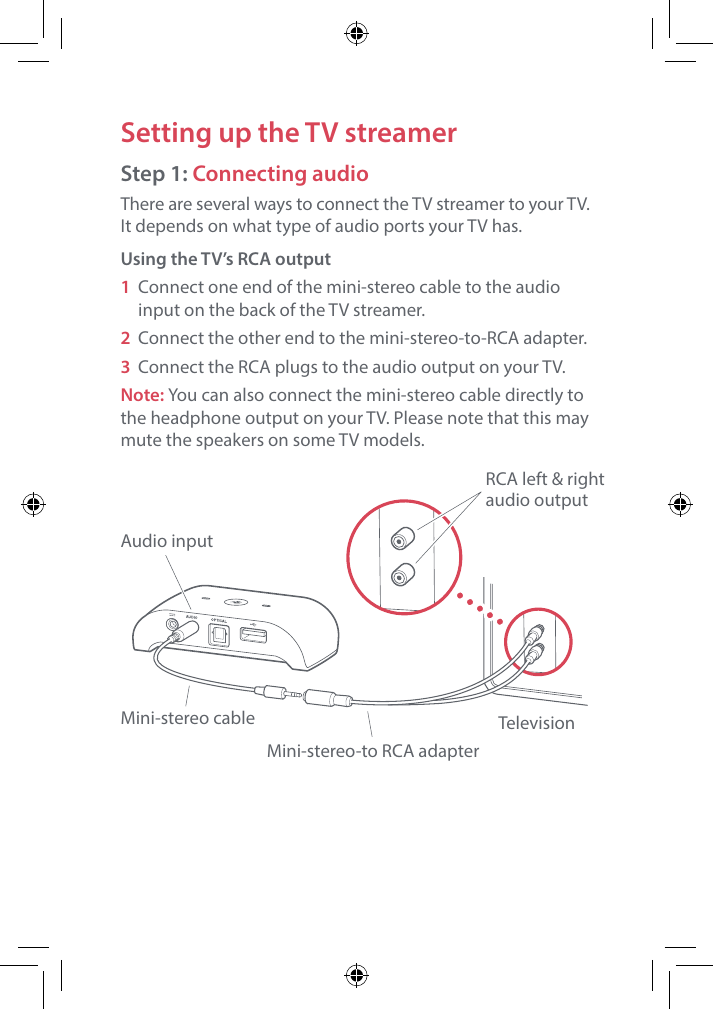
Setting up the TV streamerStep 1: Connecting audioThere are several ways to connect the TV streamer to your TV.  It depends on what type of audio ports your TV has.Using the TV’s RCA output1 Connect one end of the mini-stereo cable to the audio input on the back of the TV streamer.2  Connect the other end to the mini-stereo-to-RCA adapter.3 Connect the RCA plugs to the audio output on your TV.Note: You can also connect the mini-stereo cable directly to the headphone output on your TV. Please note that this may mute the speakers on some TV models.Audio inputMini-stereo cableMini-stereo-to RCA adapterTelevisionRCA left & rightaudio output
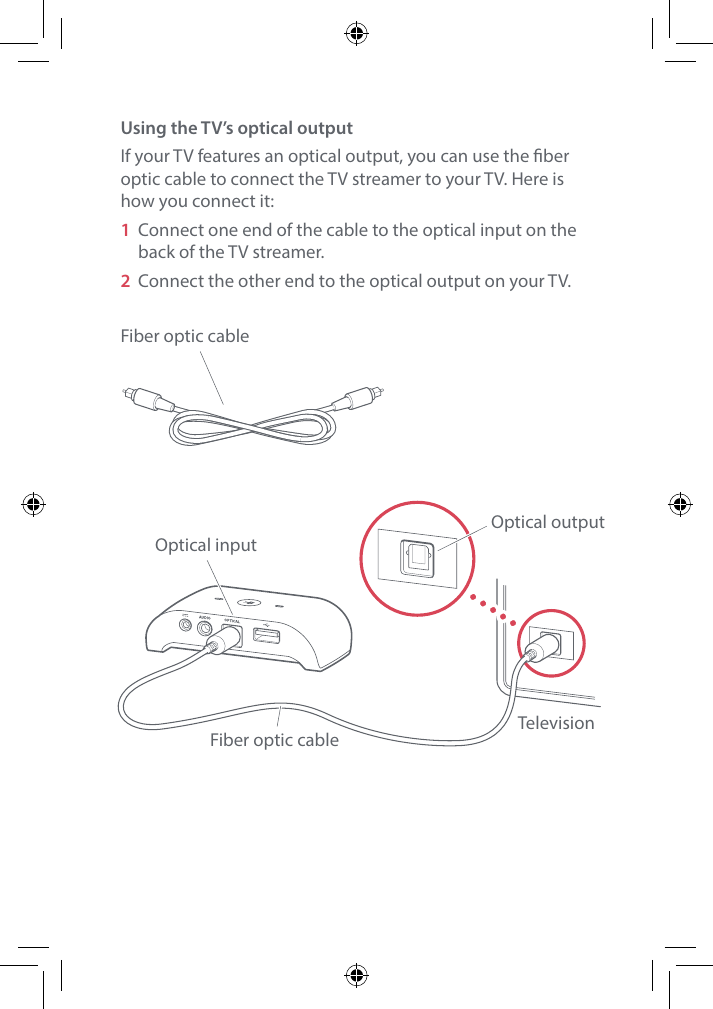
Using the TV’s optical outputIf your TV features an optical output, you can use the ber optic cable to connect the TV streamer to your TV. Here is how you connect it:1  Connect one end of the cable to the optical input on the back of the TV streamer.2  Connect the other end to the optical output on your TV. Fiber optic cableRCA left & rightaudio outputOptical inputFiber optic cable TelevisionOptical output
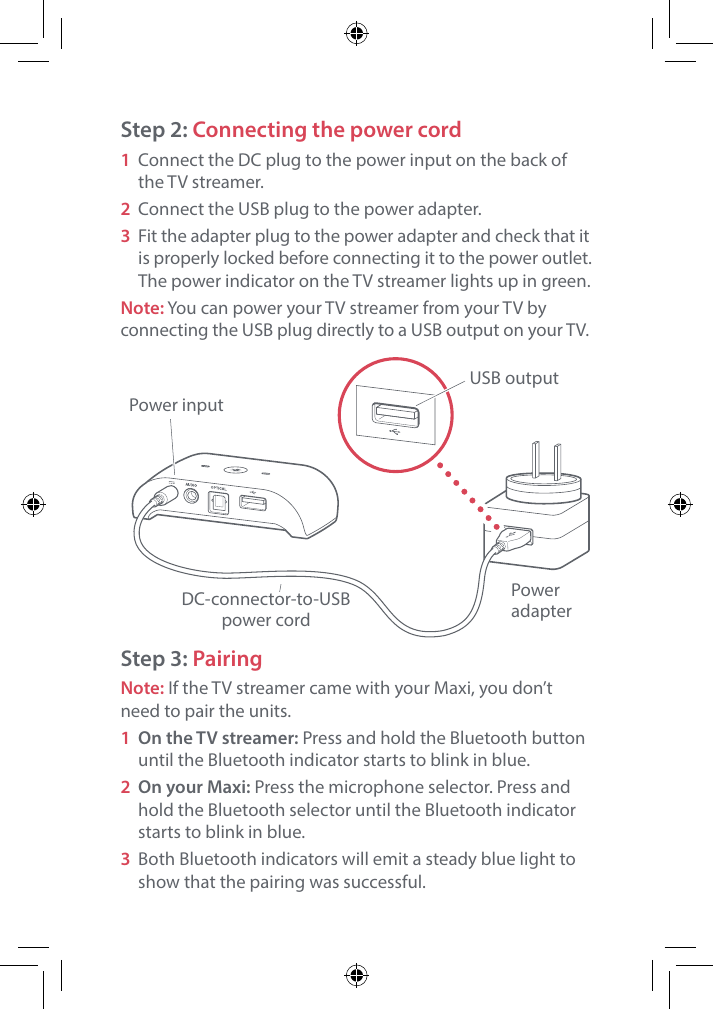
Step 2: Connecting the power cord1  Connect the DC plug to the power input on the back of the TV streamer. 2 Connect the USB plug to the power adapter.3  Fit the adapter plug to the power adapter and check that it is properly locked before connecting it to the power outlet. The power indicator on the TV streamer lights up in green.Note: You can power your TV streamer from your TV by connecting the USB plug directly to a USB output on your TV.Step 3: PairingNote: If the TV streamer came with your Maxi, you don’t need to pair the units.1  On the TV streamer: Press and hold the Bluetooth button until the Bluetooth indicator starts to blink in blue. 2  On your Maxi: Press the microphone selector. Press and hold the Bluetooth selector until the Bluetooth indicator starts to blink in blue.3  Both Bluetooth indicators will emit a steady blue light to show that the pairing was successful. Power inputPower adapterUSB outputDC-connector-to-USBpower cord
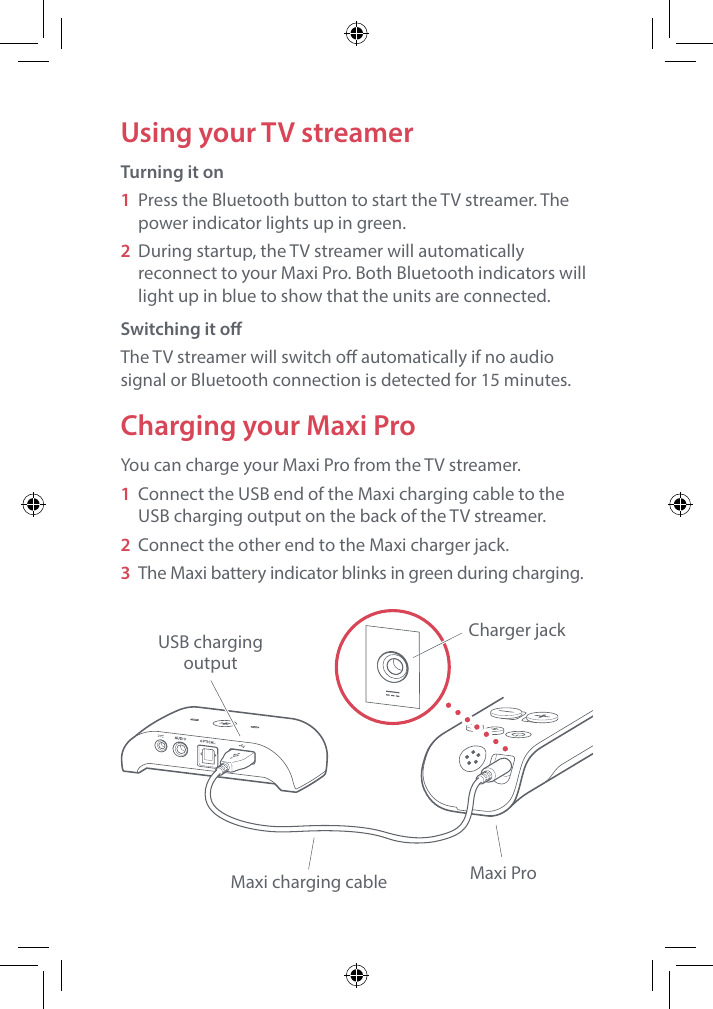
Using your TV streamerTurning it on1  Press the Bluetooth button to start the TV streamer. The power indicator lights up in green.2  During startup, the TV streamer will automatically reconnect to your Maxi Pro. Both Bluetooth indicators will light up in blue to show that the units are connected. Switching it oThe TV streamer will switch o automatically if no audio signal or Bluetooth connection is detected for 15 minutes.Charging your Maxi ProYou can charge your Maxi Pro from the TV streamer.1  Connect the USB end of the Maxi charging cable to the USB charging output on the back of the TV streamer.2  Connect the other end to the Maxi charger jack.3  The Maxi battery indicator blinks in green during charging.USB chargingoutputMaxi charging cable Maxi ProCharger jack
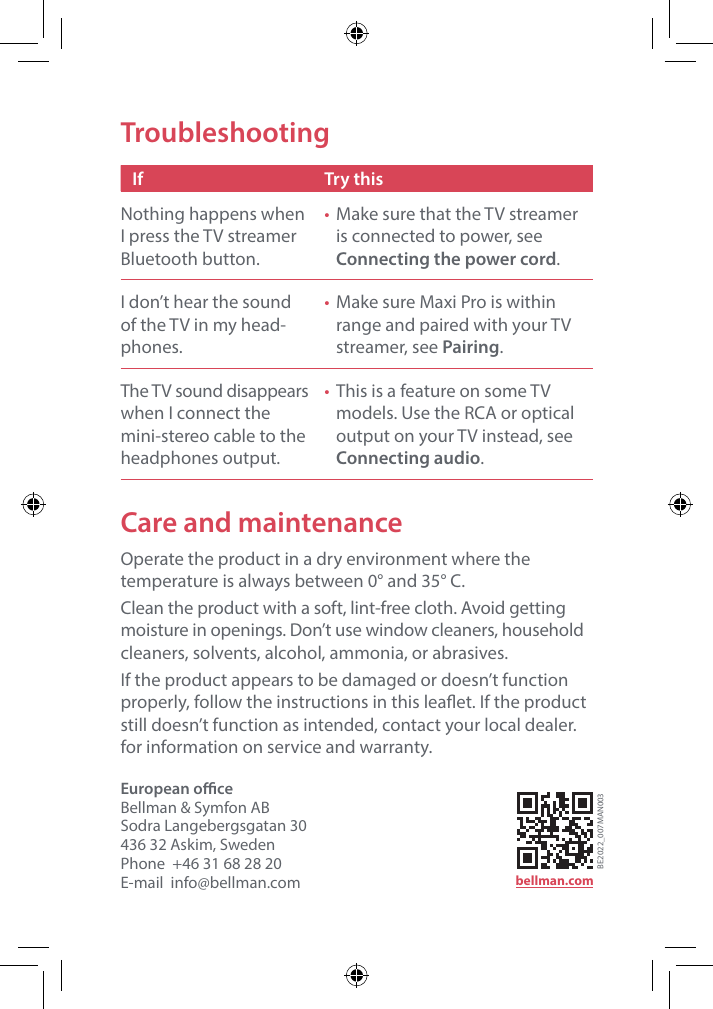
Care and maintenanceOperate the product in a dry environment where the temperature is always between 0° and 35° C. Clean the product with a soft, lint-free cloth. Avoid getting moisture in openings. Don’t use window cleaners, household cleaners, solvents, alcohol, ammonia, or abrasives.If the product appears to be damaged or doesn’t function properly, follow the instructions in this leaet. If the product still doesn’t function as intended, contact your local dealer. for information on service and warranty.TroubleshootingIf Try thisNothing happens when I press the TV streamer Bluetooth button.•  Make sure that the TV streamer is connected to power, see  Connecting the power cord.I don’t hear the sound of the TV in my head-phones.•  Make sure Maxi Pro is within range and paired with your TV streamer, see Pairing.The TV sound disappears when I connect the mini-stereo cable to the headphones output.•  This is a feature on some TV models. Use the RCA or optical output on your TV instead, see Connecting audio.European oceBellman & Symfon AB Sodra Langebergsgatan 30436 32 Askim, SwedenPhone  +46 31 68 28 20E-mail  info@bellman.com bellman.comBE2022_007MAN003
Support centersEurope Bellman & Symfon AB Södra Långebergsgatan 30Askim, Västra Götaland436 32, Sweden Call +46 31 7483750 E-mail info@bellman.comNorth America Bellman & Symfon Service Center 1081 West Innovation Drive Kearney, MO 64060, U.S.A Call +1 877 720 3401 Toll Free  Germany Bellman & Symfon Deutschland Uelzener Str. 14 21335 Lüneburg Call +49 800 7433338 E-mail info@bellman.deAsia Pacic Bellman & Symfon Asia 339 Huanshi Dong Rd Guangzhou, China, 510095 Call +86 20 8318 2950 E-mail  info.cn@bellman.comBE2022_024WCD002© and TM 2018 Bellman & Symfon AB. All rights reserved.BE2022_024WCD002_Maxi-Pro-warranty-card.indd   1 2017-12-20   08:46:25
ENGLISHWarranty cardBE2022_024WCD002_Maxi-Pro-warranty-card.indd   2 2017-12-20   08:46:25
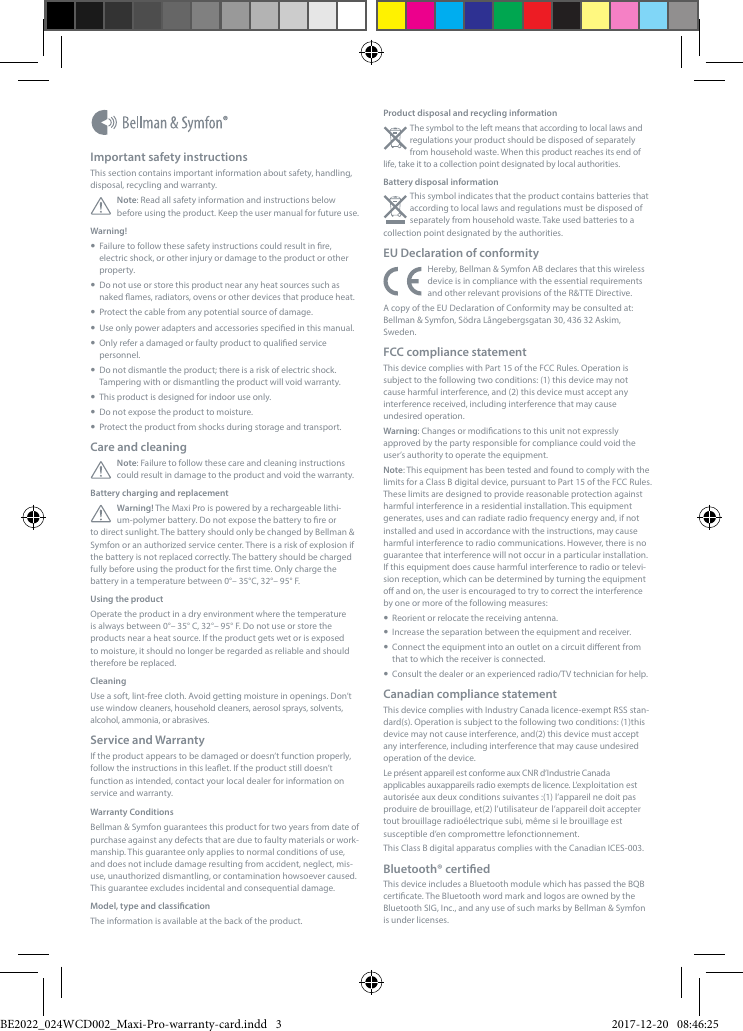
Product disposal and recycling informationThe symbol to the left means that according to local laws and regulations your product should be disposed of separately from household waste. When this product reaches its end of life, take it to a collection point designated by local authorities. Battery disposal informationThis symbol indicates that the product contains batteries that according to local laws and regulations must be disposed of separately from household waste. Take used batteries to a collection point designated by the authorities.EU Declaration of conformityHereby, Bellman & Symfon AB declares that this wireless device is in compliance with the essential requirements and other relevant provisions of the R&TTE Directive.A copy of the EU Declaration of Conformity may be consulted at: Bellman & Symfon, Södra Långebergsgatan 30, 436 32 Askim, Sweden.FCC compliance statementThis device complies with Part 15 of the FCC Rules. Operation is subject to the following two conditions: (1) this device may not cause harmful interference, and (2) this device must accept any interference received, including interference that may cause undesired operation.Warning: Changes or modications to this unit not expressly approved by the party responsible for compliance could void the user’s authority to operate the equipment.Note: This equipment has been tested and found to comply with the limits for a Class B digital device, pursuant to Part 15 of the FCC Rules. These limits are designed to provide reasonable protection against harmful interference in a residential installation. This equipment generates, uses and can radiate radio frequency energy and, if not installed and used in accordance with the instructions, may cause harmful interference to radio communications. However, there is no guarantee that interference will not occur in a particular installation. If this equipment does cause harmful interference to radio or televi-sion reception, which can be determined by turning the equipment o and on, the user is encouraged to try to correct the interference by one or more of the following measures:  Reorient or relocate the receiving antenna.  Increase the separation between the equipment and receiver.  Connect the equipment into an outlet on a circuit dierent from that to which the receiver is connected.  Consult the dealer or an experienced radio/TV technician for help.Canadian compliance statementThis device complies with Industry Canada licence-exempt RSS stan-dard(s). Operation is subject to the following two conditions: (1)this device may not cause interference, and(2) this device must accept any interference, including interference that may cause undesired operation of the device.    Le présent appareil est conforme aux CNR d’Industrie Canada applicables auxappareils radio exempts de licence. L’exploitation est autorisée aux deux conditions suivantes :(1) l’appareil ne doit pas produire de brouillage, et(2) l’utilisateur de l’appareil doit accepter tout brouillage radioélectrique subi, même si le brouillage est susceptible d’en compromettre lefonctionnement.This Class B digital apparatus complies with the Canadian ICES-003.Bluetooth® certiedThis device includes a Bluetooth module which has passed the BQB certicate. The Bluetooth word mark and logos are owned by the Bluetooth SIG, Inc., and any use of such marks by Bellman & Symfon is under licenses.Important safety instructionsThis section contains important information about safety, handling, disposal, recycling and warranty.Note: Read all safety information and instructions below before using the product. Keep the user manual for future use.Warning!   Failure to follow these safety instructions could result in re, electric shock, or other injury or damage to the product or other property.  Do not use or store this product near any heat sources such as naked ames, radiators, ovens or other devices that produce heat.  Protect the cable from any potential source of damage.  Use only power adapters and accessories specied in this manual.  Only refer a damaged or faulty product to qualied service personnel.  Do not dismantle the product; there is a risk of electric shock. Tampering with or dismantling the product will void warranty.  This product is designed for indoor use only.  Do not expose the product to moisture.  Protect the product from shocks during storage and transport.Care and cleaningNote: Failure to follow these care and cleaning instructions could result in damage to the product and void the warranty.Battery charging and replacementWarning! The Maxi Pro is powered by a rechargeable lithi-um-polymer battery. Do not expose the battery to re or to direct sunlight. The battery should only be changed by Bellman & Symfon or an authorized service center. There is a risk of explosion if the battery is not replaced correctly. The battery should be charged fully before using the product for the rst time. Only charge the battery in a temperature between 0°– 35°C, 32°– 95° F.Using the productOperate the product in a dry environment where the temperature is always between 0°– 35° C, 32°– 95° F. Do not use or store the products near a heat source. If the product gets wet or is exposed to moisture, it should no longer be regarded as reliable and should therefore be replaced.CleaningUse a soft, lint-free cloth. Avoid getting moisture in openings. Don’t use window cleaners, household cleaners, aerosol sprays, solvents, alcohol, ammonia, or abrasives.Service and WarrantyIf the product appears to be damaged or doesn’t function properly, follow the instructions in this leaet. If the product still doesn’t function as intended, contact your local dealer for information on service and warranty.Warranty ConditionsBellman & Symfon guarantees this product for two years from date of purchase against any defects that are due to faulty materials or work-manship. This guarantee only applies to normal conditions of use, and does not include damage resulting from accident, neglect, mis-use, unauthorized dismantling, or contamination howsoever caused. This guarantee excludes incidental and consequential damage. Model, type and classicationThe information is available at the back of the product.BE2022_024WCD002_Maxi-Pro-warranty-card.indd   3 2017-12-20   08:46:25
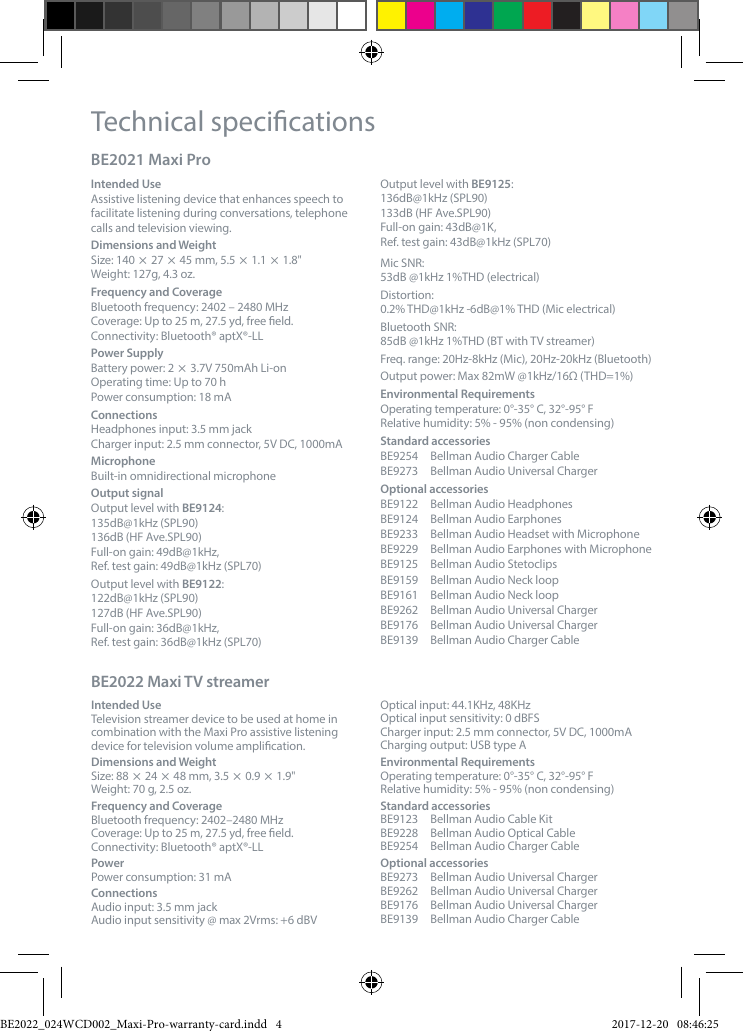
Technical specicationsBE2021 Maxi Pro Intended UseAssistive listening device that enhances speech to facilitate listening during conversations, telephone calls and television viewing.Dimensions and WeightSize: 140  27  45 mm, 5.5  1.1  1.8"Weight: 127g, 4.3 oz. Frequency and Coverage Bluetooth frequency: 2402 – 2480 MHzCoverage: Up to 25 m, 27.5 yd, free eld. Connectivity: Bluetooth® aptX®-LLPower SupplyBattery power: 2  3.7V 750mAh Li-onOperating time: Up to 70 hPower consumption: 18 mAConnectionsHeadphones input: 3.5 mm jackCharger input: 2.5 mm connector, 5V DC, 1000mAMicrophoneBuilt-in omnidirectional microphoneOutput signalOutput level with BE9124: 135dB@1kHz (SPL90) 136dB (HF Ave.SPL90)Full-on gain: 49dB@1kHz,  Ref. test gain: 49dB@1kHz (SPL70)Output level with BE9122:122dB@1kHz (SPL90)127dB (HF Ave.SPL90)Full-on gain: 36dB@1kHz,  Ref. test gain: 36dB@1kHz (SPL70)Output level with BE9125: 136dB@1kHz (SPL90)133dB (HF Ave.SPL90)Full-on gain: 43dB@1K,  Ref. test gain: 43dB@1kHz (SPL70)Mic SNR:  53dB @1kHz 1%THD (electrical)Distortion: 0.2% THD@1kHz -6dB@1% THD (Mic electrical)Bluetooth SNR: 85dB @1kHz 1%THD (BT with TV streamer)Freq. range: 20Hz-8kHz (Mic), 20Hz-20kHz (Bluetooth)Output power: Max 82mW @1kHz/16Ω (THD=1%)Environmental RequirementsOperating temperature: 0°-35° C, 32°-95° FRelative humidity: 5% - 95% (non condensing)Standard accessoriesBE9254  Bellman Audio Charger CableBE9273  Bellman Audio Universal ChargerOptional accessoriesBE9122  Bellman Audio HeadphonesBE9124  Bellman Audio EarphonesBE9233  Bellman Audio Headset with MicrophoneBE9229  Bellman Audio Earphones with MicrophoneBE9125  Bellman Audio StetoclipsBE9159  Bellman Audio Neck loopBE9161  Bellman Audio Neck loopBE9262  Bellman Audio Universal ChargerBE9176  Bellman Audio Universal ChargerBE9139  Bellman Audio Charger CableBE2022 Maxi TV streamer Intended UseTelevision streamer device to be used at home in combination with the Maxi Pro assistive listening device for television volume amplication.Dimensions and WeightSize: 88  24  48 mm, 3.5  0.9  1.9"Weight: 70 g, 2.5 oz. Frequency and Coverage Bluetooth frequency: 2402–2480 MHzCoverage: Up to 25 m, 27.5 yd, free eld. Connectivity: Bluetooth® aptX®-LLPowerPower consumption: 31 mAConnectionsAudio input: 3.5 mm jackAudio input sensitivity @ max 2Vrms: +6 dBVOptical input: 44.1KHz, 48KHz Optical input sensitivity: 0 dBFSCharger input: 2.5 mm connector, 5V DC, 1000mACharging output: USB type AEnvironmental RequirementsOperating temperature: 0°-35° C, 32°-95° FRelative humidity: 5% - 95% (non condensing) Standard accessoriesBE9123  Bellman Audio Cable KitBE9228  Bellman Audio Optical CableBE9254  Bellman Audio Charger CableOptional accessories BE9273  Bellman Audio Universal ChargerBE9262  Bellman Audio Universal ChargerBE9176  Bellman Audio Universal ChargerBE9139  Bellman Audio Charger CableBE2022_024WCD002_Maxi-Pro-warranty-card.indd   4 2017-12-20   08:46:25

Navigation menu