Beltronics USA G7M4R Radar Detector User Manual

Beltronics USA Inc Radar Detector

Manual

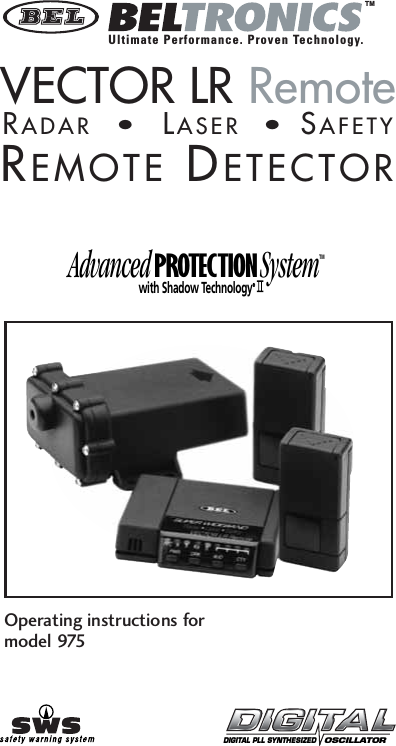
Advanced PROTECTION SystemTMwith Shadow Technology®®®®®TMOperating instructions formodel 975DIGITAL PLL SYNTHESIZED   OSCILLATORVECTOR LR RemoteREMOTE DETECTORRADAR•LASER• SAFETYUltimate Performance. Proven Technology.
INTRODUCTIONSHADOW TECHNOLOGY®IISELECTABLE FEATURESThank you for purchasing a BELTRONICS Remote installation Radar/Laser/Safety detector. Your VECTOR LR Remote detector provides all the benefits of full coverage Radar and laser detection as well as detection of the Safety Warning System™— all in the discretion of a concealed installation. To ensure maximum benefit from your new VECTOR LR Remote, please read all operating instructions completely as well as the accompanying installation instructions enclosed. VECTOR LR REMOTE contains Shadow Technology®II, making it undetectable to the Interceptor VG-2 or any other Radar Detector Detector (RDD). Only Shadow Technology®II has been consistently proven undetectable to the Interceptor VG-2.1. Auto-Mute On/OffSelect Auto-Mute ON for several X,K, Super Wideband Ka audio alertsfollowed by a “clicking” tone to quietly inform you for the duration ofthe signal. Auto-Mute OFF provides a continuous series of X,K, Super Wideband Ka audio alerts. Factory setting is Auto-Mute OFF. (see page 9)2. Safety Warning System®(sws™)VECTOR LR Remote detects encoded signals from sws™  transmitters and provides distinct alerts for: Highway Construction/Maintenance, Highway Hazard Zones, Weather Related Hazards, Emergency/Slow Moving Vehicles and Travel/Convenience Information. For a complete description of sws™ of audio and visual alerts, see page 163. X/K/Ka Band On of OffSelect “X ON/X OFF”, “K ON/K OFF” or “Ka ON/Ka OFF” depending upon your driving environment and selectivity requirements. Factory settingis X/K/Ka ON. (see page 9).4. Four Ka Narrow FrequenciesSelect Ka Narrow sweeps of 33.8 GHz, 34.36 GHz, 34.7 GHz or 35.5 GHz. Narrow Band Ka frequencies are especially useful in areas where you know a specific Ka Narrow sweep is used. Factory setting isSuper Wideband Ka ON. (see page 9)2
3Table of ContentsProfile of Features  . . . . . . . . . . . . . . . . . . . . . . . . . . 4Description of Features  . . . . . . . . . . . . . . . . . . . . . . 5kPower-on Test Sequence  . . . . . . . . . . . . . . . . . . 5kTutorial Mode . . . . . . . . . . . . . . . . . . . . . . . . . . . 6kLow Voltage Warning  . . . . . . . . . . . . . . . . . . . . . 6kLoss of Antenna Connection  . . . . . . . . . . . . . . . 6kMemory Retention of Feature Selections  . . . . . 6kAdjusting the Audio Level  . . . . . . . . . . . . . . . . . 6kAudio/Visual Alert for Instant-On/Pulsed Radar . 7kDRK (Dim/Dark) Button  . . . . . . . . . . . . . . . . . . . 7kAUD (Auto-Mute/Volume Control) Button  . . . . 7kCTY (City/Highway) Button  . . . . . . . . . . . . . . . . 8kCity X/K/Ka Mode . . . . . . . . . . . . . . . . . . . . . . . 8kReset to Factory Settings . . . . . . . . . . . . . . . . . . 9Selectable Features  . . . . . . . . . . . . . . . . . . . . . . . . . 9kEntering Selectable Features Mode . . . . . . . . . . 11Understanding Radar, Laser and SWS™ . . . . . . . . . . 12Interpretation of Alerts  . . . . . . . . . . . . . . . . . . . . . . 13kRadar Alerts  . . . . . . . . . . . . . . . . . . . . . . . . . . . . 13kTypical False Alert   . . . . . . . . . . . . . . . . . . . . . . . 16kLaser Alerts  . . . . . . . . . . . . . . . . . . . . . . . . . . . . 16kSafety Warning System®(SWS™) Alerts  . . . . . . . 17Performance Verification  . . . . . . . . . . . . . . . . . . . . . 17Troubleshooting  . . . . . . . . . . . . . . . . . . . . . . . . . . . . 18Consumer Warranty  . . . . . . . . . . . . . . . . . . . . . . . . . 19Service  . . . . . . . . . . . . . . . . . . . . . . . . . . . . . . . . . . . 20kWarranty Service  . . . . . . . . . . . . . . . . . . . . . . . . 20kPost-Warranty Service  . . . . . . . . . . . . . . . . . . . . 21 Specifications . . . . . . . . . . . . . . . . . . . . . . . . . . . . . . 21Accessories . . . . . . . . . . . . . . . . . . . . . . . . . . . . . . . . 22
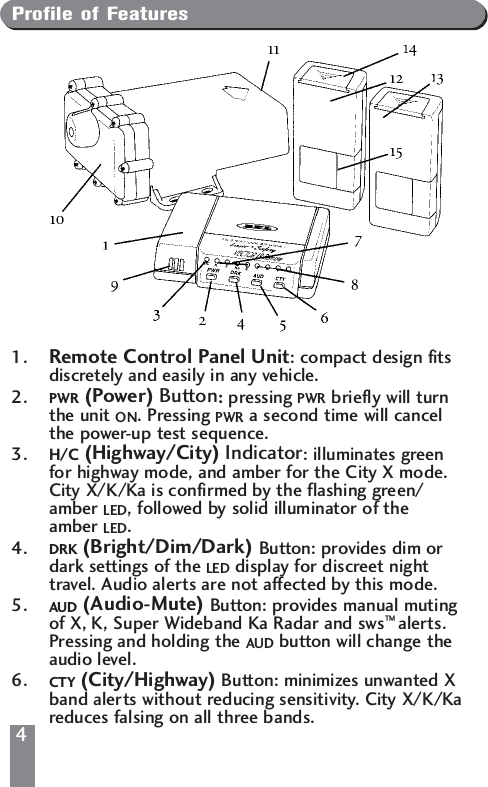
Profile of Features1. Remote Control Panel Unit: compact design fitsdiscretely and easily in any vehicle.2.  PWR (Power) Button:pressing PWR briefly will turnthe unit ON. Pressing PWR a second time will cancelthe power-up test sequence.3. H/C (Highway/City) Indicator: illuminates greenfor highway mode, and amber for the City X mode.City X/K/Ka is confirmed by the flashing green/amber LED, followed by solid illuminator of the amber LED.4.  DRK (Bright/Dim/Dark) Button: provides dim ordark settings of the LED display for discreet nighttravel. Audio alerts are not affected by this mode.5. AUD (Audio-Mute) Button: provides manual mutingof X, K, Super Wideband Ka Radar and sws™ alerts.Pressing and holding the AUD button will change theaudio level.6. CTY (City/Highway) Button: minimizes unwanted Xband alerts without reducing sensitivity. City X/K/Kareduces falsing on all three bands. 4
7. X/K/Ka/sws™ Band Visual Alerts : the alertreceived is confirmed by the illumination of theappropriate LED.8. Four-LED Display: LEDs illuminate sequentially toconfirm signal strength of Radar signals. A differentalert pattern confirms detection of Laser and SafetyWarning System®(sws™).9. Audio Speaker: all audible alerts are emitted fromthis location.10 . Antenna Sensor: contains the electronics whichdetect police Radar. This antenna sensor installs withinthe engine compartment of the vehicle.11. Antenna Face: receiving portion of the antenna sensormust have a clear, unobstructed view of the road ahead.12 . Front Laser Sensor: with 11’ cable mounts onto thewindshield using the supplied suction cup.13 . Rear Laser Sensor: with 17’ cable mounts to rearwindow of vehicle.14 . Windshield Accessory Cover: remove the cover toinsert the suction cup mount.15 . Optical Opening: Laser signals are received at thisside of the Laser sensor which must have a clear,unobstructed view of the road ahead.Description of FeaturesPower-on Test SequenceEach time your unit is turned on, alerts for Laser, X, K,Ka and Safety Warning System™are presented briefly. This is immediately followed by the status of the four Selectable Features:1. Auto Mute – a clicking tone confirms if feature is engaged.2. Safety Warning System®– illumination if the green “S” LED confirms if feature is engaged.3. X/K/Ka Bands – illumination of the appropriate LEDconfirms if band is activated. Full illumination of four signal strength LED, coupled with the illumination of the Ka LED confirms Super Wideband Ka mode.5
64. Ka Narrow Bands –With Super Wideband Ka turned OFF, any Ka narrow frequency which is engaged is confirmed by rapid flashing of appropriate signal strength LED (see page 10).Pressing PWR anytime during the power up test sequence will suspend the normal power up test sequence; your unit will be ready for operation.Tutorial ModeThe tutorial mode allows you to become more familiar with all audible and visual alerts. To engage this mode, press the AUD and the CTY buttons simultaneously while the unit is ON. The audio/visual alerts will be presented slowly in order of Laser, K, X, Ka and SWS™. The tutorial mode will cycle these audio/visual alerts continuously. Press the P/V button to exit. Two “beeps” confirm exiting from the tutorial mode. Your unit is now ON and ready for operation.Set and Forget MemoryAny time VECTOR LR Remote is turned OFF all feature settings you have selected are retained in the unit’s memory. Set and Forget Memory eliminates the need to reset your preferred feature settings each time your unit is turned OFF and then back ON.Low Voltage WarningVECTOR LR Remote continually checks voltage to ensure proper performance. The unit’s operating range is 10.0 to 16.0 volts. If voltage falls below 10.0,the highway (H) or city (C) indicator will flash, coupled with a series of steady audible “beeps”.Loss of Antenna ConnectionIn the event the control panel and Radar antenna are not properly connected, the X/K/Ka band indicators will flash, coupled with steady audible “beeps”.
7Audio/Visual Alert for Instant-On/Pulsed RadarThis type of signal appears suddenly when a Radar unit is “triggered”. The instant-on or pulsed alert consists of an intense, three-second, X, K or Super Wideband Ka audio “burst”, coupled with the flashing of the four-LED display.DRK (Bright/Dim/Dark) ButtonThe DRK button allows selection of a dim or dark setting for all LEDS. To engage dim mode, press the DRK buttononce. A  single “beep” confirms your selection. To completely cancel the illumination of all LEDS, press DRKa second time. You’ll notice the city/highway LED remainsdim to confirm your unit  is receiving power. To return to a full bright setting, press the DRK button a third time; two “beeps” confirm this selection. Use of the DIMbutton does not affect audio alerts.Important – if you press the DRK button and do not receive audible confirmation, the audio level has been set too low.AUD (Audio Mute/Volume Control) ButtonManual Muting of Audio Alerts (Radar and SWS™)Whether Auto-Mute is selected ON or OFF in Selectable Features, the audio alerts can be completely muted by pressing the AUD button during an alert. No audible alert will be heard for approximately 12 seconds. If the signal is still present after 12 seconds, the unit will remain in manual mute mode.Volume ControlPress and hold AUD button to engage the volume control. Release the AUD button when you have reached your desired audio setting. To reverse direction of the volume, release and press AUD a second time.Note – because Laser alerts are not lengthy or sustained, muting is not required (see page 17).
88CITY (City/Highway) ButtonThe City X mode has been designed to effectively reduce unwanted audio alerts caused by intrusion alarms, door openers, and other devices which share X band with police Radar – without reducing sensitivity. Signals from non-police Radar sources are frequently encountered in urban and suburban areas, making use of this mode ideal in these areas.Pressing the CTY button once engages the City X mode which is confirmed by a single “beep” and the illumination of the yellow city LED labeled H/C. Once engaged, weak X band signals encountered will produce no audible alert until the signal strength reaches a preset level. However visual alerts are processed the instant an X band signal is detected, keeping you quietly informed. Since most “false” X band signals are weak, the use of the city node allowsyou to drive out of their range before they reach preset level and trigger a full audio alert. In contrast, signals from X band traffic Radar are generally stronger and will exceed the preset level, causing a full X band audio alert.Activating the City X mode will not change Super Wideband Ka, K or instant-on X band Radar alert patterns.Note – the city mode has no effect on the reception of Laser or SWS™.City X/K/KaCity X/K/Ka provides an alternate approach for improving X, K and Ka band selectivity and is ideal for use in areas with a high level of microwave transmissions which can cause falsing on all three bands. To engage City X/K/Ka mode, press the City button twice. City X/K/Ka is confirmed by the alternate flashing of the green/amber H/C LED for one second. After the one second, the LED returns to solid amber illumination.
9Once engaged, weak X, K or Super Wideband Ka signals encountered will produce no audible alerts until the signal strength reaches a preset level. Visual alerts are processed the instant an X, K or Super Wideband Ka signal is detected, keeping you quietly informed.Pressing CTY a third time returns you to highway mode; two beeps and the illumination of the green H/C LEDconfirms highway mode.Reset to Factory SettingsYou can reset your unit to factory settings for volume, DRK, AUDIO, CITY and Selectable Features. With the unit  OFF press and hold the AUD and CTY buttons, then press the PWR button. Two “beeps” will confirm factory settings are reset. Your unit is now ON and ready for operation.Selectable FeaturesAuto-Mute, Safety Warning System®, X, K, Super Wideband Ka ON/OFF and the four Ka Narrow frequencies:33.8 GHz, 34.36 GHz, 34.7 and GHz, 35.5 GHz, are all features that may be selected ON or OFF, depending upon your preference.Auto-Mute On/OffWhen activated, unit will provide several X, K, Super Wideband Ka audio alerts followed by a “clicking” tone to keep you quietly informed for as long as the signal is present. The clicking becomes more rapid as the strength of the Radar signal increases. Auto-Mute enables you to conveniently monitor extended encounters without having to manually mute or adjust the volume setting.Note – because of their urgency, Laser alerts are not affected.
10With Auto-Mute off, unit will provide a continuous series of X, K, Super Wideband Ka or Laser audio alerts. This standard setting is often preferred when background noise in a vehicle is loud. Factory setting is Auto-Mute off. Auto-Mute ON is confirmed by the FULL illumination of all 4 red LEDs in the signal strength meter. Auto-Mute off is confirmed when the same 4 red LEDs flash.Safety Warning System®(SWS™) – LED#1When activated, unit will detect signals from SWS™transmitters and provide audio/visual warnings if SWS™transmitters are in use. Factory setting is ON.X Band On/Off – X BAND LEDWhen activated, unit will detect X Band signals (10.456 GHz - 10.60 GHz).K Band On/Off – K BAND LEDWhen activated, unit will detect K Band signals (24.050 GHz - 24.205 GHz).Super Wideband Ka On/Off – KA BAND LEDWhen activated, unit will detect Super Wideband Ka signals (33.4 GHz - 36.0 GHz).Ka Narrow Band (33.8 GHz) On/Off (LED#1)When activated, unit will detect ONLY the 33.8 GHzsegment of the Ka bandwidth.Ka Narrow Band (34.36 GHz) On/Off (LED#2)When activated, unit will detect ONLY the 34.36 GHzsegment of the Ka bandwidth.
11Ka Narrow Band (34.7 GHz) On/Off (LED#3)When activated, unit will detect ONLY the 34.7 GHzsegment of the Ka bandwidth.Ka Narrow Band (35.5 GHz) On/Off (LED#4)When activated, unit will detect ONLY the 35.5 GHzsegment of the Ka bandwidth.Note: Always operate your unit in Super Wideband Ka unless you are certain of a specific Ka Narrow band is used in your area of travel. When engaging one, two, three or all four Ka Narrow bands,  remember to disengage Super Wideband Ka. If you do not, the Super Wideband Ka will override any or all Ka Narrow bands that you have engaged.Entering Selectable Features Mode1. With the unit OFF, press and hold the CTY button followed by the PWR button. A short “beep” will sound indicating you’re in Selectable Features mode.2. Illumination of the appropriated LED confirms feature is ON. Conversely, if the selected LED is flashing, the feature is OFF.3. Feature selection is made by pressing the CTY button to move forward in the list of Selectable Features; pressing DRK moves backward in the list. Selectable Features appear in the following order and are identified as follows:• Auto-Mute —          all signal strength LED’s illuminate.• SWS — “S” LED• X Band — “X” LED• K Band — “K” LED• Super Wideband Ka –  “Ka” LED• Ka Narrow 33.8 —      first red Signal Strength LED
12• Ka Narrow 34.3 — second red Signal Strength LED• Ka Narrow 34.7 — third red Signal Strength LED• Ka Narrow 35.5 — fourth red Signal Strength LED4. Full illumination of the LED confirms feature is ON. Flashing of the LED confirms feature is OFF. Use the AUD button to make your selection.5. Press the PWR button to retain your new settings for Selectable Features. Two “beeps” will confirm that you  have exited from Selectable Features. Your unit will be ON and ready for operation.Understanding Radar, Laser and SWS™Three Radar FrequenciesThree microwave frequencies have been allocated by the FCC (Federal Communications Commission) and are used for traffic Radar. They are:X band: 10.45 - 10.60 GHzK band: 24.050 - 24.250 GHzSuper Wideband Ka: 33.4 GHz to 36.0 GHzBoth X and K bands are well known to motorists who have traveled with Radar detectors. Introduced first was X band Radar which became common during the 1960s. In the mid 1970s, the lower powered, more difficult to detect K band Radar was introduced. In 19 87,   FCC approval was given for use of Radar equipment using a third frequency, Ka. In response tothis, BELTRONICS introduced the first Radar detectors capable of detecting X, K and Ka band signals. In late 1990, FCC approval was given to Wideband Ka: 34.2 GHz to 35.2 GHz. Once again, BEL responded with Wideband Ka detection. Today, your VECTOR LR Remote detects the entire Super Wideband Ka frequency allotted for police monitoring– 33.4 to 36.0 GHz, as well as four specific Ka narrow frequencies.
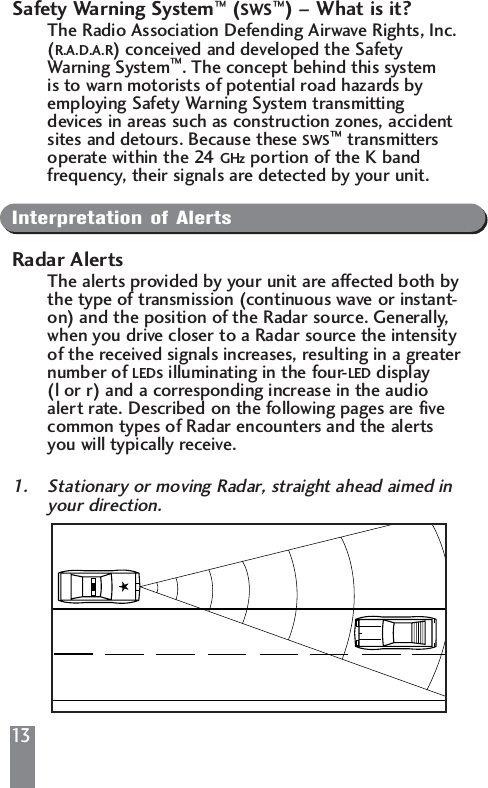
13Safety Warning System™(SWS™) – What is it?The Radio Association Defending Airwave Rights, Inc. (R.A.D.A.R) conceived and developed the Safety Warning System™. The concept behind this system is to warn motorists of potential road hazards by employing Safety Warning System transmitting devices in areas such as construction zones, accident sites and detours. Because these SWS™transmitters operate within the 24 GHz portion of the K band frequency, their signals are detected by your unit.Interpretation of AlertsRadar AlertsThe alerts provided by your unit are affected both bythe type of transmission (continuous wave or instant-on) and the position of the Radar source. Generally, when you drive closer to a Radar source the intensity of the received signals increases, resulting in a greaternumber of LEDs illuminating in the four-LED display  (l or r) and a corresponding increase in the audio alert rate. Described on the following pages are five common types of Radar encounters and the alerts you will typically receive.1. Stationary or moving Radar, straight ahead aimed in your direction.
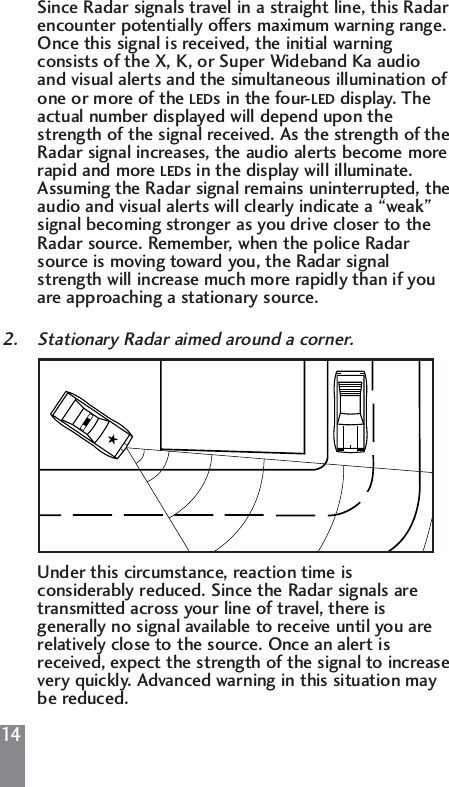
14Since Radar signals travel in a straight line, this Radar encounter potentially offers maximum warning range. Once this signal is received, the initial warning consists of the X, K, or Super Wideband Ka audio and visual alerts and the simultaneous illumination of one or more of the LEDs in the four-LED display. The actual number displayed will depend upon the strength of the signal received. As the strength of theRadar signal increases, the audio alerts become more rapid and more LEDs in the display will illuminate. Assuming the Radar signal remains uninterrupted, theaudio and visual alerts will clearly indicate a “weak” signal becoming stronger as you drive closer to the Radar source. Remember, when the police Radar source is moving toward you, the Radar signal strength will increase much more rapidly than if you are approaching a stationary source.2. Stationary Radar aimed around a corner.Under this circumstance, reaction time is considerably reduced. Since the Radar signals are transmitted across your line of travel, there is generally no signal available to receive until you are relatively close to the source. Once an alert is received, expect the strength of the signal to increasevery quickly. Advanced warning in this situation may be reduced.
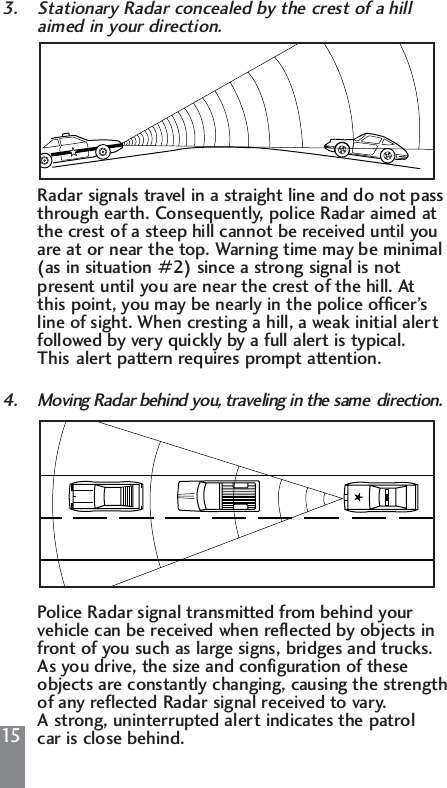
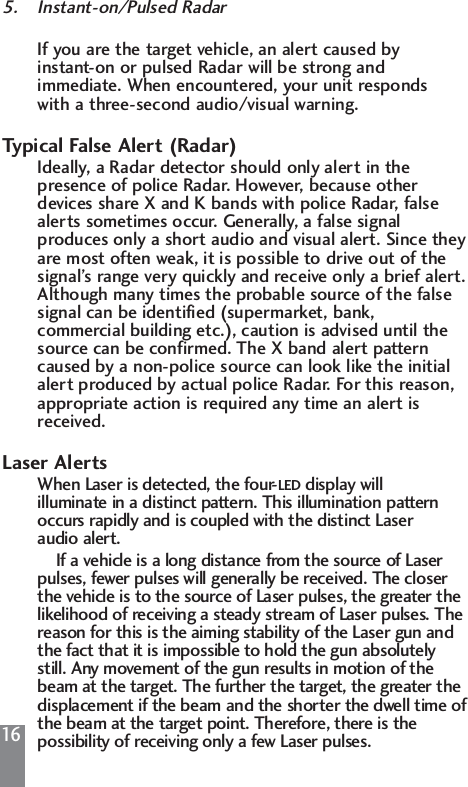
153. Stationary Radar concealed by the crest of a hill aimed in your direction.Radar signals travel in a straight line and do not pass through earth. Consequently, police Radar aimed at the crest of a steep hill cannot be received until you are at or near the top. Warning time may be minimal (as in situation #2) since a strong signal is not present until you are near the crest of the hill. At this point, you may be nearly in the police officer’s line of sight. When cresting a hill, a weak initial alert followed by very quickly by a full alert is typical. This alert pattern requires prompt attention.4. Moving Radar behind you, traveling in the same  direction.Police Radar signal transmitted from behind your vehicle can be received when reflected by objects in front of you such as large signs, bridges and trucks. As you drive, the size and configuration of these objects are constantly changing, causing the strength of any reflected Radar signal received to vary. A strong, uninterrupted alert indicates the patrol car is close behind.
165. Instant-on/Pulsed RadarIf you are the target vehicle, an alert caused by instant-on or pulsed Radar will be strong and immediate. When encountered, your unit responds with a three-second audio/visual warning.Typical False Alert (Radar)Ideally, a Radar detector should only alert in the presence of police Radar. However, because other devices share X and K bands with police Radar, false alerts sometimes occur. Generally, a false signal produces only a short audio and visual alert. Since theyare most often weak, it is possible to drive out of the signal’s range very quickly and receive only a brief alert.Although many times the probable source of the false signal can be identified (supermarket, bank, commercial building etc.), caution is advised until the source can be confirmed. The X band alert pattern caused by a non-police source can look like the initial alert produced by actual police Radar. For this reason, appropriate action is required any time an alert is received.Laser AlertsWhen Laser is detected, the four-LED display will illuminate in a distinct pattern. This illumination pattern occurs rapidly and is coupled with the distinct Laser audio alert.If a vehicle is a long distance from the source of Laser pulses, fewer pulses will generally be received. The closer the vehicle is to the source of Laser pulses, the greater the likelihood of receiving a steady stream of Laser pulses. The reason for this is the aiming stability of the Laser gun and the fact that it is impossible to hold the gun absolutely still. Any movement of the gun results in motion of the beam at the target. The further the target, the greater the displacement if the beam and the shorter the dwell time ofthe beam at the target point. Therefore, there is the possibility of receiving only a few Laser pulses.
17Due to these characteristics, all Laser alerts received from your unit should be taken seriously.Safety Warning System®(SWS™) AlertsWith the Safety Warning System™feature ON and an SWS™transmitter in use, your detector will provide a unique, three-second, two-tone “beep” followed by clicking, coupled with the flashing of the (S) LED and the appropriate LED in the four-LED display. To select SWS™ON or OFF, see Selectable Features, page 9.LED #1 confirms Highway Construction/Maintenance aheadLED # 2 confirms Highway Hazard Zone Advisory which could indicate an accident aheadLED # 3 confirms Weather Related Hazards such as fog aheadLED # 4 confirms Emergency/Slow Moving Vehicles in transitWhen only the SWS™audio warning is provided, the category referenced is Travel/Convenience Informationor the category is unknown.Performance VerificationConditions that Affect Radar AlertsIf you feel your unit is not alerting properly, keep in mind that there are many conditions that influence the intensity or duration of an alert:1. The police are using instant-on/pulsed Radar, in which case no signal is transmitted until visual contact has been made with your vehicle. For detection of this signal, you must rely on reflected signals from Radar directed at traffic traveling ahead of you.
182. The police Radar unit is positioned perpendicular to the road, around a curve, or just over the crest of a hill, thus, significantly reducing the reception range.3. The highway traffic between your vehicle and the police Radar source is heavy, blocking or reflecting transmitted signals. The presence of several large trucks between you and the police Radar unit could also significantly reduce reception.4. Rain or humid weather conditions can absorb transmitted signals before they reach your vehicle, again reducing detection range.5. The police Radar unit is not properly tuned and is transmitting outside allocated X, K or Super Wideband Ka frequency ranges.Conditions that Affect Laser AlertsIf you feel your unit is not properly alerting to the presence of Laser signals, keep in mind that rain, fog, high humidity and other weather conditions can affect the range that the Laser beam can be detected.TroubleshootingSolutions for Common ProblemsIf your unit is not operating properly, please refer to the outline on the next page.
19If you experience a problem with your unit that is notcovered in the previous outline, please call, Monday to Friday, 9 AM – 5 PM, EST, for assistance:1-800-341-2288 USA1-800-268-3994 CANADAConsumer WarrantyLimited One-Year Warranty1. This warranty covers all defects in materials and workmanship. This warranty does not apply if the unit  has been subject to physical abuse, improper installation, modification or if the housing or serial number of the unit has been removed.2. BELTRONICS manufacturers its products using parts and components which are new or equivalent to new in accordance with industry standard practices.3. The enforceability of this warranty is limited to theProblem Possible Cause Corrective ProcedureUnit not Cable not properly  Check connection  receiving connected to antennapower or control panelFuse in red power  Replace with 1 lead is defective amp, 250 3AG fuse “Poor” Antenna opening Reposition antenna withdetection partially blocked. unobstructed view ofrange road ahead. Clean off anyaccumulated debris onantenna face.Unit alarms Connection to antenna Re-connect cable to  every second sensor is disengaged antenna sensorErratic or High concentration Use city mode. Review  frequent of non-police X band section in this manual onalerts band sourcesPerformance Verification.
20original consumer purchaser and is not transferable to, or enforceable by, any subsequent owner.4. In the event of a defect, malfunction or other failure to conform to this warranty, BELTRONICS will, at its sole discretion, repair or replace the unit at no charge. You are responsible for all shipping costs in connection with warranty service pursuant to this warranty.5. This warranty commences on the date of retail purchase and shall be effective for a period of one year.6. There are no express warranties covering the unit other than those set forth in this warranty. All implied warranties are limited to the one-year period of this warranty and no warranties, expressed or implied, extend beyond this one-year period. Some states do not allow limitation on how long an implied warranty lasts, so the above limitation may not apply to you.7. BELTRONICS will in no event be liable for any consequential, incidental, indirect or special damages (including, but not limited to, lost profits) arising out of or in connection with the use, misuse or function of the unit. Some states do not allow the exclusion of limitation of incidental or consequential damages, so the above limitation or exclusion may not apply to you.8. This warranty gives you specific legal rights and you may also have other rights which vary from state to state.9 . You must  provide a copy of a dated sales receipt for your unit in order to receive service under warranty.ServiceWarranty ServiceIf you feel your detector is not functioning properly please review this manual, particularly the section on Performance Verification. If you still feel service is required, please follow the instructions below:
211. To obtain service during the one-year warranty period, please call the appropriate number below to obtain a Return Authorization (RA) Number and theproper mailing address. Clearly mark the RA number on the exterior of a suitable mailing package before sending your detector, postage paid and insured.1-800-341-2288 USA1-800-268-3994 CANADA2. For your own protection, obtain a proof of delivery receipt. Shipping costs are your responsibility.3. Enclose with your unit the following information:(a) Your name, complete return address and written description of the problem (no P.O. Box please).(b) A telephone number where you can be reached during regular business hours.(c) A copy of your dated sales receipt.Post-Warranty ServiceThe following arrangements apply if the one-year warranty period has expired or you are not able to provide a copy of your dated sales receipt indicating purchase within the past twelve months.1. Return your unit to the appropriate address under Warranty Serviceand follow steps 1 through 3(b) outlined in that section.2. Enclose with your unit $85 US or $115 CAN to cover inspection and postage return.SpecificationsRadar Receiver Frequencies: 10.525 GHz ±50 MHz(X band), 24.150 GHz ±110   MHz (K band), 33.4 GHzto 36.0 GHz (Super Wideband Ka), Ka Narrow: 33.8 GHz, 34.36 GHz, 34.7 GHz, 35.5 GHz.Laser Wavelength: 905 nm
22Operating Temperatures: -4°F to 158°F (-20°C to 70°C)Power Supply Requirements: 13.8 Volts, 250 mARadar Antenna Type: patented diecast horn with integrated transition to microstrip mixerWeight: 7.0 ounces (Antenna Sensor), 3.0 ounces (Control Panel), 1.8 ounce (Laser Sensor)Maximum Dimensions3.66” (L) x 3.14”(W) x 1.77” (H) (Antenna Sensor)2.25” (L) x 2.0”(W) x .66” (H) (Control Panel)2.62” (L) x 1.24”(W) x .72” (H) (Laser Sensors)BELTRONICS reserves the right to incorporate design improvements which may not be reflected in the specifications listed in this owner’s manual.AccessoriesIf you require any additional accessories, replacementaccessories or any accessory which is not included with your unit, call to order or for more information, Monday to Friday, 9 AM-5 PM, EST.1-800-341-2288 USA1-800-268-3994 CANADAMODEL COST COSTDESCRIPTION NUMBER USA CANADARadar Antenna 975 $170.00 $300.00Control PanelIn-Dash Mounting Kit DA-55 $8.50 $12.00Control PanelMounting Kit DA-56 $8.50 $12.00VECTOR LR RemoteControl Panel DA-504 $67.00 $93.00
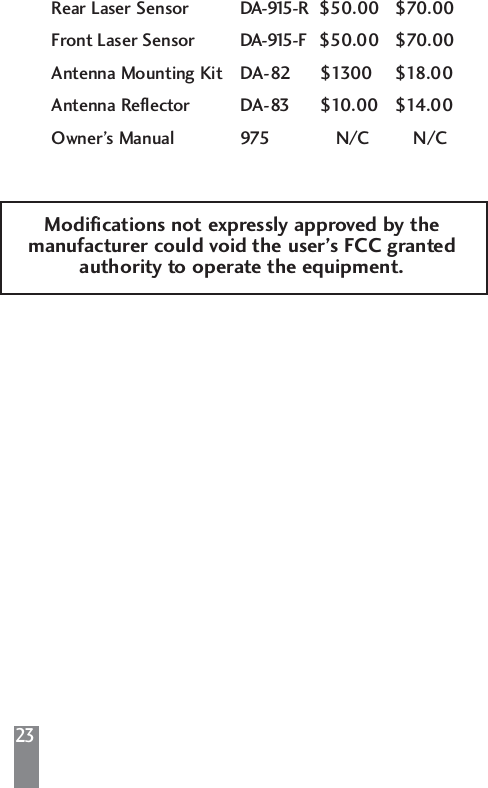
23Rear Laser Sensor DA-915-R $50.00 $70.00Front Laser Sensor DA-915-F $50.00 $70.00Antenna Mounting Kit DA-82 $1300 $18.00Antenna Reflector DA-83 $10.00 $14.00Owner’s Manual 975 N/C N/CModifications not expressly approved by themanufacturer could void the user’s FCC grantedauthority to operate the equipment.
Head Office2422 Dunwin DriveMississauga, OntarioCanada L5L 1J91-800-341-2288 USA1-800-268-3994 CANwwwwww..bbeellttrroonniiccss..ccoommThis product is subject to one or more of the following patents:U.S.P.   #4,571,593  C.P.   #1,187,586#4,630,054 #1,187,602#4,961,074 #1,295,714#4,952,936 #1,295,715#5,402,087#5,446,932 Other Patents PendingSafety Warning System®L.C.–Patents Pending, Fundamental Mixer Technology, FMT are registered trademarks of BELTRONICS. VECTOR LR, Total Tracking Laser and TTL are trademarks of BELTRONICS.Safety Warning System and SWS are trademarks of Safety Warning System L.C. Printed in Canada    273004-08TMUltimate Performance. Proven Technology.

Navigation menu