BenQ Mobile and OHG HKW Car Kit with Bluetooth Transceiver User Manual HKW 600
BenQ Mobile GmbH & Co. OHG Car Kit with Bluetooth Transceiver HKW 600
Users Manual
r
i
g
h
t page
(
1
)
o
f
HKW
-
600
en,
A31008
-
H6551
-
A102
-
1
-
4W28
(12
.
08
.
2004
,
©
S
i
emens
A
G
2
0
0
3
,
W
:
\
I
C
M
_
M
P
_
C
C
Q
_
S
_
U
M
\
0
3
F
L
0
0
4
4
3
C
ar
K
i
t
6
5
\
C
K
_
F
i
na
l
\
C
ar_
K
i
t_
B
l
uetoot
h
_
2
\
F
rame
\
H
K
W
-
6
0
0
_en.
f
m
1
V
A
R
L
anguage: un
k
nown;
V
A
R
i
ssue
d
ate:
1
2
-
M
arc
h
-
2
0
0
3
Car Kit Blue-
tooth (en) Compatibility
The Car Kit Bluetooth (hereafter
referred to as "Car Kit") is intend-
ed for the following phones:
• Siemens mobile phones with
a Bluetooth interface.
• Siemens mobile phones S55,
SX1 and mobile phones with
a Bluetooth interface from
other manufacturers can
also be used with limited
functionality.
• Siemens mobile phones of the
65 Series or later without a
Bluetooth interface (use with
optional holder possible).
Safety precautions
These installation instructions only
provide basic information. Because
the different car makes and car radio
connections require different installa-
tions, the assembly must be per-
formed in line with the individual
circumstances.
Please read the operating instructions
and the safety precautions carefully
before use!
Remember to comply with
legal requirements and lo-
cal restrictions when using
the phone. This could ap-
ply e.g. when driving or at
petrol stations.
General and vehicle-spe-
cific guidelines for the in-
stallation of add-on
devices must be observed;
where applicable, profes-
sional assistance should
be sought (in the case of
electrical fusing, wiring,
contact with hot compo-
nents, contact with fuel,
etc.).
The installation of the com-
ponents must not impede:
• The driver's freedom of
movement, safety or line
of vision
• The safety of any pas-
senger (especially in the
event of an accident)
• The vehicle's safety
mechanisms (airbag,
seat belts, etc.)
Take care during installa-
tion! Young children may
choke on small parts.
© Siemens AG 2003, W:\ICM_MP_CCQ_S_UM\03FL00443 Car Kit 65\CK_Final\Car_Kit_Bluetooth_2\Frame\HKW-600_en.fm
l
e
f
t page
(
2
)
o
f
HKW
-
600
en,
A31008
-
H6551
-
A102
-
1
-
4W28
(12
.
08
.
2004
,
2
VAR Language: unknown; VAR issue date: 12-March-2003
Before using Bluetooth® accessories,
or a mobile phone inside a vehicle,
check the vehicle user guide for any
limitations on the use of these products.
For further details, please refer to
the operating instructions for your
mobile phone.
The device is only suitable
for 12V operation.
Do not install the device in
environments where there
is danger of explosion.
If your car is fitted with met-
allised windows, this may
impair the reception of the
phone. For optimum signal
reception, always use an
external antenna. Your
phone and the Car Kit must
be equipped with an exter-
nal antenna for installation.
Improper use and opening
of the components invali-
dates the warranty.
Please note:
Please dispose of unwant-
ed telephones and acces-
sories in accordance with
the relevant legislation.
Only use Siemens original
accessories. In this way
you will avoid possible
health risks and damage to
the product and ensure
compliance with the rele-
vant provisions.
r
i
g
h
t page
(
3
)
o
f
HKW
-
600
en,
A31008
-
H6551
-
A102
-
1
-
4W28
(12
.
08
.
2004
,
©
S
i
emens
A
G
2
0
0
3
,
W
:
\
I
C
M
_
M
P
_
C
C
Q
_
S
_
U
M
\
0
3
F
L
0
0
4
4
3
C
ar
K
i
t
6
5
\
C
K
_
F
i
na
l
\
C
ar_
K
i
t_
B
l
uetoot
h
_
2
\
F
rame
\
H
K
W
-
6
0
0
_en.
f
m
3
V
A
R
L
anguage: un
k
nown;
V
A
R
i
ssue
d
ate:
1
2
-
M
arc
h
-
2
0
0
3
Installation
Microphone, Display,
Loudspeaker
* Antenna and mobile holder are not
included in the scope of supply.
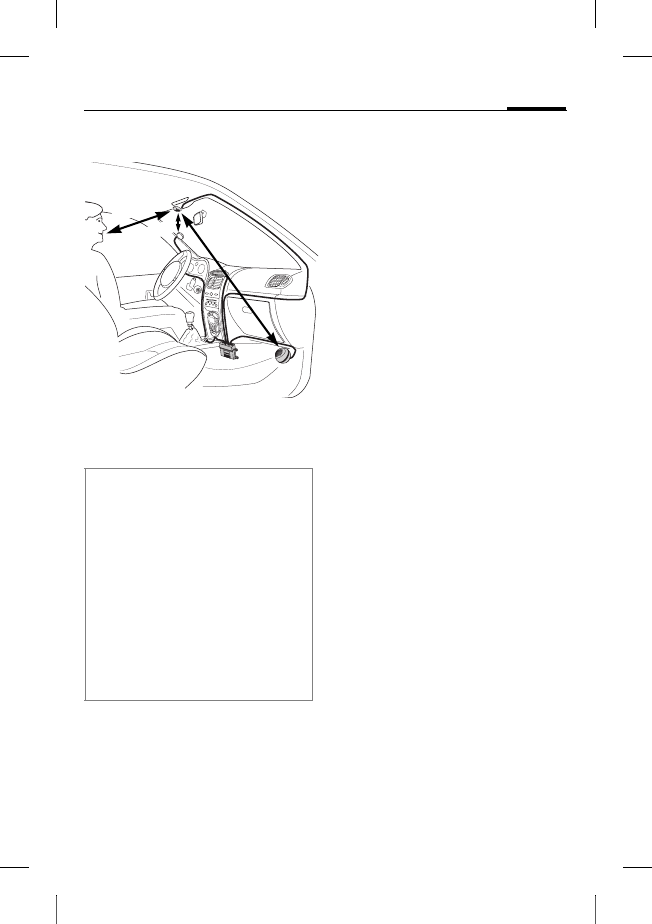
Run the cable for the external
microphone :, the display 6
and the loudspeaker 8 correctly
to suit the individual require-
ments of your vehicle.
Avoid damaging, bending or
squashing the cables.
Microphone
First clean the area where you
want to attach the external mi-
crophone : using a suitable
grease-dissolving cleaning
agent. The adhesive pad will on-
ly adhere permanently to a
grease-free surface.
Secure the external
microphone : pointing towards
the speaker at the required loca-
tion using the adhesive pads.
Display
Make sure you mount the dis-
play 6 in a position that allows
the driver optimal visual contact
and access.
You can attach the display 6
directly to the dashboard or fix it
with the help of the display
holder 7.
When performing the installation,
please note the following:
• Distance from the microphone :
to the loudspeaker 8 preferably
>1 m
• Distance from microphone :/
microphone cable to the phone
>50cm
• Distance from the microphone :
to the user's mouth < 80 cm
Avoid installing the microphone di-
rectly in the air flow of the sunroof,
window or ventilation.
> 50 cm
‹ 80 cm
>1 m
*
*

© Siemens AG 2003, W:\ICM_MP_CCQ_S_UM\03FL00443 Car Kit 65\CK_Final\Car_Kit_Bluetooth_2\Frame\HKW-600_en.fm
l
e
f
t page
(
4
)
o
f
HKW
-
600
en,
A31008
-
H6551
-
A102
-
1
-
4W28
(12
.
08
.
2004
,
4
VAR Language: unknown; VAR issue date: 12-March-2003
Direct installation of the display
First clean the area where you
want to attach the display 6 us-
ing a suitable grease-dissolving
cleaning agent. The adhesive
pad will only adhere permanent-
ly to a grease-free surface.
Mount the display 6 using the
adhesive pads.
Installation using the display holder
Mount the display holder 7 on-
to the dashboard with the adhe-
sive pad supplied or with appro-
priate screws*.
Then press the display 6 into
the display holder 7 until it
clicks into place.
Loudspeaker
The inclination and the rotation
of the loudspeaker 8 can be
adjusted. Loosen the set
screw in the base, install the
loudspeaker 8 and tighten
the screw.
Secure the loudspeaker 8 in a
suitable location (such as the
passenger-side footwell).
The screws can be found in the
base of the loudspeaker 8.
Wiring loom
Electrical connections
When connecting the Car Kit to
the wiring loom 3 ensure that
the function and operation of
other devices are not compro-
mised (e.g. voltage drop).
Disconnect the car battery cor-
rectly before installing the wir-
ing loom 3 and the electronics
box 1.
Connect the §B§ 12V+ line (red)
to the positive terminal of the
car battery.
Connect the §D§ line (brown) to
the negative terminal of the
car battery.
* Not included in the Siemens standard
scope of supply.

r
i
g
h
t page
(
5
)
o
f
HKW
-
600
en,
A31008
-
H6551
-
A102
-
1
-
4W28
(12
.
08
.
2004
,
©
S
i
emens
A
G
2
0
0
3
,
W
:
\
I
C
M
_
M
P
_
C
C
Q
_
S
_
U
M
\
0
3
F
L
0
0
4
4
3
C
ar
K
i
t
6
5
\
C
K
_
F
i
na
l
\
C
ar_
K
i
t_
B
l
uetoot
h
_
2
\
F
rame
\
H
K
W
-
6
0
0
_en.
f
m
5
V
A
R
L
anguage: un
k
nown;
V
A
R
i
ssue
d
ate:
1
2
-
M
arc
h
-
2
0
0
3
Connect the §C§ line (violet) to the
vehicle electrical system so that
12V+ or 24 V+ are applied when
the ignition is switched on.
Connecting the loudspeaker cable to
the wiring loom
Connect the white/black loud-
speaker cable + §G§ to the
green/black §E§ loudspeaker con-
nection using a cable
connector 9.
Connect the black loudspeaker
cable §H§ to the green loud-
speaker cable §F§ using a cable
connector 9.
Connecting the radio*
The Car Kit can be connected to
your car's audio system via the
phone-in connection of your car
radio. The loudspeakers of the
audio system are then used as a
play-back system for the Car Kit.
Please use the optional phone-in
adapter cable to ensure an opti-
mal connection to the radio.
Connect the connector cable §H§
of the wiring loom 3 to the
phone-in connection of your car
radio via the optional phone-in
adapter.
Then connect the connector ca-
ble §G§ directly to the signal-con-
ducting pole of the phone-in
connection of your car radio.
If the voltage levels of the Car Kit
and phone-in connection differ,
the voltage levels can be adjust-
ed with the phone-in adapter
cable.
Only use spade fuse connectors 4
for connecting the cable and then in-
sert 3A spade fuses 5 into the spade
fuse connectors 4.
To safeguard the wiring loom profes-
sionally, the fuses must be mounted
between the end of the wiring loom
supplied and the connector from the
vehicle.
* For vehicles with car radios with
phone-in connections. The car radio
is not included in the Siemens
standard scope of supply.
© Siemens AG 2003, W:\ICM_MP_CCQ_S_UM\03FL00443 Car Kit 65\CK_Final\Car_Kit_Bluetooth_2\Frame\HKW-600_en.fm
l
e
f
t page
(
6
)
o
f
HKW
-
600
en,
A31008
-
H6551
-
A102
-
1
-
4W28
(12
.
08
.
2004
,
6
VAR Language: unknown; VAR issue date: 12-March-2003
There is a wiring diagram and
further information on the
phone-in adapter cable on the
Siemens website:
www.siemens-mobile.com/
phoneinadapter
Radio Muting*
The radio signal can be switched
automatically to mute during
phone calls. Connect the radio
mute control line §A§ to the mute
input of the car radio.
Electronics box
Feed the lines for the following
components carefully to the
electronics box 1 without dam-
aging them and then connect
them with the electronics
box 1:
• Wiring loom 3,
• Display 6,
• External microphone :,
• Mobile holder cable (optional)
* For vehicles with car radios with
mute connections. The car radio is
not included in the Siemens
standard scope of supply.
Please refer to the car radio manufac-
turer's instructions.
Please make sure that the electronics
box 1 is not mounted on or between
metal objects. Only then can good ra-
dio communication be ensured.
Make sure that the electronics box 1
is securely mounted.
Ensure that the ventilation slots on the
electronics box 1 are not covered (at
least 2 cm space) and the installation
does not cause interference with any
other devices.
Do not place the connector cable be-
hind the electronics box 1 or wrap it
around the electronics box 1 as this
may lead to interference.
Insulate any unused cable ends with
insulating tape.
r
i
g
h
t page
(
7
)
o
f
HKW
-
600
en,
A31008
-
H6551
-
A102
-
1
-
4W28
(12
.
08
.
2004
,
©
S
i
emens
A
G
2
0
0
3
,
W
:
\
I
C
M
_
M
P
_
C
C
Q
_
S
_
U
M
\
0
3
F
L
0
0
4
4
3
C
ar
K
i
t
6
5
\
C
K
_
F
i
na
l
\
C
ar_
K
i
t_
B
l
uetoot
h
_
2
\
F
rame
\
H
K
W
-
6
0
0
_en.
f
m
7
V
A
R
L
anguage: un
k
nown;
V
A
R
i
ssue
d
ate:
1
2
-
M
arc
h
-
2
0
0
3
Ensure the connectors are se-
curely plugged in.
Feed the cable of the external
microphone : around the clip
provided for strain relief
(see diagram).
Secure the electronics box 1 in
the passenger-side footwell (for
example) with two screws 2.
Reconnect the car battery fol-
lowing installation.
Dismantling the display
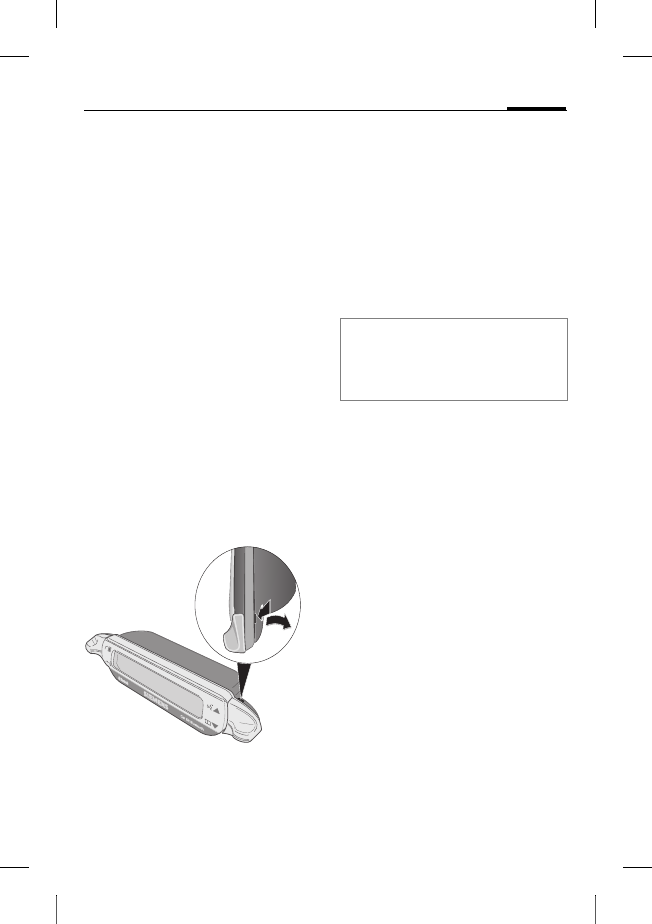
To detach the display 6 from
the display holder 7 insert a
screwdriver into the narrow
opening between the two
elements.
Press the display 6 gently out
of the display holder 7 and
remove the display.
Features
With the Car Kit Bluetooth you
can enjoy optimal communica-
tion in your car with full-duplex
handsfree talking and superb
ease of use. You can speak on
the phone as if you were talking
to the passenger next to you.
Bluetooth™ technology
The Car Kit communicates with
the phone via Bluetooth™, a
short range radio link.
To make this communication
possible, the Car Kit and the
phone must be linked with each
other. For more information
please read "Establishing the
first connection with the
telephone", p. 9.
The Bluetooth word mark and logos are
owned by the Bluetooth SIG, Inc. and any
use of such marks by Siemens is under li-
cense. Other trademarks and trade names
are those of their respective owners.
© Siemens AG 2003, W:\ICM_MP_CCQ_S_UM\03FL00443 Car Kit 65\CK_Final\Car_Kit_Bluetooth_2\Frame\HKW-600_en.fm
l
e
f
t page
(
8
)
o
f
HKW
-
600
en,
A31008
-
H6551
-
A102
-
1
-
4W28
(12
.
08
.
2004
,
8
VAR Language: unknown; VAR issue date: 12-March-2003
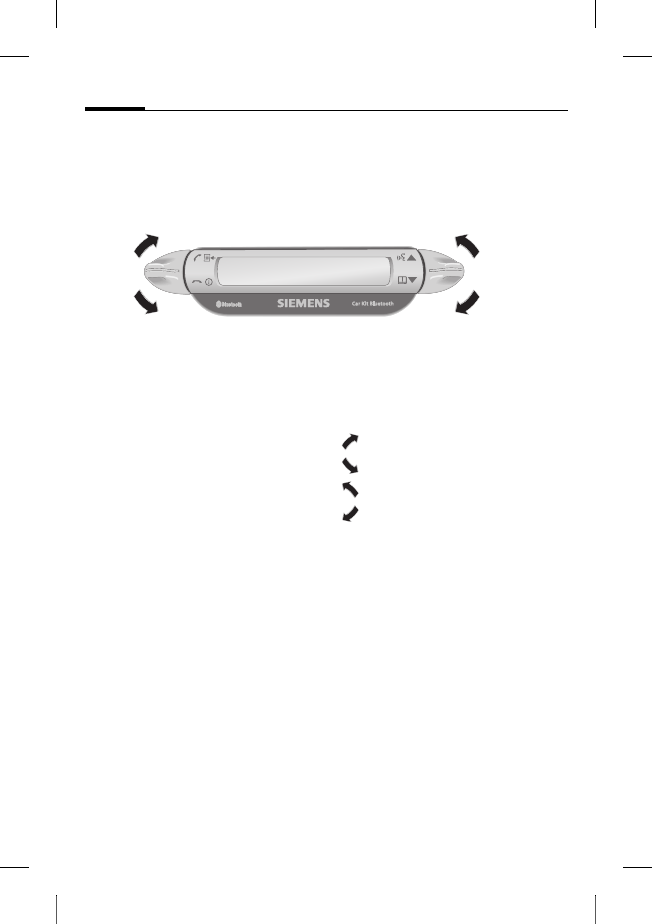
Display –
functionality of the keys
The Car Kit is operated by the
display keys which can be
pressed both upwards and
downwards.
•The key on the left is for
confirming/rejecting
•The key on the right allows you
to browse through the lists.
The symbols below are used
to represent the four different
actions.
yes/accept
no/reject
up
down
When a long press is required,
"long press" is written in the
user guide.
In all other cases, pressing the
key briefly is enough.
yes/accept
no/reject
up
down
r
i
g
h
t page
(
9
)
o
f
HKW
-
600
en,
A31008
-
H6551
-
A102
-
1
-
4W28
(12
.
08
.
2004
,
©
S
i
emens
A
G
2
0
0
3
,
W
:
\
I
C
M
_
M
P
_
C
C
Q
_
S
_
U
M
\
0
3
F
L
0
0
4
4
3
C
ar
K
i
t
6
5
\
C
K
_
F
i
na
l
\
C
ar_
K
i
t_
B
l
uetoot
h
_
2
\
F
rame
\
H
K
W
-
6
0
0
_en.
f
m
9
V
A
R
L
anguage: un
k
nown;
V
A
R
i
ssue
d
ate:
1
2
-
M
arc
h
-
2
0
0
3
Initial operation
Establishing the first
connection with the
telephone
• Activate the Car Kit's log-on
mode by a long press of
the key.
• Activate your phone's Blue-
tooth interface and begin a
search on your phone for
Bluetooth devices in the area
that are ready to receive.
•When the Car Kit is found,
your phone will ask you to
type in a PIN number as
confirmation
• The PIN number is shown on
the Car Kit's display.
• After the confirmation the Car
Kit shows the identification of
the phone on the display and
then switches into stand-by
mode. For phones from other
manufacturers it is likely that
confirmation on the phone
will be required before the
switch to stand-by mode.
From then on, the Car Kit is
ready for use. The Car Kit and the
phone can communicate with
each other and will recognise
each other in the future.
Use with multiple phones
The Car Kit memorises the con-
nection of a maximum of four
phones with which it can be op-
erated alternately.
If a fifth phone is connected, the
entry for the phone which has
not been in contact with the
Car Kit for the longest period
will be deleted.
When the Car Kit is activated, it
searches for the last phone it
was connected with. If this is not
found, it searches for other
saved phones. Those it finds are
shown on the display. The user
can then select one of these.
Note
For details of how to establish a Blue-
tooth connection, please refer to the
operating instructions for your phone.
© Siemens AG 2003, W:\ICM_MP_CCQ_S_UM\03FL00443 Car Kit 65\CK_Final\Car_Kit_Bluetooth_2\Frame\HKW-600_en.fm
l
e
f
t page
(
10
)
o
f
HKW
-
600
en,
A31008
-
H6551
-
A102
-
1
-
4W28
(12
.
08
.
2004
,
10
VAR Language: unknown; VAR issue date: 12-March-2003
Using the Car Kit with a different
phone
• Switch off the Car Kit by press-
ing with a long press.
• Deactivate the Bluetooth in-
terface of the last phone that
was connected.
• Switch on the Car Kit by press-
ing with a long press. It
searches for the last active
phone but does not find it.
• The Car Kit will now search for
other saved phones and show
them in the display.
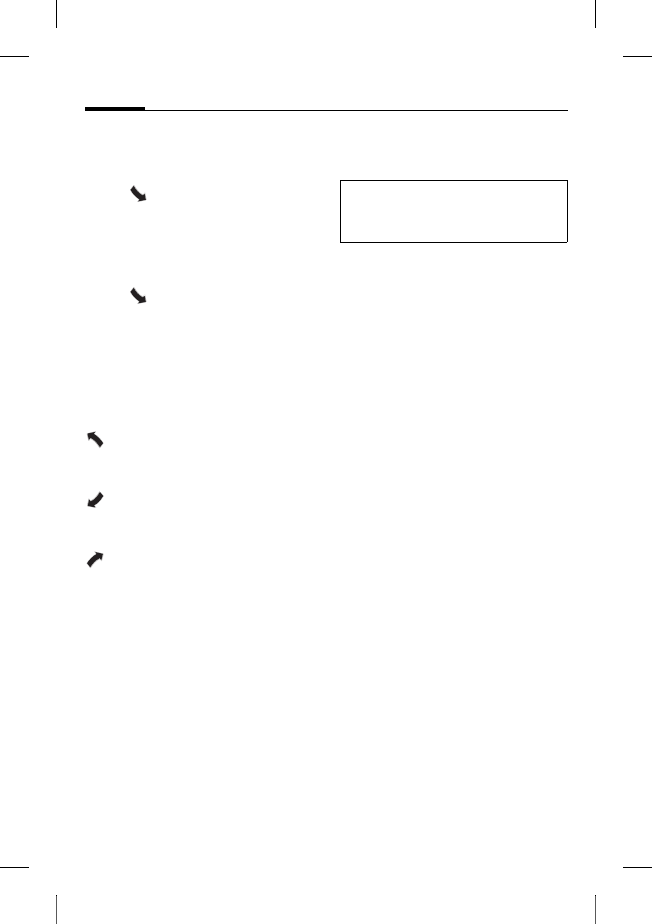
• Choose the desired device:
Shows the next
phone found (if avail-
able).
Shows the previous
phone in the list (if
available).
The phone indicated
will be connected.
Use with an optional mobile
holder
You can equip the Car Kit with an
optional mobile holder. This will
enable more functions:
• Use with an optional external
antenna is possible.
• Charging the phone after
inserting into the mobile
holder.
• Use of the Car Kit with a Sie-
mens phone which does not
have Bluetooth functionality.
When you insert the phone into
the mobile holder, the phone
and Car Kit connect via the mo-
bile holder's connector.
Note
For details, please refer to the operat-
ing instructions for your mobile holder.

r
i
g
h
t page
(
11
)
o
f
HKW
-
600
en,
A31008
-
H6551
-
A102
-
1
-
4W28
(12
.
08
.
2004
,
©
S
i
emens
A
G
2
0
0
3
,
W
:
\
I
C
M
_
M
P
_
C
C
Q
_
S
_
U
M
\
0
3
F
L
0
0
4
4
3
C
ar
K
i
t
6
5
\
C
K
_
F
i
na
l
\
C
ar_
K
i
t_
B
l
uetoot
h
_
2
\
F
rame
\
H
K
W
-
6
0
0
_en.
f
m
11
V
A
R
L
anguage: un
k
nown;
V
A
R
i
ssue
d
ate:
1
2
-
M
arc
h
-
2
0
0
3
First steps
Switching on the Car Kit
• Start the Car Kit by switching
on your car's ignition or by
pressing with a long press.
• The Car Kit searches for the
last phone to be used. This
will be shown in the display.
From then on, the Car Kit is
ready for use.
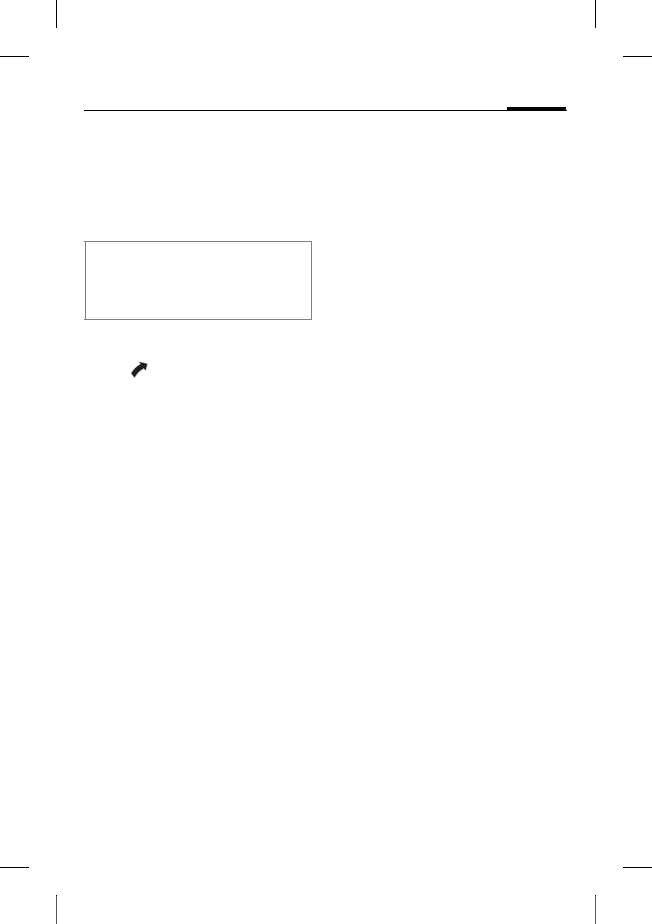
Accepting a call
accepts the call.
Rejecting a call
rejects the call.
Ending a call
ends the call.
Functions
Valid for all functions unless
stated otherwise:
Tap/long press: Car Kit
switches to stand-by
mode.
Stand-by mode
In stand-by mode, the Car Kit of-
fers the following functions:
Call lists
Long press: log-on
mode
Long press: switches
off the Car Kit
Phonebook
Voice recognition (if
supported by phone)
Making a call from the
phonebook
Phonebook
Shows the phone's phonebook.
Access the phone-
book.
, Select entry.

© Siemens AG 2003, W:\ICM_MP_CCQ_S_UM\03FL00443 Car Kit 65\CK_Final\Car_Kit_Bluetooth_2\Frame\HKW-600_en.fm
l
e
f
t page
(
12
)
o
f
HKW
-
600
en,
A31008
-
H6551
-
A102
-
1
-
4W28
(12
.
08
.
2004
,
12
VAR Language: unknown; VAR issue date: 12-March-2003
Multiple phone numbers can be
saved under one entry in the ad-
dress book.
, Select entry.
Begin the call.
Other phonebook functions
Moves up one entry.
Long press: moves up
10 entries.
Moves down one
entry.
Long press: moves
down 10 entries.
Making a call from the call
lists
Call lists
Shows the phone's call lists.
There is a choice of three call
lists:
• Dialled numbers
• Missed calls
• Accepted calls
The call lists are only shown if
there is at least one entry in
them.
, Select call list.
Activate call list.
, Select entry. (For fur-
ther functions see
“Other phonebook
functions“)
Start call.
During a call
Louder.
Quieter.
Hold call.
Long press: Acti-
vate/deactivate the
microphone muting.
End call.
r
i
g
h
t page
(
13
)
o
f
HKW
-
600
en,
A31008
-
H6551
-
A102
-
1
-
4W28
(12
.
08
.
2004
,
©
S
i
emens
A
G
2
0
0
3
,
W
:
\
I
C
M
_
M
P
_
C
C
Q
_
S
_
U
M
\
0
3
F
L
0
0
4
4
3
C
ar
K
i
t
6
5
\
C
K
_
F
i
na
l
\
C
ar_
K
i
t_
B
l
uetoot
h
_
2
\
F
rame
\
H
K
W
-
6
0
0
_en.
f
m
13
V
A
R
L
anguage: un
k
nown;
V
A
R
i
ssue
d
ate:
1
2
-
M
arc
h
-
2
0
0
3
Second call
End current call.
Put current call on
hold and accept
second call.
Toggle between
two calls.
Long press:
end all calls.
Transferring a call
Long press: transfer
current call to the
Car Kit.
To continue the call on the
phone, press the corresponding
display key on the phone (if sup-
ported by the phone).
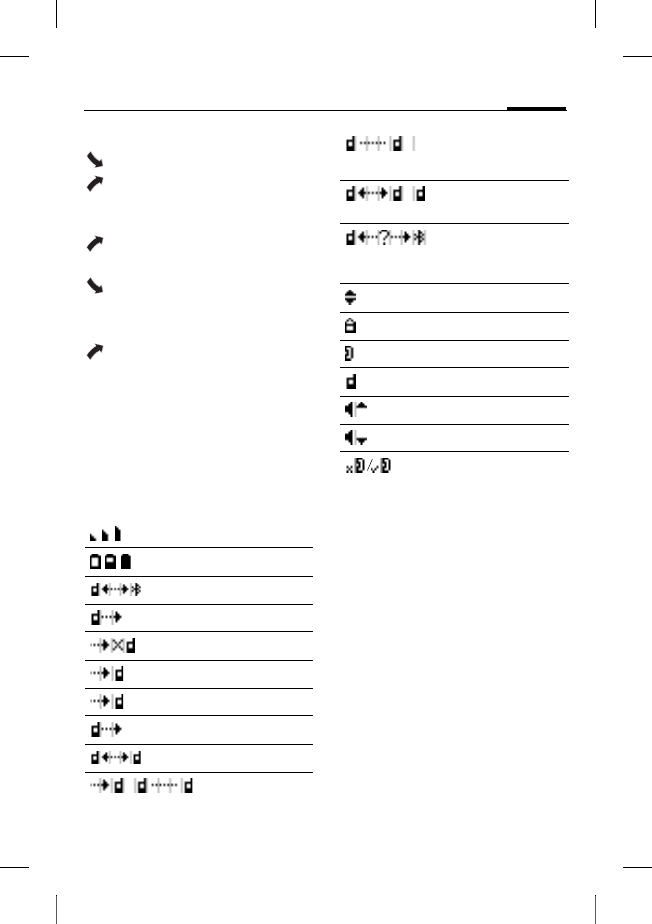
Display symbols
Signal strength
Phone's charging status
Log-on mode (Pairing)
Dialled numbers
Missed calls
Accepted calls
Incoming call
Outgoing call
Current call
Current call/second call
Call on hold
Toggle between two calls
Interface error (if supported
by phone)
List selections
Home phone number
Work phone number
Mobile phone number
Louder
Quieter
Microphone muting
active/inactive

© Siemens AG 2003, W:\ICM_MP_CCQ_S_UM\03FL00443 Car Kit 65\CK_Final\Car_Kit_Bluetooth_2\Frame\HKW-600_en.fm
l
e
f
t page
(
14
)
o
f
HKW
-
600
en,
A31008
-
H6551
-
A102
-
1
-
4W28
(12
.
08
.
2004
,
14
VAR Language: unknown; VAR issue date: 12-March-2003
Troubleshooting
Car Kit does not work
• Check line connections
• No operating voltage, check
line connection
• Phone not on or connection to
Car Kit not active
•Check fuses
• Operating voltage too high or
too low
Loud background noise at called
party's end
• Microphone installed in the
air flow of the sunroof, win-
dow or ventilation
• Distance from micro-
phone/microphone cable
to phone < 50 cm
Poor voice and audio quality
• Car Kit outside permitted
operating temperature
• Volume too low (adjust vol-
ume via phone)
• Connection to radio (phone-in
mode): Phone volume too
high (reduce volume via
phone and then increase it if
necessary via radio)
Loud echo
• Distance between the micro-
phone and loudspeaker < 1m
Weak microphone signal (your part-
ner on the phone barely hears you)
• Distance from microphone to
the user's mouth > 80 cm
• Microphone not pointed at
speaker
Poor reception quality
• No network available
• Alter the phone's position
• If your car is fitted with metal-
lised windows, this may im-
pair the reception of the
phone. Observe the vehicle
manufacturer's recommenda-
tions and install the relevant
(external) antenna or an op-
tional mobile holder.
r
i
g
h
t page
(
15
)
o
f
HKW
-
600
en,
A31008
-
H6551
-
A102
-
1
-
4W28
(12
.
08
.
2004
,
©
S
i
emens
A
G
2
0
0
3
,
W
:
\
I
C
M
_
M
P
_
C
C
Q
_
S
_
U
M
\
0
3
F
L
0
0
4
4
3
C
ar
K
i
t
6
5
\
C
K
_
F
i
na
l
\
C
ar_
K
i
t_
B
l
uetoot
h
_
2
\
F
rame
\
H
K
W
-
6
0
0
_en.
f
m
15
V
A
R
L
anguage: un
k
nown;
V
A
R
i
ssue
d
ate:
1
2
-
M
arc
h
-
2
0
0
3
Phone is not found/problems with
Bluetooth connection
• Establishing the first connec-
tion with the phone, see p. 9
• Since the last time the phone
was used with the Car Kit, at
least four other phones have
been used. Log the phone on
again.
• Make sure that the electronics
box is not mounted on or be-
tween metal objects
• Reduce the distance between
the electronics box and the
phone
Car radio is permanently switched to
mute
• The radio mute control line
connector may be reversed
with the chassis
Automatic Car Kit switch-on/off does
not work/ the Car Kit does not switch
itself off
• Check that the ignition line is
connected to the car ignition
Technical data and
approval
Car Kit complies with the
following EU directives:
89/336/EC "Electromagnetic
Compatibility"
92/59/EC "Guideline for General
Product Safety"
Model approved in ac-
cordance with Direc-
tive 72/245/EC and as
amended by Directive 95/54/EC
"Electromagnetic Compatibility
in Automobiles".
Power supply 10.8 V+ to 16 V+
Car ignition adapter
cable, optionally also
to 24V
Current input max. 2 A max. 1 mA
(idle current)
Operating
temperature -25 C to +70 C
Loudspeaker
output power max. 7 W
(into 4 Ohm)
Weight (elec-
tronics box) approx. 110 g
Housing di-
mensions
(electronics
box)
ca. 110 x 120 x 30
mm (LxWxH)
e1
023752
© Siemens AG 2003, W:\ICM_MP_CCQ_S_UM\03FL00443 Car Kit 65\CK_Final\Car_Kit_Bluetooth_2\Frame\HKW-600_en.fm
l
e
f
t page
(
16
)
o
f
HKW
-
600
en,
A31008
-
H6551
-
A102
-
1
-
4W28
(12
.
08
.
2004
,
16
VAR Language: unknown; VAR issue date: 12-March-2003
Declaration of conformity
CE
Siemens Information and Com-
munication mobile hereby de-
clares that the phone described
in this user guide is in compli-
ance with the essential require-
ments and other relevant provi-
sions of European Directive
1999/5/EC (R&TTE). The declara-
tion of conformity (DoC) con-
cerned has been signed. Please
call the company hotline if you
require a copy of the original or:
www.siemens-mobile.com/
conformity
FCC
This device complies with
part 15 of the FCC Rules. Opera-
tion is subject to the following
two conditions: (1) This device
may not cause harmful interfer-
ence, and (2) this device must
accept any interference re-
ceived, including interference
that may cause undesired
operation.
Changes or modifications not
expressly approved by the party
responsible for compliance
could void the user's authority to
operate the device.
Maintenance
The product should be cleaned
with a soft, slightly damp (not
wet) cloth.
Do not use cleaning agents,
colourants or other chemical
substances.
Accessories
Mobile holder with electrical connec-
tions, comprising:
• Car Kit Upgrade (Base module for
mobile holder/mobile holder antenna
with cable for electronics box)
• Mobile Holder Antenna/
Mobile Holder
With these additions, the following extra
functions are available: antenna con-
nection, phone charging, safer storage
of the phone in the car. Phones without
Bluetooth functionality from the 65th
generation or above can be used.
For connecting to the car radio:
• Phone-In adapter cable
Products are available from specialist
dealers or visit our online shop at:
Siemens Original
Accessories
www.siemens-
mobile.com/shop

r
i
g
h
t page
(
17
)
o
f
HKW
-
600
en,
A31008
-
H6551
-
A102
-
1
-
4W28
(12
.
08
.
2004
,
©
S
i
emens
A
G
2
0
0
3
,
W
:
\
I
C
M
_
M
P
_
C
C
Q
_
S
_
U
M
\
0
3
F
L
0
0
4
4
3
C
ar
K
i
t
6
5
\
C
K
_
F
i
na
l
\
C
ar_
K
i
t_
B
l
uetoot
h
_
2
\
F
rame
\
H
K
W
-
6
0
0
_en.
f
m
17
V
A
R
L
anguage: un
k
nown;
V
A
R
i
ssue
d
ate:
1
2
-
M
arc
h
-
2
0
0
3
Customer Care
You can also get personal advice about
our range of products on our Premium
Hotline:
United Kingdom 0906 9597500
(0.75 £ per minute)
Qualified Siemens employees are wait-
ing to offer you expert information about
our products and installation.
In some countries repair and replace
services are impossible where the
products are not sold through our au-
thorised dealers.
If repair work is necessary, please con-
tact one of our service centres:
Abu Dhabi................................0 26 42 38 00
Argentina ............................0 80 08 88 98 78
Australia.................................13 00 66 53 66
Austria....................................05 17 07 50 04
Bahrain ............................................40 42 34
Bangladesh..............................0 17 52 74 47
Belgium....................................0 78 15 22 21
Bolivia......................................0 21 21 41 14
Bosnia Herzegovina.................0 33 27 66 49
Brazil...................................0 80 07 07 12 48
Brunei .........................................02 43 08 01
Bulgaria.......................................02 73 94 88
Cambodia ...................................12 80 05 00
Canada ...............................1 88 87 77 02 11
China ..................................0 21 38 98 47 77
Croatia.....................................0 16 10 53 81
Czech Republic........................2 33 03 27 27
Denmark .....................................35 25 86 00
Dubai .......................................0 43 96 64 33
Egypt........................................0 23 33 41 11
Estonia........................................06 30 47 97
Finland...................................09 22 94 37 00
France....................................01 56 38 42 00
Germany *...........................0 18 05 33 32 26
Greece................................0 80 11 11 11 16
Hong Kong..................................28 61 11 18
Hungary .................................06 14 71 24 44
Iceland ..........................................5 11 30 00
India....................22 24 98 70 00 Extn: 70 40
Indonesia ............................0 21 46 82 60 81
Ireland....................................18 50 77 72 77
Italy........................................02 24 36 44 00
Ivory Coast..................................05 02 02 59
Jordan......................................0 64 39 86 42
Kenya............................................2 72 37 17
Kuwait...........................................2 45 41 78
Latvia ............................................7 50 11 18
Lebanon......................................01 44 30 43
Libya ......................................02 13 50 28 82
Lithuania..................................8 52 74 20 10
Luxembourg................................43 84 33 99
Macedonia ..................................02 13 14 84
We offer fast, individual advice! You
have several options:
Our online support on the Internet:
www.siemens-mobile.com/
mobilescustomercare
We can be reached any time, any
place. You are given 24 hour support
on all aspects of our products. Here
you will find an interactive fault-finding
system, a compilation of the most fre-
quently asked questions and an-
swers, plus user guides and current
software updates to download.
When calling customer service,
please have ready your receipt and
the phone identity number (IMEI, to
display press *#06#), the software
version (to display, press *#06#, then
§More§) and if available, your Siemens
Service customer number.
* 0,12 Euro/min.

© Siemens AG 2003, W:\ICM_MP_CCQ_S_UM\03FL00443 Car Kit 65\CK_Final\Car_Kit_Bluetooth_2\Frame\HKW-600_en.fm
l
e
f
t page
(
18
)
o
f
HKW
-
600
en,
A31008
-
H6551
-
A102
-
1
-
4W28
(12
.
08
.
2004
,
18
VAR Language: unknown; VAR issue date: 12-March-2003
Malaysia...........................+ 6 03 77 12 43 04
Malta..............................+ 35 32 14 94 06 32
Mauritius .......................................2 11 62 13
Mexico ..............................01 80 07 11 00 03
Morocco......................................22 66 92 09
Netherlands ........................0 90 03 33 31 00
New Zealand..........................08 00 57 43 63
Nigeria .....................................0 14 50 05 00
Norway........................................22 70 84 00
Oman...............................................79 10 12
Pakistan.................................02 15 66 22 00
Paraguay .................................8 00 10 20 04
Philippines ...............................0 27 57 11 18
Poland....................................08 01 30 00 30
Portugal ...................................8 08 20 15 21
Qatar...........................................04 32 20 10
Romania ................................02 12 04 60 00
Russia.................................8 80 02 00 10 10
Saudi Arabia ............................0 22 26 00 43
Serbia ....................................01 13 07 00 80
Singapore ...................................62 27 11 18
Slovak Republic.....................02 59 68 22 66
Slovenia...................................0 14 74 63 36
South Africa ...........................08 60 10 11 57
Spain........................................9 02 11 50 61
Sweden....................................0 87 50 99 11
Switzerland ............................08 48 21 20 00
Taiwan ...................................02 23 96 10 06
Thailand...................................0 27 22 11 18
Tunisia ........................................71 86 19 02
Turkey.................................0 21 65 79 71 00
Ukraine ...............................8 80 05 01 00 00
United Arab Emirates...............0 43 66 03 86
United Kingdom ..................0 87 05 33 44 11
USA ....................................1 88 87 77 02 11
Vietnam..................................84 89 30 01 21
Zimbabwe ...................................04 36 94 24

r
i
g
h
t page
(
19
)
o
f
HKW
-
600
d
e,
A31008
-
H6551
-
A102
-
1
-
4W28
(12
.
08
.
2004
,
©
S
i
emens
A
G
2
0
0
3
,
W
:
\
I
C
M
_
M
P
_
C
C
Q
_
S
_
U
M
\
0
3
F
L
0
0
4
4
3
C
ar
K
i
t
6
5
\
C
K
_
F
i
na
l
\
C
ar_
K
i
t_
B
l
uetoot
h
_
2
\
F
rame
\
H
K
W
-
6
0
0
_
d
e.
f
m
19Car Kit Bluetooth
V
A
R
L
anguage: un
k
nown;
V
A
R
i
ssue
d
ate:
1
2
-
M
arc
h
-
2
0
0
3
Car Kit Blue-
tooth (de) Car Kit Bluetooth
Lieferumfang
Zubehör siehe S. 35
1 Elektronikbox mit Anschluss-
buchsen für:
• Bordnetzkabel
• Display
• Mikrofon
• Telefonhalterung (optional, nicht
im Lieferumfang enthalten)
2 Schrauben zur Befestigung der
Elektronikbox
3 Bordnetzkabel mit Lautsprecher-
anschlüssen
•§A§ Radiostummschaltung
(Radio Mute) (schwarz)
•§B§ Batterie 12V+ (rot)
•§C§ Kfz-Zündung 12V+/24V+
(violett)
•§D§ Masse (braun)
•§E§ Lautsprecheranschluss +
(grün/schwarz)
•§F§ Lautsprecheranschluss -
(grün)
4 3 Stück Sicherungsklemmverbin-
der für das Bordnetz
5 3 Stück Flachstecksicherungen
(3 A violett) für die Sicherungs-
klemmverbinder
6 Display mit Klebepad
7 Display-Halterung
8 Lautsprecher mit Anschlusskabel
•§G§ Lautsprecheranschluss +
(weiß/schwarz)
•§H§ Lautsprecheranschluss -
(schwarz)
(Schrauben zur Befestigung sind
im Sockel integriert)
9 2 Stück Kabelverbinder für die
Lautsprecherkabel
: Externes Mikrofon mit Klebepad
* Nicht im Siemens Standard Lieferumfang enthalten.
Die Marke Bluetooth und die zugehörigen Logos sind Eigentum von Bluetooth SIG, Inc. (Spe-
cial Interest Group). Jegliche Benutzung dieser Marken durch Siemens erfolgt unter Lizenz.
Andere erwähnte Handelsmarken und Markennamen sind geschützte Marken oder eingetra-
gene Warenzeichen des jeweiligen Eigentümers.
© Siemens AG 2003, W:\ICM_MP_CCQ_S_UM\03FL00443 Car Kit 65\CK_Final\Car_Kit_Bluetooth_2\Frame\HKW-600_de.fm
l
e
f
t page
(
20
)
o
f
HKW
-
600
d
e,
A31008
-
H6551
-
A102
-
1
-
4W28
(12
.
08
.
2004
,
Car Kit Bluetooth
20
VAR Language: unknown; VAR issue date: 12-March-2003
Kompatibilität
Die Kfz-Freisprecheinrichtung
Car Kit Bluetooth (nachfolgend
bezeichnet als „Car Kit“) ist ge-
eignet für folgende Telefone:
• Siemens-Mobiltelefone mit
Bluetooth-Schnittstelle
• Siemens-Mobiltelefone S55
und SX1 sowie Mobiltelefone
anderer Hersteller, welche
über eine Bluetooth-Schnitt-
stelle verfügen, können mit
evtl. eingeschränkter Funktio-
nalität betrieben werden.
• Siemens-Mobiltelefone ab
65er-Serie ohne Bluetooth-
Schnittstelle (Einsatz mit
optionaler Telefonhalterung
möglich)
Sicherheitshinweise
Diese Installationsanleitung kann nur
die grundsätzlichen Informationen
vermitteln. Da die verschiedenen Kfz-
Fabrikate und Anschlüsse der Auto-
radios unterschiedliche Installatio-
nen verlangen, ist die Montage
nach jeweiliger Gegebenheit
vorzunehmen.
Lesen Sie vor Gebrauch die Bedie-
nungsanleitung und die Sicherheits-
hinweise genau!
Beachten Sie bei der Be-
nutzung des Telefons ge-
setzliche Vorschriften und
lokale Einschränkungen.
Diese können z. B. gelten
beim Autofahren oder an
Tankstellen.
Allgemein gültige und fahr-
zeugtypspezifische Richtli-
nien für den Einbau von
Zusatzgeräten sind einzu-
halten; ggf. ist fachkundige
Hilfe in Anspruch zu neh-
men (Elektrische Absiche-
rung, Kabelverlegung,
Berührung mit heißen Tei-
len, Berührung mit Kraft-
stoff etc.).
Durch den Einbau der
Komponenten dürfen nicht
beeinträchtigt werden:
• die Bewegungsfreiheit,
die Sicherheit und das
Sichtfeld des Fahrers
• die Sicherheit der
Fahrzeuginsassen
(auch bei Unfall)
• die Sicherheitsvorrich-
tungen im Kfz (Airbag,
Sicherheitsgurte etc.)
Vorsicht beim Einbau!
Kleinkinder könnten Klein-
teile verschlucken.
r
i
g
h
t page
(
21
)
o
f
HKW
-
600
d
e,
A31008
-
H6551
-
A102
-
1
-
4W28
(12
.
08
.
2004
,
©
S
i
emens
A
G
2
0
0
3
,
W
:
\
I
C
M
_
M
P
_
C
C
Q
_
S
_
U
M
\
0
3
F
L
0
0
4
4
3
C
ar
K
i
t
6
5
\
C
K
_
F
i
na
l
\
C
ar_
K
i
t_
B
l
uetoot
h
_
2
\
F
rame
\
H
K
W
-
6
0
0
_
d
e.
f
m
21Car Kit Bluetooth
V
A
R
L
anguage: un
k
nown;
V
A
R
i
ssue
d
ate:
1
2
-
M
arc
h
-
2
0
0
3
Überprüfen Sie vor Nutzung von
Bluetooth®-Zubehör oder Mobil-Telefo-
nen innerhalb eines Kraftfahrzeuges
die KFZ-Bedienungsanleitung auf
eventuelle Einschränkungen bei der
Verwendung derartiger Produkte.
Weitere Hinweise entnehmen Sie
bitte der Bedienungsanleitung Ihres
Mobiltelefons.
Das Gerät ist nur für den
12V-Betrieb bestimmt.
Das Gerät darf nicht in
explosionsgefährdeten
Räumen betrieben
werden.
Wenn Ihr Auto mit einer
metallbedampften Vergla-
sung ausgestattet ist, kann
das die Empfangsqualität
Ihres Telefons beeinträch-
tigen. Eine externe Anten-
ne gewährleistet optimalen
Empfang. Zur Installation
müssen Ihr Telefon und
das Car Kit zum Betrieb mit
einer externen Antenne
ausgestattet sein.
Unsachgemäßer Ge-
brauch und Öffnen der
Komponenten schließt jeg-
liche Gewährleistung aus.
Bitte beachten:
Entsorgen Sie unbrauch-
bare Telefone und deren
Zubehör den gesetzlichen
Bestimmungen ent-
sprechend.
Verwenden Sie nur Sie-
mens-Original-Zubehör.
So vermeiden Sie mögli-
che Gesundheits- und
Sachschäden und stellen
sicher, dass alle relevan-
ten Bestimmungen einge-
halten werden.
© Siemens AG 2003, W:\ICM_MP_CCQ_S_UM\03FL00443 Car Kit 65\CK_Final\Car_Kit_Bluetooth_2\Frame\HKW-600_de.fm
l
e
f
t page
(
22
)
o
f
HKW
-
600
d
e,
A31008
-
H6551
-
A102
-
1
-
4W28
(12
.
08
.
2004
,
Car Kit Bluetooth
22
VAR Language: unknown; VAR issue date: 12-March-2003
Montage
Mikrofon, Display,
Lautsprecher
* Antenne und Telefonhalterung sind
nicht im Lieferumfang enthalten.
Verlegen Sie die Kabel für das
externe Mikrofon :, das
Display 6 und den
Lautsprecher 8 fachgerecht
den Gegebenheiten Ihres Fahr-
zeugs entsprechend.
Vermeiden Sie die Kabel zu be-
schädigen, zu knicken oder zu
quetschen.
Mikrofon
Reinigen Sie die Stelle, an der Sie
das externe Mikrofon : befesti-
gen wollen, mit einem geeigne-
ten fettlösenden Reinigungsmit-
tel. Nur auf einer fettfreien
Oberfläche kann das Klebepad
dauerhaft befestigt werden.
Das externe Mikrofon : an der
gewünschten Stelle mit Hilfe
des Klebepads in Richtung des
Sprechers befestigen.
Display
Achten Sie darauf, das
Display 6 so anzubringen, dass
der Fahrer optimalen Sichtkon-
takt und Zugriff darauf hat.
Sie können das Display 6 direkt
an der Armatur anbringen oder
unter Zuhilfenahme der Display-
Halterung 7 befestigen.
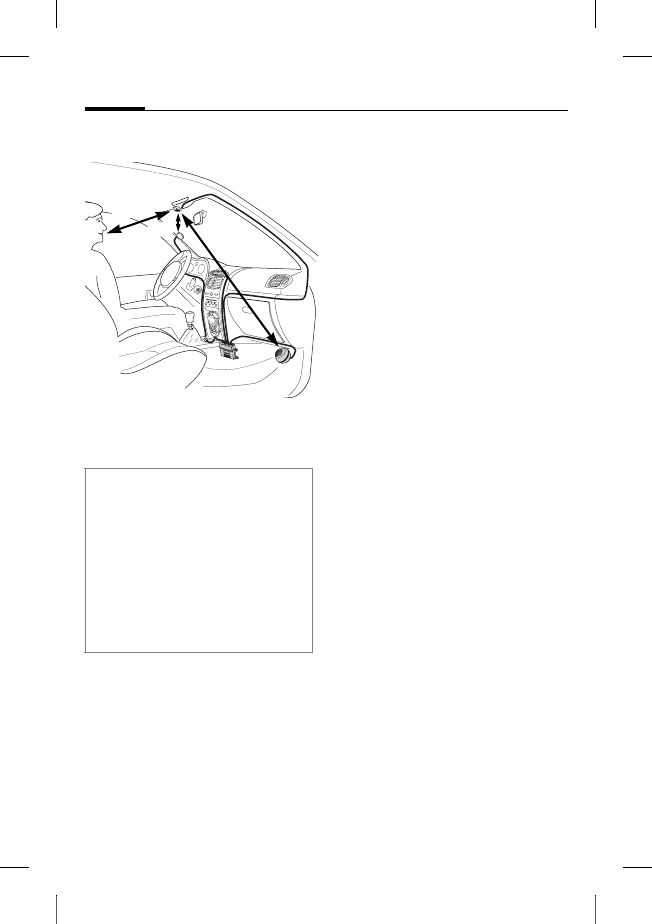
Bitte beachten Sie bei der Montage:
• Abstand Mikrofon : –
Lautsprecher 8 möglichst > 1 m
• Abstand Mikrofon :/
Mikrofonkabel – Telefon > 50 cm
• Abstand Mikrofon : – Mund des
Benutzers < 80 cm
Montage des Mikrofons im Luftstrom
des Schiebedaches, des Fensters
oder der Lüftung vermeiden.
> 50 cm
< 80 cm
>1 m
*
*

r
i
g
h
t page
(
23
)
o
f
HKW
-
600
d
e,
A31008
-
H6551
-
A102
-
1
-
4W28
(12
.
08
.
2004
,
©
S
i
emens
A
G
2
0
0
3
,
W
:
\
I
C
M
_
M
P
_
C
C
Q
_
S
_
U
M
\
0
3
F
L
0
0
4
4
3
C
ar
K
i
t
6
5
\
C
K
_
F
i
na
l
\
C
ar_
K
i
t_
B
l
uetoot
h
_
2
\
F
rame
\
H
K
W
-
6
0
0
_
d
e.
f
m
23Car Kit Bluetooth
V
A
R
L
anguage: un
k
nown;
V
A
R
i
ssue
d
ate:
1
2
-
M
arc
h
-
2
0
0
3
Direkt-Montage des Displays
Reinigen Sie die Stelle, an der Sie
das Display 6 befestigen wol-
len, mit einem geeigneten fett-
lösenden Reinigungsmittel. Nur
auf einer fettfreien Oberfläche
kann das Klebepad dauerhaft
befestigt werden.
Befestigen Sie dann das
Display 6 mit Hilfe des
Klebepads.
Montage mittels Display-Halterung
Befestigen Sie die Display-
Halterung 7 mit dem beiliegen-
den Klebepad oder geeigneten
Schrauben* an der Armatur.
Drücken Sie dann das Display 6
in die Vorrichtung der Display-
Halterung 7 bis es einrastet.
Lautsprecher
Die Neigung und der Drehwinkel
des Lautsprechers 8 sind ver-
stellbar. Dazu Einstellschraube
im Sockel lösen, Lautsprecher 8
einstellen, Schraube festziehen.
Den Lautsprecher 8 an einer ge-
eigneten Stelle (z. B. im Beifahr-
erfußraum) anschrauben.
Die Schrauben befinden sich im
Sockel des Lautsprechers 8.
Bordnetzkabel
Elektrische Anschlüsse
Achten Sie bei Anschluss des
Car Kits an das Bordnetzkabel 3
darauf, dass die Funktion und
der Betrieb anderer Geräte
nicht beeinträchtigt wird
(z.B.Spannungsabfall).
Die Kfz-Batterie vor Beginn der
Montage des Bordnetzkabels 3
und der Elektronikbox 1 fach-
gerecht abklemmen.
Das Kabel §B§ (rot) 12V+ mit dem
Pluspol der Autobatterie ver-
binden.
Das Kabel §D§ (braun) mit dem
Minuspol der Autobatterie ver-
binden.
* Nicht im Siemens Standard Lieferum-
fang enthalten.

© Siemens AG 2003, W:\ICM_MP_CCQ_S_UM\03FL00443 Car Kit 65\CK_Final\Car_Kit_Bluetooth_2\Frame\HKW-600_de.fm
l
e
f
t page
(
24
)
o
f
HKW
-
600
d
e,
A31008
-
H6551
-
A102
-
1
-
4W28
(12
.
08
.
2004
,
Car Kit Bluetooth
24
VAR Language: unknown; VAR issue date: 12-March-2003
Das Kabel §C§ (violett) mit der
Fahrzeugelektrik verbinden, so
dass bei eingeschalteter Zün-
dung 12V+ oder 24 V+ anliegen.
Lautsprecherkabel an Bordnetz-
kabel anschließen
Lautsprecherkabel + §G§ (weiß-
schwarz) und §E§ (grün-schwarz)
unter Verwendung eines
Kabelverbinders 9 verbinden.
Lautsprecherkabel - §H§ (schwarz )
und §F§ (grün) unter Verwendung
eines Kabelverbinders 9 ver-
binden.
Verbindung zum Radio*
Das Car Kit kann über den
Phone-In-Eingang des Autora-
dios an das Audiosystem Ihres
Autos angeschlossen werden.
Dann werden die Lautsprecher
des Audiosystems als Wiederga-
begerät für das Car Kit benutzt.
Verwenden Sie bitte das optio-
nale Phone-In-Adapter Cable zur
optimalen Anbindung an das
Radio.
Schließen Sie hierzu vom
Bordnetzkabel 3 das Anschluss-
kabel §H§ über den optionalen
Phone-In-Adapter an den Phone-
In-Eingang Ihres Autoradios an.
Verbinden Sie dann das An-
schlusskabel §G§ direkt mit dem
signalführenden Pol des Phone-
In-Eingangs Ihres Autoradios.
Unterschiedliche Spannungs-
pegel von Car Kit und Phone-In-
Eingang können mit dem Phone-
In Adapter Cable angeglichen
werden.
Die Kabel ausschließlich mit den
Sicherungsklemmverbindern 4
verbinden und dann die 3A-Flach-
stecksicherungen 5 in die
Sicherungsklemmverbinder 4 ein-
stecken.
Zur fachgerechten Absicherung
des Bordnetzkabels müssen die
Sicherungen zwischen dem Ende
des mitgelieferten Bordnetzkabels
und der Kfz-seitigen Anschlusstelle
angebracht werden.
* Falls ein Autoradio mit Phone-In-
Eingang vorhanden ist.
Das Autoradio ist nicht im Siemens
Standard Lieferumfang enthalten.
r
i
g
h
t page
(
25
)
o
f
HKW
-
600
d
e,
A31008
-
H6551
-
A102
-
1
-
4W28
(12
.
08
.
2004
,
©
S
i
emens
A
G
2
0
0
3
,
W
:
\
I
C
M
_
M
P
_
C
C
Q
_
S
_
U
M
\
0
3
F
L
0
0
4
4
3
C
ar
K
i
t
6
5
\
C
K
_
F
i
na
l
\
C
ar_
K
i
t_
B
l
uetoot
h
_
2
\
F
rame
\
H
K
W
-
6
0
0
_
d
e.
f
m
25Car Kit Bluetooth
V
A
R
L
anguage: un
k
nown;
V
A
R
i
ssue
d
ate:
1
2
-
M
arc
h
-
2
0
0
3
Einen Schaltplan und weitere
Informationen zum Phone-In
Adapter Cable finden Sie auf
der Siemens-Homepage:
www.siemens-mobile.com/
phoneinadapter
Radiostummschaltung (Mute)*
Das Radiosignal kann während
des Telefonierens automatisch
stumm geschaltet werden. Dazu
verbinden Sie das Steuerkabel §A§
der Radiostummschaltung mit
dem Mute-Eingang des Auto-
radios.
Elektronikbox
Führen Sie die Kabel folgender
Komponenten vorsichtig und
ohne Beschädigung zur
Elektronikbox 1 und verbinden
Sie die Steckverbinder mit der
Elektronikbox 1 :
• Bordnetzkabel 3,
• Display 6,
• Externes Mikrofon :.
• Kabel der Telefonhalterung
(optional)
* Falls ein Autoradio mit Mute-Ein-
gang vorhanden ist.
Das Autoradio ist nicht im Siemens
Standard Lieferumfang enthalten.
Bitte beachten Sie die Angaben des
Autoradioherstellers.
Bitte achten Sie darauf, dass die
Elektronikbox 1 nicht auf oder zwi-
schen metallischen Gegenständen
montiert wird. Nur so ist eine gute
Funkkomunikation gesichert.
Stellen Sie sicher, dass die
Elektronikbox 1 sicher befestigt ist.
Achten Sie darauf, dass die Kühl-
schlitze der Elektronikbox 1 nicht
abgedeckt werden (mind. 2 cm Frei-
raum) und dass die Montage keine
Störungen an anderen Geräten ver-
ursacht.
Anschlusskabel bitte nicht hinter der
Elektronikbox 1 verlegen oder um
die Elektronikbox 1 wickeln, da dies
zu Störungen führen kann.
Alle Kabelenden, die nicht gebraucht
werden, mit Klebeband isolieren.
© Siemens AG 2003, W:\ICM_MP_CCQ_S_UM\03FL00443 Car Kit 65\CK_Final\Car_Kit_Bluetooth_2\Frame\HKW-600_de.fm
l
e
f
t page
(
26
)
o
f
HKW
-
600
d
e,
A31008
-
H6551
-
A102
-
1
-
4W28
(12
.
08
.
2004
,
Car Kit Bluetooth
26
VAR Language: unknown; VAR issue date: 12-March-2003
Lassen Sie die Steckverbinder
sicher einrasten.
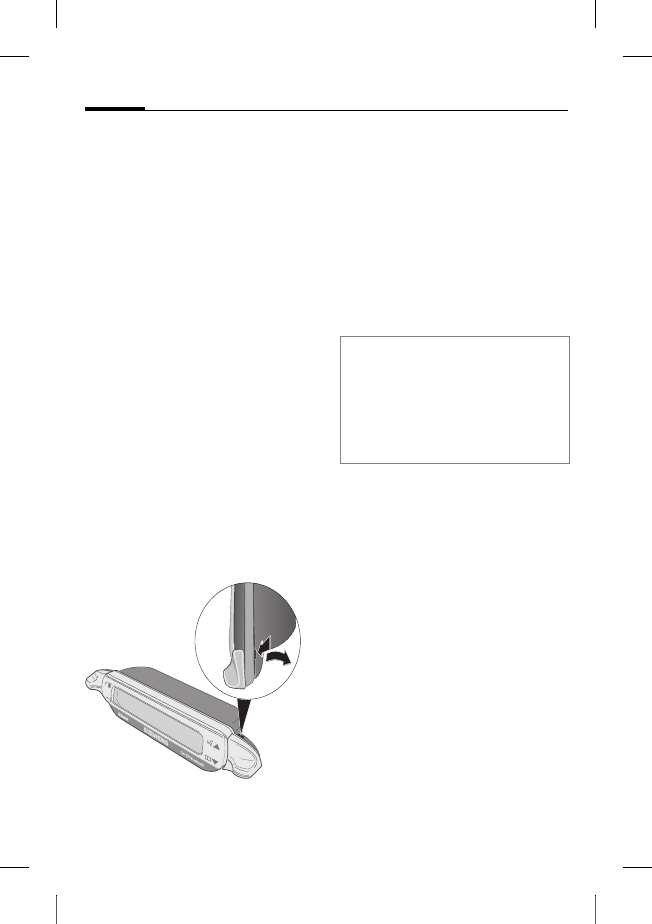
Führen Sie das Kabel des exter-
nen Mikrofons : zur Zugentlas-
tung um die dafür vorgesehene
Klemmnase (siehe Bild).
Die Elektronikbox 1 z. B. im
Beifahrerfußraum mit
Schrauben 2 befestigen.
Schließen Sie die Kfz-Batterie
nach der Montage wieder fach-
gerecht an.
Demontage Display
Zum Lösen des Displays 6 von
der Display-Halterung 7 führen
Sie einen Schraubendreher in
die schmale Öffnung zwischen
den beiden Elementen.
Drücken Sie mit mäßiger Kraft
das Display 6 aus der Display-
Halterung 7 und nehmen sie
das Display 6 ab.
Leistungsmerkmale
Mit dem Car Kit Bluetooth erle-
ben Sie durch Vollduplex-Frei-
sprechen und besten Bedien-
komfort ein optimales
Kommunikationsgefühl im Fahr-
zeug. Sie telefonieren so, als
würden Sie sich mit dem Beifah-
rer unterhalten.
Bluetooth™-Technologie
Das Car Kit und das Telefon
kommunizieren mittels Blue-
tooth™, einer Kurzstrecken-
funkverbindung.
Um diese Kommunikation zu er-
möglichen, müssen Car Kit und
Telefon miteinander verbunden
werden. Lesen Sie hierzu "Erste
Verbindung mit dem Telefon
herstellen", S. 28.
Die Marke Bluetooth und die zugehörigen
Logos sind Eigentum von Bluetooth SIG,
Inc. (Special Interest Group). Jegliche Be-
nutzung dieser Marken durch Siemens er-
folgt unter Lizenz. Andere erwähnte
Handelsmarken und Markennamen sind ge-
schützte Marken oder eingetragene Waren-
zeichen des jeweiligen Eigentümers.
r
i
g
h
t page
(
27
)
o
f
HKW
-
600
d
e,
A31008
-
H6551
-
A102
-
1
-
4W28
(12
.
08
.
2004
,
©
S
i
emens
A
G
2
0
0
3
,
W
:
\
I
C
M
_
M
P
_
C
C
Q
_
S
_
U
M
\
0
3
F
L
0
0
4
4
3
C
ar
K
i
t
6
5
\
C
K
_
F
i
na
l
\
C
ar_
K
i
t_
B
l
uetoot
h
_
2
\
F
rame
\
H
K
W
-
6
0
0
_
d
e.
f
m
27Car Kit Bluetooth
V
A
R
L
anguage: un
k
nown;
V
A
R
i
ssue
d
ate:
1
2
-
M
arc
h
-
2
0
0
3
Display –
Funktionalität der Tasten
Die Bedienerführung Ihres Car
Kits erfolgt über die Tasten des
Displays, die jeweils nach oben
und unten gedrückt werden
können.
•Die linke Taste dient der Bestä-
tigung/Ablehnung.
•Die rechte Taste ermöglicht ein
Blättern in Listen.
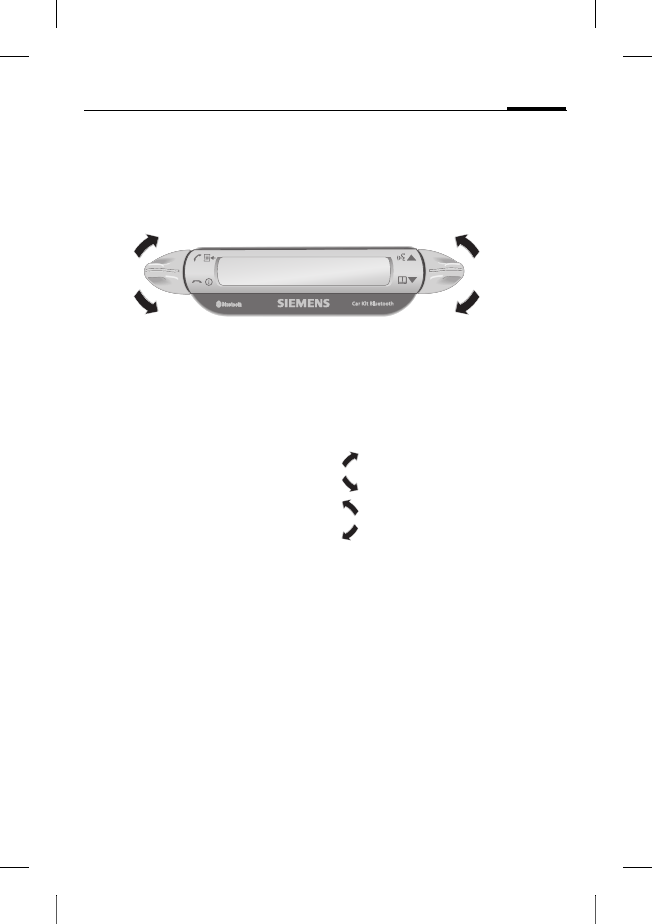
Nachfolgend werden Symbole
verwendet, um die vier unter-
schiedlichen Aktionen darzu-
stellen:
ja/annehmen
nein/auflegen
nach oben
nach unten
Wenn langes Drücken erforderlich
ist, steht in der Bedienungsanlei-
tung "lang drücken".
In allen anderen Fällen genügt
es, die Tasten kurz anzutippen.
ja/annehmen
nein/auflegen
nach oben
nach unten
© Siemens AG 2003, W:\ICM_MP_CCQ_S_UM\03FL00443 Car Kit 65\CK_Final\Car_Kit_Bluetooth_2\Frame\HKW-600_de.fm
l
e
f
t page
(
28
)
o
f
HKW
-
600
d
e,
A31008
-
H6551
-
A102
-
1
-
4W28
(12
.
08
.
2004
,
Car Kit Bluetooth
28
VAR Language: unknown; VAR issue date: 12-March-2003
Inbetriebnahme
Erste Verbindung mit dem
Telefon herstellen
• Aktivieren Sie den Anmelde-
modus vom Car Kit, indem Sie
lang drücken.
• Aktivieren Sie die Bluetooth-
Schnittstelle Ihres Telefons
und starten Sie am Telefon
die Suche nach emfangs-
bereiten Bluetooth-Geräten
in der Umgebung.
• Wenn das Car Kit gefunden
wird, fordert das Telefon Sie
auf, die Verbindung durch
Eingabe einer PIN-Nummer
zu bestätigen.
• Die PIN-Nummer wird im Dis-
play des Car Kits angezeigt.
• Nach der Bestätigung zeigt
das Car Kit die Identifikation
des Telefons im Display an
und schaltet anschließend in
den Bereitschaftsmodus um.
Bei Telefonen anderer Herstel-
ler ist möglicherweise eine Be-
stätigung am Telefon
notwendig, um in den Bereit-
schaftsmodus zu gelangen.
Ab diesem Moment ist das Car
Kit betriebsbereit. Das Car Kit
und das Telefon können mit-
einander kommunizieren und
werden sich künftig wieder
erkennen.
Betrieb mit mehreren
Telefonen
Das Car Kit speichert die Verbin-
dung von insgesamt vier Telefo-
nen, mit denen es wahlweise be-
trieben werden kann.
Wenn ein fünftes Telefon ver-
bunden wird, wird der Eintrag
für das Telefon gelöscht, wel-
ches am längsten nicht mehr in
Verbindung mit dem Car Kit ge-
nutzt wurde.
Wenn das Car Kit aktiviert wird,
sucht es nach dem zuletzt ver-
bundenen Telefon. Wird dieses
nicht gefunden, sucht es nach
weiteren gespeicherten Telefo-
nen. Die gefundenen Telefone
werden im Display angezeigt.
Der Benutzer kann eines der
Geräte auswählen.
Hinweis
Details über die Herstellung einer
Bluetooth-Verbindung lesen Sie bitte
in der Bedienungsanleitung Ihres Te-
lefons nach.
r
i
g
h
t page
(
29
)
o
f
HKW
-
600
d
e,
A31008
-
H6551
-
A102
-
1
-
4W28
(12
.
08
.
2004
,
©
S
i
emens
A
G
2
0
0
3
,
W
:
\
I
C
M
_
M
P
_
C
C
Q
_
S
_
U
M
\
0
3
F
L
0
0
4
4
3
C
ar
K
i
t
6
5
\
C
K
_
F
i
na
l
\
C
ar_
K
i
t_
B
l
uetoot
h
_
2
\
F
rame
\
H
K
W
-
6
0
0
_
d
e.
f
m
29Car Kit Bluetooth
V
A
R
L
anguage: un
k
nown;
V
A
R
i
ssue
d
ate:
1
2
-
M
arc
h
-
2
0
0
3
Car Kit mit einem anderen Telefon
nutzen
• Schalten Sie das Car Kit aus,
indem Sie lang drücken.
• Deaktivieren Sie die Blue-
tooth-Schnittstelle des zuletzt
verbundenen Telefons.
• Schalten Sie das Car Kit ein, in-
dem Sie lang drücken.
Es sucht nach dem zuletzt ak-
tiven Telefon und findet die-
ses nicht.
• Nun wird das Car Kit nach wei-
teren gespeicherten Telefo-
nen suchen und diese im
Display anzeigen.
•Wählen Sie das gewünschte
Gerät aus:
Zeigt das nächste ge-
fundene Telefon (falls
vorhanden).
Zeigt das vorherige
Telefon in der Liste
(falls vorhanden).
Das angezeigte Tele-
fon wird verbunden.
Betrieb mit optionaler
Telefonhalterung
Sie können das Car Kit mit einer
optionalen Telefonhalterung
ausstatten. Sie gewinnen
dadurch weitere Funktionen:
• Betrieb mit einer optionalen
externen Antenne möglich.
• Laden des Telefons nach
Einführen in die Telefon-
halterung.
• Benutzung des Car Kits mit ei-
nem Siemens-Telefon ohne
Bluetooth-Funktionalität.
Wenn Sie das Telefon in die Tele-
fonhalterung einstecken, erfolgt
die Verbindung von Telefon und
Car Kit über die Steckverbindung
der Telefonhalterung.
Hinweis
Details lesen Sie bitte in der Bedie-
nungsanleitung der Telefonhalterung
nach.

© Siemens AG 2003, W:\ICM_MP_CCQ_S_UM\03FL00443 Car Kit 65\CK_Final\Car_Kit_Bluetooth_2\Frame\HKW-600_de.fm
l
e
f
t page
(
30
)
o
f
HKW
-
600
d
e,
A31008
-
H6551
-
A102
-
1
-
4W28
(12
.
08
.
2004
,
Car Kit Bluetooth
30
VAR Language: unknown; VAR issue date: 12-March-2003
Erste Schritte
Car Kit einschalten
• Starten Sie das Car Kit, indem
Sie die Kfz-Zündung Ihres Au-
tos einschalten oder lang
drücken.
• Das Car Kit sucht nach dem
zuletzt benutzten Telefon.
Dieses wird im Display ange-
zeigt.
Ab diesem Moment ist das Car
Kit betriebsbereit.
Anruf annehmen
Anruf annehmen.
Anruf ablehnen
Anruf ablehnen.
Gespräch beenden
Gespräch beenden.
Funktionen
Wenn nicht anders beschrieben
gilt für alle Funktionen:
Antippen/lang
drücken: Car Kit wech-
selt in den Bereit-
schaftsmodus.
Bereitschaftsmodus
Das Car Kit verfügt im Bereit-
schaftsmodus über folgende
Funktionen:
Ruflisten
Lang drücken:
Anmeldemodus
Lang drücken: Das
Car Kit wird aus-
geschaltet
Telefonbuch
Spracherkennung
(falls vom Telefon
unterstützt)
Anrufen aus dem
Telefonbuch
Telefonbuch
Zeigt das Telefonbuch des Tele-
fons an.
Telefonbuch auf-
rufen.
, Eintrag auswählen.

r
i
g
h
t page
(
31
)
o
f
HKW
-
600
d
e,
A31008
-
H6551
-
A102
-
1
-
4W28
(12
.
08
.
2004
,
©
S
i
emens
A
G
2
0
0
3
,
W
:
\
I
C
M
_
M
P
_
C
C
Q
_
S
_
U
M
\
0
3
F
L
0
0
4
4
3
C
ar
K
i
t
6
5
\
C
K
_
F
i
na
l
\
C
ar_
K
i
t_
B
l
uetoot
h
_
2
\
F
rame
\
H
K
W
-
6
0
0
_
d
e.
f
m
31Car Kit Bluetooth
V
A
R
L
anguage: un
k
nown;
V
A
R
i
ssue
d
ate:
1
2
-
M
arc
h
-
2
0
0
3
Ein Eintrag im Adressbuch kann
mehrere Rufnummern gespei-
chert haben.
, Eintrag auswählen.
Anruf starten.
Weitere Telefonbuch-Funktionen
Wechselt einen Ein-
trag nach oben.
Lang drücken: wech-
selt 10 Einträge nach
oben.
Wechselt einen Ein-
trag nach unten.
Lang drücken: wech-
selt 10 Einträge nach
unten.
Anruf aus den Ruflisten
Ruflisten
Zeigt die Ruflisten des Telefons
an.
Es stehen drei Ruflisten zur Aus-
wahl:
• Gewählte Nummern
•Entgangene Anrufe
• Angenommene Anrufe
Die Ruflisten werden nur ange-
zeigt, wenn jeweils mindestens
ein Eintrag darin enthalten ist.
, Rufliste auswählen.
Rufliste aktivieren.
, Eintrag auswählen.
(Erweiterte Funktio-
nalität: siehe
„Weitere Telefon-
buch-Funktionen“)
Anruf starten.
Im Gespräch
Lauter.
Leiser.
Anruf halten.
Lang drücken:
Mikrofonstumm-
schaltung aktivie-
ren/deaktivieren.
Anruf beenden.
© Siemens AG 2003, W:\ICM_MP_CCQ_S_UM\03FL00443 Car Kit 65\CK_Final\Car_Kit_Bluetooth_2\Frame\HKW-600_de.fm
l
e
f
t page
(
32
)
o
f
HKW
-
600
d
e,
A31008
-
H6551
-
A102
-
1
-
4W28
(12
.
08
.
2004
,
Car Kit Bluetooth
32
VAR Language: unknown; VAR issue date: 12-March-2003
Zweiter Anruf
Aktives Gespräch
beenden.
Aktives Gespräch hal-
ten und anklopfen-
den Anruf annehmen.
Zwischen zwei Ge-
sprächen makeln.
Lang drücken: alle Ge-
spräche beenden.
Gesprächsübergabe
Lang drücken: aktives
Gespräch an das Car
Kit übergeben.
Um das Gespräch am Telefon
weiterzuführen, drücken Sie die
entsprechende Displaytaste am
Telefon (falls vom Telefon unter-
stützt).
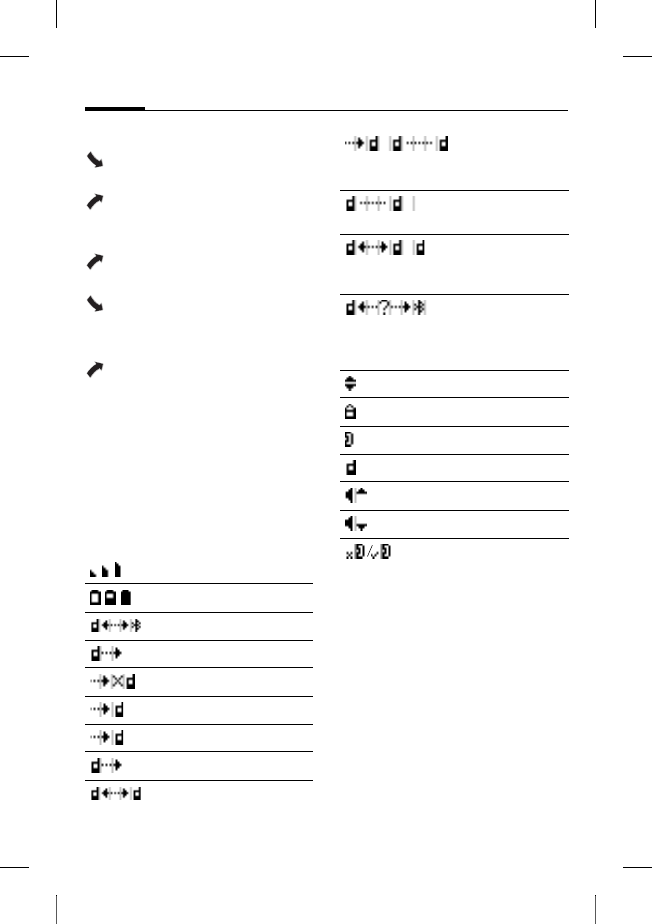
Displaysymbole
Signalstärke
Ladezustand Telefon
Anmeldemodus (Pairing)
Gewählte Nummern
Entgangene Anrufe
Angenommene Anrufe
Eingehender Anruf
Abgehender Anruf
Aktives Gespräch
Aktives Gespräch/an-
klopfender Anruf
Gehaltenes Gespräch
Zwischen zwei Gesprächen
hin- und herschalten
Schnittstellenfehler
(falls vom Telefon unter-
stützt)
Listenauswahl
Telefonnummer privat
Telefonnummer Büro
Telefonnummer Mobil
Lauter
Leiser
Mikrofonstummschaltung
aktiv/inaktiv

r
i
g
h
t page
(
33
)
o
f
HKW
-
600
d
e,
A31008
-
H6551
-
A102
-
1
-
4W28
(12
.
08
.
2004
,
©
S
i
emens
A
G
2
0
0
3
,
W
:
\
I
C
M
_
M
P
_
C
C
Q
_
S
_
U
M
\
0
3
F
L
0
0
4
4
3
C
ar
K
i
t
6
5
\
C
K
_
F
i
na
l
\
C
ar_
K
i
t_
B
l
uetoot
h
_
2
\
F
rame
\
H
K
W
-
6
0
0
_
d
e.
f
m
33Car Kit Bluetooth
V
A
R
L
anguage: un
k
nown;
V
A
R
i
ssue
d
ate:
1
2
-
M
arc
h
-
2
0
0
3
Fehlerbehebung
Car Kit funktioniert nicht
• Kabelanschlüsse überprüfen
• Keine Betriebsspannung, An-
schluss der Kabel überprüfen
• Telefon nicht eingeschaltet
oder Verbindung zum Car Kit
nicht aktiv
• Sicherungen überprüfen
• Betriebsspannung zu niedrig
bzw. zu hoch
Störgeräusche beim
Gesprächspartner
• Mikrofon im Luftstrom des
Schiebedaches, des Fensters
oder der Lüftung
•Abstand zwischen Mikro-
fon/Mikrofonkabel zum Tele-
fon < 50 cm
Schlechte Sprach- und Audio-
qualität
• Car Kit außerhalb zulässiger
Betriebstemperatur
• Lautstärke zu gering einge-
stellt (Lautstärke über Telefon
einstellen!)
•Verbindung zum Radio
(Phone-In Betrieb):
Telefonlautstärke zu hoch ein-
gestellt (Lautstärke über Tele-
fon geringer einstellen und
Lautstärke über Radio ggf.
erhöhen.)
Starkes Echo
•Abstand zwischen Mikrofon
und Lautsprecher < 1m
Schwaches Mikrofonsignal
(Gesprächspartner hört Sie nur
leise)
•Abstand zwischen Mikrofon
und Mund des Benutzers
>80cm
• Mikrofon nicht auf Sprecher
gerichtet
Schlechte Empfangsqualität
•Kein Netz verfügbar
• Position des Telefons ver-
ändern
• Wenn Ihr Auto mit einer me-
tallbedampften Verglasung
ausgestattet ist, kann das die
Empfangsqualität Ihres Tele-
fons beeinträchtigen. Emp-
fehlungen des Autoherstellers
beachten und entsprechende
(Außen-)Antenne installieren
sowie eine optionale Telefon-
halterung.
© Siemens AG 2003, W:\ICM_MP_CCQ_S_UM\03FL00443 Car Kit 65\CK_Final\Car_Kit_Bluetooth_2\Frame\HKW-600_de.fm
l
e
f
t page
(
34
)
o
f
HKW
-
600
d
e,
A31008
-
H6551
-
A102
-
1
-
4W28
(12
.
08
.
2004
,
Car Kit Bluetooth
34
VAR Language: unknown; VAR issue date: 12-March-2003
Telefon wird nicht gefunden/
Bluetooth-Verbindungsprobleme
• Erste Verbindung mit dem Te-
lefon herstellen, siehe S. 28
• Seit der letzten Benutzung des
Telefons mit dem Car Kit sind
mindestens vier weitere Tele-
fone angemeldet worden.
Melden Sie das Telefon erneut
an.
• Stellen Sie sicher, dass die
Elektronikbox nicht auf oder
zwischen metallischen Ge-
genständen montiert ist
• Verringern Sie den Abstand
zwischen Elektronikbox und
Telefon
Autoradio dauerhaft stumm
geschaltet
• Anschluss der Radiostumm-
schaltung möglicherweise mit
Masse vertauscht
Automatisches Ein- und Ausschal-
ten des Car Kits funktioniert nicht/
Car Kit schaltet sich nicht selbst aus
• Prüfen Sie, ob die Leitung
Zündung mit der Kfz-Zündung
verbunden ist
Technische Daten und
Zulassung
Car Kit erfüllt folgende
EU-Richtlinien:
89/336/EWG „Elektromagneti-
sche Verträglichkeit“
92/59/EWG „Richtlinie über die
allgemeine Produktsicherheit“
Typengenehmigung
gemäß Richtlinie
72/245/EWG, zuletzt
geändert durch die Richtlinie
95/54/EG „Elektromagnetische
Verträglichkeit im Kraftfahr-
zeug“.
Spannungs-
versorgung 10,8 V+ bis 16 V+
Anschlusskabel Kfz-
Zündung wahlweise
auch an 24V
Strom-
aufnahme max. 2 A /
max. 1 mA
(Ruhestrom)
Betriebs-
temperatur –25°C bis +70°C
Lautsprecher-
ausgangs-
leistung
max. 7 W
(an 4 Ohm)
Gewicht
(Elektronik-
box)
ca. 110 g
Gehäuse-
abmessungen
(Elektronik-
box)
ca. 110 x 120 x
30 mm (LxBxH)
e1
023752
r
i
g
h
t page
(
35
)
o
f
HKW
-
600
d
e,
A31008
-
H6551
-
A102
-
1
-
4W28
(12
.
08
.
2004
,
©
S
i
emens
A
G
2
0
0
3
,
W
:
\
I
C
M
_
M
P
_
C
C
Q
_
S
_
U
M
\
0
3
F
L
0
0
4
4
3
C
ar
K
i
t
6
5
\
C
K
_
F
i
na
l
\
C
ar_
K
i
t_
B
l
uetoot
h
_
2
\
F
rame
\
H
K
W
-
6
0
0
_
d
e.
f
m
35Car Kit Bluetooth
V
A
R
L
anguage: un
k
nown;
V
A
R
i
ssue
d
ate:
1
2
-
M
arc
h
-
2
0
0
3
Konformitätserklärung
CE
Siemens Information and Com-
munication mobile erklärt hier-
mit, dass das im vorliegenden
Handbuch beschriebene Mobil-
telefon den wesentlichen Anfor-
derungen und anderen einschlä-
gigen Bestimmungen der
Richtlinie 1999/5/EC (R&TTE)
entspricht. Die betreffende Kon-
formitätserklärung (DoC) wurde
unterzeichnet. Falls erforderlich,
kann eine Kopie des Originals
über die Firmen-Hotline ange-
fordert werden oder:
www.siemens-
mobile.com/conformity
FCC
Dieses Gerät ist konform mit
Teil 15 der FCC-Regeln. Voraus-
setzungen für den Betrieb des
Geräts: (1) das Gerät verursacht
keine gefährlichen Interferen-
zen und (2) wird von keinerlei In-
terferenzen beeinträchtigt, auch
wenn es sich um Interferenzen
handelt, die unerwünschte
Effekte haben können.
Bei Änderungen und Umbauten,
die nicht ausdrücklich von der
für die Einhaltung verantwortli-
chen Partei genehmigt sind,
kann dem Benutzer die Betriebs-
erlaubnis für das Gerät entzogen
werden.
Pflege
Das Produkt sollte mit einem
weichen, befeuchteten, jedoch
nicht nassen Tuch gereinigt
werden.
Verwenden Sie bitte keine Reini-
gungslösungen, Farben oder an-
dere chemische Substanzen.
Zubehör
Kfz-Telefonhalterung mit elektrischen
Anschlüssen, bestehend aus:
• Car Kit Upgrade (Basis-Modul für Mo-
bile Holder/Mobile Holder Antenna
mit Kabel zur Elektronikbox)
• Mobile Holder Antenna/
Mobile Holder
Mit diesem Zusatz verfügen Sie über
erweiterte Funktionen: Antennenan-
schluss, Laden des Telefons, Sichere
Aufbewahrung des Telefons im Auto.
Außerdem können Telefone ohne Blue-
tooth-Funktionalität ab der Generation
65 benutzt werden.
Zur Verbindung mit dem Autoradio:
• Phone-In Adapter Cable
Produkte erhältlich im Fachhandel oder
besuchen Sie unseren Online-Shop
unter:
Siemens Original
Accessories
www.siemens-
mobile.com/shop

© Siemens AG 2003, W:\ICM_MP_CCQ_S_UM\03FL00443 Car Kit 65\CK_Final\Car_Kit_Bluetooth_2\Frame\HKW-600_de.fm
l
e
f
t page
(
36
)
o
f
HKW
-
600
d
e,
A31008
-
H6551
-
A102
-
1
-
4W28
(12
.
08
.
2004
,
Car Kit Bluetooth
36
VAR Language: unknown; VAR issue date: 12-March-2003
Kundenservice
(Customer Care)
Persönliche Beratung zu unserem An-
gebot erhalten Sie bei unserer Premi-
um Hotline:
Deutschland 0190 - 74 58 26
(1,24 Euro/Minute)
Österreich 0900 - 30 08 08
(1,35 Euro/Minute)
Es erwarten Sie qualifizierte Siemens-
Mitarbeiter, die Ihnen bezüglich
Produktinformation und Installation
kompetent zur Seite stehen.
In Ländern, in denen unser Produkt
nicht durch autorisierte Händler ver-
kauft wird, werden keine Austausch-
bzw. Reparaturleistungen angeboten.
Im Falle einer notwendigen Reparatur
wenden Sie sich bitte an eines unserer
Servicecentren:
Abu Dhabi................................0 26 42 38 00
Ägypten....................................0 23 33 41 11
Argentinien..........................0 80 08 88 98 78
Australien...............................13 00 66 53 66
Bahrain ............................................40 42 34
Bangladesch............................0 17 52 74 47
Belgien.....................................0 78 15 22 21
Bolivien....................................0 21 21 41 14
Bosnien Herzegowina..............0 33 27 66 49
Brasilien..............................0 80 07 07 12 48
Brunei .........................................02 43 08 01
Bulgarien.....................................02 73 94 88
China ..................................0 21 38 98 47 77
Dänemark ...................................35 25 86 00
Deutschland * .....................0 18 05 33 32 26
Dubai .......................................0 43 96 64 33
Elfenbeinküste ............................05 02 02 59
Estland........................................06 30 47 97
Finnland.................................09 22 94 37 00
Frankreich..............................01 56 38 42 00
Griechenland ......................0 80 11 11 11 16
Großbritannien....................0 87 05 33 44 11
Hong Kong..................................28 61 11 18
Indien..................22 24 98 70 00 Extn: 70 40
Indonesien ..........................0 21 46 82 60 81
Irland......................................18 50 77 72 77
Island ............................................5 11 30 00
Italien.....................................02 24 36 44 00
Jordanien.................................0 64 39 86 42
Kambodscha...............................12 80 05 00
Kanada ...............................1 88 87 77 02 11
Katar ...........................................04 32 20 10
Kenia.............................................2 72 37 17
Kroatien ...................................0 16 10 53 81
Kuwait...........................................2 45 41 78
Lettland.........................................7 50 11 18
Libanon.......................................01 44 30 43
Libyen ....................................02 13 50 28 82
Litauen.....................................8 52 74 20 10
Luxemburg..................................43 84 33 99
Malaysia...........................+ 6 03 77 12 43 04
Wir bieten Ihnen schnelle und indivi-
duelle Beratung! Sie haben mehrere
Möglichkeiten:
Unser Online Support im Internet:
www.siemens-mobile.com/
mobilescustomercare
Immer und überall erreichbar. Sie er-
halten 24 Stunden Unterstützung
rund um unsere Produkte. Sie finden
dort ein interaktives Fehler-Suchsys-
tem, eine Zusammenstellung der
häufigst gestellten Fragen und Ant-
worten sowie Bedienungsanleitun-
gen und aktuelle Software-Updates
zum Download.
Halten Sie beim Anruf bitte Ihren
Kaufbeleg, die Gerätenummer (IMEI,
Anzeige mit *#06#), die Softwarever-
sion (Anzeige mit *#06#, dann
§Mehr§) und ggf. Ihre Kundennummer
des Siemens Service bereit.
* 0,12 Euro/Minute

r
i
g
h
t page
(
37
)
o
f
HKW
-
600
d
e,
A31008
-
H6551
-
A102
-
1
-
4W28
(12
.
08
.
2004
,
©
S
i
emens
A
G
2
0
0
3
,
W
:
\
I
C
M
_
M
P
_
C
C
Q
_
S
_
U
M
\
0
3
F
L
0
0
4
4
3
C
ar
K
i
t
6
5
\
C
K
_
F
i
na
l
\
C
ar_
K
i
t_
B
l
uetoot
h
_
2
\
F
rame
\
H
K
W
-
6
0
0
_
d
e.
f
m
37Car Kit Bluetooth
V
A
R
L
anguage: un
k
nown;
V
A
R
i
ssue
d
ate:
1
2
-
M
arc
h
-
2
0
0
3
Malta..............................+ 35 32 14 94 06 32
Marokko......................................22 66 92 09
Mauritius .......................................2 11 62 13
Mazedonien ................................02 13 14 84
Mexiko ..............................01 80 07 11 00 03
Neuseeland............................08 00 57 43 63
Niederlande ........................0 90 03 33 31 00
Nigeria .....................................0 14 50 05 00
Norwegen ...................................22 70 84 00
Oman...............................................79 10 12
Österreich..............................05 17 07 50 04
Pakistan.................................02 15 66 22 00
Paraguay .................................8 00 10 20 04
Philippinen ...............................0 27 57 11 18
Polen......................................08 01 30 00 30
Portugal ...................................8 08 20 15 21
Rep. Südafrika.......................08 60 10 11 57
Rumänien ..............................02 12 04 60 00
Russland.............................8 80 02 00 10 10
Saudi Arabien ..........................0 22 26 00 43
Serbien ..................................01 13 07 00 80
Schweden................................0 87 50 99 11
Schweiz .................................08 48 21 20 00
Simbabwe...................................04 36 94 24
Singapur .....................................62 27 11 18
Slowakei ................................02 59 68 22 66
Slowenien ................................0 14 74 63 36
Spanien....................................9 02 11 50 61
Taiwan ...................................02 23 96 10 06
Thailand...................................0 27 22 11 18
Tschechische Republik............2 33 03 27 27
Tunesien.....................................71 86 19 02
Türkei..................................0 21 65 79 71 00
Ukraine ...............................8 80 05 01 00 00
Ungarn...................................06 14 71 24 44
USA ....................................1 88 87 77 02 11
Vereinigte Arabische Emirate ..0 43 66 03 86
Vietnam..................................84 89 30 01 21

© Siemens AG 2003, W:\ICM_MP_CCQ_S_UM\03FL00443 Car Kit 65\CK_Final\Car_Kit_Bluetooth_2\Frame\HKW-600_de.fm
l
e
f
t page
(
38
)
o
f
HKW
-
600
d
e,
A31008
-
H6551
-
A102
-
1
-
4W28
(12
.
08
.
2004
,
38
VAR Language: unknown; VAR issue date: 12-March-2003

r
i
g
h
t page
(
39
)
o
f
HKW
-
600
i
t,
A31008
-
H6551
-
A102
-
1
-
4W28
(12
.
08
.
2004
,
©
S
i
emens
A
G
2
0
0
3
,
W
:
\
I
C
M
_
M
P
_
C
C
Q
_
S
_
U
M
\
0
3
F
L
0
0
4
4
3
C
ar
K
i
t
6
5
\
C
K
_
F
i
na
l
\
C
ar_
K
i
t_
B
l
uetoot
h
_
2
\
F
rame
\
H
K
W
-
6
0
0
_
i
t.
f
m
39Car Kit Bluetooth
V
A
R
L
anguage: un
k
nown;
V
A
R
i
ssue
d
ate:
1
2
-
M
arc
h
-
2
0
0
3
Car Kit Blueto-
oth (it) Car Kit Bluetooth
Contenuto della
fornitura
Accessori v. pag. 55
1 Centralina elettronica con connet-
tori per:
• cavo rete di bordo
• display
• microfono
• supporto per telefono (opziona-
le, non compreso nella fornitura
standard)
2Viti per il fissaggio della centralina
elettronica
3 Cavo rete di bordo con collega-
menti per altoparlanti
•§A§ Commutazione mute della
radio (Radio Mute) (nero)
•§B§ Batteria 12V+ (rosso)
•§C§ Accensione auto 12V+/24V+
(violetto)
•§D§ Massa (marrone)
•§E§ Collegamento altoparlanti +
(verde/nero)
•§F§ Collegamento altoparlanti -
(verde)
4 3 morsetti di sicurezza per la rete
di bordo
5 3 sicurezze ad attacco piatto (a 3A,
violetto) per il connettore di fissag-
gio di sicurezza
6 Display con cuscinetto adesivo
7 Supporto display
8 Altoparlanti con cavo di
collegamento
•§G§ Collegamento altoparlanti +
(bianco/nero)
•§H§ Collegamento altoparlanti -
(nero)
(le viti per il fissaggio sono
integrate nel supporto)
9 2 connettori cavo per cavo
altoparlanti
: Microfono esterno con cuscinetto
adesivo
* Non compreso nella fornitura standard di Siemens.
Il marchio e i logo Bluetooth sono proprietà di Bluetooth SIG, Inc. (Special Interest Group). Sie-
mens utilizza questo marchio e i logo su licenza. Gli altri marchi e gli altri nomi commerciali so-
no depositati dai rispettivi proprietari.
© Siemens AG 2003, W:\ICM_MP_CCQ_S_UM\03FL00443 Car Kit 65\CK_Final\Car_Kit_Bluetooth_2\Frame\HKW-600_it.fm
l
e
f
t page
(
40
)
o
f
HKW
-
600
i
t,
A31008
-
H6551
-
A102
-
1
-
4W28
(12
.
08
.
2004
,
Car Kit Bluetooth
40
VAR Language: unknown; VAR issue date: 12-March-2003
Compatibilità
Il kit viva voce auto Bluetooth
(definito in seguito "kit viva voce
auto") è compatibile con i se-
guenti telefoni:
• i cellulari Siemens con inter-
faccia Bluetooth
• i cellulari Siemens S55 e SX1
così come i cellulari di altre
case produttrici che dispongo-
no di un'interfaccia Bluetooth
possono eventualmente pre-
sentare delle funzionalità limi-
tate durante l'uso.
• i cellulari Siemens sono, a
partire dalla serie 65, senza
interfaccia Bluetooth (uso
possibile con un supporto
per telefono opzionale)
Istruzioni di sicurezza
Le presenti istruzioni di installazione
forniscono solo le informazioni di ba-
se. Dato che i diversi modelli di auto-
mobile e i contatti delle autoradio
richiedono impianti di tipo diverso, il
montaggio deve essere eseguito in
base alle esigenze del singolo caso.
Prima dell'utilizzo leggere attenta-
mente le istruzioni per l'uso e di
sicurezza!
Durante l'utilizzo del telefo-
no rispettare le prescrizioni
di legge e le limitazioni lo-
cali. Può trattarsi ad esem-
pio di un particolare
comportamento da tenere
mentre si è alla guida di
una vettura oppure nei
pressi delle stazioni di
servizio.
Si devono rispettare le di-
rettive generali e quelle
specifiche per il tipo di vei-
colo in questione, in mate-
ria di installazione di
dispositivi supplementari;
eventualmente richiedere
l'assistenza di esperti (si-
curezza elettrica, posa dei
cavi, contatto con elementi
caldi, contatto con il carbu-
rante, ecc.).
r
i
g
h
t page
(
41
)
o
f
HKW
-
600
i
t,
A31008
-
H6551
-
A102
-
1
-
4W28
(12
.
08
.
2004
,
©
S
i
emens
A
G
2
0
0
3
,
W
:
\
I
C
M
_
M
P
_
C
C
Q
_
S
_
U
M
\
0
3
F
L
0
0
4
4
3
C
ar
K
i
t
6
5
\
C
K
_
F
i
na
l
\
C
ar_
K
i
t_
B
l
uetoot
h
_
2
\
F
rame
\
H
K
W
-
6
0
0
_
i
t.
f
m
41Car Kit Bluetooth
V
A
R
L
anguage: un
k
nown;
V
A
R
i
ssue
d
ate:
1
2
-
M
arc
h
-
2
0
0
3
Prima di utilizzare accessori o telefoni
cellulari Bluetooth® all'interno di un vei-
colo, consultare il manuale delle istru-
zioni del veicolo riguardo ad eventuali
limitazioni nell'uso di prodotti di questo
tipo.
Per ulteriori informazioni consultare
il manuale d'uso del cellulare.
Il montaggio dei compo-
nenti non deve compro-
mettere:
• la libertà di movimento,
la sicurezza e il campo
visivo del conducente
• la sicurezza dei passeg-
geri (anche in caso di in-
cidente)
• i dispositivi di sicurezza
all'interno del veicolo
(airbag, cinture di sicu-
rezza, ecc.).
Attenzione durante il mon-
taggio! I bambini potrebbe-
ro ingerire le parti piccole.
L'apparecchio funziona
solo a 12 V.
L'apparecchio non deve
essere utilizzato in am-
bienti in cui sussiste il peri-
colo di esplosione.
Se l'automobile è dotata di
vetri oscurati, la qualità di
ricezione del telefono può
essere compromessa.
Un'antenna esterna
garantisce una ricezione
ottimale. Per funzionare,
l'impianto del telefono e del
kit viva voce auto devono
essere dotati di un'antenna
esterna.
L'uso improprio o l'apertura
delle varie parti compo-
nenti escludono qualsiasi
garanzia.
Si prega di osservare:
Smaltire a norma di legge i
telefoni inutilizzabili ed i
relativi accessori.
Usare solo Accessori Ori-
ginali Siemens. In questo
modo si eviteranno danni
alla salute e agli oggetti ga-
rantendo il rispetto di tutte
le disposizioni vigenti nel
Paese di appartenenza.
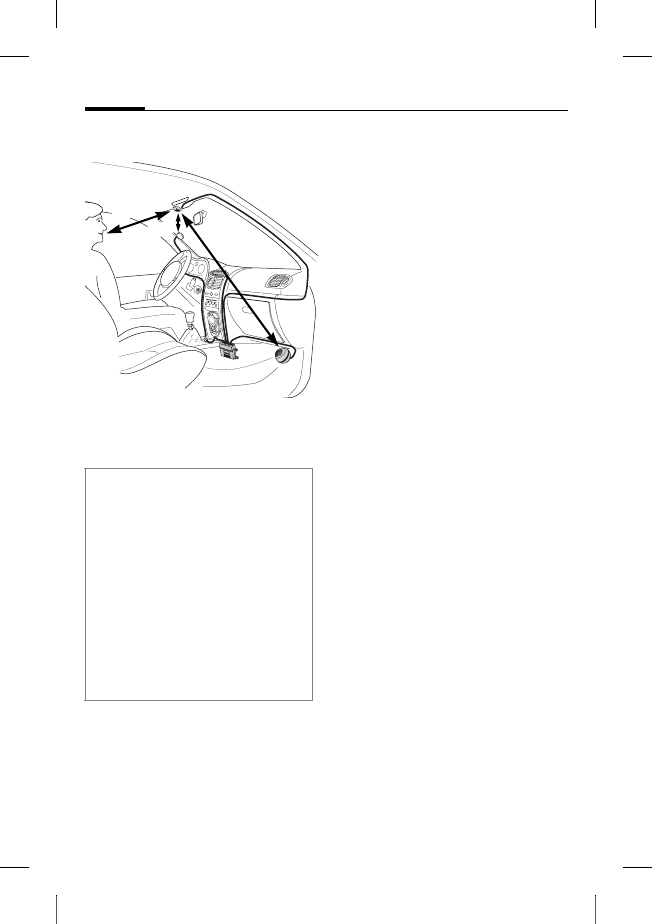
© Siemens AG 2003, W:\ICM_MP_CCQ_S_UM\03FL00443 Car Kit 65\CK_Final\Car_Kit_Bluetooth_2\Frame\HKW-600_it.fm
l
e
f
t page
(
42
)
o
f
HKW
-
600
i
t,
A31008
-
H6551
-
A102
-
1
-
4W28
(12
.
08
.
2004
,
Car Kit Bluetooth
42
VAR Language: unknown; VAR issue date: 12-March-2003
Montaggio
Microfono, display,
altoparlante
* Antenna e supporto per telefono non
compresi nella fornitura standard.
Posare i cavi per il microfono
esterno :, il display 6 e l'alto-
parlante 8 correttamente, in
conformità alla tipologia del
veicolo.
Evitare di danneggiare i cavi, di
piegarli o di schiacciarli.
Microfono
Pulire il punto sul quale si vuole
fissare il microfono esterno :
con uno sgrassante adatto. Il cu-
scinetto adesivo può essere fis-
sato solo su una superficie op-
portunamente predisposta.
Fissare il microfono esterno :
nel punto desiderato e in
direzione dell'utente usando
il cuscinetto adesivo.
Display
Assicurarsi di montare il
display 6 in modo tale da garan-
tire al guidatore un controllo ot-
timale, sia visivo che d'utilizzo.
Il display 6 può essere
applicato direttamente al cru-
scotto o essere fissato con l'aiuto
del supporto 7.
Durante il montaggio fare attenzione
a quanto segue:
• distanza microfono : – altoparlan-
te 8 possibilmente > 1 m
• distanza microfono :/cavo micro-
fono – telefono > 50 cm
• distanza microfono : – bocca
dell'utente < 80 cm
Evitare il montaggio del microfono in
prossimità di corrente d'aria prove-
niente dal tettuccio apribile, dal fine-
strino o dalle bocchette di
ventilazione.
> 50 cm
‹ 80 cm
>1 m
*
*

r
i
g
h
t page
(
43
)
o
f
HKW
-
600
i
t,
A31008
-
H6551
-
A102
-
1
-
4W28
(12
.
08
.
2004
,
©
S
i
emens
A
G
2
0
0
3
,
W
:
\
I
C
M
_
M
P
_
C
C
Q
_
S
_
U
M
\
0
3
F
L
0
0
4
4
3
C
ar
K
i
t
6
5
\
C
K
_
F
i
na
l
\
C
ar_
K
i
t_
B
l
uetoot
h
_
2
\
F
rame
\
H
K
W
-
6
0
0
_
i
t.
f
m
43Car Kit Bluetooth
V
A
R
L
anguage: un
k
nown;
V
A
R
i
ssue
d
ate:
1
2
-
M
arc
h
-
2
0
0
3
Montaggio diretto del display
Pulire il punto sul quale si vuole
fissare il display 6 con uno
sgrassante adatto. Il cuscinetto
adesivo può essere fissato in
modo permanente solo su una
superficie opportunamente
predisposta.
Fissare il display 6 con un
cuscinetto adesivo.
Montaggio tramite supporto display
Fissare il supporto display 7
al cruscotto con il cuscinetto
adesivo fornito o con delle
viti adatte*.
Spingere il display 6 nel suppor-
to display 7 fino allo scatto.
Altoparlante
L'inclinazione e l'angolo di rota-
zione dell'altoparlante 8 sono
regolabili. Per la regolazione, al-
lentare l'apposita vite nel sup-
porto, regolare l'altoparlante 8
e serrare la vite.
Avvitare l'altoparlante 8 nel
punto idoneo (ad esempio
all'interno dell'abitacolo nella
zona bassa vicino ai piedi del
passeggero).
Le viti si trovano nel supporto
dell'altoparlante 8.
Cavo rete di bordo
Collegamenti elettrici
Durante il collegamento del kit
viva voce auto al cavo rete di
bordo 3 assicurarsi che non
venga compromesso il funziona-
mento di altri dispositivi (ad es.
caduta di tensione).
Prima di iniziare il montaggio del
cavo rete di bordo 3 e della cen-
tralina elettronica 1 staccare la
batteria dell'automobile.
Collegare il cavo §B§ (rosso) 12V+
con il polo positivo della batteria
dell'automobile.
Collegare il cavo §D§ (marrone)
con il polo negativo della batte-
ria dell'automobile.
* Non compreso nella fornitura stan-
dard di Siemens.

© Siemens AG 2003, W:\ICM_MP_CCQ_S_UM\03FL00443 Car Kit 65\CK_Final\Car_Kit_Bluetooth_2\Frame\HKW-600_it.fm
l
e
f
t page
(
44
)
o
f
HKW
-
600
i
t,
A31008
-
H6551
-
A102
-
1
-
4W28
(12
.
08
.
2004
,
Car Kit Bluetooth
44
VAR Language: unknown; VAR issue date: 12-March-2003
Collegare il cavo §C§ (violetto) con
l'impianto elettrico del veicolo in
modo che ad accensione inserita
siano presenti 12V+ o 24 V+.
Collegare il cavo dell'altoparlante al
cavo rete di bordo
Collegare il cavo dell'alto-
parlante + §G§ (bianco-nero) e §E§
(verde-nero) utilizzando il
connettore 9.
Collegare il cavo dell'altoparlan-
te - §H§ (nero ) e §F§ (verde) utiliz-
zando il connettore 9.
Collegamento con la radio*
Il kit viva voce auto può essere
collegato al sistema audio
dell'automobile tramite l'ingres-
so phone-in dell'autoradio. In
questo caso gli altoparlanti del
sistema audio vengono utilizzati
come dispositivo di riproduzione
del kit viva voce auto.
Si prega di utilizzare l'adattatore
cavo phone-in opzionale per
garantire un collegamento
ottimale alla radio.
A tale scopo collegare il cavo
rete di bordo 3 con il cavo di
collegamento §H§ e, tramite
l'adattatore phone-in opzionale,
con l'ingresso phone-in
dell'autoradio.
Collegare inoltre il cavo di colle-
gamento §G§ direttamente con
il polo che conduce il segnale
dell'ingresso phone-in dell'auto-
radio.
I diversi livelli di tensione del kit
viva voce auto e dell'ingresso
phone-in possono essere com-
pensati con il cavo adattatore
phone-in.
Collegare i cavi esclusivamente con i
morsetti di sicurezza 4 e inserire poi
le sicurezze ad attacco piatto a 3A 5
nei morsetti di sicurezza 4.
Per un'installazione corretta del cavo
rete di bordo, far sì che le sicurezze
vengano posizionate tra l'estremità
del cavo rete di bordo fornito e il pun-
to attacco del veicolo.
* Se esiste un'autoradio con ingresso
phone-in. L'autoradio non è compre-
sa nella fornitura standard di
Siemens.
r
i
g
h
t page
(
45
)
o
f
HKW
-
600
i
t,
A31008
-
H6551
-
A102
-
1
-
4W28
(12
.
08
.
2004
,
©
S
i
emens
A
G
2
0
0
3
,
W
:
\
I
C
M
_
M
P
_
C
C
Q
_
S
_
U
M
\
0
3
F
L
0
0
4
4
3
C
ar
K
i
t
6
5
\
C
K
_
F
i
na
l
\
C
ar_
K
i
t_
B
l
uetoot
h
_
2
\
F
rame
\
H
K
W
-
6
0
0
_
i
t.
f
m
45Car Kit Bluetooth
V
A
R
L
anguage: un
k
nown;
V
A
R
i
ssue
d
ate:
1
2
-
M
arc
h
-
2
0
0
3
Nella homepage Siemens sono
disponibili lo schema e altre in-
formazioni sul cavo adattatore
phone-in:
www.siemens-mobile.com/
phoneinadapter
Commutazione mute della radio
(Mute)*
Durante la conversazione il se-
gnale radio può essere commu-
tato automaticamente su mute.
Per attivare questa funzione, col-
legare il cavo di controllo §A§ della
commutazione mute con l'in-
gresso mute dell'autoradio.
Centralina elettronica
Posare i cavi dei seguenti com-
ponenti con cautela e senza pro-
vocare danni fino alla centralina
elettronica 1 e collegare i con-
nettori ad innesto con la centra-
lina elettronica stessa 1:
• cavo rete di bordo 3,
•display
6,
• microfono esterno :,
• cavo del supporto per telefo-
no (opzionale)
* Se l'autoradio è dotata di ingresso
mute. L'autoradio non è compresa
nella fornitura standard di Siemens.
Attenersi ai dati del produttore
dell'autoradio.
Attenzione a non fissare la centralina
elettronica 1 su o tra oggetti metalli-
ci. Solo in questo modo viene garanti-
ta una buona comunicazione radio.
Assicurarsi che la centralina elettroni-
ca 1 sia fissata correttamente.
Assicurarsi che le fessure di raffreda-
mento della centralina elettronica 1
non vengano coperte (almeno 2 cm di
spazio) e che il montaggio non provo-
chi disturbi ad altri dispositivi.
Non posizionare il cavo di collega-
mento dietro la centralina
elettronica 1 né avvolgerlo attorno
alla centralina elettronica 1 perché
ciò può causare disturbi.
Isolare con nastro specifico tutte le
terminazioni dei cavi che non vengo-
no utilizzate.
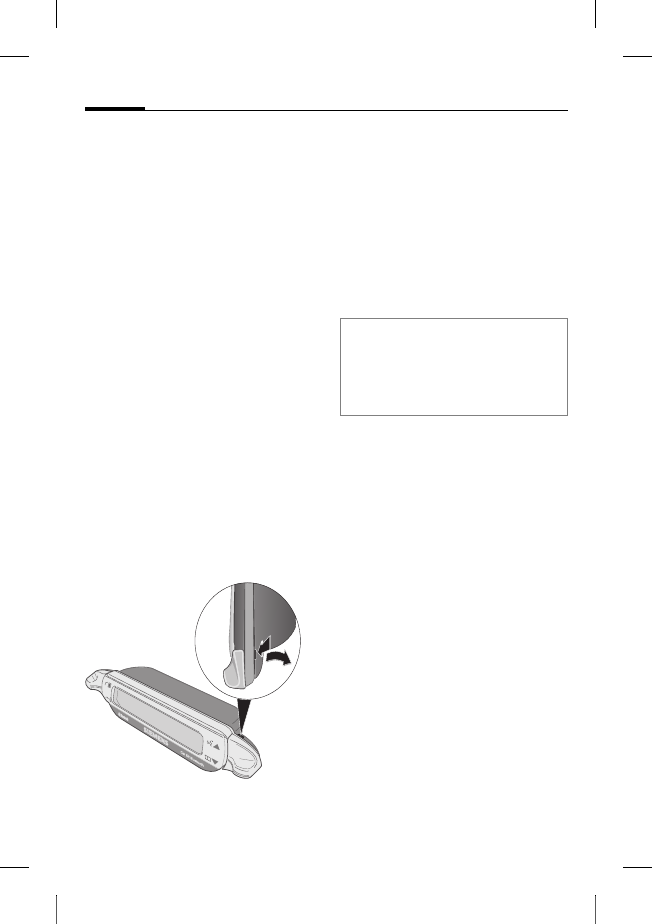
© Siemens AG 2003, W:\ICM_MP_CCQ_S_UM\03FL00443 Car Kit 65\CK_Final\Car_Kit_Bluetooth_2\Frame\HKW-600_it.fm
l
e
f
t page
(
46
)
o
f
HKW
-
600
i
t,
A31008
-
H6551
-
A102
-
1
-
4W28
(12
.
08
.
2004
,
Car Kit Bluetooth
46
VAR Language: unknown; VAR issue date: 12-March-2003
Far agganciare i connettori ad
innesto.
Avvolgere il cavo del microfono
esterno : intorno all'apposita
linguetta di bloccaggio per scari-
care la trazione (v. figura).
Fissare la centralina
elettronica 1 con viti 2 ad
esempio nella zona bassa vicino
ai piedi del passeggero.
Dopo il montaggio, collegare di
nuovo accuratamente la batteria
dell'automobile.
Smontaggio del display
Per smontare il display 6 dal
supporto 7, inserire un cacciavi-
te nell'apertura situata tra i due
elementi.
Premere con forza moderata il
display 6 allontanandolo dal
supporto 7 ed estrarre il
display 6.
Caratteristiche
Grazie al viva voce full-duplex ed
al massimo comfort d'uso, con il
kit viva voce auto Bluetooth go-
drete di una qualità di comunica-
zione ottimale anche in automo-
bile. Vi sembrerà di parlare con il
passeggero accanto a voi.
Tecnologia Bluetooth™
Il kit viva voce auto e il telefono
comunicano mediante Blueto-
oth™, un collegamento radio a
distanza limitata.
Per rendere possibile questa co-
municazione, collegare il kit viva
voce auto con il telefono. V.
"Creare un primo collegamento
con il telefono", pag. 48.
Il marchio e i logo Bluetooth sono proprietà
di Bluetooth SIG, Inc. (Special Interest
Group). Siemens utilizza questo marchio e i
logo su licenza. Gli altri marchi e gli altri no-
mi commerciali sono depositati dai rispettivi
proprietari.
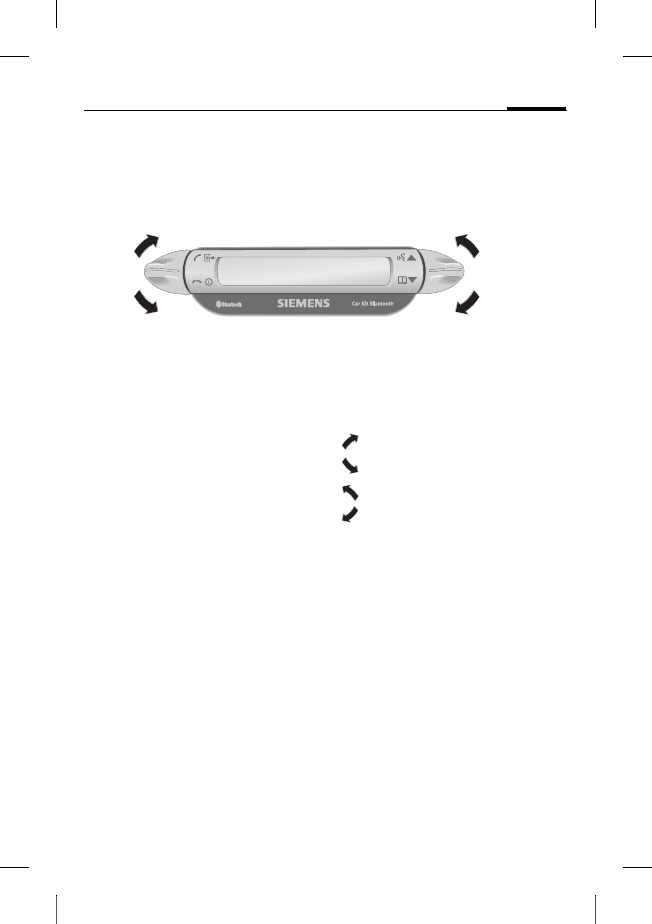
r
i
g
h
t page
(
47
)
o
f
HKW
-
600
i
t,
A31008
-
H6551
-
A102
-
1
-
4W28
(12
.
08
.
2004
,
©
S
i
emens
A
G
2
0
0
3
,
W
:
\
I
C
M
_
M
P
_
C
C
Q
_
S
_
U
M
\
0
3
F
L
0
0
4
4
3
C
ar
K
i
t
6
5
\
C
K
_
F
i
na
l
\
C
ar_
K
i
t_
B
l
uetoot
h
_
2
\
F
rame
\
H
K
W
-
6
0
0
_
i
t.
f
m
47Car Kit Bluetooth
V
A
R
L
anguage: un
k
nown;
V
A
R
i
ssue
d
ate:
1
2
-
M
arc
h
-
2
0
0
3
Display –
funzionalità dei tasti
La gestione del kit viva voce auto
avviene tramite i tasti del display
che possono essere spostati ver-
so l'alto e il basso.
• Con il tasto a sinistra si confer-
ma/rifiuta.
• Con il tasto a destra si sfoglia
nelle liste.
In seguito vengono utilizzati
simboli che rappresentano quat-
tro azioni differenti:
sì/rispondere
no/terminare
in su
in giù
Quando è necessario premere a
lungo, nel manuale viene specifi-
cato "a lungo".
Negli altri casi è sufficiente pre-
mere brevemente.
sì/rispondere
no/terminare
in su
in giù
© Siemens AG 2003, W:\ICM_MP_CCQ_S_UM\03FL00443 Car Kit 65\CK_Final\Car_Kit_Bluetooth_2\Frame\HKW-600_it.fm
l
e
f
t page
(
48
)
o
f
HKW
-
600
i
t,
A31008
-
H6551
-
A102
-
1
-
4W28
(12
.
08
.
2004
,
Car Kit Bluetooth
48
VAR Language: unknown; VAR issue date: 12-March-2003
Messa in funzione
Creare un primo
collegamento con il telefono
• Attivare il login del kit viva
voce auto premendo il
tasto a lungo.
• Attivare l'interfaccia Blueto-
oth del telefono e iniziare la ri-
cerca di dispositivi ricettivi nei
dintorni.
• Una volta individuato il kit
viva voce auto, il telefono
chiede di confermare il
collegamento digitando il
numero PIN.
• Sul display viene visualizzato il
numero PIN del kit viva voce
auto.
• Dopo la conferma, sul display
viene visualizzata l'identifica-
zione del telefono e il kit viva
voce auto passa allo stand-by.
Se si utilizza il telefono di
un'altra casa produttrice, po-
trebbe essere necessario con-
fermare l'identificazione per
poter passare allo stand-by.
A partire da questo momento il
kit viva voce auto è pronto al
funzionamento. Il kit viva voce
auto e il telefono possono comu-
nicare tra di loro e successiva-
mente si riconosceranno.
Funzionamento con più
telefoni
Il kit viva voce auto mantiene in
memoria i collegamenti di mas-
simo quattro telefoni con i quali
può comunicare alternativa-
mente.
Se si collega un quinto telefono,
viene cancellata la voce del tele-
fono che per più tempo non è
stato collegato al kit viva voce
auto.
Quando il kit viva voce viene atti-
vato, esso cerca il telefono con il
quale è stato collegato per ulti-
mo. Se questo non viene trova-
to, il kit viva voce cerca gli altri
telefoni memorizzati. I telefoni
trovati vengono visualizzati sul
display. L'utente può ora selezio-
nare un apparecchio.
Nota
Per ulteriori informazioni riguardanti la
creazione di un collegamento Blueto-
oth, leggere le sezioni relative nel ma-
nuale d'uso del telefono.
r
i
g
h
t page
(
49
)
o
f
HKW
-
600
i
t,
A31008
-
H6551
-
A102
-
1
-
4W28
(12
.
08
.
2004
,
©
S
i
emens
A
G
2
0
0
3
,
W
:
\
I
C
M
_
M
P
_
C
C
Q
_
S
_
U
M
\
0
3
F
L
0
0
4
4
3
C
ar
K
i
t
6
5
\
C
K
_
F
i
na
l
\
C
ar_
K
i
t_
B
l
uetoot
h
_
2
\
F
rame
\
H
K
W
-
6
0
0
_
i
t.
f
m
49Car Kit Bluetooth
V
A
R
L
anguage: un
k
nown;
V
A
R
i
ssue
d
ate:
1
2
-
M
arc
h
-
2
0
0
3
Usare il kit viva voce auto con un
altro telefono
• Spegnere il kit viva voce auto
premendo il tasto a lungo.
• Disattivare l'interfaccia Blue-
tooth del telefono con il quale
si è stati collegati per ultimo.
• Accendere il kit viva voce auto
premendo il tasto a lungo. Il
kit viva voce auto cerca il tele-
fono attivato per ultimo e non
lo trova.
• Il kit viva voce auto cerca ora
ulteriori telefoni memorizzati
che vengono visualizzati sul
display.
• Scegliere l'apparecchio desi-
derato:
Indica il primo tele-
fono trovato (se già
registrato).
Indica il telefono pre-
cedente nella lista (se
già registrato).
Collegamento con il
telefono visualizzato.
Funzionamento con
supporto per telefono
opzionale
Il kit viva voce auto è disponibile
con un supporto opzionale. Ciò
comporta i seguenti vantaggi:
• Funzionamento con un'anten-
na esterna opzionale suppor-
tato.
• Ricarica del telefono dopo
essere stato inserito nel
supporto.
• Utilizzo del kit viva voce auto
con un telefono Siemens sen-
za funzionalità Bluetooth.
Quando si inserisce il telefono
nel supporto, il collegamento
del telefono con il kit viva voce
auto avviene tramite la connes-
sione ad innesto del supporto.
Nota
Per ulteriori informazioni si prega di
leggere le sezioni relative nel manuale
d'uso del supporto per telefono.

© Siemens AG 2003, W:\ICM_MP_CCQ_S_UM\03FL00443 Car Kit 65\CK_Final\Car_Kit_Bluetooth_2\Frame\HKW-600_it.fm
l
e
f
t page
(
50
)
o
f
HKW
-
600
i
t,
A31008
-
H6551
-
A102
-
1
-
4W28
(12
.
08
.
2004
,
Car Kit Bluetooth
50
VAR Language: unknown; VAR issue date: 12-March-2003
Primi passi
Accendere il kit viva voce
auto
• Accendere il kit viva voce auto
tramite l'accensione del pro-
prio veicolo o premendo il
tasto a lungo.
• Il kit viva voce auto cerca il te-
lefono usato per ultimo. Esso
viene visualizzato sul display.
A partire da questo momento il
kit viva voce auto è pronto al
funzionamento.
Rispondere ad una chiamata
Rispondere ad una
chiamata.
Rifiutare una chiamata
Rifiutare una
chiamata.
Terminare una
conversazione
Terminare una
conversazione.
Funzioni
Se non ci sono altre indicazioni,
per tutte le funzioni vale quanto
segue:
premendo brevemen-
te/a lungo: il kit viva
voce auto commuta
su modalità stand-by.
Stand-by
In modalità stand-by il kit viva
voce ha le funzioni seguenti:
Liste chiamate
Premendo a lungo:
modalità log-in
Premendo a lungo:
spegnere il kit viva
voce auto
Rubrica
Riconoscimento voca-
le (se la funzione è of-
ferta dal telefono)
Chiamate dalla Rubrica
Rubrica
Indica la Rubrica del telefono.
Aprire la Rubrica.
, Selezionare una Voce.

r
i
g
h
t page
(
51
)
o
f
HKW
-
600
i
t,
A31008
-
H6551
-
A102
-
1
-
4W28
(12
.
08
.
2004
,
©
S
i
emens
A
G
2
0
0
3
,
W
:
\
I
C
M
_
M
P
_
C
C
Q
_
S
_
U
M
\
0
3
F
L
0
0
4
4
3
C
ar
K
i
t
6
5
\
C
K
_
F
i
na
l
\
C
ar_
K
i
t_
B
l
uetoot
h
_
2
\
F
rame
\
H
K
W
-
6
0
0
_
i
t.
f
m
51Car Kit Bluetooth
V
A
R
L
anguage: un
k
nown;
V
A
R
i
ssue
d
ate:
1
2
-
M
arc
h
-
2
0
0
3
Una voce nella Rubrica degli in-
dirizzi può comprendere più nu-
meri di telefono.
, Selezionare una Voce.
Iniziare la chiamata.
Ulteriori funzioni della Rubrica
Sale di una voce nella
lista.
Premendo a lungo:
sale di 10 voci nella
lista.
Scende di una voce
nella lista.
Premendo a lungo:
scende di 10 voci
nella lista.
Chiamate dalle Liste
Liste chiamate
Visualizza le liste chiamate del
telefono.
Sono disponibili tre liste
chiamate:
• Chiamate in uscita
• Chiamate perse
• Chiamate ricevute
Le liste chiamate vengono visua-
lizzate solo se ognuna di esse
comprende almeno una voce.
, Scegliere la lista
chiamate.
Attivare la lista
chiamate.
, Selezionare una voce.
(Per ulteriori funzio-
nalità v. “Ulteriori fun-
zioni della Rubrica)
Iniziare la chiamata.
Durante la conversazione
Alzare il volume.
Abbassare il volume.
Tenere una chiamata
in linea.
Premendo a lungo: at-
tivare/disattivare la
commutazione mute
del microfono.
Terminare la
chiamata.
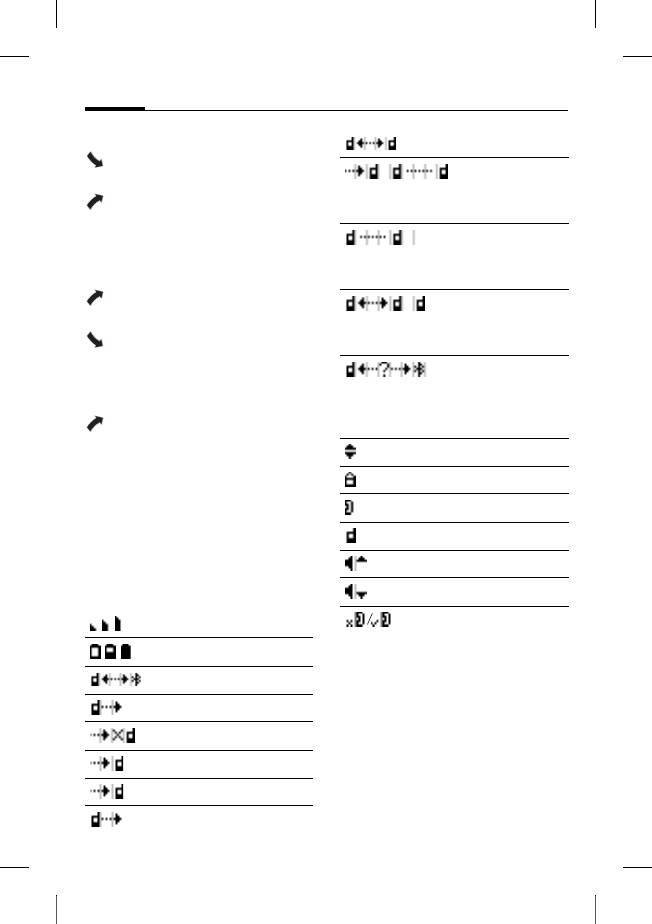
© Siemens AG 2003, W:\ICM_MP_CCQ_S_UM\03FL00443 Car Kit 65\CK_Final\Car_Kit_Bluetooth_2\Frame\HKW-600_it.fm
l
e
f
t page
(
52
)
o
f
HKW
-
600
i
t,
A31008
-
H6551
-
A102
-
1
-
4W28
(12
.
08
.
2004
,
Car Kit Bluetooth
52
VAR Language: unknown; VAR issue date: 12-March-2003
Seconda chiamata
Terminare la chiama-
ta attiva.
Tenere la conversa-
zione attiva in linea e
rispondere alla chia-
mata in entrata
(avviso di chiamata).
Commutare tra due
chiamate.
Premendo a lungo:
terminare tutte le
conversazioni.
Passaggio conversazione
Premendo a lungo:
passare la conversa-
zione attiva al kit viva
voce auto.
Per continuare la conversazione
al telefono, premere il tasto di-
splay corrispondente (se la fun-
zione è offerta dal telefono).
Simboli display
Intensità del segnale
Stato di ricarica del telefono
Modalità login (Pairing)
Chiamate in uscita
Chiamate perse
Chiamate ricevute
Chiamata in entrata
Chiamata in uscita
Conversazione attiva
Conversazione attiva/avviso
di chiamata
Conversazione tenuta in
linea
Commutare tra due
conversazioni
Anomalia interfaccia
(se la funzione è offerta dal
telefono)
Selezione lista
Numero privato
Numero ufficio
Numero cellulare
Aumentare il volume
Abbassare il volume
Commutazione mute micro-
fono attivata/disattivata

r
i
g
h
t page
(
53
)
o
f
HKW
-
600
i
t,
A31008
-
H6551
-
A102
-
1
-
4W28
(12
.
08
.
2004
,
©
S
i
emens
A
G
2
0
0
3
,
W
:
\
I
C
M
_
M
P
_
C
C
Q
_
S
_
U
M
\
0
3
F
L
0
0
4
4
3
C
ar
K
i
t
6
5
\
C
K
_
F
i
na
l
\
C
ar_
K
i
t_
B
l
uetoot
h
_
2
\
F
rame
\
H
K
W
-
6
0
0
_
i
t.
f
m
53Car Kit Bluetooth
V
A
R
L
anguage: un
k
nown;
V
A
R
i
ssue
d
ate:
1
2
-
M
arc
h
-
2
0
0
3
Eliminazione di
anomalie e guasti
Il kit viva voce auto non funziona
• Verificare i collegamenti dei
cavi
• Assenza della tensione di eser-
cizio, verificare il collegamen-
to dei cavi
• Telefono non acceso o colle-
gamento kit viva voce auto
non attivo
• Verificare le sicurezze
• Tensione di esercizio troppo
bassa o troppo alta
Comunicazione disturbata o presen-
za di rumore di fondo da parte del
chiamante
• Microfono montato in prossi-
mità di corrente d'aria prove-
niente dal tettuccio apribile,
dal finestrino o dalle bocchet-
te di ventilazione
• Distanza microfono/cavo mi-
crofono - telefono < 50 cm
Cattiva qualità vocale e audio
• Temperatura del kit viva voce
auto al di fuori della tempera-
tura di esercizio ammessa
• Volume troppo basso (regola-
re il volume con il telefono!)
• In caso di funzionamento pho-
ne-in (collegamento con la ra-
dio): volume telefono troppo
alto (abbassare il volume con
il telefono ed eventualmente
aumentare il volume con la
radio)
Forte eco
• Distanza tra microfono e alto-
parlante < 1 m
Segnale microfono debole (l'interlo-
cutore sente poco)
• Distanza tra microfono e boc-
ca dell'utente > 80 cm
• Microfono non orientato ver-
so la fonte vocale
Cattiva qualità di ricezione
• Nessuna rete disponibile
• Modificare la posizione del
telefono
• Se l'automobile è dotata di ve-
tri oscurati, la qualità di rice-
zione del telefono può essere
compromessa. Attenersi ai
consigli del produttore
dell'automobile e installare
un'antenna addizionale
(esterna) così come un sup-
porto per telefono opzionale.
© Siemens AG 2003, W:\ICM_MP_CCQ_S_UM\03FL00443 Car Kit 65\CK_Final\Car_Kit_Bluetooth_2\Frame\HKW-600_it.fm
l
e
f
t page
(
54
)
o
f
HKW
-
600
i
t,
A31008
-
H6551
-
A102
-
1
-
4W28
(12
.
08
.
2004
,
Car Kit Bluetooth
54
VAR Language: unknown; VAR issue date: 12-March-2003
Telefono non trovato/problemi con
collegamento Bluetooth
• Per creare un primo collega-
mento con il telefono, v.
pag. 48
• Dall'ultimo uso del telefono
con il kit viva voce auto sono
stati registrati altri quattro te-
lefoni. Effettuare nuovamen-
te il login del telefono.
• Assicurarsi che la centralina
elettronica non sia fissata su o
tra elementi metallici.
• Ridurre la distanza tra centrali-
na elettronica e telefono
Autoradio commutata su mute in
modo permanente
• Possibile errore di collega-
mento della commutazione
mute della radio con la massa
L'attivazione/disattivazione automa-
tica del kit viva voce auto non funzio-
na / il kit viva voce auto non si
spegne automaticamente
• Assicurarsi che il cavo dell'ac-
censione sia collegato con
quello dell'accensione auto.
Dati tecnici e
omologazione
Il kit viva voce auto ri-
spetta le seguenti diretti-
ve EU:
89/336/CEE "Compatibilità elet-
tromagnetica"
92/59/CEE "Direttiva sulla sicu-
rezza generale dei prodotti"
Approvazione del tipo
basata sulla direttiva
72/245/CEE, modifica-
ta dalla direttiva 95/54/CE "Com-
patibilità elettromagnetica nel
veicolo a motore".
Tensione di
alimentazione da 10,8 V+ a 16 V+
Cavo di collegamen-
to accensione auto a
scelta anche su 24V
Potenza as-
sorbita max. 2 A /max. 1 mA
(corrente di riposo)
Temperatura
d'esercizio da –25 C a +70 C
Linea di usci-
ta audio max. 7 W (su 4 Ohm)
Peso (centrali-
na elettronica) ca. 110 g
Dimensioni te-
laio (centralina
elettronica)
ca. 110 x 120 x 30
mm (LxPxA)
e1
023752
r
i
g
h
t page
(
55
)
o
f
HKW
-
600
i
t,
A31008
-
H6551
-
A102
-
1
-
4W28
(12
.
08
.
2004
,
©
S
i
emens
A
G
2
0
0
3
,
W
:
\
I
C
M
_
M
P
_
C
C
Q
_
S
_
U
M
\
0
3
F
L
0
0
4
4
3
C
ar
K
i
t
6
5
\
C
K
_
F
i
na
l
\
C
ar_
K
i
t_
B
l
uetoot
h
_
2
\
F
rame
\
H
K
W
-
6
0
0
_
i
t.
f
m
55Car Kit Bluetooth
V
A
R
L
anguage: un
k
nown;
V
A
R
i
ssue
d
ate:
1
2
-
M
arc
h
-
2
0
0
3
Dichiarazione di conformità
CE
Siemens Information and Com-
munication mobile dichiara che
il telefono descritto nel presente
manuale è conforme alle richie-
ste principali e alle altre impor-
tanti disposizioni della direttiva
1999/5/EC (R&TTE). La relativa
dichiarazione di conformità
(DoC) è stata sottoscritta.
La stessa è disponibile su richie-
sta presso la Hotline Siemens
oppure all'indirizzo Internet:
www.siemens-mobile.com/
conformity
FCC
Questo dispositivo è conforme
alla parte 15 delle Regole FCC. Il
suo funzionamento è soggetto
alle condizioni seguenti: (1) esso
non deve causare interferenze
pericolose e (2) deve accettare la
ricezione di qualsiasi interferen-
za, anche quelle che possono
comportare effetti indesiderati.
Qualsiasi cambiamento o modi-
fica non espressamente appro-
vata dalla parte responsabile
potrebbe rendere nulla l'autoriz-
zazione per l'utente a utilizzare
l'apparecchio.
Cura
Il prodotto dovrebbe essere
pulito con un panno umido
(non bagnato) non abrasivo.
Non usare detergenti, coloranti
o altre sostanze chimiche
aggressive.
Accessori
Il supporto per auto con collegamenti
elettrici è composto da:
• Car Kit Upgrade (modulo base per
supporto per auto/supporto per auto
con attacco antenna con cavo per
centralina elettronica)
• Mobile Holder Antenna/
Mobile Holder
Con questo supplemento si dispone di
ulteriori funzioni: attacco antenna, rica-
rica del telefono, posizionamento sicuro
del telefono nel veicolo. Inoltre si pos-
sono usare i telefoni senza funzionalità
Bluetooth a partire dalla serie 65.
Per il collegamento con l'autoradio:
• Phone-In Adapter Cable
(cavo adattatore phone-in)
I prodotti sono disponibili presso i riven-
ditori specializzati oppure visitate il no-
stro Online-Shop all'indirizzo:
Siemens Original
Accessories
www.siemens-
mobile.com/shop

© Siemens AG 2003, W:\ICM_MP_CCQ_S_UM\03FL00443 Car Kit 65\CK_Final\Car_Kit_Bluetooth_2\Frame\HKW-600_it.fm
l
e
f
t page
(
56
)
o
f
HKW
-
600
i
t,
A31008
-
H6551
-
A102
-
1
-
4W28
(12
.
08
.
2004
,
Servizio Clienti Siemens
56
VAR Language: unknown; VAR issue date: 12-March-2003
Servizio Clienti
Siemens
Per una consulenza personalizzata
riguardo a:
• Codice di sblocco del proprio telefono
• Utilizzo dei loghi, suonerie e giochi
rivolgetevi alla Hot Line Premium Num-
ber al numero 899 842 423 (1 euro/mi-
nuto da telefono fisso e 1,42
euro/munito da cellulare) durata massi-
ma del servizio 10 minuti.
In alcuni Paesi, in cui i prodotti non ven-
gono venduti tramite i nostri rivenditori
autorizzati, i servizi di riparazione e di
sostituzione non sono assistiti.
Per altre informazioni commerciali e
servizio assistenza rivolgersi ad uno dei
nostri Centri Servizi:
Abu Dhabi................................0 26 42 38 00
Arabia Saudita .........................0 22 26 00 43
Argentina ............................0 80 08 88 98 78
Australia.................................13 00 66 53 66
Austria....................................05 17 07 50 04
Bahrain ............................................40 42 34
Bangladesh..............................0 17 52 74 47
Belgio.......................................0 78 15 22 21
Bolivia......................................0 21 21 41 14
Bosnia Erzegovina...................0 33 27 66 49
Brasile.................................0 80 07 07 12 48
Brunei .........................................02 43 08 01
Bulgaria.......................................02 73 94 88
Cambogia ...................................12 80 05 00
Canada ...............................1 88 87 77 02 11
Cina ....................................0 21 38 98 47 77
Costa d'Avorio.............................05 02 02 59
Croazia ....................................0 16 10 53 81
Danimarca ..................................35 25 86 00
Dubai .......................................0 43 96 64 33
Egitto........................................0 23 33 41 11
Emirati Arabi Uniti....................0 43 66 03 86
Estonia........................................06 30 47 97
Filippine ...................................0 27 57 11 18
Finlandia................................09 22 94 37 00
Francia...................................01 56 38 42 00
Germania *..........................0 18 05 33 32 26
Giordania .................................0 64 39 86 42
Gran Bretagna ....................0 87 05 33 44 11
Grecia .................................0 80 11 11 11 16
Hong Kong..................................28 61 11 18
India....................22 24 98 70 00 Extn: 70 40
Indonesia ............................0 21 46 82 60 81
Irlanda....................................18 50 77 72 77
Islanda ..........................................5 11 30 00
Italia.......................................02 24 36 44 00
Un’assistenza semplice e non com-
plessa per domande di carattere tec-
nico e per l’utilizzo del vostro
apparecchio si può ricevere tramite il
nostro Online Support in Internet:
www.siemens-mobile.it
(sezione "Assistenza").
In tal modo siamo sempre ed ovun-
que raggiungibili. Per i nostri prodotti,
vi offriamo un’assistenza di 24 ore su
24. In questo sito trovate un sistema
di ricerca errori interattivo, un somma-
rio delle domande e risposte più fre-
quenti ed infine un manuale d’uso
come anche gli aggiornamenti
Software che potete scaricare
dal web.
Prima di chiamare, recuperare il do-
cumento di acquisto, annotare il codi-
ce identificativo dell’apparecchhio
(IMEI, visualizzazione con*#06#), la
versione del software (visualizzazio-
ne con *#06#, e §Altro§) ed eventual-
mente il numero cliente
dell’Assistenza Siemens.
* 0,12 euro/minuto

r
i
g
h
t page
(
57
)
o
f
HKW
-
600
i
t,
A31008
-
H6551
-
A102
-
1
-
4W28
(12
.
08
.
2004
,
©
S
i
emens
A
G
2
0
0
3
,
W
:
\
I
C
M
_
M
P
_
C
C
Q
_
S
_
U
M
\
0
3
F
L
0
0
4
4
3
C
ar
K
i
t
6
5
\
C
K
_
F
i
na
l
\
C
ar_
K
i
t_
B
l
uetoot
h
_
2
\
F
rame
\
H
K
W
-
6
0
0
_
i
t.
f
m
57Servizio Clienti Siemens
V
A
R
L
anguage: un
k
nown;
V
A
R
i
ssue
d
ate:
1
2
-
M
arc
h
-
2
0
0
3
Kenia.............................................2 72 37 17
Kuwait...........................................2 45 41 78
Lettonia.........................................7 50 11 18
Libano.........................................01 44 30 43
Libia .......................................02 13 50 28 82
Lituania....................................8 52 74 20 10
Lussemburgo..............................43 84 33 99
Macedonia ..................................02 13 14 84
Malesia ............................+ 6 03 77 12 43 04
Malta..............................+ 35 32 14 94 06 32
Marocco......................................22 66 92 09
Mauritius .......................................2 11 62 13
Messico.............................01 80 07 11 00 03
Nigeria .....................................0 14 50 05 00
Norvegia .....................................22 70 84 00
Nuova Zelenda.......................08 00 57 43 63
Olanda ................................0 90 03 33 31 00
Oman...............................................79 10 12
Pakistan.................................02 15 66 22 00
Paraguay .................................8 00 10 20 04
Polonia...................................08 01 30 00 30
Portogallo.................................8 08 20 15 21
Qatar...........................................04 32 20 10
Rep. Ceca................................2 33 03 27 27
Rep. Slovacca........................02 59 68 22 66
Romania ................................02 12 04 60 00
Russia.................................8 80 02 00 10 10
Serbia ....................................01 13 07 00 80
Singapore ...................................62 27 11 18
Slovenia...................................0 14 74 63 36
Spagna ....................................9 02 11 50 61
Sud Africa ..............................08 60 10 11 57
Svezia......................................0 87 50 99 11
Svizzera.................................08 48 21 20 00
Tailandia..................................0 27 22 11 18
Taiwan ...................................02 23 96 10 06
Tunisia ........................................71 86 19 02
Turchia................................0 21 65 79 71 00
Ucraina ...............................8 80 05 01 00 00
Ungheria ................................06 14 71 24 44
U.S.A. .................................1 88 87 77 02 11
Vietnam..................................84 89 30 01 21
Zimbabwe ...................................04 36 94 24

© Siemens AG 2003, W:\ICM_MP_CCQ_S_UM\03FL00443 Car Kit 65\CK_Final\Car_Kit_Bluetooth_2\Frame\HKW-600_it.fm
l
e
f
t page
(
58
)
o
f
HKW
-
600
i
t,
A31008
-
H6551
-
A102
-
1
-
4W28
(12
.
08
.
2004
,
58
VAR Language: unknown; VAR issue date: 12-March-2003

r
i
g
h
t page
(
59
)
o
f
HKW
-
600
f
r,
A31008
-
H6551
-
A102
-
1
-
4W28
(12
.
08
.
2004
,
©
S
i
emens
A
G
2
0
0
3
,
W
:
\
I
C
M
_
M
P
_
C
C
Q
_
S
_
U
M
\
0
3
F
L
0
0
4
4
3
C
ar
K
i
t
6
5
\
C
K
_
F
i
na
l
\
C
ar_
K
i
t_
B
l
uetoot
h
_
2
\
F
rame
\
H
K
W
-
6
0
0
_
f
r.
f
m
59Car Kit Bluetooth
V
A
R
L
anguage: un
k
nown;
V
A
R
i
ssue
d
ate:
1
2
mars
2
0
0
3
Car Kit Blue-
tooth (fr) Car Kit Bluetooth
Contenu de
l'emballage
Accessoires voir p. 75
1 Boîtier électronique avec prises de
raccordement pour :
• faisceau de câbles
• écran
• microphone
• support passif (en option, ne
figure pas dans le contenu de
l'emballage)
2 Vis pour la fixation du boîtier
électronique
3 Faisceau de câbles avec prises
haut-parleur
•§A§ Mise en sourdine de la radio
(Radio Mute) (noir)
•§B§ Batterie 12 V+ (rouge)
•§C§ Allumage 12 V+/24 V+ (violet)
•§D§ Masse (brun)
•§E§ Prise haut-parleur + (vert/noir)
•§F§ Prise haut-parleur - (vert)
4 3 connecteurs de sûreté pour le
circuit électrique du véhicule
5 3 fusibles plats (3 A violet) pour les
connecteurs de sûreté
6 Ecran avec socle autocollant
7 Support écran
8 Haut-parleur avec câble de
raccordement
•§G§ Prise haut-parleur +
(blanc/noir)
•§H§ Prise haut-parleur - (noir)
(Des vis de fixation sont intégrées
dans le socle)
9 2 raccords de câble pour les
câbles des haut-parleurs
: Microphone externe avec socle
autocollant
* Ne figurent pas dans la livraison standard Siemens.
La marque et les logos Bluetooth sont la propriété de Bluetooth SIG, Inc. Siemens utilise cette
marque et ces logos sous licence. Les autres marques et noms commerciaux sont déposés par
leurs propriétaires respectifs.
© Siemens AG 2003, W:\ICM_MP_CCQ_S_UM\03FL00443 Car Kit 65\CK_Final\Car_Kit_Bluetooth_2\Frame\HKW-600_fr.fm
l
e
f
t page
(
60
)
o
f
HKW
-
600
f
r,
A31008
-
H6551
-
A102
-
1
-
4W28
(12
.
08
.
2004
,
Car Kit Bluetooth
60
VAR Language: unknown; VAR issue date: 12 mars 2003
Compatibilité
Le kit mains-libres Bluetooth
(appelé ci-après « Kit véhicule »)
convient pour les mobiles
suivants :
• Les mobiles Siemens avec
interface Bluetooth
• Les mobiles Siemens S55 et
SX1 et les mobiles d'autres fa-
bricants dotés d'une interface
Bluetooth peuvent être utili-
sés mais ne proposeront
peut-être pas toutes les
fonctionnalités.
• Les mobiles Siemens sans in-
terface Bluetooth (utilisation
possible avec un support pas-
sif proposé en option) à partir
de la série 65.
Consignes de sécurité
Ce manuel d'installation ne peut four-
nir que les informations essentielles.
Etant donné que les différents modè-
les de véhicule et raccordements de
l'autoradio exigent des installations
différentes, le montage doit être ef-
fectué en fonction des conditions
respectives.
Lisez précisément le mode d'emploi
et les consignes de sécurité avant
utilisation !
Lors de l'utilisation du mo-
bile, respectez les disposi-
tions légales et les
restrictions locales. Celles-
ci peuvent s'appliquer,
p. ex., à la conduite en
voiture ou dans les
stations-service.
Les directives générales
valables pour le type de
véhicule sont à respecter
lors du montage d'acces-
soires ; ne pas hésiter à
faire appel, si nécessaire,
à un spécialiste (sécurité
électrique, pose des câ-
bles, contact avec des piè-
ces portées à
températures élevées,
contact avec le carburant,
etc.).
r
i
g
h
t page
(
61
)
o
f
HKW
-
600
f
r,
A31008
-
H6551
-
A102
-
1
-
4W28
(12
.
08
.
2004
,
©
S
i
emens
A
G
2
0
0
3
,
W
:
\
I
C
M
_
M
P
_
C
C
Q
_
S
_
U
M
\
0
3
F
L
0
0
4
4
3
C
ar
K
i
t
6
5
\
C
K
_
F
i
na
l
\
C
ar_
K
i
t_
B
l
uetoot
h
_
2
\
F
rame
\
H
K
W
-
6
0
0
_
f
r.
f
m
61Car Kit Bluetooth
V
A
R
L
anguage: un
k
nown;
V
A
R
i
ssue
d
ate:
1
2
mars
2
0
0
3
Vérifiez au moyen du mode d’emploi du
véhicule, avant l’emploi d’accessoires
Bluetooth® ou de téléphones mobiles
dans un véhicule, s’il y a des restric-
tions d’utilisation.
Pour des instructions d'utilisation
supplémentaires, reportez-vous au
mode d'emploi de votre mobile.
Le montage des différents
éléments ne doit pas
entraver :
• la liberté de mouvement,
la sécurité et la visibilité
du conducteur
• la sécurité des passa-
gers (également en cas
d'accident)
• le fonctionnement des
dispositifs de sécurité du
véhicule (coussin d'air,
ceinture de sécurité,
etc.)
Attention pendant le mon-
tage ! Risque d'ingestion
des petites pièces par les
petits enfants.
L'appareil fonctionne uni-
quement sous une tension
de 12 V.
Ne pas utiliser l'appareil
dans des locaux exposés à
des risques d'explosion.
Si votre véhicule est équi-
pé de vitres métallisées, la
qualité de réception de vo-
tre téléphone peut être
amoindrie. Une antenne
externe garantit une récep-
tion optimale. Pour fonc-
tionner à l'installation,
votre téléphone et le Kit vé-
hicule doivent être équipés
d'une antenne externe.
Toute utilisation et ouver-
ture inappropriées des
éléments annulent la
garantie.
Veuillez tenir compte des indications
suivantes :
Les téléphones inutilisa-
bles et leurs accessoires
doivent être éliminés con-
formément aux disposi-
tions légales en la matière.
N'utilisez que des acces-
soires d'origine Siemens.
Vous éviterez ainsi tout ris-
que de dommage matériel
ou de blessure et serez
certain de respecter tous
les règlements en vigueur.
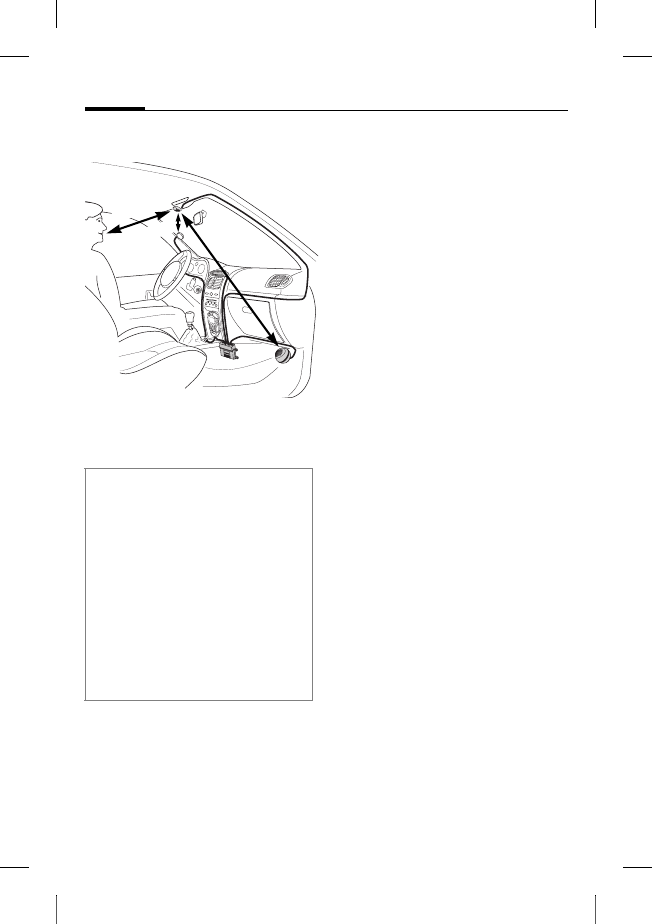
© Siemens AG 2003, W:\ICM_MP_CCQ_S_UM\03FL00443 Car Kit 65\CK_Final\Car_Kit_Bluetooth_2\Frame\HKW-600_fr.fm
l
e
f
t page
(
62
)
o
f
HKW
-
600
f
r,
A31008
-
H6551
-
A102
-
1
-
4W28
(12
.
08
.
2004
,
Car Kit Bluetooth
62
VAR Language: unknown; VAR issue date: 12 mars 2003
Montage
Microphone, écran,
haut-parleur
* L'antenne et le support passif ne
sont pas compris dans le contenu
de l'emballage.
Poser correctement les câbles
pour le microphone externe :,
l'écran 6 et le haut-parleur 8
en fonction des conditions de
votre véhicule.
Eviter d'endommager les câbles,
de les plier ou de les écraser.
Microphone
Nettoyer l'endroit choisi pour
fixer le microphone externe :
avec un produit détergent dé-
graissant approprié. Le socle
autocollant ne tient durable-
ment que si la surface est non
graisseuse.
Fixer le microphone externe : à
l'endroit souhaité à l'aide du so-
cle autocollant en l'orientant
vers l'utilisateur.
Ecran
Veiller à positionner l'écran 6 de
manière à ce que le conducteur
le voit et y ait accès de manière
optimale.
Vous pouvez fixer l'écran 6 di-
rectement sur l'armature ou le
placer dans le support
d'écran 7.
Lors du montage, veuillez respecter
les indications suivantes :
• distance entre microphone : -
et haut-parleur 8 autant que
possible > 1 m
• distance entre microphone :/
câble microphone et téléphone
>50cm
• distance entre microphone : -
et bouche de l'utilisateur < 80 cm
Eviter le montage du microphone
dans le courant d'air du toit ouvrant,
de la fenêtre ou de la ventilation.
> 50 cm
< 80 cm
>1 m
*
*

r
i
g
h
t page
(
63
)
o
f
HKW
-
600
f
r,
A31008
-
H6551
-
A102
-
1
-
4W28
(12
.
08
.
2004
,
©
S
i
emens
A
G
2
0
0
3
,
W
:
\
I
C
M
_
M
P
_
C
C
Q
_
S
_
U
M
\
0
3
F
L
0
0
4
4
3
C
ar
K
i
t
6
5
\
C
K
_
F
i
na
l
\
C
ar_
K
i
t_
B
l
uetoot
h
_
2
\
F
rame
\
H
K
W
-
6
0
0
_
f
r.
f
m
63Car Kit Bluetooth
V
A
R
L
anguage: un
k
nown;
V
A
R
i
ssue
d
ate:
1
2
mars
2
0
0
3
Montage direct de l'écran
Nettoyer l'endroit choisi pour
fixer l'écran 6 avec un produit
détergent dégraissant appro-
prié. Le socle autocollant ne
tient durablement que si la sur-
face est non graisseuse.
Fixer ensuite l'écran 6 à l'aide
du socle autocollant.
Montage au moyen du support
d'écran
Fixer le support d'écran 7 sur
l'armature à l'aide du socle
autocollant fourni ou de vis
adéquates* .
Enfoncer ensuite l'écran 6
dans le logement du support
d'écran 7 prévu à cet effet jus-
qu'à l'enclipsage.
Haut-parleur
L'inclinaison et l'angle d'orienta-
tion du haut-parleur 8 sont ré-
glables. Desserrer pour cela la vis
de réglage dans le socle, régler
la position du haut-parleur 8 et
serrer la vis.
Visser le haut-parleur 8 à l'en-
droit voulu (p. ex. au niveau de
l'espace prévu pour les pieds
des passagers).
Les vis sont rangées dans le socle
du haut-parleur 8.
Faisceau de câbles
Raccordements électriques
Lors du raccordement du Kit vé-
hicule au faisceau de câbles 3,
assurez-vous du bon fonctionne-
ment des autres appareils
(pour éviter, par ex., une
baisse de tension).
Débrancher correctement la
batterie du véhicule avant d'en-
tamer le montage du faisceau
de câbles 3 et du boîtier élec-
tronique 1.
Raccorder le câble §B§ 12 V+
(rouge) au pôle positif de la
batterie du véhicule.
Raccorder le câble §D§ (brun)
au pôle négatif de la batterie
du véhicule.
* Ne figurent pas dans la livraison stan-
dard Siemens.

© Siemens AG 2003, W:\ICM_MP_CCQ_S_UM\03FL00443 Car Kit 65\CK_Final\Car_Kit_Bluetooth_2\Frame\HKW-600_fr.fm
l
e
f
t page
(
64
)
o
f
HKW
-
600
f
r,
A31008
-
H6551
-
A102
-
1
-
4W28
(12
.
08
.
2004
,
Car Kit Bluetooth
64
VAR Language: unknown; VAR issue date: 12 mars 2003
Raccorder le câble §C§ (violet) au
système électrique du véhicule
de manière à disposer d'une ali-
mentation 12 V+ ou 24 V+ lors-
que le contact est mis.
Relier le câble du haut-parleur au
faisceau de câbles
Relier les câbles du haut-parleur
+ §G§ (blanc-noir) et §E§ (vert-noir)
à l'aide d'un raccord de câble 9.
Relier les câbles du haut-parleur
- §H§ (noir) et §F§ (vert) à l'aide d'un
raccord de câble 9.
Raccordement à la radio*
Vous pouvez raccorder le Kit vé-
hicule au système audio de votre
véhicule en utilisant l'entrée Té-
léphone de l'autoradio. Les haut-
parleurs du système audio servi-
ront alors de dispositif de restitu-
tion pour le Kit véhicule.
Utiliser le câble adaptateur
Phone-In (en option) pour un
raccordement optimal à la radio.
Relier pour cela le câble de rac-
cordement §H§ du faisceau de câ-
bles 3 à l'entrée Téléphone de
votre autoradio en utilisant
le câble adaptateur Phone-In
(en option).
Relier ensuite le câble de raccor-
dement §G§ directement au pôle
signal de l'entrée Téléphone de
votre autoradio.
Si les niveaux de tension du Kit
véhicule et de l'entrée téléphone
devaient être différents, il est
possible de les équilibrer avec le
câble adaptateur Phone-In.
Utiliser exclusivement les connec-
teurs de sûreté 4 pour raccorder les
câbles et insérer les fusibles plats
3A 5dans les connecteurs de
sûreté 4.
De manière à isoler correctement le
faisceau de câbles, les fusibles doi-
vent être placés entre l'extrémité du
faisceau de câbles fourni et le point
de raccordement côté véhicule.
* Si le véhicule dispose d'un autoradio
équipé d'une entrée Téléphone.
L'autoradio n'est pas compris dans la
livraison standard Siemens.
r
i
g
h
t page
(
65
)
o
f
HKW
-
600
f
r,
A31008
-
H6551
-
A102
-
1
-
4W28
(12
.
08
.
2004
,
©
S
i
emens
A
G
2
0
0
3
,
W
:
\
I
C
M
_
M
P
_
C
C
Q
_
S
_
U
M
\
0
3
F
L
0
0
4
4
3
C
ar
K
i
t
6
5
\
C
K
_
F
i
na
l
\
C
ar_
K
i
t_
B
l
uetoot
h
_
2
\
F
rame
\
H
K
W
-
6
0
0
_
f
r.
f
m
65Car Kit Bluetooth
V
A
R
L
anguage: un
k
nown;
V
A
R
i
ssue
d
ate:
1
2
mars
2
0
0
3
Vous trouverez un schéma de
connexions et d'autres informa-
tions sur le câble adaptateur
Phone-In sur la page d'accueil
de Siemens :
www.siemens-mobile.com/
phoneinadapter
Mise en sourdine de la radio (Mute)*
Le signal radio peut être coupé
automatiquement pendant les
appels téléphoniques. Relier
pour ce faire le câble de com-
mande §A§ de la mise en sourdine
de la radio à l'entrée Mute de
l'autoradio.
Boîtier électronique
Brancher le câble des éléments
suivants au boîtier
électronique 1 avec précaution
et sans les endommager et rac-
corder les connecteurs au boîtier
électronique 1 :
• Faisceau de câbles 3,
•Ecran
6,
• Microphone externe :,
• Câble du support passif
(en option)
* Si le véhicule dispose d'un autoradio
équipé d'une entrée Mute.
L'autoradio n'est pas compris dans
la livraison standard Siemens.
Veuillez respecter les instructions du
fabricant de l'autoradio.
Veillez à ne pas fixer le boîtier élec-
tronique 1 sur ou entre des objets
métalliques. Vous assurerez ainsi
une bonne communication radio.
Assurez-vous que le boîtier
électronique 1 est bien fixé.
Evitez d'obstruer l'ouverture de venti-
lation du boîtier électronique 1 (min.
2 cm d'espace) et assurez-vous que
le montage ne génère aucun parasite
sur d'autres appareils.
Ne posez pas le câble de raccorde-
ment derrière le boîtier
électronique 1 ou ne l'enroulez pas
autour du boîtier électronique 1
sous peine de provoquer des
parasites.
Isolez avec du ruban adhésif toutes
les extrémités des câbles non utilisés.
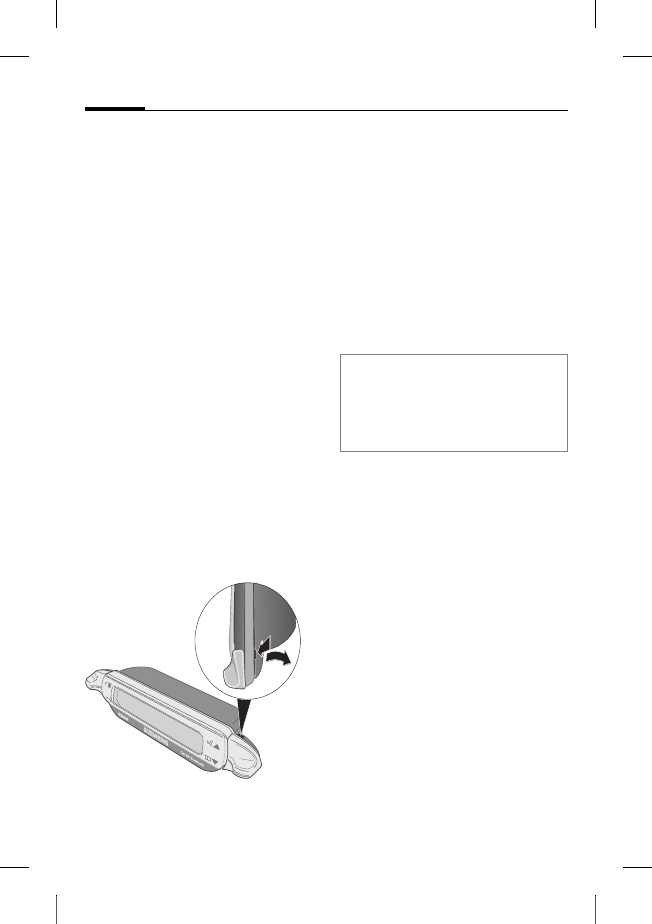
© Siemens AG 2003, W:\ICM_MP_CCQ_S_UM\03FL00443 Car Kit 65\CK_Final\Car_Kit_Bluetooth_2\Frame\HKW-600_fr.fm
l
e
f
t page
(
66
)
o
f
HKW
-
600
f
r,
A31008
-
H6551
-
A102
-
1
-
4W28
(12
.
08
.
2004
,
Car Kit Bluetooth
66
VAR Language: unknown; VAR issue date: 12 mars 2003
Enfoncer les connecteurs jusqu'à
enclipsage.
Pour soulager la traction sur les
câbles, passer le câble du micro-
phone externe : autour du te-
non de serrage prévu à cet effet
(voir figure).
Fixer le boîtier électronique 1
au moyen de vis 2, par ex. au ni-
veau de l'espace prévu pour les
pieds des passagers.
Une fois le montage terminé, re-
connecter la batterie du véhicule
correctement.
Démontage de l'écran
Pour libérer l'écran 6 de son
support 7, introduire un tour-
nevis dans la petite ouverture
entre les deux éléments.
Appuyer modérément pour dé-
gager l'écran 6 de son
support 7 puis retirer l'écran 6.
Caractéristiques
Grâce au Kit véhicule Bluetooth,
à la communication mains-libres
en duplex intégral et à un con-
fort d'utilisation optimal, vous
allez découvrir de nouvelles
sensations dans votre véhicule.
Vous téléphonerez comme si
votre correspondant était assis
àcôté de vous.
Technologie Bluetooth™
Le Kit véhicule et le mobile com-
muniquent grâce à Bluetooth™,
une liaison radio sur de courtes
distances.
Pour permettre ce type de com-
munication, le kit véhicule et le
mobile doivent être reliés l'un à
l'autre. Lisez à ce propos « Etablir
une première connexion avec le
mobile », p. 68.
La marque et les logos Bluetooth sont la
propriété de Bluetooth SIG, Inc. Siemens
utilise cette marque et ces logos sous licen-
ce. Les autres marques et noms commer-
ciaux sont déposés par leurs propriétaires
respectifs.
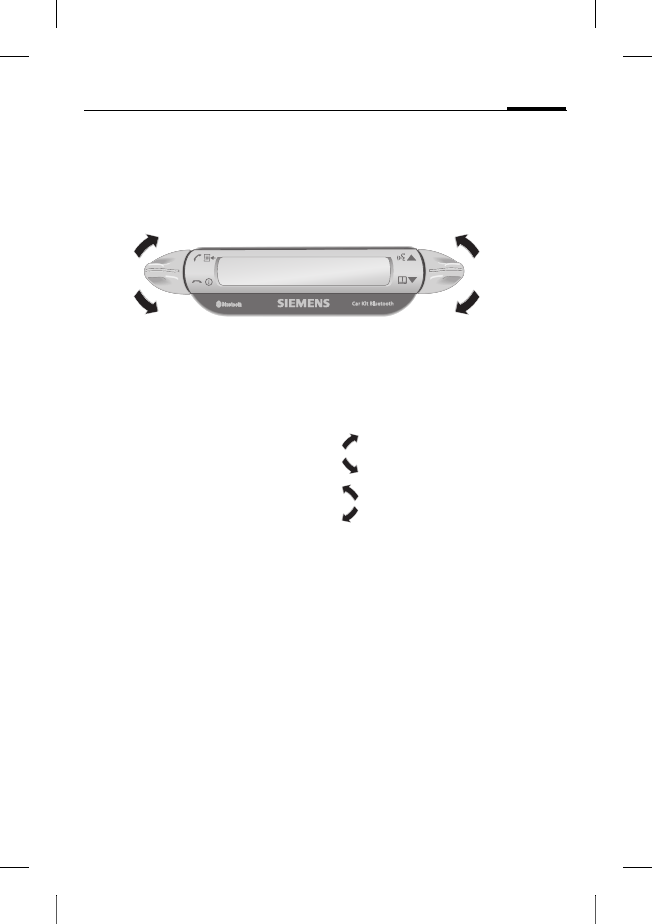
r
i
g
h
t page
(
67
)
o
f
HKW
-
600
f
r,
A31008
-
H6551
-
A102
-
1
-
4W28
(12
.
08
.
2004
,
©
S
i
emens
A
G
2
0
0
3
,
W
:
\
I
C
M
_
M
P
_
C
C
Q
_
S
_
U
M
\
0
3
F
L
0
0
4
4
3
C
ar
K
i
t
6
5
\
C
K
_
F
i
na
l
\
C
ar_
K
i
t_
B
l
uetoot
h
_
2
\
F
rame
\
H
K
W
-
6
0
0
_
f
r.
f
m
67Car Kit Bluetooth
V
A
R
L
anguage: un
k
nown;
V
A
R
i
ssue
d
ate:
1
2
mars
2
0
0
3
Ecran –
Fonction des touches
Votre Kit véhicule s'utilise avec
les touches situées de part et
d'autre de l'écran et actionnées
vers le haut ou vers le bas.
•La touche gauche sert à
valider/refuser.
•La touche droite permet de
faire défiler des listes.
Les symboles suivants sont utili-
sés pour représenter les quatre
actions différentes :
oui/accepter
non/raccrocher
remonter
descendre
Lorsqu'un appui prolongé est né-
cessaire, le mode d'emploi préci-
sera « appui prolongé ».
Dans tous les autres cas, il suffit
d'appuyer brièvement sur les
touches.
oui/accepter
non/raccrocher
remonter
descendre
© Siemens AG 2003, W:\ICM_MP_CCQ_S_UM\03FL00443 Car Kit 65\CK_Final\Car_Kit_Bluetooth_2\Frame\HKW-600_fr.fm
l
e
f
t page
(
68
)
o
f
HKW
-
600
f
r,
A31008
-
H6551
-
A102
-
1
-
4W28
(12
.
08
.
2004
,
Car Kit Bluetooth
68
VAR Language: unknown; VAR issue date: 12 mars 2003
Mise en service
Etablir une première
connexion avec le mobile
• Activer le mode Association
du Kit véhicule par un appui
prolongé sur .
• Activer l'interface Bluetooth
de votre mobile et lancer sur
le mobile la recherche d'appa-
reils Bluetooth à proximité.
• Lorsque le Kit véhicule est dé-
tecté, le mobile vous invite à
valider la connexion en en-
trant un code PIN.
• Le code PIN s'affiche sur
l'écran du Kit véhicule.
• Après validation de la con-
nexion, le Kit véhicule affiche
l'identification du mobile à
l'écran puis bascule automati-
quement en mode veille. Avec
les mobiles d'autres fabri-
cants, il peut s'avérer néces-
saire de valider sur le mobile
pour activer le mode veille.
Votre Kit véhicule est à présent
opérationnel. Le Kit véhicule et
le mobile peuvent désormais
communiquer et se reconnaître
mutuellement.
Utilisation avec plusieurs
mobiles
Le Kit véhicule mémorise un
max. de quatre mobiles avec les-
quels il peut être utilisé au choix.
Lorsqu'un cinquième mobile est
connecté, l'entrée du mobile
connecté le moins récemment
sur le Kit véhicule sera effacée.
Lorsque le Kit véhicule est acti-
vé, il commence par rechercher
le mobile connecté en dernier
lieu. S'il ne le trouve pas, il re-
cherche d'autres mobiles mémo-
risés. Les mobiles trouvés
s'affichent à l'écran. L'utilisateur
peut choisir l'un de ces appareils.
Note
Vous trouverez plus de détails sur
l'établissement d'une connexion Blue-
tooth dans le manuel d'utilisation de
votre mobile.
r
i
g
h
t page
(
69
)
o
f
HKW
-
600
f
r,
A31008
-
H6551
-
A102
-
1
-
4W28
(12
.
08
.
2004
,
©
S
i
emens
A
G
2
0
0
3
,
W
:
\
I
C
M
_
M
P
_
C
C
Q
_
S
_
U
M
\
0
3
F
L
0
0
4
4
3
C
ar
K
i
t
6
5
\
C
K
_
F
i
na
l
\
C
ar_
K
i
t_
B
l
uetoot
h
_
2
\
F
rame
\
H
K
W
-
6
0
0
_
f
r.
f
m
69Car Kit Bluetooth
V
A
R
L
anguage: un
k
nown;
V
A
R
i
ssue
d
ate:
1
2
mars
2
0
0
3
Utiliser le Kit véhicule avec un autre
mobile
• Mettre le Kit véhicule hors
tension par un appui prolongé
sur .
• Désactiver l'interface Blue-
tooth du mobile connecté en
dernier lieu.
• Mettre le Kit véhicule sous
tension par un appui prolongé
sur . Il recherche le mobile
utilisé en dernier lieu et ne le
trouve pas.
• Le Kit véhicule recherche alors
d'autres mobiles mémorisés
et les affiche à l'écran.
• Sélectionner l'appareil
souhaité :
Affiche le prochain
mobile détecté
(s'il existe).
Affiche le mobile pré-
cédent de la liste
(s'il existe).
Le mobile affiché est
connecté.
Utilisation avec support
passif en option
Vous pouvez équiper le Kit véhi-
cule d'un support passif disponi-
ble en option. Vous bénéficierez
ainsi de fonctions
supplémentaires :
• Utilisation avec une antenne
externe disponible en option.
• Chargement du mobile après
placement dans le support
passif.
• Utilisation du Kit véhicule
avec un mobile Siemens sans
fonctionnalité Bluetooth.
Lorsque vous placez le mobile
sur le support passif, la liaison
entre le mobile et le Kit véhicule
s'effectue par l'intermédiaire du
connecteur du support passif.
Note
Vous trouverez plus détails dans le
mode d'emploi du support passif.
© Siemens AG 2003, W:\ICM_MP_CCQ_S_UM\03FL00443 Car Kit 65\CK_Final\Car_Kit_Bluetooth_2\Frame\HKW-600_fr.fm
l
e
f
t page
(
70
)
o
f
HKW
-
600
f
r,
A31008
-
H6551
-
A102
-
1
-
4W28
(12
.
08
.
2004
,
Car Kit Bluetooth
70
VAR Language: unknown; VAR issue date: 12 mars 2003
Premiers pas
Mettre le Kit véhicule sous
tension
• Démarrer le Kit véhicule en
mettant le contact ou par un
appui prolongé sur .
• Le Kit véhicule recherche le
mobile utilisé en dernier lieu.
Il l'affiche à l'écran.
Dès cet instant, le Kit véhicule
est opérationnel.
Accepter un appel
Accepter un appel.
Refuser un appel
Refuser un appel.
Terminer un appel
Terminer un appel.
Fonctions
A défaut d'une autre description,
celle-ci vaut pour toutes les
fonctions :
Effleurer/appui
prolongé : le Kit véhi-
cule bascule en
mode veille.
Mode veille
En mode veille, les fonctions sui-
vantes sont opérationnelles :
Listes des appels
Appui prolongé :
Mode Association
Appui prolongé : Le Kit
véhicule s'éteint.
Répertoire
Reconnaissance
vocale (si cette fonc-
tion est supportée par
le mobile)
Composer un appel depuis le
répertoire
Répertoire
Le répertoire du mobile s'affiche.
Ouvrir le répertoire.
, Sélectionner une
entrée.

r
i
g
h
t page
(
71
)
o
f
HKW
-
600
f
r,
A31008
-
H6551
-
A102
-
1
-
4W28
(12
.
08
.
2004
,
©
S
i
emens
A
G
2
0
0
3
,
W
:
\
I
C
M
_
M
P
_
C
C
Q
_
S
_
U
M
\
0
3
F
L
0
0
4
4
3
C
ar
K
i
t
6
5
\
C
K
_
F
i
na
l
\
C
ar_
K
i
t_
B
l
uetoot
h
_
2
\
F
rame
\
H
K
W
-
6
0
0
_
f
r.
f
m
71Car Kit Bluetooth
V
A
R
L
anguage: un
k
nown;
V
A
R
i
ssue
d
ate:
1
2
mars
2
0
0
3
Une entrée de l'annuaire peut
renfermer plusieurs numéros de
téléphone.
, Sélectionner une
entrée.
Composer l'appel.
Autres fonctions du répertoire
Affiche l'entrée
précédente.
Appui prolongé : affi-
che les 10 entrées
précédentes.
Affiche l'entrée
suivante.
Appui prolongé :
affiche les 10 entrées
suivantes.
Composer un appel depuis
les listes d'appels
Listes d'appels
Affiche les listes d'appels
du mobile.
Trois listes d'appels sont
proposées :
• Appels émis
• Appels perdus
• Appels reçus
Les listes d'appels apparaissent
uniquement lorsqu'elles renfer-
ment au moins une entrée.
, Sélectionner liste
des appels.
Activer liste
des appels.
, Sélectionner
une entrée.
(Fonctionnalité
étendue : voir
« Autres fonctions du
répertoire »)
Composer l'appel.
Pendant l'appel
Plus fort.
Plus faible.
Mettre l'appel
en attente.
Appui prolongé :
activer/désactiver la
mise en sourdine du
microphone.
Terminer l'appel.
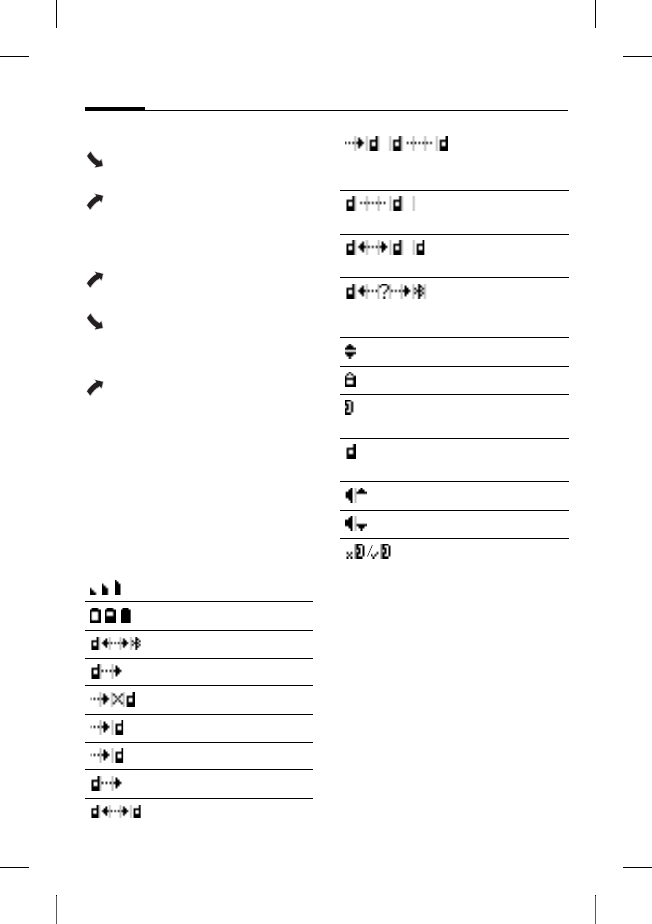
© Siemens AG 2003, W:\ICM_MP_CCQ_S_UM\03FL00443 Car Kit 65\CK_Final\Car_Kit_Bluetooth_2\Frame\HKW-600_fr.fm
l
e
f
t page
(
72
)
o
f
HKW
-
600
f
r,
A31008
-
H6551
-
A102
-
1
-
4W28
(12
.
08
.
2004
,
Car Kit Bluetooth
72
VAR Language: unknown; VAR issue date: 12 mars 2003
Deuxième appel
Terminer l'appel
en cours.
Mettre l'appel en
cours en garde et
prendre l'appel
en attente.
Va-et-vient entre les
deux appels.
Appui prolongé : termi-
ner tous les appels.
Transfert d'appel
Appui prolongé : trans-
férer l'appel en cours
sur le Kit véhicule.
Pour poursuivre l'appel sur le
mobile, appuyer sur la touche
écran correspondante du mobile
(si cette fonction est supportée
par le mobile).
Symboles sur l'écran
Intensité du signal
Etat de charge du mobile
Mode Association (pairing)
Appels émis
Appels perdus
Appels reçus
Appel entrant
Appel sortant
Appel en cours
Appel en cours/appel en at-
tente
Appel mis en garde
Permuter deux appels
Erreur d'interface (si suppor-
té par le téléphone)
Sélection dans la liste
Numéro de téléphone Privé
Numéro de téléphone
Bureau
Numéro de téléphone
Mobile
Plus fort
Plus bas
Mise en sourdine du micro-
phone active/inactive

r
i
g
h
t page
(
73
)
o
f
HKW
-
600
f
r,
A31008
-
H6551
-
A102
-
1
-
4W28
(12
.
08
.
2004
,
©
S
i
emens
A
G
2
0
0
3
,
W
:
\
I
C
M
_
M
P
_
C
C
Q
_
S
_
U
M
\
0
3
F
L
0
0
4
4
3
C
ar
K
i
t
6
5
\
C
K
_
F
i
na
l
\
C
ar_
K
i
t_
B
l
uetoot
h
_
2
\
F
rame
\
H
K
W
-
6
0
0
_
f
r.
f
m
73Car Kit Bluetooth
V
A
R
L
anguage: un
k
nown;
V
A
R
i
ssue
d
ate:
1
2
mars
2
0
0
3
Correction des
pannes
Le Kit véhicule ne fonctionne pas
• Vérifier les raccords de câble
• Pas de tension secteur,
vérifier le raccordement
des câbles
• Mobile éteint ou raccorde-
ment au Kit véhicule inactif
• Vérifier les fusibles
• Tension secteur trop faible
ou trop élevée
Nombreux parasites chez votre cor-
respondant
• Microphone dans le courant
d'air du toit ouvrant, de la fe-
nêtre ou de la ventilation
• Distance entre micropho-
ne/câble du microphone et
mobile < 50 cm
Qualité vocale et audio médiocre
• La température de service du
Kit véhicule dépasse la plage
autorisée
• Volume trop faible (régler le
volume sur le mobile !)
• Raccordement à la radio
(en mode Téléphone) :
Volume du mobile trop élevé
(diminuer le volume sur le
mobile et augmenter le volu-
me sur la radio, si nécessaire)
Echo important
• Distance entre microphone et
haut-parleur < 1 m
Faible signal microphone
(votre correspondant vous entend
très faiblement)
• Distance entre microphone
et bouche de l’utilisateur
>80cm
• Le microphone n’est pas dirigé
vers l’appelant
Qualité de réception médiocre
• Le réseau n'est pas disponible
• Modifier la position du mobile
• Si votre véhicule est équipé de
vitres métallisées, la qualité
de réception de votre télépho-
ne peut être amoindrie. Res-
pecter les recommandations
du constructeur de votre véhi-
cule et installer l'antenne
(externe) correspondante
ainsi qu'un support passif
en option.
© Siemens AG 2003, W:\ICM_MP_CCQ_S_UM\03FL00443 Car Kit 65\CK_Final\Car_Kit_Bluetooth_2\Frame\HKW-600_fr.fm
l
e
f
t page
(
74
)
o
f
HKW
-
600
f
r,
A31008
-
H6551
-
A102
-
1
-
4W28
(12
.
08
.
2004
,
Car Kit Bluetooth
74
VAR Language: unknown; VAR issue date: 12 mars 2003
Mobile non détecté/problèmes de
connexion Bluetooth
• Etablir une première con-
nexion avec le mobile, voir
p. 68
• Depuis la dernière utilisation
du mobile avec le Kit véhicule,
quatre autres mobiles au
moins ont été associés. Asso-
cier le mobile encore une fois.
• S'assurer que le boîtier élec-
tronique n'est pas fixé sur ou
entre des objets métalliques
• Réduire la distance entre
le boîtier électronique et
le mobile
L'autoradio est mis en sourdine en
permanence
• Le câble de commande de la
mise en sourdine de la radio
est peut-être relié par erreur
à la masse.
Le démarrage et l'arrêt automatiques
du Kit véhicule ne fonctionnent pas/
le Kit véhicule ne s'arrête pas de lui-
même
• Vérifier si le câble Allumage
est raccordé à l'allumage du
véhicule
Caractéristiques
techniques et
homologation
Le Kit véhicule respecte
les directives UE
suivantes :
89/336/CEE « Compatibilité
électromagnétique »
92/59/CEE « Directive sur la sé-
curité générale du produit »
Homologation type con-
formément à la directive
72/245/CEE, adaptée par
la directive 95/54/EG
« Compatibilité électromagnéti-
que dans le véhicule ».
Alimentation
en courant 10,8 V+ à 16 V+
Le câble d'allumage
peut aussi être
branché sur du 24 V
Consomma-
tion de
courant
max. 2 A /
max. 1 mA (courant
permanent)
Température
de service -25°C à +70°C
Puissance de
sortie haut-
parleur
max. 7 W
(pour 4 Ohm)
Poids (boîtier
électronique) env. 110 g
Dimensions
du boîtier
électronique
(boîtier élec-
tronique)
env. 110 x 120 x
30 mm (Lxlxh)
e1
023752
r
i
g
h
t page
(
75
)
o
f
HKW
-
600
f
r,
A31008
-
H6551
-
A102
-
1
-
4W28
(12
.
08
.
2004
,
©
S
i
emens
A
G
2
0
0
3
,
W
:
\
I
C
M
_
M
P
_
C
C
Q
_
S
_
U
M
\
0
3
F
L
0
0
4
4
3
C
ar
K
i
t
6
5
\
C
K
_
F
i
na
l
\
C
ar_
K
i
t_
B
l
uetoot
h
_
2
\
F
rame
\
H
K
W
-
6
0
0
_
f
r.
f
m
75Car Kit Bluetooth
V
A
R
L
anguage: un
k
nown;
V
A
R
i
ssue
d
ate:
1
2
mars
2
0
0
3
Déclaration de conformité
CE
Siemens Information and Com-
munication mobile déclare par la
présente que le mobile décrit
dans le présent mode d'emploi
satisfait aux exigences strictes et
aux autres dispositions légales
de la directive 1999/5/EC
(R&TTE). La déclaration de con-
formité en question (DoC) a été
signée. Si nécessaire, une copie
de l'original peut être obtenue
par la ligne d'assistance de la
société ou :
www.siemens-mobile.com/
conformity
FCC
Cet appareil est conforme à la
partie 15 des règles FCC. Condi-
tions d'utilisation de l'appareil :
(1) l'appareil n'émet aucune in-
terférence dangereuse et (2) son
fonctionnement n'est entravé
par aucune interférence même
s'il s'agit d'interférences suscep-
tibles de pouvoir provoquer des
effets non désirés.
En cas de transformations ou
modifications n'ayant pas été ex-
pressément autorisées par les
responsables de la conformité
aux règlements, l'utilisateur
peut se voir retirer son droit
d'utilisation de l'appareil.
Entretien
Pour nettoyer le produit, utiliser
un chiffon doux et légèrement
humide mais jamais mouillé.
Ne pas utiliser de détergents,
couleurs ou autres substances
chimiques.
Accessoires
Support passif voiture avec connec-
teurs électriques, composé de :
• Car Kit Upgrade (module de base
pour le support passif voiture/le sup-
port voiture avec connexion antenne
avec câble de raccordement au
boîtier électronique)
• Mobile Holder Antenna/
Mobile Holder
Grâce à cet accessoire, vous bénéfi-
ciez de fonctions étendues : prise d'an-
tenne, chargement du téléphone,
fixation sécurisée du téléphone dans la
voiture. Vous pouvez également utiliser
les téléphones sans fonctionnalité
Bluetooth à partir de la génération 65.
Pour le raccordement à l'autoradio :
• Phone-In Adapter Cable
(câble adaptateur Phone-In)
Produits disponibles dans les commer-
ces spécialisés ou dans notre magasin
en ligne à l'adresse :
Accessoires d'origine
Siemens
www.siemens-
mobile.com/shop

© Siemens AG 2003, W:\ICM_MP_CCQ_S_UM\03FL00443 Car Kit 65\CK_Final\Car_Kit_Bluetooth_2\Frame\HKW-600_fr.fm
l
e
f
t page
(
76
)
o
f
HKW
-
600
f
r,
A31008
-
H6551
-
A102
-
1
-
4W28
(12
.
08
.
2004
,
Car Kit Bluetooth
76
VAR Language: unknown; VAR issue date: 12 mars 2003
Service clients
(Customer Care)
Vous trouverez des conseils personna-
lisés sur nos produits en contactant no-
tre ligne d'assistance Premium :
France08 99 70 01 85
(1,35 EuroTTC/Appel puis
0,34 EuroTTC/Minute)
Dans certains pays, les services de ré-
paration et de remplacement ne sont
pas assurés si les produits n'ont pas été
commercialisés par nos revendeurs
autorisés.
Si une réparation s'avère nécessaire ou
si vous souhaitez faire jouer la garantie,
nos centres de service vous fourniront
également une aide rapide et fiable.
Abou Dhabi..............................0 26 42 38 00
Afrique du Sud .......................08 60 10 11 57
Allemagne * ........................0 18 05 33 32 26
Arabie Saoudite .......................0 22 26 00 43
Argentine ............................0 80 08 88 98 78
Australie.................................13 00 66 53 66
Autriche..................................05 17 07 50 04
Bahrein ............................................40 42 34
Bangladesh..............................0 17 52 74 47
Belgique...................................0 78 15 22 21
Bolivie......................................0 21 21 41 14
Bosnie Herzégovine.................0 33 27 66 49
Brésil...................................0 80 07 07 12 48
Brunei .........................................02 43 08 01
Bulgarie.......................................02 73 94 88
Cambodge ..................................12 80 05 00
Canada ...............................1 88 87 77 02 11
Chine ..................................0 21 38 98 47 77
Côte-d'Ivoire ...............................05 02 02 59
Croatie.....................................0 16 10 53 81
Danemark ...................................35 25 86 00
Dubai .......................................0 43 96 64 33
Egypte......................................0 23 33 41 11
Emirats Arabes Unis ................0 43 66 03 86
Espagne...................................9 02 11 50 61
Estonie........................................06 30 47 97
Finlande.................................09 22 94 37 00
France....................................01 56 38 42 00
Grèce..................................0 80 11 11 11 16
Hong Kong..................................28 61 11 18
Hongrie ..................................06 14 71 24 44
Inde.....................22 24 98 70 00 Extn: 70 40
Indonésie ............................0 21 46 82 60 81
Irlande....................................18 50 77 72 77
Islande ..........................................5 11 30 00
Italie.......................................02 24 36 44 00
Jordanie...................................0 64 39 86 42
Kenya............................................2 72 37 17
Koweït...........................................2 45 41 78
Nous vous proposons des conseils
rapides et personnalisés ! Vous dis-
posez de plusieurs possibilités :
Notre assistance en ligne sur
Internet :
www.siemens-mobile.com/
mobilescustomercare
Vous disposez d'une assistance per-
manente sur tous nos produits,
24 heures/24. Vous y trouverez un
système interactif de recherche des
erreurs, une liste des questions et ré-
ponses courantes, ainsi que des mo-
des d'emploi et des mises à jour
logicielles à télécharger.
Quand vous contactez le service
clients, ayez sous la main votre preu-
ve d’achat, le numéro de l’appareil
(IMEI, affiché avec *#06#), la version
du logiciel (affiché avec *#06#, puis
§Autres§) et, le cas échéant, votre nu-
méro de client de Siemens-Services.
* 0,12 Euro/Minute

r
i
g
h
t page
(
77
)
o
f
HKW
-
600
f
r,
A31008
-
H6551
-
A102
-
1
-
4W28
(12
.
08
.
2004
,
©
S
i
emens
A
G
2
0
0
3
,
W
:
\
I
C
M
_
M
P
_
C
C
Q
_
S
_
U
M
\
0
3
F
L
0
0
4
4
3
C
ar
K
i
t
6
5
\
C
K
_
F
i
na
l
\
C
ar_
K
i
t_
B
l
uetoot
h
_
2
\
F
rame
\
H
K
W
-
6
0
0
_
f
r.
f
m
77Car Kit Bluetooth
V
A
R
L
anguage: un
k
nown;
V
A
R
i
ssue
d
ate:
1
2
mars
2
0
0
3
Lettonie.........................................7 50 11 18
Liban...........................................01 44 30 43
Lituanie....................................8 52 74 20 10
Luxembourg................................43 84 33 99
Lybie ......................................02 13 50 28 82
Macédoine ..................................02 13 14 84
Malaisie............................+ 6 03 77 12 43 04
Malte..............................+ 35 32 14 94 06 32
Maroc..........................................22 66 92 09
Maurice.........................................2 11 62 13
Mexique ............................01 80 07 11 00 03
Nigeria .....................................0 14 50 05 00
Norvège ......................................22 70 84 00
Nouvelle-Zélande...................08 00 57 43 63
Oman...............................................79 10 12
Pakistan.................................02 15 66 22 00
Paraguay .................................8 00 10 20 04
Pays-Bas ............................0 90 03 33 31 00
Philippines ...............................0 27 57 11 18
Pologne..................................08 01 30 00 30
Portugal ...................................8 08 20 15 21
Qatar...........................................04 32 20 10
Rép. Slovaque .......................02 59 68 22 66
Rép. Tchèque ..........................2 33 03 27 27
Roumanie ..............................02 12 04 60 00
Royaume-Uni......................0 87 05 33 44 11
Russie.................................8 80 02 00 10 10
Serbie ....................................01 13 07 00 80
Singapour ...................................62 27 11 18
Slovénie...................................0 14 74 63 36
Suède ......................................0 87 50 99 11
Suisse....................................08 48 21 20 00
Taiwan ...................................02 23 96 10 06
Thaïlande.................................0 27 22 11 18
Tunisie ........................................71 86 19 02
Turquie................................0 21 65 79 71 00
Ukraine ...............................8 80 05 01 00 00
USA ....................................1 88 87 77 02 11
Vietnam..................................84 89 30 01 21
Zimbabwe ...................................04 36 94 24

© Siemens AG 2003, W:\ICM_MP_CCQ_S_UM\03FL00443 Car Kit 65\CK_Final\Car_Kit_Bluetooth_2\Frame\HKW-600_fr.fm
l
e
f
t page
(
78
)
o
f
HKW
-
600
f
r,
A31008
-
H6551
-
A102
-
1
-
4W28
(12
.
08
.
2004
,
78
VAR Language: unknown; VAR issue date: 12 mars 2003

r
i
g
h
t page
(
79
)
o
f
HKW
-
600
es,
A31008
-
H6551
-
A102
-
1
-
4W28
(12
.
08
.
2004
,
©
S
i
emens
A
G
2
0
0
3
,
W
:
\
I
C
M
_
M
P
_
C
C
Q
_
S
_
U
M
\
0
3
F
L
0
0
4
4
3
C
ar
K
i
t
6
5
\
C
K
_
F
i
na
l
\
C
ar_
K
i
t_
B
l
uetoot
h
_
2
\
F
rame
\
H
K
W
-
6
0
0
_es.
f
m
79Car Kit Bluetooth
V
A
R
L
anguage: un
k
nown;
V
A
R
i
ssue
d
ate:
1
2
-
M
arc
h
-
2
0
0
3
Car Kit Bluetoo-
th (es) Car Kit Bluetooth
Volumen de entrega
Accesorios véase pág. 95
1 Caja electrónica con entradas de
conexión para:
• Cable de red de a bordo
• Display
• Micrófono
• Cuna soporte (opcional, no in-
cluida en el volumen de suminis-
tro estándar de Siemens).
2 Tornillos para fijar la caja
electrónica
3 Cable de red de a bordo con co-
nexiones para altavoces
•§A§ Atenuación de radio
(radio mute) (negro)
•§B§ Batería 12V+ (rojo)
•§C§ Encendido 12V+/24V+
(violeta)
•§D§ Masa (marrón)
•§E§ Conexión de los altavoces +
(verde/negro)
•§F§ Conexión de los altavoces -
(verde)
4 3 abrazaderas de protección para
el cable de red de a bordo
5 3 fusibles planos de enchufe
(3 A violeta) para las abrazaderas
de protección
6 Display con almohadilla adhesiva
7 Soporte del display
8 Altavoz con cable de conexión
•§G§ Conexión de los altavoces +
(blanco/negro)
•§H§ Conexión de los altavoces -
(negro)
(Los tornillos de fijación están inte-
grados en el zócalo)
9 2 conectores de cable para los
cables de los altavoces
: Micrófono externo con almohadilla
adhesiva
* No está incluido en el volumen de suministro estándar de Siemens.
La marca y los logos Bluetooth son propiedad de Bluetooth SIG, Inc. (Special Interest Group).
Siemens utiliza esta marca y estos logos bajo licencia. Otras marcas y nombres comerciales
pertenecen a sus propietarios respectivos.
© Siemens AG 2003, W:\ICM_MP_CCQ_S_UM\03FL00443 Car Kit 65\CK_Final\Car_Kit_Bluetooth_2\Frame\HKW-600_es.fm
l
e
f
t page
(
80
)
o
f
HKW
-
600
es,
A31008
-
H6551
-
A102
-
1
-
4W28
(12
.
08
.
2004
,
Car Kit Bluetooth
80
VAR Language: unknown; VAR issue date: 12-March-2003
Compatibilidad
El dispositivo de manos libres
kit bluetooth para automóvil
(a continuación denominado
"kit bluetooth") es apto para los
siguientes teléfonos:
• Teléfonos móviles Siemens
con interfaz bluetooth
• Teléfonos móviles Siemens
S55 y SX1 así como los teléfo-
nos móviles de otros provee-
dores que disponen de una
interfaz bluetooth aunque de
una manera limitada.
• Teléfonos móviles Siemens a
partir de la serie 65 sin inter-
faz bluetooth (cuna soporte
opcional)
Indicaciones de
seguridad
Estas instrucciones de instalación só-
lo le brindan las informaciones más
básicas. Puesto que cada modelo de
automóvil y cada conexión de radio
hacen necesaria una instalación
distinta, el montaje deberá realizarse
de acuerdo con las características
existentes.
Lea con exactitud las instrucciones de
manejo y las indicaciones de seguri-
dad antes del uso.
Respete las disposiciones
legales y las restricciones
locales referidas al uso del
teléfono. Estas pueden ser
válidas por ejemplo al con-
ducir un automóvil o en
gasolineras.
Deben observarse las nor-
mas generales y específi-
cas válidas para cada
modelo de automóvil en lo
que se refiere a la instala-
ción de accesorios; en ca-
so necesario se deberá
recurrir a ayuda especiali-
zada (protección eléctrica,
instalación de cables, con-
tacto con piezas calientes,
contacto con combustible
etc.).
r
i
g
h
t page
(
81
)
o
f
HKW
-
600
es,
A31008
-
H6551
-
A102
-
1
-
4W28
(12
.
08
.
2004
,
©
S
i
emens
A
G
2
0
0
3
,
W
:
\
I
C
M
_
M
P
_
C
C
Q
_
S
_
U
M
\
0
3
F
L
0
0
4
4
3
C
ar
K
i
t
6
5
\
C
K
_
F
i
na
l
\
C
ar_
K
i
t_
B
l
uetoot
h
_
2
\
F
rame
\
H
K
W
-
6
0
0
_es.
f
m
81Car Kit Bluetooth
V
A
R
L
anguage: un
k
nown;
V
A
R
i
ssue
d
ate:
1
2
-
M
arc
h
-
2
0
0
3
Antes de utilizar accesorios Bluetooth®
o teléfonos móviles dentro de un vehí-
culo, compruebe las instrucciones de
manejo de dicho vehículo por si hay
restricciones a la hora de utilizar este ti-
po de productos.
Encontrará más advertencias en
las instrucciones de manejo de
su teléfono móvil.
La instalación de los
componentes no debe
afectar a:
• la libertad de movimien-
tos, la seguridad y el
campo de visión del
conductor
• la seguridad de los
acompañantes (incluso
en caso de accidente)
• los dispositivos de segu-
ridad del vehículo
(airbag, cinturones de
seguridad, etc.)
¡Tenga cuidado durante la
instalación! Los niños pe-
queños se podrían tragar
las piezas pequeñas.
El aparato sólo es apto
para el funcionamiento
con 12V.
El aparato no debe utilizar-
se en lugares con peligro
de explosión.
Si su automóvil está equi-
pado con lunas metaliza-
das, la potencia de
recepción de su teléfono
puede verse mermada.
Una antena externa garan-
tiza en este caso una re-
cepción óptima. Para
realizar la instalación, es
necesario que su teléfono
y el kit de automóvil estén
equipados para su uso con
una antena exterior.
El uso indebido y la apertu-
ra de los componentes in-
valida cualquier derecho
de garantía.
Téngase en cuenta:
Elimine los teléfonos inser-
vibles y sus accesorios se-
gún las disposiciones
legales vigentes.
Utilice exclusivamente ac-
cesorios originales
Siemens. De este modo
evitará posibles daños per-
sonales y materiales y con-
tará con la garantía del
cumplimiento de todas
las reglamentaciones
relevantes.
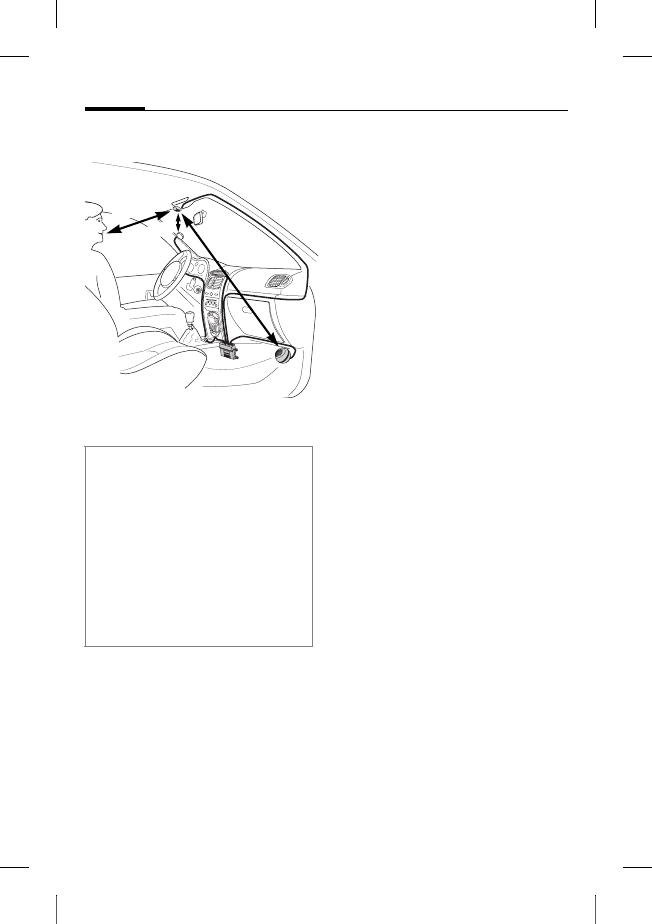
© Siemens AG 2003, W:\ICM_MP_CCQ_S_UM\03FL00443 Car Kit 65\CK_Final\Car_Kit_Bluetooth_2\Frame\HKW-600_es.fm
l
e
f
t page
(
82
)
o
f
HKW
-
600
es,
A31008
-
H6551
-
A102
-
1
-
4W28
(12
.
08
.
2004
,
Car Kit Bluetooth
82
VAR Language: unknown; VAR issue date: 12-March-2003
Montaje
Micrófono, display, altavoz
* La antena y la cuna soporte no están
incluidas en el volumen de suminis-
tro estándar de Siemens.
Instale los cables para el micró-
fono externo :, el display 6 y el
altavoz 8 de forma reglamenta-
ria de acuerdo con las caracterís-
ticas de su vehículo.
Evite dañar, doblar o aplastar
los cables.
Micrófono
Limpie el lugar en el que desee
fijar el micrófono externo : con
un producto de limpieza adecua-
do. La almohadilla adhesiva sólo
se podrá fijar de forma perma-
nente sobre una superficie
libre de grasa.
Sujete el micrófono externo :
en el lugar deseado y en direc-
ción al locutor mediante la
almohadilla adhesiva.
Display
Asegúrese de montar el
display 6 de tal modo que el
conductor pueda verlo y
manejarlo de forma óptima.
Puede montar el display 6 direc-
tamente en el cuadro de mandos
o sujetarlo con ayuda del sopor-
te del display 7.
Por favor, tenga en cuenta durante la
instalación:
• Distancia entre micrófono : –
y altavoz 8 > 1 m
• Distancia entre micrófono :/ cable
micrófono teléfono > 50 cm
• Distancia entre micrófono : –
boca del usuario < 80 cm
Evite el montaje en la corriente de ai-
re del techo solar, de la ventana o del
sistema de ventilación.
> 50 cm
‹ 80 cm
>1 m
*
*

r
i
g
h
t page
(
83
)
o
f
HKW
-
600
es,
A31008
-
H6551
-
A102
-
1
-
4W28
(12
.
08
.
2004
,
©
S
i
emens
A
G
2
0
0
3
,
W
:
\
I
C
M
_
M
P
_
C
C
Q
_
S
_
U
M
\
0
3
F
L
0
0
4
4
3
C
ar
K
i
t
6
5
\
C
K
_
F
i
na
l
\
C
ar_
K
i
t_
B
l
uetoot
h
_
2
\
F
rame
\
H
K
W
-
6
0
0
_es.
f
m
83Car Kit Bluetooth
V
A
R
L
anguage: un
k
nown;
V
A
R
i
ssue
d
ate:
1
2
-
M
arc
h
-
2
0
0
3
Cómo montar el display
directamente
Limpie el lugar en el que desee
fijar el display 6 con un produc-
to de limpieza adecuado.
La almohadilla adhesiva sólo
se podrá fijar de forma perma-
nente sobre una superficie
libre de grasa.
Ajuste el display 6 mediante las
almohadillas adhesivas.
Montaje del soporte del display
Ajuste el soporte del display 7
al cuadro de mandos con la al-
mohadilla adhesiva suministra-
da o mediante los tornillos
adecuados*.
Presione el display 6 en su
soporte 7 hasta que esté per-
fectamente encajado.
Altavoz
Es posible ajustar la inclinación y
el ángulo de giro del altavoz 8.
Para ello debe soltar el tornillo
de ajuste situado en el zócalo,
ajustar el altavoz 8 y apretar
los tornillos.
Atornillar el altavoz 8 en el lu-
gar deseado (por ej. en la zona
de descanso para los pies del
acompañante).
Los tornillos se encuentran en el
zócalo del altavoz 8.
Cable de red de a bordo
Conexiones eléctricas
Durante la conexión del kit de
automóvil al cable de red de a
bordo 3, debe prestar atención
para no influir sobre el funciona-
miento y manejo de otros dispo-
sitivos (p. ej. caida de tensión)
Antes de iniciar el montaje
del cable de red de a bordo 3
desconecte correctamente la
batería del automóvil y la caja
electrónica 1.
Conecte el cable §B§ (rojo) 12V+
con el polo positivo de la batería
del automóvil.
Conecte el cable §D§ (marrón) con
el polo negativo de la batería del
automóvil.
* No está incluido en el volumen de su-
ministro estándar de Siemens.

© Siemens AG 2003, W:\ICM_MP_CCQ_S_UM\03FL00443 Car Kit 65\CK_Final\Car_Kit_Bluetooth_2\Frame\HKW-600_es.fm
l
e
f
t page
(
84
)
o
f
HKW
-
600
es,
A31008
-
H6551
-
A102
-
1
-
4W28
(12
.
08
.
2004
,
Car Kit Bluetooth
84
VAR Language: unknown; VAR issue date: 12-March-2003
Conecte el cable §C§ (violeta) con
el sistema eléctrico del automó-
vil, de modo que con el encendi-
do activado se obtengan 12V+ o
bien 24 V+.
Conectar el cable de altavoz al cable
de red de a bordo
Conecte el cable de altavoz + §G§
(blanco y negro) con el cable §E§
(verde-negro) utilizando una
abrazadera 9.
Conecte el cable de altavoz - §H§
(negro) con el cable §F§ (verde)
utilizando una abrazadera 9.
Conexión con la radio*
El kit de automóvil puede conec-
tarse al sistema de audio de su
automóvil a través de la entrada
Phone-In de la radio. En este ca-
so se usan los altavoces de su sis-
tema de audio como reproduc-
tor del kit de automóvil.
Utilice el cable adaptador opcio-
nal de Phone-In para realizar una
conexión óptima con la radio.
Para ello conecte el cable de co-
nexión §H§ del cable de red de a
bordo 3 a través del adaptador
opcional Phone-In a la entrada
Phone-In de su radio.
A continuación conecte el cable
de conexión §G§ directamente con
el polo conductor de señales de
la entrada Phone-In de su radio.
Es posible equilibrar los niveles
de tensión divergentes del kit de
automóvil y de la entrada Phone-
In mediante el cable adaptador
de Phone In.
Conecte los cables sólo con las abra-
zaderas de protección 4 e inserte a
continuación los fusibles planos
3A 5 en las abrazaderas de
protección 4.
Para una instalación correcta del ca-
ble de red a bordo se deben situar los
fusibles entre el extremo del cable de
red a bordo suministrado y el punto
de conexión del automóvil.
* En el caso que se disponga de una
radio dotada de una entrada Phone-
In. La radio no está incluida en el
volumen de suministro estándar de
Siemens.
r
i
g
h
t page
(
85
)
o
f
HKW
-
600
es,
A31008
-
H6551
-
A102
-
1
-
4W28
(12
.
08
.
2004
,
©
S
i
emens
A
G
2
0
0
3
,
W
:
\
I
C
M
_
M
P
_
C
C
Q
_
S
_
U
M
\
0
3
F
L
0
0
4
4
3
C
ar
K
i
t
6
5
\
C
K
_
F
i
na
l
\
C
ar_
K
i
t_
B
l
uetoot
h
_
2
\
F
rame
\
H
K
W
-
6
0
0
_es.
f
m
85Car Kit Bluetooth
V
A
R
L
anguage: un
k
nown;
V
A
R
i
ssue
d
ate:
1
2
-
M
arc
h
-
2
0
0
3
Encontrará un esquema de cir-
cuitos e información adicional
respecto al cable adaptador
Phone-In en la página web
principal de Siemens:
www.siemens-mobile.com/
phoneinadapter
Atenuación de la radio (Mute)*
La señal de radio puede atenuar-
se automáticamente mientras se
hable por teléfono. Para ello de-
be conectar el cable de control §A§
de la atenuación de radio con la
entrada de la atenuación de la
radio del automóvil.
Caja electrónica
Pase los cables de los siguientes
componentes con precaución y
evitando ocasionar daños a la
caja electrónica 1 e inserte los
conectores por enchufe en la
caja electrónica 1.
• Cable de red de a bordo 3,
• Display 6,
• Micrófono externo :,
• Cable de la cuna soporte
(opcional)
* En el caso que se disponga de una
radio dotada de una entrada Phone-
In o de una entrada Mute. La radio
no está incluida en el volumen de
suministro estándar de Siemens.
Tenga en cuenta las indicaciones del
fabricante de la radio del automóvil.
Asegúrese de que la caja
electrónica 1 no se monte sobre o
entre objetos metálicos. Tan sólo de
esta manera queda asegurada una
buena comunicación por radio.
Asegúrese de que la caja
electrónica 1 está bien fijada.
Asegúrese de que las ranuras de ven-
tilación de la caja electrónica 1 no
queden tapadas (como mín. 2 cm de
espacio libre) y que el montaje no
produzca interferencias con
otrosdispositivos.
Para evitar posibles interferencias no
sitúe el cable de conexión ni detrás de
la caja electrónica 1 ni alrededor de
la caja electrónica 1.
Aísle con cinta aislante todos los
extremos de los cables que no se
utilicen.
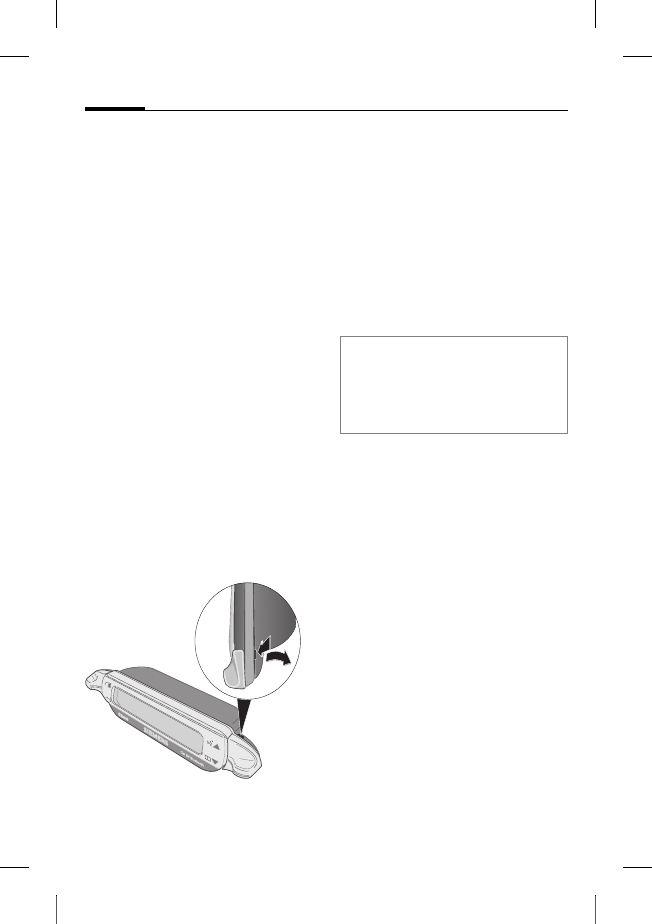
© Siemens AG 2003, W:\ICM_MP_CCQ_S_UM\03FL00443 Car Kit 65\CK_Final\Car_Kit_Bluetooth_2\Frame\HKW-600_es.fm
l
e
f
t page
(
86
)
o
f
HKW
-
600
es,
A31008
-
H6551
-
A102
-
1
-
4W28
(12
.
08
.
2004
,
Car Kit Bluetooth
86
VAR Language: unknown; VAR issue date: 12-March-2003
Asegúrese de que el conector ha
encajado perfectamente.
Pase el cable del micrófono ex-
terno : para la descarga de po-
sibles tracciones alrededor de la
pestaña de retención prevista al
efecto (véase la imagen).
Atornille la caja electrónica 1
p. ej. en la zona de descanso pa-
ra los pies del acompañante 2.
Conecte la batería del automóvil
correctamente tras finalizar el
montaje.
Desmontaje del display
Para desmontar el display 6 de
su soporte 7 introduzca un des-
tornillador en la ranura situada
entre los dos elementos.
Presione con fuerza moderada
el display 6 situado en su
soporte 7 y extraiga el
display 6.
Características
Con el kit bluetooth para el auto-
móvil puede disfrutar de una co-
municación excelente en su co-
che gracias a la comodidad del
sistema manos libres con comu-
nicación full-duplex. Se sentirá
como si hablara directamente
con su acompañante.
Tecnología Bluetooth™
El kit para automóvil y el teléfo-
no se comunican mediante Blue-
tooth™, una conexión de radio
para cortas distancias.
Para conseguir esta comunica-
ción, el kit para automóvil debe
estar conectado con el teléfono.
Véase "Establecer una primera
conexión con el teléfono",
pág. 88.
La marca y los logos Bluetooth son propie-
dad de Bluetooth SIG, Inc. (Special Interest
Group). Siemens utiliza esta marca y estos
logos bajo licencia. Otras marcas y nom-
bres comerciales pertenecen a sus propie-
tarios respectivos.
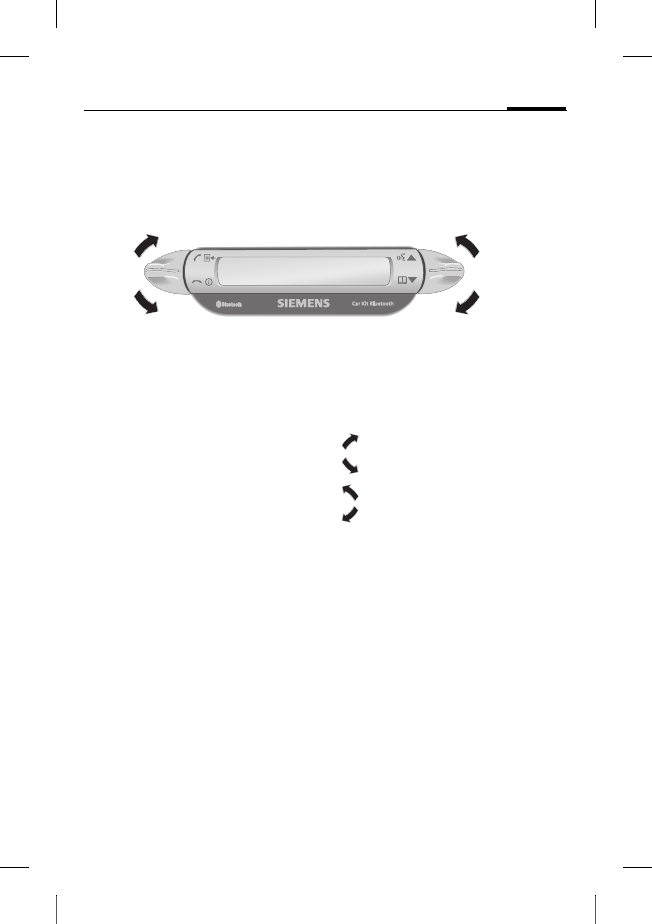
r
i
g
h
t page
(
87
)
o
f
HKW
-
600
es,
A31008
-
H6551
-
A102
-
1
-
4W28
(12
.
08
.
2004
,
©
S
i
emens
A
G
2
0
0
3
,
W
:
\
I
C
M
_
M
P
_
C
C
Q
_
S
_
U
M
\
0
3
F
L
0
0
4
4
3
C
ar
K
i
t
6
5
\
C
K
_
F
i
na
l
\
C
ar_
K
i
t_
B
l
uetoot
h
_
2
\
F
rame
\
H
K
W
-
6
0
0
_es.
f
m
87Car Kit Bluetooth
V
A
R
L
anguage: un
k
nown;
V
A
R
i
ssue
d
ate:
1
2
-
M
arc
h
-
2
0
0
3
Display –
Funcionalidad de las teclas
La gestión de su kit para auto-
móvil se realiza mediante las te-
clas del display que se pueden
presionar para ir hacia arriba o
hacia abajo.
•La tecla izquierda sirve para
aceptar o rechazar.
•La tecla derecha sirve para
desplazarse por las listas.
A continuación se exponen los
símbolos que representan las
cuatro acciones diferentes:
sí/aceptar
no/rechazar
hacia arriba
hacia abajo
Cuando es necesario mantener
presionado, en las instrucciones
de manejo viene indicado "man-
tener presionada".
En los otros casos es suficiente
presionar la tecla brevemente.
sí/aceptar
no/rechazar
hacia arriba
hacia abajo
© Siemens AG 2003, W:\ICM_MP_CCQ_S_UM\03FL00443 Car Kit 65\CK_Final\Car_Kit_Bluetooth_2\Frame\HKW-600_es.fm
l
e
f
t page
(
88
)
o
f
HKW
-
600
es,
A31008
-
H6551
-
A102
-
1
-
4W28
(12
.
08
.
2004
,
Car Kit Bluetooth
88
VAR Language: unknown; VAR issue date: 12-March-2003
Puesta en
funcionamiento
Establecer una primera
conexión con el teléfono
• Active el modo de conexión
del Kit para automóvil mante-
niendo presionada la tecla .
• Active la interfaz bluetooth de
su teléfono para iniciar la bús-
queda de dispositivos recep-
tores de bluetooth en sus
alrededores.
• Cuando se localice el Kit para
automóvil, el teléfono le pide
que confirme la conexión in-
troduciendo un número PIN.
• El número PIN se muestra en
el display del kit para auto-
móvil.
• Tras la confirmación, el kit
para automóvil muestra la
identificación del teléfono en
el display y pasa al estado
stand-by. Con los teléfonos de
otros proveedores será nece-
sario probablemente realizar
la confirmación por teléfono
antes de pasar al estado
stand-by.
A partir de este momento el kit
para automóvil se encuentra
operativo. El kit para automóvil y
el teléfono pueden comunicarse
y reconocerse en el futuro.
Funcionamiento con varios
teléfonos
El kit para automóvil almacena
las conexiones de hasta cuatro
teléfonos con los que puede co-
municarse.
Si se conecta un quinto teléfono,
se borra la conexión al teléfono
que ha estado más tiempo sin
conectarse con el kit para auto-
móvil.
Al activar el kit para automóvil,
se inicia la búsqueda del teléfo-
no que ha sido conectado en úl-
timo lugar. Si no se encuentra,
busca los otros teléfonos guar-
dados. Los teléfonos que han si-
do encontrados se muestran en
el display. El usuario puede ele-
gir uno de ellos.
Advertencia
Para más información sobre el esta-
blecimiento de una conexión bluetoo-
th, léase el apartado correspondiente
en las instrucciones de manejo de su
teléfono.
r
i
g
h
t page
(
89
)
o
f
HKW
-
600
es,
A31008
-
H6551
-
A102
-
1
-
4W28
(12
.
08
.
2004
,
©
S
i
emens
A
G
2
0
0
3
,
W
:
\
I
C
M
_
M
P
_
C
C
Q
_
S
_
U
M
\
0
3
F
L
0
0
4
4
3
C
ar
K
i
t
6
5
\
C
K
_
F
i
na
l
\
C
ar_
K
i
t_
B
l
uetoot
h
_
2
\
F
rame
\
H
K
W
-
6
0
0
_es.
f
m
89Car Kit Bluetooth
V
A
R
L
anguage: un
k
nown;
V
A
R
i
ssue
d
ate:
1
2
-
M
arc
h
-
2
0
0
3
Utilizar el kit para automóvil con otro
teléfono
• Desconecte el kit para auto-
móvil manteniendo presionada
la tecla .
• Desactive la interfaz
bluetooth del teléfono que
ha sido conectado en último
lugar.
• Active el kit para automóvil
manteniendo presionada la
tecla . El kit busca el telé-
fono conectado en último
lugar y no lo encuentra.
• A partir de este momento, el
kit para automóvil busca otros
teléfonos guardados y los
muestra en el display.
• Seleccione el dispositivo
deseado:
Muestra el primer
teléfono encontrado
(si existe).
Muestra el teléfono
anterior de la lista
(si existe).
Conexión con el telé-
fono mostrado en el
display.
Funcionamiento con cuna
soporte opcional
El kit para automóvil está dispo-
nible con cuna soporte opcional.
Utilizando una cuna soporte se
ofrecen las siguientes funciones:
• Posibilidad de funcionamien-
to con una antena externa
opcional.
• Carga del teléfono al colocarlo
en la cuna soporte.
• Utilización del kit para auto-
móvil con un teléfono
Siemens sin función
bluetooth.
Al depositar el teléfono en la cu-
na soporte, se consigue la co-
nexión del teléfono con el kit pa-
ra automóvil a través del
enchufe de la cuna soporte.
Advertencia
Para más información sobre la cuna
soporte léase el apartado correspon-
diente en las instrucciones de manejo
de su teléfono.

© Siemens AG 2003, W:\ICM_MP_CCQ_S_UM\03FL00443 Car Kit 65\CK_Final\Car_Kit_Bluetooth_2\Frame\HKW-600_es.fm
l
e
f
t page
(
90
)
o
f
HKW
-
600
es,
A31008
-
H6551
-
A102
-
1
-
4W28
(12
.
08
.
2004
,
Car Kit Bluetooth
90
VAR Language: unknown; VAR issue date: 12-March-2003
Primeros pasos
Encender el kit para
automóvil
• Encienda el kit para automóvil
activando el encendido de su
automóvil o bien manteniendo
presionada la tecla .
• El kit para automóvil busca el
teléfono que ha sido utilizado
en último lugar. Este aparece
mostrado en el display.
A partir de este momento el kit
para automóvil se encuentra
operativo.
Aceptar la llamada
Aceptar la llamada.
Rechazar la llamada
Rechazar la llamada.
Terminar una conversación
Terminar
conversación.
Funciones
Para todas las funciones es váli-
da la información a continuación
si no se indica lo contrario:
Presionar brevemente
/mantener presionada:
El Kit para automóvil
cambia al modo
stand-by.
Modo stand-by
En el modo stand-by el kit para
automóvil ofrece las siguientes
funciones:
Listas de llamadas
Mantener presionada:
modo log-in
Mantener presionada:
el kit para automóvil
se apaga
Listín telefónico
Reconocimiento de
voz (si su teléfono
ofrece esta opción)
Llamar desde el listín
telefónico
Listín telefónico
Muestra el listín telefónico.
Abrir el listín tele-
fónico.
, Seleccionar una
entrada.

r
i
g
h
t page
(
91
)
o
f
HKW
-
600
es,
A31008
-
H6551
-
A102
-
1
-
4W28
(12
.
08
.
2004
,
©
S
i
emens
A
G
2
0
0
3
,
W
:
\
I
C
M
_
M
P
_
C
C
Q
_
S
_
U
M
\
0
3
F
L
0
0
4
4
3
C
ar
K
i
t
6
5
\
C
K
_
F
i
na
l
\
C
ar_
K
i
t_
B
l
uetoot
h
_
2
\
F
rame
\
H
K
W
-
6
0
0
_es.
f
m
91Car Kit Bluetooth
V
A
R
L
anguage: un
k
nown;
V
A
R
i
ssue
d
ate:
1
2
-
M
arc
h
-
2
0
0
3
Una entrada en el listín telefóni-
co puede tener varios números
guardados.
, Seleccionar una
entrada.
Iniciar llamada.
Otras funciones del listín telefónico
Sube una entrada
Mantener presionada:
sube 10 entradas
Baja una entrada.
Mantener presionada:
baja 10 entradas
Llamar desde la lista de
llamadas
Lista de llamadas
Muestra la lista de llamadas.
Puede elegir entre tres listas de
llamadas:
• Números marcados
• Llamadas perdidas
• Llamadas aceptadas
Las listas de llamadas se mues-
tran cuando al menos contienen
una entrada.
, Seleccionar lista de
llamadas.
Activar lista de
llamadas.
, Seleccionar entrada.
(Para más funciones
véase "Otras funcio-
nes del listín
telefónico")
Iniciar llamada.
Durante la conversación
Subir el volumen.
Bajar el volumen.
Mantener una
llamada.
Mantener presionada:
Activar y desactivar
la atenuación del
micrófono.
Finalizar la llamada.
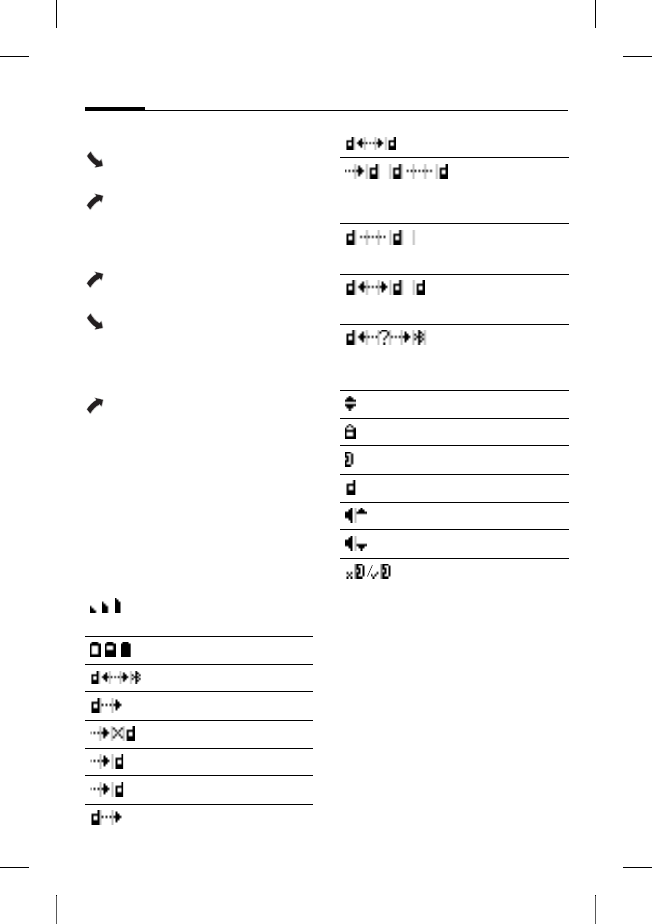
© Siemens AG 2003, W:\ICM_MP_CCQ_S_UM\03FL00443 Car Kit 65\CK_Final\Car_Kit_Bluetooth_2\Frame\HKW-600_es.fm
l
e
f
t page
(
92
)
o
f
HKW
-
600
es,
A31008
-
H6551
-
A102
-
1
-
4W28
(12
.
08
.
2004
,
Car Kit Bluetooth
92
VAR Language: unknown; VAR issue date: 12-March-2003
Segunda llamada
Terminar la llamada
activa.
Mantener en espera
la llamada activa y
responder la llamada
entrante
Alternar entre dos
llamadas.
Mantener presionada:
Finalizar todas las
llamadas.
Transmisión de llamada
Mantener presionada:
pasar la llamada
activa al kit para auto-
móvil.
Para continuar con la conversa-
ción por teléfono, presione la te-
cla display correspondiente (si
su teléfono ofrece esta opción).
Símbolos del display
Volumen de la señal
acústica
Estado de carga del teléfono
Modo de login (Pairing)
Números marcados
Llamadas perdidas
Llamadas recibidas
Llamada entrante
Llamada saliente
Conversación activa
Conversación activa/aviso
de llamada
Llamada en espera
Cambiar entre dos llamadas
Error de interfaz (si ofrece
esta opción su teléfono)
Selección de listas
Número de teléfono privado
Número de teléfono oficina
Número de teléfono móvil
Subir el volumen
Bajar el volumen
Atenuación del micrófono
activa/inactiva

r
i
g
h
t page
(
93
)
o
f
HKW
-
600
es,
A31008
-
H6551
-
A102
-
1
-
4W28
(12
.
08
.
2004
,
©
S
i
emens
A
G
2
0
0
3
,
W
:
\
I
C
M
_
M
P
_
C
C
Q
_
S
_
U
M
\
0
3
F
L
0
0
4
4
3
C
ar
K
i
t
6
5
\
C
K
_
F
i
na
l
\
C
ar_
K
i
t_
B
l
uetoot
h
_
2
\
F
rame
\
H
K
W
-
6
0
0
_es.
f
m
93Car Kit Bluetooth
V
A
R
L
anguage: un
k
nown;
V
A
R
i
ssue
d
ate:
1
2
-
M
arc
h
-
2
0
0
3
Eliminación de errores
El kit para automóvil no funciona
• Compruebe las conexiones de
los cables
• No existe tensión de servicio,
compruebe la conexión de los
cables
• El teléfono no está conectado
o no está activada la conexión
al kit para automóvil
• Revise los fusibles
• Tensión de servicio demasia-
do baja o demasiado alta
Ruidos de interferencia en el lado
del interlocutor
• El micrófono se encuentra en
la corriente de aire del techo
solar, de la ventana o del siste-
ma de ventilación
• Distancia entre el micrófo-
no/cable del micrófono -
teléfono < 50 cm
Calidad vocal y acústica deficiente
• El kit para automóvil excede la
temperatura de funciona-
miento permitida
• El volumen está ajustado a
niveles demasiado bajos
(ajustar volumen a través
del teléfono)
• Conexión a la radio (funciona-
miento Phone-In): Volumen
del teléfono ajustado dema-
siado alto (ajustar el volumen
más bajo a través del teléfono
y elevar el volumen de la
radio)
Eco reforzado
• Distancia entre el micrófono y
el altavoz < 1m.
Señal débil del micrófono (el interlo-
cutor le oye muy débilmente)
• Distancia entre el micrófono y
la boca del usuario > 80 cm
• El micrófono no está dirigido
hacia el locutor
Mala calidad de recepción
• La red no está disponible
• Modificar la posición del
teléfono
• Si su automóvil está equipado
con lunas metalizadas, la po-
tencia de recepción de su telé-
fono puede verse mermada.
Siga las recomendaciones del
fabricante de su automóvil e
instale la antena (exterior)
correspondiente así como la
cuna soporte opcional.
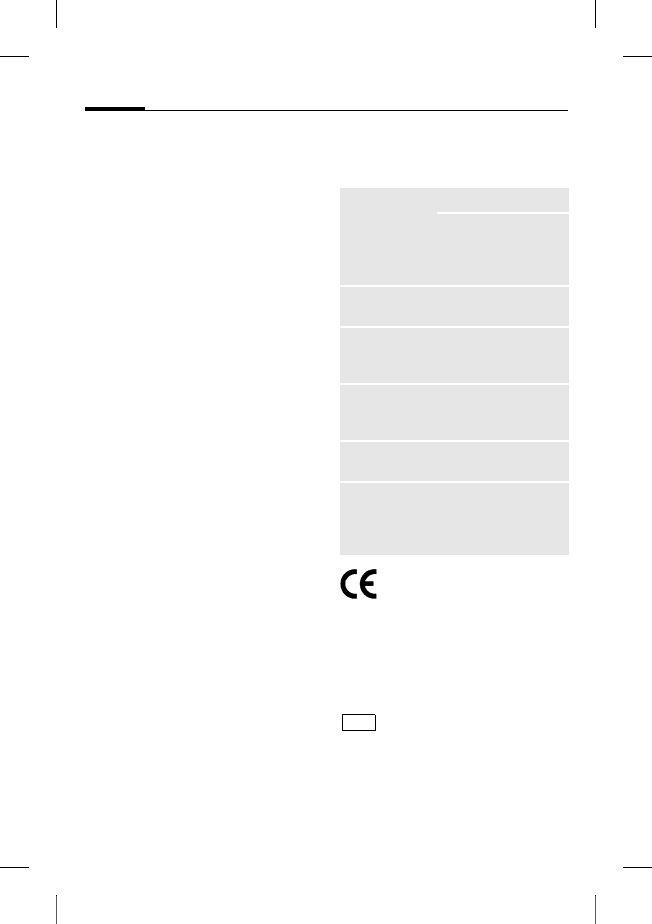
© Siemens AG 2003, W:\ICM_MP_CCQ_S_UM\03FL00443 Car Kit 65\CK_Final\Car_Kit_Bluetooth_2\Frame\HKW-600_es.fm
l
e
f
t page
(
94
)
o
f
HKW
-
600
es,
A31008
-
H6551
-
A102
-
1
-
4W28
(12
.
08
.
2004
,
Car Kit Bluetooth
94
VAR Language: unknown; VAR issue date: 12-March-2003
No se localiza el teléfono/problemas
de conexión bluetooth
• Establezca la primera co-
nexión con el teléfono, véase
pág. 88.
• Desde la última vez que se uti-
lizó el teléfono con el kit para
automóvil se han registrado al
menos cuatro teléfonos.
Registre nuevamente el
teléfono.
• Asegúrese de que la caja elec-
trónica no está montada so-
bre o entre dos objetos
metálicos.
• Reduzca la distancia entre la
caja electrónica y el teléfono.
La radio permanece silenciosa
• La conexión de la atenuación
de la radio está posiblemente
intercambiada con la masa.
La conexión/desconexión automáti-
ca del kit para automóvil no funcio-
na. El kit para automóvil no se
desconecta automáticamente
• Compruebe si el cable de en-
cendido se ha conectado al
encendido del automóvil.
Datos técnicos y
homologación
El kit para automóvil
cumple con las siguien-
tes directivas CE:
89/336/CEE "Compatibilidad
electromagnética"
92/59/CEE "Directiva para la se-
guridad general de productos"
Tipos autorizados se-
gún la directiva
72/245/CEE, modifica-
da recientemente por la directi-
va 95/54/CE "Compatibilidad
electromagnética en el auto-
móvil".
Alimentación
de tensión 10,8 V hasta 16 V
Cable de conexión al
arranque del coche
opcionalmente tam-
bién a 24V
Consumo
eléctrico máx. 2 A máx. 1 mA
(corriente de reposo)
Temperatura
de funciona-
miento
-25C hasta +70C
Potencia de
salida de los
altavoces
máx. 7 W
(a 4 Ohmnios)
Peso (caja
electrónica) aprox. 110 g
Dimensiones
de la carcasa
(caja electró-
nica)
aprox. 110 x 120 x
30 mm (l x an x al)
e1
023752
r
i
g
h
t page
(
95
)
o
f
HKW
-
600
es,
A31008
-
H6551
-
A102
-
1
-
4W28
(12
.
08
.
2004
,
©
S
i
emens
A
G
2
0
0
3
,
W
:
\
I
C
M
_
M
P
_
C
C
Q
_
S
_
U
M
\
0
3
F
L
0
0
4
4
3
C
ar
K
i
t
6
5
\
C
K
_
F
i
na
l
\
C
ar_
K
i
t_
B
l
uetoot
h
_
2
\
F
rame
\
H
K
W
-
6
0
0
_es.
f
m
95Car Kit Bluetooth
V
A
R
L
anguage: un
k
nown;
V
A
R
i
ssue
d
ate:
1
2
-
M
arc
h
-
2
0
0
3
Declaración de conformidad
CE
Siemens Information and Com-
munication Mobile declara que
el teléfono móvil descrito en es-
tas instrucciones cumple todos
los registros básicos y otras regu-
laciones en el marco de la nor-
mativa europea 1999/5/EC
(R&TTE). La declaración de con-
formidad (DoC) respectiva ha si-
do firmada a los efectos. En caso
necesario, puede solicitarse una
copia del original a través del
servicio de atención al cliente de
la compañía, o bien visitar:
www.siemens-mobile.com/
conformity
FCC
Este equipo cumple la Parte 15
de las Normas de la FCC y su ope-
ración está sujeta a las condicio-
nes siguientes: (1) el equipo no
puede causar interferencias per-
judiciales, y (2) el equipo debe
aceptar cualquier interferencia
que reciba, incluidas las interfe-
rencias que puedan causar un
funcionamiento no deseado.
Los cambios o modificaciones no
aprobados expresamente por la
parte responsable del cumpli-
miento podrían anular la autori-
dad del usuario para utilizar el
equipo.
Cuidados
El producto deberá limpiarse con
un paño suave y húmedo, pero
no empapado.
No utilice soluciones detergen-
tes, pinturas o sustancias
químicas.
Accesorios
Cuna soporte con conexiones eléctri-
cas, constituida por:
• Car Kit Upgrade (módulo base para
cuna soporte/cuna soporte conexión
de antena con cable a la caja
electrónica)
• Mobile Holder Antenna/
Mobile Holder
Con este complemento dispone de fun-
ciones adicionales tales como: co-
nexión de antena, carga del teléfono,
depósito seguro del teléfono en el auto-
móvil. Además se pueden utilizar los
teléfonos sin función bluetooth a partir
de la generación 65.
Para la conexión con la radio del auto-
móvil:
• Phone-In Adapter Cable
(cable de adaptador Phone-In)
Productos disponibles en comercios
especializados o en Internet en nuestra
tienda online bajo:
Siemens Original
Accessories
www.siemens-
mobile.com/shop

© Siemens AG 2003, W:\ICM_MP_CCQ_S_UM\03FL00443 Car Kit 65\CK_Final\Car_Kit_Bluetooth_2\Frame\HKW-600_es.fm
l
e
f
t page
(
96
)
o
f
HKW
-
600
es,
A31008
-
H6551
-
A102
-
1
-
4W28
(12
.
08
.
2004
,
Car Kit Bluetooth
96
VAR Language: unknown; VAR issue date: 12-March-2003
Atención al cliente
(Customer Care)
Para un asesoramiento personalizado
con respecto a:
• Código de desbloqueo del propio
teléfono
• Utilización de los logos, timbres y
juegos
dirigirse a la Hot Line Premium Number
al número 807 517 203
(0,91 euro/minuto).
En países en los que nuestro producto
no se vende a través de distribuidores
autorizados los servicios de reparación
y sustitución no están disponibles.
Para ulteriores informaciones comer-
ciales y servicio de asistencia dirigirse
a uno de nuestros Centros Servicios:
Abu Dhabi................................0 26 42 38 00
Alemania * ..........................0 18 05 33 32 26
Arabia Saudita .........................0 22 26 00 43
Argentina ............................0 80 08 88 98 78
Australia.................................13 00 66 53 66
Austria....................................05 17 07 50 04
Bahrein ............................................40 42 34
Bangladesh..............................0 17 52 74 47
Bélgica.....................................0 78 15 22 21
Bolivia......................................0 21 21 41 14
Bosnia Herzegovina.................0 33 27 66 49
Brasil...................................0 80 07 07 12 48
Brunei .........................................02 43 08 01
Bulgaria.......................................02 73 94 88
Camboya ....................................12 80 05 00
Canadá ...............................1 88 87 77 02 11
China ..................................0 21 38 98 47 77
Costa de Marfil............................05 02 02 59
Croacia ....................................0 16 10 53 81
Dinamarca ..................................35 25 86 00
Dubai .......................................0 43 96 64 33
EE.UU.................................1 88 87 77 02 11
Egipto.......................................0 23 33 41 11
Emiratos Árabes Unidos ..........0 43 66 03 86
Eslovenia.................................0 14 74 63 36
España.....................................9 02 11 50 61
Estonia........................................06 30 47 97
Filipinas....................................0 27 57 11 18
Finlandia................................09 22 94 37 00
Francia...................................01 56 38 42 00
Grecia .................................0 80 11 11 11 16
Holanda ..............................0 90 03 33 31 00
Hong Kong..................................28 61 11 18
Hungría..................................06 14 71 24 44
India....................22 24 98 70 00 Extn: 70 40
Indonesia ............................0 21 46 82 60 81
Puede disponer de asistencia técnica
fácil y directa para las cuestiones téc-
nicas y de funcionamiento en nuestro
servicio de asistencia en línea en
Internet:
www.siemens-mobile.com/
mobilescustomercare
De este modo estamos siempre y en
todo lugar disponibles. Para nuestros
productos, les ofrecemos una asis-
tencia de 24 horas sobre 24. Es este
sitio encontrarán un sístema de bús-
queda de errores interactivo, un su-
mario de las preguntas y respuestas
más frecuentes y finalmente un ma-
nual de uso así como las actualiza-
ciones Software que pueden
descargar del web.
Cuando llame al servicio de atención
al cliente, tenga preparado su recibo
y el número de identificación del telé-
fono (IMEI, para verlo, pulse *#06#),
versión de software (para verlo, pulse
*#06#, a continuación §Más§) y el nú-
mero de cliente del servicio de
Siemens.
* 0,12 euro/minuto

r
i
g
h
t page
(
97
)
o
f
HKW
-
600
es,
A31008
-
H6551
-
A102
-
1
-
4W28
(12
.
08
.
2004
,
©
S
i
emens
A
G
2
0
0
3
,
W
:
\
I
C
M
_
M
P
_
C
C
Q
_
S
_
U
M
\
0
3
F
L
0
0
4
4
3
C
ar
K
i
t
6
5
\
C
K
_
F
i
na
l
\
C
ar_
K
i
t_
B
l
uetoot
h
_
2
\
F
rame
\
H
K
W
-
6
0
0
_es.
f
m
97Car Kit Bluetooth
V
A
R
L
anguage: un
k
nown;
V
A
R
i
ssue
d
ate:
1
2
-
M
arc
h
-
2
0
0
3
Irlanda....................................18 50 77 72 77
Islandia .........................................5 11 30 00
Italia .......................................02 24 36 44 00
Jordania...................................0 64 39 86 42
Kenia.............................................2 72 37 17
Kuwait...........................................2 45 41 78
Letonia..........................................7 50 11 18
Líbano.........................................01 44 30 43
Libia .......................................02 13 50 28 82
Lituania....................................8 52 74 20 10
Luxemburgo................................43 84 33 99
Macedonia ..................................02 13 14 84
Malasia ............................+ 6 03 77 12 43 04
Malta..............................+ 35 32 14 94 06 32
Marruecos...................................22 66 92 09
Mauricio ........................................2 11 62 13
México ..............................01 80 07 11 00 03
Nigeria .....................................0 14 50 05 00
Noruega......................................22 70 84 00
Nueva Zelanda.......................08 00 57 43 63
Omán...............................................79 10 12
Pakistán.................................02 15 66 22 00
Paraguay .................................8 00 10 20 04
Polonia...................................08 01 30 00 30
Portugal ...................................8 08 20 15 21
Qatar...........................................04 32 20 10
Reino Unido ........................0 87 05 33 44 11
República Checa......................2 33 03 27 27
República de Sudáfrica..........08 60 10 11 57
República Eslovaca ...............02 59 68 22 66
Rumanía ................................02 12 04 60 00
Rusia...................................8 80 02 00 10 10
Serbia ....................................01 13 07 00 80
Singapur .....................................62 27 11 18
Suecia......................................0 87 50 99 11
Suiza......................................08 48 21 20 00
Tailandia..................................0 27 22 11 18
Taiwan ...................................02 23 96 10 06
Túnez..........................................71 86 19 02
Turquía ...............................0 21 65 79 71 00
Ucrania ...............................8 80 05 01 00 00
Vietnam..................................84 89 30 01 21
Zimbawe .....................................04 36 94 24

© Siemens AG 2003, W:\ICM_MP_CCQ_S_UM\03FL00443 Car Kit 65\CK_Final\Car_Kit_Bluetooth_2\Frame\HKW-600_es.fm
l
e
f
t page
(
98
)
o
f
HKW
-
600
es,
A31008
-
H6551
-
A102
-
1
-
4W28
(12
.
08
.
2004
,
98
VAR Language: unknown; VAR issue date: 12-March-2003

r
i
g
h
t page
(
99
)
o
f
HKW
-
600
pt,
A31008
-
H6551
-
A102
-
1
-
4W28
(12
.
08
.
2004
,
©
S
i
emens
A
G
2
0
0
3
,
W
:
\
I
C
M
_
M
P
_
C
C
Q
_
S
_
U
M
\
0
3
F
L
0
0
4
4
3
C
ar
K
i
t
6
5
\
C
K
_
F
i
na
l
\
C
ar_
K
i
t_
B
l
uetoot
h
_
2
\
F
rame
\
H
K
W
-
6
0
0
_pt.
f
m
99Car Kit Bluetooth
V
A
R
L
anguage: un
k
nown;
V
A
R
i
ssue
d
ate:
1
2
-
M
arc
h
-
2
0
0
3
Car Kit Bluetoo-
th (pt) Car Kit Bluetooth
Âmbito de
fornecimento
Acessórios vide pág. 115
1 Caixa de electrónica com entradas
para:
• Cabo de bordo
• Display
• Microfone
• Suporte passivo (opcional,
não faz parte do âmbito de
fornecimento)
2 Parafusos para a fixação da caixa
de electrónica
3 Cabo de bordo com entradas para
altifalante
•§A§ Função 'mute' (Radio Mute)
(preto)
•§B§ Bateria 12V+ (vermelho)
•§C§ Ignição 12V+/24V+ (violeta)
•§D§ Massa (castanho)
•§E§ Entrada de altifalante +
(verde/preto)
•§F§ Entrada de altifalante - (verde)
4 3 unidades conectoras para liga-
ção dos fusíveis de fornecimento
de energia
5 3 unidades de fusíveis (3 A violeta)
para ligação das unidades referi-
das em 4
6 Display com autocolante
7 Suporte do display
8 Altifalante com cabo de ligação
•§G§ Entrada de altifalante +
(branco/preto)
•§H§ Entrada de altifalante - (preto)
(Os parafusos de fixação estão
integrados na base)
9 2 conectores para o cabo de
altifalante
: Microfone externo com auto-
colante
* Não faz parte do âmbito do fornecimento standard da Siemens.
A marca e os logotipos Bluetooth são propriedade da Bluetooth SIG, Inc.. Qualquer utilização
destas marcas pela Siemens é feita sob licença. Outras marcas e nomes comerciais mencio-
nados são marcas registadas dos respectivos proprietários.
© Siemens AG 2003, W:\ICM_MP_CCQ_S_UM\03FL00443 Car Kit 65\CK_Final\Car_Kit_Bluetooth_2\Frame\HKW-600_pt.fm
l
e
f
t page
(
100
)
o
f
HKW
-
600
pt,
A31008
-
H6551
-
A102
-
1
-
4W28
(12
.
08
.
2004
,
Car Kit Bluetooth
100
VAR Language: unknown; VAR issue date: 12-March-2003
Compatibilidade
O altifalante para viaturas Car Kit
Bluetooth (denominado a seguir
por "Car Kit") é adequado para os
seguintes telemóveis:
• Telemóveis Siemens com
interface Bluetooth
• Telemóveis Siemens S55 e
SX1 e telemóveis de outros
fabricantes com interface Blu-
etooth podem ser eventual-
mente utilizados, porém sem
todas as funções.
• Telemóveis Siemens a partir
da série 65 sem interface
Bluetooth (utilização com su-
porte passivo opcional)
Avisos de segurança
Este manual de instalação apenas
oferece informações básicas. Dada a
diversidade de modelos de viaturas e
de auto-rádios, a instalação deve ser
realizada em conformidade com os
mesmos.
Leia cuidadosamente o manual de
instruções e os avisos de segurança
antes de iniciar a utilização!
Quando utilizar o telemó-
vel, tenha em atenção os
requisitos legais e as res-
trições locais. Estas po-
dem aplicar-se, por
exemplo, ao conduzir a
viatura ou em postos de
abastecimento de
combustível.
Devem ser observadas as
instruções em vigor e es-
pecíficas do tipo de carro
no que se refere à instala-
ção de equipamentos adi-
cionais; se necessário,
deve ser utilizada ajuda
qualificada (protecções
eléctricas, colocação dos
cabos, contacto com com-
ponentes quentes, contac-
to com gasolina, etc.).
r
i
g
h
t page
(
101
)
o
f
HKW
-
600
pt,
A31008
-
H6551
-
A102
-
1
-
4W28
(12
.
08
.
2004
,
©
S
i
emens
A
G
2
0
0
3
,
W
:
\
I
C
M
_
M
P
_
C
C
Q
_
S
_
U
M
\
0
3
F
L
0
0
4
4
3
C
ar
K
i
t
6
5
\
C
K
_
F
i
na
l
\
C
ar_
K
i
t_
B
l
uetoot
h
_
2
\
F
rame
\
H
K
W
-
6
0
0
_pt.
f
m
101Car Kit Bluetooth
V
A
R
L
anguage: un
k
nown;
V
A
R
i
ssue
d
ate:
1
2
-
M
arc
h
-
2
0
0
3
Verifique, antes da utilização dos aces-
sórios Bluetooth® ou de telemóveis,
dentro de um veículo, o manual de ins-
truções dos respectivos veículos quan-
to a eventuais restrições na utilização
de produtos desse tipo.
Para mais informações consulte
o manual de instruções do seu
telemóvel.
A instalação dos disposivi-
tos não deve afectar :
• a liberdade de movimen-
tos, a segurança e o
campo de visão do
condutor
• a segurança dos passa-
geiros (também em
caso de um eventual
acidente)
• os equipamentos de
segurança no carro
(airbag, cintos de
segurança, etc.)
Atenção na instalação!
Perigo de ingestão por
crianças.
O telemóvel só funciona
a 12V.
Não instalar o equipamen-
to em ambientes passíveis
de perigo de explosão.
Se o seu carro tiver vidros
metalizados, a qualidade
de recepção do telemóvel
pode ser afectada. Uma
antena exterior optimiza a
recepção. Para efeito de
instalação o seu telemóvel
e o car kit devem estar pre-
parados para funciona-
mento com antena
exterior.
A garantia exclui danos
causados por uso incor-
recto e abertura dos
componentes.
De notar:
Elimine telemóveis inutili-
záveis e respectivos
acessórios de acordo
com as disposições
legais vigentes.
Utilize apenas acessórios
originais da Siemens. Des-
ta forma prevenirá danos
pessoais e materiais e terá
garantias do cumprimento
de todas as disposições
relevantes.
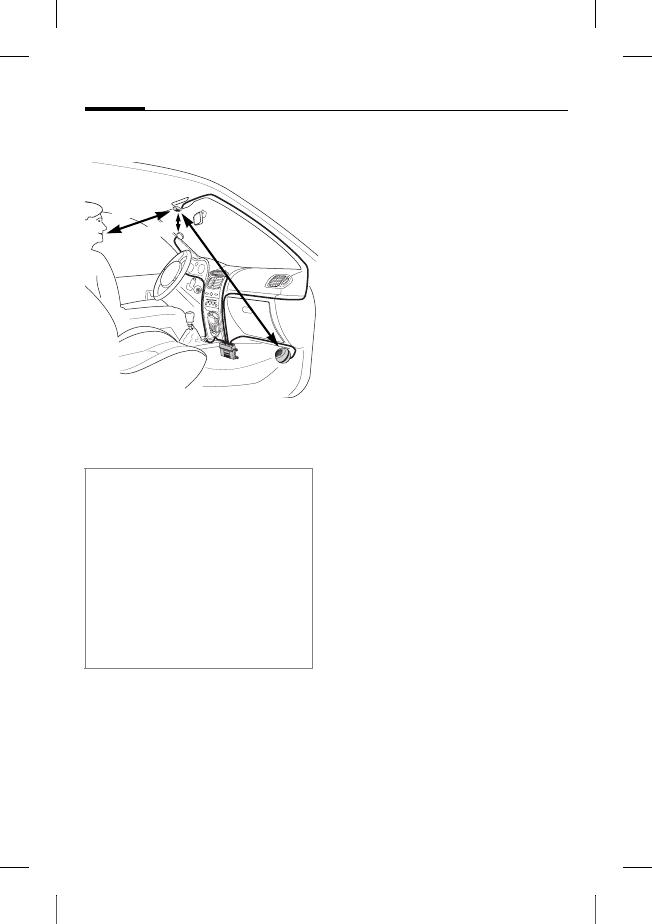
© Siemens AG 2003, W:\ICM_MP_CCQ_S_UM\03FL00443 Car Kit 65\CK_Final\Car_Kit_Bluetooth_2\Frame\HKW-600_pt.fm
l
e
f
t page
(
102
)
o
f
HKW
-
600
pt,
A31008
-
H6551
-
A102
-
1
-
4W28
(12
.
08
.
2004
,
Car Kit Bluetooth
102
VAR Language: unknown; VAR issue date: 12-March-2003
Instalação
Microfone, display,
altifalantes
* A antena e o suporte passivo
não fazem parte do âmbito de
fornecimento.
Instalar os cabos para o microfo-
ne externo :, o display 6 e o al-
tifalante 8 correctamente e de
acordo com as condições de
sua viatura.
Evite danificar, dobrar ou entalar
o cabo.
Microfone
Limpe o local onde pretende
fixar o microfone externo : uti-
lizando um detergente desen-
gordurante adequado. O auto-
colante só permanecerá fixo
numa superfície isenta de
gordura.
Fixe o microfone externo :
no local pretendido, voltado
para o utilizador, utilizando
para tal o autocolante.
Display
A posição do suporte passivo 6
deve ser tal que o condutor te-
nha contacto visual e acesso
ideais.
O display 6 pode ser montado
directamente no painel de ins-
trumentos ou pode ser fixado
com auxílio do suporte 7.
Atenção durante a instalação:
• Distância entre microfone : - alti-
falante 8 se possível > 1 m
• Distância entre microfone :/
cabo do microfone - Telefone
>50cm
• Distância entre microfone : -
boca do utilizador < 80 cm
Evitar a montagem do microfone na
corrente de ar do tecto de abrir, da
janela ou da ventilação.
> 50 cm
< 80 cm
>1 m
*
*

r
i
g
h
t page
(
103
)
o
f
HKW
-
600
pt,
A31008
-
H6551
-
A102
-
1
-
4W28
(12
.
08
.
2004
,
©
S
i
emens
A
G
2
0
0
3
,
W
:
\
I
C
M
_
M
P
_
C
C
Q
_
S
_
U
M
\
0
3
F
L
0
0
4
4
3
C
ar
K
i
t
6
5
\
C
K
_
F
i
na
l
\
C
ar_
K
i
t_
B
l
uetoot
h
_
2
\
F
rame
\
H
K
W
-
6
0
0
_pt.
f
m
103Car Kit Bluetooth
V
A
R
L
anguage: un
k
nown;
V
A
R
i
ssue
d
ate:
1
2
-
M
arc
h
-
2
0
0
3
Montagem directa do display
Limpe o local onde pretende
fixar o microfone externo 6 uti-
lizando um detergente desen-
gordurante adequado. O auto-
colante só ficará bem fixo numa
superfície isenta de gordura.
Fixar então o display 6 com
auxílio do autocolante.
Montagem do display com o suporte
Fixe o suporte do display 7 no
painel de instrumentos com o
autocolante ou com parafusos
apropriados*.
Premir então o display 6 no
suporte 7 até encaixar.
Altifalante
A inclinação e o ângulo de rota-
ção do altifalante 8 são regulá-
veis. Para tal, é necessário folgar
o parafuso de ajuste na base, ori-
entar o altifalante 8 e reapertar
o parafuso.
Aparafusar o altifalante 8 em
um local adequado (por exem-
plo, na zona dos pés no lado
do passageiro).
Os parafusos de fixação
estão integrados na base do
altifalante 8.
Cabo da rede de bordo
Entradas eléctricas
Ao ligar o car kit ao cabo de bor-
do 3 tenha em atenção de não
afectar o funcionamento de ou-
tros equipamentos (por exem-
plo, falta de tensão eléctrica).
Antes da instalação do cabo de
bordo 3 e da caixa de electróni-
ca 1, é necessário desligar cor-
rectamente a bateria da viatura.
Ligue o cabo §B§ (vermelho) de
12V+ ao terminal positivo da
bateria da viatura.
Ligue o cabo §D§ (castanho) de
12V+ ao terminal negativo da
bateria da viatura.
* Não faz parte do âmbito do forneci-
mento standard da Siemens.

© Siemens AG 2003, W:\ICM_MP_CCQ_S_UM\03FL00443 Car Kit 65\CK_Final\Car_Kit_Bluetooth_2\Frame\HKW-600_pt.fm
l
e
f
t page
(
104
)
o
f
HKW
-
600
pt,
A31008
-
H6551
-
A102
-
1
-
4W28
(12
.
08
.
2004
,
Car Kit Bluetooth
104
VAR Language: unknown; VAR issue date: 12-March-2003
Ligar o cabo §C§ (violeta) com o
sistema eléctrico da viatura, de
forma que se tenha 12V+ ou
24V+ quando a ignição estiver
ligada.
Ligar o cabo de altifalante ao cabo
de bordo
Ligar o cabo de altifalante + §G§
(branco-preto) e §E§ (verde-preto)
utilizando o conector
respectivo 9.
Ligar os cabos de altifalante - §H§
(preto) e §F§ (verde) utilizando
um conector adequado 9.
Ligação ao auto-rádio*
O Car Kit pode ser ligado ao sis-
tema de áudio da sua viatura
através da entrada Phone-In do
auto-rádio. Neste caso, os altifa-
lantes do sistema de áudio são
utilizados como equipamento de
áudio do Car Kit.
Utilize o cabo Phone-In-Adapter
para garantir uma ligação opti-
mizada ao auto-rádio.
Ligue a partir do cabo de
bordo 9 o cabo de ligação §H§
à entrada Phone-In do seu auto-
rádio, através do Phone-In-
Adapter opcional.
Ligue o cabo de ligação §G§
directamente ao terminal de
sinal da entrada Phone-In do
seu auto-rádio.
Níveis de tensão distintos entre
o Car Kit e a entrada Phone-In
podem ser equalizados através
do cabo do Phone-In Adapter.
Ligue os cabos utilizando exclusiva-
mente os conectores para fusíveis 4
e, em seguida, encaixar os fusíveis
de encaixe planos de 3A 5 nos liga-
dores de aperto mecânico 4.
Para a protecção correcta do cabo da
rede de bordo, os fusíveis têm de ser
instalados entre a extremidade do ca-
bo da rede de bordo e o terminal no
lado da viatura.
* Se houver um auto-rádio com entra-
da Phone-In.
O auto-rádio não faz do âmbito do
fornecimento standard da Siemens.
r
i
g
h
t page
(
105
)
o
f
HKW
-
600
pt,
A31008
-
H6551
-
A102
-
1
-
4W28
(12
.
08
.
2004
,
©
S
i
emens
A
G
2
0
0
3
,
W
:
\
I
C
M
_
M
P
_
C
C
Q
_
S
_
U
M
\
0
3
F
L
0
0
4
4
3
C
ar
K
i
t
6
5
\
C
K
_
F
i
na
l
\
C
ar_
K
i
t_
B
l
uetoot
h
_
2
\
F
rame
\
H
K
W
-
6
0
0
_pt.
f
m
105Car Kit Bluetooth
V
A
R
L
anguage: un
k
nown;
V
A
R
i
ssue
d
ate:
1
2
-
M
arc
h
-
2
0
0
3
O esquema eléctrico e outras
informações relativas ao cabo
Phone-In Adapter constam do
site da Siemens:
www.siemens-mobile.com/
phoneinadapter
Função 'mute' do rádio*
O som do rádio pode ser desliga-
do automaticamente durante a
chamada telefónica. Para tal,
ligar o cabo de comando §A§ da
função Mute com a entrada
'Mute' do auto-rádio.
Caixa de electrónica
Passe o cabo do suporte passivo
com cuidado e sem danificá-lo
até à caixa de electrónica 1 e
ligue a ficha de encaixe à caixa
de electrónica 1:
• Cabo de bordo 3,
• Display 6,
•Microfone externo :,
• Cabo do suporte passivo
(opcional)
* Se houver um auto-rádio com
entrada Mute.
O auto-rádio não faz do âmbito do
fornecimento standard da Siemens.
Siga as instruções do fabricante do
auto-rádio.
Cuidar para que a caixa de electróni-
ca 1 não seja montada entre objec-
tos metálicos. Apenas assim fica
garantida uma boa comunicação.
Assegure-se da fixação segura da
caixa de electrónica 1.
Cuidar para que as grelhas de ventila-
ção da caixa electrónica 1 não se-
jam obstruídas (pelo menos 2 cm de
espaço livre) e para que a instalação
não venha causar interferências nou-
tros equipamentos.
Não instalar o cabo de ligação por
trás da caixa de electrónica 1 e não
enrolar o cabo na caixa de
electrónica 1, já que isto poderia
causar interferências.
Isole todas as extremidades de cabo
não utilizadas com fita isolante.
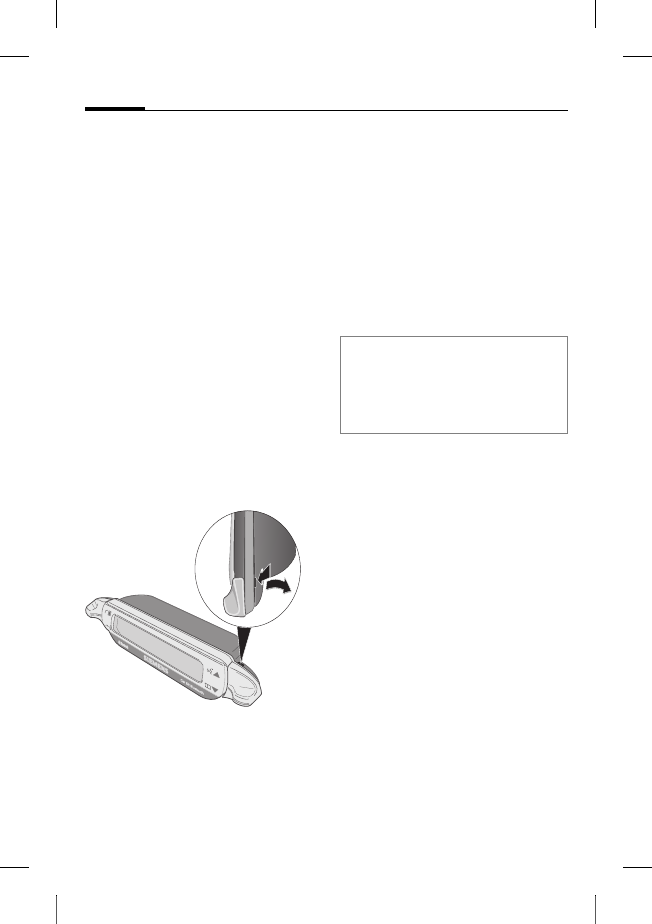
© Siemens AG 2003, W:\ICM_MP_CCQ_S_UM\03FL00443 Car Kit 65\CK_Final\Car_Kit_Bluetooth_2\Frame\HKW-600_pt.fm
l
e
f
t page
(
106
)
o
f
HKW
-
600
pt,
A31008
-
H6551
-
A102
-
1
-
4W28
(12
.
08
.
2004
,
Car Kit Bluetooth
106
VAR Language: unknown; VAR issue date: 12-March-2003
Engate a ficha de encaixe.
Passe o cabo do microfone exter-
no : à volta da patilha prevista
para o efeito (vide figura).
Fixar a caixa de electrónica 1,
por exemplo, na zona dos pés do
lado do passageiro, utilizando os
parafusos 2.
Após instalação volte a ligar cor-
rectamente a bateria da viatura.
Desmontagem do display
Para soltar o display 6 do supor-
te 7, introduzir uma chave de
fendas na abertura estreita entre
ambos os elementos.
Premir com força moderada o
display 6 do seu suporte 7.
Remover o display 6.
Facilidades
Com o Car Kit Bluetooth, terá
uma comunicação ideal em sua
viatura, devido à função de
mãos livres totalmente duplex e
do alto conforto de utilização. Irá
telefonar como se estivesse a
conversar com o passageiro
ao lado.
Tecnologia Bluetooth™
O Car Kit e o telefone comuni-
cam-se através de Bluetooth™,
uma interligação digital de curto
alcance.
Para permitir esta comunicação,
o Car Kit e o telemóvel tem de
estar ligados um ao outro. Para
tal, leia "Estabelecer a primeira
ligação com o telemóvel",
pág. 108.
A marca e os logotipos Bluetooth são pro-
priedade da Bluetooth SIG, Inc.. Qualquer
utilização destas marcas pela Siemens é
feita sob licença. Outras marcas e nomes
comerciais mencionados são marcas regis-
tadas dos respectivos proprietários.
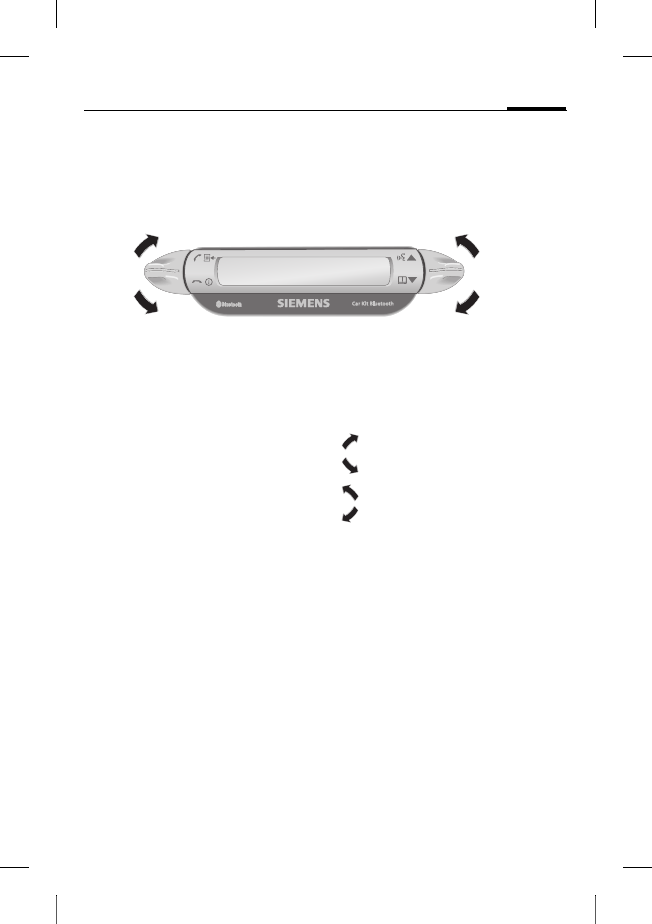
r
i
g
h
t page
(
107
)
o
f
HKW
-
600
pt,
A31008
-
H6551
-
A102
-
1
-
4W28
(12
.
08
.
2004
,
©
S
i
emens
A
G
2
0
0
3
,
W
:
\
I
C
M
_
M
P
_
C
C
Q
_
S
_
U
M
\
0
3
F
L
0
0
4
4
3
C
ar
K
i
t
6
5
\
C
K
_
F
i
na
l
\
C
ar_
K
i
t_
B
l
uetoot
h
_
2
\
F
rame
\
H
K
W
-
6
0
0
_pt.
f
m
107Car Kit Bluetooth
V
A
R
L
anguage: un
k
nown;
V
A
R
i
ssue
d
ate:
1
2
-
M
arc
h
-
2
0
0
3
Display –
Funcionalidade das teclas
A orientação do utilizador de seu
Car Kit ocorre através das teclas
do display, que podem ser pre-
midas tanto para cima como pa-
ra baixo.
• A tecla esquerda serve para
confirmar/recusar.
• A tecla direita serve para
folhear listas.
A seguir serão utilizados símbo-
los para mostrar as quatro dife-
rentes acções possíveis:
sim/aceitar
não/desligar
para cima
para baixo
Se for necessário premir longa-
mente, aparece no manual de
instruções "premir longamente".
Em todos os demais casos, basta
premir brevemente as teclas.
sim/aceitar
não/desligar
para cima
para baixo
© Siemens AG 2003, W:\ICM_MP_CCQ_S_UM\03FL00443 Car Kit 65\CK_Final\Car_Kit_Bluetooth_2\Frame\HKW-600_pt.fm
l
e
f
t page
(
108
)
o
f
HKW
-
600
pt,
A31008
-
H6551
-
A102
-
1
-
4W28
(12
.
08
.
2004
,
Car Kit Bluetooth
108
VAR Language: unknown; VAR issue date: 12-March-2003
Primeira utilização
Estabelecer a primeira
ligação com o telemóvel
• Activar o modo de registo do
Car Kit. Para tal, premir
longamente.
• Activar a interface Bluetooth
do seu telemóvel e iniciar no
telefone a busca de equipa-
mentos Bluetooth próximos,
prontos para a recepção.
• Quando o Car Kit for encon-
trado, o telemóvel solicita que
confirme a ligação através da
introdução do número PIN.
• O número PIN é exibido no
display do Car Kit.
• Após a confirmação, o Car Kit
exibe a identificação do tele-
fone no display e comuta em
seguida para o modo de
stand-by. No caso de telemó-
veis de outros fabricantes,
pode ser que para passar para
o modo de stand-by seja ne-
cessária uma confirmação
no telefone.
A partir desse momento o Car Kit
está pronto para ser utilizado.
O Car Kit pode comunicar-se
com o telefone e ambos reco-
nhecer-se-ão mutuamente no
futuro.
Utilização de vários telefones
O Car Kit memoriza a ligação
com um total de quatro telefo-
nes, com os quais ele pode ser
utilizado alternadamente.
Caso seja registado um quinto
telefone, é apagado o telefone
que não foi utilizado com o Car
Kit há mais tempo.
Quando o Car Kit é activado, ele
procura pelo último telefone uti-
lizado. Caso este não seja encon-
trado, ele procura por outros te-
lefones guardados. Os telefones
encontrados são exibidos no dis-
play. O utilizador pode então se-
leccionar um aparelho.
Nota
Para saber como estabelecer uma
interligação Bluetooth, queira consul-
tar o manual de instruções de seu
telefone.
r
i
g
h
t page
(
109
)
o
f
HKW
-
600
pt,
A31008
-
H6551
-
A102
-
1
-
4W28
(12
.
08
.
2004
,
©
S
i
emens
A
G
2
0
0
3
,
W
:
\
I
C
M
_
M
P
_
C
C
Q
_
S
_
U
M
\
0
3
F
L
0
0
4
4
3
C
ar
K
i
t
6
5
\
C
K
_
F
i
na
l
\
C
ar_
K
i
t_
B
l
uetoot
h
_
2
\
F
rame
\
H
K
W
-
6
0
0
_pt.
f
m
109Car Kit Bluetooth
V
A
R
L
anguage: un
k
nown;
V
A
R
i
ssue
d
ate:
1
2
-
M
arc
h
-
2
0
0
3
Utilizar o Car Kit com um outro
telefone
• Desligar o Car Kit,
premindo longamente.
• Desactivar a interface Blue-
tooth do último telefone
ligado.
• Ligar o Car Kit, premindo
longamente. Ele procurará pelo
último telefone activo e não o
encontrará.
• O Car Kit procurará então por
outros telefones guardados e
os exibirá no display.
• Seleccionar o aparelho deseja-
do:
Mostra o próximo
telefone encontrado
(se existente).
Mostra o telefone
anterior da lista
(se existente).
O telefone exibido é
interligado.
Utilização com suporte
passivo opcional
Poderá equipar o Car Kit com um
suporte passivo opcional. Assim
serão obtidas outras funções:
• Possibilidade de utilização
com uma antena externa
opcional.
• Carregamento do telemóvel
após sua colocação no
suporte.
• Utilização do Car Kit com
um telemóvel Siemens sem
tecnologia Bluetooth.
Quando o telemóvel é colocado
no suporte passivo, é feita a liga-
ção entre o telefone e o Car Kit
através do encaixe do suporte.
Nota
Ler detalhes no manual de instruções
do suporte passivo.

© Siemens AG 2003, W:\ICM_MP_CCQ_S_UM\03FL00443 Car Kit 65\CK_Final\Car_Kit_Bluetooth_2\Frame\HKW-600_pt.fm
l
e
f
t page
(
110
)
o
f
HKW
-
600
pt,
A31008
-
H6551
-
A102
-
1
-
4W28
(12
.
08
.
2004
,
Car Kit Bluetooth
110
VAR Language: unknown; VAR issue date: 12-March-2003
Primeiros passos
Ligar o Car Kit
• Activar o Car Kit através da ig-
nição da sua viatura ou pre-
mendo longamente.
• O Car Kit procura pelo útimo
telefone utilizado. Este é indi-
cado no display.
A partir desse momento o Car Kit
está pronto para ser utilizado.
Atender a chamada
Atender a chamada.
Recusar a chamada
Recusar a chamada.
Terminar a chamada
Terminar a chamada.
Funções
Caso não descrito de outra for-
ma, para todas as funções vale
o seguinte:
Premir brevemen-
te/premir longamente: o
Car Kit passa para o
modo de stand-by.
Modo de stand-by
No modo de stand-by, o Car Kit
apresenta as seguintes funções:
Listas de chamadas
Premir longamente:
Modo de registo
Premir longamente:
O Car Kit é desligado
Lista telefónica
Reconhecimento
de voz (caso o telefo-
ne apresente esta
função)
Chamar a partir da lista
telefónica
Lista telefónica
Exibe a lista telefónica do
telemóvel.
Chamar a lista
telefónica.
, Seleccionar registo.

r
i
g
h
t page
(
111
)
o
f
HKW
-
600
pt,
A31008
-
H6551
-
A102
-
1
-
4W28
(12
.
08
.
2004
,
©
S
i
emens
A
G
2
0
0
3
,
W
:
\
I
C
M
_
M
P
_
C
C
Q
_
S
_
U
M
\
0
3
F
L
0
0
4
4
3
C
ar
K
i
t
6
5
\
C
K
_
F
i
na
l
\
C
ar_
K
i
t_
B
l
uetoot
h
_
2
\
F
rame
\
H
K
W
-
6
0
0
_pt.
f
m
111Car Kit Bluetooth
V
A
R
L
anguage: un
k
nown;
V
A
R
i
ssue
d
ate:
1
2
-
M
arc
h
-
2
0
0
3
Sob um registo na lista telefóni-
ca podem ser guardados vários
números de telefone.
, Seleccionar registo.
Iniciar a chamada.
Outras funções da lista telefónica
Salta um registo
para cima.
Premir longamente:
salta 10 registos
para cima.
Salta um registo
para baixo.
Premir longamente:
salta 10 registos
para baixo.
Chamada a partir das listas
de chamadas
Listas de chamadas
Mostra as listas de chamadas do
telemóvel.
Pode-se seleccionar entre três
listas de chamadas:
• Números marcados
• Chamadas não atendidas
• Chamadas atendidas
Uma lista de chamada apenas
é exibida se ela contiver pelo
menos um registo.
, Seleccionar lista de
chamadas.
Activar lista de
chamadas.
, Seleccionar registo.
(outras funções: vide
"Outras funções da
lista telefónica")
Iniciar a chamada.
Na chamada
Aumentar o volume.
Diminuir o volume
Reter a chamada.
Premer longamente:
Activar/desactivar
afunção Mute do
microfone.
Terminar a chamada.
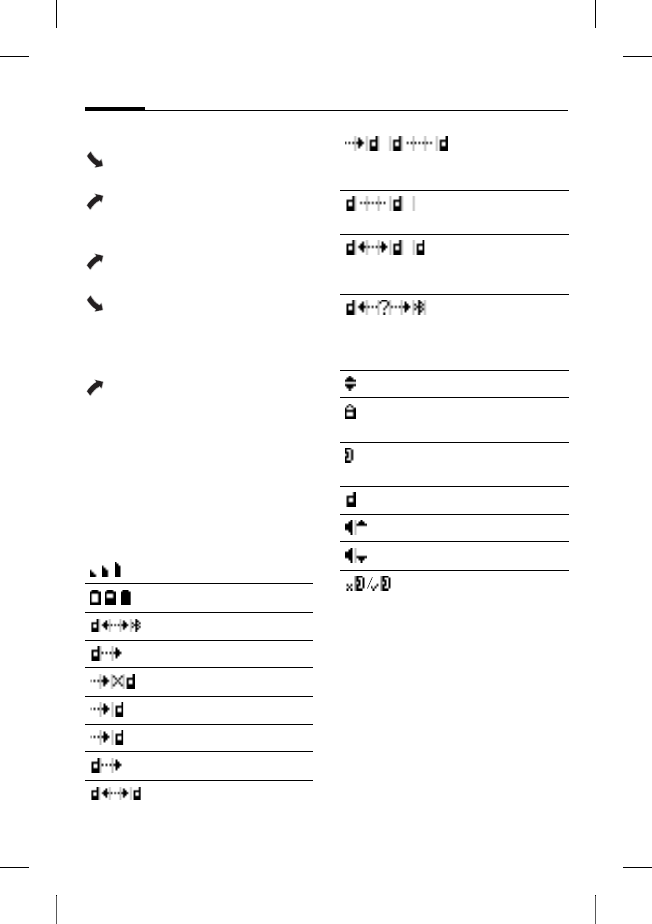
© Siemens AG 2003, W:\ICM_MP_CCQ_S_UM\03FL00443 Car Kit 65\CK_Final\Car_Kit_Bluetooth_2\Frame\HKW-600_pt.fm
l
e
f
t page
(
112
)
o
f
HKW
-
600
pt,
A31008
-
H6551
-
A102
-
1
-
4W28
(12
.
08
.
2004
,
Car Kit Bluetooth
112
VAR Language: unknown; VAR issue date: 12-March-2003
Segunda chamada
Terminar a chamada
activa.
Reter a chamada acti-
va e atender uma cha-
mada em espera.
Alternar entre duas
chamadas.
Premir longamente:
terminar todas as
chamadas.
Transferência de chamada
Premir longamente:
passar a chamada ac-
tiva para o Car Kit.
Para transferir a chamada, pre-
mir no display do telemóvel a
respectiva tecla (caso o telefone
apresente esta função).
Símbolos no display
Intensidade do sinal
Nível de carga do telefone
Modo de registo (Pairing)
Números marcados
Chamadas não atendidas
Chamadas atendidas
Chamada de entrada
Chamada de saída
Chamada activa
Chamada activa/chamada
em espera
Chamada retida
Alternar entre duas
chamadas
Erro da interface (caso o
telefone apresente esta
função)
Selecção de lista
Número de telefone
particular
Número de telefone
escritório
Número do telemóvel
Aumentar o volume
Diminuir o volume
Função Mute do microfone
activa/desactivada

r
i
g
h
t page
(
113
)
o
f
HKW
-
600
pt,
A31008
-
H6551
-
A102
-
1
-
4W28
(12
.
08
.
2004
,
©
S
i
emens
A
G
2
0
0
3
,
W
:
\
I
C
M
_
M
P
_
C
C
Q
_
S
_
U
M
\
0
3
F
L
0
0
4
4
3
C
ar
K
i
t
6
5
\
C
K
_
F
i
na
l
\
C
ar_
K
i
t_
B
l
uetoot
h
_
2
\
F
rame
\
H
K
W
-
6
0
0
_pt.
f
m
113Car Kit Bluetooth
V
A
R
L
anguage: un
k
nown;
V
A
R
i
ssue
d
ate:
1
2
-
M
arc
h
-
2
0
0
3
Eliminação de avarias
O car kit não funciona
• Verificar as ligações dos cabos
• Sem corrente eléctrica, verifi-
car a ligação dos cabos
• Telemóvel não ligado ou
interligação com o Car Kit
não activa
• Verificar os fusíveis
• Tensão baixa ou alta demais
Interferências do lado do
interlocutor
• O microfone está na corrente
de ar do tecto de abrir, da
janela ou da ventilação
• Distância entre o microfo-
ne/cabo do microfone e o
telefone < 50 cm
Deficiente qualidade de voz e áudio
• Car kit fora da temperatura
de serviço
• Volume ajustado muito baixo
(ajustar o volume através do
telemóvel!)
• Ligação com o rádio
(regime de Phone-In):
Volume demasiadamente
alto (diminuir o volume atra-
vés do telemóvel e, se neces-
sário, aumentar o volume
através do auto-rádio)
Forte eco
• Distância entre microfone e
altifalante < 1m
Sinal de microfone fraco (o seu inter-
locutor tem dificuldade em ouvi-lo)
• Distância entre microfone e
boca > 80 cm
• O microfone não está orienta-
do para o interlocutor
Má qualidade de recepção
•Sem rede
• Alterar a posição do
microfone
• Se o seu carro tiver vidros me-
talizados, a qualidade de re-
cepção do telemóvel pode ser
afectada. Observar as reco-
mendações do fabricante da
viatura e instalar a respectiva
antena (externa) e um supor-
te passivo opcional.
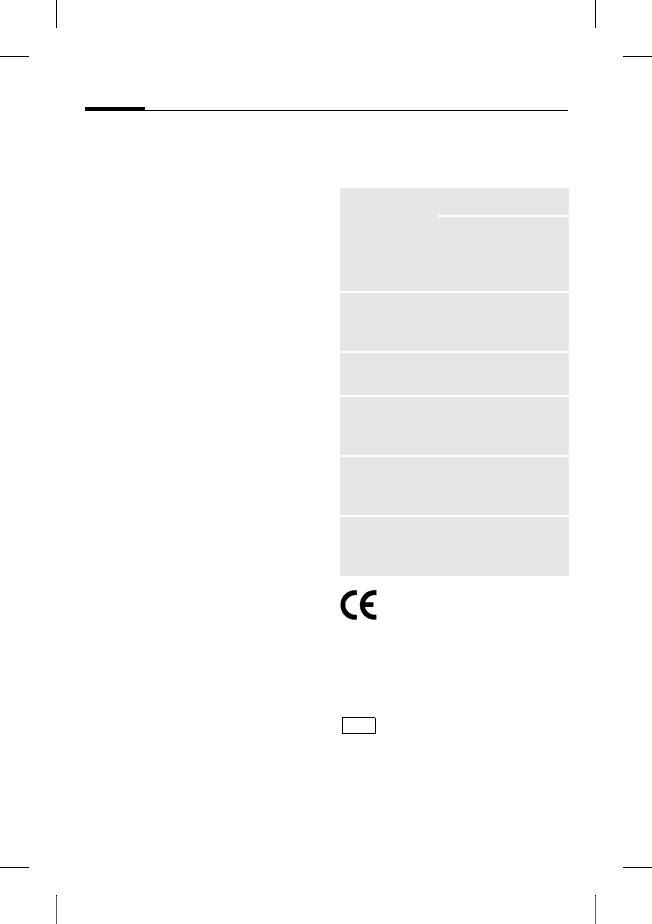
© Siemens AG 2003, W:\ICM_MP_CCQ_S_UM\03FL00443 Car Kit 65\CK_Final\Car_Kit_Bluetooth_2\Frame\HKW-600_pt.fm
l
e
f
t page
(
114
)
o
f
HKW
-
600
pt,
A31008
-
H6551
-
A102
-
1
-
4W28
(12
.
08
.
2004
,
Car Kit Bluetooth
114
VAR Language: unknown; VAR issue date: 12-March-2003
Telefone não encontrado/ Proble-
mas na ligação Bluetooth
• Estabelecer a primeira ligação
com o telemóvel, vide
pág. 108
• Desde a última utilização do
telemóvel com o Car Kit, fo-
ram registados pelo menos
quatro outros telefones.
Registar novamente o
telemóvel.
• Confirmar que a caixa de
electrónica não está montada
entre objectos metálicos
• Reduzir a distância entre a
caixa de electrónica e o
telemóvel
O auto-rádio está sempre silenciado
• Possivelmente troca da fun-
ção 'mute' com a massa
O ligar/desligar do Car Kit não
funciona/ o Car Kit não desliga
automaticamente
• Verificar se o cabo da ignição
está ligado com a ignição da
viatura
Dados técnicos e
homologação
O Car Kit respeita as se-
guintes directivas da UE:
89/336/CEE "Compatibilidade
electromagnética"
92/59/CEE "Directiva sobre a se-
gurança geral de produtos"
Autorização do tipo
conforme directiva
72/245/CEE, alterada
por último através da directiva
95/54/CE Conformidade electro-
magnética em viaturas".
Tensão de
alimentação 10,8 V+ a 16 V+
O cabo de ligação
da ignição da viatura
também pode ser
ligado a 24 V.
Consumo de
energia máx. 2 A /
máx. 1 mA (corrente
de repouso)
Temperatura
de serviço -25°C a +70°C
Potência de
saída para os
altifalantes
máx.7 W (a 4 Ohm)
Peso
(caixa de
electrónica)
aprox. 110 g
Dimensões
(caixa de
electrónica)
aprox. 110 x 120 x
30 mm (CxLxA)
e1
023752
r
i
g
h
t page
(
115
)
o
f
HKW
-
600
pt,
A31008
-
H6551
-
A102
-
1
-
4W28
(12
.
08
.
2004
,
©
S
i
emens
A
G
2
0
0
3
,
W
:
\
I
C
M
_
M
P
_
C
C
Q
_
S
_
U
M
\
0
3
F
L
0
0
4
4
3
C
ar
K
i
t
6
5
\
C
K
_
F
i
na
l
\
C
ar_
K
i
t_
B
l
uetoot
h
_
2
\
F
rame
\
H
K
W
-
6
0
0
_pt.
f
m
115Car Kit Bluetooth
V
A
R
L
anguage: un
k
nown;
V
A
R
i
ssue
d
ate:
1
2
-
M
arc
h
-
2
0
0
3
Declaração de conformidade
CE
Siemens Information and Com-
munication mobile declara que o
telemóvel descrito no presente
manual respeita as principais
exigências e outras disposições
importantes da directiva
1999/5/CE (R&TTE). A respectiva
declaração de conformidade
(DoC) foi assinada. Se necessá-
rio, pode pedir uma cópia do
original através da hotline da
empresa ou visitando:
www.siemens-
mobile.com/conformity
FCC
Este dispositivo está de acordo
com o tópico 15 das regras FCC.
Pré-requisitos para o funciona-
mento do aparelho: (1) o apare-
lho não oferece qualquer inter-
ferência perigosa, e (2) não
sofre influência de quaisquer in-
terferências, mesmo se se tratar
de interferências que possam a
vir ter efeitos indesejados.
Quaisquer alterações ou modifi-
cações não aprovadas pela enti-
dade responsável pelo cumpri-
mento das normas poderá
invalidar a autorização do utiliza-
dor em operar o dispositivo.
Cuidados
O produto deve ser limpo com
um pano macio ligeiramente
húmido, mas não molhado.
Não utilize diluentes, corantes
ou outras substâncias químicas.
Acessórios
Suporte passivo com entradas eléctri-
cas, constituído por:
• Car Kit Upgrade (módulo base para
suporte passivo/suporte passivo com
ligação à antena com cabo para a
caixa de electrónica)
• Mobile Holder Antenna/
Mobile Holder
Com este complemento, dispõe de ou-
tras funções: ligação de antena, carre-
gamento do telemóvel, possibilidade de
guardar o telefone na viatura com se-
gurança. Além disso, podem ser utiliza-
dos telemóveis sem tecnologia
Bluetooth a partir da geração 65.
Para ligação ao auto-rádio da viatura:
• Phone-In Adapter Cable
Os produtos podem ser adquiridos jun-
tos dos revendedores especializados
ou na nossa loja On-line em:
Acessórios originais da
Siemens
www.siemens-
mobile.com/shop

© Siemens AG 2003, W:\ICM_MP_CCQ_S_UM\03FL00443 Car Kit 65\CK_Final\Car_Kit_Bluetooth_2\Frame\HKW-600_pt.fm
l
e
f
t page
(
116
)
o
f
HKW
-
600
pt,
A31008
-
H6551
-
A102
-
1
-
4W28
(12
.
08
.
2004
,
Car Kit Bluetooth
116
VAR Language: unknown; VAR issue date: 12-March-2003
Serviço ao cliente
(Customer Care)
A Siemens não garante qualquer servi-
ço de reparação e de substituição nos
países onde os seus produtos não se-
jam vendidos por revendedores autori-
zados.
No caso de necessidade de reparação,
evtl. certificado de garantia, obtém
apoio rápido e de confiança nos nossos
centros de serviço:
Abu Dhabi................................0 26 42 38 00
África do Sul...........................08 60 10 11 57
Alemanha * .........................0 18 05 33 32 26
Arábia Saudita .........................0 22 26 00 43
Argentina ............................0 80 08 88 98 78
Austrália.................................13 00 66 53 66
Áustria....................................05 17 07 50 04
Bangladesh..............................0 17 52 74 47
Barém ..............................................40 42 34
Bélgica.....................................0 78 15 22 21
Bolívia......................................0 21 21 41 14
Bósnia Herzegovina.................0 33 27 66 49
Brasil...................................0 80 07 07 12 48
Brunei .........................................02 43 08 01
Bulgária.......................................02 73 94 88
Camboja .....................................12 80 05 00
Canadá ...............................1 88 87 77 02 11
Catar...........................................04 32 20 10
China ..................................0 21 38 98 47 77
Costa do Marfim..........................05 02 02 59
Croácia ....................................0 16 10 53 81
Dinamarca ..................................35 25 86 00
Dubai .......................................0 43 96 64 33
Egipto.......................................0 23 33 41 11
Emirados Árabes Unidos .........0 43 66 03 86
Eslovénia.................................0 14 74 63 36
Espanha...................................9 02 11 50 61
EUA ....................................1 88 87 77 02 11
Estónia........................................06 30 47 97
Filipinas....................................0 27 57 11 18
Finlândia................................09 22 94 37 00
França....................................01 56 38 42 00
Grécia .................................0 80 11 11 11 16
Hong-Kong..................................28 61 11 18
Hungria ..................................06 14 71 24 44
Índia....................22 24 98 70 00 Extn: 70 40
Indonésia ............................0 21 46 82 60 81
Irlanda....................................18 50 77 72 77
Islândia .........................................5 11 30 00
Itália.......................................02 24 36 44 00
Jordânia...................................0 64 39 86 42
Kuweit...........................................2 45 41 78
Letónia..........................................7 50 11 18
Líbano.........................................01 44 30 43
Líbia.......................................02 13 50 28 82
Lituânia....................................8 52 74 20 10
Luxemburgo................................43 84 33 99
Um auxílio simples e descomplicado
às sua perguntas sobre a técnica e
sobre a utilização do seu aparelho vo-
cê encontrará no nosso Serviço Onli-
ne na internet:
www.siemens-mobile.com/
mobilescustomercare
Sempre acessível em qualquer lugar.
Pode usufruir de assistência em rela-
ção aos nossos produtos 24 horas
por dia. Aqui encontrará um sistema
de detecção de erros interactivo, uma
compilação das perguntas mais fre-
quentes e respectivas respostas,
bem como instruções de funciona-
mento e as mais recentes actualiza-
ções de software para download.
Tenha à mão o recibo, o número do
aparelho (IMEI, declaração com
*#06#), a versão do software (decla-
ração com *#06#, depois §Mais§) e
caso necessário o seu número de
cliente do Serviço Siemens.
* 0,12 euro/minuto