BenQ Mobile and OHG HKW100 HKW-100 CK Bluetooth Easy User Manual Car Kit BT Easy en
BenQ Mobile GmbH & Co. OHG HKW-100 CK Bluetooth Easy Car Kit BT Easy en
User Manual
Headset Bluetooth® (en)
r
i
g
h
t page
(9)
o
f
CKBP
HKW
-
100
en
A31008
-
H2981
-
A100
-
1
-
TS19
(01
.
06
.
2006
,
05
:
21)
©
S
i
emens
A
G
2
0
0
3
,
Z
:
\
L
S
\
0
6
G
U
W
0
0
2
5
8
H
K
W
-
1
0
0
_
L
S
\
W
or
k
\
U
e
b
erset-
9
T
emp
l
ate:
X
7
5
,
V
ers
i
on
2
.
2
;
V
A
R
L
anguage: un
k
nown;
V
A
R
i
ssue
d
ate:
V
A
R
_
I
ssue
_
D
A
T
E
Car Kit
Bluetooth®
Easy (en)
Car Kit Bluetooth® Easy (en)
Safety precautions
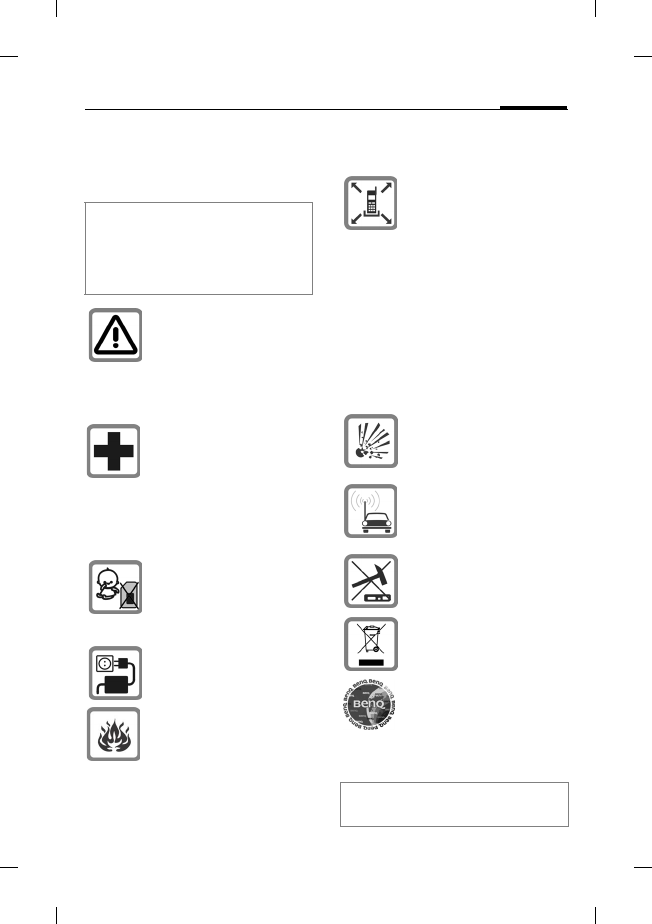
Please read the user guide and safety
precautions carefully before use!
Explain the content to your children
and the hazards associated with us-
ing the device.
Remember to comply with
legal requirements and local
restrictions when using the
device. These may apply, for
example, in aeroplanes, at
petrol stations, in hospitals
or while driving.
The functioning of medical
devices such as hearing aids
or pacemakers can be im-
paired. Keep at least 20cm/9
inches between the device
and the pacemaker. For
more information consult
your doctor.
Caution! Young children
may choke on small parts.
The device must therefore
be stored out of the reach of
small children.
The device is only suitable
for 12 V operation.
Do not throw the device into
an open fire.
The installation of the com-
ponents must not impede:
• The driver's freedom of
movement, safety or line of
vision
• The functioning of the dis-
play elements
• The safety of any
passenger (especially in
the event of an accident)
• The vehicle’s safety mech-
anisms (airbag, seat belts,
switch for hazard warning
lights,etc.)
The device must not be
operated in
surroundingswhere there is
the risk ofexplosion.
If your car is fitted with metal-
lised windows,this may im-
pair the reception quality of
your phone.
Improper use and opening
the components invalidates
the warranty.
Dispose of used devices and
their accessories according
to the legal regulations.
Use only
originalaccessories. This will
avoid potentialrisks to health
or propertyand ensure com-
pliance with all relevant
regulations.
Improper use invalidates the
warranty.
Headset Bluetooth® (en)
© Siemens AG 2003, Z:\LS\06GUW00258 HKW-100_LS\Work\Ueberset-
l
e
f
t page
(10)
o
f
CKBP
HKW
-
100
en,
A31008
-
H2981
-
A100
-
1
-
TS19
(01
.
06
.
2006
,
05
:
21)
10
Template: X75, Version 2.2;VAR Language: unknown; VAR issue date: VAR_Issue_DATE
For additional information please
consult your mobile phone's user
guide.
Compatibility
The Car Kit Bluetooth® Easy (referred
to hereafter as "Car Kit") is suitable for
telephoning with mobile phones with
the Bluetooth Profile (Handsfree Pro-
file). It is intended for use in the 12 V
cigarette lighter socket.
The following phones are suitable:
• BenQ-Siemens mobile phones
withBluetooth® interface. Depending
on the device, functionality may be
restricted.
• Mobile phones from other manufac-
turers which have a Bluetooth
"Handsfree Profile" interface.
Depending on the device, functionali-
ty may be restricted.
Bluetooth®
technology
The Car Kit and the mobile phone
communicate via Bluetooth®, a short
range radio link.
To enable this communication, the Car
Kit and mobile phone must be paired
with each other. For more information
please read "S. 13", Establishing the
first connection with the phone
(pairing).
Permanent hearing loss may occur if
you use the device at high volume.
With time you could become so ac-
customed to the high volume that it
appears normal to you. But it can
cause damage to your hearing. So re-
duce the volume to a safe level. If you
experience ringing in your ears,
reduce the volume or discontinue use
of your system.
In some countries there may be
restrictions to the use of Bluetooth®
devices. Please make enquiries to the
authorities responsible.
Manufactured by BenQ Mobile GmbH
& Co. OHG under trademark license
of Siemens AG.
The rights to the Bluetooth® word-
mark and the Bluetooth® logos are
owned by the Bluetooth® SIG, Inc.
Any use of such marks by BenQ Corp.
is under licence.
Other trademarks and trade names
are those of their respective owners.
Please also read the notes on Blue-
tooth® connectivity in your mobile
phone user guide as the controls and
display messages differ between
phones.
Headset Bluetooth® (en)
r
i
g
h
t page
(11)
o
f
CKBP
HKW
-
100
en
A31008
-
H2981
-
A100
-
1
-
TS19
(01
.
06
.
2006
,
05
:
21)
©
S
i
emens
A
G
2
0
0
3
,
Z
:
\
L
S
\
0
6
G
U
W
0
0
2
5
8
H
K
W
-
1
0
0
_
L
S
\
W
or
k
\
U
e
b
erset-
11
T
emp
l
ate:
X
7
5
,
V
ers
i
on
2
.
2
;
V
A
R
L
anguage: un
k
nown;
V
A
R
i
ssue
d
ate:
V
A
R
_
I
ssue
_
D
A
T
E
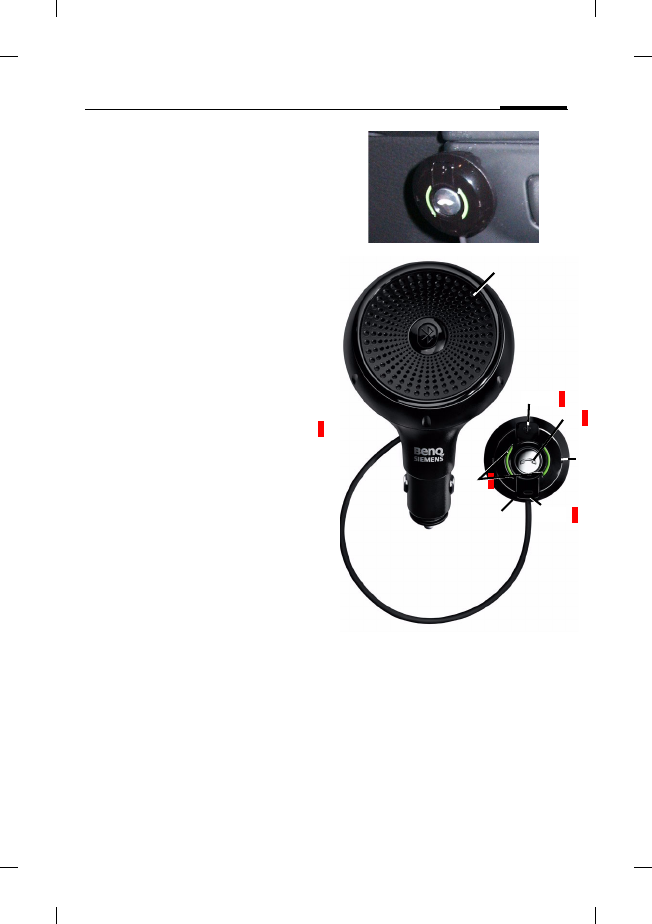
Overview of Car Kit
1 Loudspeaker
2 Control satellite
Comes with a clip or adhesive
velcro® strip for attachment within
1.2 m
3 Volume buttons
Press + button: louder
Press – button: quieter
4 LED
signals different Car Kit states
(page 15)
5 Microphone
6 ‰ On/Off button
Multifunction button
Some examples of functions:
Press briefly:
Activate voice dialling or
Accept a call
Press and hold:
End a call Placeholder 3
4
5
6
1
2
3
Headset Bluetooth® (en)
© Siemens AG 2003, Z:\LS\06GUW00258 HKW-100_LS\Work\Ueberset-
l
e
f
t page
(12)
o
f
CKBP
HKW
-
100
en,
A31008
-
H2981
-
A100
-
1
-
TS19
(01
.
06
.
2006
,
05
:
21)
12
Template: X75, Version 2.2;VAR Language: unknown; VAR issue date: VAR_Issue_DATE
Installation/De-
installation
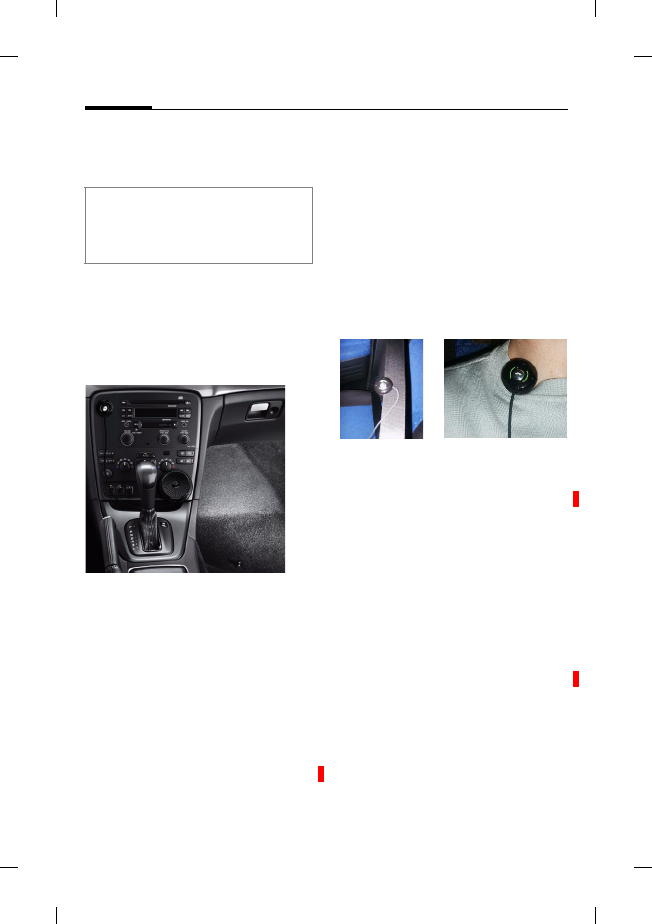
To install, plug the Car Kit into
the cigarette lighter socket of
your car, as shown in the follow-
ing picture. To de-install, re-
move the device from the ciga-
rette lighter socket.
Installing the control satellite
On the back of the Car Kit there
is a cable that can be unwound
to attach the control satellite 2
in a suitable position.
• Secure the control satellite 2
to the seat belt or to clothing,
for example, by means of the
clip.
Or
• Secure the control satellite 2
to the dashboard by means of
the adhesive velcro® strip.
First clean the area where you
want to attach the control
satellite 2 using a grease-dis-
solving cleaning agent. The
adhesive pad will only adhere
permanently to a grease-free
surface.
The distance between the con-
trol satellite 2 and the user's
mouth should not exceed
80 cm.
Switching off the Car Kit
‰Press for at least 3
seconds to switch off
the Car Kit.
The Car Kit will switch off auto-
matically if no telephone is con-
nected.
Switching on the Car Kit
Switch on the Car Kit by turning
the ignition or by pressing and
holding the ‰ key.
The Car Kit searches for the
phone with which it is paired
and connects it automatically if
the search is successful. The LED
then flashes quickly four times.
If it does not find a mobile phone
it knows, see page 13.
Do not use any plug extensions nor
any plug adapters when installing,
otherwise secure mounting of the Car
Kit cannot be guaranteed.
Placeholder
Place-
holder
Placeholder

Headset Bluetooth® (en)
r
i
g
h
t page
(13)
o
f
CKBP
HKW
-
100
en
A31008
-
H2981
-
A100
-
1
-
TS19
(01
.
06
.
2006
,
05
:
21)
©
S
i
emens
A
G
2
0
0
3
,
Z
:
\
L
S
\
0
6
G
U
W
0
0
2
5
8
H
K
W
-
1
0
0
_
L
S
\
W
or
k
\
U
e
b
erset-
13
T
emp
l
ate:
X
7
5
,
V
ers
i
on
2
.
2
;
V
A
R
L
anguage: un
k
nown;
V
A
R
i
ssue
d
ate:
V
A
R
_
I
ssue
_
D
A
T
E
Establishing the first
connection with the phone
(pairing)
The Car Kit must be switched off.
1. Press the ‰ button for at
least 8 seconds. The LED
lights continuously. Your mo-
bile phone can now "look for"
the Car Kit.
2. Activate the Bluetooth®
search mode of your mobile
phone. For information on
how to do this, please consult
your mobile phone user
guide.
3. If the mobile phone finds your
Car Kit, this is shown on the
phone's display beneath the
device name HKW-100.
4. When asked, enter the pass-
word (PIN) of the Car Kit on
the mobile phone:
0000
5. When pairing is successfully
completed, the LED of your
Car Kit will flash four times;
the pauses in between alter-
nating between long and very
long. Then the LED switches
into standby mode, in which
the LED is dimmed.
The Car Kit is now ready for use.
The Car Kit and the phone can
communicate with one another
and will recognise each other in
future.
Operation with different phones
The Car Kit saves the connection
details to one phone.
If a second phone is connected,
the first is deleted from the
memory.
Functions
Incoming call
‰Press briefly:
Accept call.
‰Press and hold:
Refuse call.
If the Car Kit is not found by your mo-
bile phone within 3 minutes, the Car
Kit automatically switches off and you
will have to activate the search mode
again (repeat step 1).
Headset Bluetooth® (en)
© Siemens AG 2003, Z:\LS\06GUW00258 HKW-100_LS\Work\Ueberset-
l
e
f
t page
(14)
o
f
CKBP
HKW
-
100
en,
A31008
-
H2981
-
A100
-
1
-
TS19
(01
.
06
.
2006
,
05
:
21)
14
Template: X75, Version 2.2;VAR Language: unknown; VAR issue date: VAR_Issue_DATE
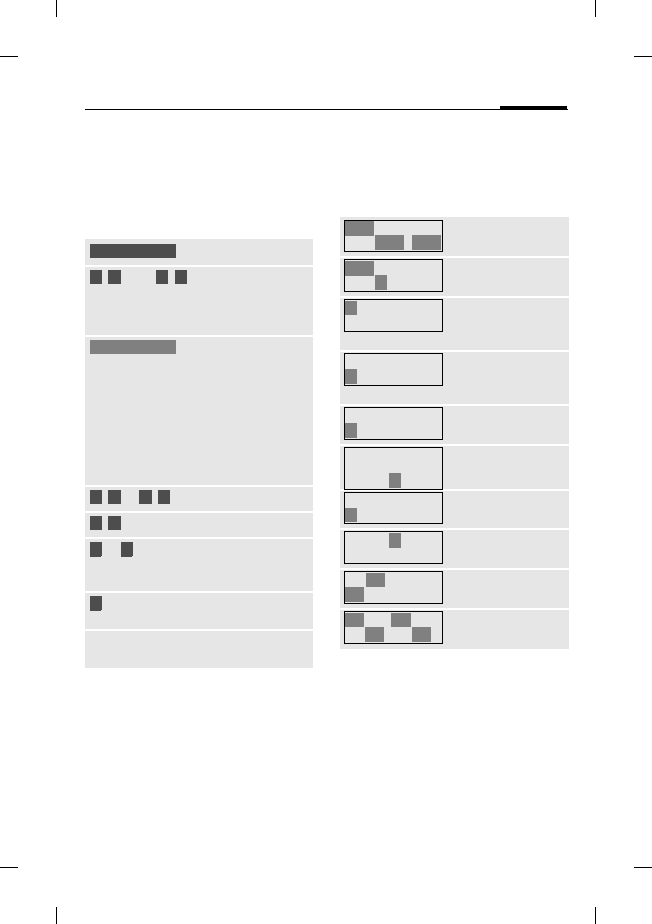
During calls
+Louder.
–Quieter.
‰Press 1x briefly: Hold
call. Press 1 x briefly
again: Continue call.
‰Press and hold : End
call.
‰Press 2 x briefly: Con-
tinue call on mobile
phone. Press 2x briefly
again: Take over ac-
tive call on the Car Kit.
+ - Press simultaneously :
Activate/deactivate
microphonemuting.
Second call b
‰Press and hold: End
active call.
‰Press briefly: Hold ac-
tive call and accept
waiting call.
‰Press 1 x briefly: Swap
between two calls.
‰Press 1 x and hold: End
the active and held
calls.
Third call b
‰Press and hold: End the
active and held calls.
Then press briefly and
accept the 3rd call.
Transferring a call to the
Car Kit
You can transfer a call from the
mobile phone to the Car Kit.
‰Press briefly: Have the
Car Kit take the call
that was on the mo-
bile phone.
For additional information
please consult your mobile
phone's user guide.
Voice dialling
(if supported by the phone)
‰Press briefly: Activate
the phone's voice di-
alling (in standby
mode).
‰Press and hold: End
voice dialling and re-
turn to standby
mode.
For additional information
please consult your mobile
phone's user guide.
The volume set here does not affect
the setting on the mobile phone.
Headset Bluetooth® (en)
r
i
g
h
t page
(1
5
)
o
f
CKBP
HKW
-
100
en
A31008
-
H2981
-
A100
-
1
-
TS19
(01
.
06
.
2006
,
05
:
21)
©
S
i
emens
A
G
2
0
0
3
,
Z
:
\
L
S
\
0
6
G
U
W
0
0
2
5
8
H
K
W
-
1
0
0
_
L
S
\
W
or
k
\
U
e
b
erset-
15
T
emp
l
ate:
X
7
5
,
V
ers
i
on
2
.
2
;
V
A
R
L
anguage: un
k
nown;
V
A
R
i
ssue
d
ate:
V
A
R
_
I
ssue
_
D
A
T
E
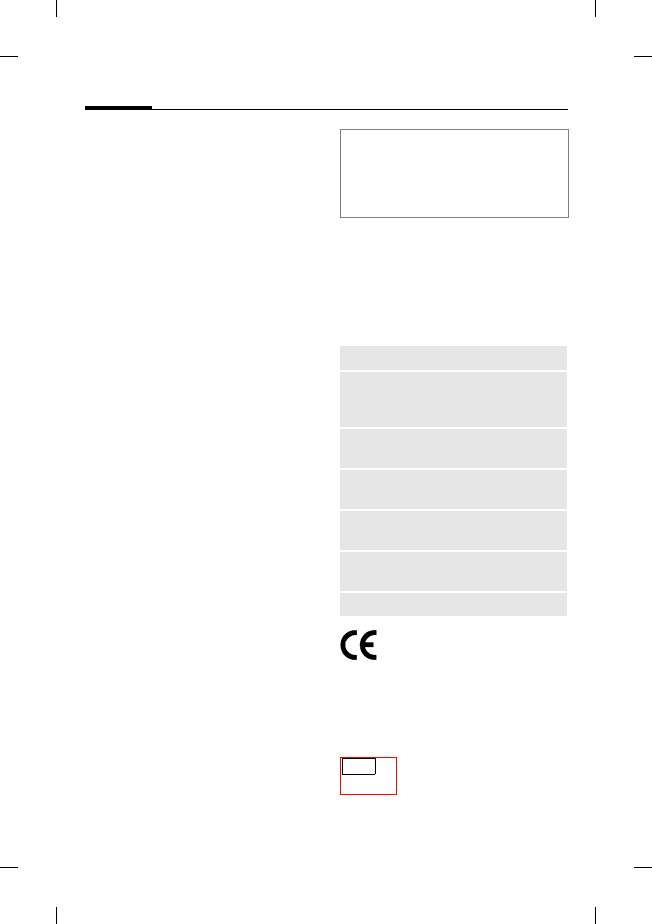
Status indicators of the LED
display
The flash sequence of the LED in-
dicates the different operating
states of the Car Kit:
Acoustic signals
The length and pitch of the
acoustic signals indicate the dif-
ferent states of the Car Kit:
During pairing.
The Car Kit is
ready to use when
pairing is success-
fully completed.
Pairing
successfully com-
pleted. The LED
remains dimmed
until an action
takes place. Then
the LED lights con-
tinuously at full in-
tensity.
Incoming call
Current call
The Car Kit switch-
es on, a phone is
connected.
The Car Kit switch-
es off.
Off The Car Kit is
switched off.
...
...
...
...
...
The Car Kit is
switched on.
The Car Kit is
switched off.
Pairing
successfully com-
pleted.
Bluetooth® con-
nection is interrupt-
ed
Volume +
Max. volume
reached
Volume -
Min. volume
reached
Incoming call
accepted.
Call ended
Headset Bluetooth® (en)
© Siemens AG 2003, Z:\LS\06GUW00258 HKW-100_LS\Work\Ueberset-
l
e
f
t page
(16)
o
f
CKBP
HKW
-
100
en,
A31008
-
H2981
-
A100
-
1
-
TS19
(01
.
06
.
2006
,
05
:
21)
16
Template: X75, Version 2.2;VAR Language: unknown; VAR issue date: VAR_Issue_DATE
Troubleshooting
Poor voice and audio quality
• Increase distance between
microphone and loudspeaker.
• Switch Car Kit louder.
• The distance between the mi-
crophone and the user's
mouth should not exceed
80 cm.
• We recommend keeping a dis-
tance of at least 60 cm be-
tween the microphone and
the loudspeaker of the Car Kit.
• Avoid installing the micro-
phone directly in the air flow
from the sunroof, window or
ventilation system.
Phone is not found/
Bluetooth® connection problems
• The Bluetooth® profile of your
mobile phone and your Car Kit
are not compatible, see
page 10.
• No mobile phone is connect-
ed, see page 13.
• You can recognise the threat
of a call being cut off by the
poor audio quality.
¢Reduce the distance be-
tween Car Kit and mobile
phone.
Service numbers
• See Customer Care, S. 108.
Technical data and
approval
Car Kit complies with the
following EU directives:
89/336/EEC "Electromagnetic
Compatibility"
92/59/EEC "General Product
Safety Directive"
Model approved in ac-
cordance with direc-
tive 72/245/EEC, last
amended by Directive 95/54/EU
If the Bluetooth® connection to the
mobile phone is interrupted (see also
page 14)for several seconds during a
call, you can continue the call with the
mobile phone.
Power supply 10.8 V to 16 V
Power
consumption
max. 1.5 A /
max. 1 mA (idle cur-
rent)
Ambient-
temperature
–25°C to +70°C
Loudspeaker
output power
max. 1.5 W
Range Blue-
tooth®
max. 10 m, less in
buildings
Operating
temperature
0°C to +45°C
Total weight approx. 140 g
e13
022983
Headset Bluetooth® (en)
r
i
g
h
t page
(1
7
)
o
f
CKBP
HKW
-
100
en
A31008
-
H2981
-
A100
-
1
-
TS19
(01
.
06
.
2006
,
05
:
21)
©
S
i
emens
A
G
2
0
0
3
,
Z
:
\
L
S
\
0
6
G
U
W
0
0
2
5
8
H
K
W
-
1
0
0
_
L
S
\
W
or
k
\
U
e
b
erset-
17
T
emp
l
ate:
X
7
5
,
V
ers
i
on
2
.
2
;
V
A
R
L
anguage: un
k
nown;
V
A
R
i
ssue
d
ate:
V
A
R
_
I
ssue
_
D
A
T
E
"Electromagnetic Compatibility
in Automobiles".
Declaration of conformity
CE
BenQ Mobile hereby declares
that the phone described in this
user guide is in compliance with
the essential requirements and
other relevant provisions of Eu-
ropean Directive 1999/5/EC
(R&TTE). The relevant declara-
tion of conformity (DoC) has
been signed. Please call the
company hotline if you require a
copy of the original or visit:
www.BenQMobile.com/conformity
FCC
This device complies with
Part 15 of the FCC regulations.
Operation of the device is sub-
ject to the following conditions:
(1) this device does not generate
any dangerous interference and
(2) this device is not impaired by
any interference, even if such
interference could have unde-
sired effects.
In the event of modifications or
conversions that have not been
explicitly approved by the party
responsible for compliance, per-
mission for operating the device
can be withdrawn from the user.
FCC ID:PWX-HKW100
BSP: N626
Care
The product should be cleaned
with a soft cloth that is damp but
not wet.
Do not use cleaning agents, col-
orants or other chemical sub-
stances.
Protect the device from damp-
ness and shock. Do not expose
the device to direct sunlight.
Headset Bluetooth® (en)
© Siemens AG 2003, Z:\LS\06GUW00258 HKW-100_LS\Work\Ueberset-
l
e
f
t page
(18)
o
f
CKBP
HKW
-
100
en,
A31008
-
H2981
-
A100
-
1
-
TS19
(01
.
06
.
2006
,
05
:
21)
18
Template: X75, Version 2.2;VAR Language: unknown; VAR issue date: VAR_Issue_DATE
Accessories
Products may be obtained in
specialist shops or visit our
online shop at:
In countries where our product
is not sold by authorised dealers,
no replacement or repair service
is offered.
Customer Care
see S. 108
Original Accessories
www.BenQMobile.com/
shop
FEDERAL COMMUNICATIONS COMMISSION INTERFERENCE STATEMENT
This equipment has been tested and found to comply with the limits for a Class B digital
device, pursuant to Part 15 of the FCC Rules. These limits are designed to provide
reasonable protection against harmful interference in a residential installation. This
equipment generates, uses and can radiate radio frequency energy and, if not installed
and used in accordance with the instructions, may cause harmful interference to radio
communications. However, there is no guarantee that interference will not occur in a
particular installation. If this equipment does cause harmful interference to radio or
television reception, which can be determined by turning the equipment off and on, the
user is encouraged to try to correct the interference by one or more of the following
measures:
– Reorient or relocate the receiving antenna.
– Increase the separation between the equipment and receiver.
– Connect the equipment into an outlet on a circuit different from that to which the
receiver is connected.
– Consult the dealer or an experienced radio/TV technician for help.
CAUTION:
Any changes or modifications not expressly approved by the party responsible for
compliance could void the user's authority to operate the equipment.
This device complies with Part 15 of the FCC Rules. Operation is subject to the following
two conditions:
(1) This device may not cause harmful interference and
(2) This device must accept any interference received, including interference that may
cause undesired operation.
FCC RF Radiation Exposure Statement
This equipment complies with FCC RF radiation exposure limits set forth for an
uncontrolled environment.
This equipment must not be co-located or operating in conjunction with any other antenna
or transmitter.