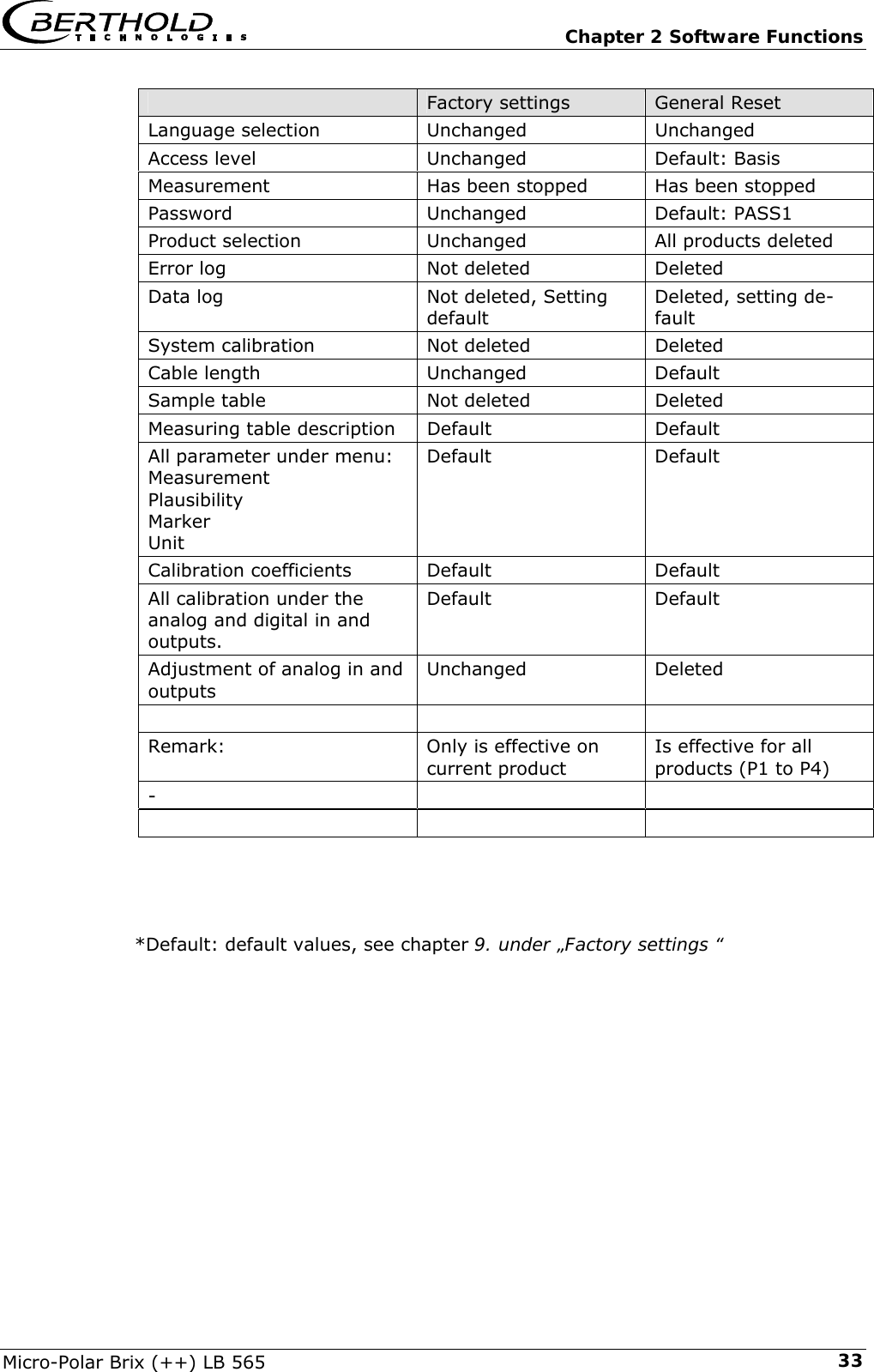
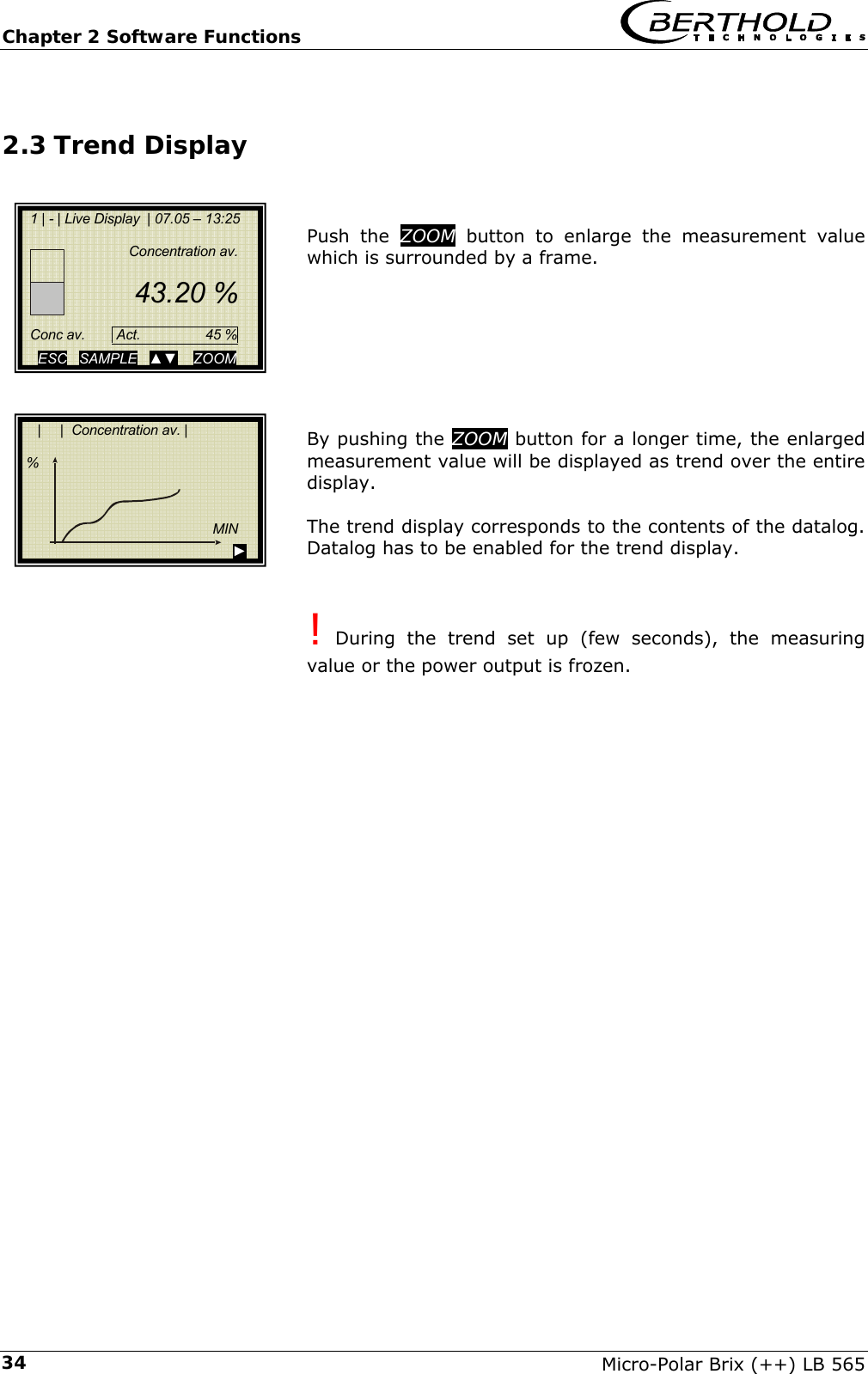
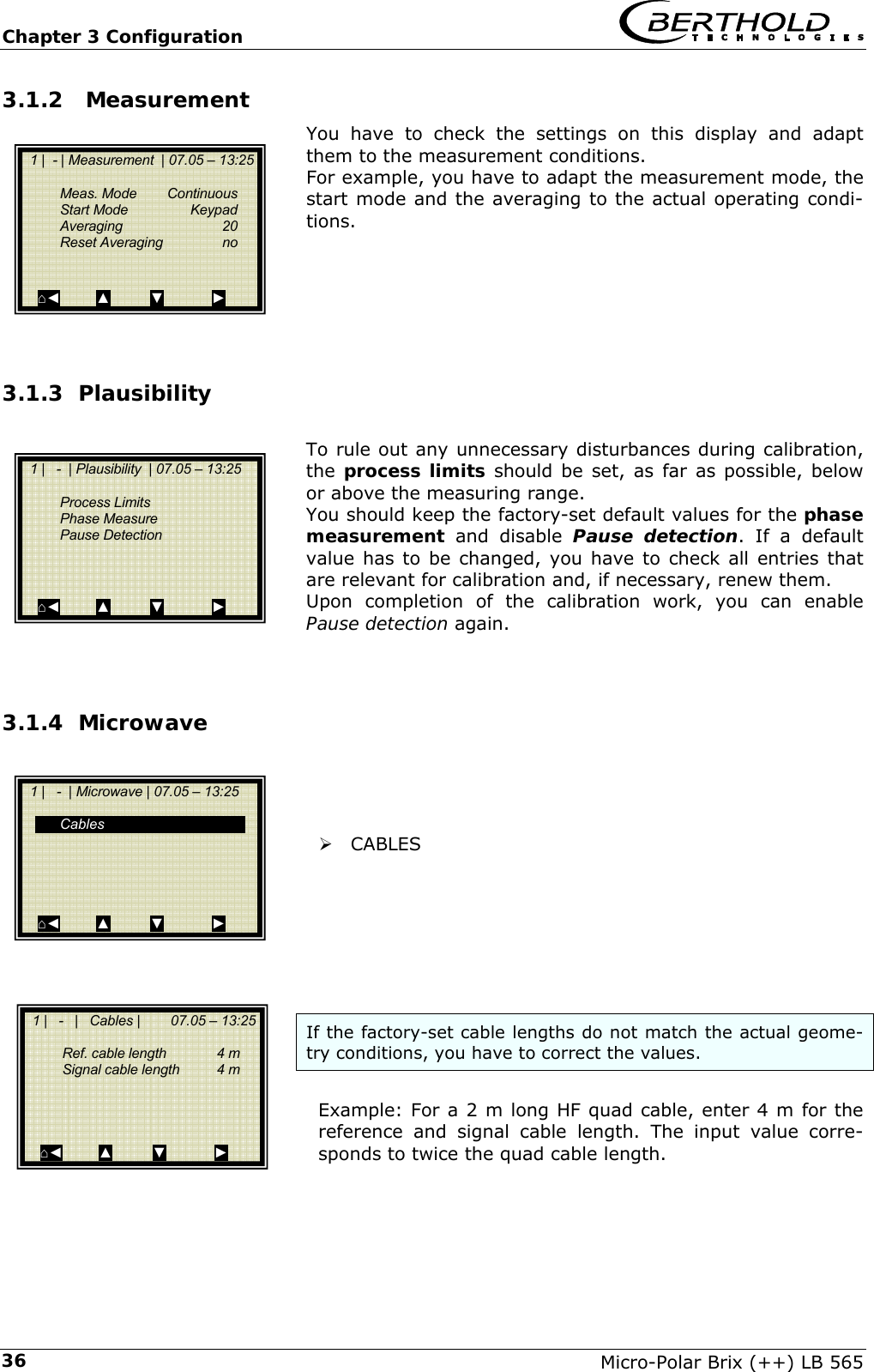
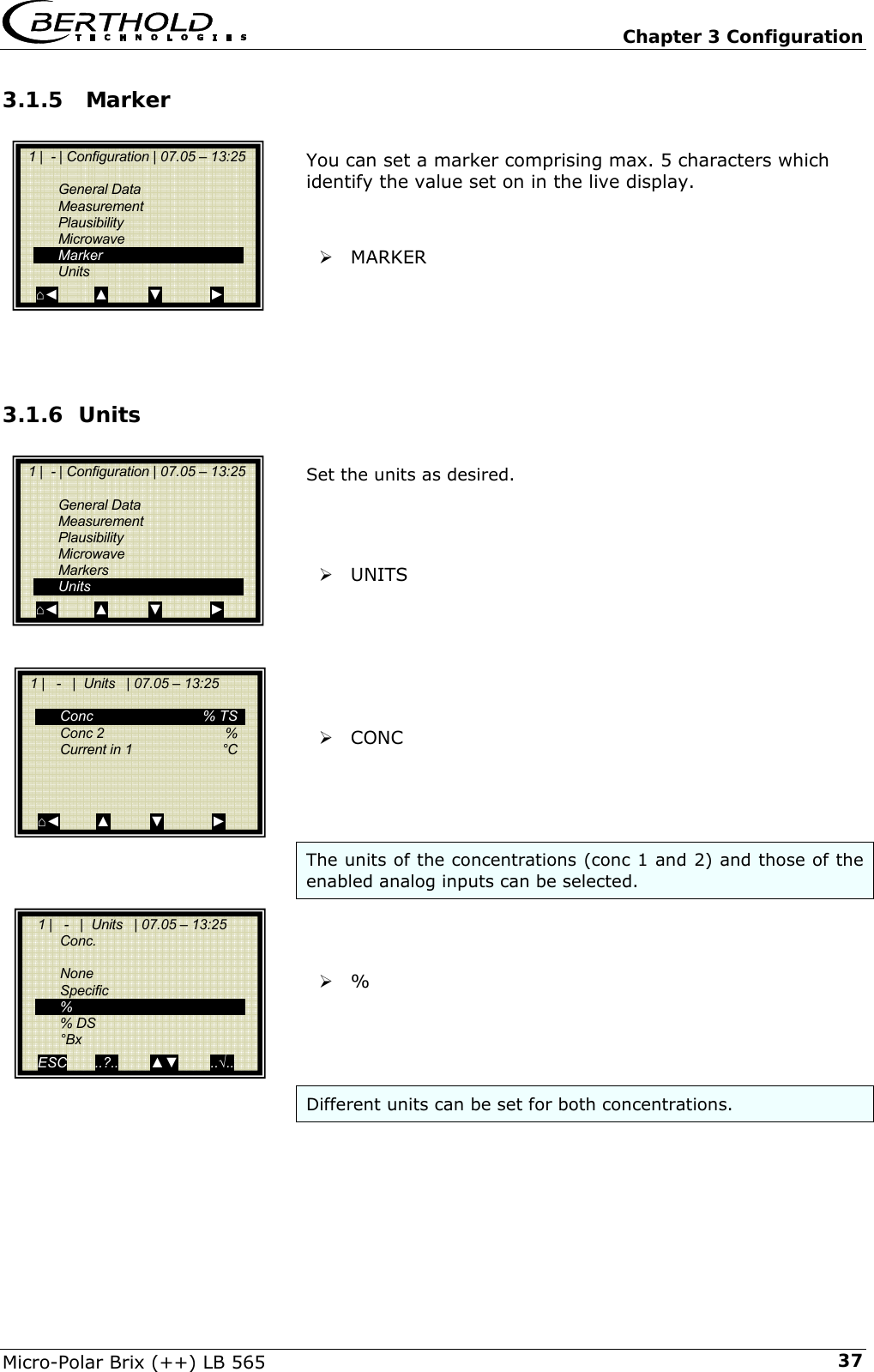
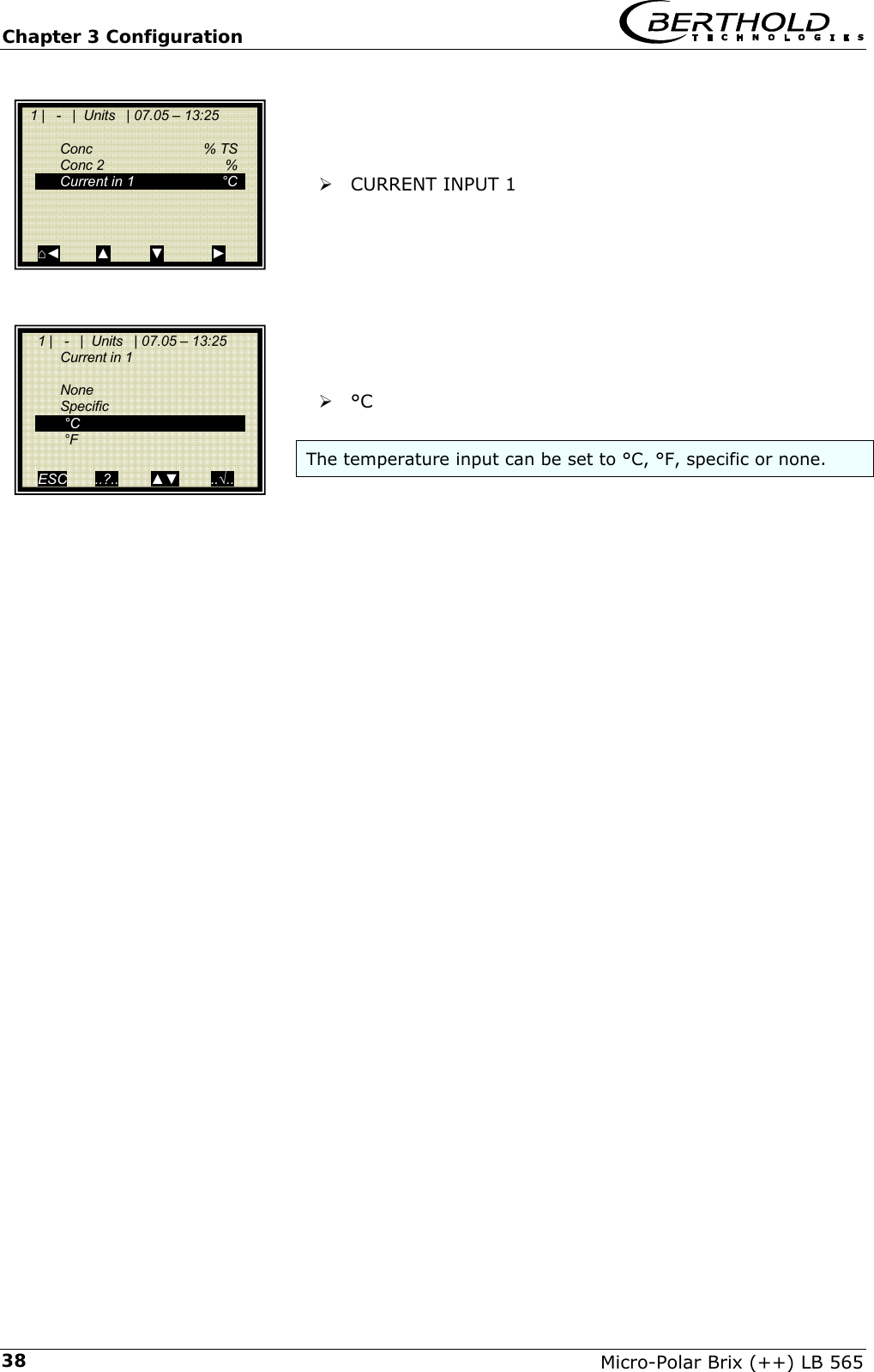
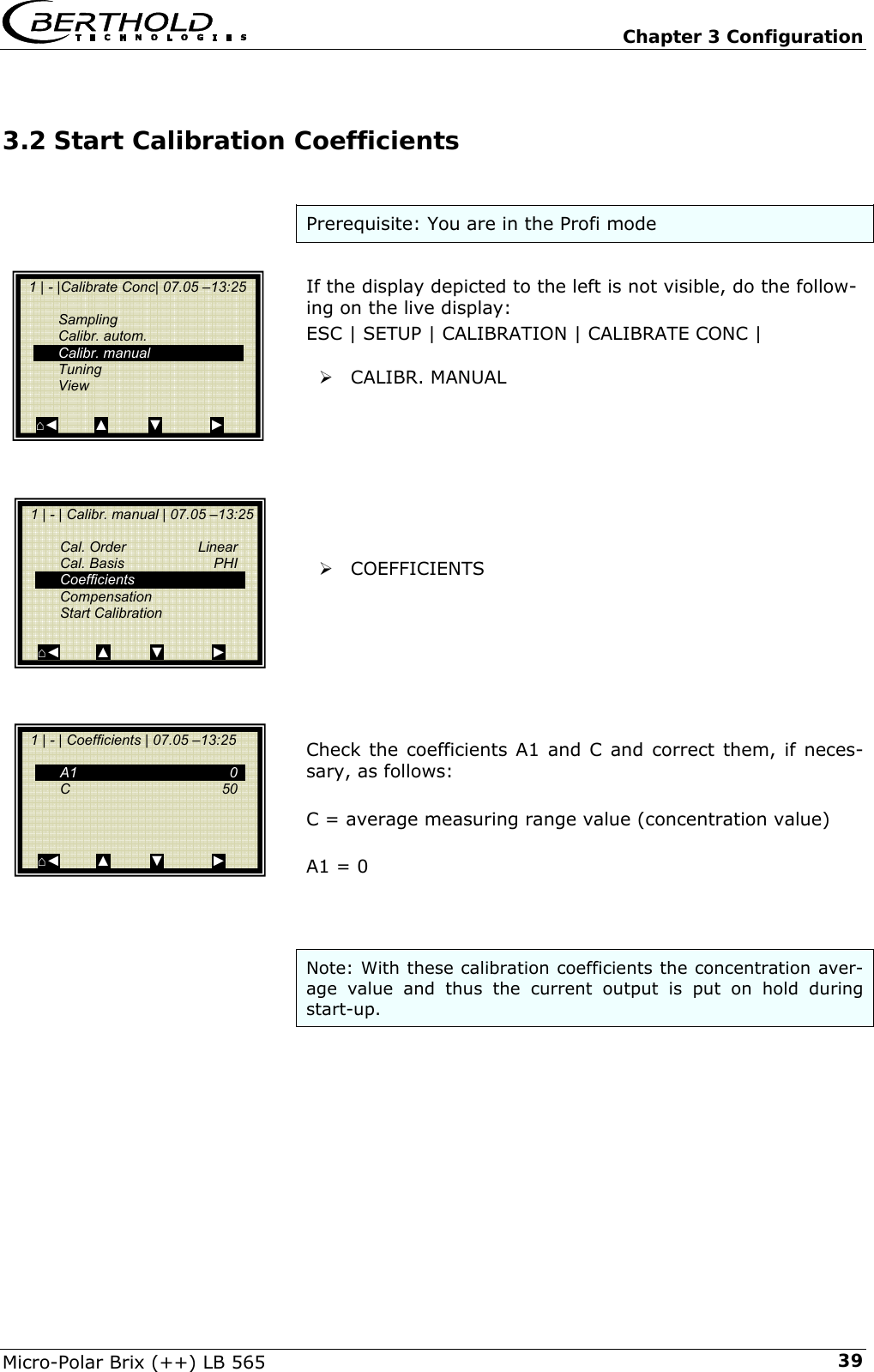
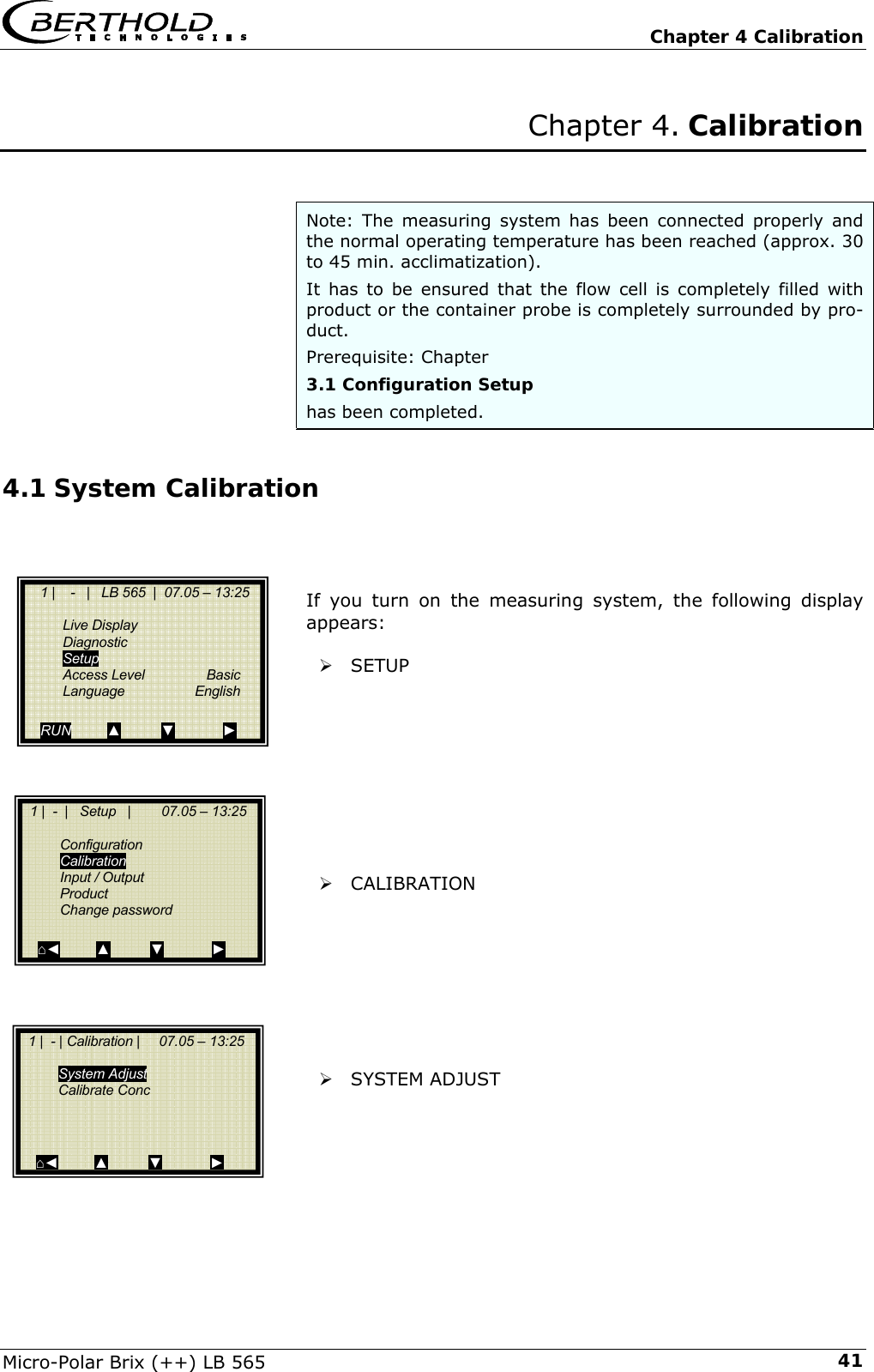
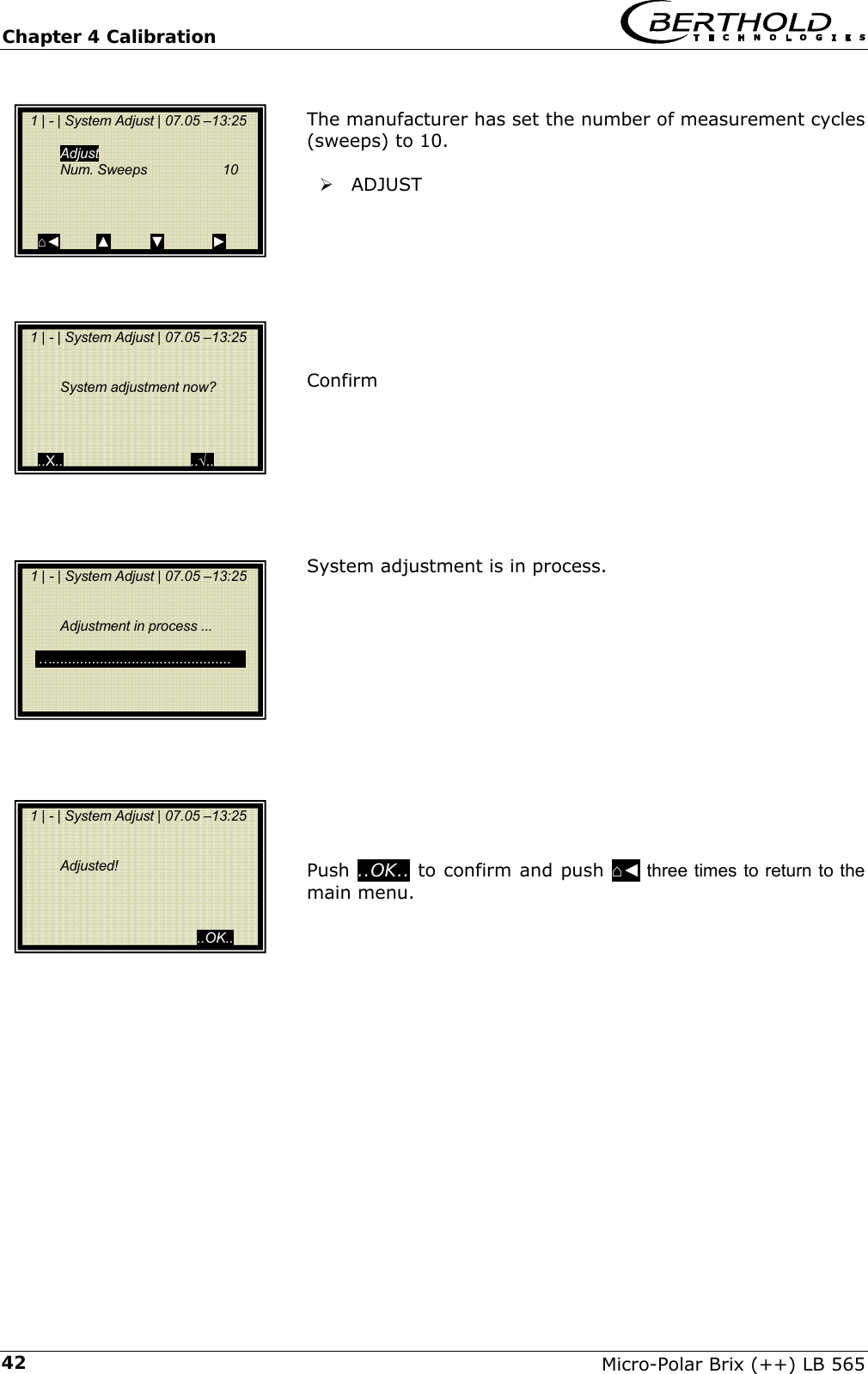
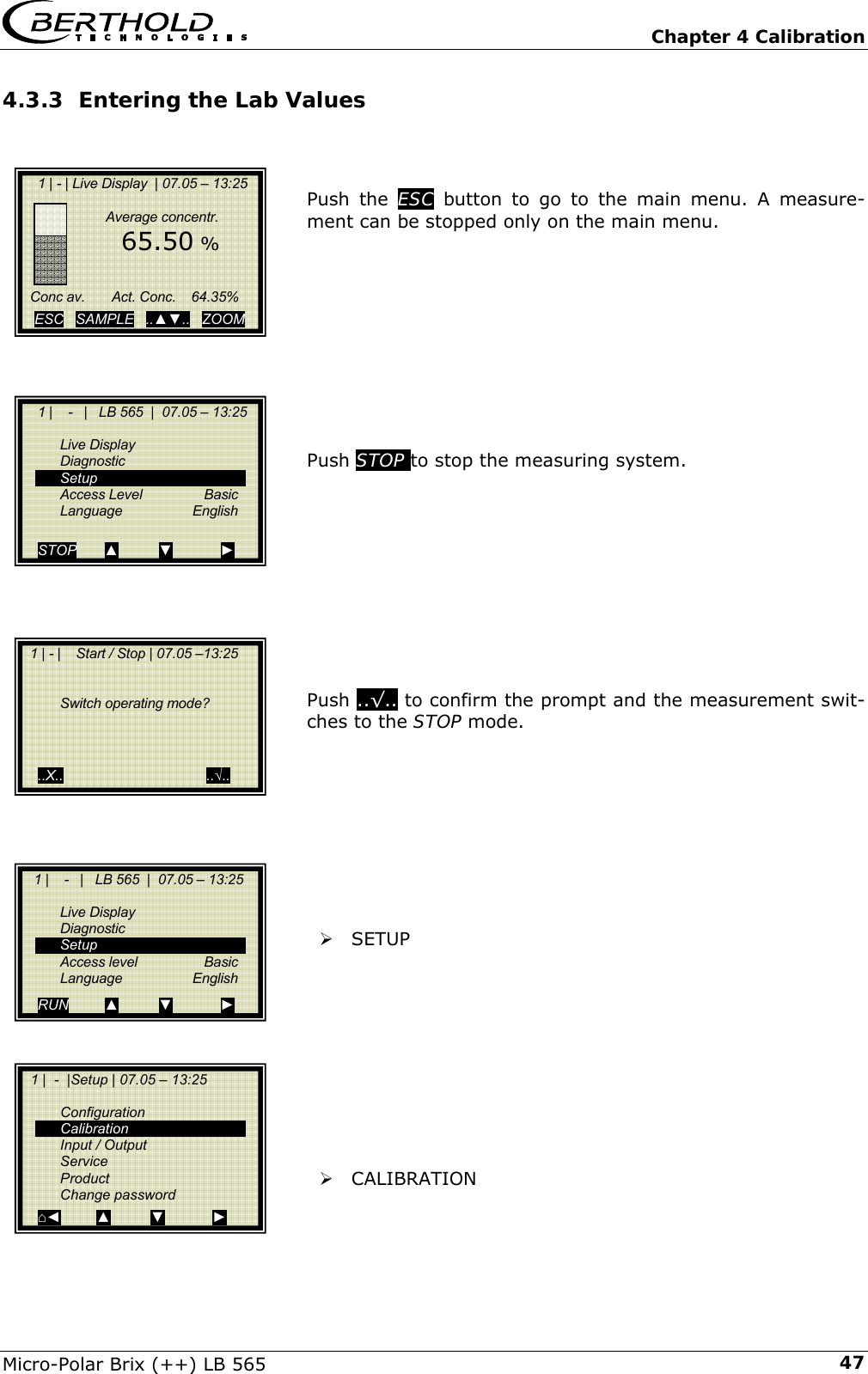
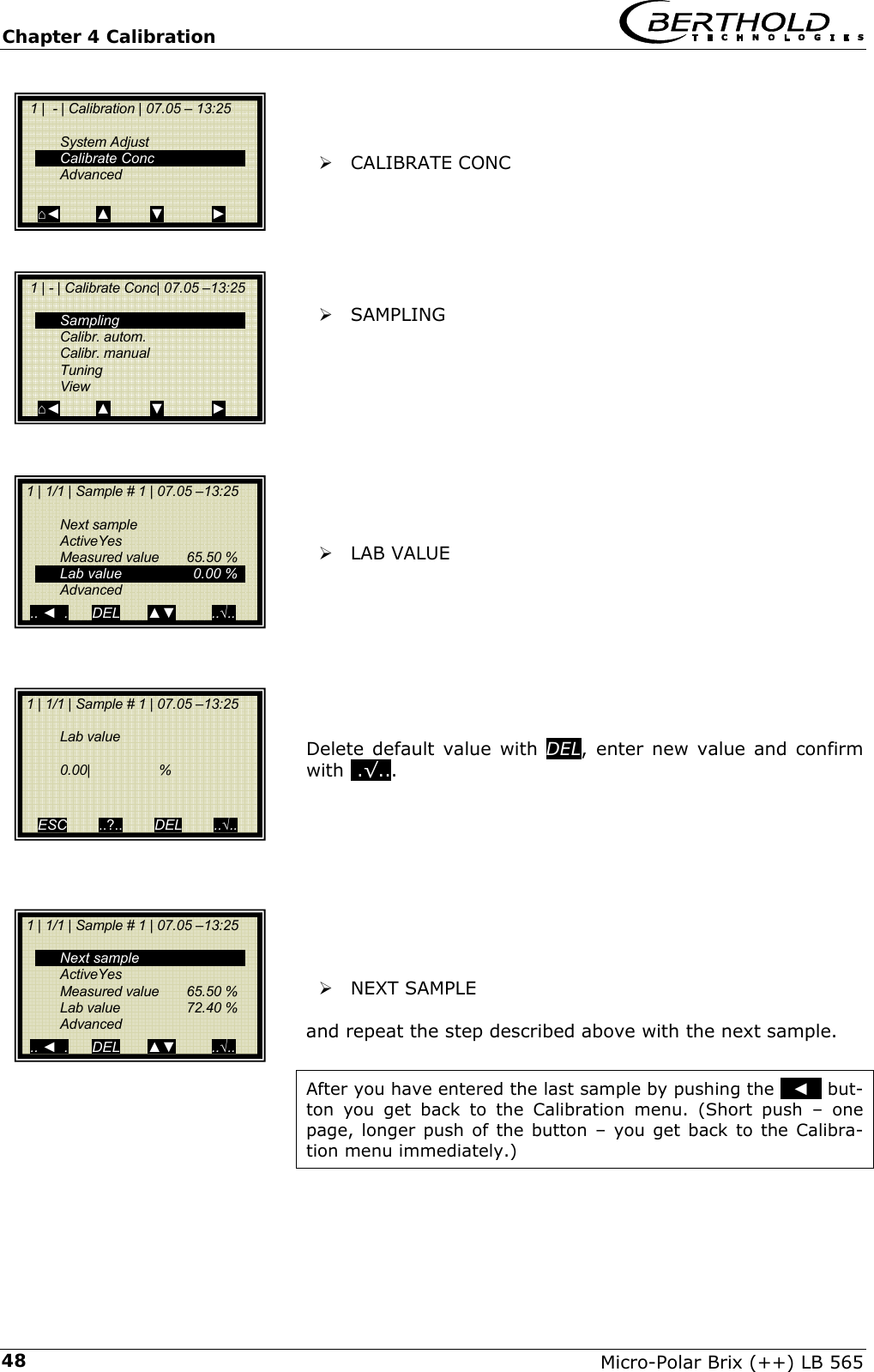
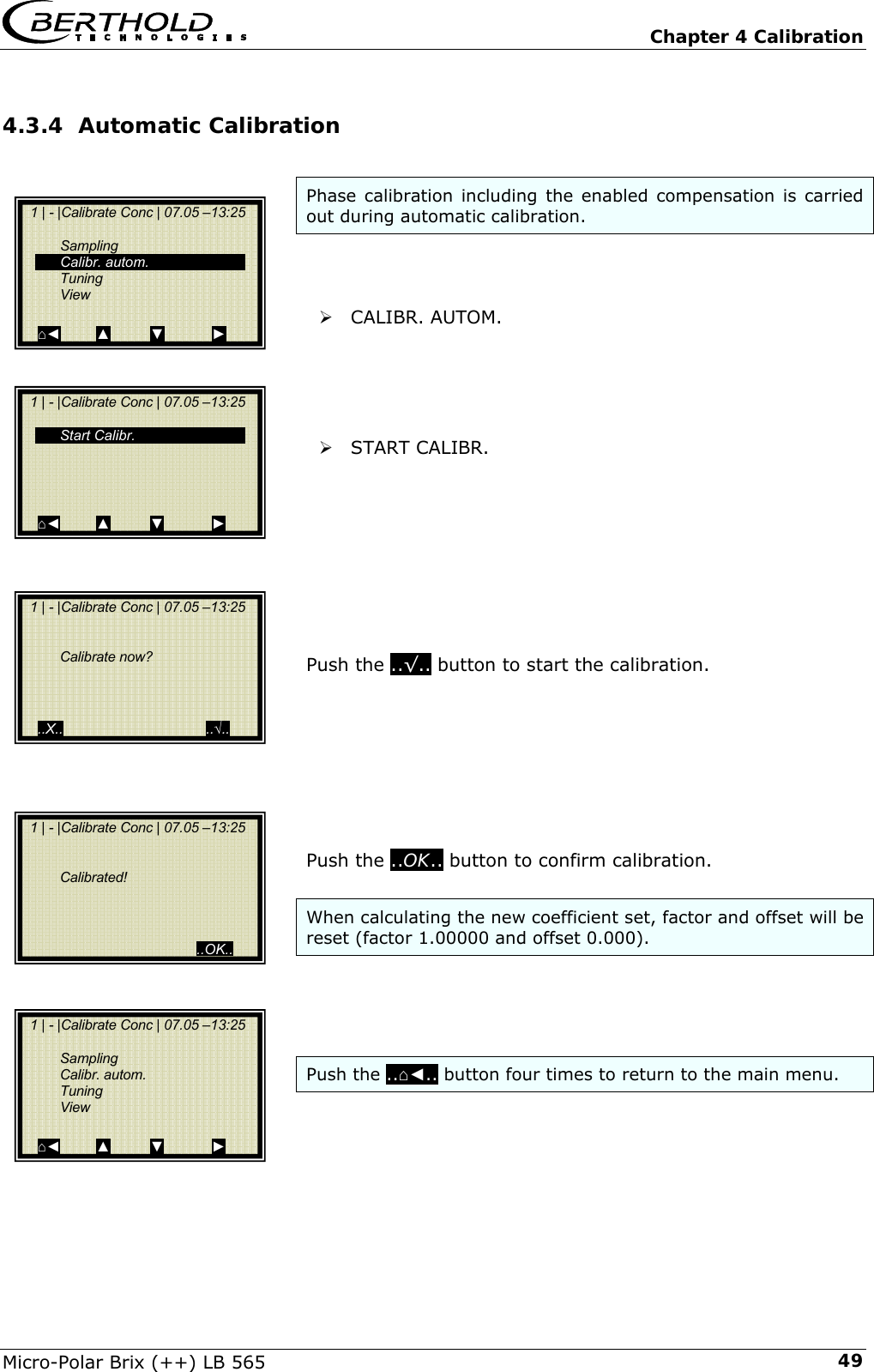
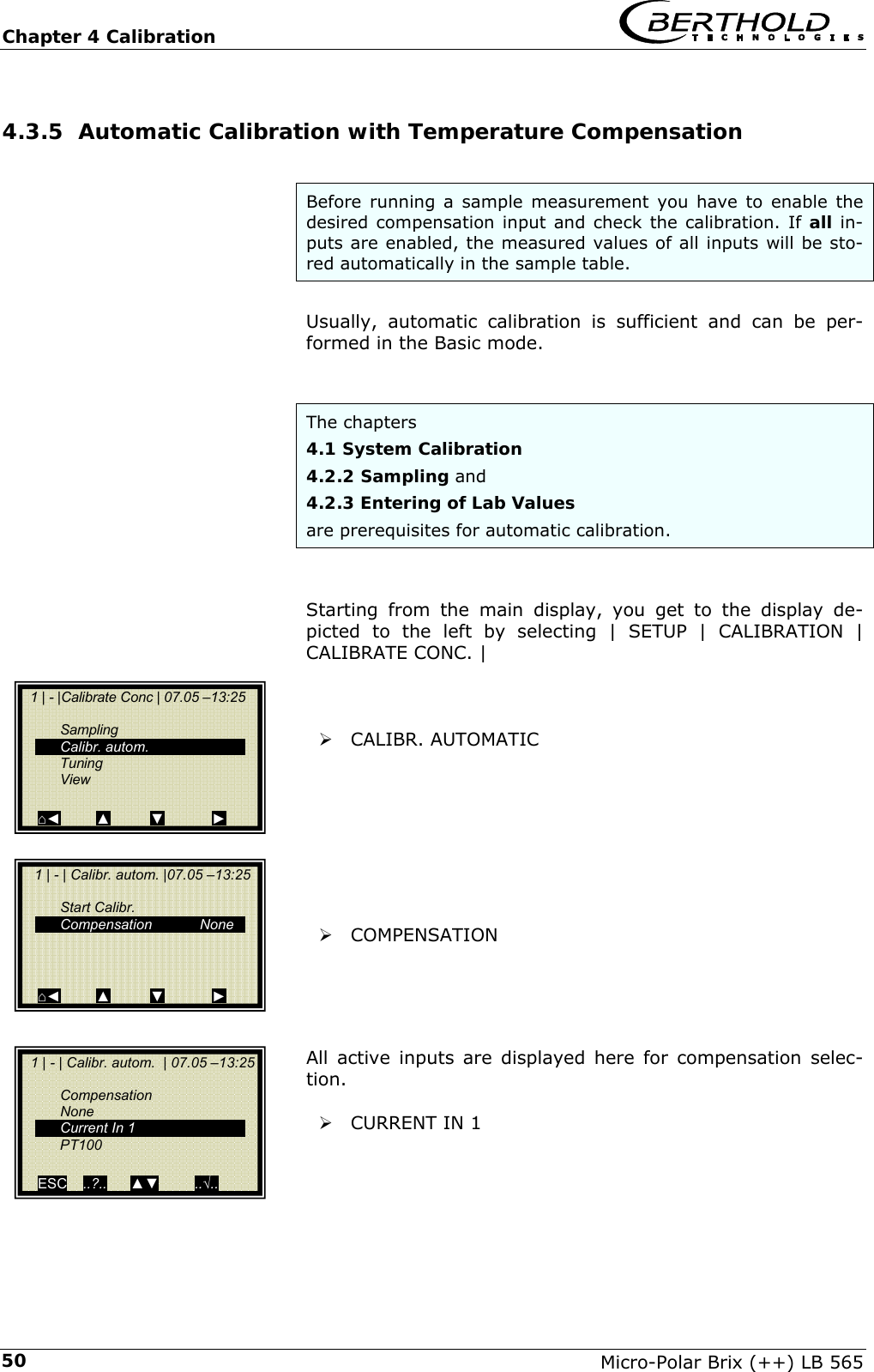
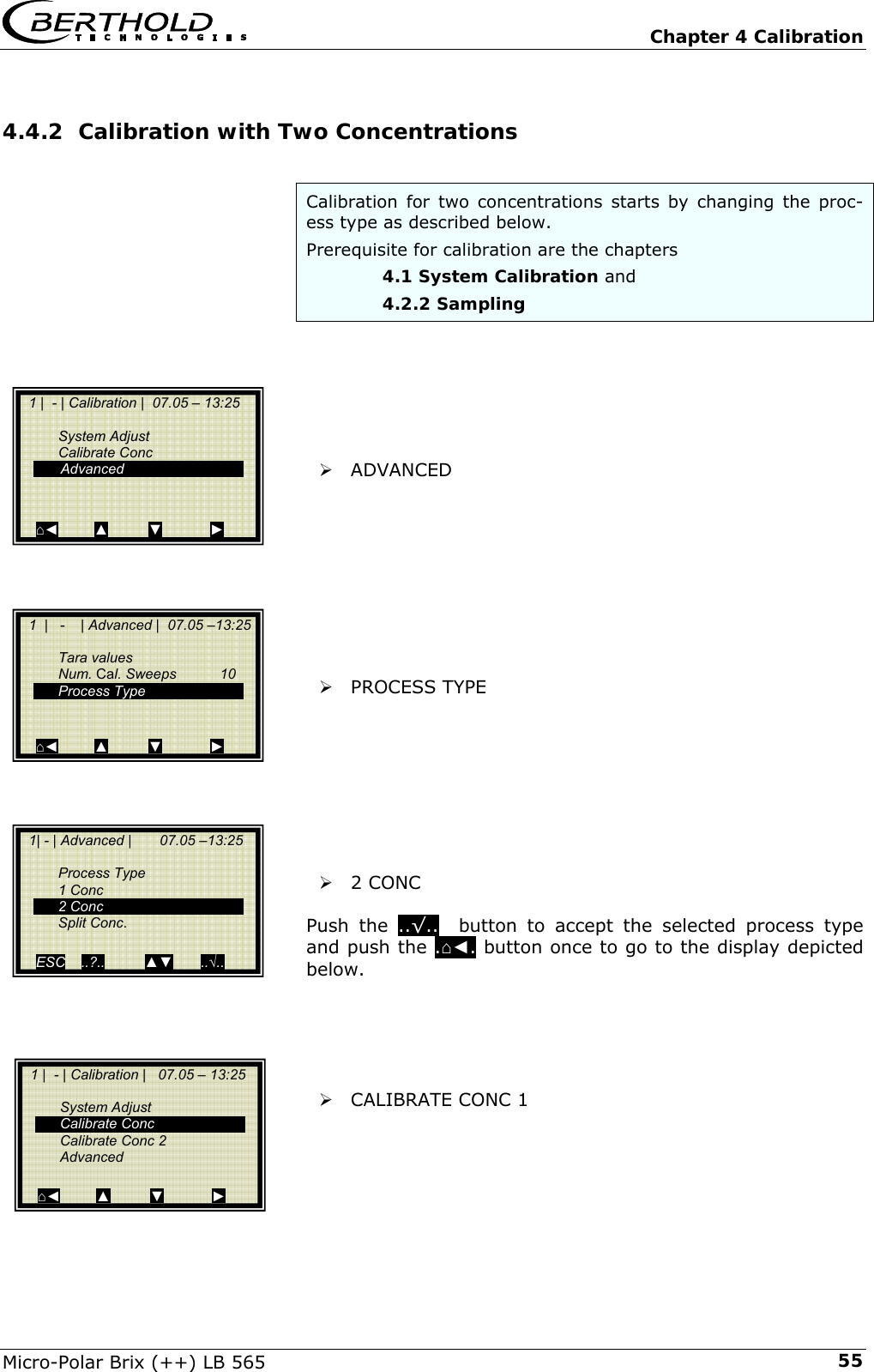
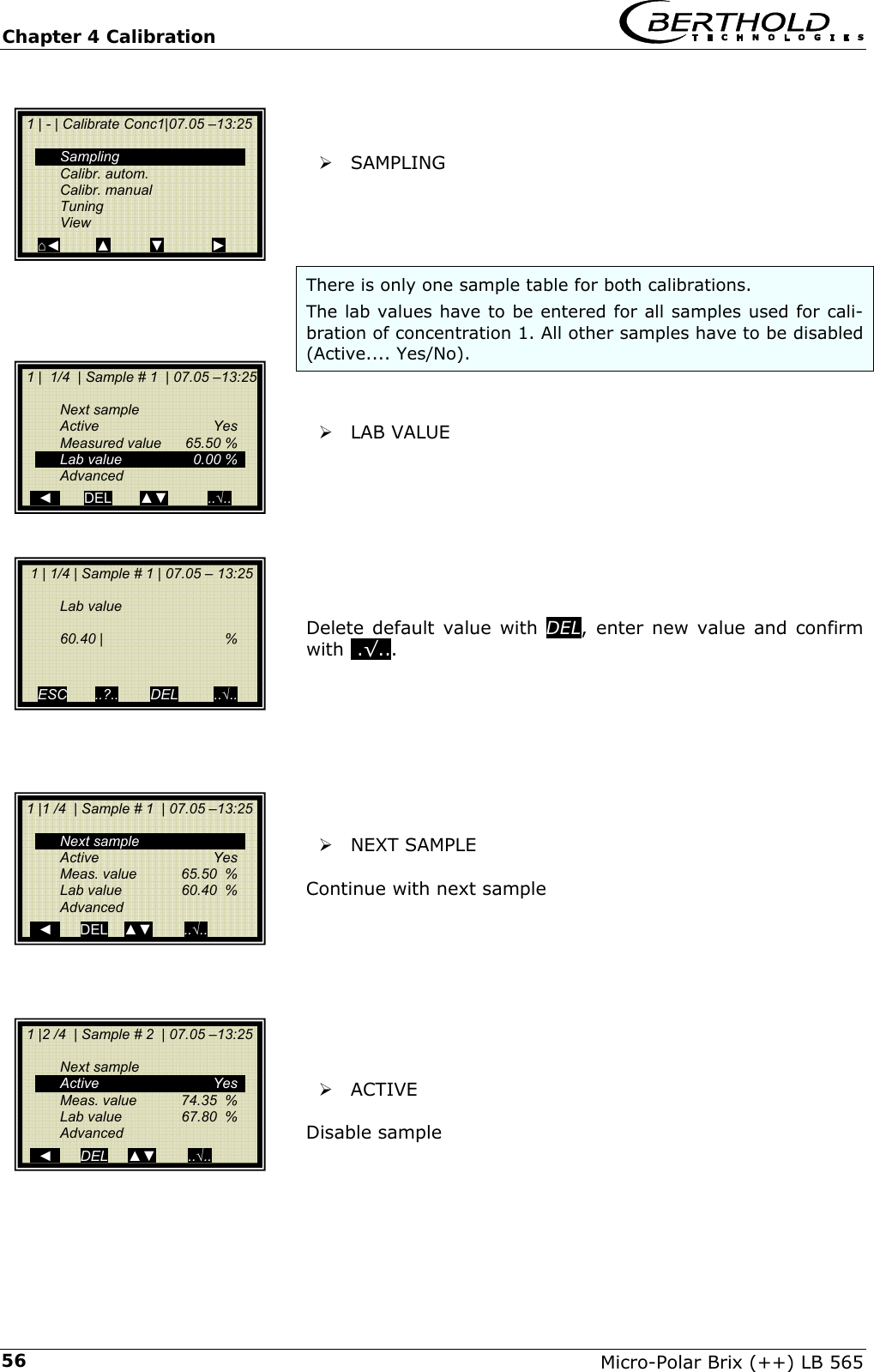
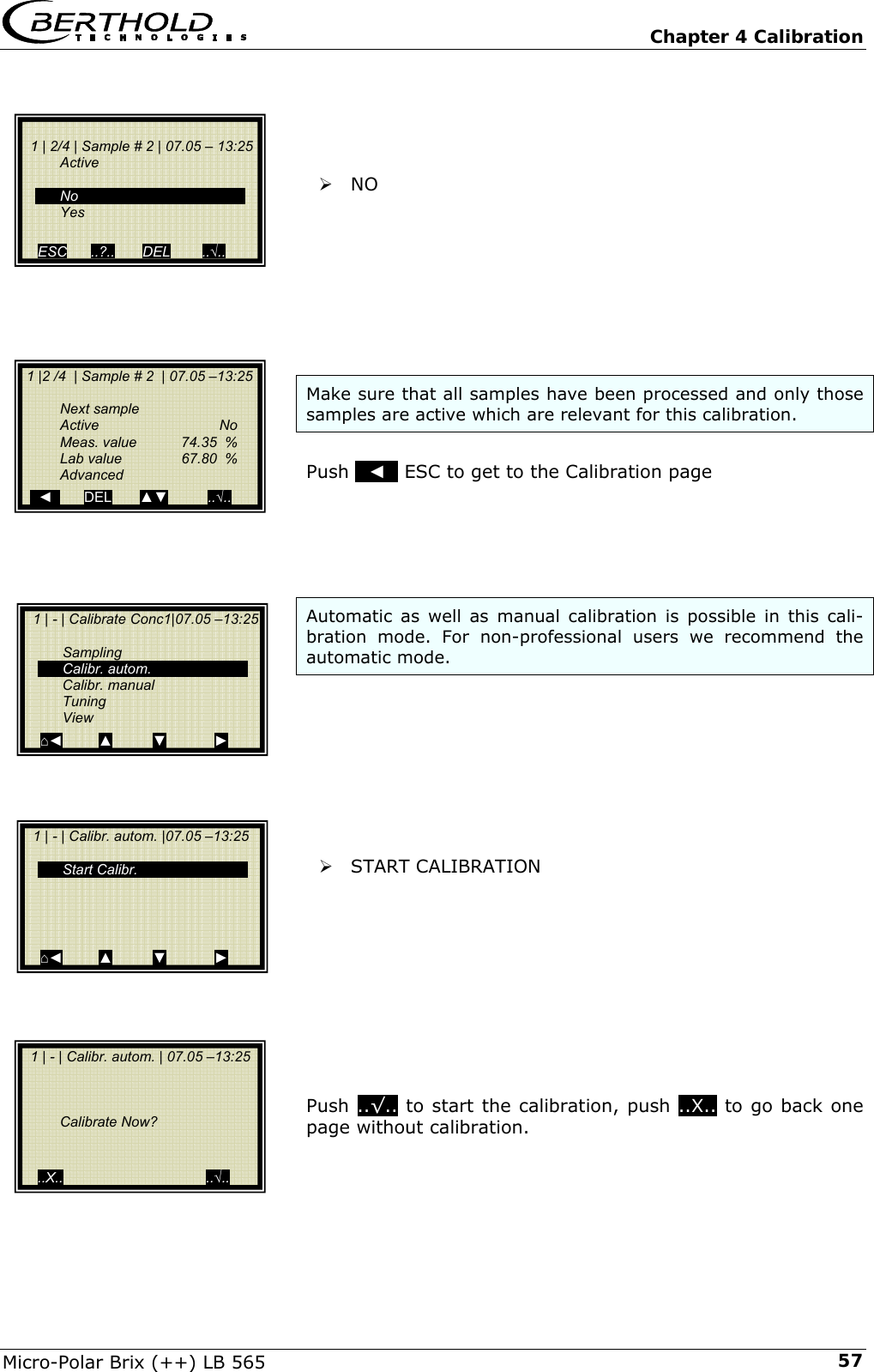
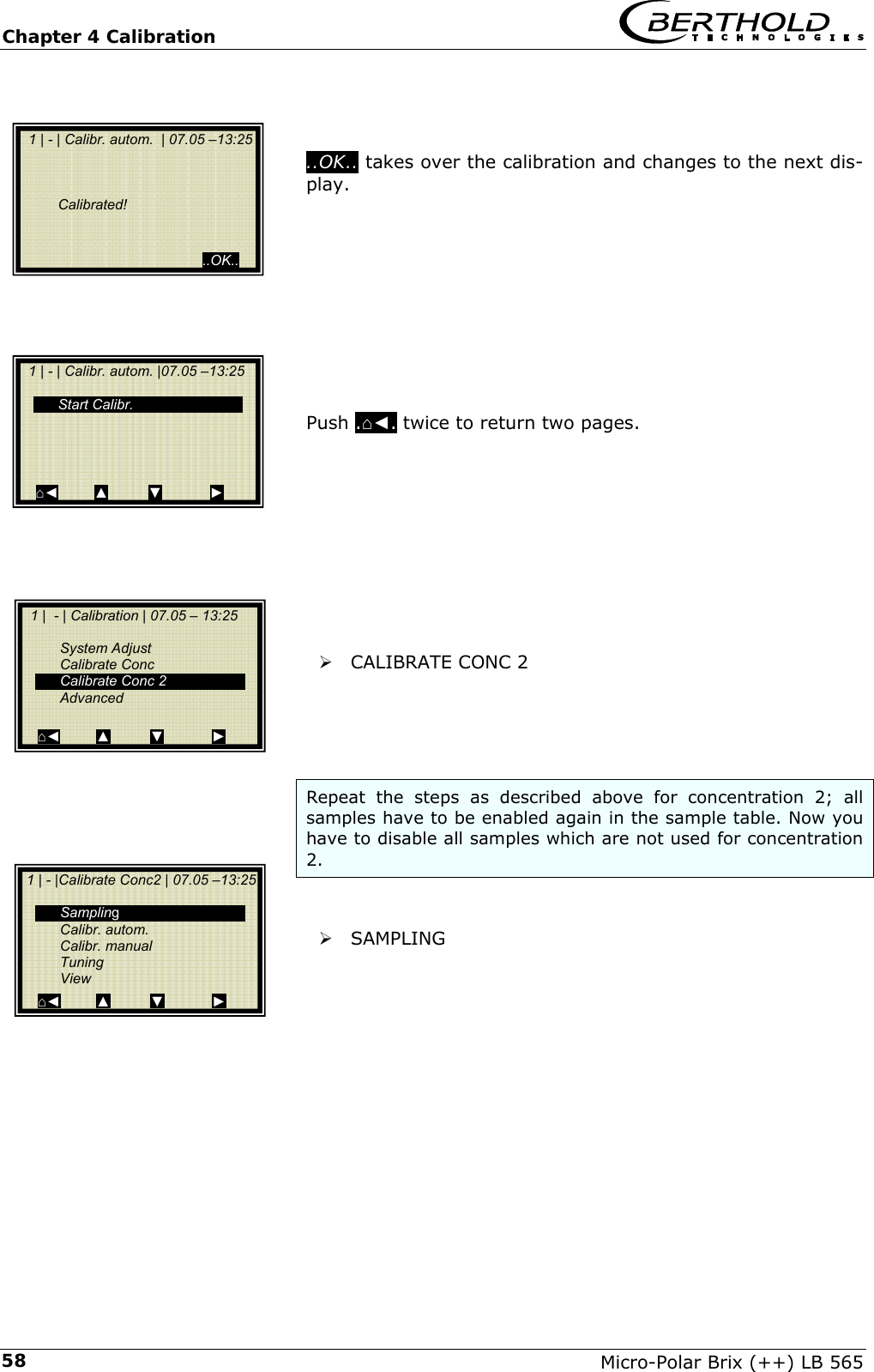
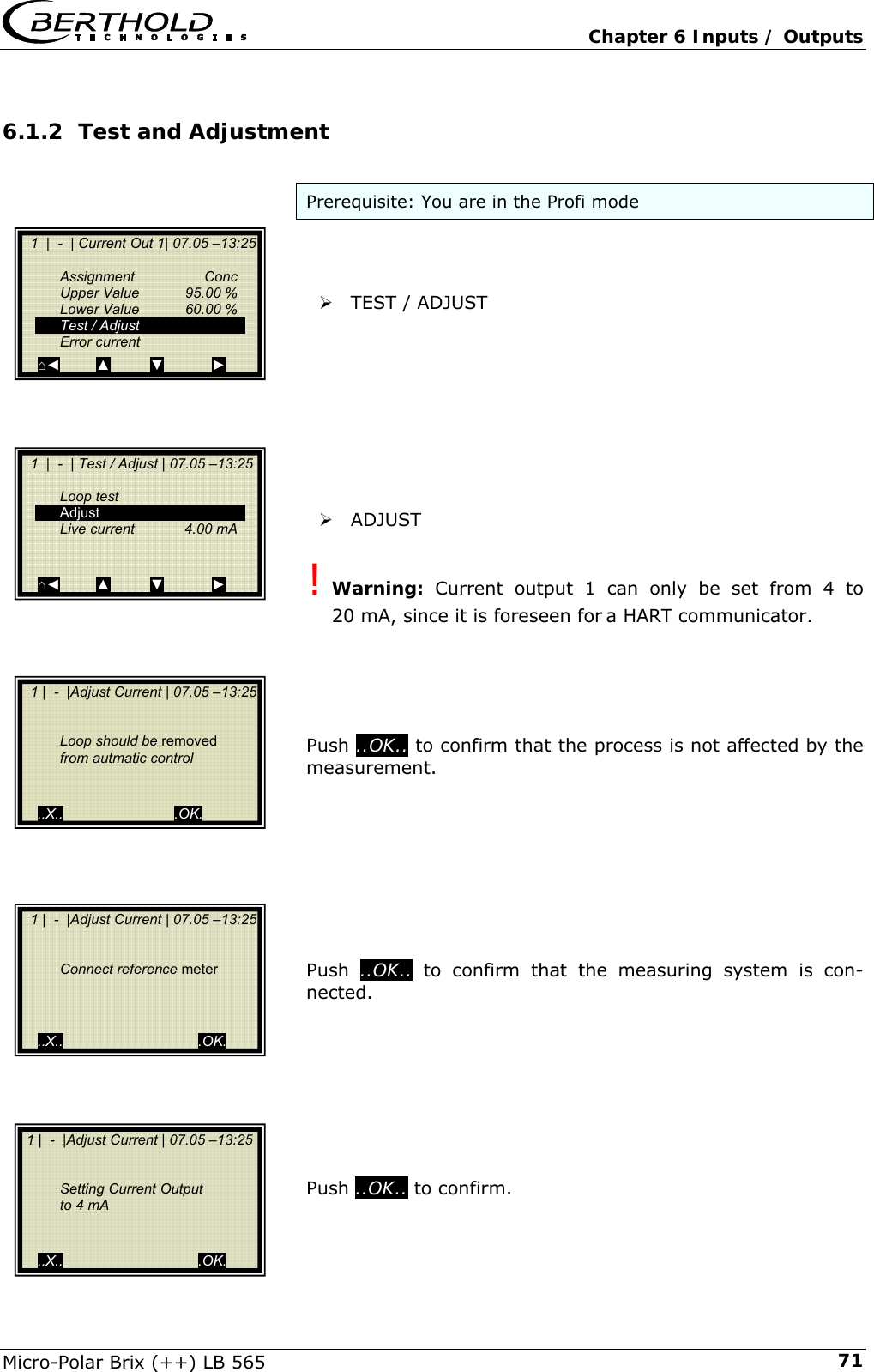
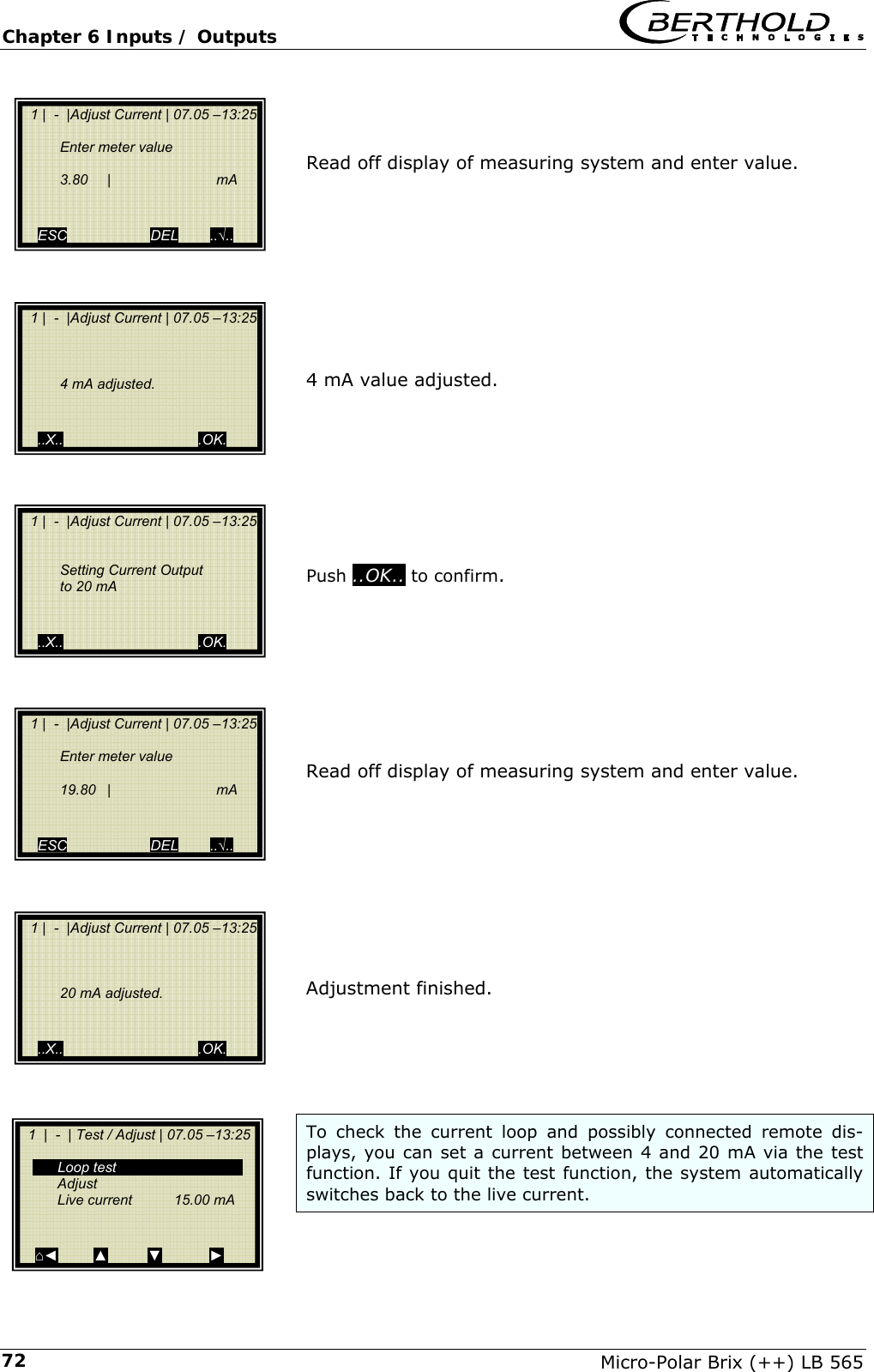
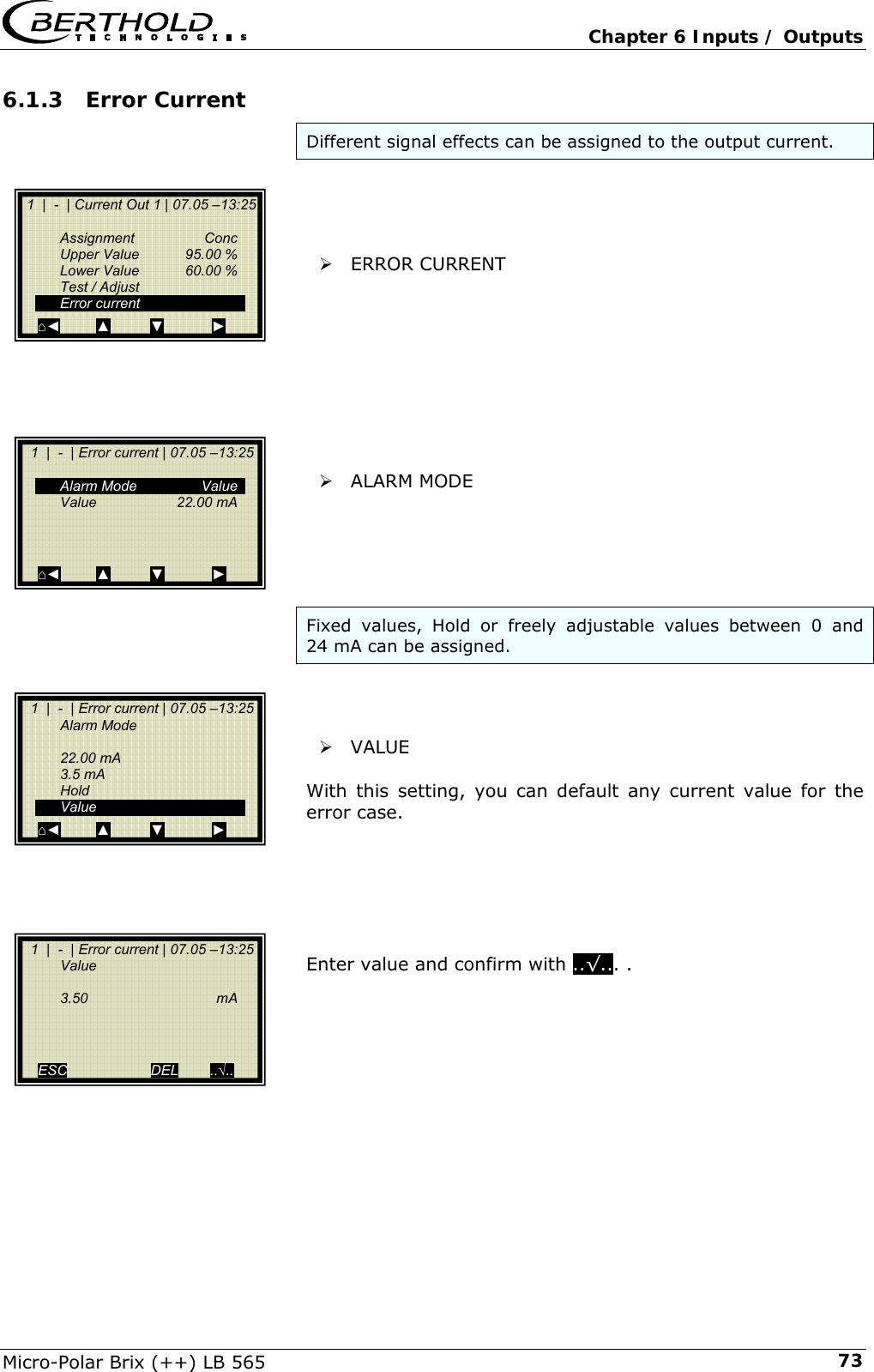
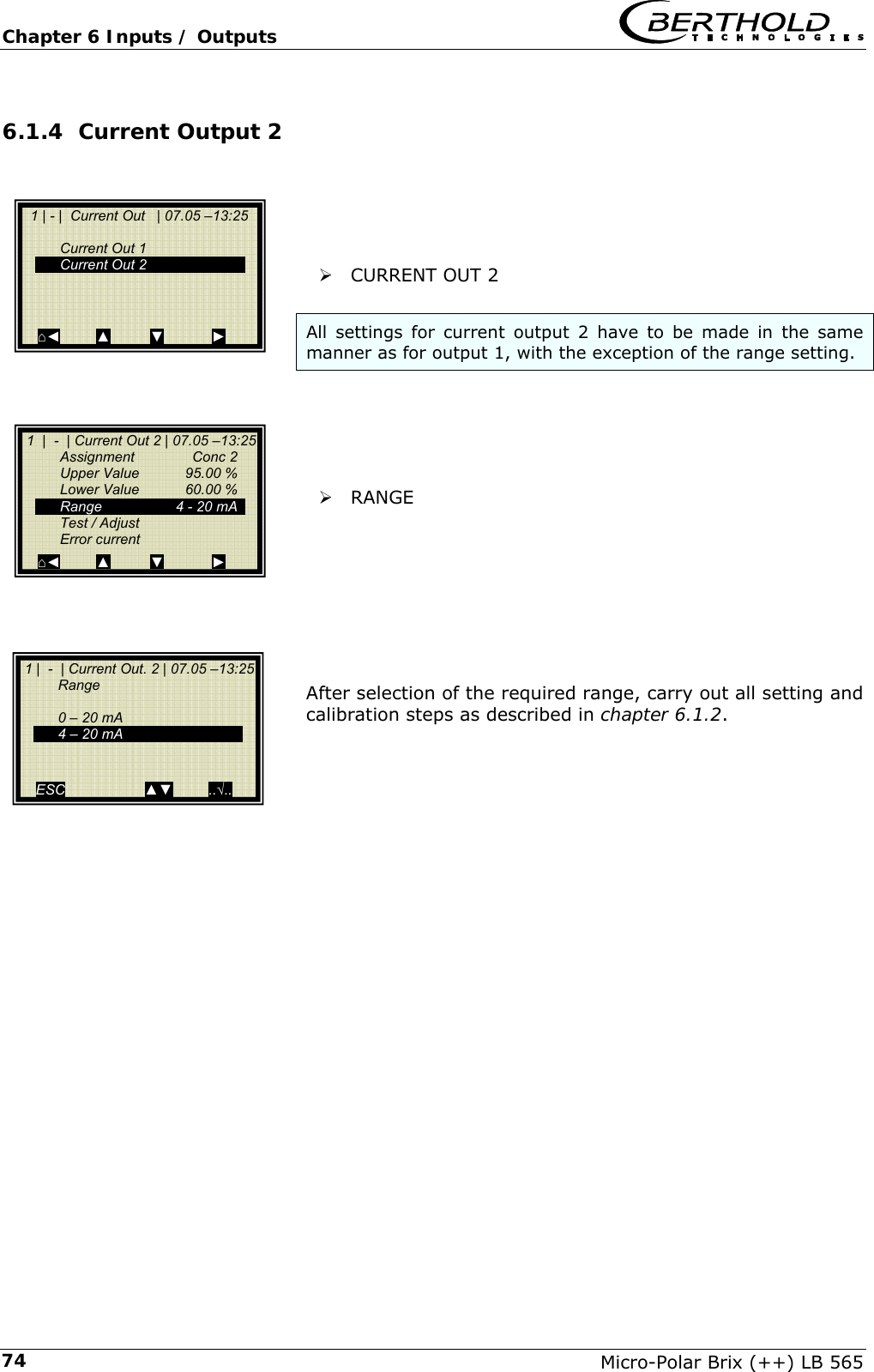
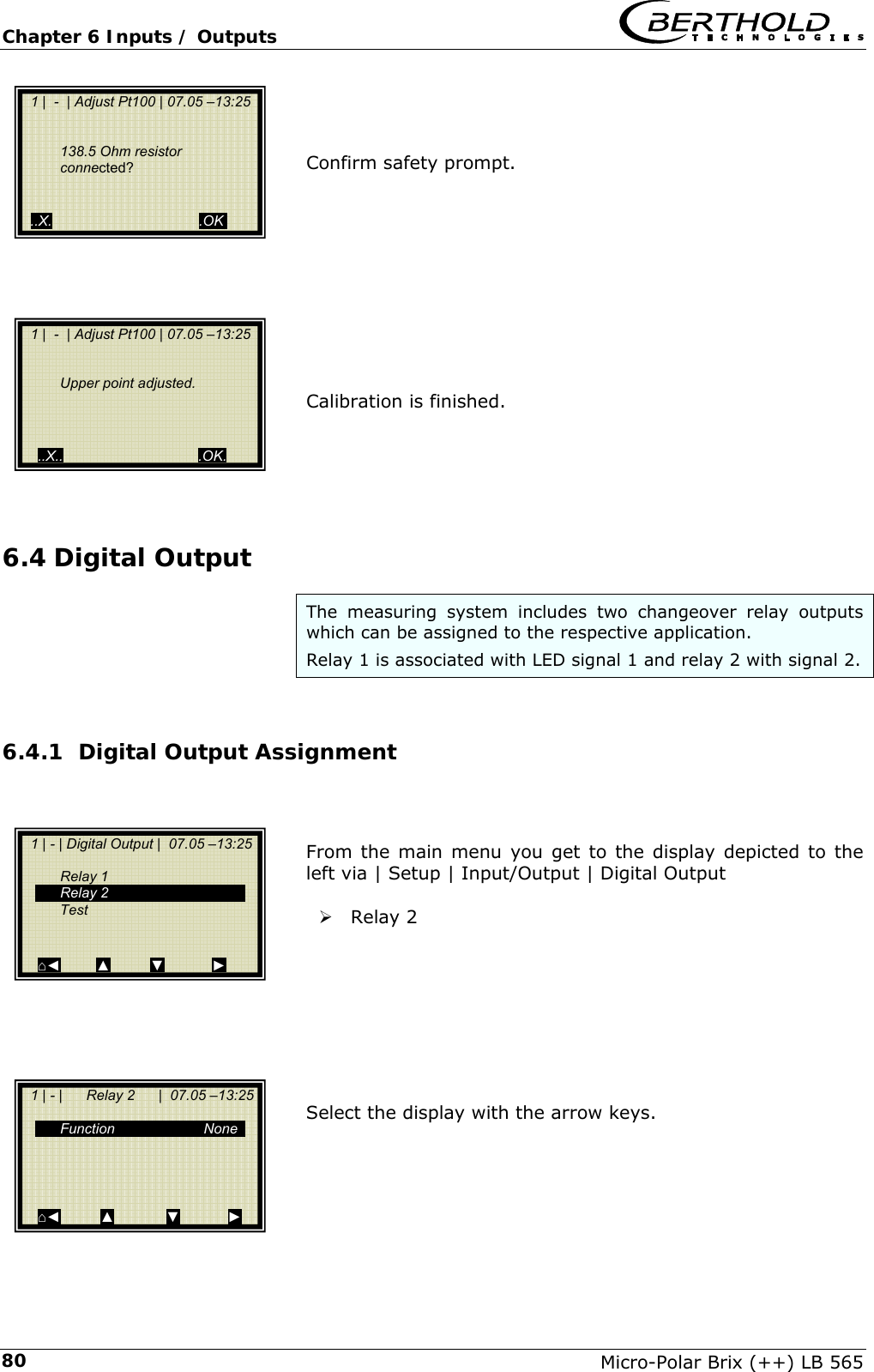
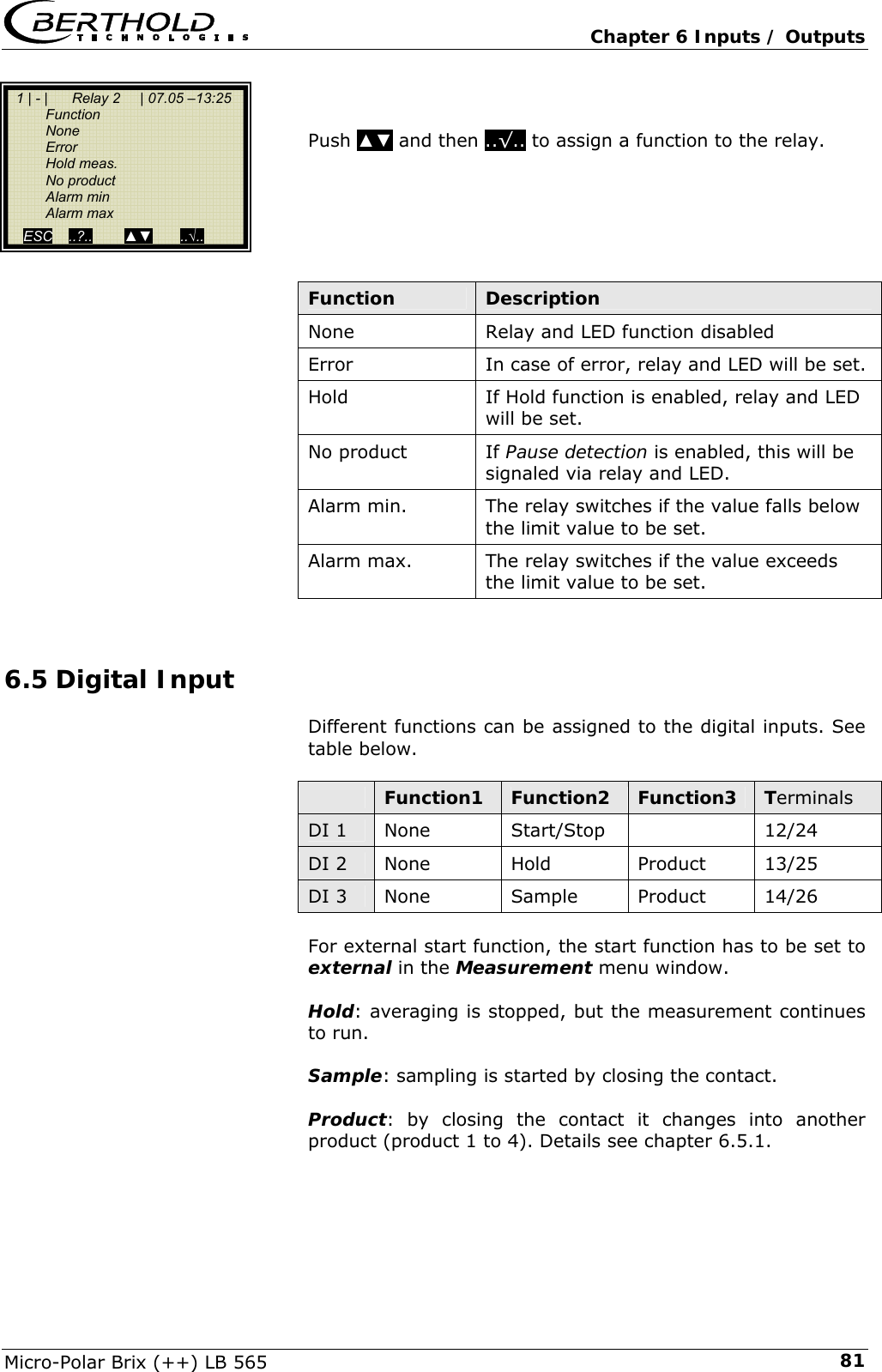
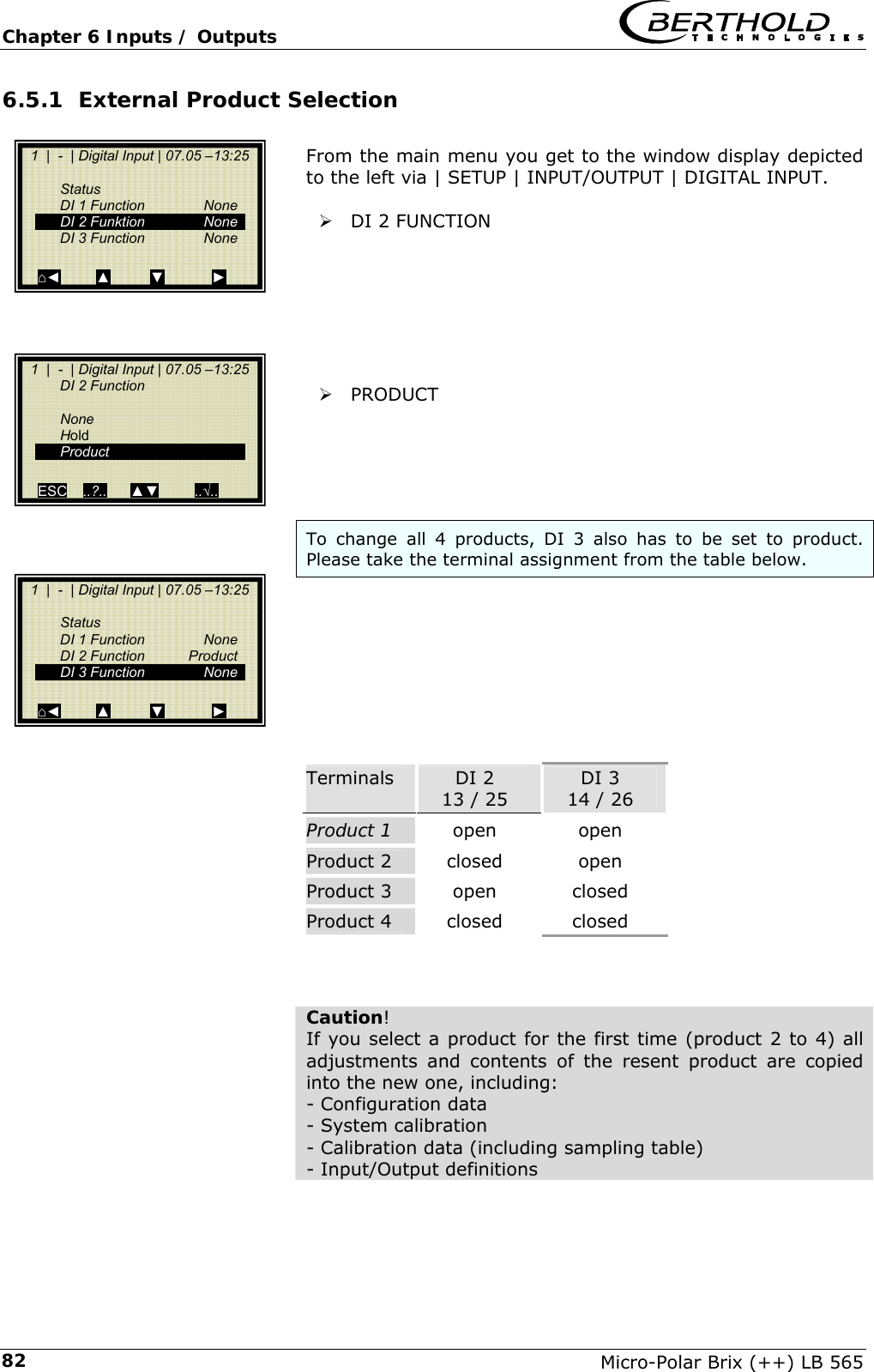
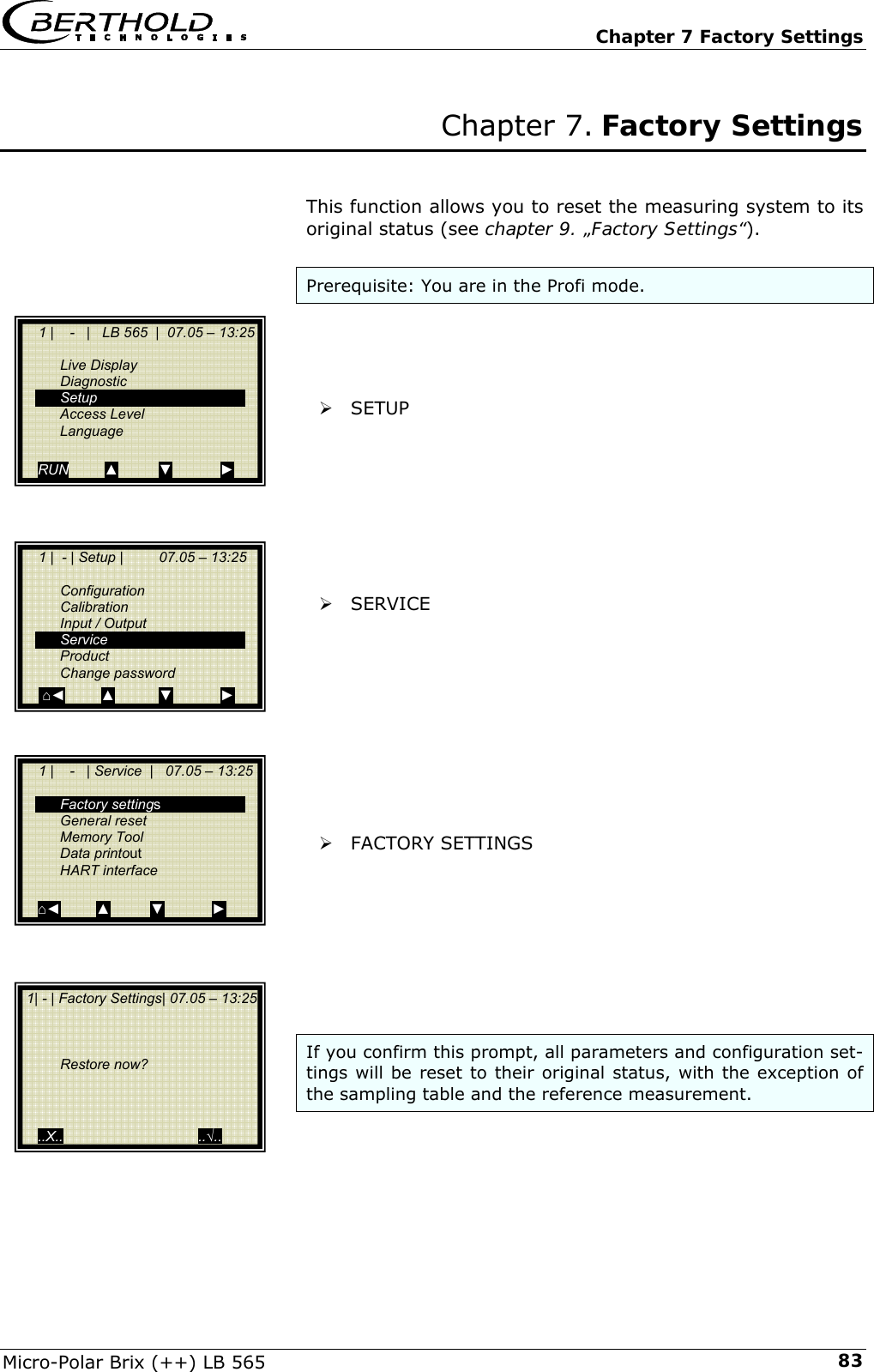
Berthold Technologies FCC01X12 Concentration, Dry, Mass, Water measuring system User Manual 39531BA2 04CETECOM HW

Berthold Technologies Concentration, Dry, Mass, Water measuring system 39531BA2 04CETECOM HW

User Manual

  Process Control ID No. 39531BA2 Rev. No. 04E  10.10.2008 Soft. Version: ≥ 1.21 detect and identify User's Guide Concentration Meters  Micro-Polar BrixTM Micro-Polar Brix ++ LB 565 Hardware Manual
    Micro-Polar Brix (++) LB 565  The units supplied should not be repaired by anyone other than Berthold Technolo-gies Service engineers or technicians by Berthold Technologies.  In case of operation trouble, please address to our central service department.   The complete user’s guide consists of two manuals, the hardware description and the software description.  The hardware manual comprises: ¾ mechanical components ¾ installation ¾ electrical installation ¾ technical data ¾ electrical and mechanical drawings  The software manual comprises: ¾ operation of the evaluation unit ¾ parameter description ¾ basic setting ¾ calibration ¾ error messages  The present manual is the hardware description.     Subject to change without prior notice.  BERTHOLD TECHNOLOGIES GmbH & Co. KG Calmbacher Str. 22 ⋅ 75323 Bad Wildbad, Germany  Phone +49 7081 177 0 ⋅ Fax +49 7081 177 100 industry@Berthold.com www.Berthold.com
  Table of Contents Micro-Polar Brix (++) LB 565  5  Table of Contents  Page Chapter 1. Safety Summary  7 1.1 Symbol and Pictograms  7 1.2 Use and Function  8 1.3 General Safety Instructions  10 Chapter 2. General Information  13 2.1 Intended Use  13 2.2 Definitions 14 Chapter 3. System Description  15 3.1 Principle of Measurement  15 3.2 Calculation of Measured Values  16 3.3 Temperature Compensation  16 3.4 Mechanical Components  18 3.4.1 Evaluation Units  19 3.4.2 Flow Cell  22 3.4.3 Container Probe  23 3.4.4 High-Frequency Cable  27 3.5 Pipeline Measurement Configuration  29 3.6 Container Measurement Configuration  30 Chapter 4. Getting Started  31 4.1 Transport to the Installation Site  31 4.2 Installation 31 4.2.1 Flow Cell Installation  31 4.2.2 Container Probe Installation  33 4.2.3 Installing the Evaluation Unit  35 4.3 Connecting the Evaluation Unit  36 4.3.1 Connecting the HF Cable  36 4.3.2 Pin Configuration of the Connector Strip  39 4.3.3 Digital Outputs, Relays  43 Chapter 5. Service Instructions  45 5.1 General Information  45 5.2 Wearing Parts  45 5.3 Instrument Cleaning  45 5.4 Battery 46 5.5 Fuse Replacement  46 Chapter 6. Technical Data  47 6.1 Evaluation Unit  47 6.2 Technical Data Sensors  50 6.3 Technical Data HF-Cable  52 6.4 Format of Serial Data Output RS 232 and RS 485  53
Table of Contents   Micro-Polar Brix (++) LB 565 6Chapter 7. Certificates  55 7.1 EC Declaration of Conformity  55 7.2 Frequency Approval  57 Chapter 8. Technical Drawings  61 8.1 Dimensional Drawing of Evaluation Unit Housing  61 8.1.1 Evaluation Unit from Micro-Polar Brix  61 8.1.2 Evaluation Unit from Micro-Polar Brix++  62 8.2 Electrical Wiring Diagram  63 8.3 Dimensional Drawings Flow Cells  64 8.3.1 Type LB 3543-11 MP, Nominal Width 50 mm, Options  64 8.3.2 Type LB 3543-11 MP, Nominal Width 50 mm, Adapter  65 8.3.3 Type LB 3543-31 MP, Nominal Width 50 mm  66 8.3.4 Type LB 3547-11 MP, Nominal Width 65 mm, Options  67 8.3.5 Type LB 3545-11 MP, Nominal Width 80 mm  68 8.3.6 Type LB 3544-11 MP, Nominal Width 100 mm, Options  69 8.3.7 Type LB 3544-21 MP, Nominal Width 100 mm  70 8.3.8 Type LB 3548-11 MP, Nominal Width 150 mm  71 8.4 Dimensional Drawings Container Probes  72 8.4.1 Type LB 5650-01  72 8.4.2 Type LB 5650-02  73 8.4.3 Type LB 5650-03  74 8.4.4 Type LB 5650-04  75 8.4.5 Type LB 5650-05  76 8.4.6 Type LB 5650-09  77 8.4.7 Installation Situation in Pipelines  78 8.5 Dimensional Drawings Container Flush Probes  79 8.5.1 Type LB 5651-01  79 8.5.2 Type LB 5651-02  80 8.5.3 Type LB 5651-03  81 8.5.4 Type LB 5651-04  82 8.5.5 Type LB 5651-05  83 8.5.6 Installation Situation in Pipelines  84 8.6 Installation Sheets for LB 5650 (Container Probe)  85 8.7 Installation Sheets for LB 5651 (Container Flush Probe)  87
  Chapter 1 Safety Summary Micro-Polar Brix (++) LB 565  7Chapter 1. Safety Summary 1.1  Symbol and Pictograms The following symbols identify safety instructions in this user’s guide: Danger!  Possible danger for life and health hazard  Caution!  Possible hazard Minor personal injuries  Warning!  Possible hazard Property damages  Note!  Tips for application and useful information The safety instructions are supplemented by explanatory picto-grams, for example:
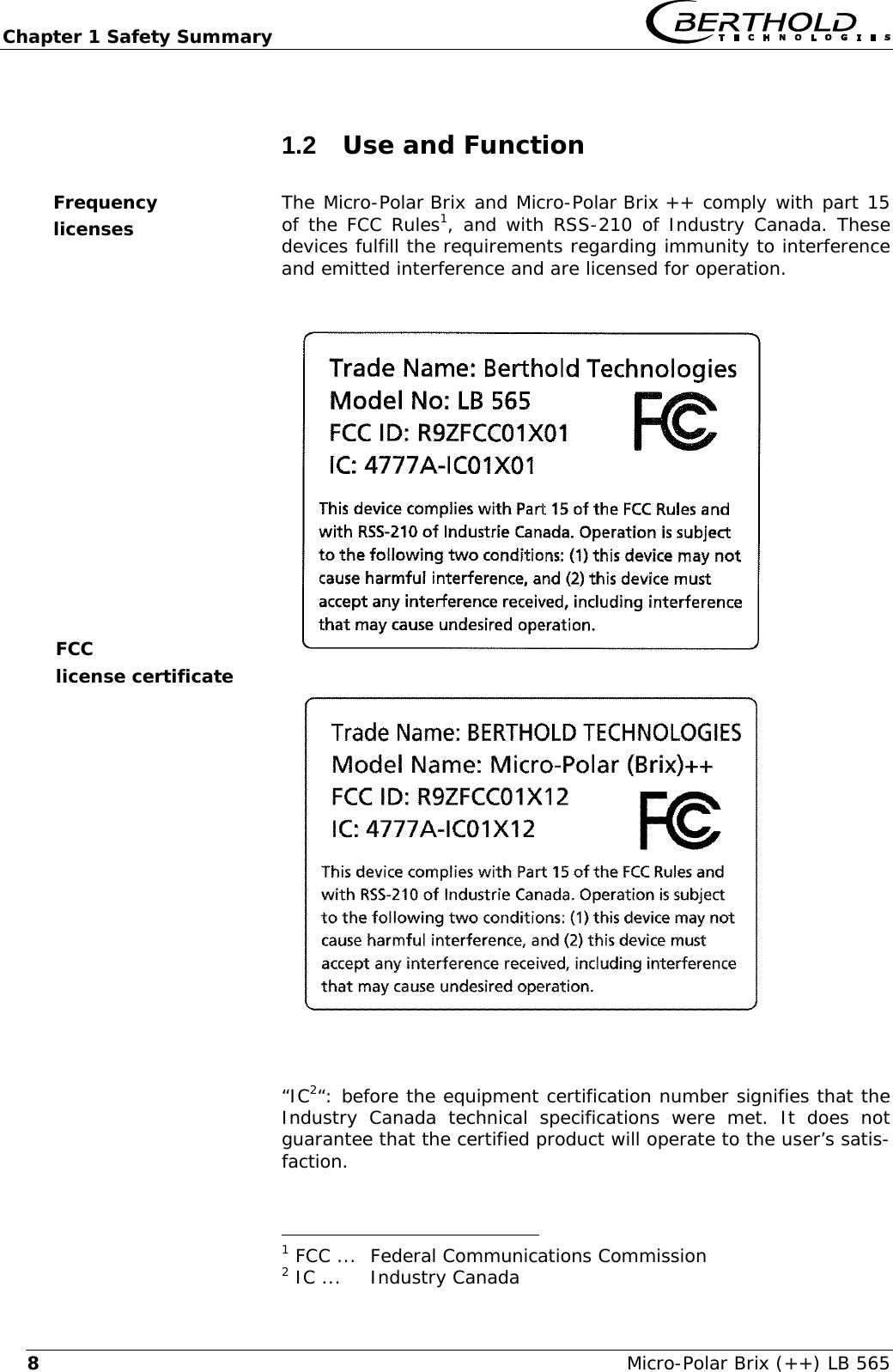
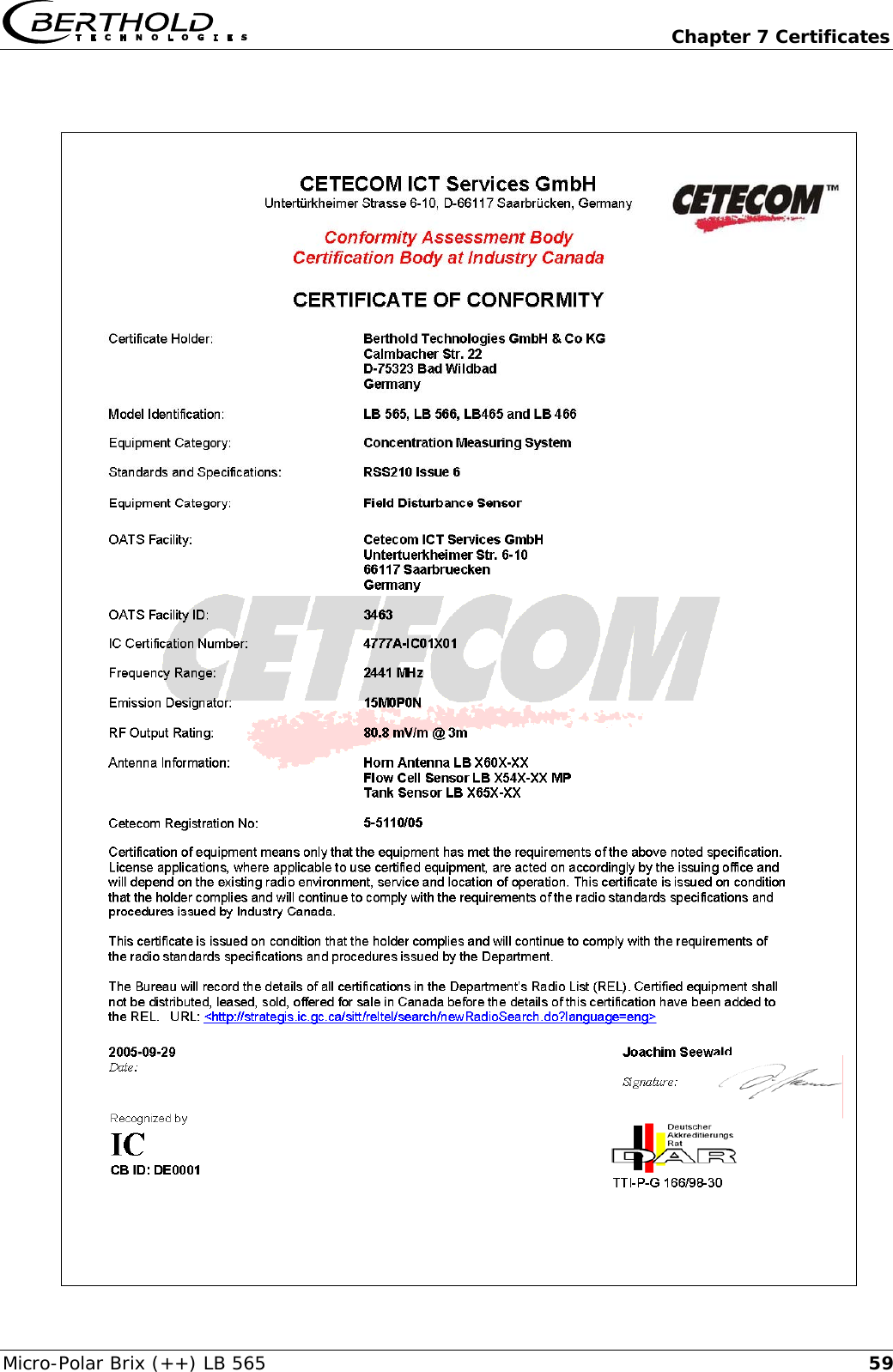
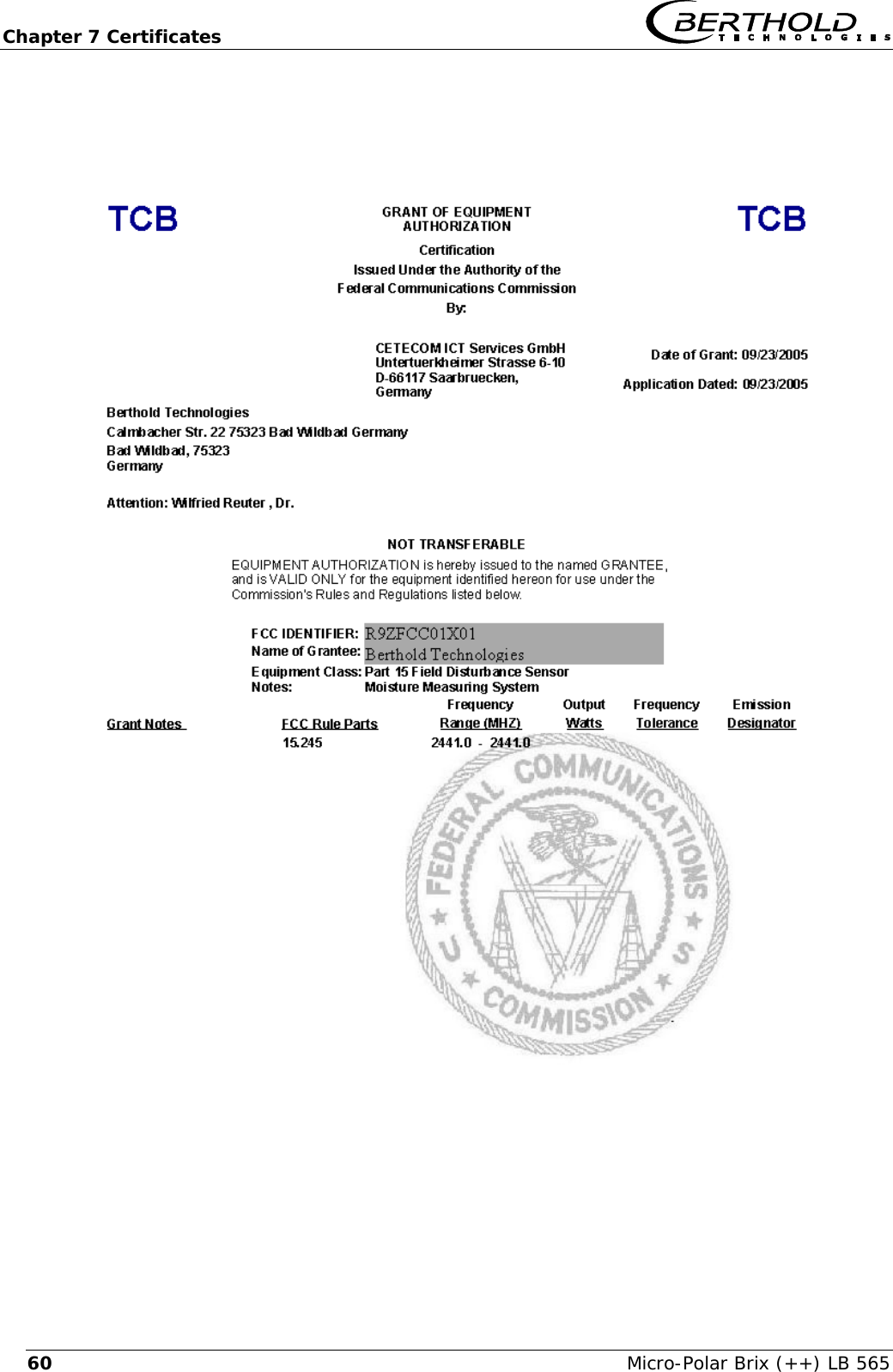
Chapter 1 Safety Summary   Micro-Polar Brix (++) LB 565 8 1.2  Use and Function The Micro-Polar Brix and Micro-Polar Brix ++ comply with part 15 of the FCC Rules1, and with RSS-210 of Industry Canada. These devices fulfill the requirements regarding immunity to interference and emitted interference and are licensed for operation.                    “IC2“: before the equipment certification number signifies that the Industry Canada technical specifications were met. It does not guarantee that the certified product will operate to the user’s satis-faction.                                             1 FCC ...  Federal Communications Commission 2 IC ...  Industry Canada Frequency licenses FCC license certificate
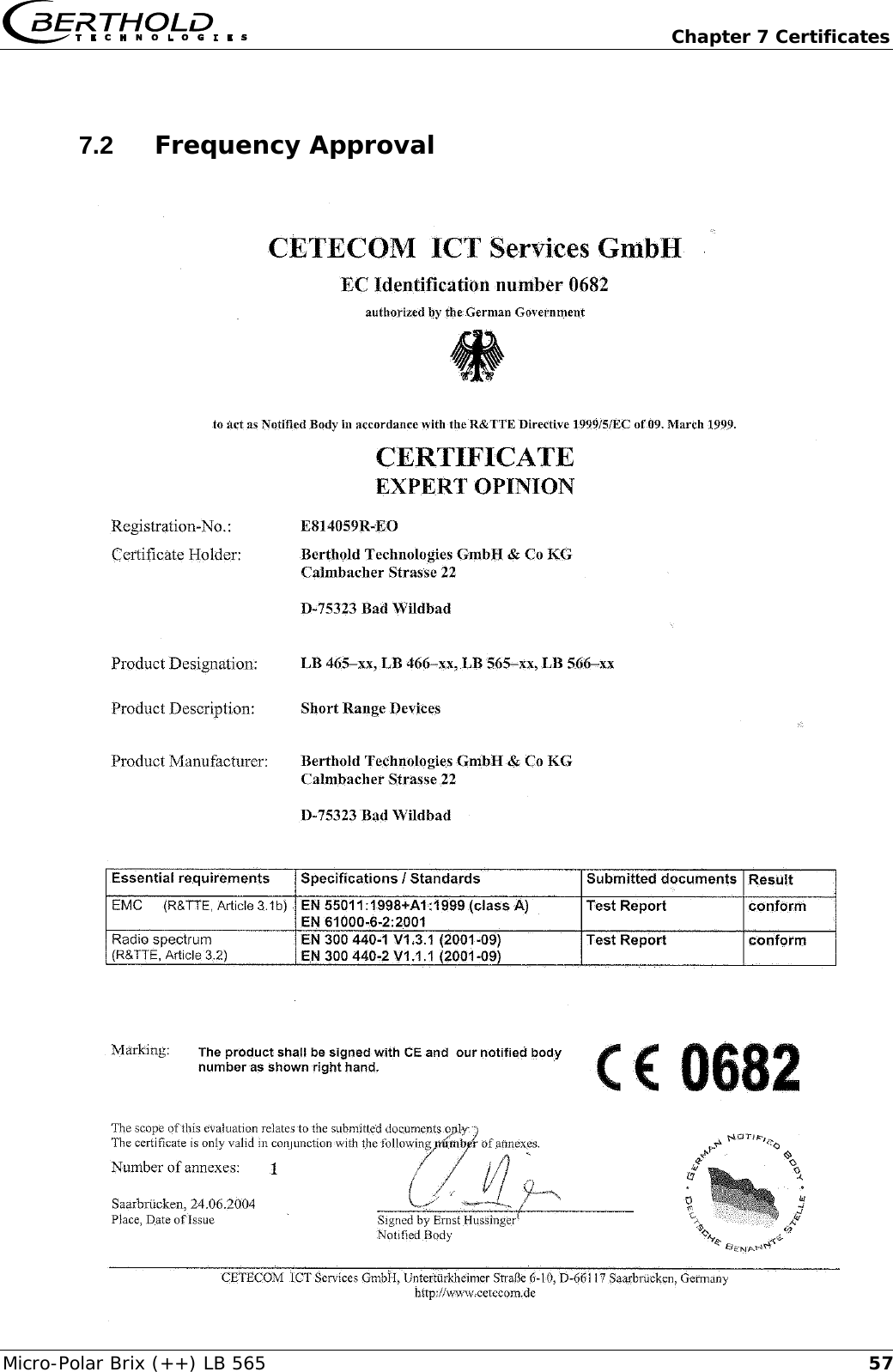
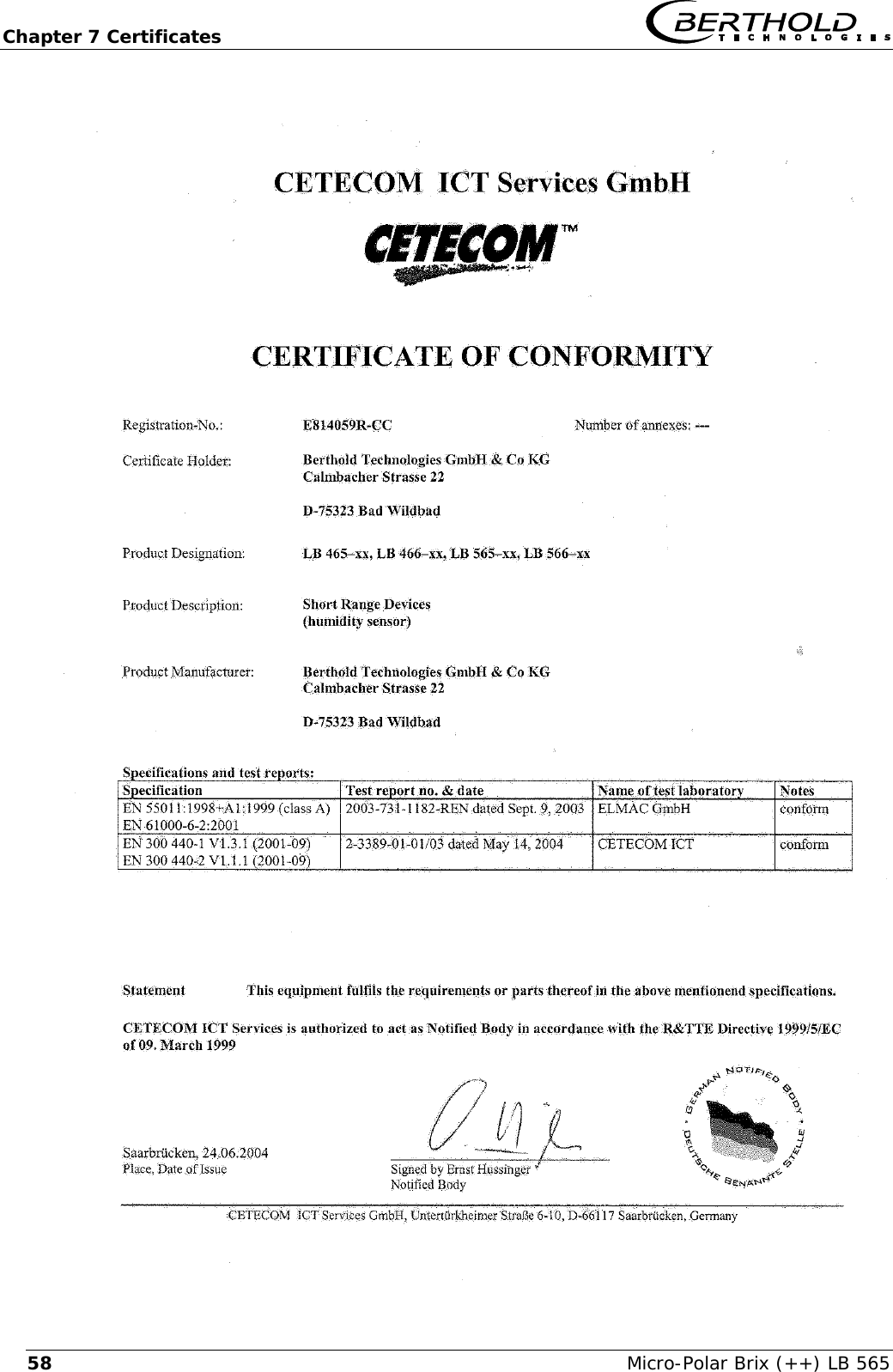
  Chapter 1 Safety Summary Micro-Polar Brix (++) LB 565  9   The Micro-Polar Brix and Micro-Polar Brix ++ comply with the R&TTE regulations 1999/5/EG and fulfil herein all requirements for this type of high-frequency device. The devices contain the identi-fication of conformity according to CE symbol of No. 0682 of the certification office. The certificate can be found in chapter 7.2 Fre-quency Approval.    The LB 565 is a system for concentration measurement using mi-crowave technology. The microwave probe is immersed into the product being measured. The emitted microwaves have a very low activity and are, therefore, not at all hazardous to human beings or the environment. Also, the product is not affected at all by the microwaves.  The LB 565 has been manufactured in compliance with the safety requirements for microwave devices. If special legal provisions exist regarding the use of microwaves, it will be the responsibility of the user to adhere to them.  Any change in frequency or any other manipulation on the micro-wave device will result in a loss of the frequency approval and will be prosecuted. The microwave modules do not include any replaceable compo-nents and must not be opened.  NOTICE: Changes or modifications made to this equipment not expressly approved by (manufacturer name) may void the FCC authorization to operate this equipment.
Chapter 1 Safety Summary   Micro-Polar Brix (++) LB 565 101.3  General Safety Instructions   The systems have been manufactured in accordance with state-of-the-art technology and in compliance with acknowledged safety rules ensuring the highest level of occupational safety. The instrument housings are protected according to protection type IP 65 and are suitable for outdoor application. The instru-ment has been tested by the manufacturer and is delivered in a condition that allows safe and reliable operation.   The measuring systems have to be protected against direct sun rays and rain during outdoor applications e. g. by a suitable pro-tective cover.   Never change the installation and the parameter settings without a full knowledge of these operating instructions, as well as a full knowledge of the behavior of the connected controller and the possible influence on the operating process to be controlled.   The safety instructions and warnings in this user’s guide have to be observed without fail to ensure safe operation of the instru-ment! The systems may be used only in technically good order and only according to regulations! Only authorized persons who have been trained, have the proper qualification and have received the necessary instructions may work with the systems! Installations and modifications on the sys-tems which may affect the operational safety are not permitted!   Ambient conditions: All systems components require non corrosive ambient conditions during transport, storage and starting up.   Electrical shock hazard: Disconnect power to rule out any contact with live parts during installation and when servicing. Turn off power supply before opening the instrument. NEVER work on open and live instruments.
  Chapter 1 Safety Summary Micro-Polar Brix (++) LB 565  11  Attention! Possible danger, damage to property! Concerns the sys-tem type LB 565-12 Micro-Polar Brix ++ (ID no.  51832-02):  When connecting the 24 V DC auxiliary power, the + and – Poles should be connected correctly. There is no reverse voltage protec-tion!   Spare fuses must match the rating specified by the device manu-facturer. Short-circuiting or manipulation is not permitted.   The LB 565 and all ancillary units have to be connected to mains via grounded connection.   If liquid gets inside the instrument, cut off the power supply. The instrument has to be checked and cleaned by an authorized ser-vice center.
  Chapter 2 General Information Micro-Polar Brix (++) LB 565  13Chapter 2. General Information 2.1  Intended Use The measuring system LB 565 can be used to determine the con-centration of nearly all materials which can be dissolved or sus-pended in water using microwave technology. The following sensor and evaluation unit versions are available: 1. The container probes have been designed for installation into pipelines with a nominal width of ≥ 200 mm and in containers, for example, crystallizers. The probe is installed such that both measuring rods (transmitter and receiver) are immersed into the product being measured. 2. The flow cell is a tubular probe, with microwave transmitter and receiver being firmly welded onto the outside of the pipe. The inside of the pipe is Teflon-coated. The flow cell is in-stalled into the existing pipeline system inline or into a bypass.  The evaluation unit is available in two versions: The Standard Model Micro-Polar Brix and the high dynamic version Micro-Polar Brix ++. The evaluation unit Micro-Polar Brix ++ can only be used when sufficiently large microwave attenuation (min. 40 dB) is present. The Micro-Polar Brix should be used for lower microwave attenuation.  During operation, the concentration measuring devices Micro-Polar Brix and Micro-Polar Brix ++ send out electromagnetic radia-tion in the frequency range between 2.4 GHz and 2.5 GHz (range restrictions depending on local regulations in your country). The microwaves which emerge are not dangerous to human beings and the environment (power emission < 10 mW). The microwaves are emitted from the microwave window; the product is not changed by the microwaves.  To ensure proper function of the meter, please pay attention to the following:  ¾ The material being measured must not be electrically conduc-tive, i.e. the ohmic resistance is infinite. ¾ The product must not contain any gas bubbles, or gas bubbles have to be compressed with adequate pressure when carrying out measurements in pipelines. ¾ The ion concentration, e.g. salt content, has to be nearly con-stant. ¾ The total attenuation of microwave signals must be at least 40 dB for the Micro-Polar Brix ++. For details, see Chapter 3.4.1 the evaluation units
Chapter 2 General Information   Micro-Polar Brix (++) LB 565 142.2  Definitions  Attenuation Weakening of microwave signals, microwave measurement  effect. Container flush probe  Container probe with flushing device. EVU Evaluation unit Factory setting  All parameters have been set to standard values by the manu-facturer. In most cases this simplifies calibration of the device significantly. Despite factory setting, calibration always has to be performed. Flow cell  Tubular probe for simple integration into the existing pipeline system. HF cable  High-frequency cable. Microwaves  Electromagnetic waves in a certain frequency range. Phase  Phase or phase shift. Microwave measurement effect. Quad cable  Combination of four HF cables of equal length in a corrugated tube. Softkeys  Buttons associated with the software. TC  Temperature compensation.
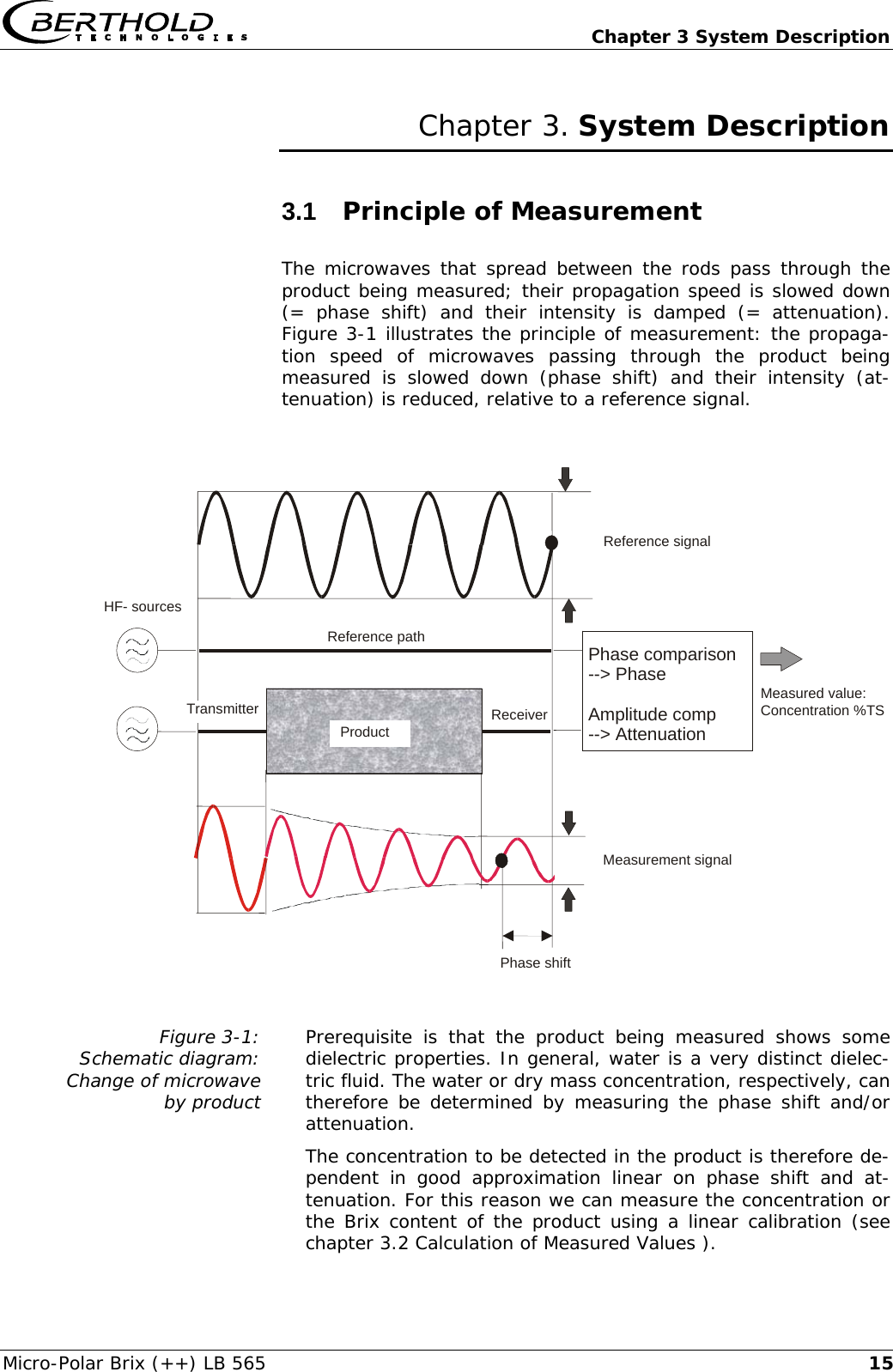
  Chapter 3 System Description Micro-Polar Brix (++) LB 565  15Chapter 3. System Description 3.1  Principle of Measurement The microwaves that spread between the rods pass through the product being measured; their propagation speed is slowed down (= phase shift) and their intensity is damped (= attenuation). Figure 3-1 illustrates the principle of measurement: the propaga-tion speed of microwaves passing through the product being measured is slowed down (phase shift) and their intensity (at-tenuation) is reduced, relative to a reference signal.                Figure 3-1:  Schematic diagram:  Change of microwave  by product  Prerequisite is that the product being measured shows some dielectric properties. In general, water is a very distinct dielec-tric fluid. The water or dry mass concentration, respectively, can therefore be determined by measuring the phase shift and/or attenuation. The concentration to be detected in the product is therefore de-pendent in good approximation linear on phase shift and at-tenuation. For this reason we can measure the concentration or the Brix content of the product using a linear calibration (see chapter 3.2 Calculation of Measured Values ).   Phase shift        Product Phase comparison--> PhaseAmplitude comp--> Attenuation Reference path Reference signalMeasurement signalMeasured value:Concentration %TS HF- sourcesTransmitter Receiver
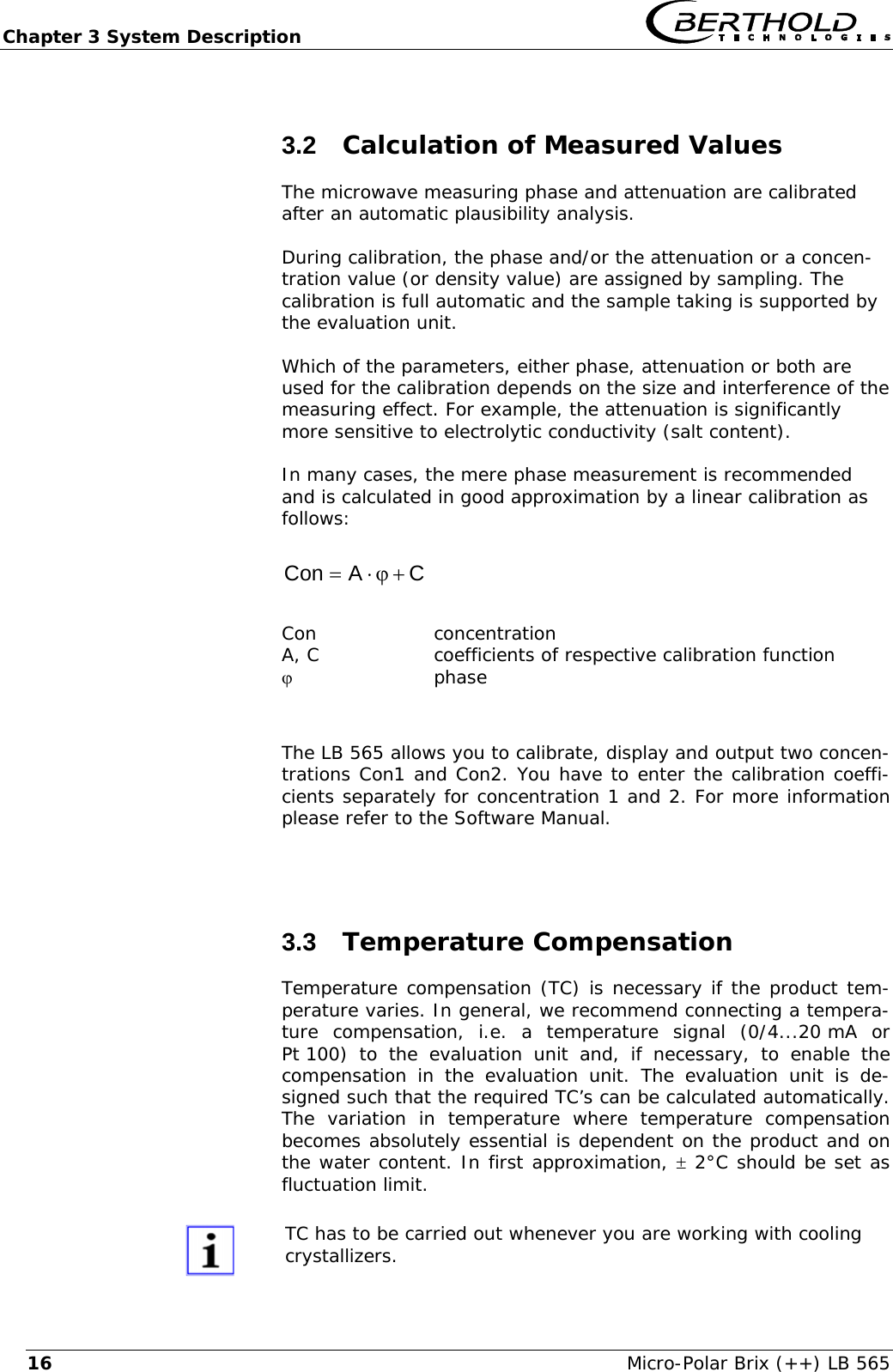
Chapter 3 System Description   Micro-Polar Brix (++) LB 565 163.2  Calculation of Measured Values The microwave measuring phase and attenuation are calibrated after an automatic plausibility analysis.  During calibration, the phase and/or the attenuation or a concen-tration value (or density value) are assigned by sampling. The calibration is full automatic and the sample taking is supported by the evaluation unit.  Which of the parameters, either phase, attenuation or both are used for the calibration depends on the size and interference of the measuring effect. For example, the attenuation is significantly more sensitive to electrolytic conductivity (salt content).  In many cases, the mere phase measurement is recommended and is calculated in good approximation by a linear calibration as follows:  CACon+ϕ⋅=   Con concentration A, C  coefficients of respective calibration function ϕ phase  The LB 565 allows you to calibrate, display and output two concen-trations Con1 and Con2. You have to enter the calibration coeffi-cients separately for concentration 1 and 2. For more information please refer to the Software Manual.  3.3  Temperature Compensation Temperature compensation (TC) is necessary if the product tem-perature varies. In general, we recommend connecting a tempera-ture compensation, i.e. a temperature signal (0/4...20 mA or Pt 100) to the evaluation unit and, if necessary, to enable the compensation in the evaluation unit. The evaluation unit is de-signed such that the required TC’s can be calculated automatically. The variation in temperature where temperature compensation becomes absolutely essential is dependent on the product and on the water content. In first approximation, ± 2°C should be set as fluctuation limit.   TC has to be carried out whenever you are working with cooling crystallizers.
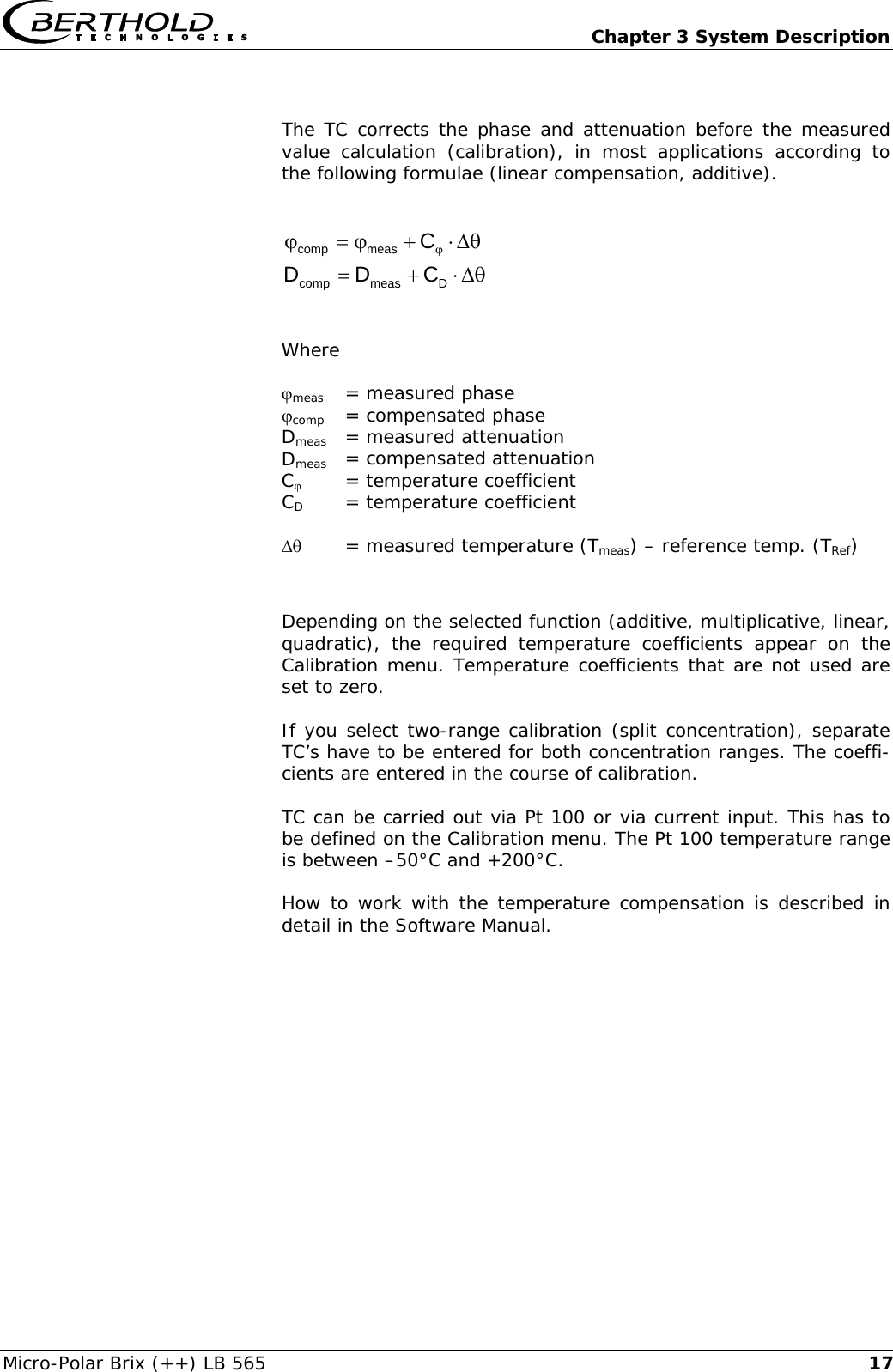
  Chapter 3 System Description Micro-Polar Brix (++) LB 565  17 The TC corrects the phase and attenuation before the measured value calculation (calibration), in most applications according to the following formulae (linear compensation, additive).  θΔ⋅+ϕ=ϕ ϕCmeascomp  θΔ⋅+=Dmeascomp CDD    Where   ϕmeas   = measured phase ϕcomp  = compensated phase Dmeas   = measured attenuation Dmeas  = compensated attenuation Cϕ   = temperature coefficient CD   = temperature coefficient  Δθ   = measured temperature (Tmeas) – reference temp. (TRef)  Depending on the selected function (additive, multiplicative, linear, quadratic), the required temperature coefficients appear on the Calibration menu. Temperature coefficients that are not used are set to zero.  If you select two-range calibration (split concentration), separate TC’s have to be entered for both concentration ranges. The coeffi-cients are entered in the course of calibration.  TC can be carried out via Pt 100 or via current input. This has to be defined on the Calibration menu. The Pt 100 temperature range is between –50°C and +200°C. How to work with the temperature compensation is described in detail in the Software Manual.
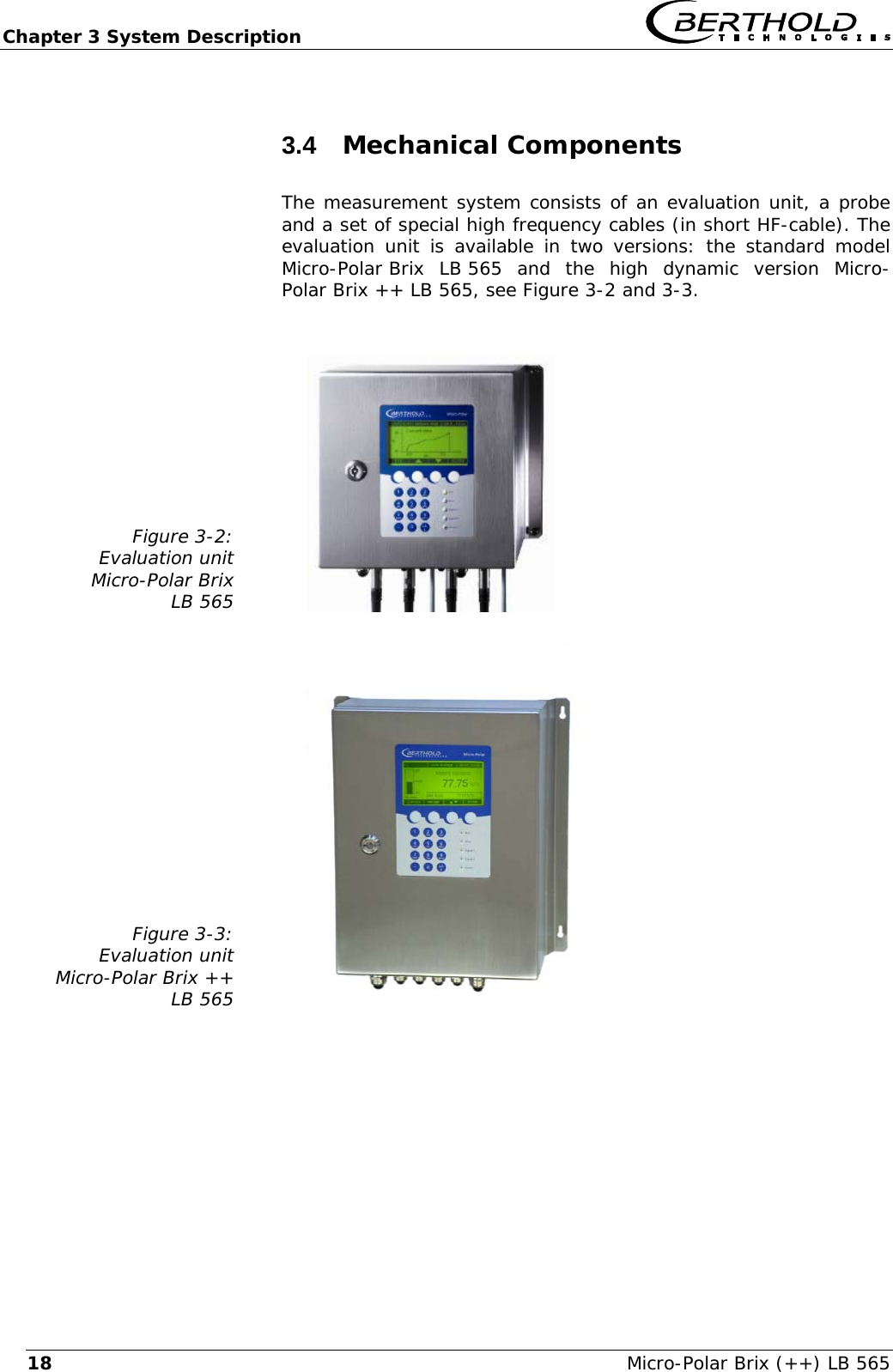
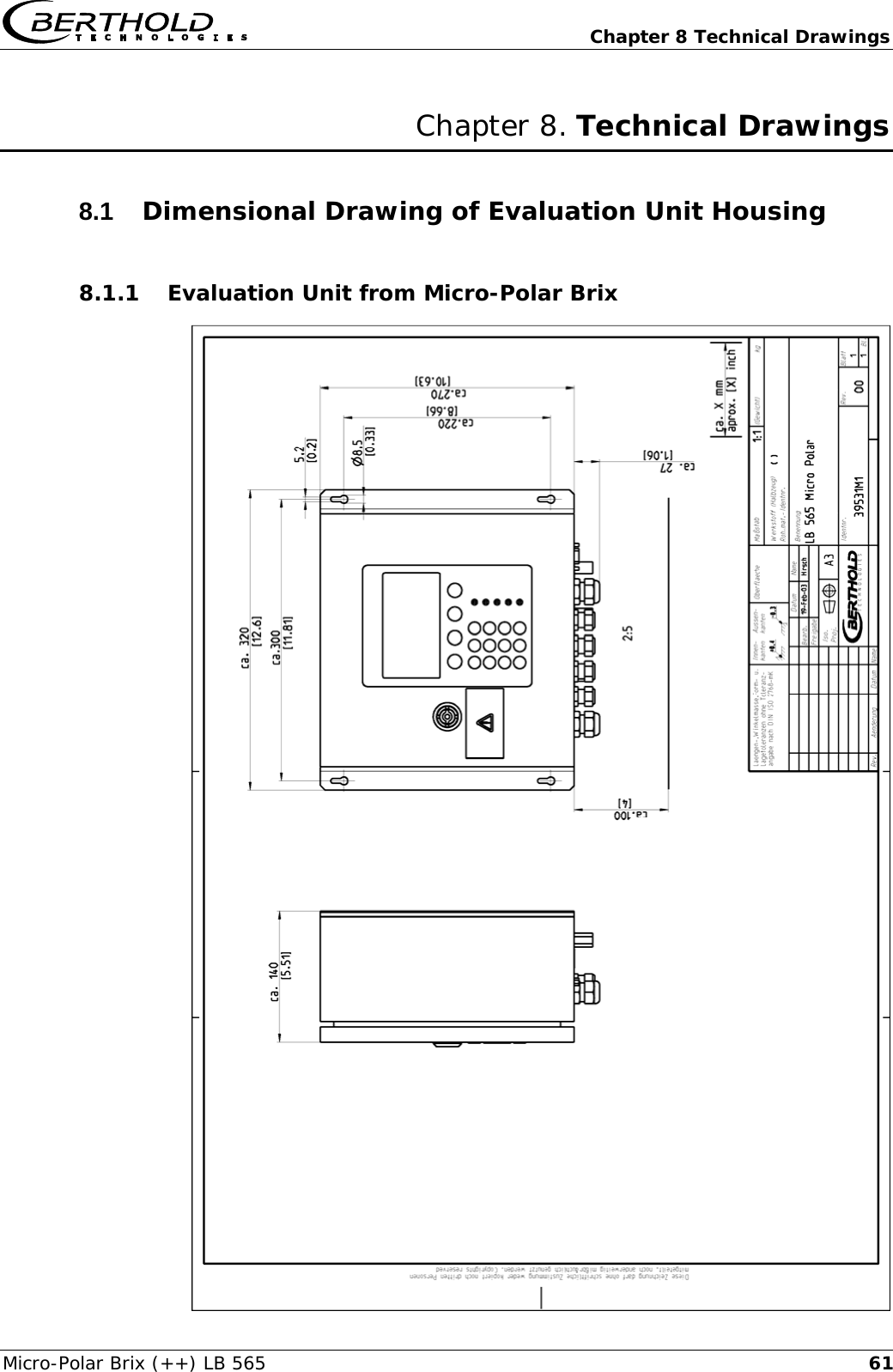
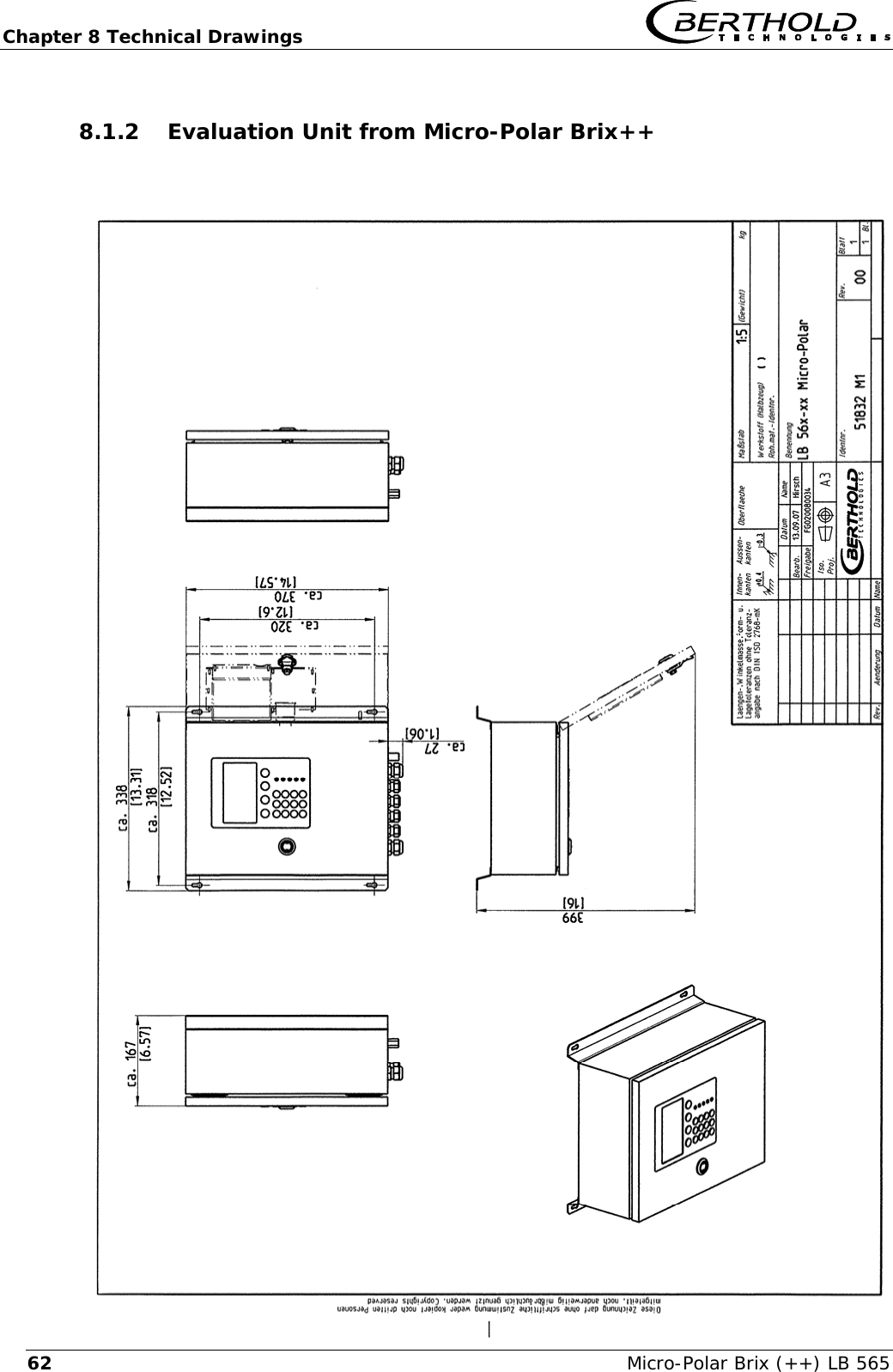
Chapter 3 System Description   Micro-Polar Brix (++) LB 565 183.4  Mechanical Components The measurement system consists of an evaluation unit, a probe and a set of special high frequency cables (in short HF-cable). The evaluation unit is available in two versions: the standard model Micro-Polar Brix  LB 565  and  the high dynamic version Micro-Polar Brix ++ LB 565, see Figure 3-2 and 3-3.   Figure 3-2: Evaluation unit Micro-Polar Brix LB 565     Figure 3-3: Evaluation unit Micro-Polar Brix ++ LB 565
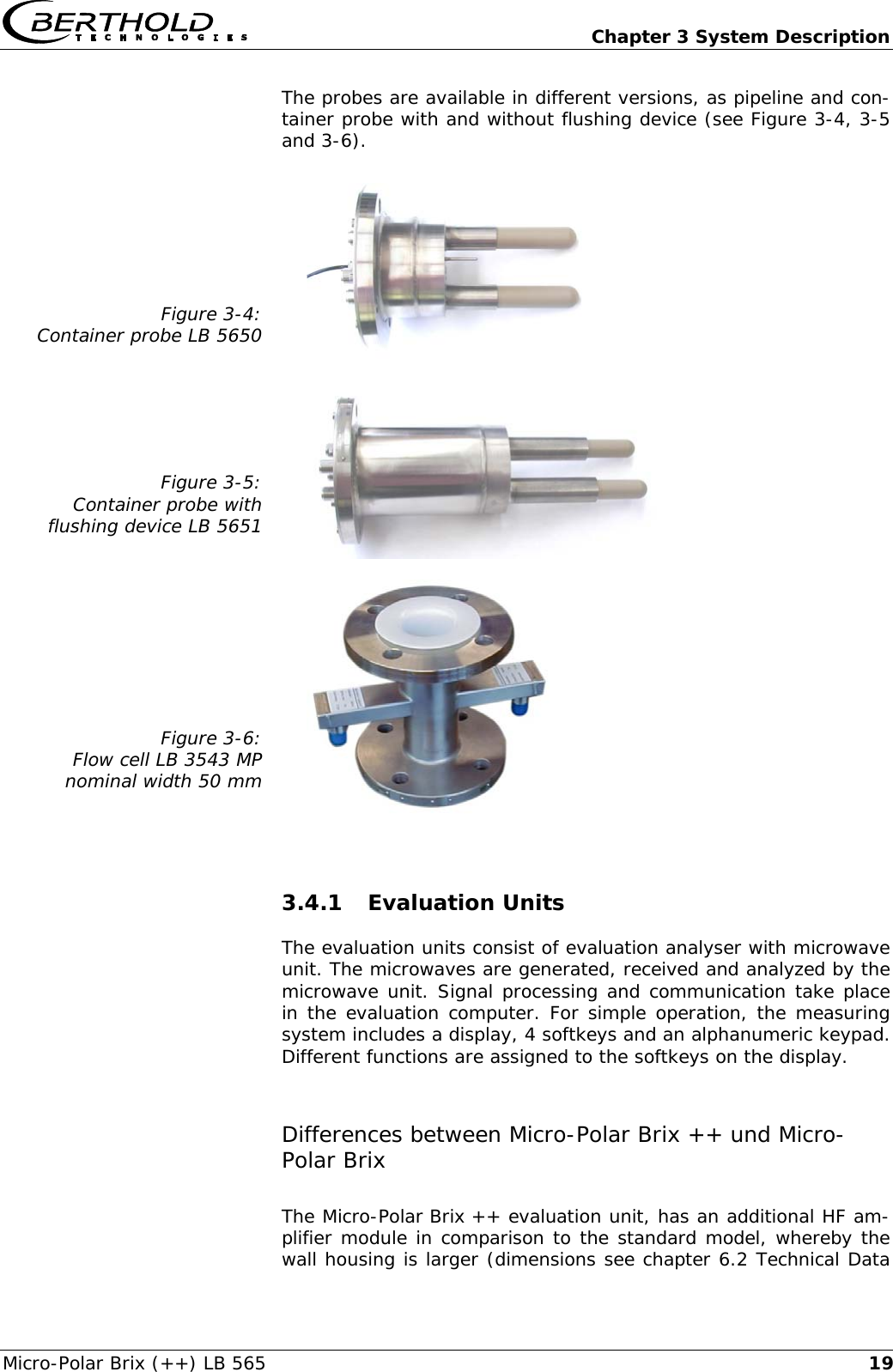
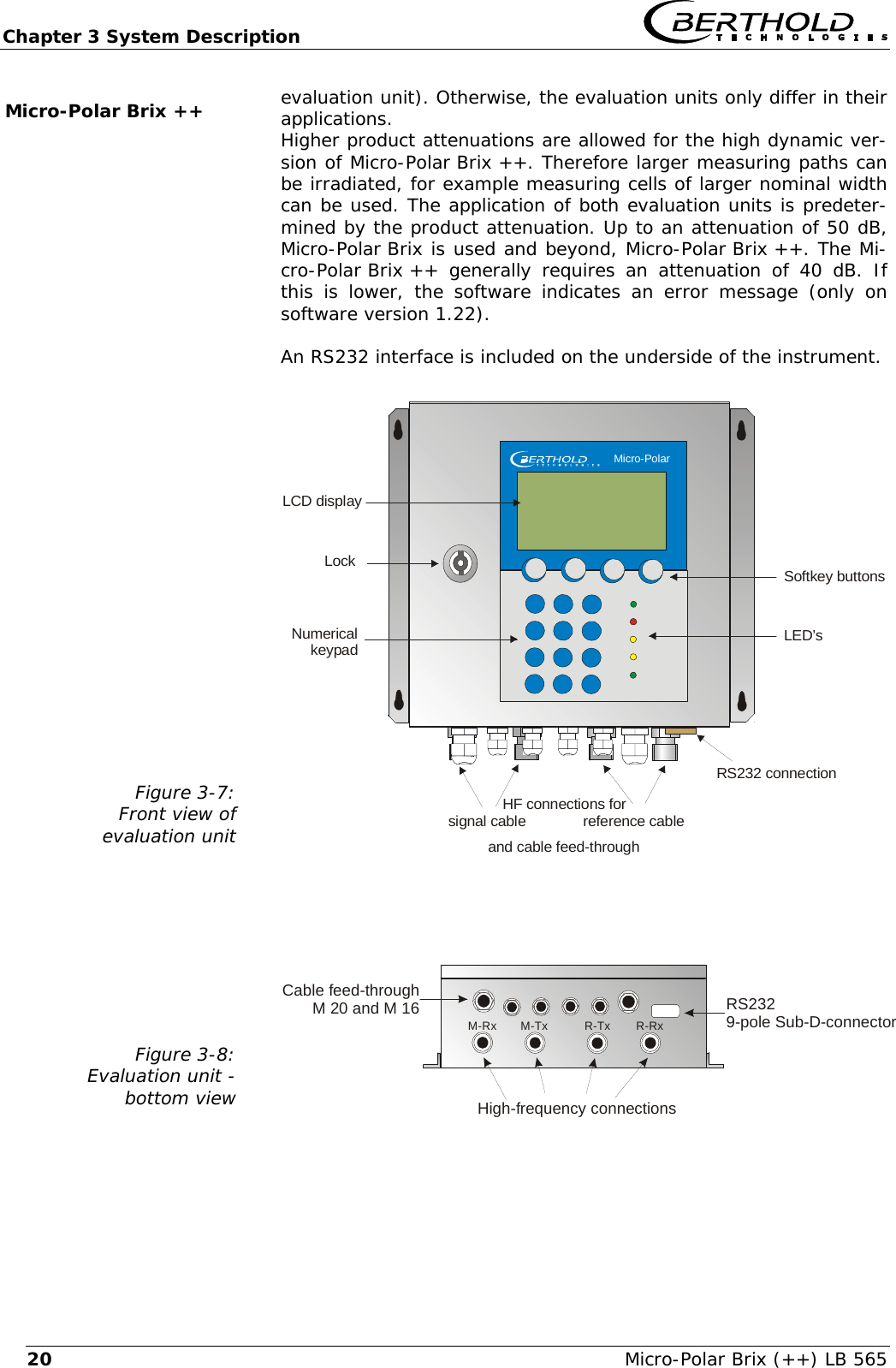
  Chapter 3 System Description Micro-Polar Brix (++) LB 565  19The probes are available in different versions, as pipeline and con-tainer probe with and without flushing device (see Figure 3-4, 3-5 and 3-6).  Figure 3-4: Container probe LB 5650     Figure 3-5: Container probe with flushing device LB 5651     Figure 3-6: Flow cell LB 3543 MP nominal width 50 mm    3.4.1 Evaluation Units The evaluation units consist of evaluation analyser with microwave unit. The microwaves are generated, received and analyzed by the microwave unit. Signal processing and communication take place in the evaluation computer. For simple operation, the measuring system includes a display, 4 softkeys and an alphanumeric keypad. Different functions are assigned to the softkeys on the display. Differences between Micro-Polar Brix ++ und Micro-Polar Brix The Micro-Polar Brix ++ evaluation unit, has an additional HF am-plifier module in comparison to the standard model, whereby the wall housing is larger (dimensions see chapter 6.2 Technical Data
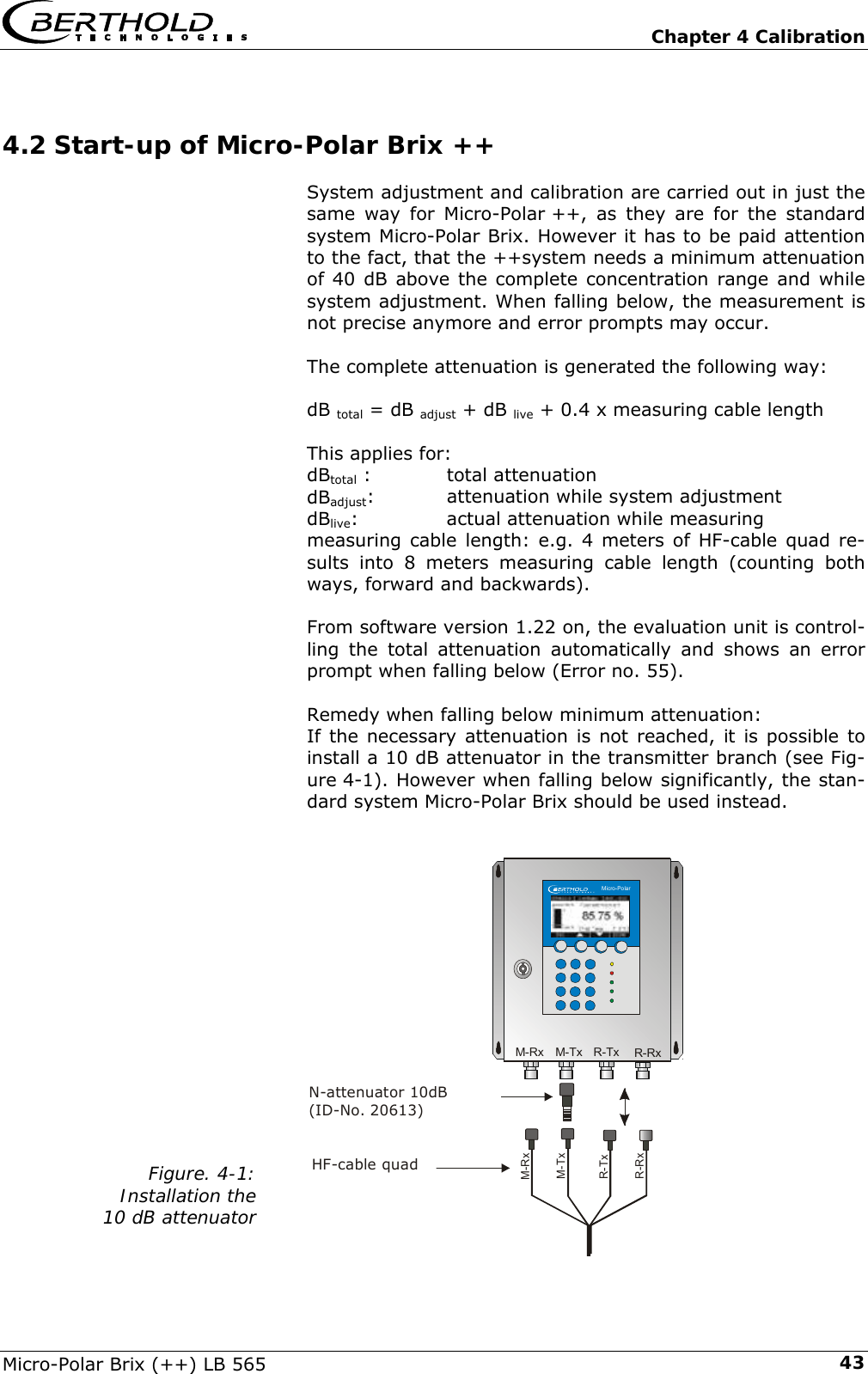
Chapter 3 System Description   Micro-Polar Brix (++) LB 565 20evaluation unit). Otherwise, the evaluation units only differ in their applications. Higher product attenuations are allowed for the high dynamic ver-sion of Micro-Polar Brix ++. Therefore larger measuring paths can be irradiated, for example measuring cells of larger nominal width can be used. The application of both evaluation units is predeter-mined by the product attenuation. Up to an attenuation of 50 dB, Micro-Polar Brix is used and beyond, Micro-Polar Brix ++. The Mi-cro-Polar Brix ++  generally  requires an attenuation of 40 dB. If this is lower, the software indicates an error message (only on software version 1.22).  An RS232 interface is included on the underside of the instrument.  Figure 3-7: Front view of  evaluation unit   and cable feed-throughLockNumericalkeypadSoftkey buttonsLED’sLCD displayRS232 connectionHF connections for   signal cable              reference cable    Micro-Polar Figure 3-8: Evaluation unit -  bottom view    Cable feed-throughM 20 and M 16High-frequency connectionsRS2329-pole Sub-D-connectorM-TxM-Rx R-Tx R-Rx Micro-Polar Brix ++
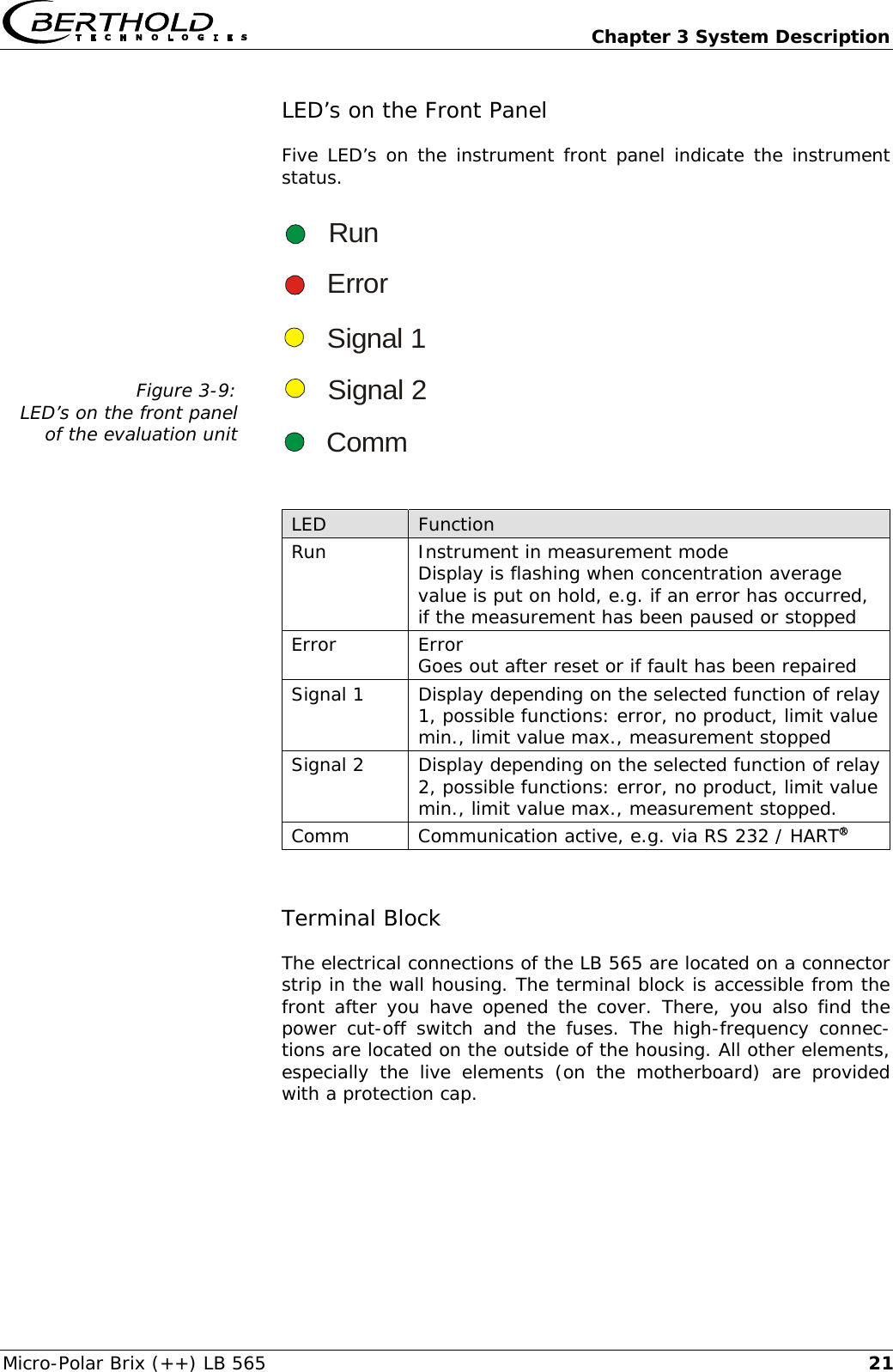
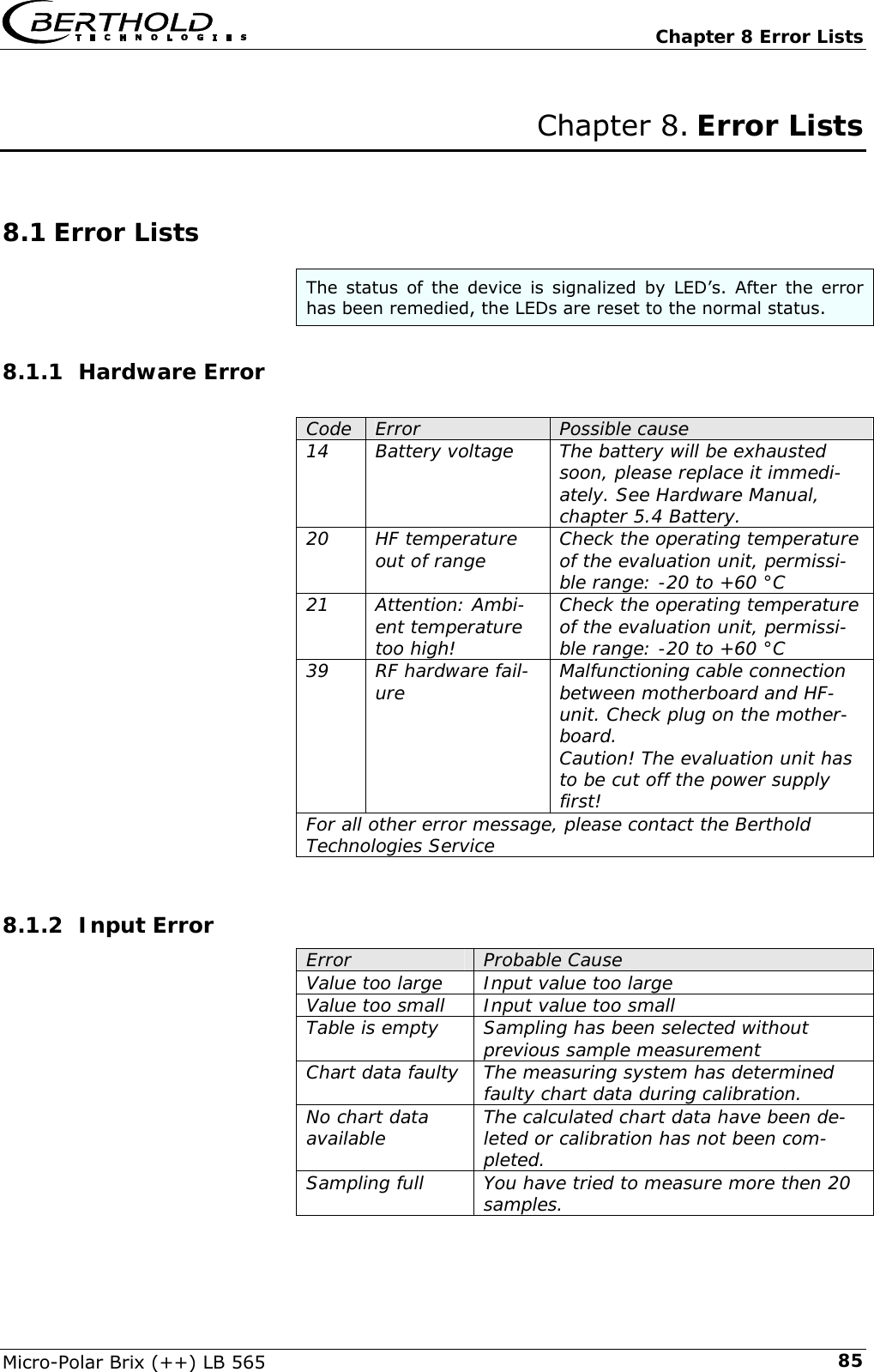
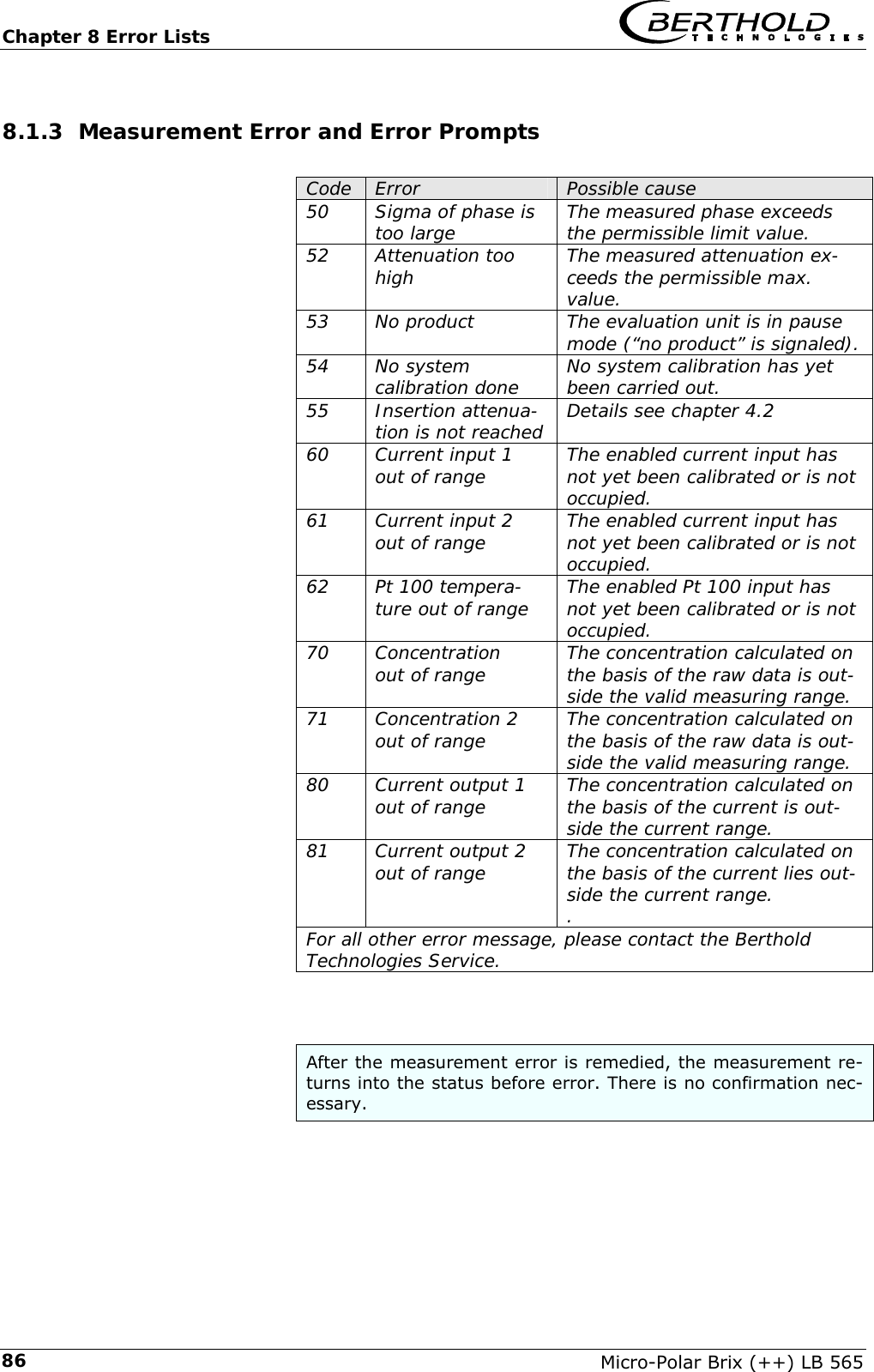
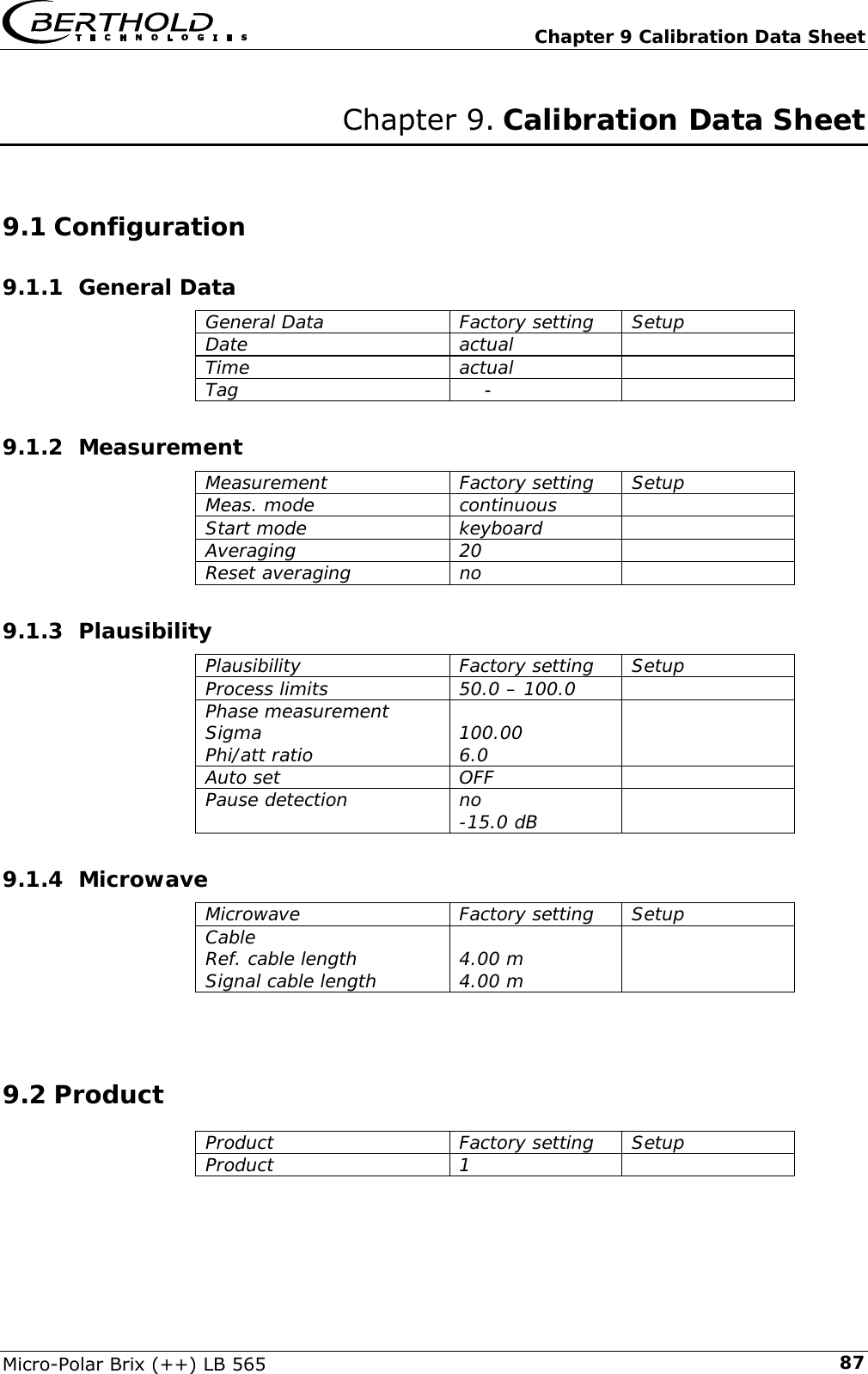
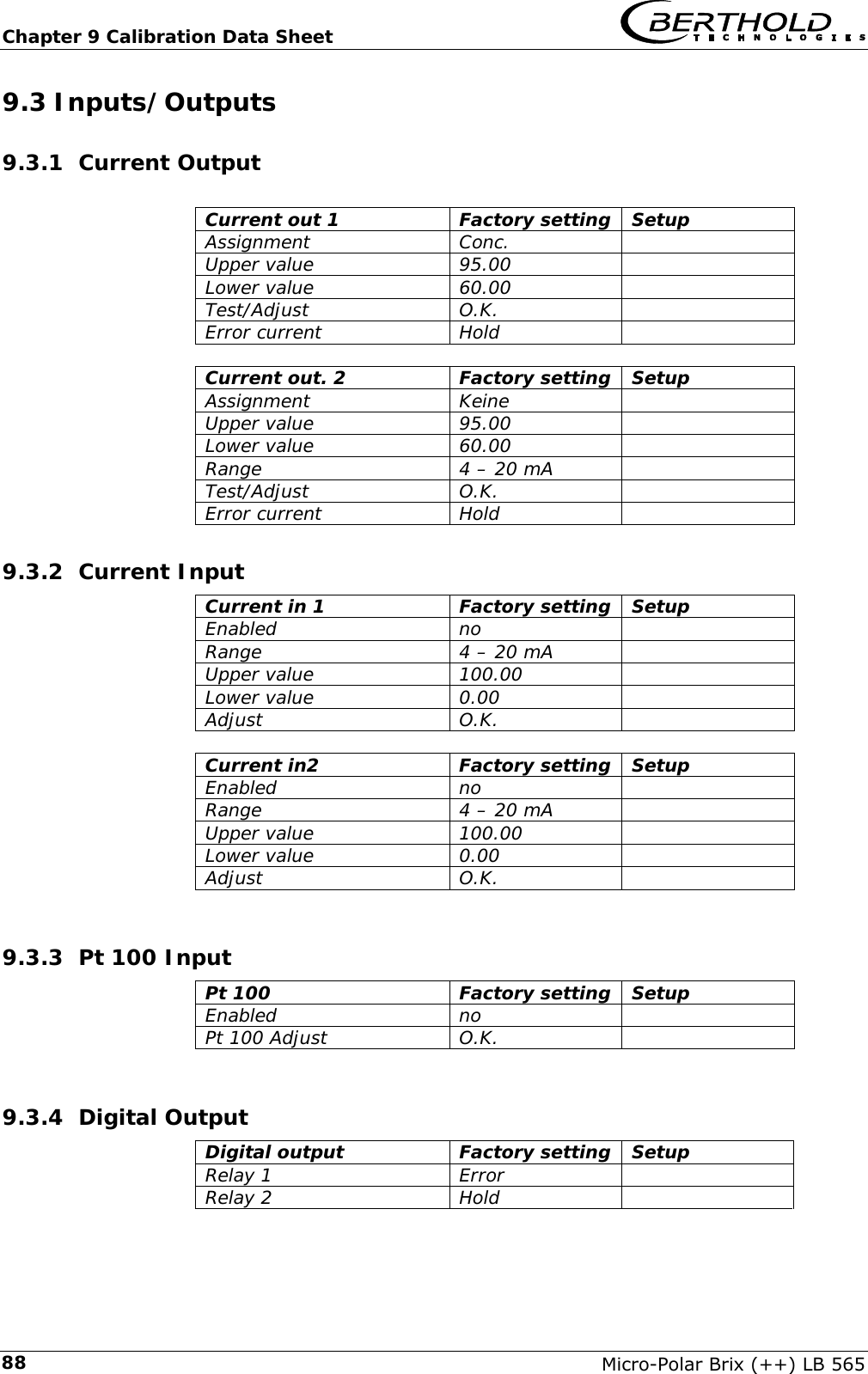
  Chapter 3 System Description Micro-Polar Brix (++) LB 565  21LED’s on the Front Panel Five LED’s on the instrument front panel indicate the instrument status.  Figure 3-9: LED’s on the front panel of the evaluation unit   RunErrorSignal 1Signal 2Comm  LED  Function Run  Instrument in measurement mode Display is flashing when concentration average value is put on hold, e.g. if an error has occurred, if the measurement has been paused or stopped Error Error Goes out after reset or if fault has been repaired Signal 1  Display depending on the selected function of relay 1, possible functions: error, no product, limit value min., limit value max., measurement stopped Signal 2  Display depending on the selected function of relay 2, possible functions: error, no product, limit value min., limit value max., measurement stopped. Comm  Communication active, e.g. via RS 232 / HART®  Terminal Block The electrical connections of the LB 565 are located on a connector strip in the wall housing. The terminal block is accessible from the front after you have opened the cover. There, you also find the power cut-off switch and the fuses. The high-frequency connec-tions are located on the outside of the housing. All other elements, especially the live elements (on the motherboard) are provided with a protection cap.
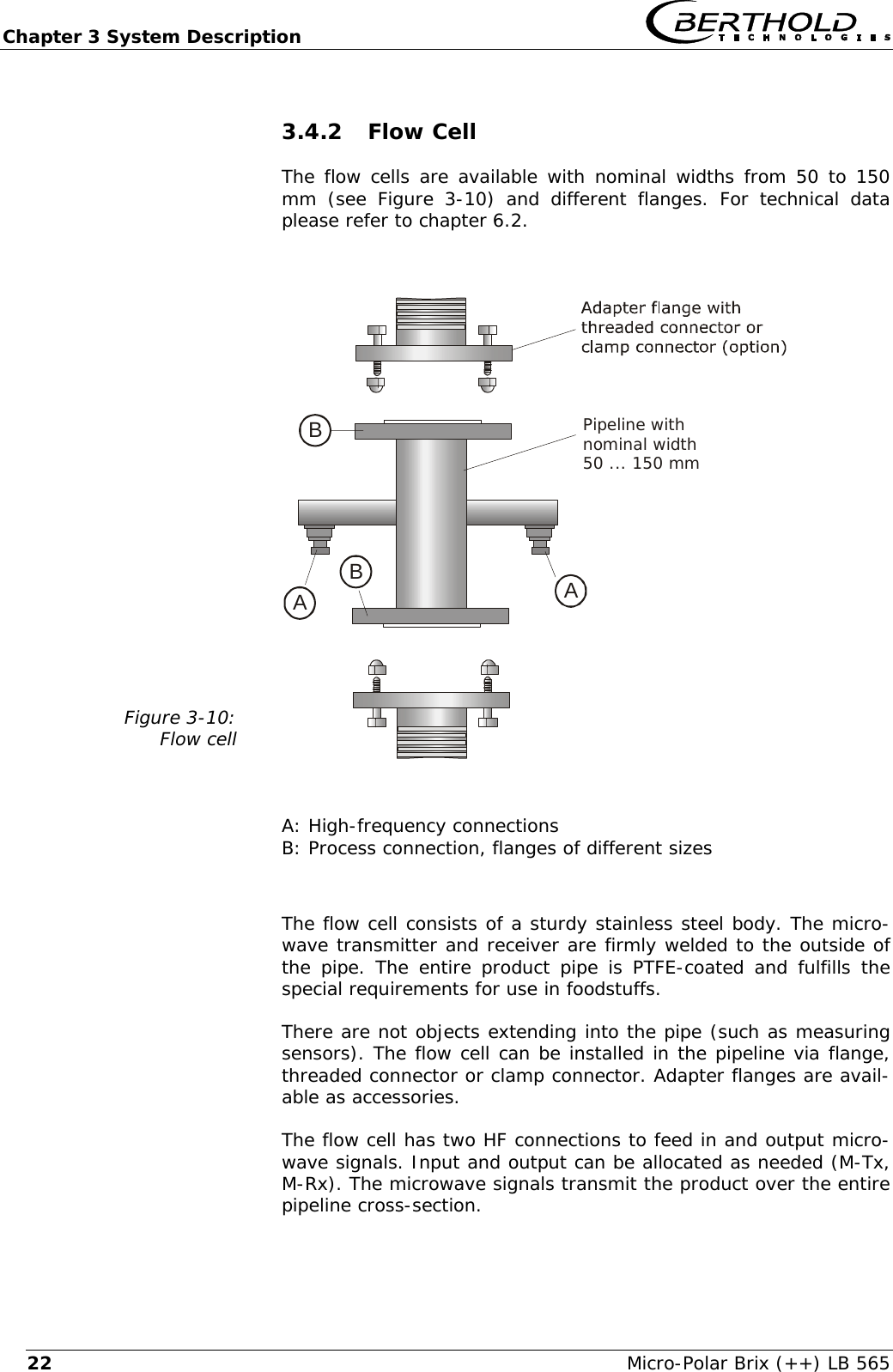
Chapter 3 System Description   Micro-Polar Brix (++) LB 565 223.4.2 Flow Cell The flow cells are available with nominal widths from 50 to 150 mm (see Figure 3-10) and different flanges. For technical data please refer to chapter 6.2.  Figure 3-10: Flow cell   AABBPipeline withnominal width50 ... 150 mm  A: High-frequency connections B: Process connection, flanges of different sizes  The flow cell consists of a sturdy stainless steel body. The micro-wave transmitter and receiver are firmly welded to the outside of the pipe. The entire product pipe is PTFE-coated and fulfills the special requirements for use in foodstuffs. There are not objects extending into the pipe (such as measuring sensors). The flow cell can be installed in the pipeline via flange, threaded connector or clamp connector. Adapter flanges are avail-able as accessories. The flow cell has two HF connections to feed in and output micro-wave signals. Input and output can be allocated as needed (M-Tx, M-Rx). The microwave signals transmit the product over the entire pipeline cross-section.
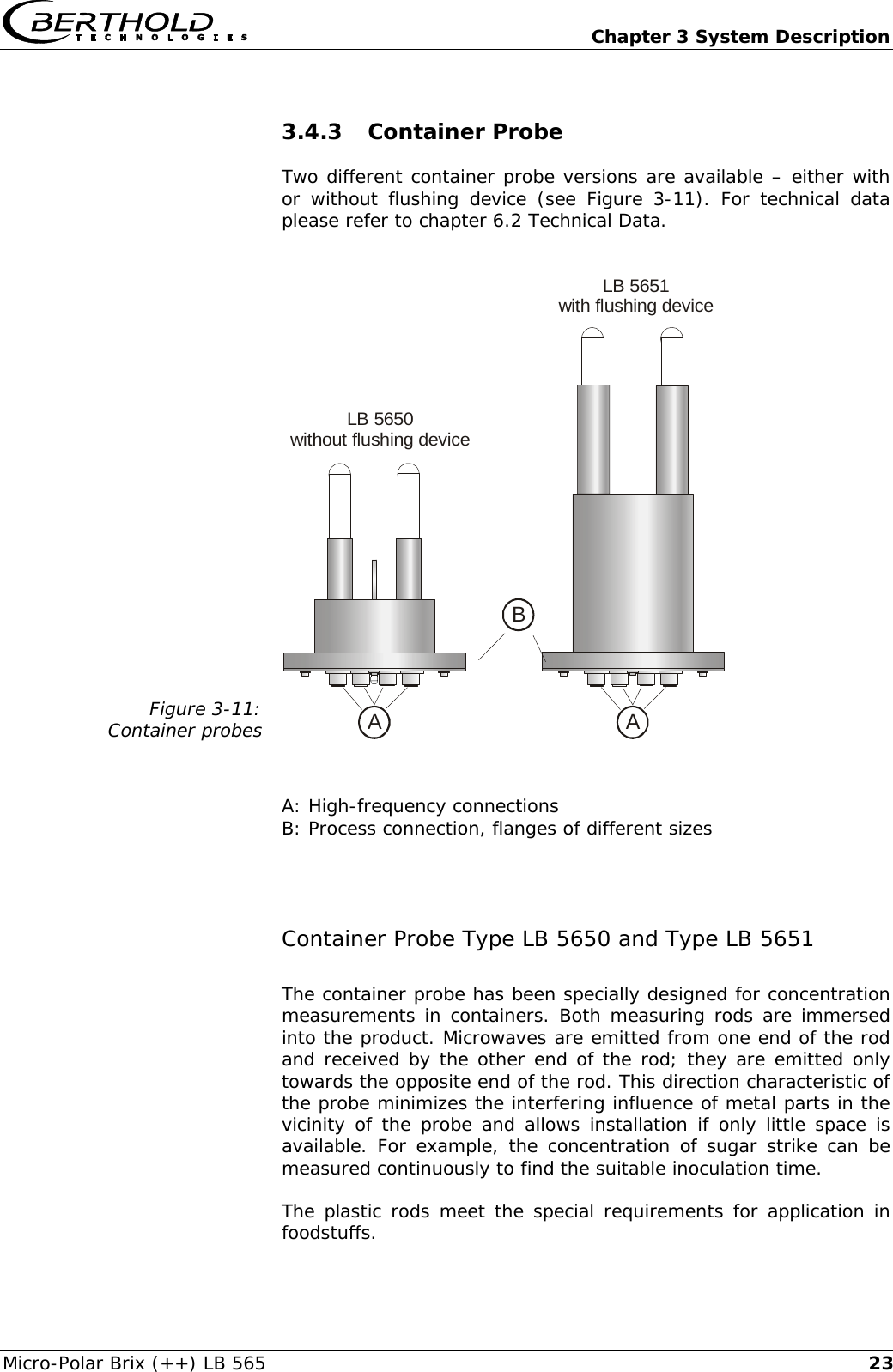
  Chapter 3 System Description Micro-Polar Brix (++) LB 565  233.4.3 Container Probe Two different container probe versions are available – either with or without flushing device (see Figure 3-11). For technical data please refer to chapter 6.2 Technical Data.  Figure 3-11: Container probes ALB 5650without flushing deviceABLB 5651with flushing device   A: High-frequency connections B: Process connection, flanges of different sizes  Container Probe Type LB 5650 and Type LB 5651 The container probe has been specially designed for concentration measurements in containers. Both measuring rods are immersed into the product. Microwaves are emitted from one end of the rod and received by the other end of the rod; they are emitted only towards the opposite end of the rod. This direction characteristic of the probe minimizes the interfering influence of metal parts in the vicinity of the probe and allows installation if only little space is available. For example, the concentration of sugar strike can be measured continuously to find the suitable inoculation time. The plastic rods meet the special requirements for application in foodstuffs.
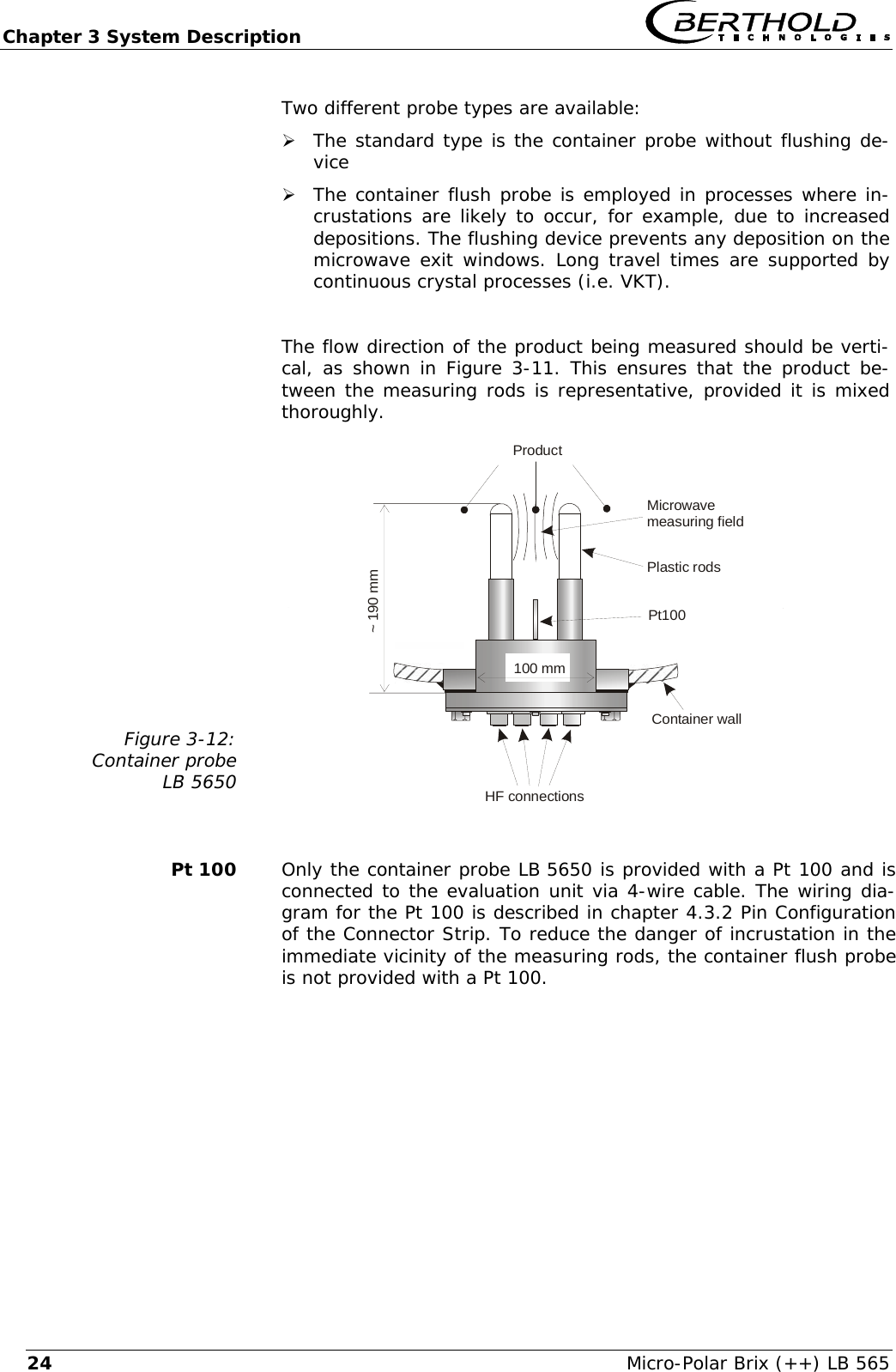
Chapter 3 System Description   Micro-Polar Brix (++) LB 565 24Two different probe types are available:  ¾ The standard type is the container probe without flushing de-vice ¾ The container flush probe is employed in processes where in-crustations are likely to occur, for example, due to increased depositions. The flushing device prevents any deposition on the microwave exit windows. Long travel times are supported by continuous crystal processes (i.e. VKT).  The flow direction of the product being measured should be verti-cal, as shown in Figure 3-11. This ensures that the product be-tween the measuring rods is representative, provided it is mixed thoroughly. Figure 3-12: Container probe LB 5650   Container wallHF connectionsProductMicrowavemeasuring fieldPlastic rods~ 190 mm100 mmPt100    Pt 100  Only the container probe LB 5650 is provided with a Pt 100 and is connected to the evaluation unit via 4-wire cable. The wiring dia-gram for the Pt 100 is described in chapter 4.3.2 Pin Configuration of the Connector Strip. To reduce the danger of incrustation in the immediate vicinity of the measuring rods, the container flush probe is not provided with a Pt 100.
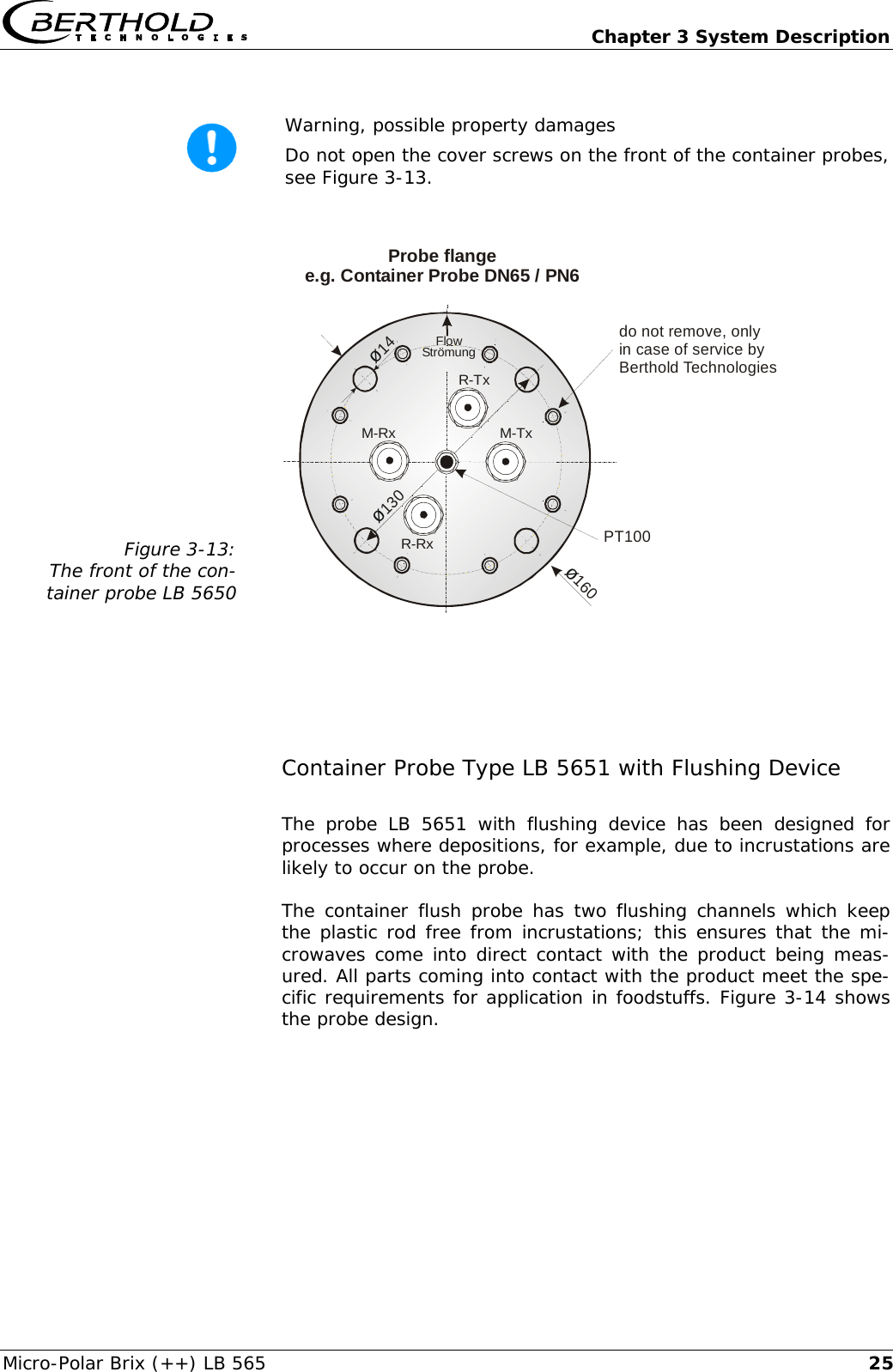
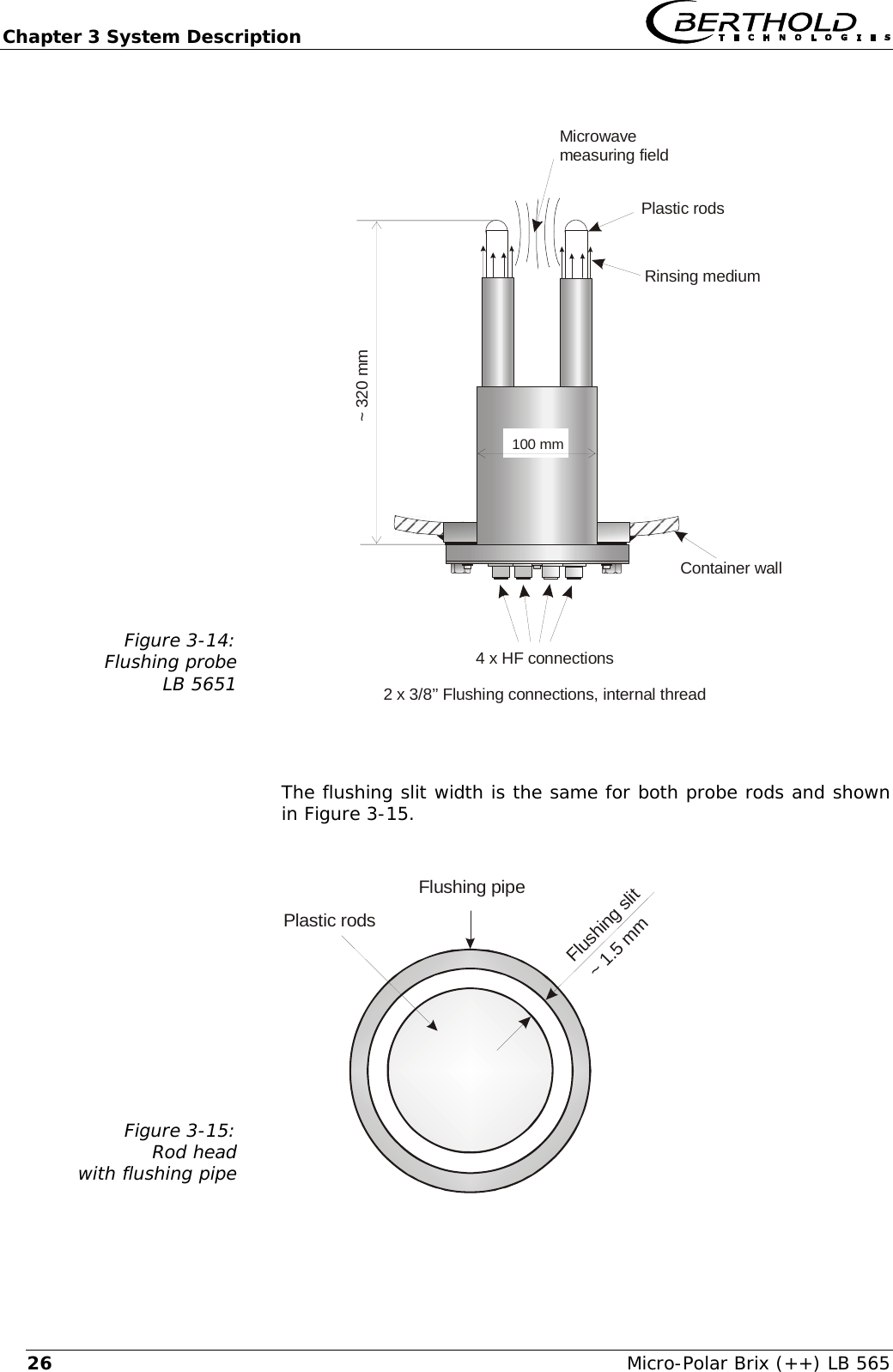
  Chapter 3 System Description Micro-Polar Brix (++) LB 565  25 Warning, possible property damages  Do not open the cover screws on the front of the container probes, see Figure 3-13.  Figure 3-13: The front of the con-tainer probe LB 5650   ø14M-RxR-Txdo not remove, onlyin case of service byBerthold TechnologiesR-RxM-Txø160ø130PT100Probe flangee.g. Container Probe DN65 / PN6FlowStrömung   Container Probe Type LB 5651 with Flushing Device The probe LB 5651 with flushing device has been designed for processes where depositions, for example, due to incrustations are likely to occur on the probe. The container flush probe has two flushing channels which keep the plastic rod free from incrustations; this ensures that the mi-crowaves come into direct contact with the product being meas-ured. All parts coming into contact with the product meet the spe-cific requirements for application in foodstuffs. Figure 3-14 shows the probe design.
Chapter 3 System Description   Micro-Polar Brix (++) LB 565 26 Figure 3-14: Flushing probe LB 5651   Container wall4 x HF connections2 x 3/8’’ Flushing connections, internal threadMicrowavemeasuring fieldPlastic rodsRinsing medium~ 320 mm100 mm    The flushing slit width is the same for both probe rods and shown in Figure 3-15.  Figure 3-15: Rod head with flushing pipe   Plastic rodsFlushing pipeFlushing slit~ 1.5 mm
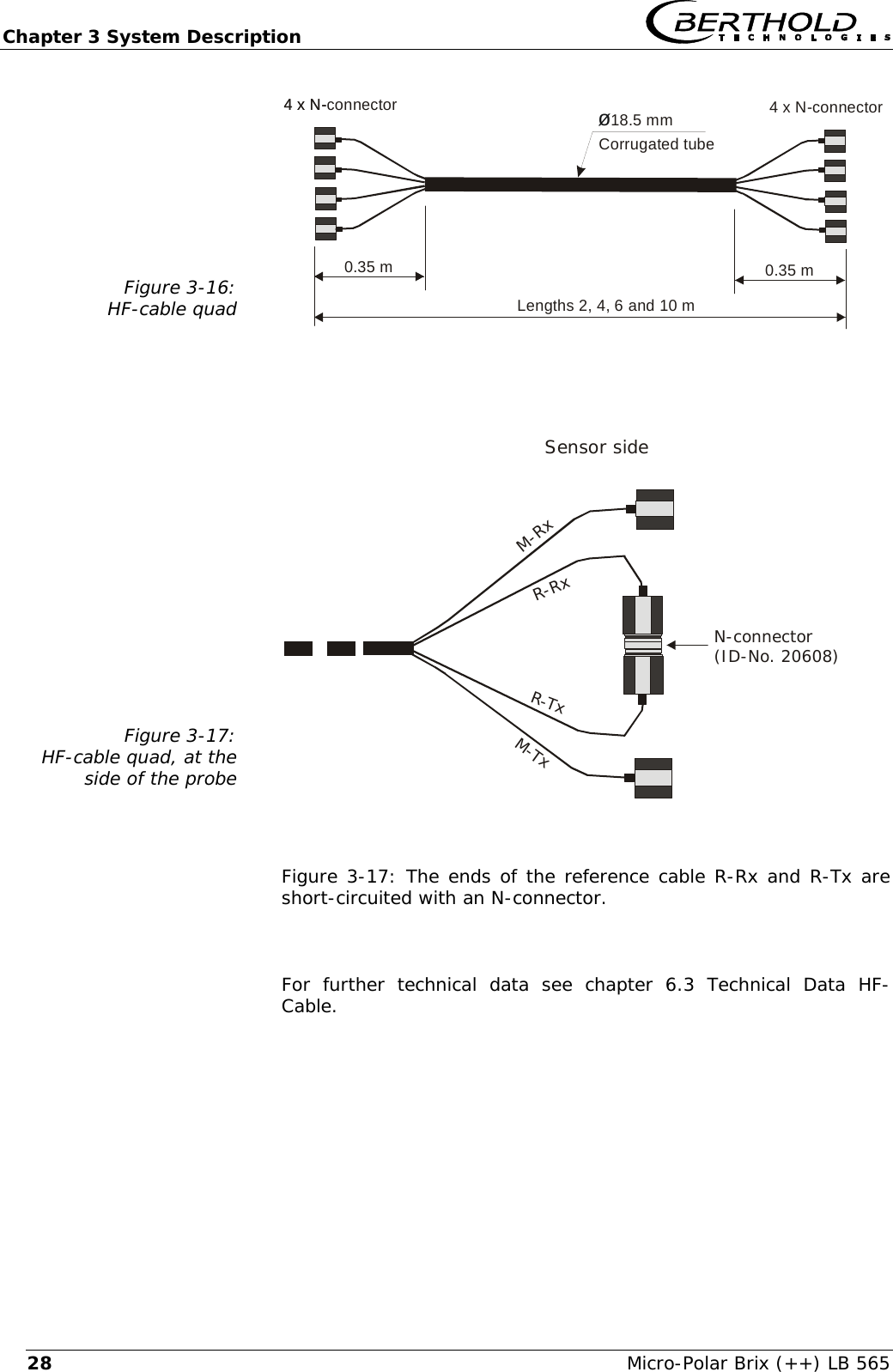
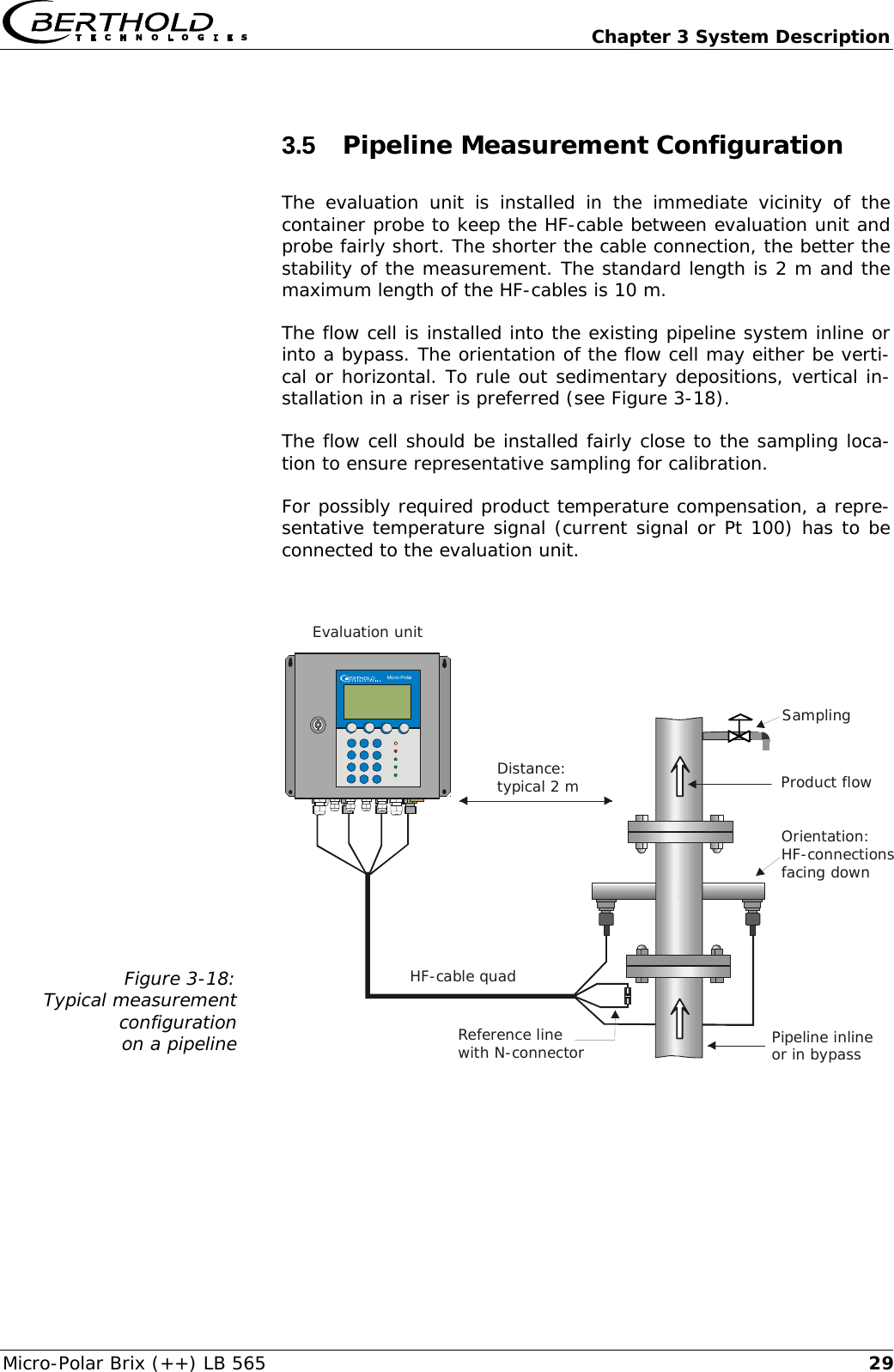
  Chapter 3 System Description Micro-Polar Brix (++) LB 565  273.4.4 High-Frequency Cable High-frequency cables (HF cable) are used to transmit microwaves between probe and evaluation electronics. HF cables change their conductivity (for microwaves) relative to the temperature. Therefore, variations in the ambient temperature would create measurement errors. This error is compensated for by enabling the cable compensation. Influences of the ambient temperature on the signal cable are compensated for by means of the reference cable. The reference cable has the same length as the signal cable; during operation, it should be exposed to the same ambient temperature. Therefore, we recommend installing both cable types together in a corrugated tube; this also simplifies installation. Special HF-cables are available for each sensor type. For the con-tainer probe (with and without flushing device) the HF-cable quad is used (see Figure 3-16). It consists of four single HF-cables of equal length, whose ends are terminated by one HF-connector (N-type). Available cable lengths: 2, 4, 6 and 10 m.  Two cable versions are available for the flow cell. Version 1: A HF cable quad as described above, where the refer-ence cable is sort-circuited by means of the N-connector at the side of the probe (see Figure 3-17). Available cable lengths: 2, 4, 6 and 10 m. Version 2: The flow cell is connected using two separate HF-cables (solid sheath cable) of equal length (signal cable). Another separate cable, with the length corresponding to the sum of both signal cables, makes up the reference cable (not shown). Available lengths of the solid sheath cable: signal cable: 1.5 and 2.0 m; ref-erence cable: 3.0 and 4.0 m.   Never bend HF cables! The bending radius should not be less than 100 mm. After installation, fix cables with cable binders.
Chapter 3 System Description   Micro-Polar Brix (++) LB 565 28Figure 3-16: HF-cable quad   Lengths 2, 4, 6 and 10 mCorrugated tube4 x N-connectorø18.5 mm0.35 m 0.35 m4 x N- 4 x N-connector   Figure 3-17: HF-cable quad, at the side of the probe   N-connector(ID-No. 20608)Sensor sideR-RxR-TxM-RxM-Tx  Figure 3-17: The ends of the reference cable R-Rx and R-Tx are short-circuited with an N-connector.  For further technical data see chapter 6.3 Technical Data HF-Cable.
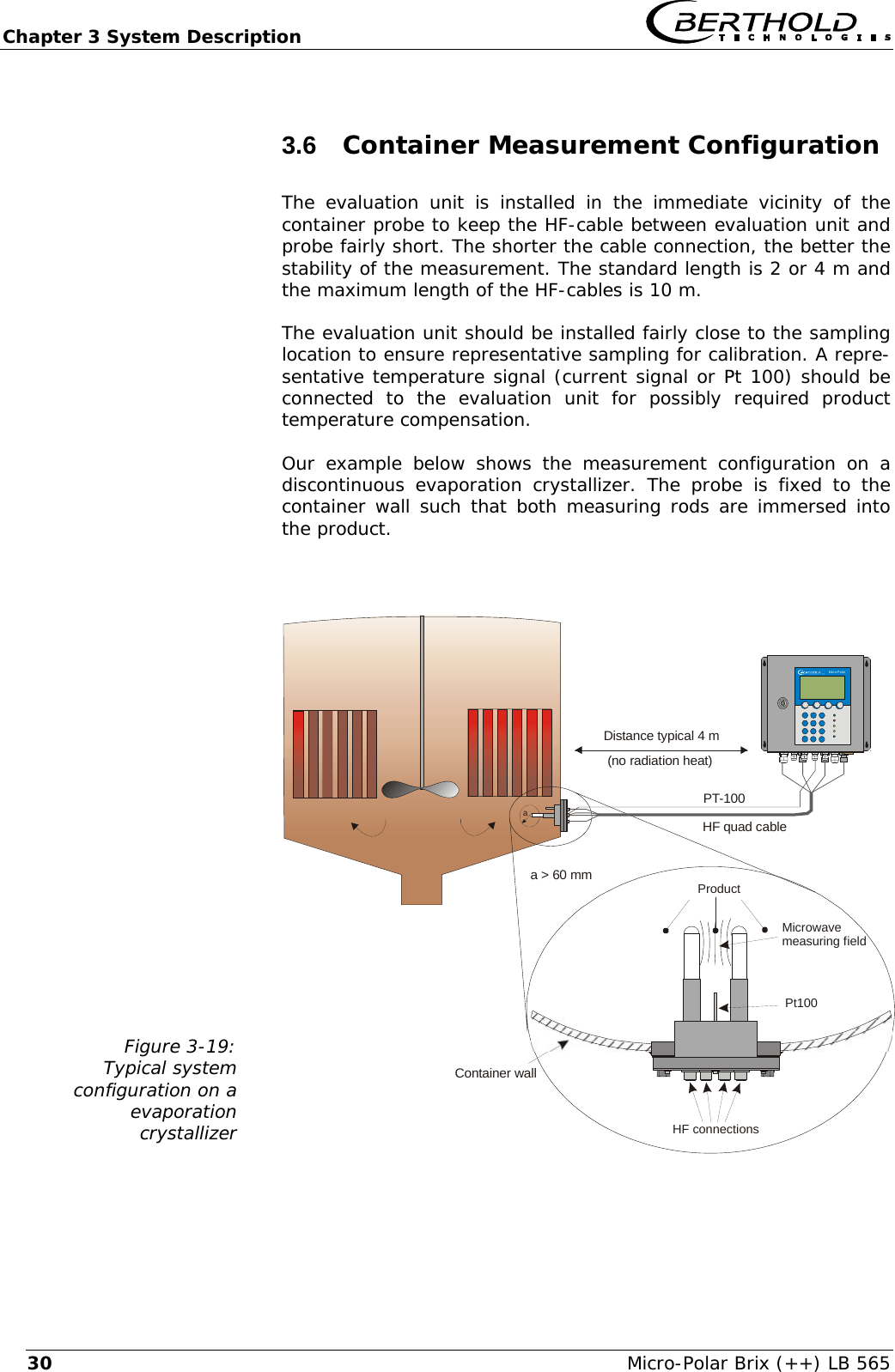
  Chapter 3 System Description Micro-Polar Brix (++) LB 565  293.5  Pipeline Measurement Configuration The evaluation unit is installed in the immediate vicinity of the container probe to keep the HF-cable between evaluation unit and probe fairly short. The shorter the cable connection, the better the stability of the measurement. The standard length is 2 m and the maximum length of the HF-cables is 10 m. The flow cell is installed into the existing pipeline system inline or into a bypass. The orientation of the flow cell may either be verti-cal or horizontal. To rule out sedimentary depositions, vertical in-stallation in a riser is preferred (see Figure 3-18). The flow cell should be installed fairly close to the sampling loca-tion to ensure representative sampling for calibration. For possibly required product temperature compensation, a repre-sentative temperature signal (current signal or Pt 100) has to be connected to the evaluation unit.  Figure 3-18: Typical measurement configuration  on a pipeline   Pipeline inlineor in bypassProduct flowSamplingReference linewith N-connectorHF-cable quad Evaluation unitDistance:typical 2 m    Micro-Polar    Micro-PolarOrientation:HF-connectionsfacing down
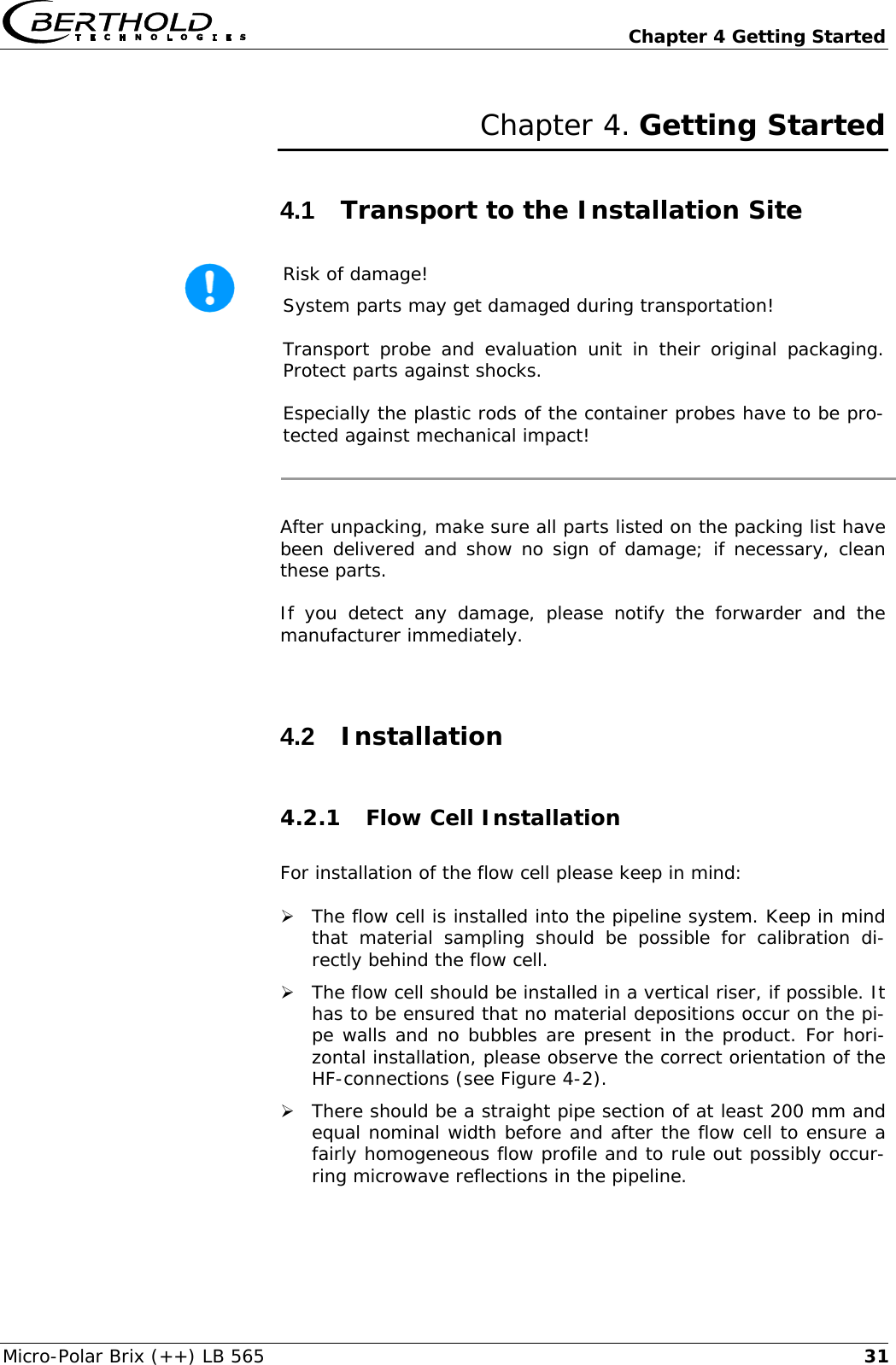
Chapter 3 System Description   Micro-Polar Brix (++) LB 565 303.6  Container Measurement Configuration  The evaluation unit is installed in the immediate vicinity of the container probe to keep the HF-cable between evaluation unit and probe fairly short. The shorter the cable connection, the better the stability of the measurement. The standard length is 2 or 4 m and the maximum length of the HF-cables is 10 m. The evaluation unit should be installed fairly close to the sampling location to ensure representative sampling for calibration. A repre-sentative temperature signal (current signal or Pt 100) should be connected to the evaluation unit for possibly required product temperature compensation. Our example below shows the measurement configuration on a discontinuous evaporation crystallizer. The probe is fixed to the container wall such that both measuring rods are immersed into the product.  Figure 3-19: Typical system  configuration on a  evaporation crystallizer   Container wallDistance typical 4 m(no radiation heat)aMicro-PolarPt100HF connectionsProductMicrowavemeasuring fieldPT-100a > 60 mmHF quad cable
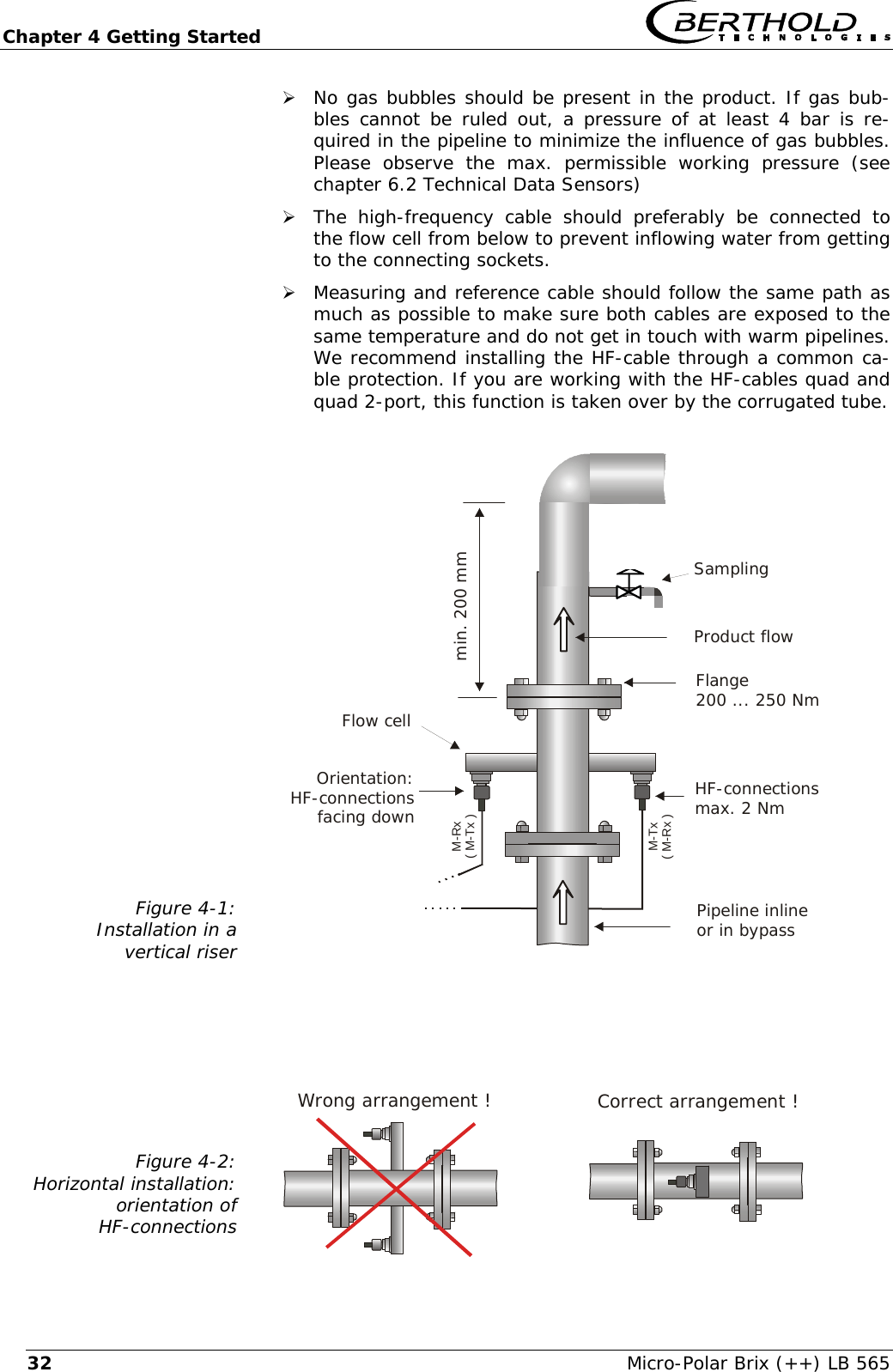
  Chapter 4 Getting Started Micro-Polar Brix (++) LB 565  31Chapter 4. Getting Started 4.1  Transport to the Installation Site  Risk of damage! System parts may get damaged during transportation! Transport probe and evaluation unit in their original packaging. Protect parts against shocks. Especially the plastic rods of the container probes have to be pro-tected against mechanical impact!  After unpacking, make sure all parts listed on the packing list have been delivered and show no sign of damage; if necessary, clean these parts. If you detect any damage, please notify the forwarder and the manufacturer immediately.  4.2  Installation 4.2.1 Flow Cell Installation  For installation of the flow cell please keep in mind:  ¾ The flow cell is installed into the pipeline system. Keep in mind that material sampling should be possible for calibration di-rectly behind the flow cell.  ¾ The flow cell should be installed in a vertical riser, if possible. It has to be ensured that no material depositions occur on the pi-pe walls and no bubbles are present in the product. For hori-zontal installation, please observe the correct orientation of the HF-connections (see Figure 4-2). ¾ There should be a straight pipe section of at least 200 mm and equal nominal width before and after the flow cell to ensure a fairly homogeneous flow profile and to rule out possibly occur-ring microwave reflections in the pipeline.
Chapter 4 Getting Started   Micro-Polar Brix (++) LB 565 32Wrong arrangement !¾ No gas bubbles should be present in the product. If gas bub-bles cannot be ruled out, a pressure of at least 4 bar is re-quired in the pipeline to minimize the influence of gas bubbles. Please observe the max. permissible working pressure (see chapter 6.2 Technical Data Sensors) ¾ The high-frequency cable should preferably be connected to the flow cell from below to prevent inflowing water from getting to the connecting sockets. ¾ Measuring and reference cable should follow the same path as much as possible to make sure both cables are exposed to the same temperature and do not get in touch with warm pipelines. We recommend installing the HF-cable through a common ca-ble protection. If you are working with the HF-cables quad and quad 2-port, this function is taken over by the corrugated tube.  Figure 4-1: Installation in a vertical riser                    Figure 4-2: Horizontal installation:  orientation of  HF-connections     Pipeline inlineor in bypassHF-connectionsmax. 2 NmFlange200 ... 250 NmProduct flowFlow cellmin. 200 mmOrientation:HF-connectionsfacing downSamplingM-Tx( M-Rx )M-Rx( M-Tx )Correct arrangement !
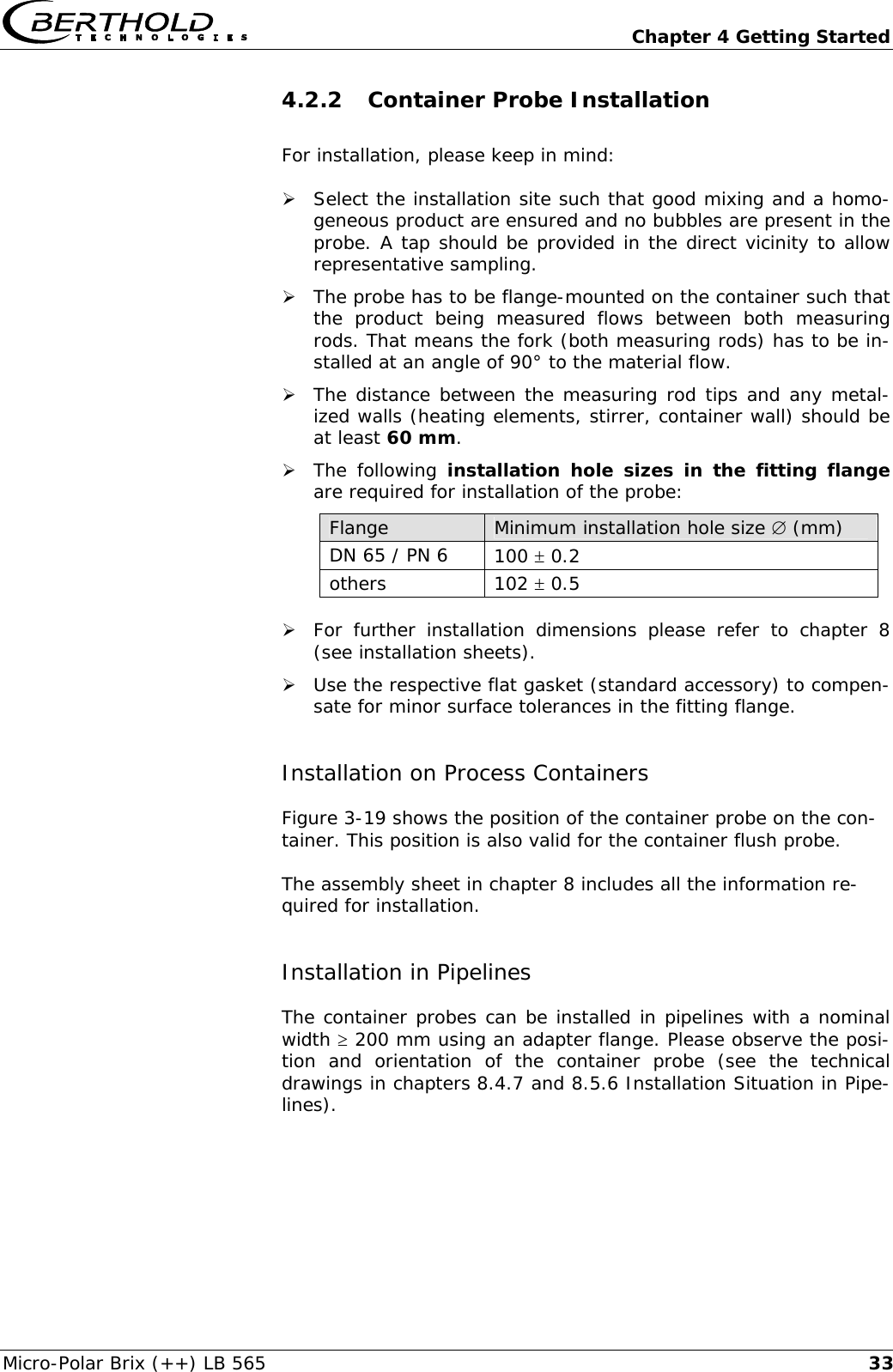
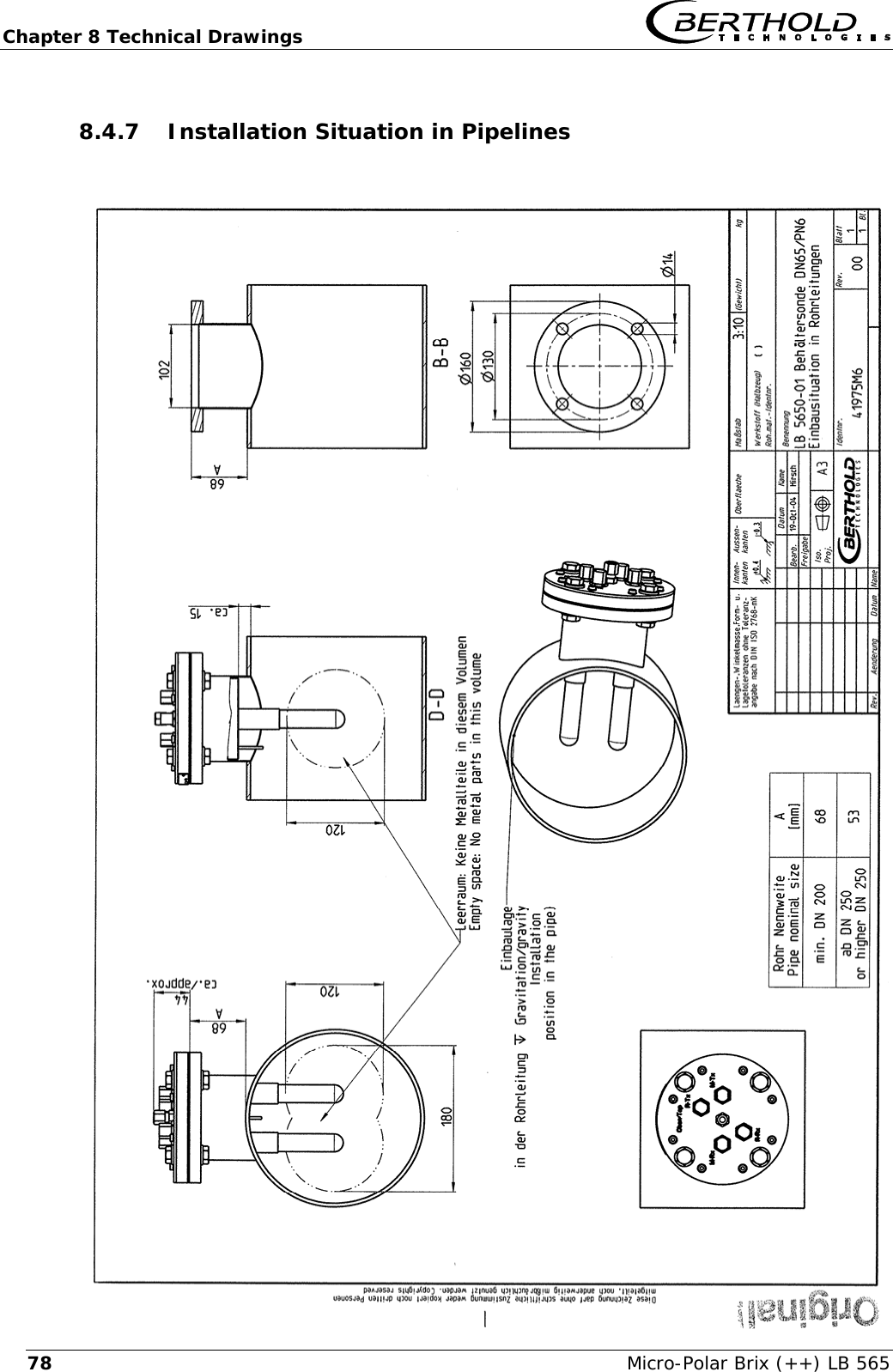
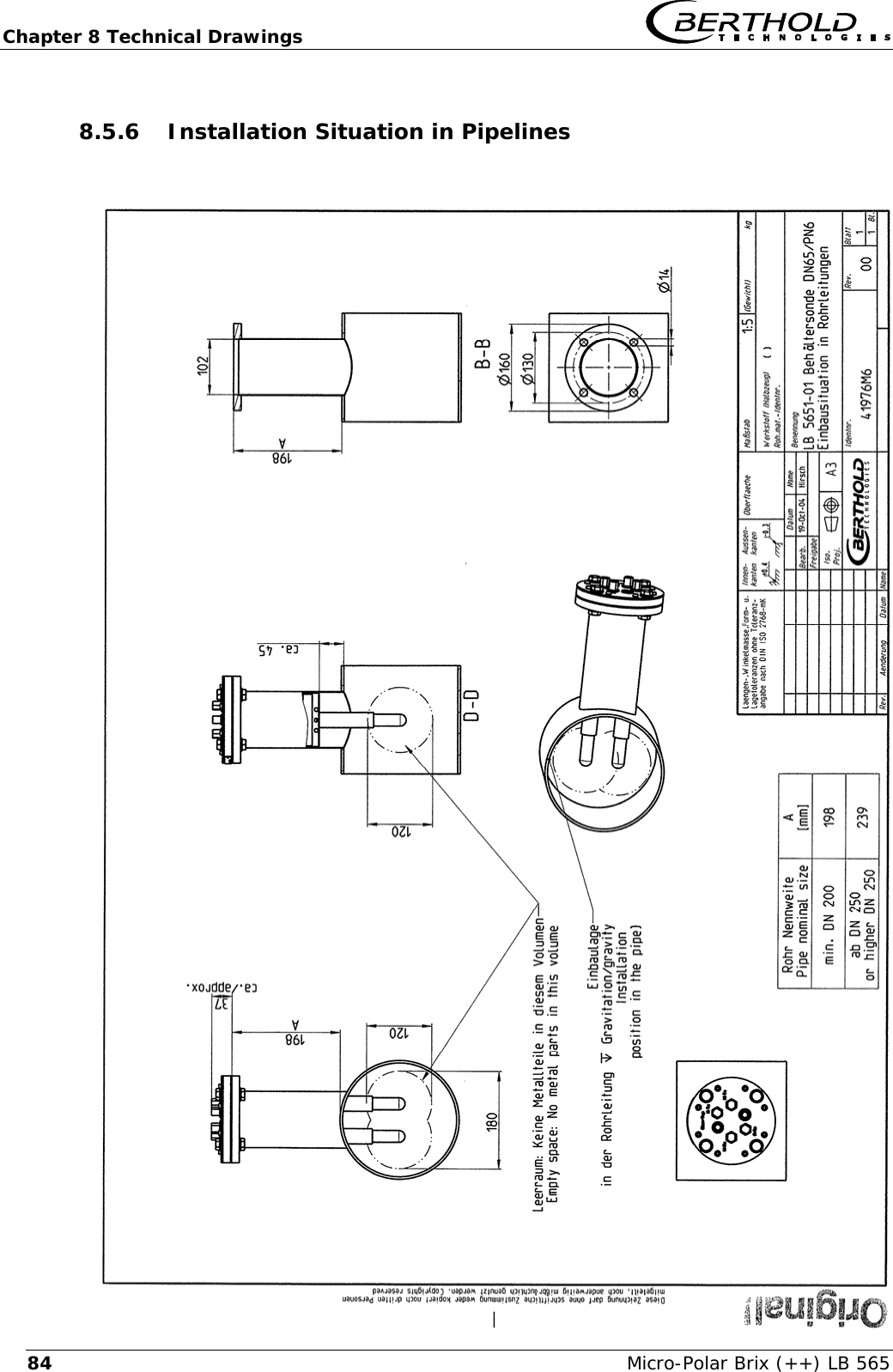
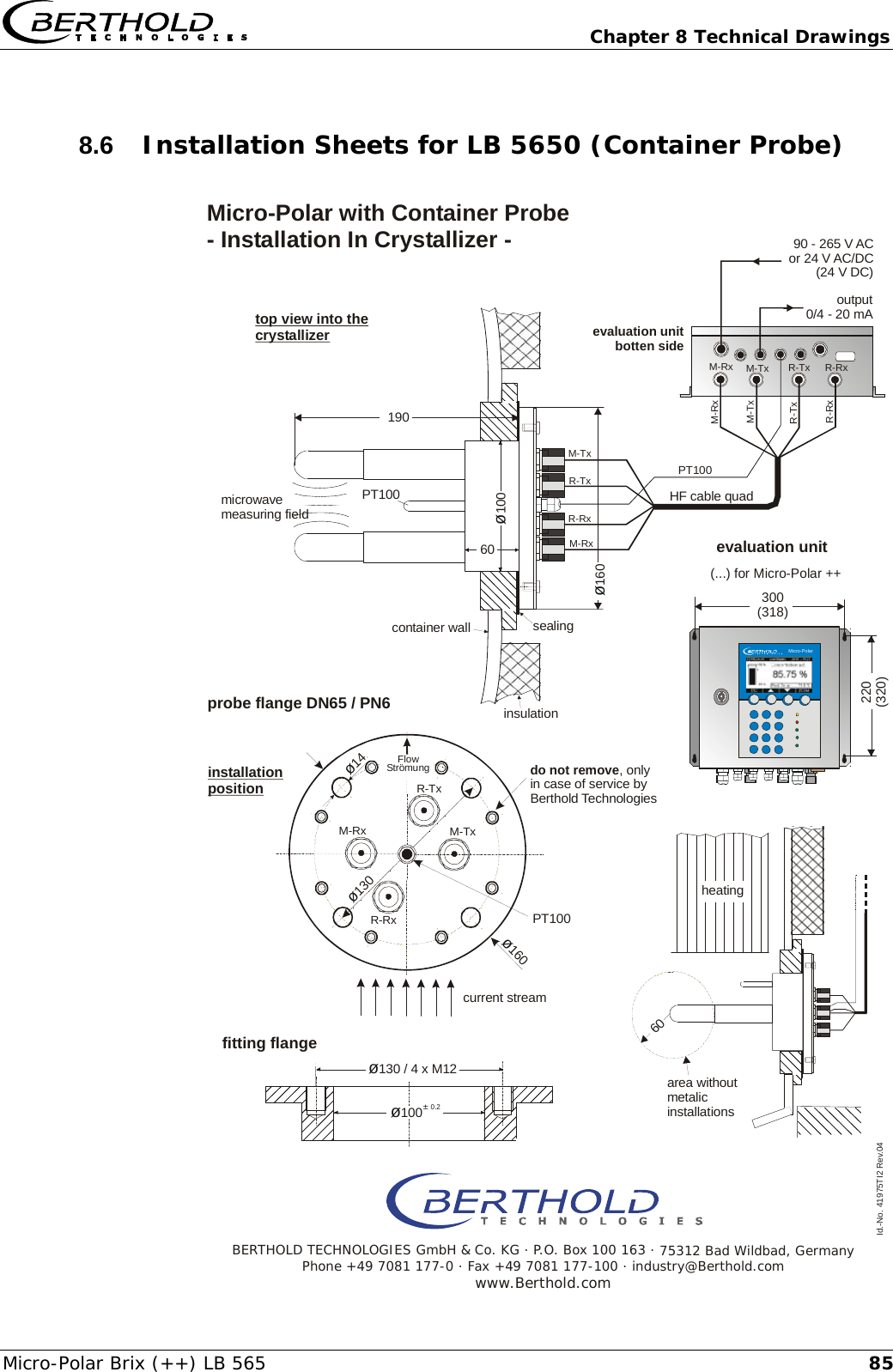
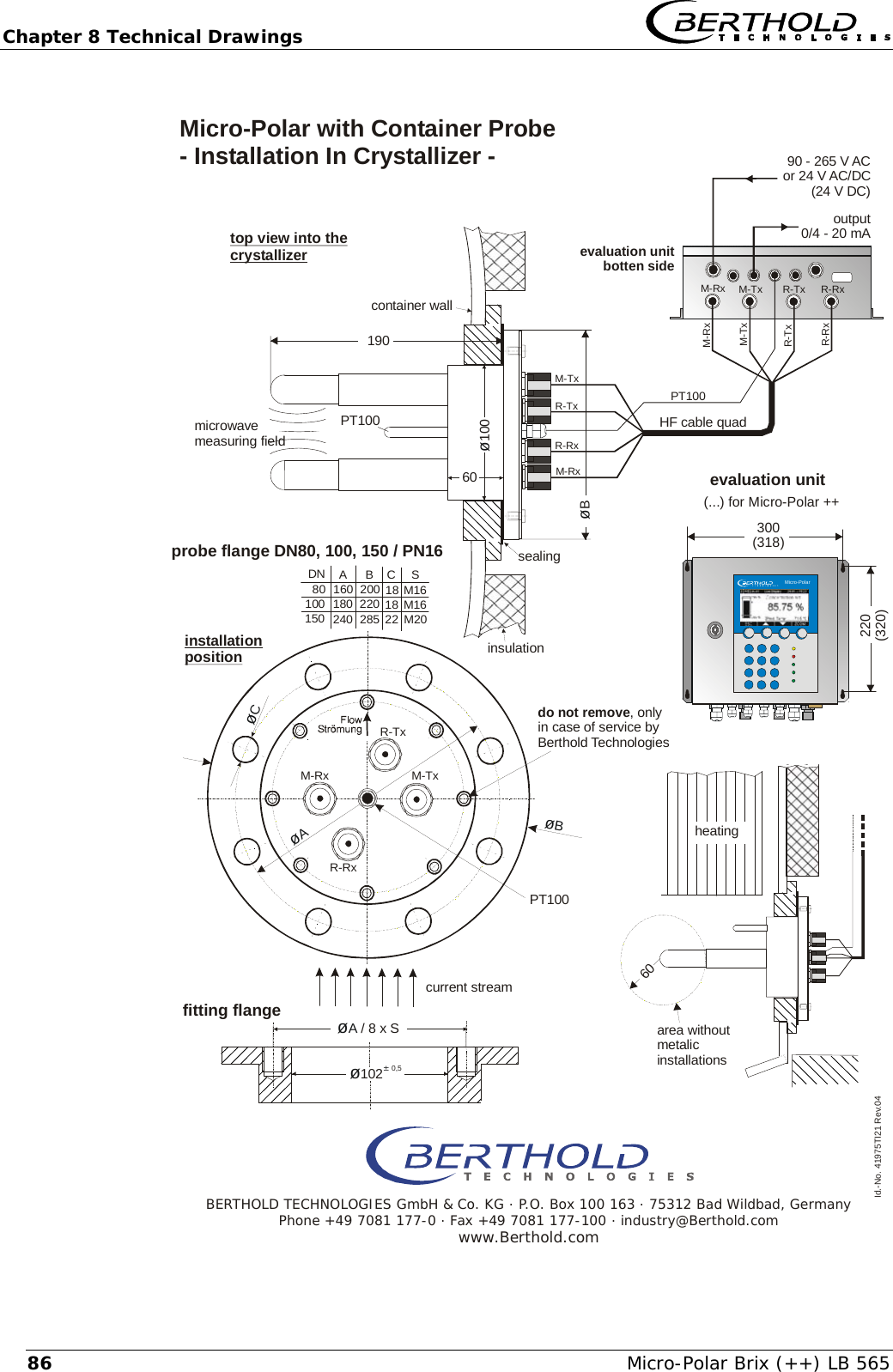
  Chapter 4 Getting Started Micro-Polar Brix (++) LB 565  334.2.2 Container Probe Installation For installation, please keep in mind:  ¾ Select the installation site such that good mixing and a homo-geneous product are ensured and no bubbles are present in the probe. A tap should be provided in the direct vicinity to allow representative sampling. ¾ The probe has to be flange-mounted on the container such that the product being measured flows between both measuring rods. That means the fork (both measuring rods) has to be in-stalled at an angle of 90° to the material flow. ¾ The distance between the measuring rod tips and any metal-ized walls (heating elements, stirrer, container wall) should be at least 60 mm. ¾ The following installation hole sizes in the fitting flange are required for installation of the probe: Flange  Minimum installation hole size ∅ (mm) DN 65 / PN 6  100 ± 0.2 others  102 ± 0.5 ¾ For further installation dimensions please refer to chapter 8 (see installation sheets). ¾ Use the respective flat gasket (standard accessory) to compen-sate for minor surface tolerances in the fitting flange. Installation on Process Containers Figure 3-19 shows the position of the container probe on the con-tainer. This position is also valid for the container flush probe.  The assembly sheet in chapter 8 includes all the information re-quired for installation.  Installation in Pipelines The container probes can be installed in pipelines with a nominal width ≥ 200 mm using an adapter flange. Please observe the posi-tion and orientation of the container probe (see the technical drawings in chapters 8.4.7 and 8.5.6 Installation Situation in Pipe-lines).
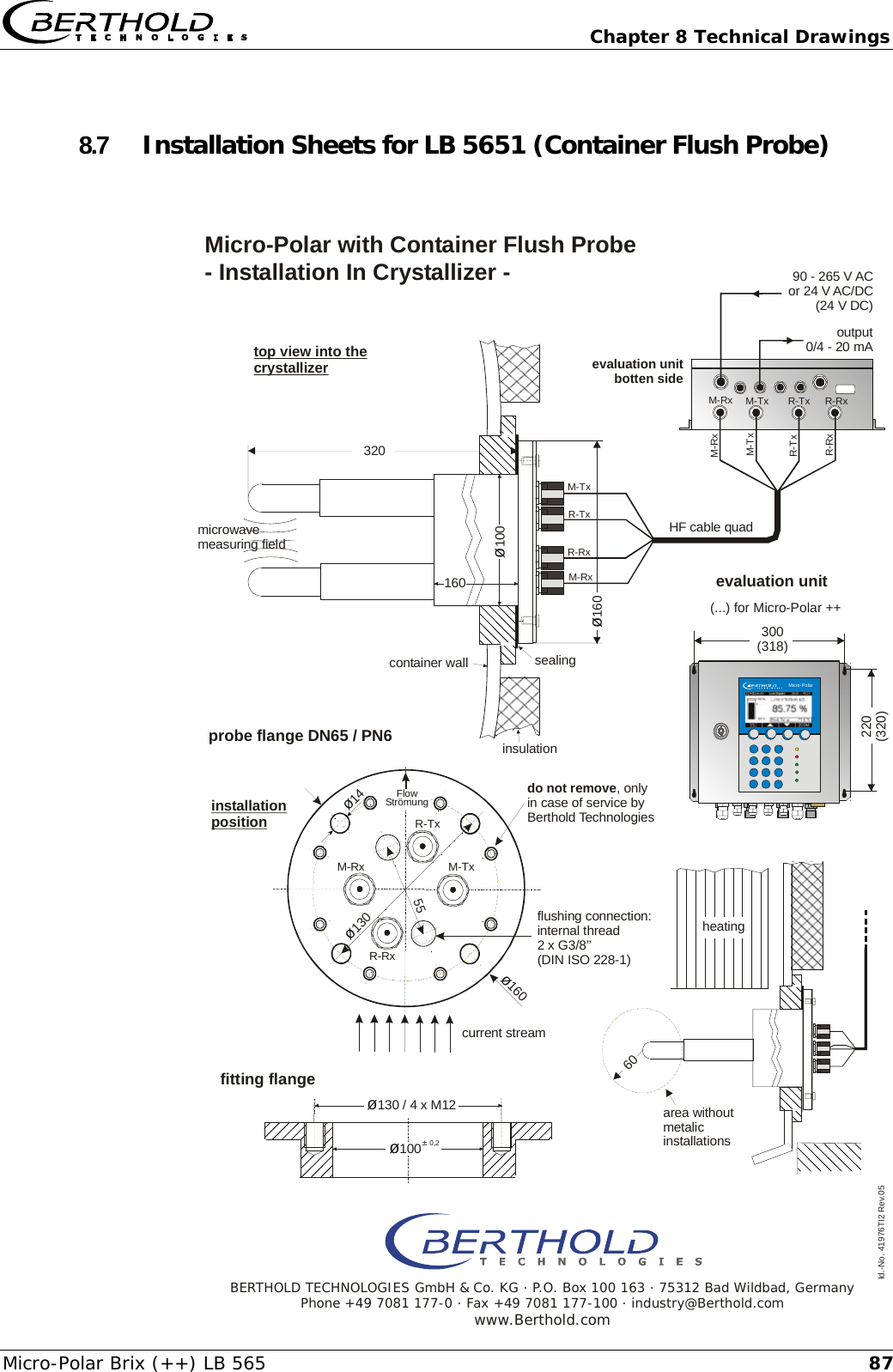
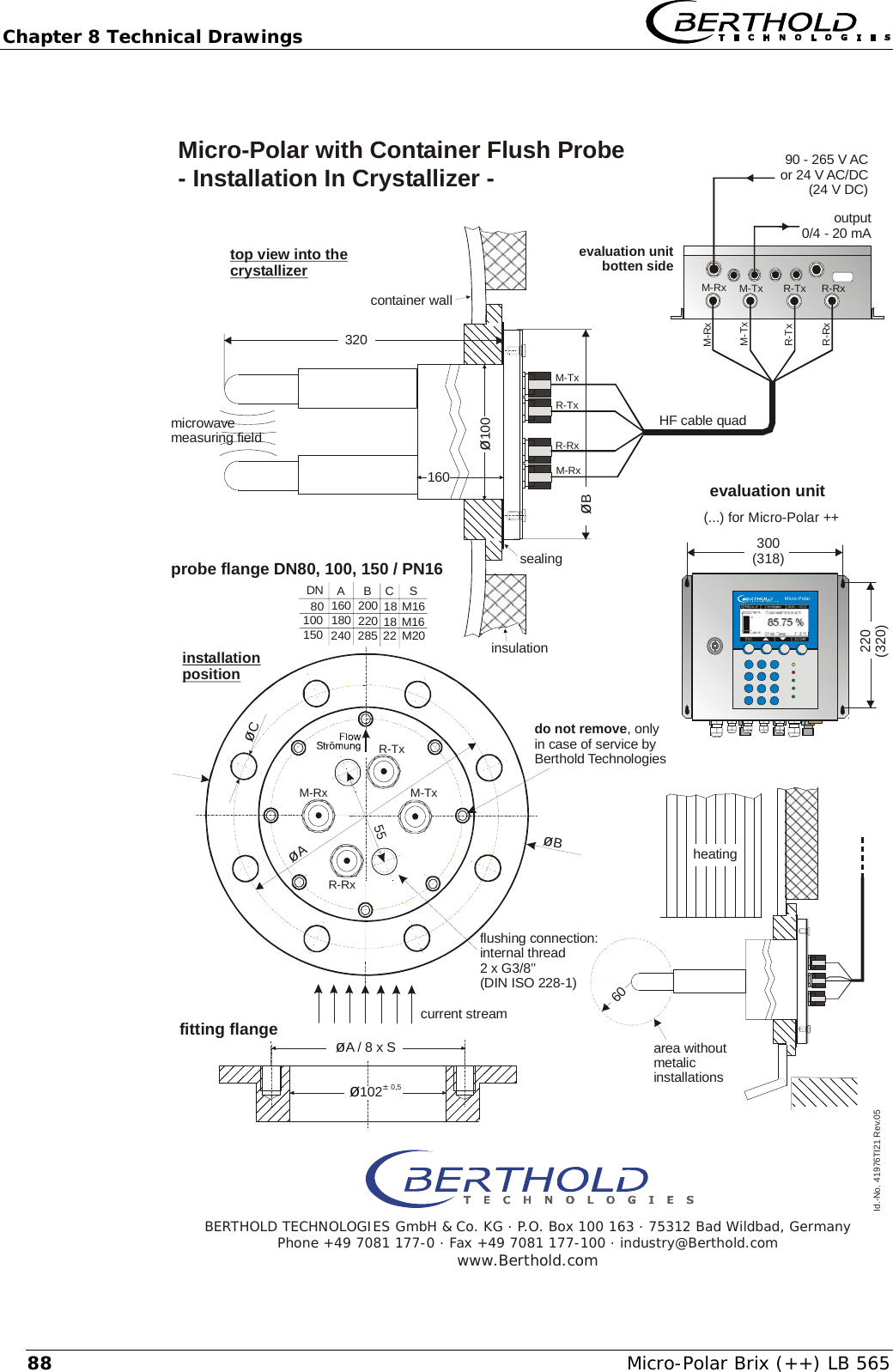
Chapter 4 Getting Started   Micro-Polar Brix (++) LB 565 34Connection of the flushing pipes  The container probe with flushing device consists of two flushing devices with a 3/8 inch inner thread (DIN ISO 228-1). The flushing connections are subsequently sealed to this thread. A sealing to the probe cover is not permitted, for example with silicone. Flush Parameters (only for container flush probe) The degree of deposition or incrustation is essential for the flush parameters, i.e. flush frequency and duration. The flush parame-ters have to be adapted to the product and the process. The following independent flushing parameters for products and processes have to be observed: Flush solution  water, condensation Temperature of flush solution  Maximum 120 °C Pressure  ≥ 3 bar, max. 8 bar Fittings  2 x 3/8 inch female screw thread (DIN ISO 228-1) Supply pipe  ≥ 1/2 inch   Independent flushing parameters product and process, typical starting rates:  Interval  every 2 hours Duration 12 seconds Temperature of flush solution  average product temperature, mostly 65 ±5°C   For measurements on the C-product the flushing intervals can be considerably reduced, e.g. every 6 hours for 30 seconds.  The following is generally valid: the flushing devices can be flushed simultaneously or in shifts. The flushing parameters are valid for every flushing device.   The required flush duration has to take into account a possible inertness of the system, e.g. valve openings. The flush supply pipes have to be insulated well against heat to prevent that the flush solution is initially colder.  The amount of water per flushing connector is approx. 0.8 l/sec at a flushing pressure of 5 bars. Amount of water
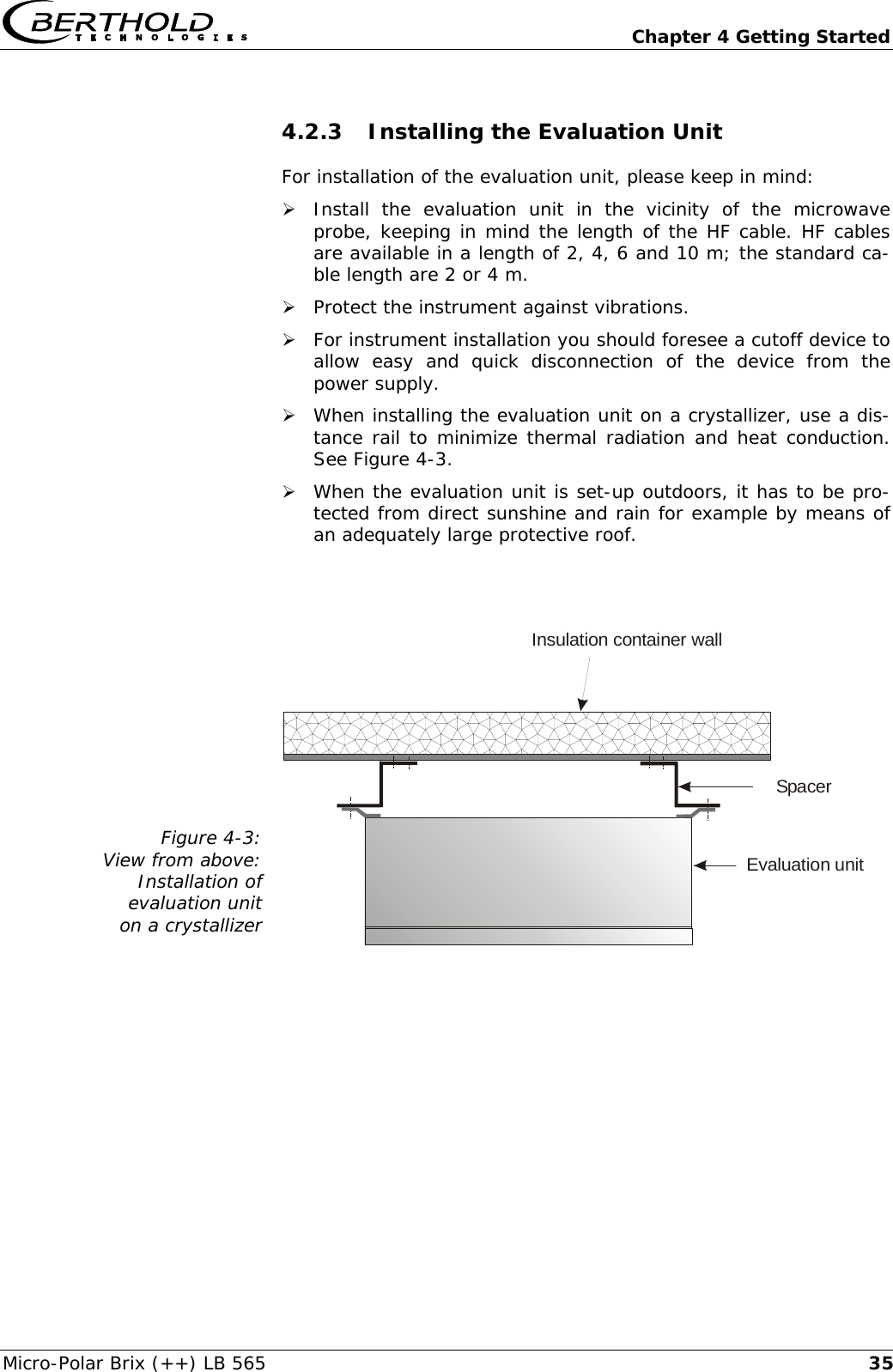
  Chapter 4 Getting Started Micro-Polar Brix (++) LB 565  354.2.3 Installing the Evaluation Unit For installation of the evaluation unit, please keep in mind: ¾ Install the evaluation unit in the vicinity of the microwave probe, keeping in mind the length of the HF cable. HF cables are available in a length of 2, 4, 6 and 10 m; the standard ca-ble length are 2 or 4 m. ¾ Protect the instrument against vibrations. ¾ For instrument installation you should foresee a cutoff device to allow easy and quick disconnection of the device from the power supply. ¾ When installing the evaluation unit on a crystallizer, use a dis-tance rail to minimize thermal radiation and heat conduction. See Figure 4-3. ¾ When the evaluation unit is set-up outdoors, it has to be pro-tected from direct sunshine and rain for example by means of an adequately large protective roof.   Figure 4-3: View from above:  Installation of  evaluation unit  on a crystallizer  Insulation container wallSpacerEvaluation unit
Chapter 4 Getting Started   Micro-Polar Brix (++) LB 565 364.3  Connecting the Evaluation Unit 4.3.1 Connecting the HF Cable You need the following HF quad cable to connect the sensor to the evaluation unit. For the flow cell Version1:  1 HF-cable quad with N-connector Version 2:  2 x solid sheath cable (as signal cable, same length)     1 x solid sheath cable (as reference cable)  For the container probes 1 x HF-cable quad  Prerequisite for a proper measurement is the correct installation of cables! Please keep in mind:  Make sure the cables do not get into contact with hot pipes over the entire length (corrugated tube and single cable section after splitting), e.g. direct contact with the device wall (not insulated). This alone guarantees that all single cables are subject to the sa-me ambient conditions and that the compensation of the cable drift works properly.  Never bend HF cables! The bending radius should not be less than 100 mm. After installation, fix the cables with cable binders to prevent the cable from slipping!
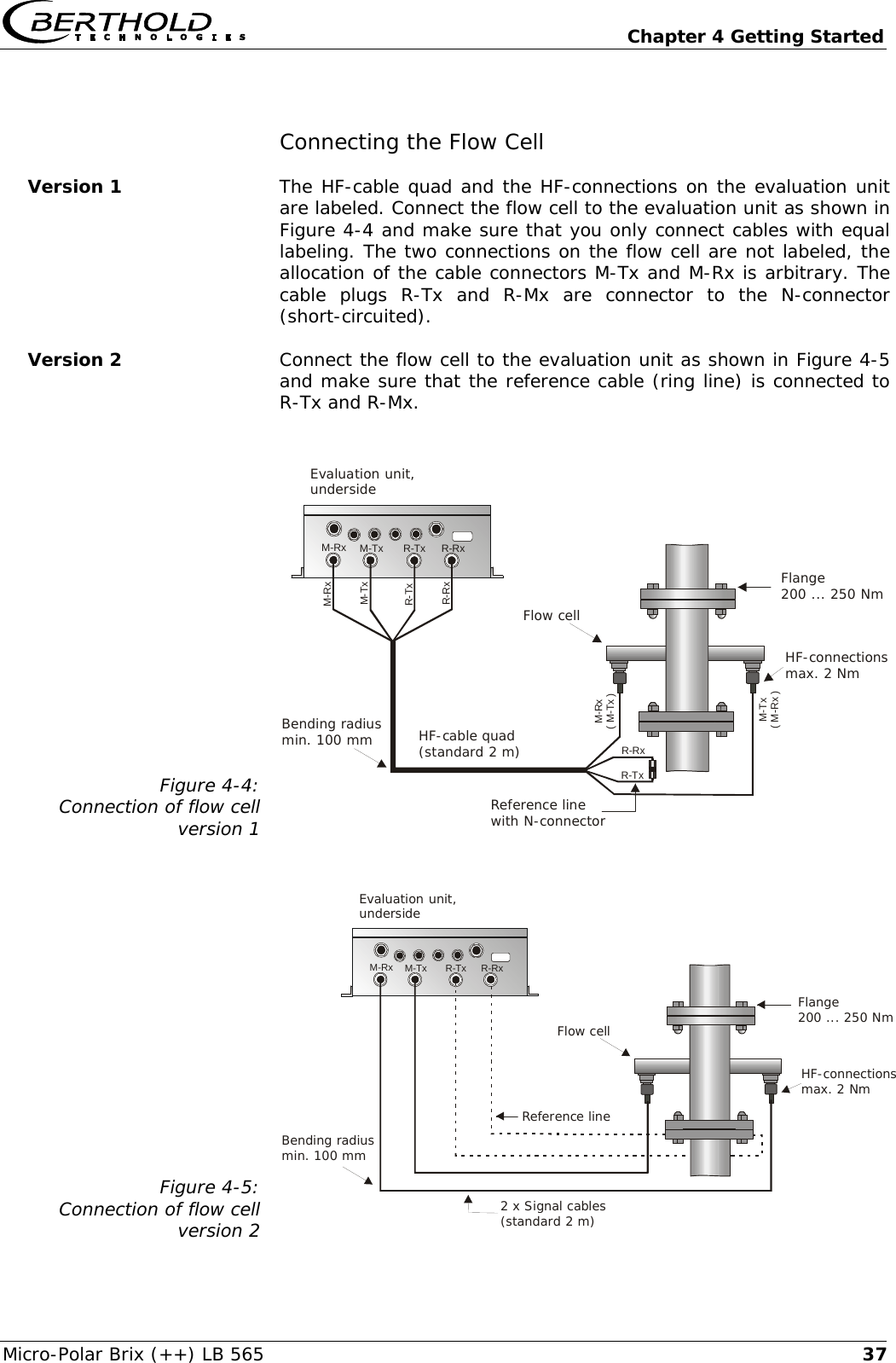
  Chapter 4 Getting Started Micro-Polar Brix (++) LB 565  37Connecting the Flow Cell Version 1  The HF-cable quad and the HF-connections on the evaluation unit are labeled. Connect the flow cell to the evaluation unit as shown in Figure 4-4 and make sure that you only connect cables with equal labeling. The two connections on the flow cell are not labeled, the allocation of the cable connectors M-Tx and M-Rx is arbitrary. The cable plugs R-Tx and R-Mx are connector to the N-connector (short-circuited).  Version 2  Connect the flow cell to the evaluation unit as shown in Figure 4-5 and make sure that the reference cable (ring line) is connected to R-Tx and R-Mx.  Figure 4-4: Connection of flow cell version 1 Evaluation unit,undersideM-TxM-TxM-RxM-RxR-TxR-TxR-RxR-RxReference linewith N-connectorFlow cellBending radiusmin. 100 mm HF-cable quad(standard 2 m) HF-connectionsmax. 2 NmFlange200 ... 250 NmM-Tx( M-Rx )M-Rx( M-Tx )R-RxR-Tx   Figure 4-5: Connection of flow cell version 2 M-TxM-Rx R-Tx R-RxEvaluation unit,undersideReference lineFlow cellBending radiusmin. 100 mm2 x Signal cables(standard 2 m)HF-connectionsmax. 2 NmFlange200 ... 250 Nm
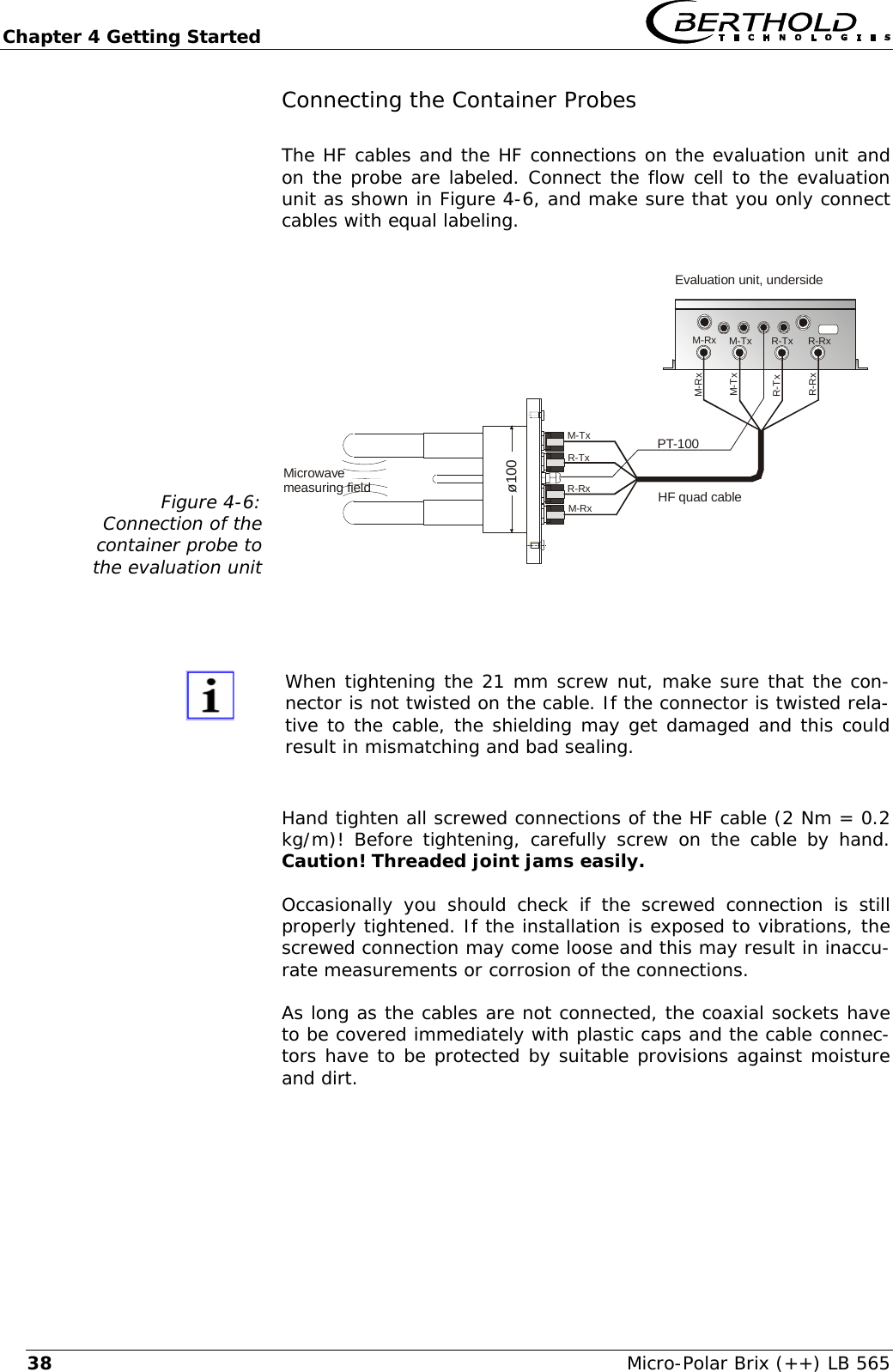
Chapter 4 Getting Started   Micro-Polar Brix (++) LB 565 38Connecting the Container Probes The HF cables and the HF connections on the evaluation unit and on the probe are labeled. Connect the flow cell to the evaluation unit as shown in Figure 4-6, and make sure that you only connect cables with equal labeling.  Figure 4-6: Connection of the  container probe to  the evaluation unit Microwavemeasuring fieldEvaluation unit, undersideø100PT-100HF quad cableM-TxM-TxM-TxM-RxM-RxR-TxR-TxR-RxR-RxM-RxR-TxR-Rx    When tightening the 21 mm screw nut, make sure that the con-nector is not twisted on the cable. If the connector is twisted rela-tive to the cable, the shielding may get damaged and this could result in mismatching and bad sealing.  Hand tighten all screwed connections of the HF cable (2 Nm = 0.2 kg/m)! Before tightening, carefully screw on the cable by hand. Caution! Threaded joint jams easily.  Occasionally you should check if the screwed connection is still properly tightened. If the installation is exposed to vibrations, the screwed connection may come loose and this may result in inaccu-rate measurements or corrosion of the connections. As long as the cables are not connected, the coaxial sockets have to be covered immediately with plastic caps and the cable connec-tors have to be protected by suitable provisions against moisture and dirt.
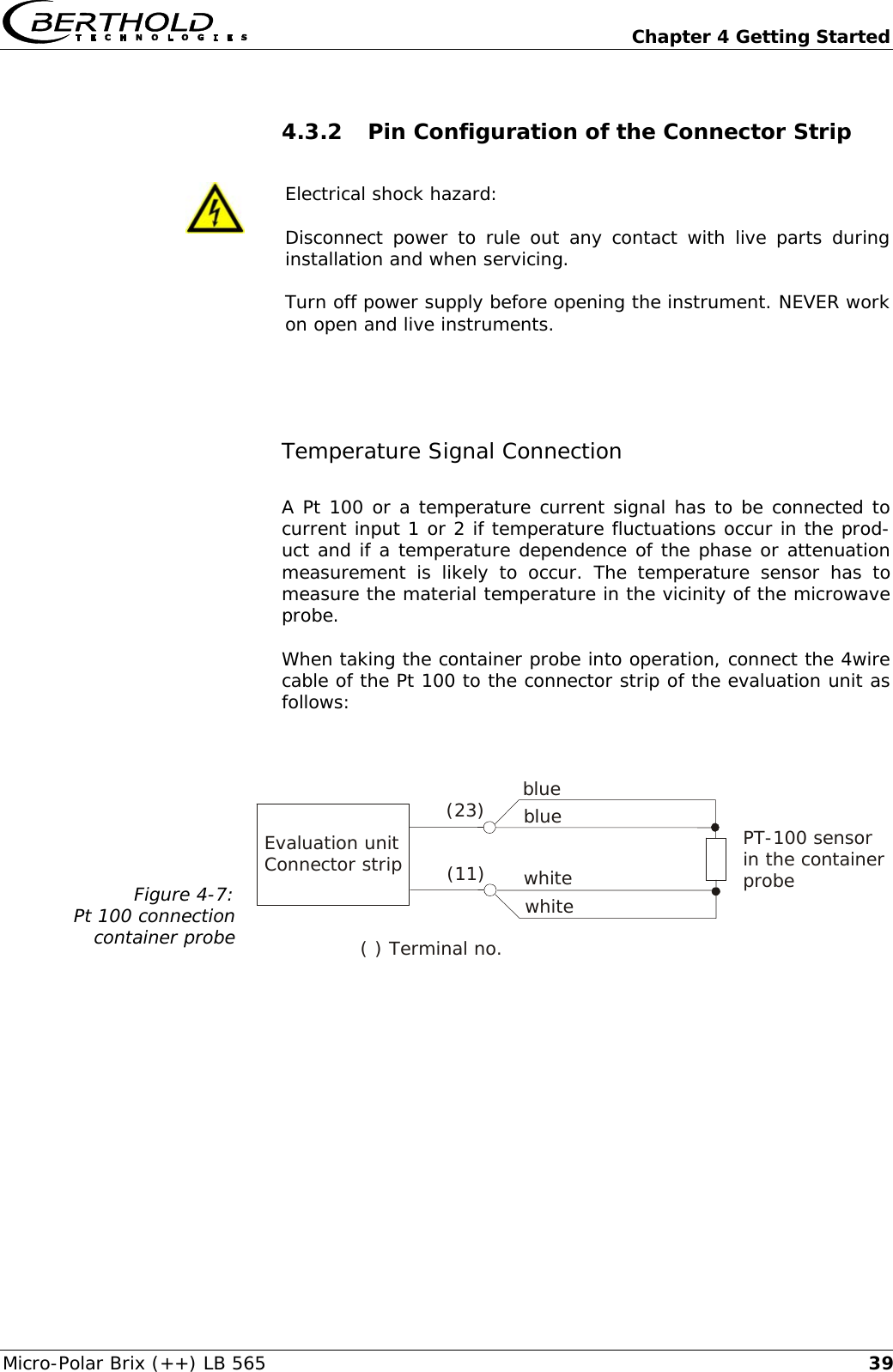
  Chapter 4 Getting Started Micro-Polar Brix (++) LB 565  394.3.2 Pin Configuration of the Connector Strip   Electrical shock hazard: Disconnect power to rule out any contact with live parts during installation and when servicing. Turn off power supply before opening the instrument. NEVER work on open and live instruments.  Temperature Signal Connection A Pt 100 or a temperature current signal has to be connected to current input 1 or 2 if temperature fluctuations occur in the prod-uct and if a temperature dependence of the phase or attenuation measurement is likely to occur. The temperature sensor has to measure the material temperature in the vicinity of the microwave probe.  When taking the container probe into operation, connect the 4wire cable of the Pt 100 to the connector strip of the evaluation unit as follows:  Figure 4-7: Pt 100 connection container probe     Evaluation unit Connector strip ( ) Terminal no.(23) blue white whiteblue PT-100 sensor  in the container probe (11)
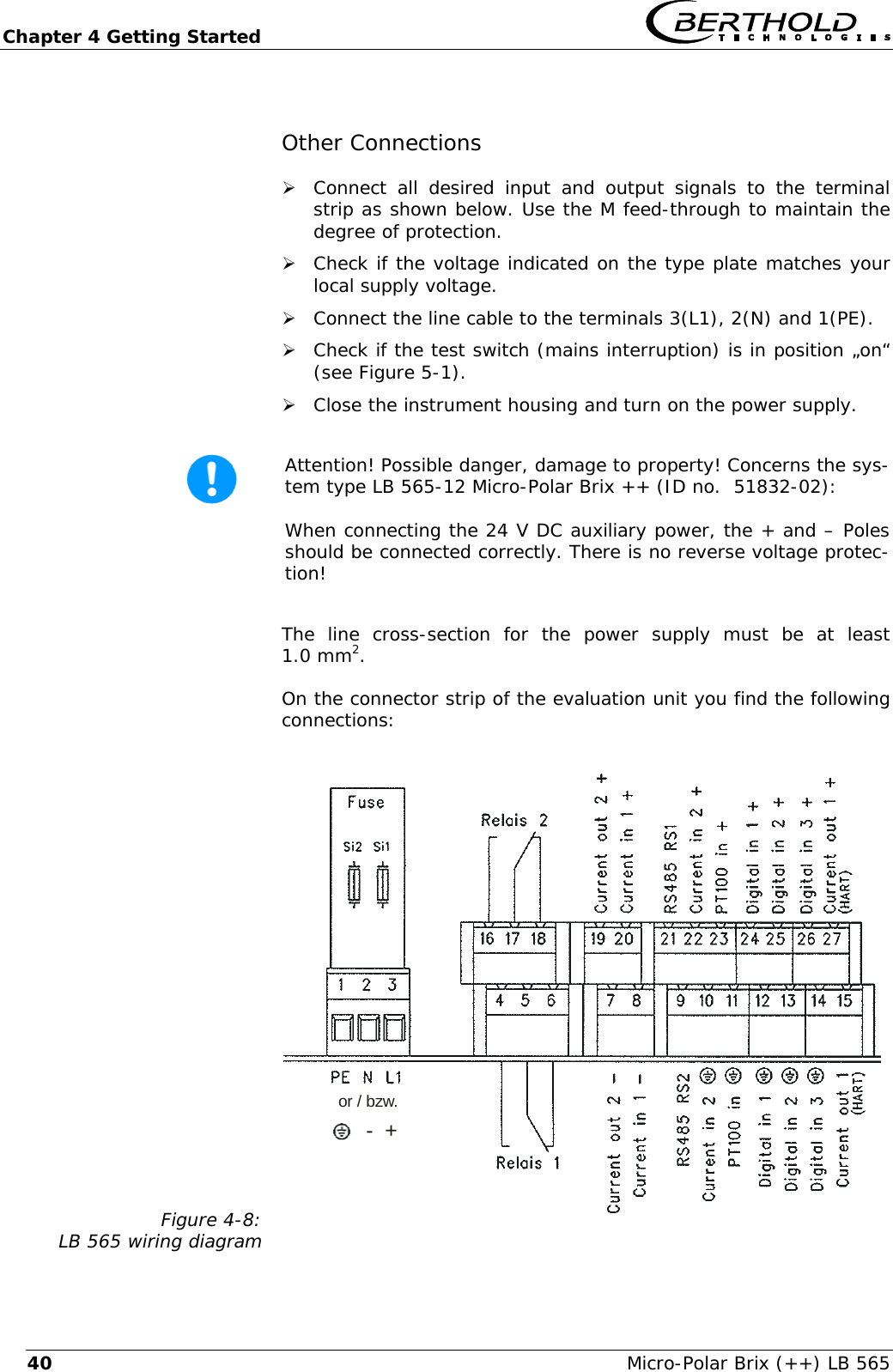
Chapter 4 Getting Started   Micro-Polar Brix (++) LB 565 40Other Connections ¾ Connect all desired input and output signals to the terminal strip as shown below. Use the M feed-through to maintain the degree of protection.  ¾ Check if the voltage indicated on the type plate matches your local supply voltage. ¾ Connect the line cable to the terminals 3(L1), 2(N) and 1(PE). ¾ Check if the test switch (mains interruption) is in position „on“ (see Figure 5-1). ¾ Close the instrument housing and turn on the power supply.   Attention! Possible danger, damage to property! Concerns the sys-tem type LB 565-12 Micro-Polar Brix ++ (ID no.  51832-02):  When connecting the 24 V DC auxiliary power, the + and – Poles should be connected correctly. There is no reverse voltage protec-tion!  The line cross-section for the power supply must be at least 1.0 mm2. On the connector strip of the evaluation unit you find the following connections: Figure 4-8: LB 565 wiring diagram or / bzw.-  +
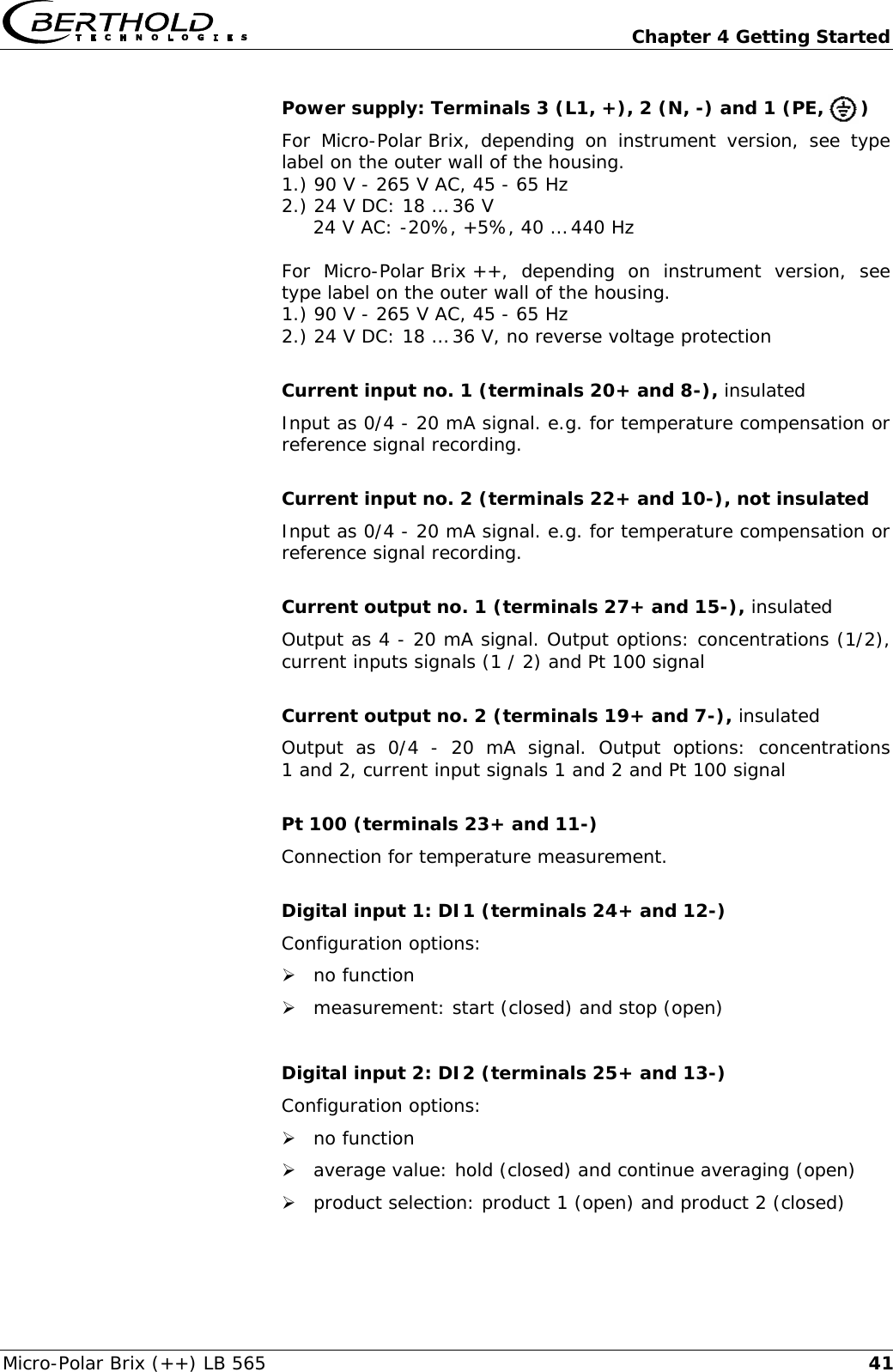
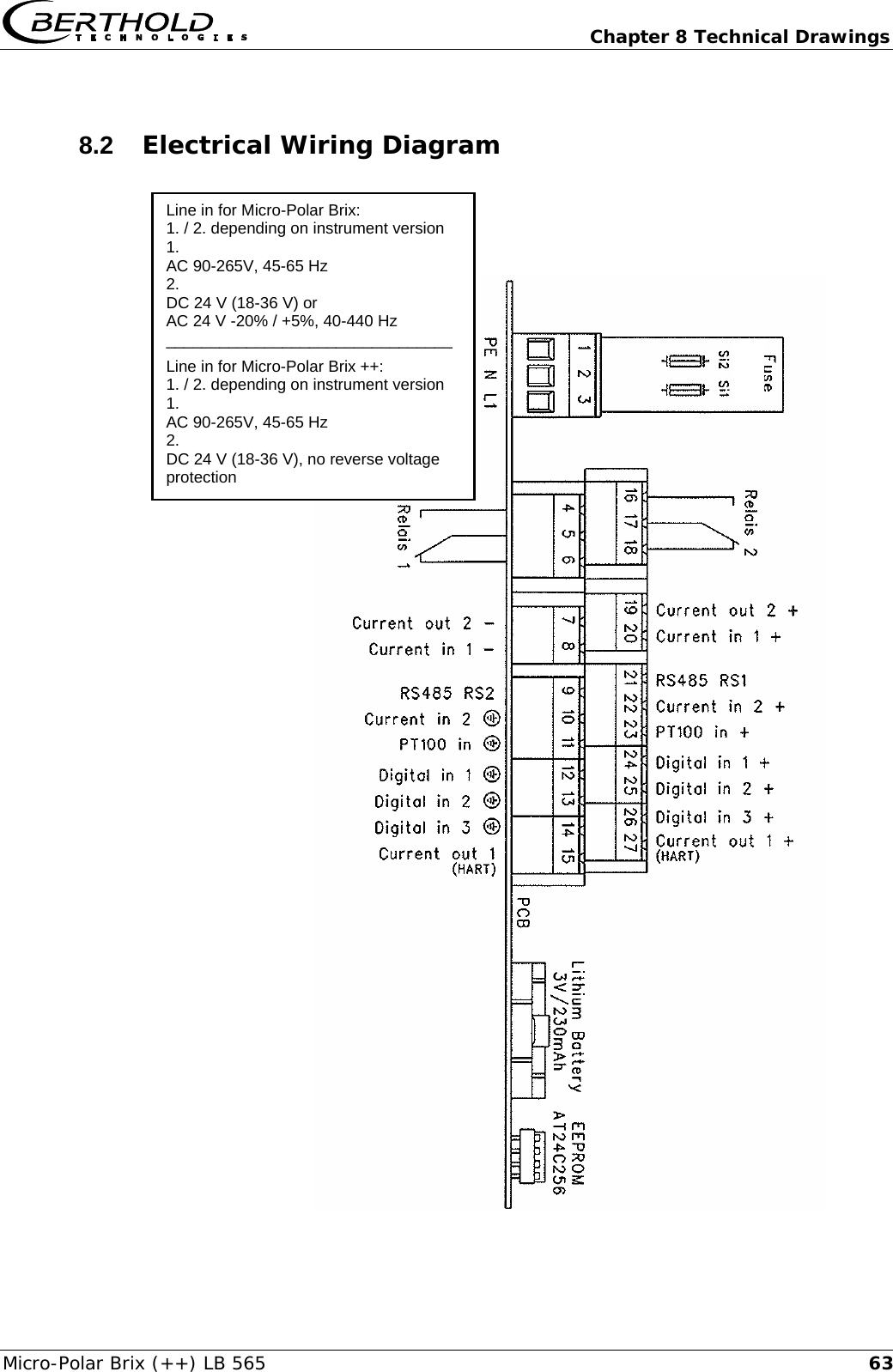
  Chapter 4 Getting Started Micro-Polar Brix (++) LB 565  41Power supply: Terminals 3 (L1, +), 2 (N, -) and 1 (PE,      ) For Micro-Polar Brix, depending on instrument version, see type label on the outer wall of the housing. 1.) 90 V - 265 V AC, 45 - 65 Hz 2.) 24 V DC: 18 … 36 V      24 V AC: -20%, +5%, 40 … 440 Hz  For Micro-Polar Brix ++, depending on instrument version, see type label on the outer wall of the housing. 1.) 90 V - 265 V AC, 45 - 65 Hz 2.) 24 V DC: 18 … 36 V, no reverse voltage protection  Current input no. 1 (terminals 20+ and 8-), insulated Input as 0/4 - 20 mA signal. e.g. for temperature compensation or reference signal recording.  Current input no. 2 (terminals 22+ and 10-), not insulated Input as 0/4 - 20 mA signal. e.g. for temperature compensation or reference signal recording.  Current output no. 1 (terminals 27+ and 15-), insulated Output as 4 - 20 mA signal. Output options: concentrations (1/2), current inputs signals (1 / 2) and Pt 100 signal  Current output no. 2 (terminals 19+ and 7-), insulated Output as 0/4 - 20 mA signal. Output options: concentrations 1 and 2, current input signals 1 and 2 and Pt 100 signal  Pt 100 (terminals 23+ and 11-) Connection for temperature measurement.  Digital input 1: DI1 (terminals 24+ and 12-) Configuration options: ¾ no function ¾ measurement: start (closed) and stop (open)  Digital input 2: DI2 (terminals 25+ and 13-) Configuration options: ¾ no function ¾ average value: hold (closed) and continue averaging (open) ¾ product selection: product 1 (open) and product 2 (closed)
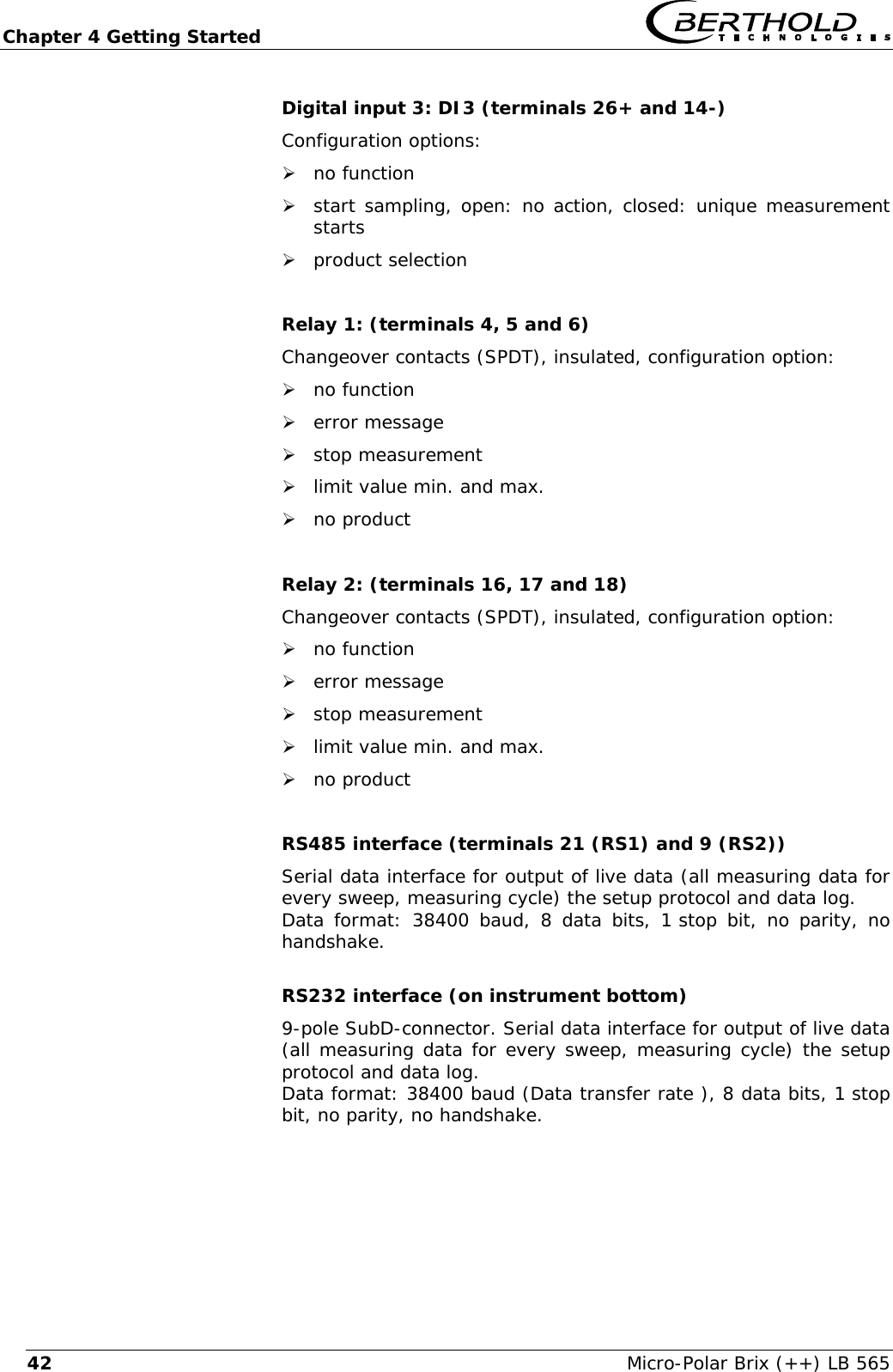
Chapter 4 Getting Started   Micro-Polar Brix (++) LB 565 42Digital input 3: DI3 (terminals 26+ and 14-) Configuration options: ¾ no function ¾ start sampling, open: no action, closed: unique measurement starts ¾ product selection  Relay 1: (terminals 4, 5 and 6) Changeover contacts (SPDT), insulated, configuration option: ¾ no function ¾ error message ¾ stop measurement ¾ limit value min. and max. ¾ no product  Relay 2: (terminals 16, 17 and 18) Changeover contacts (SPDT), insulated, configuration option: ¾ no function ¾ error message ¾ stop measurement ¾ limit value min. and max. ¾ no product  RS485 interface (terminals 21 (RS1) and 9 (RS2)) Serial data interface for output of live data (all measuring data for every sweep, measuring cycle) the setup protocol and data log. Data format: 38400 baud, 8 data bits, 1 stop bit, no parity, no handshake.  RS232 interface (on instrument bottom) 9-pole SubD-connector. Serial data interface for output of live data (all measuring data for every sweep, measuring cycle) the setup protocol and data log. Data format: 38400 baud (Data transfer rate ), 8 data bits, 1 stop bit, no parity, no handshake.
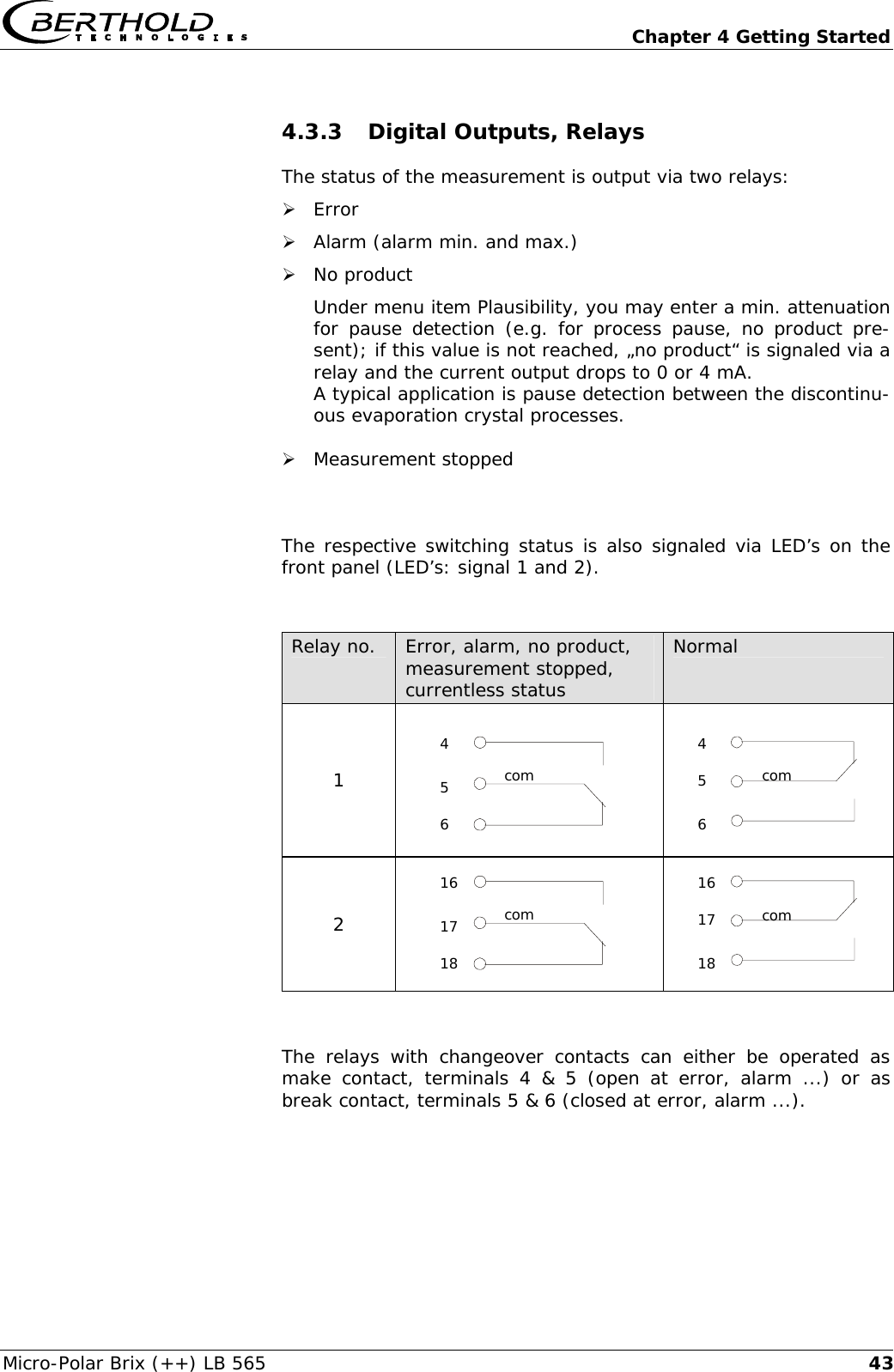
  Chapter 4 Getting Started Micro-Polar Brix (++) LB 565  434.3.3 Digital Outputs, Relays The status of the measurement is output via two relays: ¾ Error ¾ Alarm (alarm min. and max.) ¾ No product Under menu item Plausibility, you may enter a min. attenuation for pause detection (e.g. for process pause, no product pre-sent); if this value is not reached, „no product“ is signaled via a relay and the current output drops to 0 or 4 mA. A typical application is pause detection between the discontinu-ous evaporation crystal processes.  ¾ Measurement stopped  The respective switching status is also signaled via LED’s on the front panel (LED’s: signal 1 and 2).   Relay no.  Error, alarm, no product, measurement stopped, currentless status Normal 1    2    The relays with changeover contacts can either be operated as make contact, terminals 4 & 5 (open at error, alarm ...) or as break contact, terminals 5 & 6 (closed at error, alarm ...).  com 4 5 6 com 16 17 18 com 4 6 5 com 16 18 17
  Chapter 5 Service Instructions Micro-Polar Brix (++) LB 565  45Chapter 5. Service Instructions 5.1  General Information The evaluation unit has no wearing parts or components requiring any special maintenance. A malfunction of the measuring system is not always due to a de-fect in the instrument. Often the error is caused by incorrect op-eration, wrong installation, or irregularities in the product being measured.  If a malfunction occurs, anyway, the measuring system helps you to identify and eliminate errors by displaying error messages on the LCD, indicating operator errors and defects of the electronics. Usually, faulty modules of the evaluation unit cannot be repaired but have to be replaced. The microwave module is fixed with screws to a shielding cover and must not be opened. 5.2  Wearing Parts The evaluation unit consists of no wearing parts and components that need special attention.  The plastic rods of the container probes and the PTFE lining of the measuring cell can eventually experience abrasion depending on the material being measured. A lower to middle abrasion influ-ences inconsiderably the measurement or is compensated by cali-bration. Therefore, you should check the wearing parts approxi-mately every 2 years. The plastic rods of the container probe and the lining of the meas-uring cell can be exchanged if abrasion is heavy. During excessive wear, the plastic rods of the container probe and the lining of the Flow cells can be exchanged. These container probes and the Flow cells have to be sent back to the company. An on-site exchange is not possible. 5.3  Instrument Cleaning Clean all system components using a moistened cloth. Do not use any chemical cleaning agent. Parts coming into contact with the product (during regular operation) can be cleaned with hot water, taking into account the temperature limits (see chapter 6.2 Technical Data Sensors).
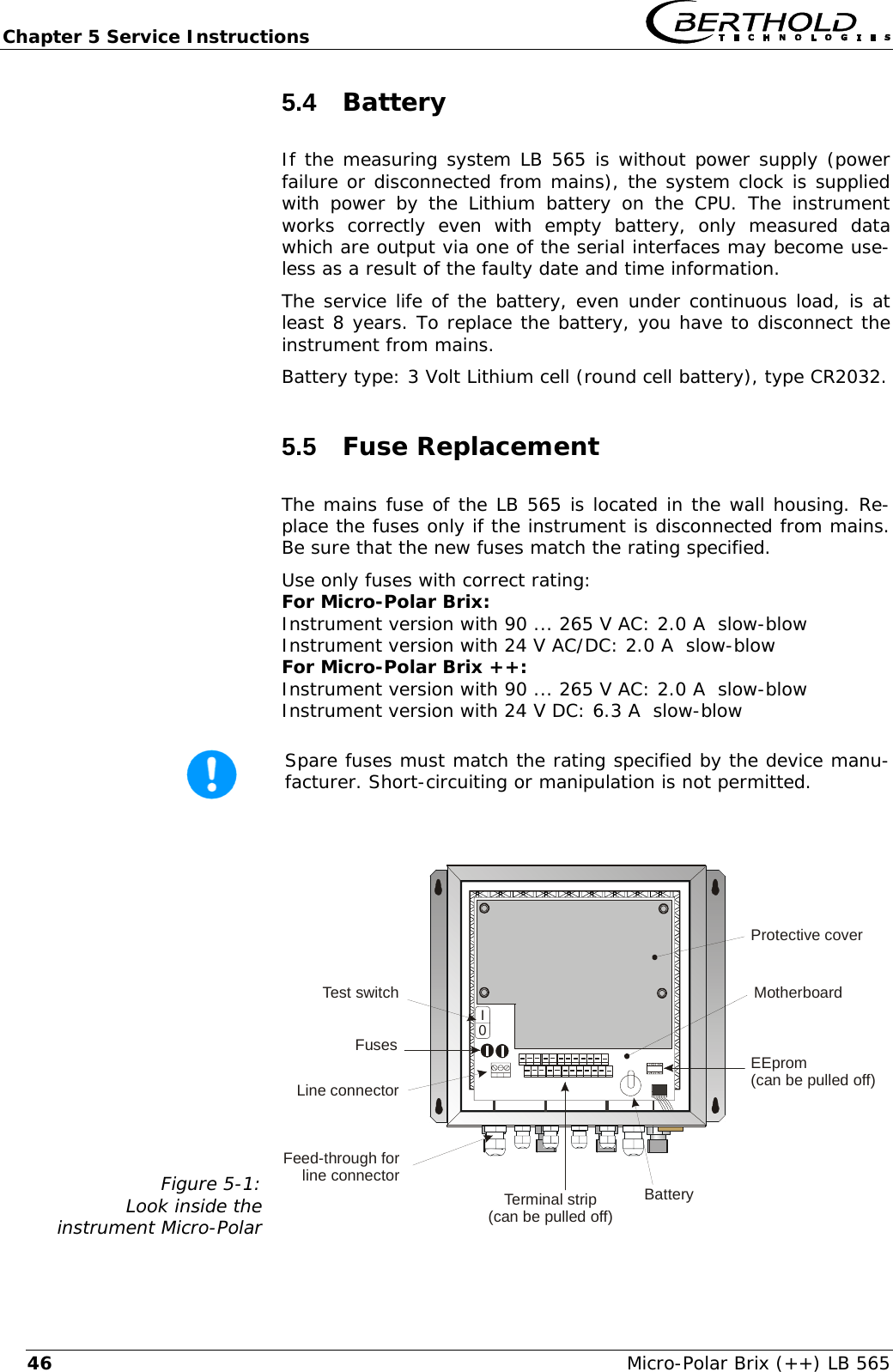
Chapter 5 Service Instructions   Micro-Polar Brix (++) LB 565 465.4  Battery If the measuring system LB 565 is without power supply (power failure or disconnected from mains), the system clock is supplied with power by the Lithium battery on the CPU. The instrument works correctly even with empty battery, only measured data which are output via one of the serial interfaces may become use-less as a result of the faulty date and time information.  The service life of the battery, even under continuous load, is at least 8 years. To replace the battery, you have to disconnect the instrument from mains. Battery type: 3 Volt Lithium cell (round cell battery), type CR2032. 5.5  Fuse Replacement The mains fuse of the LB 565 is located in the wall housing. Re-place the fuses only if the instrument is disconnected from mains. Be sure that the new fuses match the rating specified. Use only fuses with correct rating:  For Micro-Polar Brix: Instrument version with 90 ... 265 V AC: 2.0 A  slow-blow Instrument version with 24 V AC/DC: 2.0 A  slow-blow For Micro-Polar Brix ++: Instrument version with 90 ... 265 V AC: 2.0 A  slow-blow Instrument version with 24 V DC: 6.3 A  slow-blow   Spare fuses must match the rating specified by the device manu-facturer. Short-circuiting or manipulation is not permitted.  Figure 5-1: Look inside the  instrument Micro-Polar     0INetzteilFusesLine connectorTerminal strip(can be pulled off)BatteryEEprom(can be pulled off)Feed-through forline connectorTest switch MotherboardProtective cover
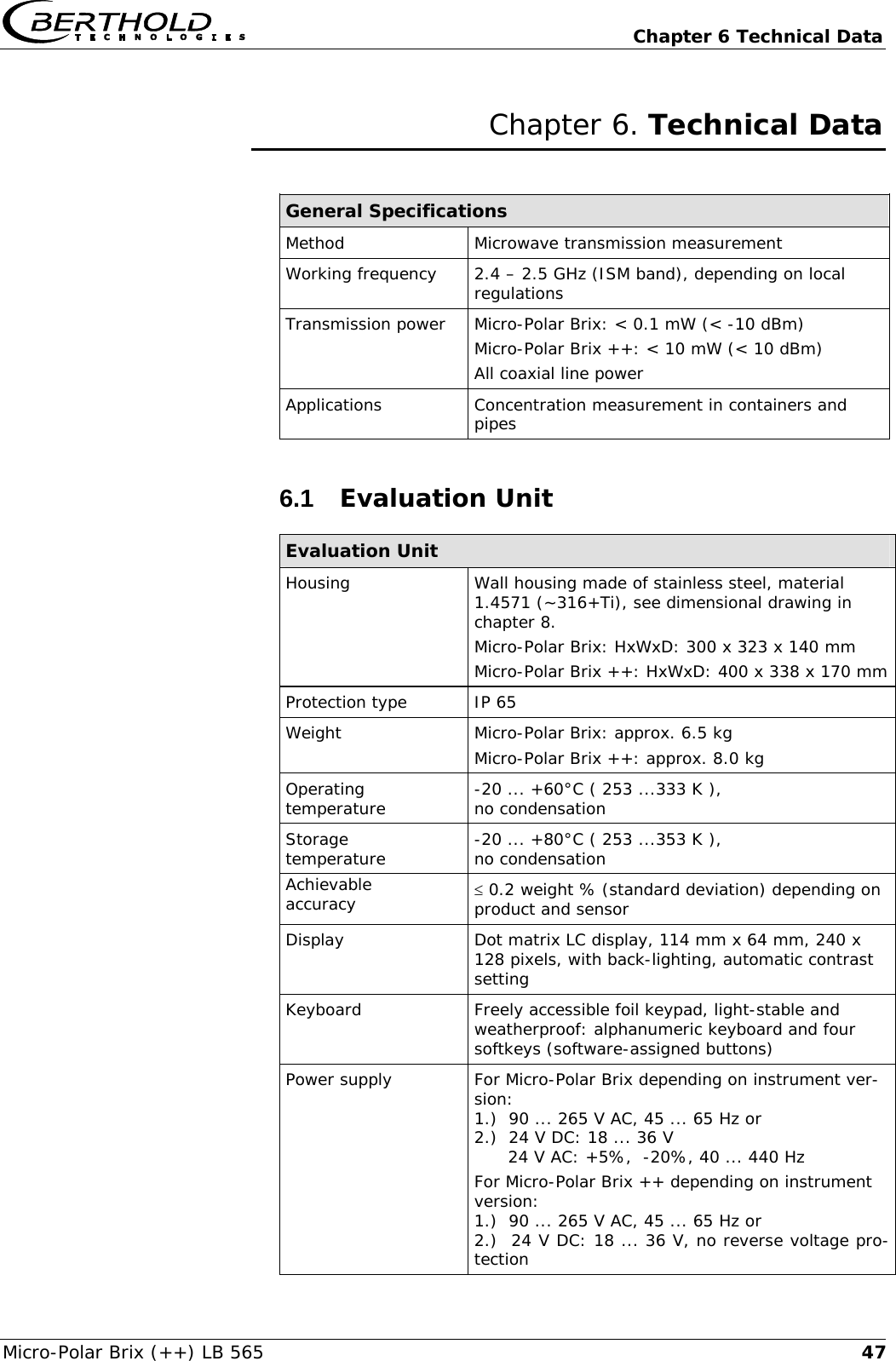
  Chapter 6 Technical Data Micro-Polar Brix (++) LB 565  47Chapter 6. Technical Data  General Specifications Method Microwave transmission measurement Working frequency   2.4 – 2.5 GHz (ISM band), depending on local regulations Transmission power  Micro-Polar Brix: < 0.1 mW (< -10 dBm) Micro-Polar Brix ++: < 10 mW (< 10 dBm) All coaxial line power Applications  Concentration measurement in containers and pipes 6.1  Evaluation Unit Evaluation Unit Housing Wall housing made of stainless steel, material 1.4571 (~316+Ti), see dimensional drawing in chapter 8. Micro-Polar Brix: HxWxD: 300 x 323 x 140 mm Micro-Polar Brix ++: HxWxD: 400 x 338 x 170 mm  Protection type  IP 65 Weight  Micro-Polar Brix: approx. 6.5 kg Micro-Polar Brix ++: approx. 8.0 kg Operating temperature  -20 ... +60°C ( 253 ...333 K ),  no condensation Storage  temperature  -20 ... +80°C ( 253 ...353 K ),  no condensation Achievable  accuracy  ≤ 0.2 weight % (standard deviation) depending on product and sensor Display  Dot matrix LC display, 114 mm x 64 mm, 240 x 128 pixels, with back-lighting, automatic contrast setting Keyboard  Freely accessible foil keypad, light-stable and weatherproof: alphanumeric keyboard and four softkeys (software-assigned buttons) Power supply  For Micro-Polar Brix depending on instrument ver-sion: 1.)  90 ... 265 V AC, 45 ... 65 Hz or 2.)  24 V DC: 18 ... 36 V       24 V AC: +5%,  -20%, 40 ... 440 Hz For Micro-Polar Brix ++ depending on instrument version: 1.)  90 ... 265 V AC, 45 ... 65 Hz or 2.)  24 V DC: 18 ... 36 V, no reverse voltage pro-tection
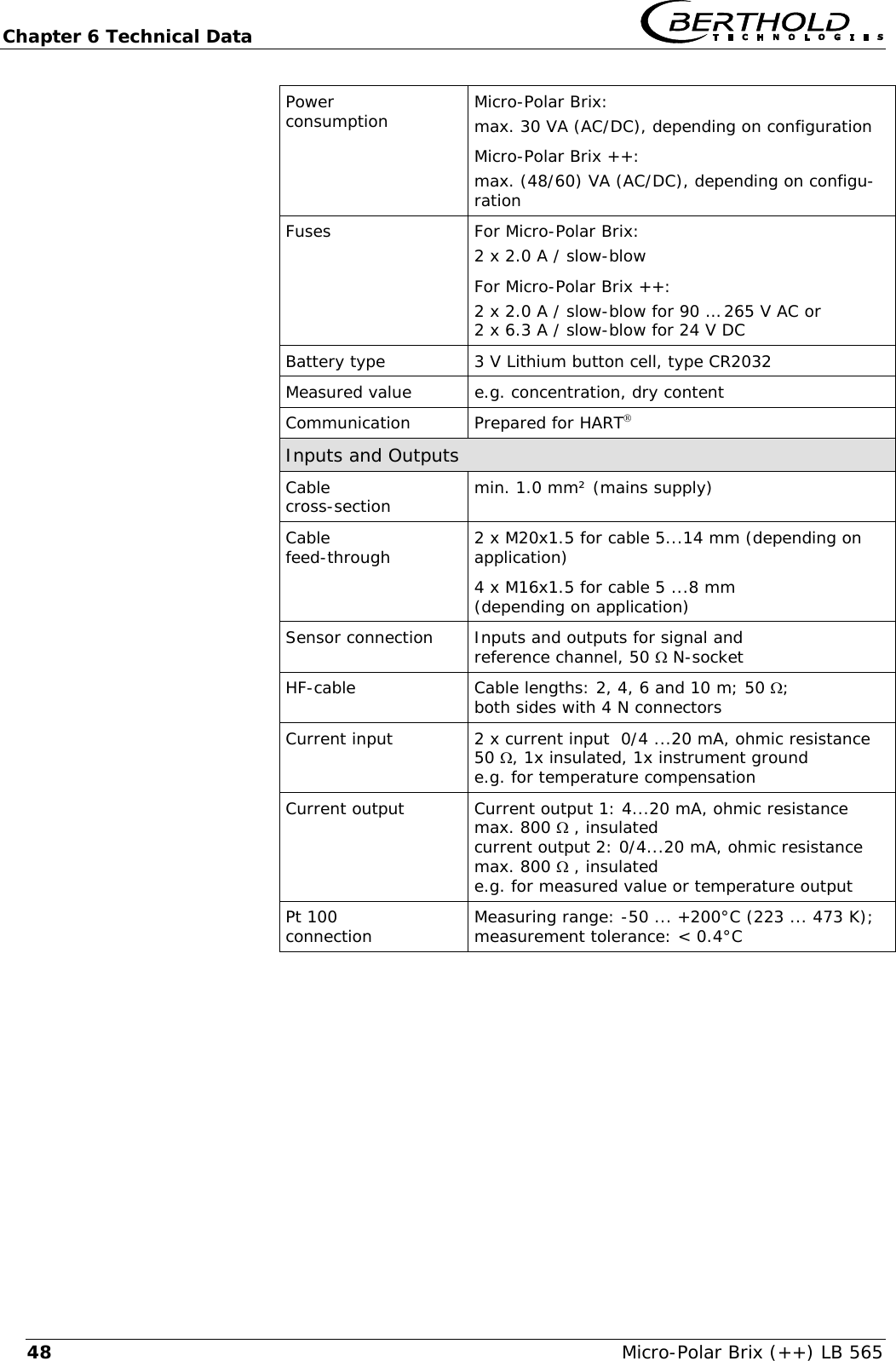
Chapter 6 Technical Data   Micro-Polar Brix (++) LB 565 48Power  consumption  Micro-Polar Brix: max. 30 VA (AC/DC), depending on configuration Micro-Polar Brix ++: max. (48/60) VA (AC/DC), depending on configu-ration Fuses  For Micro-Polar Brix: 2 x 2.0 A / slow-blow For Micro-Polar Brix ++: 2 x 2.0 A / slow-blow for 90 … 265 V AC or 2 x 6.3 A / slow-blow for 24 V DC Battery type  3 V Lithium button cell, type CR2032 Measured value  e.g. concentration, dry content Communication  Prepared for HART® Inputs and Outputs Cable  cross-section  min. 1.0 mm² (mains supply) Cable  feed-through  2 x M20x1.5 for cable 5...14 mm (depending on application) 4 x M16x1.5 for cable 5 ...8 mm  (depending on application) Sensor connection Inputs and outputs for signal and  reference channel, 50 Ω N-socket HF-cable   Cable lengths: 2, 4, 6 and 10 m; 50 Ω;  both sides with 4 N connectors  Current input  2 x current input  0/4 ...20 mA, ohmic resistance 50 Ω, 1x insulated, 1x instrument ground e.g. for temperature compensation Current output Current output 1: 4...20 mA, ohmic resistance max. 800 Ω , insulated current output 2: 0/4...20 mA, ohmic resistance max. 800 Ω , insulated e.g. for measured value or temperature output Pt 100  connection  Measuring range: -50 ... +200°C (223 ... 473 K); measurement tolerance: < 0.4°C
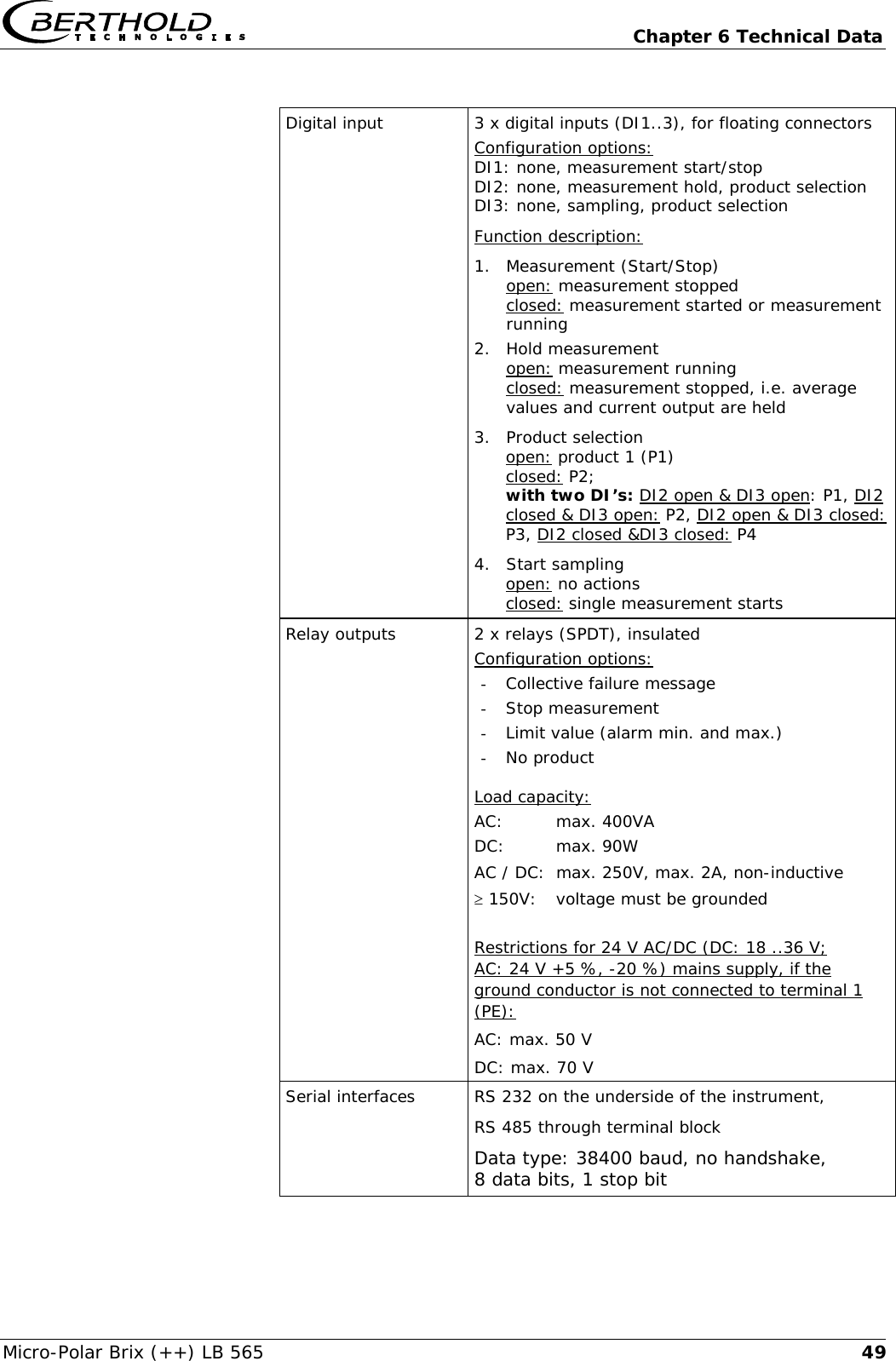
  Chapter 6 Technical Data Micro-Polar Brix (++) LB 565  49 Digital input  3 x digital inputs (DI1..3), for floating connectors Configuration options: DI1: none, measurement start/stop DI2: none, measurement hold, product selection DI3: none, sampling, product selection Function description: 1. Measurement (Start/Stop)  open: measurement stopped  closed: measurement started or measurement running 2. Hold measurement open: measurement running closed: measurement stopped, i.e. average values and current output are held 3. Product selection open: product 1 (P1) closed: P2;  with two DI’s: DI2 open & DI3 open: P1, DI2 closed & DI3 open: P2, DI2 open & DI3 closed: P3, DI2 closed &DI3 closed: P4 4. Start sampling open: no actions closed: single measurement starts Relay outputs  2 x relays (SPDT), insulated Configuration options: - Collective failure message - Stop measurement - Limit value (alarm min. and max.) - No product  Load capacity: AC: max. 400VA DC: max. 90W AC / DC:  max. 250V, max. 2A, non-inductive ≥ 150V:  voltage must be grounded  Restrictions for 24 V AC/DC (DC: 18 ..36 V;  AC: 24 V +5 %, -20 %) mains supply, if the ground conductor is not connected to terminal 1 (PE): AC: max. 50 V DC: max. 70 V Serial interfaces RS 232 on the underside of the instrument, RS 485 through terminal block Data type: 38400 baud, no handshake, 8 data bits, 1 stop bit
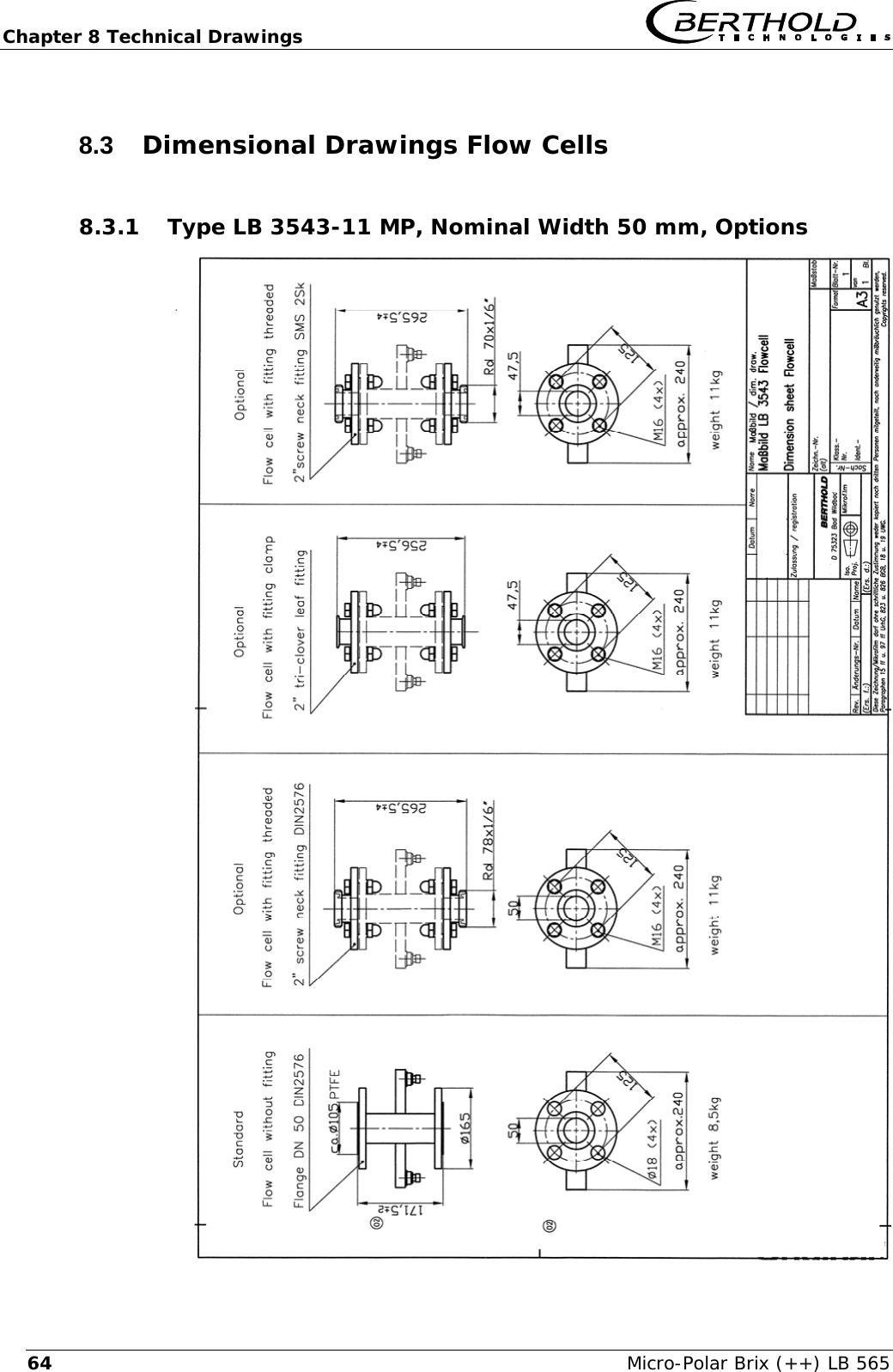
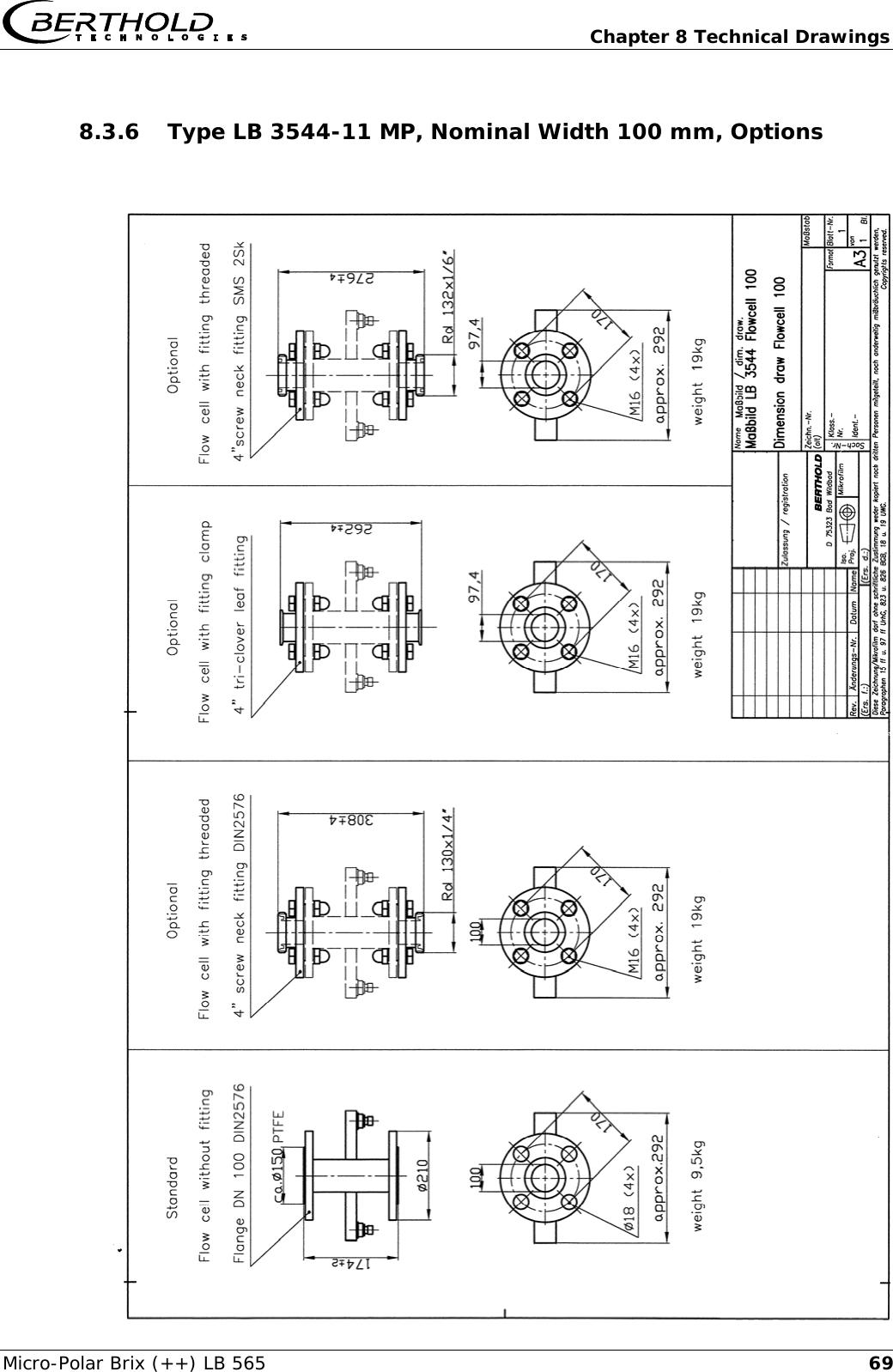
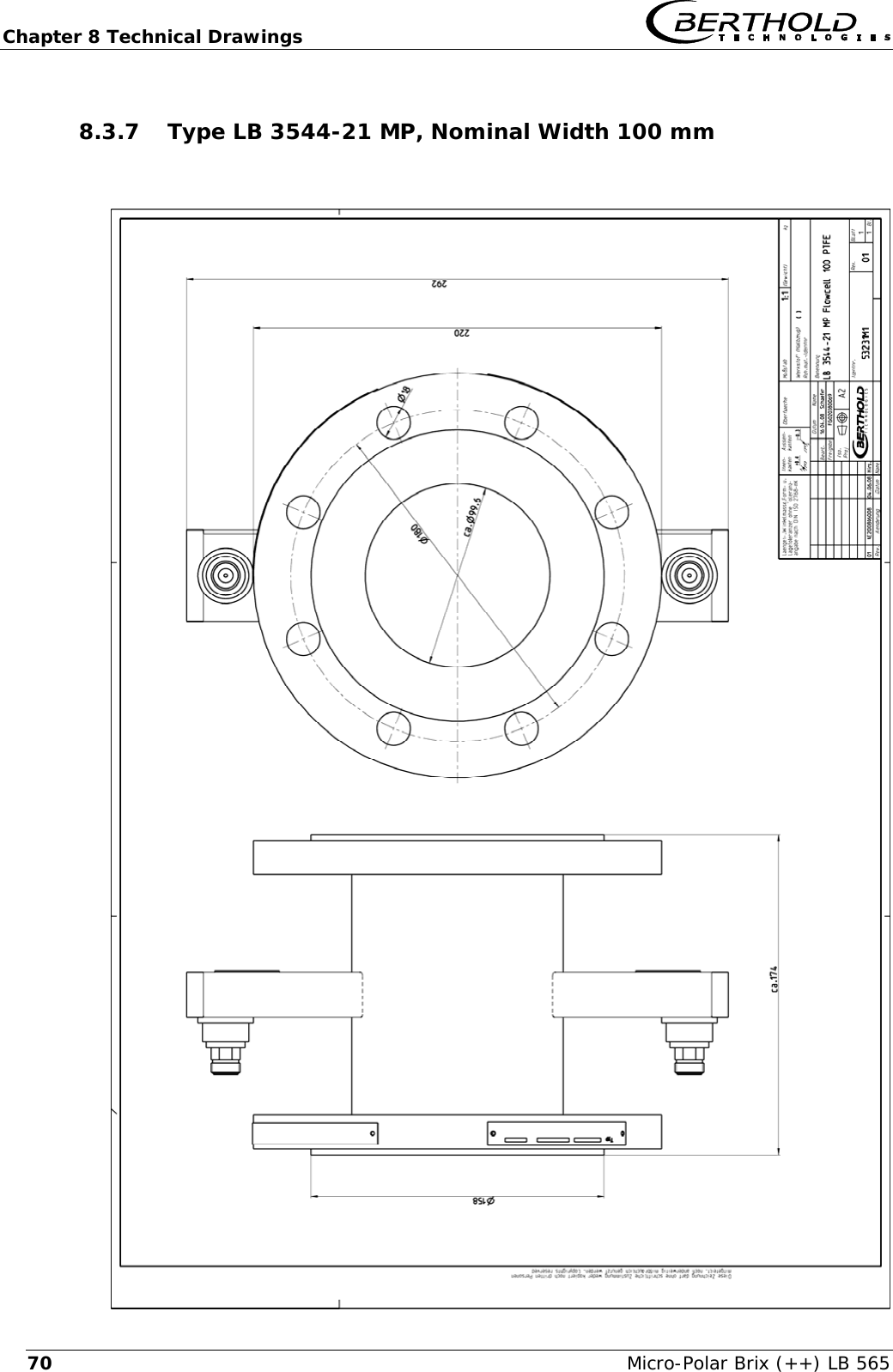
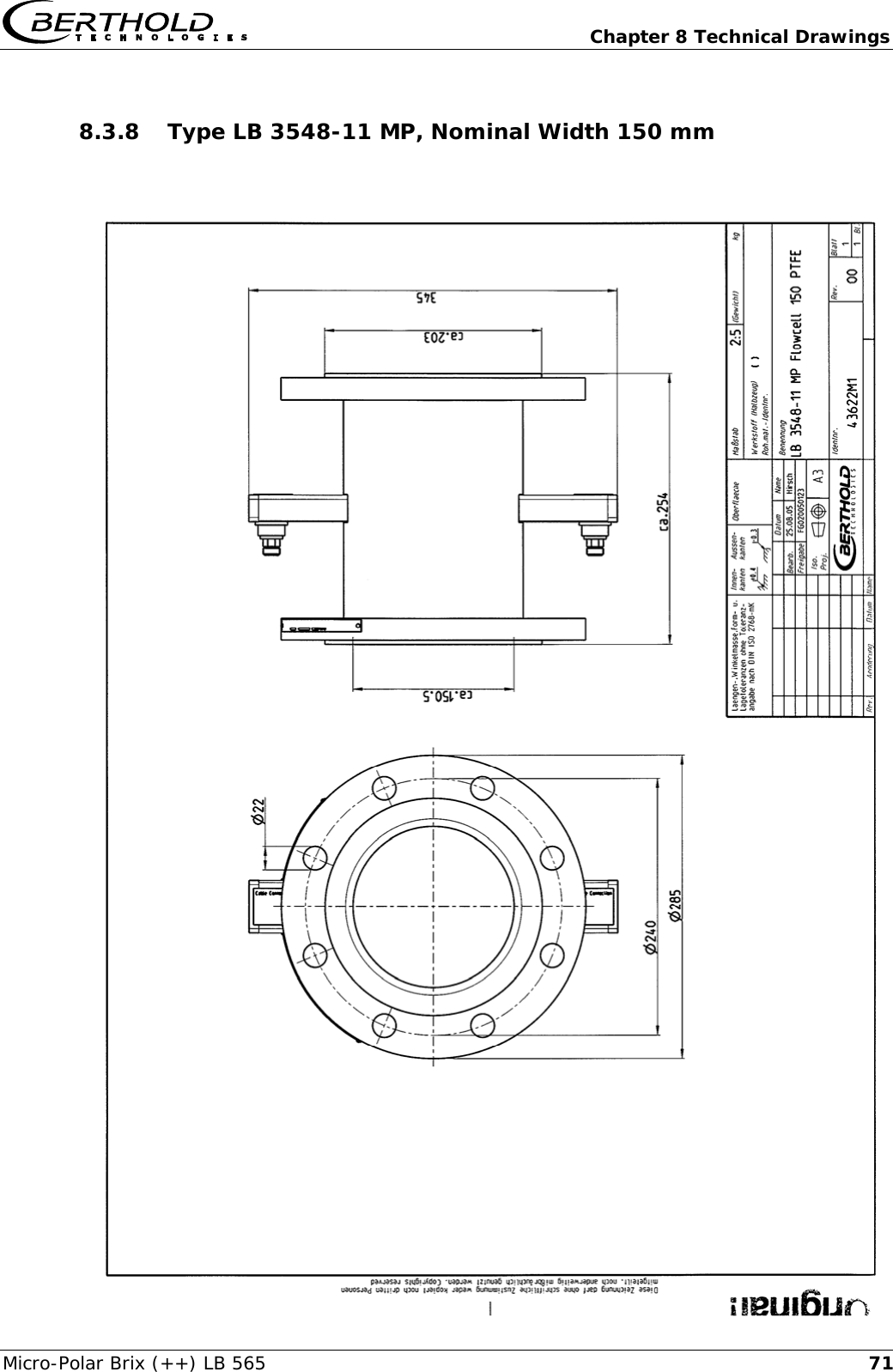
Chapter 6 Technical Data   Micro-Polar Brix (++) LB 565 506.2  Technical Data Sensors Flow cells Application  Microwave flow cell with various nominal widths and flanges for measurement on pipelines Material  Stainless steel, PTFE lining Process coupling  Flange according to DIN EN 1092 Type 05 and ASA Optional with threaded or clamp connector Process pressure  Up to 20 bar (relative), depending on nominal width and flange type, see table below Temperature range Product temperature: +10 ... +130°C (283 … 403 K) Ambient temperature: -20 ... +60°C (253 … 333 K) Storage temperature: +10 ... +80°C (283 … 353 K) Connections  2 x HF connections: N-socket, 50 Ω  for HF-cable with max. 10 m length Versions  Nominal pipe widths from 50 ... 150 mm Dimensions  See dimensional drawings in chapter 8      Overview flow cells Designation  ID-No.  Nominal width [mm] Flange  Pressure [bar] LB 3543-11 MP  43617  50  DN 50 / PN 16  16 LB 3547-11 MP  43619  65  DN 65 / PN 40  20 LB 3545-11 MP  43620  80  DN 80 / PN 16  16 LB 3544-11 MP  43621  100  DN 100 / PN 6  6 LB 3544-21 MP  53231  100  DN 100 / PN 16  16 LB 3548-11 MP  43622  150  DN 150 / PN 16  16 LB 3543-31 MP  43623  50  ASA 2’’ / 150 PSI  16 LB 3547-31 MP  43624  65  ASA 2.5’’ / 300 PSI  20 LB 3545-31 MP  43625  80  ASA 3’’ / 150 PSI  16 LB 3544-31 MP  43626  100  ASA 4’ / 150 PSI  16 LB 3548-31 MP  43627  150  ASA 6’’ / 150 PSI  16
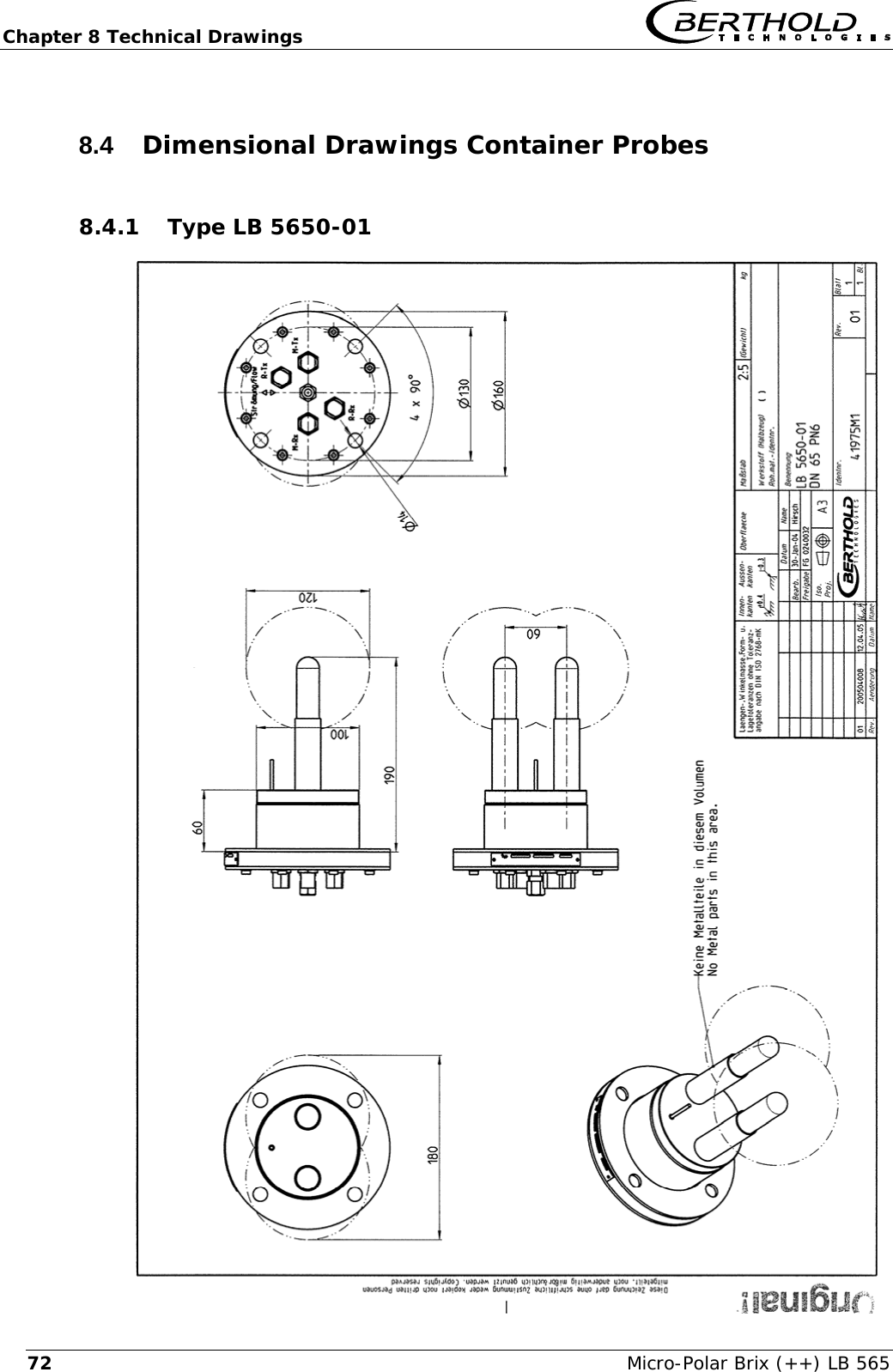
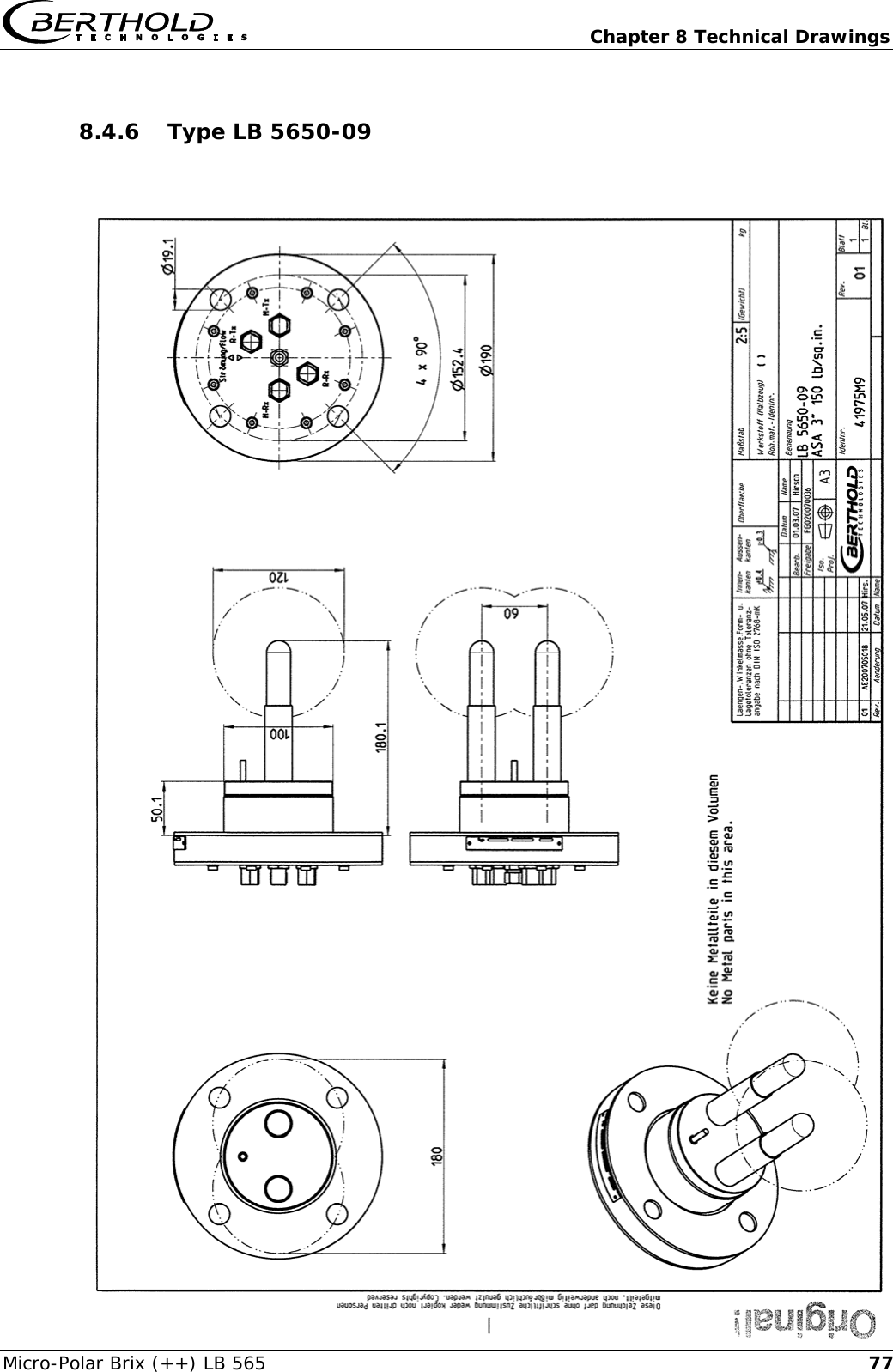
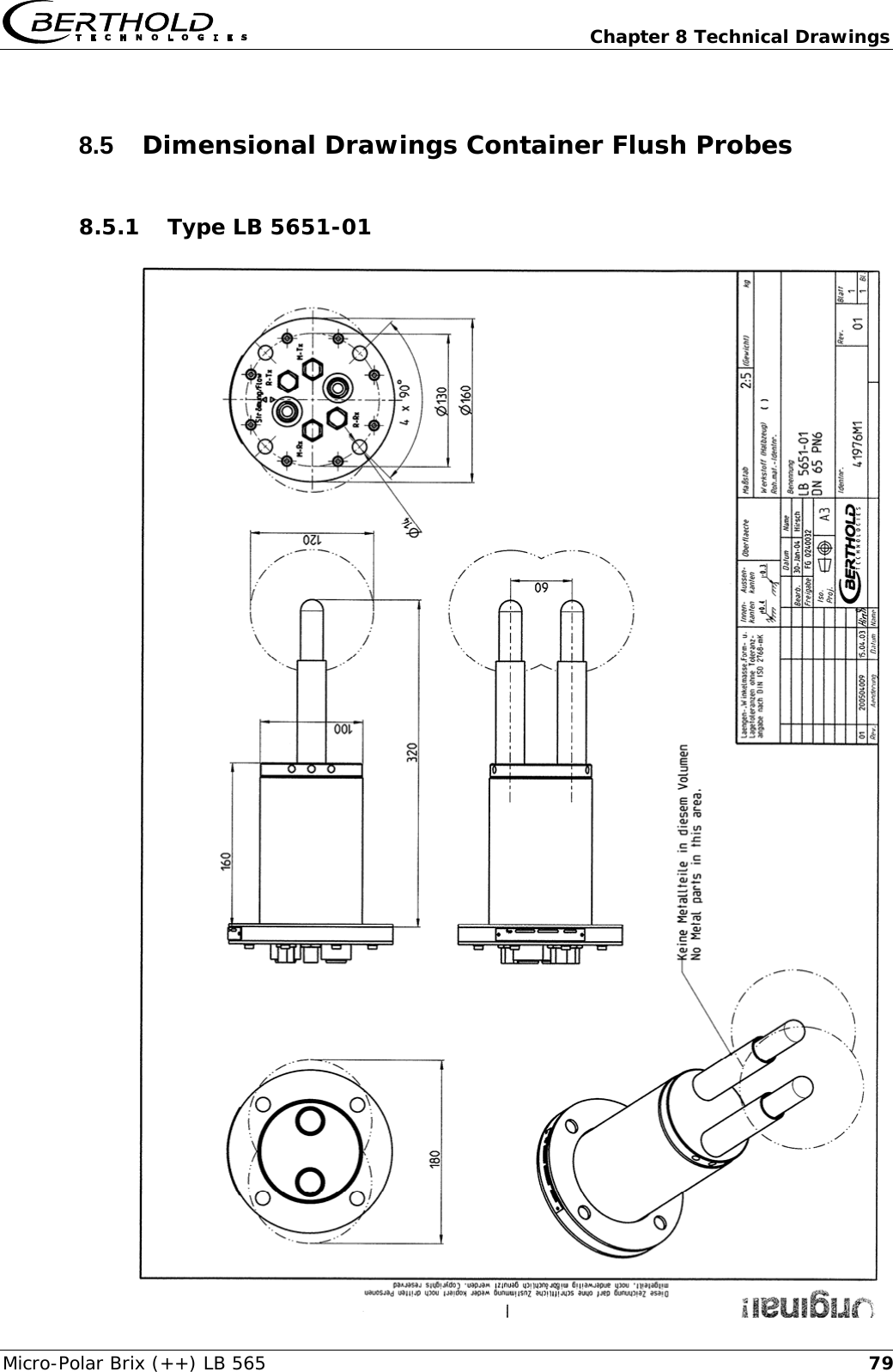
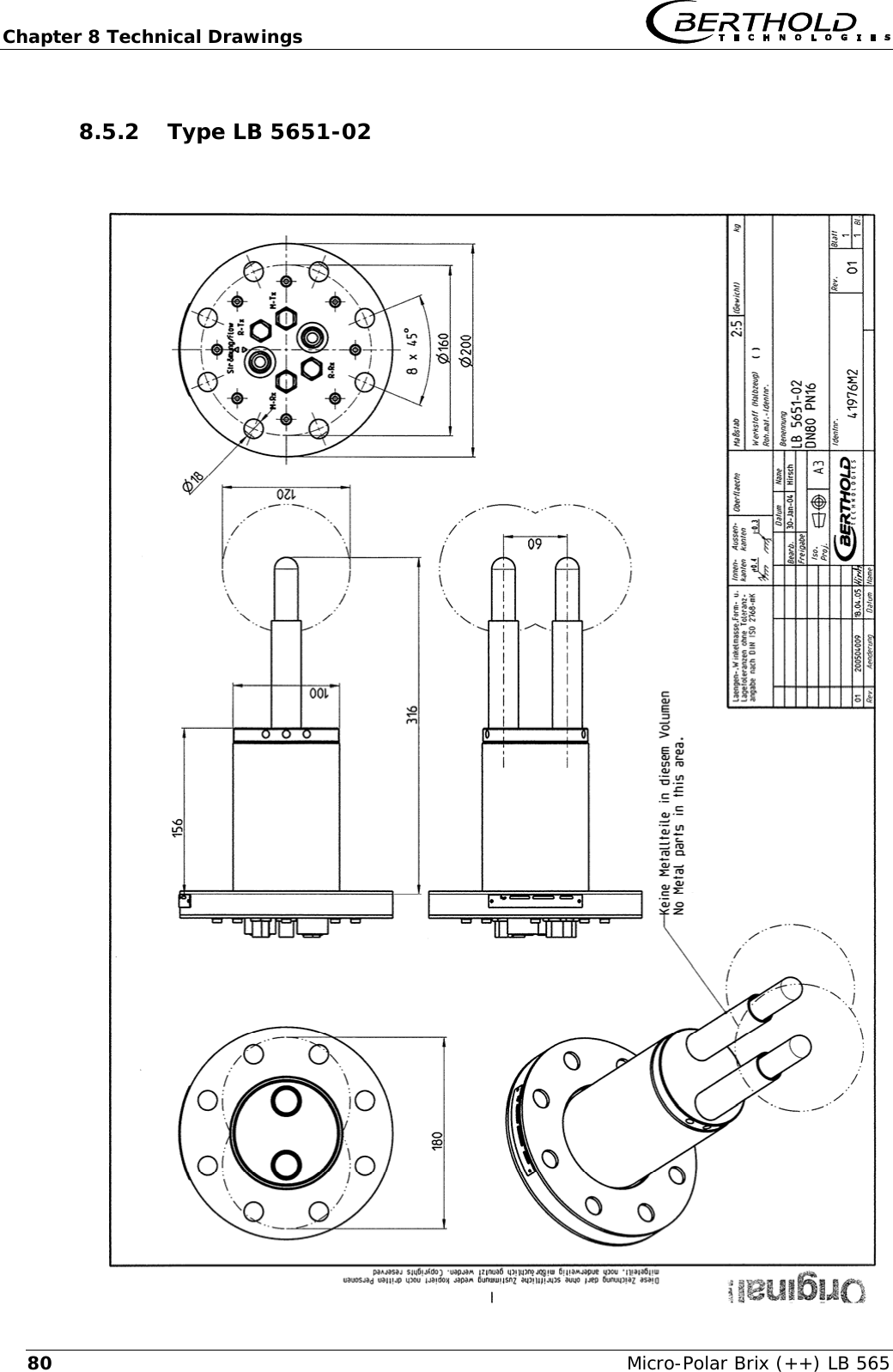
  Chapter 6 Technical Data Micro-Polar Brix (++) LB 565  51 Container probes Application  Container probes with and without flushing  device for concentration measurement in  process containers and pipelines with nominal width ≥ 200 mm. Material  Plastic rod, stainless steel 1.4301 PT100 connection cable: Silicon / Teflon Process coupling  Flange according to DIN EN 1092 Type 05 DN65 / PN6, DN 80, 100, 150 / PN16; ASA flange 2.5’’, 3’’ / 150 PSI (others on request) Process pressure  Up to 16 bar (relative), depending on model Temperature range Product temperature: +10 ... +120°C (283 … 393 K) Ambient temperature: -20 ... +60°C (253 … 333 K) Storage temperature: +10 ... +80°C (283 … 353 K) Connections  4 x HF connections: N-socket, 50 Ω  for HF-cable with max. 10 m length Dimensions  See dimensional drawings in chapter 8   Accessory sealing washer Material Klingersil C-4400 Thickness 3 mm  Overview container probes and sealing washers Designation ID-No.  Flange  Pressure [bar]  ID-No.  sealing washer LB 5650-01  41975-01  DN 65 / PN 6  6  32175 LB 5650-02  41975-02  DN 80 / PN 16  16  33717 LB 5650-03  41975-03  DN 100 / PN 16  16  46661 LB 5650-04  41975-04  DN 150 / PN 16  16  46664 LB 5650-05  41975-05  ASA 2.5’’ / 150 PSI  16  46665 LB 5650-09  41975-09  ASA 3’’ / 150 PSI  16   LB 5651-01  41976-01  DN 65 / PN 6  6  32175 LB 5651-02  41976-02  DN 80 / PN 16  16  33717 LB 5651-03  41976-03  DN 100 / PN 16  16  46661 LB 5651-04  41976-04  DN 150 / PN 16  16  46664 LB 5651-05  41976-05  ASA 2.5’’ / 150 PSI  16  46665
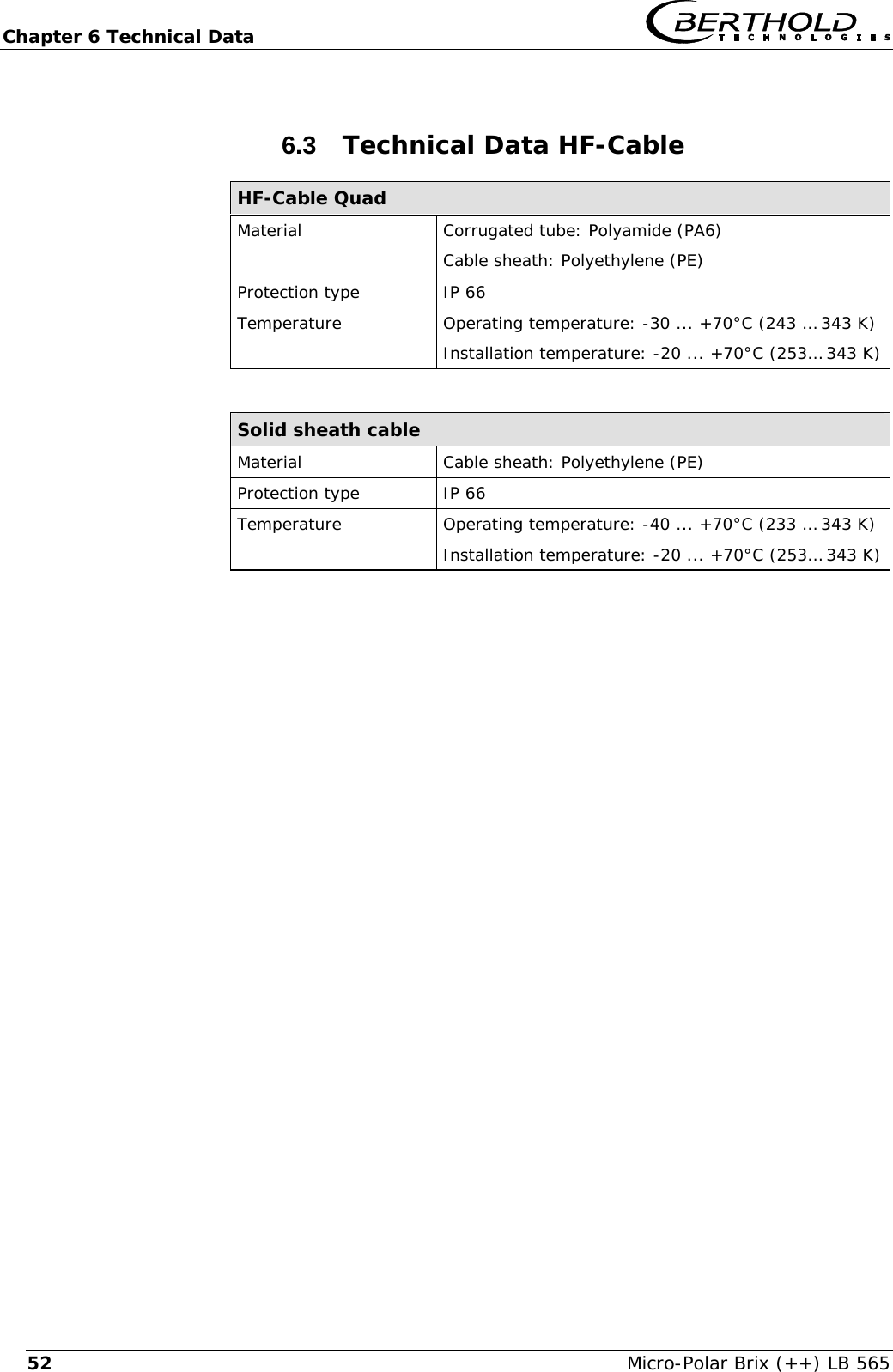
Chapter 6 Technical Data   Micro-Polar Brix (++) LB 565 526.3  Technical Data HF-Cable HF-Cable Quad Material  Corrugated tube: Polyamide (PA6) Cable sheath: Polyethylene (PE) Protection type  IP 66 Temperature  Operating temperature: -30 ... +70°C (243 … 343 K) Installation temperature: -20 ... +70°C (253… 343 K)  Solid sheath cable Material  Cable sheath: Polyethylene (PE) Protection type  IP 66 Temperature  Operating temperature: -40 ... +70°C (233 … 343 K) Installation temperature: -20 ... +70°C (253… 343 K)
  Chapter 6 Technical Data Micro-Polar Brix (++) LB 565  536.4  Format of Serial Data Output RS 232 and RS 485 Header Date·Time→Flags→Status→Product→Att→Phi→R2→Tint→IN1→IN2→Pt 100→C→Cm→C2→C2m¶  Following lines 01.01.2005·00:00:00→0000→0→1→0.43→5.30→0.07→0.0→0.0→0.0→0.0→75.36→75.00→0.00→0.00¶ 1                                2    3  4     5      6      7      8     9    10   11    12      13      14     15  Column no.  Description  Format 1  Date and time  DD.MM.YY·HH:MM:SS 2  Flags (for test purposes)  4 digits, HEX 3  Status: Information on quality of last  measurement  0    : measurement OK < 0 : error 4  Product number  X (1 to 4) 5 Attenuation [dB]  X.XX 6 Phase [°/GHz]  X.XX 7  Statistical spread of phase regression  X.XX 8 Instrument temperature [temperature unit]  X.X 9  Current input 1 [unit of current input]  X.X 10  Current input 2 [unit of current input]  X.X 11  Pt 100 temperature [temperature unit]  X.X   […] by selection of unit g/cm3 12  Concentration 1 live  X.XX    [X.XXXX] 13  Concentration 1 averaged  X.XX    [X.XXXX] 14  Concentration 2 live  X.XX    [X.XXXX] 15  Concentration 2 averaged  X.XX    [X.XXXX]  Special characters  “→” Tabulation  “¶” Carriage return + Line feed    “·” Blank character
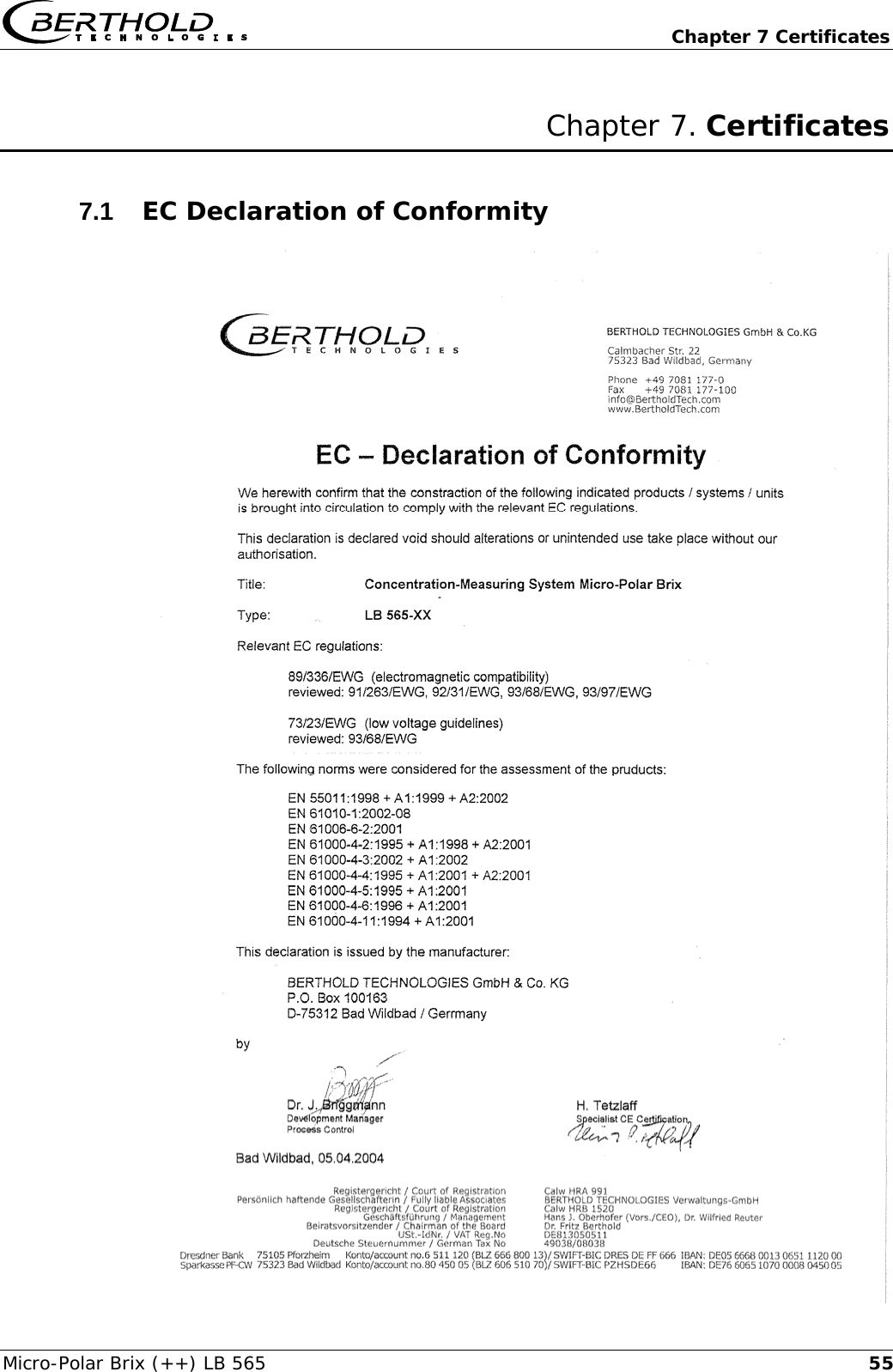
  Chapter 7 Certificates Micro-Polar Brix (++) LB 565  55Chapter 7. Certificates 7.1  EC Declaration of Conformity
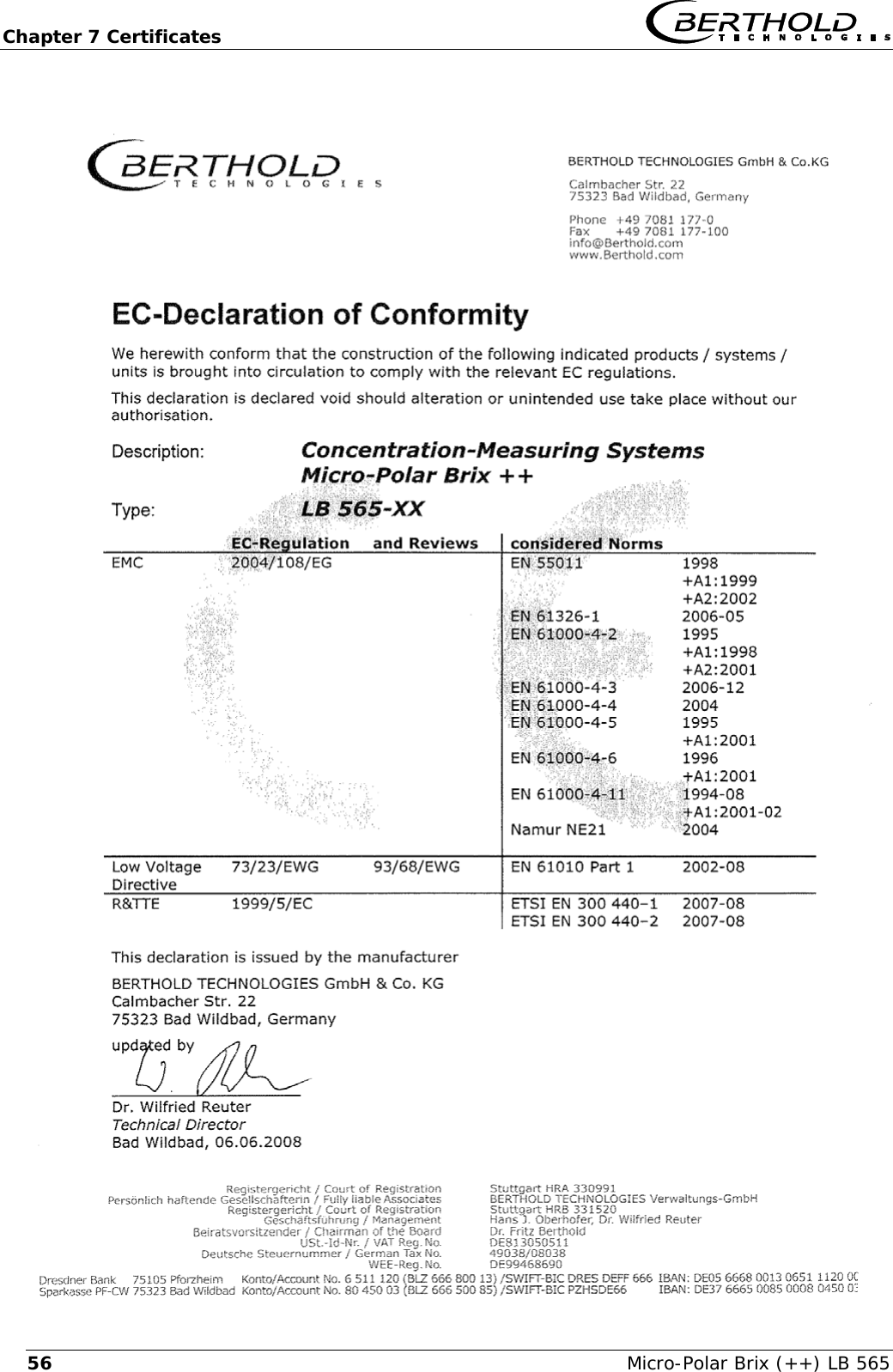
Chapter 7 Certificates   Micro-Polar Brix (++) LB 565 56
  Chapter 7 Certificates Micro-Polar Brix (++) LB 565  577.2  Frequency Approval
Chapter 7 Certificates   Micro-Polar Brix (++) LB 565 58
  Chapter 7 Certificates Micro-Polar Brix (++) LB 565  59
Chapter 7 Certificates   Micro-Polar Brix (++) LB 565 60
  Chapter 8 Technical Drawings Micro-Polar Brix (++) LB 565  61Chapter 8. Technical Drawings 8.1  Dimensional Drawing of Evaluation Unit Housing 8.1.1 Evaluation Unit from Micro-Polar Brix
Chapter 8 Technical Drawings   Micro-Polar Brix (++) LB 565 628.1.2 Evaluation Unit from Micro-Polar Brix++
  Chapter 8 Technical Drawings Micro-Polar Brix (++) LB 565  638.2  Electrical Wiring Diagram                         Line in for Micro-Polar Brix: 1. / 2. depending on instrument version 1. AC 90-265V, 45-65 Hz 2. DC 24 V (18-36 V) or AC 24 V -20% / +5%, 40-440 Hz ________________________________  Line in for Micro-Polar Brix ++: 1. / 2. depending on instrument version 1. AC 90-265V, 45-65 Hz 2. DC 24 V (18-36 V), no reverse voltage protection
Chapter 8 Technical Drawings   Micro-Polar Brix (++) LB 565 648.3  Dimensional Drawings Flow Cells 8.3.1 Type LB 3543-11 MP, Nominal Width 50 mm, Options
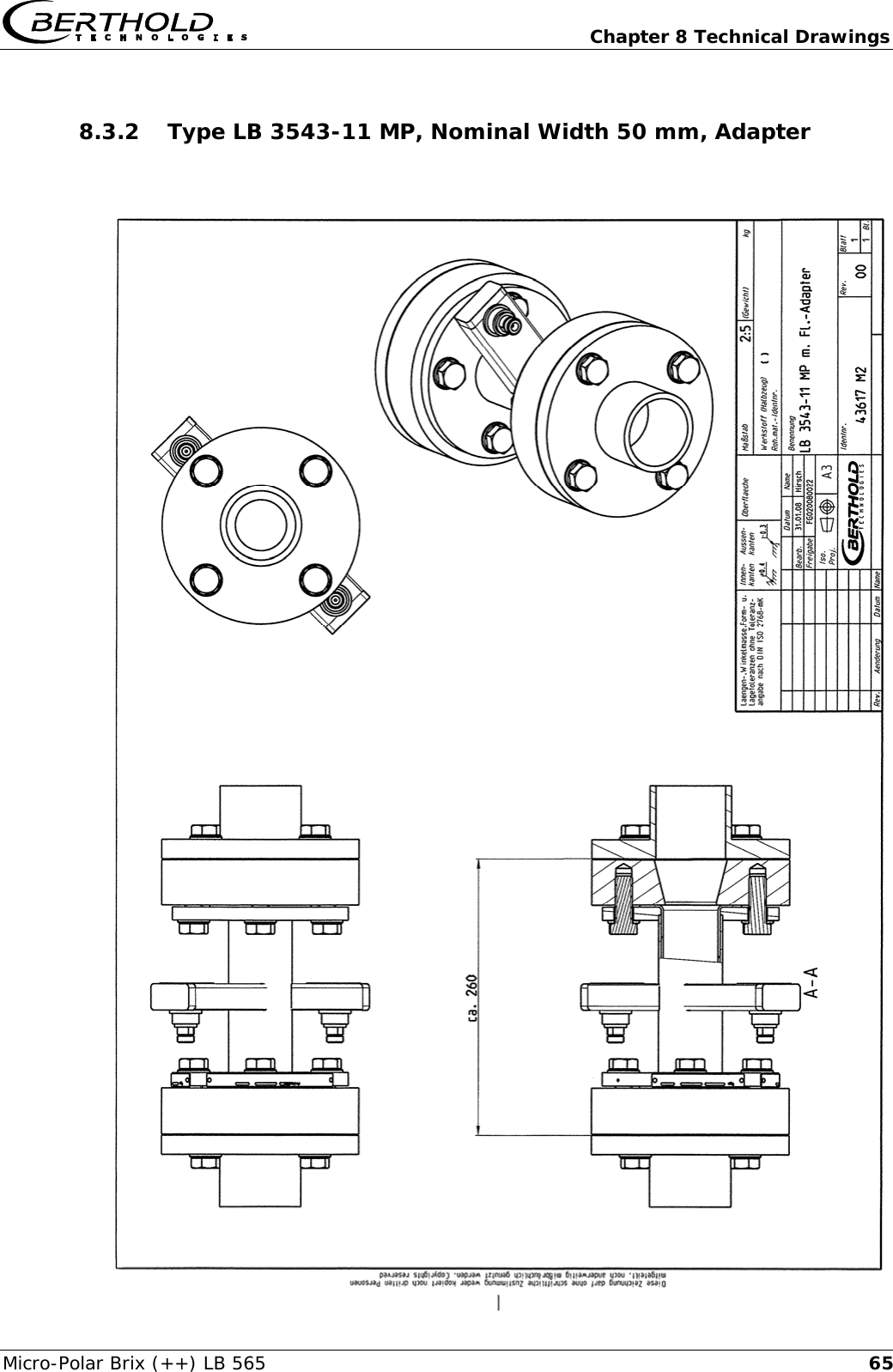
  Chapter 8 Technical Drawings Micro-Polar Brix (++) LB 565  658.3.2 Type LB 3543-11 MP, Nominal Width 50 mm, Adapter
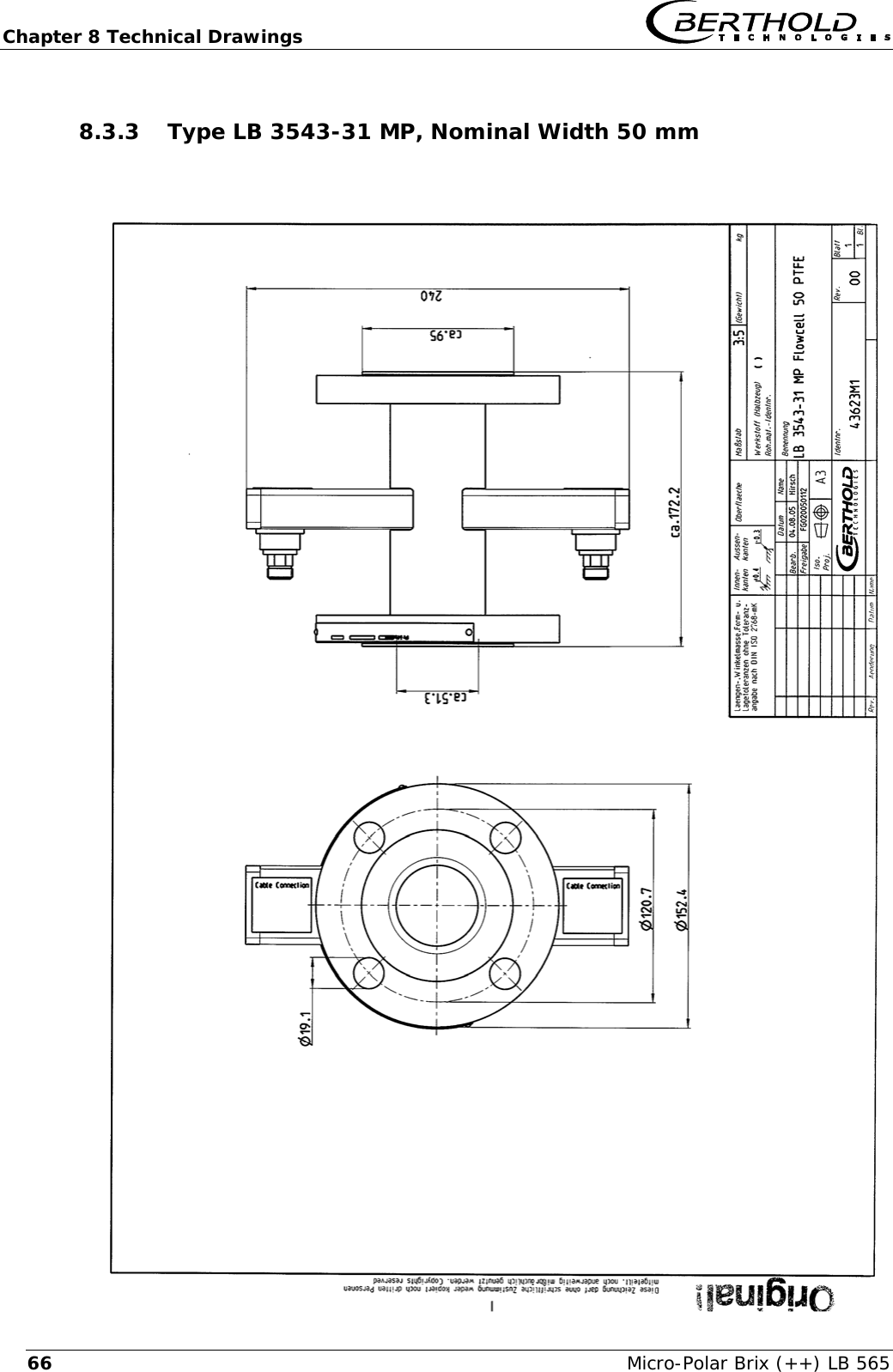
Chapter 8 Technical Drawings   Micro-Polar Brix (++) LB 565 668.3.3 Type LB 3543-31 MP, Nominal Width 50 mm
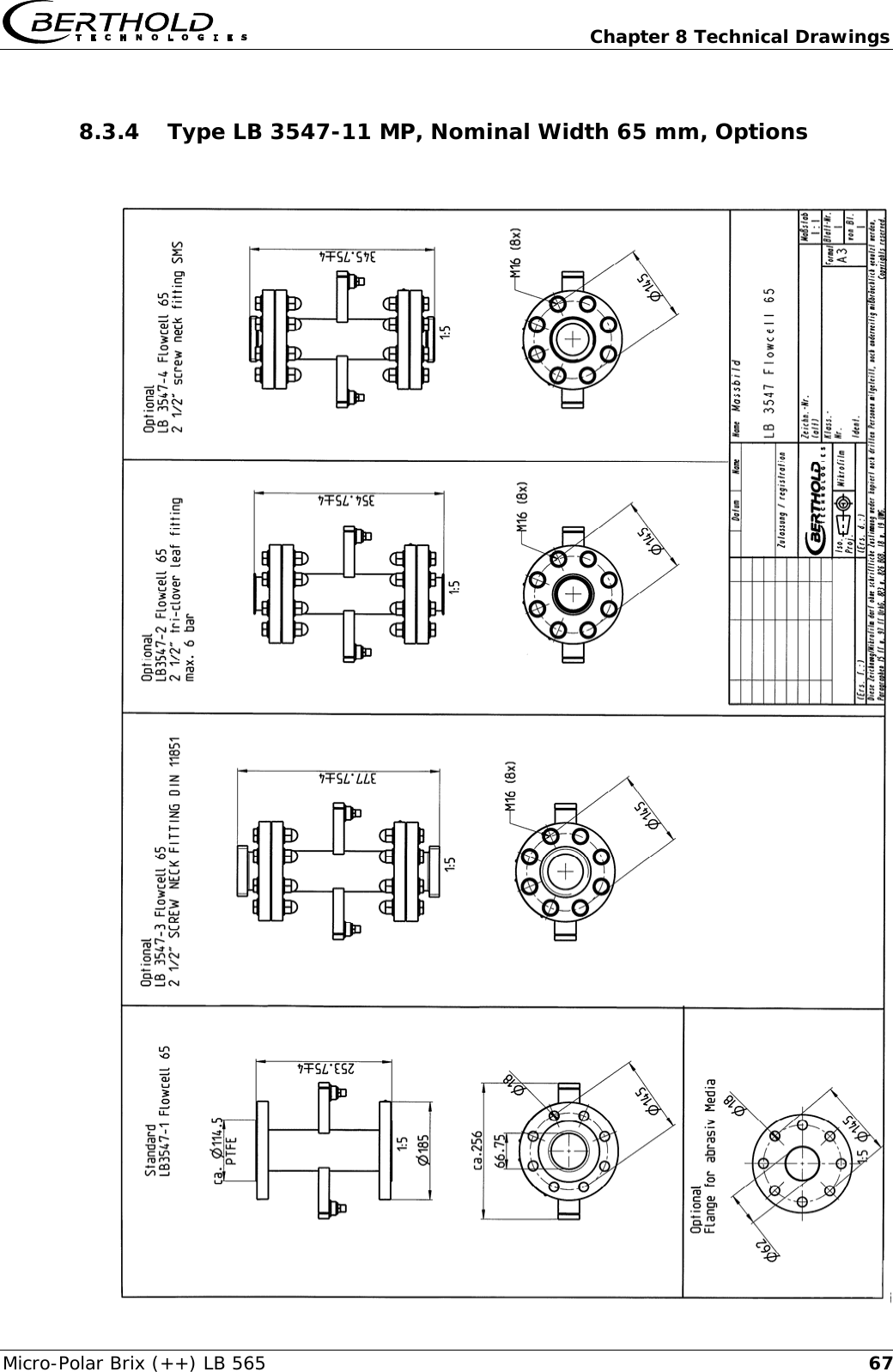
  Chapter 8 Technical Drawings Micro-Polar Brix (++) LB 565  678.3.4 Type LB 3547-11 MP, Nominal Width 65 mm, Options
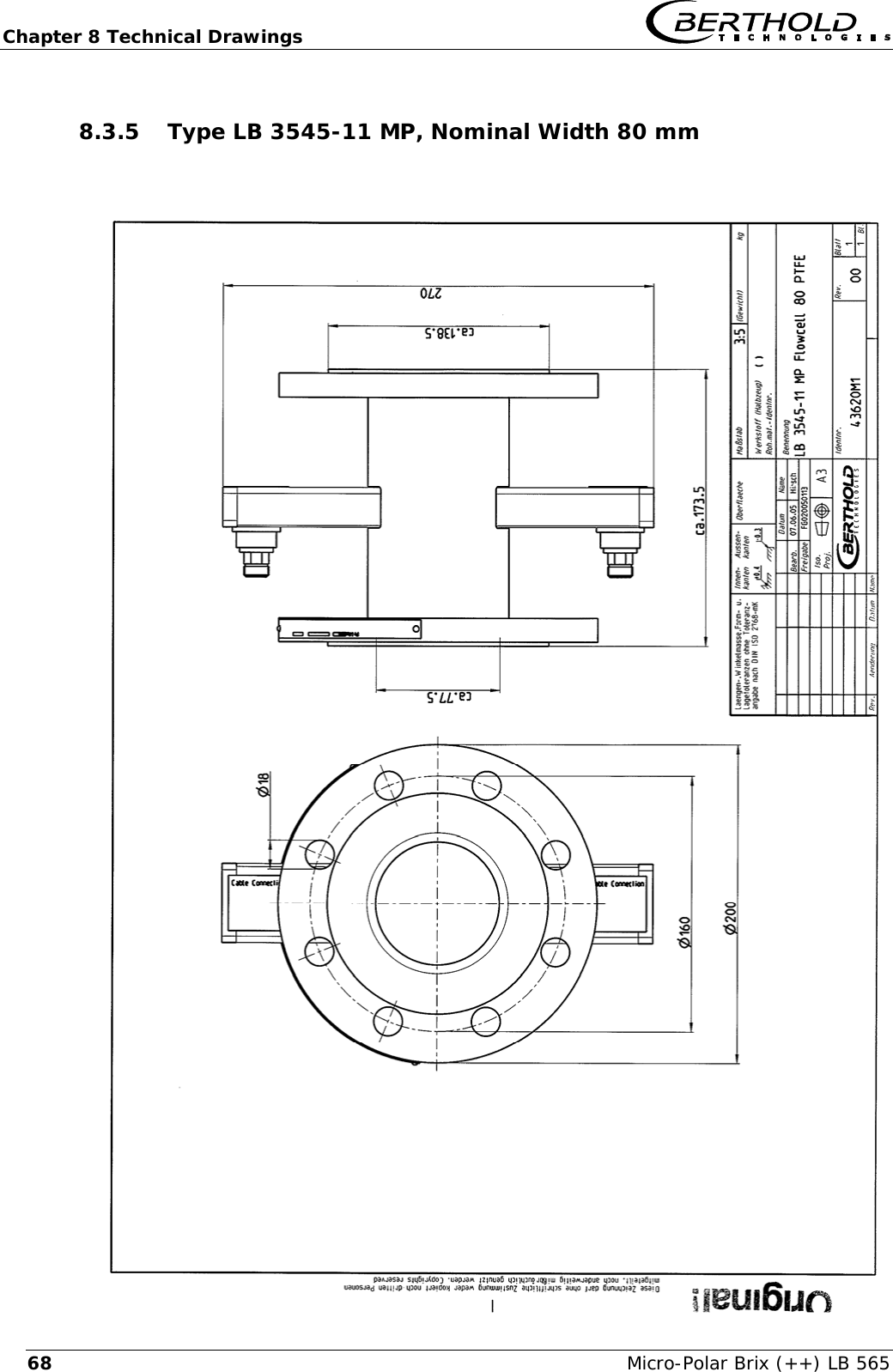
Chapter 8 Technical Drawings   Micro-Polar Brix (++) LB 565 688.3.5 Type LB 3545-11 MP, Nominal Width 80 mm
  Chapter 8 Technical Drawings Micro-Polar Brix (++) LB 565  698.3.6 Type LB 3544-11 MP, Nominal Width 100 mm, Options
Chapter 8 Technical Drawings   Micro-Polar Brix (++) LB 565 708.3.7 Type LB 3544-21 MP, Nominal Width 100 mm
  Chapter 8 Technical Drawings Micro-Polar Brix (++) LB 565  718.3.8 Type LB 3548-11 MP, Nominal Width 150 mm
Chapter 8 Technical Drawings   Micro-Polar Brix (++) LB 565 728.4  Dimensional Drawings Container Probes 8.4.1 Type LB 5650-01
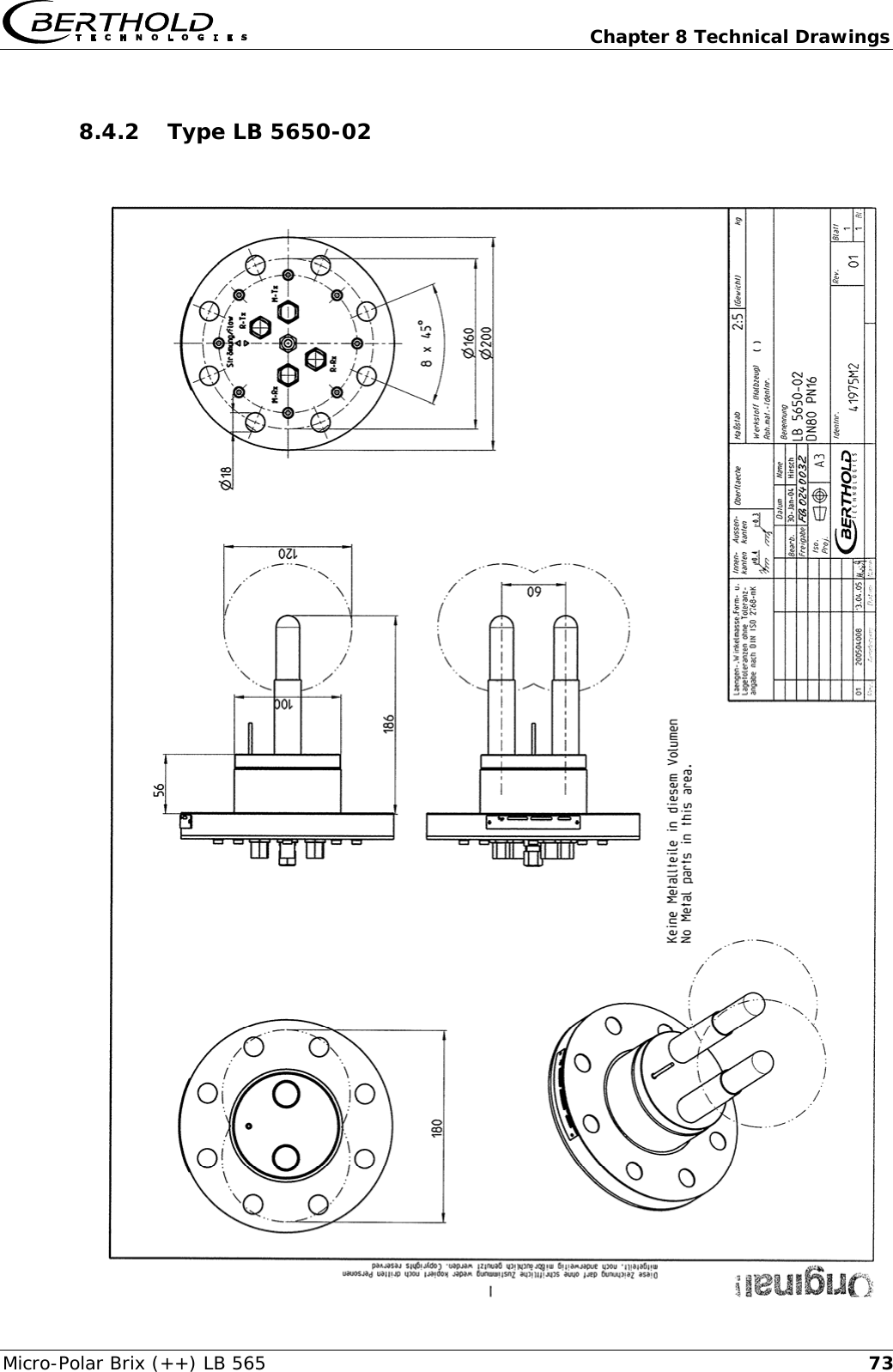
  Chapter 8 Technical Drawings Micro-Polar Brix (++) LB 565  738.4.2 Type LB 5650-02
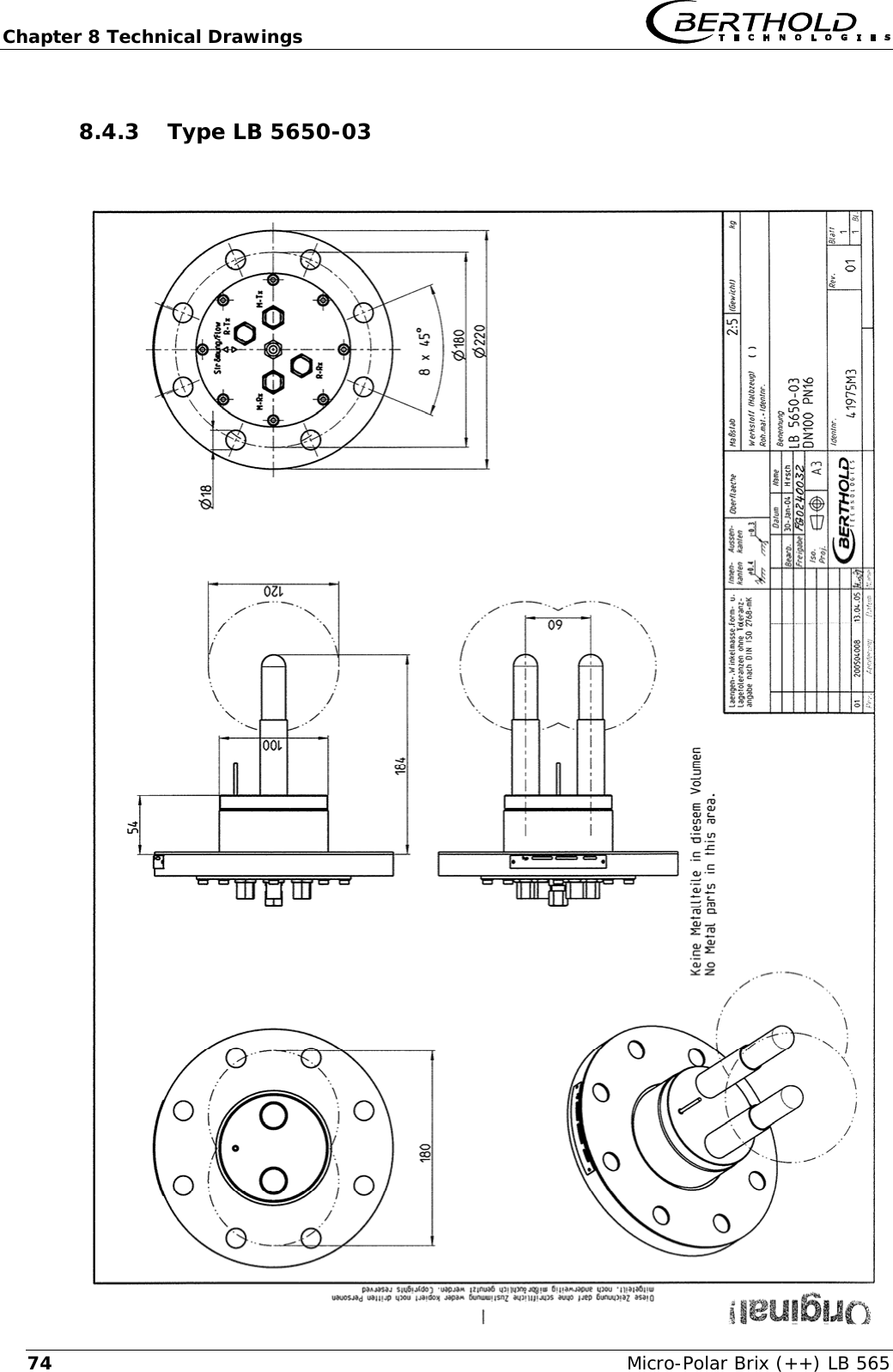
Chapter 8 Technical Drawings   Micro-Polar Brix (++) LB 565 748.4.3 Type LB 5650-03
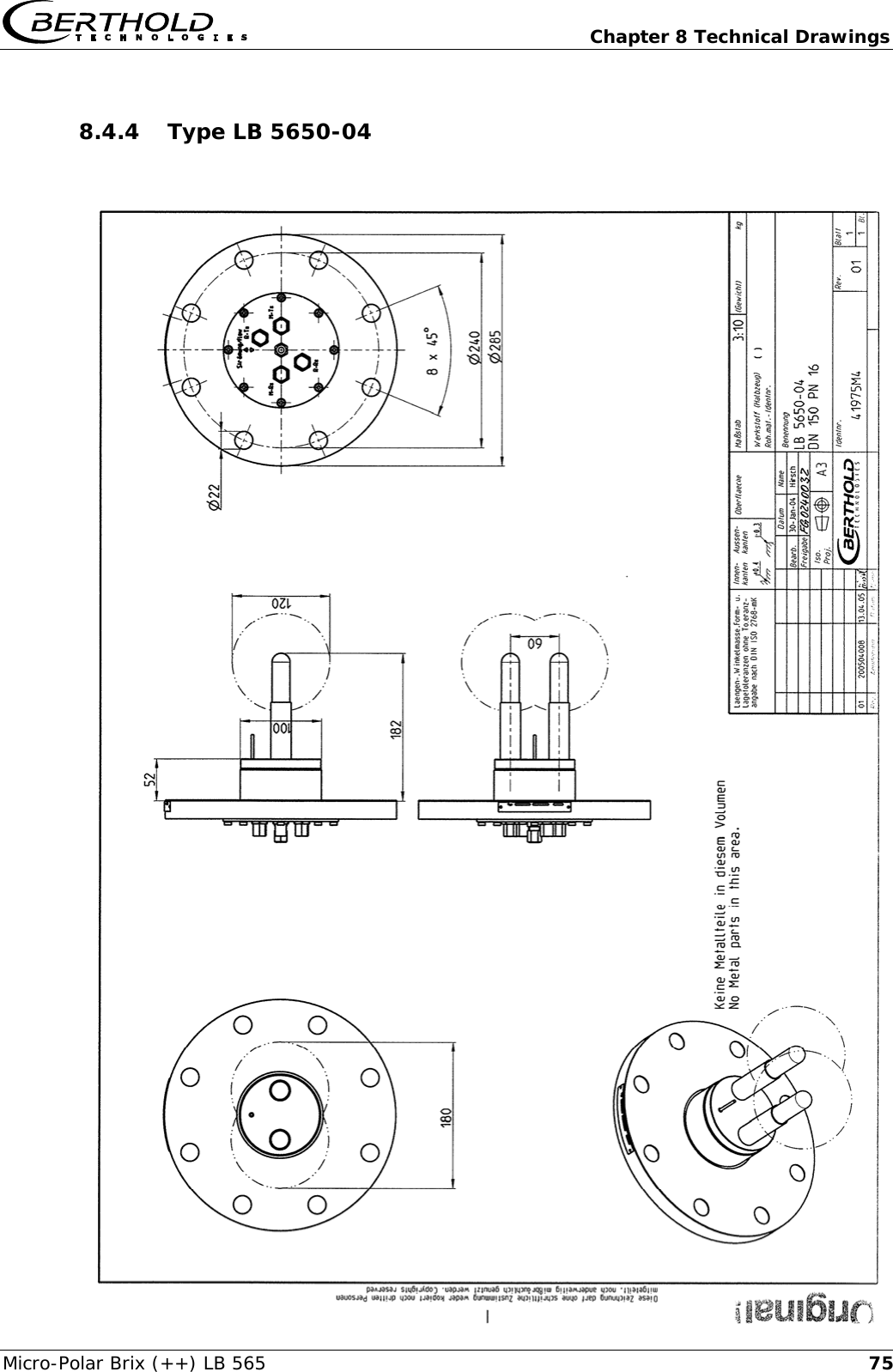
  Chapter 8 Technical Drawings Micro-Polar Brix (++) LB 565  758.4.4 Type LB 5650-04
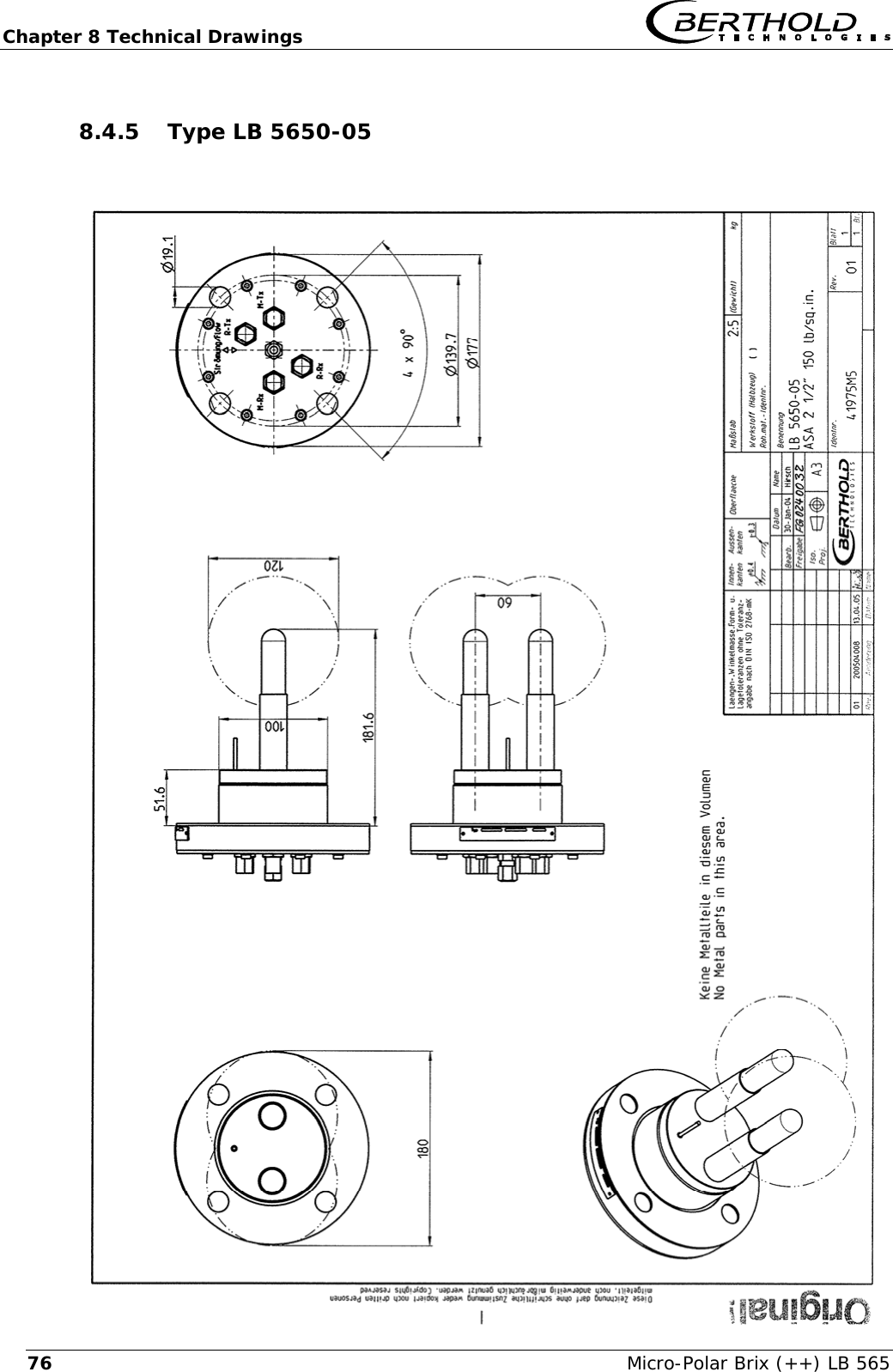
Chapter 8 Technical Drawings   Micro-Polar Brix (++) LB 565 768.4.5 Type LB 5650-05
  Chapter 8 Technical Drawings Micro-Polar Brix (++) LB 565  778.4.6 Type LB 5650-09        ll
Chapter 8 Technical Drawings   Micro-Polar Brix (++) LB 565 788.4.7 Installation Situation in Pipelines
  Chapter 8 Technical Drawings Micro-Polar Brix (++) LB 565  798.5  Dimensional Drawings Container Flush Probes 8.5.1 Type LB 5651-01
Chapter 8 Technical Drawings   Micro-Polar Brix (++) LB 565 808.5.2 Type LB 5651-02
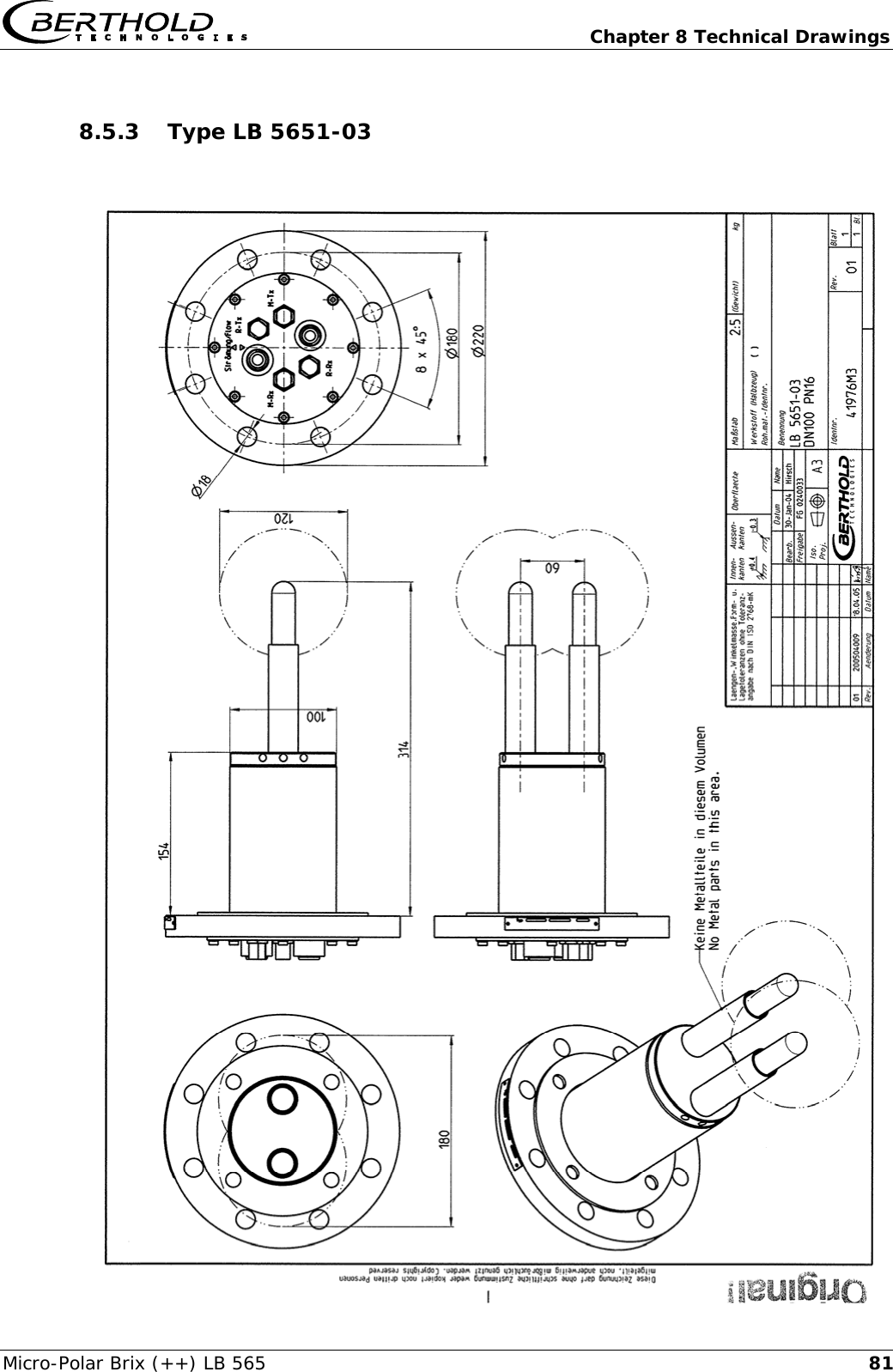
  Chapter 8 Technical Drawings Micro-Polar Brix (++) LB 565  818.5.3 Type LB 5651-03
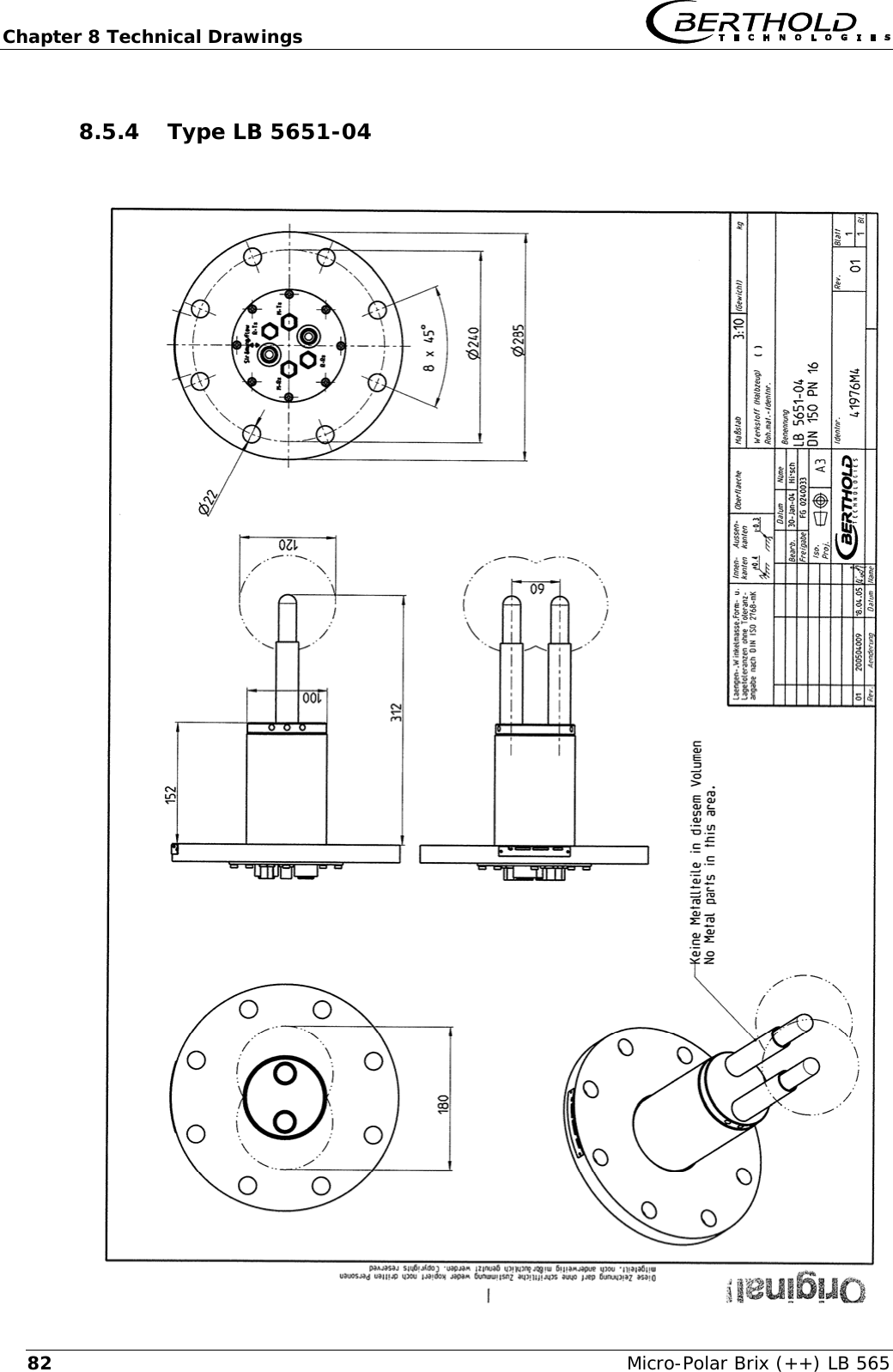
Chapter 8 Technical Drawings   Micro-Polar Brix (++) LB 565 828.5.4 Type LB 5651-04
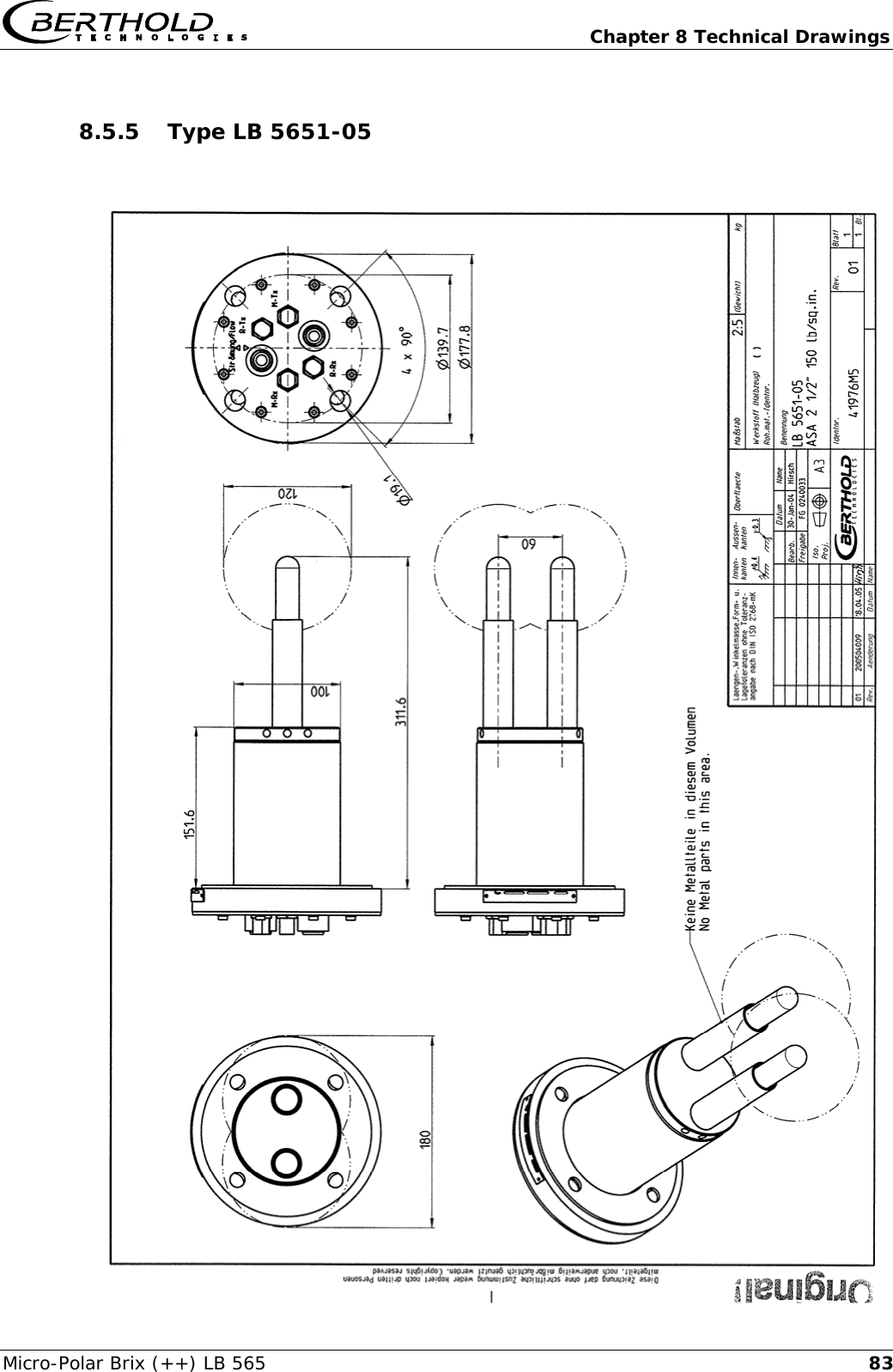
  Chapter 8 Technical Drawings Micro-Polar Brix (++) LB 565  838.5.5 Type LB 5651-05
Chapter 8 Technical Drawings   Micro-Polar Brix (++) LB 565 848.5.6 Installation Situation in Pipelines
  Chapter 8 Technical Drawings Micro-Polar Brix (++) LB 565  858.6  Installation Sheets for LB 5650 (Container Probe)     ø14M-RxR-Txdo not remove, onlyin case of service byBerthold TechnologiesR-RxM-Txø160ø130microwavemeasuring fieldcurrent streamprobe flange DN65 / PN6evaluation unitbotten sideoutput0/4 - 20 mAMicro-Polar with Container Probe - Installation In Crystallizer - installationpositiontop view into the crystallizersealinginsulationcontainer wallø130 / 4 x M12190ø100ø16060heatingarea withoutmetalicinstallationsfitting flangeBERTHOLD TECHNOLOGIES GmbH & Co. KG . P.O. Box 100 163 . 75312 Bad Wildbad, GermanyPhone +49 7081 177-0 . Fax +49 7081 177-100 . industry@Berthold.comwww.Berthold.com60Id.-No. 41975TI2 Rev.04ø± 1000.2PT100PT100PT100M-TxM-TxM-TxM-RxM-RxR-TxR-TxR-RxR-RxM-RxR-TxR-RxHF cable quadFlowStrömungevaluation unit220(320)300(318)(...) for Micro-Polar ++Micro-Polar90 - 265 V ACor 24 V AC/DC(24 V DC)
Chapter 8 Technical Drawings   Micro-Polar Brix (++) LB 565 86   output0/4 - 20 mAsealingId.-No. 41975TI21 Rev.04øA / 8 x S190ø100øB6060probe flange DN80, 100, 150 / PN16installationpositionDN ABCS80100160 200 18 M16180 220 18 M16240 28522M20150ø± 1020,5PT100M-TxM-TxM-TxM-RxM-RxR-TxR-TxR-RxR-RxM-RxR-TxR-RxM-RxR-TxR-RxM-TxøCøBøAPT100insulationPT100do not remove, onlyin case of service byBerthold Technologiesmicrowavemeasuring fieldcontainer walltop view into the crystallizerMicro-Polar with Container Probe - Installation In Crystallizer - evaluation unitbotten sideHF cable quadheatingarea withoutmetalicinstallationsBERTHOLD TECHNOLOGIES GmbH & Co. KG . P.O. Box 100 163 . 75312 Bad Wildbad, GermanyPhone +49 7081 177-0 . Fax +49 7081 177-100 . industry@Berthold.comwww.Berthold.comcurrent streamfitting flangeevaluation unit220(320)300(318)(...) for Micro-Polar ++    Micro-Polar90 - 265 V ACor 24 V AC/DC(24 V DC)
  Chapter 8 Technical Drawings Micro-Polar Brix (++) LB 565  878.7  Installation Sheets for LB 5651 (Container Flush Probe)                      ø14M-RxR-Txoutput0/4 - 20 mAinstallationpositionR-RxM-Txø160ø160160ø130 / 4 x M12ø± 1000,2320ø10060Id.-No. 41976TI2 Rev.05M-TxM-TxM-TxM-RxM-RxR-TxR-TxR-RxR-RxM-RxR-TxR-Rxø13055Micro-Polar with Container Flush Probe - Installation In Crystallizer - BERTHOLD TECHNOLOGIES GmbH & Co. KG . P.O. Box 100 163 . 75312 Bad Wildbad, GermanyPhone +49 7081 177-0 . Fax +49 7081 177-100 . industry@Berthold.comwww.Berthold.commicrowavemeasuring fieldtop view into the crystallizerevaluation unitbotten sideHF cable quadevaluation unitsealinginsulationdo not remove, onlyin case of service byBerthold Technologiesheatingarea withoutmetalicinstallationscurrent streamfitting flangeprobe flange DN65 / PN6flushing connection:internal thread2 x G3/8’’(DIN ISO 228-1)container wallFlowStrömung220(320)300(318)(...) for Micro-Polar ++Micro-Polar90 - 265 V ACor 24 V AC/DC(24 V DC)
Chapter 8 Technical Drawings   Micro-Polar Brix (++) LB 565 88                    M-RxR-TxR-RxM-Tx55output0/4 - 20 mAøB160øA / 8 x S320ø10060øCinstallationpositionøBøADN ABCS80100160 200 18 M16180 220 18 M16240 28522M20150Id.-No. 41976TI21 Rev.05ø± 1020,5flushing connection:internal thread2 x G3/8’’(DIN ISO 228-1)M-TxM-TxM-TxM-RxM-RxR-TxR-TxR-RxR-RxM-RxR-TxR-RxMicro-Polar with Container Flush Probe - Installation In Crystallizer - BERTHOLD TECHNOLOGIES GmbH & Co. KG . P.O. Box 100 163 . 75312 Bad Wildbad, GermanyPhone +49 7081 177-0 . Fax +49 7081 177-100 . industry@Berthold.comwww.Berthold.comtop view into the crystallizercontainer wallmicrowavemeasuring fieldevaluation unitbotten sideHF cable quadsealinginsulationdo not remove, onlyin case of service byBerthold Technologiesheatingarea withoutmetalicinstallationscurrent streamfitting flangeprobe flange DN80, 100, 150 / PN16evaluation unit220(320)300(318)(...) for Micro-Polar ++    Micro-Polar90 - 265 V ACor 24 V AC/DC(24 V DC)
 Index  Micro-Polar Brix LB 565  89Index  A accuracy · 45 adapter flange · 31 B Battery · 44 bending radius · 25 C Calculation of Measured Values · 14 CE symbol · 8 Certificates · 53 clamp connector · 20 Components · 16 Connecting the Container Probes · 36 Connecting the Flow Cell · 35 container flush probe · 23 Container Probe · 21 Container Probe Installation · 31 D Data format RS232 · 51 Data transfer rate · 40 Digital Outputs · 41 Dimensional Drawings Container Flush Probes · 77 Dimensional Drawings Container Probes · 70 Dimensional Drawings Flow Cells · 62 distance rail · 33 E EC Declaration of Conformity · 53 Electrical Wiring Diagram · 61 Evaluation Unit Housing · 59 Evaluation Units · 17 F Factory setting · 12 fitting flange · 31 Flow Cell · 20 Flow Cell Installation · 29 Flush Parameters · 32 foodstuffs · 21 Frequency Approval · 8, 55 Fuse Replacement · 44 G gas bubbles · 11, 30 H High-Frequency Cable · 25 I Installation in Pipelines · 31 Installation Sheets · 83 Installation Situation in Pipelines · 76, 82 Instrument Cleaning · 43 L LED’s · 19 M Measurement Configuration · 27, 28 Microwaves · 12 O Overview container probes · 49 Overview flow cells · 48 P Principle of Measurement · 13 Pt 100 connection · 37 R Reference temperature · 15 Relays · 41 riser · 29 RS232 interface · 40 S safety instructions · 7
Index   Micro-Polar Brix LB 565 90salt content · 11 sealing washers · 49 Softkeys · 12 solid sheath cable · 25 symbols · 7 T Technical Data · 45 Technical Data HF-Cable · 50 Technical Data Sensors · 48 Technical Drawings · 59 Temperature Compensation · 14 threaded connector · 20 Transmission power · 45 Transport · 29 W Wearing Parts · 43
   Micro-Polar Brix LB 565  91Notes
   Micro-Polar Brix LB 565 92 Notes
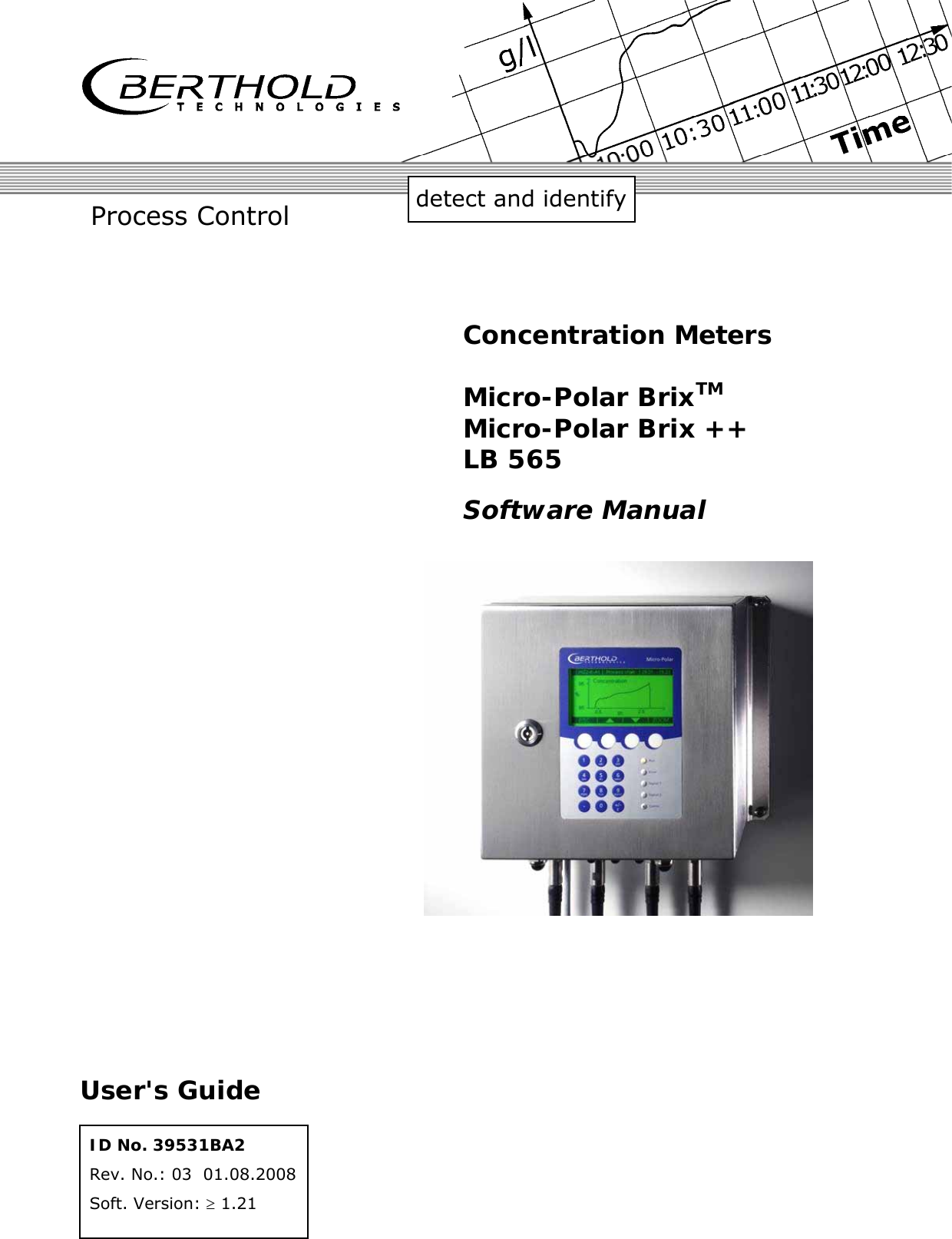
              detect and identify Process Control ID No. 39531BA2 Rev. No.: 03  01.08.2008 Soft. Version: ≥ 1.21 User's Guide Concentration Meters  Micro-Polar BrixTM Micro-Polar Brix ++ LB 565 Software Manual
   Micro-Polar Brix (++) LB 565  The units supplied should not be repaired by anyone other than Berthold Service en-gineers or technicians authorized by Berthold. In case of operation trouble, please address to our central service department.  The complete user’s guide consists of two manuals, the hardware description and the software description.  The hardware manual comprises: ¾ mechanical components ¾ installation ¾ electrical installation ¾ radiation protection guidelines ¾ technical data ¾ electrical and mechanical drawings  The software manual comprises: ¾ operation of the evaluation unit ¾ parameter description ¾ basic setting ¾ calibration ¾ error messages  The present manual is the software description.  Subject to changes without prior notice.  BERTHOLD TECHNOLOGIES GmbH & Co. KG Calmbacher Str. 22 ⋅ 75323 Bad Wildbad, Germany  Phone +49 7081 177 0 ⋅ Fax +49 7081 177 100 industry@Berthold.com www.Berthold.com
    Micro-Polar Brix (++) LB 565 Table of Contents  Page Chapter 1. Communication with Micro-Polar Brix  9 1.1 Brief Instructions  10 1.2 System Configuration  10 1.3 System Calibration  10 Chapter 2. Software Functions  11 2.1 Information on Menu Structure  11 2.2 Menu Structure  12 2.2.1 Start Menu  14 2.2.2 Diagnostic 14 2.2.3 Setup 16 2.2.4 Access Level  17 2.2.5 Language 17 2.2.6 Configuration 18 2.2.7 General Data  19 2.2.8 Measurement 19 2.2.9 Plausibility 20 2.2.10 Phase Measurement  21 2.2.11 Pause Detection  22 2.2.12 Calibration 24 2.2.13 System Adjust  24 2.2.14 Calibrate Concentration  25 2.2.15 Sample No.  26 2.2.16 Sample Data (expanded)  27 2.2.17 Advanced Settings  27 2.2.18 Calibr. manual  28 2.2.19 Input / Output  28 2.2.20 Current output  29 2.2.21 Current Output 1  29 2.2.22 Current Output 2  29 2.2.23 Current input  30 2.2.24 Current In 1  30 2.2.25 Current In 2  30 2.2.26 Pt 100  30 2.2.27 Digital Output  31 2.2.28 Digital Input  31 2.2.29 Service 32 2.3 Trend Display  34 Chapter 3. Configuration  35 3.1 Configuration Setup  35 3.1.1 General Data  35 3.1.2 Measurement 36 3.1.3 Plausibility 36 3.1.4 Microwave 36 3.1.5 Marker 37 3.1.6 Units 37 3.2 Start Calibration Coefficients  39 Chapter 4. Calibration  41 4.1 System Calibration  41 4.2 Start-up of Micro-Polar Brix ++  43 4.3 Start Calibration  44
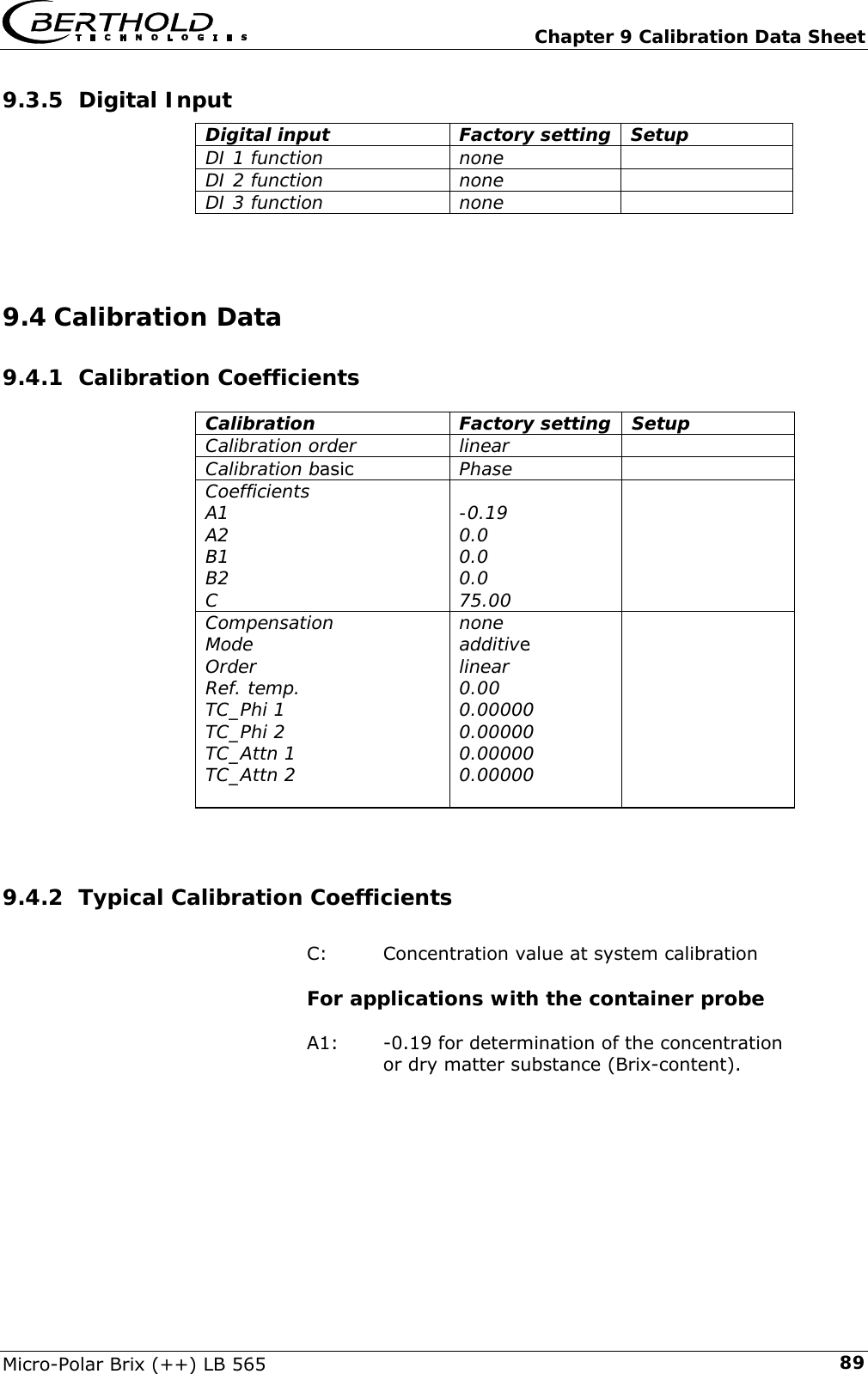
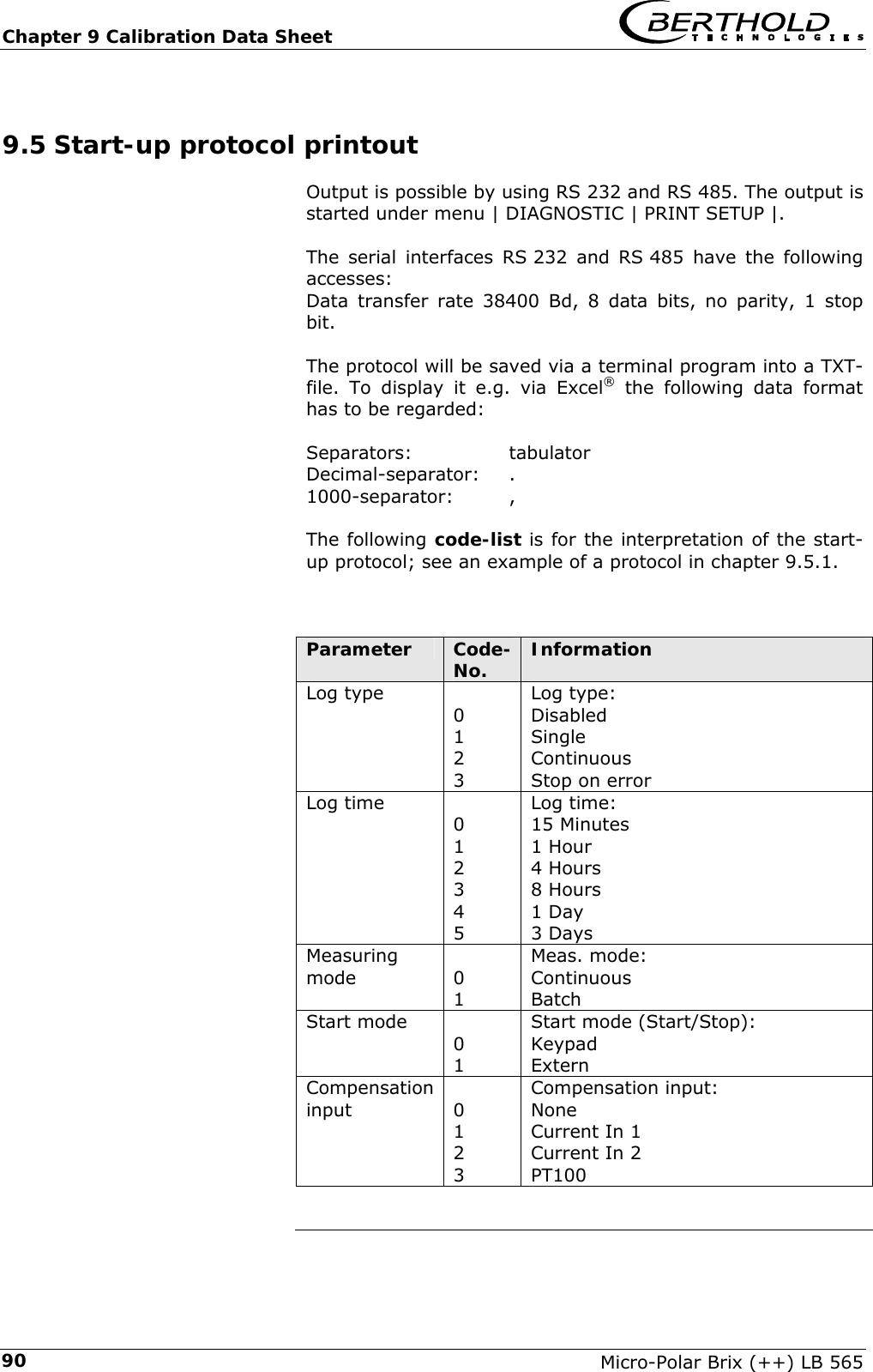
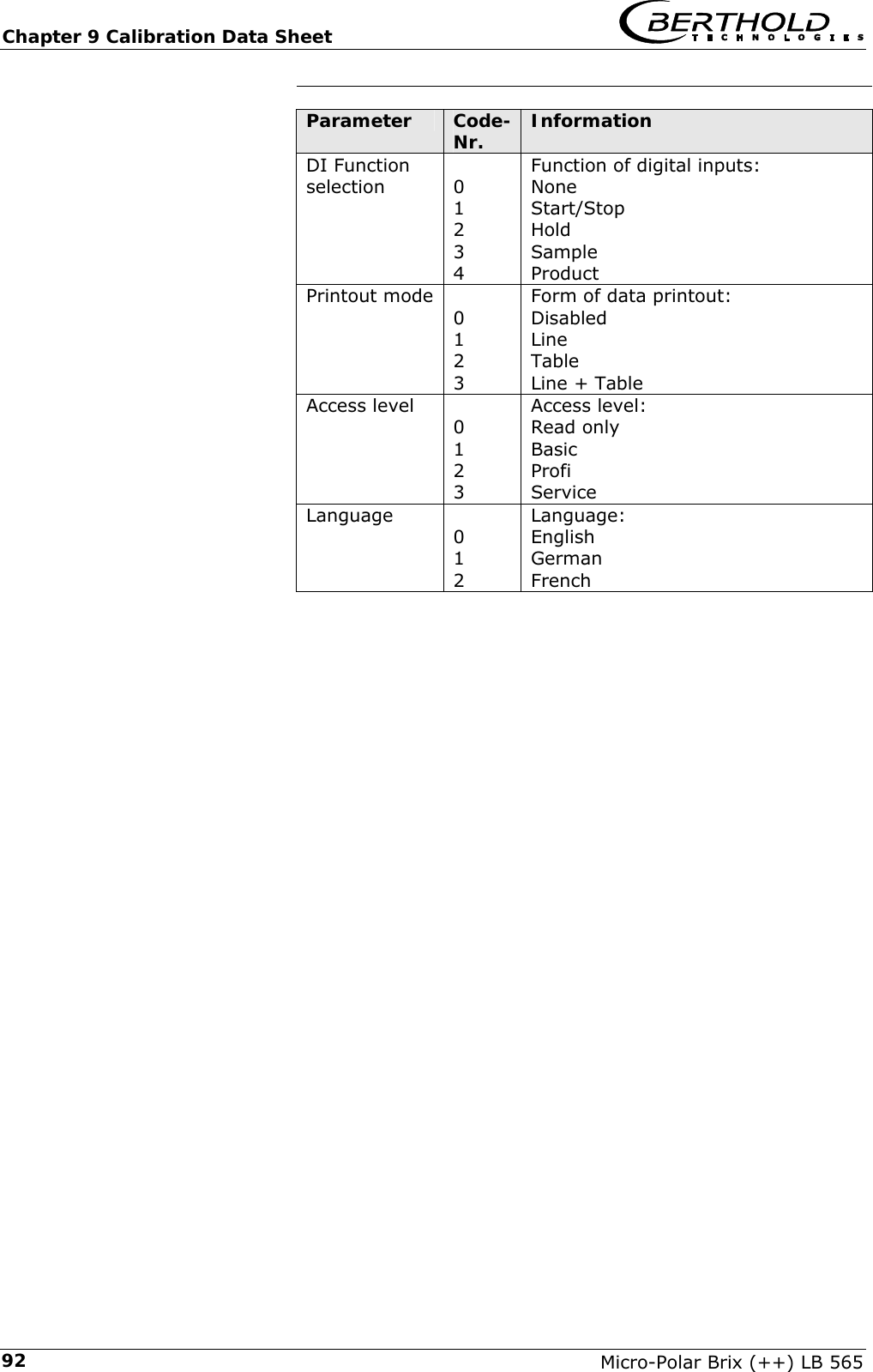
   Micro-Polar Brix (++) LB 565 4.3.1 First Process Run  44 4.3.2 Sampling 46 4.3.3 Entering the Lab Values  47 4.3.4 Automatic Calibration  49 4.3.5 Automatic Calibration with Temperature Compensation  50 4.4 Manual Calibration  52 4.4.1 Manual Calibration with one Concentration  52 4.4.2 Calibration with Two Concentrations  55 4.4.3 Calibration with Split Value  59 4.4.4 Calibration with Temperature Compensation  61 4.5 Adjusting the Calibration  64 4.6 Output of the start-up protocol  66 Chapter 5. Password  67 5.1 Forgot password  68 Chapter 6. Inputs / Outputs  69 6.1 Current Outputs  69 6.1.1 Current Output Setup  70 6.1.2 Test and Adjustment  71 6.1.3  Error Current  73 6.1.4 Current Output 2  74 6.2 Current Inputs  75 6.2.1 Enabling the Current Input  75 6.2.2 Range Setting and Adjustment  76 6.3 Pt 100  78 6.3.1 Pt 100 Enabling  78 6.3.2 Pt 100 Calibration  79 6.4 Digital Output  80 6.4.1 Digital Output Assignment  80 6.5 Digital Input  81 6.5.1 External Product Selection  82 Chapter 7. Factory Settings  83 Chapter 8. Error Lists  85 8.1 Error Lists  85 8.1.1 Hardware Error  85 8.1.2 Input Error  85 8.1.3 Measurement Error and Error Prompts  86 Chapter 9. Calibration Data Sheet  87 9.1 Configuration 87 9.1.1 General Data  87 9.1.2 Measurement 87 9.1.3 Plausibility 87 9.1.4 Microwave 87 9.2 Product 87 9.3 Inputs/Outputs 88 9.3.1 Current Output  88 9.3.2 Current Input  88 9.3.3 Pt 100 Input  88 9.3.4 Digital Output  88 9.3.5 Digital Input  89 9.4 Calibration Data  89 9.4.1 Calibration Coefficients  89
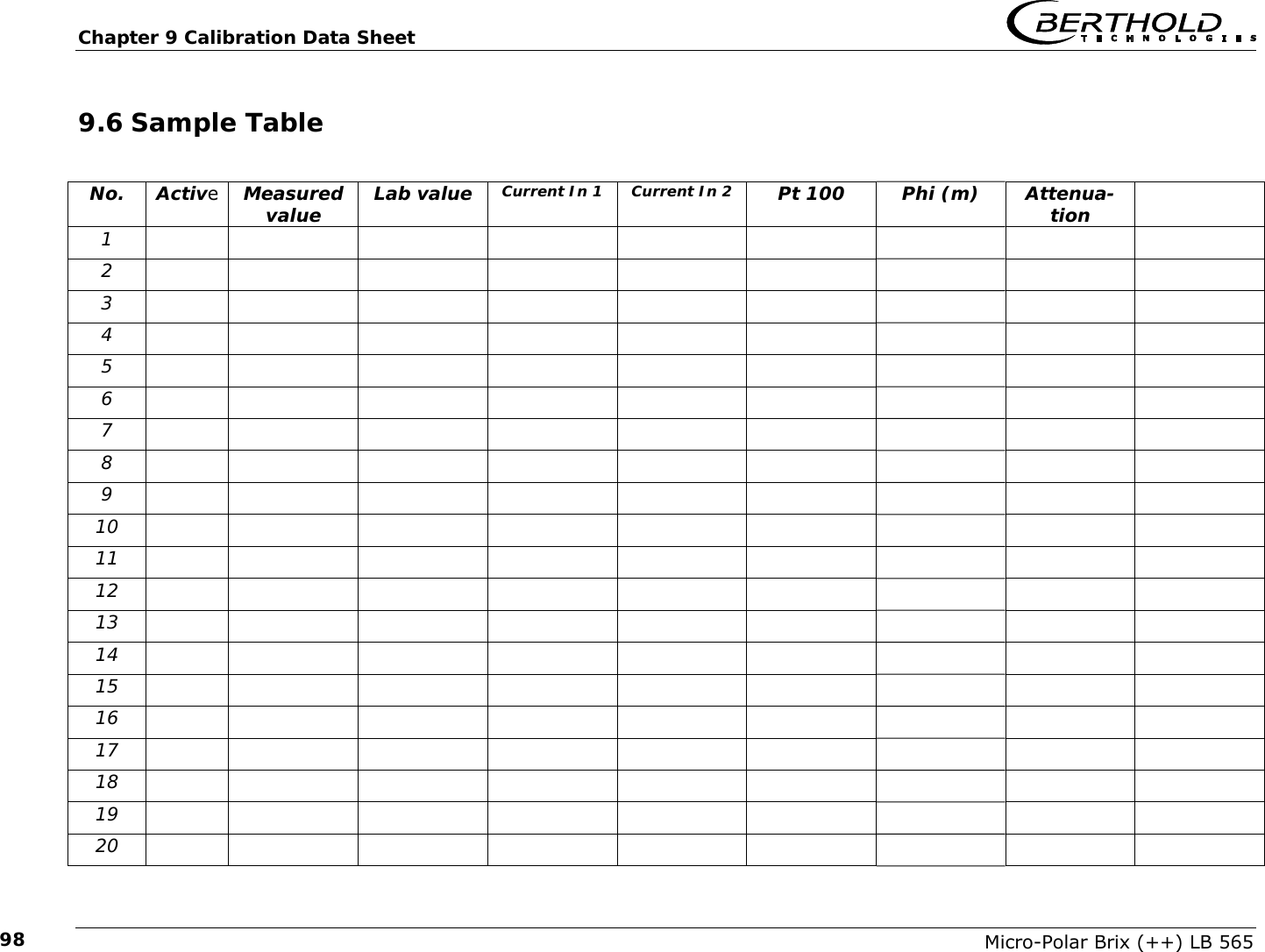
    Micro-Polar Brix (++) LB 565 9.4.2 Typical Calibration Coefficients  89 9.5 Start-up protocol printout  90 9.5.1 Examples of a start-up protocol  93 9.6 Sample Table  98
  Chapter 1 Communication with Micro-Polar Brix Micro-Polar Brix (++) LB 565  7 Safety Summary   GENERAL WARNINGS   Parameter settings Never change the parameter settings without a full knowledge of these operating instructions, as well as a full knowledge of the behavior of the connected controller and the possible influence on the operating process to be controlled.
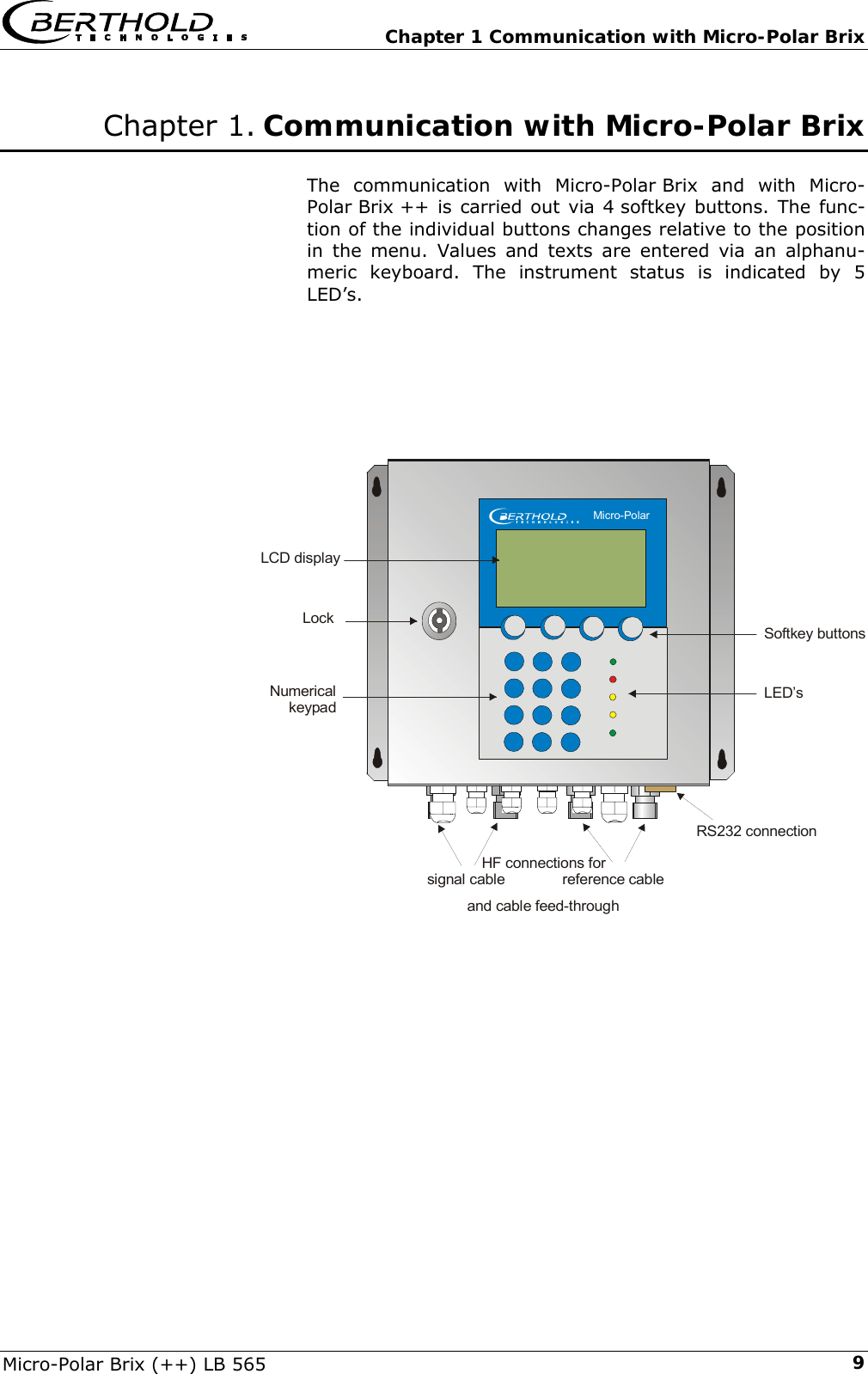
  Chapter 1 Communication with Micro-Polar Brix Micro-Polar Brix (++) LB 565  9 Chapter 1. Communication with Micro-Polar Brix  The communication with Micro-Polar Brix and with Micro-Polar Brix ++ is carried out via 4 softkey buttons. The func-tion of the individual buttons changes relative to the position in the menu. Values and texts are entered via an alphanu-meric keyboard. The instrument status is indicated by 5 LED’s.        and cable feed-throughLockNumericalkeypadSoftkey buttonsLED’sLCD displayRS232 connectionHF connections for   signal cable              reference cable    Micro-Polar
Chapter 1 Communication with Micro-Polar Brix   Micro-Polar Brix (++) LB 565 101.1 Brief Instructions Provided that Micro-Polar Brix / Micro-Polar Brix ++ is installed correctly, after power on of the de-vice the main menu appears automatically. To get correct measurement values, the instrument has to be configured and calibrated before running the first measurement. Go to the Profi mode. We recommend that you use these brief instructions only if you have already performed a process measurement with the same product and you are familiar with the Phi/att ratio. 1.2 System Configuration ¾ Select | Setup | Configuration | General Data ¾ Enter the general data (date, time, tag) ¾ □< Push the Home button to return to the Configuration menu and select | Measurement | ¾ Enter the system parameters (measurement mode, start mode, averaging, units, ...) ¾ □< Push the Home button to return to the Configuration menu ¾ Select | Plausibility |  ¾ Enter:  1. Process limits;  2. Phase measurement: Sigma max. = 100, Phi/att ratio = known value, Auto set = OFF;  3. Disable pause detection ¾ □< Push the Home button to return to the Configuration menu ¾ Select | Microwave | ¾ Enter the cable length (reference cable length, signal cable length) ¾ □< Push the Home button to return to the Setup menu ¾ Select | Input/Output | ¾ Enter the values for current output, current input, Pt100, digital out-/input ¾ □< Push the Home button to return to the Setup menu. 1.3 System Calibration ¾ Power on the instrument at least 45 minutes prior to system calibration. ¾ On the main menu, select | Setup |Calibration | System Adjust | Adjust | ¾ Start the adjustment only if you are sure that the transducer is sufficiently covered by the prod-uct. The typical standard coefficients for your application have been set up by the manufacturer. A sample has to be taken during system calibration. The lab value of the sample is needed for calculation of the offset. Calculation: Analysis value – Display = Offset. ¾ Upon completion of the system calibration, push the □< Home button three times to return to the main menu.  ¾ Push the RUN softkey to start the measurement. The live display appears. ¾ Push ESC to get to the main display and enter the offset value via | Setup | Calibration | Cali-brate Conc | Adjust | Offset |.  ¾ Enter offset value. ¾ Push the □< Home button 4 times to return to the main menu. ¾ Select | Live display |  ¾ If the product has not changed, the reading value corresponds to the laboratory value.
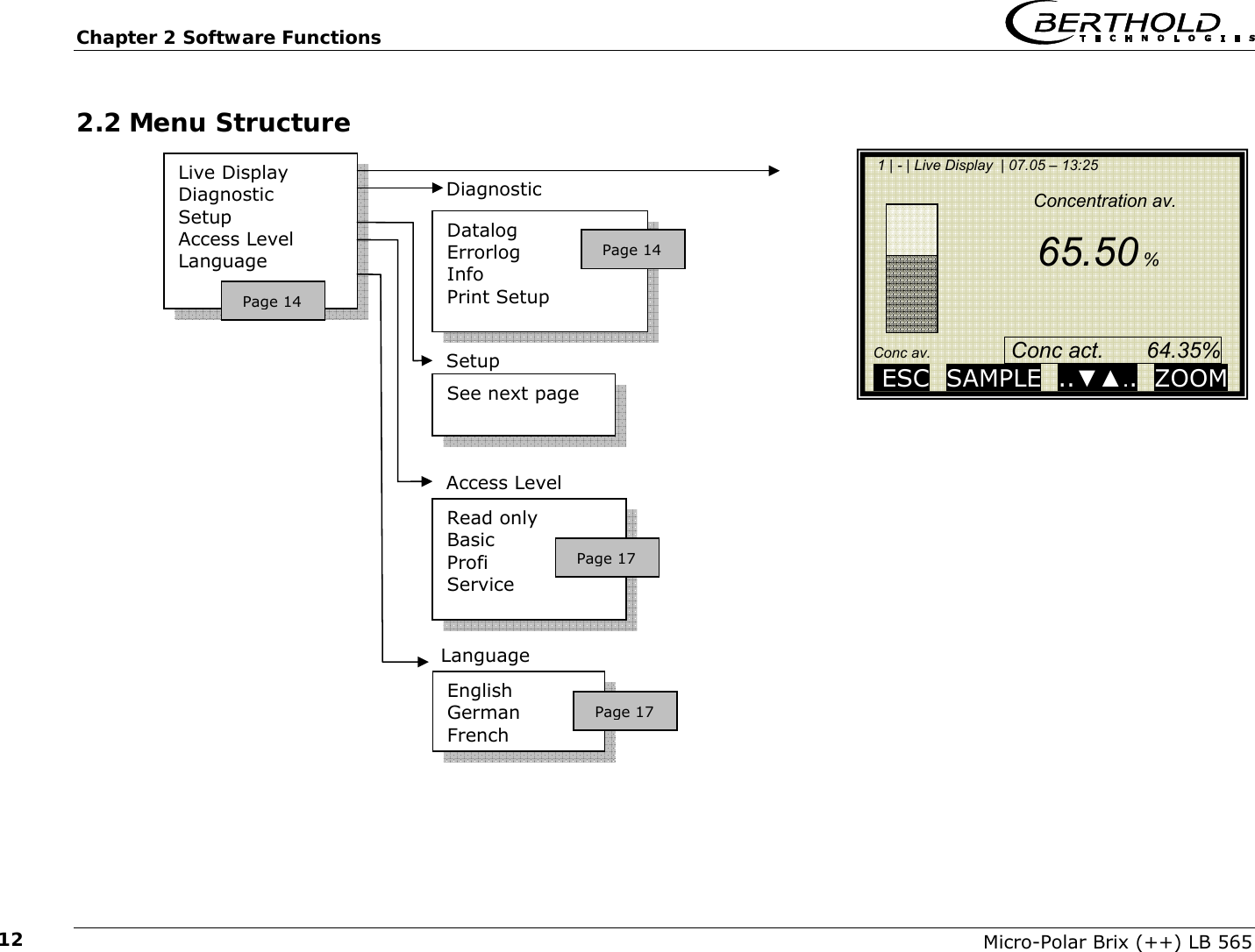
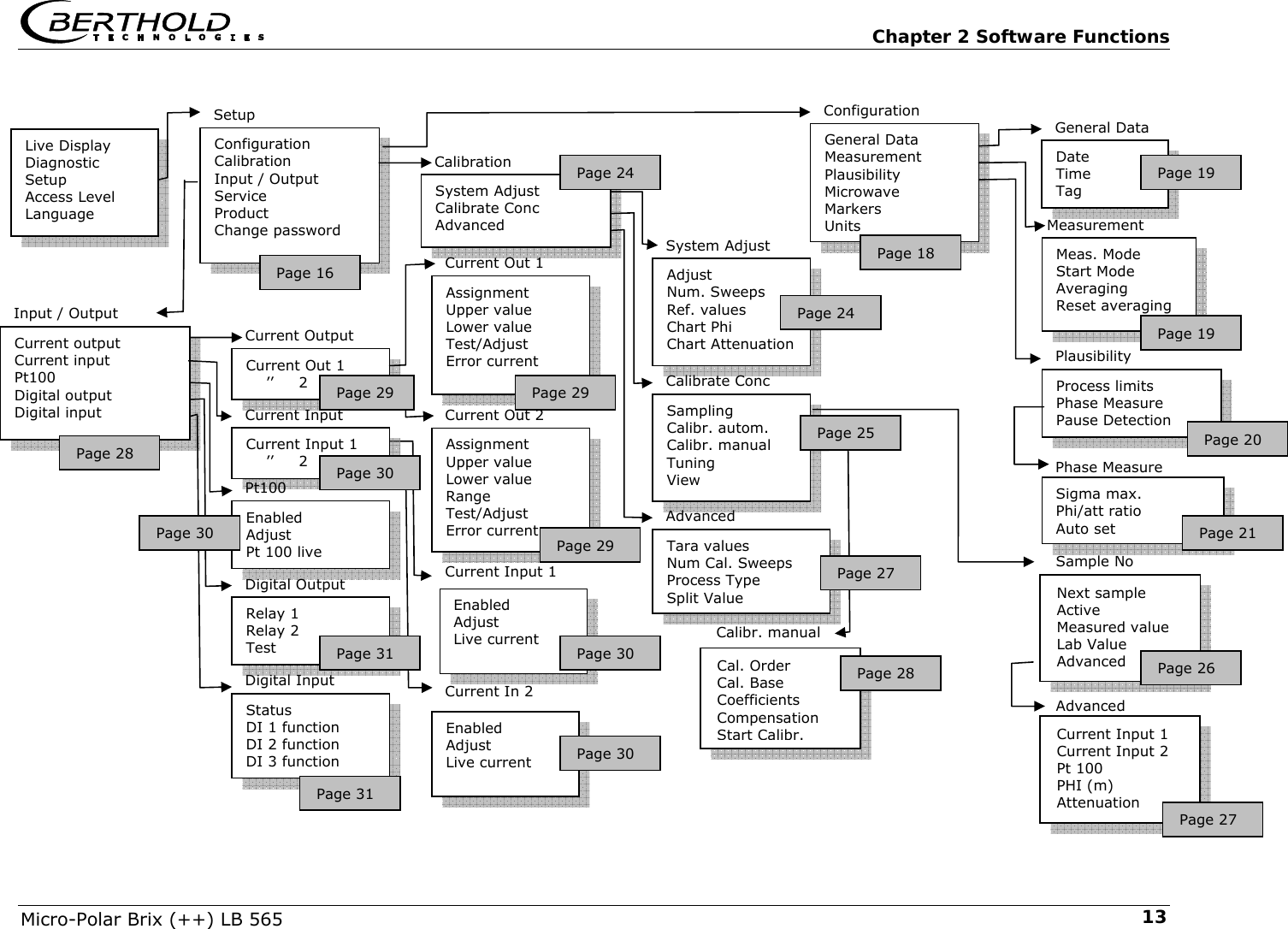
  Chapter 2 Software Functions Micro-Polar Brix (++) LB 565  11Chapter 2. Software Functions 2.1 Information on Menu Structure  The menu structure on the following pages provides an over-view of all functions of the Micro-Polar Brix. Using the page numbers indicated you can look up the function of the de-picted window.  Depending on the access level, some menu items are hidden. You have to enter an editable password to change from the level „Read only“ to „Basic“ or to „Profi“. The „Service level“ is not accessible due to licensing regulations.
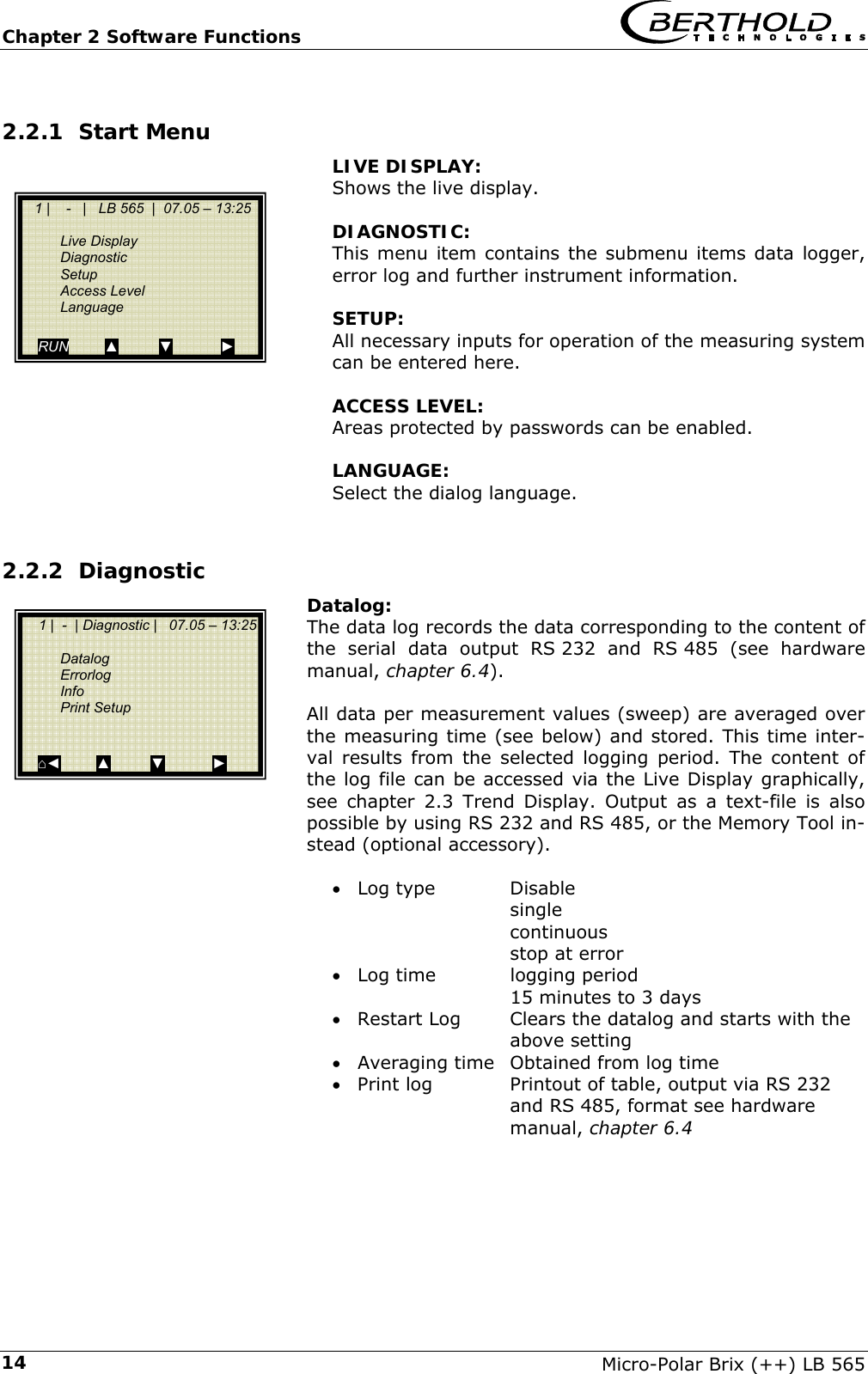
Chapter 2 Software Functions   Micro-Polar Brix (++) LB 565 122.2 Menu Structure                                   Live Display Diagnostic Setup Access Level Language Datalog Errorlog Info Print Setup  Diagnostic English German French Language Read only Basic Profi Service  Access Level See next page Setup Page 14 Page 14 Page 17 Page 17    1 | - | Live Display  | 07.05 – 13:25                                      Concentration av.                                      65.50 %       Conc av.                   Conc act.       64.35%     ESC  SAMPLE  ..▼▲..  ZOOM
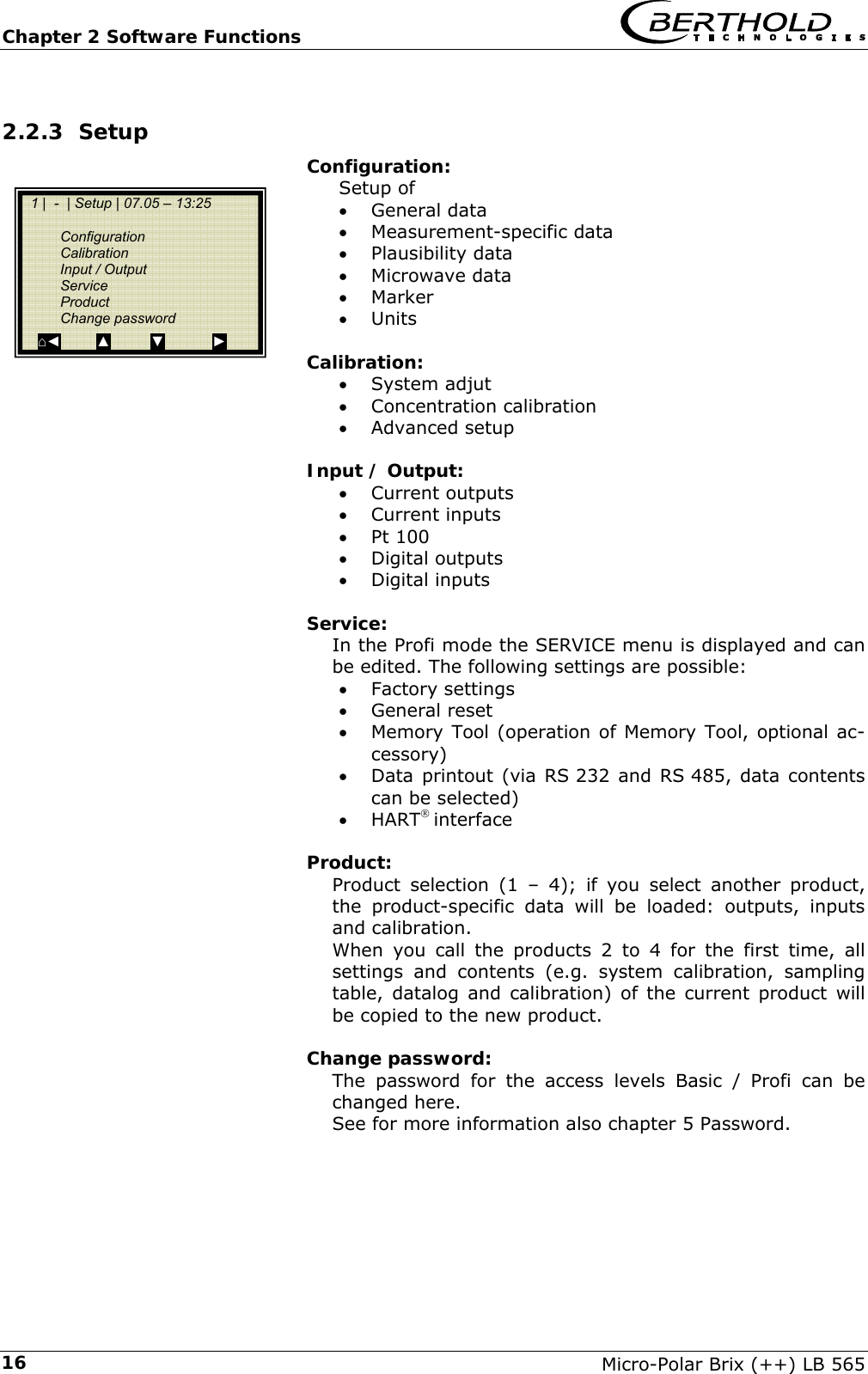
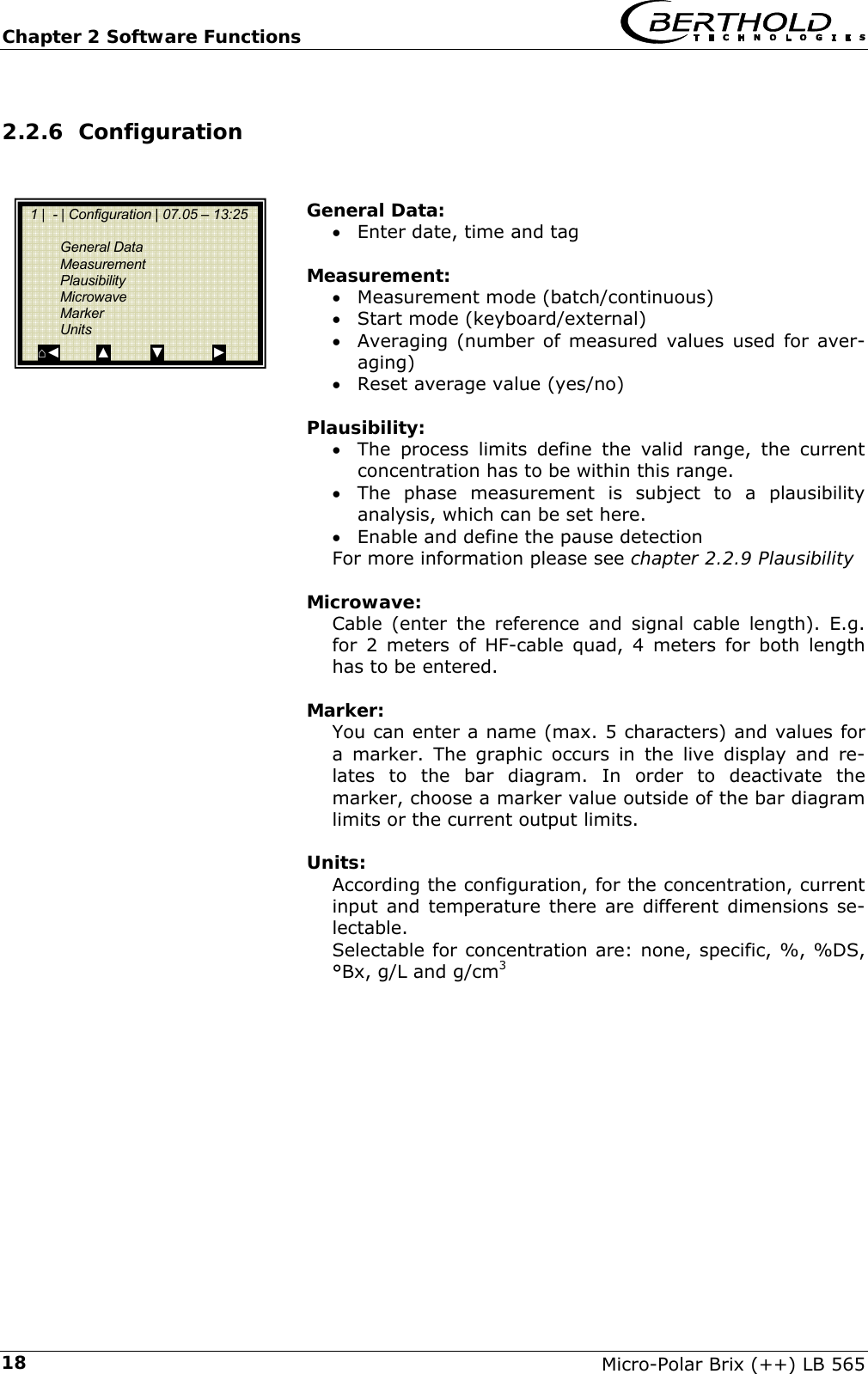
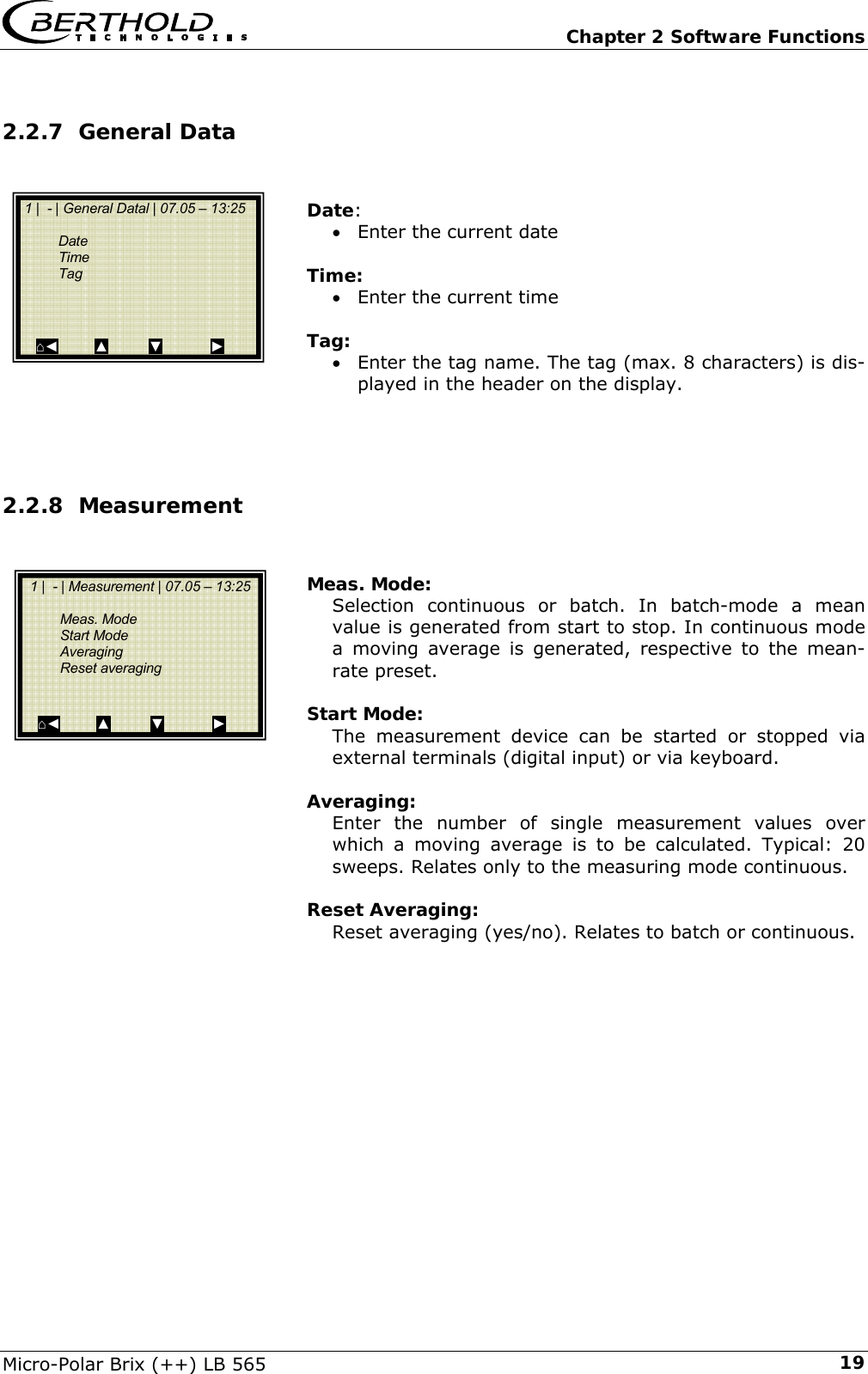
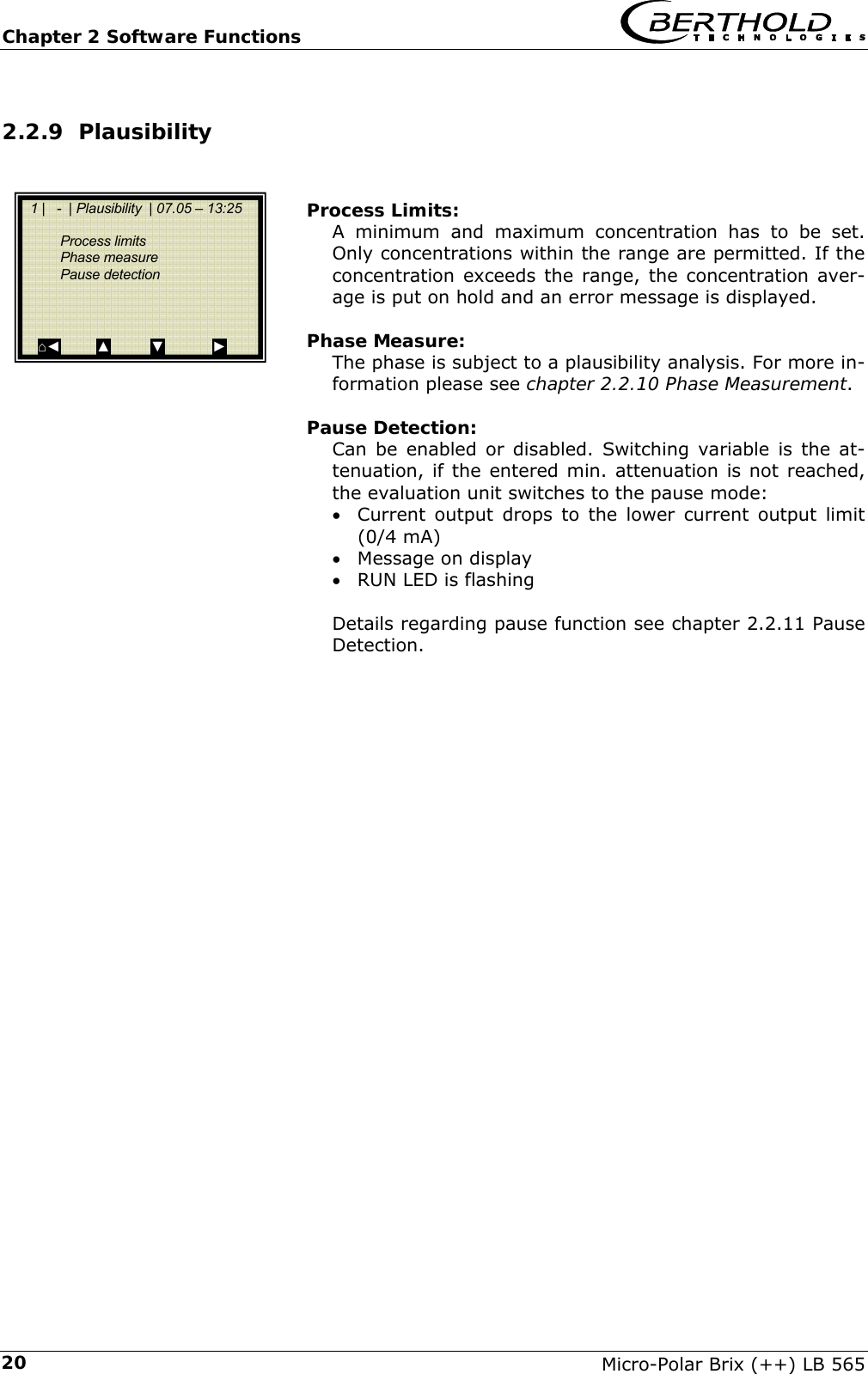
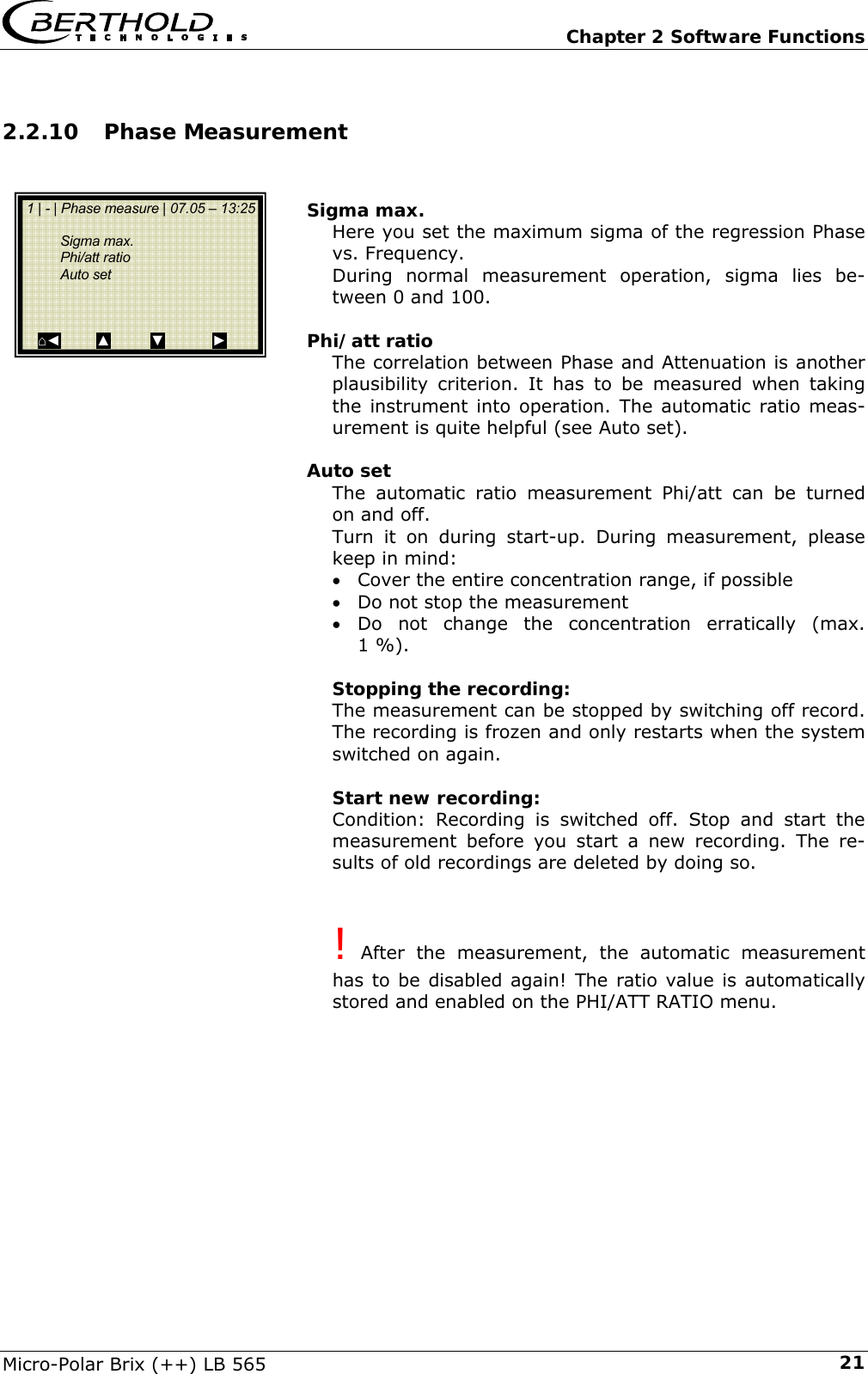
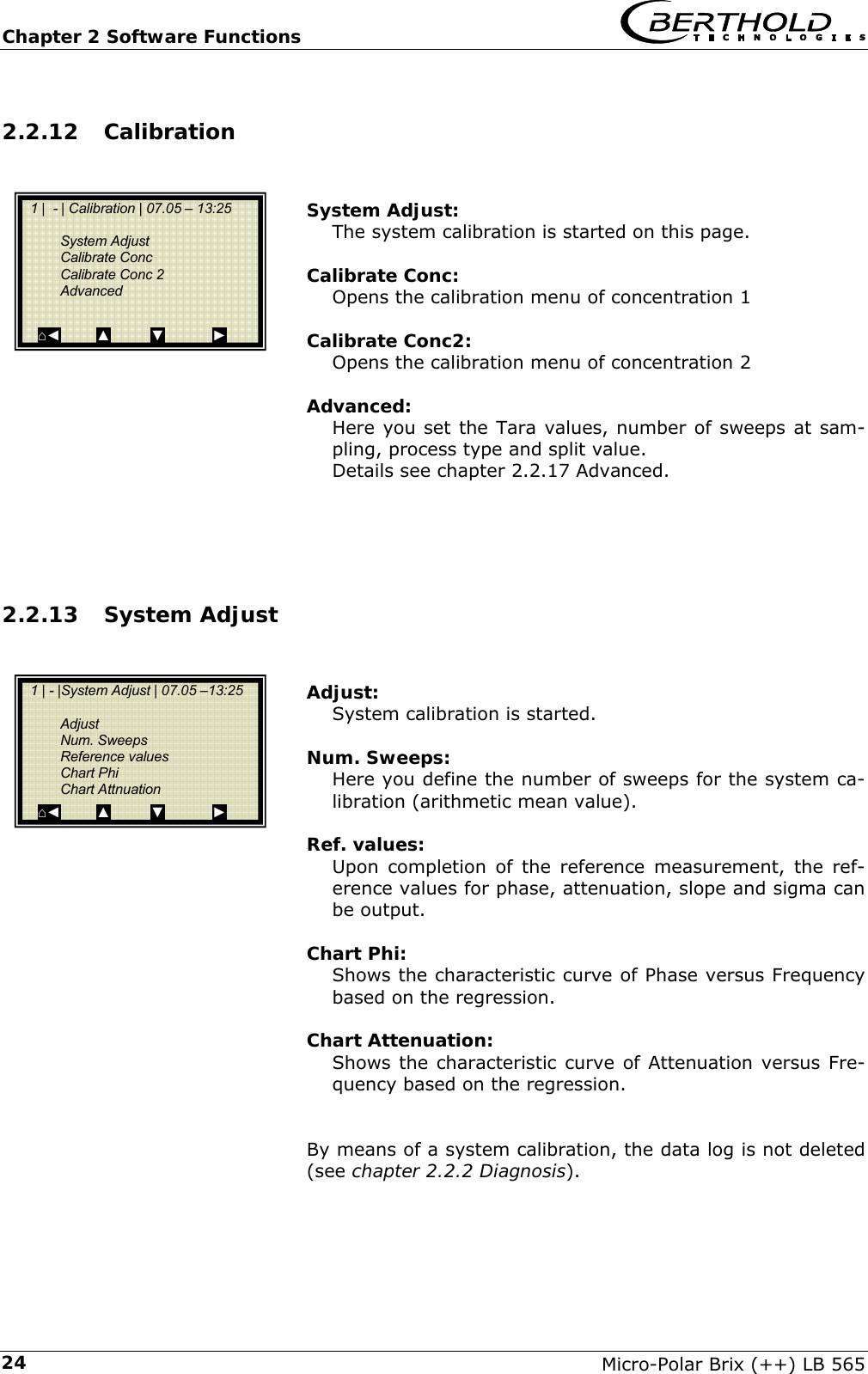
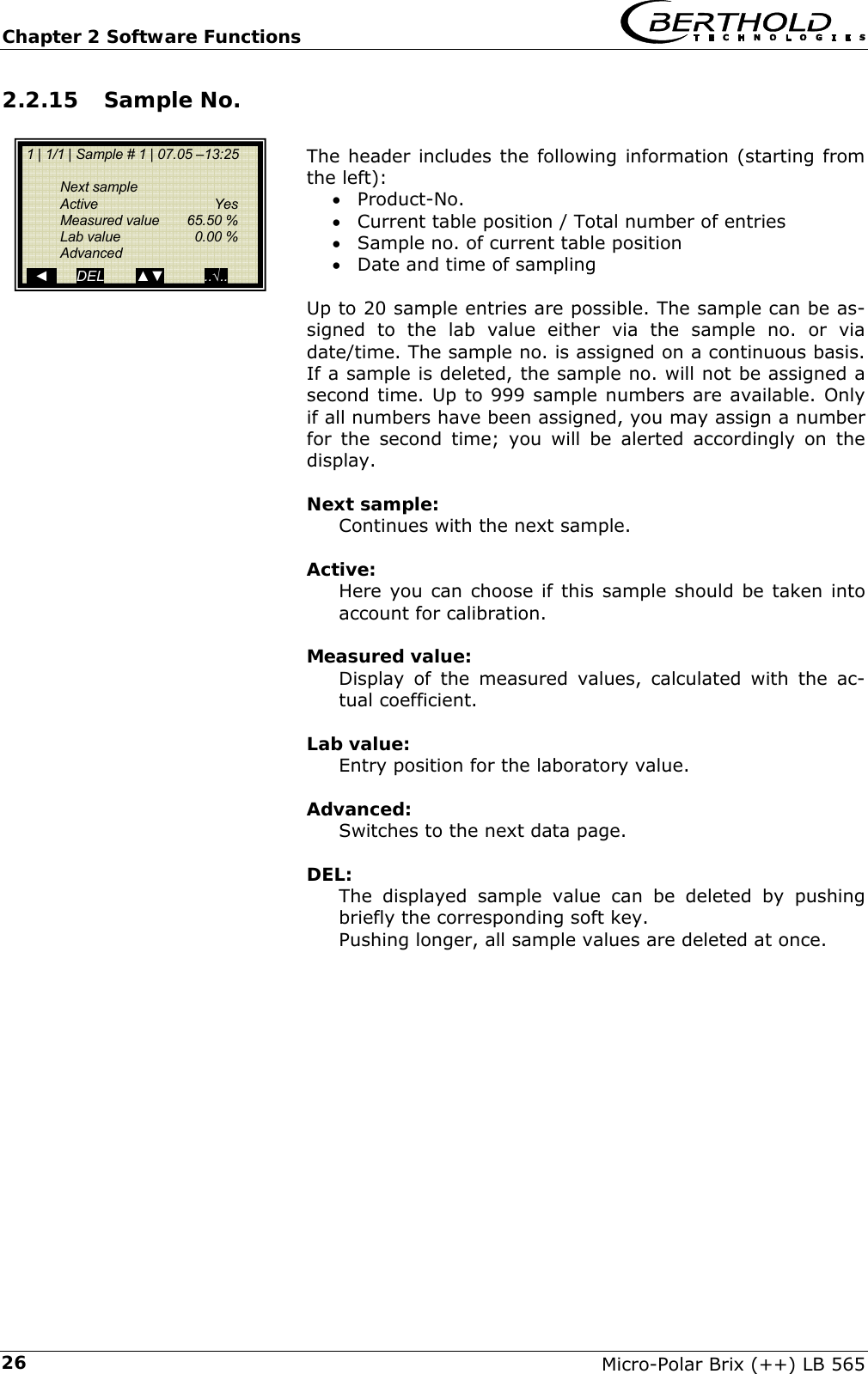
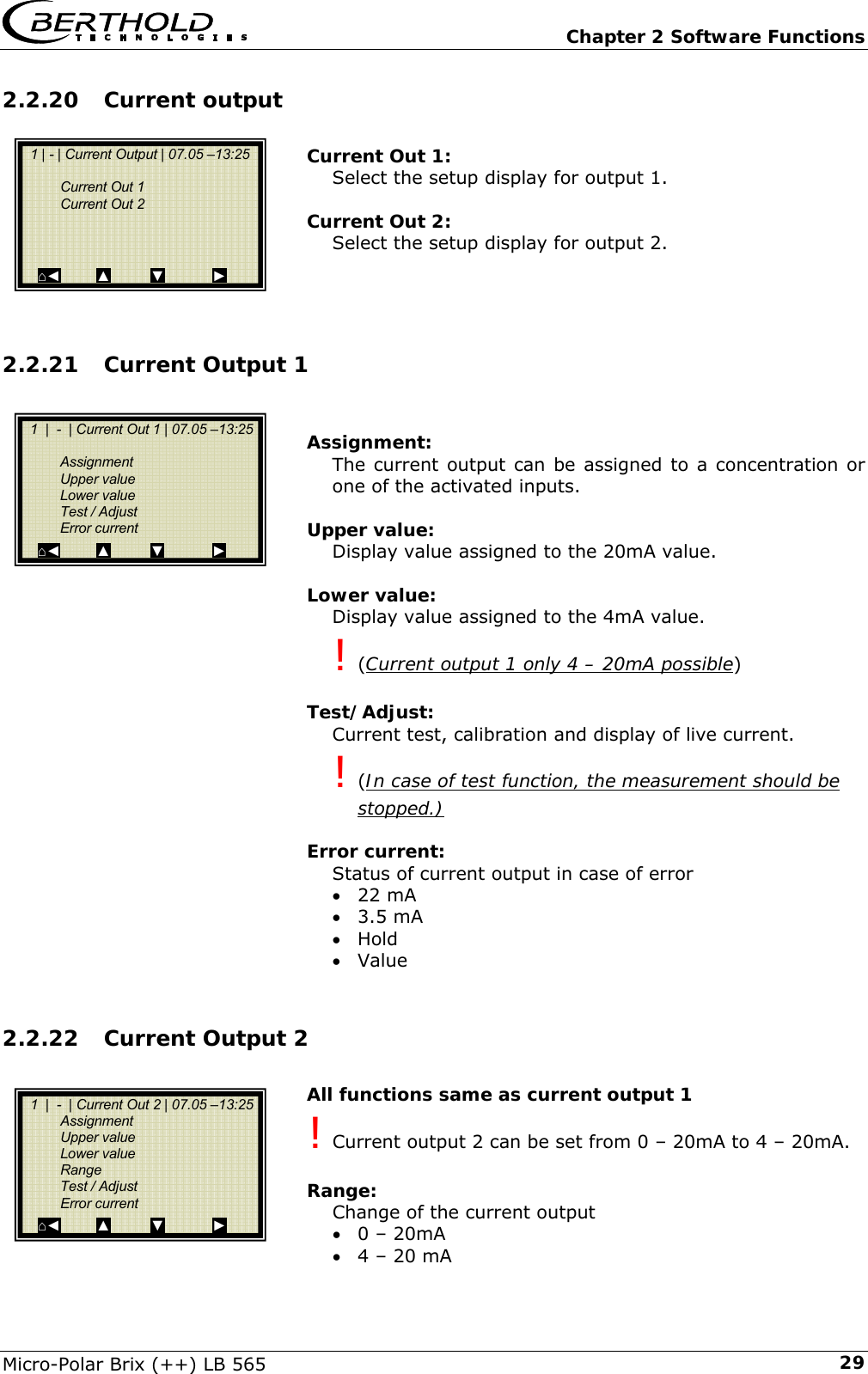
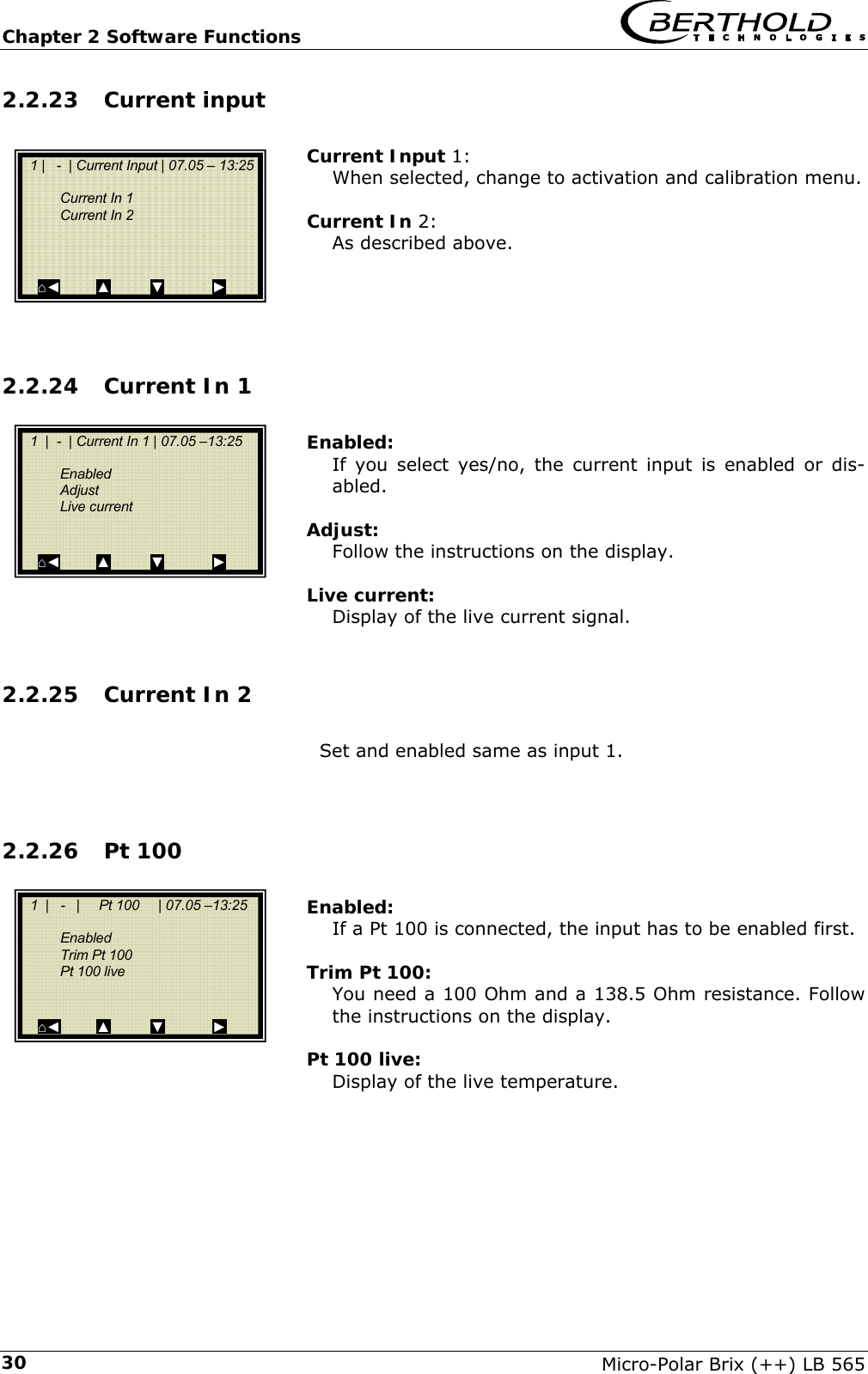
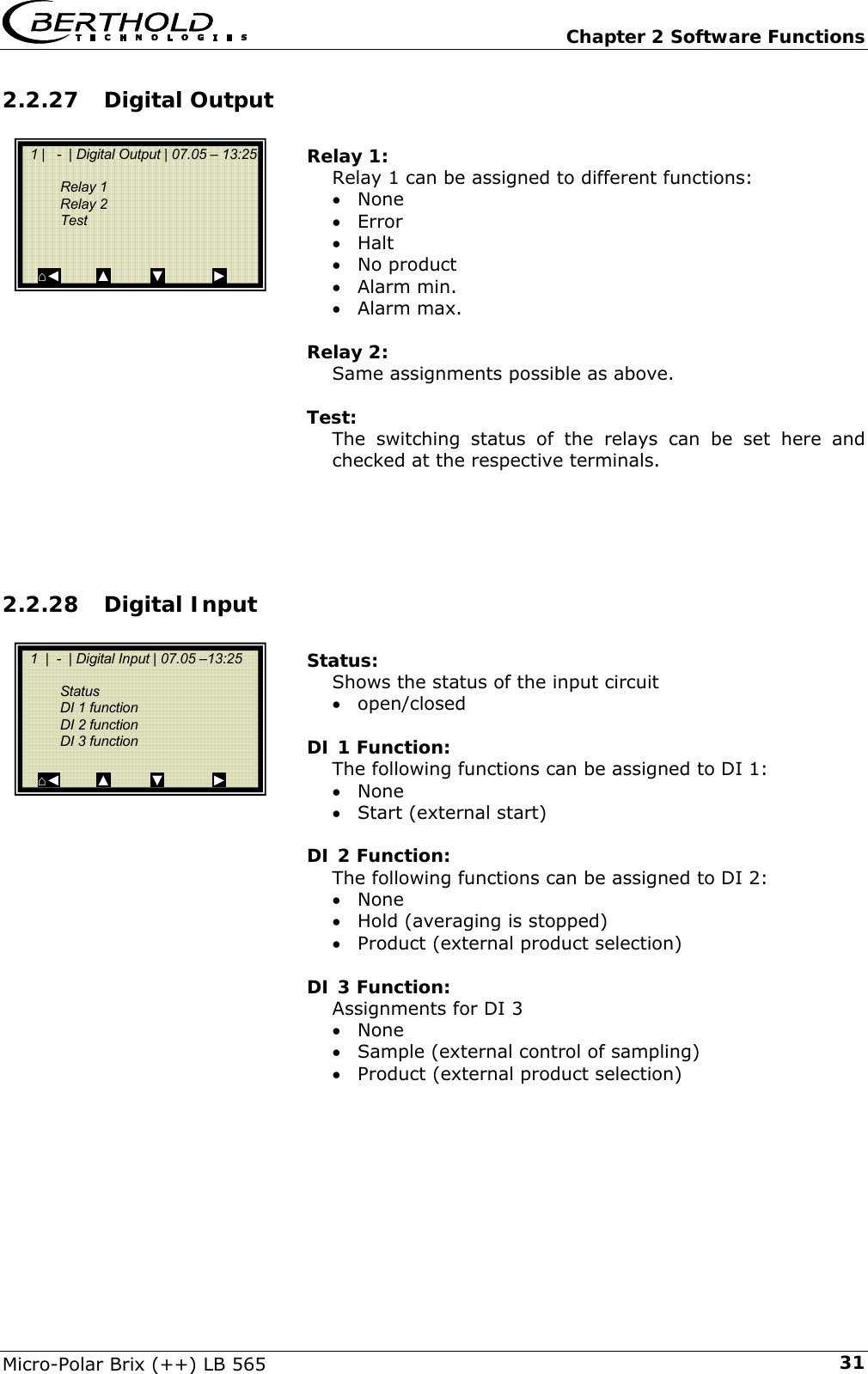
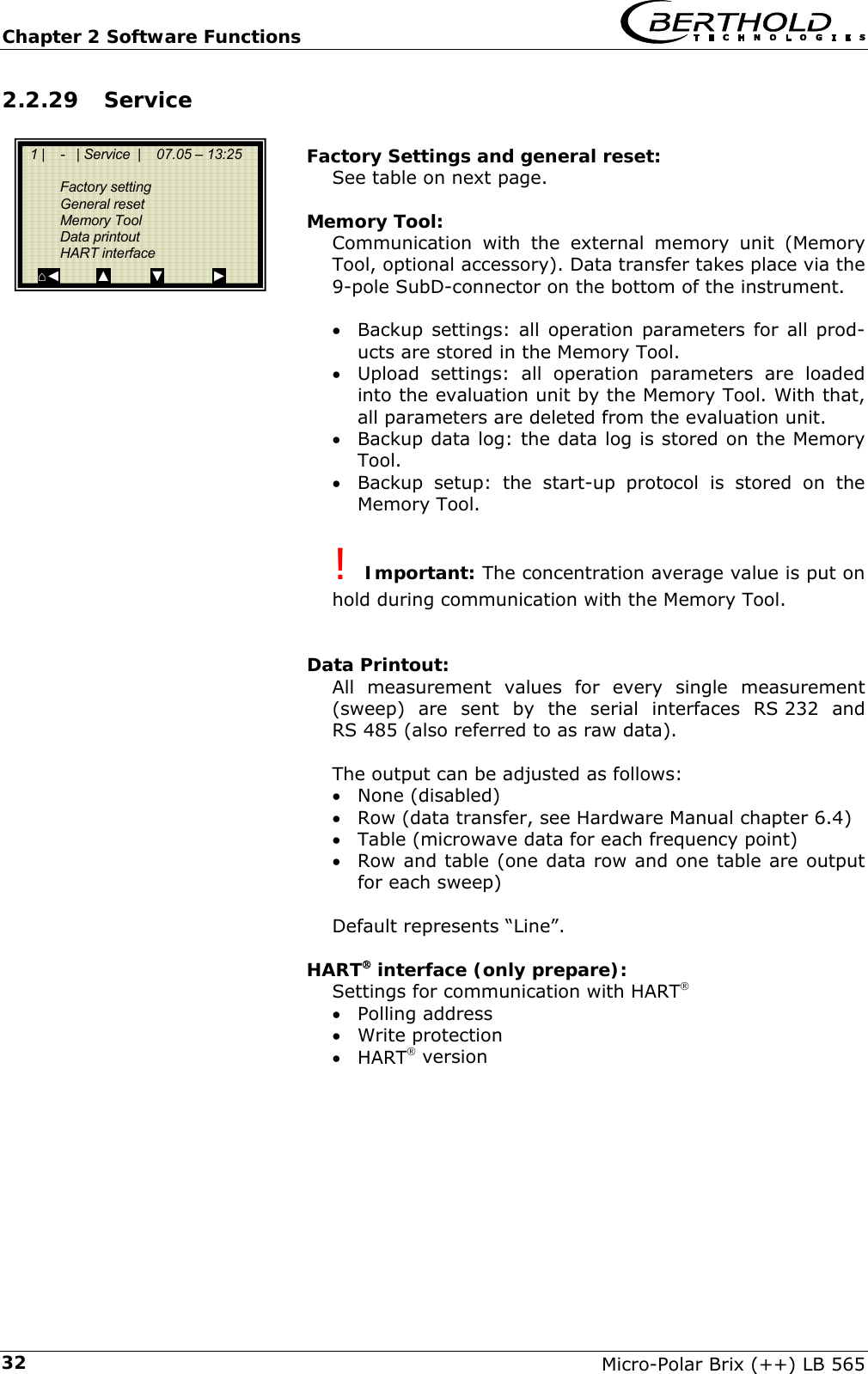
 Chapter 2 Software Functions Micro-Polar Brix (++) LB 565  13Live Display Diagnostic Setup Access Level Language General Data Measurement Plausibility Microwave Markers Units Configuration Configuration Calibration Input / Output Service Product Change password Setup Measurement Meas. Mode Start Mode Averaging Reset averaging Plausibility Process limits Phase Measure Pause Detection Phase Measure Sigma max. Phi/att ratio Auto set General Data Date Time Tag Calibration System Adjust Calibrate Conc Advanced  System Adjust Adjust Num. Sweeps Ref. values Chart Phi Chart Attenuation Calibrate Conc Sampling  Calibr. autom. Calibr. manual Tuning View Advanced  Tara values Num Cal. Sweeps Process Type Split Value Input / Output Current output Current input Pt100 Digital output Digital input Current Out 1     ’’     2 Current Out 1 Assignment Upper value Lower value Test/Adjust Error current Current Out 2 Assignment Upper value Lower value Range Test/Adjust Error current Current In 2 Enabled Adjust Live current Cal. Order Cal. Base Coefficients Compensation Start Calibr. Calibr. manual Current Input 1 Enabled Adjust Live current Page 16 Page 18 Page 19 Page 19 Page 20 Page 21 Page 24 Page 24 Page 25 Page 27 Page 28 Page 28 Page 29 Page 29 Page 30 Page 30 Current Output Current Input Current Input 1     ’’     2 Pt100 Enabled Adjust Pt 100 live Digital Output Relay 1 Relay 2 Test Digital Input Status DI 1 function DI 2 function DI 3 function Page 29 Page 30 Page 30 Page 31 Page 31 Next sample Active Measured value Lab Value Advanced Current Input 1 Current Input 2 Pt 100 PHI (m) Attenuation Sample No Advanced Page 26 Page 27
Chapter 2 Software Functions   Micro-Polar Brix (++) LB 565 142.2.1 Start Menu  LIVE DISPLAY:  Shows the live display.   DIAGNOSTIC:  This menu item contains the submenu items data logger, error log and further instrument information.   SETUP:  All necessary inputs for operation of the measuring system can be entered here.   ACCESS LEVEL: Areas protected by passwords can be enabled.   LANGUAGE: Select the dialog language.  2.2.2 Diagnostic Datalog: The data log records the data corresponding to the content of the serial data output RS 232 and RS 485 (see hardware manual, chapter 6.4).  All data per measurement values (sweep) are averaged over the measuring time (see below) and stored. This time inter-val results from the selected logging period. The content of the log file can be accessed via the Live Display graphically, see chapter 2.3 Trend Display. Output as a text-file is also possible by using RS 232 and RS 485, or the Memory Tool in-stead (optional accessory).  • Log type    Disable    single    continuous    stop at error • Log time    logging period       15 minutes to 3 days • Restart Log  Clears the datalog and starts with the above setting • Averaging time  Obtained from log time • Print log    Printout of table, output via RS 232 and RS 485, format see hardware manual, chapter 6.4     1 |    -   |   LB 565  |  07.05 – 13:25   Live Display  Diagnostic  Setup  Access Level  Language  RUN         ▲          ▼            ►     1 |  -  | Diagnostic |   07.05 – 13:25    Datalog  Errorlog  Info  Print Setup    ⌂◄         ▲          ▼            ►
  Chapter 2 Software Functions Micro-Polar Brix (++) LB 565  15Change datalog settings: If you change the logtype from any to „single“ the datalog will be cleared and you start again with the current set-ting. If you change all other logtypes and log times, the datalog will not be cleared and you continue with the new settings.  Stopped measurement: If the measurement is stopped for a time during the data log, then the measurement pause is interpreted as log time during the data logging “single”. For all other log types, the measuring pause is added to the log time.  Error log: • Shows the logged error. The last 20 error messages will be stored with date and time.   Info:  • Tag   : ... • Device type  : LB566 • Supplier   : Berthold Technologies • Manufacturer  : Berthold Technologies • Device no.  : ... • Production no. : ...-... • Software ver.  : V... • SW release date: ...  Print Setup: Printout of the start-up protocol via RS 232 and RS 485. Format, content and example see chapter 9.5 Start- up protocol printout.
Chapter 2 Software Functions   Micro-Polar Brix (++) LB 565 162.2.3 Setup Configuration: Setup of • General data • Measurement-specific data • Plausibility data • Microwave data • Marker • Units  Calibration: • System adjut • Concentration calibration • Advanced setup  Input / Output: • Current outputs • Current inputs • Pt 100 • Digital outputs • Digital inputs  Service: In the Profi mode the SERVICE menu is displayed and can be edited. The following settings are possible: • Factory settings • General reset • Memory Tool (operation of Memory Tool, optional ac-cessory) • Data printout (via RS 232 and RS 485, data contents can be selected) • HART® interface  Product: Product selection (1 – 4); if you select another product, the product-specific data will be loaded: outputs, inputs and calibration. When you call the products 2 to 4 for the first time, all settings and contents (e.g. system calibration, sampling table, datalog and calibration) of the current product will be copied to the new product.  Change password: The password for the access levels Basic / Profi can be changed here. See for more information also chapter 5 Password.   1 |  -  | Setup | 07.05 – 13:25     Configuration  Calibration   Input / Output  Service  Product  Change password ⌂◄         ▲          ▼            ►
  Chapter 2 Software Functions Micro-Polar Brix (++) LB 565  172.2.4 Access Level Read only: This mode can be selected on all levels without password.  Basic: • No password required on higher levels. Password has to be entered for „Read only“. • Password can be changed. • At the basic level some menu items are disabled, re-spectively masked, e.g. manual calibration.  Profi: • As described above. Should be used only if you are suf-ficiently familiar with the measuring system. • Changing between basic and profi is possible without using a password.  Service: • This level is reserved to the service personnel.  2.2.5 Language  Language: • Select the dialog language               1 |  - | Access Level  | 07.05 – 13:25    Select Level  Read only  Basic  Profi  Service   ESC        ?             ▲▼       ..√..   1 |    -   |   LB 565  |  07.05 – 13:25     LANGUAGE     English  German  French   ESC             ▲▼           .√.
Chapter 2 Software Functions   Micro-Polar Brix (++) LB 565 182.2.6 Configuration   General Data: • Enter date, time and tag  Measurement: • Measurement mode (batch/continuous) • Start mode (keyboard/external) • Averaging (number of measured values used for aver-aging) • Reset average value (yes/no)  Plausibility: • The process limits define the valid range, the current concentration has to be within this range. • The phase measurement is subject to a plausibility analysis, which can be set here. • Enable and define the pause detection For more information please see chapter 2.2.9 Plausibility  Microwave: Cable (enter the reference and signal cable length). E.g. for 2 meters of HF-cable quad, 4 meters for both length has to be entered.  Marker: You can enter a name (max. 5 characters) and values for a marker. The graphic occurs in the live display and re-lates to the bar diagram. In order to deactivate the marker, choose a marker value outside of the bar diagram limits or the current output limits.  Units: According the configuration, for the concentration, current input and temperature there are different dimensions se-lectable. Selectable for concentration are: none, specific, %, %DS, °Bx, g/L and g/cm3     1 |  - | Configuration | 07.05 – 13:25    General Data  Measurement  Plausibility  Microwave  Marker  Units ⌂◄         ▲          ▼            ►
  Chapter 2 Software Functions Micro-Polar Brix (++) LB 565  192.2.7 General Data   Date: • Enter the current date  Time: • Enter the current time  Tag: • Enter the tag name. The tag (max. 8 characters) is dis-played in the header on the display.    2.2.8 Measurement   Meas. Mode: Selection continuous or batch. In batch-mode a mean value is generated from start to stop. In continuous mode a moving average is generated, respective to the mean-rate preset.  Start Mode: The measurement device can be started or stopped via external terminals (digital input) or via keyboard.  Averaging: Enter the number of single measurement values over which a moving average is to be calculated. Typical: 20 sweeps. Relates only to the measuring mode continuous.  Reset Averaging: Reset averaging (yes/no). Relates to batch or continuous.   1 |  - | General Datal | 07.05 – 13:25     Date  Time  Tag       ⌂◄         ▲          ▼            ►   1 |  - | Measurement | 07.05 – 13:25     Meas. Mode  Start Mode  Averaging  Reset averaging     ⌂◄         ▲          ▼            ►
Chapter 2 Software Functions   Micro-Polar Brix (++) LB 565 202.2.9 Plausibility    Process Limits: A minimum and maximum concentration has to be set. Only concentrations within the range are permitted. If the concentration exceeds the range, the concentration aver-age is put on hold and an error message is displayed.  Phase Measure: The phase is subject to a plausibility analysis. For more in-formation please see chapter 2.2.10 Phase Measurement.  Pause Detection: Can be enabled or disabled. Switching variable is the at-tenuation, if the entered min. attenuation is not reached, the evaluation unit switches to the pause mode: • Current output drops to the lower current output limit (0/4 mA) • Message on display • RUN LED is flashing  Details regarding pause function see chapter 2.2.11 Pause Detection.     1 |   -  | Plausibility  | 07.05 – 13:25     Process limits  Phase measure  Pause detection     ⌂◄         ▲          ▼            ►
  Chapter 2 Software Functions Micro-Polar Brix (++) LB 565  212.2.10 Phase Measurement   Sigma max. Here you set the maximum sigma of the regression Phase vs. Frequency. During normal measurement operation, sigma lies be-tween 0 and 100.  Phi/att ratio The correlation between Phase and Attenuation is another plausibility criterion. It has to be measured when taking the instrument into operation. The automatic ratio meas-urement is quite helpful (see Auto set).  Auto set The automatic ratio measurement Phi/att can be turned on and off. Turn it on during start-up. During measurement, please keep in mind: • Cover the entire concentration range, if possible • Do not stop the measurement • Do not change the concentration erratically (max. 1 %).  Stopping the recording: The measurement can be stopped by switching off record. The recording is frozen and only restarts when the system switched on again.  Start new recording: Condition: Recording is switched off. Stop and start the measurement before you start a new recording. The re-sults of old recordings are deleted by doing so.   ! After the measurement, the automatic measurement has to be disabled again! The ratio value is automatically stored and enabled on the PHI/ATT RATIO menu.       1 | - | Phase measure | 07.05 – 13:25    Sigma max.  Phi/att ratio  Auto set    ⌂◄         ▲          ▼            ►
Chapter 2 Software Functions   Micro-Polar Brix (++) LB 565 222.2.11 Pause Detection   Enabled Here the pause function is activated and deactivated. Con-sider the measuring conditions for using the pause detec-tion; see below.  Attenuation min Input of the minimum attenuation, when falling below that value measurement goes into pause mode.  Conditions and discription: The pause detection function is a software feature for pause detection between two sequential discontinuous crystallization processes. This is interesting because dur-ing the cleaning phase, the sensor indicates the lower cur-rent output value (0/4 mA). Only after restart of a crystal-lization process, does the sensor show the current dry substance content (Brix content) after product entry.  Condition: pure phase calibration first order. This corre-sponds to the default adjustment of the automatical cali-bration.  For example: typical signal behavior of two crystallization processes.             Necessary Software Installations Enter under menu SETUP | CONFIGURATION | PLAUSIBIL-ITY | the following values: -  Under PROCESS LIMITS: Min. Conc. and Max. Conc. Entry of process limits: ±5 %DS to the real process limits. Example: real process limits 70 to 90 %DS, therefore 65 to 95 %DS is entered. - Under PAUSE DETECTION: The pause detection can be activated here. Switching variable is the attenuation; if the entered minimum attenuation is fallen short of, then the evaluation unit pauses.   1 | - | Pause detection | 07.05 – 13:25    Enabled  no   Attenuation min  -15 dB      ⌂◄         ▲          ▼            ► tCurrentoutput[mA]0/4Pause20tCurrentoutput[mA]0/4Pause20
  Chapter 2 Software Functions Micro-Polar Brix (++) LB 565  23Adjust these settings if applicable according to the condi-tions of „Quitting the pause mode” (see below).   Determination of the min. attenuation as a switching variable: For this, the attenuation process must be observed up to the end of a crystalliza-tion process including cleaning phase. In addition, you can take the data log (see chapter 2.2.2 diagnosis) for assistance.  For example, typical attenuation process:              D1 = smallest attenuation value in the product D2 = Attenuation value for an empty vessel  D (min) = Switching variable = average attenuation be-tween D1 and D2  Typical values (Sugar beet): D1: -15 to -10 dB D2: -25 to -20 dB D (min): -20 to -15 dB   Quitting the pause mode (change to measuring mode): Two conditions have to be met before changing the mode: 1.  The attenuation has to be higher than the attenua-tion threshold. 2.  The recent concentration (Conc act.) has to be in the following range: -  Conc act.> min. process limit -  Conc act.< min. process limit – A1·Faktor·146   A1:   Calibration coefficient of the phase Factor:  From tuning (Default =1; see chapter 2.2.13 Calibr. Concentration). Process limit:  See menu PLAUSIBILITY  tAttenuation [dB]0PauseD1D2tAttenuation [dB]0PauseD1D2
Chapter 2 Software Functions   Micro-Polar Brix (++) LB 565 242.2.12 Calibration   System Adjust: The system calibration is started on this page.  Calibrate Conc: Opens the calibration menu of concentration 1  Calibrate Conc2: Opens the calibration menu of concentration 2  Advanced: Here you set the Tara values, number of sweeps at sam-pling, process type and split value. Details see chapter 2.2.17 Advanced.     2.2.13 System Adjust   Adjust: System calibration is started.  Num. Sweeps: Here you define the number of sweeps for the system ca-libration (arithmetic mean value).  Ref. values: Upon completion of the reference measurement, the ref-erence values for phase, attenuation, slope and sigma can be output.  Chart Phi: Shows the characteristic curve of Phase versus Frequency based on the regression.  Chart Attenuation: Shows the characteristic curve of Attenuation versus Fre-quency based on the regression.   By means of a system calibration, the data log is not deleted (see chapter 2.2.2 Diagnosis).       1 |  - | Calibration | 07.05 – 13:25     System Adjust  Calibrate Conc  Calibrate Conc 2  Advanced  ⌂◄         ▲          ▼            ►   1 | - |System Adjust | 07.05 –13:25     Adjust  Num. Sweeps  Reference values  Chart Phi  Chart Attnuation ⌂◄         ▲          ▼            ►
  Chapter 2 Software Functions Micro-Polar Brix (++) LB 565  252.2.14 Calibrate Concentration   Sampling: Shows all measured samples.  Calibr. autom.: Calibration can be started after measurement of two sam-ples and input of the respective laboratory values. More-over, compensation can be enabled if the following pre-requisites have been fulfilled: 1. The respective analog input has been enabled (Pt100 or current input 1 / 2). 2. Sampling has been carried out using the previously set up compensation input. 3. The reference value has been entered on the menu COMPENSATION. The reference value is either the current product temperature at system adjustment or the average product temperature.  There are at least three samples needed for temperature compensation, otherwise the calibration error “Keeping old coefficients” appears at the evaluation unit.  Basis of automatic calibration (fixed setting): • Linear phase calibration • Compensation: additive and linear   Calibr. manual: Here you can choose the calibration order [lin-ear/quadratic], the basis [phase/attenuation or both] and compensation temperature.  Tuning: Subsequent correction of the reading is possible by enter-ing a factor and an offset. Calculation is carried out according to the following for-mula:  offsetfactordisplaydisplayCorrected +⋅=   View: Presentation of calibration curve, display of correlation and coefficients.       1 | - |Calibrate Conc| 07.05 –13:25     Sampling  Calibr. autom.  Calibr. manual  Tuning  View ⌂◄         ▲          ▼            ►
Chapter 2 Software Functions   Micro-Polar Brix (++) LB 565 262.2.15 Sample No.  The header includes the following information (starting from the left): • Product-No. • Current table position / Total number of entries • Sample no. of current table position • Date and time of sampling  Up to 20 sample entries are possible. The sample can be as-signed to the lab value either via the sample no. or via date/time. The sample no. is assigned on a continuous basis. If a sample is deleted, the sample no. will not be assigned a second time. Up to 999 sample numbers are available. Only if all numbers have been assigned, you may assign a number for the second time; you will be alerted accordingly on the display.  Next sample: Continues with the next sample.  Active: Here you can choose if this sample should be taken into account for calibration.  Measured value: Display of the measured values, calculated with the ac-tual coefficient.  Lab value: Entry position for the laboratory value.  Advanced: Switches to the next data page.  DEL: The displayed sample value can be deleted by pushing briefly the corresponding soft key. Pushing longer, all sample values are deleted at once.    1 | 1/1 | Sample # 1 | 07.05 –13:25    Next sample  Active   Yes  Measured value 65.50 %  Lab value  0.00 %  Advanced    ◄       DEL        ▲▼          ..√..
  Chapter 2 Software Functions Micro-Polar Brix (++) LB 565  272.2.16 Sample Data (expanded)  Current In 1: Editable display of the first compensation input.  Current In 2: Editable display of the second compensation input.  Pt 100: Editable display of the Pt 100 input.  PHI (m): Not editable display of the measured phase.  Attenuation: Not editable display of the measured attenuation.    2.2.17 Advanced Settings   Tara Values: Input option of Tara values for phase and attenuation. The Tara values are attributed to the phase or the attenuation before calibration. The calculation is the following:  Phase = Phasemeas - Phase Tara Attenuation = Attunationmeas - AttenuationTara   This function is not needed for the determination of dry substance, brix or density in sugar solution.  Number of Calibration Sweeps: Freely adjustable number of sweeps over which a calibra-tion point (in the course of automatic sample measure-ment) will be averaged.  Process Type: Select the operation mode: • one concentration [1 measuring range] • two concentrations [2 measuring ranges] • split concentration [1 measuring range with switching point (split value) for coefficient switchover].  Split Value: Setting of the switching point on a value basis.   1 | - | Advanced |          07.05 –13:25     Tara values  Num. Cal. Sweeps  Process type  Split Value     ⌂◄         ▲          ▼            ►  1 | 1/1 | Sample # 1 | 07.05 –13:25    Current In 1  Current In 2  PT100  PHI (m)  Attenuation    ◄      DEL    ▲▼          ..√..
Chapter 2 Software Functions   Micro-Polar Brix (++) LB 565 282.2.18 Calibr. manual   Cal. Order: Here you define the calibration order [linear / quadratic]  Cal. Base: The following parameters can be set: • Phase • Attenuation • Phase and attenuation  Coefficients: Here you can edit all coefficients for phase and attenua-tion.  Compensation: If at least one analog input is active, you may assign the compensation and set the compensation parameters.  Start Calibr.: Starts the calibration using the parameters you have set earlier.    2.2.19 Input / Output    Current Output: Both outputs can be adjusted, assigned and set up on the selected level.  Current Input: Activation level of current input, calibration and display of the live current signal.  Pt 100: Here you can enable and adjust a connected Pt 100. Dis-play of the actual temperature signal.  Digital Output: Allocation of relays 1 and 2 and test function.  Digital Input: Status control and assignment of the digital inputs.    1 | - | Calibr. manual | 07.05 –13:25    Cal. Order  Cal. Base  Coefficients  Compensation  Start Calibr. ⌂◄         ▲          ▼            ►   1 | - | Inputs/Outputs |  07.05 –13:25    Current Output  Current Input  PT100  Digital Output  Digital Input ⌂◄         ▲          ▼            ►
  Chapter 2 Software Functions Micro-Polar Brix (++) LB 565  292.2.20 Current output   Current Out 1: Select the setup display for output 1.  Current Out 2: Select the setup display for output 2.    2.2.21 Current Output 1   Assignment: The current output can be assigned to a concentration or one of the activated inputs.  Upper value: Display value assigned to the 20mA value.  Lower value: Display value assigned to the 4mA value. ! (Current output 1 only 4 – 20mA possible)  Test/Adjust: Current test, calibration and display of live current. ! (In case of test function, the measurement should be stopped.)    Error current: Status of current output in case of error • 22 mA • 3.5 mA • Hold • Value  2.2.22 Current Output 2  All functions same as current output 1 ! Current output 2 can be set from 0 – 20mA to 4 – 20mA.   Range: Change of the current output  • 0 – 20mA • 4 – 20 mA    1 | - | Current Output | 07.05 –13:25     Current Out 1  Current Out 2       ⌂◄         ▲          ▼            ►   1  |  -  | Current Out 1 | 07.05 –13:25     Assignment  Upper value  Lower value   Test / Adjust  Error current ⌂◄         ▲          ▼            ►   1  |  -  | Current Out 2 | 07.05 –13:25   Assignment  Upper value  Lower value  Range   Test / Adjust  Error current   ⌂◄         ▲          ▼            ►
Chapter 2 Software Functions   Micro-Polar Brix (++) LB 565 302.2.23 Current input  Current Input 1: When selected, change to activation and calibration menu.  Current In 2: As described above.     2.2.24 Current In 1  Enabled: If you select yes/no, the current input is enabled or dis-abled.  Adjust: Follow the instructions on the display.  Live current: Display of the live current signal.  2.2.25 Current In 2  Set and enabled same as input 1.   2.2.26 Pt 100   Enabled: If a Pt 100 is connected, the input has to be enabled first.  Trim Pt 100: You need a 100 Ohm and a 138.5 Ohm resistance. Follow the instructions on the display.  Pt 100 live: Display of the live temperature.         1  |  -  | Current In 1 | 07.05 –13:25       Enabled  Adjust  Live current       ⌂◄         ▲          ▼            ►   1 |   -  | Current Input | 07.05 – 13:25       Current In 1  Current In 2         ⌂◄         ▲          ▼            ►   1  |   -   |     Pt 100     | 07.05 –13:25      Enabled  Trim Pt 100   Pt 100 live        ⌂◄         ▲          ▼            ►
  Chapter 2 Software Functions Micro-Polar Brix (++) LB 565  312.2.27 Digital Output  Relay 1: Relay 1 can be assigned to different functions: • None • Error • Halt • No product • Alarm min. • Alarm max.  Relay 2: Same assignments possible as above.  Test: The switching status of the relays can be set here and checked at the respective terminals.     2.2.28 Digital Input  Status: Shows the status of the input circuit • open/closed  DI 1 Function: The following functions can be assigned to DI 1: • None • Start (external start)  DI 2 Function: The following functions can be assigned to DI 2: • None • Hold (averaging is stopped) • Product (external product selection)  DI 3 Function: Assignments for DI 3 • None • Sample (external control of sampling) • Product (external product selection)          1 |   -  | Digital Output | 07.05 – 13:25      Relay 1   Relay 2   Test        ⌂◄         ▲          ▼            ►   1  |  -  | Digital Input | 07.05 –13:25       Status   DI 1 function    DI 2 function   DI 3 function     ⌂◄         ▲          ▼            ►
Chapter 2 Software Functions   Micro-Polar Brix (++) LB 565 322.2.29 Service  Factory Settings and general reset: See table on next page.  Memory Tool: Communication with the external memory unit (Memory Tool, optional accessory). Data transfer takes place via the 9-pole SubD-connector on the bottom of the instrument.  • Backup settings: all operation parameters for all prod-ucts are stored in the Memory Tool. • Upload settings: all operation parameters are loaded into the evaluation unit by the Memory Tool. With that, all parameters are deleted from the evaluation unit. • Backup data log: the data log is stored on the Memory Tool. • Backup setup: the start-up protocol is stored on the Memory Tool.  ! Important: The concentration average value is put on hold during communication with the Memory Tool.   Data Printout: All measurement values for every single measurement (sweep) are sent by the serial interfaces RS 232 and RS 485 (also referred to as raw data).  The output can be adjusted as follows: • None (disabled) • Row (data transfer, see Hardware Manual chapter 6.4) • Table (microwave data for each frequency point) • Row and table (one data row and one table are output for each sweep)  Default represents “Line”.  HART® interface (only prepare): Settings for communication with HART® • Polling address • Write protection • HART® version        1 |    -   | Service  |    07.05 – 13:25    Factory setting  General reset  Memory Tool  Data printout  HART interface ⌂◄         ▲          ▼            ►
  Chapter 2 Software Functions Micro-Polar Brix (++) LB 565  33                                                            *Default: default values, see chapter 9. under „Factory settings “       Factory settings   General Reset Language selection  Unchanged   Unchanged  Access level   Unchanged   Default: Basis Measurement   Has been stopped  Has been stopped  Password  Unchanged   Default: PASS1 Product selection  Unchanged   All products deleted  Error log  Not deleted   Deleted  Data log  Not deleted, Setting default Deleted, setting de-fault System calibration  Not deleted  Deleted Cable length   Unchanged  Default Sample table   Not deleted   Deleted  Measuring table description   Default  Default All parameter under menu: Measurement  Plausibility  Marker Unit  Default Default Calibration coefficients   Default  Default All calibration under the analog and digital in and outputs.  Default Default Adjustment of analog in and outputs  Unchanged   Deleted    Remark:  Only is effective on current product  Is effective for all products (P1 to P4) -
Chapter 2 Software Functions   Micro-Polar Brix (++) LB 565 342.3 Trend Display   Push the ZOOM button to enlarge the measurement value which is surrounded by a frame.        By pushing the ZOOM button for a longer time, the enlarged measurement value will be displayed as trend over the entire display.  The trend display corresponds to the contents of the datalog. Datalog has to be enabled for the trend display.   ! During the trend set up (few seconds), the measuring value or the power output is frozen.           |     |  Concentration av. |        %            MIN                                                  ►  1 | - | Live Display  | 07.05 – 13:25        Concentration av.       43.20 %       Conc av.        Act.   45 % ESC   SAMPLE   ▲▼    ZOOM
  Chapter 3 Configuration Micro-Polar Brix (++) LB 565  35Chapter 3. Configuration   Before carrying out any calibration work, you should check the configuration setup of the measuring system and change it, if necessary. 3.1 Configuration Setup      ¾ CONFIGURATION      3.1.1 General Data    ¾ GENERAL DATA       Example: Select the respective entry, edit and store it.  ¾ DATE       Push  DEL to delete the entry and then enter the new date. Push..√..  to confirm and store the changed date. ! The colon for the time input (e.g. 13:25) is invoked by pushing the button [ . ].    1 |  -  | Setup |             07.05 – 13:25     Configuration  Calibration  Input / Output  Service  Product  Change password ⌂◄         ▲          ▼            ►  1 |  - | Configuration l  | 07.05 – 13:25    General Data  Measurement  Plausibility  Microwave  Marker  Units ⌂◄         ▲          ▼            ►   1 |  - | General Datal  | 07.05 – 13:25    Date   07.05.2004  Time   13:25  Tag   App.1       ⌂◄         ▲          ▼            ►   1 |  - | General Data | 07.05 – 13:25     Date    07.05.2004 |     ESC        ..?..        DEL        ..√..
Chapter 3 Configuration   Micro-Polar Brix (++) LB 565 363.1.2  Measurement You have to check the settings on this display and adapt them to the measurement conditions.  For example, you have to adapt the measurement mode, the start mode and the averaging to the actual operating condi-tions.      3.1.3 Plausibility   To rule out any unnecessary disturbances during calibration, the  process limits should be set, as far as possible, below or above the measuring range. You should keep the factory-set default values for the phase measurement and disable Pause detection. If a default value has to be changed, you have to check all entries that are relevant for calibration and, if necessary, renew them. Upon completion of the calibration work, you can enable Pause detection again.   3.1.4 Microwave     ¾ CABLES        If the factory-set cable lengths do not match the actual geome-try conditions, you have to correct the values.  Example: For a 2 m long HF quad cable, enter 4 m for the reference and signal cable length. The input value corre-sponds to twice the quad cable length.      1 |  - | Measurement  | 07.05 – 13:25     Meas. Mode   Continuous   Start Mode   Keypad   Averaging  20  Reset Averaging  no    ⌂◄         ▲          ▼            ►   1 |   -  | Plausibility  | 07.05 – 13:25     Process Limits  Phase Measure  Pause Detection     ⌂◄         ▲          ▼            ►   1 |   -  | Microwave | 07.05 – 13:25     Cables       ⌂◄         ▲          ▼            ►   1 |   -   |   Cables |        07.05 – 13:25      Ref. cable length  4 m   Signal cable length   4 m     ⌂◄         ▲          ▼            ►
  Chapter 3 Configuration Micro-Polar Brix (++) LB 565  373.1.5  Marker  You can set a marker comprising max. 5 characters which identify the value set on in the live display.   ¾ MARKER     3.1.6 Units  Set the units as desired.    ¾ UNITS       ¾ CONC     The units of the concentrations (conc 1 and 2) and those of the enabled analog inputs can be selected.    ¾ %      Different units can be set for both concentrations.     1 |  - | Configuration | 07.05 – 13:25     General Data  Measurement  Plausibility  Microwave  Marker  Units ⌂◄         ▲          ▼            ►   1 |  - | Configuration | 07.05 – 13:25     General Data  Measurement  Plausibility  Microwave  Markers  Units ⌂◄         ▲          ▼            ►   1 |   -   |  Units   | 07.05 – 13:25     Conc   % TS  Conc 2   %  Current in 1   °C       ⌂◄         ▲          ▼            ►     1 |   -   |  Units   | 07.05 – 13:25   Conc.    None  Specific  %  % DS  °Bx ESC       ..?..        ▲▼        ..√..
Chapter 3 Configuration   Micro-Polar Brix (++) LB 565 38    ¾ CURRENT INPUT 1          ¾ °C   The temperature input can be set to °C, °F, specific or none.     1 |   -   |  Units   | 07.05 – 13:25     Conc   % TS  Conc 2   %   Current in 1  °C      ⌂◄         ▲          ▼            ►     1 |   -   |  Units   | 07.05 – 13:25   Current in 1    None  Specific   °C   °F    ESC       ..?..        ▲▼        ..√..
  Chapter 3 Configuration Micro-Polar Brix (++) LB 565  393.2 Start Calibration Coefficients  Prerequisite: You are in the Profi mode  If the display depicted to the left is not visible, do the follow-ing on the live display: ESC | SETUP | CALIBRATION | CALIBRATE CONC |  ¾ CALIBR. MANUAL         ¾ COEFFICIENTS        Check the coefficients A1 and C and correct them, if neces-sary, as follows:  C = average measuring range value (concentration value)  A1 = 0    Note: With these calibration coefficients the concentration aver-age value and thus the current output is put on hold during start-up.        1 | - |Calibrate Conc| 07.05 –13:25     Sampling  Calibr. autom.  Calibr. manual  Tuning  View  ⌂◄         ▲          ▼            ►   1 | - | Calibr. manual | 07.05 –13:25    Cal. Order  Linear  Cal. Basis  PHI  Coefficients     Compensation  Start Calibration  ⌂◄         ▲          ▼            ►   1 | - | Coefficients | 07.05 –13:25     A1    0  C    50       ⌂◄         ▲          ▼            ►
  Chapter 4 Calibration Micro-Polar Brix (++) LB 565  41Chapter 4. Calibration   Note: The measuring system has been connected properly and the normal operating temperature has been reached (approx. 30 to 45 min. acclimatization).  It has to be ensured that the flow cell is completely filled with product or the container probe is completely surrounded by pro-duct. Prerequisite: Chapter 3.1 Configuration Setup has been completed. 4.1 System Calibration    If you turn on the measuring system, the following display appears:  ¾ SETUP          ¾ CALIBRATION         ¾ SYSTEM ADJUST           1 |    -   |   LB 565  |  07.05 – 13:25     Live Display  Diagnostic  Setup  Access Level  Basic  Language  English  RUN         ▲          ▼            ►   1 |  -  |   Setup   |        07.05 – 13:25     Configuration  Calibration  Input / Output  Product  Change password   ⌂◄         ▲          ▼            ►   1 |  - | Calibration |     07.05 – 13:25     System Adjust  Calibrate Conc      ⌂◄         ▲          ▼            ►
Chapter 4 Calibration   Micro-Polar Brix (++) LB 565 42 The manufacturer has set the number of measurement cycles (sweeps) to 10.   ¾ ADJUST         Confirm         System adjustment is in process.              Push ..OK.. to confirm and push ⌂◄ three times to return to the main menu.          1 | - | System Adjust | 07.05 –13:25   Adjust  Num. Sweeps  10     ⌂◄         ▲          ▼            ►   1 | - | System Adjust | 07.05 –13:25    System adjustment now?     ..X..                                ..√..   1 | - | System Adjust | 07.05 –13:25     Adjustment in process ...     ….. ...........................................     1 | - | System Adjust | 07.05 –13:25     Adjusted!                                              ..OK..
  Chapter 4 Calibration Micro-Polar Brix (++) LB 565  434.2 Start-up of Micro-Polar Brix ++ System adjustment and calibration are carried out in just the same way for Micro-Polar ++, as they are for the standard system Micro-Polar Brix. However it has to be paid attention to the fact, that the ++system needs a minimum attenuation of 40 dB above the complete concentration range and while system adjustment. When falling below, the measurement is not precise anymore and error prompts may occur.  The complete attenuation is generated the following way:  dB total = dB adjust + dB live + 0.4 x measuring cable length  This applies for: dBtotal :    total attenuation dBadjust:    attenuation while system adjustment dBlive:    actual attenuation while measuring measuring cable length: e.g. 4 meters of HF-cable quad re-sults into 8 meters measuring cable length (counting both ways, forward and backwards).  From software version 1.22 on, the evaluation unit is control-ling the total attenuation automatically and shows an error prompt when falling below (Error no. 55).  Remedy when falling below minimum attenuation: If the necessary attenuation is not reached, it is possible to install a 10 dB attenuator in the transmitter branch (see Fig-ure 4-1). However when falling below significantly, the stan-dard system Micro-Polar Brix should be used instead.                    Figure. 4-1: Installation the 10 dB attenuator     Micro-PolarM-TxM-TxM-RxM-RxR-TxR-TxR-RxR-RxN-attenuator 10dB(ID-No. 20613)HF-cable quad
Chapter 4 Calibration   Micro-Polar Brix (++) LB 565 444.3 Start Calibration    Push RUN to start the measuring system.         Push  ..√.. to confirm this prompt and the instrument  switches to the run mode.       4.3.1 First Process Run  Prerequisite: You are in the Profi mode Chapters   3.1 Configuration Setup       3.2 Start Calibration Coefficients      4.1 System Calibration have been completed.  The first process run is used to determine the ratio of Phase and Attenuation (Phi/att), a parameter from the plausibility analysis for correct determination of the phase.  If you know the ratio already from other measurements, you may enter it directly on the PLAUSIBILITY menu (see chapter 2.2.10 Phase Measurement); in this case, process recording is not necessary. ! The measurement takes place automatically; you only have to start and stop it again. During measurement, please keep in mind: -  Do not stop the measurement -  Do not change the concentration erratically (max. 1%). -  Cover the entire measuring range, if possible      1 |    -   |   LB 565  |  07.05 – 13:25    Live Display  Diagnostic  Setup  Access Level  Basic  Language   English  RUN         ▲          ▼            ► 1 | - |    Run / Stop | 07.05 –13:25        Switch operating mode?         ..X..                                ..√..
  Chapter 4 Calibration Micro-Polar Brix (++) LB 565  45  From the main menu, you get in the Advanced mode to the display to the left by selecting | SETUP | CALIBRATION | CALIBRATE CONC.  ¾ PHASE MEASURE        ¾ AUTO SET       ¾ ON               While the process recording is running, carry out sampling (see the following chapter). Do not forget to enable the process recording again as described above!     1 |   -  | Plausibility  | 07.05 – 13:25     Process Limits  Phase Measure  Pause Detection   ⌂◄         ▲          ▼            ►  1 | - |Phase Measure | 07.05 –13:25   Sigma max.  100.00  Phi/att ratio  6.00   Auto set    OFF    ⌂◄         ▲          ▼            ►  1 | - |Phase Measure | 07.05 –13:25   Auto set  Off  On   ESC       ..?..        ▲▼        ..√..    1 | - |Phase Measure | 07.05 –13:25    Sigma max.  100.00  Phi/att ratio  5.32  Auto set  ON   ⌂◄         ▲          ▼            ►
Chapter 4 Calibration   Micro-Polar Brix (++) LB 565 464.3.2  Sampling   Push RUN and the display to the left will appear.   Note: Push the SAMPLE button to start measurement of the raw data. At the same time, the laboratory sample has to be taken and marked. The analysis may be performed later, provided the product is not changed by this.      Sampling is in process......  Push the ..X..  button to stop the sampling process any time.        If the sampling process has been completed without any problem, push the ..√.. button to save the sample in the ta-ble and the measurement continues.       You have to repeat the process described above for each further sample.  The second sample taking should be started only when the dis-play shows a significant difference to the first sample taking. The assumed concentration of the samples should be distributed within the complete measuring range. If there is an additional temperature compensation, the temperature of the samples should be also distributed within the complete temperature range.  The minimum number of required samples is derived according to the preset calibration. In case there is not a sufficient number of samples, an error message will appear after attempted cali-bration.      1 | - | Live Display  | 07.05 – 13:25                  Average concentr.         65.50 %        Conc av.     Conc. act.        64.35%    ESC     SAMPLE    ..▲▼..  ZOOM       1 |  - | Live Display | 07.05 – 13:25                          Taking Sample #1                  Conc av.           Conc act    64.35%       ..X..                  ..▲▼..           1 |  - | Live Display | 07.05 – 13:25               Save sample no. 1?      Conc av.            Conc act   64.35%       . ..X..                  ..▲▼..      ..√..
  Chapter 4 Calibration Micro-Polar Brix (++) LB 565  474.3.3 Entering the Lab Values    Push the ESC button to go to the main menu. A measure-ment can be stopped only on the main menu.           Push STOP to stop the measuring system.            Push ..√.. to confirm the prompt and the measurement swit-ches to the STOP mode.          ¾ SETUP           ¾ CALIBRATION       1 | - | Live Display  | 07.05 – 13:25                  Average concentr.       65.50 %       Conc av.       Act. Conc.    64.35%      ESC   SAMPLE   ..▲▼..   ZOOM       1 |    -   |   LB 565  |  07.05 – 13:25     Live Display  Diagnostic  Setup  Access Level   Basic  Language   English  STOP       ▲          ▼            ►   1 | - |    Start / Stop | 07.05 –13:25        Switch operating mode?        ..X..                                    ..√..    1 |    -   |   LB 565  |  07.05 – 13:25     Live Display  Diagnostic  Setup   Access level   Basic  Language   English RUN         ▲          ▼            ►   1 |  -  |Setup | 07.05 – 13:25     Configuration  Calibration   Input / Output  Service  Product  Change password ⌂◄         ▲          ▼            ►
Chapter 4 Calibration   Micro-Polar Brix (++) LB 565 48   ¾ CALIBRATE CONC       ¾ SAMPLING            ¾ LAB VALUE         Delete default value with DEL, enter new value and confirm with ..√...           ¾ NEXT SAMPLE   and repeat the step described above with the next sample.  After you have entered the last sample by pushing the   ◄   but-ton you get back to the Calibration menu. (Short push – one page, longer push of the button – you get back to the Calibra-tion menu immediately.)   1 |  - | Calibration | 07.05 – 13:25     System Adjust  Calibrate Conc  Advanced   ⌂◄         ▲          ▼            ►   1 | - | Calibrate Conc| 07.05 –13:25     Sampling  Calibr. autom.  Calibr. manual  Tuning  View ⌂◄         ▲          ▼            ►  1 | 1/1 | Sample # 1 | 07.05 –13:25    Next sample  ActiveYes  Measured value 65.50 %   Lab value  0.00 %  Advanced   .. ◄  .      DEL       ▲▼         ..√..  1 | 1/1 | Sample # 1 | 07.05 –13:25    Lab value     0.00|                  %    ESC        ..?..        DEL        ..√..   1 | 1/1 | Sample # 1 | 07.05 –13:25    Next sample  ActiveYes  Measured value 65.50 %  Lab value  72.40 %  Advanced   .. ◄  .      DEL       ▲▼         ..√..
  Chapter 4 Calibration Micro-Polar Brix (++) LB 565  494.3.4 Automatic Calibration  Phase calibration including the enabled compensation is carried out during automatic calibration.    ¾ CALIBR. AUTOM.      ¾ START CALIBR.          Push the ..√.. button to start the calibration.         Push the ..OK.. button to confirm calibration.  When calculating the new coefficient set, factor and offset will be reset (factor 1.00000 and offset 0.000).      Push the ..⌂◄.. button four times to return to the main menu.      1 | - |Calibrate Conc | 07.05 –13:25       Calibrate now?      ..X..                                    ..√..   1 | - |Calibrate Conc | 07.05 –13:25    Start Calibr.        ⌂◄         ▲          ▼            ►   1 | - |Calibrate Conc | 07.05 –13:25     Sampling  Calibr. autom.  Tuning  View  ⌂◄         ▲          ▼            ►   1 | - |Calibrate Conc | 07.05 –13:25       Calibrated!                                              ..OK..   1 | - |Calibrate Conc | 07.05 –13:25     Sampling  Calibr. autom.  Tuning  View  ⌂◄         ▲          ▼            ►
Chapter 4 Calibration   Micro-Polar Brix (++) LB 565 504.3.5 Automatic Calibration with Temperature Compensation  Before running a sample measurement you have to enable the desired compensation input and check the calibration. If all in-puts are enabled, the measured values of all inputs will be sto-red automatically in the sample table.  Usually, automatic calibration is sufficient and can be per-formed in the Basic mode.   The chapters  4.1 System Calibration  4.2.2 Sampling and  4.2.3 Entering of Lab Values are prerequisites for automatic calibration.   Starting from the main display, you get to the display de-picted to the left by selecting | SETUP | CALIBRATION | CALIBRATE CONC. |    ¾ CALIBR. AUTOMATIC         ¾ COMPENSATION     All active inputs are displayed here for compensation selec-tion.  ¾ CURRENT IN 1       1 | - |Calibrate Conc | 07.05 –13:25     Sampling  Calibr. autom.  Tuning  View  ⌂◄         ▲          ▼            ►    1 | - | Calibr. autom. |07.05 –13:25      Start Calibr.   Compensation            None     ⌂◄         ▲          ▼            ►   1 | - | Calibr. autom.  | 07.05 –13:25   Compensation  None   Current In 1  PT100   ESC    ..?..      ▲▼         ..√..
  Chapter 4 Calibration Micro-Polar Brix (++) LB 565  51   ¾ REFERENCE VALUE  After selection of the compensation input, REFERENCE VALUE is displayed on the menu. The input of a reference value (e.g. the reference temperature) is required.     As reference value either the temperature of the product dur-ing calibration or the averaged operating temperature en-tered and confirmed.      ¾ START CALIBRATION          Start calibration.                Push  ..OK.. to confirm the Calibration. The calibration is fin-ished. Push the Home button  .⌂◄.  four times to return to the main menu and to start a measurement.   1 | - | Calibr. autom. | 07.05 –13:25         Calibrate Now?     ..X..                                    ..√..    1 | - |Calibr. autom. |07.05 –13:25       Start Calibr.   Compensation   Current In 1  Ref. value   ⌂◄         ▲          ▼            ►   1 | - | Calibr. autom. |07.05 –13:25    Start Calibr.   Compensation   Current In 1   Ref. value   80 °C   ⌂◄         ▲          ▼            ► 1 | - | Compensation  | 07.05 –13:25    Ref. value      80.00 |  °C       ESC      ..?..      DEL      ..√..     1 | - | Calibr. autom.  | 07.05 –13:25         Calibration in process..                                               ..OK..   1 | - | Calibr. autom.  | 07.05 –13:25        Calibrated!                                               ..OK..
Chapter 4 Calibration   Micro-Polar Brix (++) LB 565 524.4  Manual Calibration Manual calibration is possible only on the Profi level.  Prerequisite a for manual calibration are the chapters    4.1 System Calibration    4.2 Start Calibration    4.2.2 Sampling and    4.2.3 Entering the Lab Values  4.4.1  Manual Calibration with one Concentration    If the display depicted to the left is not visible, do the follow-ing on the live display: ESC | SETUP | CALIBRATION | CALIBRATE CONC |  ¾ CALIBR. MANUAL          ¾ CAL ORDER           ¾ LINEAR  Quadratic calibration is possible only for a calibration with three and more samples.    1 | - | Calibrate Conc| 07.05 –13:25     Sampling  Calibr. autom.  Calibr. manual  Tuning  View ⌂◄         ▲          ▼            ►   1 | - | Calibr. manual | 07.05 –13:25    Cal. Order   Linear  Cal. Base  PHI  Coefficients  Start Calibr.   ⌂◄         ▲          ▼            ►   1 | - | Calibr. manual | 07.05 –13:25  Cal. Order     Linear  Quadratic    ⌂◄         ▲          ▼            ►
  Chapter 4 Calibration Micro-Polar Brix (++) LB 565  53   ¾ CAL. BASE           ¾ PHASE    ( Phase measurement)   The calibration base is selected depending on the number of samples and their raw data. Initial calibration should be as sim-ple as possible, since calibration can be optimized any time.    ¾ START CALIBRATION          Push ..√.. to start the calibration, push ..X.. to go back one page without calibration.           ..OK.. takes over the calibration and changes to the next dis-play.       1 | - | Calibr. manual | 07.05 –13:25    Cal. Order  Linear  Cal. Base  PHI  Coefficients  Start Calibr.   ⌂◄         ▲          ▼            ►   1 | - | Calibr. manual | 07.05 –13:25  Cal. Base     Phase  Attenuation  Both   ESC    ..?..      ▲▼         ..√..     1 | - | Calibr. manual | 07.05 –13:25    Cal. Order  Linear  Cal. Base  PHI  Coefficients  Start Calibr.   ⌂◄         ▲          ▼            ►   1 | - | Calibration | 07.05 –13:25         Calibrate Now?     ..X..                                    ..√..   1 | - | Calibration  | 07.05 –13:25         Calibrated!                                               ..OK..
Chapter 4 Calibration   Micro-Polar Brix (++) LB 565 54   The curve to the left shows the characteristic curve lab vs. measured value.  ¾ ..►..         The correlation shows the average deviation of the character-istic curve from the sample series.  ¾ ..OK..            As soon as you confirm this prompt, the calibration display appears again; from there you get back to the main menu by pushing .⌂◄. four times and you can start the measurement again.          1 | - | Calibration  | 07.05 –13:25                                                                    Lab                                            ►   1 | - | Calibration  | 07.05 –13:25     Correlation Lab/Meas value    0.998726                                               ..OK..  1 | - | Calibration | 07.05 –13:25       Calibration  OK?      ..X..                                    ..√..
  Chapter 4 Calibration Micro-Polar Brix (++) LB 565  554.4.2 Calibration with Two Concentrations  Calibration for two concentrations starts by changing the proc-ess type as described below.  Prerequisite for calibration are the chapters     4.1 System Calibration and    4.2.2 Sampling       ¾ ADVANCED           ¾ PROCESS TYPE         ¾ 2 CONC  Push the ..√..  button to accept the selected process type and push the .⌂◄. button once to go to the display depicted below.      ¾ CALIBRATE CONC 1        1 |  - | Calibration |   07.05 – 13:25     System Adjust  Calibrate Conc  Calibrate Conc 2  Advanced  ⌂◄         ▲          ▼            ►   1 |  - | Calibration |  07.05 – 13:25     System Adjust  Calibrate Conc   Advanced   ⌂◄         ▲          ▼            ►   1  |   -    | Advanced |  07.05 –13:25    Tara values  Num. Cal. Sweeps  10  Process Type       ⌂◄         ▲          ▼            ►   1| - | Advanced |       07.05 –13:25    Process Type  1 Conc  2 Conc  Split Conc.   ESC    ..?..          ▲▼       ..√..
Chapter 4 Calibration   Micro-Polar Brix (++) LB 565 56   ¾ SAMPLING     There is only one sample table for both calibrations.  The lab values have to be entered for all samples used for cali-bration of concentration 1. All other samples have to be disabled (Active.... Yes/No).    ¾ LAB VALUE         Delete default value with DEL, enter new value and confirm with ..√...          ¾ NEXT SAMPLE  Continue with next sample        ¾ ACTIVE  Disable sample     1 | 1/4 | Sample # 1 | 07.05 – 13:25    Lab value   60.40 |   %   ESC       ..?..        DEL         ..√..   1 | - | Calibrate Conc1|07.05 –13:25     Sampling  Calibr. autom.  Calibr. manual  Tuning  View ⌂◄         ▲          ▼            ►  1 |  1/4  | Sample # 1  | 07.05 –13:25   Next sample  Active   Yes   Measured value  65.50 %   Lab value  0.00 %  Advanced     ◄        DEL       ▲▼          ..√..  1 |1 /4  | Sample # 1  | 07.05 –13:25    Next sample  Active   Yes   Meas. value  65.50  %   Lab value  60.40  %  Advanced     ◄       DEL    ▲▼        ..√..  1 |2 /4  | Sample # 2  | 07.05 –13:25    Next sample  Active   Yes   Meas. value  74.35  %   Lab value   67.80  %  Advanced     ◄       DEL     ▲▼        ..√..
  Chapter 4 Calibration Micro-Polar Brix (++) LB 565  57    ¾ NO         Make sure that all samples have been processed and only those samples are active which are relevant for this calibration.   Push   ◄   ESC to get to the Calibration page      Automatic as well as manual calibration is possible in this cali-bration mode. For non-professional users we recommend the automatic mode.         ¾ START CALIBRATION           Push ..√.. to start the calibration, push ..X.. to go back one page without calibration.        1 | 2/4 | Sample # 2 | 07.05 – 13:25   Active     No  Yes  ESC      ..?..       DEL        ..√..    1 |2 /4  | Sample # 2  | 07.05 –13:25    Next sample  Active   No   Meas. value  74.35  %   Lab value   67.80  %  Advanced     ◄        DEL       ▲▼          ..√..   1 | - | Calibrate Conc1|07.05 –13:25    Sampling  Calibr. autom.  Calibr. manual  Tuning  View ⌂◄         ▲          ▼            ►   1 | - | Calibr. autom. | 07.05 –13:25         Calibrate Now?     ..X..                                    ..√..   1 | - | Calibr. autom. |07.05 –13:25     Start Calibr.     ⌂◄         ▲          ▼            ►
Chapter 4 Calibration   Micro-Polar Brix (++) LB 565 58   ..OK.. takes over the calibration and changes to the next dis-play.           Push .⌂◄. twice to return two pages.           ¾ CALIBRATE CONC 2     Repeat the steps as described above for concentration 2; all samples have to be enabled again in the sample table. Now you have to disable all samples which are not used for concentration 2.   ¾ SAMPLING              1 | - | Calibr. autom.  | 07.05 –13:25        Calibrated!                                               ..OK..  1 | - | Calibr. autom. |07.05 –13:25    Start Calibr.     ⌂◄         ▲          ▼            ►   1 |  - | Calibration | 07.05 – 13:25     System Adjust  Calibrate Conc  Calibrate Conc 2  Advanced  ⌂◄         ▲          ▼            ►  1 | - |Calibrate Conc2 | 07.05 –13:25    Sampling  Calibr. autom.  Calibr. manual  Tuning  View ⌂◄         ▲          ▼            ►
  Chapter 4 Calibration Micro-Polar Brix (++) LB 565  594.4.3 Calibration with Split Value  With this type of calibration, two characteristic curves (con-centrations) are combined in one measuring range; their point of intersection defines the split value.  Conc 1 for the lower and conc 2 for the upper measuring range can be output only together via current output.   ¾ ADVANCED          ¾ PROCESS TYPE          ¾ SPLIT CONC     Push the ..√..  button to accept the selected process type and push the .⌂◄. button once to go to the display depicted below.  The displayed split value has been set by the manufacturer, but has to be adapted to the respective application.  The samples should be chosen that way that the last sample of the lowest concentration is as close as possible to the first sam-ple of the highest concentration. It is the ideal case, when the last sample of the initial concentra-tion coincides with the first sample of the final concentration.    1 |  - | Calibration | 07.05 – 13:25     System Adjust  Calibrate Conc   Advanced    ⌂◄         ▲          ▼            ►   1  |   -   | Advanced |   07.05 –13:25    Tara values  Num. Cal. Sweeps  10  Process Type       ⌂◄         ▲          ▼            ►   1 | - | Advanced |      07.05 –13:25   Process Type  1 Conc  2 Conc  Split Conc   ESC       ..?..         ▲▼        ..√..   1 | - | Advanced |      07.05 –13:25     Tara values  Num. Cal. Sweeps  10   Process Type  Split Conc   Split Value   75.00 %     ⌂◄         ▲          ▼            ►
Chapter 4 Calibration   Micro-Polar Brix (++) LB 565 60The sample measurement is carried out continuously over the entire measuring range with the display depicted to the left. See chapter 4.2.2 Sampling   After completion of sampling, the individual samples will be enabled or disabled during input of the laboratory values, relative to the set split values. All samples smaller or equal to the split value will be assigned to the lower concentration range and all samples above to the upper concentration range.  The correlation of the samples is carried out automatically, for instance after setting the splitting value or after entering the laboratory value (e.g. after re-sampling). The correlation complies with both, the splitting value and the laboratory value.  ! By entering a splitting value, this automatic correlation reactivates samples that had been deactivated before! In such cases the deactivated samples should be deleted or deactivated again after entering the splitting value.  The required splitting value has to comply with the intersection of the two calibration characteristic lines. After calibration it is adjusted automatically (only to a certain extend).    ¾ SPLIT VALUE         Enter the split value and confirm with ..√...      Push the Home button .⌂◄. to return to the calibration page.    ¾ CALIBRATE CONC     1 | - | Live Display  | 07.05 – 13:25                    Concentration av.         65.50 %          Conc av.     Conc. act.   64.35%    ESC   SAMPLE   ..▲▼..   ZOOM    1 |   -   | Advanced |  07.05 –13:25     Tara values  Num. Cal. Sweeps  10   Process Type  Split Conc   Split Value   75.00 %     ⌂◄         ▲          ▼            ► 1| - | Advanced |07.05 –13:25     Split Value     75.00  |   %     ESC        ..?..        DEL       ..√..   1 |  - | Calibration | 07.05 – 13:25     System Adjust  Calibrate Conc  Calibrate Conc 2  Advanced  ⌂◄         ▲          ▼            ►
  Chapter 4 Calibration Micro-Polar Brix (++) LB 565  61   ¾ CALIBR. AUTOM.   The lower concentration is now calibrated. Then select CONC 2 and repeat the calibration process. Back to the main menu and start the measurement.    4.4.4 Calibration with Temperature Compensation   Starting from the main menu, you get to the display to the left by selecting | SETUP | CALIBRATION | CALIBRATE CONC | in the Profi mode.   ¾ CALIBR. MANUAL        ¾ COMPENSATION      ¾ INPUT     If all inputs have been enabled during sample measurement, you have the option to select compensation from the list, since all input values have been stored in the sample table.   ¾ Pt 100       1 | - | Calibrate Conc | 07.05 –13:25     Sampling  Calibr. autom.  Calibr. manual  Tuning  View ⌂◄         ▲          ▼            ►   1 | - | Calibr. manual | 07.05 –13:25    Cal. Order  Linear  Cal. Base  Phase  Coefficients  Compensation  Start Calibr. ⌂◄         ▲          ▼            ►   1 | - | Calibrate Conc | 07.05 –13:25  Input  None   Current In 1   Current In 2  PT100   ⌂◄         ▲          ▼            ►  1 | - | Compensation  | 07.05 –13:25  Input   None  Mode   Additive  Order   Linear  Ref. value  0.00  C_Phi 1  0.00000   C_dB 1   0.00000  ESC       ..?..         ▲▼        ..√..    1 | - |Calibrate Conc2|07.05 –13:25     Sampling  Calibr. autom.  Calibr. manual  Tuning  View ⌂◄         ▲          ▼            ►
Chapter 4 Calibration   Micro-Polar Brix (++) LB 565 62You can select additive or multiplicative mode and set the or-der to linear or quadratic. If you select automatic calibration mode, the above modes will be calculated automatically. This is recommended for non-professional users.    ¾ REF VALUE          As reference value either the temperature of the product dur-ing calibration or the averaged operating temperature en-tered and confirmed.        The coefficients C_Phi 1 and C_dB 1 are automatically calcu-lated during calibration.   ¾ ESC  If you have completed the entries described above and have carried out the steps described in chapters  4.1 System Calibration  4.2.2 Sampling and  4.2.3 Entering the Lab Values you may proceed with the calibration as described below.    ¾ START CALIBR.         1 | - | Compensation | 07.05 –13:25  Ref. value      80.00 |  °C              ESC       ..?..       DEL       ..√..     1 | - | Compensation | 07.05 –13:25  Input Pt 100  Mode   Additive  Order   Linear  Ref. value  0.00°C  C_Phi 1  0.00000   C_dB 1   0.00000  ESC   ..?..        ▲▼         ..√..     1 | - | Compensation | 07.05 –13:25   Input Pt 100  Mode   Additive  Order    Linear  Ref. value  80.00°C  C_Phi 1  0.00000   C_dB 1   0.00000  ESC      ..?..      ▲▼         ..√..   1 | - | Calibr. manual | 07.05 –13:25     Cal. Order  Linear  Cal. Base  Phase  Coefficients  Compensation  Start Calibr. ⌂◄         ▲          ▼            ►
  Chapter 4 Calibration Micro-Polar Brix (++) LB 565  63   Push ..√.. to start the calibration, push ..X.. to go back one page without calibration.         ..OK.. takes over the calibration and changes to the next dis-play.         The curve to the left shows the characteristic curve lab vs. measured value.  ¾ ..►..       The correlation indicates the average deviation of the charac-teristic curve from the sample series.  ¾ ..OK..         As soon as you confirm this prompt, the calibration display appears again; from there you get back to the main menu by pushing .⌂◄. four times and you can start the measurement again.     1 | - | Calibration | 07.05 –13:25         Calibrate Now?     ..X..                                    ..√..   1 | - | Calibration  | 07.05 –13:25         Calibrated!                                               ..OK..   1 | - | Calibration  | 07.05 –13:25                                   Lab                                            ►   1 | - | Calibration  | 07.05 –13:25     Correlation Lab/Meas    0.998726                                               ..OK..   1 | - | Calibration | 07.05 –13:25       Calibration  OK      ..X..                                    ..√..
Chapter 4 Calibration   Micro-Polar Brix (++) LB 565 644.5 Adjusting the Calibration A correction factor and an offset factor may be entered later to obtain subsequent adjustment of the calibration (fine cali-bration).  Below please find an example for an offset adjustment.  The display to the left appears if you push RUN.  The display reading is now compared with the analysis value of the lab sample. The difference has to be entered as offset with the correct algebraic sign.  Calculation: Analysis value – display = offset   Push ESC to return to the main display.     ¾ SETUP           ¾ CALIBRATION          ¾ CALIBRATE CONC          1 | - | Live Display  | 07.05 – 13:25                     Concentration av.         65.50 %        Conc av.        Conc. act.      64.35%    ESC    SAMPLE    .▲▼.    ZOOM       1 |    -   |   LB 565  |  07.05 – 13:25    Live Display  Diagnostic  Setup  Access Level  Basic  Language  English  STOP       ▲          ▼            ►   1 |  -  |  Setup  |          07.05 – 13:25   Configuration  Calibration  Input / Output  Service  Product  ⌂◄         ▲          ▼            ►   1 |  - | Calibration | 07.05 – 13:25     System Adjust  Calibrate Conc  Advanced    ⌂◄         ▲          ▼            ►
  Chapter 4 Calibration Micro-Polar Brix (++) LB 565  65    ¾ TUNING          ¾ OFFSET          Enter the calculated offset value, confirm with ..√.. button and push the Home button four times to return to the main menu.        Select with   ¾ LIVE DISPLAY   to get back to the display.       The reading value should now correspond to the actual value.        1 | - | Calibrate Conc | 07.05 –13:25     Sampling  Calibr. autom.   Tuning  View  ⌂◄         ▲          ▼            ►   1 |  -  |  Tuning |           07.05 –13:25     Factor   1.00000  Offset   0.000       ⌂◄         ▲          ▼            ►   1 |  -  |  Tuning   |        07.05 –13:25     Offset    0.000 |     ESC        ..?..       DEL       ..√..     1 |    -   |   LB 565  |  07.05 – 13:25     Live Display  Diagnostic  Setup  Access Level  Basic  Language  English  STOP        ▲          ▼            ►     1 | - | Live Display  | 07.05 – 13:25                   Concentration av.          75.50 %        Conc av.           Conc. act.   64.35%     ESC    SAMPLE    .▲▼.    ZOOM
Chapter 4 Calibration   Micro-Polar Brix (++) LB 565 664.6 Output of the start-up protocol  Starting from the main menu, you get to the display to the left by selecting | DIAGNOSTIC | in the Profi mode.  ¾ PRINT SETUP          Push ..√.. to start the print out by RS 232 and RS 485, push ..X.. to go back one page without sending.      The start-up protocol includes all adjustable parameters, calibra-tion data, data of the system adjust and entries of the sample table.   Further information for instance about the format or an ex-ample of such a protocol can be found in chapter 9.5.          1 |  -  | Diagnostic |   07.05 – 13:25    Datalog  Errorlog  Info  Print Setup    ⌂◄         ▲          ▼            ►   1 |  -  |  Print setup  | 07.05 –13:25          Print Setup now?     ..X..                                    ..√..
  Chapter 5 Password Micro-Polar Brix (++) LB 565  67Chapter 5. Password   The measuring system can be protected by passwords against unauthorized access.   The following access levels are available:  Read only The measuring system cannot be started and stopped. You can only switch from the live display to Diagnostic and to Access Level.  Basic On the Basic level you can make essential entries, and stop and start the system.  Profi The Profi mode allows additional entries in the process type menu, calibration menu and opens the Service menu.  Service The service level is reserved to service personnel.   You have to enter a password to change from the access le-vel „Read only“ to „Basic“ or „Profi“. At the time of delivery, this password is        PASS1  The password can be changed in the profi mode at: menu | SETUP | CHANGE PASSWORD.  Changing from Profi to Basic or vice versa is possible without password. You can change the password on the Profi or Basic level.   ! Note: Depending on the access level, some menu items are hidden.
Chapter 5 Password   Micro-Polar Brix (++) LB 565 685.1 Forgot password The device is in the “read only” mode and the user forgot the password. In order to carry out a “reset” of the user level, use the following way: Switch of the device. Switch it on again, the moment when all 5 LEDs light up while booting the 0 (zero-key) has to be pushed constantly for 8 seconds! The device boots in basic mode now. Henceforward it can be carried out a manual “general reset” or define a new pass-word respectively.   ! Caution: check your process before switching of the de-vice. For example the power output drop to 0 mA.
  Chapter 6 Inputs / Outputs Micro-Polar Brix (++) LB 565  69Chapter 6. Inputs / Outputs   The measuring system includes two separate floating current outputs. 6.1 Current Outputs  Current outputs 1 and 2 can be assigned to the concentra-tions for calibration with two concentrations.  You get to the setup display as follows.    ¾ SETUP            ¾ INPUTS / OUTPUTS           ¾ CURRENT OUTPUT      Now you can select the respective current output and assign it to the concentration after calibration.      1 |    -   |   LB 565  |  07.05 – 13:25    Live Display  Diagnostic  Setup  Access Level  Basic  Language  English  RUN         ▲          ▼            ►   1 |  -  | Setup |          07.05 – 13:25     Configuration  Calibration   Input / Output  Service  Product   ⌂◄         ▲          ▼            ►   1 | - | Inputs/Outputs | 07.05 –13:25    Current Output  Current Input  PT100  Digital Output  Digital Input ⌂◄         ▲          ▼            ►   1 | - | Current Output | 07.05 –13:25     Current Out 1   Current Out 2       ⌂◄         ▲          ▼            ►
Chapter 6 Inputs / Outputs   Micro-Polar Brix (++) LB 565 706.1.1 Current Output Setup    ¾ CURRENT OUT 1          ¾ ASSIGNMENT          ¾ CONC   Select and confirm with ..√..    In case of two concentrations and outputs enabled, the assign-ment can be chosen as needed.    ¾ UPPER VALUE        Delete the old value with DEL. Enter the new limit value and confirm with ..√.. .  Set the lower value also as described above.    1 | - | Current Output | 07.05 –13:25     Current Out 1   Current Out 2       ⌂◄         ▲          ▼            ►   1  |  -  | Current Out 1| 07.05 –13:25    Assignment  Conc   Upper Value   95.00 %   Lower Value   60.00 %   Test / Adjust  Error current ⌂◄         ▲          ▼            ►   1 |  -  | Current Out. 1| 07.05 –13:25  Assignment  Conc  Conc 2   Current In 1   Current In 2  PT100 ESC     ..?..      ▲▼       ..√..   1  |  -  | Current Out 1| 07.05 –13:25    Assignment  Conc   Upper Value  95.00 %   Lower Value  60.00 %   Test / Adjust  Error current ⌂◄         ▲          ▼            ►   1 |  -  | Current Out. 1| 07.05 –13:25  Upper value        95.00  |    %     ESC       ..?..        DEL        ..√..
  Chapter 6 Inputs / Outputs Micro-Polar Brix (++) LB 565  716.1.2 Test and Adjustment  Prerequisite: You are in the Profi mode    ¾ TEST / ADJUST          ¾ ADJUST  ! Warning: Current output 1 can only be set from 4 to 20 mA, since it is foreseen for a HART communicator.      Push ..OK.. to confirm that the process is not affected by the measurement.         Push  ..OK.. to confirm that the measuring system is con-nected.         Push ..OK.. to confirm.    1  |  -  | Current Out 1| 07.05 –13:25    Assignment  Conc   Upper Value  95.00 %   Lower Value  60.00 %   Test / Adjust  Error current ⌂◄         ▲          ▼            ►   1  |  -  | Test / Adjust | 07.05 –13:25     Loop test  Adjust   Live current   4.00 mA     ⌂◄         ▲          ▼            ►   1 |  -  |Adjust Current | 07.05 –13:25       Loop should be removed   from autmatic control      ..X..                            .OK.  1 |  -  |Adjust Current | 07.05 –13:25      Connect reference meter       ..X..                                  .OK.  1 |  -  |Adjust Current | 07.05 –13:25     Setting Current Output    to 4 mA     ..X..                                  .OK.
Chapter 6 Inputs / Outputs   Micro-Polar Brix (++) LB 565 72   Read off display of measuring system and enter value.          4 mA value adjusted.         Push ..OK.. to confirm.         Read off display of measuring system and enter value.          Adjustment finished.      To check the current loop and possibly connected remote dis-plays, you can set a current between 4 and 20 mA via the test function. If you quit the test function, the system automatically switches back to the live current.   1 |  -  |Adjust Current | 07.05 –13:25   Enter meter value        3.80  |   mA      ESC                     DEL        ..√..   1 |  -  |Adjust Current | 07.05 –13:25          4 mA adjusted.     ..X..                                  .OK.   1 |  -  |Adjust Current | 07.05 –13:25       Setting Current Output     to 20 mA     ..X..                                  .OK.   1 |  -  |Adjust Current | 07.05 –13:25    Enter meter value       19.80  |   mA      ESC                     DEL        ..√..   1 |  -  |Adjust Current | 07.05 –13:25        20 mA adjusted.     ..X..                                  .OK.   1  |  -  | Test / Adjust | 07.05 –13:25    Loop test  Adjust   Live current   15.00 mA     ⌂◄         ▲          ▼            ►
  Chapter 6 Inputs / Outputs Micro-Polar Brix (++) LB 565  736.1.3  Error Current Different signal effects can be assigned to the output current.     ¾ ERROR CURRENT          ¾ ALARM MODE      Fixed values, Hold or freely adjustable values between 0 and 24 mA can be assigned.     ¾ VALUE  With this setting, you can default any current value for the error case.       Enter value and confirm with ..√... .          1  |  -  | Current Out 1 | 07.05 –13:25    Assignment  Conc   Upper Value  95.00 %   Lower Value  60.00 %   Test / Adjust  Error current ⌂◄         ▲          ▼            ►   1  |  -  | Error current | 07.05 –13:25     Alarm Mode   Value  Value    22.00 mA      ⌂◄         ▲          ▼            ►   1  |  -  | Error current | 07.05 –13:25  Alarm Mode    22.00 mA  3.5 mA  Hold  Value ⌂◄         ▲          ▼            ►   1  |  -  | Error current | 07.05 –13:25  Value    3.50   mA       ESC                     DEL        ..√..
Chapter 6 Inputs / Outputs   Micro-Polar Brix (++) LB 565 746.1.4 Current Output 2      ¾ CURRENT OUT 2  All settings for current output 2 have to be made in the same manner as for output 1, with the exception of the range setting.      ¾ RANGE         After selection of the required range, carry out all setting and calibration steps as described in chapter 6.1.2.            1 | - |  Current Out   | 07.05 –13:25     Current Out 1   Current Out 2       ⌂◄         ▲          ▼            ►  1  |  -  | Current Out 2 | 07.05 –13:25  Assignment  Conc 2   Upper Value  95.00 %   Lower Value  60.00 %   Range     4 - 20 mA   Test / Adjust  Error current ⌂◄         ▲          ▼            ►  1 |  -  | Current Out. 2 | 07.05 –13:25  Range    0 – 20 mA   4 – 20 mA     ESC                    ▲▼         ..√..
  Chapter 6 Inputs / Outputs Micro-Polar Brix (++) LB 565  756.2 Current Inputs  If the window below is not displayed, you can invoke it on the main menu via | SETUP |INPUT/OUTPUT |    ¾ CURRENT INPUT      6.2.1 Enabling the Current Input     ¾ CURRENT IN 1          ¾ ENABLED  The menu ADJUST is only displayed at the profi mode.        ¾ ENABLING   If a measurement is running, enabling an adjusted current input which is not used may cause an error.   1 | - | Inputs/Outputs | 07.05 –13:25    Current Output  Current Input  PT100  Digital Output  Digital Input ⌂◄         ▲          ▼            ►   1 |  -  |  Current In  | 07.05 –13:25      Current In 1   Current In 2       ⌂◄         ▲          ▼            ►    1  |  -  | Current In 1 | 07.05 –13:25         Enabled  no  Adjust   Live current  4.00 mA    ⌂◄         ▲          ▼            ►  1 |   -   | Current In 1  | 07.05 –13:25   Enabled   No  Yes     ESC    ..?..     ▲▼       ..√..
Chapter 6 Inputs / Outputs   Micro-Polar Brix (++) LB 565 766.2.2 Range Setting and Adjustment  Prerequisite: You are in the Profi mode   ¾ RANGE SETTING           ¾ 4 – 20 mA         ¾ ADJUST          Push ..OK.. to confirm that the process is not affected by the measurement.        Push  ..OK.. to confirm that the current generator is con-nected.   1 |   -   | Current In 1 | 07.05 –13:25  Enabled  yes   Range    0 – 20 mA   Upper value  100.00 °C   Lower value  0.00 ° C  Adjust  Live current  4.00 mA ⌂◄         ▲          ▼            ►  1 | -  | Current Input 1 | 07.05 –13:25  Range     0 – 20 mA   4 – 20 mA      ESC    ..?..      ▲▼         ..√..     1  |  -  | Current In 1 | 07.05 –13:25  Enabled  yes   Range    4 – 20 mA   Upper value  100.00 °C   Lower value  0.00 ° C  Adjust  Live current  4.00 mA ⌂◄         ▲          ▼            ►   1 |  -  |Adjust Current | 07.05 –13:25       Loop should be removed   from automatic control      ..X..                                  .OK.   1 |  -  |Adjust Current | 07.05 –13:25      Connect current generator       ..X..                                  .OK.
  Chapter 6 Inputs / Outputs Micro-Polar Brix (++) LB 565  77   ¾ Set current generator to 4 mA.          Push the ..OK.. button to confirm.          Push ..OK.. to confirm adjustment of the lower value.         ¾ Set current generator to 20 mA.         Push the ..OK.. button to confirm.          Push ..OK.. to confirm adjustment of the lower value.    1 |  -  |Adjust Current | 07.05 –13:25       Set current generator      to 4 mA.     ..X..                                  .OK.   1 |  -  |Adjust Current | 07.05 –13:25           4 mA adjusted.     ..X..                                  .OK.   1 |  -  |Adjust Current | 07.05 –13:25       Generator set to 20 mA         ..X..                                  .OK.   1 |  -  |Adjust Current |07.05 –13:25          20 mA adjusted.     ..X..                                  .OK.   1 |  -  |Adjust Current | 07.05 –13:25       Generator set to     4 mA?     ..X..                                  .OK.   1 |  -  |Adjust Current | 07.05 –13:25       Set current generator     to 20 mA.   ..X..                                  .OK.
Chapter 6 Inputs / Outputs   Micro-Polar Brix (++) LB 565 78   Adjustment finished. The live current is displayed.    If necessary, carry out range setting and calibration of current input 2 as described above.     6.3 Pt 100 6.3.1 Pt 100 Enabling      ¾ Pt 100          ¾ ENABLED  The menu ADJUST is only displayed at the profi mode.       Select „yes“ and pushc..√… to confirm.       1  |  -  | Current In 1 | 07.05 –13:25   Enabled  yes   Range    4 – 20 mA   Upper value  100.00 °C   Lower value  0.00 ° C  Adjust  Live current  4.00 mA ⌂◄         ▲          ▼            ►   1 | - | Inputs/Outputs | 07.05 –13:25    Current Output  Current Input  PT100  Digital Output  Digital Input ⌂◄         ▲          ▼            ►   1 | - |       Pt 100       | 07.05 –13:25    Enabled  no  Adjust   Pt 100 live    ⌂◄         ▲          ▼            ►   1 | - |       Pt 100       | 07.05 –13:25     Enabled    no  yes   ESC    ..?..      ▲▼         ..√..
  Chapter 6 Inputs / Outputs Micro-Polar Brix (++) LB 565  796.3.2 Pt 100 Calibration Prerequisite: You are in the Profi mode    ¾ ADJUST            ..OK..    Connect 100 Ohm resistor to Pt100 terminals [11] [23].   Confirm once more with ..OK...          Adjustment of lower point finished.         After connection of the resistor, confirm with ..OK...        1 | - |       Pt 100       | 07.05 –13:25     Enabled  yes  Adjust   Pt 100 Live    ⌂◄         ▲          ▼            ►   1 |  -  | Adjust Pt100 | 07.05 –13:25      Connect 100 Ohm resistor    to Pt100 terminals.   (for 0°C/31.4°F adjustment)   ..X..                                  .OK.   1 |  -  | Adjust Pt100 | 07.05 –13:25       100 Ohm resistor connected?        ..X..                                  .OK.   1 |  -  | Adjust Pt100 | 07.05 –13:25       Lower point adjusted.        ..X..                                  .OK.   1 |  -  | Adjust Pt100 | 07.05 –13:25        Connect 138.5 Ohm resistor       to Pt100 terminals.      (for 100°C/211.4°F adjustment)    ..X..                                  .OK.
Chapter 6 Inputs / Outputs   Micro-Polar Brix (++) LB 565 80   Confirm safety prompt.           Calibration is finished.     6.4 Digital Output The measuring system includes two changeover relay outputs which can be assigned to the respective application.  Relay 1 is associated with LED signal 1 and relay 2 with signal 2.  6.4.1 Digital Output Assignment    From the main menu you get to the display depicted to the left via | Setup | Input/Output | Digital Output   ¾ Relay 2         Select the display with the arrow keys.        1 |  -  | Adjust Pt100 | 07.05 –13:25      Upper point adjusted.      ..X..                                  .OK.   1 |  -  | Adjust Pt100 | 07.05 –13:25    138.5 Ohm resistor connected?      ..X.                                     .OK.   1 | - | Digital Output |  07.05 –13:25     Relay 1  Relay 2  Test    ⌂◄         ▲          ▼            ►   1 | - |      Relay 2      |  07.05 –13:25    Function  None       ⌂◄          ▲             ▼            ►
  Chapter 6 Inputs / Outputs Micro-Polar Brix (++) LB 565  81  Push ▲▼ and then ..√.. to assign a function to the relay.       Function  Description None  Relay and LED function disabled Error  In case of error, relay and LED will be set. Hold  If Hold function is enabled, relay and LED will be set. No product  If Pause detection is enabled, this will be signaled via relay and LED. Alarm min.  The relay switches if the value falls below the limit value to be set. Alarm max.  The relay switches if the value exceeds the limit value to be set.  6.5 Digital Input Different functions can be assigned to the digital inputs. See table below.   Function1  Function2  Function3  Terminals DI 1  None  Start/Stop   12/24 DI 2  None  Hold  Product  13/25 DI 3  None  Sample  Product  14/26  For external start function, the start function has to be set to external in the Measurement menu window.  Hold: averaging is stopped, but the measurement continues to run.  Sample: sampling is started by closing the contact.  Product: by closing the contact it changes into another product (product 1 to 4). Details see chapter 6.5.1.     1 | - |      Relay 2     | 07.05 –13:25   Function  None  Error  Hold meas.  No product  Alarm min  Alarm max ESC    ..?..        ▲▼       ..√..
Chapter 6 Inputs / Outputs   Micro-Polar Brix (++) LB 565 826.5.1 External Product Selection   From the main menu you get to the window display depicted to the left via | SETUP | INPUT/OUTPUT | DIGITAL INPUT.  ¾ DI 2 FUNCTION         ¾ PRODUCT      To change all 4 products, DI 3 also has to be set to product. Please take the terminal assignment from the table below.         Terminals  DI 2 13 / 25 DI 3 14 / 26 Product 1  open  open Product 2  closed  open Product 3  open  closed Product 4  closed  closed    Caution! If you select a product for the first time (product 2 to 4) all adjustments and contents of the resent product are copied into the new one, including: - Configuration data - System calibration - Calibration data (including sampling table) - Input/Output definitions    1  |  -  | Digital Input | 07.05 –13:25      Status   DI 1 Function   None   DI 2 Funktion  None   DI 3 Function  None     ⌂◄         ▲          ▼            ►   1  |  -  | Digital Input | 07.05 –13:25   DI 2 Function      None   Hold  Product     ESC    ..?..      ▲▼         ..√..     1  |  -  | Digital Input | 07.05 –13:25      Status   DI 1 Function   None   DI 2 Function  Product   DI 3 Function  None     ⌂◄         ▲          ▼            ►
  Chapter 7 Factory Settings Micro-Polar Brix (++) LB 565  83Chapter 7. Factory Settings   This function allows you to reset the measuring system to its original status (see chapter 9. „Factory Settings“).  Prerequisite: You are in the Profi mode.     ¾ SETUP         ¾ SERVICE           ¾ FACTORY SETTINGS         If you confirm this prompt, all parameters and configuration set-tings will be reset to their original status, with the exception of the sampling table and the reference measurement.       1 |    -   |   LB 565  |  07.05 – 13:25    Live Display  Diagnostic  Setup  Access Level  Language  RUN         ▲          ▼            ►     1 |  - | Setup |         07.05 – 13:25     Configuration  Calibration   Input / Output  Service  Product  Change password      ⌂◄         ▲           ▼            ►     1 |    -   | Service  |   07.05 – 13:25     Factory settings  General reset  Memory Tool  Data printout  HART interface  ⌂◄         ▲          ▼            ►  1| - | Factory Settings| 07.05 – 13:25        Restore now?      ..X..                                  ..√..
  Chapter 8 Error Lists Micro-Polar Brix (++) LB 565  85Chapter 8. Error Lists  8.1 Error Lists The status of the device is signalized by LED’s. After the error has been remedied, the LEDs are reset to the normal status. 8.1.1 Hardware Error  Code  Error  Possible cause 14  Battery voltage  The battery will be exhausted soon, please replace it immedi-ately. See Hardware Manual, chapter 5.4 Battery. 20  HF temperature out of range  Check the operating temperature of the evaluation unit, permissi-ble range: -20 to +60 °C 21  Attention: Ambi-ent temperature too high! Check the operating temperature of the evaluation unit, permissi-ble range: -20 to +60 °C 39  RF hardware fail-ure  Malfunctioning cable connection between motherboard and HF-unit. Check plug on the mother-board. Caution! The evaluation unit has to be cut off the power supply first! For all other error message, please contact the Berthold Technologies Service   8.1.2 Input Error Error  Probable Cause Value too large  Input value too large Value too small  Input value too small Table is empty  Sampling has been selected without  previous sample measurement Chart data faulty  The measuring system has determined  faulty chart data during calibration. No chart data available  The calculated chart data have been de-leted or calibration has not been com-pleted. Sampling full  You have tried to measure more then 20 samples.
Chapter 8 Error Lists   Micro-Polar Brix (++) LB 565 868.1.3 Measurement Error and Error Prompts  Code  Error  Possible cause 50  Sigma of phase is too large  The measured phase exceeds the permissible limit value. 52  Attenuation too high  The measured attenuation ex-ceeds the permissible max. value. 53  No product  The evaluation unit is in pause mode (“no product” is signaled). 54  No system  calibration done  No system calibration has yet been carried out. 55  Insertion attenua-tion is not reached  Details see chapter 4.2 60  Current input 1 out of range  The enabled current input has not yet been calibrated or is not occupied. 61  Current input 2 out of range  The enabled current input has not yet been calibrated or is not occupied. 62  Pt 100 tempera-ture out of range  The enabled Pt 100 input has not yet been calibrated or is not occupied. 70  Concentration  out of range  The concentration calculated on the basis of the raw data is out-side the valid measuring range. 71  Concentration 2 out of range  The concentration calculated on the basis of the raw data is out-side the valid measuring range. 80  Current output 1 out of range  The concentration calculated on the basis of the current is out-side the current range. 81  Current output 2 out of range  The concentration calculated on the basis of the current lies out-side the current range. . For all other error message, please contact the Berthold Technologies Service.    After the measurement error is remedied, the measurement re-turns into the status before error. There is no confirmation nec-essary.
  Chapter 9 Calibration Data Sheet Micro-Polar Brix (++) LB 565  87Chapter 9. Calibration Data Sheet  9.1 Configuration 9.1.1 General Data General Data  Factory setting  Setup Date actual  Time actual  Tag      -   9.1.2 Measurement Measurement Factory setting Setup Meas. mode  continuous   Start mode  keyboard   Averaging 20  Reset averaging  no   9.1.3 Plausibility Plausibility Factory setting Setup Process limits  50.0 – 100.0   Phase measurement Sigma Phi/att ratio   100.00 6.0  Auto set  OFF   Pause detection  no -15.0 dB   9.1.4 Microwave Microwave Factory setting Setup Cable Ref. cable length Signal cable length  4.00 m 4.00 m    9.2 Product Product Factory setting Setup Product 1
Chapter 9 Calibration Data Sheet   Micro-Polar Brix (++) LB 565 889.3 Inputs/Outputs 9.3.1 Current Output  Current out 1  Factory setting Setup Assignment Conc.  Upper value  95.00   Lower value  60.00   Test/Adjust O.K.  Error current  Hold    Current out. 2  Factory setting Setup Assignment Keine  Upper value  95.00   Lower value  60.00   Range  4 – 20 mA   Test/Adjust O.K.  Error current  Hold   9.3.2 Current Input Current in 1  Factory setting Setup Enabled no  Range  4 – 20 mA   Upper value  100.00   Lower value  0.00   Adjust O.K.   Current in2  Factory setting Setup Enabled no  Range  4 – 20 mA   Upper value  100.00   Lower value  0.00   Adjust O.K.   9.3.3 Pt 100 Input Pt 100  Factory setting Setup Enabled no  Pt 100 Adjust  O.K.    9.3.4 Digital Output Digital output  Factory setting Setup Relay 1  Error   Relay 2  Hold
  Chapter 9 Calibration Data Sheet Micro-Polar Brix (++) LB 565  899.3.5 Digital Input Digital input  Factory setting Setup DI 1 function  none   DI 2 function  none   DI 3 function  none     9.4 Calibration Data 9.4.1 Calibration Coefficients Calibration Factory setting Setup Calibration order  linear   Calibration basic Phase   Coefficients A1 A2 B1 B2 C  -0.19 0.0 0.0 0.0 75.00  Compensation Mode Order Ref. temp. TC_Phi 1 TC_Phi 2 TC_Attn 1 TC_Attn 2  none additive linear 0.00  0.00000 0.00000 0.00000 0.00000    9.4.2 Typical Calibration Coefficients  C:   Concentration value at system calibration  For applications with the container probe  A1:  -0.19 for determination of the concentration     or dry matter substance (Brix-content).
Chapter 9 Calibration Data Sheet   Micro-Polar Brix (++) LB 565 909.5 Start-up protocol printout Output is possible by using RS 232 and RS 485. The output is started under menu | DIAGNOSTIC | PRINT SETUP |.  The serial interfaces RS 232 and RS 485 have the following accesses:  Data transfer rate 38400 Bd, 8 data bits, no parity, 1 stop bit.  The protocol will be saved via a terminal program into a TXT-file. To display it e.g. via Excel® the following data format has to be regarded:  Separators:   tabulator Decimal-separator: . 1000-separator: ,  The following code-list is for the interpretation of the start-up protocol; see an example of a protocol in chapter 9.5.1.    Parameter  Code-No.  Information Log type   0 1 2 3 Log type: Disabled Single Continuous Stop on error Log time   0 1 2 3 4 5 Log time: 15 Minutes 1 Hour 4 Hours 8 Hours 1 Day 3 Days Measuring mode  0 1 Meas. mode: Continuous Batch Start mode   0 1 Start mode (Start/Stop): Keypad Extern Compensation input  0 1 2 3 Compensation input: None Current In 1 Current In 2 PT100
  Chapter 9 Calibration Data Sheet Micro-Polar Brix (++) LB 565  91Parameter  Code-Nr.  Information Calibration mode  0 1 Cal. order: Lineare regression Quadratic regression Calibration variable  0 1 2 Cal. base: Phase Attenuation Both (Phase and Attenuation) Compensation mode  0 1 Compensation mode: Additive Multiplicative Compensation fit  0 1 Compensation order: Lineare regression Quadratic regression Measure con-figuration  0 1 2 Process type: 1 Concentration 2 Concentrationen Split Concentration AO Assign Code  0 1 2 3 4 5 Assignment of current output: None Concentration Concentration 2 Current In 1 Current In 2 PT100 AO Alarm select code  0 1 2 3 Error current for current output: 22 mA 3.5 mA Hold Value Range selec-tion  0 1 Current output range: 0 … 20 mA 4 … 20 mA AI Range se-lection  0 1 Current input range: 0 … 20 mA 4 … 20 mA AI Enabled[2]   State current in 2, enabled yes/No DO Function   0 1 2 3 4 5 Relay function: None Error Hold meas. No product Alarm min Alarm max DO Assign-ment   0 1 2 3 4 Relay: the min/max alarm is as-signed to …: Concentration Concentration 2 Current In 1 Current In 2 PT100
Chapter 9 Calibration Data Sheet   Micro-Polar Brix (++) LB 565 92     Parameter  Code-Nr.  Information DI Function selection  0 1 2 3 4 Function of digital inputs: None Start/Stop Hold Sample Product Printout mode  0 1 2 3 Form of data printout: Disabled Line Table Line + Table Access level   0 1 2 3 Access level: Read only Basic Profi Service Language   0 1 2 Language: English German French
  Chapter 9 Calibration Data Sheet Micro-Polar Brix (++) LB 565  939.5.1 Examples of a start-up protocol    Menu:  Start of Setup:  Examples of a start-up protocol Interpretation:          ( * Only relevant for service) Product  Entry  Product1 Product2 Prod.3 Prod.4       Datalog  Log type :  1 See code-list        Log time :  2     See code-list        Number of errors :  2     Number of entries into errorlog      NTC temperature :        45.3 °C     *          max. NTC temperature :        46.7 °C     *          9V power supply :        8.94 V         *       Info  Tag :         -                 Berthold LB number :            LB 566                 Unique device ID number :  2685                Serial number :  4.295E+09                Final assembly number :       000-000                 Software version :  1.21                Software release date :  12.09.2007             Actual date :  17.03.2008    Record date       Actual time :  00:24         Record time     Measurement  Measuring mode :  0     See code-list        Start mode :  0     See code-list        Filter damping value :  20     Number of average values      Filter damping value[2] :  20     *          Filter damping value[3] :  20     *        Reset average :  FALSE                  Plausibility  Lower limit :  0     Min. Concentration        Upper limit :  100     Max. Concentration        Max. phase sigma :  100     Sigma max.        Correlation Phi/Att :  6     Phi/Att ratio        Auto-set mode :  FALSE      Auto set: ON/OFF        Pause detection :  FALSE                 Minimum attenuation :  -15.0 dB                 Microwave  Ref. cable length :   4.00 m                Meas. cable length :   4.00 m                Wave band selection :  1     *          Start frequency :  2     *          Internal Attenuation :  0         *       Marker  Marker name :  Mark1      For Concentration        Marker value :  50     For Concentration        Marker name[2] :  Mark2      For Concentration 2        Marker value[2] :  50         For Concentration 2       System adjust  Nbr of sweeps for reference:  10
Chapter 9 Calibration Data Sheet   Micro-Polar Brix (++) LB 565 94  Compensation input :  0          See code-list       Compensation reference :  0               Calibrate concentration Calibration mode :  0      See code-list         Calibration variable :  0      See code-list         Phase coefficients :  -0.19      A1           Phase coefficients[2] :  0      A2           Attenuation coefficients :  0      B1           Attenuation coefficients[2] :  0      B2           Constant coefficient :  50      C           Compensation mode :  0      See code-list         Compensation fit :  0      See code-list         Compensation reference :  0                  Phase coeff. for comp. :  0      C_Ph1           Phase coeff. for comp.[2] :  0      C_Ph2           Attenuation coeff. for comp :  0      C_dB1          Attenuation coeff. for comp[2] 0   C_dB2        Adjust factor :  1                  Adjust offset :  0                     Compensation input :  0      See code-list      Compensation reference :  0               Calibrate concentration 2 Calibration mode :  0      See code-list         Calibration variable :  0      See code-list         Phase coefficients :  -0.19      A1           Phase coefficients[2] :  0      A2           Attenuation coefficients :  0      B1           Attenuation coefficients[2] :  0      B2           Constant coefficient :  50      C           Compensation mode :  0      See code-list         Compensation fit :  0      See code-list         Compensation reference :  0                  Phase coeff. for comp. :  0      C_Ph1           Phase coeff. for comp.[2] :  0      C_Ph2           Attenuation coeff. for comp :  0      C_dB1          Attenuation coeff. for comp[2] 0   C_dB2        Adjust factor :  1                  Adjust offset :  0                     Advanced  Tara Phase (°/GHz) :     0.00 °/GHz                  Tara Attenuation (dB) :    0.00 dB                  Measure configuration :  0      Process type: see code-list       Range split value :  75          Split value
  Chapter 9 Calibration Data Sheet Micro-Polar Brix (++) LB 565  95  AO Assign code :  1     Assignment: see code-list    Current out 1 AO Upper range value :  100.00%     Upper value         AO Lower range value :  0.00%     Lower value         AO Current value :   4.00 mA     Live current         AO Alarm select code :  2     Error current: see code-list       AO Error current value :  22.00 mA         Error current value      AO Assign code[2] :  0     Assignment: see code-list    Current out 2  AO Upper range value[2] :  100     Upper value         AO Lower range value[2] :  0     Lower value         Range selection[2] :  1     Range           AO Current value[2] :   4.00 mA     Live current         AO Alarm select code[2] :  2     Error current: see code-list       AO Error current value[2] :  22.00 mA         Error current value      AI Enabled :  FALSE               Current in 1  AI Range selection :  1     Range: see code-list         AI Upper range value :  100     Upper value         AI Lower range value :  0     Lower value         AI Current :   0.00 mA         Live current      AI Enabled[2] :  FALSE               Current in 2  AI Range selection[2] :  1     Range: see code-list         AI Upper range value[2] :  100     Upper value         AI Lower range value[2] :  0     Lower value         AI Current[2] :   0.02 mA         Live current      AI Enabled[3] :  TRUE                    PT100 input Pt100 value :    2.8 °C         Live value      Relay 1  DO Function :  1     Function: see code-list       DO Assignment :  0     Assignment: see code-list       DO Threshold :  0.00%     *           DO Hysteresis :  5.00%         *         Relay 2  DO Function[2] :  2     Function: see code-list       DO Assignment[2] :  0     Assignment: see code-list       DO Threshold[2] :  0.00%     *           DO Hysteresis[2] :  5.00%         *         DI Function selection :  0     Function digital input 1    DI Function selection[2] :  0     Function digital input 2    Digital input DI Function selection[3] :  0         Function digital input 3       Printout mode :  1                 Access level :  2                 Language :  1                                   End of Setup
Chapter 9 Calibration Data Sheet   Micro-Polar Brix (++) LB 565 96                        Start of Reference Data        System adjustment data:                                             Product 1:                                      Mean Atten.:  46.8509 dB                 Phase at fm:  42.6285 deg/GHz                 Phase offset:  -825.586 deg                 Phase slope:  380.984 deg/GHz                 Phase sigma:  0.24575                                    Frequency[GHz]  Phase[Deg]  Atten.[dB]                                  2.42  96.41  46.2                2.43  100.71  46.8     *           2.44  103.08  47.13                2.45  108.12  46.84                2.46  111.75  47.28                                                                                  Start of Sample Data:        Sample Table                                              Product 1: Sample Data for Concentration 1:                                    Sample:  Active:  Kon.(%): Lab.(%): AIN1(°C): AIN2(°C): Temp.(°C): Phi.(°/GHz): Att.(dB):    1|16.03 - 20:53  TRUE  50.0193 0 0 0 2.83  -0.1 -0.16    2|17.03 - 00:22  TRUE  50.1061 0 0 0 2.71  -0.56 0.18                                         Correlation factor between                 lab and meas values:  1                                    End of Sample Data                                               Do not use following data!
Chapter 9 Calibration Data Sheet   Micro-Polar Brix (++) LB 565 989.6 Sample Table  No. Active Measured value  Lab value  Current In 1  Current In 2  Pt 100  Phi (m)  Attenua-tion   1          2          3          4          5          6          7          8          9          10          11          12          13          14          15          16          17          18          19          20
   Micro-Polar Brix (++) LB 565  99 Notes
    Micro-Polar Brix (++) LB 565 100  Notes

Navigation menu