Beyerdynamic QUINTATB Microphone Unit User Manual Layout 1

Beyerdynamic Microphone Unit Layout 1

Contents

user manual part 2

QUINTADIGITALES DRAHTLOSES KONFERENZSYSTEM DIGITAL WIRELESS CONFERENCE SYSTEMSYSTÈME NUMÉRIQUE SANS FIL DE CONFERENCEGuide de démarrage rapideQuick Start GuideKurzanleitung
RegistrierungBitte registrieren Sie sich unter www.beyerdynamic.com/quinta/register. Wir werden Sie über Soft-ware-Updates und Neuheiten rund um unsere Quinta-Produktfamilie informieren. Bei Registrierungkönnen Sie das Bedienmodul der Konferenzsoftware (Quinta Conference Controller) gratis dazu er-halten.RegistrationPlease register at www.beyerdynamic.com/quinta/register. We will inform you about software updatesand new developments of our Quinta product range. When registering you will be eligible to receivethe Conference software control module (Quinta Conference Controller) free of charge. EnregistrementVeuillez vous enregistrer sur www.beyerdynamic.com/quinta/register. Nous vous ferons parvenir des informations sur les mises à jour logicielles et nouveautés tout autour de notre gamme de produitsQuinta. En vous enregistrant, vous pouvez recevoir gratuitement le module de pilotage du logiciel deconférence (Quinta Conference Controller).
Quick Start Guide Quinta – Inhalt / Contents / Sommaire 3Quick Start Guide Quintadeutsch1. Einführung. . . . . . . . . . . . . . . . . . . . . . . . . . . . Seite 42. Bedien- und Kontrollelemente . . . . . . . . . . . . . . Seite 42.1 Steuerzentrale Quinta CU . . . . . . . . . . . . . . Seite 42.2 Sprechstellen Quinta MU . . . . . . . . . . . . . . Seite 52.3 Grenzflächenmikrofon Quinta TB. . . . . . . . . Seite 83. Inbetriebnahme . . . . . . . . . . . . . . . . . . . . . . . . Seite 93.1 Steuerzentrale Quinta CU . . . . . . . . . . . . . . Seite 93.2 Sprechstellen Quinta MU  . . . . . . . . . . . . . Seite 103.3 Grenzflächenmikrofon Quinta TB  . . . . . . . . Seite 124. Entsorgung . . . . . . . . . . . . . . . . . . . . . . . . . . . Seite 135. Konformitätserklärung. . . . . . . . . . . . . . . . . . . . Seite 13Quick Start Guide QuintaQuick Start Guide Quintaenglishfrançais1. Introduction . . . . . . . . . . . . . . . . . . . . . . . . . . . Page 142. Controls and Indicators . . . . . . . . . . . . . . . . . . . Page 142.1 Quinta CU Control Unit . . . . . . . . . . . . . . . Page 142.2 Quinta MU Microphone Units . . . . . . . . . . . Page 152.3 Quinta TB Boundary Microphone. . . . . . . . . Page 183. How to Operate the System . . . . . . . . . . . . . . . . Page 193.1 Quinta CU Control Unit . . . . . . . . . . . . . . . Page 193.2 Quinta MU Microphone Units . . . . . . . . . . . Page 203.3 Quinta TB Boundary Microphone. . . . . . . . . Page 224. Disposal. . . . . . . . . . . . . . . . . . . . . . . . . . . . . . Page 235. EU Declaration of Conformity. . . . . . . . . . . . . . . Page 23FCC Regulation . . . . . . . . . . . . . . . . . . . . . . . . . . . Page 241. Introduction . . . . . . . . . . . . . . . . . . . . . . . . . . . Page 262. Eléments de commande et de contrôle . . . . . . . . Page 262.1 Centrale de commande Quinta CU. . . . . . . . Page 262.2 Postes d’appel Quinta MU  . . . . . . . . . . . . . Page 272.3 Microphone à effet de surface Quinta TB  . . Page 303. Mise en service . . . . . . . . . . . . . . . . . . . . . . . . Page 313.1 Centrale de commande Quinta CU. . . . . . . . Page 313.2 Postes d’appel Quinta MU  . . . . . . . . . . . . . Page 323.3 Microphone à effet de surface Quinta TB  . . Page 344. Evacuation. . . . . . . . . . . . . . . . . . . . . . . . . . . . Page 355. Déclaration de conformité . . . . . . . . . . . . . . . . . Page 35FCC Régulation . . . . . . . . . . . . . . . . . . . . . . . . . . . Page 36
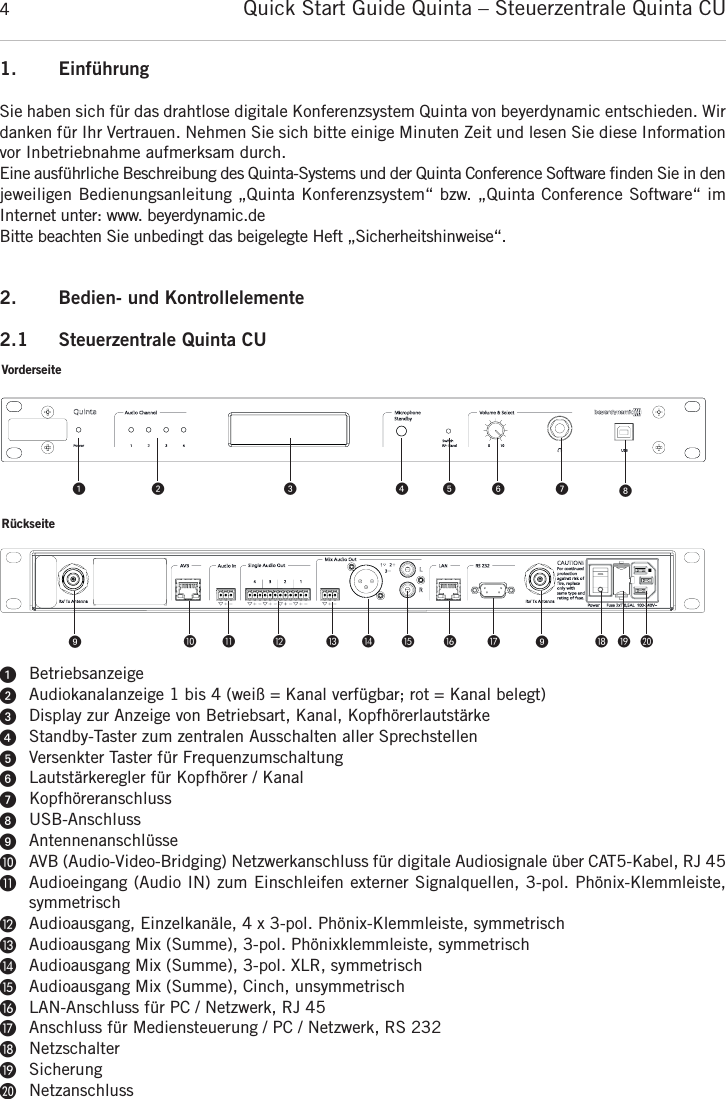
1. EinführungSie haben sich für das drahtlose digitale Konferenzsystem Quinta von beyerdynamic entschieden. Wir danken für Ihr Vertrauen. Nehmen Sie sich bitte einige Minuten Zeit und lesen Sie diese Informationvor Inbetriebnahme aufmerksam durch.Eine ausführliche Beschreibung des Quinta-Systems und der Quinta Conference Software finden Sie in denjeweiligen Bedienungsanleitung „Quinta Konferenzsystem“ bzw. „Quinta Conference Software“ im Internet unter: www. beyerdynamic.deBitte beachten Sie unbedingt das beigelegte Heft „Sicherheitshinweise“.2. Bedien- und Kontrollelemente2.1 Steuerzentrale Quinta CUᕡBetriebsanzeigeᕢAudiokanalanzeige 1 bis 4 (weiß = Kanal verfügbar; rot = Kanal belegt)ᕣDisplay zur Anzeige von Betriebsart, Kanal, KopfhörerlautstärkeᕤStandby-Taster zum zentralen Ausschalten aller Sprechstellen ᕥVersenkter Taster für FrequenzumschaltungᕦLautstärkeregler für Kopfhörer / KanalᕧKopfhöreranschlussᕨUSB-AnschlussᕩAntennenanschlüsseµAVB (Audio-Video-Bridging) Netzwerkanschluss für digitale Audiosignale über CAT5-Kabel, RJ 45¸Audioeingang (Audio IN) zum Einschleifen externer Signalquellen, 3-pol. Phönix-Klemmleiste, symmetrisch¹Audioausgang, Einzelkanäle, 4 x 3-pol. Phönix-Klemmleiste, symmetrischƸAudioausgang Mix (Summe), 3-pol. Phönixklemmleiste, symmetrischƹAudioausgang Mix (Summe), 3-pol. XLR, symmetrisch ƺAudioausgang Mix (Summe), Cinch, unsymmetrisch ƻLAN-Anschluss für PC / Netzwerk, RJ 45ƼAnschluss für Mediensteuerung / PC / Netzwerk, RS 232ƽNetzschalterƾSicherungƿNetzanschlussQuick Start Guide Quinta – Steuerzentrale Quinta CU4VorderseiteRückseiteᕡᕩ µ ¸ ¹ Ƹ ƹ ƺ ƻ Ƽ ᕩ ƽ ƾ ƿᕢ ᕣ ᕤ ᕥ ᕦ ᕧ ᕨ
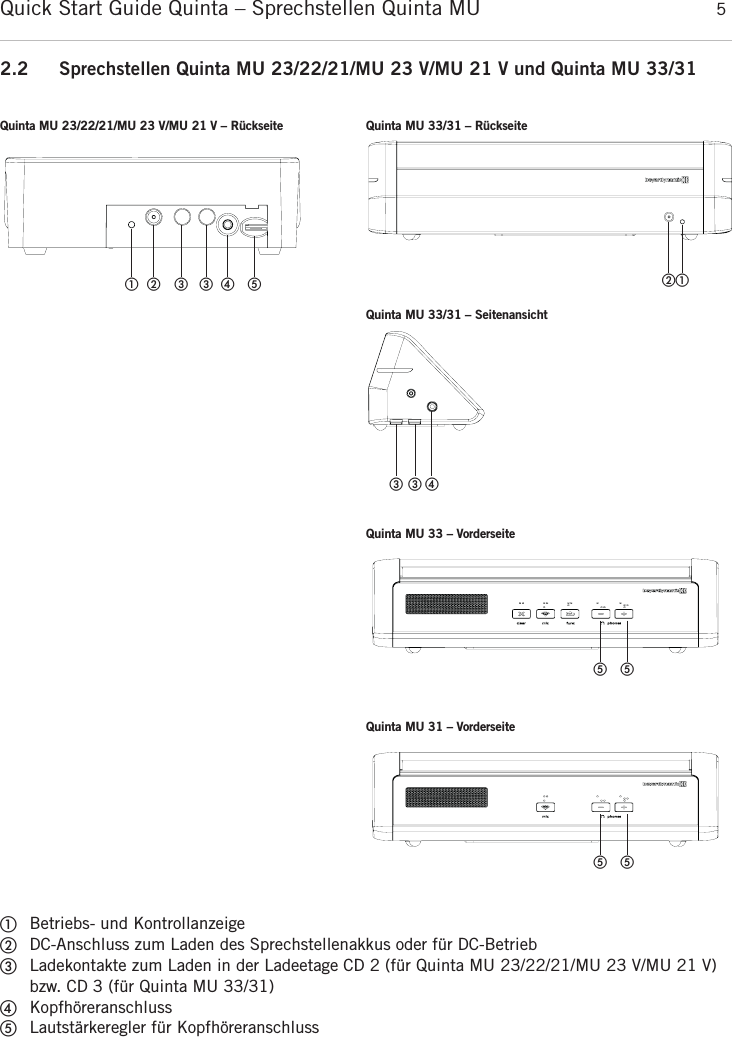
Quick Start Guide Quinta – Sprechstellen Quinta MU  52.2 Sprechstellen Quinta MU 23/22/21/MU 23 V/MU 21 V und Quinta MU 33/31ቢBetriebs- und KontrollanzeigeባDC-Anschluss zum Laden des Sprechstellenakkus oder für DC-BetriebቤLadekontakte zum Laden in der Ladeetage CD 2 (für Quinta MU 23/22/21/MU 23 V/MU 21 V)bzw. CD 3 (für Quinta MU 33/31)ብKopfhöreranschlussቦLautstärkeregler für Kopfhöreranschlussdeutsch   ቢባ ቤቤብ ቦQuinta MU 23/22/21/MU 23 V/MU 21 V – Rückseite Quinta MU 33/31 – RückseiteQuinta MU 33/31 – SeitenansichtQuinta MU 33 – Vorderseiteቢባቤ ቤብቦ ቦQuinta MU 31 – Vorderseiteቦ ቦ
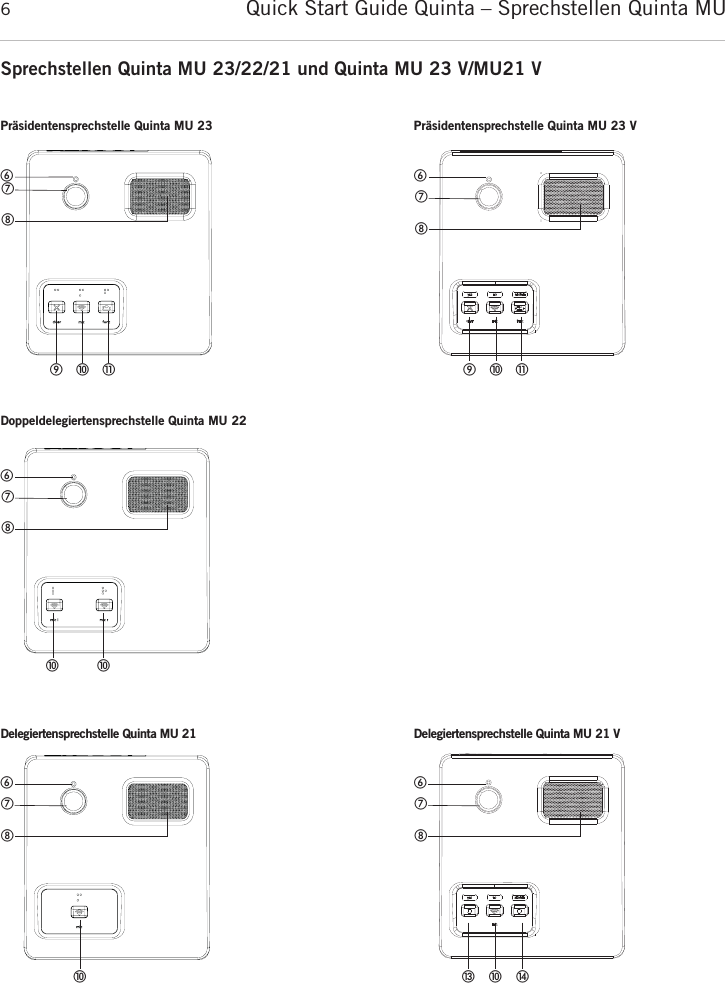
Quick Start Guide Quinta – Sprechstellen Quinta MU 6Sprechstellen Quinta MU 23/22/21 und Quinta MU 23 V/MU21 V   ቧቨቩቫቭቪPräsidentensprechstelle Quinta MU 23ቧቨቩቫቭቪPräsidentensprechstelle Quinta MU 23 VDoppeldelegiertensprechstelle Quinta MU 22Delegiertensprechstelle Quinta MU 21   ቧቨቩቫቫ   ቧቨቩቫDelegiertensprechstelle Quinta MU 21 Vቧቨቩቫቯ ተ
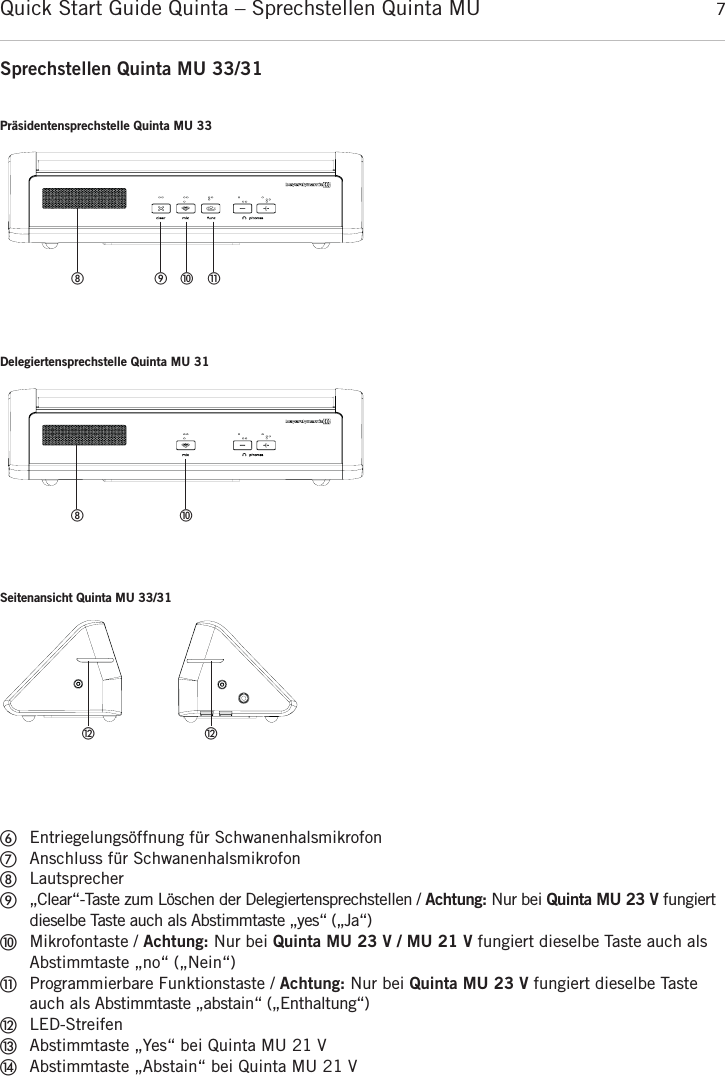
Quick Start Guide Quinta – Sprechstellen Quinta MU  7ቧEntriegelungsöffnung für SchwanenhalsmikrofonቨAnschluss für SchwanenhalsmikrofonቩLautsprecherቪ„Clear“-Taste zum Löschen der Delegiertensprechstellen / Achtung: Nur bei Quinta MU 23 V fungiertdieselbe Taste auch als Abstimmtaste „yes“ („Ja“)ቫMikrofontaste / Achtung: Nur bei Quinta MU 23 V / MU 21 V fungiert dieselbe Taste auch alsAbstimmtaste „no“ („Nein“)ቭProgrammierbare Funktionstaste / Achtung: Nur bei Quinta MU 23 V fungiert dieselbe Tasteauch als Abstimmtaste „abstain“ („Enthaltung“)ቮLED-StreifenቯAbstimmtaste „Yes“ bei Quinta MU 21 VተAbstimmtaste „Abstain“ bei Quinta MU 21 VPräsidentensprechstelle Quinta MU 33ቪ ቫ ቭቩDelegiertensprechstelle Quinta MU 31ቫቩSeitenansicht Quinta MU 33/31ቮቮSprechstellen Quinta MU 33/31deutsch
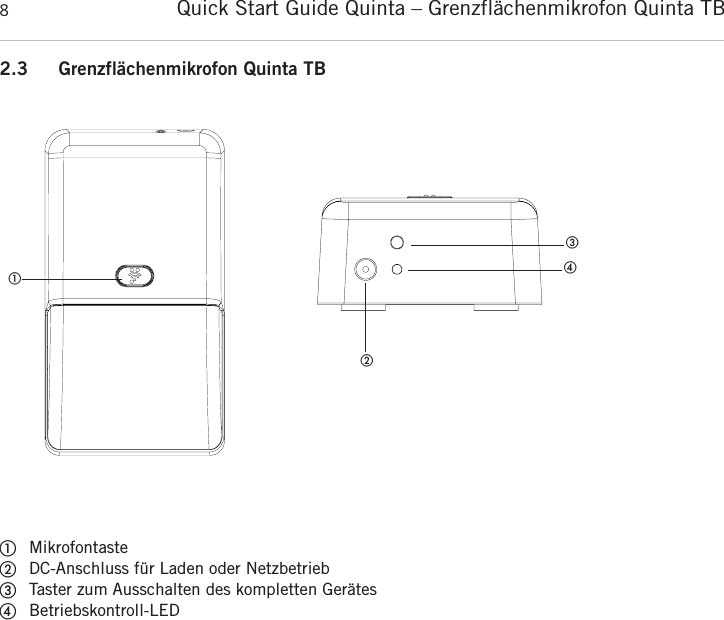
Quick Start Guide Quinta – Grenzflächenmikrofon Quinta TB 82.3 Grenzflächenmikrofon Quinta TB      ቢMikrofontasteባDC-Anschluss für Laden oder NetzbetriebቤTaster zum Ausschalten des kompletten GerätesብBetriebskontroll-LEDቢቤባብ
Quick Start Guide Quinta – Inbetriebnahme 93. Inbetriebnahme3.1 Steuerzentrale Quinta CUAufstellen der Steuerzentrale• Wenn Sie keine abgesetzten Antennen verwenden, stellen Sie die Steuerzentrale Quinta CU in demRaum auf, in dem die Konferenz stattfindet. Bei abgesetzten Antennen, stellen Sie die Antennen indem Raum auf, in dem die Konferenz stattfindet.• Vermeiden Sie Abschattungen der Antennen, insbesondere durch metallische Flächen.• Die Sprechstellen Quinta MU arbeiten optimal bei direkter Sichtverbindung zu den Antennen der Steuerzentrale Quinta CU. Antennenanschluss• Schließen Sie die Antennen an die Antennenanschlüsse ᕩ an. Für den Diversitybetrieb müssen unbedingt  beide  Antennen  angeschlossen  sein!  Eine  Auswerteelektronik  schaltet  sowohl  in Empfangs- als  auch in Senderichtung geräuschlos auf die Antenne mit dem jeweils besseren Antennensignal.• Für den Stand-Alone-Betrieb empfehlen wir die mitgelieferten Stabwinkelantennen CA Q 11.• Die  Steuerzentrale  Quinta  CU  kann  auch  mit  abgesetzten  Antennen  betrieben  werden.  Als empfohlene Anschlusskabel dienen extrem dämpfungsarme Kabel in den Längen 10 m und 20 m.Beachten Sie, dass die Antennen abgesetzt montiert werden müssen. Anschlüsse• Verbinden Sie bei Bedarf den Summenausgang Audio Mix Ƹ, XLR ƹoder Cinch ƺder Steuer-zentrale Quinta CU mit dem Eingang eines Mischverstärkers oder Mischpultes.• Schließen Sie die Steuerzentrale Quinta CU ans Netz ƿan. Das Netzteil der Steuerzentrale kannsich automatisch auf eine Wechselspannung zwischen 100 und 240 Volt bei 50 - 60 Hz  einstellen.Überprüfen Sie, ob die Anschlusswerte mit der vorhandenen Netzstromversorgung  übereinstimmen.Bei  Anschluss  des  Systems  an  die  falsche  Stromversorgung  können  ernsthafte  Schäden entstehen.Achten Sie darauf, dass das Netzkabel nicht geknickt oder durchtrennt werden kann.• Zur Verwendung des AVB-Anschlusses siehe die Bedienungsanleitung „Quinta Konferenzsystem“.Bedienhinweise• Schalten Sie die Steuerzentrale Quinta CU mit dem Ein-/Ausschalter ƽein. Die Betriebsanzeige ᕡleuchtet.• Die Kanalanzeigen 1 bis 4 leuchten weiß und zeigen so ihre Verfügbarkeit an. Sobald ein Mikrofonoffen ist, leuchtet die Kanalanzeige ᕢrot und zeigt so an, dass der Kanal belegt ist.  • Werkseitig sind die HF-Bänder 2,4; 5,2 oder 5,8 GHz* aktiviert (Automatic Mode). Das bedeutet,die  Steuerzentrale  Quinta  CU  wählt  selbständig  eine  freie  Frequenz  aus  und  springt  bei Bedarf ohne Audiostörungen dynamisch auf eine andere freie Frequenz. Diese Betriebsart wird fürden  normalen  Gebrauch  empfohlen.  Die  für  die  Steuerzentrale  Quinta  CU  frei  verfügbaren Frequenzen  können  per  Software  zusätzlich  deaktiviert  werden.  Die  Sprechstellen  werden automatisch ohne Audiounterbrechung auf die Frequenz der Steuerzentrale Quinta CU eingestellt.Siehe hierzu auch die Bedienungsanleitung „Quinta Konferenzsystem“.*Hinweis:Die Verfügbarkeit der HF-Bänder 2,4; 5,2 oder 5,8 GHz kann je nach gewählter Region  abweichen.deutsch
Quick Start Guide Quinta – Inbetriebnahme103.2 Sprechstellen Quinta MU 23/22/21/MU 23 V/MU 21 V und Quinta MU 33/31Schwanenhalsmikrofon an Quinta MU 23/22/21/MU 23 V/MU 21 V anschließenFür den Anschluss an die Sprechstellen Quinta MU 23/22/21/MU 23 V/MU 21 V stehen Schwanen-halsmikrofone mit LED zur Verfügung.• Fassen Sie das Schwanenhalsmikrofon unten am Schaft, setzen Sie es entsprechend in die Buchse ቨein und drücken Sie es am Schaft nach unten bis es einrastet.• Wollen  Sie das  Schwanenhalsmikrofon  entnehmen,  drücken  Sie  zum  Entriegeln  mit  dem  im Lieferumfang der Quinta CU enthaltenen Entriegelungswerkzeug oder einem ähnlich dünnen Werk-zeug auf die Entriegelungsöffnung ቧ und entnehmen das Schwanenhalsmikrofon, indem Sie esunten am Schaft fassen und herausziehen.Einschalten• Durch Drücken der Mikrofontaste wird die Sprechstelle eingeschaltet. Dabei leuchtet die Mikrofon-taste ቫkurz auf und die Betriebskontroll-LED ቢauf der Rückseite leuchtet grün.Sobald eine Verbindung zur Steuerzentrale Quinta CU hergestellt wurde, leuchten die Tasten derSprechstelle zur Bereitschaftsanzeige weiß.• Um das Mikrofon zu aktivieren bzw. die Sprechstelle einem freien Kanal der Steuerzentrale QuintaCU zuzuteilen, drücken Sie noch einmal kurz auf die Mikrofontaste ቫ. Je nach Betriebsart  leuchtetdie Mikrofontaste grün (Betriebsart normal) oder rot (Betriebsart Anmeldung).Ausschalten• Durch langes Drücken der Mikrofontaste ቫ (> 2 Sek.) wird die Sprechstelle ausgeschaltet.• Alle eingeschalteten Sprechstellen  Quinta  MU in „Reichweite“  der  Steuerzentrale Quinta CU können auch über die Steuerzentrale ausgeschaltet werden, wenn Sie den Standby-Taster ᕤ längerals 3 Sekunden drücken.• Außerdem schalten sich die Sprechstellen selbsttätig aus, wenn sie länger als ca. 3 Minuten kein Signal von der Steuerzentrale Quinta CU empfangen.BetriebsartenDie verschiedenen Betriebsarten wie „Normal“, „Push-To-Talk“ oder „Sprachaktiviert“ werden mitder Quinta Conference Software für alle Sprechstellen gemeinsam eingestellt. Die ab Werk einge-stellte  Betriebsart  ist  „Normal“.  Siehe  hierzu  die  entsprechende  Bedienungs anleitung  „Quinta Conference Software“ bzw. „Quinta Webserver“.Speisung / Betriebszeit• Die Sprechstellen haben einen integrierten Akku, der im vollgeladen Zustand eine Betriebszeit von ca. 20 Stunden gewährleistet.• Bei nachlassender Spannung blinkt die Betriebskontroll-LED ቢauf der Rückseite der Sprechstelle.Die Restbetriebszeit beträgt ca. eine Stunde.• Der Ladezustand der Sprechstellen kann mit der Quinta Conference Software auf einem an die Steuerzentrale Quinta CU angeschlossenen PC oder über den integrierten Webserver angezeigt werden. Außerdem ist die Anzeige auf einer an die Quinta CU angeschlossenen externen Medien-steuerung möglich.• Die Sprechstellen Quinta MU können auch über das externe Einzellade-Netzteil CA 2459 gespeistwerden,  welches  Sie  an  den  DC-Anschluss  ባauf  der  Rückseite  der  jeweiligen  Sprechstelle anschließen.• Während das Einzellade-Netzteil CA 2459 angeschlossen ist, wird die Sprechstelle auch geladen.
Quick Start Guide Quinta – Inbetriebnahme 11deutschLadenMit der im Transportkoffer Quinta CC 2 integrierten Ladeetage Quinta CD 2 können bis zu 10 Sprech-stellen Quinta MU 23/22/21/MU 23 V/MU 21 V gleichzeitig geladen werden. Mit der im Transport-koffer Quinta CC 3 integrierten Ladeetage Quinta CD 3 können bis zu 12 Sprechstellen Quinta MU 33/31 gleichzeitig geladen werden. Der Ladezustand ist über das Sichtfenster von außen ein-sehbar.1. Schließen Sie die Ladeetage ans Netz an und schalten Sie sie mit dem Ein-/Ausschalter ein. Der Schalter leuchtet.Erst Netzstecker ziehen – dann Ladekoffer bewegen.Um Schäden an der Netzbuchse sowie einen dadurch möglichen elektrischen Schlag zu ver-meiden, darf der Ladekoffer nicht bewegt werden, wenn er an einer Netzsteckdose ange-schlossen ist.2. Schieben Sie die ausgeschalteten Sprechstellen in die Ladefächer. Eventuell noch eingeschalteteSprechstellen werden automatisch ausgeschaltet. Werden die Sprechstellen wieder dem Ladefachentnommen, müssen sie von Hand eingeschaltet werden.3. Der Ladevorgang wird durch die LED am Schwanenhals (Quinta MU 23/22/21/MU 23 V/MU 21 V)bzw. den LED-Streifen (Quinta MU 33/31) angezeigt und ist von außen durch ein Sichtfenster ein-sehbar.LED-Anzeige bei Ladevorgang des Akkus:a) Schwanenhals-LED bzw. LED-Streifen blinkt bzw. blinken rot. . . . . Akku wird geladenb) Schwanenhals-LED bzw. LED-Streifen leuchtet bzw. leuchten dauerhaft rot . . . . . . . . . . . . . . . . . . . . . . . . . . . . . . . . Akku vollständig geladenc) Schwanenhals-LED bzw. LED-Streifen blinkt bzw. blinken schnell rot Fehlermeldung• Die Sprechstellen Quinta MU können auch über das externe Einzellade-Netzteil CA 2459 geladenwerden, welches Sie an die DC-Buchse ባanschließen.• Der Ladevorgang wird durch die Betriebskontroll-LED ቢangezeigt.LED-Anzeige bei Ladevorgang des Akkus:a) LED blinkt rot . . . . . . . . . . . . . . . . . . . . . . . . . . . . . . . . . . . . . . Akku wird geladenb) LED leuchtet dauerhaft rot . . . . . . . . . . . . . . . . . . . . . . . . . . . . . Akku vollständig geladenc) LED blinkt schnell rot. . . . . . . . . . . . . . . . . . . . . . . . . . . . . . . . . Fehlermeldung•PflegehinweisDie Ladekontakte an den Sprechstellen und im Ladegerät sollten Sie von Zeit zu Zeit mit einem weichen mit Spiritus oder Alkohol befeuchteten fusselfreien Tuch reinigen.
Quick Start Guide Quinta – Inbetriebnahme123.3 Grenzflächenmikrofon Quinta TBEinschalten• Durch Drücken der Mikrofontaste ቢ wird das Grenzflächenmikrofon eingeschaltet. Dabei leuchtetdie Mikrofontaste ቢkurz auf und die Betriebskontroll-LED ብauf der Rückseite leuchtet grün.Sobald eine Verbindung zur Steuerzentrale Quinta CU hergestellt wurde, leuchtet die Mikrofon-taste ቢ des Grenzflächenmikrofons im Konferenzmodus zur Bereitschaftsanzeige weiß und im Mikrofonmodus grün.• Um das Mikrofon im Konferenzmodus zu aktivieren bzw. einem freien Kanal der SteuerzentraleQuinta CU zuzuteilen, drücken Sie noch einmal kurz auf die Mikrofontaste ቢ. Je nach Betriebsartleuchtet die Mikrofontaste ቢ grün  (Betriebsart  normal)  oder  rot  (Betriebsart Anmeldung). Im Mikrofonmodus ist das Mikrofon des Quinta TB automatisch aktiviert (Mikrofontaste ቢ leuchtetgrün). Um das Mikrofon stumm zu schalten, drücken Sie noch einmal kurz auf die Mikrofontaste ቢ(Mikrofontaste ቢ leuchtet rot).Ausschalten• Durch langes Drücken der Mikrofontaste ቢ (> 2 Sek.) wird das Grenzflächenmikrofon  ausgeschaltet.• Alle  eingeschalteten  Mikrofone  Quinta  TB  in  „Reichweite“  der  Steuerzentrale  Quinta  CU können auch über die Steuerzentrale ausgeschaltet werden, wenn Sie den Standby-Taster ᕤ längerals 3 Sekunden drücken.• Außerdem schaltet sich das Grenzflächenmikrofon Quinta TB selbsttätig aus, wenn es länger als ca.3 Minuten kein Signal von der Steuerzentrale Quinta CU empfängt.BetriebsartenDie verschiedenen Betriebsarten wie „Normal“, „Push-To-Talk“ oder „Push-To-Mute“ (nur im Mikro-fonmodus verfügbar)“ werden mit der Quinta Conference Software für alle Mikrofone gemeinsam ein-gestellt.  Die  ab  Werk  eingestellte  Betriebsart  ist  „Normal“.  Siehe  hierzu  die  entsprechende Bedienungs anleitung „Quinta  Conference Software“ bzw. „Quinta Webserver“.Speisung / Betriebszeit• Die Grenzflächenmikrofone haben einen integrierten Akku, der im vollgeladenen Zustand eine Betriebszeit von mindestens 16 Stunden gewährleistet.• Bei nachlassender Spannung blinkt die Betriebskontroll-LED ብauf der Rückseite des Mikrofons.Die Restbetriebszeit beträgt ca. eine Stunde.• Der Ladezustand des Grenzflächenmikrofons kann mit der Quinta Conference Software auf eineman  die  Steuerzentrale  Quinta  CU  angeschlossenen  PC  oder  über  den  integrierten  Webserver angezeigt werden. Außerdem ist die Anzeige auf einer an die Quinta CU angeschlossenen externenMediensteuerung möglich.• Das Grenzflächenmikrofon Quinta TB kann auch über das externe Einzellade-Netzteil CA 2459 gespeist werden, welches Sie an den DC-Anschluss ባauf der Rückseite des jeweiligen Mikrofonsanschließen. Während das Einzellade-Netzteil CA 2459 angeschlossen ist, wird das Grenzflächen-mikrofon auch geladen. Laden•Vor der ersten Inbetriebnahme müssen Sie den Akkupack im Grenzflächenmikrofon Quinta TB aufladen. Die Ladedauer beträgt maximal 2 Stunden.• Zum Laden schließen Sie das Ladenetzteil CA 2459 am Mikrofon sowie an einer Netzsteckdose an.Ist das Mikrofon vor dem Laden eingeschaltet, leuchtet die Betriebskontroll-LED ብeinmal kurz rotauf und dann als Betriebsanzeige permanent grün.
Quick Start Guide Quinta – Inbetriebnahme 134. EntsorgungDieses Produkt darf am Ende seiner Lebensdauer nicht über den normalen Haushaltsab-fall entsorgt werden, sondern muss an einem Sammelpunkt für das Recycling von elektri-schen und elektronischen Geräten abgegeben werden. Das Symbol auf dem Produkt, derGebrauchsanweisung oder der Verpackung weist darauf hin.5. KonformitätserklärungHiermit erklärt beyerdynamic GmbH & Co. KG, dass das Funksystem Quinta mit der EU-Richtlinie2014/53/EU konform ist.Den vollständigen Text der EU-Konformitätserklärung finden Sie im Internet unter:www.beyerdynamic.com/coddeutsch• Der Ladevorgang im ausgeschalteten Zustand des Mikrofons wird über die Betriebskontroll-LED ብwie folgt angezeigt:a) LED blinkt langsam rot . . . . . . . . . . . . . . Akku wird geladen, normaler Ladevorgangb) LED leuchtet dauerhaft rot. . . . . . . . . . . . Akku vollständig geladenc) LED blinkt schnell rot . . . . . . . . . . . . . . . Fehlermeldung (in diesem Fall das Ladegerät nochmals ausstecken und wieder anschließen, ggf. Service rufen.)Wichtig:• Nach einiger  Zeit verlieren  Akkus technisch  bedingt an  Kapazität. Dadurch  verkürzt sich  die Betriebszeit.• Es ist normal, dass sich Akkus während des Ladevorgangs erwärmen.• Wird das Grenzflächenmikrofon während des Ladevorgangs eingeschaltet, leuchtet die LED ብ grün.
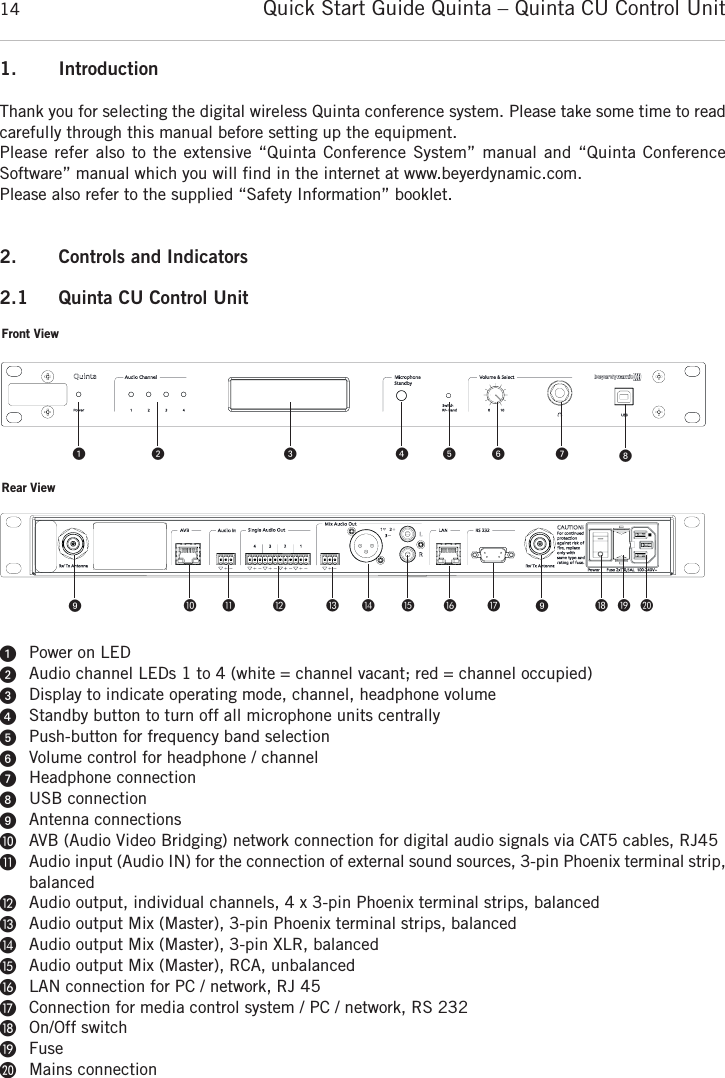
Quick Start Guide Quinta – Quinta CU Control Unit141. IntroductionThank you for selecting the digital wireless Quinta conference system. Please take some time to read carefully through this manual before setting up the equipment.Please refer also to the extensive “Quinta Conference System” manual and “Quinta Conference Software” manual which you will find in the internet at www.beyerdynamic.com.Please also refer to the supplied “Safety Information” booklet. 2. Controls and Indicators2.1 Quinta CU Control UnitᕡPower on LEDᕢAudio channel LEDs 1 to 4 (white = channel vacant; red = channel occupied)ᕣDisplay to indicate operating mode, channel, headphone volumeᕤStandby button to turn off all microphone units centrallyᕥPush-button for frequency band selection ᕦVolume control for headphone / channelᕧHeadphone connectionᕨUSB connectionᕩAntenna connectionsµAVB (Audio Video Bridging) network connection for digital audio signals via CAT5 cables, RJ45¸Audio input (Audio IN) for the connection of external sound sources, 3-pin Phoenix terminal strip,balanced¹Audio output, individual channels, 4 x 3-pin Phoenix terminal strips, balancedƸAudio output Mix (Master), 3-pin Phoenix terminal strips, balancedƹAudio output Mix (Master), 3-pin XLR, balanced ƺAudio output Mix (Master), RCA, unbalanced ƻLAN connection for PC / network, RJ 45ƼConnection for media control system / PC / network, RS 232ƽOn/Off switchƾFuseƿMains connectionFront ViewRear Viewᕡ ᕢ ᕣ ᕤ ᕥ ᕦ ᕧ ᕨᕩ µ ¸ ¹ Ƹ ƹ ƺ ƻ Ƽ ᕩ ƽ ƾ ƿ
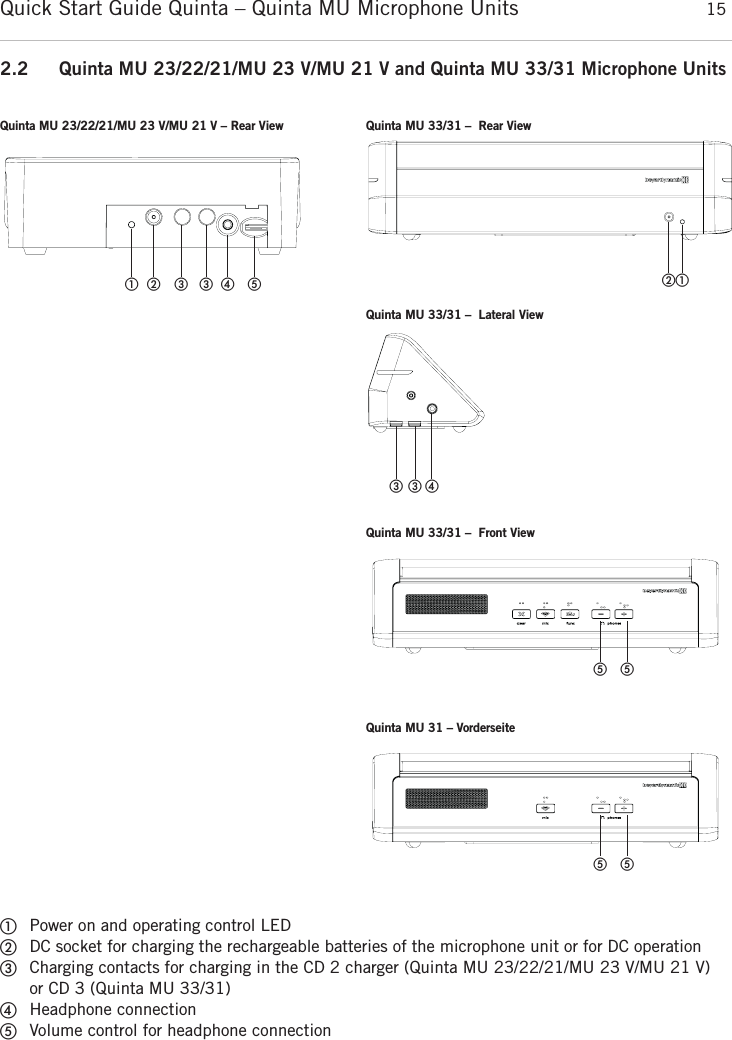
Quick Start Guide Quinta – Quinta MU Microphone Units 15english2.2 Quinta MU 23/22/21/MU 23 V/MU 21 V and Quinta MU 33/31 Microphone UnitsቢPower on and operating control LEDባDC socket for charging the rechargeable batteries of the microphone unit or for DC operationቤCharging contacts for charging in the CD 2 charger (Quinta MU 23/22/21/MU 23 V/MU 21 V)or CD 3 (Quinta MU 33/31)ብHeadphone connectionቦVolume control for headphone connectionQuinta MU 23/22/21/MU 23 V/MU 21 V – Rear View Quinta MU 33/31 – Rear ViewQuinta MU 33/31 – Front View   ቢባ ቤቤብ ቦቢባቤ ቤብQuinta MU 33/31 – Lateral Viewቦ ቦQuinta MU 31 – Vorderseiteቦ ቦ
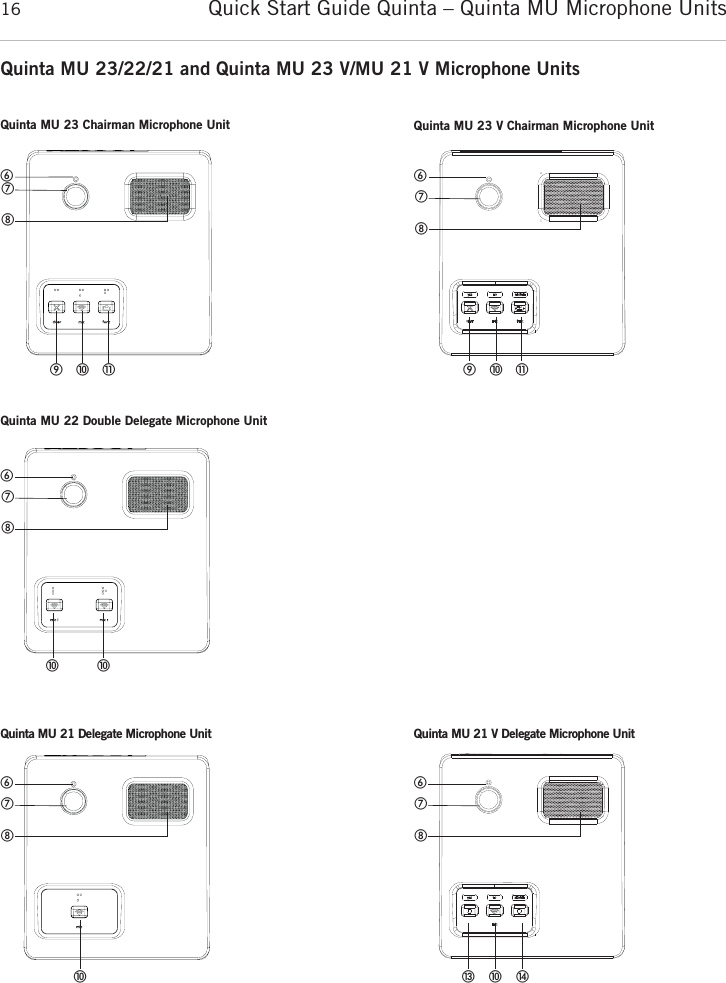
Quick Start Guide Quinta – Quinta MU Microphone Units16Quinta MU 23/22/21 and Quinta MU 23 V/MU 21 V Microphone Units   ቧቨቩቫቭቪQuinta MU 23 Chairman Microphone UnitቧቨቩቫቭቪQuinta MU 23 V Chairman Microphone UnitQuinta MU 22 Double Delegate Microphone UnitQuinta MU 21 Delegate Microphone Unit   ቧቨቩቫቫ   ቧቨቩቫQuinta MU 21 V Delegate Microphone Unitቧቨቩቫቯ ተ
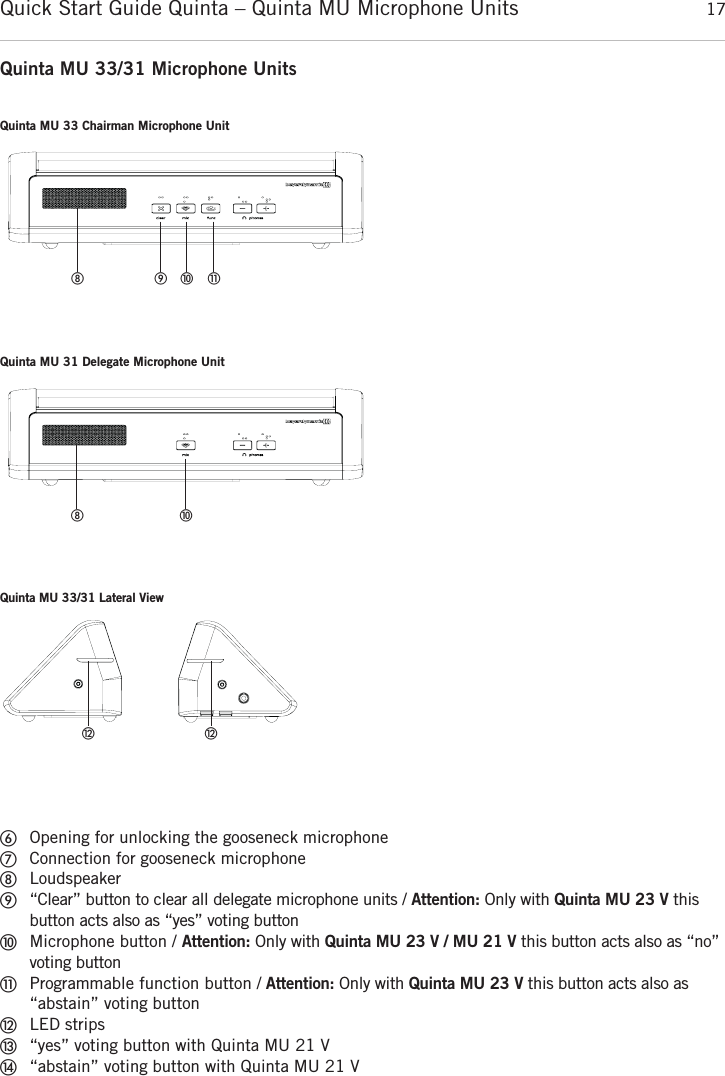
Quick Start Guide Quinta – Quinta MU Microphone Units 17englishQuinta MU 33/31 Microphone UnitsቧOpening for unlocking the gooseneck microphoneቨConnection for gooseneck microphoneቩLoudspeakerቪ“Clear” button to clear all delegate microphone units / Attention: Only with Quinta MU 23 V thisbutton acts also as “yes” voting buttonቫMicrophone button / Attention: Only with Quinta MU 23 V / MU 21 V this button acts also as “no”voting buttonቭProgrammable function button / Attention: Only with Quinta MU 23 V this button acts also as“abstain” voting button ቮLED stripsቯ“yes” voting button with Quinta MU 21 Vተ“abstain” voting button with Quinta MU 21 VQuinta MU 33 Chairman Microphone Unitቪ ቫ ቭቩQuinta MU 31 Delegate Microphone UnitቫቩQuinta MU 33/31 Lateral Viewቮቮ
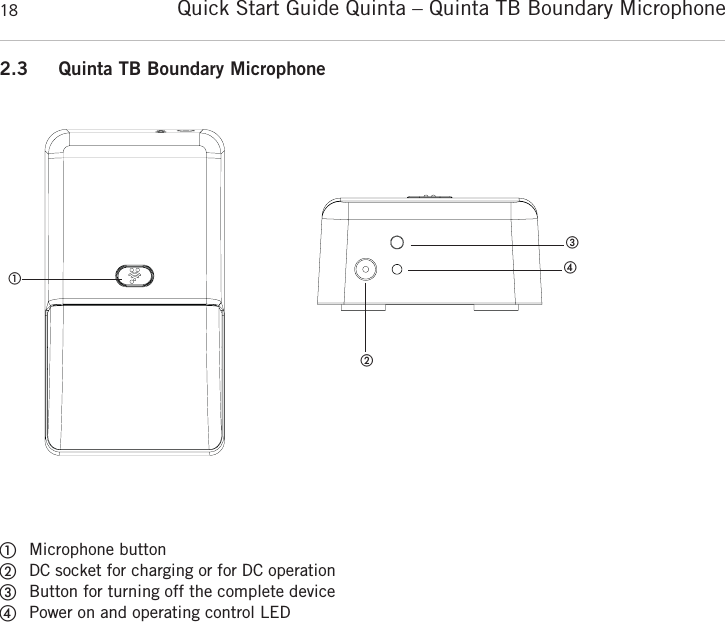
Quick Start Guide Quinta – Quinta TB Boundary Microphone 182.3 Quinta TB Boundary Microphone      ቢMicrophone buttonባDC socket for charging or for DC operationቤButton for turning off the complete deviceብPower on and operating control LEDቢቤባብ
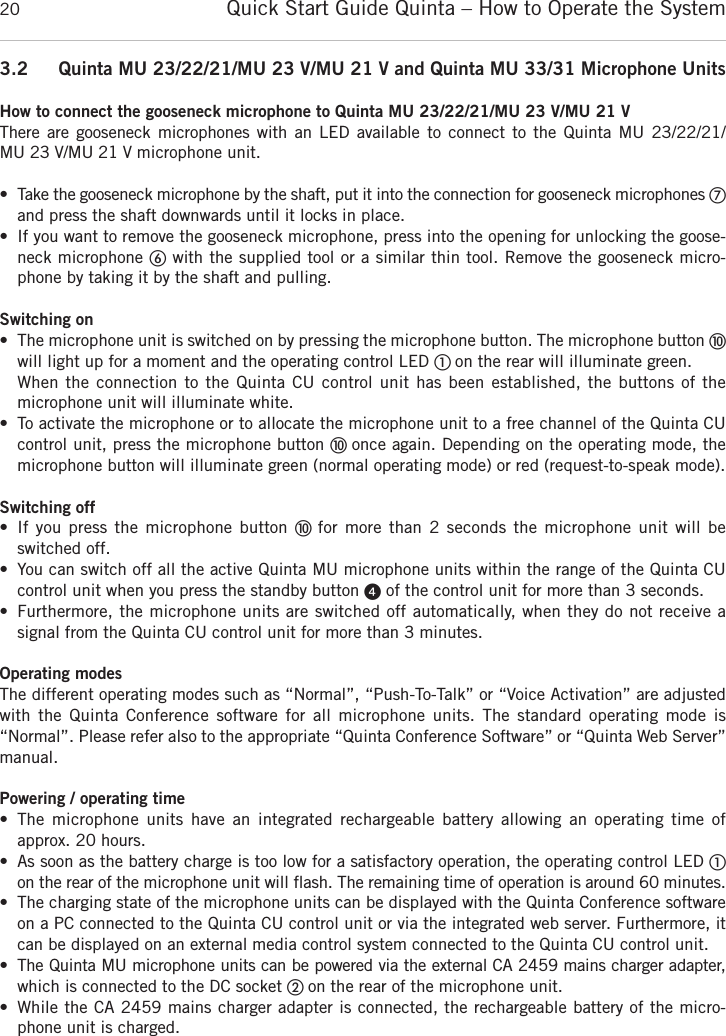
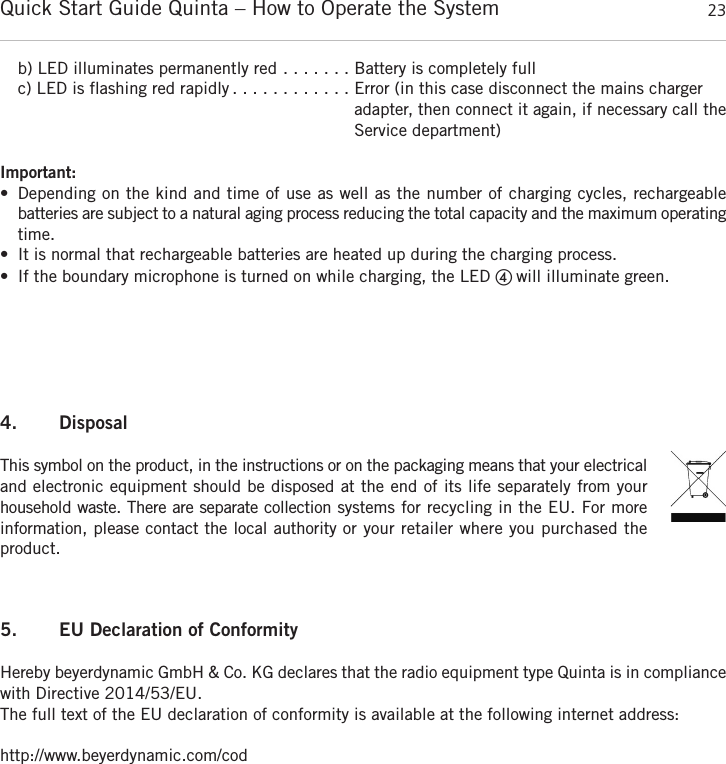
Quick Start Guide Quinta – How to Operate the System 19english3. How to Operate the System3.1 Quinta CU Control UnitWhere to place the control unit• If you do not use  remote antennae, place the  Quinta CU control unit in  the room where the meeting takes place. If you use remote antennae, place the antennae in the conference room.• Avoid shadowing effect of the antennae, especially by metallic surfaces.• A free line of sight between the Quinta MU microphone units and the antennae of the Quinta CU control unit is essential for the operation of the microphone units. How to connect the antennae• Connect the antennae to the antenna connections ᕩ. Please note that for diversity operation bothantennae have to be connected! A weighting circuit is used to make sure that the better antenna signal is received. • For stand-alone operation we recommend using the supplied CA Q 11 angled rod antennae.• The Quinta CU control unit can also be operated with remote antennae. We recommed extremelylow attenuation connecting cables which are 10 m [32.8 ft] or 20 m [65.6 ft] long. Please notethat the antennae have to be installed remotely. Connections• If required, connect the Audio Mix Ƹ, XLR ƹor Cinch ƺmaster output of the Quinta CU controlunit to the input of a mixing console or amplifier.• Connect the Quinta CU control unit to the mains ƿ. The internal power supply unit of the controlunit can automatically adjust between 100 and 240 V at 50 - 60 Hz. Verify that the voltage ratingof the unit matches that of the AC mains outlet you are to use. If you connect the unit to the wrongvoltage, you may seriously damage it. Always route cables running to the unit where they will notbe pinched or cut by heavy or sharp objects. • For using the AVB network connection, please refer to the extensive “Quinta Conference System” manual.How to operate the control unit• Turn on the Quinta CU control unit with the On/Off switch ƽ. The Power on LED ᕡwill illuminate.• The channel LED 1 to 4 will illuminate white to indicate the availability. As soon as a microphoneis activated, the channel LED ᕢwill illuminate red to indicate that the channel is occupied.• At the factory the RF bands 2.4; 5.2 or 5.8 GHz* will be activated (Automatic Mode). This meansthat the Quinta CU control unit will select a free frequency and if necessary it will select a  differentfree frequency without any interferences. This operating mode is recommended for normal use.The free frequencies for the Quinta CU control unit can be deactivated via the Quinta Conferencesoftware. The microphone unit will automatically be adjusted and without any interruption to thefrequency of the Quinta CU control unit. Please refer also to the “Quinta Conference System” manual.*Note:The availability of the RF bands 2.4; 5.2 or 5.8 GHz depends on the selected region.
Quick Start Guide Quinta – How to Operate the System203.2 Quinta MU 23/22/21/MU 23 V/MU 21 V and Quinta MU 33/31 Microphone UnitsHow to connect the gooseneck microphone to Quinta MU 23/22/21/MU 23 V/MU 21 VThere are gooseneck  microphones  with an LED available to connect to the Quinta MU 23/22/21/MU 23 V/MU 21 V microphone unit.• Take the gooseneck microphone by the shaft, put it into the connection for gooseneck microphones ቨand press the shaft downwards until it locks in place. • If you want to remove the gooseneck microphone, press into the opening for unlocking the goose-neck microphone ቧwith the supplied tool or a similar thin tool. Remove the gooseneck micro-phone by taking it by the shaft and pulling. Switching on• The microphone unit is switched on by pressing the microphone button. The microphone button ቫwill light up for a moment and the operating control LED ቢ on the rear will illuminate green. When the connection to the Quinta CU control unit has been established, the buttons of the microphone unit will illuminate white. • To activate the microphone or to allocate the microphone unit to a free channel of the Quinta CU control unit, press the microphone button ቫ once again. Depending on the operating mode, the microphone button will illuminate green (normal operating mode) or red (request-to-speak mode).Switching off• If you press the  microphone button ቫ  for  more  than 2 seconds the  microphone unit will beswitched off.• You can switch off all the active Quinta MU microphone units within the range of the Quinta CU control unit when you press the standby button ᕤof the control unit for more than 3 seconds. • Furthermore, the microphone units are switched off automatically, when they do not receive a signal from the Quinta CU control unit for more than 3 minutes.Operating modesThe different operating modes such as “Normal”, “Push-To-Talk” or “Voice Activation” are adjustedwith the  Quinta  Conference software  for  all microphone  units.  The  standard  operating  mode  is “Normal”. Please refer also to the appropriate “Quinta Conference Software” or “Quinta Web Server”manual.Powering / operating time• The microphone  units  have  an  integrated  rechargeable  battery  allowing  an  operating  time of approx. 20 hours. • As soon as the battery charge is too low for a satisfactory operation, the operating control LED ቢon the rear of the microphone unit will flash. The remaining time of operation is around 60 minutes. • The charging state of the microphone units can be displayed with the Quinta Conference softwareon a PC connected to the Quinta CU control unit or via the integrated web server. Furthermore, itcan be displayed on an external media control system connected to the Quinta CU control unit.• The Quinta MU microphone units can be powered via the external CA 2459 mains charger adapter,which is connected to the DC socket ባ on the rear of the microphone unit. • While the CA 2459 mains charger adapter is connected, the rechargeable battery of the micro-phone unit is charged.
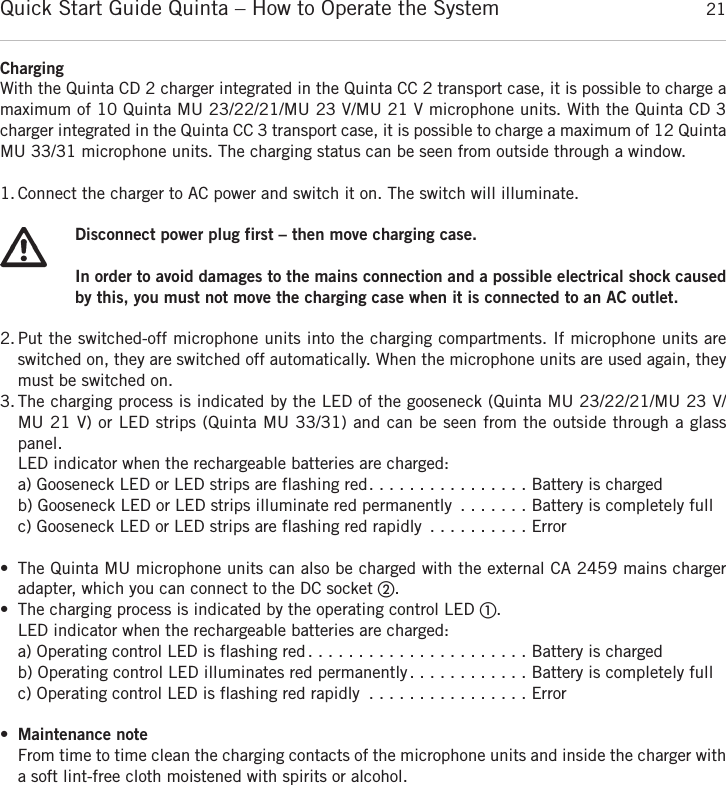
Quick Start Guide Quinta – How to Operate the System 21englishChargingWith the Quinta CD 2 charger integrated in the Quinta CC 2 transport case, it is possible to charge amaximum of 10 Quinta MU 23/22/21/MU 23 V/MU 21 V microphone units. With the Quinta CD 3charger integrated in the Quinta CC 3 transport case, it is possible to charge a maximum of 12 Quinta MU 33/31 microphone units. The charging status can be seen from outside through a window. 1. Connect the charger to AC power and switch it on. The switch will illuminate.Disconnect power plug first – then move charging case.In order to avoid damages to the mains connection and a possible electrical shock causedby this, you must not move the charging case when it is connected to an AC outlet.2. Put the switched-off microphone units into the charging compartments. If microphone units are switched on, they are switched off automatically. When the microphone units are used again, theymust be switched on. 3. The charging process is indicated by the LED of the gooseneck (Quinta MU 23/22/21/MU 23 V/MU 21 V) or LED strips (Quinta MU 33/31) and can be seen from the outside through a glasspanel. LED indicator when the rechargeable batteries are charged:a) Gooseneck LED or LED strips are flashing red. . . . . . . . . . . . . . . . Battery is chargedb) Gooseneck LED or LED strips illuminate red permanently . . . . . . . Battery is completely fullc) Gooseneck LED or LED strips are flashing red rapidly . . . . . . . . . . Error• The Quinta MU microphone units can also be charged with the external CA 2459 mains charger adapter, which you can connect to the DC socket ባ.• The charging process is indicated by the operating control LED ቢ.LED indicator when the rechargeable batteries are charged:a) Operating control LED is flashing red. . . . . . . . . . . . . . . . . . . . . . Battery is chargedb) Operating control LED illuminates red permanently. . . . . . . . . . . . Battery is completely fullc) Operating control LED is flashing red rapidly . . . . . . . . . . . . . . . . Error•Maintenance noteFrom time to time clean the charging contacts of the microphone units and inside the charger witha soft lint-free cloth moistened with spirits or alcohol.
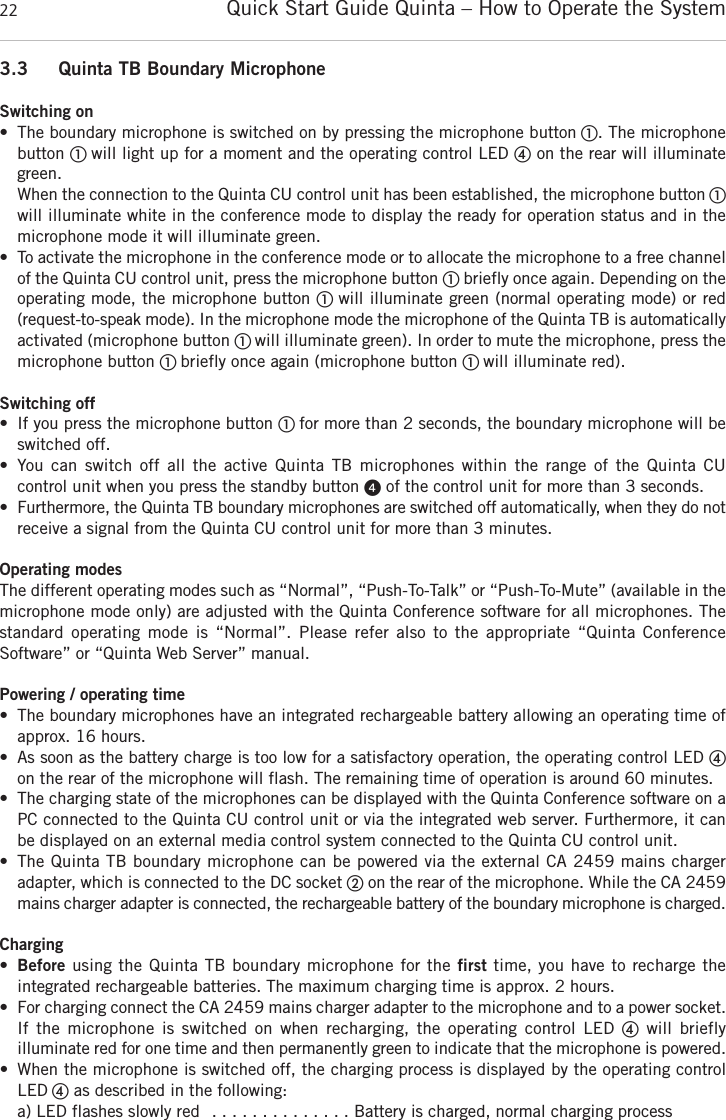
Quick Start Guide Quinta – How to Operate the System223.3 Quinta TB Boundary MicrophoneSwitching on• The boundary microphone is switched on by pressing the microphone button ቢ. The microphone button ቢ will light up for a moment and the operating control LED ብon the rear will illuminategreen. When the connection to the Quinta CU control unit has been established, the microphone button ቢwill illuminate white in the conference mode to display the ready for operation status and in the microphone mode it will illuminate green. • To activate the microphone in the conference mode or to allocate the microphone to a free  channelof the Quinta CU control unit, press the microphone button ቢbriefly once again. Depending on theoperating mode, the microphone button ቢ will illuminate green (normal operating mode) or red (request-to-speak mode). In the microphone mode the microphone of the Quinta TB is  automaticallyactivated (microphone button ቢ will illuminate green). In order to mute the microphone, press the microphone button ቢ briefly once again (microphone button ቢ will illuminate red).Switching off• If you press the microphone button ቢ for more than 2 seconds, the boundary microphone will beswitched off. • You  can  switch  off  all  the  active  Quinta  TB  microphones  within  the  range  of  the  Quinta  CU control unit when you press the standby button ᕤof the control unit for more than 3 seconds. • Furthermore, the Quinta TB boundary microphones are switched off automatically, when they do notreceive a signal from the Quinta CU control unit for more than 3 minutes. Operating modesThe different operating modes such as “Normal”, “Push-To-Talk” or “Push-To-Mute” (available in themicrophone mode only) are adjusted with the Quinta Conference software for all microphones. Thestandard operating  mode  is “Normal”.  Please  refer  also  to  the  appropriate  “Quinta Conference Software” or “Quinta Web Server” manual.Powering / operating time• The boundary microphones have an integrated rechargeable battery allowing an operating time ofapprox. 16 hours. • As soon as the battery charge is too low for a satisfactory operation, the operating control LED ብon the rear of the microphone will flash. The remaining time of operation is around 60 minutes.• The charging state of the microphones can be displayed with the Quinta Conference software on aPC connected to the Quinta CU control unit or via the integrated web server. Furthermore, it canbe displayed on an external media control system connected to the Quinta CU control unit.• The Quinta TB boundary microphone can be powered via the external CA 2459 mains charger adapter, which is connected to the DC socket ባon the rear of the microphone. While the CA 2459mains charger adapter is connected, the rechargeable battery of the boundary microphone is  charged. Charging•Before using the Quinta TB boundary microphone for the first time, you have to recharge the integrated rechargeable batteries. The maximum charging time is approx. 2 hours. • For charging connect the CA 2459 mains charger adapter to the microphone and to a power socket.If  the  microphone  is  switched  on  when  recharging,  the  operating  control  LED  ብwill  briefly illuminate red for one time and then permanently green to indicate that the microphone is powered.• When the microphone is switched off, the charging process is displayed by the operating controlLED ብas described in the following:a) LED flashes slowly red  . . . . . . . . . . . . . . Battery is charged, normal charging process
Quick Start Guide Quinta – How to Operate the System 23englishb) LED illuminates permanently red . . . . . . . Battery is completely fullc) LED is flashing red rapidly . . . . . . . . . . . . Error (in this case disconnect the mains charger adapter, then connect it again, if necessary call theService department)Important:• Depending on the kind and time of use as well as the number of charging cycles, rechargeable batteries are subject to a natural aging process reducing the total capacity and the maximum  operatingtime.• It is normal that rechargeable batteries are heated up during the charging process.• If the boundary microphone is turned on while charging, the LED ብ will illuminate green.4. DisposalThis symbol on the product, in the instructions or on the packaging means that your electricaland electronic equipment should be disposed at the end of its life separately from your household waste. There are separate collection systems for recycling in the EU. For more information, please contact the local authority or your retailer where you purchased the product.5. EU Declaration of ConformityHereby beyerdynamic GmbH & Co. KG declares that the radio equipment type Quinta is in  compliancewith Directive 2014/53/EU.The full text of the EU declaration of conformity is available at the following internet address:http://www.beyerdynamic.com/cod
Quick Start Guide Quinta – FCC Regulation24FCC RegulationFCC ID: OSDQUINTACU for Quinta CUFCC ID: OSDQUINTAMU2X for Quinta MU 21, Quinta MU 21 VFCC ID: OSDQUINTAMU2X for Quinta MU 22FCC ID: OSDQUINTAMU2X for Quinta MU 23, Quinta MU 23 VFCC ID: OSDQUINTAMU3X for Quinta MU 31FCC ID: OSDQUINTAMU3X for Quinta MU 33Canada: IC: 3628A-QUINTACU for Quinta CUCanada: IC: 3628A-QUINTAMU2X for Quinta MU 21, Quinta MU 21 VCanada: IC: 3628A-QUINTAMU2X for Quinta MU 22Canada: IC: 3628A-QUINTAMU2X for Quinta MU 23, Quinta MU 23 VCanada: IC: 3628A-QUINTAMU3X for Quinta MU 31Canada: IC: 3628A-QUINTAMU3X for Quinta MU 33Part 15.19 StatementNOTICE: This device complies with Part 15 of the FCC Rules [and with Industry Canada licence-exempt RSS standard(s)].Operation is subject to the following two conditions:(1) this device may not cause harmful interference, and(2) this device must accept any interference received, including interference that may cause undesired operation.Part 15.21 StatementNOTICE: Changes or modifications made to this equipment not expressly approved by beyerdynamic GmbH & Co. KGmay void the FCC authorization to operate this equipment.Part 15.105 StatementNOTE: This equipment has been tested and found to comply with the limits for a Class B digital device, pursuantto Part 15 of the FCC Rules. These limits are designed to provide reasonable protection against harmful interferencein a residential installation. This equipment generates, uses and can radiate radio frequency energy and, if not installed and used in accordance with the instructions, may cause harmful interference to radio communications.However, there is no guarantee that interference will not occur in a particular installation. If this equipment doescause harmful interference to radio or television reception, which can be determined by turning the equipment offand on, the user is encouraged to try to correct the interference by one or more of the following measures:• Reorient or relocate the receiving antenna.• Increase the separation between the equipment and receiver.• Connect the equipment into an outlet on a circuit different from that to which the receiver is connected.• Consult the dealer or an experienced radio/TV technician for help.RF Exposure StatementRadiofrequency radiation exposure Information:This equipment complies with FCC radiation exposure limits set forth for an uncontrolled environment.This equipment should be installed and operated with minimum distance of 20 cm between the radiator and your body.This transmitter must not be co-located or operating in conjunction with any other antenna or transmitter.Special instructions for Japan:Operation of these devices in the 5.8GHz range is illegal in Japan.The CA Q 13 and CA Q 14 antenna may only be operated with at least 10m cable between antenna and control unit.This device is granted pursuant to the  Japanese  Radio  Law  (電波法)  and  the  Japanese  Telecommunications Business Law (電気通信事業法)•本製品は、電波法および電気通信事業法に基づき許可されています。• This device should not be modified (otherwise the granted designation number will become invalid) (refer to attached Instruction File Japan (R&T) 2012)).
Quick Start Guide Quinta – Notes 25english
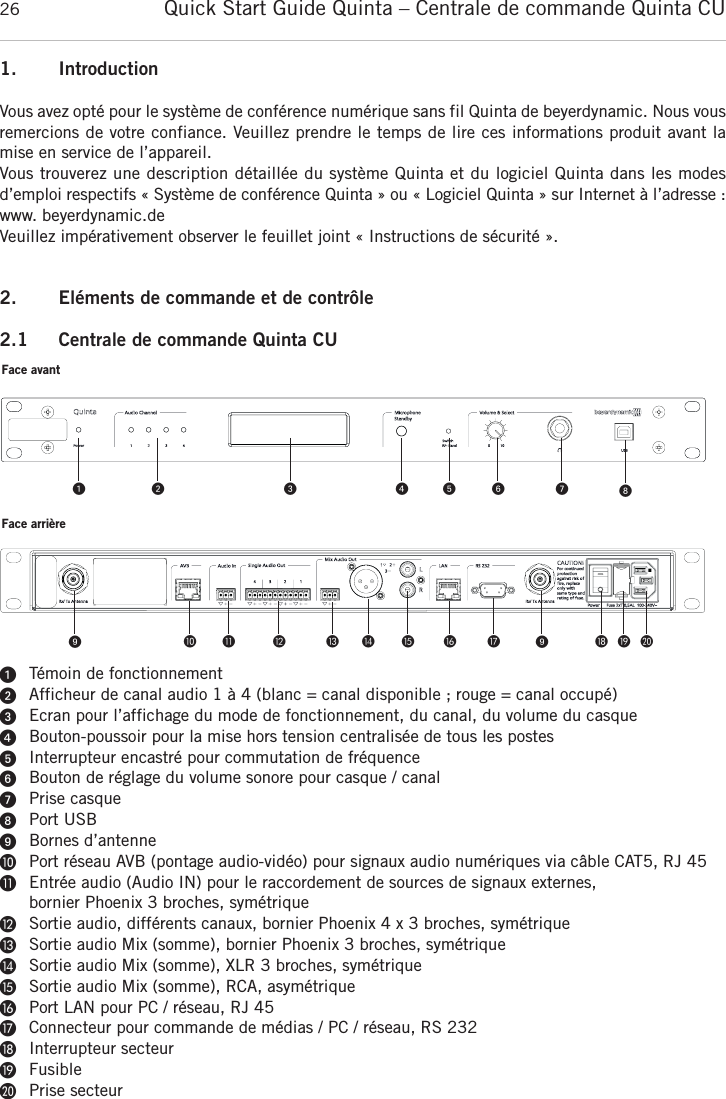
Quick Start Guide Quinta – Centrale de commande Quinta CU261. IntroductionVous avez opté pour le système de conférence numérique sans fil Quinta de beyerdynamic. Nous vousremercions de votre confiance. Veuillez prendre le temps de lire ces informations produit avant lamise en service de l’appareil.Vous trouverez une description détaillée du système Quinta et du logiciel Quinta dans les modes d’emploi respectifs « Système de conférence Quinta » ou « Logiciel Quinta » sur Internet à l’adresse :www. beyerdynamic.deVeuillez impérativement observer le feuillet joint « Instructions de sécurité ».2. Eléments de commande et de contrôle2.1 Centrale de commande Quinta CUᕡTémoin de fonctionnementᕢAfficheur de canal audio 1 à 4 (blanc = canal disponible ; rouge = canal occupé)ᕣEcran pour l’affichage du mode de fonctionnement, du canal, du volume du casqueᕤBouton-poussoir pour la mise hors tension centralisée de tous les postes  ᕥInterrupteur encastré pour commutation de fréquenceᕦBouton de réglage du volume sonore pour casque / canalᕧPrise casqueᕨPort USBᕩBornes d’antenneµPort réseau AVB (pontage audio-vidéo) pour signaux audio numériques via câble CAT5, RJ 45¸Entrée audio (Audio IN) pour le raccordement de sources de signaux externes, bornier Phoenix 3 broches, symétrique¹Sortie audio, différents canaux, bornier Phoenix 4 x 3 broches, symétriqueƸSortie audio Mix (somme), bornier Phoenix 3 broches, symétriqueƹSortie audio Mix (somme), XLR 3 broches, symétrique  ƺSortie audio Mix (somme), RCA, asymétrique  ƻPort LAN pour PC / réseau, RJ 45ƼConnecteur pour commande de médias / PC / réseau, RS 232ƽInterrupteur secteurƾFusibleƿPrise secteurFace avantFace arrièreᕡ ᕢ ᕣ ᕤ ᕥ ᕦ ᕧ ᕨᕩ µ ¸ ¹ Ƹ ƹ ƺ ƻ Ƽ ᕩ ƽ ƾ ƿ
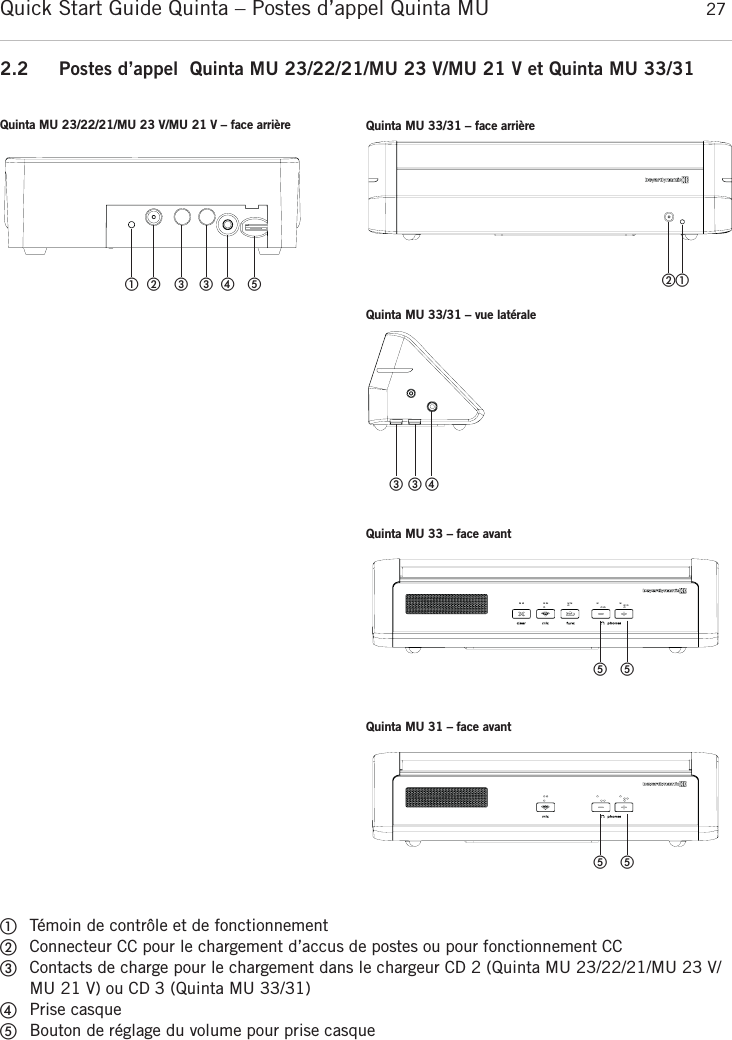
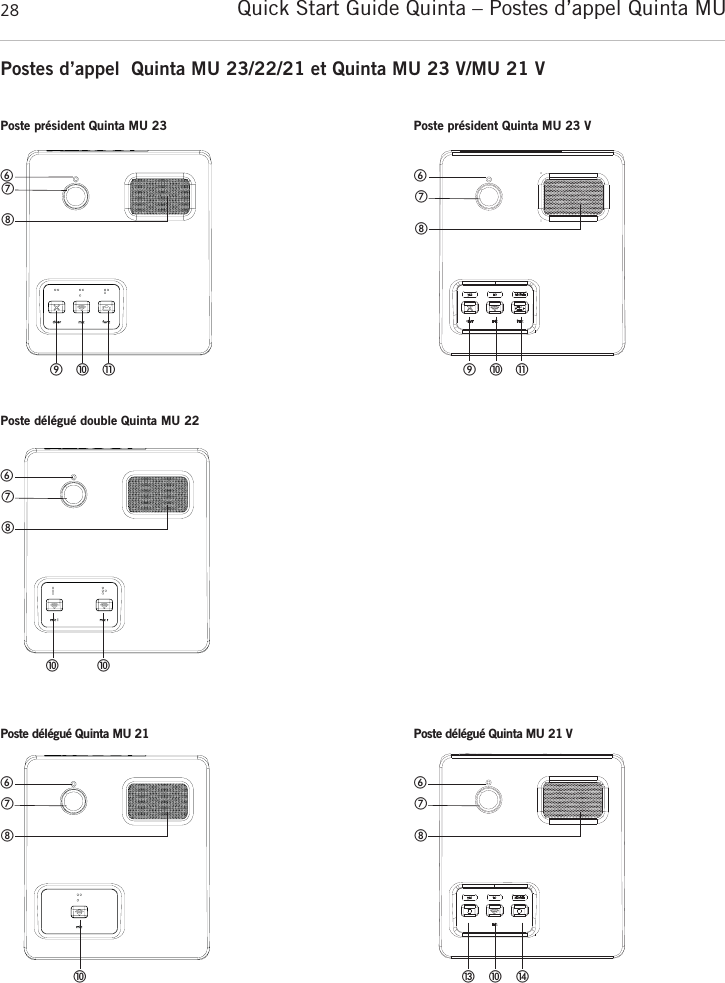
Quick Start Guide Quinta – Postes d’appel Quinta MU  27français2.2 Postes d’appel  Quinta MU 23/22/21/MU 23 V/MU 21 V et Quinta MU 33/31ቢTémoin de contrôle et de fonctionnementባConnecteur CC pour le chargement d’accus de postes ou pour fonctionnement CCቤContacts de charge pour le chargement dans le chargeur CD 2 (Quinta MU 23/22/21/MU 23 V/MU 21 V) ou CD 3 (Quinta MU 33/31)ብPrise casqueቦBouton de réglage du volume pour prise casque   ቢባ ቤቤብ ቦQuinta MU 23/22/21/MU 23 V/MU 21 V – face arrière Quinta MU 33/31 – face arrièreQuinta MU 33/31 – vue latéraleQuinta MU 33 – face avantቢባቤ ቤብቦ ቦQuinta MU 31 – face avantቦ ቦ
Quick Start Guide Quinta – Postes d’appel Quinta MU 28Postes d’appel  Quinta MU 23/22/21 et Quinta MU 23 V/MU 21 V   ቧቨቩቫቭቪPoste président Quinta MU 23ቧቨቩቫቭቪPoste président Quinta MU 23 VPoste délégué double Quinta MU 22Poste délégué Quinta MU 21   ቧቨቩቫቫ   ቧቨቩቫPoste délégué Quinta MU 21 Vቧቨቩቫቯ ተ
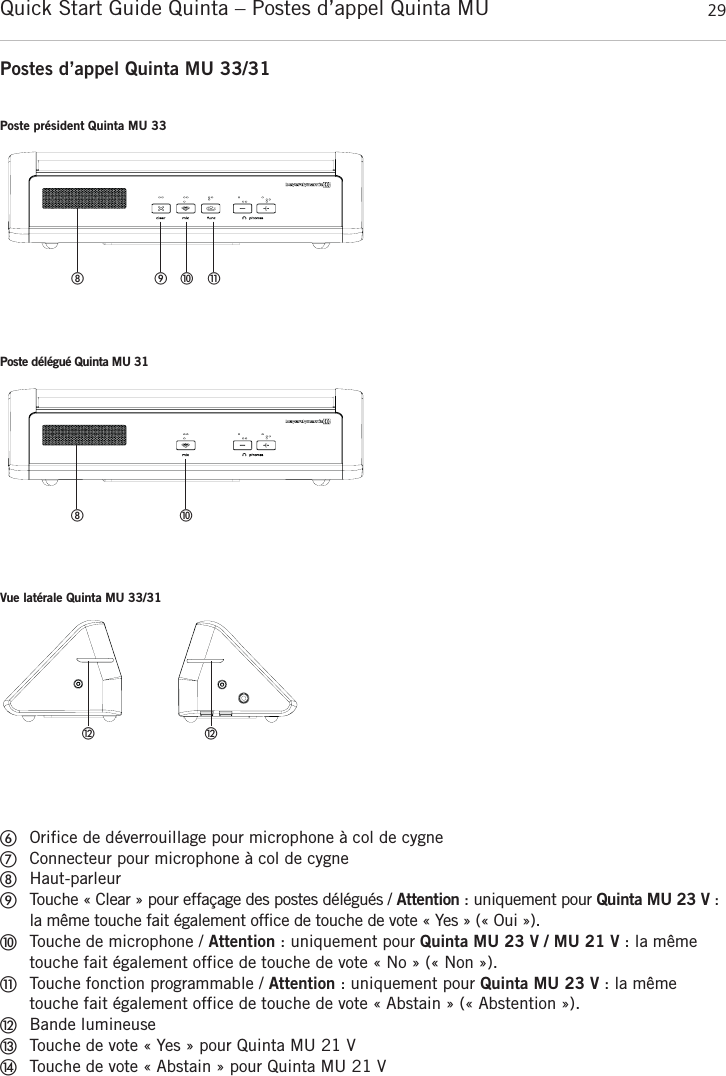
Quick Start Guide Quinta – Postes d’appel Quinta MU  29françaisPostes d’appel Quinta MU 33/31ቧOrifice de déverrouillage pour microphone à col de cygneቨConnecteur pour microphone à col de cygneቩHaut-parleurቪTouche « Clear » pour effaçage des postes délégués / Attention : uniquement pour Quinta MU 23 V :la même touche fait également office de touche de vote « Yes » (« Oui »).ቫTouche de microphone / Attention : uniquement pour Quinta MU 23 V / MU 21 V : la mêmetouche fait également office de touche de vote « No » (« Non »).ቭTouche fonction programmable / Attention : uniquement pour Quinta MU 23 V : la même touche fait également office de touche de vote « Abstain » (« Abstention »).ቮBande lumineuseቯTouche de vote « Yes » pour Quinta MU 21 VተTouche de vote « Abstain » pour Quinta MU 21 VPoste président Quinta MU 33ቪ ቫ ቭቩPoste délégué Quinta MU 31ቫቩVue latérale Quinta MU 33/31ቮቮ
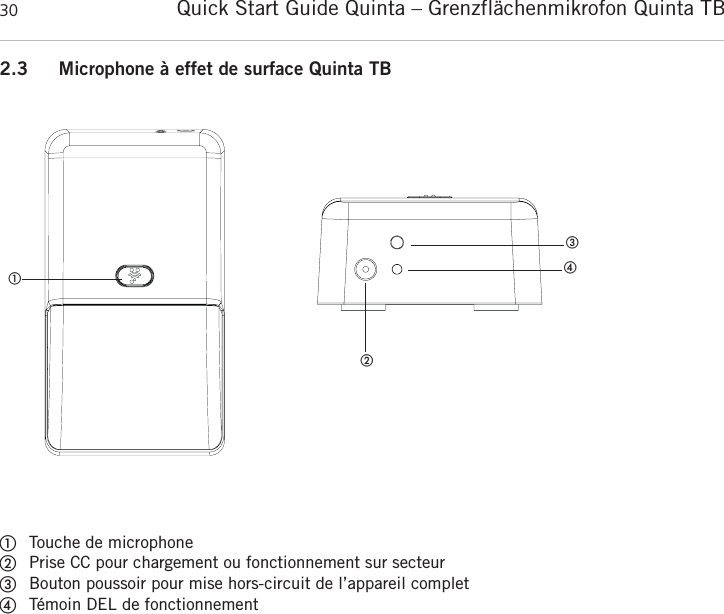
Quick Start Guide Quinta – Grenzflächenmikrofon Quinta TB 302.3 Microphone à effet de surface Quinta TB      ቢTouche de microphoneባPrise CC pour chargement ou fonctionnement sur secteurቤBouton poussoir pour mise hors-circuit de l’appareil completብTémoin DEL de fonctionnementቢቤባብ
Quick Start Guide Quinta – Mise en service 31français3. Mise en service3.1 Centrale de commande Quinta CUInstallation de la centrale de commande• Si vous n’utilisez pas d’antennes déportées, placez la centrale de commande Quinta CU dans lapièce où a lieu la conférence. En présence d’antennes déportées, placez les antennes dans la pièceoù a lieu la conférence.• Evitez la projection d’ombre sur les antennes, notamment par des surfaces métalliques.• Les postes Quinta MU travaillent au mieux en visibilité directe avec les antennes de la centrale de commande Quinta CU. Raccordement d’antenne• Branchez les antennes sur les bornes d’antenne ᕩ. Pour le fonctionnement Diversity, les antennesdoivent impérativement être toutes les deux connectées ! Une électronique d’évaluation commutesans bruit à l’émission comme à la réception sur l’antenne offrant le meilleur signal.• Pour le fonctionnement autonome « stand-alone », nous recommandons les antennes coudées CA Q 11 fournies.• La centrale de commande Quinta CU fonctionne également avec des antennes déportées. Nous recommandons l’utilisation de câbles à très basse atténuation de 10 et 20 m de longueur. Nousvous rappelons que les antennes doivent être montées à distance. Branchement• Si nécessaire, raccordez la sortie principale audio Mix Ƹ, XLR ƹou RCA ƺde la centrale de commande Quinta CU à l’entrée d’un amplificateur mélangeur ou d’une table de mixage.• Raccordez la centrale de commande Quinta CU au secteur ƿ. L’alimentation de la centrale de commande peut commuter automatiquement sur une tension alternée entre 100 et 240 volts pour50 - 60 Hz. Vérifiez si les puissances connectées correspondent à l’alimentation secteur existante.Un raccordement du système à la mauvaise alimentation peut provoquer de graves dommages.Veillez à ce que le cordon d’alimentation ne puisse être tordu ou sectionné.• Pour l’utilisation du port AVB, veuillez vous reporter au mode d’emploi de « Système de conférenceQuinta ».Instructions d’utilisation• Allumez la centrale de commande Quinta CU via l’interrupteur marche/arrêt ƽ. Le témoin de fonctionnement ᕡs’allume.• Les afficheurs de canal 1 à 4 sont allumés en blanc, signalant qu’ils sont disponibles. Dès qu’un microphone est actif, l’afficheur de canal ᕢs’allume en rouge, signalant que le canal est occupé.  • Les bandes HF 2,4; 5,2 ou 5,8 GHz* sont activées au départ usine (Automatic Mode). Ceci signi-fie que la centrale de commande Quinta CU sélectionne d’elle-même une fréquence libre et sautesi nécessaire à une autre fréquence, sans perturbations audio. Ce mode de fonctionnement est recommandé pour une utilisation normale. Les fréquences à libre disposition pour la centrale de commande Quinta  CU  peuvent  de  plus être  désactivées via  logiciel.  Les  postes  d’appel sont automatiquement réglés sur la fréquence de la centrale de commande Quinta CU sans interruptionaudio. Cf. à ce propos le mode d’emploi « Système de conférence Quinta ».*Note :La disponibilité des bandes HF 2,4; 5,2 ou 5,8 GHz peut varier selon la région sélectionnée.
Quick Start Guide Quinta – Mise en service323.2 Postes d’appel Quinta MU 23/22/21/MU 23 V/MU 21 V et Quinta MU 33/31Branchement du microphone à col de cygne aux postes d’appel Quinta MU 23/22/21/MU 23 V/MU 21 VDes  microphones  à  col  de  cygne  avec  LED  peuvent  être  raccordés  aux  postes  d’appel  Quinta MU 23/22/21/MU 23 V/MU 21 V.• Tenez le microphone par le bas de la tige, insérez-le dans la prise correspondante ቨet pressez latige vers le bas jusqu’à ce que le microphone s’enclenche.• Pour retirer le microphone à col de cygne, pressez l’outil de déverrouillage fourni avec Quinta CU(ou un autre outil aussi fin) sur l’orifice de déverrouillage ቧet dégagez le microphone en le tenantpar le bas de la tige et en le tirant vers le haut.Mise en marche• Le poste d’appel est activé d’une pression sur la touche de microphone. La touche de microphone ቫs’allume brièvement en rouge et le témoin de fonctionnement LED ቢsitué sur la face arrière estallumé en vert.Dès qu’une liaison est établie avec la centrale de commande Quinta CU, les touches du poste s’allument en blanc pour signaler la disponibilité.• Pour activer le microphone ou attribuer au poste un canal libre de la centrale de commande QuintaCU, pressez une nouvelle fois brièvement la touche de microphone ቫ. Selon le mode de   fonctionne-ment, la touche de microphone est allumée en vert (mode de fonctionnement normal) ou en rouge(mode de fonctionnement demande de parole).Mise hors tension• Le poste d’appel est désactivé d’une pression prolongée sur la touche de microphone ቫ (> 2 s).• Tous les postes Quinta MU allumés « à portée » de la centrale de commande Quinta CU peuventégalement être éteints via cette dernière lorsque vous maintenez enfoncé le bouton de veille ᕤplus de 3 secondes.• Par ailleurs, les postes s’éteignent d’eux-mêmes lorsqu’ils ne reçoivent pas de signal de la  centralede commande Quinta CU pendant plus de 3 min environ.Modes de fonctionnementLes différents modes de fonctionnement tels que « Normal », « Push-To-Talk » ou « Contrôle vocal »sont réglés ensemble pour tous les postes via le logiciel Quinta. Le mode de fonctionnement réglé audépart usine est « Normal ». Cf. à ce propos le mode d’emploi du « Logiciel Quinta ».Alimentation / Autonomie• Les postes possèdent un accu intégré garantissant en pleine charge une autonomie d’environ 20 heures.• En cas de tension faible, le témoin de contrôle LED ቢsitué sur la face arrière du poste se met à clignoter. Le temps de fonctionnement restant s’élève alors à environ 1 heure.• L’état de charge des postes peut être affiché à l’aide du logiciel Quinta sur un ordinateur raccordéà la centrale de commande Quinta CU ou via le serveur Web intégré. L’affichage est en outre possible sur une commande de médias externe raccordée à Quinta CU.• Les postes Quinta MU peuvent également être alimentés via l’alimentation externe CA 2459 quevous raccordez au connecteur CC ባsitué sur la face arrière du poste respectif.• Pendant que l’alimentation CA 2459 est raccordée, le poste est également rechargé.
Quick Start Guide Quinta – Mise en service 33françaisChargementJusqu’à 10 postes Quinta MU 23/22/21/MU 23 V/MU 21 V peuvent être chargés simultanément avecle chargeur Quinta CD 2 intégré dans le coffre de transport Quinta CC 2. Jusqu’à 12 postes Quinta MU 33/31 peuvent être chargés simultanément avec le chargeur Quinta CD 3 intégré dans le coffrede transport Quinta CC 3. L’état de charge est visible de l’extérieur via la fenêtre.1.Raccordez  le  chargeur  au  secteur  et  mettez-le  sous  tension  via  l’interrupteur  marche/arrêt. L’interrupteur est allumé.Débrancher tout d’abord le câble secteur puis déplacer le chariot de chargement.Pour  éviter  les  dégâts  sur  la  prise  secteur  ainsi  qu’un  éventuel  choc  électrique,  le chariot de chargement ne doit pas être déplacé lorsqu’il est relié à une prise secteur.2. Insérez les postes éteints dans les compartiments de recharge. Les postes éventuellement encore allumés sont automatiquement mis hors tension. Lorsque les postes sont retirés du compartimentde recharge, ils doivent être éteints manuellement.3.Le  processus  de  recharge  est  affiché  via  le  témoin  LED  situé  sur  le  col  de  cygne  (Quinta MU 23/22/21/MU 23 V/MU 21 V) ou bande LED (Quinta MU 33/31) et est visible de l’extérieur àtravers une fenêtre.Affichage LED pendant la recharge de l’accu :a) LED sur col de cygne ou bande LED clignote en rouge . . . . accu en cours de chargementb) LED sur col de cygne ou bande LED allumée en permanence en rouge. . . . . . . . . . . . . . . . . . . . . . . . . accu entièrement rechargéc) LED sur col de cygne ou bande LED clignoterapidement en rouge . . . . . . . . . . . . . . . . . . . . . . . . . . . message d’erreur• Les postes Quinta MU peuvent également être alimentés via l’alimentation externe CA 2459 quevous raccordez au connecteur CC ባ.• Le processus de recharge est affiché via le témoin LED de contrôle ቢ.Affichage LED pendant la recharge de l’accu :a) LED clignote en rouge. . . . . . . . . . . . . . . . . . . . . . . . . . . accu en cours de chargementb) LED allumée en permanence en rouge . . . . . . . . . . . . . . . accu entièrement rechargéc) LED sclignote rapidement en rouge . . . . . . . . . . . . . . . . . message d’erreur•Conseil d’entretienIl est recommandé de nettoyer de temps à autre les contacts de charge sur les postes et dans lechargeur à l’aide d’un chiffon non peluchant imprégné d’alcool dénaturé.
Quick Start Guide Quinta – Mise en service343.3 Microphone à effet de surface Quinta TBMise en marche• Le microphone à effet de surface est activé d’une pression sur la touche de microphone ቢ. La touche de microphone ቢs’allume brièvement et le témoin DEL de fonctionnement ብsitué sur laface arrière est allumé en vert.Dès qu’une liaison est établie avec la centrale de commande Quinta CU, la touche de microphone ቢdu microphone  à  effet  de  surface  s’allume  en  blanc  pour  signaler  la  disponibilité  en  mode conférence et en vert en mode microphone.• Pour activer le microphone en mode conférence ou attribuer au microphone un canal libre de la centrale de commande Quinta CU, pressez une nouvelle fois brièvement la touche de microphone ቢ.Selon le mode de fonctionnement, la touche de microphone ቢ s’allume en vert (mode normal) ou enrouge (mode demande de parole). En mode microphone, le microphone de Quinta TB est auto-matiquement activé (touche de microphone ቢ allumée en vert). Pour mettre le microphone en sourdine, pressez une nouvelle fois brièvement la touche de microphone ቢ (touche de microphone ቢallumée en rouge).Mise hors tension• Le microphone à effet de surface est désactivé d’une pression prolongée sur la touche de micro-phone ቢ (> 2 s).• Tous les microphones Quinta TB allumés « à portée » de la centrale de commande Quinta CU peuvent également être éteints via cette dernière lorsque vous maintenez enfoncé le bouton deveille ᕤplus de 3 secondes..• Par ailleurs, le microphone à effet de surface Quinta TB s’éteint de lui-même lorsqu’il ne reçoit pasde signal de la centrale de commande Quinta CU pendant plus de 3 minutes environModes de fonctionnementLes différents modes de fonctionnement tels que « Normal », « Push-To-Talk » ou « Push-To-Mute »(uniquement disponible en mode microphone) sont réglés ensemble pour tous les microphones via lelogiciel de conférence Quinta. Le mode de fonctionnement réglé au départ usine est « Normal ». Cf. à ce propos le mode d’emploi correspondant « Logiciel Quinta Conference » ou « Serveur WebQuinta ».Alimentation / Autonomie• Les microphones à effet de surface possèdent un accu intégré garantissant en pleine charge uneautonomie d’au moins 16 heures.• En cas de tension faible, le témoin DEL de fonctionnement ብsitué sur la face arrière du micro-phone se met à clignoter. Le temps de fonctionnement restant s’élève alors à environ une heure.• L’état de charge du microphone à effet de surface peut être affiché à l’aide du logiciel Quinta Conference sur un ordinateur raccordé à la centrale de commande Quinta CU ou via le serveur Webintégré. L’affichage est en outre possible sur un contrôleur multimédia externe raccordé à QuintaCU.• Le microphone à effet de surface Quinta TB peut également être alimenté via l’alimentation externeCA 2459 que vous raccordez à la prise CC ባsituée sur la face arrière du microphone respectif. Pendant que l’alimentation CA 2459 est raccordée, le microphone à effet de surface est égalementrechargé. Chargement•Avant la première mise en service, vous devez charger le pack d’accus du microphone à effet desurface Quinta TB. La durée de chargement maximale est de 2 heures.
Quick Start Guide Quinta – Mise en service 35français• Pour le chargement, raccordez le bloc de chargement CA 2459 au microphone ainsi qu’à une prisede courant. Si le microphone est activé pendant le chargement, la diode d s’allume brièvement enrouge puis est allumée en permanence en vert comme témoin de fonctionnement.• Si le microphone est désactivé, le processus de chargement est indiqué comme suit via le témoinDEL de fonctionnement ብ:a) DEL clignote lentement en rouge . . . . . . . accu en cours de chargement, chargement normalb) DEL allumée en permanence en rouge . . . accu entièrement rechargéc) DEL clignote rapidement en rouge . . . . . . message d’erreur (dans ce cas, débrancher lechargeur puis le rebrancher, le cas échéant appelerle service de dépannage.)Important :• Au bout d’un certain temps, les accus perdent, pour des raisons techniques, de leur capacité. Ladurée de fonctionnement s’en trouve raccourcie.• Il est normal que les accus chauffent pendant le chargement.• Si le microphone à effet de surface est allumé pendant le chargement, le témoin DEL ብ s’allumeen vert.4. EvacuationCe symbole sur le produit, l’emballage ou dans le manuel signifie que votre équipement électrique et électronique doit être, en fin de vie, jeté séparement de vos déchets ménages.Il existe en France des systèmes de collecte différents pour les déchets recyclables. Pourplus d’information, veuillez contacter les autorités locales ou le revendeur chez qui vousavez acheté le produit.5. Déclaration de conformitéLa société beyerdynamic GmbH & Co. KG déclare que le système radio Quinta est conforme à la directive européenne 2014/53/UE.Vous pouvez consulter la déclaration de conformité UE intégrale sur Internet :www.beyerdynamic.com/cod
Quick Start Guide Quinta – FCC Régulation36FCC RégulationCanada: IC: 3628A-QUINTACU pour Quinta CUCanada: IC: 3628A-QUINTAMU2X pour Quinta MU 21, Quinta MU 21 VCanada: IC: 3628A-QUINTAMU2X pour Quinta MU 22Canada: IC: 3628A-QUINTAMU2X pour Quinta MU 23, Quinta MU 23 VCanada: IC: 3628A-QUINTAMU3X pour Quinta MU 31Canada: IC: 3628A-QUINTAMU3X pour Quinta MU 33Part 15.19 StatementNOTICE: Le présent appareil est conforme aux CNR d’Industrie Canada applicables aux appareils radio exempts delicence. L’exploitation est autorisée aux deux conditions suivantes:(1) l’appareil ne doit pas produire de brouillage, et (2) l’utilisateur de l’appareil doit accepter tout brouillage radioélectrique subi, même si le brouillage est susceptibled’en compromettre le fonctionnement.Cet équipement est conforme aux limites d’exposition aux rayonnements IC établies pour un environnement non contrôlé. Cet équipement doit être installé et utilisé avec un minimum de 20 cm de distance entre la source de rayonnement et votre corps.Ce transmetteur ne doit pas etre place au meme endroit ou utilise simultanement avec un autre transmetteur ou antenne.
Quick Start Guide Quinta – Notes 37français
www.beyerdynamic.combeyerdynamic GmbH & Co. KG . Theresienstraße 8 . 74072 Heilbronn . Germany  Tel. +49 7131 617-0 . Fax +49 7131 617-204 . info@beyerdynamic.deWeitere Vertriebspartner weltweit finden Sie im Internet unter www.beyerdynamic.com Abbildungen nicht vertragsbindend. Änderungen vorbehalten.For further distributors worldwide, please go to www.beyerdynamic.com Non-contractual illustrations. Subject to change without notice.DE-EN-FR 5/BA Quinta (07.15) / 633.585

Navigation menu