Bosch Automotive Diagnostics Equipment KT700VMI Vehicle Oscillograph User Manual KT700 VMI

Bosch Automotive Diagnostics Equipment (Shenzhen) Limited Vehicle Oscillograph KT700 VMI

KT700 VMI user manual

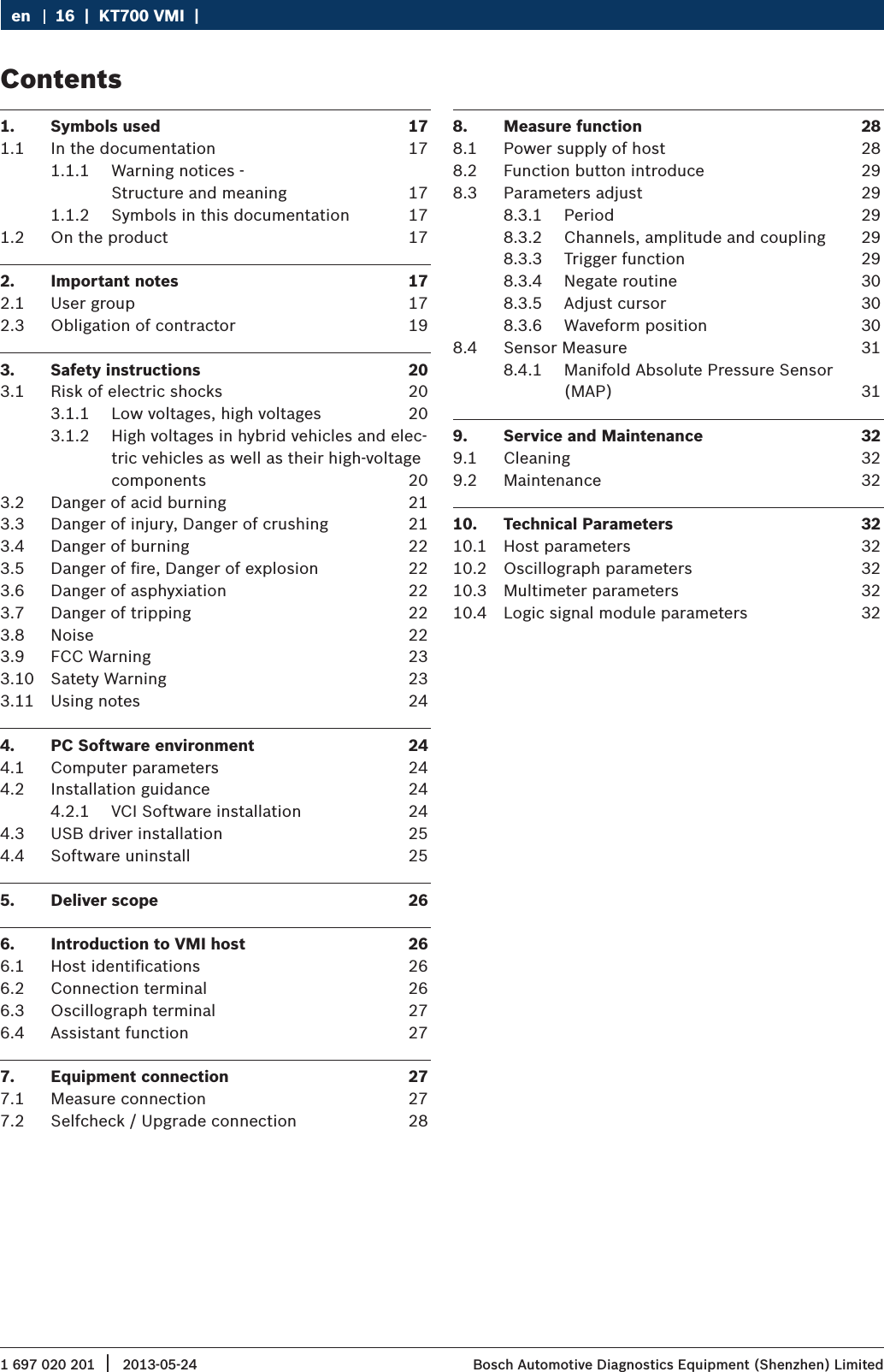
1 697 020 201 2013-05-24|  Bosch Automotive Diagnostics Equipment (Shenzhen) Limited16  |  KT700 VMI  |  en1.  Symbols used  171.1  In the documentation  171.1.1  Warning notices - Structure and meaning  171.1.2  Symbols in this documentation  171.2  On the product  172.  Important notes  172.1  User group  172.3  Obligation of contractor  193.  Safety instructions  203.1  Risk of electric shocks  203.1.1  Low voltages, high voltages  203.1.2  High voltages in hybrid vehicles and elec-tric vehicles as well as their high-voltage components  203.2  Danger of acid burning  213.3  Danger of injury, Danger of crushing  213.4  Danger of burning  223.5  Danger of fire, Danger of explosion  223.6  Danger of asphyxiation  223.7  Danger of tripping  223.8  Noise  223.9  FCC Warning  233.10  Satety Warning  233.11  Using notes  244.  PC Software environment  244.1  Computer parameters  244.2  Installation guidance  244.2.1  VCI Software installation  244.3  USB driver installation  254.4  Software uninstall   255.  Deliver scope  266.  Introduction to VMI host  266.1  Host identifications   266.2  Connection terminal  266.3  Oscillograph terminal  276.4  Assistant function  277.  Equipment connection  277.1  Measure connection  277.2  Selfcheck / Upgrade connection  288.  Measure function  288.1  Power supply of host  288.2  Function button introduce  298.3  Parameters adjust  298.3.1  Period  298.3.2  Channels, amplitude and coupling  298.3.3  Trigger function  298.3.4  Negate routine  308.3.5  Adjust cursor  308.3.6  Waveform position  308.4  Sensor Measure  318.4.1  Manifold Absolute Pressure Sensor (MAP)  319.  Service and Maintenance  329.1  Cleaning  329.2  Maintenance  3210.  Technical Parameters  3210.1  Host parameters  3210.2  Oscillograph parameters  3210.3  Multimeter parameters  3210.4  Logic signal module parameters  32Contents
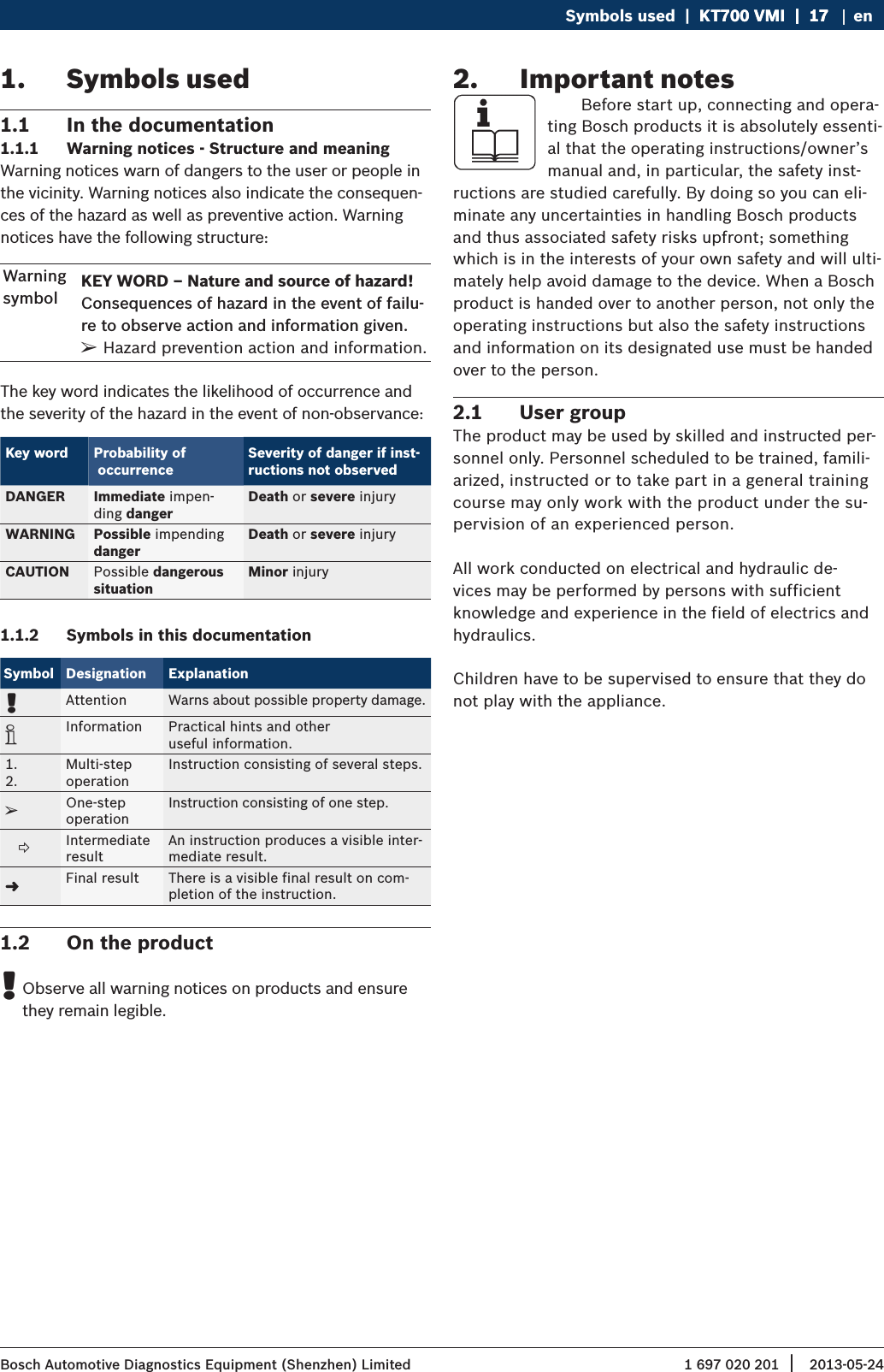
1 697 020 201 2013-05-24| Bosch Automotive Diagnostics Equipment (Shenzhen) LimitedSymbols used  |  KT700 VMI  |  17KT700 VMI  |  17  |  17 en1.  Symbols used1.1  In the documentation1.1.1  Warning notices - Structure and meaningWarning notices warn of dangers to the user or people in the vicinity. Warning notices also indicate the consequen-ces of the hazard as well as preventive action. Warning notices have the following structure:Warning symbolKEY WORD – Nature and source of hazard!Consequences of hazard in the event of failu-re to observe action and information given. ¶Hazard prevention action and information.The key word indicates the likelihood of occurrence and the severity of the hazard in the event of non-observance:Key word Probability of  occurrenceSeverity of danger if inst-ructions not observedDANGER Immediate impen-ding dangerDeath or severe injuryWARNING Possible impendingdangerDeath or severe injuryCAUTION Possible dangerous situationMinor injury1.1.2  Symbols in this documentationSymbol Designation Explanation!Attention Warns about possible property damage.iInformation Practical hints and other  useful information.1.2.Multi-step  operationInstruction consisting of several steps.eOne-step  operationInstruction consisting of one step.   Intermediate resultAn instruction produces a visible inter-mediate result."Final result There is a visible final result on com-pletion of the instruction.1.2  On the product !Observe all warning notices on products and ensure they remain legible.2.  Important notes    Before start up, connecting and opera-ting Bosch products it is absolutely essenti-al that the operating instructions/owner’s manual and, in particular, the safety inst-ructions are studied carefully. By doing so you can eli-minate any uncertainties in handling Bosch products and thus associated safety risks upfront; something which is in the interests of your own safety and will ulti-mately help avoid damage to the device. When a Bosch product is handed over to another person, not only the operating instructions but also the safety instructions and information on its designated use must be handed over to the person.2.1  User groupThe product may be used by skilled and instructed per-sonnel only. Personnel scheduled to be trained, famili-arized, instructed or to take part in a general training course may only work with the product under the su-pervision of an experienced person.All work conducted on electrical and hydraulic de-vices may be performed by persons with sufficient knowledge and experience in the field of electrics and hydraulics.Children have to be supervised to ensure that they do not play with the appliance.
1 697 020 201 2013-05-24|  Bosch Automotive Diagnostics Equipment (Shenzhen) Limited18  |  KT700 VMI  |  Symbols useden2.2  AgreementBy using the product you agree to the following regulations:Declare RRefer to packing list for detailed product configura-tion; RRefer to software for functions, pictures.This product cannot use in:Locations characterized by a separate power network, in most cases supplied from a high- or medium-voltage transformer, dedicated for the supply of installations feeding manufacturing or similar plants with one or more of the following conditions:– frequent switching of heavy inductive or capacitive loads;– high currents and associated magnetic fields;– presence of Industrial, Scientific and Medical (ISM) apparatus (for example, welding machines).The equipment complies with relevant require-ments of Directive 2004/108/EC for Electromagnetic compatibili¬ty (EMC) and Directive 2006/95/EC for Low Voltage.CopyrightSoftware  and  data  are  the  property  of  Bosch  or  its suppliers  and  protected  against  copying  by  copyright laws, international agreements and other national legal regulations. Copying or selling of data and software or any  part  thereof  is  impermissible  and  punishable;  in the event of any infringements Bosch reserves the right to proceed with criminal prosecution and to claim for damages.LiabilityAll data in this program is based - where possible - on manufacturer and importer details. Bosch does not ac-cept liability for the correctness and  completeness of software and data; liability for damage caused by faulty software  and  data  is  ruled  out.  Whatever  the  event, Bosch liability is restricted to the amount for which the customer actually pays for this product. This disclaimer of liability does not apply to damages caused by intent or gross negligence on the part of Bosch.WarrantyAny  use  of  non-approved  hardware  and  software  will result in a modification to our product and thus to exclu-sion of any liability and warranty, even if the hardware or software has in the meantime been removed or deleted.No changes may be made to our products. Our products may  only  be  used  in  combination  with  original  acces-sories and original service parts. Failing to do so, will render null and void all warranty claims.This product may only be operated using Bosch appro-ved operating systems. If the product is operated using an operating system other than the approved one, then our warranty obligation pursuant to our supply condi-tions will be rendered null and void. Furthermore, we will  not  be  held  liable  for  damage  and  consequential damage  incurred  through  the  use  of  a  non-approved operating system.WarningTest on a known source within the rated voltage range of the product, both before and after use to ensure unit is in good working condition. RNot to use the equipment for measurements on mains circuits, not to use the equipment for measu-rements on voltage exceed the voltage range descri-be in the manual. RNot to use the product for measurements within other measurement categories, such as CAT II, CAT III, CAT IV. RAny parts of the device and its accessories are not allowed to be changed or replaced, other than autho-rized by the manufacturer of his agent
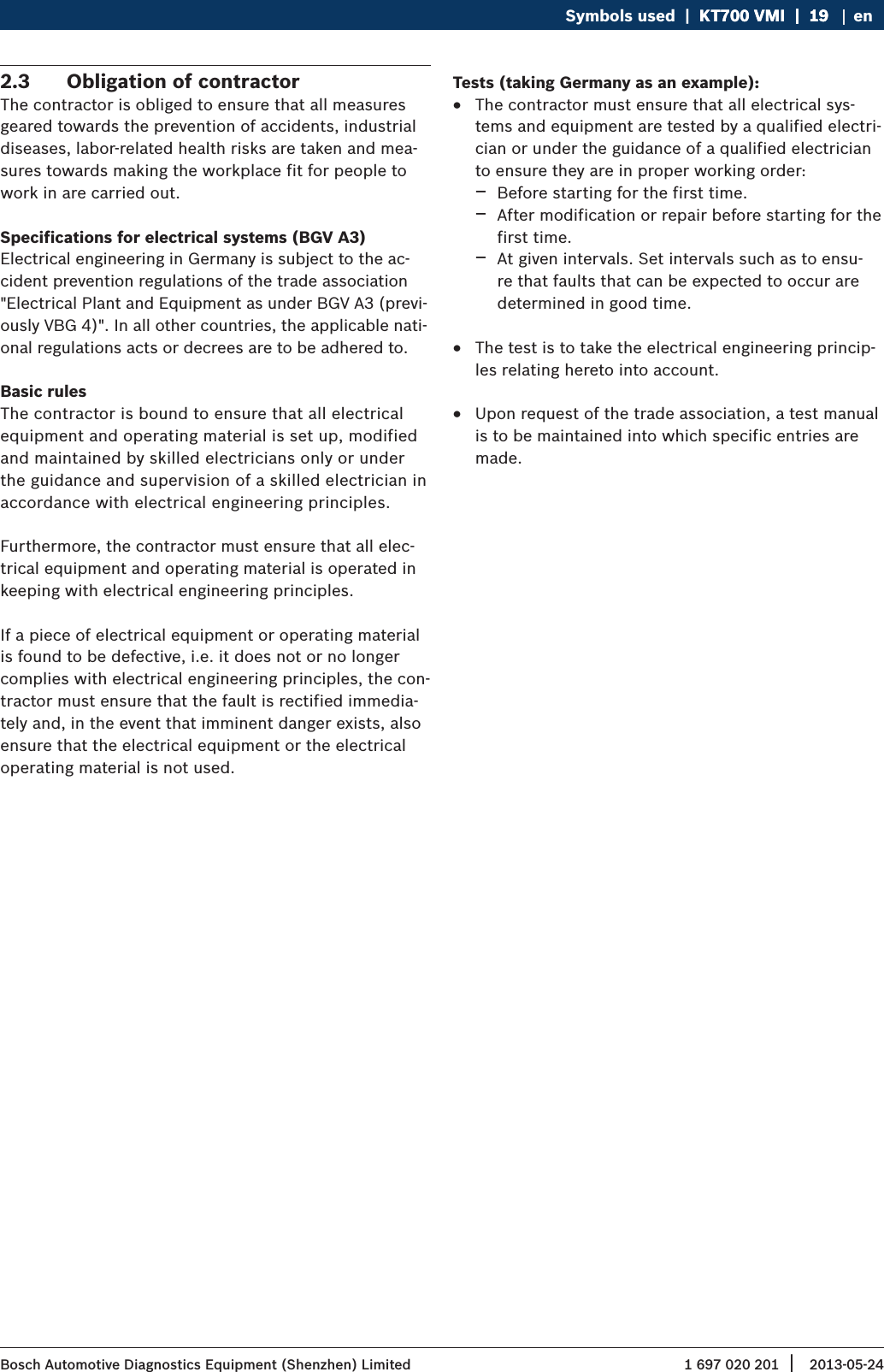
1 697 020 201 2013-05-24| Bosch Automotive Diagnostics Equipment (Shenzhen) LimitedSymbols used  |  KT700 VMI  |  19KT700 VMI  |  19  |  19 en2.3  Obligation of contractorThe contractor is obliged to ensure that all measures geared towards the prevention of accidents, industrial diseases, labor-related health risks are taken and mea-sures towards making the workplace fit for people to work in are carried out. Specifications for electrical systems (BGV A3)Electrical engineering in Germany is subject to the ac-cident prevention regulations of the trade association "Electrical Plant and Equipment as under BGV A3 (previ-ously VBG 4)". In all other countries, the applicable nati-onal regulations acts or decrees are to be adhered to.Basic rulesThe contractor is bound to ensure that all electrical equipment and operating material is set up, modified and maintained by skilled electricians only or under the guidance and supervision of a skilled electrician in accordance with electrical engineering principles. Furthermore, the contractor must ensure that all elec-trical equipment and operating material is operated in keeping with electrical engineering principles.If a piece of electrical equipment or operating material is found to be defective, i.e. it does not or no longer complies with electrical engineering principles, the con-tractor must ensure that the fault is rectified immedia-tely and, in the event that imminent danger exists, also ensure that the electrical equipment or the electrical operating material is not used.Tests (taking Germany as an example): RThe contractor must ensure that all electrical sys-tems and equipment are tested by a qualified electri-cian or under the guidance of a qualified electrician to ensure they are in proper working order: $Before starting for the first time.  $After modification or repair before starting for the first time.  $At given intervals. Set intervals such as to ensu-re that faults that can be expected to occur are determined in good time. RThe test is to take the electrical engineering princip-les relating hereto into account. RUpon request of the trade association, a test manual is to be maintained into which specific entries are made.
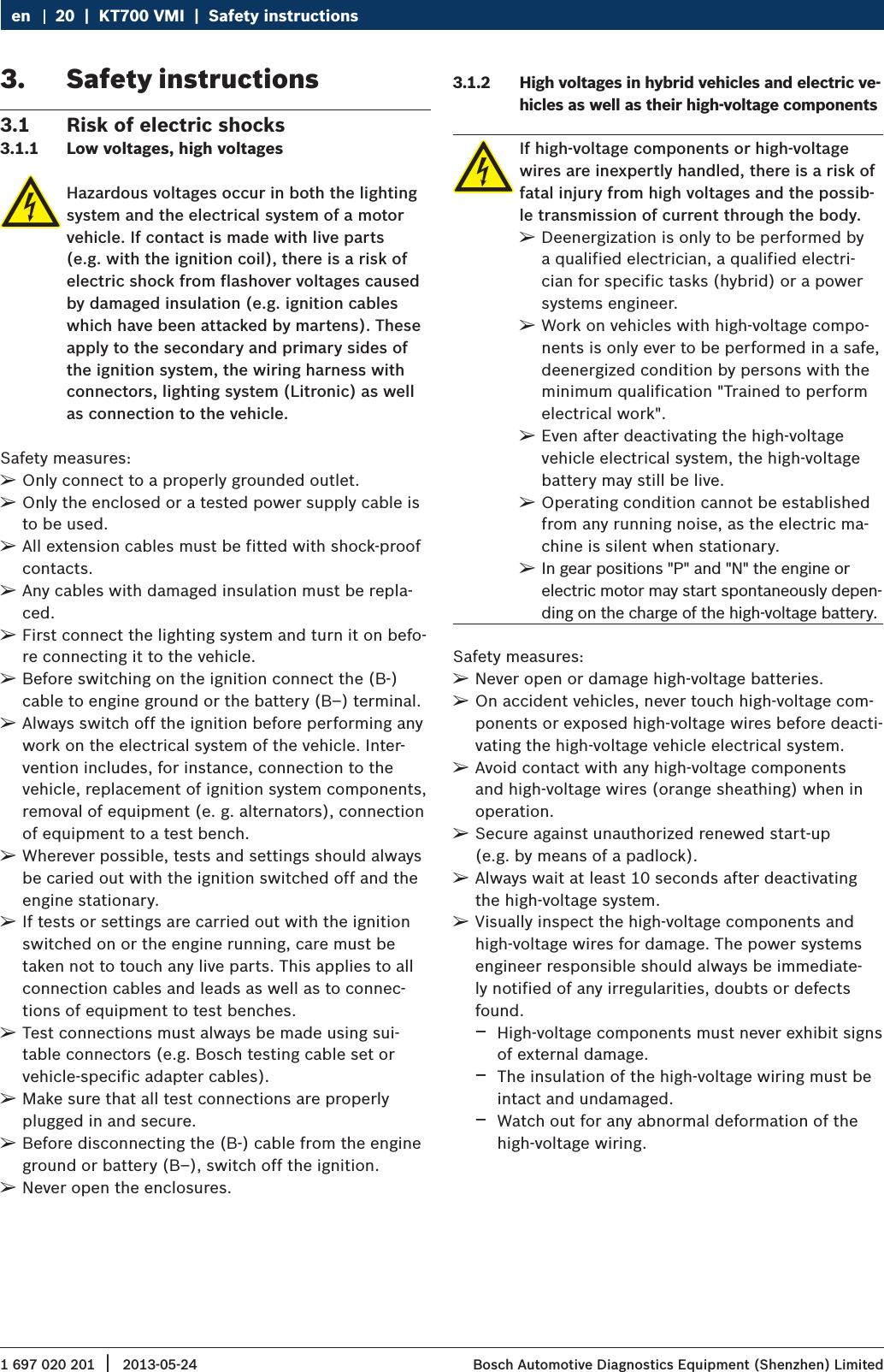
1 697 020 201 2013-05-24|  Bosch Automotive Diagnostics Equipment (Shenzhen) Limited20  |  KT700 VMI  |  Safety instructionsen3.  Safety instructions3.1  Risk of electric shocks3.1.1  Low voltages, high voltagesHazardous voltages occur in both the lighting system and the electrical system of a motor vehicle. If contact is made with live parts (e.g. with the ignition coil), there is a risk of electric shock from flashover voltages caused by damaged insulation (e.g. ignition cables which have been attacked by martens). These apply to the secondary and primary sides of the ignition system, the wiring harness with connectors, lighting system (Litronic) as well as connection to the vehicle.Safety measures: ¶Only connect to a properly grounded outlet. ¶Only the enclosed or a tested power supply cable is to be used. ¶All extension cables must be fitted with shock-proof contacts. ¶Any cables with damaged insulation must be repla-ced. ¶First connect the lighting system and turn it on befo-re connecting it to the vehicle. ¶Before switching on the ignition connect the (B-) cable to engine ground or the battery (B–) terminal. ¶Always switch off the ignition before performing any work on the electrical system of the vehicle. Inter-vention includes, for instance, connection to the vehicle, replacement of ignition system components, removal of equipment (e. g. alternators), connection of equipment to a test bench. ¶Wherever possible, tests and settings should always be caried out with the ignition switched off and the engine stationary. ¶If tests or settings are carried out with the ignition switched on or the engine running, care must be taken not to touch any live parts. This applies to all connection cables and leads as well as to connec-tions of equipment to test benches. ¶Test connections must always be made using sui-table connectors (e.g. Bosch testing cable set or vehicle-specific adapter cables). ¶Make sure that all test connections are properly plugged in and secure. ¶Before disconnecting the (B-) cable from the engine ground or battery (B–), switch off the ignition. ¶Never open the enclosures.3.1.2  High voltages in hybrid vehicles and electric ve-hicles as well as their high-voltage componentsIf high-voltage components or high-voltage wires are inexpertly handled, there is a risk of fatal injury from high voltages and the possib-le transmission of current through the body.  ¶Deenergization is only to be performed by a qualified electrician, a qualified electri-cian for specific tasks (hybrid) or a power systems engineer.   ¶Work on vehicles with high-voltage compo-nents is only ever to be performed in a safe, deenergized condition by persons with the minimum qualification "Trained to perform electrical work".  ¶Even after deactivating the high-voltage vehicle electrical system, the high-voltage battery may still be live. ¶Operating condition cannot be established from any running noise, as the electric ma-chine is silent when stationary. ¶In gear positions "P" and "N" the engine or electric motor may start spontaneously depen-ding on the charge of the high-voltage battery.Safety measures: ¶Never open or damage high-voltage batteries. ¶On accident vehicles, never touch high-voltage com-ponents or exposed high-voltage wires before deacti-vating the high-voltage vehicle electrical system. ¶Avoid contact with any high-voltage components and high-voltage wires (orange sheathing) when in operation. ¶Secure against unauthorized renewed start-up  (e.g. by means of a padlock). ¶Always wait at least 10 seconds after deactivating the high-voltage system. ¶Visually inspect the high-voltage components and high-voltage wires for damage. The power systems engineer responsible should always be immediate-ly notified of any irregularities, doubts or defects found. $High-voltage components must never exhibit signs of external damage. $The insulation of the high-voltage wiring must be intact and undamaged. $Watch out for any abnormal deformation of the high-voltage wiring.
1 697 020 201 2013-05-24| Bosch Automotive Diagnostics Equipment (Shenzhen) LimitedSafety instructions  |  KT700 VMI  |  21KT700 VMI  |  21  |  21 en3.2  Danger of acid burningWhen exhaust gas measurements are taken, the sampling hoses which are used release a highly caustic gas (hydrogen fluoride) that can cause acid burning in the respiratory system when heated to temperatures in excess of  250 °C (482 °F) or in the event of fire.Rules of conduct: ¶Consult a doctor immediately after inhaling! ¶Always wear gloves made of neoprene or PVC when removing residues left after a fire. ¶Neutralize any residues left after a fire with a cal-cium hydroxide solution. This produces non-toxic calcium fluoride, which can be washed away.Acids and alkalis can cause severe burning on unprotected skin. Hydrogen fluoride in combi-nation with moisture (water) forms hydroflu-oric acid. The condensate, which accumulates in the sampling hose and in the condensate container likewise contains acid.Rules of conduct: ¶When replacing the O2 measuring sensor, bear in mind that it contains alkali. ¶When replacing the NO measuring sensor, bear in mind that it contains acid. ¶Rinse any affected parts of the skin immediately in water, then consult a doctor! ¶NO and O2 measuring sensors are hazardous waste and must be disposed of separately. Your Bosch spe-cialist equipper can dispose of sensors in the proper manner.If liquid crystal escapes from a damaged liquid crystal display, it is imperative to avoid direct skin contact, inhalation and swallowing.Rules of conduct: ¶If you have inhaled or swallowed liquid crystal, con-sult a doctor immediately! ¶Wash the skin and clothing thoroughly with soap and water if it has come into contact with liquid crystal.If fluid (electrolyte) escapes from batteries and rechargeable batteries, avoid getting it on your skin or in your eyes.Rules of conduct: ¶If contact with skin or eyes happens nevertheless, wash the affected parts immediately with clean wa-ter and then consult a doctor.3.3  Danger of injury, Danger of crushingThe vehicle has rotating and moving parts that can injure fingers and arms.If the vehicle is not prevented from rolling away, there is a danger of people being crus-hed against a workbench, for example.There is the risk with electrically operated fans in particular that the fan can start run-ning unexpectedly even when the engine and ignition are off.Safety measures: ¶Take steps to prevent the vehicle from rolling away while it is being tested. Select the park position if the vehicle has an automatic transmission and apply the handbrake or lock the wheels with chocks (wedges). ¶Operating staff must wear work clothes without loose bands and loops. ¶Do not reach in any area with rotating or moving parts. ¶When working on or in the vicinity of electrically driven fans, allow the engine to cool down first, then disconnect the plug of the fan motor. ¶Route cables at a suitable distance from rotating parts. ¶Secure the trolley against rolling away by setting the brakes. ¶Do not place heavy objects on or lean on the sensor holder. ¶Transport and operate the equipment only in ac-cordance with the operating instructions.
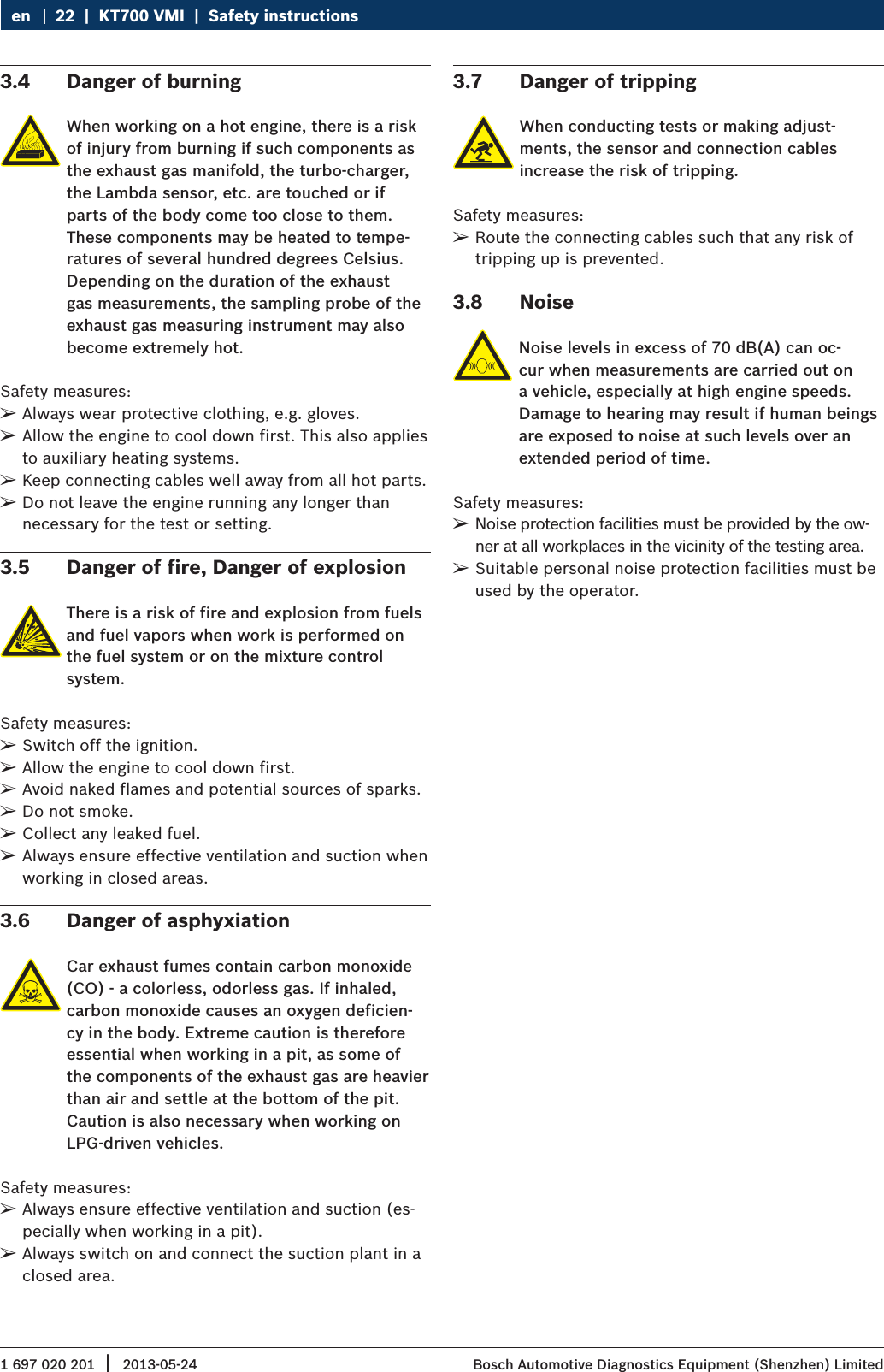
1 697 020 201 2013-05-24|  Bosch Automotive Diagnostics Equipment (Shenzhen) Limited22  |  KT700 VMI  |  Safety instructionsen3.4  Danger of burningWhen working on a hot engine, there is a risk of injury from burning if such components as the exhaust gas manifold, the turbo-charger, the Lambda sensor, etc. are touched or if parts of the body come too close to them. These components may be heated to tempe-ratures of several hundred degrees Celsius. Depending on the duration of the exhaust gas measurements, the sampling probe of the exhaust gas measuring instrument may also become extremely hot.Safety measures: ¶Always wear protective clothing, e.g. gloves. ¶Allow the engine to cool down first. This also applies to auxiliary heating systems. ¶Keep connecting cables well away from all hot parts. ¶Do not leave the engine running any longer than necessary for the test or setting.3.5  Danger of fire, Danger of explosionThere is a risk of fire and explosion from fuels and fuel vapors when work is performed on the fuel system or on the mixture control system.Safety measures: ¶Switch off the ignition. ¶Allow the engine to cool down first. ¶Avoid naked flames and potential sources of sparks. ¶Do not smoke. ¶Collect any leaked fuel. ¶Always ensure effective ventilation and suction when working in closed areas.3.6  Danger of asphyxiationCar exhaust fumes contain carbon monoxide (CO) - a colorless, odorless gas. If inhaled, carbon monoxide causes an oxygen deficien-cy in the body. Extreme caution is therefore essential when working in a pit, as some of the components of the exhaust gas are heavier than air and settle at the bottom of the pit. Caution is also necessary when working on LPG-driven vehicles.Safety measures: ¶Always ensure effective ventilation and suction (es-pecially when working in a pit). ¶Always switch on and connect the suction plant in a closed area.3.7  Danger of trippingWhen conducting tests or making adjust-ments, the sensor and connection cables increase the risk of tripping.Safety measures: ¶Route the connecting cables such that any risk of tripping up is prevented.3.8  NoiseNoise levels in excess of 70 dB(A) can oc-cur when measurements are carried out on a vehicle, especially at high engine speeds. Damage to hearing may result if human beings are exposed to noise at such levels over an extended period of time.Safety measures: ¶Noise protection facilities must be provided by the ow-ner at all workplaces in the vicinity of the testing area. ¶Suitable personal noise protection facilities must be used by the operator.
1 697 020 201 2013-05-24| Bosch Automotive Diagnostics Equipment (Shenzhen) LimitedSafety instructions  |  KT700 VMI  |  23KT700 VMI  |  23  |  23 en3.9  FCC WarningThis device complies with Part 15 of the FCC Rules. Operation is subject to the following two conditions:(1) this device may not cause harmful intererence, and (2) this device must accept any interference received, including interference that may cause undesired opera-tion.Note: changes or modifications not expressly approved by the party responsible for compliance could void the user's authority to operate the equipment. This equip-ment has been tested and found to comply with the limits for a Class B digital device, pursuant to Part 15 of the FCC Rules. These limits are designed to provide reasonable protection against harmful interference in a residential installation. This equipment generates, users and can radiate radio frequency energy and, if not installed and used in accordance with the instructions, may cause harmful interference to radio communica-tions. However, there is no guarantee the interference will not occur in a particular insatllation. If this equip-ment does cause harmful interference to radio or televi-sion reception, which can be determined by turning the equipment off and on, the user is encouraged to try to correct the interference by one or more of the following measures: RReorient or relocate the receiving antenna; RIncrease the separation between the equipment and receiver; RConnect the equipment into an outlet on a circuit different from that to which the receiver is connec-ted; RConsult the dealer or an experienced radio/TV tech-nician for help.3.10  Satety Warning RInspection shall be carried out in good ventilation. Connect the exhaust pipe to outside if there is no enough ventilation; RSmoking and open fire are prohibited in the inspec-tion; RThe battery liquid contains sulphuric acid that could erode the skin. Avoid battery liquid from touching the skin directly in operation, especially note that the liquid shall not be splashed into eye; RThe engine temperature is high when running. Avoid touching the high-temperature parts, such as radia-tor and exhaust pipe; RPull manual brake before starting the engine. Block the front wheels and place shift lever at P or neutral gear to avoid accident when starting the engine; RIf external batter is used as power supply, pay attention to the electrode; use red alligator clip to connect anode and black alligator clip to connect cathode; RKeep all the power cables, pens and tools away from belt or other moving parts if using instrument in engine compartment; RDo not wear watch, ring and loose clothes in mainte-nance for engine compartment; RWear approved safety glasses in all inspection pro-cesses; ROnly the enclosed power adapter or power supply cable can be used for supply connection; RIf the equipment is used in a manner not specified by the manufacturer, the protection provided by the equipment may be impaired.
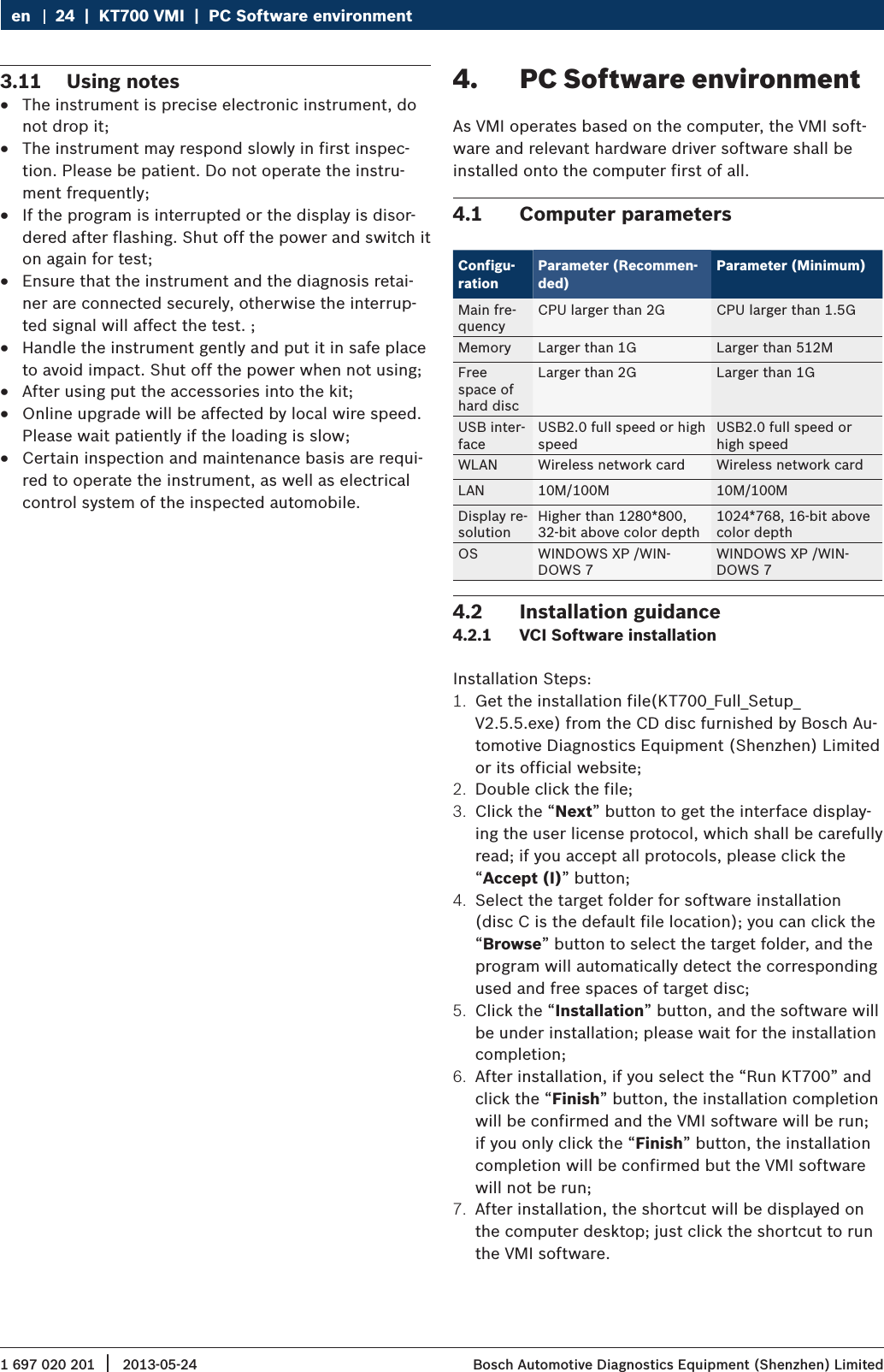
1 697 020 201 2013-05-24|  Bosch Automotive Diagnostics Equipment (Shenzhen) Limited24  |  KT700 VMI  |  PC Software environmenten3.11  Using notes RThe instrument is precise electronic instrument, do not drop it; RThe instrument may respond slowly in first inspec-tion. Please be patient. Do not operate the instru-ment frequently; RIf the program is interrupted or the display is disor-dered after flashing. Shut off the power and switch it on again for test; REnsure that the instrument and the diagnosis retai-ner are connected securely, otherwise the interrup-ted signal will affect the test. ; RHandle the instrument gently and put it in safe place to avoid impact. Shut off the power when not using; RAfter using put the accessories into the kit; ROnline upgrade will be affected by local wire speed. Please wait patiently if the loading is slow; RCertain inspection and maintenance basis are requi-red to operate the instrument, as well as electrical control system of the inspected automobile.4.  PC Software environmentAs VMI operates based on the computer, the VMI soft-ware and relevant hardware driver software shall be installed onto the computer first of all.4.1  Computer parametersConfigu-rationParameter (Recommen-ded)Parameter (Minimum)Main fre-quency CPU larger than 2G CPU larger than 1.5GMemory Larger than 1G Larger than 512MFree space of  hard discLarger than 2G Larger than 1GUSB inter-faceUSB2.0 full speed or high speedUSB2.0 full speed or high speedWLAN Wireless network card Wireless network cardLAN 10M/100M 10M/100MDisplay re-solutionHigher than 1280*800, 32-bit above color depth1024*768, 16-bit above color depthOS WINDOWS XP /WIN-DOWS 7WINDOWS XP /WIN-DOWS 74.2  Installation guidance4.2.1  VCI Software installationInstallation Steps:1.  Get the installation file(KT700_Full_Setup_V2.5.5.exe) from the CD disc furnished by Bosch Au-tomotive Diagnostics Equipment (Shenzhen) Limited or its official website;2.  Double click the file;3.  Click the “Next” button to get the interface display-ing the user license protocol, which shall be carefully read; if you accept all protocols, please click the “Accept (I)” button;4.  Select the target folder for software installation (disc C is the default file location); you can click the “Browse” button to select the target folder, and the program will automatically detect the corresponding used and free spaces of target disc;5.  Click the “Installation” button, and the software will be under installation; please wait for the installation completion;6.  After installation, if you select the “Run KT700” and click the “Finish” button, the installation completion will be confirmed and the VMI software will be run; if you only click the “Finish” button, the installation completion will be confirmed but the VMI software will not be run;7.  After installation, the shortcut will be displayed on the computer desktop; just click the shortcut to run the VMI software.
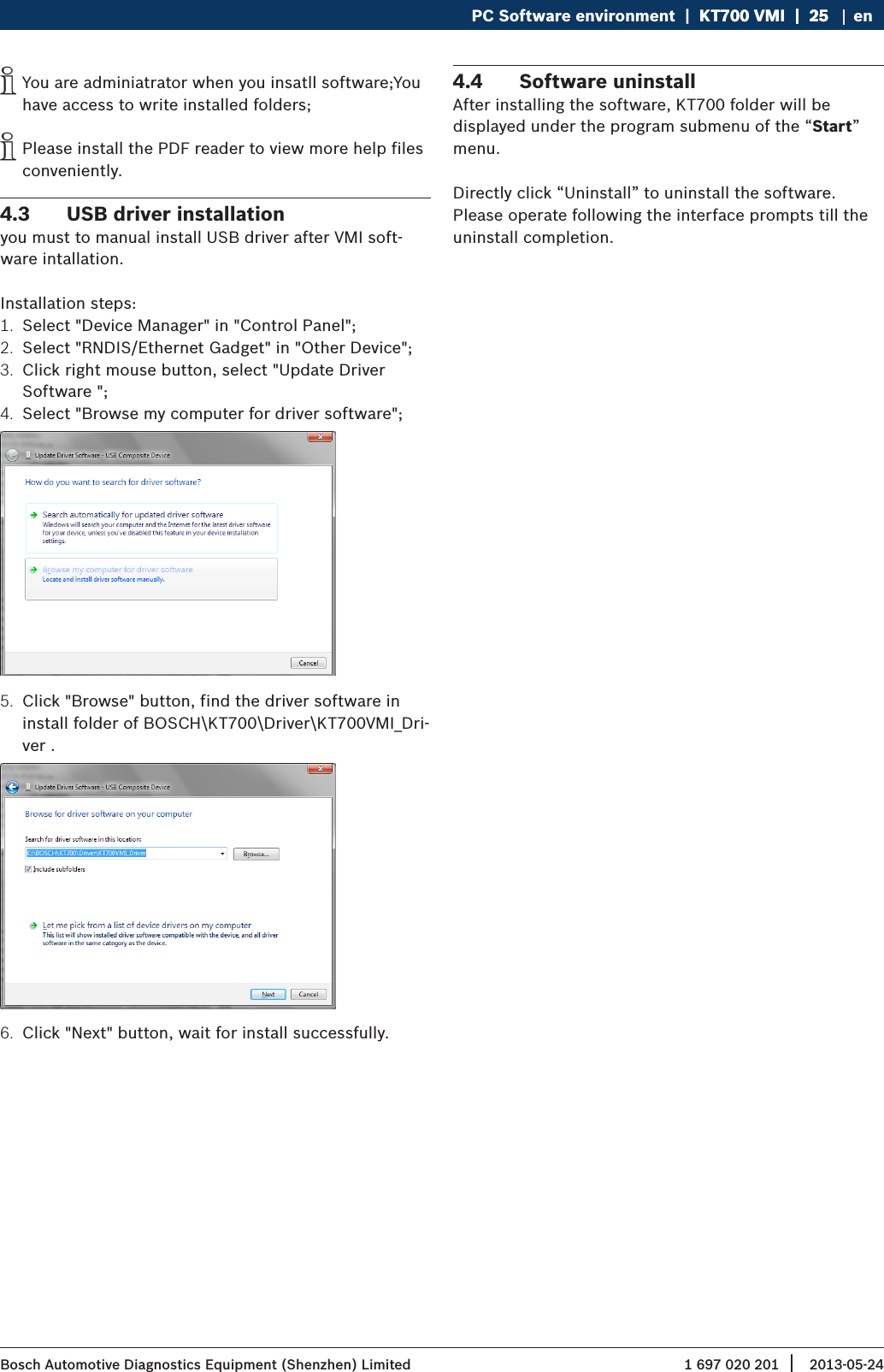
1 697 020 201 2013-05-24| Bosch Automotive Diagnostics Equipment (Shenzhen) LimitedPC Software environment  |  KT700 VMI  |  25KT700 VMI  |  25  |  25 en iYou are adminiatrator when you insatll software;You have access to write installed folders; iPlease install the PDF reader to view more help files conveniently.4.3  USB driver installationyou must to manual install USB driver after VMI soft-ware intallation.Installation steps:1.  Select "Device Manager" in "Control Panel";2.  Select "RNDIS/Ethernet Gadget" in "Other Device";3.  Click right mouse button, select "Update Driver Software ";4.  Select "Browse my computer for driver software";5.  Click "Browse" button, find the driver software in install folder of BOSCH\KT700\Driver\KT700VMI_Dri-ver .6.  Click "Next" button, wait for install successfully.4.4  Software uninstall After installing the software, KT700 folder will be displayed under the program submenu of the “Start” menu.Directly click “Uninstall” to uninstall the software. Please operate following the interface prompts till the uninstall completion.
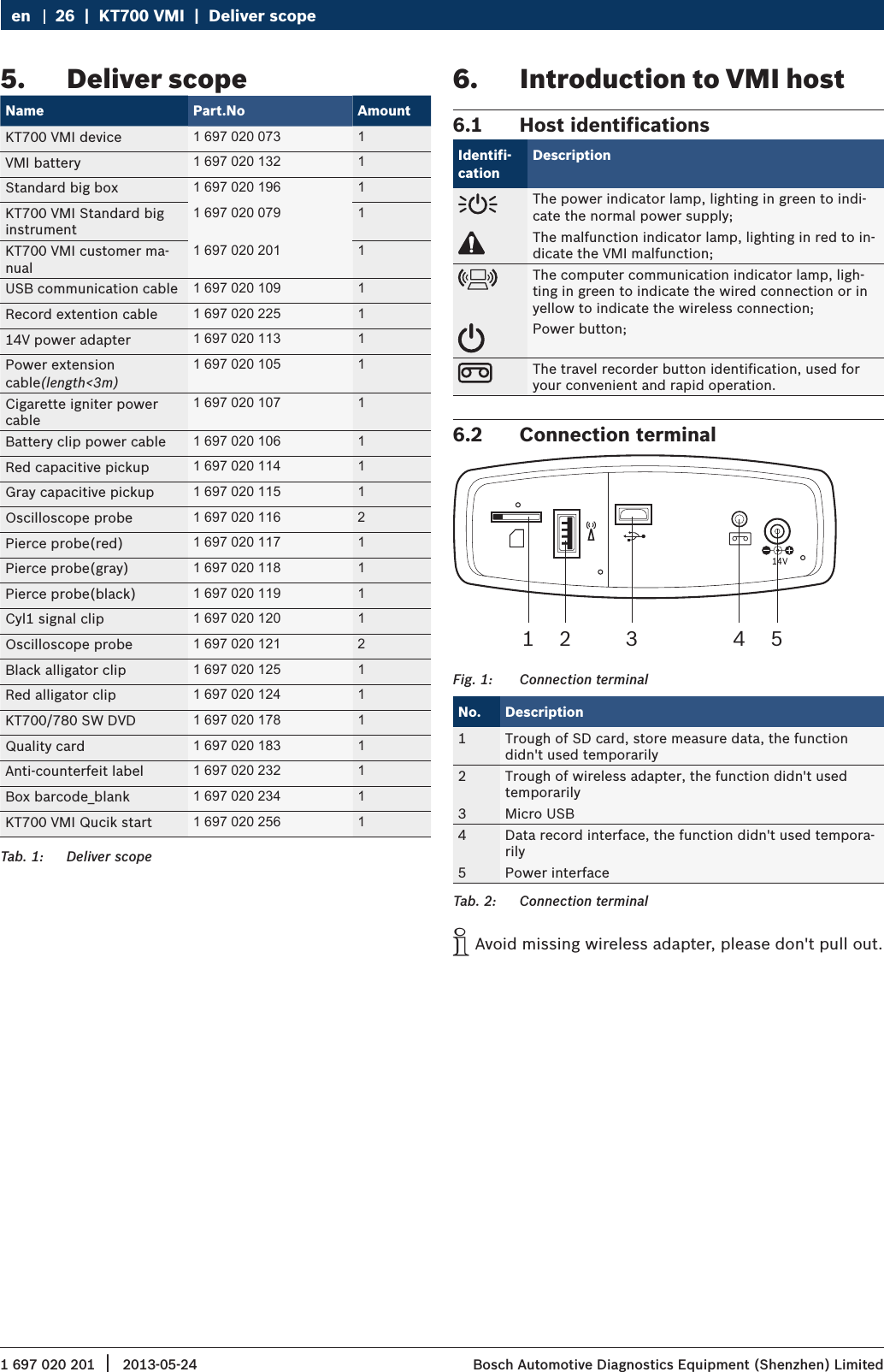
1 697 020 201 2013-05-24|  Bosch Automotive Diagnostics Equipment (Shenzhen) Limited26  |  KT700 VMI  |  Deliver scopeen5.  Deliver scopeName Part.No AmountKT700 VMI device 1 697 020 073 1VMI battery 1 697 020 132 1Standard big box 1 697 020 196 1KT700 VMI Standard big instrument1 697 020 079 1KT700 VMI customer ma-nual1 697 020 201 1USB communication cable 1 697 020 109 1Record extention cable 1 697 020 225 114V power adapter 1 697 020 113 1Power extension cable(length<3m)1 697 020 105 1Cigarette igniter power cable1 697 020 107 1Battery clip power cable 1 697 020 106 1Red capacitive pickup 1 697 020 114 1Gray capacitive pickup 1 697 020 115 1Oscilloscope probe 1 697 020 116 2Pierce probe(red) 1 697 020 117 1Pierce probe(gray) 1 697 020 118 1Pierce probe(black) 1 697 020 119 1Cyl1 signal clip 1 697 020 120 1Oscilloscope probe 1 697 020 121 2Black alligator clip 1 697 020 125 1Red alligator clip 1 697 020 124 1KT700/780 SW DVD 1 697 020 178 1Quality card 1 697 020 183 1Anti-counterfeit label 1 697 020 232 1Box barcode_blank 1 697 020 234 1KT700 VMI Qucik start 1 697 020 256 1Tab. 1:  Deliver scope6.  Introduction to VMI host6.1  Host identifications Identifi-cationDescriptionThe power indicator lamp, lighting in green to indi-cate the normal power supply;The malfunction indicator lamp, lighting in red to in-dicate the VMI malfunction;The computer communication indicator lamp, ligh-ting in green to indicate the wired connection or in yellow to indicate the wireless connection;Power button;The travel recorder button identification, used for your convenient and rapid operation.6.2  Connection terminal1 2 3 4 5Fig. 1:  Connection terminalNo. Description1 Trough of SD card, store measure data, the function didn't used temporarily2 Trough of wireless adapter, the function didn't used temporarily3 Micro USB4 Data record interface, the function didn't used tempora-rily5 Power interfaceTab. 2:  Connection terminal iAvoid missing wireless adapter, please don't pull out.
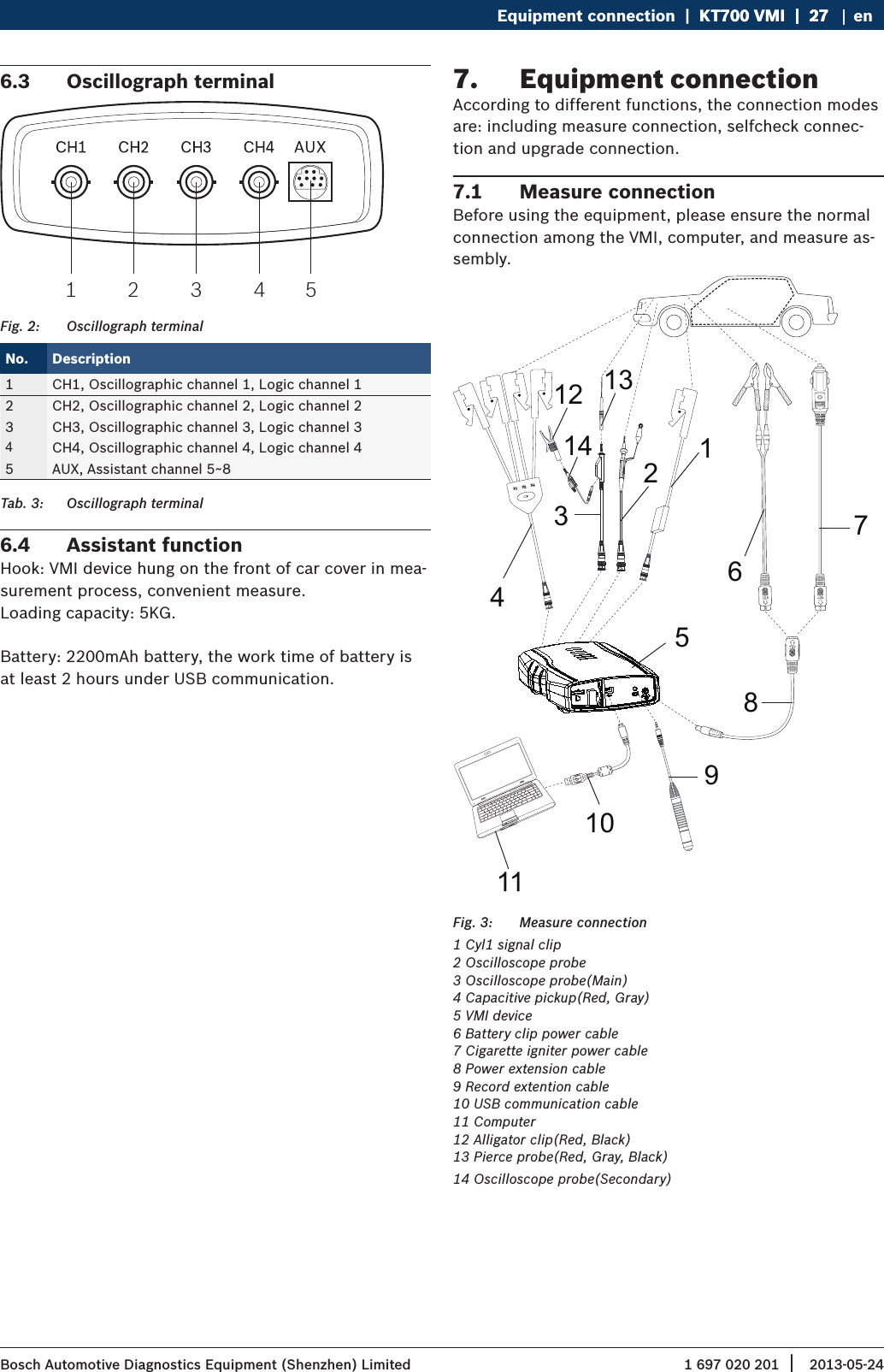
1 697 020 201 2013-05-24| Bosch Automotive Diagnostics Equipment (Shenzhen) LimitedEquipment connection  |  KT700 VMI  |  27KT700 VMI  |  27  |  27 en6.3  Oscillograph terminal1 2 3 4 5Fig. 2:  Oscillograph terminalNo. Description1 CH1, Oscillographic channel 1, Logic channel 12 CH2, Oscillographic channel 2, Logic channel 23 CH3, Oscillographic channel 3, Logic channel 34CH4, Oscillographic channel 4, Logic channel 45 AUX, Assistant channel 5~8Tab. 3:  Oscillograph terminal6.4  Assistant functionHook: VMI device hung on the front of car cover in mea-surement process, convenient measure.Loading capacity: 5KG.Battery: 2200mAh battery, the work time of battery is at least 2 hours under USB communication.7.  Equipment connectionAccording to different functions, the connection modes are: including measure connection, selfcheck connec-tion and upgrade connection.7.1  Measure connectionBefore using the equipment, please ensure the normal connection among the VMI, computer, and measure as-sembly.1234111059678131412X1     X2     X4Fig. 3:  Measure connection1 Cyl1 signal clip2 Oscilloscope probe3 Oscilloscope probe(Main)4 Capacitive pickup(Red, Gray)5 VMI device6 Battery clip power cable7 Cigarette igniter power cable8 Power extension cable9 Record extention cable10 USB communication cable11 Computer12 Alligator clip(Red, Black)13 Pierce probe(Red, Gray, Black)14 Oscilloscope probe(Secondary)
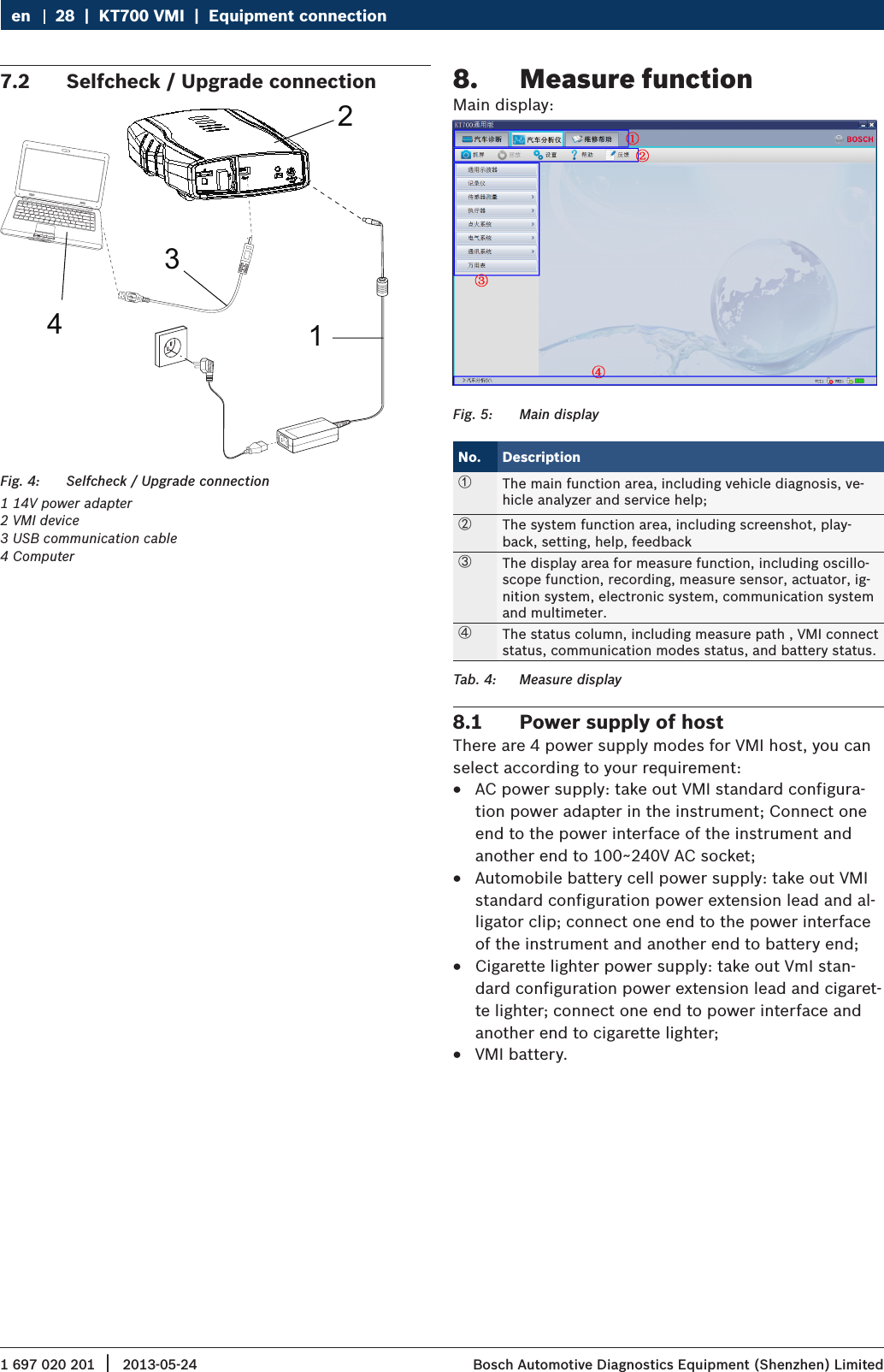
1 697 020 201 2013-05-24|  Bosch Automotive Diagnostics Equipment (Shenzhen) Limited28  |  KT700 VMI  |  Equipment connectionen7.2  Selfcheck / Upgrade connection1234Fig. 4:  Selfcheck / Upgrade connection1 14V power adapter2 VMI device3 USB communication cable4 Computer8.  Measure functionMain display:Fig. 5:  Main displayNo. Description①The main function area, including vehicle diagnosis, ve-hicle analyzer and service help;②The system function area, including screenshot, play-back, setting, help, feedback③The display area for measure function, including oscillo-scope function, recording, measure sensor, actuator, ig-nition system, electronic system, communication system and multimeter.④The status column, including measure path , VMI connect status, communication modes status, and battery status. Tab. 4:  Measure display8.1  Power supply of hostThere are 4 power supply modes for VMI host, you can select according to your requirement: RAC power supply: take out VMI standard configura-tion power adapter in the instrument; Connect one end to the power interface of the instrument and another end to 100~240V AC socket; RAutomobile battery cell power supply: take out VMI standard configuration power extension lead and al-ligator clip; connect one end to the power interface of the instrument and another end to battery end; RCigarette lighter power supply: take out VmI stan-dard configuration power extension lead and cigaret-te lighter; connect one end to power interface and another end to cigarette lighter; RVMI battery.
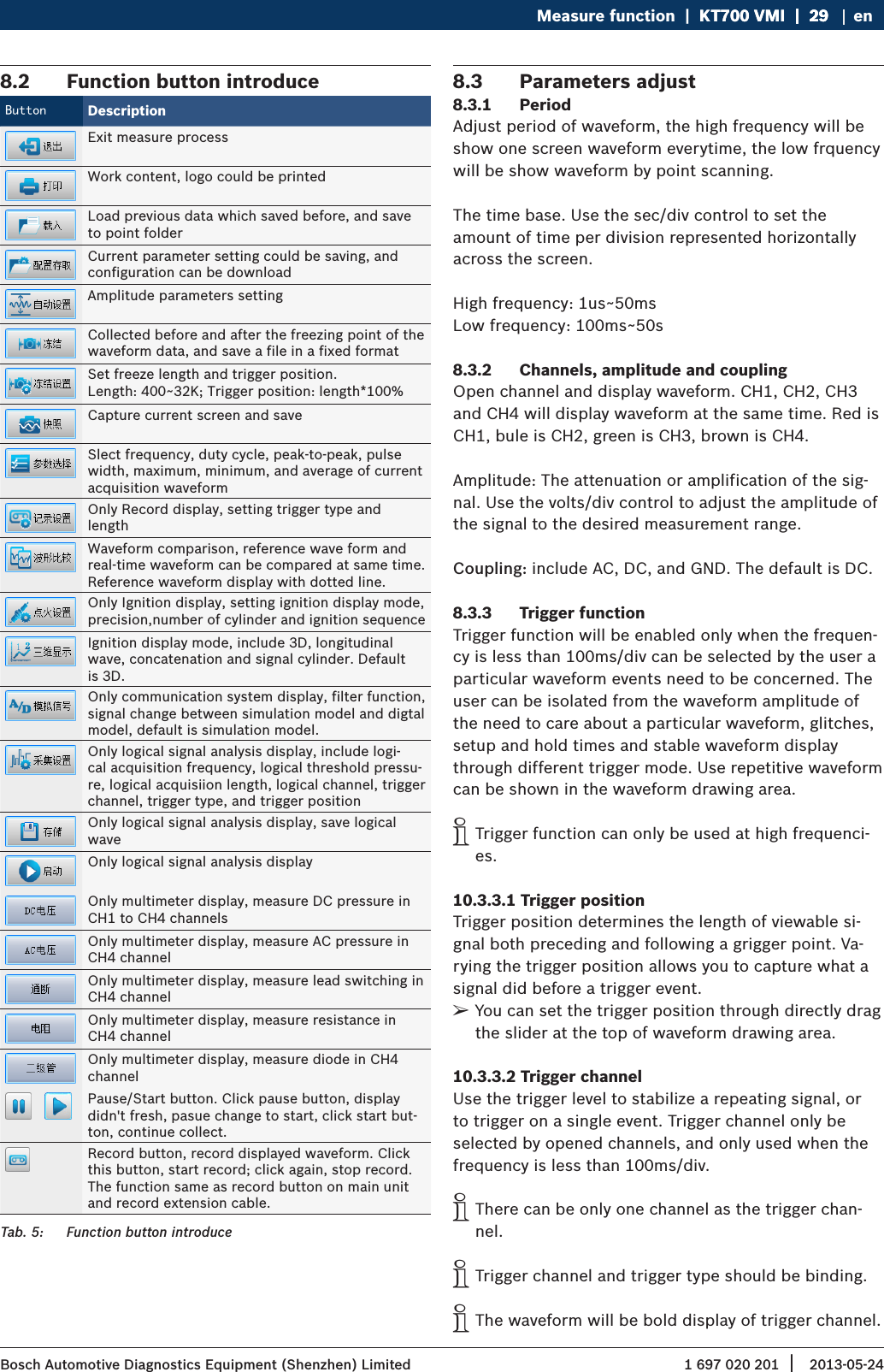
1 697 020 201 2013-05-24| Bosch Automotive Diagnostics Equipment (Shenzhen) LimitedMeasure function  |  KT700 VMI  |  29KT700 VMI  |  29  |  29 en8.2  Function button introduceButton DescriptionExit measure processWork content, logo could be printedLoad previous data which saved before, and save to point folderCurrent parameter setting could be saving, and configuration can be downloadAmplitude parameters settingCollected before and after the freezing point of the waveform data, and save a file in a fixed formatSet freeze length and trigger position.Length: 400~32K; Trigger position: length*100%Capture current screen and saveSlect frequency, duty cycle, peak-to-peak, pulse width, maximum, minimum, and average of current acquisition waveformOnly Record display, setting trigger type and lengthWaveform comparison, reference wave form and real-time waveform can be compared at same time. Reference waveform display with dotted line.Only Ignition display, setting ignition display mode, precision,number of cylinder and ignition sequenceIgnition display mode, include 3D, longitudinal wave, concatenation and signal cylinder. Default is 3D.Only communication system display, filter function, signal change between simulation model and digtal model, default is simulation model.Only logical signal analysis display, include logi-cal acquisition frequency, logical threshold pressu-re, logical acquisiion length, logical channel, trigger channel, trigger type, and trigger positionOnly logical signal analysis display, save logical waveOnly logical signal analysis displayOnly multimeter display, measure DC pressure in CH1 to CH4 channels Only multimeter display, measure AC pressure in CH4 channelOnly multimeter display, measure lead switching in CH4 channelOnly multimeter display, measure resistance in CH4 channelOnly multimeter display, measure diode in CH4 channel  Pause/Start button. Click pause button, display didn't fresh, pasue change to start, click start but-ton, continue collect.Record button, record displayed waveform. Click this button, start record; click again, stop record. The function same as record button on main unit and record extension cable.Tab. 5:  Function button introduce8.3  Parameters adjust8.3.1  PeriodAdjust period of waveform, the high frequency will be show one screen waveform everytime, the low frquency will be show waveform by point scanning.The time base. Use the sec/div control to set the amount of time per division represented horizontally across the screen.High frequency: 1us~50msLow frequency: 100ms~50s8.3.2  Channels, amplitude and couplingOpen channel and display waveform. CH1, CH2, CH3 and CH4 will display waveform at the same time. Red is CH1, bule is CH2, green is CH3, brown is CH4.Amplitude: The attenuation or amplification of the sig-nal. Use the volts/div control to adjust the amplitude of the signal to the desired measurement range.Coupling: include AC, DC, and GND. The default is DC.8.3.3  Trigger functionTrigger function will be enabled only when the frequen-cy is less than 100ms/div can be selected by the user a particular waveform events need to be concerned. The user can be isolated from the waveform amplitude of the need to care about a particular waveform, glitches, setup and hold times and stable waveform display through different trigger mode. Use repetitive waveform can be shown in the waveform drawing area. iTrigger function can only be used at high frequenci-es.10.3.3.1 Trigger positionTrigger position determines the length of viewable si-gnal both preceding and following a grigger point. Va-rying the trigger position allows you to capture what a signal did before a trigger event. ¶You can set the trigger position through directly drag the slider at the top of waveform drawing area.10.3.3.2 Trigger channelUse the trigger level to stabilize a repeating signal, or to trigger on a single event. Trigger channel only be selected by opened channels, and only used when the frequency is less than 100ms/div. iThere can be only one channel as the trigger chan-nel. iTrigger channel and trigger type should be binding. iThe waveform will be bold display of trigger channel.
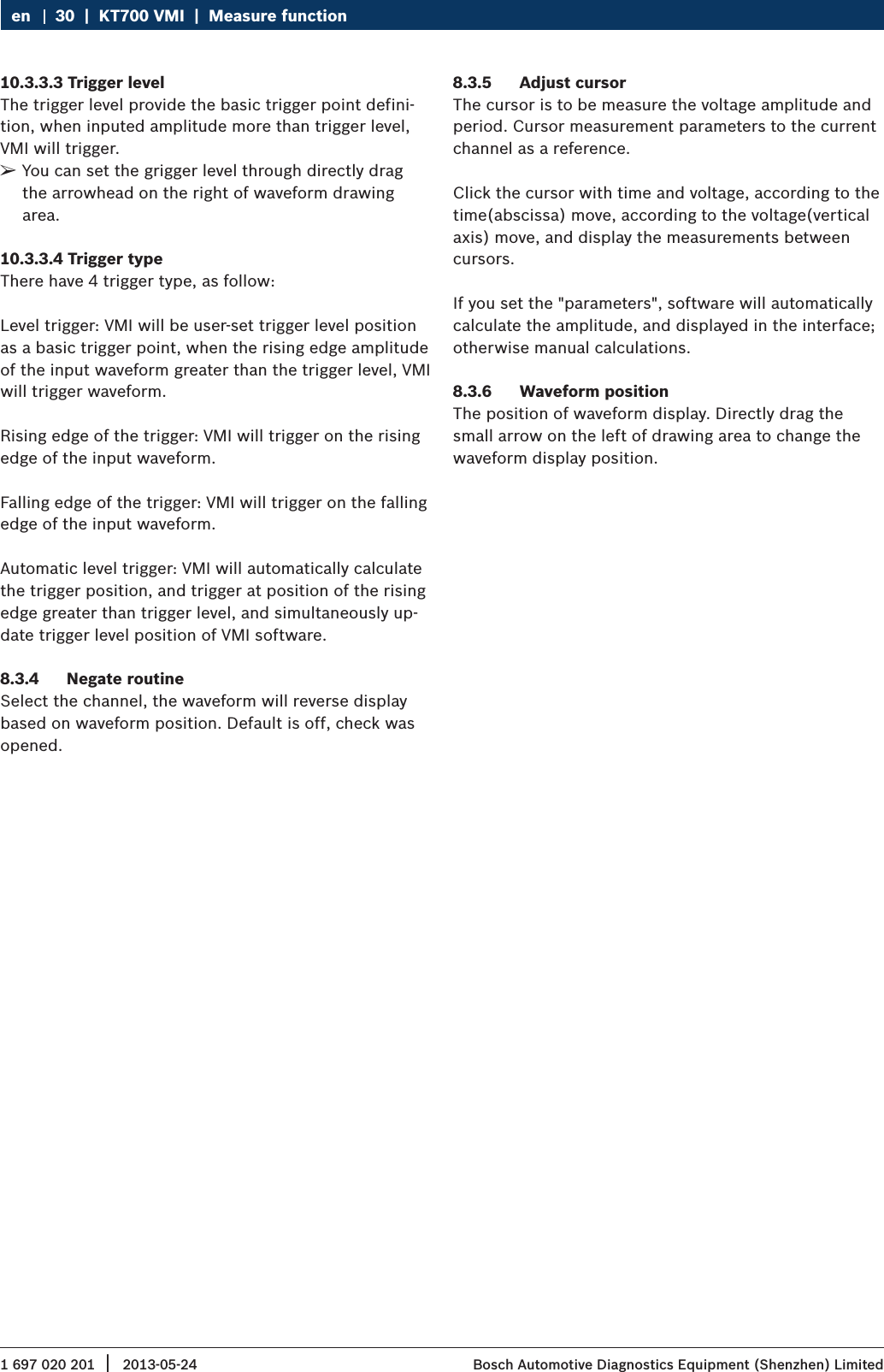
1 697 020 201 2013-05-24|  Bosch Automotive Diagnostics Equipment (Shenzhen) Limited30  |  KT700 VMI  |  Measure functionen10.3.3.3 Trigger levelThe trigger level provide the basic trigger point defini-tion, when inputed amplitude more than trigger level, VMI will trigger. ¶You can set the grigger level through directly drag the arrowhead on the right of waveform drawing area.10.3.3.4 Trigger typeThere have 4 trigger type, as follow:Level trigger: VMI will be user-set trigger level position as a basic trigger point, when the rising edge amplitude of the input waveform greater than the trigger level, VMI will trigger waveform.Rising edge of the trigger: VMI will trigger on the rising edge of the input waveform.Falling edge of the trigger: VMI will trigger on the falling edge of the input waveform.Automatic level trigger: VMI will automatically calculate the trigger position, and trigger at position of the rising edge greater than trigger level, and simultaneously up-date trigger level position of VMI software.8.3.4  Negate routineSelect the channel, the waveform will reverse display based on waveform position. Default is off, check was opened.8.3.5  Adjust cursorThe cursor is to be measure the voltage amplitude and period. Cursor measurement parameters to the current channel as a reference. Click the cursor with time and voltage, according to the time(abscissa) move, according to the voltage(vertical axis) move, and display the measurements between cursors.If you set the "parameters", software will automatically calculate the amplitude, and displayed in the interface; otherwise manual calculations.8.3.6  Waveform positionThe position of waveform display. Directly drag the small arrow on the left of drawing area to change the waveform display position.
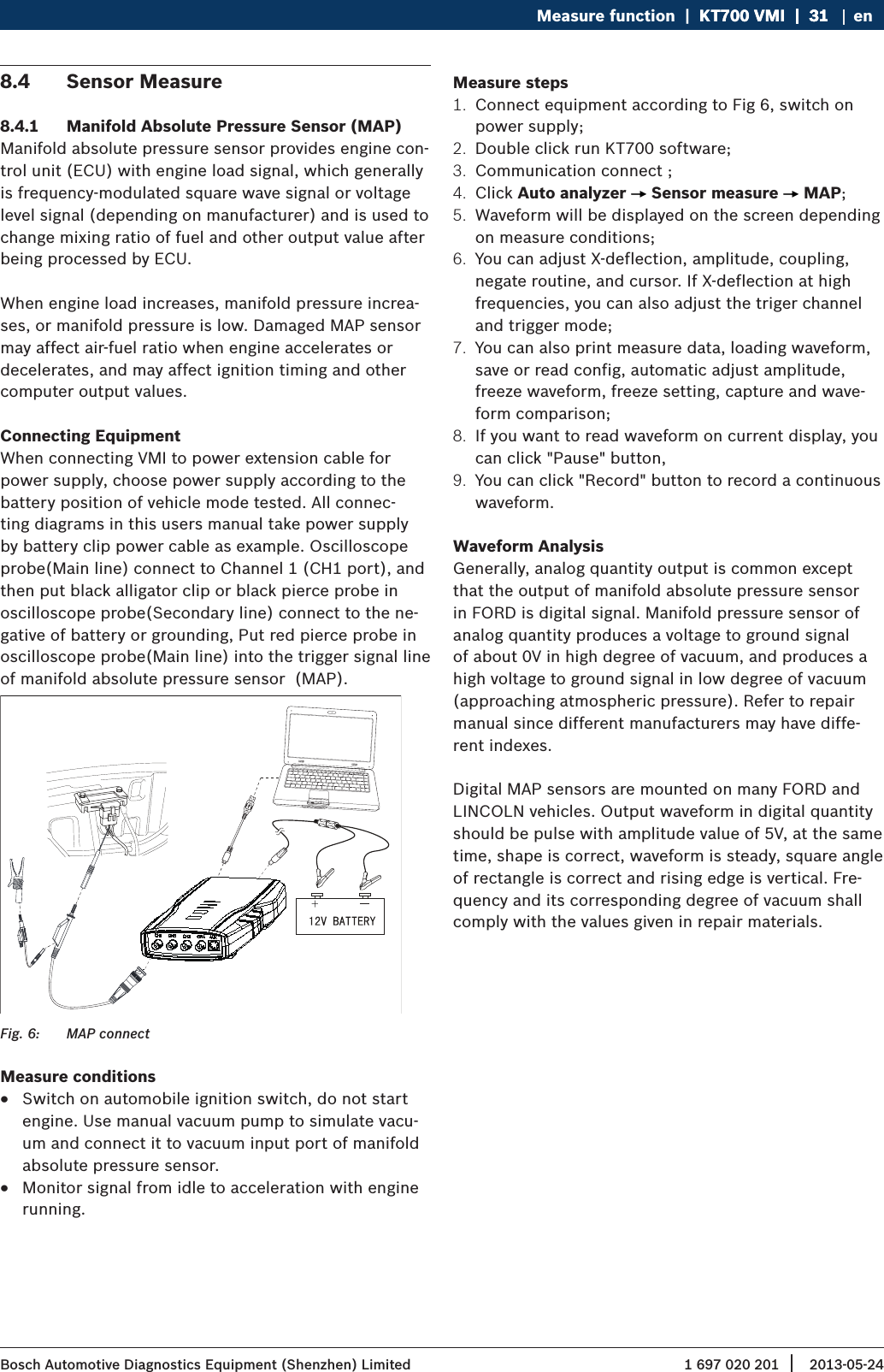
1 697 020 201 2013-05-24| Bosch Automotive Diagnostics Equipment (Shenzhen) LimitedMeasure function  |  KT700 VMI  |  31KT700 VMI  |  31  |  31 en8.4  Sensor Measure8.4.1  Manifold Absolute Pressure Sensor (MAP)Manifold absolute pressure sensor provides engine con-trol unit (ECU) with engine load signal, which generally is frequency-modulated square wave signal or voltage level signal (depending on manufacturer) and is used to change mixing ratio of fuel and other output value after being processed by ECU.When engine load increases, manifold pressure increa-ses, or manifold pressure is low. Damaged MAP sensor may affect air-fuel ratio when engine accelerates or decelerates, and may affect ignition timing and other computer output values.Connecting EquipmentWhen connecting VMI to power extension cable for power supply, choose power supply according to the battery position of vehicle mode tested. All connec-ting diagrams in this users manual take power supply by battery clip power cable as example. Oscilloscope probe(Main line) connect to Channel 1 (CH1 port), and then put black alligator clip or black pierce probe in oscilloscope probe(Secondary line) connect to the ne-gative of battery or grounding, Put red pierce probe in oscilloscope probe(Main line) into the trigger signal line of manifold absolute pressure sensor  (MAP).Fig. 6:  MAP connectMeasure conditions RSwitch on automobile ignition switch, do not start engine. Use manual vacuum pump to simulate vacu-um and connect it to vacuum input port of manifold absolute pressure sensor. RMonitor signal from idle to acceleration with engine running.Measure steps1.  Connect equipment according to Fig 6, switch on power supply;2.  Double click run KT700 software;3.  Communication connect ;4.  Click Auto analyzer   Sensor measure   MAP;5.  Waveform will be displayed on the screen depending on measure conditions;6.  You can adjust X-deflection, amplitude, coupling, negate routine, and cursor. If X-deflection at high frequencies, you can also adjust the triger channel and trigger mode;7.  You can also print measure data, loading waveform, save or read config, automatic adjust amplitude, freeze waveform, freeze setting, capture and wave-form comparison;8.  If you want to read waveform on current display, you can click "Pause" button, 9.  You can click "Record" button to record a continuous waveform.Waveform AnalysisGenerally, analog quantity output is common except that the output of manifold absolute pressure sensor in FORD is digital signal. Manifold pressure sensor of analog quantity produces a voltage to ground signal of about 0V in high degree of vacuum, and produces a high voltage to ground signal in low degree of vacuum (approaching atmospheric pressure). Refer to repair manual since different manufacturers may have diffe-rent indexes.Digital MAP sensors are mounted on many FORD and LINCOLN vehicles. Output waveform in digital quantity should be pulse with amplitude value of 5V, at the same time, shape is correct, waveform is steady, square angle of rectangle is correct and rising edge is vertical. Fre-quency and its corresponding degree of vacuum shall comply with the values given in repair materials.
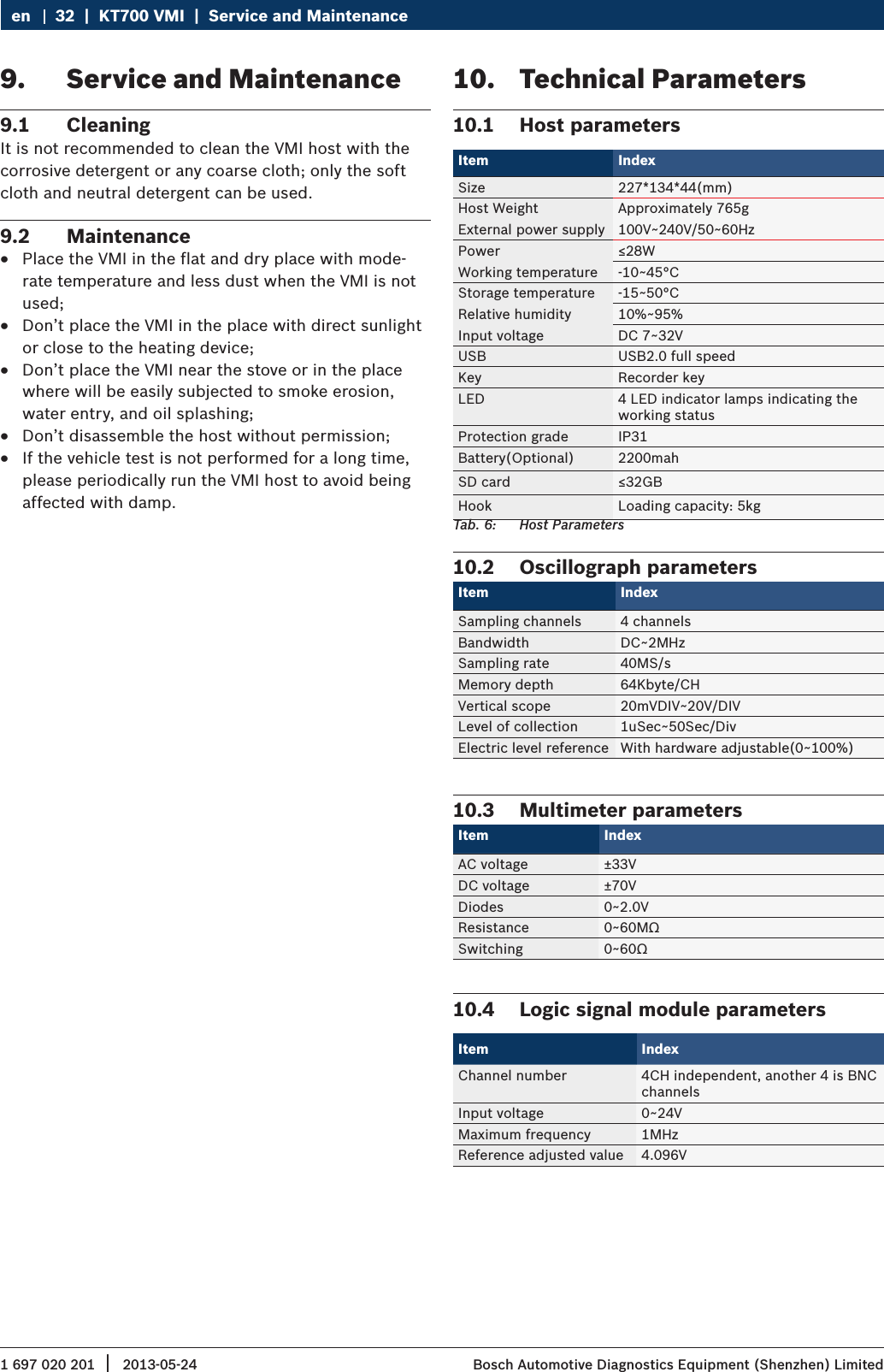
1 697 020 201 2013-05-24|  Bosch Automotive Diagnostics Equipment (Shenzhen) Limited32  |  KT700 VMI  |  Service and Maintenanceen9.  Service and Maintenance9.1  CleaningIt is not recommended to clean the VMI host with the corrosive detergent or any coarse cloth; only the soft cloth and neutral detergent can be used.9.2  Maintenance RPlace the VMI in the flat and dry place with mode-rate temperature and less dust when the VMI is not used; RDon’t place the VMI in the place with direct sunlight or close to the heating device; RDon’t place the VMI near the stove or in the place where will be easily subjected to smoke erosion, water entry, and oil splashing; RDon’t disassemble the host without permission; RIf the vehicle test is not performed for a long time, please periodically run the VMI host to avoid being affected with damp.10.  Technical Parameters10.1  Host parametersItem Index Size 227*134*44(mm)Host Weight Approximately 765gExternal power supply 100V~240V/50~60HzPower ≤28WWorking temperature -10~45°CStorage temperature -15~50°CRelative humidity 10%~95%Input voltage DC 7~32VUSB USB2.0 full speedKey Recorder keyLED 4 LED indicator lamps indicating the working statusProtection grade IP31Battery(Optional) 2200mahSD card ≤32GBHook Loading capacity: 5kgTab. 6:  Host Parameters10.2  Oscillograph parametersItem Index Sampling channels 4 channelsBandwidth DC~2MHzSampling rate 40MS/sMemory depth 64Kbyte/CHVertical scope 20mVDIV~20V/DIVLevel of collection 1uSec~50Sec/DivElectric level reference With hardware adjustable(0~100%)10.3  Multimeter parametersItem Index AC voltage ±33VDC voltage ±70VDiodes 0~2.0VResistance 0~60MΩSwitching 0~60Ω10.4  Logic signal module parametersItem IndexChannel number 4CH independent, another 4 is BNC channelsInput voltage 0~24VMaximum frequency 1MHzReference adjusted value 4.096V

Navigation menu