Boston Amplifier 81906-BDA-SBX Booster/Bi-Directional Amplifier User Manual BDA 800 User Guide P1

Boston Amplifier, Inc Booster/Bi-Directional Amplifier BDA 800 User Guide P1

users manual

VechileHome / OfficeBi-Directional AmplifierInstallation Guide Model:BDA-1900No Physical Connection to Cell PhoneBoost CellularSignal 1000%BDA-800NXTBDA-819Wireless OperationSignal Sensing Technology®http://www.bostonamplifier.com
Notice:The information in this document is intended for informational purposes only, and is subject to change without notice. By using this product, the user assumes all risk.  Any and all references to Boston Amplifier in this document, including those in the Warranty, refer to the manufacturer: Boston Amplifier, Inc.  In no event  will Boston Amplifier or its affiliates be liable for direct, indirect, special, incidental, or consequential damages arising out of the use or the inability to use the product or documentation, even if advised of the possibility of such damages. No part of this reference manual may be  reproduced or transmitted in any form, or by any means, without the prior written consent of Boston Amplifier.Legal:Trademarks:The information provided herein is believed to be completed and accurate, however, no responsibility is assumed by Boston Amplifier for any business or personal losses arising from the use of this product, nor for any infringements of patents. Boston Amplifier reserves the right to change, alter, modify or edit the specifications at anytime without notice.  Other rights of the third party, which may result from its use.Throughout this User's Guide, trade names and trademarks of other companies or products may appear.  This is not intended to imply or convey the endorsement of, or any affiliation of Boston Amplifier with, any of these companies or products. Boston Amplifier and Antenna PortModule are Trademarks   of Boston  Amplifier, Inc.Rev 1.1Copyright © 2002 -2005 Boston Amplifier, Inc.All rights reserved.Installation Guide BDA-800NXT, 819, 1900
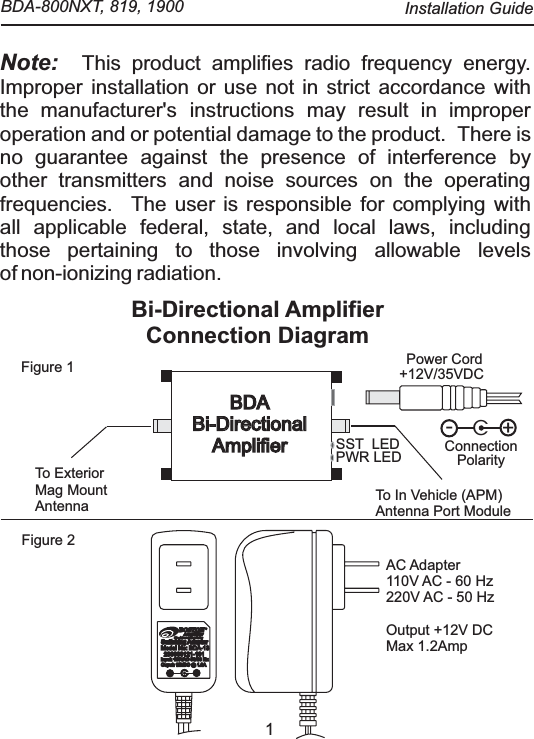
1Note:  This product amplifies radio frequency energy. Improper installation or use not in strict accordance withthe manufacturer's instructions may result in improperoperation and or potential damage to the product.   There isno guarantee against the presence of interference byother transmitters and noise sources on the operatingfrequencies.  The user is responsible for complying withall applicable federal, state, and local laws, includingthose pertaining to those involving allowable levelsof non-ionizing radiation.Bi-Directional Amplifier Connection Diagram Figure 1Figure 2AC Adapter110V AC - 60 Hz220V AC - 50 HzOutput +12V DCMax 1.2AmpBOSTONBOSTONAmplifierAmplifierYour solution to wireless technologyCSwitching AdaptorSwitching AdaptorSwitching AdaptorSwitching AdaptorModel No: BDA-13Model No: BDA-13230000121-101230000121-101Input: 110VAC 50/60 HzInput: 110VAC 50/60 HzOuput: 12VDC @ 1.3AOuput: 12VDC @ 1.3AC+-+12V/35VDCPWR LEDTo In Vehicle (APM)Antenna Port ModuleTo ExteriorMag MountAntennaBDABi-Directional AmplifierBDABi-Directional AmplifierPower CordC+-ConnectionPolaritySST  LED  BDA-800NXT, 819, 1900  Installation Guide
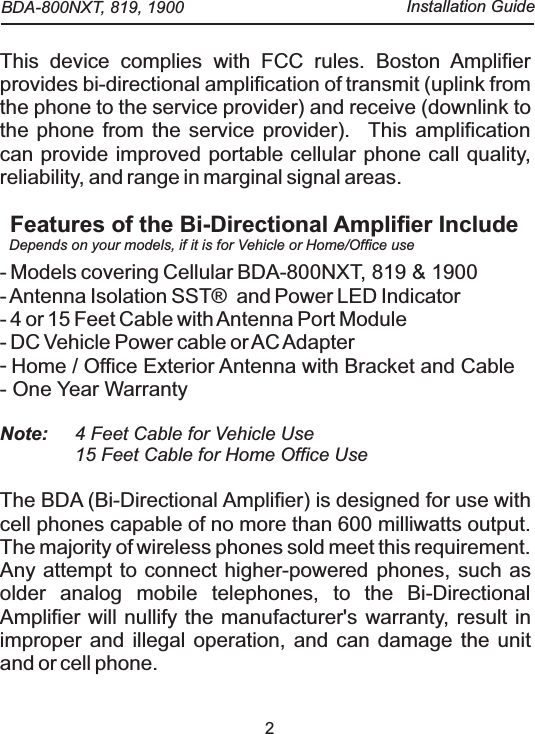
2This device complies with FCC rules. Boston Amplifier provides bi-directional amplification of transmit (uplink from the phone to the service provider) and receive (downlink to the phone from the service provider).   This amplification can provide improved portable cellular phone call quality, reliability, and range in marginal signal areas.- Models covering Cellular BDA-800NXT, 819 & 1900- Antenna Isolation  SST®   and Power LED Indicator- 4 or 15 Feet Cable with Antenna Port Module- DC Vehicle Power cable or AC Adapter- - One Year WarrantyBi-Directional AmplifierFeatures of the Bi-Directional Amplifier IncludeNote:  4 Feet Cable for Vehicle Use15 Feet Cable for Home Office UseThe BDA (Bi-Directional Amplifier) is designed for use with cell phones capable of no more than 600 milliwatts output. The majority of wireless phones sold meet this requirement.   Any attempt to connect higher-powered phones, such as older analog mobile telephones, to the  will nullify the manufacturer's warranty, result in improper and illegal operation, and can damage the unit and or cell phone. Home / Office Exterior Antenna with Bracket and CableDepends on your models, if it is for Vehicle or Home/Office use BDA-800NXT, 819, 1900  Installation Guide
3Important: The BDA-800NXT, 819 or 1900 can be used with Hands-free kit already installed in vehicle or can be used only with Boston Amplifier’s Antenna Port Module (Wireless) with standard off the shelf Cell Phone holder (Cradle).This product is exclusively for use in vehicles, vessels or Home / Office use with a negative-ground power supply. inside the vehicle, within 4 to 6 ft reach of cigarette lighter, make sure it rests flat, or mounted behind dash board or under the seat with double adhesive tape to secure in place and is not a hazard to driver, or secure the unit on the floor or next to desk in Home / Office.connect in Cigarette Lighter of vehicle or hard wired in vehicle. Use AC Adapter for Home / Office use. Connect DC Power Jack to the power connector socket in the amplifier unit.To avoid the vehicle battery drainage make sure that the amplifier is not receiving any power during the “OFF” stage of Ignition Key.Operating Voltage: 12VDC to 35VDCPower Consumption: Typical Stand By: 350maUsage 550maStep 1: Placement of Amplifier Unit Step 2: DC Power Cable Note:  Note: Please read the entire contents of this installation guide.  BDA-800NXT, 819, 1900  Installation Guide
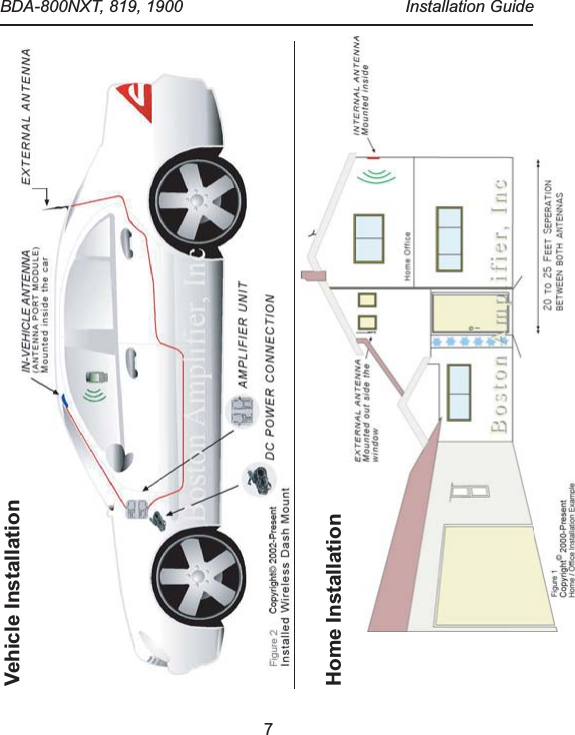
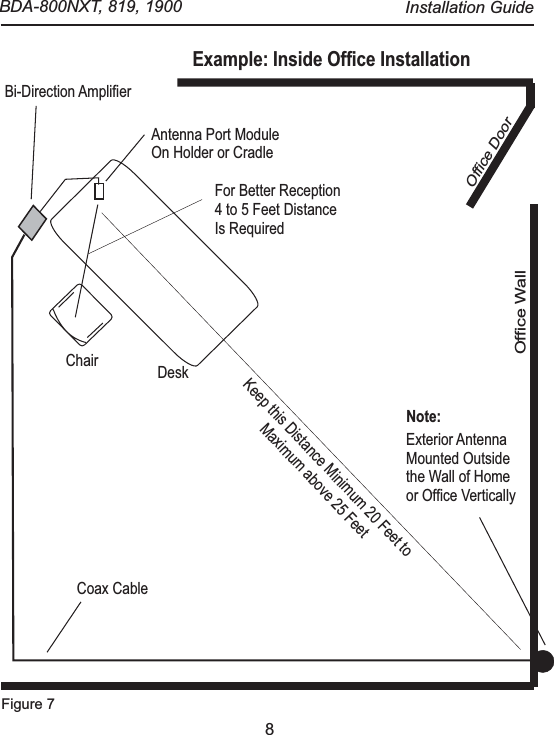
4Step 3: Position of Exterior Antenna Step 4: Take 4ft or 15ft CableStep 5: Red Power LED Important: on vehicle at rear glass or on the trunk or on the rear top of vehicle as far as back as possible. For Home / Office mount the Exterior Antenna near the window or out side the balcony at most upper area of the window. Connect the cable to Antenna side of the Amplifier. and connect with the hands free kit or directly hard wired to your cell phone or use APM (Antenna Port Module) Position APM in the cradle or holder anywhere in front with the best unobstructed view or on your Home / Office Desk. Place your cell phone on top of APM in the cradle as a pickup wireless signal and use head set from your cell phone to have communication or within a reach of 4 to 6 feet.  is lit as soon as Ignition Switch or AC Power Adapter Switch become activated, also observe Green LED lit. If APM and Exterior Antenna are not at an adequate distance then the Green LED will go off,including the Red Power LED and Red LED will start blinking.  For further Information see SST® Antenna Installation Guide.For optimal performance, rear exterior antenna to be mounted vertically and Power LED and Green LED should be ON not Blinking.   BDA-800NXT, 819, 1900  Installation Guide
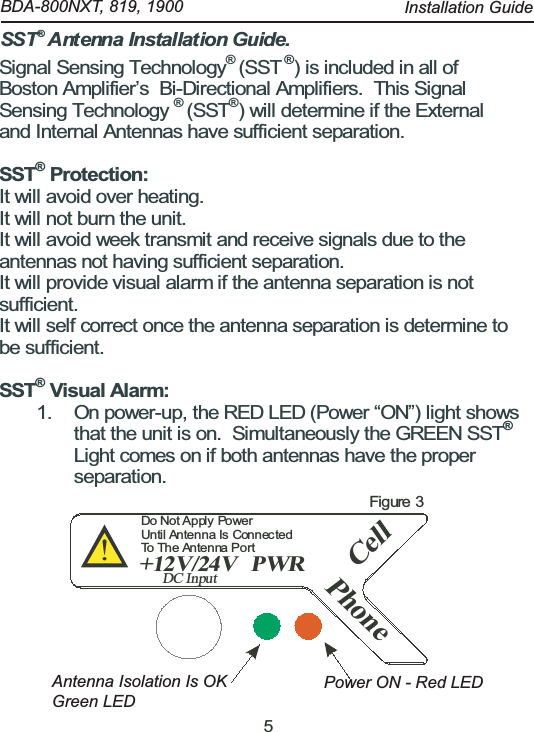
5Signal Sensing Technology®(SST®) is included in all ofBoston Amplifier’s Bi-Directional Amplifiers. This SignalSensing Technology®(SST®) will determine if the Externaland Internal Antennas have sufficient separation.SST®Protection:It will avoid over heating.It will not burn the unit.It will avoid week transmit and receive signals due to theantennas not having sufficient separation.It will provide visual alarm if the antenna separation is notsufficient.It will self correct once the antenna separation is determine tobe sufficient.SST®Visual Alarm:1. On power-up, the RED LED (Power “ON”) light showsthat the unit is on. Simultaneously the GREEN SST®Light comes on if both antennas have the properseparation.CellPWR+12V/24VDC InputPhone!Do Not Apply  PowerUntil Antenna Is  ConnectedTo The Antenna PortFigure 3SST  Antenna Installation Guide.®    BDA-800NXT, 819, 1900  Antenna Isolation Is OK Green LEDPower ON - Red LEDInstallation Guide
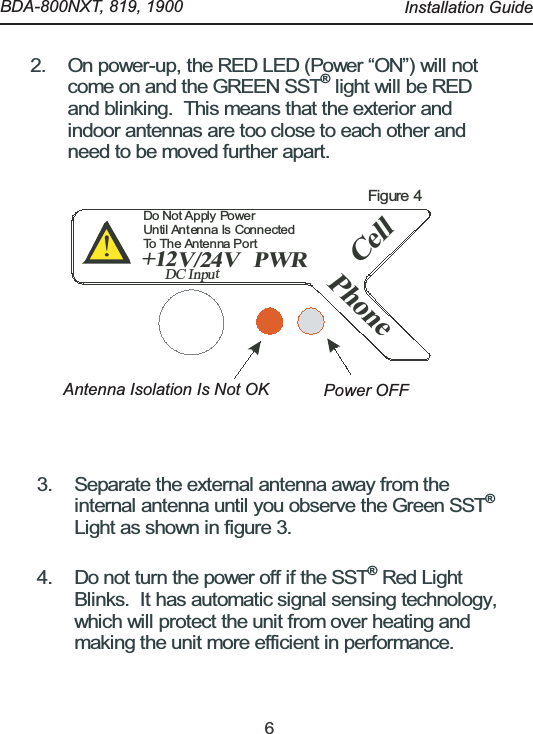
62. On power-up, the RED LED (Power “ON”) will notcome on and the GREEN SST®light will be REDand blinking. This means that the exterior andindoor antennas are too close to each other andneed to be moved further apart.CellPWR+12V/24VDC InputPhone!Do Not Apply  PowerUntil Antenna Is ConnectedTo The Antenna PortFigure 43. Separate the external antenna away from theinternal antenna until you observe the Green SST®Light as shown in figure 3.4. Do not turn the power off if the SST®Red LightBlinks. It has automatic signal sensing technology,which will protect the unit from over heating andmaking the unit more efficient in performance.    BDA-800NXT, 819, 1900  Antenna Isolation Is Not OK Power OFFInstallation Guide
7 Vehicle InstallationHome Installation   BDA-800NXT, 819, 1900  Installation Guide
8 Bi-Direction AmplifierCoax CableAntenna Port ModuleOn Holder or Cradle Example: Inside Office InstallationOffice WallExterior AntennaMounted Outsidethe Wall of Homeor Office VerticallyNote:Office DoorFor Better Reception4 to 5 Feet DistanceIs Required Chair DeskFigure 7Keep this Distance Minimum 20 Feet to Maximum above 25 Feet   BDA-800NXT, 819, 1900  Installation Guide
Cont’d Next Page9Limited WarrantyBoston Amplifier warrants to the original purchaser a product free from defects in material and workmanship for a period of One (1) year from the date of  purchase.Under the above warranty, Boston Amplifier, at its option, shall either repair or replace non-conforming or defective products. If Boston Amplifier determines that the product has been misused, carelessly handled, defaced (including unauthorized   repairs performed or attempted by others), modified or altered in any way, the warranty will be considered null and void, and the unit will not be repaired or replaced under warranty.The product must be returned with the proof of purchase to the point of purchase or by obtaining an RMA (Return Merchandise Authorization) number from Boston Amplifier. Claims must be made in accordance with the provisions of this warranty and within the applicable warranty period or they will be disregarded.No inbound or outbound shipping will be paid, regardless of the territory, by Boston Amplifier   neither will its agents, employees, or sales representatives pick up or deliver any defective or non-defective products from customer, distributor or OEM sites. Any product, which is inbound from overseas, must be handled by properly licensed freight forwarders in order to comply with the applicable laws of the United States of America.  Boston Amplifier will not be responsible for any product which has been lost or damaged during inbound and outbound shipping.   It is customers responsibility to obtain full insurance from the shipping carriers.Boston Amplifier reserves the ultimate authority to determine what constitutes warranty repair.   If it is determined that the product is received after expiration of the warranty period, it will be repaired using Boston Amplifier's standard rates for parts and labor, which may change from time to time.    BDA-800NXT, 819, 1900  Installation Guide
Boston Amplifier, Inc2110 Artesia Blvd Suite B202Redondo Beach, CA 90278http://www.bostonamplifier.comCopyright © 2002 -2005 Boston Amplifiers, Inc.All rights reserved.Limited WarrantyBoston Amplifier will use its best efforts to repair the product within 15working days after receipt thereof. Boston Amplifier shall not beresponsible for delays caused by shipping or non-availability ofreplacement parts or other causes, events, or conditions beyond itsreasonable control.The above warranty is the only warranty authorized by Boston Amplifier.The above warranty states the purchaser's exclusive remedy for anybreach of the Boston Amplifier warranty and for any claim, whethersounding in contract, tort or negligence, for loss or injury caused by thesale of any product without limiting the generality of the foregoing, shallbe limited no more than the replacement value of the Boston Amplifierpurchased, or an equivalent product, and only in the event the remedyis being sought by the original purchaser of the Boston Amplifier productin question. Boston Amplifier shall in no event be responsible for anyloss of business or profits, downtime or delay, labor, repair, monetary,financial, or material costs, injury to person, persons or property, or anysimilar or dissimilar consequential loss or damage incurred by thepurchaser, even if Boston Amplifier has been advised of the possibilitiesof such losses or damages.Note: Warning Statements: User must keep 111CM or 48Inches distance from the RF radio device

Navigation menu