BridgeWave Communications GE60 Wireless Gigabit Ethernet Link User Manual Installation Operation Manual
BridgeWave Communications, Inc. Wireless Gigabit Ethernet Link Installation Operation Manual

User Manual
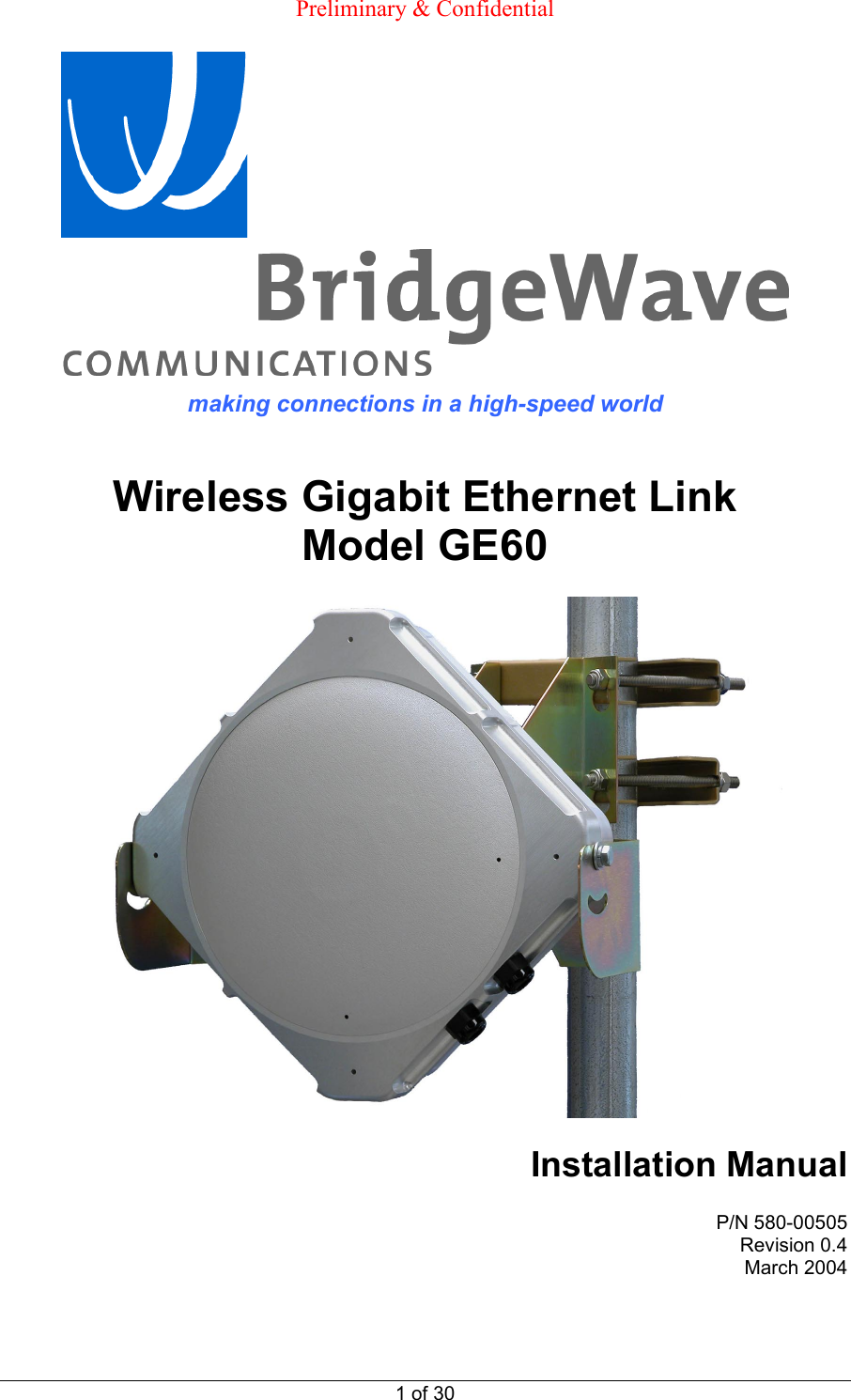
 Preliminary & Confidential  1 of 30  making connections in a high-speed world   Wireless Gigabit Ethernet Link Model GE60    Installation Manual  P/N 580-00505 Revision 0.4 March 2004
TM        GE60 Installation Manual 580-00505, rev 0.4 2 of 30  PRELIMINARY  Copyright Notice & Disclaimer  Copyright © 2004 BridgeWave Communications. All rights reserved. Printed in the USA No portion of this publication may be reproduced, copied, or distributed without the written consent of BridgeWave Communications. BridgeWave reserves the right to update or change the material in this publication at any time without notice. BridgeWave has made every effort to ensure that the information and the instructions contained in the publication are adequate and is not responsible for any errors or omissions due to typing, printing, or editing of this document. Purchasers of BridgeWave products should make their own evaluation to determine the suitability of each such product for their specific application. BridgeWave’s obligations regarding the use or application of its products shall be limited to those commitments to the purchaser set forth in its Standard Terms and Conditions of Sale for a delivered product. This publication has been prepared for professional and properly trained personnel, and the customer assumes full responsibility when using the information herein.   Revision History  Issue Date  Main changes 0.1  8/19/03  Preliminary draft for comments  0.2 12/12/03 Changes incorporated 0.3  01/12/04  Pictures added and additional changes incorporated 0.4  03/04/04  Added detail on Polyphaser circuit protector in Section 2.7 & loopback testing impact on Fiber LED in Section 3.8 item #8
TM        GE60 Installation Manual 580-00505, rev 0.4 3 of 30  PRELIMINARY Statement of Warranty  BridgeWave warrants each standard BridgeWave Product sold by it to be free of defects in material and workmanship under conditions of normal use for twelve (12) months from date of shipment thereof to Buyer.  Repair or, at BridgeWave’s option, replacement of defective parts shall be the sole and exclusive remedy under this limited warranty; provided that BridgeWave may, as an alternative, elect to refund the purchase price amortized on a straight-line basis over a period of three (3) years from the date of shipment. All warranty replacement or repair of parts shall be limited to equipment malfunctions, which, in the sole opinion of BridgeWave, are due or traceable to defects in original materials or workmanship.   In the event Buyer believes that Products do not conform to the limited warranty of this Section, Buyer shall pay for the shipping and insurance of such Product to BridgeWave.  If BridgeWave determines in its sole opinion that such Products do not conform to the limited warranty, then BridgeWave shall pay for the shipping and insurance of repaired or replacement Products to Buyer.  However, in the event that BridgeWave determines in its sole opinion that such Products conform to the limited warranty, Buyer shall pay for shipping and insurance of such Products back to Buyer.   All obligations of BridgeWave under this limited warranty shall cease in the event of abuse, accident, alteration, misuse or neglect of the Product.  In-warranty repaired or replaced parts are warranted only for the remaining unexpired portion of the original warranty period applicable to the repaired or replaced parts.  REASONABLE CARE MUST BE USED TO AVOID HAZARDS.  BRIDGEWAVE EXPRESSLY DISCLAIMS RESPONSIBILITY FOR LOSS OR DAMAGE CAUSED BY USE OF ITS PRODUCTS OTHER THAN IN ACCORDANCE WITH PROPER OPERATING PROCEDURES.  THE FOREGOING LIMITED WARRANTY FOR BRIDGEWAVE PRODUCTS IS EXPRESSLY IN LIEU OF, AND EXCLUDES ALL OTHER EXPRESS OR IMPLIED WARRANTIES, INCLUDING BUT NOT LIMITED TO WARRANTIES OF MERCHANTABILITY AND OF FITNESS FOR PARTICULAR PURPOSE, USE OR APPLICATION, AND ALL OTHER OBLIGATIONS OR LIABILITIES ON THE PART OF BRIDGEWAVE, UNLESS SUCH OTHER WARRANTIES, OBLIGATIONS OR LIABILITIES ARE EXPRESSLY AGREED TO IN WRITING BY BRIDGEWAVE.  Statements made by any person, including the representatives of BridgeWave, which are inconsistent or in conflict with the terms of these warranties shall not be binding upon BridgeWave unless expressly reduced to writing and approved by an officer of BridgeWave.
TM        GE60 Installation Manual 580-00505, rev 0.4 4 of 30  PRELIMINARY Product Compatibility  While every effort has been made to verify operation of this product with many different communications products and networks, BridgeWave makes no claim of compatibility between its products and other vendors’ equipment. It is assumed that users have thoroughly evaluated this product’s performance in the communications environment in which it will be used. Safety  CAUTION, WARNING, and DANGER statements have been strategically placed in the text to alert personnel of possible hazards. These statements must be closely observed. The following general safety precautions must be observed during all phases of operation and service of the products covered in this manual. Failure to comply with these precautions or with specific warnings elsewhere in this manual willfully violates standards of design, manufacture, and intended use of the product. BridgeWave assumes no liability for the customer’s failure to comply with these requirements. •  Do not operate wireless equipment without an appropriate termination. •  Do not work directly in front of an energized antenna. Prior to working on the antenna or RF assembly, ensure that the RF assembly is not radiating energy. When power is applied to the RF assembly and antenna, proper precautions must be taken to avoid placing any part of the human body in front of the antenna. •  The outdoor equipment must be properly grounded to provide some protection against voltage surges and built-up static charges. In the event of a short circuit, grounding reduces the risk of electrical shock.  For installations in the U.S.A., refer to Articles 810830 of the National Electrical Code, ANSI/NFPA No. 70, for information with respect to proper grounding and applicable lightning protection for DC cables.  For installations in all other countries, implement protection in accordance with the safety standards and regulatory requirements of the country where the equipment is to be installed. •  Do not install or operate this equipment in the presence of flammable gases or fumes. Operation of any electrical instrument in such an environment constitutes a definite safety hazard.
TM        GE60 Installation Manual 580-00505, rev 0.4 5 of 30  PRELIMINARY •  Do not install substitute parts or perform any unauthorized modification to the equipment. Changes or modifications not expressly approved by BridgeWave can void the user’s authority to operate the equipment. Regulatory Information This device complies with part 15 of the FCC Rules. Operation is subject to the following two conditions: (1)  This device may not cause harmful interference, and  (2)  This device must accept any interference that may cause undesired operation.  Equipment Precautions  Water and Moisture - The GE60 is designed to withstand moisture conditions typically encountered when installed outdoors. They are not designed for operation under water. Power Sources - This product should be operated only from the type of power source indicated on the unit or in the manual.
TM        GE60 Installation Manual 580-00505, rev 0.4 6 of 30  PRELIMINARY 1 Introduction 1.1  Purpose of Manual The information in this manual is directed to persons who must perform or coordinate the tasks associated with the process of installing wireless communication devices, and planning communication network applications. 1.2 Prior Knowledge This manual assumes the operator has at least basic experience with and understanding of the concepts underlying telecommunications systems, as well as some familiarity with configuring and operating networking equipment. Preferably, the installer/operator fully understands the information covered in this manual prior to attempting these procedures. While this manual summarizes the considerations and tasks involved in path analysis and site planning for radio systems, it does not provide an in-depth treatment of such issues. A professional agency specializing in this area should be consulted for additional information and services of this type.  DANGER!  Indicates that personal injury can result if the user does not comply with the given instruction. A DANGER statement will describe the potential hazard, its possible consequences, and the steps to perform to avoid personal injury.  WARNING!  Indicates that serious damage to the equipment can result if the user does not comply with the given instruction. A WARNING statement will describe the potential hazard, its possible consequences, and the steps to perform to avoid serious equipment damage.  CAUTION!  Indicates that equipment damage, process failure, and/or loss of data can result if the user does not comply with the given instruction. A CAUTION statement will describe the potential hazard, its possible consequences, and the steps to perform to avoid equipment damage, process failure, and/or loss of data.  NOTE:  Provides supplementary information to emphasize a point or procedure, or gives a tip for easier operation.
TM        GE60 Installation Manual 580-00505, rev 0.4 7 of 30  PRELIMINARY 1.3 Contact Information Technical Assistance and Customer Service BridgeWave distributors are authorized local service providers and are responsible for immediate customer support. If problems are not resolved, contact BridgeWave Customer Service for assistance:   Santa Clara, CA USA  Tel:  408.567.6900  Fax:  408.567.0775  Email: support@bridgewave.com  Return Material Authorization (RMA) Should BridgeWave equipment have to be returned for repair or replacement, an RMA number must be obtained from BridgeWave or the local BridgeWave distributor. When returning equipment, be sure to write the RMA number on the outside of the shipping carton.
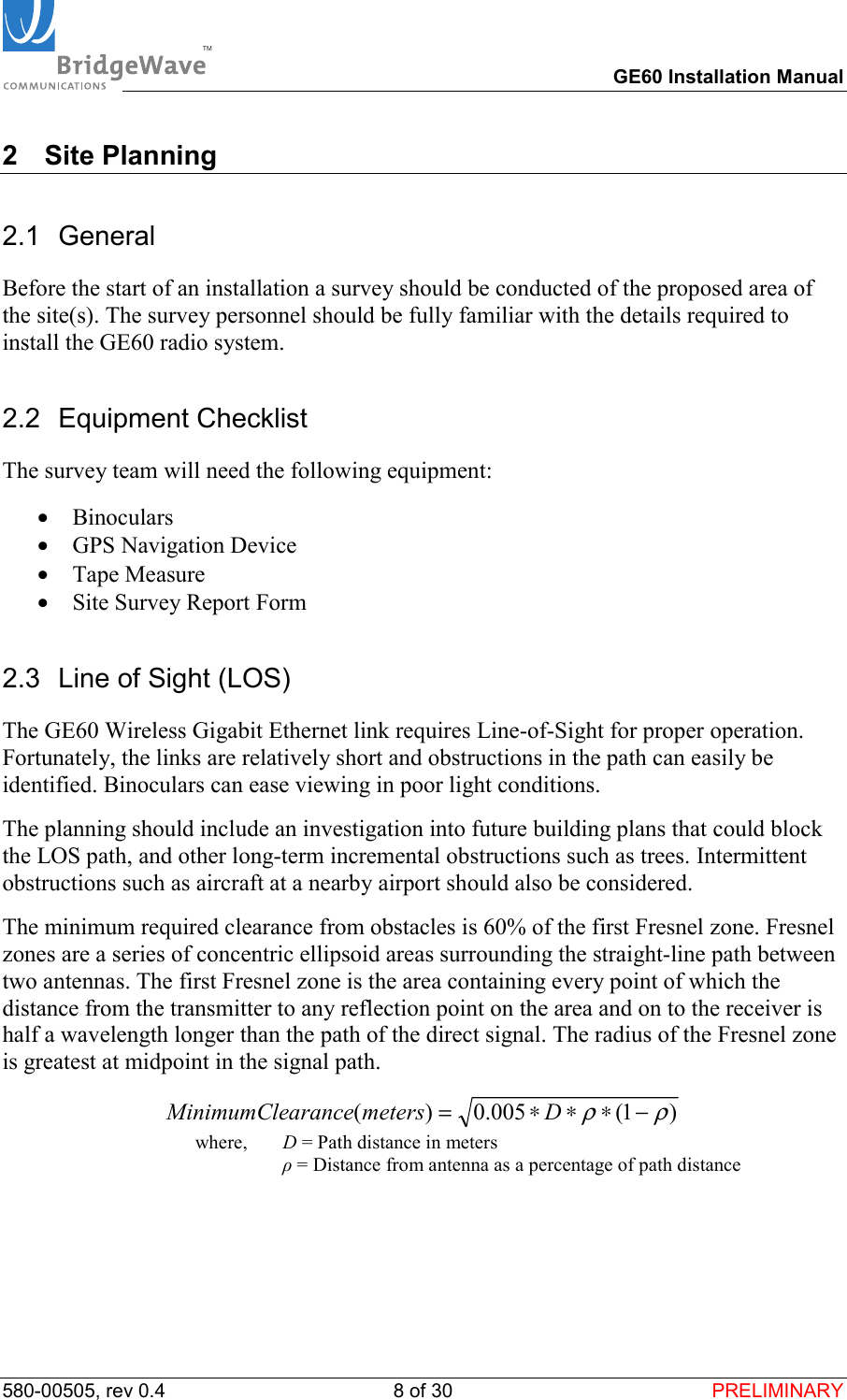
TM        GE60 Installation Manual 580-00505, rev 0.4 8 of 30  PRELIMINARY 2 Site Planning 2.1 General Before the start of an installation a survey should be conducted of the proposed area of the site(s). The survey personnel should be fully familiar with the details required to install the GE60 radio system. 2.2 Equipment Checklist The survey team will need the following equipment: •  Binoculars •  GPS Navigation Device •  Tape Measure •  Site Survey Report Form 2.3  Line of Sight (LOS) The GE60 Wireless Gigabit Ethernet link requires Line-of-Sight for proper operation.  Fortunately, the links are relatively short and obstructions in the path can easily be identified. Binoculars can ease viewing in poor light conditions. The planning should include an investigation into future building plans that could block the LOS path, and other long-term incremental obstructions such as trees. Intermittent obstructions such as aircraft at a nearby airport should also be considered. The minimum required clearance from obstacles is 60% of the first Fresnel zone. Fresnel zones are a series of concentric ellipsoid areas surrounding the straight-line path between two antennas. The first Fresnel zone is the area containing every point of which the distance from the transmitter to any reflection point on the area and on to the receiver is half a wavelength longer than the path of the direct signal. The radius of the Fresnel zone is greatest at midpoint in the signal path.  )1(005.0)(ρρ−∗∗∗= DmetersaranceMinimumCle  where,   D = Path distance in meters  ρ = Distance from antenna as a percentage of path distance
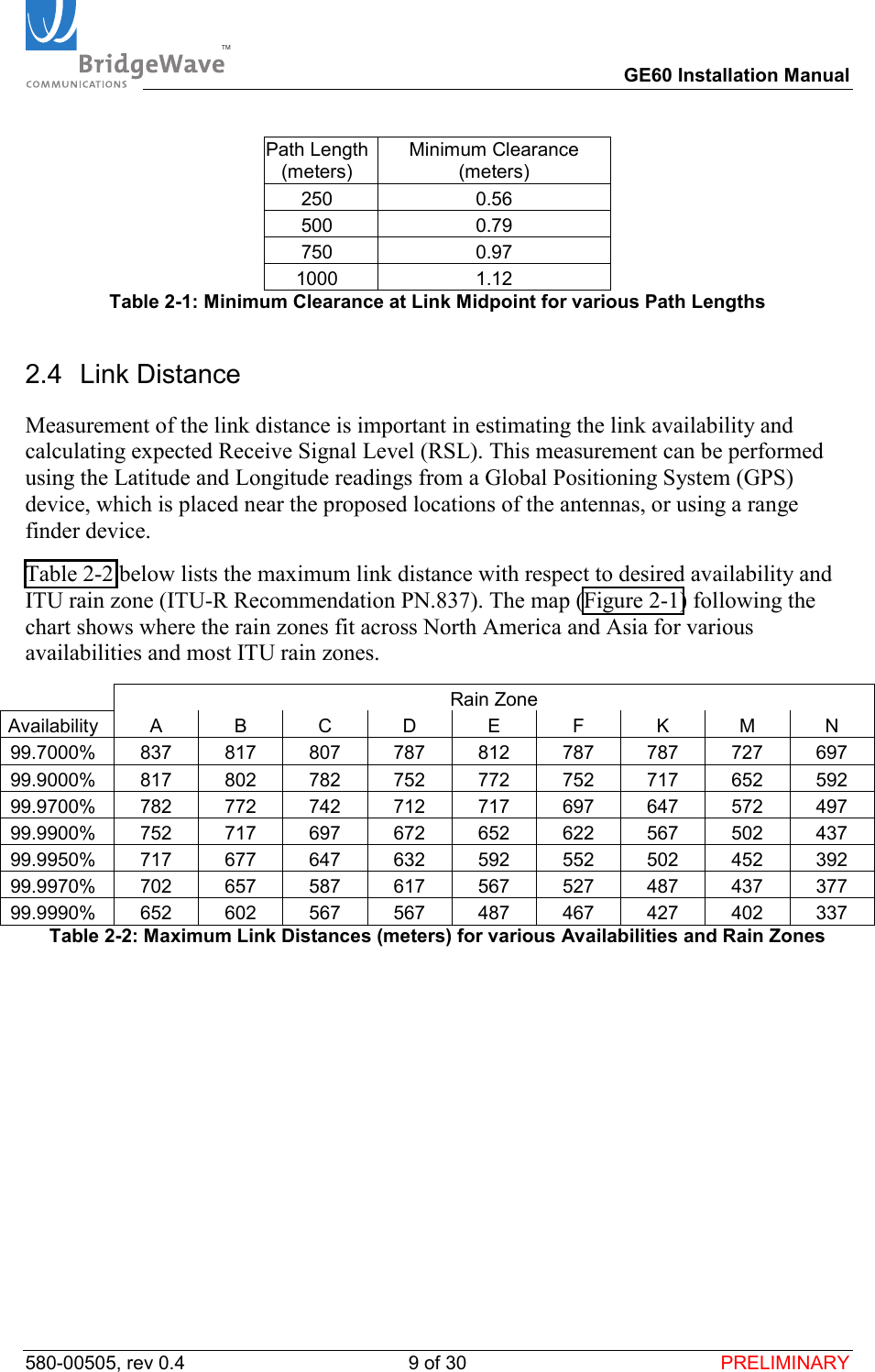
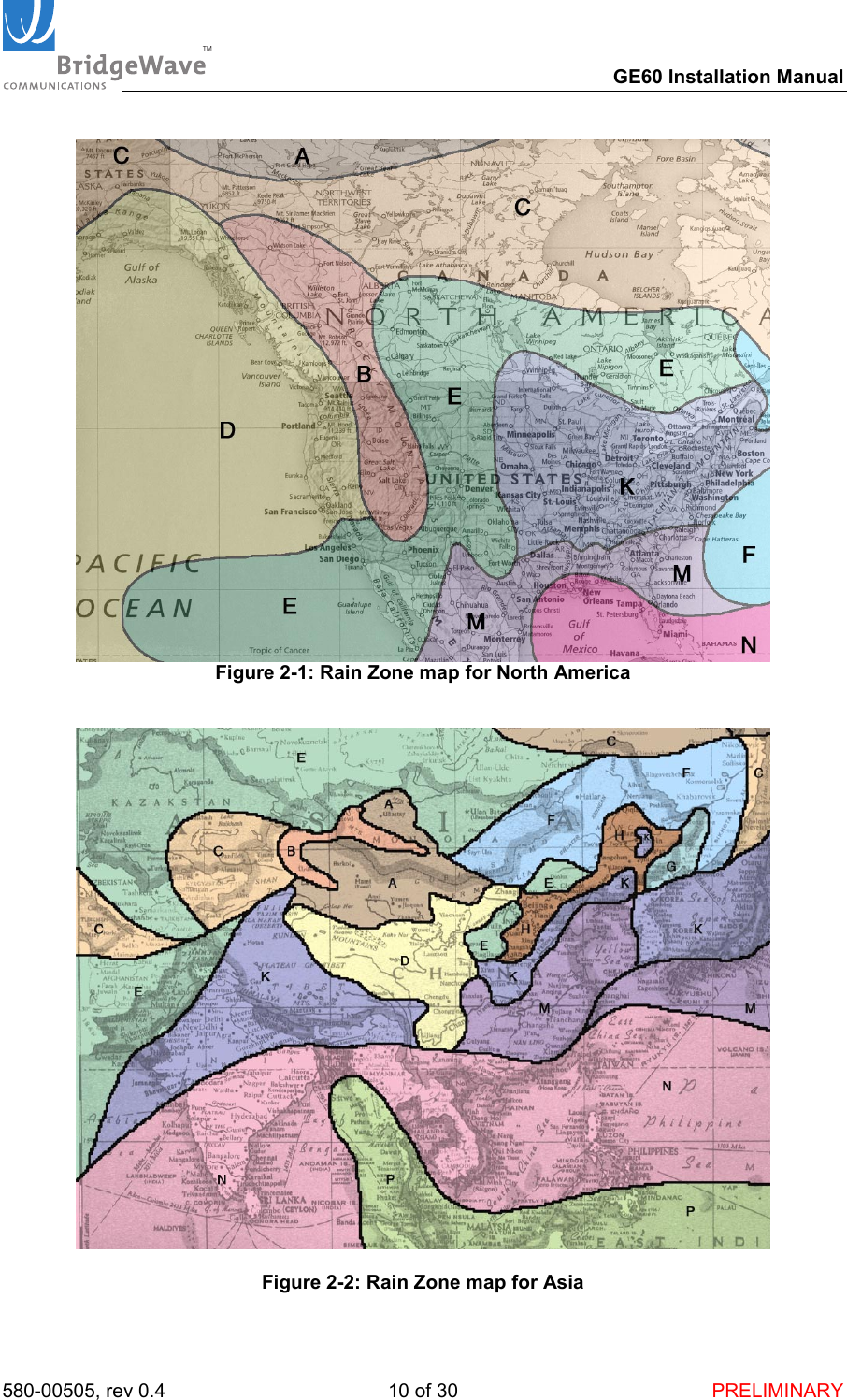
TM        GE60 Installation Manual 580-00505, rev 0.4 9 of 30  PRELIMINARY Path Length (meters) Minimum Clearance (meters) 250 0.56 500 0.79 750 0.97 1000 1.12 Table 2-1: Minimum Clearance at Link Midpoint for various Path Lengths 2.4 Link Distance Measurement of the link distance is important in estimating the link availability and calculating expected Receive Signal Level (RSL). This measurement can be performed using the Latitude and Longitude readings from a Global Positioning System (GPS) device, which is placed near the proposed locations of the antennas, or using a range finder device. Table 2-2 below lists the maximum link distance with respect to desired availability and ITU rain zone (ITU-R Recommendation PN.837). The map (Figure 2-1) following the chart shows where the rain zones fit across North America and Asia for various availabilities and most ITU rain zones.   Rain Zone Availability A B C D E F K M N 99.7000% 837 817 807 787 812 787 787 727 697 99.9000% 817 802 782 752 772 752 717 652 592 99.9700% 782 772 742 712 717 697 647 572 497 99.9900% 752 717 697 672 652 622 567 502 437 99.9950% 717 677 647 632 592 552 502 452 392 99.9970% 702 657 587 617 567 527 487 437 377 99.9990% 652 602 567 567 487 467 427 402 337 Table 2-2: Maximum Link Distances (meters) for various Availabilities and Rain Zones
TM        GE60 Installation Manual 580-00505, rev 0.4 10 of 30  PRELIMINARY  Figure 2-1: Rain Zone map for North America     Figure 2-2: Rain Zone map for Asia
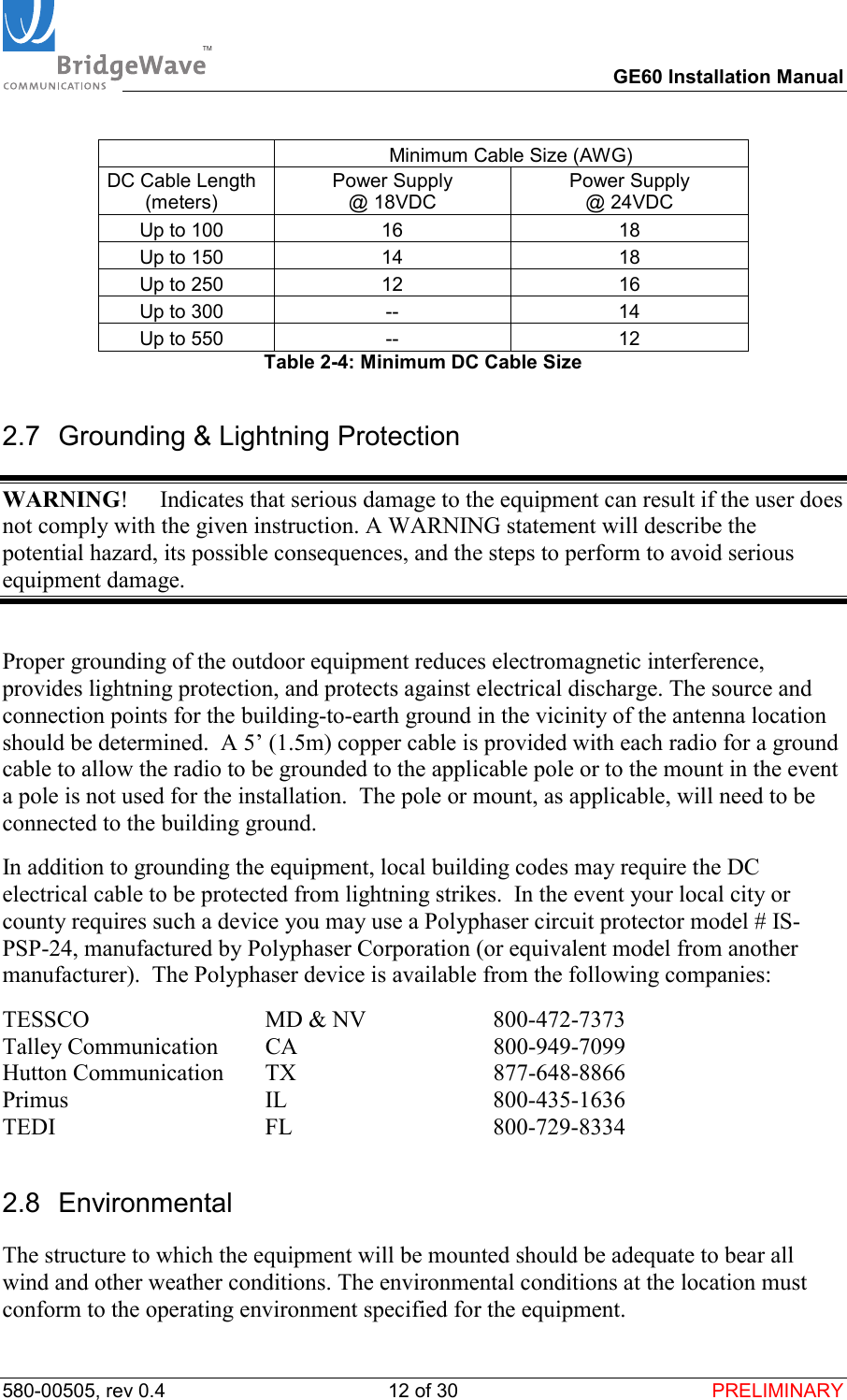
TM        GE60 Installation Manual 580-00505, rev 0.4 11 of 30  PRELIMINARY 2.5 Antenna Location The optimum location for the antennas must be determined. The ideal location should provide for ease of erecting and mounting the antenna, as well as unimpeded Line-Of-Site (LOS) to the other site. The following factors should be taken into account: •  Type of mounting—wall or pole •  Length of cable runs •  Grounding connection points •  Obstructions •  Accessibility 2.6 Cabling The installation site should be inspected to determine the run paths for the fiber cable and power cable from the radio equipment to the termination point. Locations for roof penetration should be identified. The routing and securing of all cables should conform to all applicable codes and requirements. Depending on the likelihood of damage due to foot traffic or equipment movement, cabling conduit may be required. The maximum cable run length as specified for the equipment being installed must not be exceeded.   Our radio requires an “LC” type connector on the multi-mode fiber to properly connect the fiber to the radio.  Single-mode fiber is not a current option supported by the radio. The type of fiber connector (typically either LC or “SC”) required on the other end of the fiber that connects to the applicable Gigabit Ethernet switch, router, or bridge will depend upon the interface on your applicable networking equipment. The GE60 radio includes a 100-240 VAC power adaptor that converts the AC voltage from the standard electrical outlet in the wall to DC voltage.  Our radio requires a minimum of 13.5 VDC (24.0 VDC maximum) up the power cable to the radio to function properly. When planning the cable run from indoor mounted AC power adaptor to the radio unit, it is critical to select the cable AWG to ensure adequate voltage at the radio.   Fiber Cable Length (meters) Cable Type  Up to 270  62.5/125 µm Up to 500  50/125 µm Table 2-3: Fiber Cable Types
TM        GE60 Installation Manual 580-00505, rev 0.4 12 of 30  PRELIMINARY   Minimum Cable Size (AWG) DC Cable Length (meters) Power Supply  @ 18VDC Power Supply  @ 24VDC Up to 100  16  18 Up to 150  14  18 Up to 250  12  16 Up to 300  --  14 Up to 550  --  12 Table 2-4: Minimum DC Cable Size 2.7  Grounding & Lightning Protection WARNING!  Indicates that serious damage to the equipment can result if the user does not comply with the given instruction. A WARNING statement will describe the potential hazard, its possible consequences, and the steps to perform to avoid serious equipment damage.  Proper grounding of the outdoor equipment reduces electromagnetic interference, provides lightning protection, and protects against electrical discharge. The source and connection points for the building-to-earth ground in the vicinity of the antenna location should be determined.  A 5’ (1.5m) copper cable is provided with each radio for a ground cable to allow the radio to be grounded to the applicable pole or to the mount in the event a pole is not used for the installation.  The pole or mount, as applicable, will need to be connected to the building ground. In addition to grounding the equipment, local building codes may require the DC electrical cable to be protected from lightning strikes.  In the event your local city or county requires such a device you may use a Polyphaser circuit protector model # IS-PSP-24, manufactured by Polyphaser Corporation (or equivalent model from another manufacturer).  The Polyphaser device is available from the following companies: TESSCO                        MD & NV  800-472-7373 Talley Communication     CA                                 800-949-7099 Hutton Communication     TX                                  877-648-8866 Primus                           IL                                800-435-1636 TEDI                               FL                                  800-729-8334 2.8 Environmental The structure to which the equipment will be mounted should be adequate to bear all wind and other weather conditions. The environmental conditions at the location must conform to the operating environment specified for the equipment.
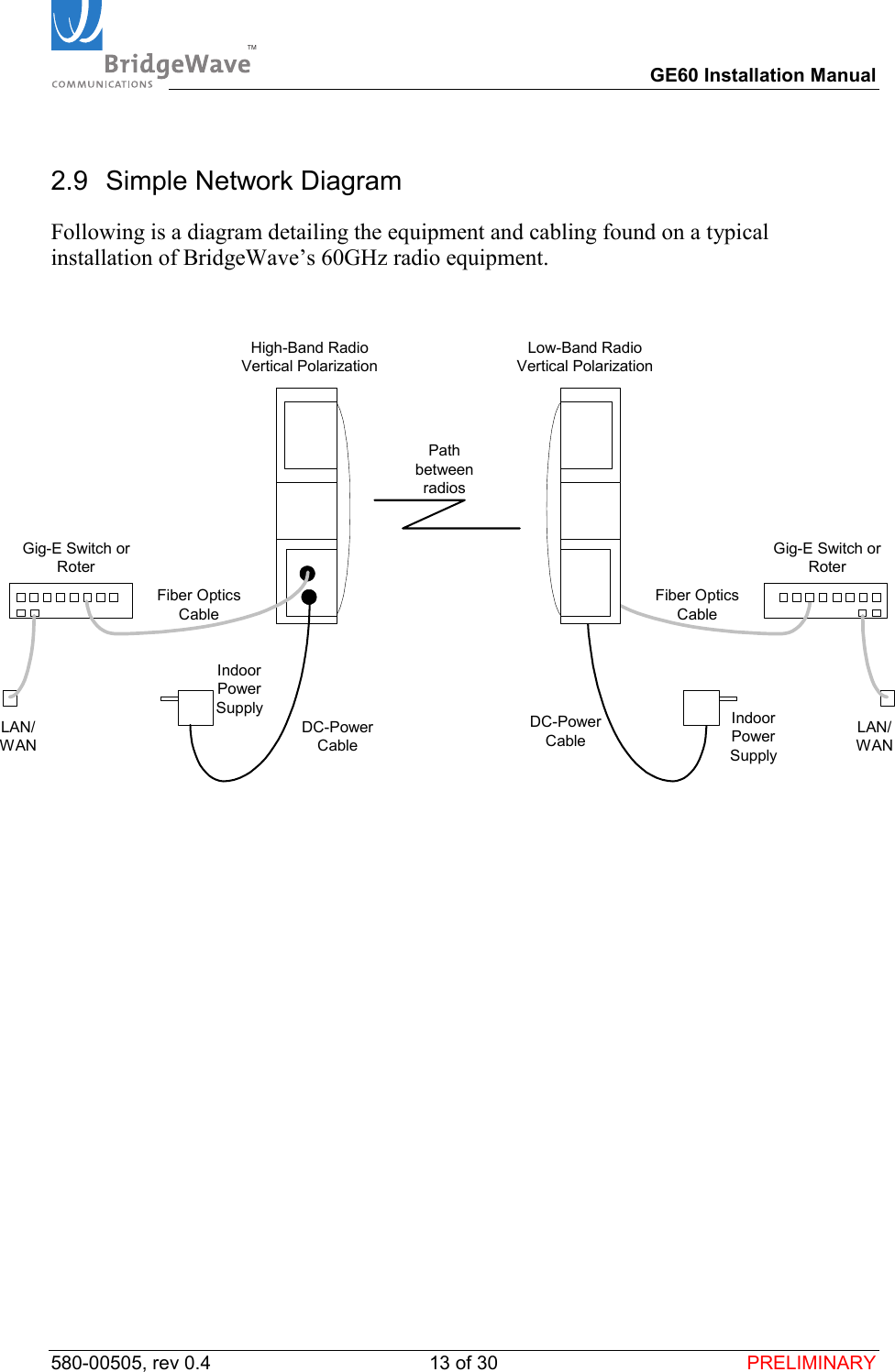
TM        GE60 Installation Manual 580-00505, rev 0.4 13 of 30  PRELIMINARY 2.9  Simple Network Diagram Following is a diagram detailing the equipment and cabling found on a typical installation of BridgeWave’s 60GHz radio equipment.  LAN/WANLAN/WANHigh-Band RadioVertical PolarizationLow-Band RadioVertical PolarizationGig-E Switch orRoterGig-E Switch orRoterFiber OpticsCableFiber OpticsCableDC-PowerCableDC-PowerCablePathbetweenradiosIndoorPowerSupply IndoorPowerSupply
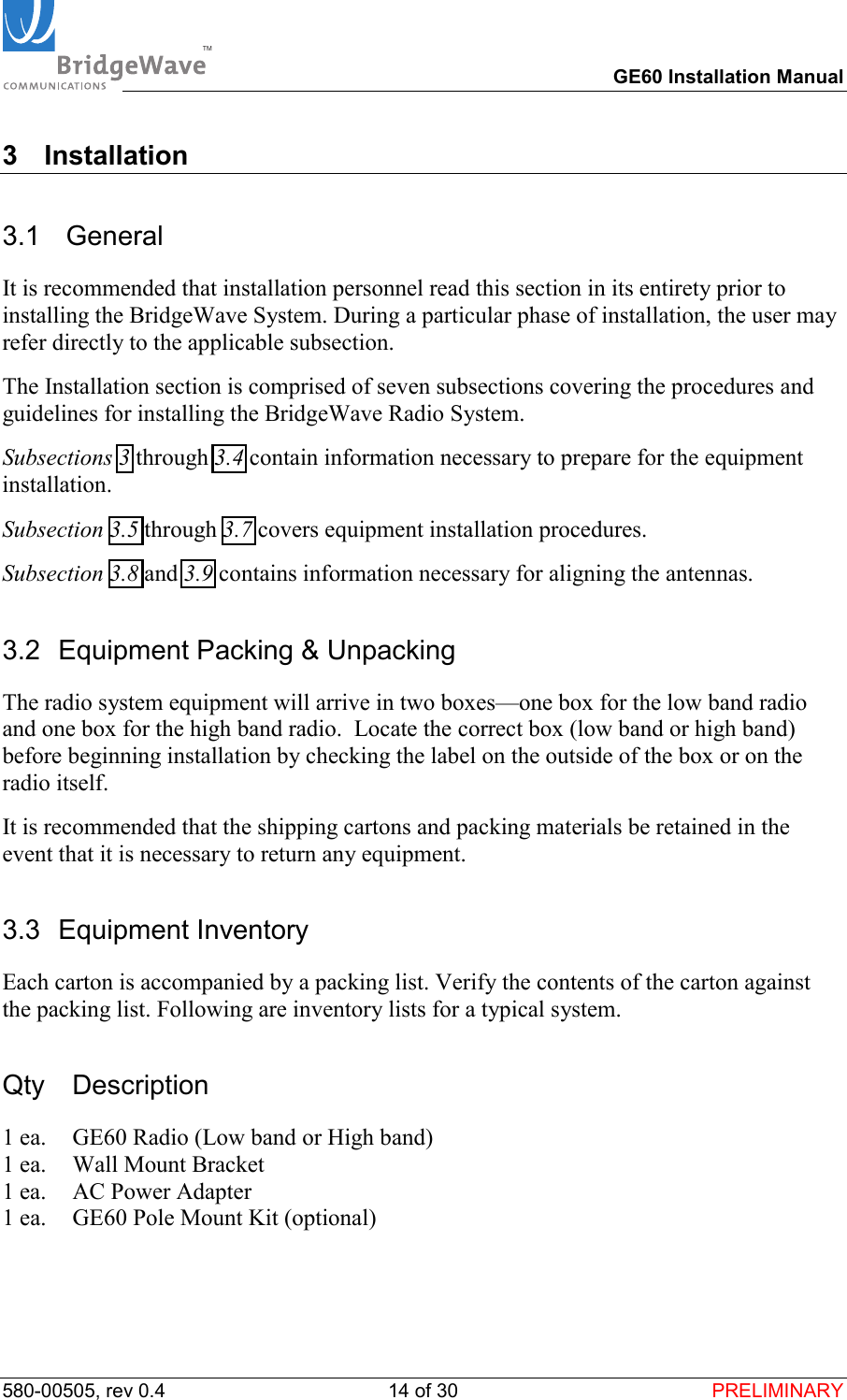
TM        GE60 Installation Manual 580-00505, rev 0.4 14 of 30  PRELIMINARY 3 Installation 3.1  General It is recommended that installation personnel read this section in its entirety prior to installing the BridgeWave System. During a particular phase of installation, the user may refer directly to the applicable subsection. The Installation section is comprised of seven subsections covering the procedures and guidelines for installing the BridgeWave Radio System. Subsections 3 through 3.4 contain information necessary to prepare for the equipment installation. Subsection 3.5 through 3.7 covers equipment installation procedures. Subsection 3.8 and 3.9 contains information necessary for aligning the antennas. 3.2  Equipment Packing & Unpacking The radio system equipment will arrive in two boxes—one box for the low band radio and one box for the high band radio.  Locate the correct box (low band or high band) before beginning installation by checking the label on the outside of the box or on the radio itself.  It is recommended that the shipping cartons and packing materials be retained in the event that it is necessary to return any equipment. 3.3 Equipment Inventory Each carton is accompanied by a packing list. Verify the contents of the carton against the packing list. Following are inventory lists for a typical system. Qty Description 1 ea.  GE60 Radio (Low band or High band) 1 ea.  Wall Mount Bracket 1 ea.  AC Power Adapter 1 ea.  GE60 Pole Mount Kit (optional)
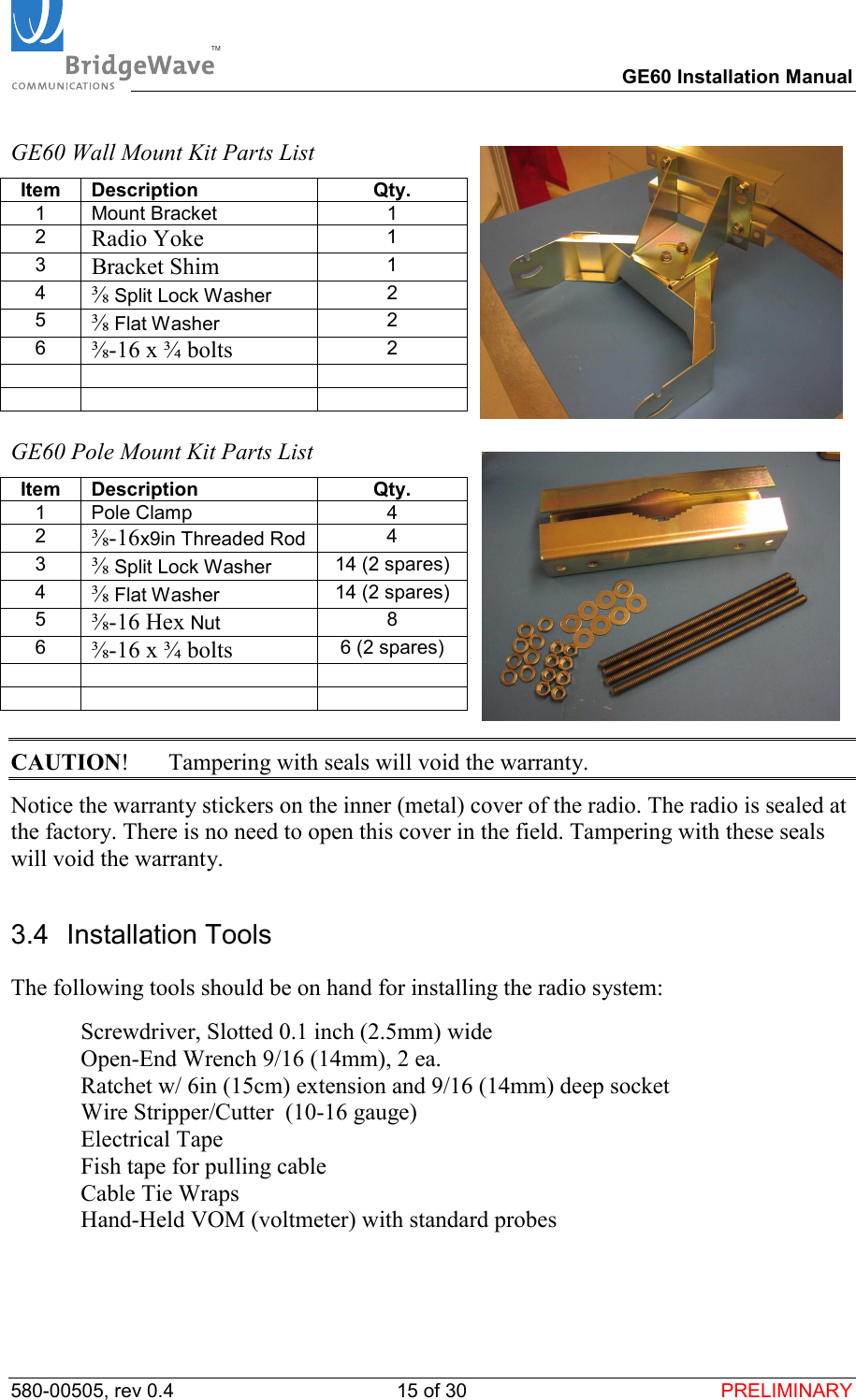
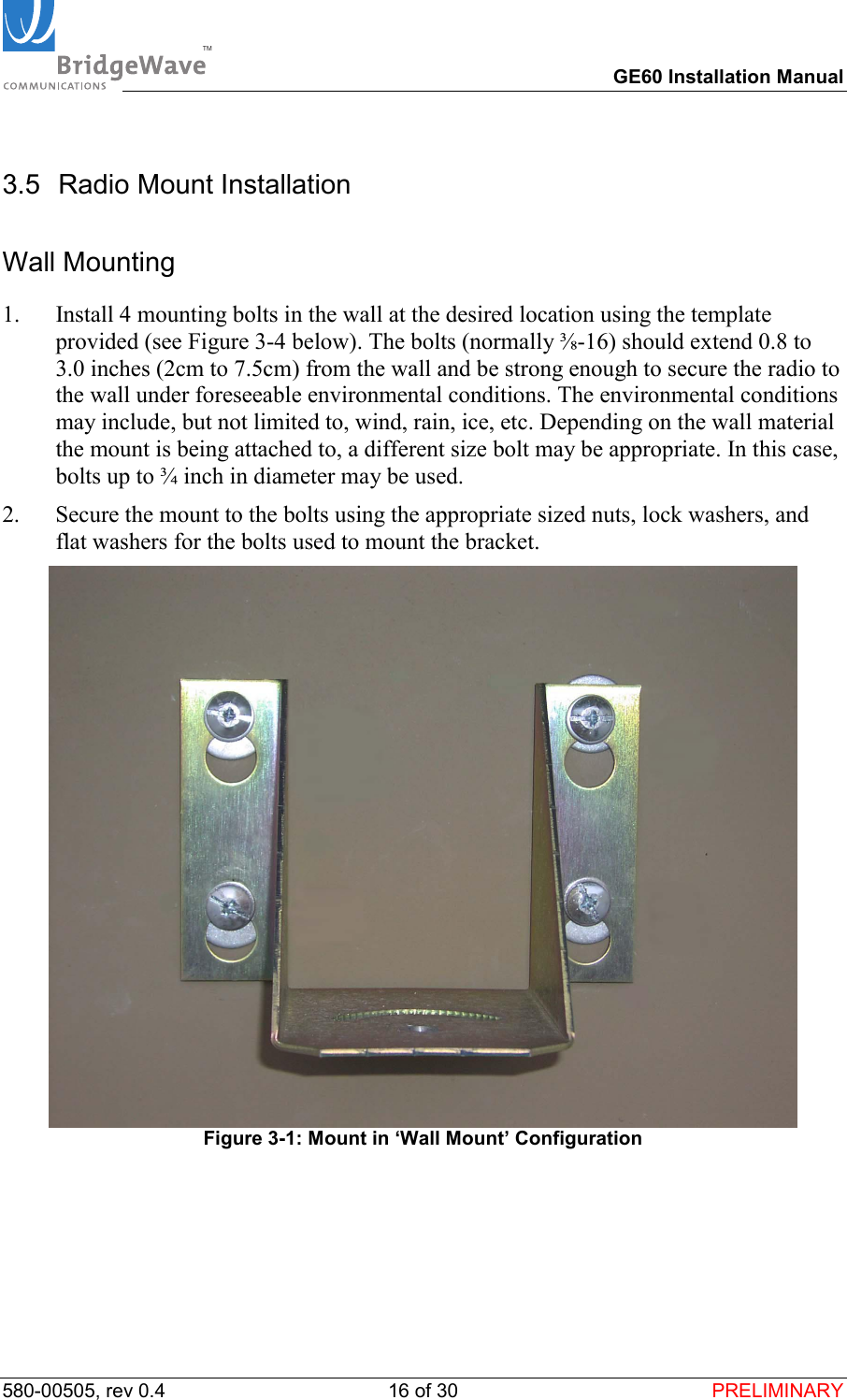
TM        GE60 Installation Manual 580-00505, rev 0.4 15 of 30  PRELIMINARY GE60 Wall Mount Kit Parts List Item Description  Qty. 1 Mount Bracket  1 2  Radio Yoke 1 3  Bracket Shim 1 4  ⅜ Split Lock Washer  2 5  ⅜ Flat Washer  2 6  ⅜-16 x ¾ bolts 2          GE60 Pole Mount Kit Parts List Item Description  Qty. 1 Pole Clamp  4 2  ⅜-16x9in Threaded Rod  4 3  ⅜ Split Lock Washer  14 (2 spares) 4  ⅜ Flat Washer  14 (2 spares) 5  ⅜-16 Hex Nut  8 6  ⅜-16 x ¾ bolts 6 (2 spares)          CAUTION!  Tampering with seals will void the warranty. Notice the warranty stickers on the inner (metal) cover of the radio. The radio is sealed at the factory. There is no need to open this cover in the field. Tampering with these seals will void the warranty. 3.4 Installation Tools The following tools should be on hand for installing the radio system:   Screwdriver, Slotted 0.1 inch (2.5mm) wide   Open-End Wrench 9/16 (14mm), 2 ea.    Ratchet w/ 6in (15cm) extension and 9/16 (14mm) deep socket   Wire Stripper/Cutter  (10-16 gauge)  Electrical Tape   Fish tape for pulling cable   Cable Tie Wraps   Hand-Held VOM (voltmeter) with standard probes
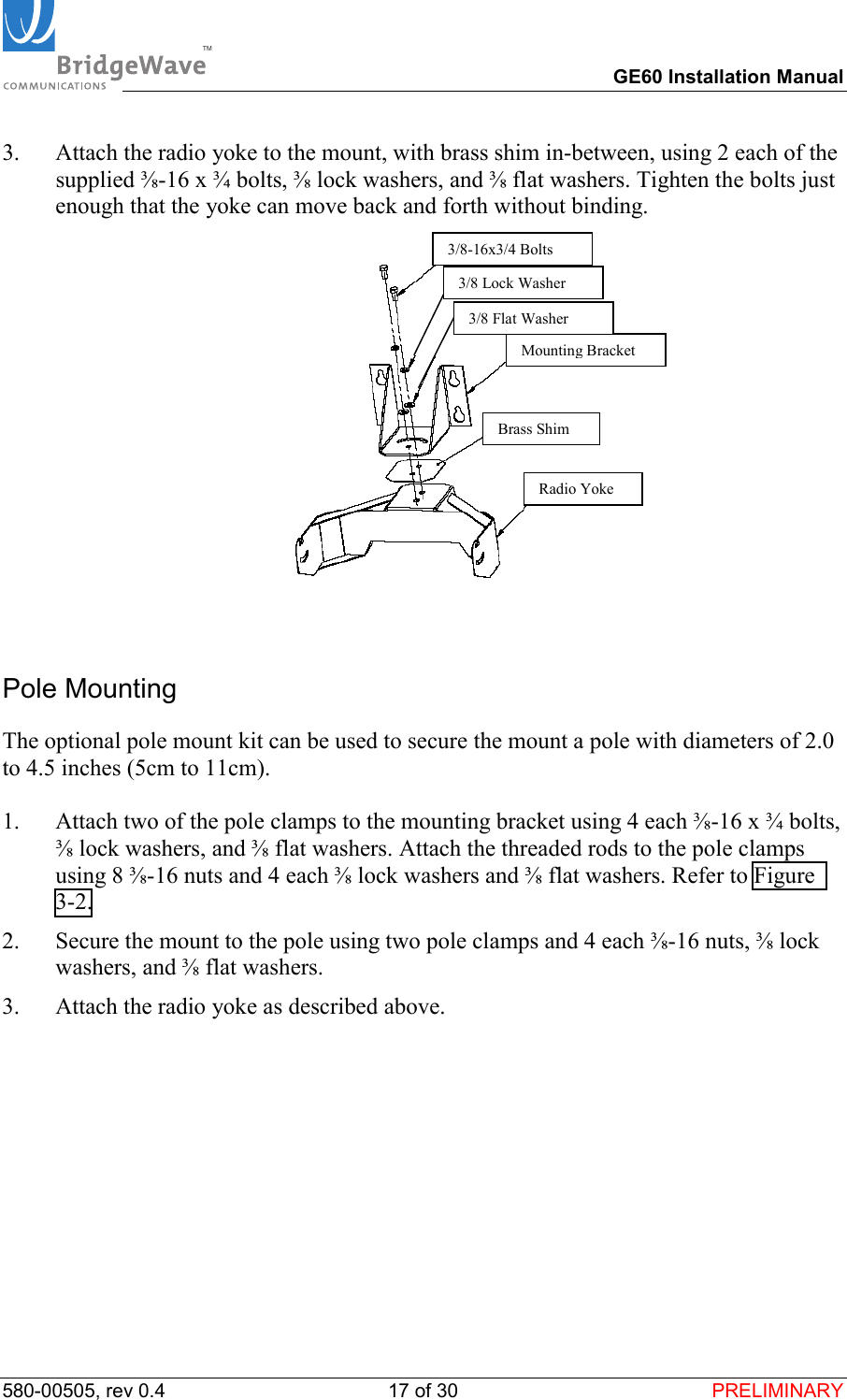
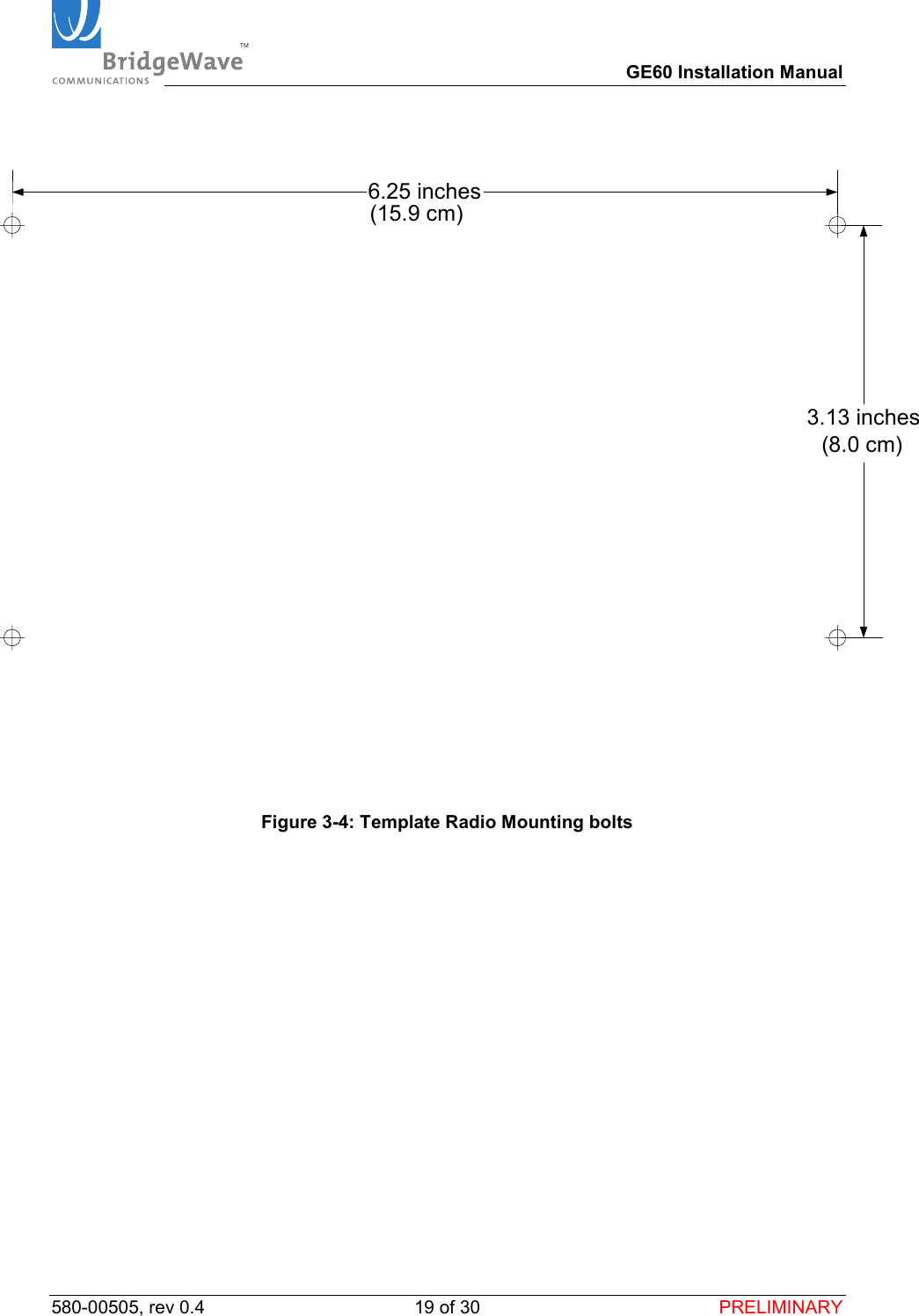
TM        GE60 Installation Manual 580-00505, rev 0.4 16 of 30  PRELIMINARY 3.5 Radio Mount Installation Wall Mounting 1.  Install 4 mounting bolts in the wall at the desired location using the template provided (see Figure 3-4 below). The bolts (normally ⅜-16) should extend 0.8 to 3.0 inches (2cm to 7.5cm) from the wall and be strong enough to secure the radio to the wall under foreseeable environmental conditions. The environmental conditions may include, but not limited to, wind, rain, ice, etc. Depending on the wall material the mount is being attached to, a different size bolt may be appropriate. In this case, bolts up to ¾ inch in diameter may be used. 2.  Secure the mount to the bolts using the appropriate sized nuts, lock washers, and flat washers for the bolts used to mount the bracket.   Figure 3-1: Mount in ‘Wall Mount’ Configuration
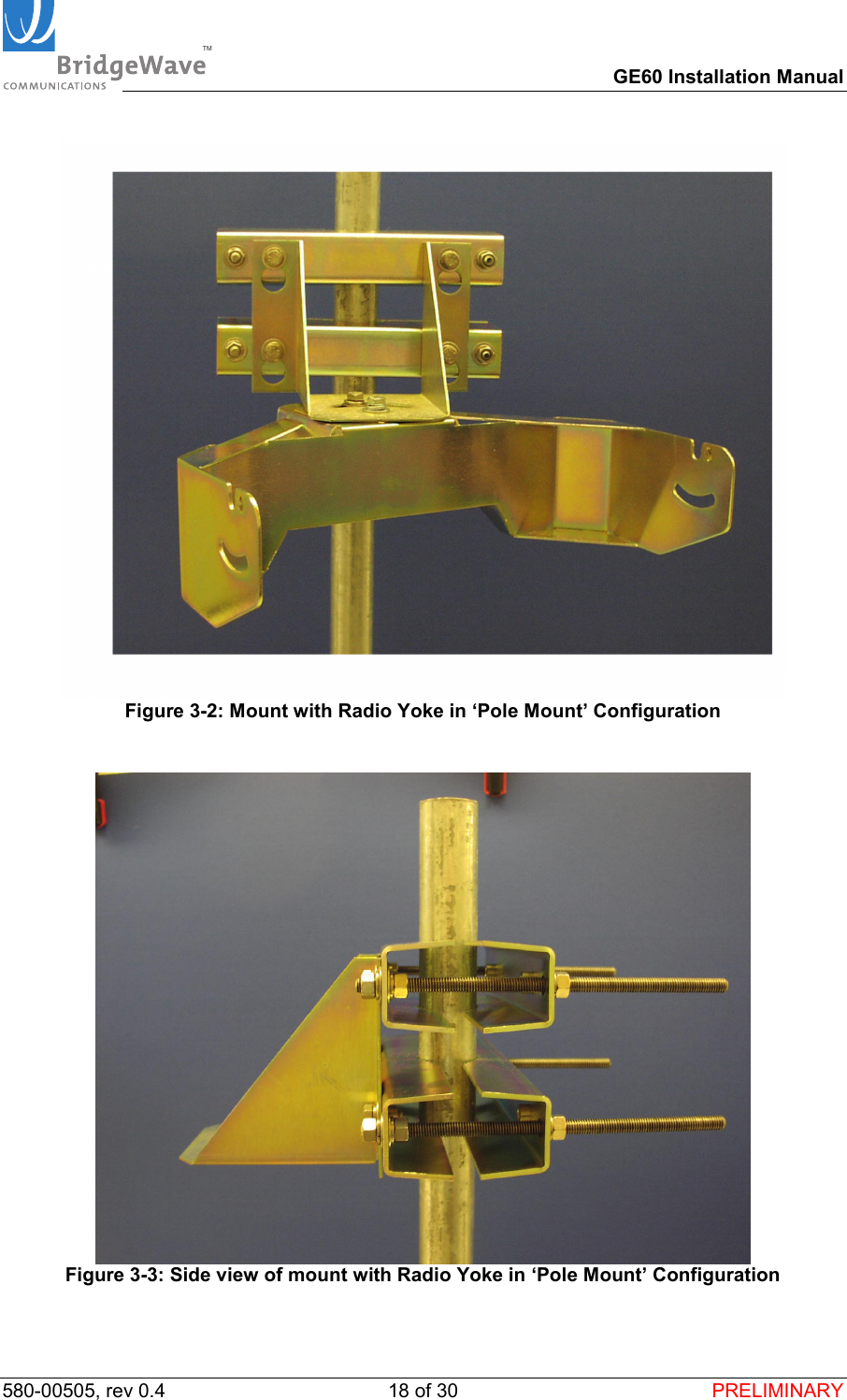
TM        GE60 Installation Manual 580-00505, rev 0.4 17 of 30  PRELIMINARY 3.  Attach the radio yoke to the mount, with brass shim in-between, using 2 each of the supplied ⅜-16 x ¾ bolts, ⅜ lock washers, and ⅜ flat washers. Tighten the bolts just enough that the yoke can move back and forth without binding.   Pole Mounting The optional pole mount kit can be used to secure the mount a pole with diameters of 2.0 to 4.5 inches (5cm to 11cm).  1.  Attach two of the pole clamps to the mounting bracket using 4 each ⅜-16 x ¾ bolts, ⅜ lock washers, and ⅜ flat washers. Attach the threaded rods to the pole clamps using 8 ⅜-16 nuts and 4 each ⅜ lock washers and ⅜ flat washers. Refer to Figure 3-2. 2.  Secure the mount to the pole using two pole clamps and 4 each ⅜-16 nuts, ⅜ lock washers, and ⅜ flat washers. 3.  Attach the radio yoke as described above. 3/8-16x3/4 BoltsMounting BracketBrass ShimRadio Yoke3/8 Lock Washer3/8 Flat Washer
TM        GE60 Installation Manual 580-00505, rev 0.4 18 of 30  PRELIMINARY   Figure 3-2: Mount with Radio Yoke in ‘Pole Mount’ Configuration   Figure 3-3: Side view of mount with Radio Yoke in ‘Pole Mount’ Configuration
TM        GE60 Installation Manual 580-00505, rev 0.4 19 of 30  PRELIMINARY  3.13 inches6.25 inches(15.9 cm)(8.0 cm)   Figure 3-4: Template Radio Mounting bolts
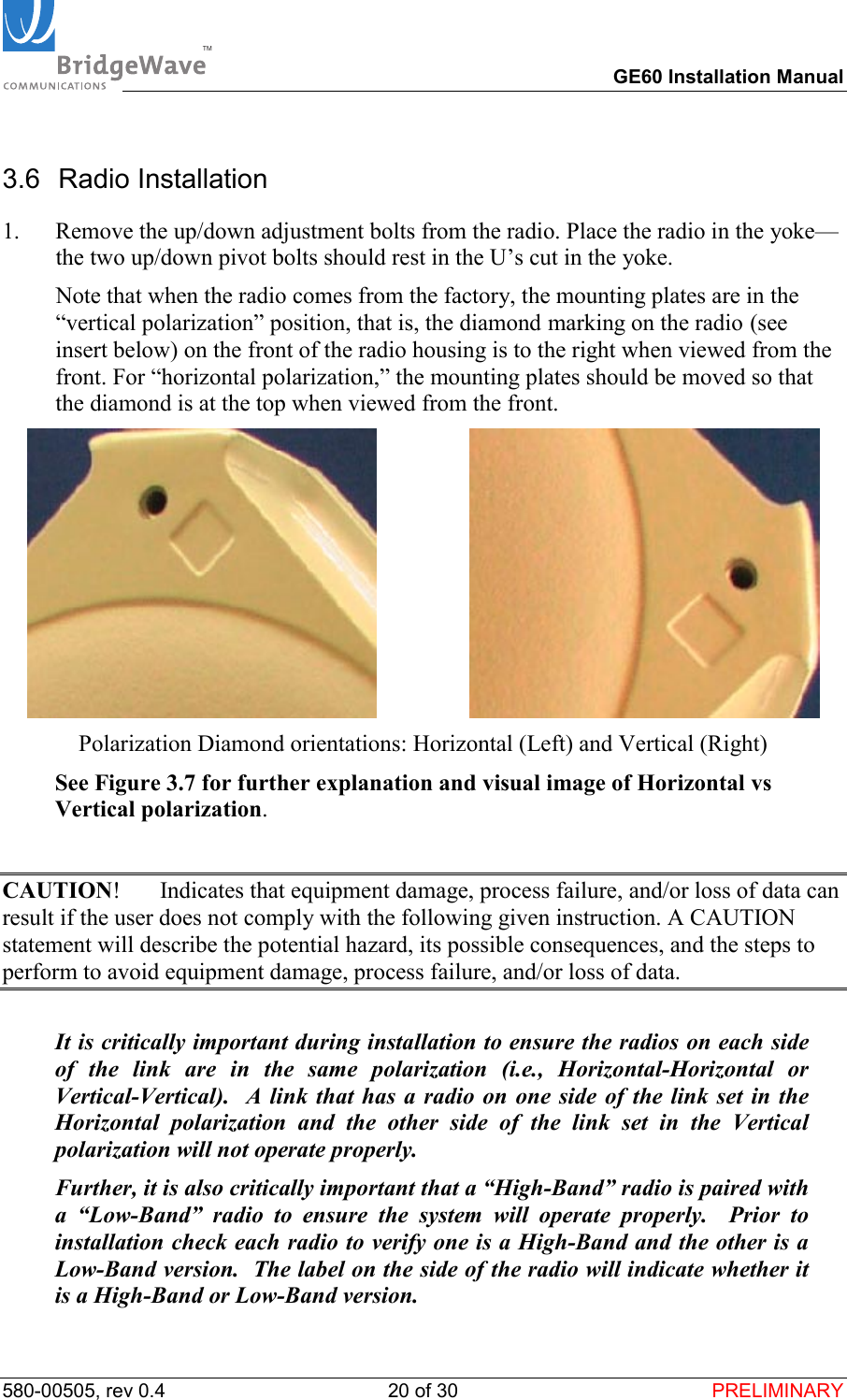
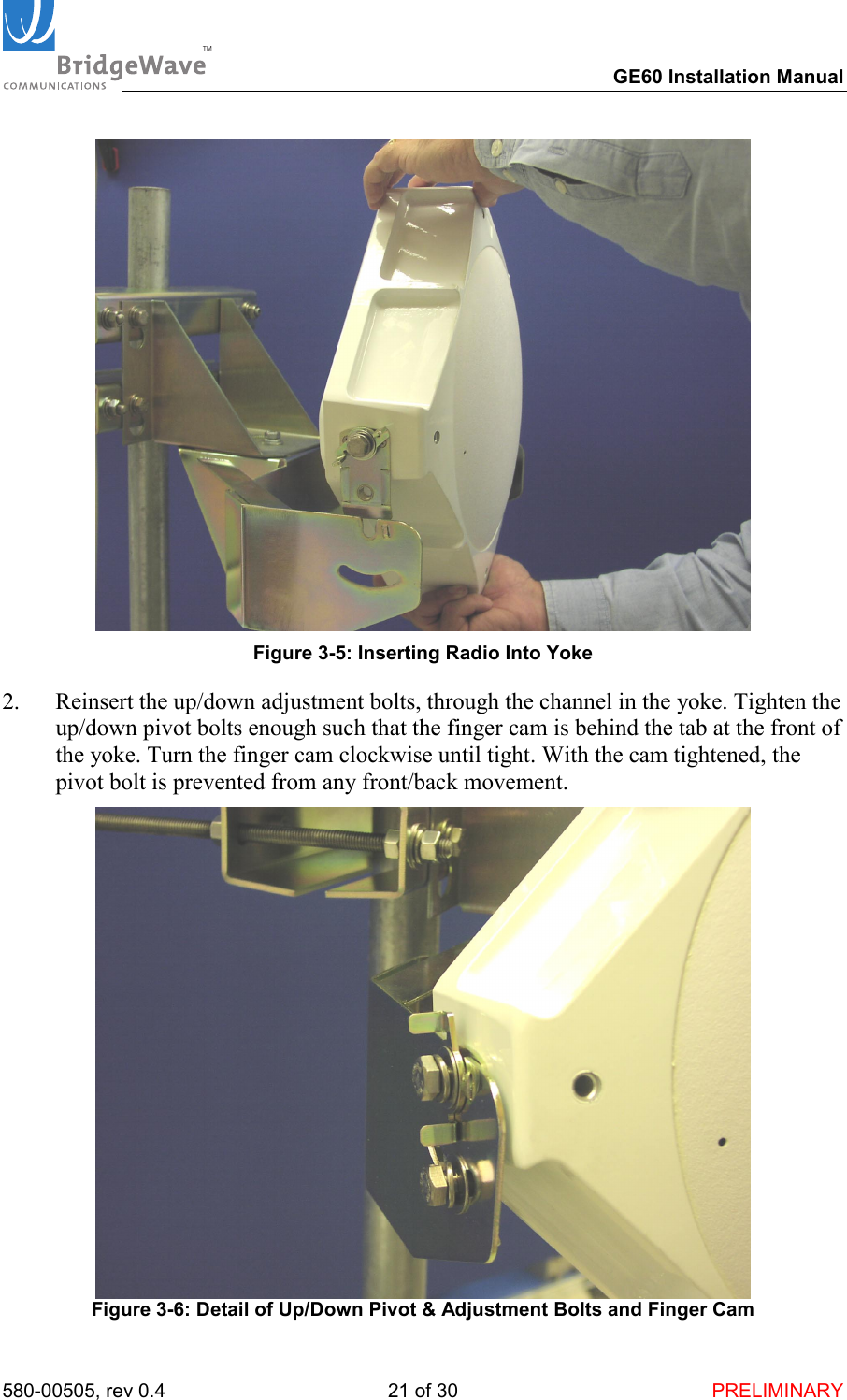
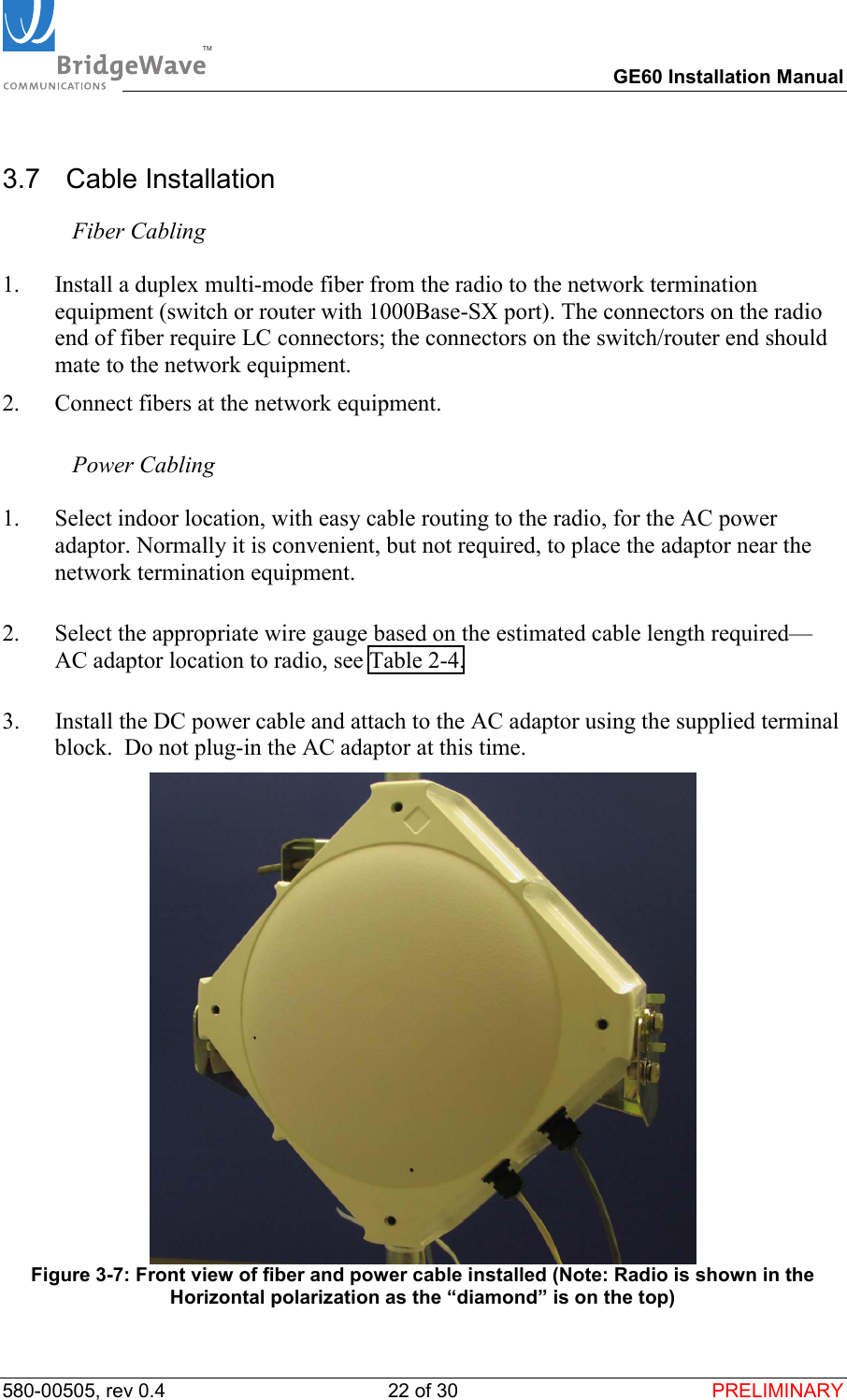
TM        GE60 Installation Manual 580-00505, rev 0.4 20 of 30  PRELIMINARY 3.6 Radio Installation 1.  Remove the up/down adjustment bolts from the radio. Place the radio in the yoke—the two up/down pivot bolts should rest in the U’s cut in the yoke.    Note that when the radio comes from the factory, the mounting plates are in the “vertical polarization” position, that is, the diamond marking on the radio (see insert below) on the front of the radio housing is to the right when viewed from the front. For “horizontal polarization,” the mounting plates should be moved so that the diamond is at the top when viewed from the front.                   Polarization Diamond orientations: Horizontal (Left) and Vertical (Right)  See Figure 3.7 for further explanation and visual image of Horizontal vs Vertical polarization.    CAUTION!  Indicates that equipment damage, process failure, and/or loss of data can result if the user does not comply with the following given instruction. A CAUTION statement will describe the potential hazard, its possible consequences, and the steps to perform to avoid equipment damage, process failure, and/or loss of data.    It is critically important during installation to ensure the radios on each side of the link are in the same polarization (i.e., Horizontal-Horizontal or Vertical-Vertical).  A link that has a radio on one side of the link set in the Horizontal polarization and the other side of the link set in the Vertical polarization will not operate properly.   Further, it is also critically important that a “High-Band” radio is paired with a “Low-Band” radio to ensure the system will operate properly.  Prior to installation check each radio to verify one is a High-Band and the other is a Low-Band version.  The label on the side of the radio will indicate whether it is a High-Band or Low-Band version.
TM        GE60 Installation Manual 580-00505, rev 0.4 21 of 30  PRELIMINARY  Figure 3-5: Inserting Radio Into Yoke 2.  Reinsert the up/down adjustment bolts, through the channel in the yoke. Tighten the up/down pivot bolts enough such that the finger cam is behind the tab at the front of the yoke. Turn the finger cam clockwise until tight. With the cam tightened, the pivot bolt is prevented from any front/back movement.  Figure 3-6: Detail of Up/Down Pivot & Adjustment Bolts and Finger Cam
TM        GE60 Installation Manual 580-00505, rev 0.4 22 of 30  PRELIMINARY 3.7  Cable Installation  Fiber Cabling  1.  Install a duplex multi-mode fiber from the radio to the network termination equipment (switch or router with 1000Base-SX port). The connectors on the radio end of fiber require LC connectors; the connectors on the switch/router end should mate to the network equipment. 2.  Connect fibers at the network equipment.   Power Cabling  1.  Select indoor location, with easy cable routing to the radio, for the AC power adaptor. Normally it is convenient, but not required, to place the adaptor near the network termination equipment.   2.  Select the appropriate wire gauge based on the estimated cable length required—AC adaptor location to radio, see Table 2-4.  3.  Install the DC power cable and attach to the AC adaptor using the supplied terminal block.  Do not plug-in the AC adaptor at this time.  Figure 3-7: Front view of fiber and power cable installed (Note: Radio is shown in the Horizontal polarization as the “diamond” is on the top)
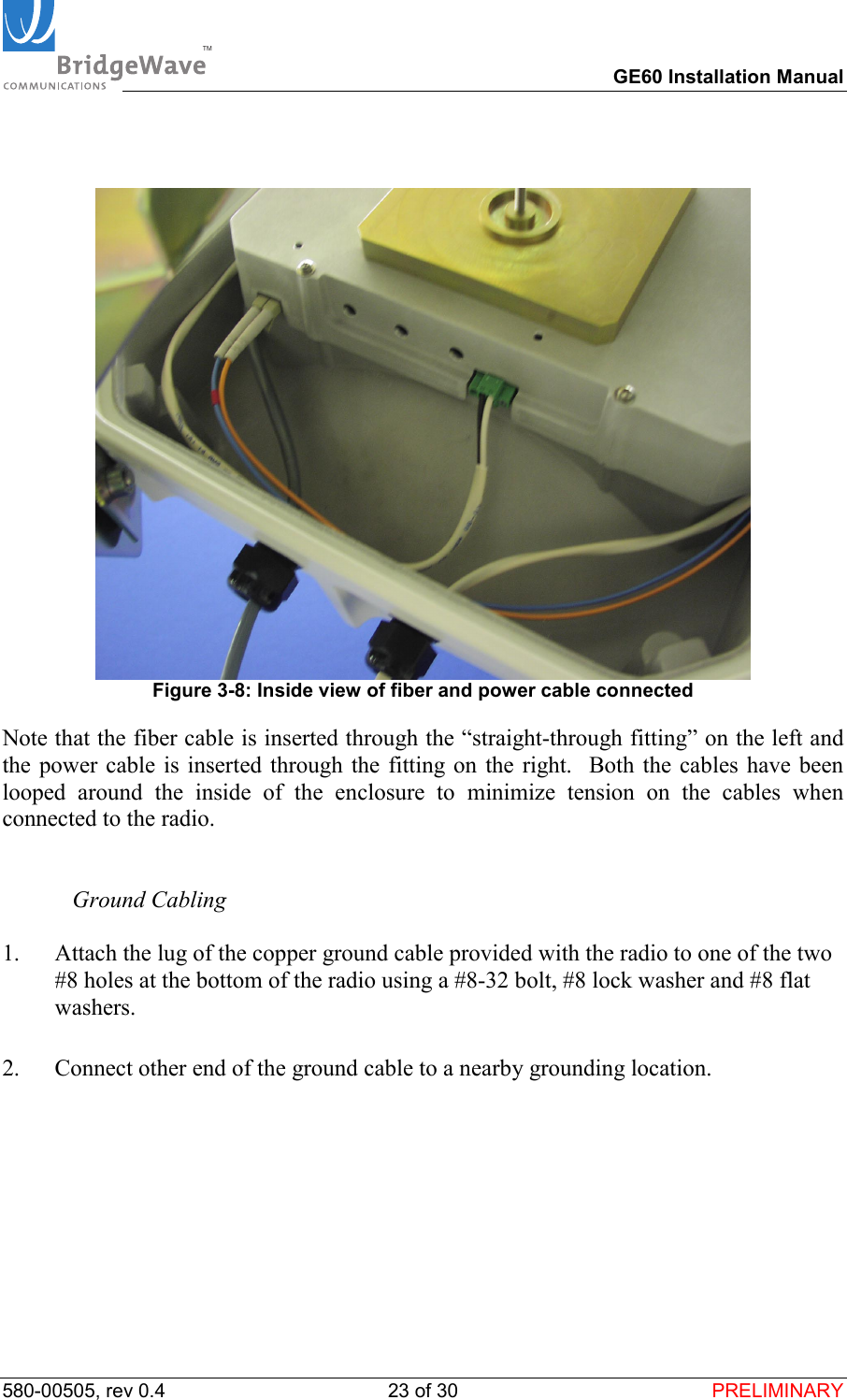
TM        GE60 Installation Manual 580-00505, rev 0.4 23 of 30  PRELIMINARY     Figure 3-8: Inside view of fiber and power cable connected Note that the fiber cable is inserted through the “straight-through fitting” on the left and the power cable is inserted through the fitting on the right.  Both the cables have been looped around the inside of the enclosure to minimize tension on the cables when connected to the radio.     Ground Cabling  1.  Attach the lug of the copper ground cable provided with the radio to one of the two #8 holes at the bottom of the radio using a #8-32 bolt, #8 lock washer and #8 flat washers.   2.  Connect other end of the ground cable to a nearby grounding location.
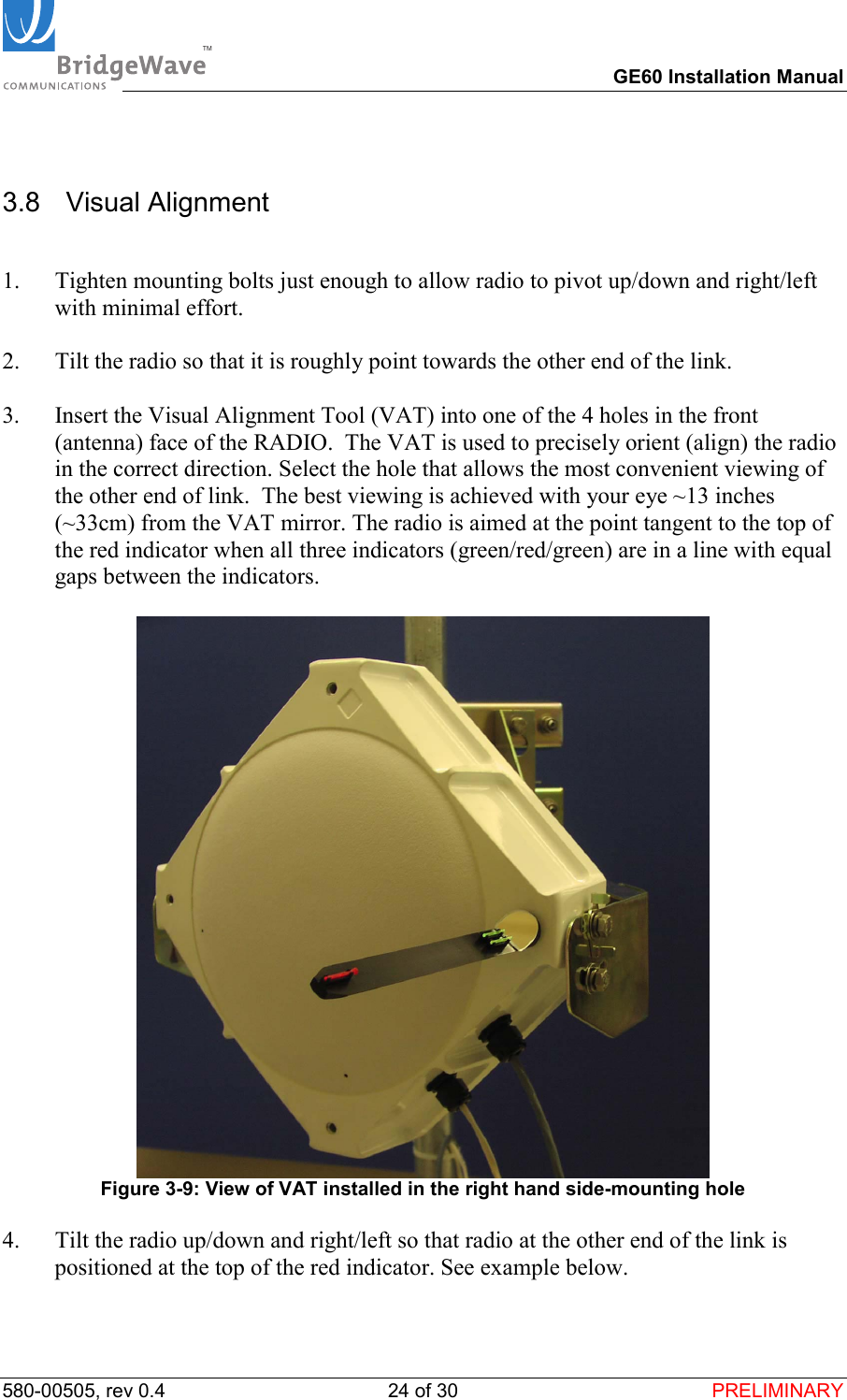
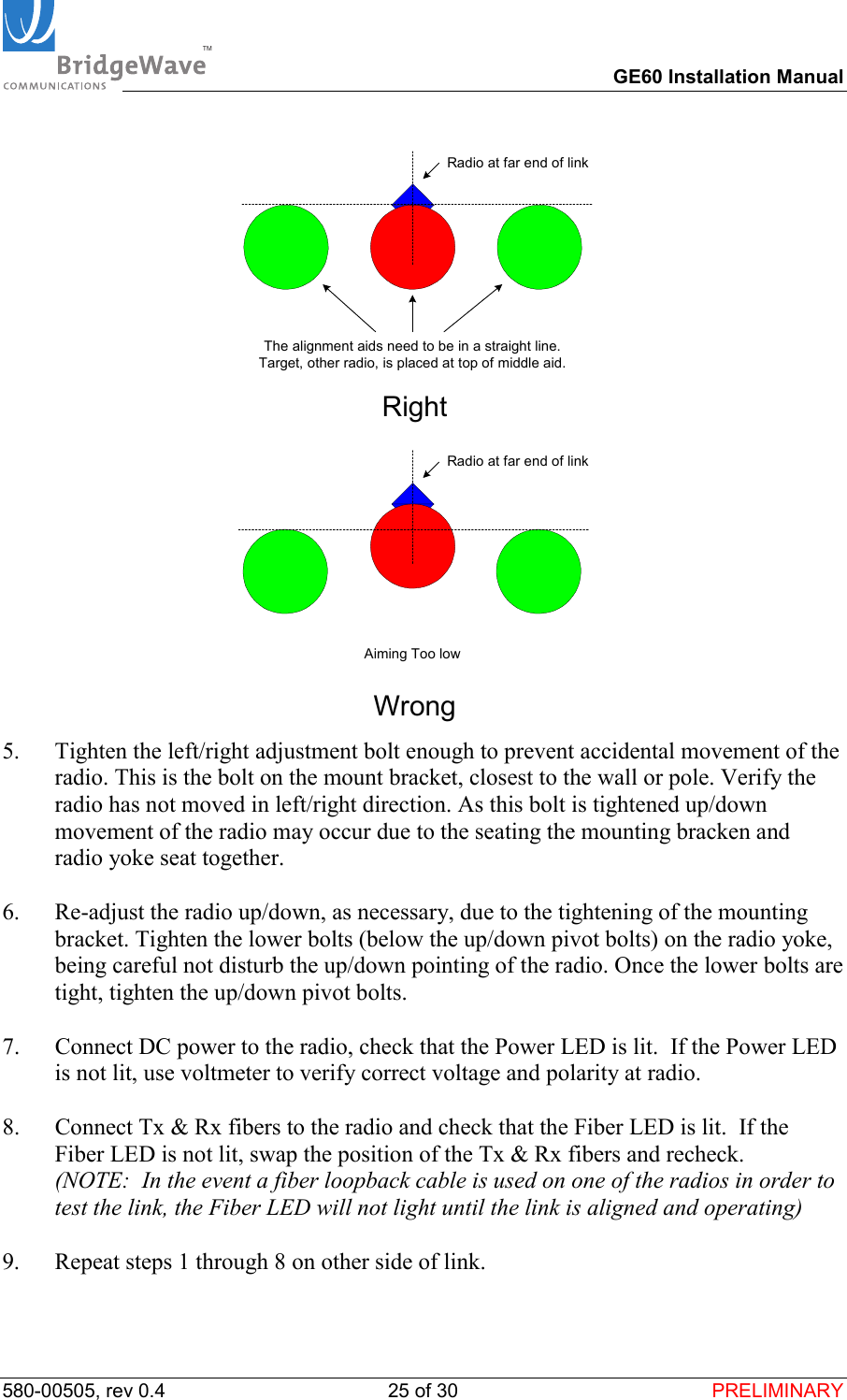
TM        GE60 Installation Manual 580-00505, rev 0.4 24 of 30  PRELIMINARY 3.8  Visual Alignment  1.  Tighten mounting bolts just enough to allow radio to pivot up/down and right/left with minimal effort.  2.  Tilt the radio so that it is roughly point towards the other end of the link.  3.  Insert the Visual Alignment Tool (VAT) into one of the 4 holes in the front (antenna) face of the RADIO.  The VAT is used to precisely orient (align) the radio in the correct direction. Select the hole that allows the most convenient viewing of the other end of link.  The best viewing is achieved with your eye ~13 inches (~33cm) from the VAT mirror. The radio is aimed at the point tangent to the top of the red indicator when all three indicators (green/red/green) are in a line with equal gaps between the indicators.   Figure 3-9: View of VAT installed in the right hand side-mounting hole  4.  Tilt the radio up/down and right/left so that radio at the other end of the link is positioned at the top of the red indicator. See example below.
TM        GE60 Installation Manual 580-00505, rev 0.4 25 of 30  PRELIMINARY Radio at far end of linkThe alignment aids need to be in a straight line.Target, other radio, is placed at top of middle aid.Right                 Radio at far end of linkAiming Too lowWrong 5.  Tighten the left/right adjustment bolt enough to prevent accidental movement of the radio. This is the bolt on the mount bracket, closest to the wall or pole. Verify the radio has not moved in left/right direction. As this bolt is tightened up/down movement of the radio may occur due to the seating the mounting bracken and radio yoke seat together.  6.  Re-adjust the radio up/down, as necessary, due to the tightening of the mounting bracket. Tighten the lower bolts (below the up/down pivot bolts) on the radio yoke, being careful not disturb the up/down pointing of the radio. Once the lower bolts are tight, tighten the up/down pivot bolts.  7.  Connect DC power to the radio, check that the Power LED is lit.  If the Power LED is not lit, use voltmeter to verify correct voltage and polarity at radio.   8.  Connect Tx & Rx fibers to the radio and check that the Fiber LED is lit.  If the Fiber LED is not lit, swap the position of the Tx & Rx fibers and recheck.   (NOTE:  In the event a fiber loopback cable is used on one of the radios in order to test the link, the Fiber LED will not light until the link is aligned and operating)  9.  Repeat steps 1 through 8 on other side of link.
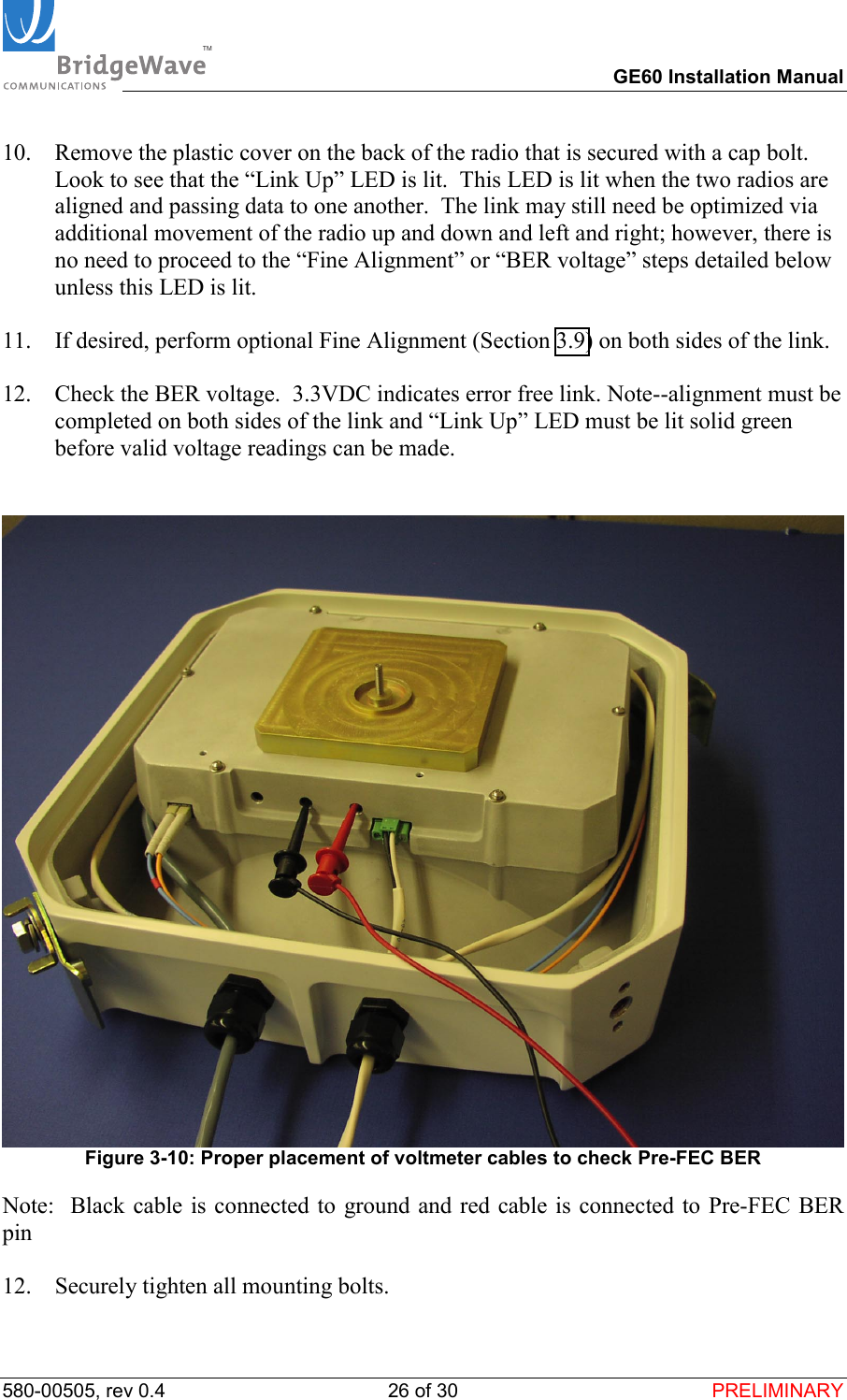
TM        GE60 Installation Manual 580-00505, rev 0.4 26 of 30  PRELIMINARY 10.  Remove the plastic cover on the back of the radio that is secured with a cap bolt.  Look to see that the “Link Up” LED is lit.  This LED is lit when the two radios are aligned and passing data to one another.  The link may still need be optimized via additional movement of the radio up and down and left and right; however, there is no need to proceed to the “Fine Alignment” or “BER voltage” steps detailed below unless this LED is lit.  11.  If desired, perform optional Fine Alignment (Section 3.9) on both sides of the link.   12.  Check the BER voltage.  3.3VDC indicates error free link. Note--alignment must be completed on both sides of the link and “Link Up” LED must be lit solid green before valid voltage readings can be made.    Figure 3-10: Proper placement of voltmeter cables to check Pre-FEC BER Note:  Black cable is connected to ground and red cable is connected to Pre-FEC BER pin  12.  Securely tighten all mounting bolts.
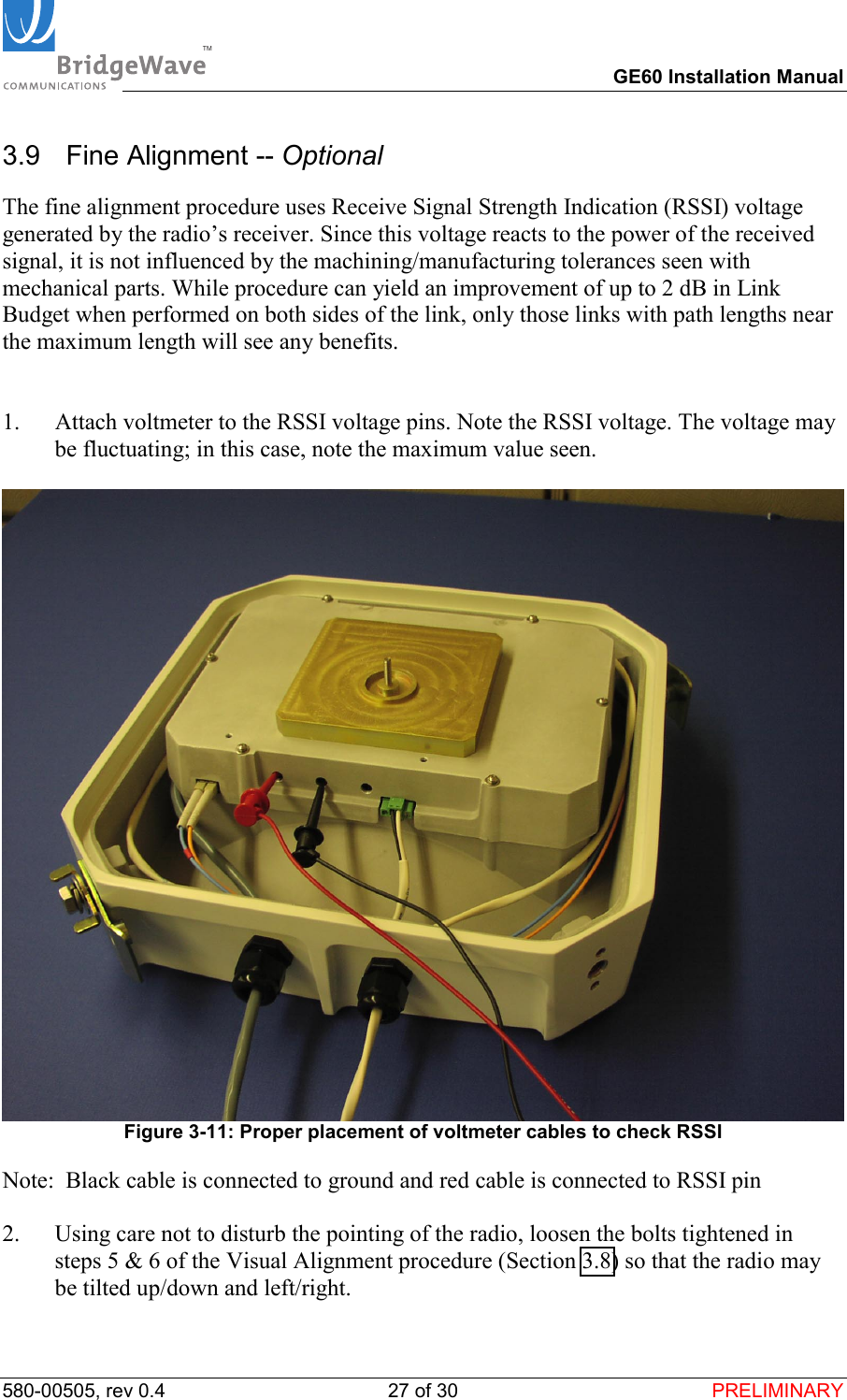
TM        GE60 Installation Manual 580-00505, rev 0.4 27 of 30  PRELIMINARY 3.9   Fine Alignment -- Optional The fine alignment procedure uses Receive Signal Strength Indication (RSSI) voltage generated by the radio’s receiver. Since this voltage reacts to the power of the received signal, it is not influenced by the machining/manufacturing tolerances seen with mechanical parts. While procedure can yield an improvement of up to 2 dB in Link Budget when performed on both sides of the link, only those links with path lengths near the maximum length will see any benefits.   1.  Attach voltmeter to the RSSI voltage pins. Note the RSSI voltage. The voltage may be fluctuating; in this case, note the maximum value seen.    Figure 3-11: Proper placement of voltmeter cables to check RSSI Note:  Black cable is connected to ground and red cable is connected to RSSI pin  2.  Using care not to disturb the pointing of the radio, loosen the bolts tightened in steps 5 & 6 of the Visual Alignment procedure (Section 3.8) so that the radio may be tilted up/down and left/right.
TM        GE60 Installation Manual 580-00505, rev 0.4 28 of 30  PRELIMINARY 3.  Tilt the radio left and right until the maximum reading is achieved on the voltmeter. Tighten the left/right adjustment bolt to prevent movement in this axis.  4.  Tilt the radio up and down until the maximum reading is achieved on the voltmeter. Tighten the up/down adjustment bolts to prevent movement further movement.
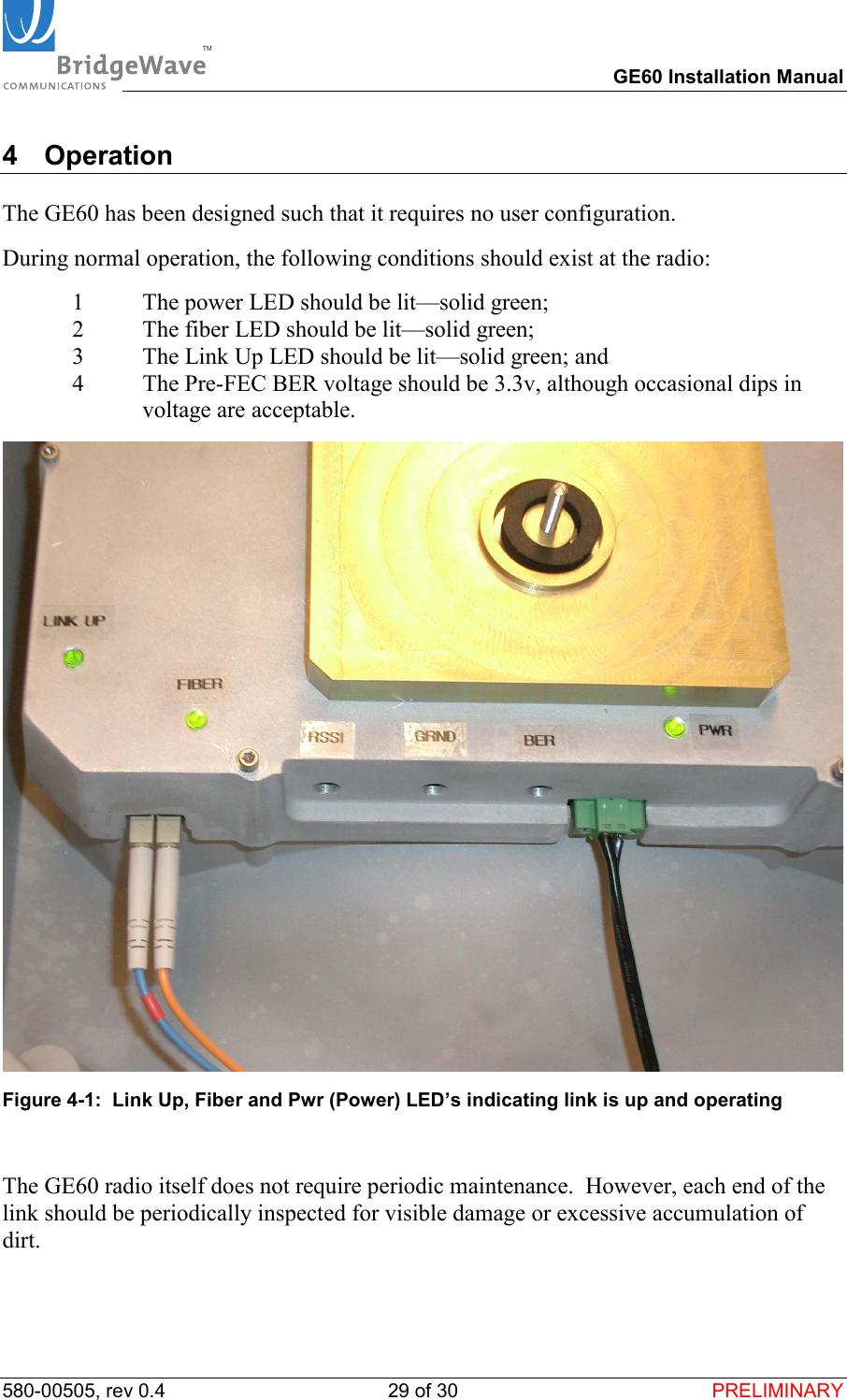
TM        GE60 Installation Manual 580-00505, rev 0.4 29 of 30  PRELIMINARY 4 Operation  The GE60 has been designed such that it requires no user configuration.  During normal operation, the following conditions should exist at the radio: 1  The power LED should be lit—solid green; 2  The fiber LED should be lit—solid green;  3  The Link Up LED should be lit—solid green; and 4  The Pre-FEC BER voltage should be 3.3v, although occasional dips in voltage are acceptable.  Figure 4-1:  Link Up, Fiber and Pwr (Power) LED’s indicating link is up and operating  The GE60 radio itself does not require periodic maintenance.  However, each end of the link should be periodically inspected for visible damage or excessive accumulation of dirt.
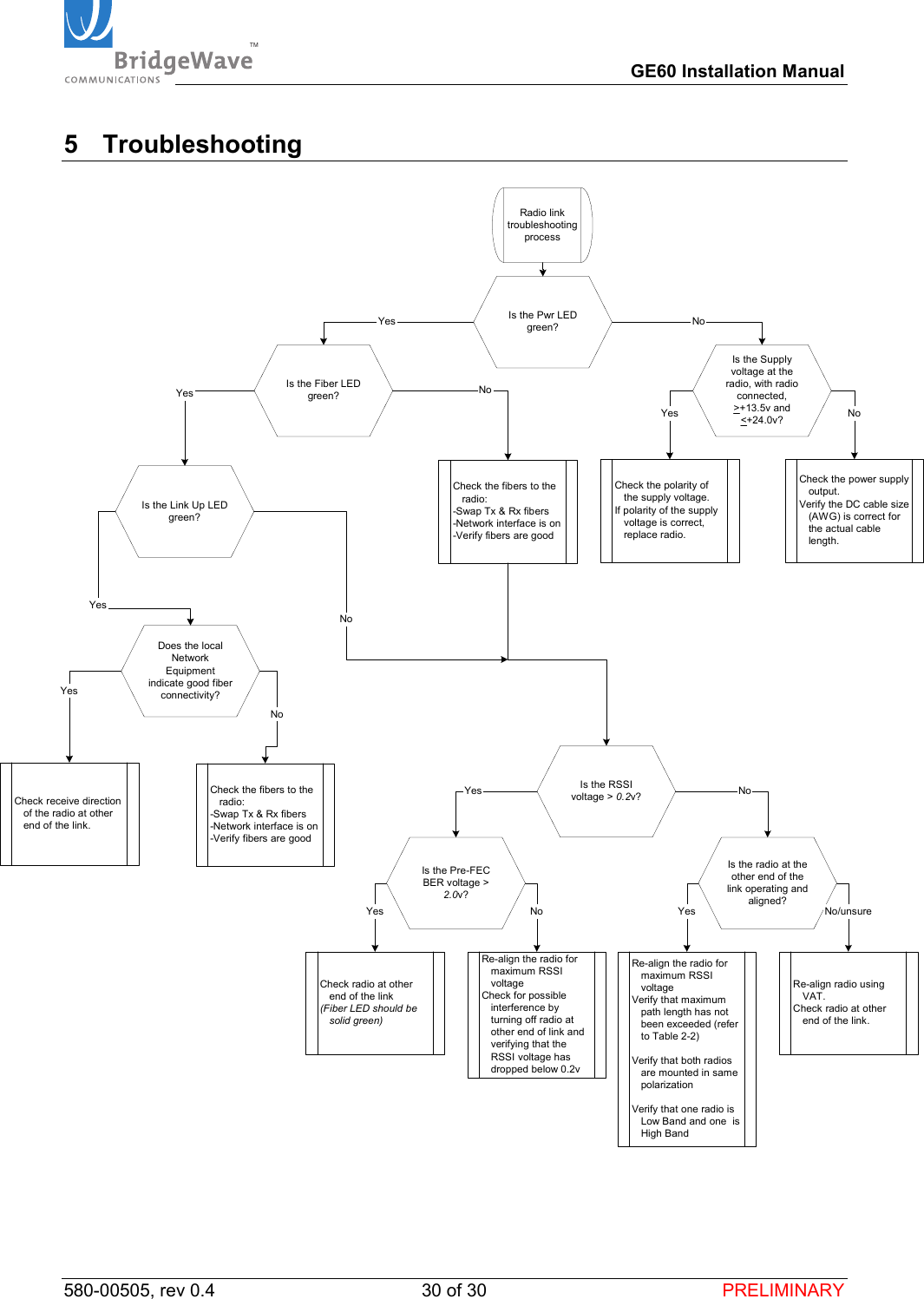
TM        GE60 Installation Manual 580-00505, rev 0.4 30 of 30  PRELIMINARY 5 Troubleshooting  Is the Supplyvoltage at theradio, with radioconnected,>+13.5v and<+24.0v?Is the Pwr LEDgreen?Check the polarity ofthe supply voltage.If polarity of the supplyvoltage is correct,replace radio.NoYesNoRadio linktroubleshootingprocessCheck the power supplyoutput.Verify the DC cable size(AWG) is correct forthe actual cablelength.Is the Fiber LEDgreen?Is the RSSIvoltage > 0.2v?Is the radio at theother end of thelink operating andaligned?YesYesYesYesNoNoNo/unsureCheck the fibers to theradio:-Swap Tx & Rx fibers-Network interface is on-Verify fibers are goodIs the Link Up LEDgreen?Is the Pre-FECBER voltage >2.0v?YesRe-align the radio formaximum RSSIvoltageVerify that maximumpath length has notbeen exceeded (referto Table 2-2)Verify that both radiosare mounted in samepolarizationVerify that one radio isLow Band and one  isHigh BandNoCheck radio at otherend of the link(Fiber LED should besolid green)Check the fibers to theradio:-Swap Tx & Rx fibers-Network interface is on-Verify fibers are goodRe-align radio usingVAT.Check radio at otherend of the link.Does the localNetworkEquipmentindicate good fiberconnectivity?YesCheck receive directionof the radio at otherend of the link.NoRe-align the radio formaximum RSSIvoltageCheck for possibleinterference byturning off radio atother end of link andverifying that theRSSI voltage hasdropped below 0.2vYesNo

Navigation menu