BridgeWave Communications GE60 Microwave Link User Manual Installation Operation Manual

BridgeWave Communications, Inc. Microwave Link Installation Operation Manual

Contents

User Manual 2 of 2
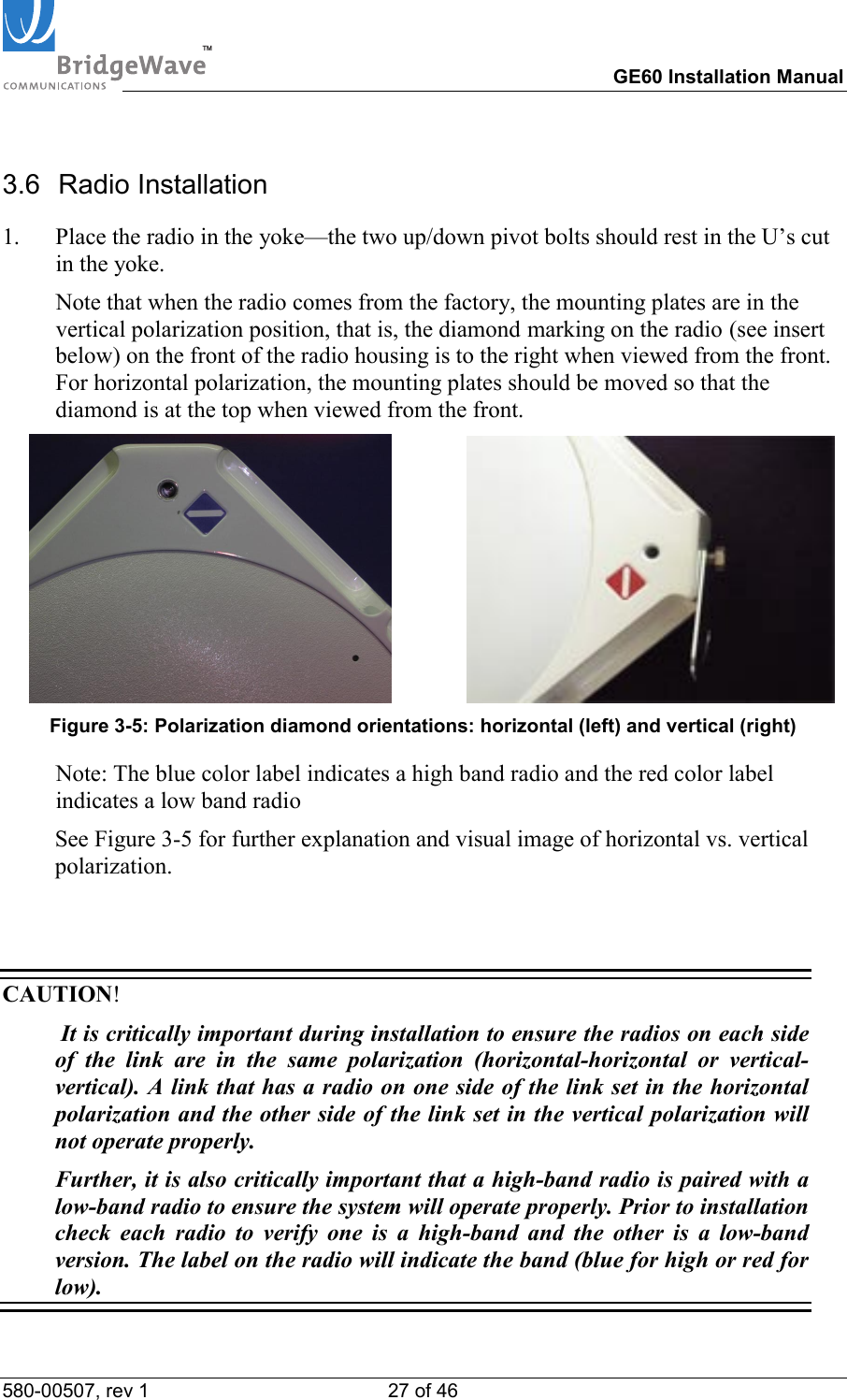
TM        GE60 Installation Manual 580-00507, rev 1 16 of 46   3  Installation of E60 products 3.1   General It is recommended that installation personnel read this section in its entirety prior to installing the BridgeWave System. During a particular phase of installation, the user may refer directly to the applicable subsection. The Installation section is comprised of seven subsections covering the procedures and guidelines for installing the BridgeWave Radio System. Subsections 3 through 3.4 contain information necessary to prepare for the equipment installation. Subsection 3.5 through 3.7 covers equipment installation procedures. Subsection 3.8 and 3.9 contains information necessary for aligning the antennas. 3.2  Equipment Packing & Unpacking The radio system equipment will arrive in two boxes—one box for the low band radio and one box for the high band radio.  Locate the correct box (low band or high band) before beginning installation by checking the label on the outside of the box or on the radio itself.  It is recommended that the shipping cartons and packing materials be retained in the event that it is necessary to return any equipment. Note: Unpacked radios can be identified by the color of their labels. The blue color label indicates a high band radio and the red color label indicates a low band radio. See Figure 3-5 for further details.
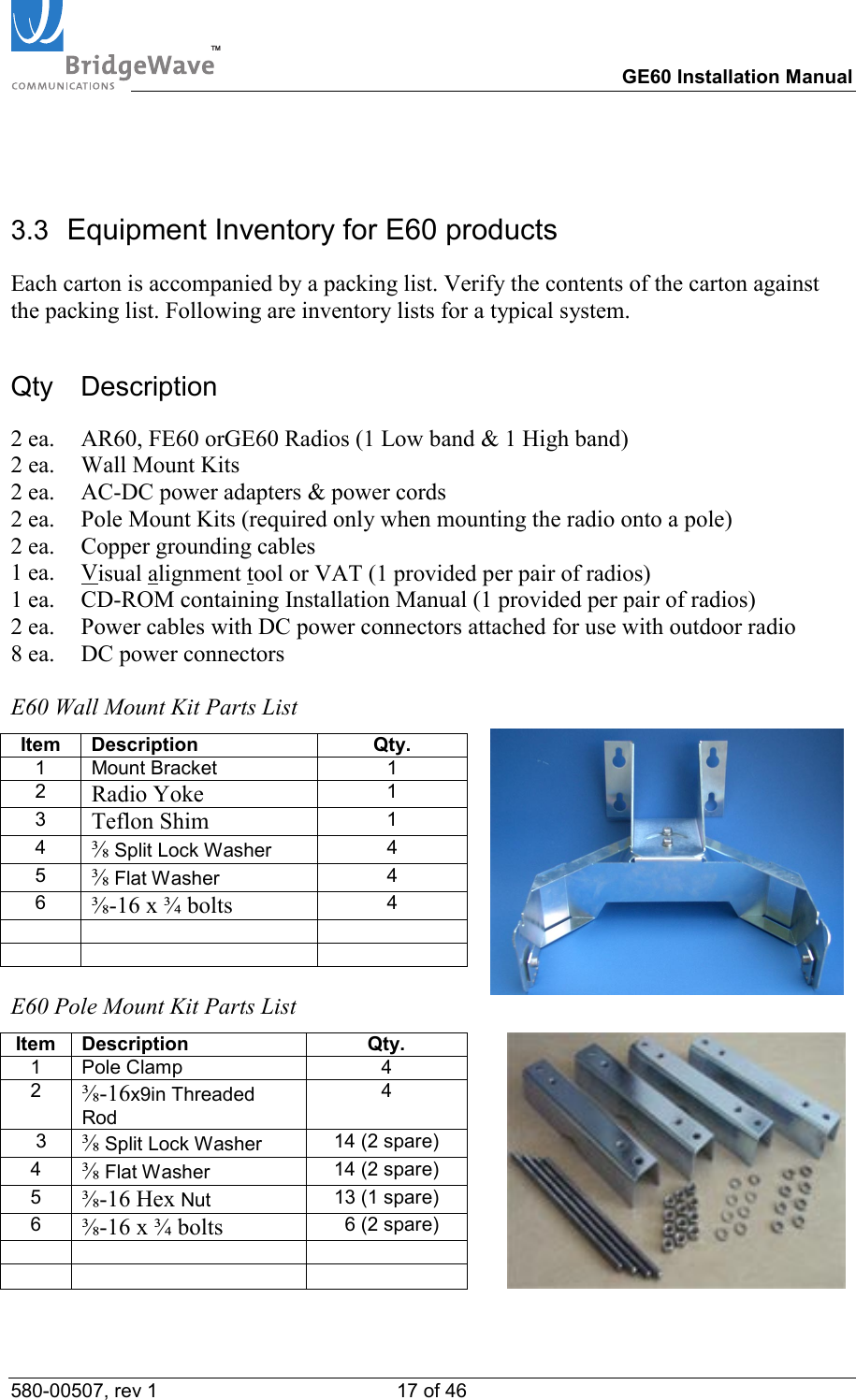
TM        GE60 Installation Manual 580-00507, rev 1 17 of 46    3.3  Equipment Inventory for E60 products Each carton is accompanied by a packing list. Verify the contents of the carton against the packing list. Following are inventory lists for a typical system. Qty Description 2 ea.  AR60, FE60 orGE60 Radios (1 Low band & 1 High band) 2 ea.  Wall Mount Kits 2 ea.  AC-DC power adapters & power cords 2 ea.  Pole Mount Kits (required only when mounting the radio onto a pole) 2 ea.  Copper grounding cables 1 ea.  Visual alignment tool or VAT (1 provided per pair of radios) 1 ea.   CD-ROM containing Installation Manual (1 provided per pair of radios) 2 ea.  Power cables with DC power connectors attached for use with outdoor radio 8 ea.  DC power connectors  E60 Wall Mount Kit Parts List Item Description  Qty. 1 Mount Bracket  1 2  Radio Yoke 1 3  Teflon Shim 1 4  ⅜ Split Lock Washer  4 5  ⅜ Flat Washer  4 6  ⅜-16 x ¾ bolts 4          E60 Pole Mount Kit Parts List Item Description  Qty.   1 Pole Clamp  4   2  ⅜-16x9in Threaded Rod 4    3  ⅜ Split Lock Washer  14 (2 spare)   4  ⅜ Flat Washer  14 (2 spare)   5  ⅜-16 Hex Nut  13 (1 spare)   6  ⅜-16 x ¾ bolts   6 (2 spare)
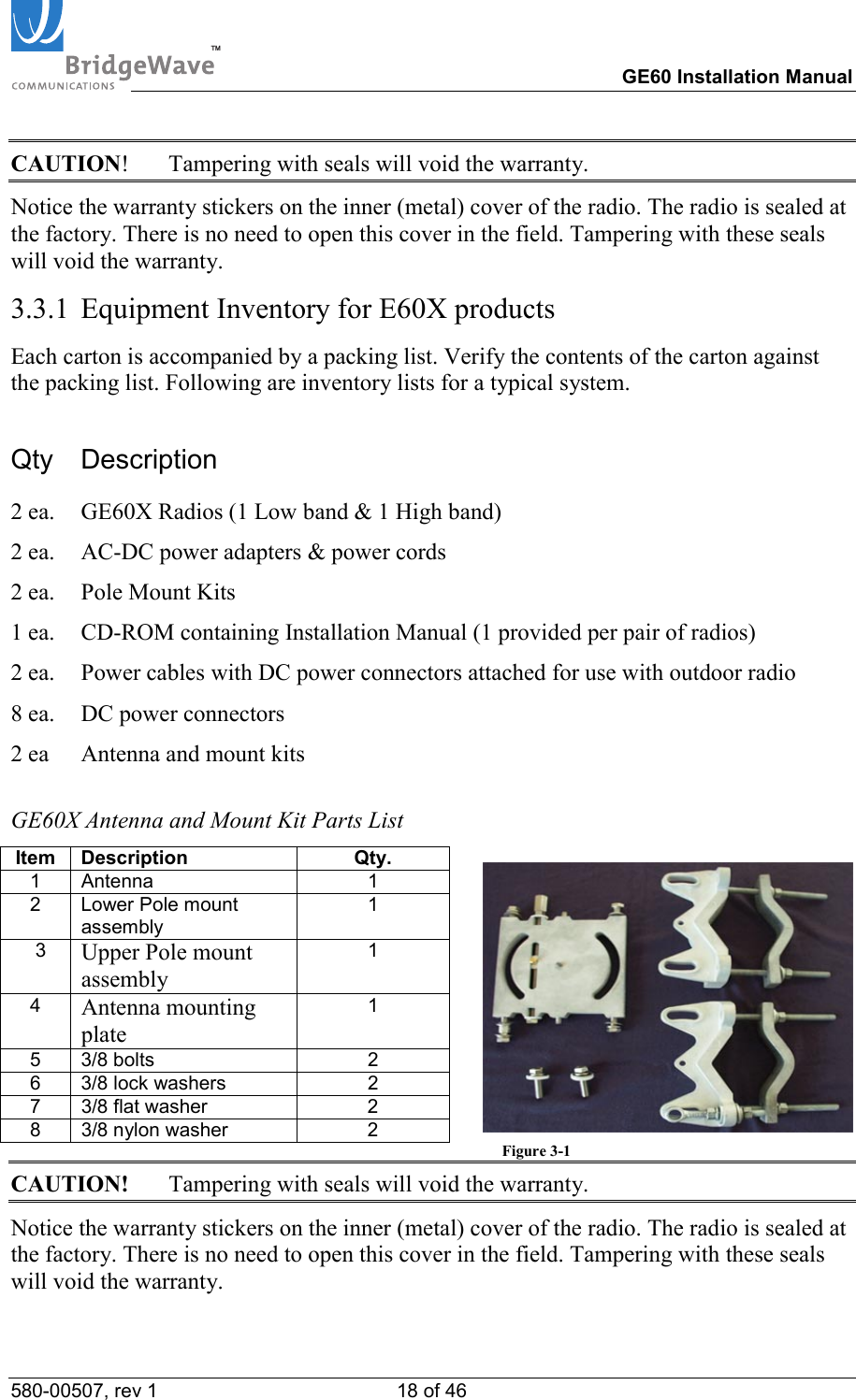
TM        GE60 Installation Manual 580-00507, rev 1 18 of 46   CAUTION!  Tampering with seals will void the warranty. Notice the warranty stickers on the inner (metal) cover of the radio. The radio is sealed at the factory. There is no need to open this cover in the field. Tampering with these seals will void the warranty. 3.3.1  Equipment Inventory for E60X products Each carton is accompanied by a packing list. Verify the contents of the carton against the packing list. Following are inventory lists for a typical system. Qty Description 2 ea.  GE60X Radios (1 Low band & 1 High band) 2 ea.  AC-DC power adapters & power cords 2 ea.  Pole Mount Kits 1 ea.   CD-ROM containing Installation Manual (1 provided per pair of radios) 2 ea.  Power cables with DC power connectors attached for use with outdoor radio 8 ea.  DC power connectors 2 ea  Antenna and mount kits  GE60X Antenna and Mount Kit Parts List Item Description  Qty.   1 Antenna  1   2 Lower Pole mount assembly 1    3  Upper Pole mount assembly 1  4  Antenna mounting plate 1  5 3/8 bolts  2   6 3/8 lock washers  2   7 3/8 flat washer  2   8 3/8 nylon washer  2             Figure 3-1 CAUTION!  Tampering with seals will void the warranty. Notice the warranty stickers on the inner (metal) cover of the radio. The radio is sealed at the factory. There is no need to open this cover in the field. Tampering with these seals will void the warranty.
TM        GE60 Installation Manual 580-00507, rev 1 19 of 46   3.4 Installation Tools The following tools, not provided by BridgeWave, should be used for installing the radio:   Screwdriver, slotted 0.1 inch (2.5mm) wide   Open-end wrench 11/32 (9mm)   Open-end wrench 9/16 (14mm), 2 ea.    Open-end wrench ½ inch (13mm)   Ratchet with 6 inch (15cm) extension and 9/16 inch (14mm) deep socket   Wire stripper/cutter/crimp tool  (10-16 gauge)  Electrical tape   Fish tape for pulling cable   Cable tie wraps   Hand-held DVM (digital voltmeter) with standard banana plug receptacles
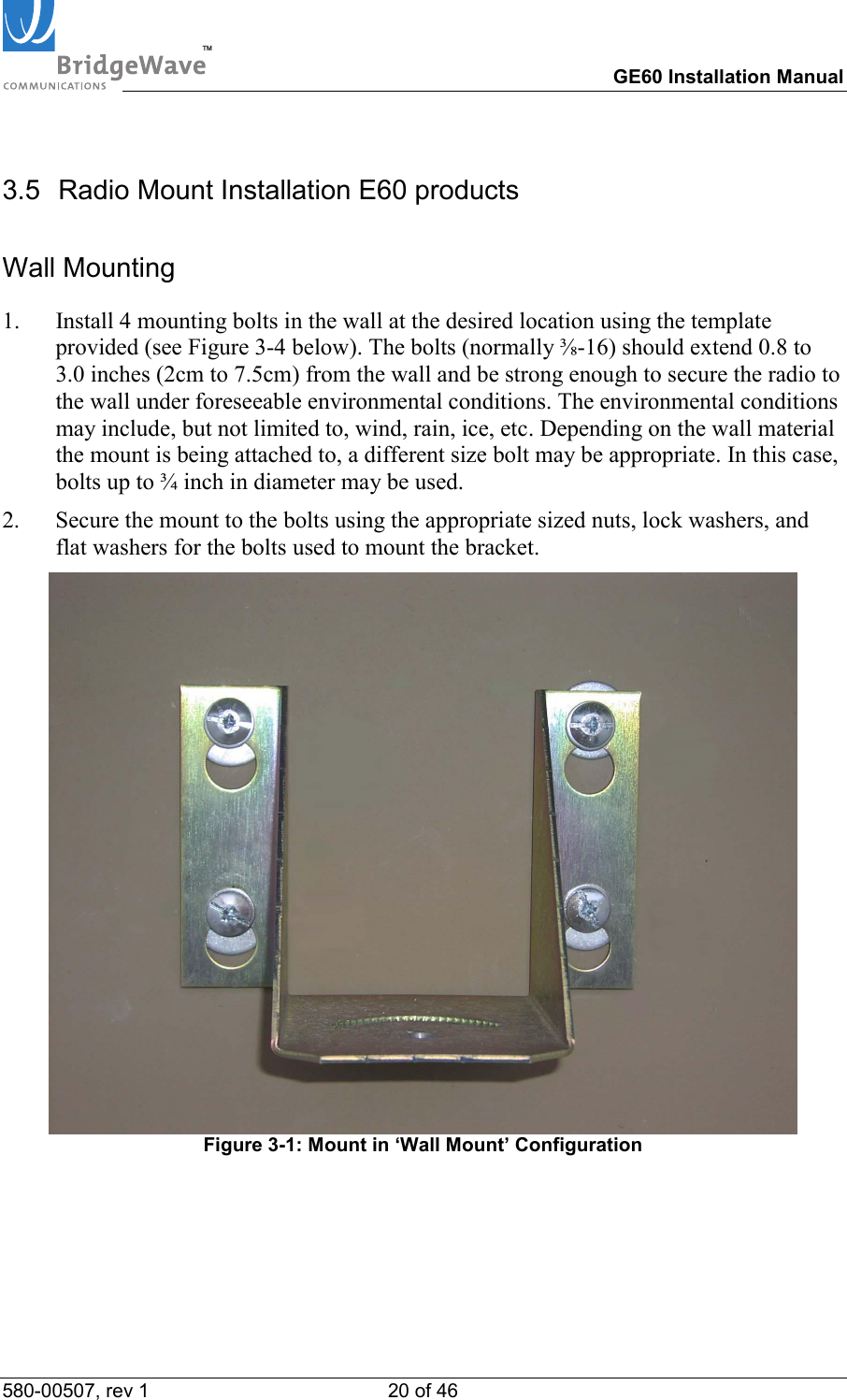
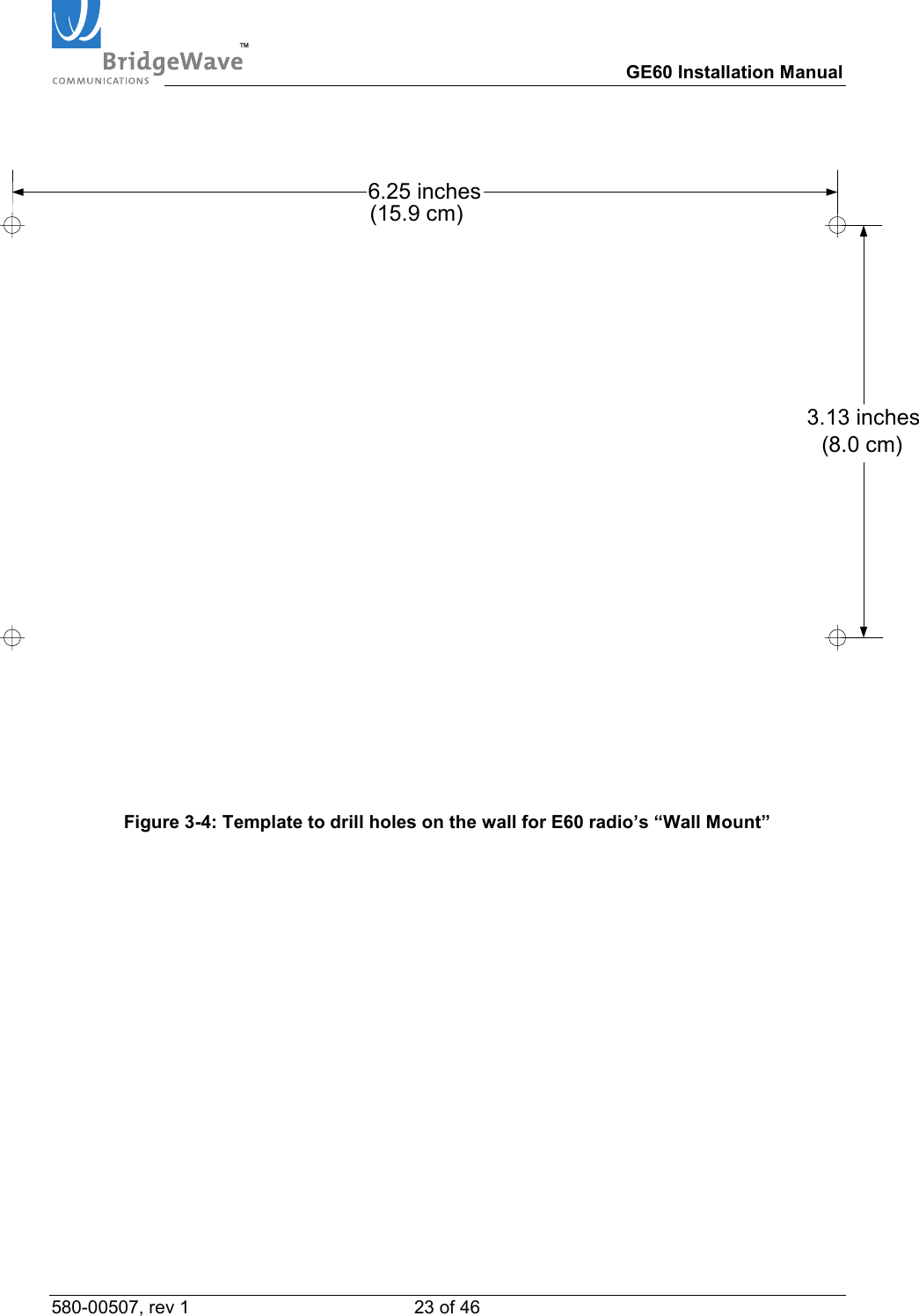
TM        GE60 Installation Manual 580-00507, rev 1 20 of 46   3.5  Radio Mount Installation E60 products Wall Mounting 1.  Install 4 mounting bolts in the wall at the desired location using the template provided (see Figure 3-4 below). The bolts (normally ⅜-16) should extend 0.8 to 3.0 inches (2cm to 7.5cm) from the wall and be strong enough to secure the radio to the wall under foreseeable environmental conditions. The environmental conditions may include, but not limited to, wind, rain, ice, etc. Depending on the wall material the mount is being attached to, a different size bolt may be appropriate. In this case, bolts up to ¾ inch in diameter may be used. 2.  Secure the mount to the bolts using the appropriate sized nuts, lock washers, and flat washers for the bolts used to mount the bracket.   Figure 3-1: Mount in ‘Wall Mount’ Configuration
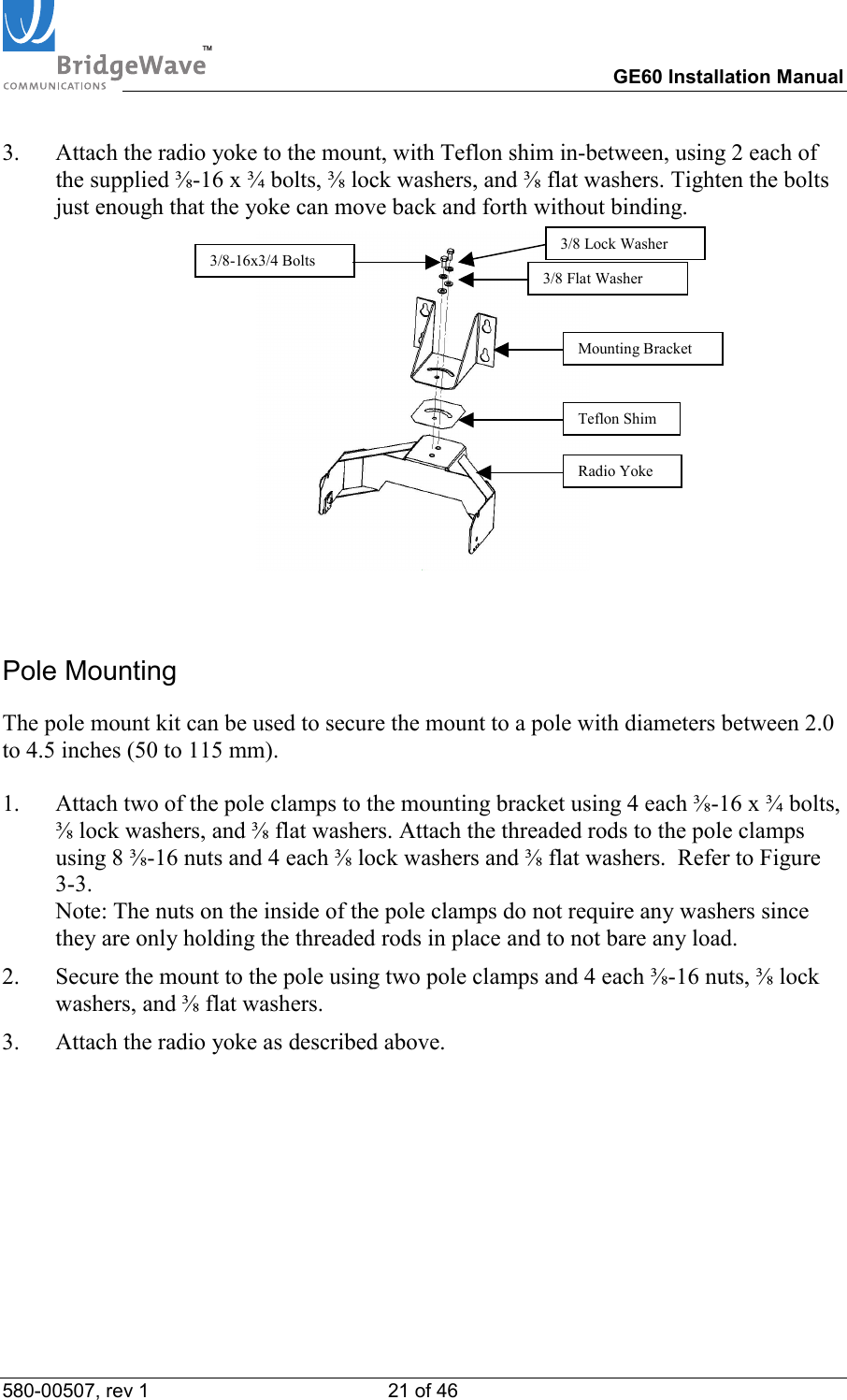
TM        GE60 Installation Manual 580-00507, rev 1 21 of 46   3.  Attach the radio yoke to the mount, with Teflon shim in-between, using 2 each of the supplied ⅜-16 x ¾ bolts, ⅜ lock washers, and ⅜ flat washers. Tighten the bolts just enough that the yoke can move back and forth without binding.   Pole Mounting The pole mount kit can be used to secure the mount to a pole with diameters between 2.0 to 4.5 inches (50 to 115 mm).  1.  Attach two of the pole clamps to the mounting bracket using 4 each ⅜-16 x ¾ bolts, ⅜ lock washers, and ⅜ flat washers. Attach the threaded rods to the pole clamps using 8 ⅜-16 nuts and 4 each ⅜ lock washers and ⅜ flat washers.  Refer to Figure 3-3.  Note: The nuts on the inside of the pole clamps do not require any washers since they are only holding the threaded rods in place and to not bare any load. 2.  Secure the mount to the pole using two pole clamps and 4 each ⅜-16 nuts, ⅜ lock washers, and ⅜ flat washers. 3.  Attach the radio yoke as described above. 3/8-16x3/4 BoltsMounting Bracket Teflon ShimRadio Yoke3/8 Lock Washer 3/8 Flat Washer
TM        GE60 Installation Manual 580-00507, rev 1 22 of 46     Figure 3-2: Mount with Radio Yoke in ‘Pole Mount’ Configuration   Figure 3-3: Side view of mount in Pole Mount Configuration
TM        GE60 Installation Manual 580-00507, rev 1 23 of 46    3.13 inches6.25 inches(15.9 cm)(8.0 cm)   Figure 3-4: Template to drill holes on the wall for E60 radio’s “Wall Mount”
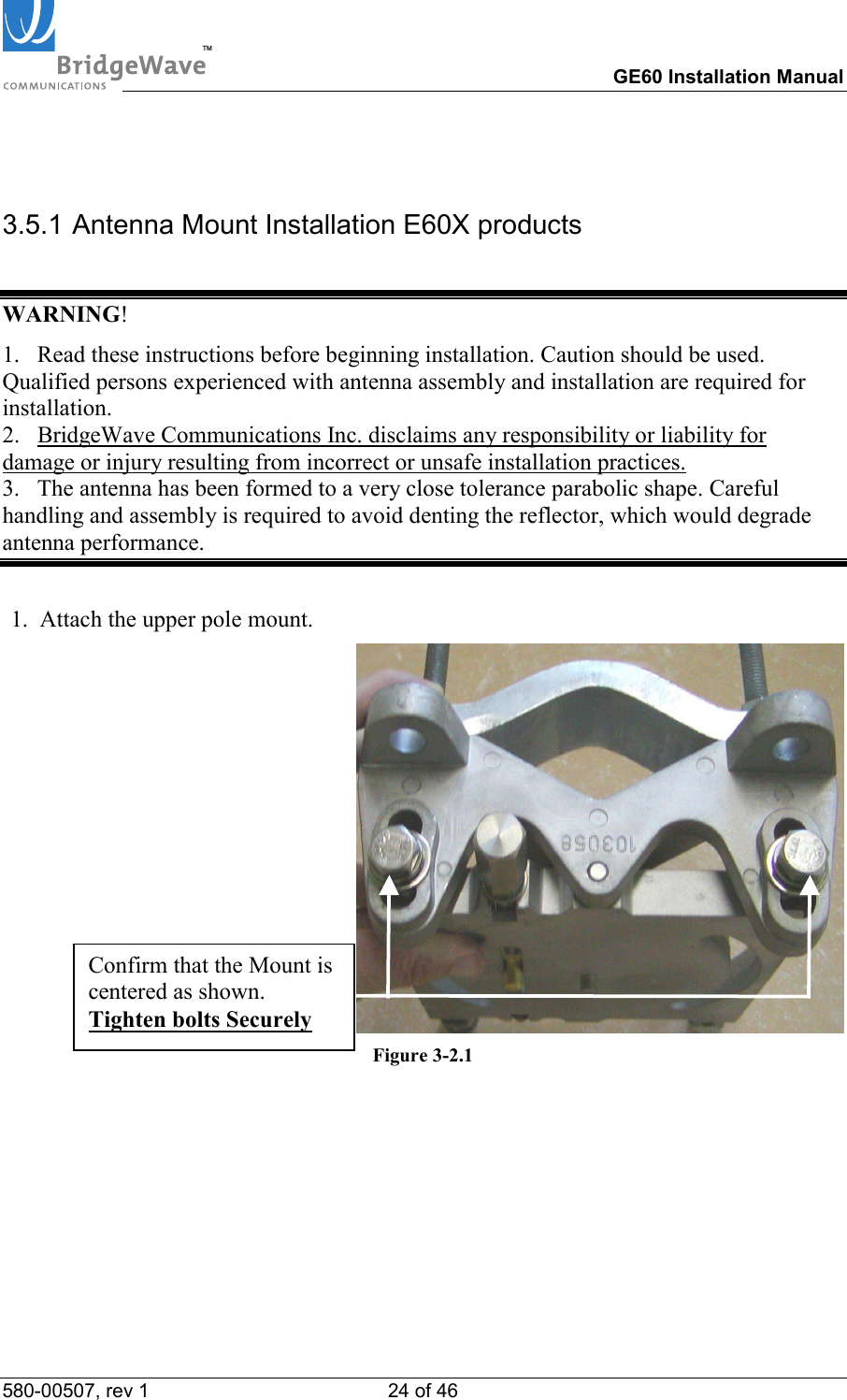
TM        GE60 Installation Manual 580-00507, rev 1 24 of 46    3.5.1 Antenna Mount Installation E60X products  WARNING! 1.   Read these instructions before beginning installation. Caution should be used. Qualified persons experienced with antenna assembly and installation are required for installation. 2.   BridgeWave Communications Inc. disclaims any responsibility or liability for damage or injury resulting from incorrect or unsafe installation practices. 3.   The antenna has been formed to a very close tolerance parabolic shape. Careful handling and assembly is required to avoid denting the reflector, which would degrade antenna performance.  1.  Attach the upper pole mount. Figure 3-2.1  Confirm that the Mount is centered as shown. Tighten bolts Securely
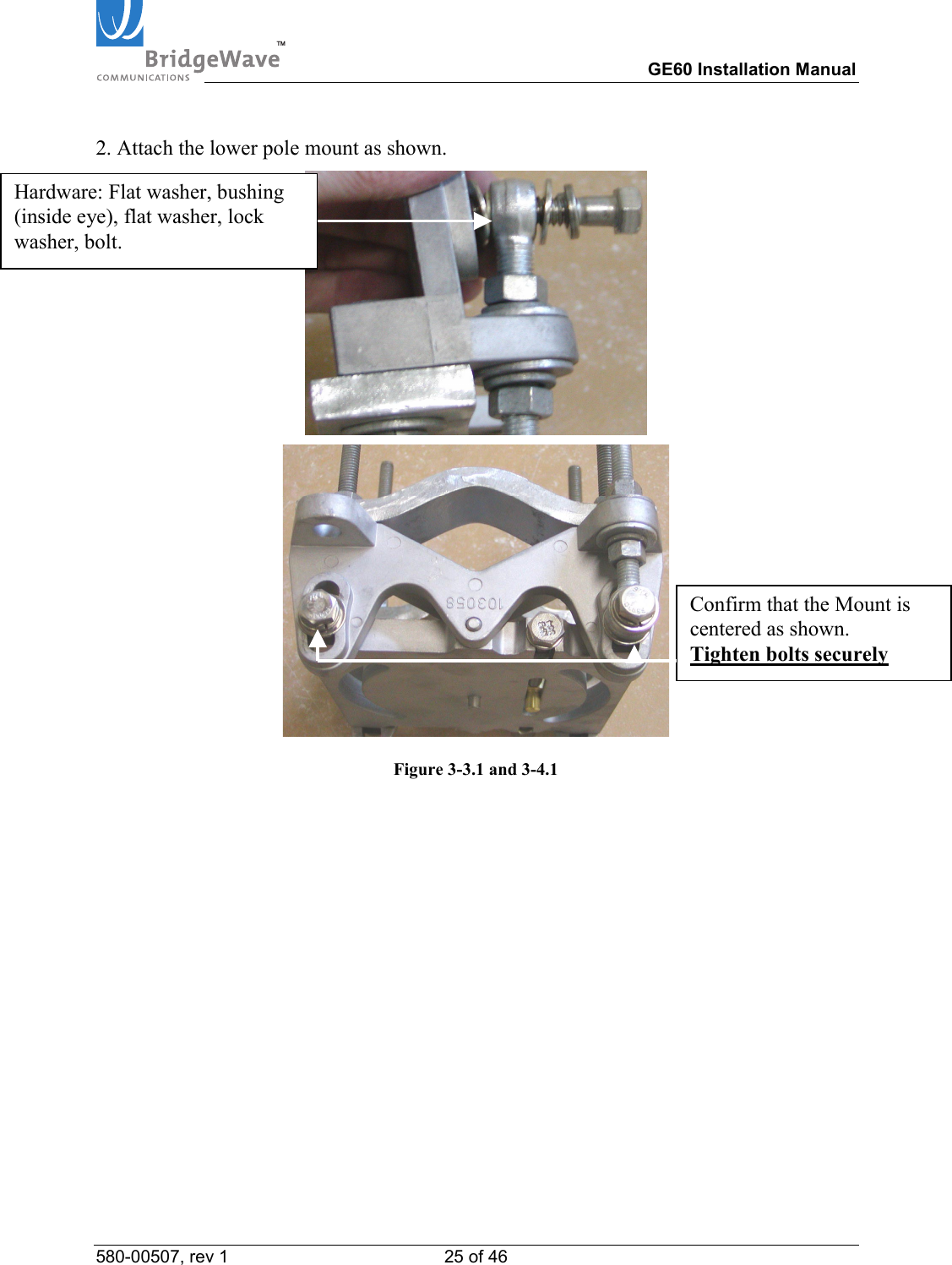
TM        GE60 Installation Manual 580-00507, rev 1 25 of 46   2. Attach the lower pole mount as shown.    Figure 3-3.1 and 3-4.1 Hardware: Flat washer, bushing (inside eye), flat washer, lock washer, bolt. Confirm that the Mount is centered as shown. Tighten bolts securely
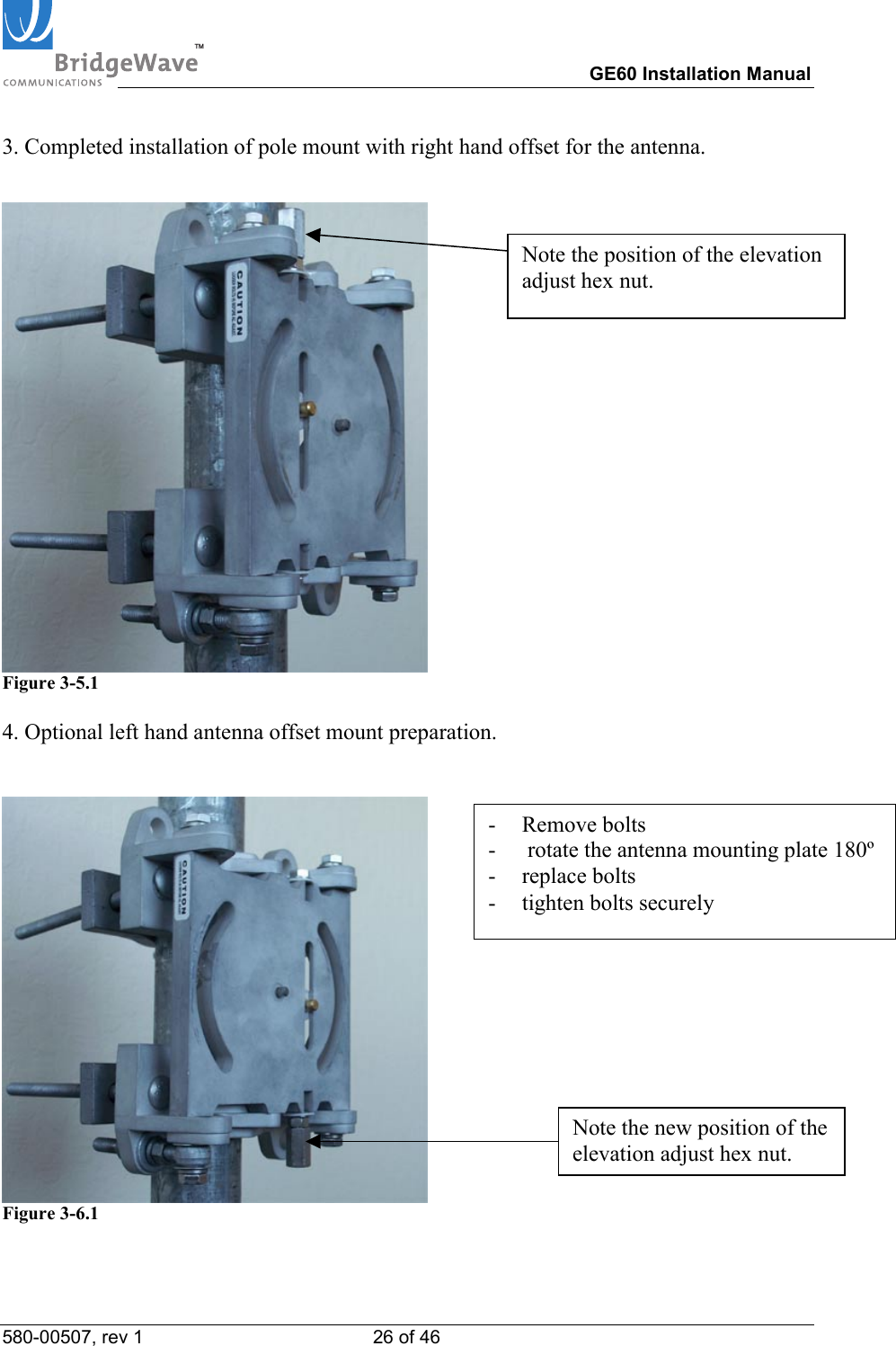
TM        GE60 Installation Manual 580-00507, rev 1 26 of 46   3. Completed installation of pole mount with right hand offset for the antenna.   Figure 3-5.1  4. Optional left hand antenna offset mount preparation.    Figure 3-6.1  Note the position of the elevation adjust hex nut. - Remove bolts -   rotate the antenna mounting plate 180º- replace bolts -  tighten bolts securely Note the new position of the elevation adjust hex nut.
TM        GE60 Installation Manual 580-00507, rev 1 27 of 46   3.6 Radio Installation 1.  Place the radio in the yoke—the two up/down pivot bolts should rest in the U’s cut in the yoke.    Note that when the radio comes from the factory, the mounting plates are in the vertical polarization position, that is, the diamond marking on the radio (see insert below) on the front of the radio housing is to the right when viewed from the front. For horizontal polarization, the mounting plates should be moved so that the diamond is at the top when viewed from the front.                    Figure 3-5: Polarization diamond orientations: horizontal (left) and vertical (right)   Note: The blue color label indicates a high band radio and the red color label indicates a low band radio   See Figure 3-5 for further explanation and visual image of horizontal vs. vertical polarization.     CAUTION!   It is critically important during installation to ensure the radios on each side of the link are in the same polarization (horizontal-horizontal or vertical-vertical). A link that has a radio on one side of the link set in the horizontal polarization and the other side of the link set in the vertical polarization will not operate properly.   Further, it is also critically important that a high-band radio is paired with a low-band radio to ensure the system will operate properly. Prior to installation check each radio to verify one is a high-band and the other is a low-band version. The label on the radio will indicate the band (blue for high or red for low).
TM        GE60 Installation Manual 580-00507, rev 1 28 of 46   2.  Once the radio has been placed in the yoke mount, insert the bolt in the lower portion of the yoke to secure the radio to the yoke. Tighten both the pivot bolts and the lower yoke bolts enough such that the radio is secured in the mount but is still able to be moved back and forth easily.    Figure 3-6: Detail of Radio in Yoke Mount and the Up/Down Pivot Bolt.  Note that the lower bolt required to secure the radio to the mount has not yet been inserted in the picture above. Note: Use both flat washer & split lock washer on lower yoke bolt
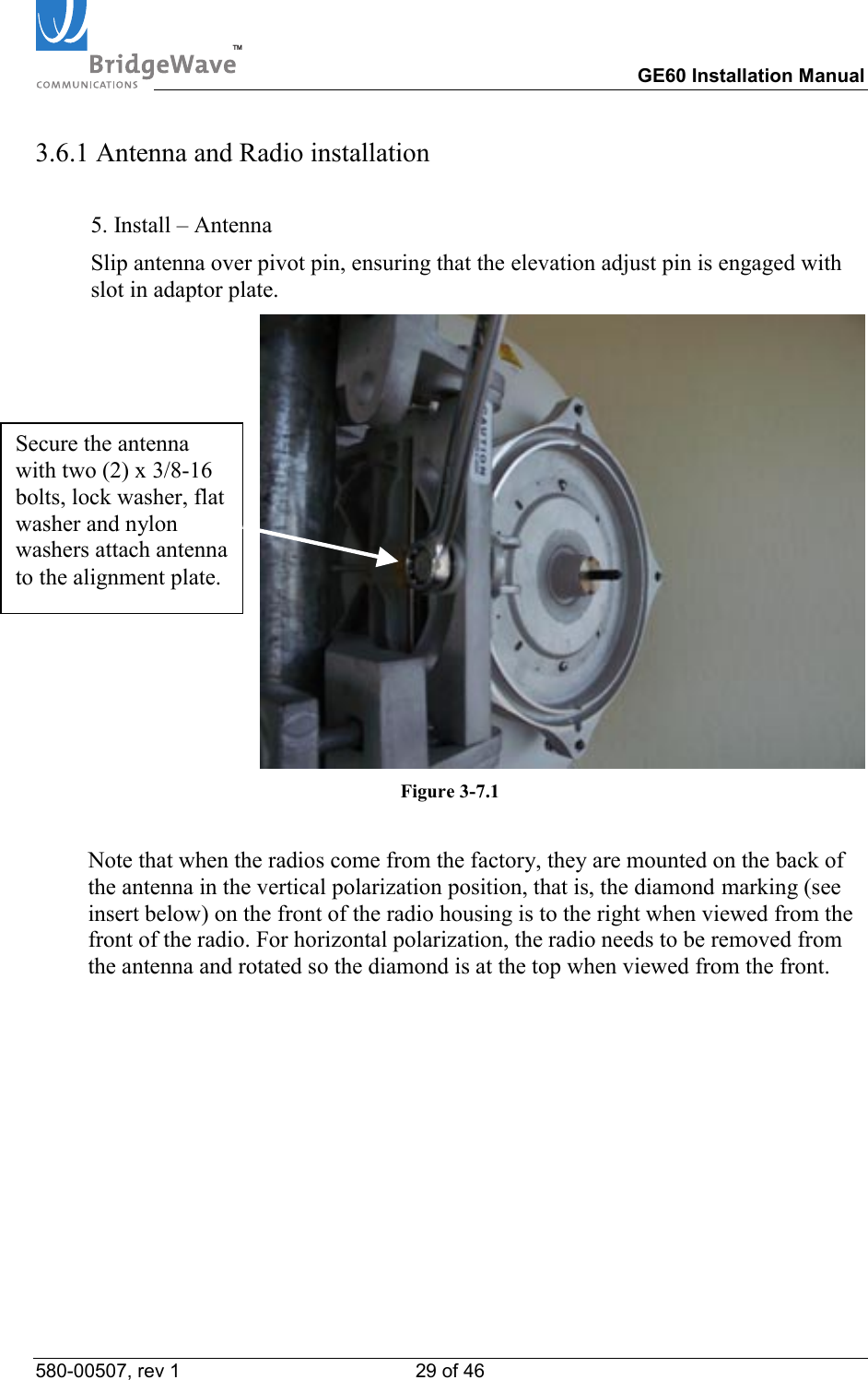
TM        GE60 Installation Manual 580-00507, rev 1 29 of 46   3.6.1 Antenna and Radio installation  5. Install – Antenna Slip antenna over pivot pin, ensuring that the elevation adjust pin is engaged with slot in adaptor plate.  Figure 3-7.1    Note that when the radios come from the factory, they are mounted on the back of the antenna in the vertical polarization position, that is, the diamond marking (see insert below) on the front of the radio housing is to the right when viewed from the front of the radio. For horizontal polarization, the radio needs to be removed from the antenna and rotated so the diamond is at the top when viewed from the front. Secure the antenna with two (2) x 3/8-16 bolts, lock washer, flat washer and nylon washers attach antenna to the alignment plate.
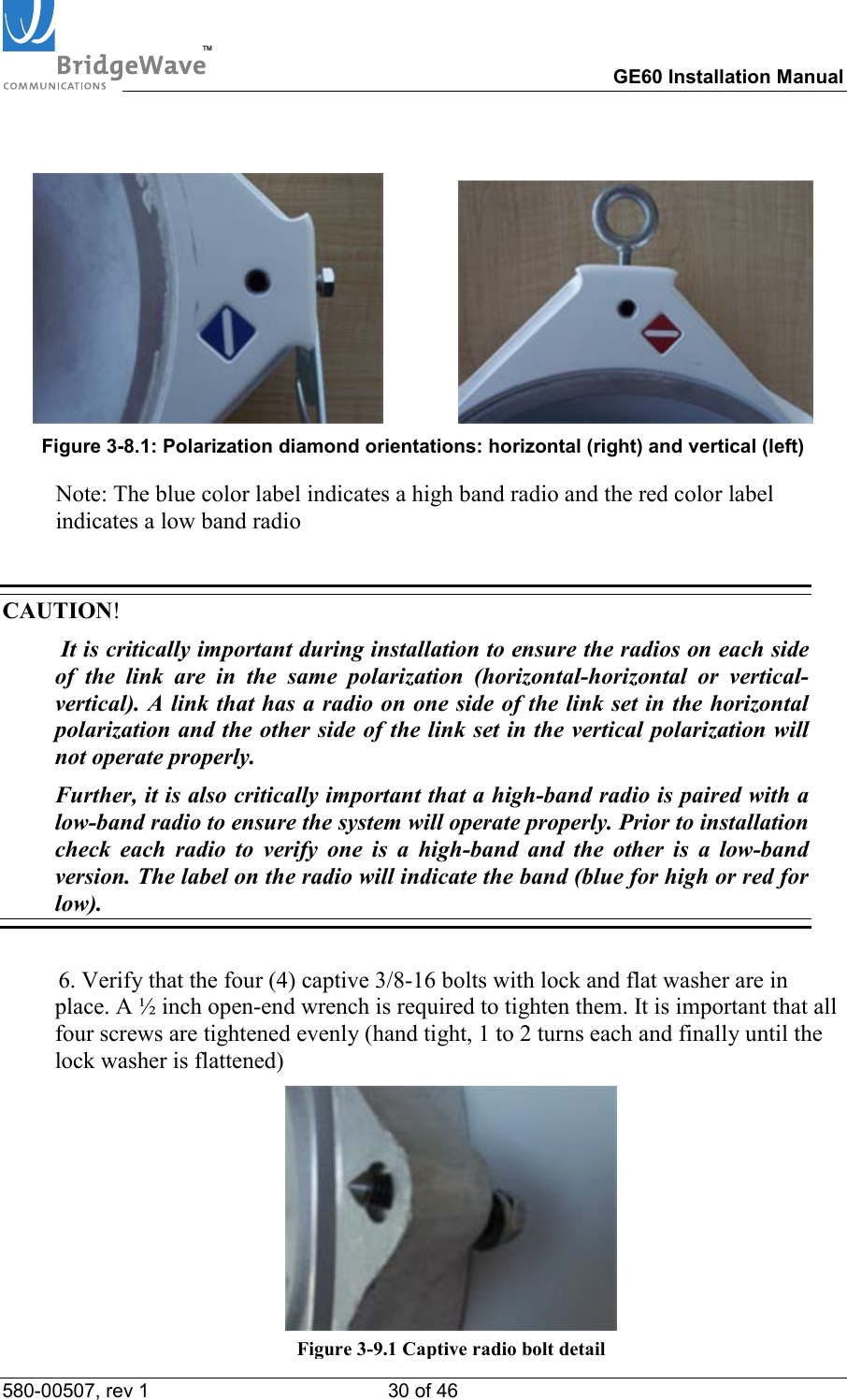
TM        GE60 Installation Manual 580-00507, rev 1 30 of 46                   Figure 3-8.1: Polarization diamond orientations: horizontal (right) and vertical (left)   Note: The blue color label indicates a high band radio and the red color label indicates a low band radio  CAUTION!   It is critically important during installation to ensure the radios on each side of the link are in the same polarization (horizontal-horizontal or vertical-vertical). A link that has a radio on one side of the link set in the horizontal polarization and the other side of the link set in the vertical polarization will not operate properly.   Further, it is also critically important that a high-band radio is paired with a low-band radio to ensure the system will operate properly. Prior to installation check each radio to verify one is a high-band and the other is a low-band version. The label on the radio will indicate the band (blue for high or red for low).  6. Verify that the four (4) captive 3/8-16 bolts with lock and flat washer are in place. A ½ inch open-end wrench is required to tighten them. It is important that all four screws are tightened evenly (hand tight, 1 to 2 turns each and finally until the lock washer is flattened)  Figure 3-9.1 Captive radio bolt detail
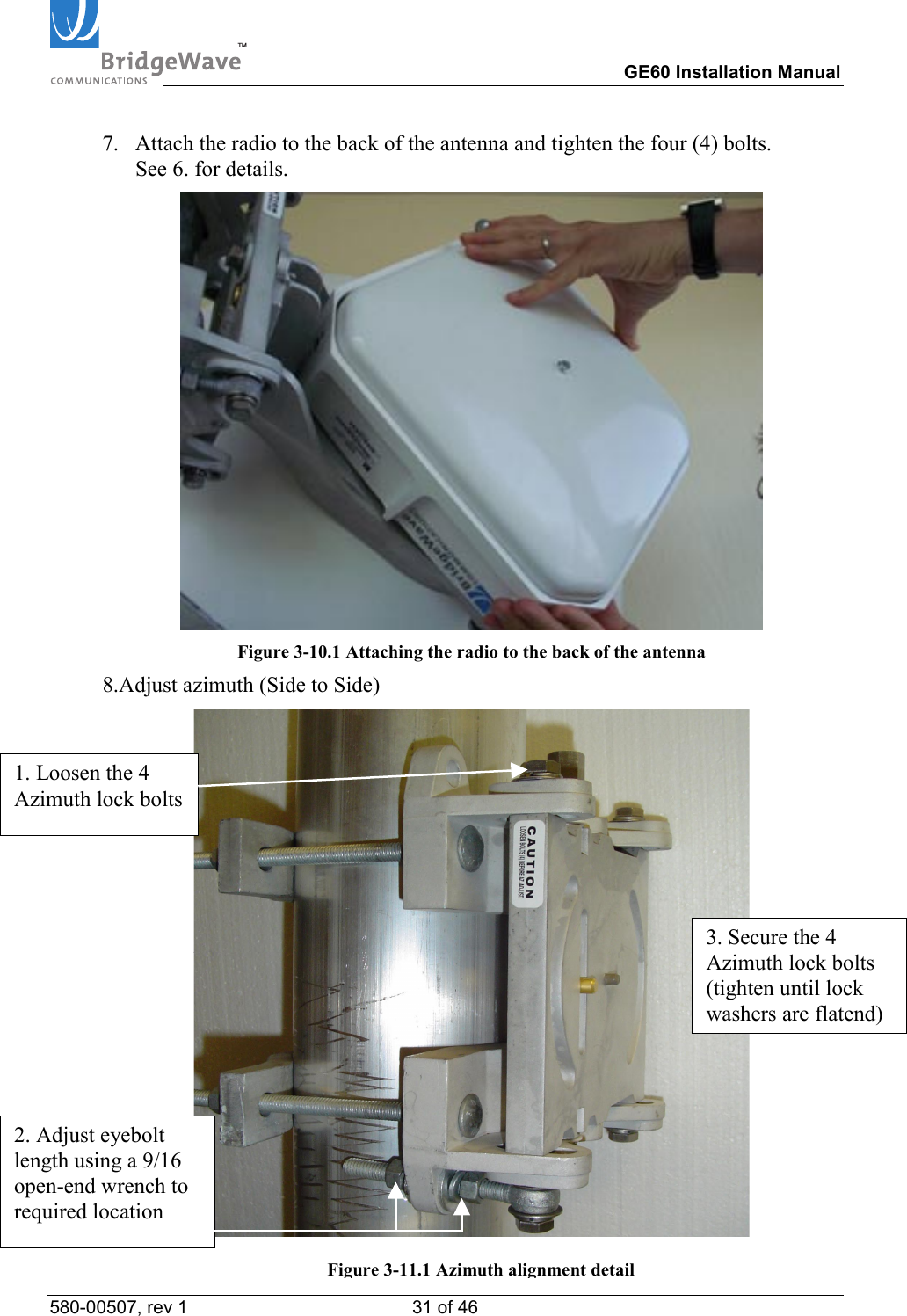
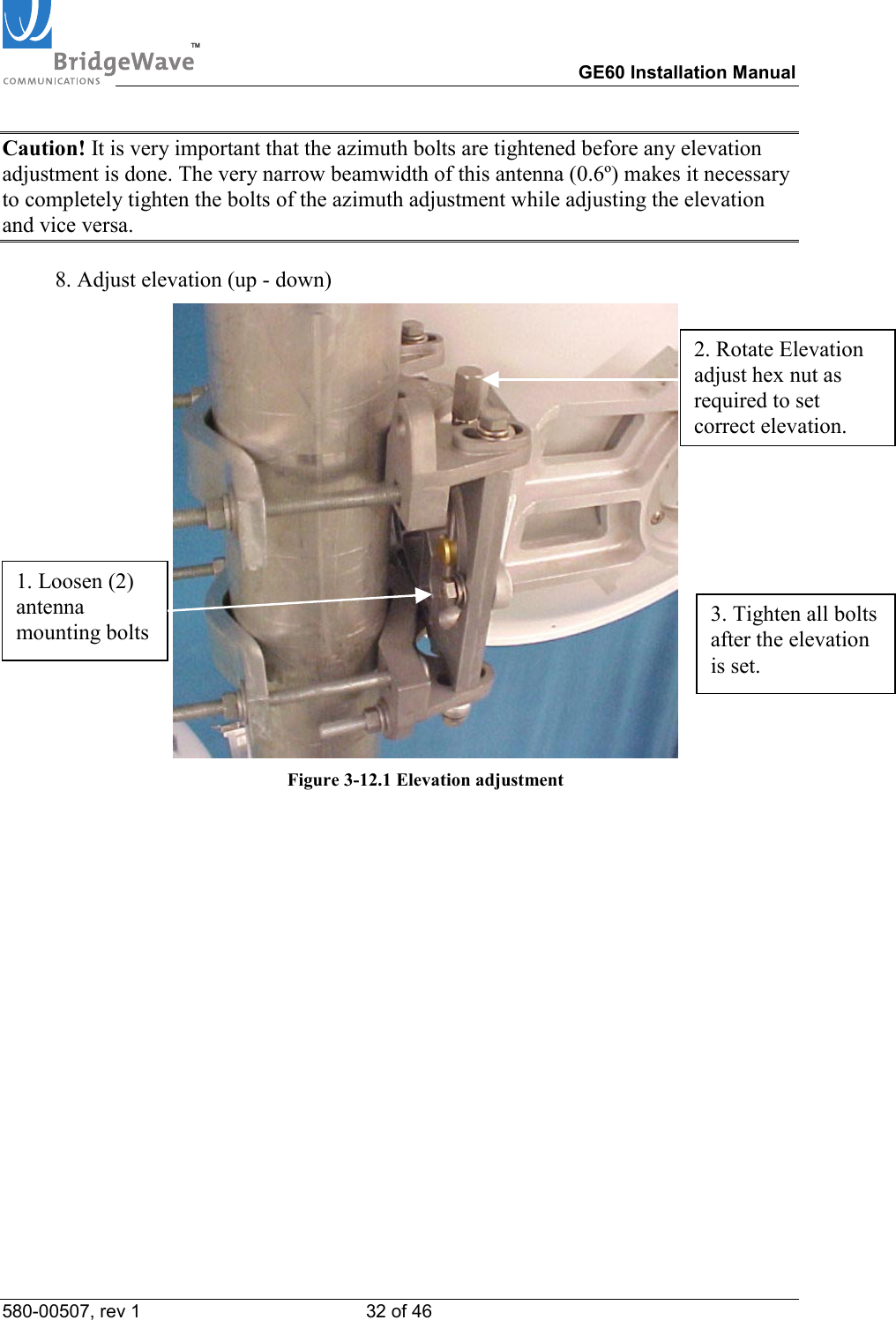
TM        GE60 Installation Manual 580-00507, rev 1 31 of 46   7.  Attach the radio to the back of the antenna and tighten the four (4) bolts. See 6. for details.  Figure 3-10.1 Attaching the radio to the back of the antenna 8.Adjust azimuth (Side to Side)  1. Loosen the 4 Azimuth lock bolts 2. Adjust eyebolt length using a 9/16 open-end wrench to required location 3. Secure the 4 Azimuth lock bolts (tighten until lock washers are flatend)Figure 3-11.1 Azimuth alignment detail
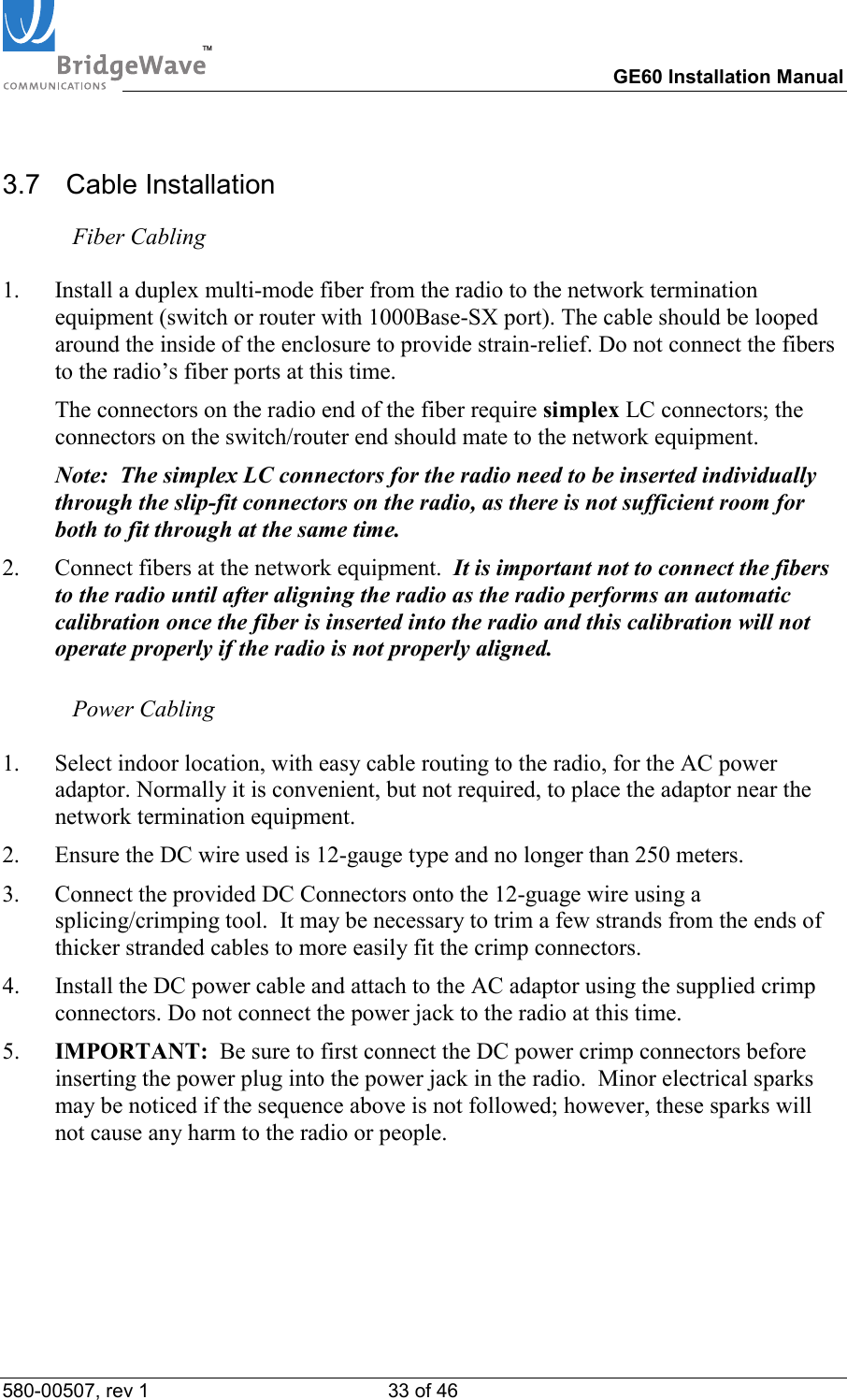
TM        GE60 Installation Manual 580-00507, rev 1 32 of 46   Caution! It is very important that the azimuth bolts are tightened before any elevation adjustment is done. The very narrow beamwidth of this antenna (0.6º) makes it necessary to completely tighten the bolts of the azimuth adjustment while adjusting the elevation and vice versa.  8. Adjust elevation (up - down)  Figure 3-12.1 Elevation adjustment  1. Loosen (2) antenna mounting bolts 2. Rotate Elevation adjust hex nut as required to set correct elevation. 3. Tighten all bolts after the elevation is set.
TM        GE60 Installation Manual 580-00507, rev 1 33 of 46   3.7  Cable Installation  Fiber Cabling  1.  Install a duplex multi-mode fiber from the radio to the network termination equipment (switch or router with 1000Base-SX port). The cable should be looped around the inside of the enclosure to provide strain-relief. Do not connect the fibers to the radio’s fiber ports at this time.   The connectors on the radio end of the fiber require simplex LC connectors; the connectors on the switch/router end should mate to the network equipment.    Note:  The simplex LC connectors for the radio need to be inserted individually through the slip-fit connectors on the radio, as there is not sufficient room for both to fit through at the same time. 2.  Connect fibers at the network equipment.  It is important not to connect the fibers to the radio until after aligning the radio as the radio performs an automatic calibration once the fiber is inserted into the radio and this calibration will not operate properly if the radio is not properly aligned.   Power Cabling  1.  Select indoor location, with easy cable routing to the radio, for the AC power adaptor. Normally it is convenient, but not required, to place the adaptor near the network termination equipment.  2.  Ensure the DC wire used is 12-gauge type and no longer than 250 meters.  3.  Connect the provided DC Connectors onto the 12-guage wire using a splicing/crimping tool.  It may be necessary to trim a few strands from the ends of thicker stranded cables to more easily fit the crimp connectors.  4.  Install the DC power cable and attach to the AC adaptor using the supplied crimp connectors. Do not connect the power jack to the radio at this time. 5.  IMPORTANT:  Be sure to first connect the DC power crimp connectors before inserting the power plug into the power jack in the radio.  Minor electrical sparks may be noticed if the sequence above is not followed; however, these sparks will not cause any harm to the radio or people.
TM        GE60 Installation Manual 580-00507, rev 1 34 of 46     Figure 3-7: Front view of fiber and power cable installed on a vertically polarized E60 unit.      Figure 3-8: Inside view of fiber and power cable connected E60 or E60X unit Note: The fiber cable is inserted through the straight through fitting on the left and the power cable is inserted through the fitting on the right.  Both the cables have been looped around the inside of the enclosure to minimize tension on the cables when connected to the radio and to maintain proper bend-radius of the fiber cable.
TM        GE60 Installation Manual 580-00507, rev 1 35 of 46       Ground Cabling  The preferred method for grounding the radio unit is to ground the mast (or wall-mount bracket) to a ground source, since this provides the largest grounding surface contact possible. If this is not possible, then use the following procedure:  1.  Attach the lug of the copper ground cable provided with the radio to one of the two #8 holes at the bottom of the radio using a #8-32 bolt, #8 lock washer and #8 flat washers.   2.  Connect other end of the ground cable to a nearby ground location.
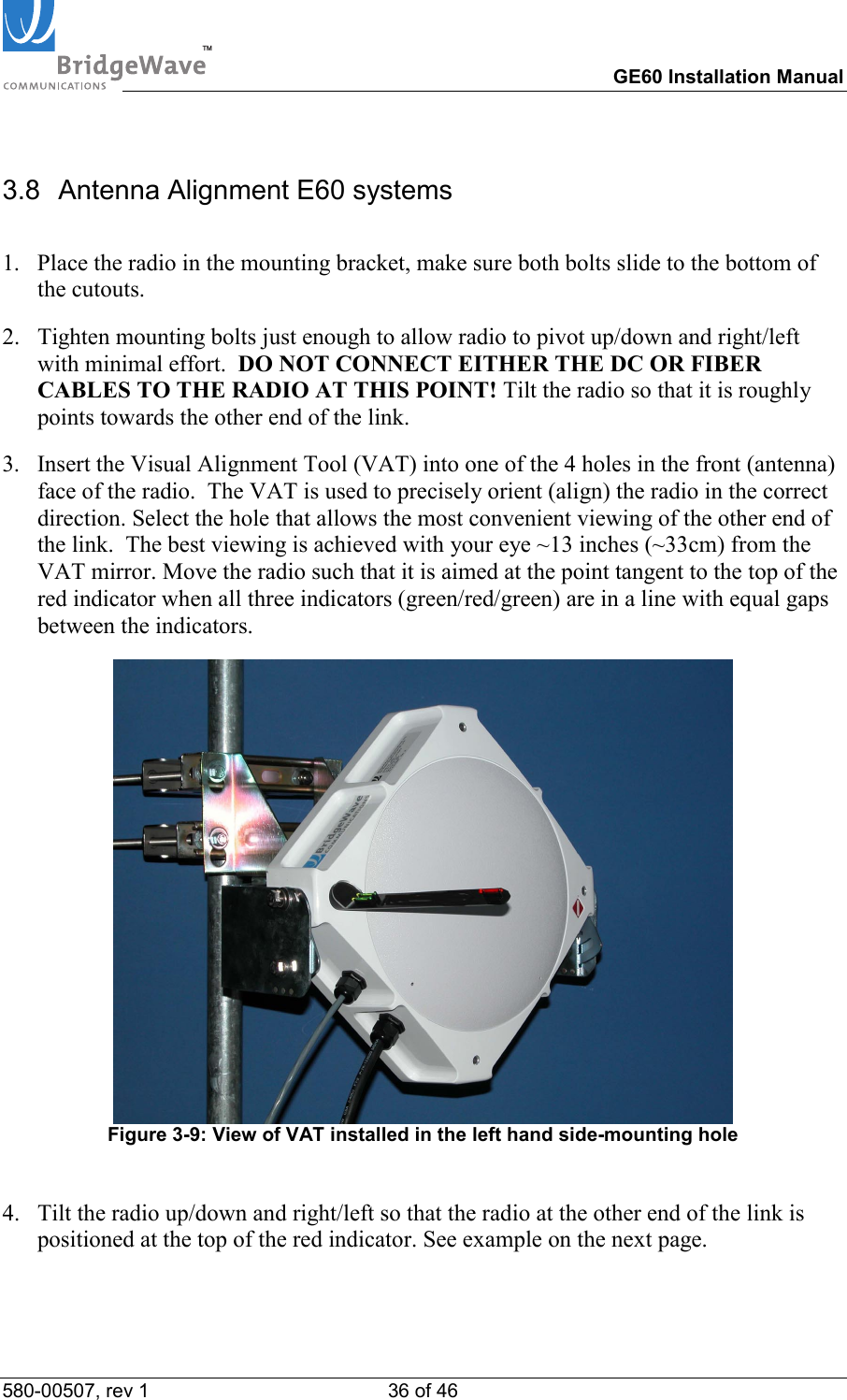
TM        GE60 Installation Manual 580-00507, rev 1 36 of 46   3.8  Antenna Alignment E60 systems  1.  Place the radio in the mounting bracket, make sure both bolts slide to the bottom of the cutouts.  2.  Tighten mounting bolts just enough to allow radio to pivot up/down and right/left with minimal effort.  DO NOT CONNECT EITHER THE DC OR FIBER CABLES TO THE RADIO AT THIS POINT! Tilt the radio so that it is roughly points towards the other end of the link.  3.  Insert the Visual Alignment Tool (VAT) into one of the 4 holes in the front (antenna) face of the radio.  The VAT is used to precisely orient (align) the radio in the correct direction. Select the hole that allows the most convenient viewing of the other end of the link.  The best viewing is achieved with your eye ~13 inches (~33cm) from the VAT mirror. Move the radio such that it is aimed at the point tangent to the top of the red indicator when all three indicators (green/red/green) are in a line with equal gaps between the indicators.   Figure 3-9: View of VAT installed in the left hand side-mounting hole   4.  Tilt the radio up/down and right/left so that the radio at the other end of the link is positioned at the top of the red indicator. See example on the next page.
TM        GE60 Installation Manual 580-00507, rev 1 37 of 46   Radio at far end of linkThe alignment aids need to be in a straight line.Target, other radio, is placed at top of middle aid.Right   Radio at far end of linkAiming Too lowWrong  5.  Ensure fiber cables are still disconnected!    6.  Connect DC power to the radio.  7.  Verify that the Power LED is lit.  If the Power LED is not lit, use voltmeter to verify  correct voltage and polarity at radio. To reverse the power polarity, unplug the  power jack and swap the crimp connectors for the two conductors.  8.  Repeat steps 1 through 7 on other side of the link.  9.  Verify Link Up LED’s are lit on both radios.  10. Slightly rotate each radio up/down and left/right to find the maximum RSL voltage reading. [If it was not possible to use the VAT to visually align the radios, then the radios must be rotated at least ten degrees on each side of the visually-perceived alignment center to ensure that the true maximum RSL voltage is found; note that the width of the center beam is only 1.4 degrees and the first side-lobe beam is only 2.5 degrees off from center.] Set the radio in the position that results in the highest RSL voltage reading. See Section 3.9 to determine the proper use of the supplied test cable in order to read the RSL voltage. Note: Verify that the RSL voltage falls within the expected range based on the graph in Appendix A.
TM        GE60 Installation Manual 580-00507, rev 1 38 of 46     11. Begin to tighten the mounting bolts.  It is important to tighten the bolts in the following order.  First start with the bolts that control the left/right movement of the radio.  These are the bolts on the yoke portion of the mount behind the radio.  Start by tightening the bolt closest to the pole or wall.  Once this is tightened, move to the bolt directly in front of the bolt you just tightened and slowly tighten this bolt.  While tightening the bolts be careful that the radio does not move during the process.  As these bolts are tightened up/down movement of the radio may occur due to the seating of the mounting bracket and radio yoke. Check the RSL voltage reading to ensure it is still at its maximum level, and adjust vertical tilt if required. Next, tighten the bolts that allow the up/down movement of the radio.  First tighten the lower bolts on both sides of the yoke bracket.  Once the lower bolts are tightened on both sides of the radio, tighten the upper bolts.  12. Connect the fiber cable to one of the radios at a time. The fibers should already be connected to active network equipment.    13. Verify the Fiber LED’s on each radio are lit solid.    Note:  The fiber integrity indication on the network equipment could show up or down independent of the link status. Ones the radio link is up and network equipment connected on both sides of the link the network equipment will indicate fiber integrity.  14. Once the fiber is connected to the radio, the radio will begin an internal link calibration. During this time the Link Up LED will blink for approximately 30 seconds.  15. Wait until the Link Up LED will be lit solid on both radios.  16. Verify the Link Quality voltage is 3.3V (i.e., error free). Repeat steps 10-12 for the second radio.  Note:  When a radio is power cycled, it will re-execute the calibration process. After this time, the link should be functioning. This automatic calibration process is also activated if the link is down for more than 50 seconds. Also, if using a loop back fiber connector at one end of the link for test purposes, note that the radio connected to actual network equipment must complete auto calibration prior to connecting the loop back cable at the other end.  17. Remove the VAT from the radio, replace the back plastic cover and use a wrench  to tighten the back cover nut to the point where the back cover stops (i.e., when it hits the metal ring on the back metal plate). The installation is now complete.
TM        GE60 Installation Manual 580-00507, rev 1 39 of 46   3.8.1 Turning on an E60X system  1.  Finish the installation as described in Chapter 3.6 and 3.7  2.  Ensure fiber cables are still disconnected!    3.  Connect DC power to the radio.  4.  Verify that the Power LED is lit.  If the Power LED is not lit, use voltmeter to verify  correct voltage and polarity at radio. To reverse the power polarity, unplug the  power jack and swap the crimp connectors for the two conductors.  5.  Repeat steps 1 through 4 on other side of the link.  6.  Verify Link Up LED’s are lit on both radios.  7.  Slightly rotate each antenna up/down and left/right to find the maximum RSL voltage reading. To ensure that the antennas are not aligned on a side-lobe, they must be rotated at least ten degrees on each side of the visually-perceived alignment center to ensure that the true maximum RSL voltage is found; note that the width of the center beam is only 0.6 degrees and the first side-lobe beam is only 1.5 degrees off from center. Set the antenna in the position that results in the highest RSL voltage reading. See Section 3.9 to determine the proper use of the supplied test cable in order to read the RSL voltage.  Note: Verify that the RSL voltage falls within the expected range based on the graph in Appendix A.   8.  Ensure all bolts are tightened securely and the RSL voltage remains unchanged during tightening. Keep in mind that it is very important that the azimuth bolts are tightened before any adjustment on the elevation is done. The very narrow beamwidth of this antenna (0.6º) makes it necessary to completely tighten the bolts of the azimuth adjustment while adjusting the elevation and vice versa.  9.  Connect the fiber cable to one of the radios at a time. The fibers should already be connected to active network equipment.   10. Verify the Fiber LED’s on each radio are illuminated solid.    Note:  The fiber integrity indication on the network equipment could show up or down independent of the link status. Once the radio link is up and network equipment connected on both sides of the link, the network equipment will indicate fiber integrity.
TM        GE60 Installation Manual 580-00507, rev 1 40 of 46   11. Once the fiber is connected to the radio, the radio will begin an internal link calibration. During this time the Link Up LED will blink for approximately 30 seconds.  12. Wait until the Link Up LED is lit solid on both radios.  13. Verify the Link Quality voltage is 3.3V (i.e., error free). Repeat steps 10-12 for the second radio.  Note:  When a radio is power cycled and it’s fiber cable disconnected, it will re-execute the calibration process. After this time, the link should be functioning. This automatic calibration process is also activated if the link is down for more than 5 minutes. Also, if using a loop back fiber connector at one end of the link for test purposes, note that the radio connected to actual network equipment must complete auto calibration prior to connecting the loop back cable at the other end.  14. Remove the test cable from the radio, replace the rear plastic cover and use a wrench  to tighten the back cover nut to the point where the back cover stops (i.e., when it hits the metal ring on the back metal plate). The installation is now complete.
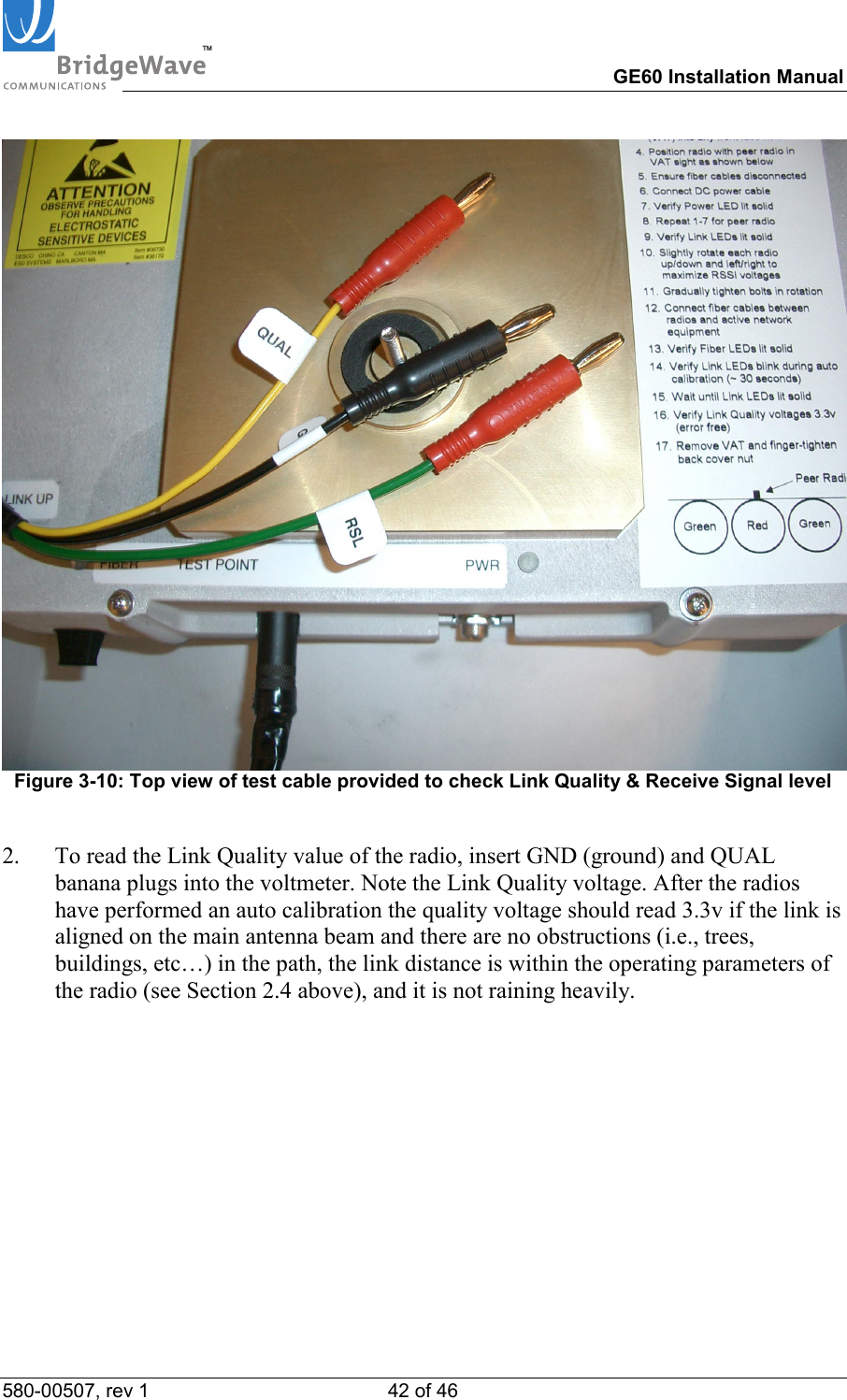
TM        GE60 Installation Manual 580-00507, rev 1 41 of 46   Auto Calibration States  State Description Unit powered up no fiber connected Unit will be in alignment mode, there will be no automatic calibration event started until the fiber is connected Unit powered up and fiber cable connected The radio will perform a single calibration scan and will then go into normal operation mode, regardless of the results of the scan. (Link up or down status has no influence on the scan) Normal operation mode Disconnecting and reconnecting the fiber cables will not cause a recalibration. A recalibration will only happen if the link is down for more then 50 seconds. Forced Recalibration  Power cycling the radio will start the auto calibration routine if the fiber cables are connected. If the fiber cables are disconnected the radio will go back into alignment mode. 3.9   Test Cable  The alignment procedure is optimized through the use of the provided test cable.  This test cable is designed for use with a digital voltmeter (not provided) to read the Link Quality and Receive Signal Level (RSL) voltage generated by the radio’s receiver.   1.  To read the RSL value of the radio, insert GND (ground) and RSL banana plugs into the voltmeter. Note the RSL voltage. The voltage may be fluctuating; in this case, note the maximum value seen.
TM        GE60 Installation Manual 580-00507, rev 1 42 of 46    Figure 3-10: Top view of test cable provided to check Link Quality & Receive Signal level  2.  To read the Link Quality value of the radio, insert GND (ground) and QUAL banana plugs into the voltmeter. Note the Link Quality voltage. After the radios have performed an auto calibration the quality voltage should read 3.3v if the link is aligned on the main antenna beam and there are no obstructions (i.e., trees, buildings, etc…) in the path, the link distance is within the operating parameters of the radio (see Section 2.4 above), and it is not raining heavily.
TM        GE60 Installation Manual 580-00507, rev 1 43 of 46   4  Operation of E60, E60X radios & configuration of network equipment  The E60 product line has been designed such that it requires no user configuration.  During normal operation, the following conditions should exist at the radio: 1  The power LED should be lit—solid green; 2  The fiber LED should be lit—solid green;  3  The Link Up LED should be lit—solid green; and 4  The Link Quality BER voltage should be 3.3v, although dips in voltage are acceptable during periods of precipitation.  Figure 4-1:  Link Up, Fiber and Pwr (Power) LED’s indicating link is up and operating    The E60(X) radios them self do not require periodic maintenance.  However, each end of the link should be periodically inspected for visible damage or excessive accumulation of dirt on the antenna’s radome (the front cover of the radio).
TM        GE60 Installation Manual 580-00507, rev 1 44 of 46   4.1  Configuring Network Equipment  The networking equipment that is connected to an E60 product should first be checked to ensure it operates properly over a wired connection.  Once this has been confirmed this will save troubleshooting steps after the radio is installed and connected to the network equipment.  We strongly recommend the network equipment on both sides of the link be configured as follows:  - 1000Mbps full-duplex  -  No port auto negotiation and no flow control  -  Port configured not to enter error-disable state due to link up/down transitions (since these may occur during periods of heavy rain)  4.2  Check port statistics on the network equipment  In the event the network equipment connected to the GE60 offers the capability below, we recommend you verify the following on the network equipment:  - Link integrity  -  There are no receive errors on the link  -  Network traffic is flowing in both directions.
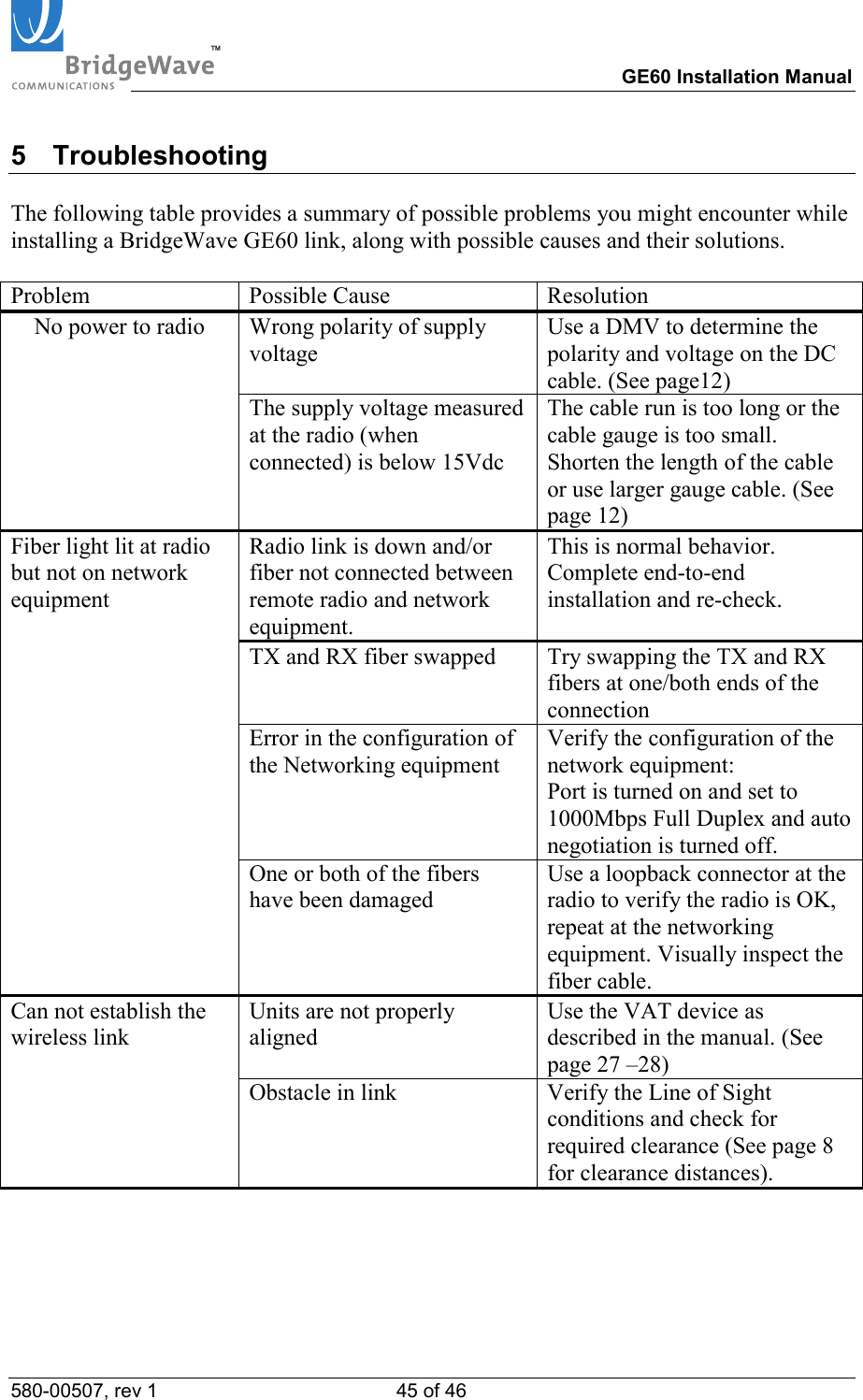
TM        GE60 Installation Manual 580-00507, rev 1 45 of 46   5 Troubleshooting  The following table provides a summary of possible problems you might encounter while installing a BridgeWave GE60 link, along with possible causes and their solutions.  Problem Possible Cause Resolution Wrong polarity of supply voltage Use a DMV to determine the polarity and voltage on the DC cable. (See page12) No power to radio The supply voltage measured at the radio (when connected) is below 15Vdc The cable run is too long or the cable gauge is too small. Shorten the length of the cable or use larger gauge cable. (See  page 12) Radio link is down and/or fiber not connected between remote radio and network equipment. This is normal behavior. Complete end-to-end installation and re-check. TX and RX fiber swapped  Try swapping the TX and RX fibers at one/both ends of the connection Error in the configuration of the Networking equipment Verify the configuration of the network equipment: Port is turned on and set to 1000Mbps Full Duplex and auto negotiation is turned off. Fiber light lit at radio but not on network equipment  One or both of the fibers have been damaged Use a loopback connector at the radio to verify the radio is OK, repeat at the networking equipment. Visually inspect the fiber cable. Units are not properly aligned Use the VAT device as described in the manual. (See page 27 –28)  Can not establish the wireless link Obstacle in link  Verify the Line of Sight conditions and check for required clearance (See page 8 for clearance distances).
TM        GE60 Installation Manual 580-00507, rev 1 46 of 46    Incorrect calculation of link distance Verify that the calculation tool used and the GPS used both use the same annotation system (degree hours minutes seconds or degree with a decimal value) Antennas aligned on side lobes Use Visual Alignment Tool to verify direction of antennas. Antennas set to different polarizations Verify that both radios are set to the same polarization. (see page 22) Installed two high or low band radios in one link Verify that one end of the link is high and the other end is a low band radio (see page 22) RSL voltage lower then expected Link exceeds maximum specified range Verify that maximum path length has not been exceeded Fibers are not connected  Connect fiber and let radio perform it’s auto calibration routine (see page 29) Antennas are not aligned for maximum RSL Use the Visual Alignment Tool to verify antenna alignment. Auto calibration not completed Power cycle units to force  auto calibration cycles. (see page 29) Low link quality voltage Interference  Check for possible interference by turning off the radio at the other end of the link and verify the RSL voltage on the local site drops below 0.2V

Navigation menu